Modern enterprise software ecosystems now bundle specialized neural architectures to automate multi-stage media workflows. Contemporary AI video creation capabilities cover text-to-video generation, image-to-video rendering, script-based post-production editing, voice synthesis, conversational assistant orchestration, and automated multi-platform distribution. That is a wide surface area. It is also, for a regulated institution, a wide control surface.
Executive Summary for Risk, Finance, and Communications Leaders
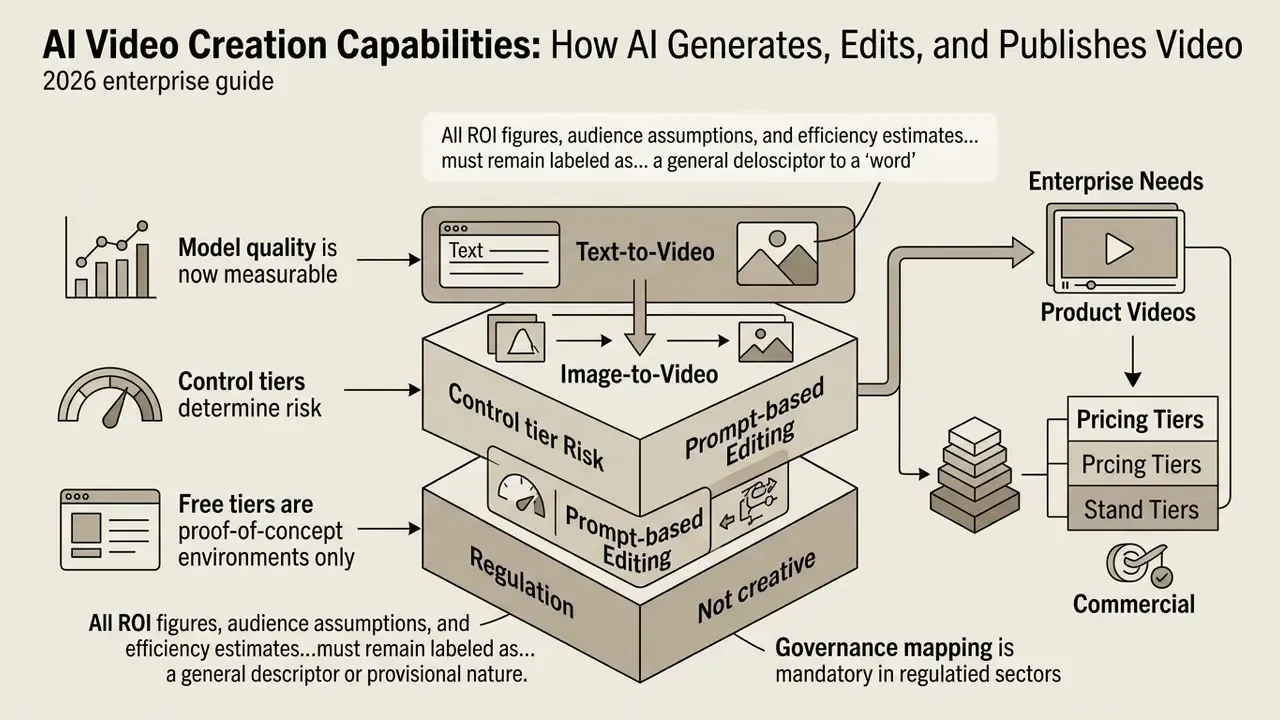
Who This Guide Is For and How to Read It
This guide is written for the person who has to sign something. A Chief Risk Officer approving a marketing pilot. A Head of Model Risk deciding whether a text-to-video model belongs in the inventory. A Finance Transformation lead asking whether an automated video creator actually reduces cost, or simply moves cost from a production studio into a compliance review queue.
The order of sections follows the sequence those buyers usually work through. First, what the capability set actually includes. Then the split between an AI video generator and a video editor. Then product and corporate video pipelines, prompt-to-publish workflow, tool selection by control level, pricing and commercial rights, operational and legal boundaries, and finally a model risk validation checklist with a risk-adjusted ROI formula.
Two reading notes. Where a claim rests only on vendor documentation, the text says so. Where a benchmark or statute supports it, the source and year are named. If you are evaluating procurement, sections on pricing, rights, and validation carry the most contractual weight. If you are evaluating creative fit, start with generation modes and control tiers.
What AI Video Creation Capabilities Include
AI video creation capabilities represent an integrated stack of computer vision and natural language processing models that turn unstructured inputs into rendered video assets. These systems automate initial storyboarding, asset synthesis, motion control, audio alignment, and final publishing. Baseline definitions and pricing models for AI video generators provide the vocabulary you need before a procurement conversation starts.
"Current systems reach a VBench score of 91.2, outperforming closed commercial models on temporal consistency and physical plausibility."
Official guidance and vendor documentation converge on a three-stage structure: generation, AI-assisted editing, and publication or redistribution. United Nations SOP 2026.02 states that AI-assisted editing is permitted for technical enhancement, while AI-generated audiovisual outputs must be disclosed and clearly labeled. Saudi Arabia's "AI Principles in Media" framework extends coverage to production, editing, publication, and redistribution, defining responsible use across the entire media lifecycle rather than at the generation step alone.
That lifecycle framing matters more than it first appears. A control applied only at generation misses the moment when a clip is re-cut, re-captioned, and re-published on a second channel with different disclosure rules.
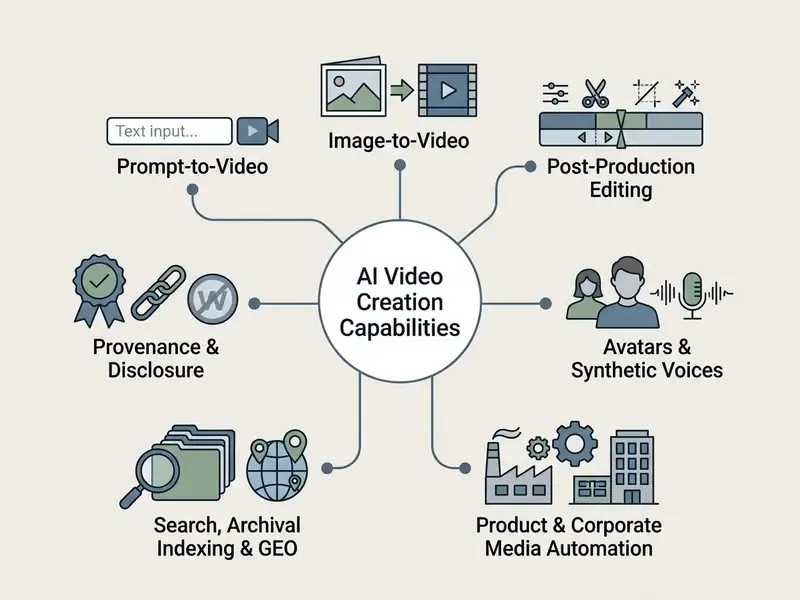
Text equivalent of the diagram, for accessibility and indexing: prompt-to-video generates new footage from a written brief; image-to-video animates a static reference frame; post-production editing changes existing footage through natural language; avatars and synthetic voices deliver scripted presentation without a studio; product and corporate media automation converts listings and policy documents into scenes; search and archival indexing makes existing libraries retrievable; provenance and disclosure attach machine-readable and visible labels before release.
Can an AI Assistant Create a Video Based on User Requests?
Yes. An AI assistant can generate, modify, and export complete video sequences directly from natural language requests. Modern conversational systems interpret multi-modal prompts, select the underlying neural model, and render clips asynchronously through API endpoints.
When enterprise operators ask whether an AI assistant can create video assets without manual timeline editing, current technical documentation confirms the capability under defined constraints. Dedicated systems parse prompts describing camera framing, subject movement, lighting, and audio parameters, then output rendered MP4 files. Google's Veo prompt guidance documents that users describe scenes, actions, camera movement, style, and audio requirements in text, and can supply reference images to steer generation. Asynchronous architectures, such as HeyGen's Video Agent, which returns a session_id and then a retrievable video_id, confirm that generation, retrieval, and export operate as separate API events rather than one synchronous call.
So can AI assistants make videos that survive external review? Sometimes. The capability is real; the governance question is who signs off before publication. Enterprise deployment requires visible human-in-the-loop oversight to validate outputs, and that reviewer must be named, not implied.
Conversational agent integration (GPT-to-video workflows).
Modern production pipelines extend past standalone web interfaces by embedding native plugins directly into conversational LLM environments, for example ChatGPT Plus plugins and custom GPT instances. In this hybrid workflow, the operator prompts the conversational AI for a structured script, scene breakdown, and metadata. The integrated video plugin converts those script nodes into timeline scenes, populates visual assets through background API requests, and returns an editable project URL inside the chat window. Manual copy-paste from a text tool into a rendering engine disappears.
Practical constraints apply, and they are contractual rather than technical. Plugin-based generation usually requires a paid conversational tier, and the plugin inherits the data-handling posture of both the chat provider and the video vendor. For a regulated institution, that dual-vendor data path must be documented in the vendor risk register before any internal script containing non-public information is typed into the chat window. Where neither party offers a Zero Data Retention (ZDR) commitment, restrict AI chatbot video creation capabilities to non-confidential, public-facing marketing concepts. No exceptions for "just testing."
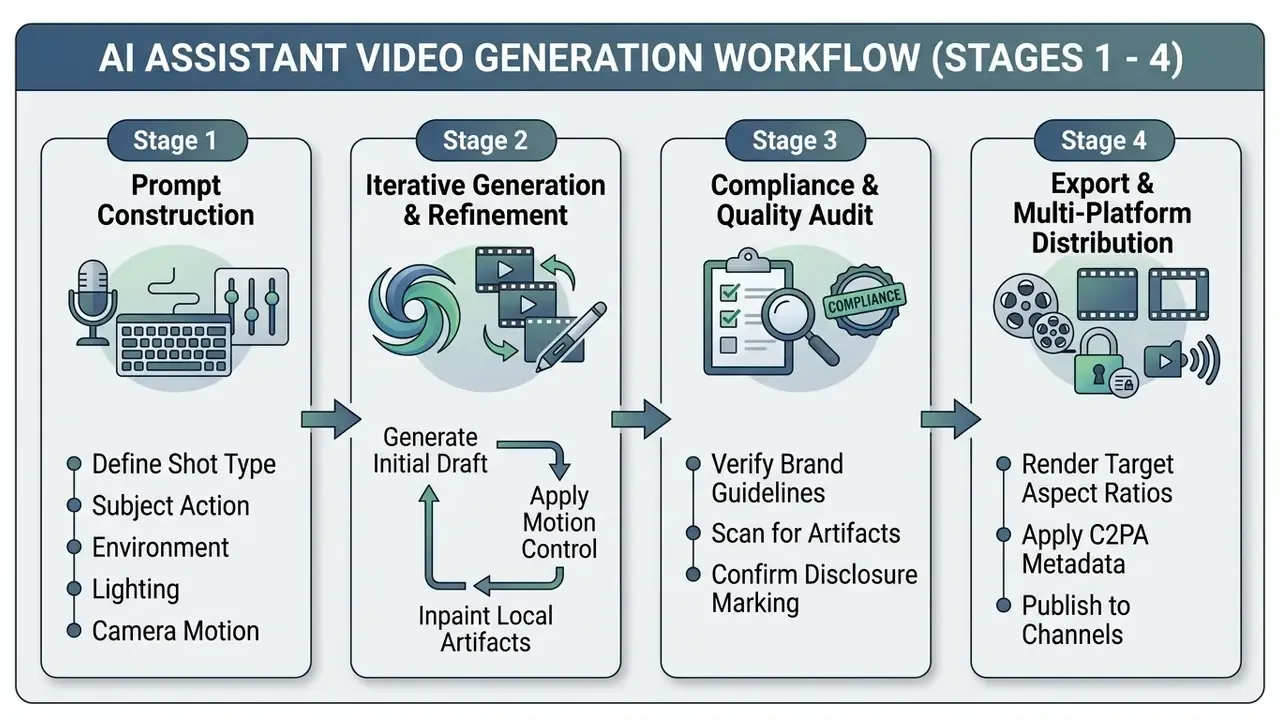
Prompt-first refinement is the documented operating pattern: write an initial prompt, generate variants, evaluate outputs, then remix or refine the selected version. This iteration loop is exactly where human accountability is exercised, so it belongs in the audit trail rather than in someone's browser history.
What Source Materials Can Be Used to Start AI Video Creation?
AI video creation tools accept diverse input modalities: text descriptions, single static images, multi-frame image sequences, raw video clips, structured product descriptions, and documents. Your choice of source material largely decides how much visual consistency and temporal control you get.
- Text prompts. Best for original concept generation and storyboarding where strict visual identity is not required. OpenAI's video API documentation shows generation initiated by a
POST /videosrequest with a text prompt describing subjects, camera, lighting, and motion. - Static images and references. Required for brand consistency, since tools can hold subject features using first-and-last-frame conditioning. Seedance 2.5 documentation exposes both a first-frame reference image and a last-frame reference image for image-to-video, with the last-frame input requiring a first-frame image as well.
- Existing video clips. Used for video-to-video style transfer, relighting, and object replacement while preserving underlying motion paths. Runway documents inputs up to 30 seconds and under 4096 pixels per side on its professional generation tiers.
- Documents, slide decks, and PDFs. Document-to-video pipelines extract structure from PDFs, presentations, and policy documents, draft scenes automatically, then allow scene rearrangement, visual swapping, text adjustment, and voiceover regeneration before export. This is the dominant path for internal compliance and training material.
- Product descriptions and listing data. Used by automated e-commerce pipelines to extract technical specifications and construct promotional scripts.
Documented modality support can differ between product surfaces, which trips up more than one procurement team. Google's Gemini API documentation lists text and image inputs, while the AI Studio interface lists text, image, and video. The difference reflects product-surface scope rather than a gap in the underlying model. Verify modality support against the specific API endpoint you intend to license, not the marketing page.
Core Functions of AI Video Generators and Video Editors
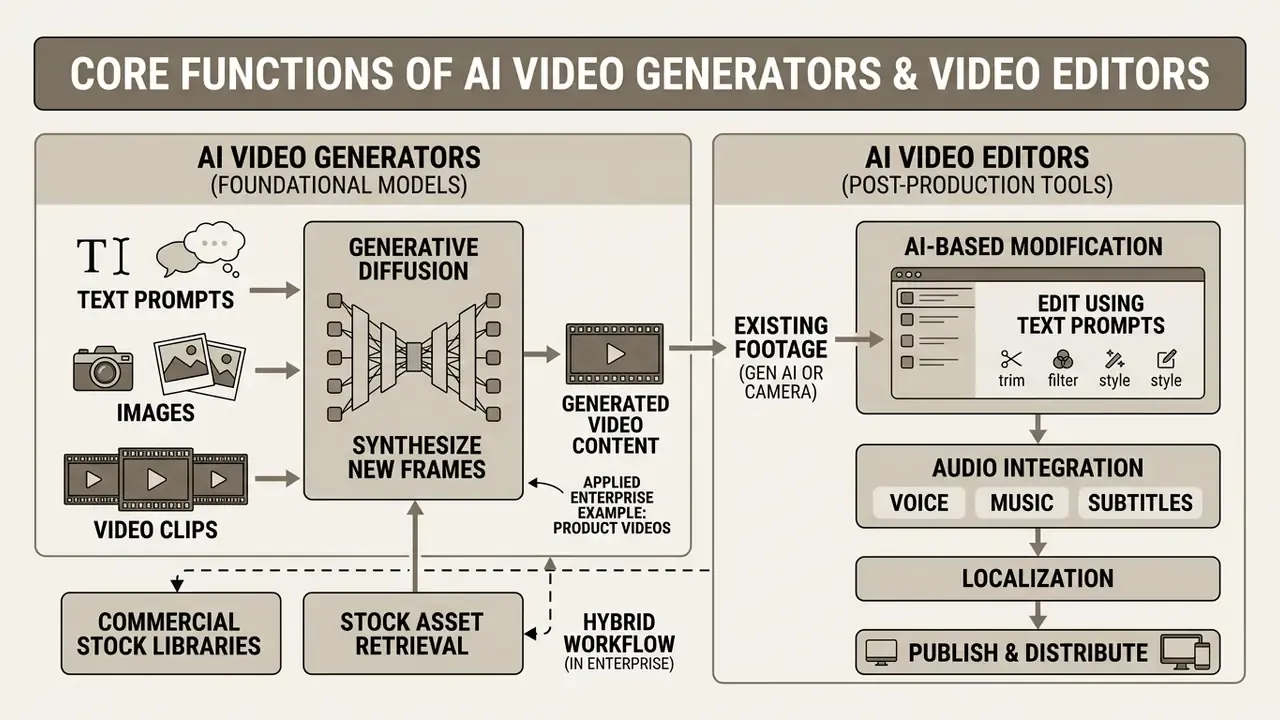
AI video tools split functionally into foundational video generators, which synthesize new frames from prompts, and AI video editors, which modify existing footage through transcript manipulation, object masking, or lighting adjustment. That distinction drives risk-adjusted software procurement more than any feature list.
The split is functional, not absolute. Several products do both. Generators center on producing a new draft from inputs; editors center on post-production changes to existing material, for example script-based editors that let an operator change footage by editing the transcript. Detailed feature comparisons and workflow fit are covered in our guide to video editing tools.
Generating Video from Text, Images, and Video Clips
Text-to-video and image-to-video models synthesize frames by predicting temporal motion vectors across latent diffusion representations. These architectures process text prompts or image references to build multi-second clips with plausible motion dynamics.
Recent benchmarks show that advanced 14-billion parameter models can produce 720p and 1080p clips with strong temporal consistency and physical plausibility.
"Alice v1 raises the teacher score from 84.0 to 91.2 on VBench, ahead of Veo3 (about 90) and Sora2 (about 88), generating a five-second clip in roughly eight seconds."
Image-to-video workflows use reference images as visual anchors, which reduces spatial hallucination during sequence generation.
"AIGCBench evaluates image-to-video models across 11 metrics in four dimensions: alignment with the control video, motion effects, temporal consistency, and video quality."
Editing AI-Generated Videos Using Text Prompts
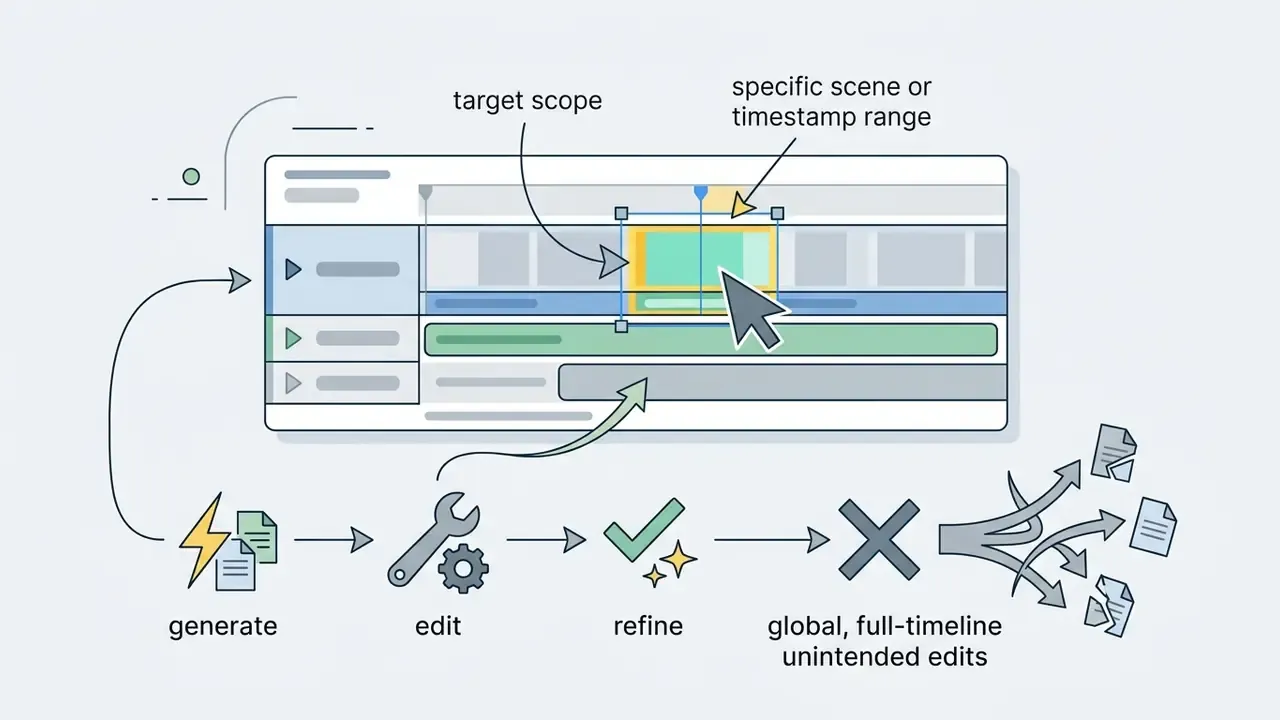
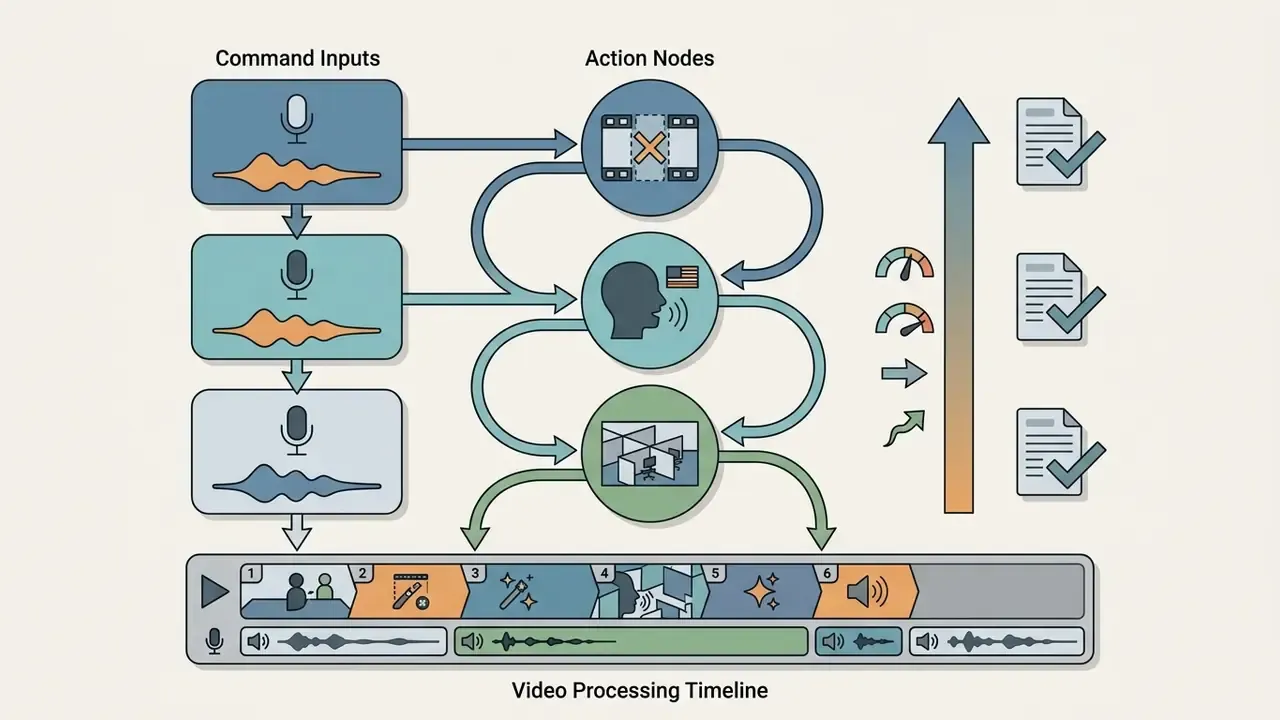
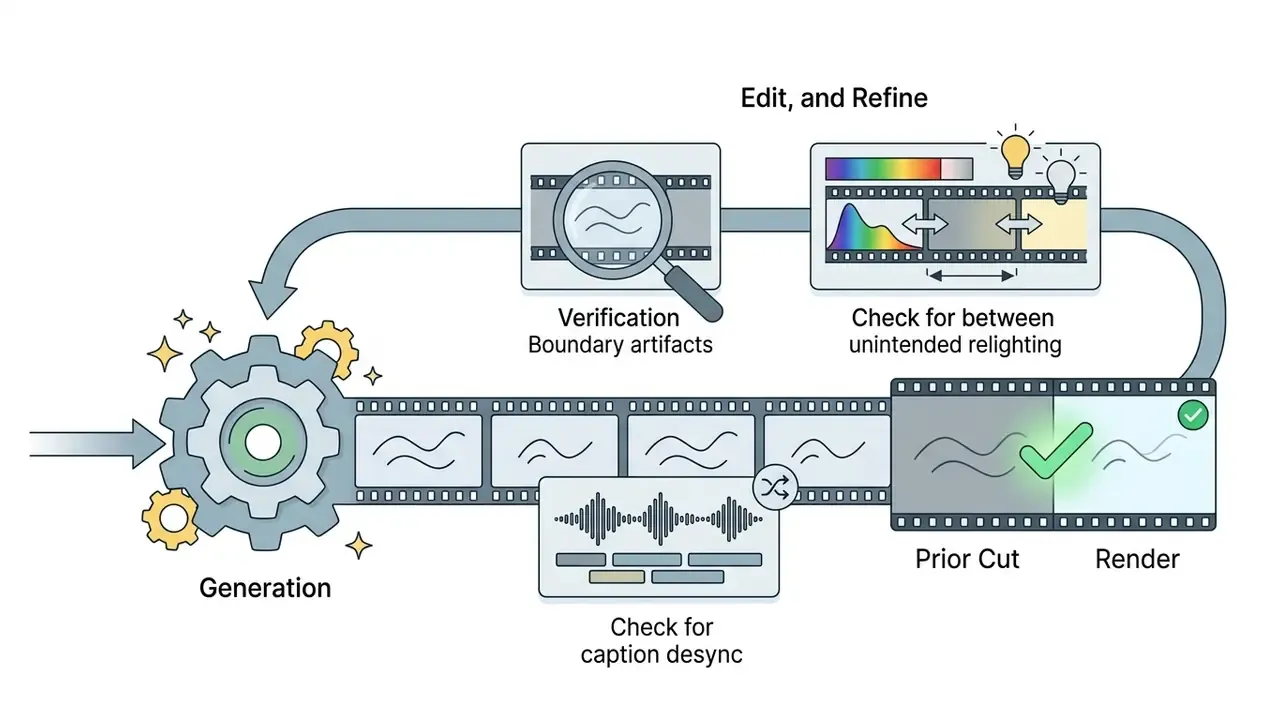
Prompt-based video editing lets an operator modify rendered or real footage by typing instructions instead of dragging timeline layers. Current video editing models support localized object replacement, background swapping, relighting, frame extension, and motion-preserving in-context edits on real footage.
Architectures using decoupled cross-attention can isolate foreground subjects to swap backgrounds or adjust lighting without destroying original camera motion.
"MoonShot uses a decoupled multimodal cross-attention mechanism that conditions generation on both an image and text at once, with no additional fine-tuning."
Research pipelines separate edit classes explicitly. AnyV2V targets localized edits while preserving background and motion, using a reference subject image plus text guidance for object replacement. AnyPortal frames background replacement as three stages: background generation, light harmonization, and consistency enhancement, driven by a foreground video plus prompt. RelightVid adds temporally consistent relighting, accepting a background video, text prompt, or environment map as the lighting condition.
Applied enterprise example. A global compliance and anti-money-laundering training team used automated text-guided relighting and text masking to standardize legacy training footage recorded across regional hubs under inconsistent lighting and signage conditions. The stated internal outcome was a 64% reduction in manual video editing hours while maintaining strict data lineage protocols. Treat that figure as a hypothesis until you reproduce it against your own baseline editing timesheets. No independent audit of the methodology or sample size is available, and the sample was a single organization.
The masking capability is the governance-relevant part of that example, not the hours saved. Text-driven masking removes visible customer identifiers, internal system screens, or branch signage from archived footage before republication, which cuts PII exposure in reused media assets. For teams repackaging long recordings into short-form assets, the same masking pass should run before an ai clip generator slices the footage, because clipping tools inherit whatever the source frame contains.
Voice, Music, Subtitles, and Video Localization
Complete AI video production needs multi-track audio integration: realistic voice cloning, automated background music, and time-aligned subtitle translation. Integrated platforms align synthetic audio directly with visual scene markers, and buyer-side evaluation criteria for voice quality, language coverage, and licensing are detailed in our guide to AI voice generators.
Zero-shot voice cloning synthesizes natural-sounding speech from short reference audio, while machine translation systems apply speech-aware length control so translated audio matches video timing.
"VideoDubber implements phonetics-aware speech length control, keeping translated audio synchronized with the original video track across language changes."
Peer-reviewed dubbing systems describe the localization chain as ASR transcription, translation, text-to-speech, lip-sync, and optional custom voice cloning. OpenVoice documents instant voice cloning from a short audio clip with multilingual speech generation, and commercial subtitle translators advertise coverage above 150 languages with SRT and VTT export. Enterprise platforms commonly offer automatic translation into up to 50 languages as a flat-rate archive service rather than per-video billing.
Two controls belong in the voice workflow, and neither is optional. First, voice cloning requires documented consent from the speaker whose voice is reproduced, because impersonation exposure sits squarely inside FTC Section 5 deceptive-practices risk. Second, translation drift in regulated language, meaning disclaimers, rate disclosures, and warranty terms, must be reviewed by a native-language compliance reviewer. Speech-aware length control optimizes for timing fit. It does not optimize for legal precision.
Creators and teams who want comprehensive terminology for synthetic audio and video processing can review the AI Media Glossary.
| Capability Category | Primary Source Input | Output Artifact | Key Operational Risk | Target Enterprise Use Case |
|---|---|---|---|---|
| Text-to-Video (T2V) | Natural language text prompt | 5 to 15 second MP4 clip | Temporal drift and hallucination | Rapid concept storyboarding |
| Image-to-Video (I2V) | Static image plus text prompt | Animated video clip | Loss of reference fidelity | Product photo animation |
| AI Video Editing | Existing video plus edit prompt | Modified video footage | Artifacts on object boundaries | Compliance masking and relighting |
| Synthetic Avatars and Voice | Text script plus voice profile | Talking-head presenter video | Non-consensual voice cloning; biometric data exposure | Corporate training and onboarding |
| Subtitles and Dubbing | Audio track plus target language | Localized video plus SRT subtitles | Translation drift in legal terms | Global compliance video distribution |
| Document-to-Video | PDF, slide deck, policy doc | Scene-based explainer video | Hallucinated or omitted disclosures | Internal policy rollout |
| Archive Search and Indexing | Existing video library | Transcripts, metadata, chapters | Incorrect tagging of sensitive footage | Knowledge retrieval and GEO |
Read the table as a routing tool rather than a ranking. Each row pairs an input type with the failure mode most likely to appear in review, which is usually a faster way to assign a reviewer than debating model quality. Deeper walkthroughs of the two dominant generation modes are available in our guides to text-to-video AI tools and image-to-video AI tools, including pricing and usage-rights breakdowns for each category.
Hybrid Workflows: Combining Generative AI with Commercial Stock Libraries
Pure text-to-video diffusion offers complete visual novelty. Enterprise scale, though, often demands a hybrid approach to manage compute cost and latency. Integrated platforms connect neural rendering engines directly with indexed commercial stock repositories holding over 15 million royalty-free clips and B-roll assets.
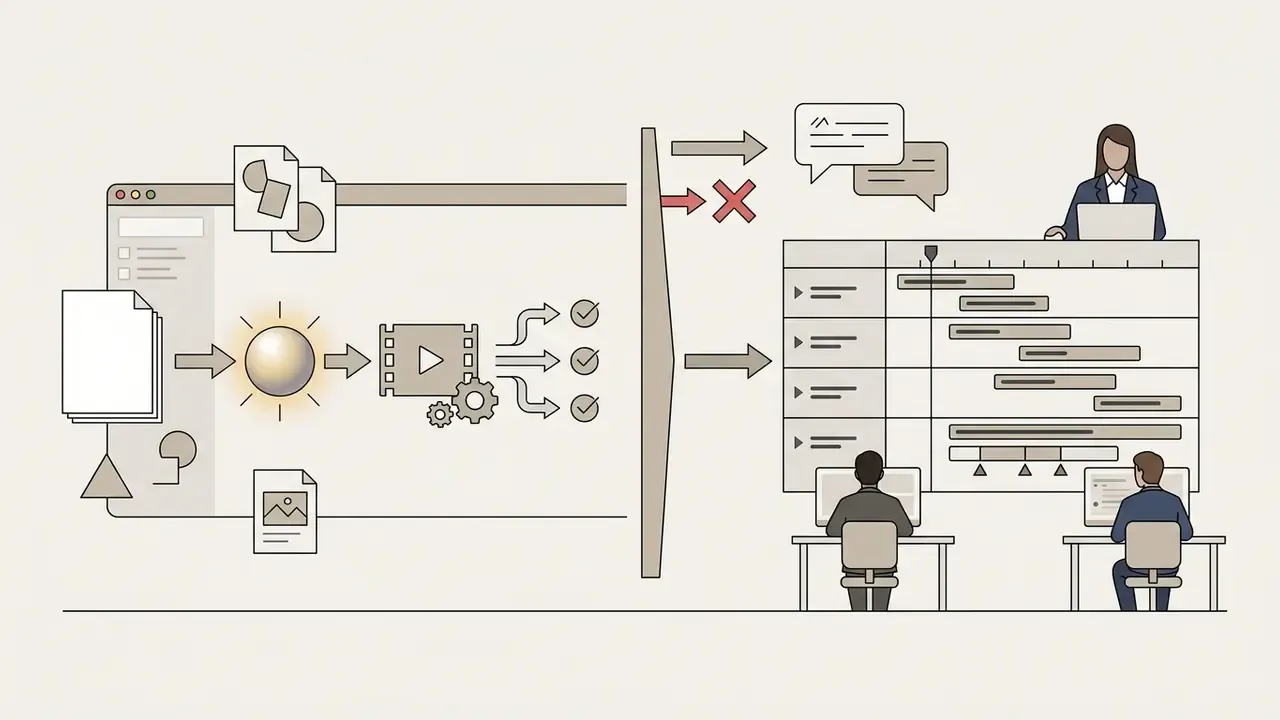
In a hybrid pipeline the AI script engine parses production text and assigns generation modes dynamically:
- Generative diffusion. Reserved for unique hero products, custom brand elements, or abstract concepts that cannot be captured physically.
- Stock asset retrieval. Queried automatically through vector embeddings for contextual background B-roll: cityscapes, office environments, general human interaction.
By interleaving synthetic clips with pre-rendered commercial stock media, organizations report reducing compute rendering credits by up to 40% while keeping high visual variance across multi-scene marketing assets. That estimate is workload-dependent, and it should be validated against your own credit-consumption logs before anyone puts it in a budget model. Seasonal campaign work behaves differently again, since a themed asset run built with something like an ai christmas photo generator tends to spike generation volume in a narrow window rather than spread it across the quarter.
Hybrid workflows also change the licensing question, which is where the real exposure sits. Generated frames may fall outside copyright protection, while stock clips arrive with an explicit vendor license and, on enterprise tiers, indemnification. Mixed-source timelines therefore need a per-asset provenance record, so legal review can tell which segments carry contractual protection and which do not. Automated pipelines that silently substitute stock footage for failed generations without logging the substitution create precisely the audit gap that model risk validation exists to close.
Creating AI Product, Corporate, and Financial Communication Videos
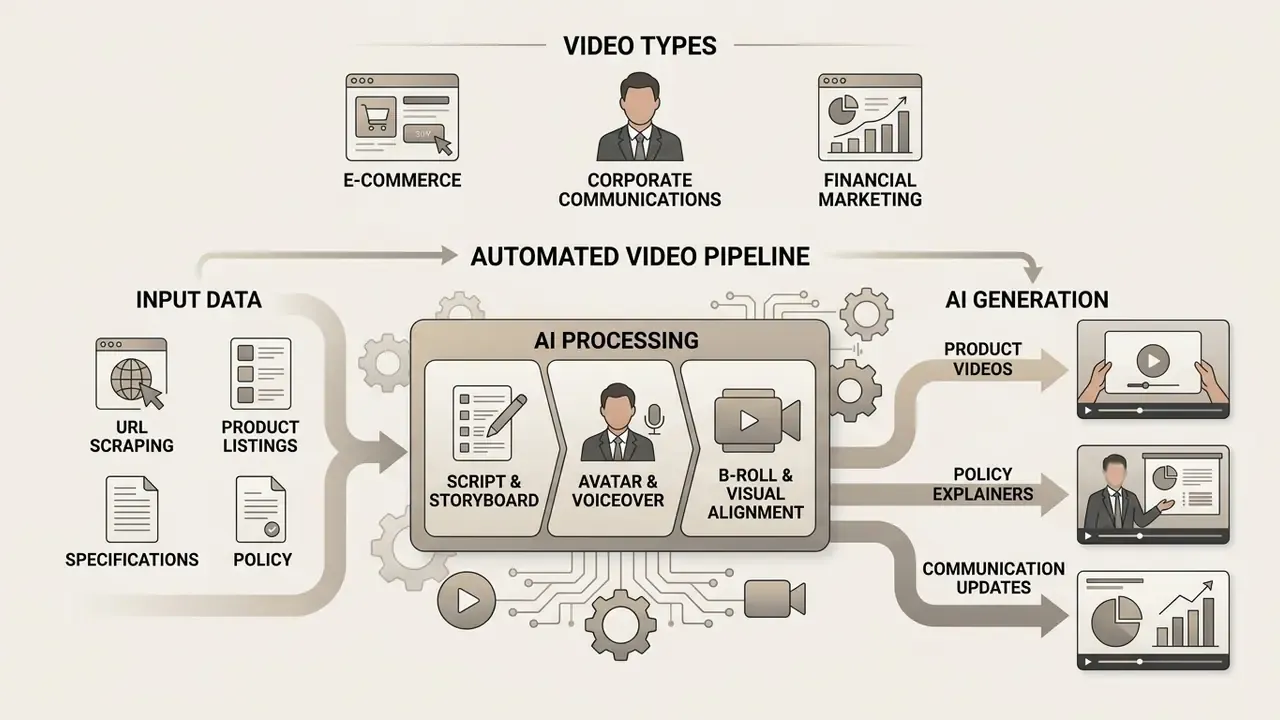
E-commerce, corporate communications, and financial marketing teams use specialized AI tools to generate video directly from inventory listings, technical specifications, policy documents, and static photography. The same pipeline that renders a product demo renders a compliance explainer. Only the review threshold changes.
How to Turn Product Descriptions into Product Videos
Automated product video creation starts by ingesting written product details, extracting key features with a text LLM, and generating a structured scene-by-scene production script.
Vendor-documented workflows confirm the pattern rather than prove the quality. Platforms that convert PDFs and listings into storyboard videos with captions, visuals, voiceover, and design elements describe a deterministic ingest, draft, approve, render sequence. Independent benchmarking is still required before you treat their output-quality claims as verified.
"Multi-agent frameworks such as Mora reach a VBench video quality score of 0.800, marginally ahead of Sora (0.797) when generating from text descriptions."
E-commerce URL-to-video automated pipeline:
- URL scraping and data extraction. The operator inputs a live product page URL, for example a Shopify or Amazon listing. The system scrapes product titles, bulleted specifications, price, high-resolution photography, and customer review sentiment.
- Script and storyboard structuring. An LLM processes the scraped structured data into a 15-second visual storyboard, highlighting value propositions and building a call to action.
- Avatar and voiceover assignment. The engine selects a digital presenter matched to the target demographic, generating localized voiceovers in over 50 languages with matching accents.
- Automated B-roll and visual alignment. Static product images are isolated through background removal, placed into 3D environments, and animated alongside dynamic synthetic captions.
Two control points must be inserted into that pipeline before external publication. Scraped price and specification data must be re-validated against the system of record, because a stale scrape produces a factually incorrect advertisement. Scraped review sentiment must not be rendered as an endorsement claim without substantiation, since synthetic testimonial content sits inside FTC endorsement-guide exposure.
Corporate and financial adaptations of the same pipeline:
- Policy rollout explainers. Ingest the approved internal policy PDF, render scene-based summaries, and route through compliance sign-off before intranet distribution.
- Wealth management and product explainers. Render standardized disclosure language as locked, non-generated text overlays so the model cannot paraphrase regulated wording.
- Board and investor reporting visualizations. Convert approved reporting decks into narrated walkthroughs, with figures inserted as static assets rather than model-generated text.
- Mobile banking how-to instructions. Record real UI capture, then use AI editing only for masking, captioning, and localization. Never for synthesizing interface screens.
- Regulatory training with sourced references. Where a training video cites a rule, statute, or internal standard, generate the reference list separately with an ai citation generator and verify each entry against the primary document before it appears on screen.
To analyze the financial modeling behind asset automation, risk leaders use AI Media Calculators to estimate return on investment adjusted for human review cost.
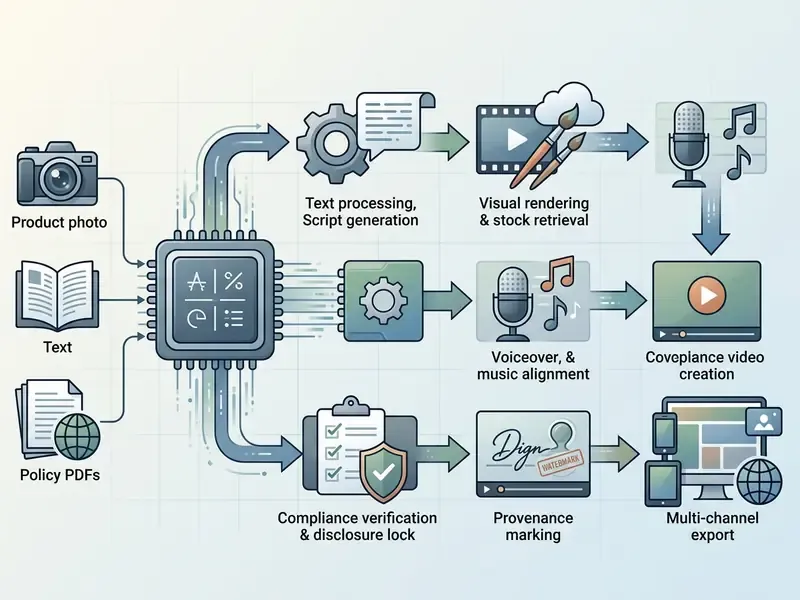
Numbered text equivalent of the flowchart: ingest source material, generate the script, render visuals and retrieve stock, align voice and music, run compliance verification with disclosure locking, apply provenance marking, then export per channel. Steps five and six are the two most often skipped when a business unit runs the tool without governance involvement.
Product Photos, AI Visuals, and Product Demonstrations
Holding a physical product visually consistent across AI-generated scenes requires explicit reference conditioning. Without it, logos morph and dimensions drift.
Advanced image-to-video platforms accept first-frame and last-frame references, anchoring product geometry through the rendered sequence. Seedance 2.5 documentation exposes both inputs directly, with the last-frame reference dependent on a supplied first frame. That is vendor documentation, not independent measurement, so verify the consistency claim against benchmark evidence.
"Multi-reference systems are scored on reference consistency and audiovisual coherence across 350 curated samples in the MultiRef-Compass benchmark."
Peer-reviewed comparison adds useful nuance to the technique choice. VideoStudio (ECCV 2024) reports that explicit foreground and background reference-image guidance produces higher foreground and background similarity scores than IP-Adapter conditioning or no reference images at all. IP-Adapter still earns its place, since it encodes a product photo into a visual embedding that steers shape, color, and appearance. But temporal anchoring through first and last frames addresses a different failure mode: drift across the sequence rather than deviation from the source appearance. Dedicated visual conditioning is what stops a hallucination from quietly resizing your logo mid-playback.
For simple explanatory graphics inside a product video, a generated illustration or ai clipart asset is often the lower-risk choice, because a flat vector element carries none of the temporal drift problems that a rendered photorealistic product shot introduces.
Templates, Avatars, and Voiceovers for Marketing and Training Videos
"A randomized experiment with 74 students found equal knowledge gain from an AI avatar and a live instructor (p=0.78, Cohen's d=-0.064), although students preferred the human."
Equal learning, unequal preference. Worth remembering when the use case is persuasion rather than instruction.
How to Create Video with an AI Assistant: From Prompt to Publish
Deploying an AI assistant for video production needs a structured, multi-step execution model spanning prompt formulation, iterative refinement, quality control, and secure publishing. The workflow below is deliberately boring. Boring is auditable.
How to Structure Prompts for AI Video Creation
Effective video prompting follows a standard structural formula covering camera movement, subject description, environment context, lighting, and style parameters.
Leading model guidelines recommend a deterministic order: [Cinematography/Camera Move] + [Subject & Action] + [Environment Context] + [Lighting & Mood] + [Audio Requirements]. Adobe Firefly's guidance uses a parallel structure of shot type, character, action, location, aesthetic, and published prompt libraries add one explicit constraint: keep a single camera move and a single subject action per shot. Omit camera control and diffusion models tend to default to static, low-engagement framing.
"Prompt-A-Video shows that LLM adaptation of prompts to a specific diffusion model raises user preference in paired comparisons for Open-Sora 1.2 and CogVideoX."
Copy-paste enterprise prompt template:
[Cinematography]: Slow tracking medium shot, 35mm lens, smooth camera motion -> [Subject & Action]: A sleek modern smartwatch sitting on a wet dark granite surface, water droplets glistening on the metallic frame -> [Environment Context]: Minimalist dark studio setting with subtle blue neon ambient backlighting -> [Lighting & Mood]: High-contrast cinematic lighting, photorealistic reflection, 4k resolution -> [Audio]: Subdued ambient electronic synthesizer soundtrack.
Corporate training variant:
[Cinematography]: Static locked-off medium shot, eye-level framing -> [Subject & Action]: Professional presenter in business attire explaining a process directly to camera, minimal hand gesture -> [Environment Context]: Neutral office backdrop, shallow depth of field, no readable signage or screens -> [Lighting & Mood]: Soft even key light, low contrast, corporate neutral -> [Audio]: Clear narration only, no music bed.
Store prompt versions alongside the rendered output. Reproducing a generated asset depends on retaining the exact prompt, model version, seed where available, and reference inputs. That bundle is also the first evidence a validator will ask for.
Generate, Edit, and Refine Video in the App Interface
After the first render, operators use browser studio interfaces to upscale resolution, extend clip duration, and adjust individual scene elements. A modern AI video creation app interface allows canvas extension, 2x or 4x spatial upscaling, and isolated object replacement through inpainting masks. Replicate's enhancement collections document video upscaling alongside extension models that add 2 to 10 seconds from the final frame of a source clip.
When building code walkthroughs or developer tutorials, teams often drop snippets produced by an ai code generator into visual overlays. For screen-recorded software demonstrations, real UI capture remains the required source, with AI limited to masking and captioning. Synthesized interface screens in a customer-facing how-to are a factual accuracy problem waiting to be reported.

How to Choose AI Video Creation Tools Based on Control and Use Case
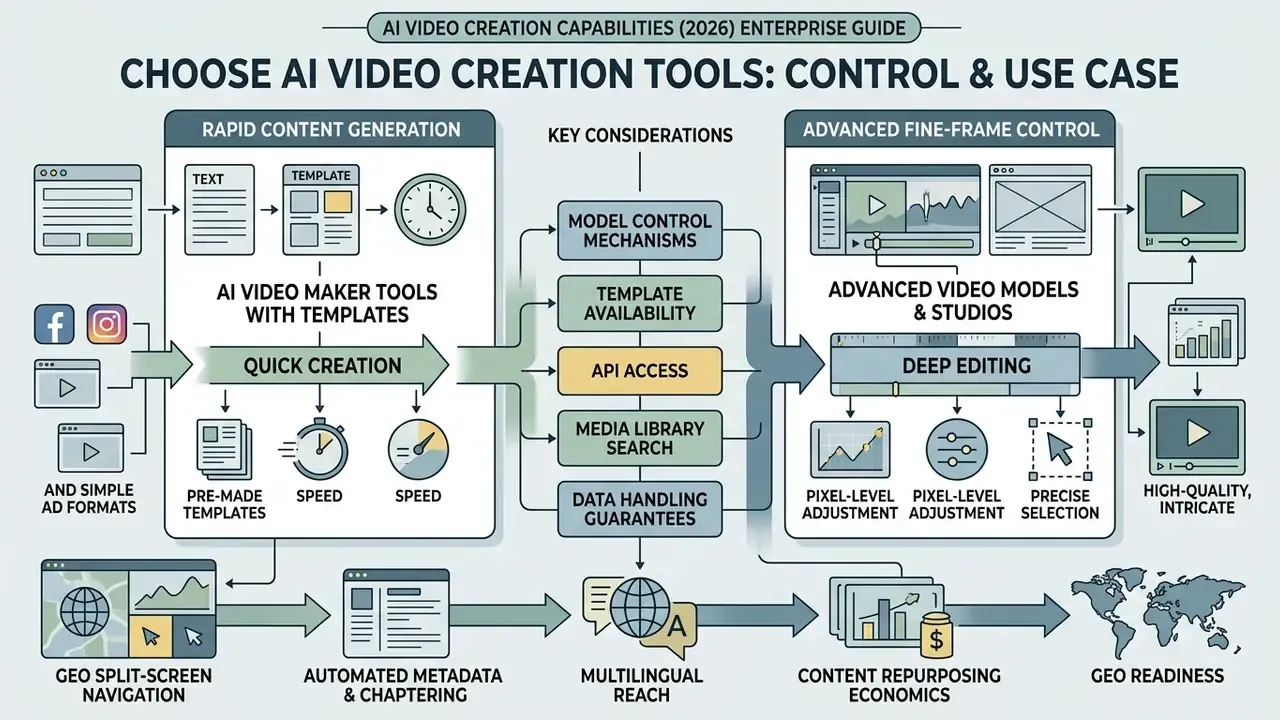
Selecting enterprise AI video software means evaluating model control mechanisms, template availability, API access, media library search, and data-handling guarantees against your organization's risk appetite. Comparative scoring of leading AI video generators gives you a starting shortlist by control, quality, and price.
Current tools separate into three control bands: low-control avatar and slideshow tools for non-specialists; mid-control browser editors for marketing teams; and high-control generative studios for operators able to manage shot-by-shot prompting. Runway's own prompting guidance limits many clips to 5 to 10 seconds with one action per prompt, which is high creative control bought at the price of higher prompt complexity and more iteration cycles.
Expert quote: "model control is the primary differentiator in enterprise video adoption. low-control avatar tools suit routine internal communications, but mission-critical marketing requires fine-grained control over camera vectors, keyframes, and motion physics." AI media governance desk editorial assessment
"Implement content filters to block inappropriate, harmful, false, illegal, or violent content, and use human moderation where appropriate." NIST AI 600-1, Generative AI Profile (2024). https://nvlpubs.nist.gov/nistpubs/ai/NIST.AI.600-1.pdf
AI Video Maker Tools with Templates for Rapid Content
Template-driven video makers prioritize ease of use and speed, letting non-technical staff produce branded communications without motion-graphics expertise. If your search is for an AI video maker with templates included, this is the band you are shopping in.
Template-first platforms advertise libraries in the thousands. Vendor pages cite figures from 5,000 to 7,000 or more templates, searchable by platform, industry, and content type, with drag-drop-replace editing and prompt-to-script generation for beginners. Short-form editors position free template packs with one-click customization for social output. These are vendor-stated capabilities and counts, not independently audited figures. Verify how many templates are actually usable under your brand guidelines rather than trusting the headline library size. In practice that number is far smaller. These tools fit internal communications, where low production friction outweighs the need for custom motion physics.
Template convenience should not be confused with reasoning capability:
"VGI-Bench shows that even the strongest model, Seedance 2.0, solves only 51% of visually grounded reasoning tasks across 810 test instances."
That measured 51% ceiling is the technical reason template-generated explainers cannot be trusted to depict procedural or regulatory sequences correctly without human verification of every step shown on screen.
Advanced Video Models and Studios for Fine Frame Control
Professional studios and foundational generative models offer explicit control over multi-axis camera movement, keyframe interpolation, and temporal motion speed.
Enterprise-grade systems provide dedicated camera controls including pan, tilt, zoom, and horizontal tracking, alongside multi-frame reference inputs for exact scene alignment. Runway's help documentation describes six directional camera controls plus a static-camera option, with motion types spanning horizontal, vertical, pan, tilt, zoom, and roll, and a general motion slider graded 1 to 10. Luma's documentation exposes camera motion through prompt language and a dedicated camera-motions endpoint, with composable "Camera Motion Concepts" learned from one or few examples. Kling's official guide lists six basic camera movements and four Master Shots, including combined moves such as move-left-and-zoom-in.
"FilmBench evaluates text-to-video models across 35 sub-metrics of cinematographic quality; the automatic FilmOps scorer reaches Spearman correlation of 0.95 with expert ratings."
Technical teams sizing developer infrastructure cost for these high-control models can consult our Google Veo AI Video Generator Implementation Guide.
AI That Can Access, Analyze, Search Video Libraries, and Drive GEO
Multimodal search architectures let AI assistants index, transcribe, tag, and retrieve specific moments across large enterprise repositories through natural language queries. This is the capability people mean when they ask for AI that can access videos rather than only generate them.
Platforms built on multimodal video search embeddings integrate visual, audio, and spoken transcript data, enabling semantic retrieval of a specific scene without manual metadata tagging. Documented capability sets include text queries, image queries, and composed queries, with explicit modality control over visual, audio, or transcription retrieval, plus indexing, any-to-video search, embeddings, and segment-level analysis as separate functions. Independent, peer-reviewed retrieval accuracy data for enterprise-scale libraries remains thin, so validate accuracy claims on your own corpus during the pilot.
Beyond internal archival search, automated transcript indexing powers Generative Engine Optimization (GEO) and AI-driven video searchability:
- Split-screen interactive navigation. Systems generate time-aligned, clickable transcripts beside playback, so users browse the transcript and jump to precise thematic timestamps.
- Automated metadata and chaptering. Engines parse spoken audio and visual transitions to generate structured JSON-LD schema (
VideoObject), chapter markers, keyword extraction, and descriptive titles. - Multilingual reach. Enterprise archive services translate transcripts into up to 50 languages and deliver them as subtitles, improving accessibility and expanding indexable text per asset.
- Content repurposing economics. Transcripts convert into articles, summaries, and short clips, extending the useful life of one recording. A single town hall becomes a multi-asset content set.
- GEO readiness. Converting video into machine-readable transcripts and metadata makes assets indexable by generative search engines such as Perplexity, Google's AI search surfaces, and conversational assistants, raising the chance that your video is cited directly in a conversational answer.
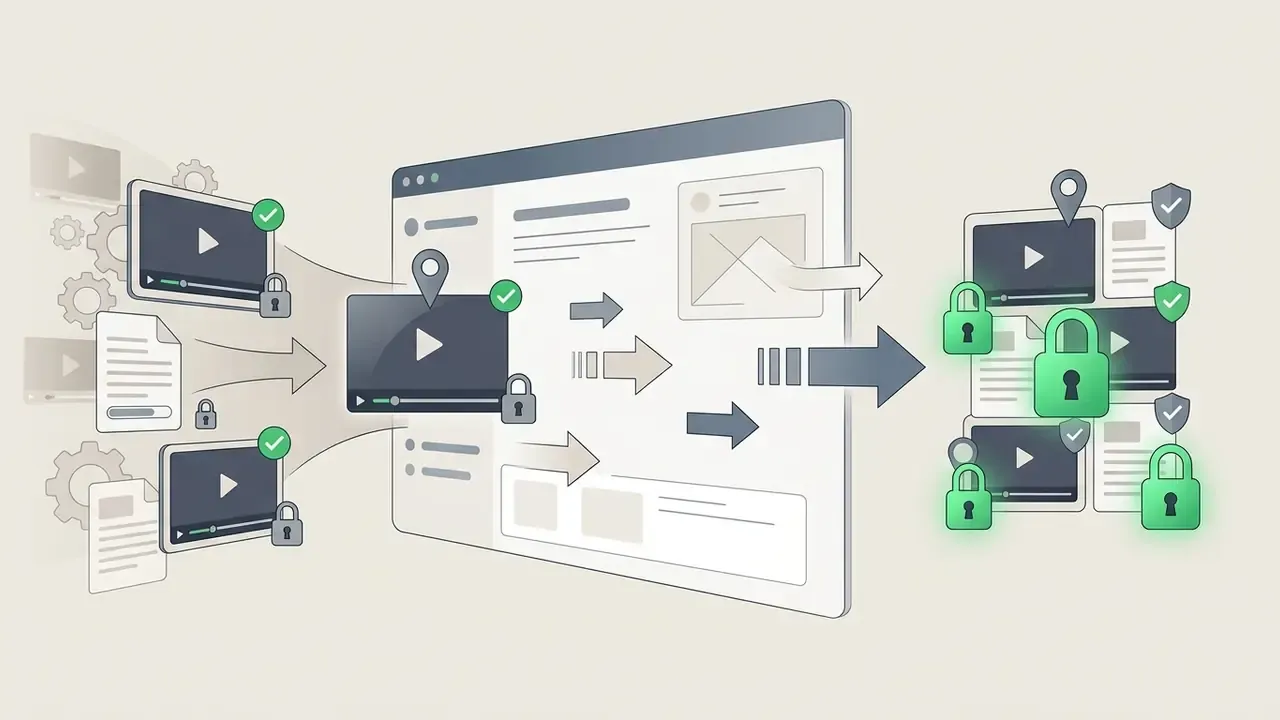
One governance caveat applies to archive indexing, and it is easy to underestimate. Automatic transcription of historic footage can surface previously obscure sensitive content, named customers, internal system references, unreleased financial figures, into a searchable index reachable by a far wider internal audience than the original video ever had. Apply role-based access controls to transcripts and metadata at the same sensitivity level as the source video, and run a sensitivity sweep before indexing legacy archives. Enterprise deployments that process content within a defined region under role-based access control, encryption, and secure handling reduce this exposure. They do not remove it. For developers building custom ingestion systems, the AI Media API guidance provides architectural patterns for scalable endpoint integration.
Pricing Tiers, Commercial Rights, and Usage Terms for AI Videos
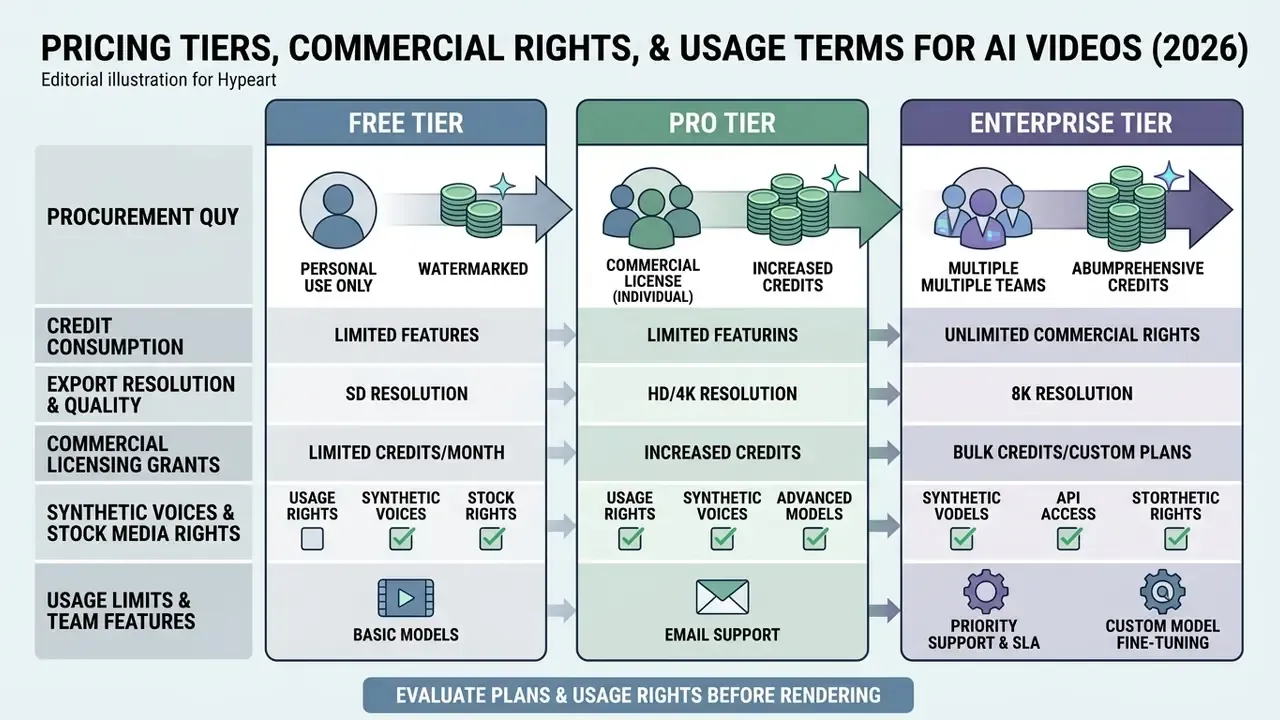
Enterprise procurement of AI video generation software demands close scrutiny of credit consumption structures, export resolutions, commercial licensing grants, stock media indemnification, and data-retention commitments. Entry-level constraints are documented in our guide to free AI video generators.
| Plan Tier | Typical Credit Allocation | Export Quality and Watermarking | Commercial Usage Rights | Enterprise Security and Audit Features |
|---|---|---|---|---|
| Free Tier | 30 to 125 one-time or monthly credits; some vendors cap at 3 videos or 5 to 10 minutes per month | 720p or lower maximum; mandatory visible watermark; export count caps; no batch export | Strictly non-commercial, personal evaluation only | None; public data processing; no retention guarantee |
| Paid Commercial Tier | 1,000 to 5,000 recurring monthly credits; entry pricing commonly $8 to $25 per month | 1080p or 4K; no watermark | Commercial license typically granted for generated outputs; some vendors restrict to higher tiers | Basic SSL; standard support ticketing; limited or no ZDR |
| Enterprise Tier | Custom volume or dedicated GPU capacity; API and team access | Uncompressed ProRes, 10-bit SDR, HDR; custom canvas size | Full commercial usage grant plus IP indemnification | Dedicated GRC integration, SSO, audit logs, kill-switch API, Zero Data Retention option, regional data residency, SOC 2 Type II attestation, role-based access control |
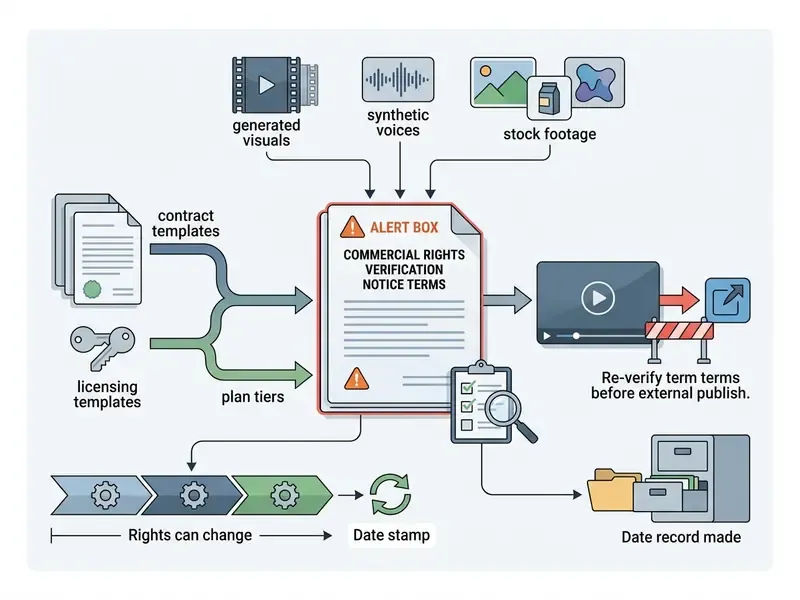
Prices and quotas move. Check the vendor's live pricing page and record the verification date in your procurement file rather than relying on any table, including this one.
Procurement questions that free and mid-tier pages rarely answer:
- Does the vendor train models on submitted prompts, footage, or biometric avatar data, and is opt-out contractual or merely a settings toggle?
- Is Zero Data Retention available on the API endpoint, and does it also cover logs and moderation review queues?
- Where is inference physically performed, and can processing be constrained to a required jurisdiction?
- Which attestations exist, SOC 2 Type II or ISO 27001, and are they current?
- Does IP indemnification cover generated frames, synthetic voices, and integrated stock media, or only stock media?
- What is the kill-switch procedure and notification SLA if a model version is deprecated or withdrawn mid-contract?
What to Evaluate in Free and Paid Plans Before Rendering
Free tiers of AI video services function as technical proof-of-concept environments. They almost universally impose restrictions that rule out commercial deployment.
Reported free-plan constraints cluster consistently across vendors: hard caps on render runtime or video count, mandatory visible brand watermarks, export resolution limited to 720p or lower, and explicit prohibition of commercial monetization. Commonly cited free allocations include 66 credits per month for one platform, 80 for another, 50 for a third, and 30 for a fourth, with watermarking and reduced resolution attached. Those figures come from vendor terms-of-service pages and secondary summaries rather than audited disclosures, and quotas change without notice, so re-verify at the point of purchase. Several vendors omit the free-tier quota from the pricing page entirely and publish only the restrictions, which tells you something on its own.
Organizations preparing production budgets should examine our comprehensive AI Media Pricing Guides to model long-term compute cost.
Usage Rights for Generated Content, Synthetic Voices, and Stock Media
This information is general in nature and does not substitute for advice from qualified legal counsel.
Commercial deployment of AI-generated video requires verifying that platform terms of service grant explicit ownership or usage rights covering rendered outputs, synthesized voice tracks, and integrated stock assets.
Under current guidance from the U.S. Copyright Office, purely AI-generated visual output lacking human expressive control is ineligible for federal copyright registration. Material where AI determines the expressive elements is not treated as human authorship, although human-authored arrangement or modification can be protected. Commercial protection therefore rests substantially on contractual terms granted by the platform, and platform ownership language is not the same thing as copyright. Some vendors state that users own both input and output "to the extent permitted by law" and disclaim any copyright claim of their own. Others prohibit generative use that infringes copyright, trademark, privacy, or publicity rights regardless of ownership language.
"Legal analysis proposes applying personal property doctrines, the right of capture and the doctrine of accession, to vest rights in AI-created material with the system operator."
For synthetic voices and stock media, the operative constraint is usually rights clearance rather than AI authorship: consent for voice reproduction, licensing for stock footage, and publicity-rights review for any recognizable likeness. Advertising disclosure obligations sit on top of that, with jurisdiction-specific triggers for synthetic performers, synthetic characters, and latent provenance marking. Teams managing corporate risk should consult our AI Media Commercial-Use Hub and review current updates on AI Litigation and related copyright disputes to keep infringement exposure visible.
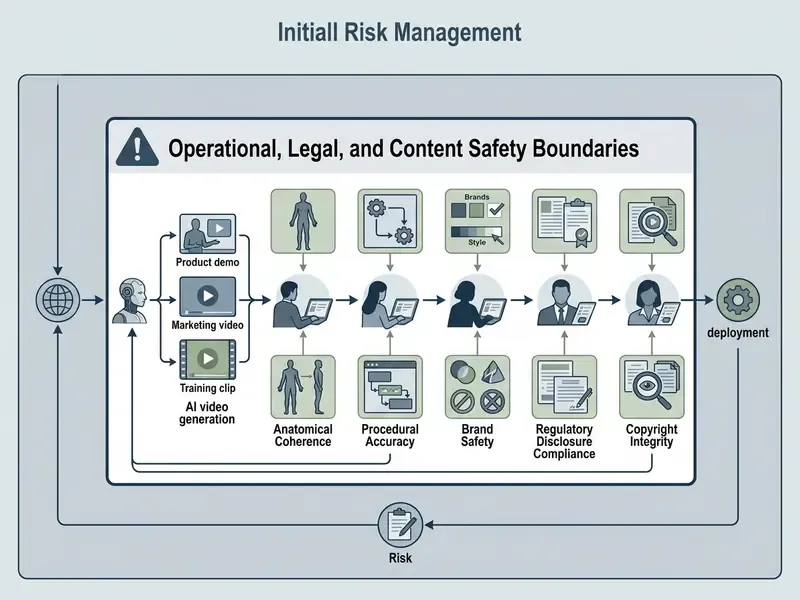
Operational, Legal, and Content Safety Boundaries
Despite rapid model advancement, AI video generation still shows hard operational boundaries: physical reasoning errors, prompt hallucination, biometric and confidentiality exposure, and strict content moderation filters built to prevent misuse.
"VF-Eval evaluates 13 advanced multimodal LLMs across four AIGC video feedback tasks; even GPT-4.1 fails to score consistently high on all of them."
That result matters operationally. Automated evaluation of generated video is itself unreliable, so quality gates cannot be fully delegated to a second model. Human review remains the control of record.
1. Physical, Visual, and Factual Hallucination
Diffusion models optimize perceptual plausibility, not physical or procedural correctness. Failure modes with direct institutional consequences:
- Procedural misrepresentation. A generated walkthrough of an application flow, claims process, or onboarding sequence that shows steps out of order or invents a screen that does not exist.
- Hallucinated regulatory language. Paraphrased disclaimers, invented rate figures, dropped risk warnings inside compliance or product videos. Mitigation: render all regulated wording as locked static overlays sourced from approved copy, never as model-generated text or model-narrated paraphrase.
- Numerical drift in captions and on-screen data. Figures rendered by the model instead of inserted from the system of record.
- Anatomical and object incoherence. Boundary artifacts, morphing hands, logo distortion. Most frequent at edit boundaries and in extended-duration clips.
The VGI-Bench result cited earlier, 51% on visually grounded reasoning tasks for the strongest tested model, is the quantitative basis for treating any procedurally instructive generated video as unverified until a subject-matter expert confirms every depicted step.
2. Confidentiality, PII, and Biometric Exposure
The data path is the risk, not only the output. Controls to enforce:
- Input classification gate. Prohibit submission of non-public financial data, customer records, or unreleased material into any prompt, script, or uploaded document on a non-ZDR endpoint.
- Biometric consent and lifecycle. Written, scoped, time-bounded consent for every employee likeness and voiceprint used in avatar creation, with a documented deletion request path and verification that deletion occurred.
- Archive sensitivity sweep. Run it before enabling automatic transcription and indexing of legacy footage, since indexing makes previously obscure sensitive content searchable.
- Vendor training posture. Confirm contractually whether submitted assets feed model improvement.
- Shadow AI detection. Monitor expense reports, SaaS discovery tooling, and network egress for unsanctioned video generation subscriptions. Unmanaged tools are the most common route by which confidential scripts leave an institution.
3. Deepfake, Impersonation, and Fraud Exposure
Synthetic video capability is dual-use. Your defensive posture matters as much as your production posture.
- Executive impersonation fraud. Synthetic video or voice of a named executive used to authorize payments or data disclosure. Controls: out-of-band verification for every payment instruction change regardless of apparent video authenticity, plus explicit staff training that video presence is no longer identity proof.
- Identity verification bypass. Synthetic video presented against video-based KYC or liveness checks. Controls: liveness detection with challenge-response, injection-attack detection, and periodic red-team testing of the onboarding channel against current generative models.
- Brand and endorsement misuse. Synthetic spokespeople or fabricated testimonials, which sit inside FTC Section 5 deceptive-practices and endorsement exposure.
- Provenance as defense. Applying C2PA manifests to legitimate corporate video creates a verifiable baseline, which supports fast repudiation of forged assets.
Privacy regulators from 61 countries stated in February 2026 that non-consensual intimate imagery constitutes a privacy violation and can be a criminal offence in many jurisdictions. That is the legal basis for the categorical platform bans described next.
Why Nude and Non-Consensual Video Generation Requests Are Strictly Restricted
This information is general in nature and does not substitute for advice from qualified legal counsel.
AI video creation platforms enforce automated safety filters and zero-tolerance policies that block requests for nude, explicit, or non-consensual intimate imagery. Query variants such as "ai nude video generater" and "ai nudevideo generator" still generate meaningful search volume, and mature platforms answer all of them the same way: refusal, logging, and in repeat cases account action.
Federal legislation, including the US TAKE IT DOWN Act signed on 19 May 2025, criminalizes publishing or threatening to publish non-consensual intimate imagery, including AI-generated deepfakes, and requires covered platforms to remove reported content within 48 hours. Major platforms treat non-consensual deepfake intimate imagery as a harassment violation independent of the statute, and vendor policies commonly combine automated NSFW filters, identity safeguards, and removal of reported deepfakes pending investigation. Hong Kong's 2024 Generative AI Technical and Application Guideline requires input filtering plus labeling of synthetic content, noting explicitly that video-generation services can otherwise produce pornographic, violent, or child-abuse material.
Architecturally, platforms implement vision-language classifiers and latent-space guardrails that strip explicit representations at the neural level, preserving platform integrity and user safety.
"SafeGen achieves 99.4% removal of sexual content across four datasets, outperforming eight baseline methods while preserving the quality of benign images."
NIST's guidance to policymakers reinforces the operational expectation: scan inputs and outputs for abusive content, report CSAM and AI-generated CSAM to authorities, and apply provenance indicators by default to image and video outputs. For institutional deployments the practical requirement is threefold. Safety filtering cannot be disabled by a business unit. Filter-trigger events are logged. Repeated trigger patterns are escalated as a conduct matter, not treated as a technical inconvenience.
Model Risk Validation Checklist and Risk-Adjusted ROI
This information is general in nature and does not substitute for advice from qualified legal, compliance, or risk professionals.
Video generation models belong in the institutional model inventory. Where an organization operates under model risk management expectations, including SR 11-7 and OCC 2011-12, generative video systems should be documented, tiered, validated, and monitored on the same basis as other models, with the NIST AI Risk Management Framework Generative AI Profile supplying the generative-specific control set.
Model risk validation checklist for video AI, used as a pre-production gate:
- Inventory entry and ownership.Model, vendor, version, endpoint, business owner, and the named human accountable for published output are all recorded.
- Use-case risk tier assigned.Tier by public visibility, regulatory sensitivity, and brand impact. Each tier maps to a defined human-in-the-loop review depth and approval authority.
- Data flow documented and gated.Input classification rules, ZDR status, regional processing, biometric consent records, and retention or deletion paths are evidenced.
- Output controls tested.Disclosure locking for regulated wording, provenance marking (C2PA or visible label per jurisdiction), and jurisdiction-specific advertising disclosure verified on a sample render.
- Performance and degradation monitoring.Benchmark-referenced acceptance criteria for temporal consistency, reference fidelity, caption accuracy, and translation accuracy, with a defined re-validation trigger on vendor model updates.
- Continuity and vendor risk.Deprecation notification SLA, export format portability, prompt, seed, and version retention for reproducibility, plus a documented fallback model.
- Incident response.Takedown procedure, deepfake repudiation playbook, kill-switch test evidence, and an escalation path for safety-filter trigger patterns.
Risk-adjusted ROI framing. Naive ROI comparisons against traditional production overstate benefit, because they exclude control cost. A defensible formulation:
Risk-Adjusted ROI = (Baseline Production Cost - Generation Cost - Review Cost - Control Cost - Expected Rework/Incident Cost) / (Generation Cost + Review Cost + Control Cost)
Where:
  Generation Cost = credits/subscription + storage + API integration amortization
  Review Cost     = (SME review hours + compliance review hours) x loaded hourly rate x assets
  Control Cost    = validation, provenance tooling, monitoring, training, audit evidence
  Expected Rework = P(reject or correction) x average remediation cost per asset
Review Cost is the term most often omitted and most often decisive. For high-tier regulated assets, human verification can exceed generation cost by an order of magnitude, which is exactly why risk tiering, not blanket adoption, drives the business case. Every resulting figure should stay labeled as a hypothesis until validated against internal analytics and actual timesheet data.
FAQ: AI Video Creation Capabilities
Can an AI assistant generate video without any manual editing?
Yes, technically. Text-to-video endpoints render finished MP4 files from a prompt alone, and conversational plugins can go from script to editable project without a human touching a timeline. Whether that output is publishable is a separate question. In regulated communications, the answer is usually no until a named reviewer has checked procedural accuracy, disclosure wording, and provenance marking.
Can I use AI to make a video for commercial marketing?
Generally yes, on a paid or enterprise tier where the terms grant commercial usage rights. Free plans almost always prohibit monetization, watermark the export, and cap resolution at 720p. Confirm three things before publication: the commercial grant covers generated frames and synthetic voices, stock media licensing is included, and required disclosure applies for the distribution geography.
What is the difference between an AI video generator and an AI video maker?
A generator synthesizes new frames from a prompt or reference image. A maker, in common vendor usage, assembles video from templates, stock assets, avatars, and scripted voiceover. Generators give more creative control and demand more prompt skill. Template-based makers give speed and consistency, with less control over camera motion and physics.
Can AI create videos for users from existing product pages?
Yes. URL-to-video pipelines scrape titles, specifications, price, and photography, then build a short storyboard automatically. Add two mandatory checks: re-validate scraped price and specification data against your system of record, and never render scraped review sentiment as an endorsement claim without substantiation.
Which AI video capability carries the highest institutional risk?
Avatar and voice cloning, in most assessments. It requires uploading employee biometric identifiers to an external processor, and it is the capability most directly usable for impersonation fraud if misused or stolen. Stock avatars avoid the biometric transfer entirely, and they satisfy more use cases than teams expect.
Do we need to register a video generation model in the model inventory?
If your institution operates under model risk management expectations, then yes, treat it as in scope. The practical test is whether output influences a customer-facing representation, a regulatory disclosure, or an internal control procedure. If it does, tier it, validate it, and monitor it.
Conclusion and Strategic Next Steps
Modern AI video creation capabilities give US enterprises real tools to accelerate production, automate product marketing, streamline localized communication, and scale internal training. Controlled experimental evidence supports the instructional viability of avatar-led delivery, since the randomized study cited earlier found no significant difference in knowledge gain between an AI avatar and a human instructor while students still preferred the human presenter. Read that carefully: substitution is defensible for routine instruction, and much less defensible where trust and persuasion are the objective. Sustainable value comes from balancing creative speed against rigorous model governance, clear decision ownership, and continuous risk management.
To establish a compliant and workable AI video workflow, execute these steps in order:
- Conduct an asset inventory. Audit existing media creation tools to find unauthorized shadow AI usage across business units, and register every sanctioned video model in the institutional model inventory.
- Define risk tiering. Categorize use cases by public visibility, regulatory sensitivity, and brand impact, then assign matching human-in-the-loop review thresholds and approval authority.
- Validate commercial licensing. Audit contracts so rendered assets, synthetic voice profiles, avatar likeness rights, and stock media all carry explicit commercial usage rights and, where available, indemnification.
- Establish audit trails. Implement metadata tagging and logging for prompt version, model version, seed, reference inputs, edit chain, and approver, to track data lineage and keep reproducible evidence for internal compliance review.
- Lock regulated language. Configure templates so disclosures, rate information, and risk warnings render as approved static overlays that no generative pass can rewrite.
- Harden the fraud perimeter. Extend payment-authorization verification, KYC liveness testing, and staff awareness training to account for synthetic video and voice impersonation.
- Publish disclosure standards. Define, per distribution geography, whether machine-readable provenance, visible labeling, or both are required before release, then verify on a sample export.
None of this requires a moratorium on generative video. It requires that the first published asset be traceable end to end. Platform-specific publishing considerations are covered in our guide to YouTube video editing workflows.
Appendix A: Superseded Formulations Retained for Transparency
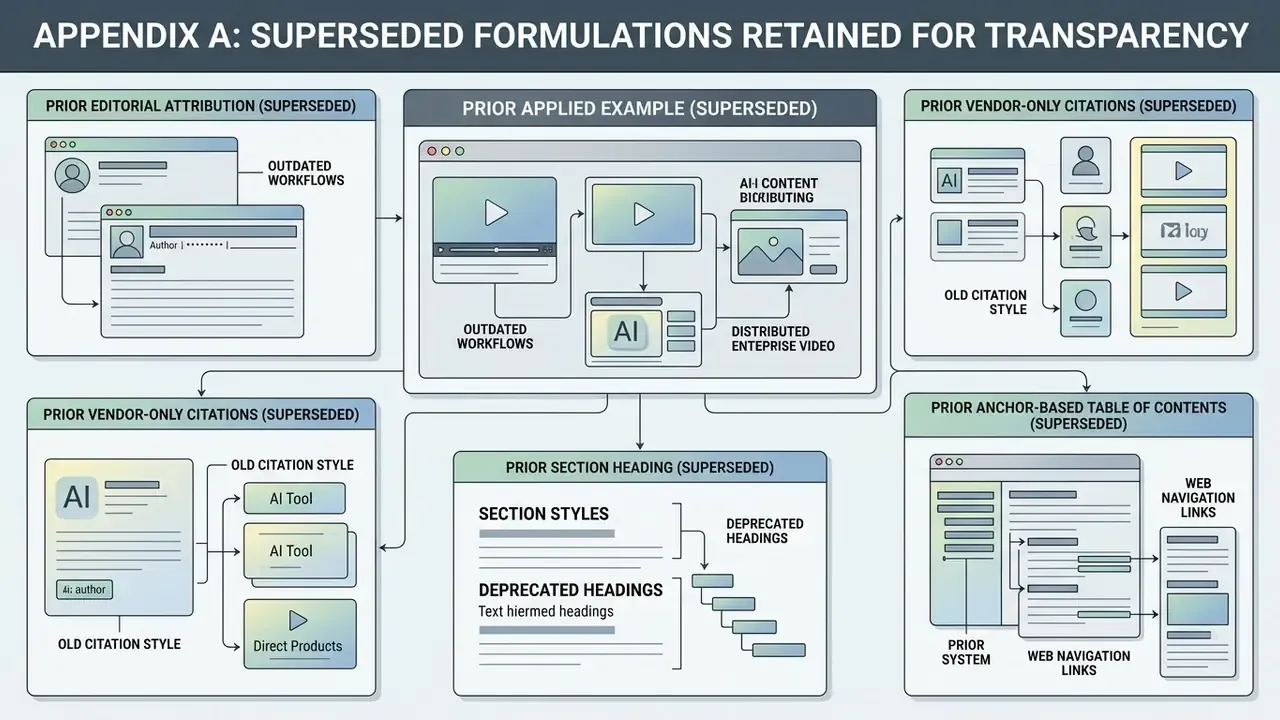
- Prior applied example (superseded). "In financial transformation workflows, an accounts payable team utilized automated text-guided relighting and text masking to standardize historical training footage across global regional hubs, reducing manual video editing costs by 64% while maintaining strict data lineage protocols." Replaced in the main text by the compliance and anti-money-laundering training team example, which reflects the function that actually owns global training footage standardization. The 64% figure is retained and explicitly labeled as an unaudited internal estimate.
- Prior editorial attribution (superseded). The opening governance statement was previously attributed to "Marcus Hale, author." It is now attributed to the AI Media Governance Desk editorial position and anchored to the NIST AI Risk Management Framework Generative AI Profile.
- Prior vendor-only citations (superseded). Claims previously supported solely by vendor documentation for product-description-to-video conversion, first and last frame product anchoring, template libraries, avatar templates, and free-plan restrictions are retained in the main text but re-labeled as documented product behavior rather than verified performance, with benchmark or regulatory sources added where available.
- Prior section heading (superseded). "Limitations of AI Video Generation and Safe Deployment", with a single nude-generation subsection, has been expanded into "Operational, Legal, and Content Safety Boundaries" covering hallucination, confidentiality and biometric exposure, deepfake fraud, and content safety, without removing the original content-safety material.
- Prior anchor-based table of contents (superseded). Replaced by a plain-language reading guide, since duplicated anchor navigation added no decision value for the buyer audience.