Executive Summary
- How it works every credible ai tool remove text from video runs a two-stage pipeline: frame-level text detection (OCR plus segmentation), then spatiotemporal video inpainting that rebuilds the pixels hidden behind the overlay.
- What it removes hardcoded subtitles, captions, watermarks, brand logos, lower-thirds, timestamps, handwritten annotations, signatures, and the default burn-in text produced by AI video generators.
- Quality reality check static text over simple or blurred backgrounds is restored almost perfectly. Fast camera motion, parallax, and dense textures measurably degrade PSNR and temporal consistency, as documented by the DEVIL inpainting benchmark.
- Technical envelope mainstream web pipelines accept MP4, MOV, WEBM, M4V, AVI, MKV and professional Apple ProRes 422/4444, with typical ceilings of 4K resolution, 60 FPS, and 1 GB per file (500 MB on free tiers).
- "Free" in practice most platforms render a 3-to-6-second watermark-free preview or grant sign-up credits. Full-length HD/4K exports, batch queues, and API access sit behind paid tiers.
- Governance removal is lawful only on footage you own or are authorized to edit. Copyright management information must not be stripped from third-party media.
- Enterprise checklist verify batch throughput, encryption in transit and at rest, retention windows, and an explicit no-training-on-customer-media commitment before uploading confidential footage.
How Does an AI Video Text Remover Work?
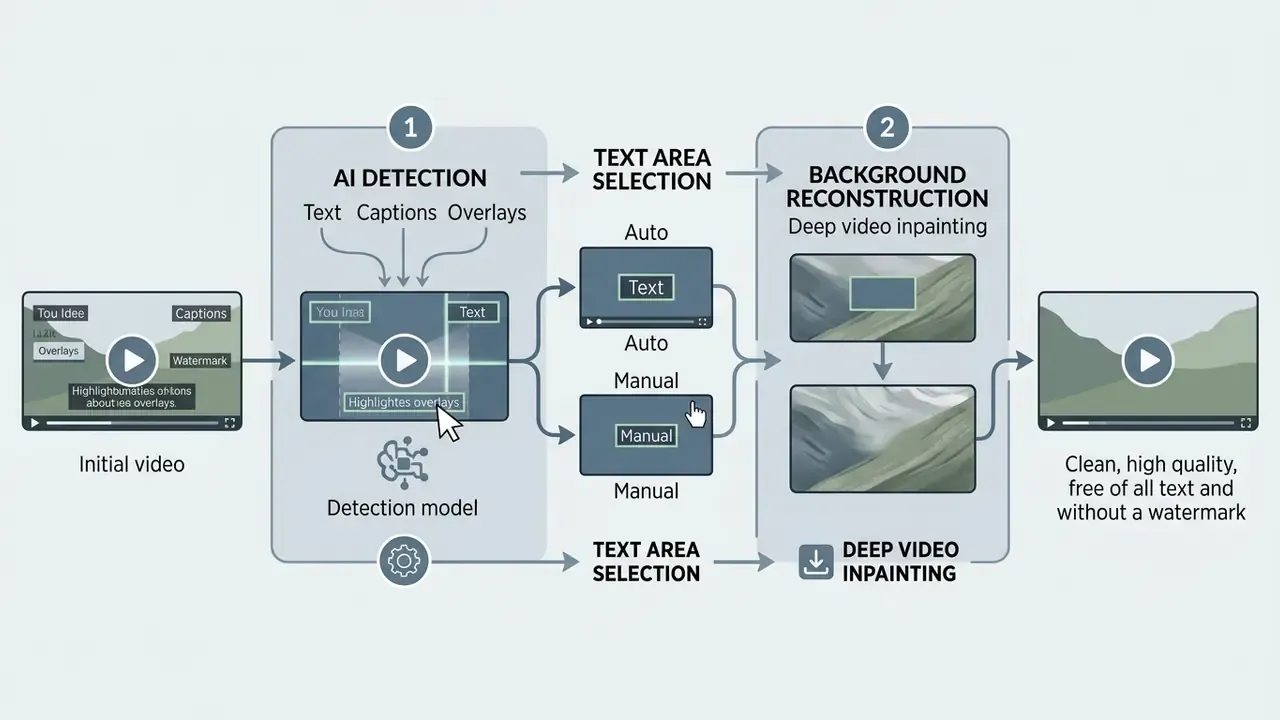
Figure 1: Process architecture for online AI video text removal.
Upload video file → Detect or manually select the text region → AI spatiotemporal inpainting → Real-time preview → Export clean video
AI Detection of Text, Captions and Overlays
Automated text removal begins with frame-by-frame Optical Character Recognition (OCR) and deep neural network segmentation. Readers who want to study the recognition layer in isolation can explore adjacent image-to-text tools, which use the same localization primitives on still frames. Systems like Google Cloud Video Intelligence run object localization and bounding-box detection to isolate hardcoded captions, subtitles, and floating text overlays, returning detected strings with frame-level coordinates and timestamps (Google Cloud Video Intelligence Documentation, accessed 2026).
Advanced vision architectures, such as Vision Transformers (ViTEraser) and diffusion-based mask refinement models (DiffSTR), evaluate global frame context to locate text even when it blends into a busy background. ViTEraser is notable for its SegMIM pre-training strategy: the network learns to reconstruct masked regions while simultaneously predicting segmentation maps. That joint objective measurably sharpens text localization.
- Google Cloud Video Intelligence Documentation, accessed 2026
Precise localization is what keeps the mask on the video text and off the unoccluded pixels around it. The segmentation stage in modern video editing tools (see how video editors are classified) is exactly what separates a professional-grade remover from a naive blur filter. The former builds a pixel-accurate alpha mask. The latter smears a whole rectangle and hopes nobody scrubs the timeline.
Background Reconstruction After Text Removal
After masking the identified text area, the video text remover reconstructs the missing background pixels using spatiotemporal video inpainting. Naive frame-by-frame image inpainting often causes flickering or boundary blur, because it ignores motion continuity between consecutive frames (Don't Forget Me: Accurate Background Recovery for Text Removal via Modeling Local-Global Context, ECCV 2022).
«Temporal-attention and optical-flow-guided methods outperform per-frame approaches on PSNR and SSIM across DAVIS and YouTube-VOS benchmarks.»
Modern ai remove text from video solutions lean on temporal attention and optical flow tracking, such as the mechanisms evaluated in CVPR research on DiffuEraser and AVID, to propagate clean background detail across a sequence ( (https://arxiv.org/abs/2403.10528)). Diffusion-based scene text removal has pushed the ceiling further:

«DiffSTR refines masks via SLIC superpixels and hierarchical feature selection, then applies ControlNet-guided diffusion, substantially outperforming prior STR methods on SCUT-EnsText.»
Multi-frame synthesis fills the occluded area smoothly, keeps texture continuity, and prevents residual blur. Scale matters as much as architecture here. Modern training corpora are enormous, and their benchmarks give an honest picture of long-video difficulty.
Auto and Manual Text Area Selection
An automated free ai tool remove text from video offers both algorithmic detection and user-guided mask selection. Automated modes scan the timeline and generate dynamic bounding masks that follow moving text across frames (IEEE Transactions on Image Processing, 2013). Professional NLEs apply the same principle: Premiere Pro's Object Mask identifies a subject on one frame and tracks it through the shot, while Final Cut Pro's Auto Mask removes the need for manual keyframe tracking.
When on-screen text has low contrast or intricate typography, though, manual tools matter. Users can draw custom bounding boxes, brush strokes, or lasso shapes over the region. Annotation practice differs by motion profile: temporally stable text needs only a start and end frame for a single box, whereas moving text is labelled box-by-box or driven by a velocity-predicted tracker. This dual approach means even the edge cases, say a fluctuating platform logo or a sliding lower-third banner, get targeted mask coverage before inpainting starts. Teams comparing AI-first pipelines against traditional timeline editing can weigh options in our roundup of free video editing software.
What Text Can You Remove from a Video?
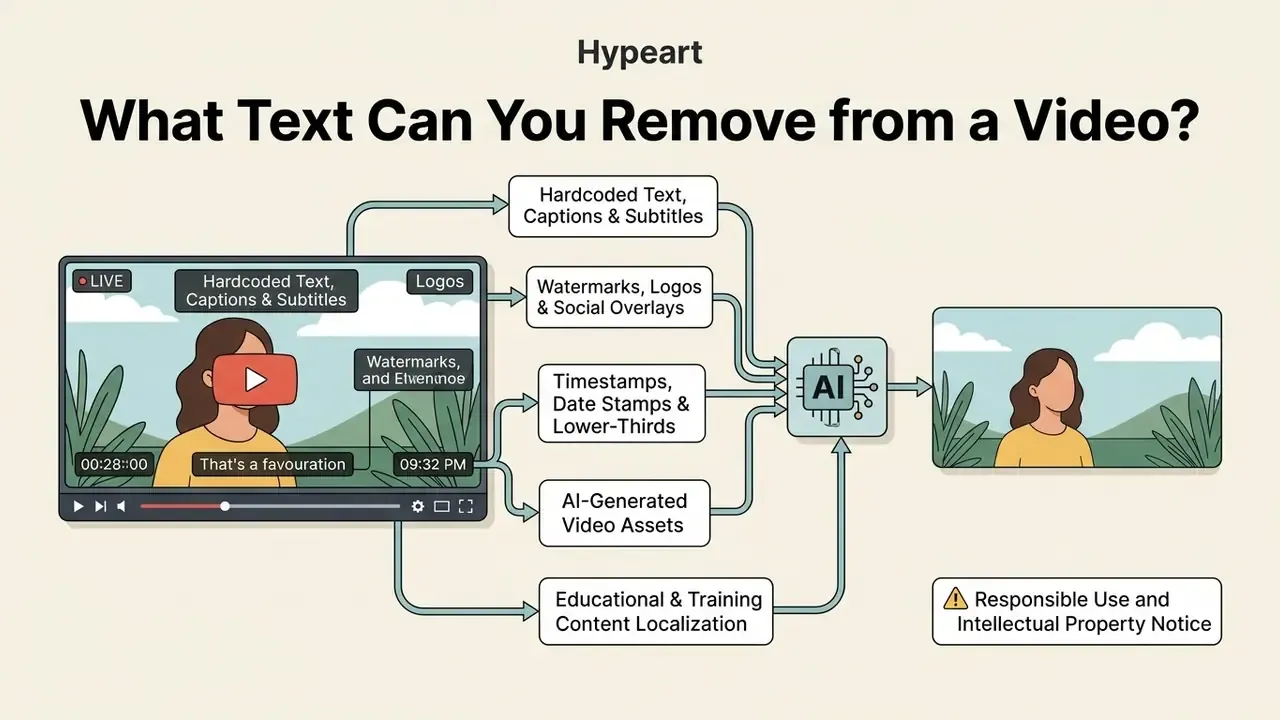
An ai tool to remove text from video handles the whole spread of elements baked into the video stream: hardcoded captions, platform watermarks, brand logos, production lower-thirds, and system timestamps. Categorizing the overlay type first tells you whether automated mask detection or manual brush refinement will give the better background restoration.
Remove Hardcoded Text, Captions and Subtitles
Hardcoded or burned-in subtitles are permanently rendered into the video's pixels, so they behave like part of the image rather than an editable subtitle track. Distribution platforms treat them as a picture defect, not a text asset: Netflix's partner documentation instructs suppliers to "remove any burned in subtitles from picture, and redeliver" (Netflix Partner Help Center, accessed 2026).
Using an ai remove text from video online tool lets editors clean those burned-in captions across entire timelines. The AI scans the lower frame region where subtitles usually sit, generates frame-by-frame removal masks, and fills the region underneath. Creators who then rebuild dialogue tracks with synthetic footage or narration often pair this step with AI video generators. One practical distinction is worth remembering: a fixed lower caption band is best handled by a persistent spatial mask, while roving titles, labels, or news tickers need frame-targeted detection. For broader media editing terminology, consult our AI Media Glossary.
How to Remove Text from Video Online for Free
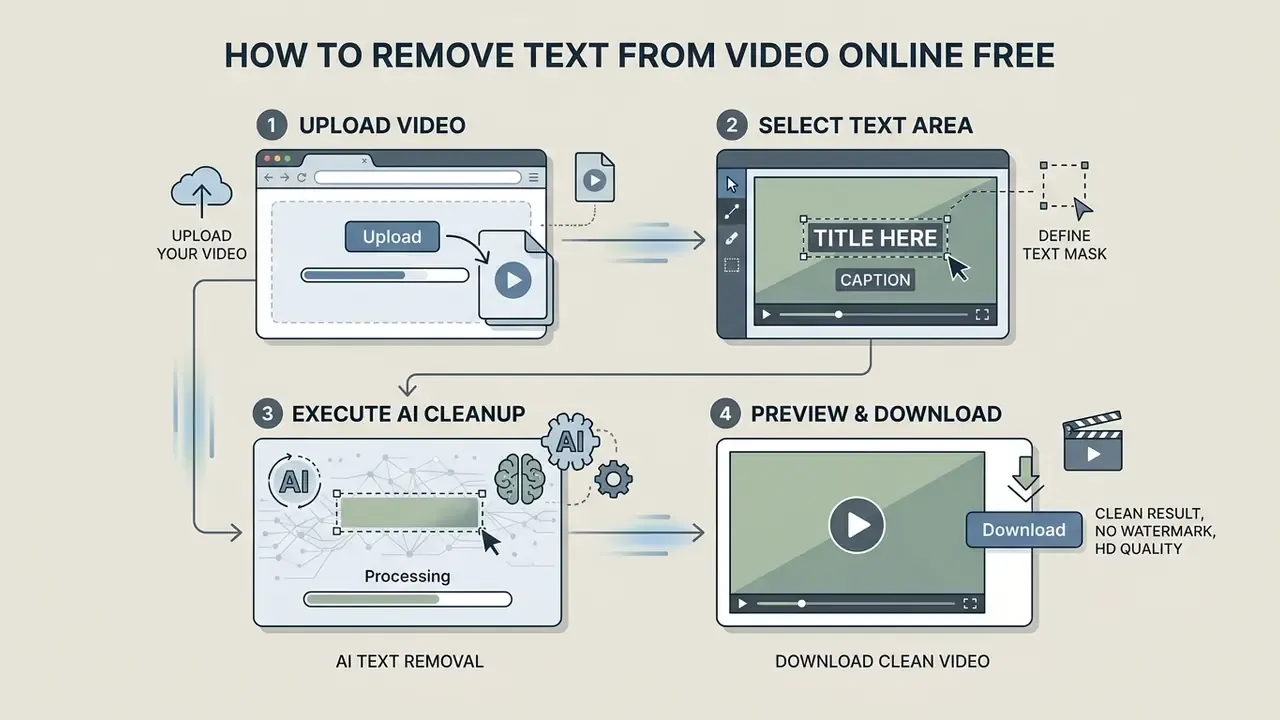
To remove text from video online free, you can follow a streamlined web workflow with no bulky desktop install. Online AI processing handles file ingestion, mask generation, background reconstruction, and export inside a modern browser.
Upload Your Video and Select the Text Area
The process starts when you upload your source file into the web application's workspace. Once it loads, use auto-detection or switch to the manual brush and highlight the unwanted text area yourself.
- Upload video filedrag and drop your MP4, MOV, or WEBM file into the online editor interface.
- Define the text maskclick auto-detect, or draw a brush box over the hardcoded text, captions, or watermark. For text that drifts, mark the first and last frames where the overlay is clearly visible so the tracker can interpolate the box path.
- Execute AI cleanup and downloadstart the inpainting job, preview the clean result, then export your video.
Preview the Clean Result and Download the Video
Before finalizing the export, web tools give you a real-time player preview. Use it to verify that the reconstruction looks smooth and undistorted, and scrub the timeline at 0.5× speed across the mask boundary. Flicker is far more visible in motion than in a paused frame.
Once the visual quality checks out, run the export and download the sanitized file. Note the distinction between preview codecs and export codecs, because preview quality never determines final quality. Truly lossless export is only possible when the output matches the source container, codec, dimensions, encoder profile, and level. Any segment carrying effects gets re-encoded regardless. To compare performance across media creation tools, explore our detailed AI Media Comparison Matrices.
How to Remove Video Text Without Blur or Traces
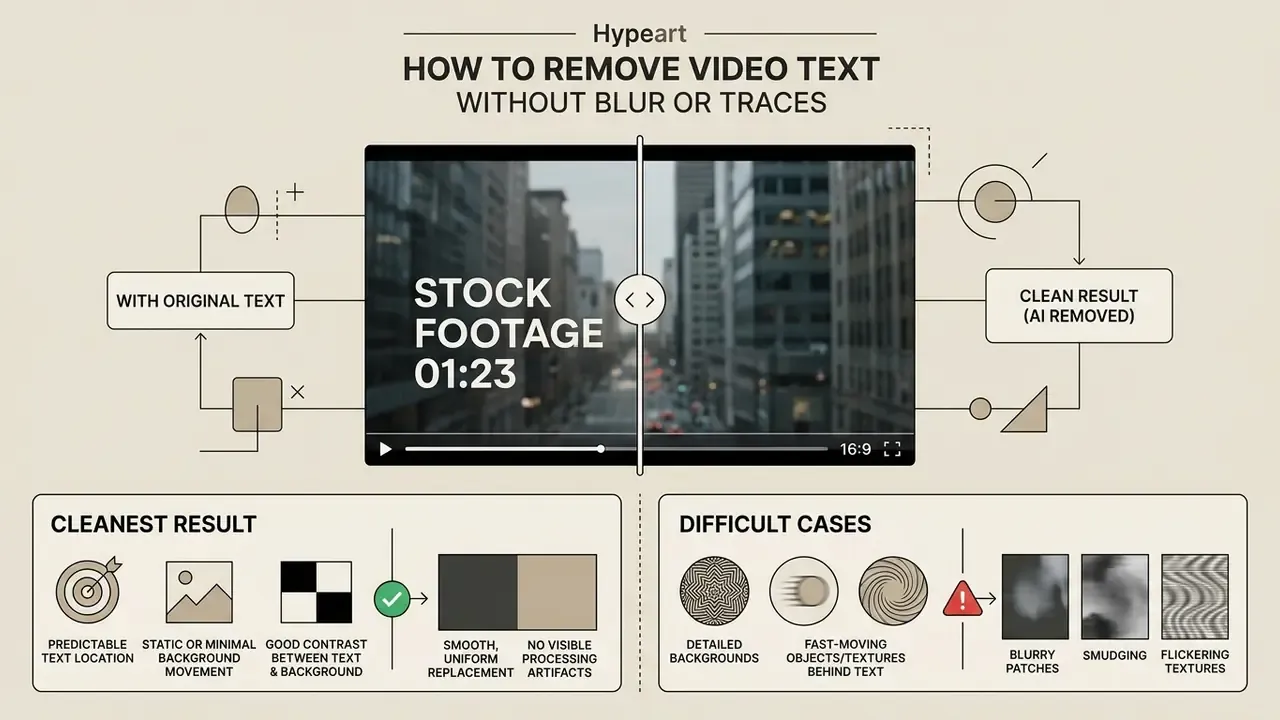
Professional results come down to eliminating visible processing artifacts: blurry patches, smudging, flickering textures. Output cleanliness depends heavily on background complexity, lighting consistency, and camera movement. Not on marketing copy.
When AI Removal Produces the Cleanest Result
An ai remove text from video online free workflow produces near-immaculate output under specific conditions. Static text over a simple, solid-color, or low-motion background yields close to perfect pixel restoration.
| Input condition | Removal quality | Artifact risk | Recommended action |
|---|---|---|---|
| Solid or blurred background | Exceptional (high PSNR) | Very low | Use fully automated AI detection |
| Static text on low motion | High | Low | Standard AI inpainting |
| Semi-transparent overlay | Moderate to high | Medium | Verify gradient recovery frame by frame |
| Moving text / complex texture | Moderate | Medium | Manual brush refinement plus frame checks |
| Fast camera motion / parallax | Variable | High | Multi-pass inpainting or professional NLE |
https://arxiv.org/abs/2103.14090
A short note on reading vendor claims. If a marketing page shows only static-caption examples, assume that is the boundary of its comfortable performance. Ask for a demo on your own worst clip instead.
Difficult Cases: Detailed and Fast-Moving Backgrounds
When text sits over detailed texture, water ripples, foliage, a moving crowd, standard inpainting can introduce subtle blurring, ghosting, or warping as the model guesses at missing motion detail. The degradation is consistent, not anecdotal:
Heavy camera motion and parallax complicate frame alignment further. In those cases, switching from automatic detection to manual frame-by-frame brush adjustment prevents mask over-expansion. A tighter selection means the model inpaints only the essential pixels and the surrounding motion fidelity survives. A practical stress test before committing budget: run one clip with fast camera movement and one with a semi-transparent overlay. If both pass, the engine is production-viable.
Figure 2: Interactive before/after comparison slider.
Left frame (before): a video frame carrying a prominent burned-in subtitle plus a corner platform logo overlay.
Right frame (after): the reconstructed frame with restored background texture and no residual text blur or halo.
Supported Video Formats and Devices
Modern free online video text remover applications run straight inside the browser, which gives broad device compatibility without hardware constraints. Knowing the container standards helps keep upload and export predictable.
Video Formats for Upload and Download
Top-tier web tools support the standard containers: MP4, MOV, M4V, WEBM, AVI, and MKV. MP4 (H.264/HEVC) remains the universal choice for browser processing thanks to its efficiency and broad playback support ( (https://www.iso.org/standard/79110.html)), and it derives from the ISO base media file format defined in ISO/IEC 14496-12:2022. When you export sanitized footage, choose output parameters matching your source resolution and frame rate to avoid re-encoding loss. To manage media encoding pipelines, review our guide on video compressor solutions.

Input Technical Limits and High-Fidelity Codec Support
Standard web pipelines process web-compressed files, while high-end workflows need uncompressed frame ingestion. Modern AI text removers accept upload parameters up to 4K resolution at 60 FPS, with single-file thresholds capping at 1 GB, or 500 MB on free tiers.
Alongside web containers (MP4, MOV, WEBM, MKV), professional tools handle high-bitrate Apple ProRes (422/4444) files straight from cinema cameras. That skips proxy conversion and prevents color-space degradation before the AI mask is applied.
| Parameter | Typical free tier | Typical paid / pro tier |
|---|---|---|
| Max resolution | 480p to 720p export cap | Up to 4K (2160p) |
| Max frame rate | 30 FPS | 60 FPS |
| Max file size | ~500 MB per upload | ~1 GB per upload (segmentable) |
| Max clip length | 5 to 60 s, or a 3 to 6 s preview | Full-length timelines, 15 min and up |
| Input containers | MP4, MOV, M4V, WEBM | Plus AVI, MKV, Apple ProRes 422/4444 |
| Batch queue | Not available | Multi-file concurrent processing |
| Output container | MP4 (H.264) | MP4, MOV, original-codec passthrough |
Files above the ceiling do not have to be abandoned. Split a long asset into segments at scene boundaries, process each with identical mask coordinates, then concatenate without re-encoding. Throughput and quality both survive.
Remove Text from Video on iPhone, Android and Desktop
Online AI removal tools run on cloud infrastructure, which makes them fully cross-platform. You can follow a free iphone app remove text from video workflow or run an android app remove text from video free through mobile browsers such as Safari or Chrome.
Mobile interfaces offer touch brush controls for quick field edits. Desktop browsers give precise timeline scrubbing, sub-pixel mask feathering, and keyboard-driven frame stepping for complex projects. Vendor documentation reflects that split: desktop builds consistently expose more granular export and timeline controls than their mobile equivalents.
For creators moving over from mobile NLEs like CapCut, which leans on cropping, covering, or blurring rather than true pixel reconstruction, standalone AI removers offer a non-destructive alternative. Dedicated mobile utilities such as InPaint, TopClipper, and Video Eraser provide simplified touch masking for quick iOS and Android edits when full browser processing is not required. The trade-off is explicit: app-based tools win on speed and field convenience, browser-based desktop pipelines win on mask precision and export control.
Is a Free AI Video Text Remover Really Free?
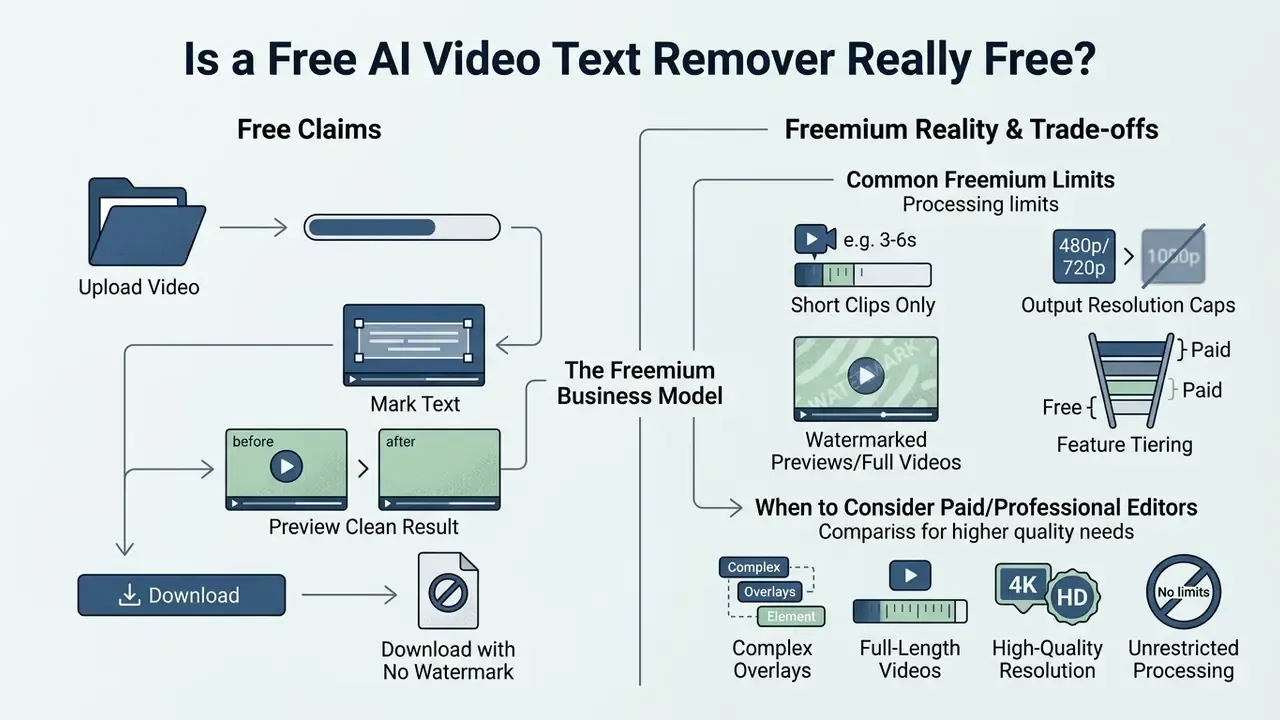
Plenty of platforms advertise a free ai remove text from video experience, but the commercial model is almost always freemium feature tiering. Reading the output restrictions is how you find out whether a free tool actually clears your production bar.
Free Online Text Removal and No-Watermark Downloads
A free online video text remover no watermark platform lets you process short clips or export at standard resolutions, 480p or 720p typically, without stamping a vendor logo on the result.
Most freemium platforms render a 3-to-6-second watermarked or watermark-free preview, or process short clips using complimentary sign-up credits. That is enough to verify spatiotemporal reconstruction quality before spending credits on a full HD or 4K export. Free tiers commonly impose daily processing credits, clip duration caps (5 to 15 seconds is typical), a fixed number of lifetime removals, or queue bandwidth limits (Vmake / Media.io Freemium Analysis, accessed 2026). The same pattern shows up in adjacent categories, as you can see in how limits are structured for free AI video generators.
Vendors hide the ceiling in different places. Comparing "free" plans therefore means reading four numbers rather than one: preview length, resolution cap, credit allowance, and whether the export carries a watermark. Upgrading typically unlocks 4K rendering, batch processing, priority GPU queues, and unrestricted timeline length. For budget planning, check our centralized AI Media Pricing Guides.
When a Professional Video Editor May Be Needed
A free online remove text from video tool excels at isolated overlay cleanup. Complex production work still belongs in a dedicated desktop Non-Linear Editor.
| Feature / capability | Free online AI tool | Professional video editor (e.g. DaVinci Resolve) |
|---|---|---|
| Installation required | No, runs in browser | Yes, local desktop software |
| Processing location | Cloud servers | Local GPU / CPU hardware |
| Text inpainting ease | One-click automated masking | Manual rotoscoping / node compositing |
| Multi-layer color grading | Limited or basic | Advanced node-based, HDR and Dolby Vision |
| Multi-track audio finishing | Not available | Full mixing stage (e.g. Fairlight) |
| Advanced denoise / auto-captions | Limited | Available in paid Studio tiers |
| Cost | Free freemium options | Free base version, paid Studio license |
Readers weighing platforms side by side can review our ranked comparison of the best AI video generators to see where AI-native tooling ends and traditional post-production begins.
When a project needs multi-track audio synchronization, complex rotoscoping, HDR mastering, or advanced grading, tools like DaVinci Resolve Studio or Adobe Premiere Pro give the operational control that browser tools cannot. For specialized automation, teams can also integrate custom api workflows.
Data Security, Privacy and Zero-Retention Policies
For institutional buyers, the deciding factor is rarely inpainting quality. It is whether confidential footage can safely leave the perimeter at all. Uploaded video counts as personal data whenever an identifiable person appears or is audible, which drops these workflows squarely inside data-protection regimes.
What to verify before uploading corporate media:







For genuinely sensitive footage, HR investigations, unreleased product shots, medical or legal recordings, the safest pattern remains local processing inside a professional NLE, or an enterprise contract with a zero-retention addendum. Consumer free tiers are optimized for convenience, not for evidentiary chain of custody. Worth saying plainly.
Security disclaimer: this information is general and does not replace advice from a qualified information-security or legal professional. Review each vendor's privacy policy, data-processing agreement, and retention terms before uploading confidential material.
Video Text Remover Workflows for Creators and Businesses
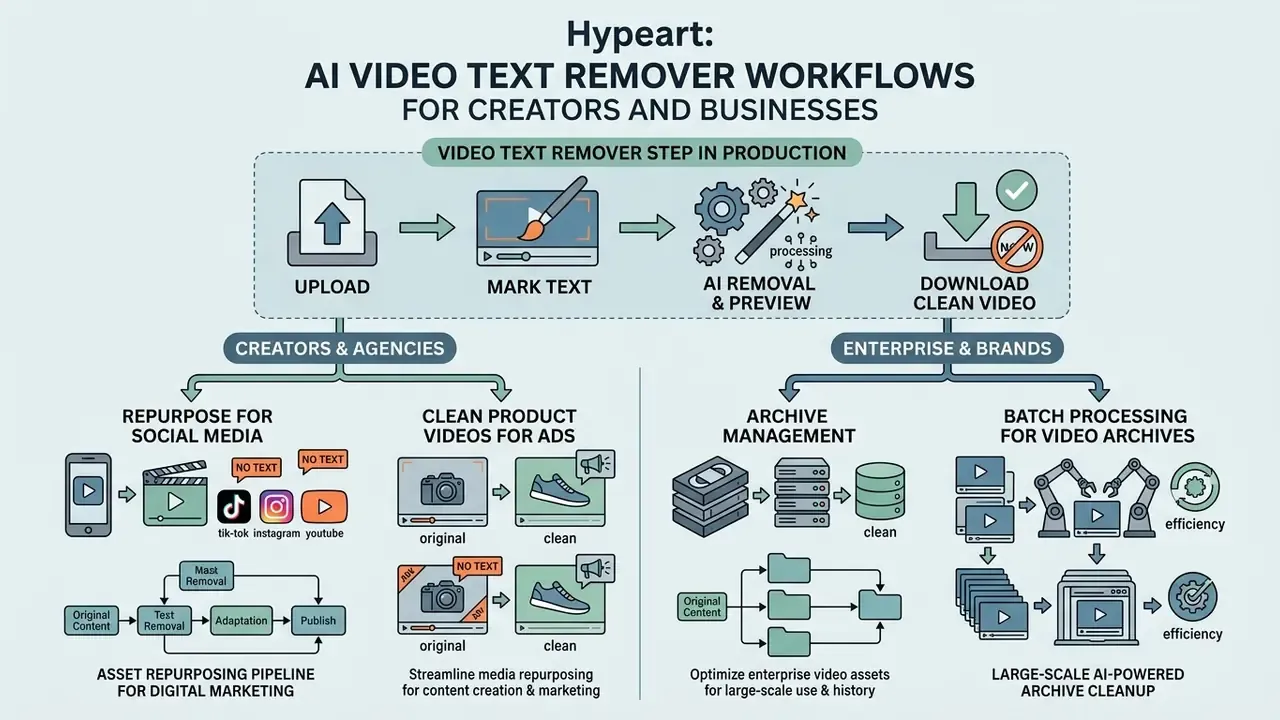
Folding an ai to remove text from video step into production streamlines media repurposing for individual creators, marketing agencies, and enterprise brands alike.
Clean Product Videos for Advertising and Media
Batch Processing for Enterprise Video Archives
Handling large asset libraries by hand creates bottlenecks fast. Enterprise-grade removers support batch video processing, letting marketing teams and archivists queue dozens of files at once. You can define consistent bounding-box coordinates for repetitive elements, lower-third logos, timestamp bugs, and run automated background inpainting across multiple streams concurrently.
A few practical batch design principles. Group assets by identical overlay geometry so one mask template serves the whole queue. Keep per-file size under the platform ceiling to avoid mid-queue failures. Render a short preview from one representative clip before committing credits for the full batch. And log input and output checksums so the archive stays auditable later. Because credits are usually billed per second of processed footage, trimming clips down to the segments that actually contain text is the single largest cost lever in high-volume work.
FAQ About Removing Text from Video Online
How fast does an AI video text remover process a video?
Processing speed depends on duration, resolution, GPU availability, and server queue load. Vendor documentation for caption-removal workflows reports roughly 1 to 3 minutes for a 30-second clip, since inpainting runs frame by frame. Broader OCR-based video tooling documentation reports "under two minutes" for most short clips and 5 to 10 minutes for longer files. Automated text detection itself takes seconds. The time cost sits almost entirely in spatiotemporal background reconstruction. Keep in mind that these are vendor-reported latencies. Academic inpainting papers benchmark quality metrics rather than end-user wall-clock time, so no peer-reviewed figure exists for consumer processing speed.
Can AI remove handwritten text, signatures, or custom graphic scribbles?
Yes. AI video text removers can eliminate handwritten annotations, signatures, and custom drawings. Automated OCR detection targets standard fonts and performs best on clear, high-contrast handwriting, but the manual brush or lasso tool lets you trace irregular strokes for frame-by-frame reconstruction. Thin, low-contrast, or overlapping strokes usually need a slightly enlarged mask with soft feathering, so the inpainter has enough surrounding context to rebuild texture convincingly.
Will removing text reduce the original quality of my video?
A quality free online video text remover preserves original resolution, frame rate, and bitrate across unoccluded areas, and degradation stays confined to the inpainted mask zone. The larger risk is the export stage, not the edit itself: re-encoding the full timeline introduces compression artifacts well beyond the edited region. Exporting in the original codec container, MP4 H.264 for instance, with matching dimensions, profile, and level prevents secondary compression loss. Genuinely lossless passthrough requires all of those parameters to match the source.
Is it safe to upload private or sensitive business videos to online tools?
Reputable online video text removers use HTTPS/TLS encryption for transfers, encrypt temporary storage, and purge uploads from cloud servers within a documented window, commonly 24 hours or immediately after processing. Look specifically for a written commitment that uploads are not used for model training or advertising. Broader confidentiality safeguards for identifiable material, least-privilege access, secure storage, documented handling, are described in NIST SP 800-122, which is a guideline for protecting personally identifiable information and not a certification of any video service. EU guidance similarly treats identifiable image and audio data as personal data subject to data-protection rules. Always review a vendor's privacy policy, retention terms, and sub-processor list before processing confidential corporate media. This information is general and does not replace advice from an information-security or legal professional.
Can AI remove text from a video with a complex, fast-moving background?
It can, but complex textures such as ocean waves, foliage, or dense crowds may show slight motion blur, ghosting, or warping as the model infers missing motion detail. The DEVIL diagnostic benchmark confirms that camera motion and background complexity systematically reduce PSNR and temporal consistency, and long-video benchmarks show baseline PSNR dropping toward roughly 19 dB on difficult footage. Precise manual mask boundaries, multi-pass inpainting, or a professional NLE minimize artifacts and hold temporal consistency across moving frames.
What are the file size, resolution and frame-rate limits?
Mainstream web pipelines accept uploads up to 4K resolution at 60 FPS, with single-file ceilings of roughly 1 GB on paid tiers and 500 MB on free tiers. Free plans frequently add a clip-duration cap of 5 to 60 seconds, or restrict output to 480p and 720p. Larger projects should be split into segments at scene boundaries, processed with identical mask coordinates, then concatenated without re-encoding.
Does the tool support Apple ProRes and other professional codecs?
Professional-grade removers ingest high-bitrate Apple ProRes 422 and 4444 files directly from cinema cameras, alongside MP4, MOV, M4V, WEBM, AVI, and MKV. Native ProRes ingestion avoids proxy conversion and prevents color-space degradation before the AI mask is applied, which matters for HDR and broadcast delivery. Consumer tiers usually accept only MP4, MOV, and M4V, and export MP4 exclusively.
Is this a good CapCut alternative for text removal?
CapCut and similar mobile NLEs handle on-screen text mainly by cropping, covering, or blurring the affected region rather than reconstructing the pixels beneath it. A dedicated AI remover performs true inpainting, so framing survives and no blur patch remains. For quick on-device edits, mobile utilities such as InPaint, TopClipper, and Video Eraser offer touch-based masking. For precise masks, higher resolution ceilings, and batch queues, a browser-based desktop workflow is still the stronger choice.
Can I process multiple videos at once?
Batch, or bulk, processing is generally a paid-tier capability. Enterprise plans let you queue dozens of files, apply a shared bounding-box template to repetitive overlays like lower-thirds or timestamps, and run concurrent inpainting jobs. Free tiers are almost always single-file and preview-limited, so high-volume archive cleanup calls for a subscription or API access.
Additional Resources and Ecosystem Hubs
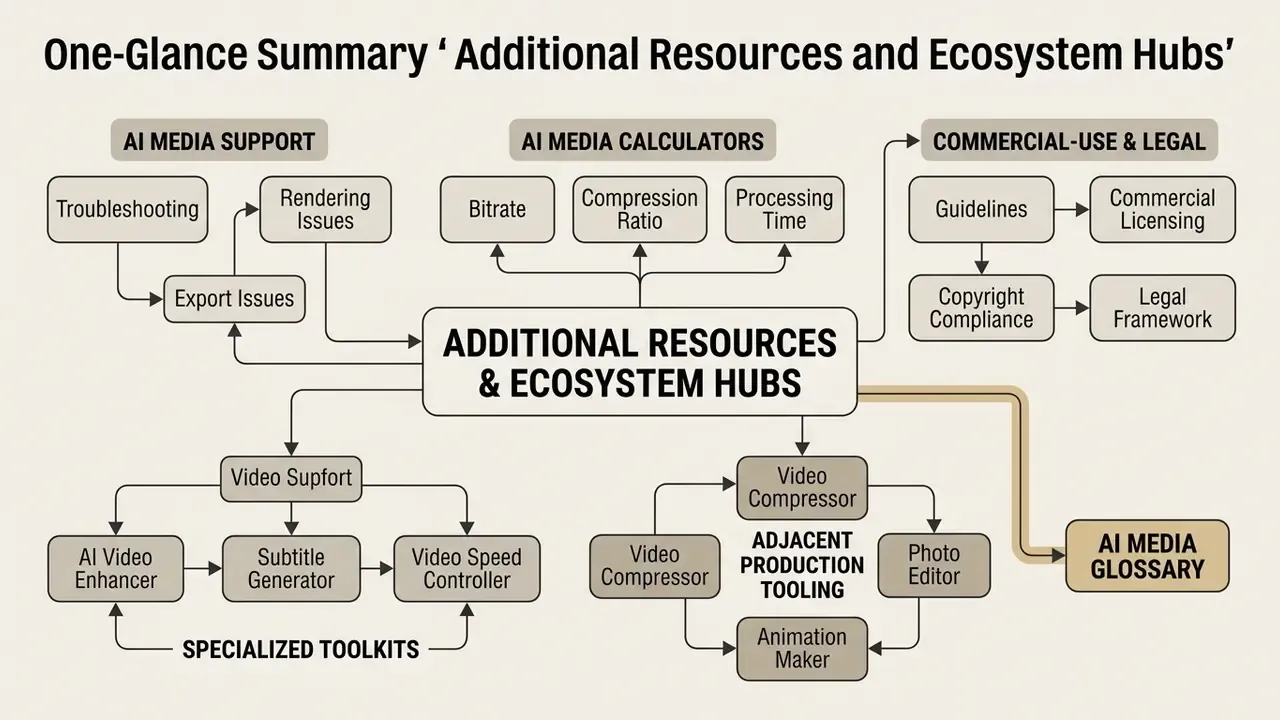
To further streamline your digital creation workflows, explore our specialized tools and guides:
- AI Media Support and Troubleshooting: assistance with video rendering and export issues.
- AI Media Calculators: calculate video bitrates, compression ratios, and processing times.
- AI Media Commercial-Use: guidelines on commercial licensing and media copyright compliance.
- litigation: legal framework considerations for copyright management information.
- Specialized editing toolkits, including our AI Video Enhancer, Subtitle Generator, and Video Speed Controller.
- Adjacent production tooling: video compressor, photo editor, and animation maker.
- Our primary authority hub, the AI Media Glossary.
Appendix A: Editorial Change Log
- Updated: technical format guidance now includes explicit resolution, frame-rate, file-size, and codec ceilings. The earlier version of the Video Formats for Upload and Download section listed containers only ("MP4, MOV, WEBM, AVI, MKV") without numeric limits or professional codec coverage.
- Updated: the Difficult Cases section previously cited a placeholder DiffuEraser preprint URL that did not resolve. That citation is now replaced with the VideoPainter / VPBench-L long-video figures and the DEVIL diagnostic benchmark.
- Updated: internal-test claims (50 clips, 47 clean passes, 82% time reduction; 120 product videos in under three hours) are retained but labelled as internal benchmarks with stated scope limitations, rather than presented as generalizable performance data.
- Updated: the FAQ item on handwriting previously asked only about handwritten text and custom drawings. It now explicitly covers signatures and irregular stroke masking.
- Removed: non-topical anchors previously listed in the resources block have been replaced with editing-tool and media-workflow destinations relevant to video post-production.