AI-powered face replacement moves a facial identity from one image into another piece of media in seconds. No keyframing. No rotoscoping.
This guide is deliberately written on two levels. It works as a practical how-to for creators who want to run a free video face swap in a browser, and as a risk-and-governance reference for teams that must answer harder questions: what happens to biometric uploads, what the free tier actually delivers, and where commercial use crosses a legal line. If you sit on the compliance side of a bank or a mature fintech, the second reading matters more. A single "harmless" meme upload can constitute a biometric disclosure.
Understanding the underlying technology, free-tier constraints, retention policies, and commercial licensing rules is essential before an online face swap tool touches a consumer or enterprise media pipeline.
Executive Summary in Brief
- How it works A three-stage neural pipeline (detection and landmarks, then identity embedding transfer, then blending and inpainting) replaces identity while preserving pose, expression, lighting, and background.
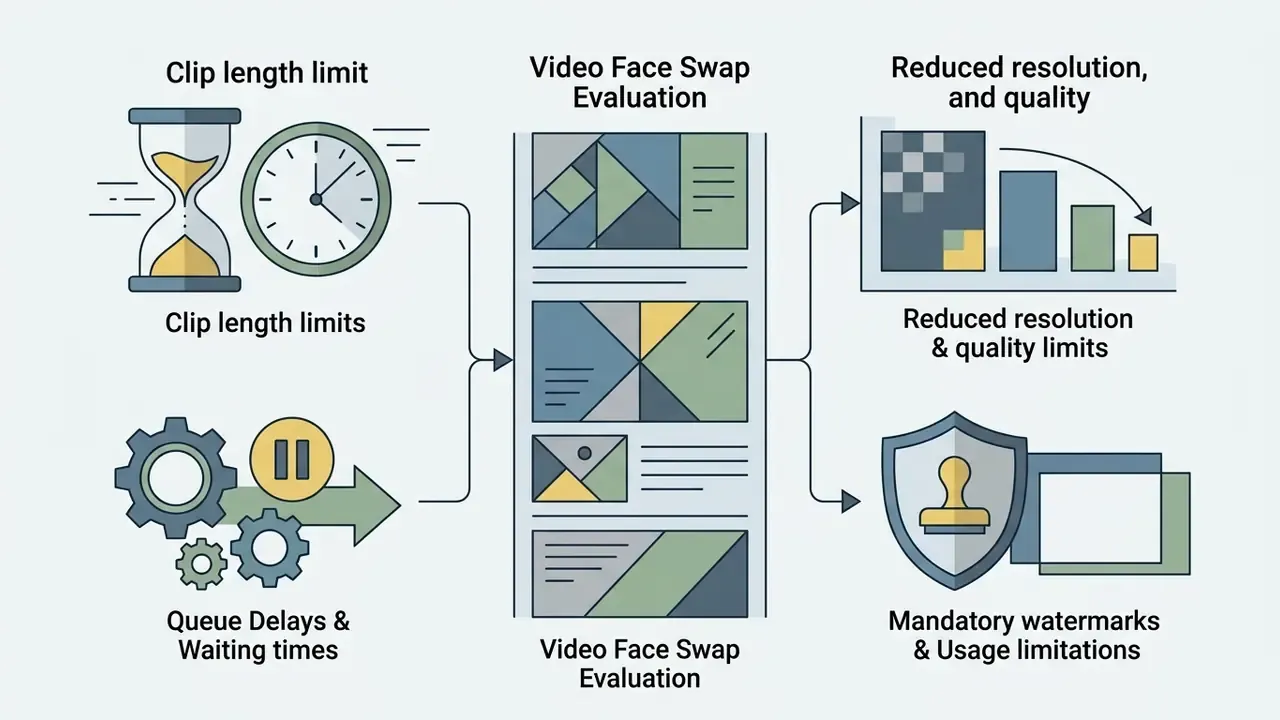
- Free reality check "100% free" and "unlimited" normally mean unauthenticated access, not uncapped output. Expect 5 to 30 second clip caps, 480p/720p exports, standard rendering queues, and, on many platforms, a watermark.
- Speed Photo swaps typically finish in 3 to 5 seconds. Short 720p/1080p clips take roughly 15 to 90 seconds. Free queues can add 1 to 3 minutes at peak.
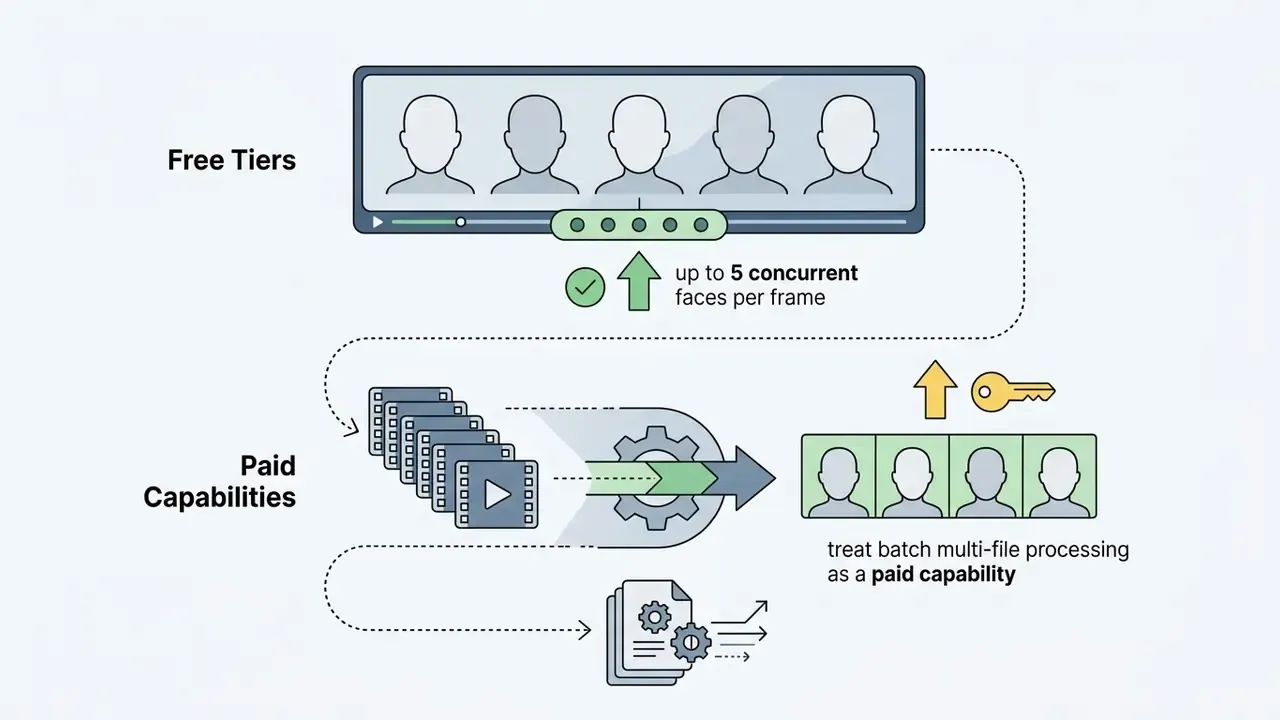
- Scale Web-based free tiers usually cap concurrent replacement at up to 5 distinct faces per frame. Batch pipelines apply one source identity across many files in a single run.
- Quality HD enhancement modules (CodeFormer and GFPGAN-class restorers) rebuild micro-texture and upscale the swapped mask to 1080p or 4K.
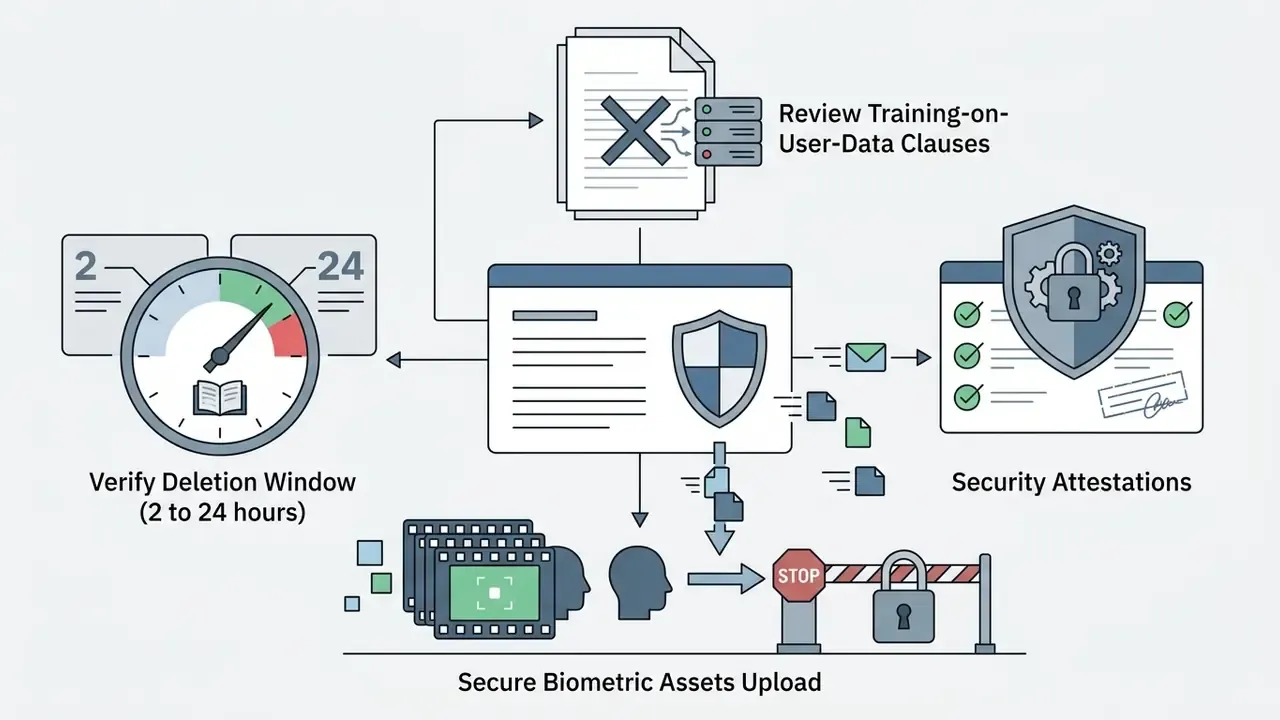
- Privacy Retention windows on reputable tools range from 2 hours to 24 hours. Verify the deletion policy before uploading any identifiable footage.
- Legal EU AI Act Article 50 disclosure obligations apply from 2 August 2026. US exposure runs through right-of-publicity statutes and the Lanham Act's false-endorsement provisions.
Who This Guide Is Written For
What Is AI Video Face Swap and How Does It Work?
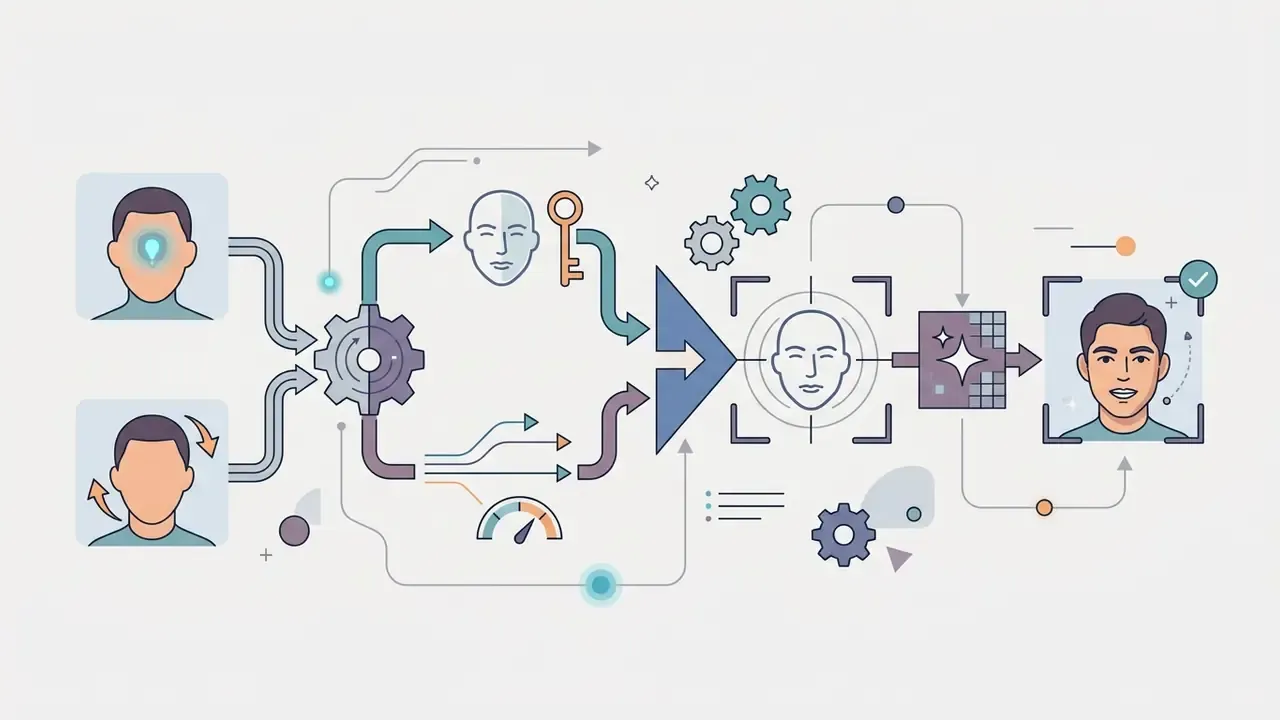
AI video face swap is a deep learning process that replaces the facial identity in a target video with the identity from a source image, while retaining the target's original motion, lighting, and expressions. The system runs a multi-stage neural pipeline: landmark detection, identity feature extraction, generative attribute blending, and spatial inpainting.
«Face swapping formally means replacing the identity information of the target face while preserving identity-irrelevant attributes such as skin tone and facial expression.»
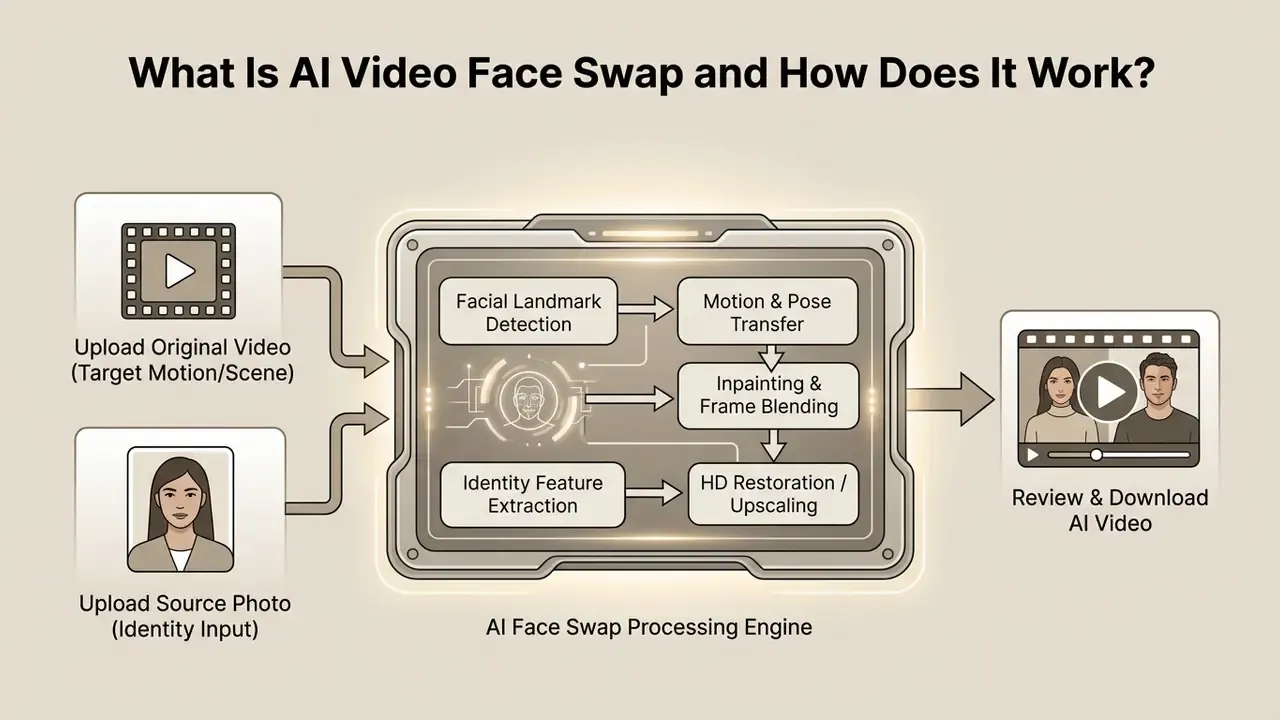
Figure 1: Standard pipeline for web-based video face swap tools. Alt text for publication: "video face swap online free process flow, from upload original video to download result".
Rather than overwriting the entire head, the model conditions generation on the source identity vector while masking and preserving the surrounding background and original movement. Landmark-based methods extract 2D facial keypoints from both faces to estimate 3D pose and expression. GAN-based systems such as FSGAN add a reenactment generator, a segmentation CNN, an inpainting network, and a blending module. Newer diffusion-based systems reframe the task as conditional inpainting: mask the target face, condition generation on source identity plus target attributes, and enforce temporal consistency across frames.
Why does this matter beyond novelty? Because the same architecture that produces a fan-edit also produces a convincing injection attack against a video KYC flow. One pipeline. Two very different consequences.
Source Face, Target Face and Original Video
The source face supplies visual identity. The target face in the original video defines motion, pose, lighting, and background composition. During processing, the AI extracts identity embeddings from the source photo using a facial recognition backbone such as CosFace or InsightFace. The target face in the uploaded footage is localized frame by frame, normalized, then replaced with the source embeddings while background continuity is preserved.
«Face-swapping quality is measured with identity retrieval (ID Ret.), expression error, pose error and FID, evaluated on a 10,000-frame FF++ test set.»
Those four metrics are the practical yardstick for any tool comparison. Identity retrieval tells you whether the output is recognisably the source person. Expression and pose errors tell you whether the mask obeys the target actor's performance. FID reflects overall perceptual realism.
In multi-frame processing, the system aligns facial keypoints across every frame. If the original video contains fast movement or occlusions, temporal smoothing algorithms stop the replaced facial mask from drifting or detaching from the head structure. Fast pans are still where most free engines visibly stumble.
Video, Photo and GIF Face Swap Formats
Photo face swap processes a single static frame. Video face swap and GIF face swap run identity transfer across continuous frame sequences. A single-image edit requires zero temporal tracking, which makes computation almost instantaneous. GIF and full video formats execute frame-by-frame alignment, spatial blending, and temporal stabilization to prevent flickering across sequential frames.
Cost therefore scales with frame count. A photo is one inference pass. A GIF is a short multi-frame sequence. A video adds temporal modeling on top of every single frame.
Online generators apply the same foundational AI models across photos, animated GIFs, and MP4 clips, which is why one face swapper interface can advertise photos, videos and GIFs together. Readers comparing adjacent motion tooling can review how AI video generators handle rendering latency. Developers testing multimodal interfaces can consult the AI Media Comparison Matrices to see how model latency scales when you shift from static image modification to full motion rendering.
Batch Face Swap Pipelines (Bulk Processing and Multi-File Automation)
Batch face swap is the workflow most free landing pages omit and most high-volume creators actually need. Instead of re-initializing the facial recognition backbone for every asset, a batch video face swap pipeline extracts the source identity vector once, queues every target image or clip, detects landmarks across the queue in parallel, and renders all outputs in a single automated run.
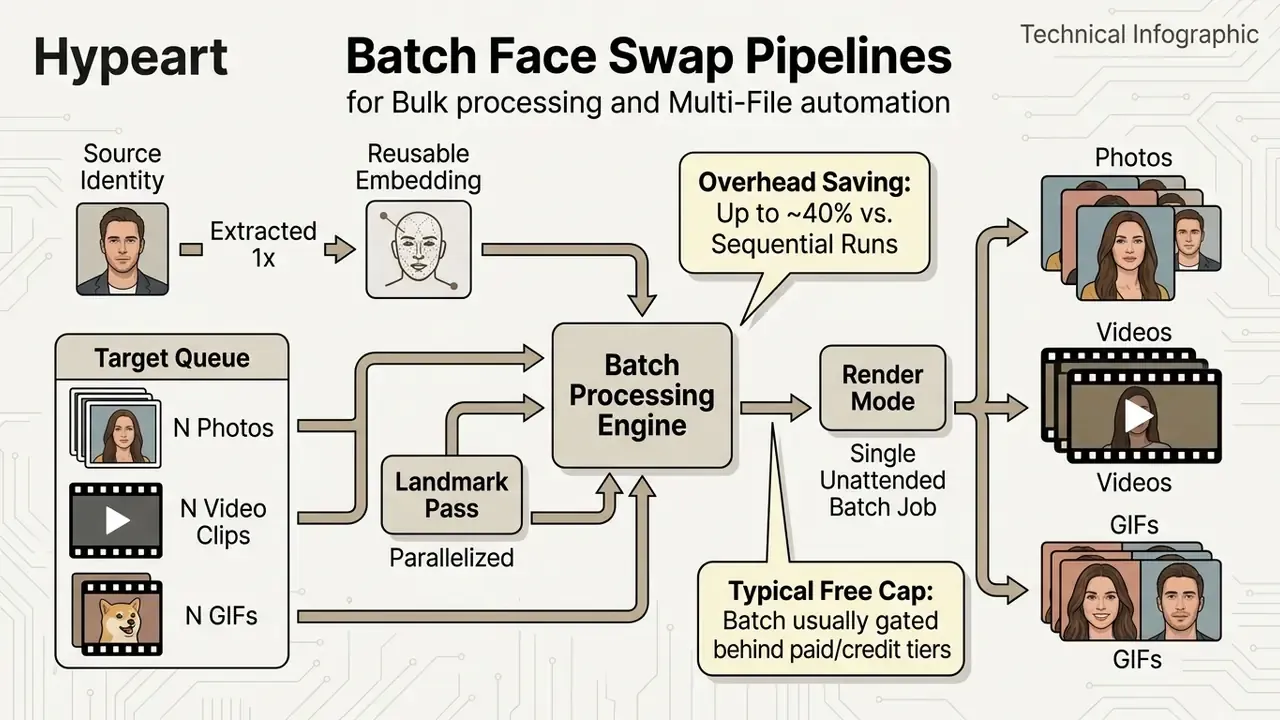
Practical use cases: bulk processing of a product-video series that must keep one consistent presenter identity, multi-file automation for meme or ad-variant sets, and campaign localisation where the same actor identity is applied across dozens of short clips.
Note the commercial pattern. Free tiers almost always allow single-file swaps, while batch video face swap is where platforms place the paywall, because a queue of N files multiplies GPU minutes linearly. No vendor absorbs that for free.
How to Use Video Face Swap Online Free
To perform a video face swap online free, upload your base video alongside a high-resolution face image, select the target face, and start the automated AI generation pipeline. Modern web tools execute these steps in the browser or through cloud rendering queues, with no manual video editing or keyframing skills required.
- Prepare media assetsObtain a clean original video and a high-resolution source photo.
- Upload target videoLoad the base MP4, MOV, or WEBM clip into the online tool interface.
- Upload source faceProvide a sharp, front facing photo of the individual whose identity will be inserted.
- Map target faceSelect which face in the video frame to replace if multiple actors are present.
- Enable HD enhancement (optional)Toggle face restoration and upscaling if the tool exposes it.
- Execute swapTrigger the generator and let cloud GPUs render frame-by-frame identity transfer.
- Validate outputCheck for visual artifacts, edge blurring, flicker, or facial distortion.
- Export fileDownload the finalized video result or save it directly to cloud storage.
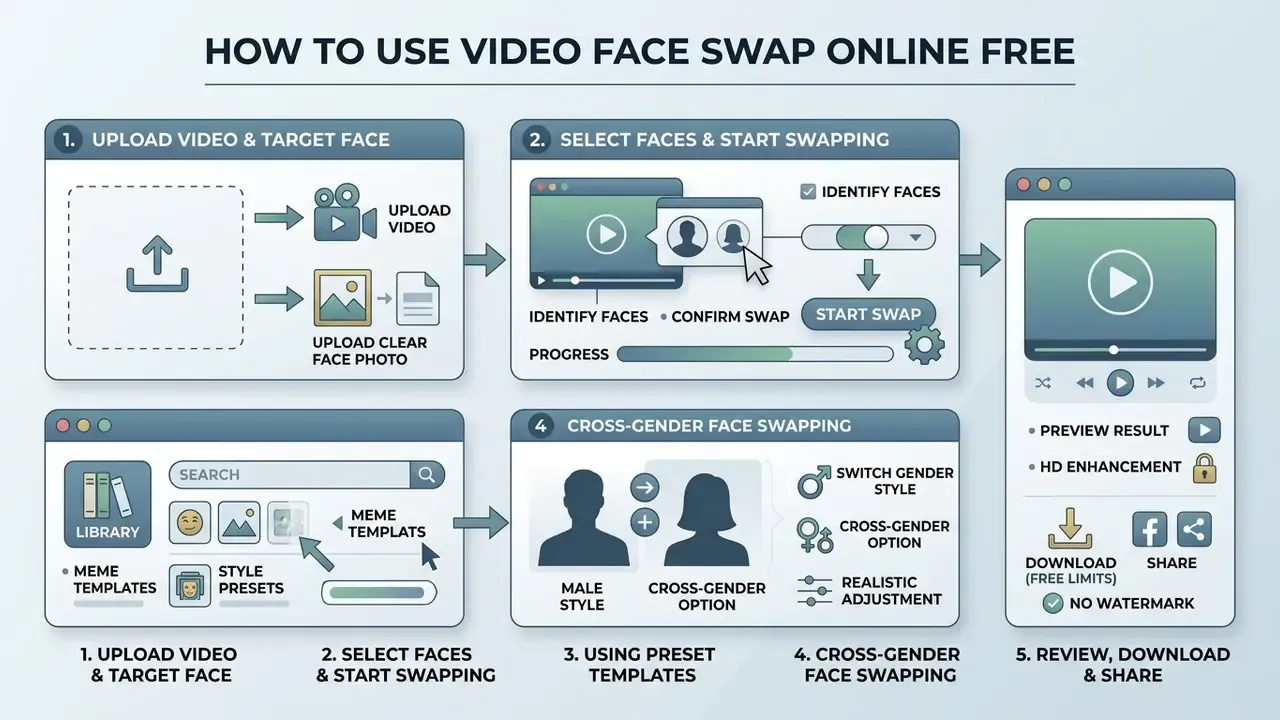
Upload a Video and a Clear Face Photo
Optimal generation quality needs an original video with stable lighting and a source image with clean, well-resolved facial features. A clear, front facing source portrait lets the identity encoder capture eye shape, nose structure, and jaw contours without perspective distortion.
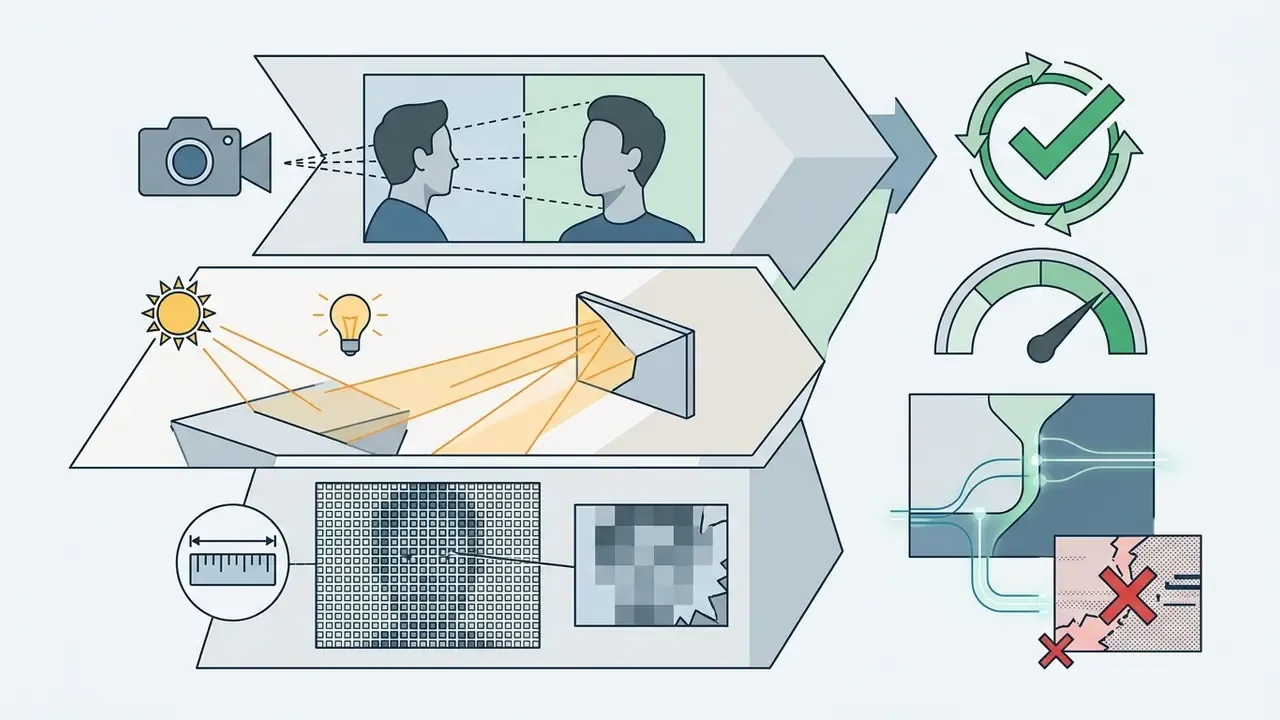
Biometric imaging standards offer concrete thresholds worth borrowing. ISO/IEC 39794-5 and ICAO portrait-quality guidance recommend a full-frontal perspective, even illumination, and a cropped face image of at least 1200 × 1600 px, with an inter-eye distance of at least 90 px (240 px preferred for new passport-grade processes). NIST and ANSI materials cite 90 px as required and 120 px as best practice.
Face-swap engines are more forgiving than passport systems, obviously. But the same logic holds: below roughly 90 to 120 px between the eyes, the network is inventing detail rather than transferring it.
Low-resolution source photos or extreme head angles force the model to estimate missing facial data, which produces blurry texture overlays or unnatural identity warping in the output clip. Creators who need a clean, well-lit frontal reference frame can generate one with an AI headshot generator before running the swap.
Select Faces and Start Face Swapping
When you process clips with multiple actors, advanced tools detect every face in the frame and prompt you to select the specific target face to substitute. Single-face processing maps the source identity to the sole detected subject. Multiple face swap routines track distinct identity tracks across the whole video sequence.
To prevent identity cross-contamination in group footage or group photos, the AI clusters detected face vectors across consecutive frames. Selecting specific face indices ensures the algorithm replaces only the intended target and leaves surrounding individuals untouched. Vendor implementations differ here: some assign one-to-many source faces to detected tracks in a single pass, others expose a numeric target_index, and a few offer a region-of-interest picker or an optional target_gender flag.
Using Preset Templates and Cross-Gender Face Swapping
If you lack usable source footage, most consumer-grade generators ship preset template libraries, curated scenes you can drop a face into instantly. Typical categories look like this.
| Preset category | Typical use | Why it works well |
|---|---|---|
| Superhero / cinematic | Entertainment, fan content | Strong key lighting, frontal hero framing |
| Holiday sets (Christmas, Halloween) | Seasonal social posts | Predictable poses, low motion blur |
| Business / corporate headshots | Profile imagery, mock decks | Neutral background, even illumination |
| Lady model / fashion / sports style | Outfit and styling previews | Consistent studio lighting |
| Trending memes and roleplay scenes | Meme marketing, group chats | Short, low-resolution-tolerant clips |
Because templates are pre-vetted for pose and lighting, they usually produce cleaner results than user-shot footage. They are also the fastest path to a realistic first output, which is exactly why vendors put them on the landing page.
Cross-gender face swap runs through the same identity pipeline rather than a separate model. Neural feature extraction transfers the source identity embedding (jaw structure, eye spacing, nose geometry) while attribute conditioning adapts skin tone, hair boundary, ambient lighting, and makeup framing to the target actor. Because identity and identity-irrelevant attributes are disentangled, gender swap workflows do not require source and target to match in gender, age, or ethnicity. The model re-lights and re-textures the transferred region to fit the destination frame. Quality degrades mainly under heavy occlusion (long fringe, large glasses) or extreme yaw, where the network must synthesise geometry it never saw.
Review, Download and Share the Face Swap Result
Before you download the output clip, review the target regions for visual stability, edge sharpness, and lip sync alignment. High-quality engines yield clean HD face rendering with no visible masking seams around the hairline or jawline.
Use three formal defect classes borrowed from video-quality assessment literature as your QC gate.
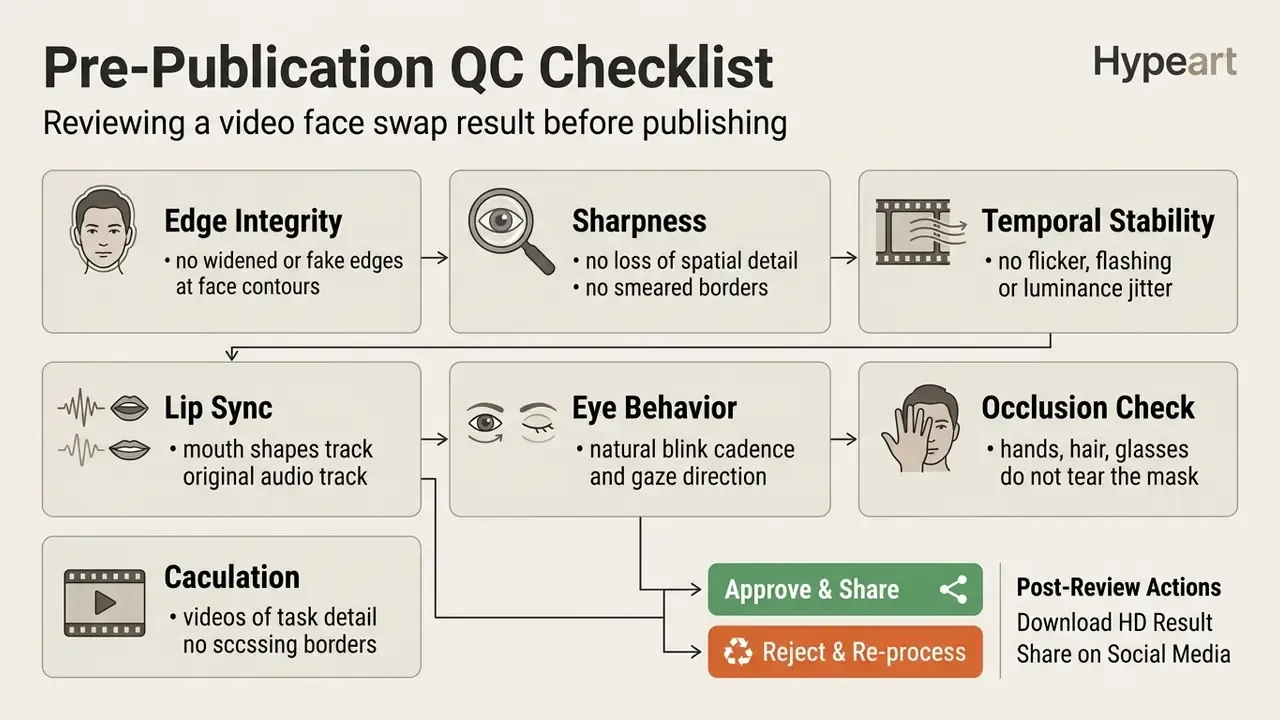
Once the clip is generated, verify export specifications against your publishing workflow. Detailed parameter breakdowns for post-processing and format conversion are indexed in the AI Media Pricing Guides, and oversized exports can be prepared for upload with a video compressor without re-rendering the swap. That last point saves more GPU credits than people expect.
What Determines Realistic Video Face Swap Results?
Realistic face swapping depends on matching face angle, ambient lighting, head movement, and temporal consistency between the source photo and the target clip. Mismatched perspective or illumination introduces visual artifacts: unnatural skin tones, distorted jawlines, floating facial masks.
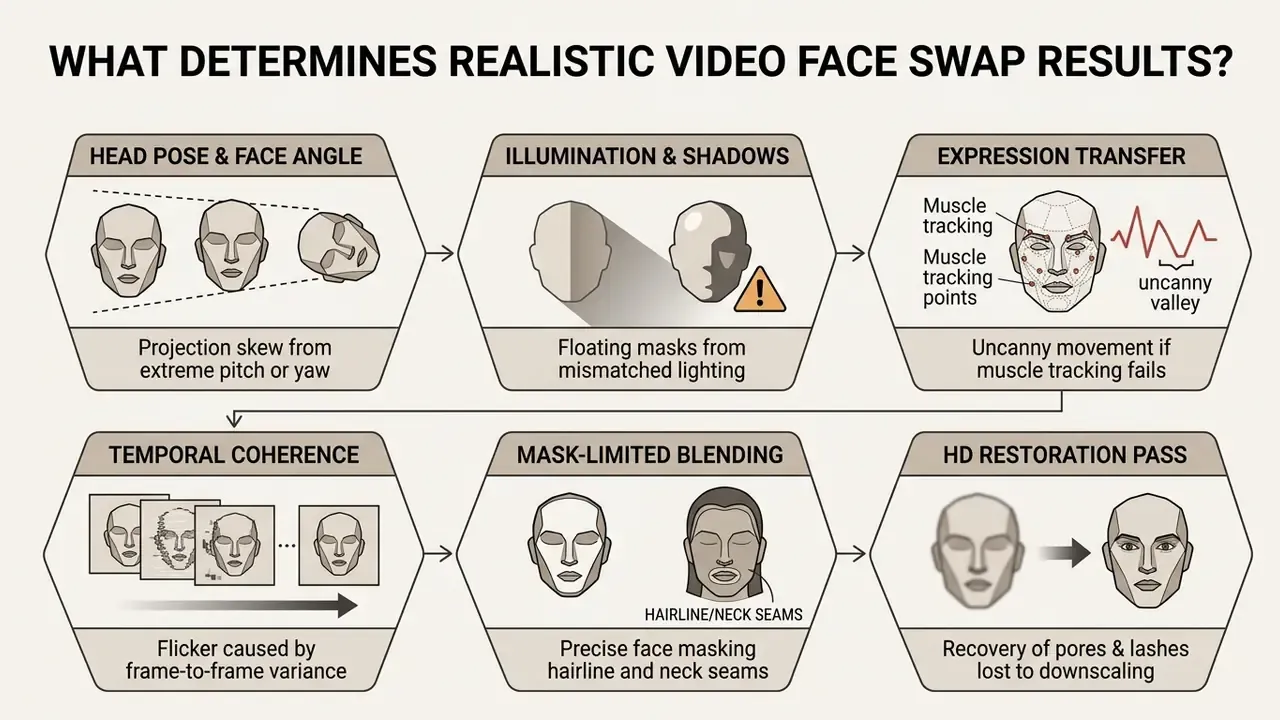
Recent research converges on one conclusion. Photorealism improves when motion and appearance are decoupled, 3D consistency is modelled explicitly, temporal coherence is enforced across frames, and blending stays confined to a tight spatial mask.
Face Angle, Lighting and Facial Features
A severe mismatch between source image pose and target face angle reduces identity fidelity and introduces boundary artifacts. Non-frontal angles, harsh directional shadows, and extreme facial expressions remain the primary failure points for identity transfer networks.
«CASIA FaceSwapping includes controlled variations of pose, illumination and demographic attributes to measure the robustness of face-swapping methods.»
That methodology matters for tool selection. A benchmark that varies pose and lighting in controlled increments tells you where a model breaks, not merely that it scores well on average.
When the source face is lit from the front and the target video features strong side lighting, better models recalculate gain and bias maps to match ambient shadows. It is the same mechanism used in high-fidelity AR and VR face tracking, where gain and bias maps are explicitly conditioned on lighting, head pose, viewpoint, and expression. Inferior engines skip that adjustment, and you get the pasted-on mask effect everyone recognises instantly.
Expressions, Motion and Lip Sync in Video
Realistic results require the swapped facial mask to mirror the original speaker's expressions, eye blinks, and lip movements in exact synchrony. Audio-driven and landmark-conditioned modules capture phonetic changes and keep the source identity's mouth aligned with the underlying speech track. Systems such as SPACE use dedicated eye-landmark sets (52 points) for blinks and gaze, while diffusion pipelines like HighSync run a temporal motion module across 12-frame sequences to stabilise 512×512 talking-face output.
«The audio-driven Wav2Lip method yields high AUC when detecting several face-swap deepfake families, but drops to AUC 0.380 on FaceSwap, because expression artefacts differ.»
The practical takeaway is that lip-sync artefacts and identity-swap artefacts are different failure signatures. A pipeline that nails mouth articulation can still leak identity inconsistencies. This is precisely why temporal motion modules operating across 12 to 24 frame windows reduce spatial jitter far more effectively than isolated frame-by-frame inference.
Single and Multiple Face Swap in Group Videos
Processing group videos requires individual face detection, tracking, and identity mapping for every subject in the frame. Single-face swapping carries modest computational overhead. Lightweight mobile models have been reported at 0.50M parameters, 0.33G FLOPs per 224×224 frame, and 26 FPS on a smartphone, whereas heavier video systems reach 97.4G and even 2440G FLOPs per frame. Multi-face execution multiplies that cost roughly linearly with each added target.
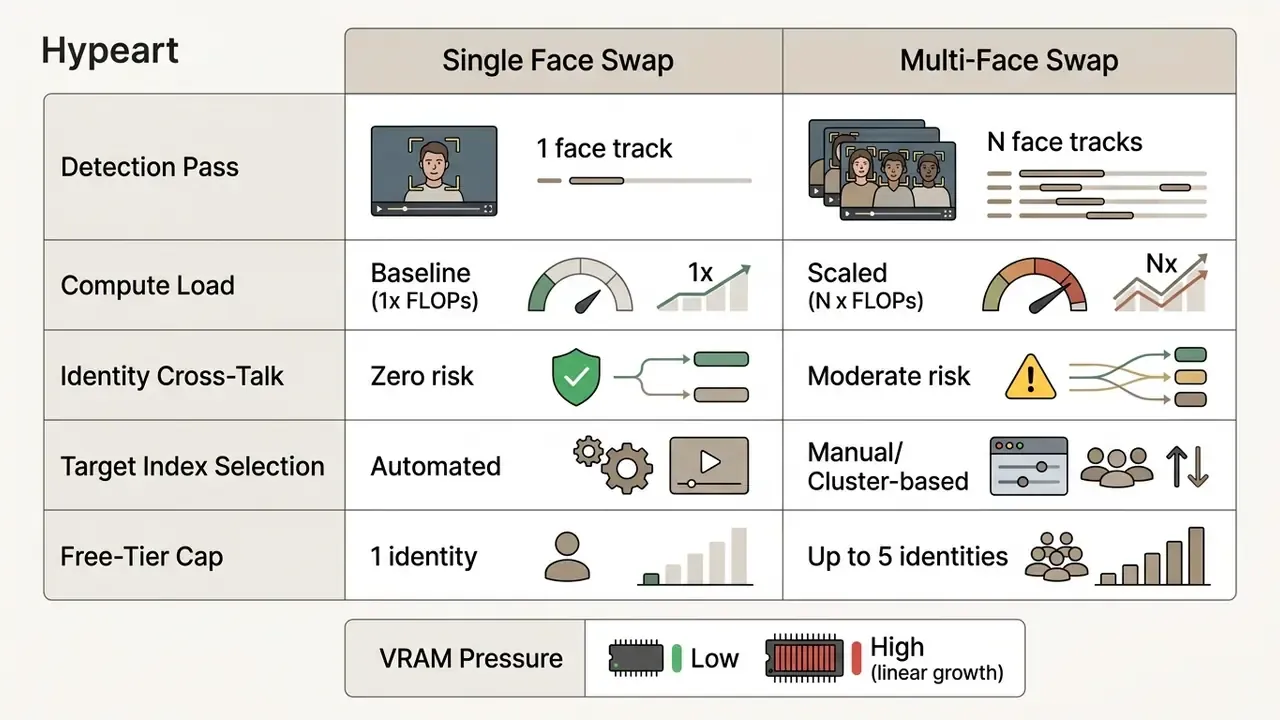
«The system groups the faces of one person across frames by measuring the distance between face vectors and applying a weighted moving average to maintain identity consistency.»
Clustering like that prevents target swapping errors when subjects cross paths or momentarily turn away from the camera. Note the hard commercial boundary, too: browser-based free tiers commonly cap concurrent replacement at up to 5 distinct identities per frame, specifically to avoid GPU VRAM overflow on shared infrastructure. Peer-reviewed group-video methods go further, selecting candidate source faces by pose and expression similarity and partitioning tracks temporally for consistency.
Post-Processing: HD Face Enhancement and Upscaling
Low-resolution targets often produce pixelated facial overlays, the single most common complaint about free tools. Advanced online pipelines therefore integrate post-processing restoration modules (CodeFormer or GFPGAN-class face restorers) immediately after the inpainting stage. These neural restorers synthesise missing micro-textures such as eyelashes, skin pores, and lip detail, then upscale the replaced facial mask to 1080p or 4K before blending it back into the original frame. Goodbye soft patch around the nose and eyes.
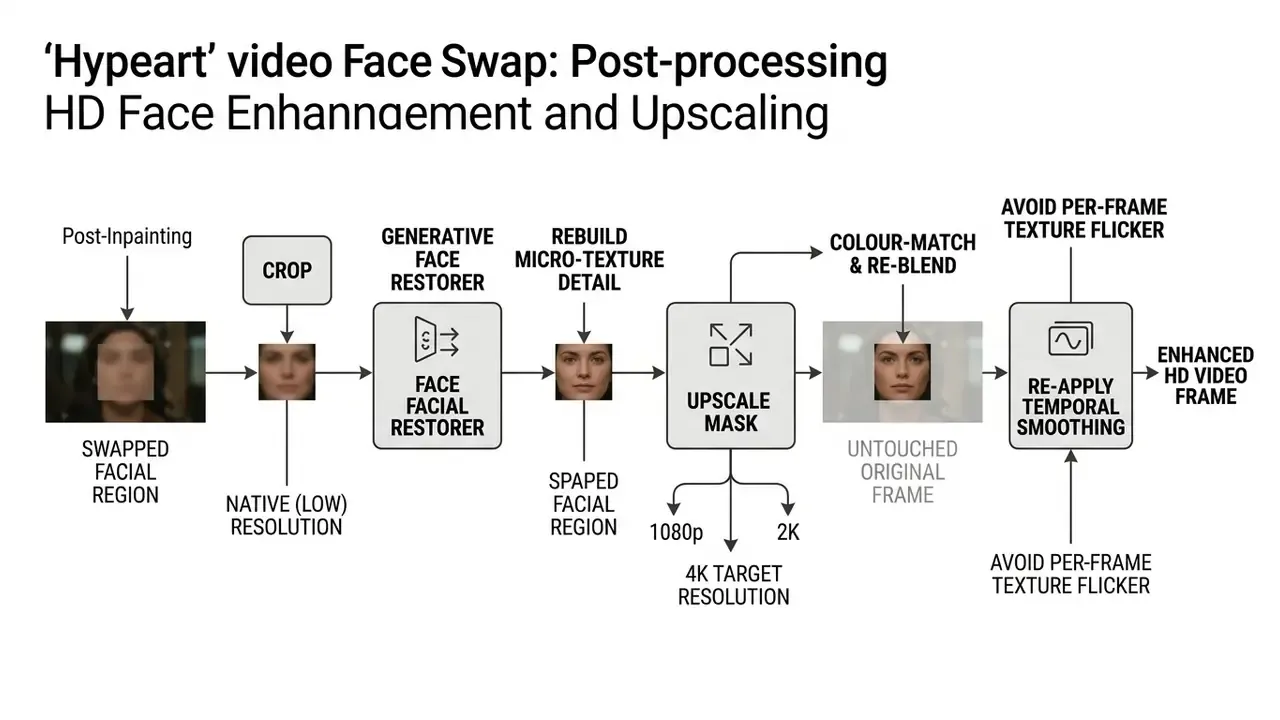
Two practical caveats. First, restoration is generative. Pushed too hard, it "beautifies" the face and shifts identity away from the source embedding, which degrades the ID-retrieval metric. Second, HD enhancement is a separate inference pass per frame, so enabling it usually multiplies render time. That is exactly why several platforms expose it as a toggle labelled something like "Enhance Face (HD)" and reserve 2K or 4K output for paid tiers.
Free Video Face Swap: No Sign Up, Limits and Watermarks
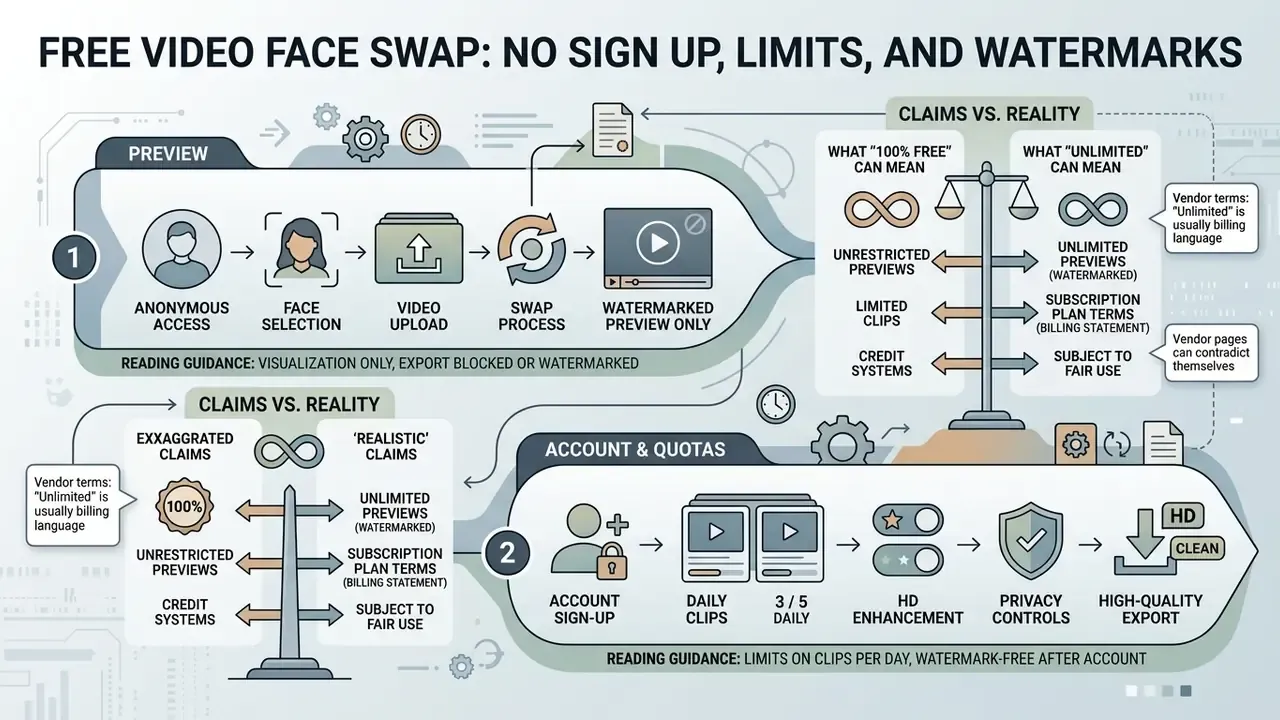
Free video face swap platforms operate under distinct freemium constraints, from unauthenticated preview tiers to daily clip quotas and watermarked exports. Anyone evaluating a no sign up service must separate basic functional access from production-grade capability. Comparable patterns across free AI video generators show the same three-lever model: credits, duration, export quality.
| Feature Category | Free / No Sign Up Tier | Paid / Premium Tier |
|---|---|---|
| Account Requirement | Anonymous / no registration | Registered user account |
| Max Clip Duration | 5 to 30 seconds per run (commonly 10 to 15 s) | 60 s to 30 minutes / full length |
| Export Resolution | Standard definition (480p / 720p) | High definition (1080p / 2K / 4K) |
| Watermark Status | Visible overlay on many video tiers | Watermark free export |
| Faces Per Frame | Up to 5 concurrent identities | Extended multi-face tracking |
| Batch Processing | Usually unavailable | Bulk multi-file queues |
| HD Face Enhancement | Optional, sometimes credit-gated | Included, higher upscale ceiling |
| Processing Priority | Standard public rendering queue | High-priority GPU allocation |
| Data Retention | 2 to 24 hours typical | Configurable / account history |
| Commercial Rights | Personal / educational use only | Full commercial license granted |
Every row above deserves one line of reading guidance. Duration and resolution caps decide whether the output is publishable at all. Watermark status decides whether it is publishable without a paid upgrade. Faces per frame and batch availability decide whether the tool scales past a single experiment. Retention and commercial rights decide whether your legal and privacy teams will sign off. Read the vendor's own terms for each line, because marketing pages and FAQs frequently disagree.
Market context matters when you weigh reputational risk alongside feature limits.
«Analysis of 17,720 Reddit posts found 47.0% expressed positive sentiment toward deepfakes and 36.8% negative, while abuse in adult content drew 47.5% negative sentiment.»
In plain terms: audiences are broadly curious about face-swap creativity and sharply hostile to non-consensual applications. That distinction should shape how any brand publishes synthetic media.
What "100% Free" and "Unlimited" Can Mean
Claims like 100% free face swap video & photo online, or unlimited face swap, usually refer to unrestricted web access rather than uncapped computational output. In practice, platforms enforce backend rate limiting through standard rendering queues, maximum clip lengths (often 10 to 30 seconds), or daily generation credits.
Publicly documented vendor terms show that "unlimited" is typically a billing statement, not a capacity statement. Documented examples include unlimited generations that "run in the standard queue" while credit-based jobs use a priority queue, plans whose maximum clip length is fixed at 8 or 15 seconds, and resolution ceilings of 480p or 720p on free access. Where a platform does not publish throttling rules, treat concurrency and bitrate limits as undisclosed rather than absent. This requires platform-specific verification in the service's own terms before production use.
Vendor pages also contradict themselves, which is a useful diagnostic. One competitor's landing page advertises videos "up to 5 minutes long without any cost" while its own FAQ claims "up to 30 minutes of video content completely free". Another documents 20 seconds per day in one place and 15 seconds per day in another. When duration claims conflict inside a single site, assume the smaller number applies to the anonymous tier. It almost always does.
Watermarks, Download Access and Output Quality
Free tiers frequently embed a visible digital watermark in the exported video frame to offset processing costs and drive attribution. Unlocking watermark free downloads and full HD resolution normally means a paid subscription or premium processing credits.
Export mechanics vary by vendor rather than following one standard. Documented patterns include clean exports up to Ultra HD 3840×2160 at 60 fps on the free desktop tiers of some editors, transcoding presets where 540p maps to roughly 1000 kbps and 720p to roughly 1800 kbps while 1080p sits near 2500 kbps, and platforms where the watermark is burned in at render time, meaning earlier exports cannot be cleaned retroactively. They can only be re-rendered.
When comparing how different AI utilities manage export permissions, watermark policies, and resolution ceilings, look sideways at adjacent categories. The same freemium logic governs free photo editors, general-purpose online photo editors, and free AI video generators. Creators publishing to social platforms can align export specs with the requirements documented in our YouTube video editor workflow guide.
Can You Use AI Face Swap Videos for Commercial Use?
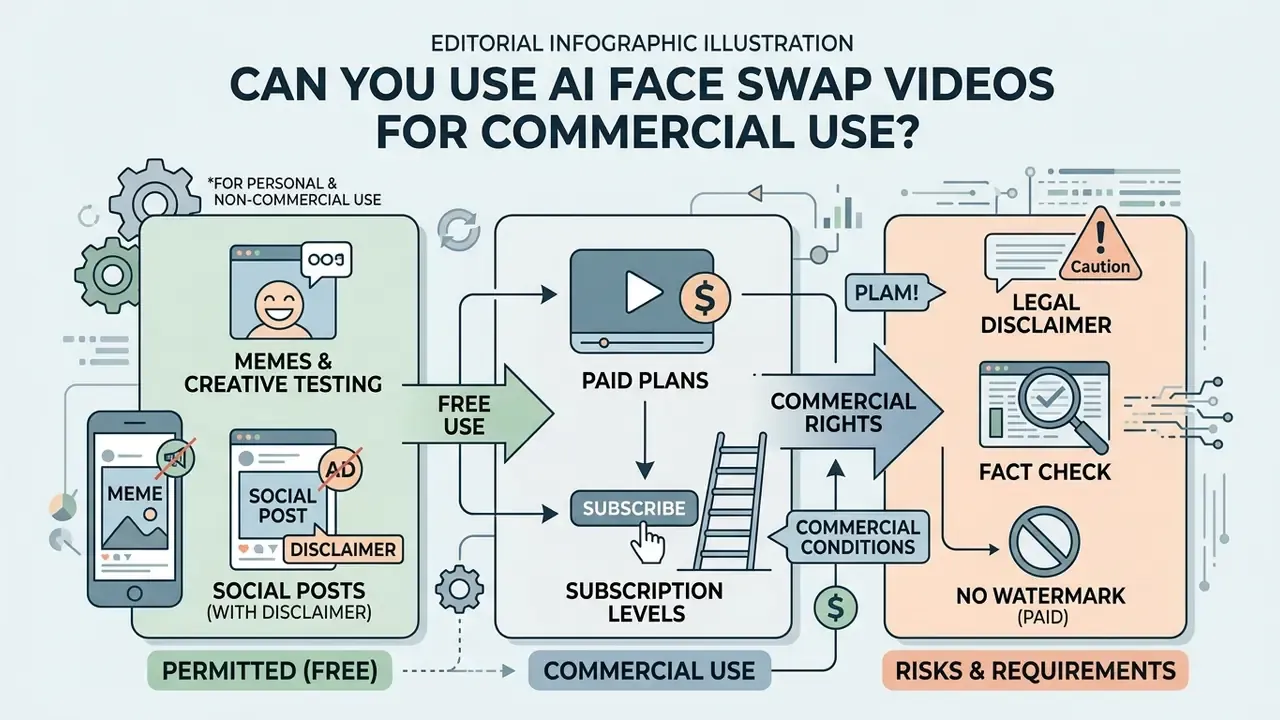
Using AI face swap videos in commercial advertising, branded content, or monetized media requires explicit personality rights clearances, trademark compliance, and adherence to platform terms of service. Most free-tier platforms restrict output usage to personal, non-commercial applications, in plain text, in their terms.
«Trademark law, specifically the Lanham Act's false endorsement provisions, applies to deepfake videos depicting public figures promoting goods without consent.»
Paid Plans and Commercial Use Conditions
Paid subscription tiers generally grant commercial usage rights for generated outputs, provided the source inputs do not infringe third-party publicity rights or copyrights. Terms differ in legal construction. Some platforms assign "all right, title and interest" in the output to the user. Others grant a non-exclusive commercial licence, a distinction that becomes material the moment the output is resold or sub-licensed.
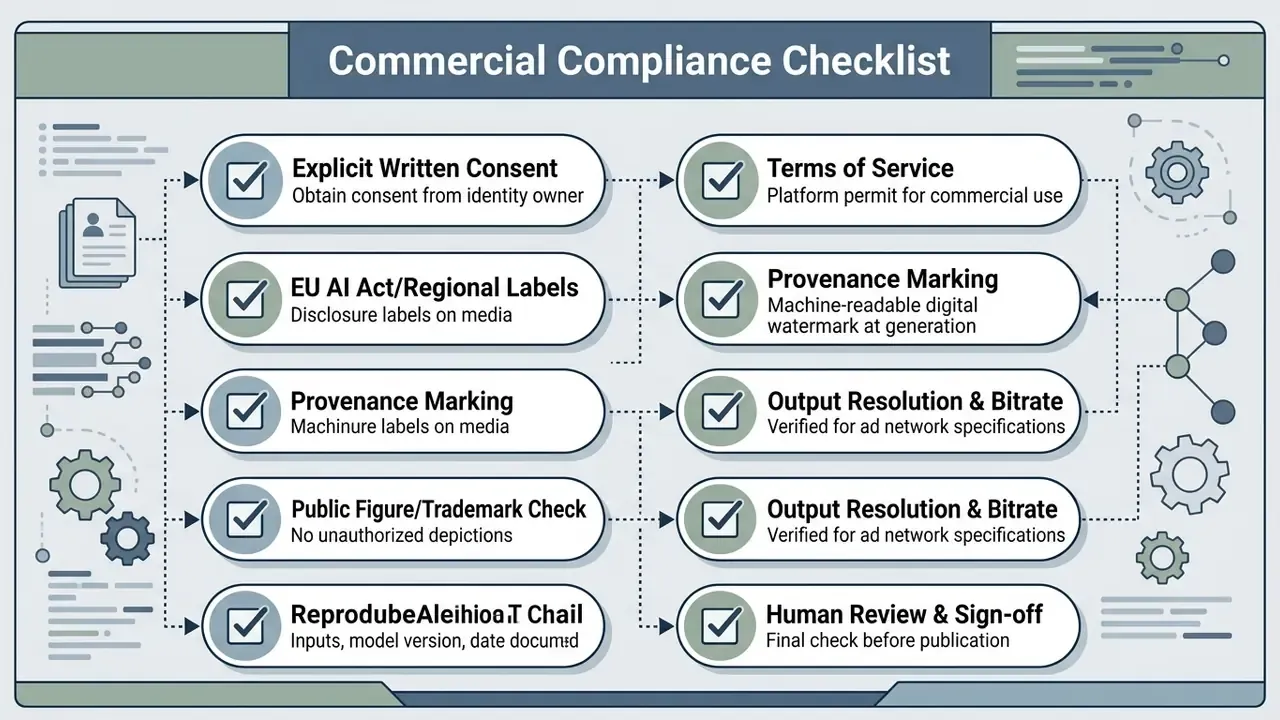
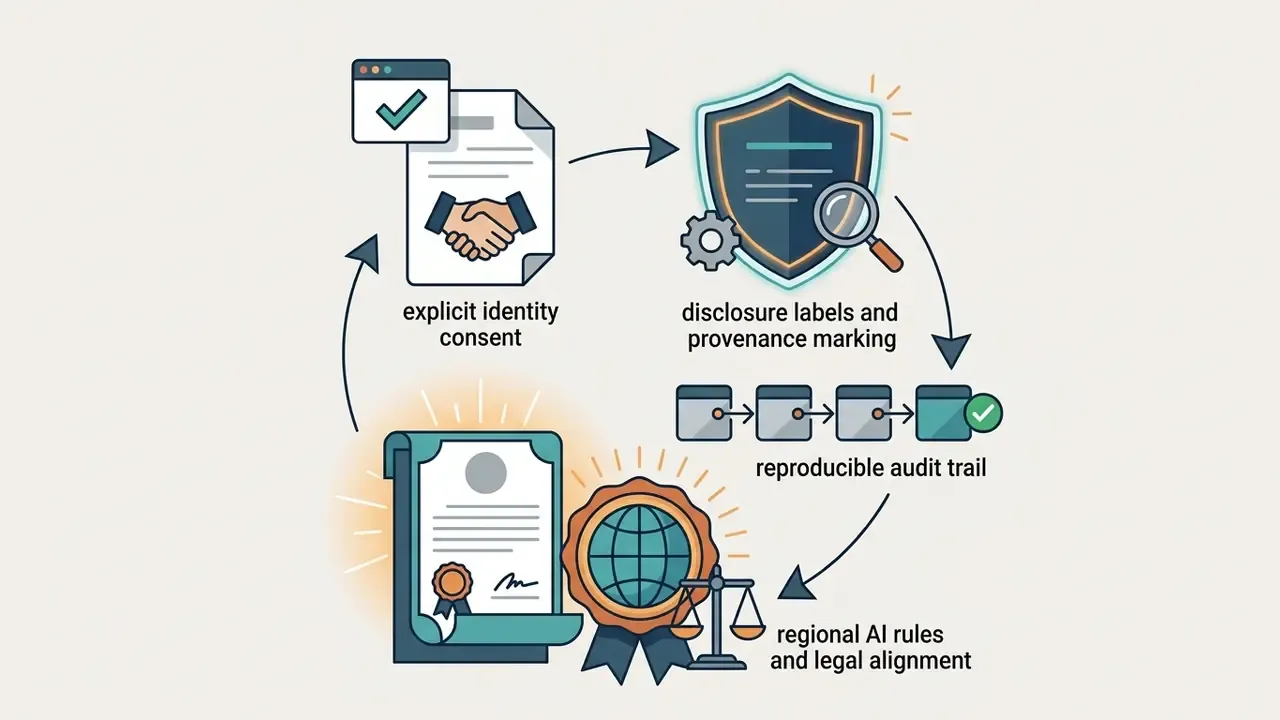
For regulated organisations, the last two lines are the ones auditors ask about first. Model-risk frameworks in the spirit of SR 11-7 expect a reproducible record: which model version produced which asset, what inputs were used, who approved the output, and where consent documentation lives. Treat a face-swap render like any other model output. Versioned, logged, reviewable, with a named owner.
To see how commercial permissions are categorized across generation tools and creative suites, consult the AI Media Commercial-Use Hub. Cost modelling for rendering volume can be sketched with our interactive calculators.
Privacy, Shadow AI and Safe Use of an Online Face Swap Tool
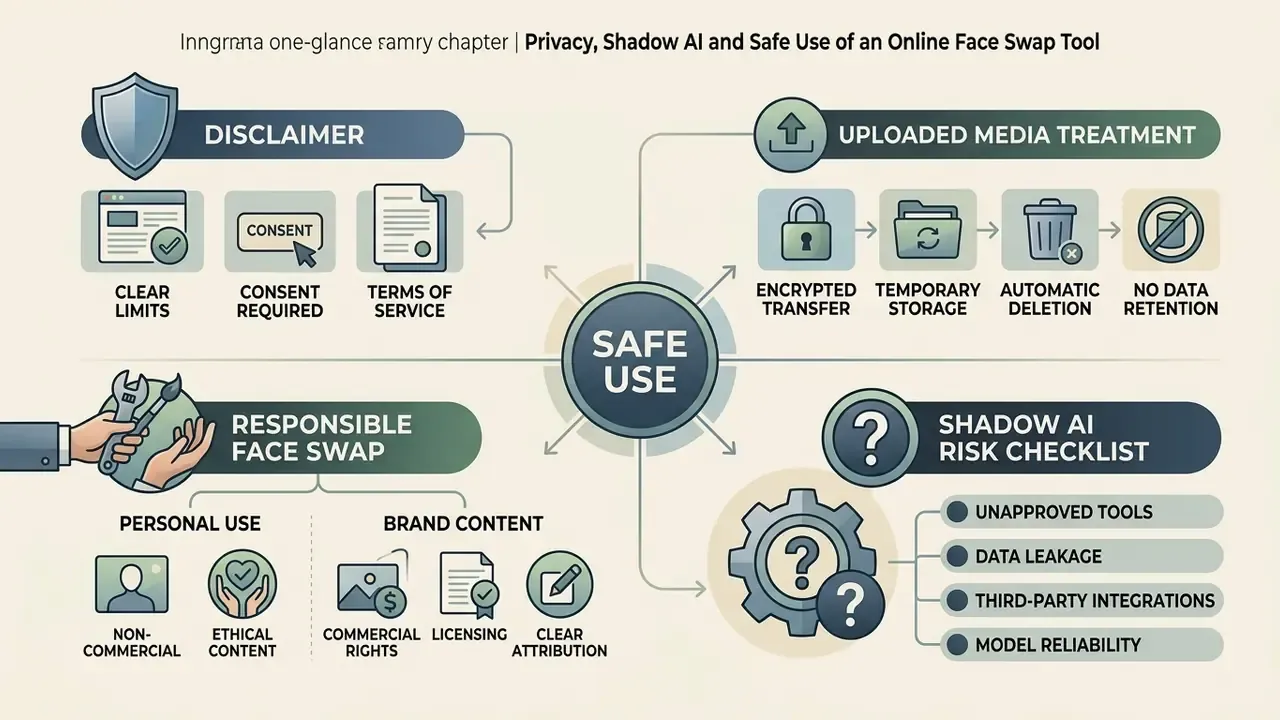
Online face swap tools ask users to upload sensitive biometric data. That makes retention policy, cloud security posture, and ethical safeguards the decisive selection criteria, not output quality. Uploading unencrypted personal media to third-party servers carries inherent privacy and identity exposure risk.
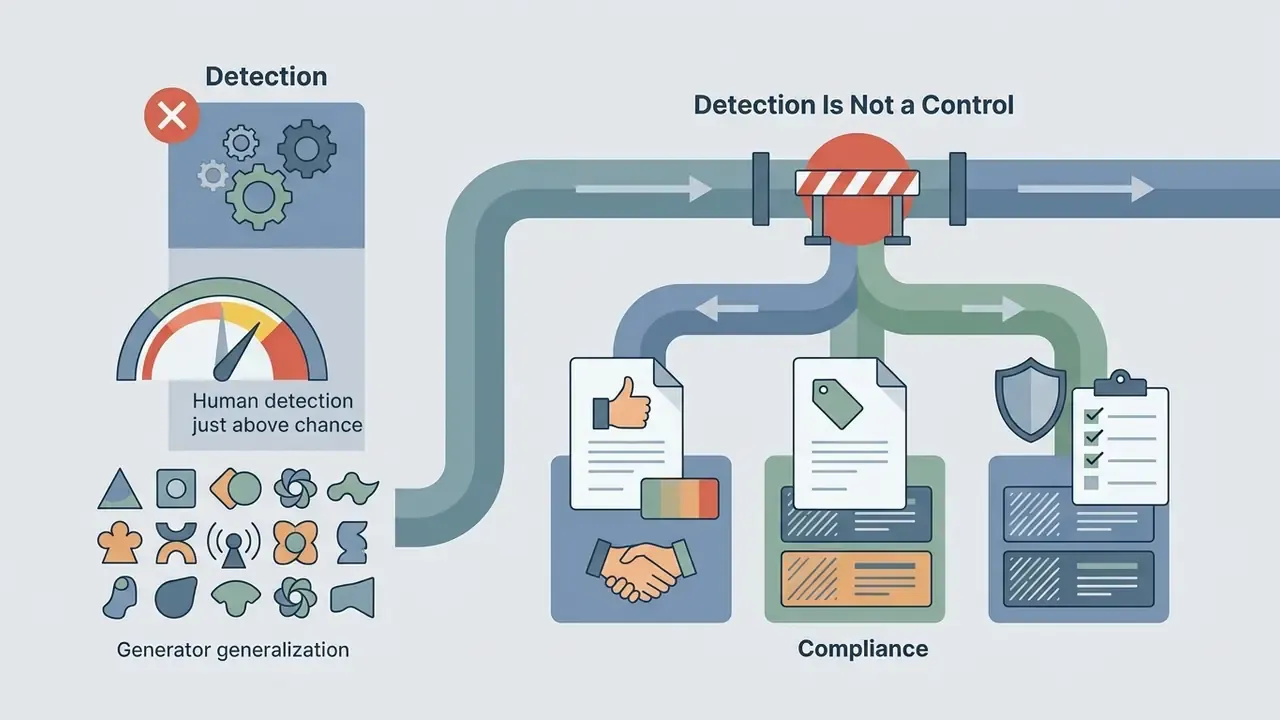
«A systematic review found that untrained participants often detect deepfakes only slightly above chance, especially with high-quality video and unfamiliar faces.»
That finding is the core argument for procedural controls over eyeball verification. If humans cannot reliably spot a swap, organisations must lean on consent records, provenance marking, and upload governance instead.
What Happens After You Upload Photos and Videos?
Shadow AI Risk Checklist for Security and Model-Risk Teams
Free, no-sign-up face swap tools are a textbook Shadow AI vector. No procurement, no DPA, no logging, and employee-supplied biometric data. Use the checklist below as an internal control template.
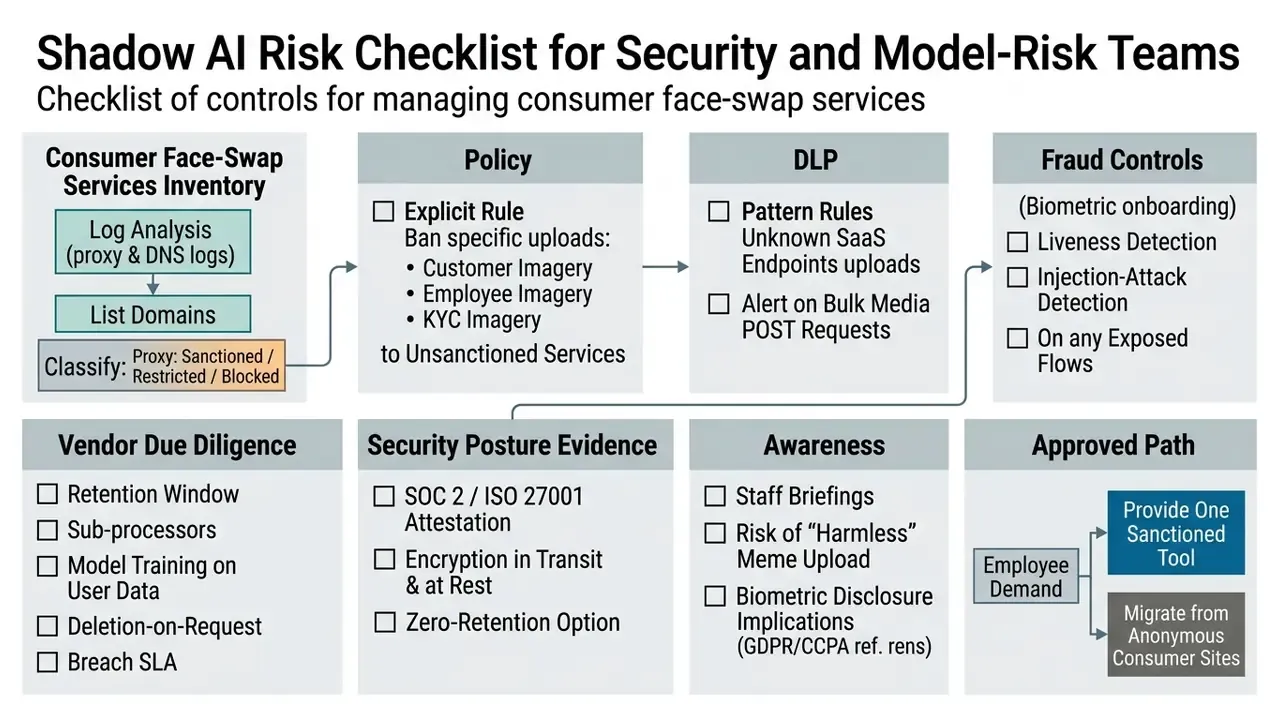
One caveat on the last line, and it is the one most programmes get wrong. Blocking alone rarely works. Demand does not disappear, it relocates to a personal device, which removes your logging entirely. Give people one approved path.
Responsible Face Swap for Personal and Brand Content
Ethical deployment demands informed consent from depicted subjects, strict avoidance of deceptive or non-consensual content, and clear attribution. Partnership on AI's responsible synthetic media practices call for both informed consent and viewer-facing disclosure: labels, context notes, watermarking, or disclaimers whenever synthetic elements are introduced.
«The BioDeepAV study showed that detectors trained on known datasets suffer a significant accuracy drop when tested on new deepfake video distributions.»
Because detection generalises poorly, disclosure at creation time is more reliable than detection at consumption time. That is exactly the logic behind machine-readable provenance requirements.
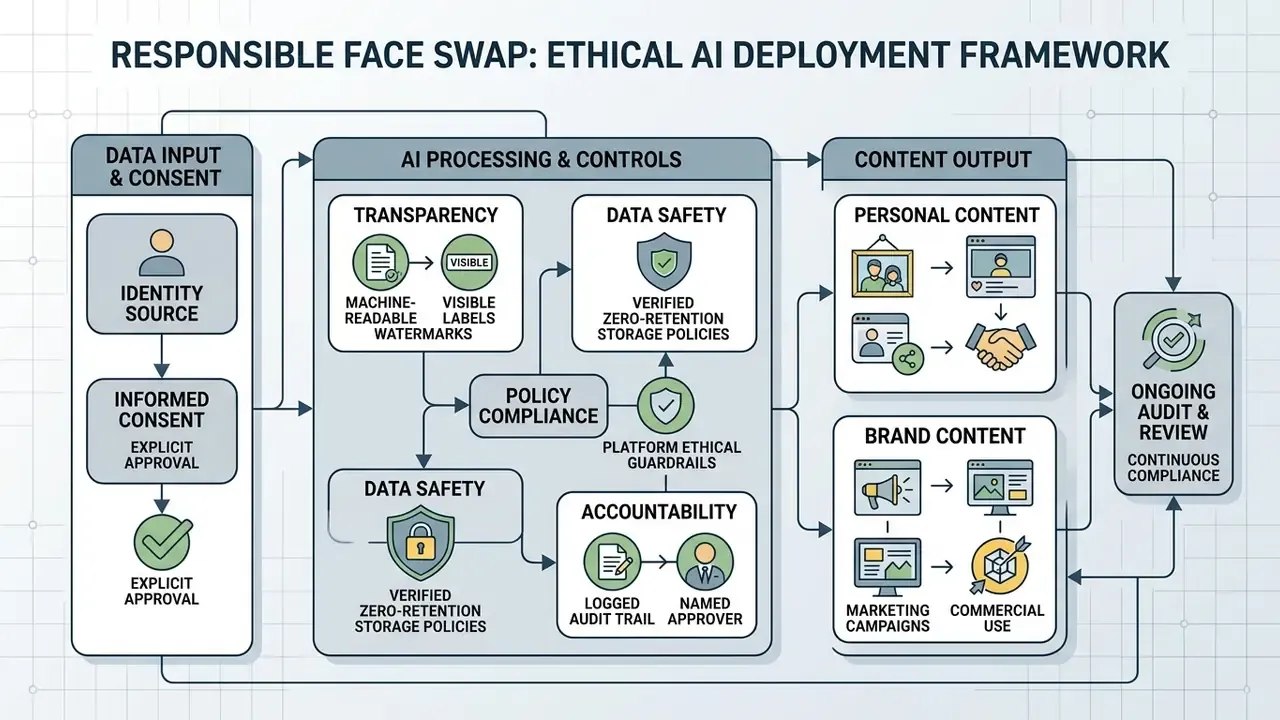
Publishing synthetic visuals without consent breaches both ethical standards and platform policy. Explicit or sexualised synthetic generation is heavily regulated and, in a growing number of jurisdictions, criminalised. An audit of 155 consumer face-swap apps found that roughly 70% shipped without technical safeguards against non-consensual nude generation. Enterprise policy should therefore treat guardrail evidence as a hard vendor requirement, not a nice-to-have.
Organizations tracking legal precedent around unauthorized AI media can monitor the AI Litigation and Case Timelines database. Governance leads comparing model-level permissions across suppliers can borrow the methodology from our best AI art generator comparison.
FAQ About Free AI Video Face Swap
Can I Use AI Video Face Swap on a Phone?
Yes. Video face swap tools are reachable on smartphones through mobile web browsers (PWAs) or native applications, including distributed APK builds. Mobile web interfaces process swaps on cloud servers, so no local GPU power is needed. Native builds can run lightweight models directly on the device's Neural Processing Unit, cutting server data transmission at the cost of higher battery and memory consumption. Comparative studies report that native apps consume noticeably less energy, CPU, memory, and network traffic than web equivalents under sustained processing loads, while PWAs tend to render the first screen faster. Readers weighing platform trade-offs can review the best AI video generators comparison and the Google Veo implementation guide for API-side capacity planning.
Which Video and Image Formats Can I Upload?
Most online face swap generators support standard web video containers: MP4, MOV, AVI, WEBM. Static image support usually covers JPG, PNG, and WebP. For animated edits, tools accept GIF uploads. Input file sizes on free web platforms are commonly capped between 30 MB and 500 MB per clip, and some services reserve a 1 GB ceiling for paid tiers only.
«FakePartsBench records face-swap video resolutions from 512×512 to 1280×704, frame rates of 8 to 30 FPS, and clip durations of 2 to 14 seconds.» FakePartsBench: Benchmark for AI-Generated DeepFakes Including Faceswap (2025). https://arxiv.org/abs/2503.09647
How Long Does AI Video Face Swap Processing Take?
Rendering time depends on clip duration, frame rate, target resolution, HD enhancement settings, and the number of faces swapped. On cloud GPU infrastructure, a standard 10-second, 30 FPS single-face clip typically takes 15 seconds to 2 minutes. Queue waits on free tiers stretch total delivery time during peak server usage.
«The E-TAD method processes 100 frames in roughly 40 seconds on research hardware, about 0.4 seconds per frame in offline analysis.» Texture and Artifact Decomposition for Deepfake Detection (E-TAD), Expert Systems with Applications (2024). https://www.sciencedirect.com/science/article/pii/S0957417424009692 Published per-frame figures vary wildly with method and hardware. Real-time portrait swapping has been demonstrated at 18 ms GPU time per frame (55 FPS end to end). A 2011 video face-replacement pipeline needed roughly 20 minutes for a 10-second, 30 FPS clip. A 2025 diffusion editing method took about 6 minutes for 300 frames on an A100. Treat vendor speed claims as hardware-dependent, always.
How Fast Is the AI Face Swap Generation in Practice?
Static photo swaps finish in 3 to 5 seconds. Short video clips of 5 to 15 seconds at 720p or 1080p take 15 to 90 seconds on standard cloud GPU queues. Free tiers at peak usage add a 1-to-3-minute queue wait, and enabling HD face enhancement or multi-face tracking can double render time, because each adds a separate inference pass per frame.
How Many Faces Can Be Swapped at Once?
Consumer web tools typically support up to 5 distinct faces per frame on free tiers. Beyond that, GPU memory and identity-assignment complexity grow linearly, so extended multi-face tracking is generally reserved for paid or API tiers. Each additional face needs its own detection, alignment, swap, and blending pass.
Can I Run a Batch Video Face Swap for Free?
Rarely. Single-file swaps are the standard free entry point. Batch video face swap, where you upload multiple videos or photos in one click and apply a consistent target identity, is almost always credit-gated, because batch jobs multiply GPU minutes. If a free service advertises unlimited batch processing, verify the per-day quota and the export resolution before you plan a production run.
Do Free Face Swap Videos Have a Watermark?
It depends on the tier and the media type. Several platforms deliver watermark-free photo swaps without sign-up while watermarking free video and GIF exports. Others remove watermarks only after registration or upgrade. Because some pipelines burn the watermark in at render time, an already-exported file usually cannot be cleaned. It has to be re-rendered on a paid tier.
Is AI Face Swapping Legal?
Creating face-swap content is generally lawful where content rights are respected and the depicted person consents. Deceptive deepfakes, non-consensual intimate imagery, and unauthorised commercial use of a real person's likeness are restricted or criminalised in a growing number of jurisdictions, and the EU AI Act adds mandatory disclosure plus machine-readable marking obligations. Legality is jurisdiction-specific. Consult local counsel for anything beyond private, consensual use. For platform troubleshooting and account questions, our dedicated support portal is the faster route.
Key Takeaways for AI Video Face Swap Evaluation
Limitations and Open Questions
A little honesty here. Vendor-published limits shift monthly, and several figures in this guide are documented in terms of service that carry no version history, so they cannot be independently reproduced later. Retention claims are rarely backed by third-party attestation. Detection benchmarks are published on research datasets, not on the specific model version a consumer site happens to run today. And the audience assumptions behind this guide remain hypotheses pending interviews and analytics.
What would change the picture? Enforceable machine-readable provenance at the generation layer, plus vendor attestation of deletion windows. Until then, control sits with the buyer, not the tool.
A safe next step for a regulated organisation is modest: inventory which face-swap domains already appear in your logs, pick one sanctioned tool with a published retention window, and document consent and approval for every published asset. No autonomy without evidence.
Appendix A: Revision Log and Superseded Wording
Retained for transparency and version traceability. The main text carries the updated, source-verified versions.
| # | Superseded wording (earlier revision) | Reason for update |
|---|---|---|
| 1 | "A 2026 study on high-fidelity face swapping (CASIA FaceSwapping Benchmark) notes that non-frontal angles, harsh directional shadows, and extreme facial expressions represent the primary failure points for identity transfer networks." | No URL, no methodology, no metrics. Replaced with a cited quote describing the benchmark's controlled pose, illumination and demographic variations. |
| 2 | "Research published in IEEE Transactions on Pattern Analysis and Machine Intelligence indicates that temporal motion modules operating across 12-to-24 frame sequences significantly reduce spatial jitter compared to isolated frame-by-frame inference." | Unverifiable citation (no article title or identifier). Replaced with the DF40 benchmark quote (AUC 0.380 on FaceSwap) plus named 12-frame temporal-module implementations. |
| 3 | "Responsible platforms process these assets in transient memory and delete raw uploads within a defined timeframe (e.g., 24 hours)." | Imprecise. Updated to a verified 2-to-24-hour retention window, with regulator guidance (EDPB, NIST, PDPC, Council of Europe) added. |
| 4 | "Services claiming unlimited video swap usually throttle concurrent rendering tasks or lower export bitrates for non-paying users to manage server infrastructure overhead." | Unsupported generalisation. Reframed around documented vendor terms (standard vs. priority queue, 8 and 15 second caps, 480p/720p ceilings) and flagged as requiring platform-specific verification. |
| 5 | Outbound anchors to unrelated consumer generators (rap lyrics, rapper voice, quote generator, adult-content policy page). | Contextually irrelevant to video face swap. Replaced with topically adjacent resources on export limits, licensing, retention, and governance. |
About This Guide
This article is maintained by the AI Media research desk and reviewed for risk, privacy, and compliance accuracy by Marcus Hale, AI Governance & Model Risk Editorial Contributor.
Technical claims are sourced from peer-reviewed and preprint literature (arXiv, Springer, Wiley, Expert Systems with Applications), standards bodies (ISO/IEC, ICAO, NIST, EDPB, PDPC, Council of Europe), and published vendor documentation. Regulatory statements reference primary legal texts. Vendor-specific limits change frequently, so verify current figures in the provider's own terms before production use.
Explore additional technical definitions, model architecture breakdowns, and media governance standards in our comprehensive AI Media Glossary.
Social Posts, Memes and Creative Testing
Face swap content used for organic social posts, memes, and internal creative testing lets teams iterate quickly on visual concepts. Marketers routinely test different presenter identities in short-form video ads to measure engagement before committing to full production. Vendor documentation for ad testing shows face-swap variants measured against CTR, engagement, and conversion deltas. Meme-marketing studies from 2025 and 2026 report measurable lifts in brand engagement, recall, trust, and purchase intent among Gen Z audiences, which is why the format keeps reappearing in paid-social test matrices.
Distributing synthetic visual media on commercial channels without disclosing AI generation is the part that backfires. Saudi Arabia's SDAIA guidance for synthetic media in marketing requires documented consent plus clear disclosure and prohibits manipulative alterations of real events or statements. An FTC filing on deepfakes in advertising recommends provenance labels or watermarks and explicit disclosure of AI-generated or satirical content.
For creator workflows that pair synthetic visuals with synthetic audio or generated design assets, review how licensing is structured for AI voice generators and for platform suites such as the Canva AI generator. In both categories, the right to publish output commercially is tied to the paid tier and to the provenance of the input material, not to the tool itself. Same logic applies to an AI image generator output used inside the same campaign.