Last regulatory review: February 2026 (EU AI Act Article 50, FCC TCPA declaratory ruling, California SB 11). AI disclosure rules shift almost monthly. Re-verify platform terms before every paid campaign.
Executive summary
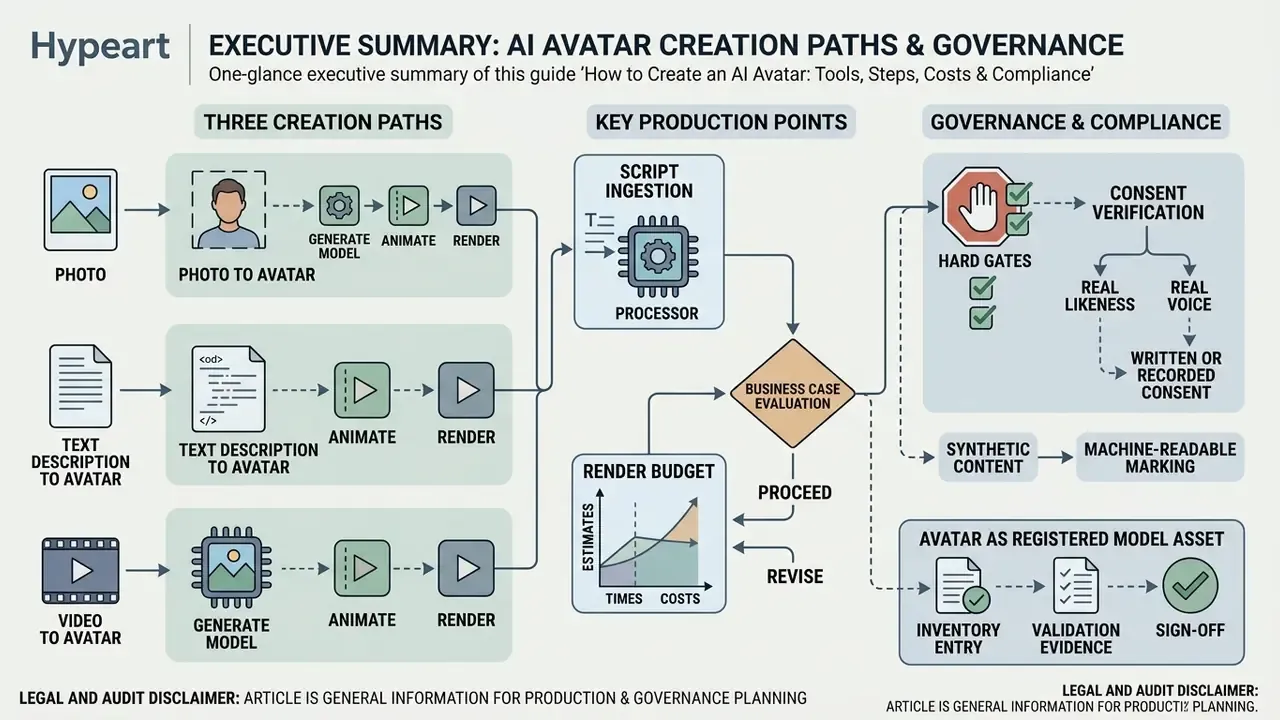
- Three creation paths. Photo-to-avatar (fastest, one 1080p+ portrait), video-to-avatar (highest fidelity, 10 to 20 minutes of reference footage), and text-to-avatar (maximum stylistic freedom, no source likeness).
- Render budget. Plan roughly 5 to 7 minutes of server processing per finished minute of 1080p/30 fps avatar video. Real-time streaming avatars respond in 0.17 to 0.40 seconds end-to-end.
- Script ingestion. Enterprise-grade platforms accept pasted text, PDF/DOCX uploads, and URLs, converting documents into speaker-ready scripts with phonetic normalization.
- Business case. Academic testing reports equal knowledge transfer versus human instructors with roughly 20% faster completion, while corporate teams report up to 80% lower cost per video minute, before control costs.
- Hard gates. Written or recorded consent for any real likeness or voice, machine-readable synthetic-content marking under EU AI Act Article 50, prior express consent for synthetic voices under the TCPA, and platform AI labels (TikTok, Meta, Google).
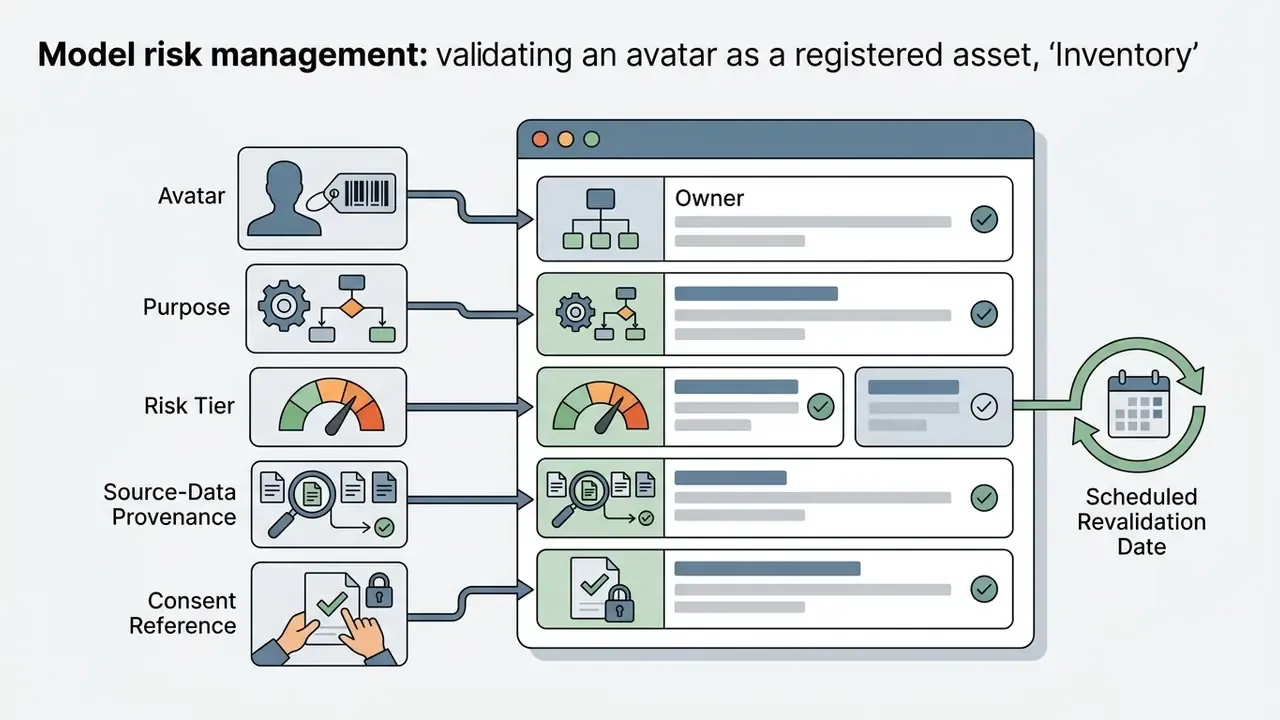
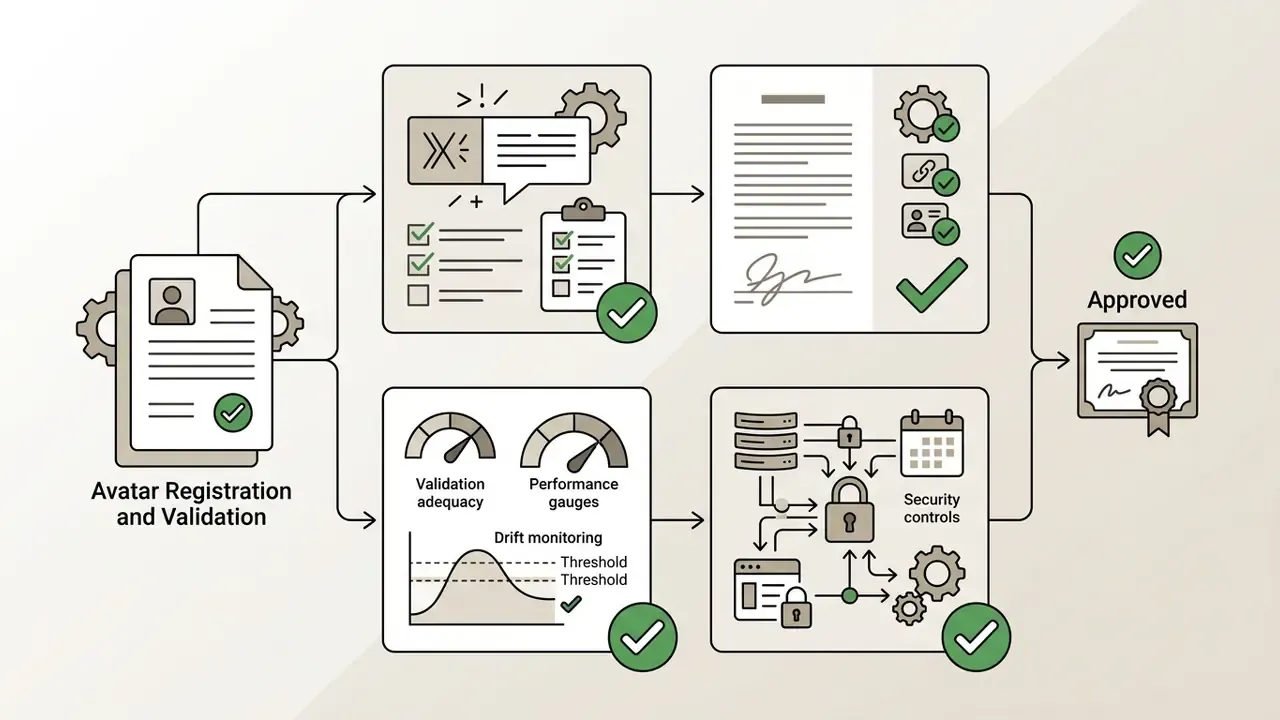
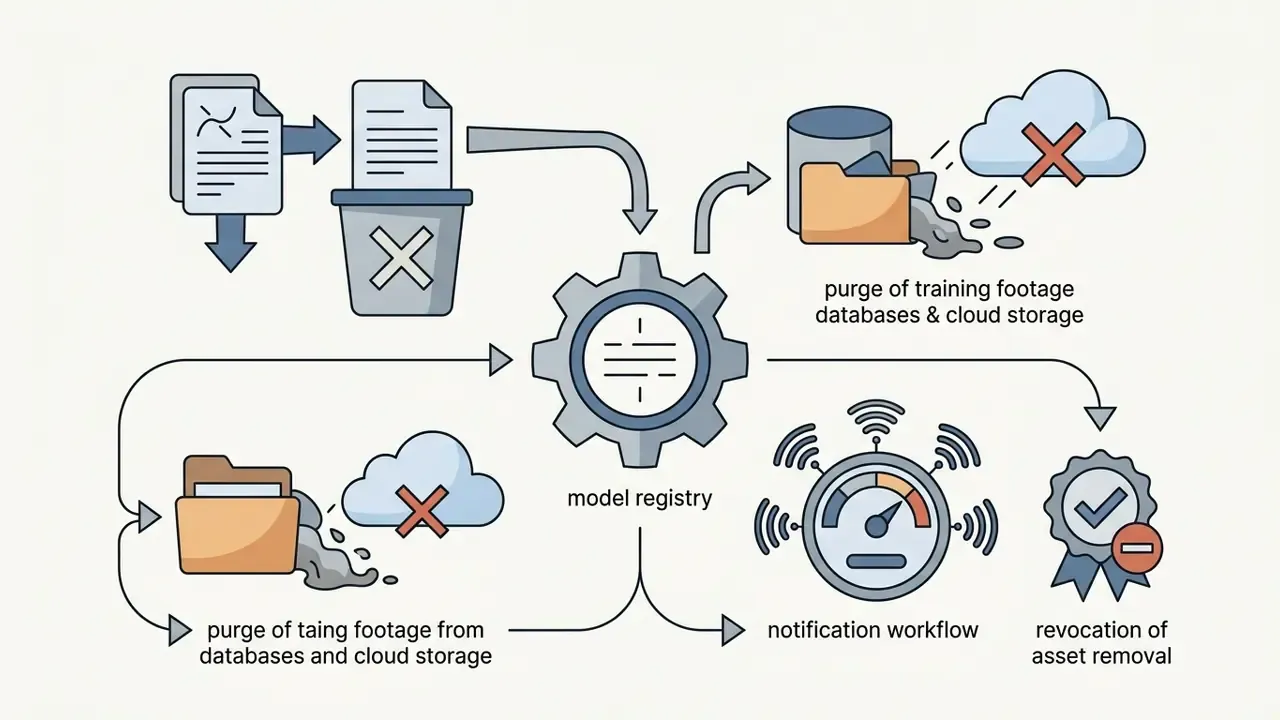
- Governance. Treat each avatar as a registered model asset: inventory entry, validation evidence, sign-off matrix, and a documented decommissioning path when consent is withdrawn.
Choose the AI avatar type for your goal
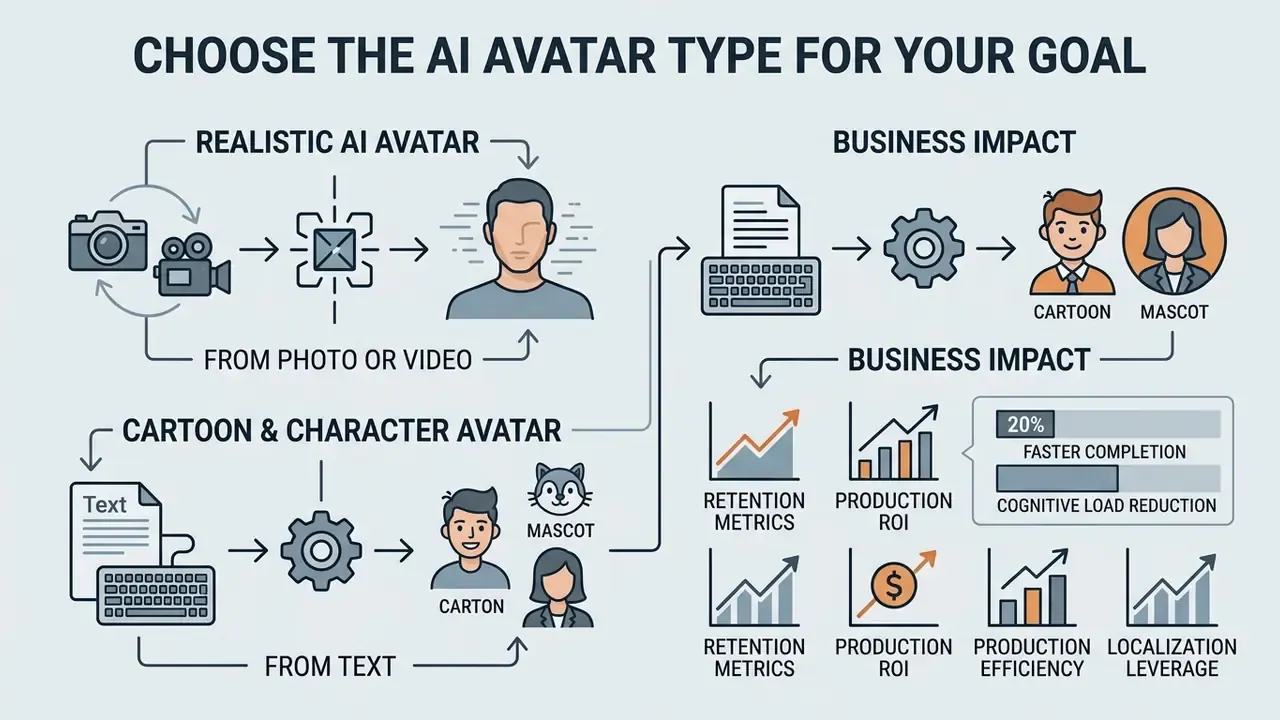
Selecting the right AI avatar type depends on the balance you need between identity fidelity, visual style, and regulatory control. Organizations deploy realistic photo or video avatars for formal presentations, while creative teams reach for stylized text-generated avatars when broad social media engagement matters more than gravitas.
Business impact: retention metrics and production ROI
«A study in 500 adult learners found no significant difference in engagement or retention between an AI avatar video and human instructor video. Viewers completed the AI version around 20% faster.»
- Cognitive load reduction: Animation-based presenters help reduce extraneous cognitive load, letting learners focus on key concepts during dense compliance or product training.
«AI avatars and animation-based video content can help to reduce extraneous cognitive load, allowing learners to focus on key concepts.»
- Production efficiency Corporate teams commonly report up to an 80% reduction in cost per finished video minute versus studio shoots with talent, lighting, and editing crews.
- Localization leverage A single master recording can publish across 160+ languages without a reshoot, converting recurring per-market vendor spend into a one-time render cost.
Risk-adjusted view: ROI models must net out control costs. Legal review of consent packages, periodic model validation, enterprise security tiers, watermark and labeling QA, plus residual-risk provisioning. The full formula sits in the appendix at the end of this guide.
Create a realistic AI avatar from a photo or video
Realistic AI avatars are built by mapping a high-resolution 2D portrait or monocular video onto 3D facial geometry using motion transfer models. Systems such as VASA-3D reconstruct 3D head representations from a single photo, preserving facial identity while synchronizing motion to input audio (VASA-3D, 2024).
«Using a single image often fails to provide enough data for a dynamic avatar, producing unnatural transitions and awkward motion.»
That limitation is the core argument for video-driven pipelines whenever an executive or spokesperson will appear repeatedly. Real-time streaming architectures point the same way: Livatar-1 achieves a lip-sync confidence score of 8.50 on the HDTF benchmark dataset with end-to-end latency of 0.17 seconds (Livatar-1, 2025).
«Livatar-1 reaches 141 frames per second throughput at 0.17 seconds end-to-end latency on a single NVIDIA A10 GPU.»
For enterprise applications, video-to-avatar pipelines capture 10 to 20 minutes of high-definition reference video to train a full digital twin. Microsoft's custom-avatar documentation uses roughly 10 minutes of footage for a proof-of-concept model and about 20 minutes for a production-grade one. The payoff is higher expression stability and fewer visual artifacts around the jawline compared with single-photo generation.
«On the HDTF dataset, Teller reports FID 21.35, FVD 173.46, and 0.92 seconds of generation time per second of video.»
Published figures like these give procurement teams a neutral baseline for interrogating vendor claims about realism and render speed. Useful when a demo looks flawless and the contract says nothing about it.
Situation: A financial technology firm needed to produce 50 compliance training modules monthly across four regional offices without repeatedly scheduling executive recording sessions. Action: The team established a video-to-avatar pipeline using 15 minutes of studio-recorded spokesperson footage to create a custom realistic avatar. Governance / Oversight Action: Before first publication, the avatar was registered in the firm's unified AI inventory, passed an internal Model Risk Review (input-data provenance, lip-sync validation evidence, drift monitoring plan), and was signed off jointly by Marketing, Legal, and Model Risk Management. Signed spokesperson consent, the consent verification video, and render logs were archived in the GRC system with a defined retention period and a revocation playbook. Result: Video production throughput increased by 400% while studio scheduling overhead dropped to zero, with uniform visual branding across all regional modules and reproducible audit evidence available for internal audit on request. Note: Composite, illustrative scenario. Figures are hypothetical and not a documented client result.
Generate a cartoon or character avatar from text
Cartoon and character avatars come from text descriptions run through diffusion-based 3D pipelines that translate natural language prompts into consistent geometry and textures. Frameworks like Text2Control3D combine geometry-guided diffusion models with depth map conditioning to produce viewpoint-aware avatar assets from prompts such as "a confident corporate presenter in a formal blazer" (Text2Control3D, 2024). Related work shows the field moving from static stylization toward motion-ready characters: Text2Avatar (discrete codebooks for attribute disentanglement), DreamAvatar (text-and-shape guidance), SEEAvatar (constrained geometry plus physically based rendering), and X-Oscar (animation-ready avatars).
To prevent identity drift across frames, multi-asset character systems employ iterative identity extraction. The Chosen One methodology extracts consistent latent features across generated sets, so creators can produce different avatar expressions while preserving facial structure (The Chosen One, 2024).
«A systematic review of 73 studies identified five key factors: avatar characteristics, trust, authenticity, engagement, and brand perception.»
Meta-analytic marketing studies show a split worth remembering. Stylized avatars generate high initial engagement and novelty on social media, yet realistic avatars perform significantly better when credibility and trust drive the campaign (Virtual Influencer Meta-Analysis, 2026). In regulated financial marketing, that usually settles the argument.
Table 1: AI Avatar Modality Comparison Matrix
| Avatar Type | Primary Input | Customization Level | Production Complexity | Typical Render Time (1 min output) | Optimal Use Cases |
|---|---|---|---|---|---|
| Realistic Photo Avatar | 1 portrait photo (PNG/JPG, 1080p+) | Medium (Fixed facial structure, variable voice/script) | Low (Instant rendering) | ~2 to 7 min, queue-dependent | Corporate explainers, localized news, helpdesk digital presenters |
| Custom Video Avatar | 10 to 20 min video footage + audio consent | High (Full digital twin identity) | High (Model training required) | Training: hours (one-time); render: ~5 to 7 min | Executive communications, brand spokespersons, scaled video ads |
| Cartoon / Stylized Character | Text description / prompt engineering | High (Full visual & artistic control) | Medium (Prompt iteration) | Seconds for stills; ~5 to 7 min for animated output | Social media content, creative marketing, brand mascots |
| Ready-Made Stock Avatar | Pre-configured library selection | Low (Script and background only) | None (Immediate deployment) | ~2 to 5 min | Internal documentation, rapid prototyping, generic training |
| Real-Time Interactive Avatar | Live STT input + LLM backend | Medium (persona prompt + avatar layer) | High (engineering integration) | 0.17 to 0.40 s per response (streaming) | Support kiosks, onboarding agents, in-product assistants |
Teams still shortlisting vendors can cross-reference this modality table with our comparison of AI video generators before committing to a pipeline.
Consent and regulatory guardrails (read before you build)
For regulated industries, compliance is a starting condition, not a final checklist. Before a single asset is produced, confirm these five gates:
Full statutory detail, case law references, and platform policy analysis appear later in the section on commercial safety.
- Consent on file.Written and video-recorded consent from every person whose face or voice is recreated, with a reasonably specific description of intended use, duration, and territory.
- Identity match.The person in the consent recording must be the same individual shown in the source footage. AI-generated source images are rejected by the moderation teams at major platforms.
- Machine-readable marking.Synthetic output must carry provenance metadata and, where applicable, visible disclosure (EU AI Act Article 50).
- Channel labels.TikTok requires creator-applied AI labels on realistic synthetic media. Meta and Google surface AI-use disclosures in their ad panels.
- Revocation path.Document how an avatar and its voice model are disabled, purged, and re-attested if consent is withdrawn (right-to-be-forgotten workflow), including retention periods for archived consent records in your GRC or MRM system.
Prepare the photo, text description, and brand assets
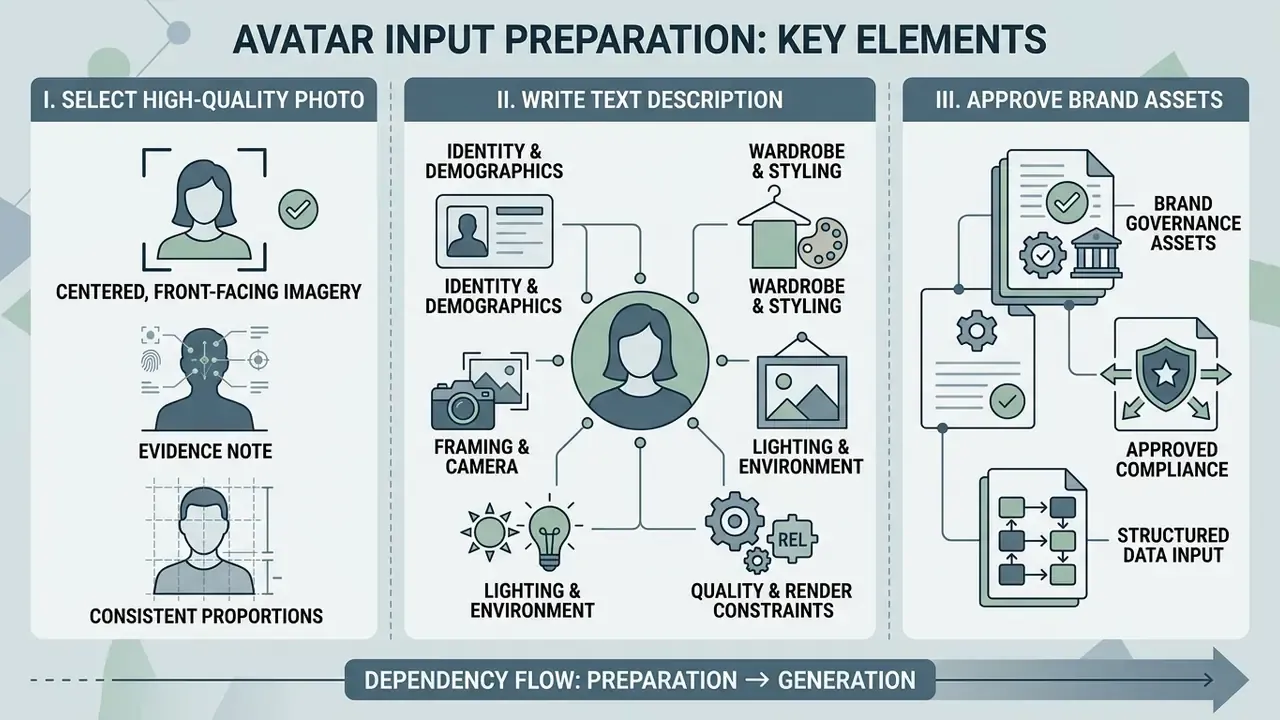
High-quality AI avatar generation depends on structured input preparation: centered front-facing imagery, precise text prompts, and approved brand governance assets. Teams assembling visual assets for backgrounds, overlays, and mascot concepts can start with AI image generators. Weak source assets degrade viseme alignment, increase identity jitter, and produce lip movements that never quite land.
Select a high-quality photo for an AI avatar
An optimal reference photo needs a front-facing angle, minimum 1080p resolution (preferably 1152×1152 or higher in 1:1 aspect ratio), even three-point lighting, and an unobstructed mouth line. Vendor specifications converge on similar numbers: HeyGen requires at least 1920×1080 for live avatars and recommends 3840×2160 at 30 fps for studio capture with side-face rotation limited to 30°; Anam accepts square images from 1152×1152 with hands out of frame; Zego's digital-human spec asks for 1080p minimum and 2K preferred. Shadows across the lower face, heavy motion blur, or severe head tilt beyond 30 degrees off-center distort the keypoint detection used by models like SadTalker and Teller (Talking Head Survey, 2026).
«The TalkVid dataset filters clips by motion stability, aesthetic quality, and facial detail, confirming how critical input quality is.»
«Speech-driven portrait animation quality is measured by lip-sync confidence together with natural facial expression and head motion.»
Practical vendor guidance aligns with the research. Masks, scarves, or a hand near the mouth degrade synchronization because the lip region simply is not observable, and simple or blurred backgrounds reduce boundary distortion around the face.
Write a text description for a custom avatar
A structured text prompt for a custom avatar must define physical identity, facial geometry, wardrobe, color palette, lighting, and negative safety constraints. Prompts built from isolated keywords tend to make diffusion models blend uncoordinated visual styles into something oddly generic.
To keep structural clarity across an ai avatar generator from text description, split prompts into five functional blocks:
«Text2Control3D uses depth maps and ControlNet to generate viewpoint-aware avatars from text descriptions such as "a confident corporate presenter in a blazer".»
- Identity and demographicsAge, ethnicity, gender, facial structure (for example, "a 35-year-old female executive with a sharp jawline and warm expression").
- Wardrobe and stylingSpecific attire and accessories ("wearing a tailored charcoal navy blazer over a crisp white button-down shirt").
- Framing and cameraLens parameters and orientation ("medium close-up portrait, 85mm lens, eye-level framing").
- Lighting and environmentIllumination setup ("soft studio three-point lighting, neutral blurred office background").
- Quality and render constraintsPhotographic standards ("8k resolution, photorealistic skin texture, sub-surface scattering, no distortion").
Vendor prompting guides use roughly the same field set, basic description, physical features, clothing and style, background, and mood or expression. So a single internal prompt template usually transfers across platforms with minor syntax edits. Handy when you migrate tools mid-quarter.
Pre-generation checklists (split by owner)
Checklist0 / 14
How to create an AI avatar step by step
Creating an AI avatar comes down to four primary steps: platform selection, asset ingestion (photo or prompt), appearance customization, and neural rendering. Run them in sequence and visual quality stays consistent. Assemble both checklists above before step 2, because missing consent and low-resolution sources are the two most common causes of a full pipeline restart.
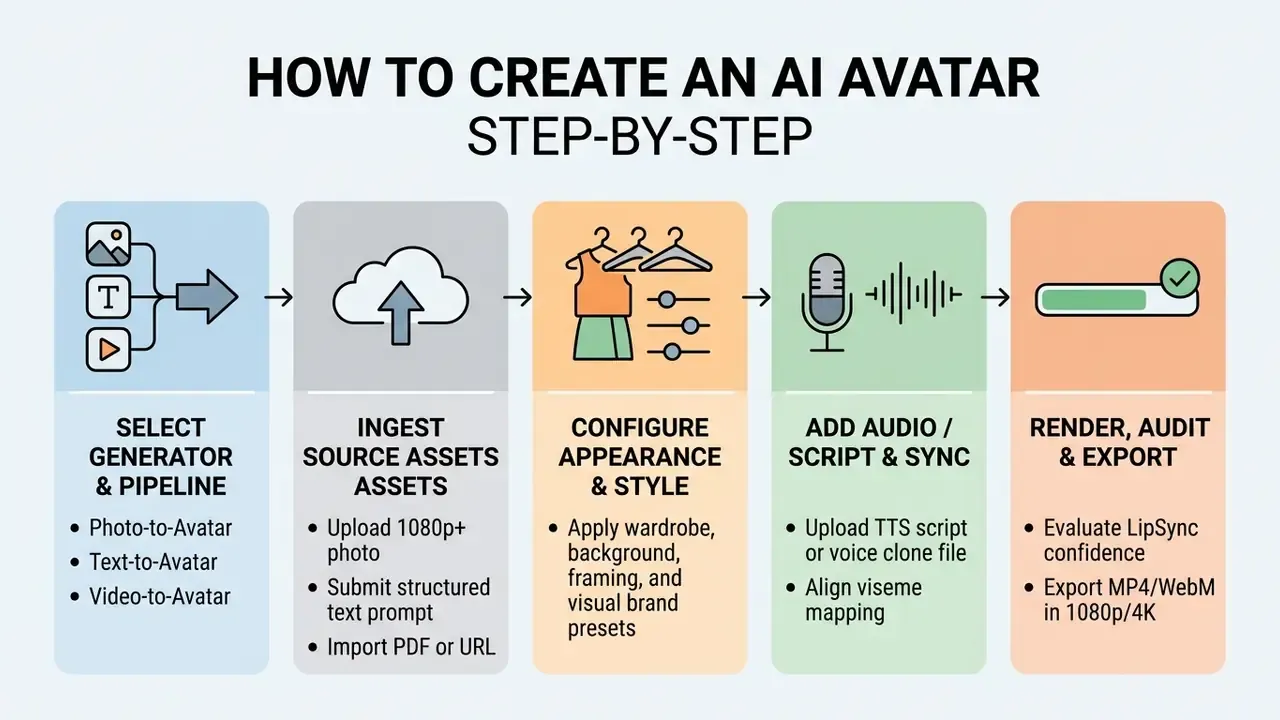
«Most systems follow a three-stage pipeline: portrait generation, a motion-driving mechanism, and editing techniques that improve visual consistency.»
Choose an AI avatar generator and creation method
Select an ai avatar creation software platform on three axes: input capability (photo-to-avatar, text-to-avatar, or video-to-avatar), rendering speed, and commercial licensing terms. Leading platforms have distinct architectural strengths:
- HeyGen Multi-modal endpoints (v3 API) supporting photo avatars, interactive LiveAvatar instances, and video-driven digital twins. Documentation also exposes a dedicated prompt-avatar path for named characters and agents.
- Synthesia Enterprise video generation with stock presenters, strict identity moderation, Avatar Builder for stylized characters, and LMS/SCORM packaging.
- D-ID High-speed talk generation API endpoints (Create Talk) suited to lightweight web applications and real-time agents.
- Hedra Expressive audio-driven character animation from still images, with deep emotional expression controls and manual resolution, duration, and batch parameters.
- Adobe Firefly (Text to Avatar) Script-first workflow with 25+ licensed actors, accent selection, and commercially safe training data.
Before committing budget, many teams stress-test output quality with free AI video generators and then migrate the winning workflow to a paid tier. A cheap way to fail fast.
Teams evaluating platforms should review published performance metrics, such as those cataloged in our AI Media Comparison Matrices and technical benchmarks, to weigh rendering costs against visual fidelity.
«Subjective user ratings for SadTalker, Teller, and READ ranged from 3.72 to 4.08 out of 5, with inference times from seconds to minutes.»
Pair those subjective scores with quantitative benchmarks, then validate the shortlist against our detailed review of the best AI video generators.
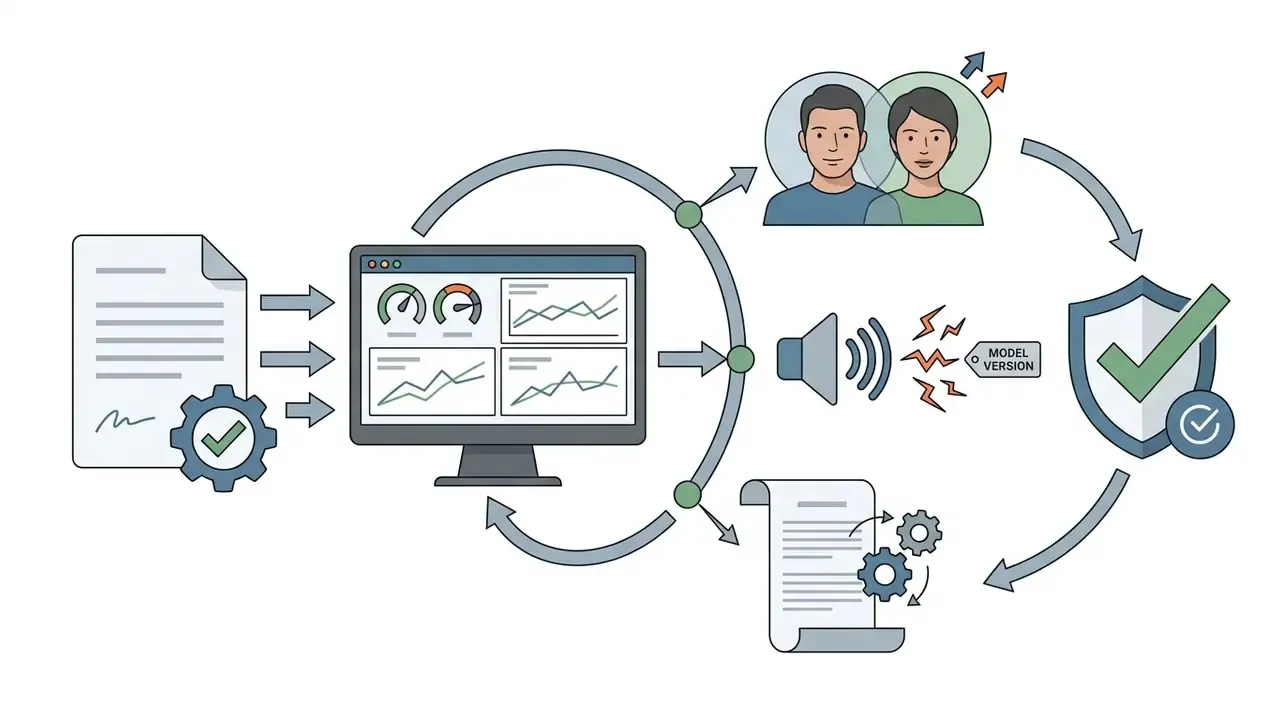
Model risk management: validating an avatar as a registered asset
Regulated organizations should treat each avatar and voice clone as a model artifact subject to the same lifecycle controls as any analytical model, consistent with supervisory model-risk guidance such as SR 11-7:
No evidence, no autonomy. That principle applies to a talking head just as much as to a credit model.

Upload a photo or enter a text prompt
Uploading assets or entering prompts establishes the baseline latent code for the avatar's facial structure and identity. When you drive an ai avatar generator software through an API, asset registration is usually a two-stage asynchronous workflow.
Developer documentation typically specifies uploading media assets via a dedicated asset endpoint (for example, POST /v3/assets) to obtain a unique asset_id before passing that reference to the primary creation route (POST /v3/avatars). Web interfaces compress all of that into a drag-and-drop panel. Programmatic deployments can inspect integration specifications in our AI Media API guide, and teams budgeting for generative video at scale can compare per-second costs in our Google Veo implementation guide.
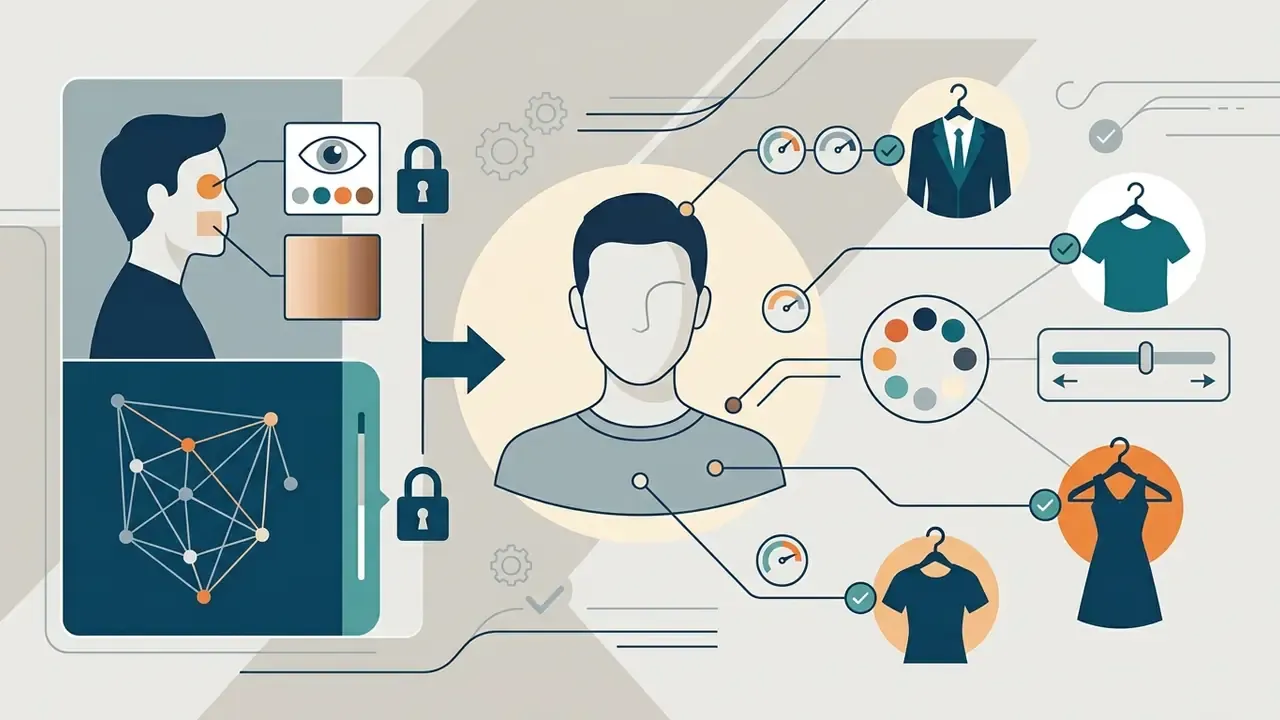
Customize the avatar's appearance and wardrobe
Customizing appearance means locking facial geometry first, then applying reusable wardrobe and style presets so episodes stay visually consistent. In multi-video campaigns, shifting an avatar's core facial features between scenes quietly erodes audience trust.
To enforce visual consistency across a video series:
- Define a static wardrobe specification (standard corporate suit versus casual polo), including fit, accessory rules, and an allowed color palette.
- Save the finalized character configuration as a reusable template preset inside your ai avatar creation tools.
- Run a short QC review before publication covering identity, wardrobe, lighting, and artifacts, so silent changes in garment color or layering never reach the audience.
Generate, review, and save your AI avatar
The generation phase executes neural motion rendering. Review it frame by frame for lip-sync alignment, gaze consistency, and artifact distortion before you save the asset. Use both quantitative metrics and old-fashioned visual inspection:
- Lip-sync auditConfirm mouth closure on bilabial plosives (/p/, /b/, /m/) and proper viseme shaping on vowels.
- Boundary artifactsInspect the neck, shoulder line, and hair edges for shimmering or texture sliding against the background.
- Gaze trackingEnsure eye contact stays on the primary camera axis rather than drifting.
«A QOE framework defines ten avatar evaluation dimensions: realism, trust, comfort of use, appropriateness for work, eeriness, affinity, and emotion accuracy among them.»
- Perceptual metricsWhere available, record FID, CPBD, NIQE, or frame-level 1 to 5 perceptual scoring so reviews stay comparable release over release.
- Error triageLog and fix the recurring failure modes documented in the literature: lip-sync mismatch, flicker, identity drift, texture sliding, gaze inconsistency, and geometry warping around teeth or neck.
Once validated, export the avatar as a reusable digital asset (PNG/PSD for stills, MP4/WebM/GLB/FBX for motion rigs) ready for video integration.
«A study of 170 students found 50% could identify AI video and 35% could not; mean detectability scored 3.31 out of 5.»
Because roughly half of viewers can spot a synthetic presenter, the review stage doubles as a trust gate. Visible artifacts amplify skepticism that disclosure alone cannot offset.
Turn an AI avatar into an animated talking video
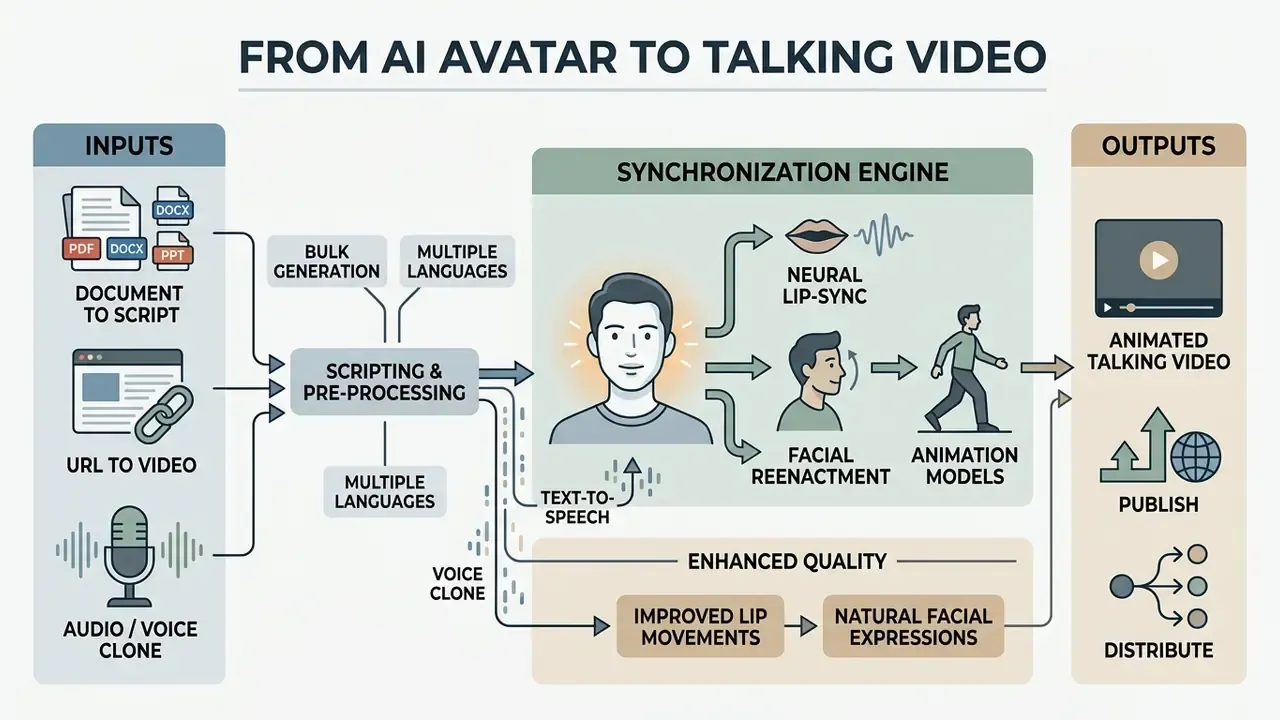
Converting a static avatar into a talking video means combining text-to-speech or a voice clone with neural lip-sync animation and facial reenactment models. The engine turns text into phonemes, maps phonemes to visual mouth shapes (visemes), and renders synchronized frame sequences. End-to-end audiovisual TTS research such as FastLips (Interspeech 2024) generates speech and co-verbal facial movement jointly from text, while production systems like Xiaomingbot feed phoneme sequences and durations from the TTS module straight into the lip-motion module.
Add a script, voice, and language settings
To animate an avatar, import a clean text script or audio track, pick a synthetic voice or voice clone, and configure language and dubbing parameters. Advanced dubbing platforms such as ElevenLabs (Dubbing v2) automatically build a speaker voice model from reference audio, letting the avatar speak across 90+ languages while preserving original pitch and emotional inflection. Teams choosing a narration layer can compare options among AI voice generators.
«TalkVid contains 1,244 hours of video from 7,729 speakers across 15 languages at up to 2160p, providing a foundation for multilingual speech synthesis.»
Automated script ingestion: from PDF or URL to video
Modern avatar generators remove most manual script writing through multi-source ingestion pipelines:
- Document-to-script (PDF/DOCX/PPT) Parsing algorithms extract core text blocks, strip header and footer metadata, and structure content into natural speaking pauses.
- URL-to-video Web scrapers summarize a target article URL through an LLM layer, extracting key bullet points to auto-generate a 60-second presenter script.
- Phonetic pre-processing During ingestion, raw numbers such as "$5M" are converted to expanded text ("five million dollars") to prevent TTS mispronunciation.
- Bulk generation A spreadsheet of scripts can be queued in one run, producing dozens of localized or personalized variants from a single avatar and voice preset.
- Multi-language fan-out One source file can generate separate dubbed video and subtitle assets per target language in parallel, with the cloned voice reused across 150+ locales.
When drafting scripts for ai video production, spell out numbers, acronyms, and technical terms phonetically so the text-to-speech engine does not improvise. Creators can tighten pre-production by integrating ai voiceover tools to refine speech cadence, while selecting titles with an ai youtube title generator and channel branding via an ai youtube channel name generator.
Improve lip sync, lip movements, and facial expressions
Lip sync accuracy improves when audio phonemes map directly to 15 facial visemes and the render injects micro-gestures: head tilts, blinks, brow movements. The standard viseme set used in production engines (sil, PP, FF, TH, DD, kk, CH, SS, nn, RR, aa, E, ih, oh, ou) is documented in Meta Horizon OS's Oculus Lipsync guide. Modern systems like SyncAnimation use three-stage pipelines, audio-driven pose estimation, facial expression synthesis, and lip refinement, to hold synchronization accuracy (SyncAnimation, 2024).
«Audio-driven animation systems use pose estimation, expression synthesis, and lip refinement to maintain synchronization.»
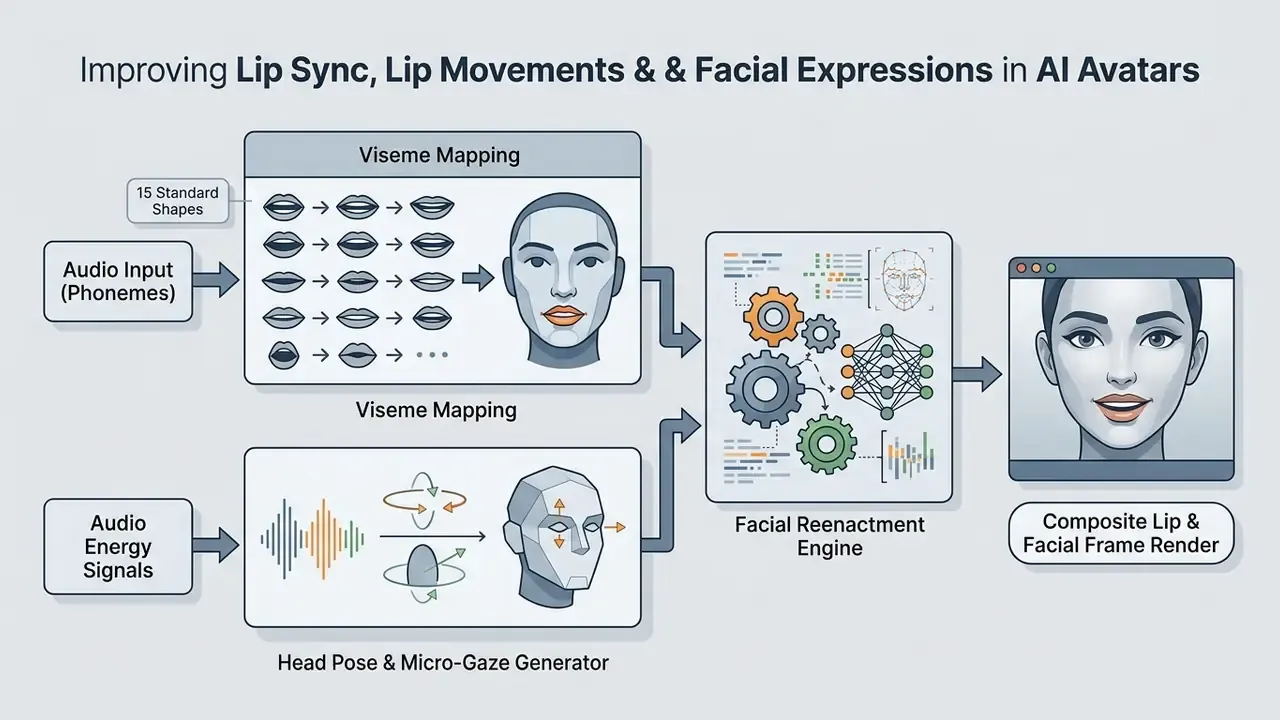
To kill the robotic stiffness in a talking avatar:
- Keep audio tracks noise-free with clear vocal frequencies. Heavy background music during viseme alignment is a known sync killer.
- Enable natural blinking. Many engines default to a resting blink cadence near 15 to 20 blinks per minute. Treat that as an industry working baseline rather than a validated constant, and confirm the actual default in your platform's documentation before locking it into a brand style guide.
- Apply subtle audio-driven head motion parameters to mimic human speech cadence, following vendor guidance that layers blinks, head tilts, and micro-expressions on top of clean speech audio and a front-facing or 3/4 portrait.
- Filter training and reference clips with SyncNet-style checks, discarding takes with high synchronization error, abrupt cuts, or off-screen speakers.
Generate and export an avatar video
Final video generation composites facial animation and audio into standardized formats scaled for the destination channel. Most platforms export MP4 containers with H.264 video and AAC audio codecs.
Processing speed benchmarks and hardware requirements
Rendering duration varies with resolution, motion complexity, and server-side queue depth. As an operational baseline:
- Standard render ratio Expect roughly 5 to 7 minutes of server processing per minute of exported 1080p video at 30 fps. A 90-second script on a fast photo-avatar path can finish in about two minutes.
- Real-time streaming latency API endpoints (LiveAvatar-style architectures) operate at approximately 0.17 to 0.40 seconds end-to-end latency.
- Client system prerequisites Web-based creation studios generally need 4 GB RAM minimum, WebGL 2.0 enabled, JavaScript active, and a current desktop browser (Chrome 110+, Edge 110+, Firefox 113+, or Safari 17.4+). Mobile creation apps target iOS 17.4+ and Android 9.0+.
- Local storage Budget roughly 100 to 200 MB per exported minute at 1080p H.264 and 400 to 600 MB per minute at 4K, before archival copies. Oversized masters can be trimmed with a video compressor before LMS upload.
Export configurations should match destination aspect ratios:
To estimate rendering duration and storage requirements from bitrate and resolution, reference our interactive production calculators.
Compare AI avatar creation tools before choosing a platform
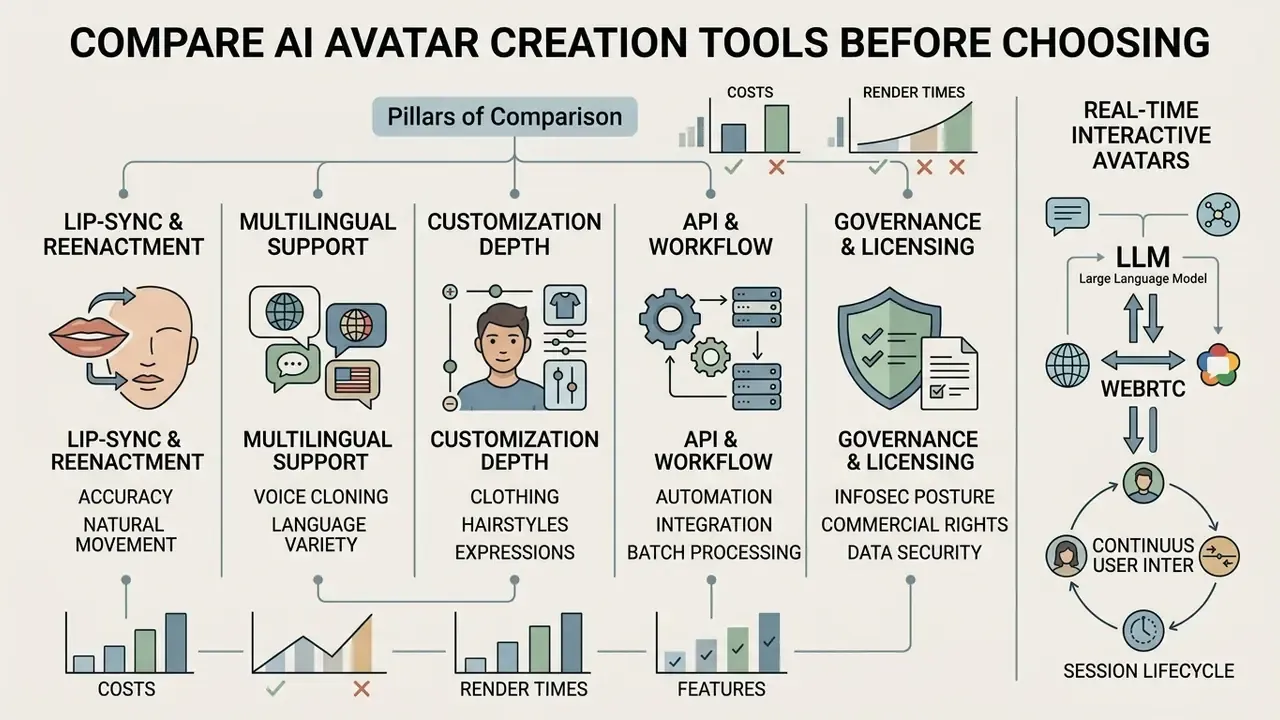
Platform evaluation means auditing lip-sync accuracy, multilingual support, API access, pricing tiers, information-security posture, and commercial usage rights. Pick the wrong engine and you pay twice: migration costs plus a broken production pipeline.
Features to compare in an AI avatar generator
When evaluating an ai avatar creator software or enterprise service, compare platforms across five core criteria:
«A meta-analysis of 210 experimental studies found highly anthropomorphic virtual influencers perform better with rational messages, low-anthropomorphic ones with emotional messages.»
Security due-diligence questions to add for regulated buyers:
- Does the vendor use customer video, audio, or scripts to train or fine-tune its base models, and can that be contractually disabled (zero data retention)?
- Is tenant isolation enforced for avatar and voice models, and could a custom avatar ever surface in another workspace?
- Are SSO (SAML/OIDC), SCIM provisioning, and role-based access control available on the purchased tier?
- What are the documented retention windows for source footage, consent recordings, and generated renders, and what is the deletion SLA?
- Which certifications and regional hosting options exist (SOC 2 Type II, ISO 27001, GDPR data-residency, on-premise or private-cloud rendering for sensitive biometric inputs)?
- Is content moderation performed by humans, models, or both, and how are false rejections appealed?
- Lip-sync and reenactment qualityMeasured through objective benchmarks (SyncNet, FID) and the absence of visual jitter.
- Multi-language and voice cloningRange of supported languages (90 to 177+) and fidelity of cross-lingual voice cloning.
- Customization depthAbility to train custom digital twins from user-submitted video versus relying on stock avatars alone.
- API and workflow automationREST API availability for asynchronous video generation, webhooks, bulk runs, and LMS integration.
- Governance and commercial licensingExplicit legal rights for commercial advertising, SOC 2 compliance, and anti-deepfake moderation.
Real-time interactive avatars: connecting LLMs and WebRTC
For real-time customer support or interactive kiosks, enterprise teams combine AI avatars with large language models through streaming APIs:
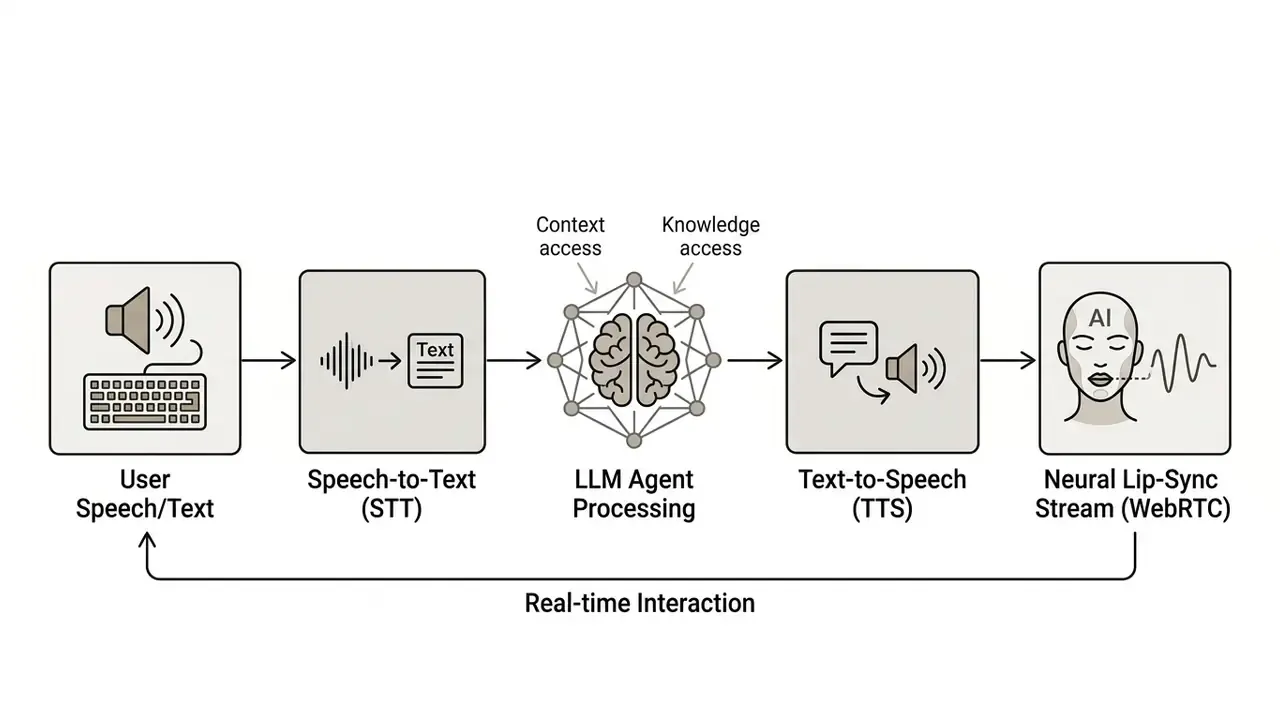
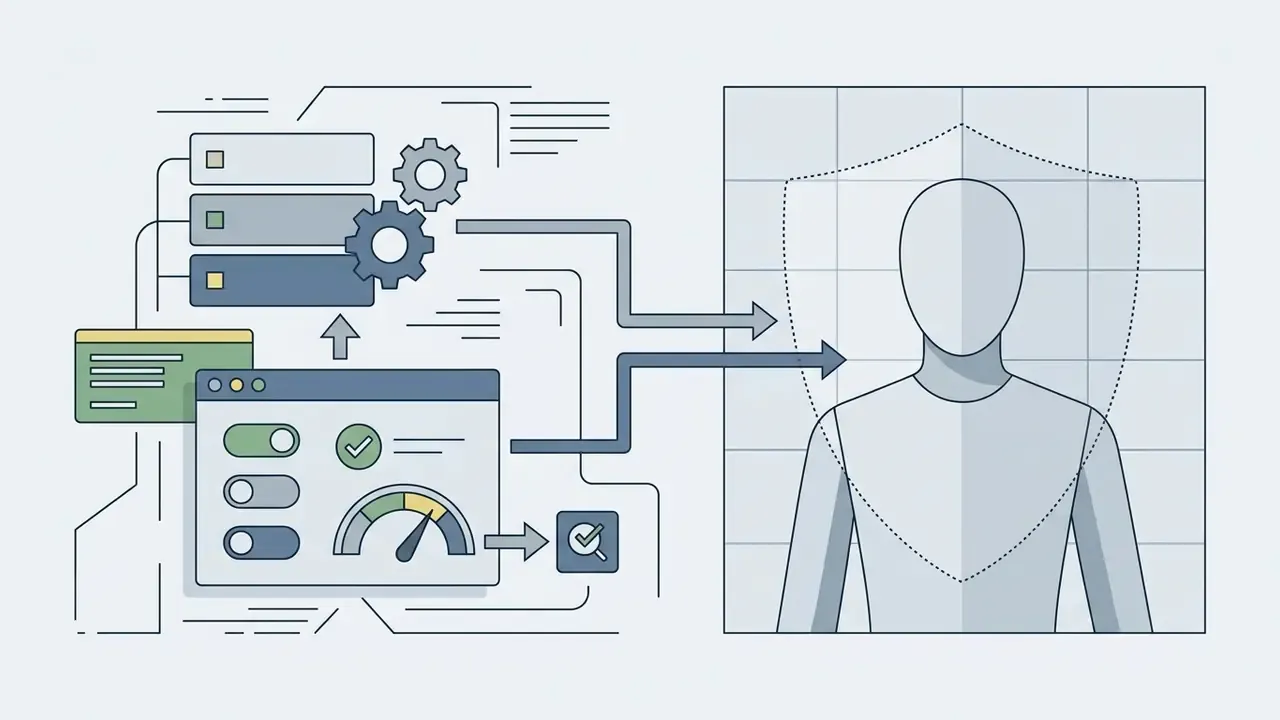
Systems like Synthesia Interactive and HeyGen's streaming/LiveAvatar APIs let developers plug custom LLM backends (GPT-4o, for instance) into an avatar front-end, producing sub-second voice-to-video responses over WebRTC. Implementation notes that matter in production:
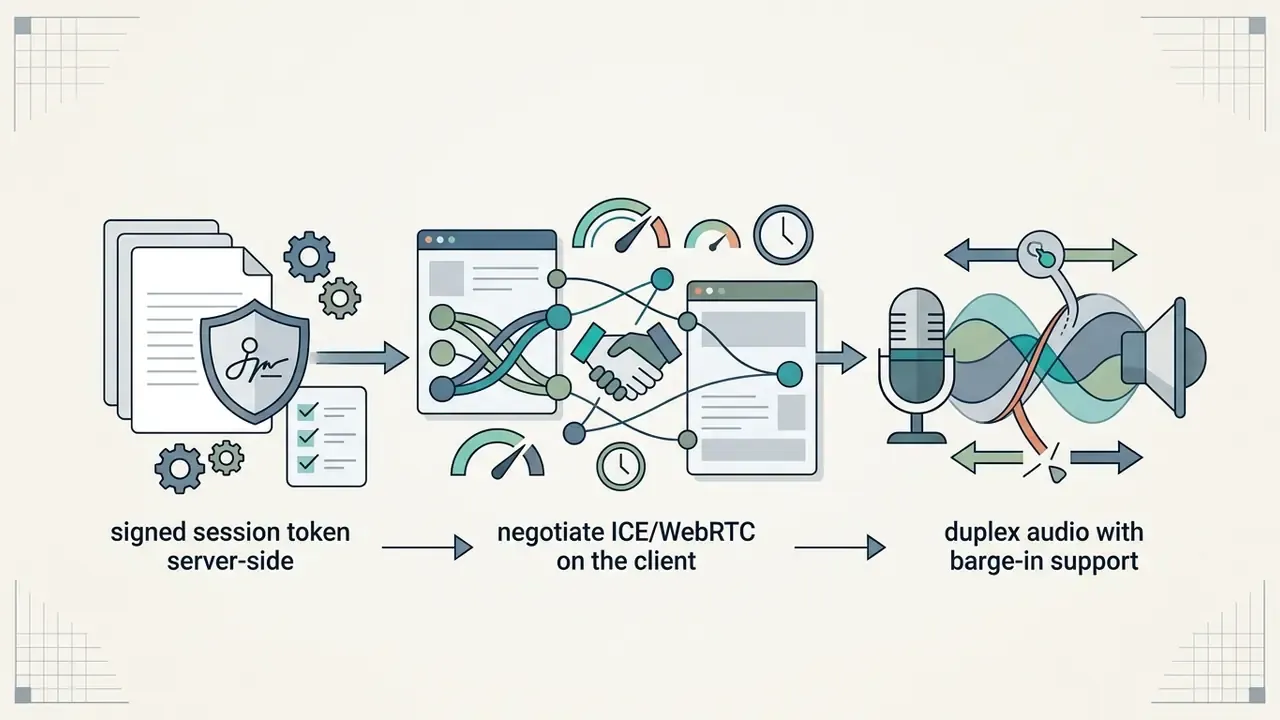
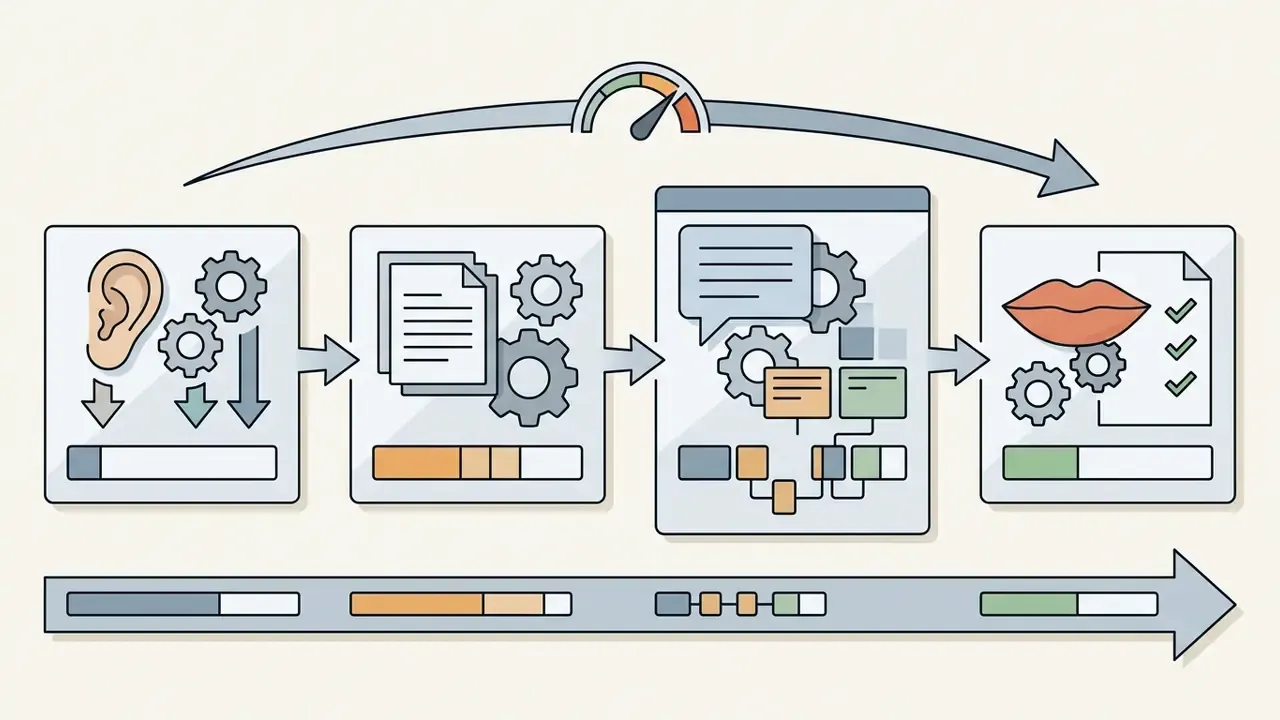
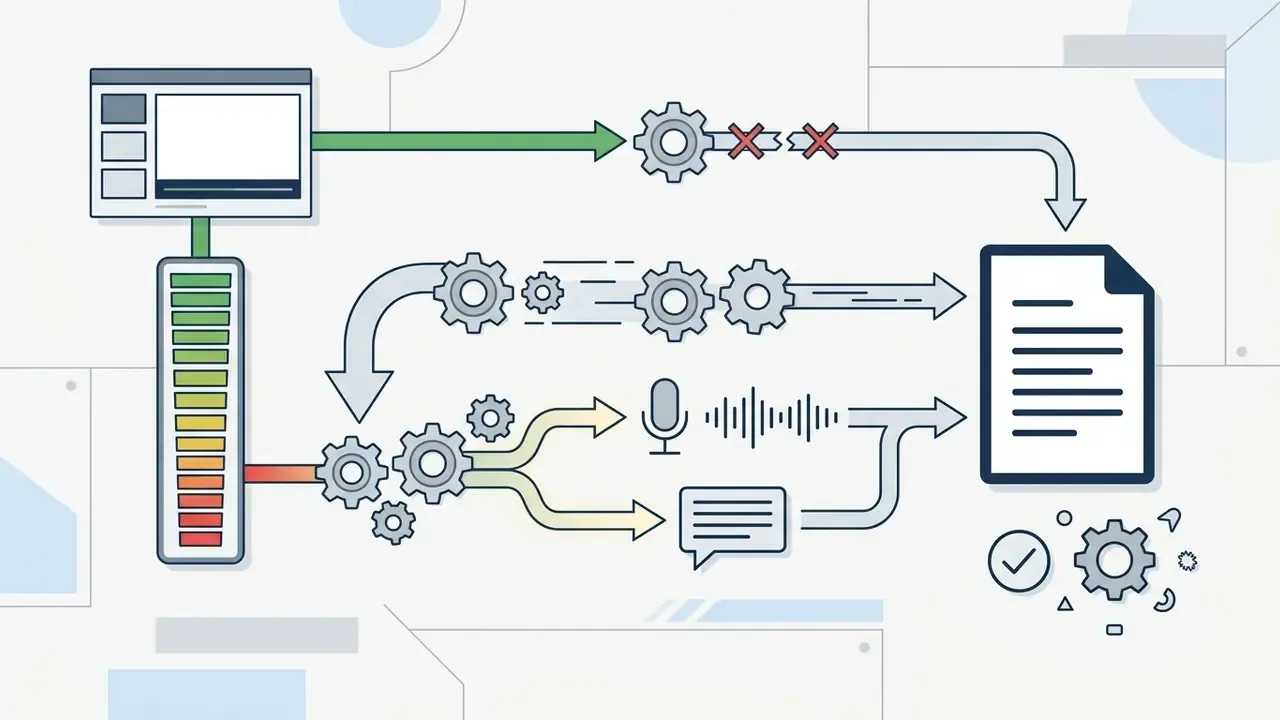
«Connect your own LLM or agent while Synthesia powers the avatar layer.»
Vertical-specific workflow templates
- Real estate Convert CRM property specs into script text, deploy a stock presenter avatar, export 9:16 vertical video with automatic property photo overlays, then follow with weekly market-update and price-change variants.
- Personalized sales outreach Integrate the avatar API with your CRM, apply dynamic variable replacement (prospect name, company, use case), and auto-render customized 30-second video touchpoints at list scale.
- L&D compliance Ingest an internal PDF policy, translate the script into 12 regional languages, and export SCORM packages for LMS integration with completion tracking.
- HR onboarding Map the first-week schedule into modular 60-second lessons, keep one consistent presenter across all modules, and refresh by editing the script instead of reshooting.
- E-commerce and UGC ads Generate 5 to 10 hook variants per product from one script, test creatives per placement, and retire losers without a reshoot.
- Professional services (advisors, attorneys) Turn recurring client questions into short explainers delivered by a consented spokesperson avatar, reviewed by compliance before publication.
Free AI avatar tools versus paid creation services
Free and freemium platforms are fine for evaluation, but their operational limits block commercial deployment. Reviewing the documented limits of free AI video generators before a trial saves render credits. Paid tiers lift those barriers; our comparison of the best free AI video generators shows where the free ceilings sit today.
Select a tool for teams, marketing, or personal content
Tool selection should follow your operational scale and regulatory environment:
- Solo content creators Prioritize speed, pre-built template libraries, and low-cost subscription plans for rapid social video. Creators who need a polished still portrait as the avatar's base image can start with AI headshot generators.
- Marketing agencies Need robust custom ai avatar creation, high-resolution rendering, multi-account management, written client consent workflows, disclosure controls, and clear commercial ad licenses.
- Enterprise HR and L&D teams Need SOC 2 Type II certification, SSO and RBAC, LMS SCORM export, strict data privacy terms, documented legal authority for training and decommissioning, and auditable consent management.
«Students considered AI avatars suitable and sometimes preferable for lectures, yet noted a lack of naturalness and spontaneity.»
That trade-off argues for blended delivery: avatar-led standardized modules plus live human sessions for discussion and edge-case coaching.
Table 2: AI Avatar Platform Selection Matrix (capability + security posture)
| Platform Class | Representative Tools | Free Tier Features | Paid / Enterprise Capabilities | Security & Data Controls to Verify | Commercial Usage Rights |
|---|---|---|---|---|---|
| Enterprise Video Platforms | Synthesia, HeyGen | 1 to 3 min trial videos, mandatory watermark | Custom video clones, 160 to 177+ languages, SSO, API access, SCORM export | SOC 2 / GDPR attestation, SSO + RBAC, tenant-scoped custom avatars, opt-out from model training, defined retention & deletion SLA | Included on eligible business/enterprise plans |
| Developer / API First Engines | D-ID, Anam, Hedra, BitHuman | Free trial credit allocation | Real-time streaming APIs, custom viseme hooks, low latency, batch rendering | Zero-data-retention mode, regional endpoint choice, key rotation, webhook signing, audit logs | Granted via paid API tier terms |
| Creative & Social Animators | Fliki, Kapwing, OpenArt, Adobe Firefly | Watermarked exports, restricted duration, daily generation caps | 1080p/4K export, social integrations, fast script-to-video, licensed training data | Clarify training-data licensing, output indemnification, and whether uploads are reused for model improvement | Varies by plan; check platform terms |
| Voice & Dubbing Layers | ElevenLabs, VideoDubber | Limited characters/minutes, watermark or attribution | Voice cloning, 90 to 150+ language dubbing, speaker-similarity controls | Explicit voice-consent capture, voice-model deletion on request, misuse detection | Commercial rights on paid tiers; verify voice-owner consent separately |
Use AI avatars safely for commercial content
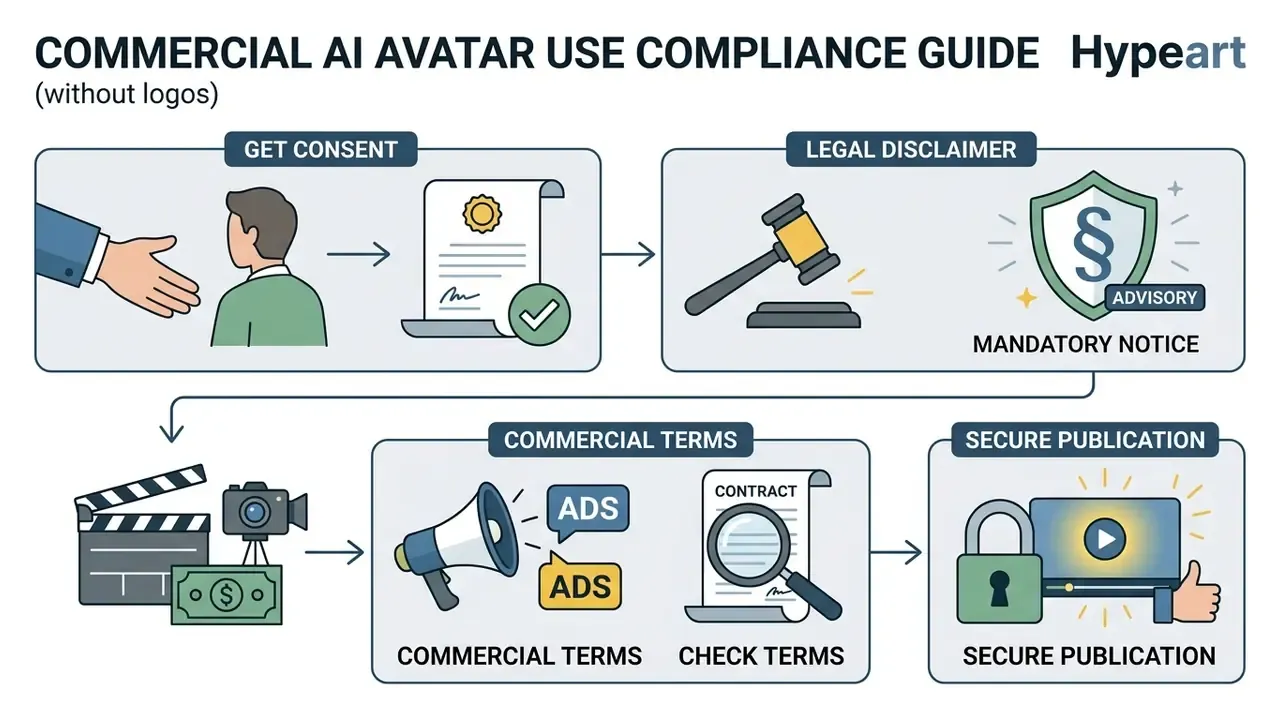
Deploying AI-generated digital presenters in commercial campaigns triggers legal and regulatory obligations. Unauthorized use of an individual's image or voice creates exposure to civil liability and platform enforcement, sometimes on the same day.
Get consent before creating an avatar of a real person
Recreating a real individual's visual likeness or voice requires explicit written or recorded video consent specifying intended scope, duration, and usage rights. Under the Right of Publicity and state regulations such as California SB 11, commercial deployment of a digital replica without consent is unlawful. Industry agreements point the same direction: the SAG-AFTRA memorandum of agreement approved in December 2023 requires "clear and conspicuous" consent plus a "reasonably specific description" of the intended digital replica use. In other jurisdictions the baseline is broader still. Article 152.1 of the Russian Civil Code permits use of a person's image only with consent, subject to narrow public-event exceptions.
Federal regulatory actions reinforce the boundary. The FCC confirmed that AI-generated synthetic voices fall under the Telephone Consumer Protection Act (TCPA), prohibiting automated calls using synthetic voices without prior express consent (FCC TCPA Ruling, 2024).
«The FCC confirmed that AI-generated synthetic voices fall under the TCPA, which bars automated calls using artificial or prerecorded voices without prior express consent.»
Academic work documenting synthetic media harms records a sharp rise in unauthorized voice impersonation, which is exactly why verifiable consent documentation matters (OECD Voice Cloning Taxonomy, 2024).
«OECD research records a sharp rise in voice incidents since March 2023, including corporations training speech generators on actors' recordings without consent or compensation.»
Privacy regulators add a parallel obligation on the data side. Australia's OAIC expects consent or a clearly established primary-purpose basis before secondary use of personal information in AI systems, and Canada's OPC requires valid, meaningful, specific consent plus documented legal authority across training, deployment, operation, and decommissioning of generative systems. Practically, your consent record has to survive the whole lifecycle, not just the shoot day.
Check commercial use terms before publishing video ads
Before publishing avatar video ads on Meta, Google, or TikTok, read both the platform terms of service and the advertising disclosure policies. Major ad networks mandate disclosure panels or tags when synthetic media featuring realistic human likenesses appears in creatives. TikTok's community guidelines require creators to label realistic AI-generated images, audio, and video, while Meta and Google surface AI-use disclosures inside their ad interfaces.
European regulation adds structural obligations. Article 50 of the EU AI Act requires providers to ensure synthetic content is marked in a machine-readable format, and that deepfakes or AI-generated presenters in public communications are visibly disclosed (EU AI Act Article 50, 2024).
«Article 50 of the EU AI Act obliges providers to mark synthetic content in machine-readable form and to disclose deepfake use in public communications.»
In the United States, the Copyright Office's digital-replica work treats voice cloning as a likeness issue, and 2026 federal policy proposals recommend rules against unauthorized commercial distribution of AI-generated replicas, with carve-outs for parody, satire, and news reporting. For a detailed analysis of licensing terms across generated media, review our guide on commercial use rights, and for still-image workflows see our breakdown of AI image generator commercial use plus the platform-specific terms in our Canva AI Generator licensing overview.
Limitations, open questions, and a safe next step
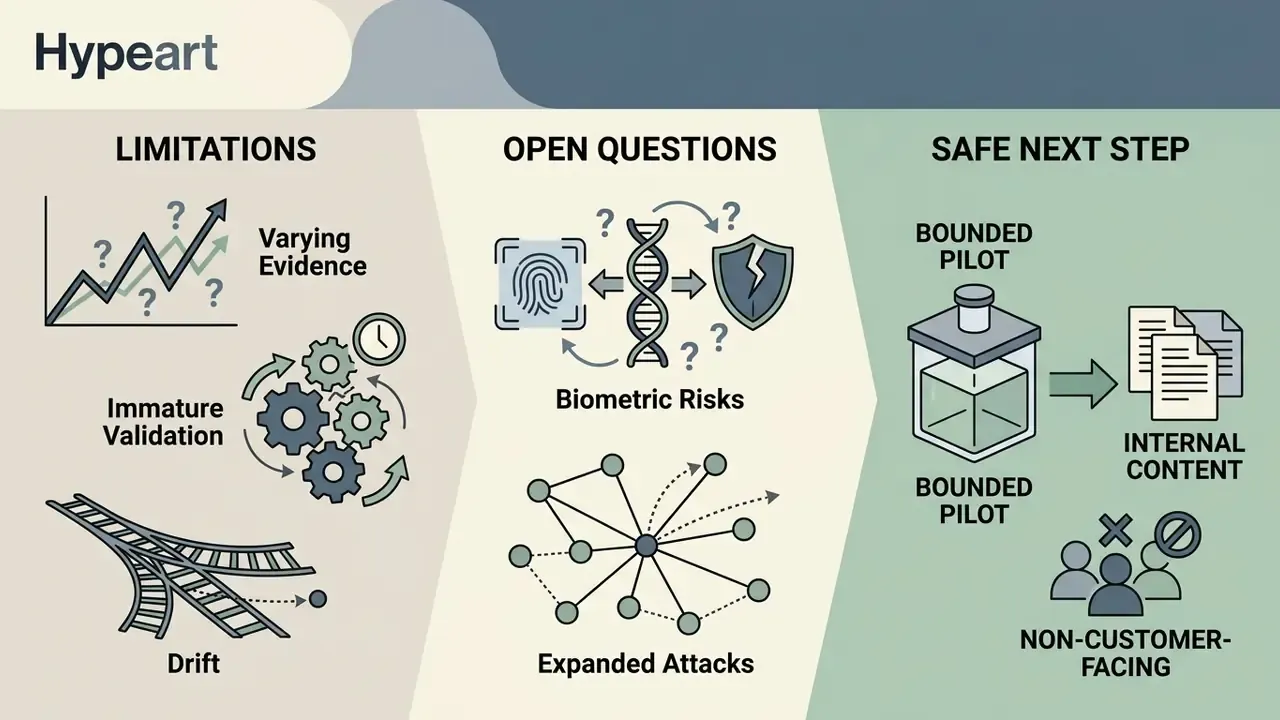
Worth naming the gaps before anyone signs a multi-year contract.
- Evidence quality varies. Several performance and savings figures in this guide come from vendor-published material. Treat them as hypotheses until your own pilot produces comparable numbers under your own review protocol.
- Validation methods are immature. There is no supervisory consensus yet on how to validate generative presenters the way you validate a PD model. Expect to document your own acceptance thresholds and defend them.
- Drift is under-measured. Vendor model upgrades can change voice timbre or facial micro-motion without notice. Version pinning and periodic re-attestation reduce the surprise, though they rarely eliminate it.
- Biometric inputs raise the stakes. Reference footage and voice samples are sensitive personal data. Where residency or retention terms are unclear, private-cloud or on-premise rendering deserves a serious look.
- Interactive modes expand the attack surface. A live avatar wired to an LLM can be prompted, socially engineered, or quoted out of context. Keep policy logic server-side and transcripts logged.
A conservative next step: run one bounded pilot on internal, non-customer-facing training content. One avatar, one consented spokesperson, one language, full audit protocol. Measure control cost alongside production savings, then decide whether the risk-adjusted case holds at scale.
AI avatar generator FAQs
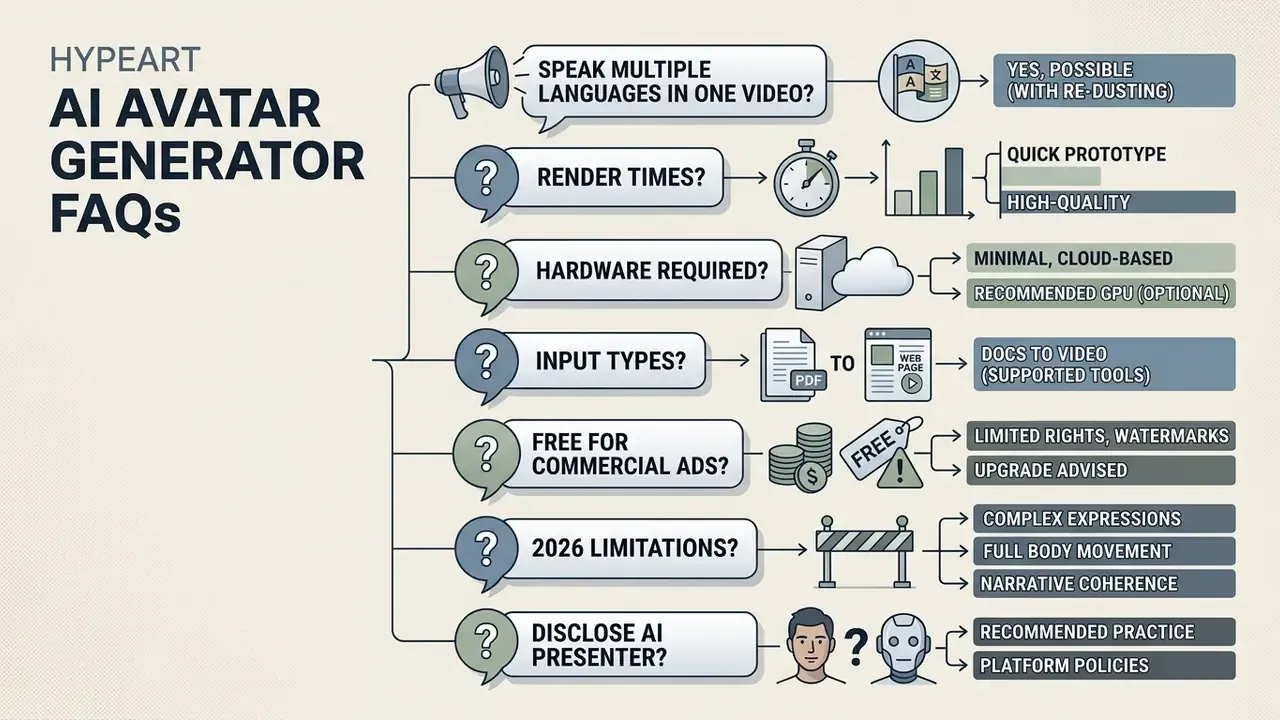
Can an AI avatar speak multiple languages in one video?
Yes. Advanced AI avatar platforms translate scripts and re-align lip sync across 90+ to 177+ languages inside a single master video project while preserving voice timbre. Multi-language pipelines extract phonemes from the target-language audio track and recompute viseme alignment frame by frame, keeping mouth movements plausible regardless of language. Peer-reviewed work on multilingual lip sync reports that models such as Wav2Lip and GeneFace++ generalize across languages in real-time face-to-face translation settings. Native-speaker spot checks are still advisable for regulated claims.
«The OECD Truth Quest survey examines whether AI-generated content is easier to identify than human content, and how labeling shapes audience perception.»
How long does it take to render an AI avatar video?
Plan for roughly 5 to 7 minutes of processing per finished minute of 1080p video. Short photo-avatar clips can render in about two minutes, while 4K or heavy-motion scenes take noticeably longer. Real-time streaming avatars are a different architecture entirely, responding in 0.17 to 0.40 seconds.
What hardware do I need to create an AI avatar?
Most work happens server-side, so a modern desktop browser (Chrome 110+, Edge 110+, Firefox 113+, Safari 17.4+) with 4 GB RAM and WebGL 2.0 is enough. Mobile creation typically needs iOS 17.4+ or Android 9.0+. Local GPU power matters only for self-hosted or on-premise rendering of sensitive biometric inputs.
Can I turn a PDF or a web page into an avatar video?
Yes. Leading platforms ingest pasted scripts, PDF/DOCX/PPT uploads, and URLs, then summarize and normalize the text into a speaking script. Always proofread the generated script for numerals, acronyms, and regulated claims before rendering.
Is a free AI avatar generator good enough for commercial ads?
Usually not. Free tiers commonly add watermarks, cap output at 1 to 5 minutes per month, restrict resolution, and exclude commercial use outright. Paid tiers remove watermarks, enable 4K, and grant the licensing that paid media requires.
What are the main limitations of AI avatars in 2026?
Documented gaps include identity drift over long sequences, weak hand and full-body detail, limited emotional nuance, response latency in live modes, and privacy obligations around biometric inputs. Standards work such as ISO/IEC 24216-1:2026 stresses that avatar actions, limits, and intended ranges of use must be clearly managed and communicated to users.
Do I have to disclose that a presenter is AI-generated?
In the EU, Article 50 of the AI Act requires machine-readable marking and visible disclosure of deepfakes in public communication. TikTok requires creator-applied labels on realistic synthetic media, and Meta and Google expose AI-use disclosures in their ad systems. Treat disclosure as the default, not the exception.
Appendix A: audit protocol and TCO worksheet
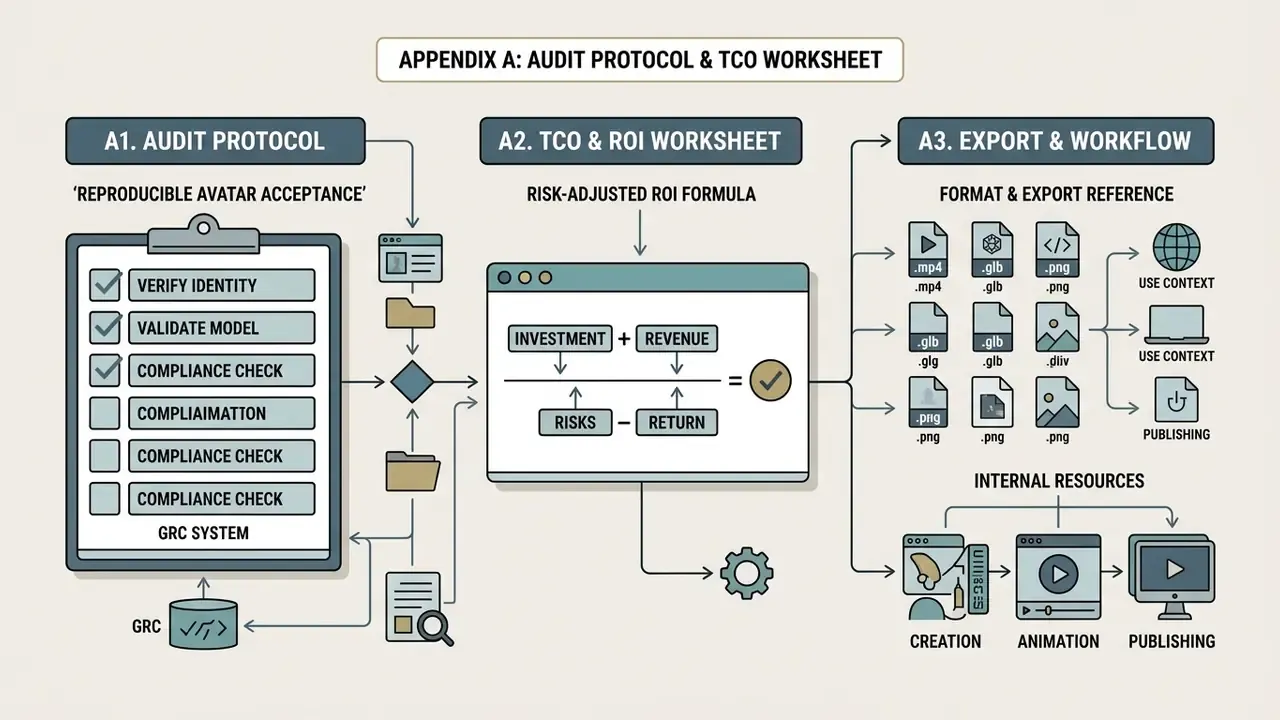
A1. Reproducible avatar acceptance protocol (copy into your GRC system)
Avatar ID: __________        Owner: __________        Risk tier: __________
1. Consent evidence attached (written + video)            [ ] Yes  [ ] No
2. Identity match verified against HR/ID records          [ ] Yes  [ ] No
3. Source asset specs met (resolution, lighting, angle)   [ ] Yes  [ ] No
4. Lip-sync audit passed (/p/, /b/, /m/ closure; vowels)  [ ] Yes  [ ] No
5. Artifact audit passed (neck, hair, teeth, flicker)     [ ] Yes  [ ] No
6. Gaze and blink cadence reviewed                        [ ] Yes  [ ] No
7. Translation spot-check per language (native reviewer)  [ ] Yes  [ ] No
8. Disclosure + machine-readable marking applied          [ ] Yes  [ ] No
9. Commercial license confirmed for intended channel      [ ] Yes  [ ] No
10. Sign-offs: Marketing ____  Legal ____  MRM ____  Security ____
11. Render log, prompt, seed, model version archived      [ ] Yes  [ ] No
12. Revocation/decommissioning owner named                [ ] Yes  [ ] No
A2. Risk-adjusted ROI formula
Gross saving   = (Traditional cost per video minute - Avatar cost per video minute) × Minutes produced
Control cost   = Legal review + Consent administration + Model validation + Enterprise security tier
                 + Labeling/disclosure QA + Localization review + Archive/retention
Residual risk  = Probability of incident × Estimated exposure (fines, takedown, remediation, reputation)
Risk-adjusted ROI = (Gross saving - Control cost - Residual risk) / (Platform spend + Control cost)
Teams that omit control cost and residual risk routinely overstate savings. The 80% per-minute reduction reported by production teams is a gross figure, not a net one.
A3. Format and export reference
| Destination | Aspect ratio | Resolution | Container / codecs |
|---|---|---|---|
| YouTube Shorts / Reels / TikTok | 9:16 | 1080×1920 | MP4, H.264, AAC |
| YouTube long-form / web embed | 16:9 | 1920×1080 or 3840×2160 | MP4, H.264/H.265, AAC |
| Feed ads / in-app placements | 1:1 | 1080×1080 | MP4, H.264, AAC |
| LMS / compliance training | 16:9 | 1920×1080 | MP4 + SCORM package, captions sidecar |
| Reusable avatar asset | n/a | n/a | PNG/PSD (stills), MP4/WebM (motion), GLB/GLTF/FBX/VRM (3D rigs) |
Internal workflows and resources
- AI Media Workflows explore complete end-to-end automation pipelines for digital content creation.
- AI voice generators compare narration quality, language coverage, and licensing before pairing a voice with your avatar.
- Animation makers review template-driven and AI-assisted animation tools for scenes around your presenter.
- Photo editors prepare and retouch source portraits before avatar training.
- YouTube video editors finish, caption, and publish avatar footage on your channel.