Last reviewed: Q1 2026. Standards, benchmarks and vendor limits verified against the primary sources cited inline.
Executive Summary: What Decision-Makers Need to Know
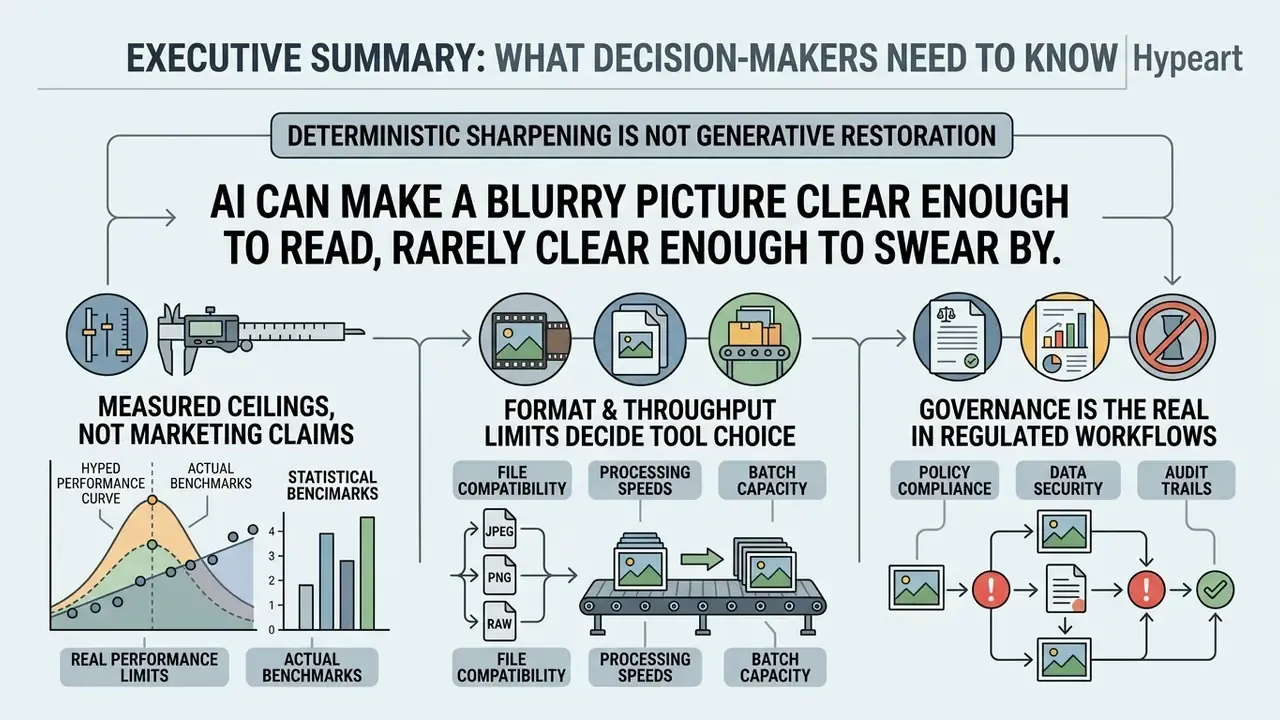
- Deterministic sharpening is not generative restoration. An Unsharp Mask amplifies existing edge contrast with a fixed mathematical filter. A neural AI unblur image model synthesizes plausible high-frequency detail from learned priors. The two carry completely different evidentiary and audit implications, and conflating them is where governance failures usually start.
- Measured ceilings, not marketing claims. On the multi-cause MC-Blur benchmark, leading deblurring architectures land between 22 dB and 32 dB PSNR depending on blur type and severity. Moderate motion blur and mild defocus restore well. Extreme blur forces the model to invent content.
- Format and throughput limits decide tool choice. Practical selection depends on supported containers (JPG, JPEG, PNG, WEBP, HEIC/HEIF, AVIF, BMP, TIFF, RAW), local-mode file caps (commonly around 12 MB in browser WASM/WebGPU modes), and cloud batch queues (up to 50 images per batch on consumer platforms).
- Governance is the real bottleneck in regulated workflows. Privacy (zero-retention, on-prem or VPC execution), provenance marking, and a documented model-validation checklist matter more than raw PSNR once a deblurred image enters KYC, claims or evidence pipelines.
One sentence version: AI can make a blurry picture clear enough to read, rarely clear enough to swear by.
What Is AI Unblur Image and How Does It Work?
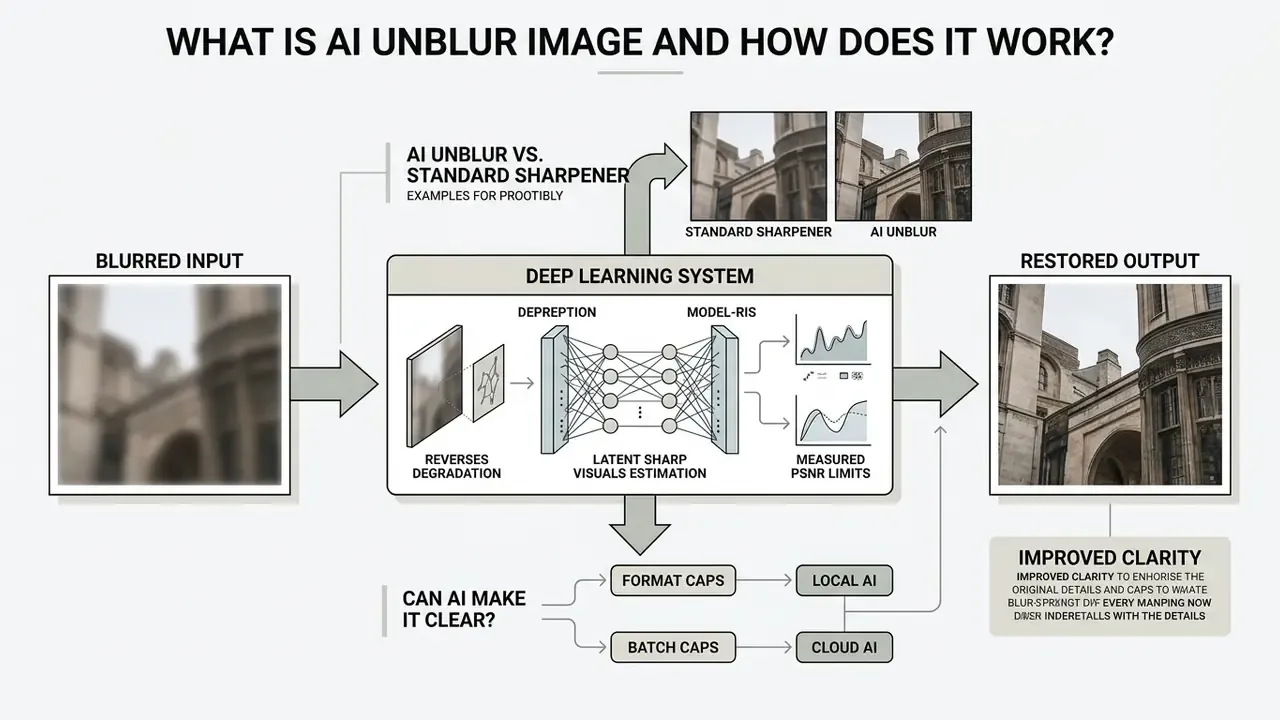
An AI unblur image tool is a deep learning system that reverses image degradation by estimating latent sharp visuals from blurred inputs. Unlike a traditional sharpening filter that simply boosts contrast along local edges, an AI image unblurer analyzes degraded pixel structures with trained neural networks to reconstruct probable high-frequency details.
Modern AI-powered image enhancement relies on several architecture families: Convolutional Neural Networks (CNNs), Generative Adversarial Networks (GANs), recurrent models and latent diffusion models, all trained on paired datasets of blurred and sharp images. Deep learning lets the network learn a non-linear inverse mapping from degradation patterns straight to sharp representations. That is how an ai image unblur system restores complex structural textures while suppressing digital noise.
«A review of more than 150 works over six years shows blind deblurring has shifted fully to end-to-end neural networks trained on paired datasets.»
Mathematically, deblurring is an ill-posed inverse problem. A single blurred observation is consistent with many possible sharp originals. The network does not undo optics. It minimizes a learned loss (pixel error plus perceptual terms) over paired blur and sharp data, then projects the most probable sharp estimate. Blind settings, where the blur kernel is unknown, are substantially harder than non-blind settings where the point spread function is measured or supplied.
Worth pausing on that word: probable. Not recovered. Probable.
AI Unblur vs. Standard Image Sharpener
A standard image sharpener works deterministically through mathematical filters. An Unsharp Mask (USM) or high-pass filter subtracts a smoothed copy of the image, then re-adds a weighted mask to amplify high-frequency edge contrast. The behaviour is fully parameterized by blur radius, gain and threshold. Effective for minor soft focus, yes. But classic sharpening cannot recover missing structural details, and it frequently produces halo artifacts, amplified sensor noise, and false textures across smooth regions.
Deep learning models do something else entirely. They perform generative reconstruction guided by learned natural image priors, which is why the output can look professional grade while still being an estimate. Guidance from the National Institute of Standards and Technology draws the line explicitly: where generative tools are used on facial images, decisions must rest on the original unedited image rather than on the AI-produced version.
«NIST guidance separates deterministic processing from generative reconstruction, stressing that modified images must be labelled and distinguished from original source data in forensic workflows.»
Notably, the same standards family treats Unsharp Mask as a post-capture enhancement that should not be enabled during the scanning of facial images. Further evidence that sharpening and reconstruction belong in different processing categories, and should sit in different rows of your control matrix.
Can AI Really Make a Blurry Picture Clear?
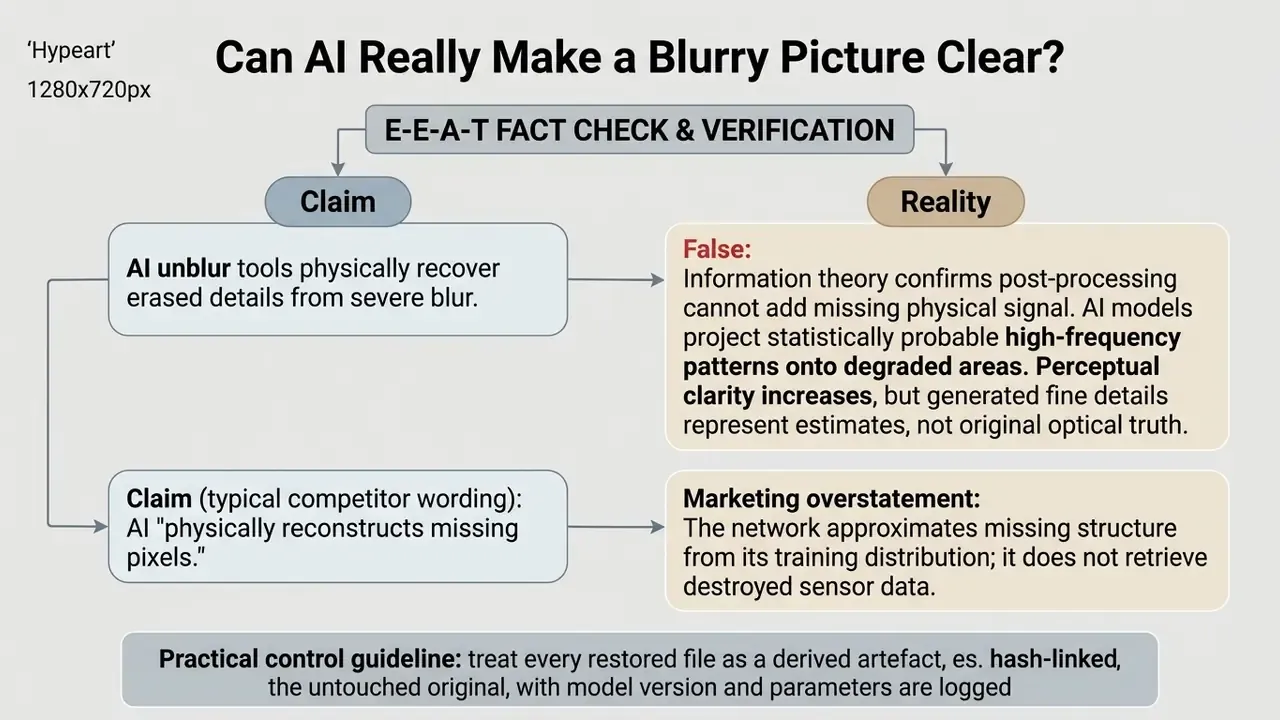
Can AI clean up a blurry photo? Partly, and honestly that is the only defensible answer. AI systems improve perceived visual clarity and structural sharpness measurably. They cannot recover physically destroyed information that the camera sensor never captured. Neural deblurring solves an ill-posed inverse problem by calculating the most statistically probable clear image from millions of learned visual parameters.
«On the MC-Blur dataset (129,900 blurred images), leading methods reach PSNR between 22 and 32 dB depending on blur type and severity.»
Moderate camera motion or mild defocus can be restored to near-original quality. Extreme blurring forces the model to synthesize content. And the hallucination risk is now formally benchmarked rather than anecdotal. HalluGen: Synthesizing Realistic and Controllable Hallucinations for Evaluating Image Restoration (CVPR 2026) characterizes restoration failures as "visually plausible yet incorrect content." Looks Too Good To Be True: An Information-Theoretic Analysis of Hallucinations in Generative Restoration Models (arXiv, 2024, https://arxiv.org/abs/2404.02197) shows such models generate realistic-looking details absent from the ground truth.
In medical imaging the regulator went further. The FDA's Center for Devices and Radiological Health proposed scanning Fourier Ring Correlation (sFRC) specifically to detect AI-generated fakes inside restored images (FDA CDRH, 2025). The accompanying analysis states it plainly: post-processing cannot add information a device never measured.
«Guiding diffusion models on spatial consistency alone can distort image content, producing plausible but incorrect textures.»
Which Types of Blurry Images Can AI Fix?
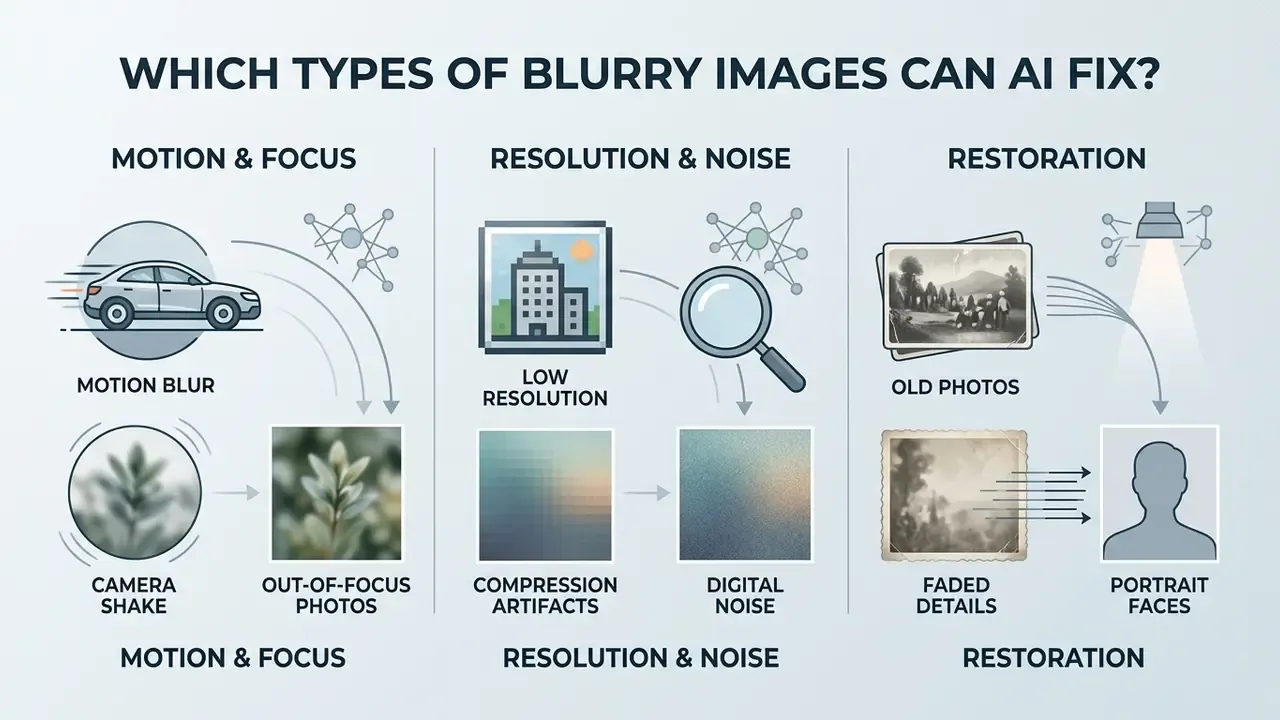
AI deblurring algorithms evaluate specific degradation patterns to decide whether an image suffers from motion blur, camera shake, improper lens focus, compression artifacts, or sensor noise. The effectiveness of an ai blurry image fixer depends on how closely the physical defect aligns with the training distribution of the underlying neural model. Benchmark literature therefore groups blur into uniform, non-uniform, out-of-focus and mixed categories. Evaluation should always be type-specific rather than a single averaged score.
Motion Blur, Camera Shake and Out-of-Focus Photos
Motion blur and camera shake occur when relative movement between the camera lens and the subject smears incoming light across multiple sensor pixels during exposure. AI models remove blur of this kind by calculating spatially variant blur kernels, or by using latent motion trajectories to reverse the directional smear. Classical pipelines split the job into two stages, kernel estimation then deconvolution, while camera-shake methods may reconstruct the camera trajectory and synthesize a spatially varying kernel from it.
Defocus blur appears when an improper lens focal plane makes light rays converge before or behind the sensor. The resulting point spread function (PSF) softens edges across the whole frame. Specialized defocus frameworks such as the RealDefocus benchmark evaluate restoration across large volumes of real-world image pairs. These models estimate local aperture maps and restore sharp boundaries around out-of-focus subjects without flattening background depth of field.
«RealDefocus contains 23,000 image pairs from 4,400 scenes at apertures f/2.0–f/20.0 and 6000×4000 pixel resolution.»
Automatic blur detection matters operationally, because it decides which restoration head runs. A pipeline that sharpens an out-of-focus receipt with a motion-blur model wastes compute and invites artifacts.
Low Resolution, Compression Artifacts and Digital Noise
Low-resolution files combined with lossy JPEG compression create compound degradation: block boundaries on 8×8 pixel grids, high-frequency detail loss, colour shifts, and additive digital noise and grain. When teams use ai to make a blurry picture clear in this situation, unified restoration architectures handle deblurring, deblocking and denoising in one pass.
The current state of the art is documented in compression- and blur-aware diffusion research. Compression-Aware One-Step Diffusion Model for JPEG Artifact Removal (ICCV 2025) shows that modelling the compression operator prevents amplification of block artifacts during sharpening. BlurDM integrates the blur formation process directly into the diffusion trajectory.
«BlurDM integrates blur formation into the diffusion process, jointly removing noise and blur, with significant gains across four benchmark datasets.»
Perceptual blur-adaptive super-resolution networks also report lower perceptual distortion. They disentangle noise and blur features from core content before upscaling with an AI image upscaler, which keeps low quality inputs from turning into plastic textures.
«PBaSR achieves LPIPS improvements of 0.02–0.10 over super-resolution baselines on the ReBlurSR dataset of roughly 3,000 blur samples.»
Old Photos, Faded Details and Portrait Faces
Restoring archival family photos means addressing age-related fading, paper grain, silvering, scratches, stains and facial blur together. Specialized face restoration models incorporate facial geometry priors so they can detect eye contours, iris structures, skin pores and mouth boundaries automatically. Survey work on facial image deblurring confirms that deep-learning methods now dominate the field over classical model-based deconvolution.
Vintage portraits get dedicated facial feature enhancement. By balancing generative face priors against spatial feature preservation, modern restorers refine facial clarity while keeping authentic skin texture instead of imposing a synthetic plastic look. For heavily damaged heritage scans, photo restoration is frequently chained with colourization, so yellowed or monochrome prints regain natural skin tones. One caveat from practice: on a faded 1950s group shot, expect the model to guess at eyes that occupy twelve pixels. It will guess convincingly. That is the problem.
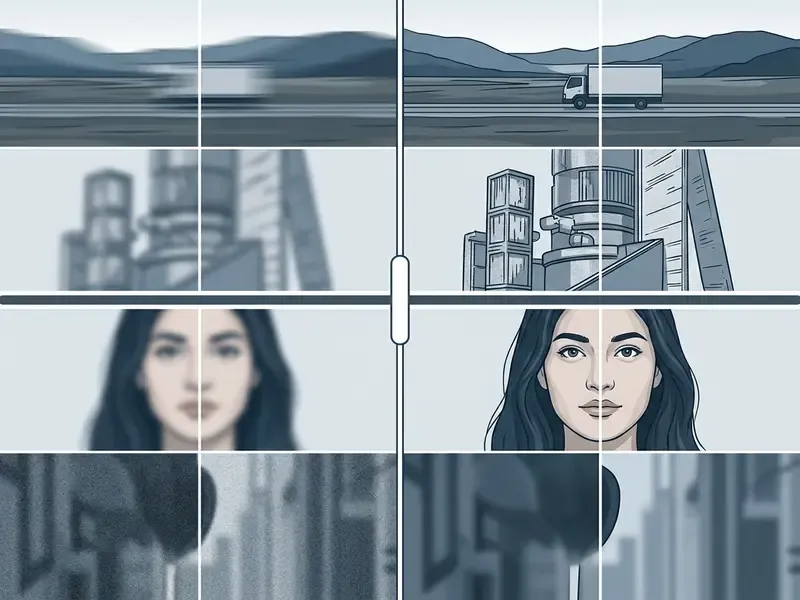
How to Unblur an Image Online with AI
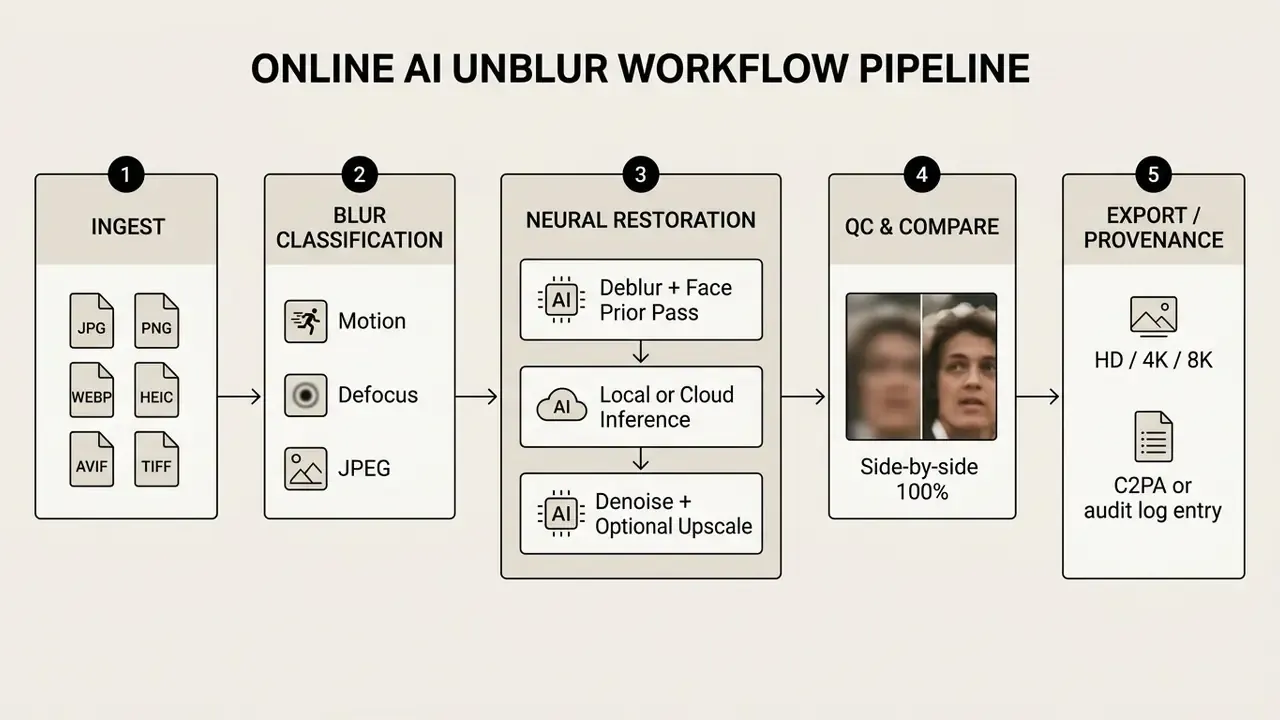
Running a degraded photo through an online ai for blurry photos workflow is an automated execution pipeline: file ingestion, degradation analysis, neural restoration, quality control, high-resolution export. Few clicks for the user, five distinct stages under the hood.
Upload a JPG, JPEG or PNG Image: Supported Formats and File Optimization
Most users simply upload image files in standard web containers: jpg, jpeg or png. High-quality inputs yield significantly better structural restoration than heavily compressed copies. That single habit changes outcomes more than any slider in the interface.
Modern AI unblur engines decode far more than jpeg png pairs. Web-optimized formats such as WEBP and AVIF need de-blocking passes to clear chroma subsampling artifacts. Apple's native HEIC/HEIF photos require colour-space decoding before tensor ingestion. Legacy containers (BMP, JFIF/JFI/JPE/JIF, ICO) are accepted by most consumer engines as direct RGB decodes. For professional workflows, uncompressed TIFF and camera RAW files carry the highest dynamic range, letting neural models estimate motion-blur trajectories without interference from lossy compression patterns. Rule of thumb: convert HEIC and RAW once, losslessly, before upload. Never round-trip through a lossy format twice.
Preparing source photos mostly means avoiding repeated lossy compression. Guidelines for generative workflow inputs recommend uncompressed PNGs or high-quality JPEGs (compression quality 85 or higher, ideally 90 to 95) with target dimensions between 1024×1024 px and 2048×2048 px, matching the native latent space of current restoration models. Keeping the longest edge in the 1024 to 1536 px range is a safe default. Anyone comparing platforms can also review a broader online photo editor overview to confirm which containers an engine decodes natively versus transcodes server-side.
Choose AI Enhancement and Preview the Result
Once ingested, the ai image unblurer ai automatically analyzes the file to classify blur type and intensity. From there users adjust enhancement options: Face Refinement, Text Readability Boost, Low-Light Denoise, or General Deblur, plus an upscale factor (2× for speed, 4× for maximum fine details).
Modern web tools lean on real-time rendering engines to generate an instant split-screen preview. This interactive comparison lets you inspect edge sharpness, judge skin textures, and confirm that small text stays legible before spending compute credits on a full-resolution render. It is also the cheapest place to catch a hallucination.
«The one-step diffusion model OSDD compresses denoising into a single step while preserving high restoration fidelity with significant speedups.»
Compare and Download the Enhanced Image
The final step is comparison at 100% zoom, original against processed output. This verification confirms that high-frequency noise was suppressed without introducing artificial ringing or over-sharpening halos. Camera manufacturers formalized the habit long ago: professional bodies show a side-by-side view with the original on the left, the retouched copy on the right, and the applied processing parameters displayed above. The same discipline belongs in AI restoration.
After confirming quality, export in HD, 4K or original scale. High resolution exports preserve restored line work and structural contrast, so the image is ready for digital publishing, commercial print or archive storage. Control three parameters deliberately at export: output scale relative to the source, compression level (aggressive compression trades measurable quality for file size), and the embedded colour profile. Keep the original file untouched, always.
Enterprise Ingestion Architecture and Provenance Marking
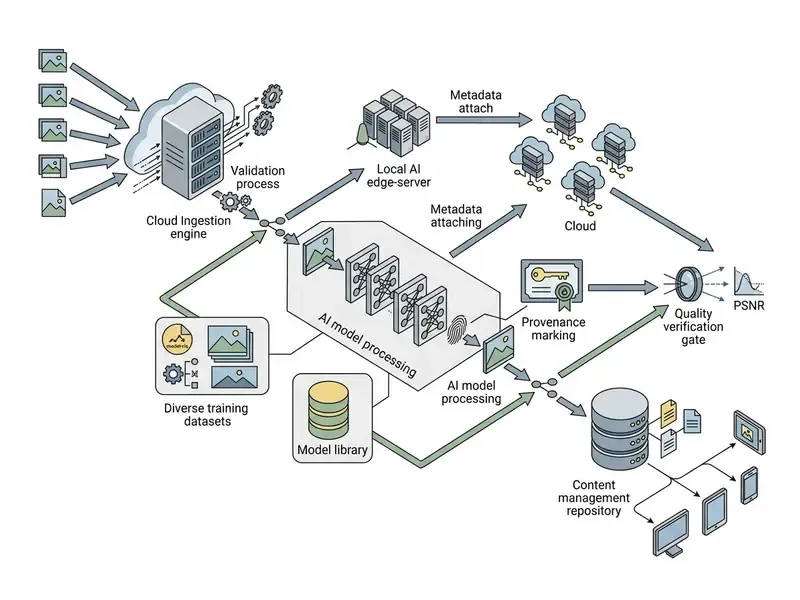
Consumer three-click flows do not survive audit. For organisations the same five stages become a controlled pipeline: ingest, local blur and quality scoring, restoration inside VPC or on-prem inference, automated QC gate, provenance marking and audit logging. The QC gate should reject outputs where structural similarity to the source drops below a defined threshold, or where hallucination detectors such as sFRC-style frequency checks flag synthetic high-frequency content. Every restored asset needs a provenance record: C2PA-style content credentials, or at minimum an immutable audit-log entry holding the original hash, the model version and the parameters used.
Who owns that pipeline? Name a person, not a team.
How to Get Better AI Unblur Results
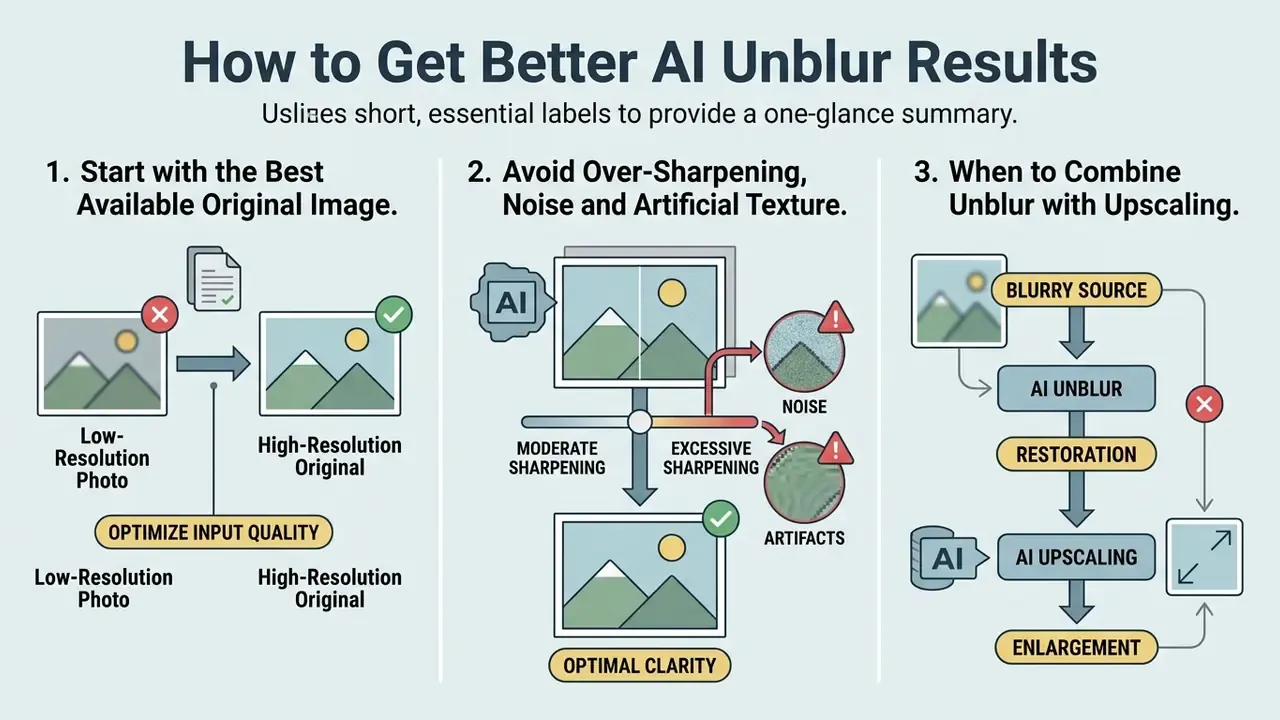
Getting professional grade output from an ai blurry image fixer comes down to three things: input standards, artifact thresholds, and pipeline order. Most disappointing results trace back to the first one.
Start with the Best Available Original Image
Neural restoration depends on surviving structural cues inside the source file. An original high-resolution photo straight from a camera or scanner beats a re-downloaded social media copy by a wide margin, every time.
When a file goes through aggressive downsampling, critical edge information is gone for good. Starting from the highest available pixel dimensions lets the network separate genuine object boundaries from compression noise. Operational digitization guidance sets useful floors for document work: complete pages, 600 dpi for bitonal and 300 dpi for colour or greyscale scans, no skew, no speckle, strong text-to-background contrast. Where some loss is unavoidable, "visually lossless" (0 to 1 JND, as framed in ISO/IEC 29170-3:2026) is the practical upper bound, not arbitrary lossy re-encoding.
Avoid Over-Sharpening, Noise and Artificial Texture
Excessive sharpening leaves a signature: bright halo borders around high-contrast edges, amplified background sensor noise, unnatural synthetic patterns on skin or clothing. Federal digitization guidance mitigates this by applying unsharp mask to the luminosity channel only for colour files. Imaging-test literature defines over-sharpening as gain beyond a reference sharpening value, visible as halos near strongly enlarged edges. Masking sharpening to edges, instead of applying it globally across flat regions such as skies, prevents most noise amplification.
To suppress these defects, modern diffusion frameworks use frequency-aware guidance. Enforcing consistency across both spatial and 2D discrete wavelet frequency domains keeps halos down while preserving natural skin texture.
«A wavelet loss enforcing spatial and frequency-domain consistency yields a 3.72 dB PSNR gain in blind deblurring.»
When to Combine Unblur with Upscaling
Combining deblurring with an AI image upscaler is essential for low resolution sources that suffer pixelation and optical blur at once. Upscale an un-deblurred image and you simply enlarge blurry edges. Deblur a tiny image without upscaling and pixel-grid blockiness stays.
Cascaded networks handle both operations, either simultaneously or in sequence. The deblurring pass restores crisp edge vectors and eliminates blur kernels first. Then the super-resolution pass expands pixel dimensions toward 4K while interpolating sub-pixel fine details. Research supports three viable patterns: a joint end-to-end model trained on blurred low-resolution pairs, a deblur-first cascade for severely blurred inputs, and feature-level fusion of deblurring and SR branches. The last option avoids propagating errors from an imperfect intermediate deblurred image, which is why production teams often prefer it.
«PBaSR disentangles blur and content features through CDM and CFM modules, restoring sharp high-resolution images across varied blur types and intensities.»
AI Unblur Image Use Cases: Photos, Text, Print and Product Images
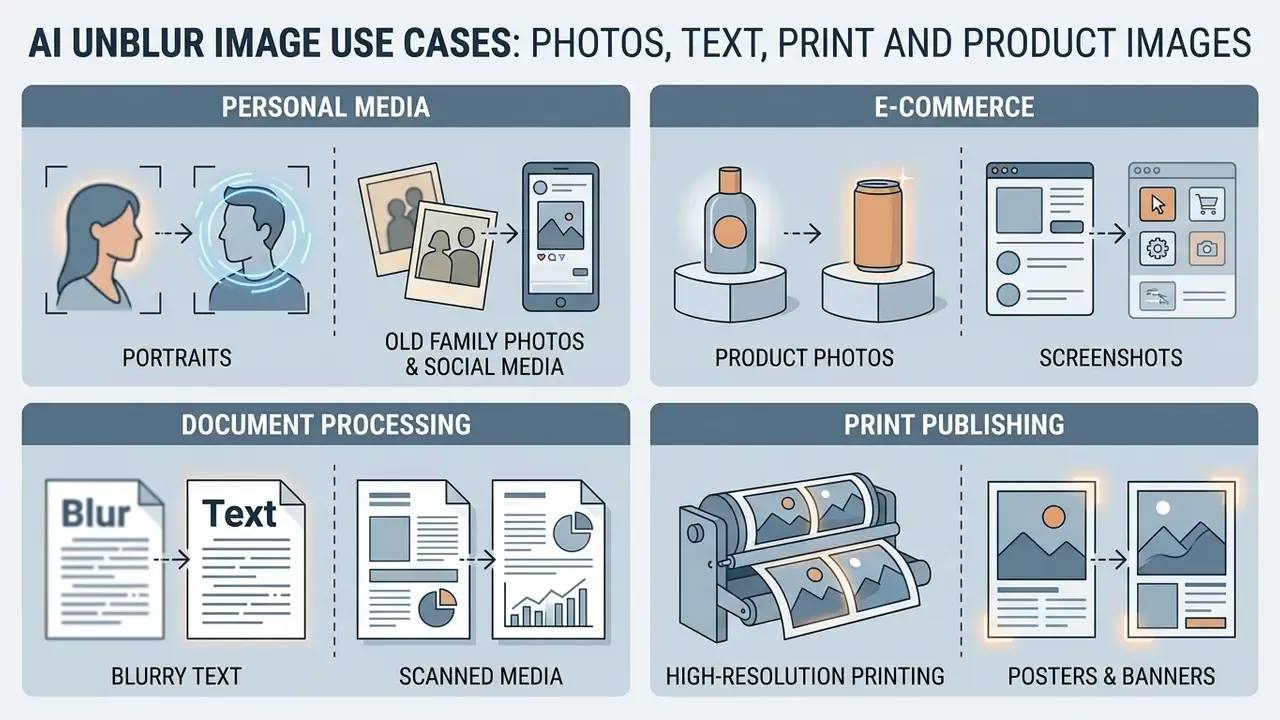
Whether teams fix blurry photo ai free or through enterprise platforms, the same capability serves personal media management, e-commerce publishing, document processing, print production, medical and industrial inspection, and digital archiving. Recent application literature lists surveillance, remote sensing, digital pathology, vehicle and licence-plate recognition, and industrial quality control among the commercial domains where deblurring materially shifts downstream model accuracy.
Product Photos, Screenshots and Blurry Text Images
E-commerce marketplaces set hard image quality floors. GS1 product image specifications require a minimum of 900×900 px, while GS1's own guidance recommends 2400×2400 px to preserve clarity and detail for customer zoom. The Mobile Ready Hero Image methodology even simulates small-screen legibility by applying a 34-px Gaussian blur to a 3000×3000 render. Running catalogue shots through an ai tool to fix blurry images sharpens brand logos, lifts packaging text and restores material surface textures, which tends to move conversion. For product images that are both soft and undersized, chaining restoration with an AI image upscaler is the standard fix; an AI outpainting tool can then extend cropped backgrounds to marketplace aspect ratios.
In document digitization and OCR workflows, blurred text on scanned receipts, contracts or software screenshots blocks accurate automated extraction. Practitioner checklists recommend 300 DPI captures with no skew and no blur before recognition, and OCR vendor guidance warns that lossy-compressed or low-resolution sources measurably reduce accuracy. Teams standardising extraction can compare image-to-text and OCR tools against their restoration stack. Deep CNN models built for text restoration turn unreadable characters into crisp, machine-readable typography.
«A dedicated CNN architecture for text images raises PSNR from 15.55 dB to 20.41 dB and SSIM from 0.62 to 0.88 at ×4 scaling.»
High-Resolution Printing, Posters and Scanned Media
Preparing blurry assets for physical print, whether photo books, fine-art prints, retail signage or trade-show posters, means converting web resolution into a clean 300 DPI output. Standard interpolation during enlargement leaves visible blur and edge softening, because ink spread amplifies any residual softness in the file. Pairing AI deblurring with 4× super-resolution neutralizes scan grain and high-ISO sensor noise at the same time, which matters most for flatbed scans of heritage prints where paper texture competes with image detail.
Practical sequence for print: restore edges first, upscale to the target pixel grid (print width in inches × 300), apply noise reduction at low strength, then sharpen for the output medium only at the final step. Restoring edge boundaries before rasterization keeps typography, line graphics and facial features sharp at large format, and it prevents halo rings that become glaring at poster viewing distance.
How to Choose an AI Tool to Fix Blurry Images
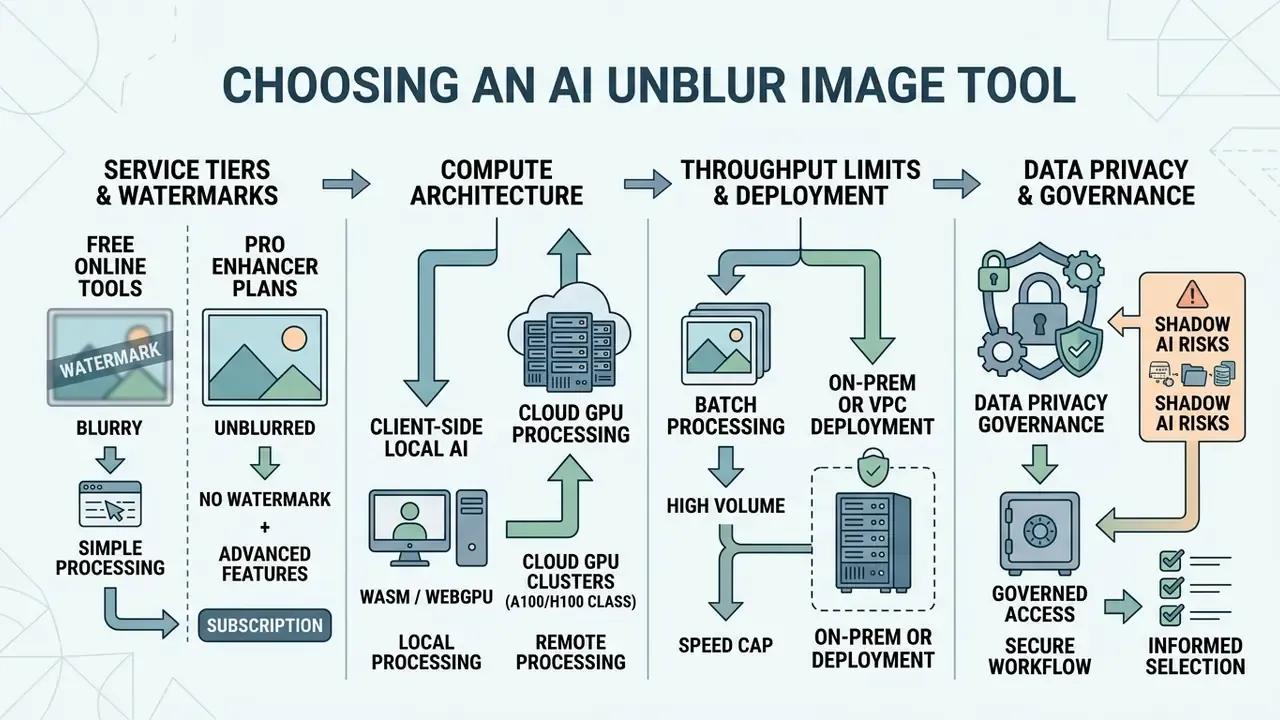
Picking among ai tools to fix blurry images means weighing service tiers, watermark policy, throughput limits, compute architecture and data privacy governance. Why choose one over another? Usually it comes down to where the data is allowed to travel.
Free Online Tools vs. Pro AI Photo Enhancer Plans
Free online unblur services cover basic image enhancement for occasional personal use. Free tiers do impose limits: lower output resolution, mandatory watermarks, daily credit caps, monthly action ceilings (some platforms allow only three unblur operations per month), or forced account creation. Readers hunting free AI tools with no sign-up should check watermark and commercial-rights wording separately, because "free" and "licensed for commercial use" are not the same promise. Our free photo editor guide maps those export restrictions in detail.
Professional AI photo enhancer subscriptions lift export restrictions, grant commercial usage rights and unlock heavier generative models. Pro tools typically add 4K and 8K downloads, no watermark output, priority GPU queuing, processing history, and fine-grained control over face enhancement and noise reduction. Pricing in 2026 clusters into three models: per-credit packs (roughly $1.99 for 10 credits up to $49.99 for 500), weekly or annual subscriptions (around $12.99 weekly, $59.99 annually on mobile apps), and freemium tiers with quota resets. A useful comparison baseline sits in our broader AI image enhancer analysis.
Client-Side Local AI (WebGPU/WASM) vs. Cloud GPU Processing
Online unblur architectures run in three distinct execution models:
- Client-side local AI (WASM/WebGPU).Neural weights download into the browser and inference runs locally on the user's GPU or NPU, zero server uploads, full data confidentiality, no per-image credit cost. The trade-offs are structural. Browser memory and VRAM ceilings cap input file size (commonly around 12 MB, with PNG, JPG and WEBP accepted), restrict model size to compact architectures, and make first-run latency dependent on weight download. Local modes usually offer 2× and 4× upscale presets rather than arbitrary resolutions.
- Cloud GPU clusters (A100/H100 class).Heavy generative diffusion models run on remote servers. This mode supports multi-frame video deblurring, 8K renders, face-prior ensembles and bulk queues of up to 50 images per batch on consumer platforms. It also means transmitting data over the network, so encryption in transit, retention windows and processing jurisdiction become contractual questions rather than technical ones.
- On-prem or VPC deployment.For regulated data, the third path runs cloud-class weights inside the organisation's own virtual private cloud. Large-model capability, data residency control, full audit logging.
Batch Processing, Image Formats and Data Privacy
Enterprise workflows need volume. Platforms with batch processing let users upload many files at once and apply standardized deblurring profiles across whole product lines or document archives.
For studio photography and e-commerce catalogues, processing photos one at a time is an operational bottleneck, nothing more. Production-grade AI unblurers offer multi-threaded batch processing with automated queue ingestion of up to 50 photos per batch, and advanced pipelines classify blur type per file independently: motion correction on action shots, dedicated facial restoration on portraits, same bulk job. Document-AI platforms illustrate the ceilings worth planning against. Online requests commonly cap around 40 MB per file while batch requests allow up to 1 GB per job; asynchronous batch APIs in adjacent categories permit 512 MB per batch with up to 100,000 requests, results retained for 24 hours.
Data privacy is the decisive criterion when handling sensitive personal records or unreleased product media. Leading cloud platforms enforce zero-retention policies and delete uploaded files automatically within one hour. One published mobile privacy policy states photos are removed within an hour and shared only temporarily with the inference provider. Privacy-focused applications instead run open-source models locally on client hardware for 100% data confidentiality. Vendor claims differ widely, though: one major editor states images are SSL-encrypted and deleted within 24 hours, so retention windows should be read in the actual policy rather than inferred from marketing copy.
Shadow AI is the practical governance issue here. Employees pasting customer documents into public unblur forms move regulated data outside controlled systems, silently. Enterprise policy should whitelist local-mode or VPC tools and block open web uploads for anything containing PII. Then evidence the block, because an unenforced policy is not a control.
| Evaluation Criteria | Free / No-Sign Online Services | Pro / Paid AI Enhancers | Enterprise / Controlled Execution |
|---|---|---|---|
| Access Model | Free access; guest mode, no sign-up required | Credit packs ($1.99 to $49.99) or weekly/annual subscription | Contracted seats, API keys, SSO |
| Watermark Policy | May include watermarks on free downloads | 100% watermark-free commercial outputs | Watermark-free; optional forensic marking |
| Supported Formats | Standard JPG, JPEG, PNG, WEBP (local modes) | JPG, PNG, WEBP, AVIF, BMP, TIFF, HEIC/HEIF, RAW | Full set plus RAW/TIFF archival ingest |
| Max Output Resolution | Standard HD (1080p equivalent), 2× and 4× upscale | Full HD, 4K, 8K, or original source scale | Original scale, print-grade 300 DPI targets |
| File Size Limit | ~12 MB (browser local mode) | Tens of MB per file | ~40 MB online, up to 1 GB per batch job |
| Batch Processing | Single file upload only | Multi-file batch queues (up to 50 images per batch) | Queued API jobs, per-file blur classification |
| Commercial Rights | Personal use only; restricted rights | Full commercial rights granted | Contractual rights plus indemnity terms |
| Compute Location | Browser WASM/WebGPU or shared cloud | Cloud GPU (A100/H100 class) | On-prem or VPC; data residency controls |
| Data Privacy | Cloud server processing; temporary storage | Encrypted transit, auto-deletion within 1 to 24 h | Zero-retention contract, SOC 2 / ISO 27001, audit logs |
| Provenance & Audit | None | Metadata only | C2PA-style credentials, immutable audit trail |
Model Risk Checklist, TCO and ROI
MRM Validation Checklist for AI Deblurring
Where restored images feed decisions, identity verification, claims adjudication, damage assessment, evidence review, the model belongs in the AI inventory. It needs documented validation in the spirit of supervisory model-risk guidance: conceptual soundness, outcome analysis, ongoing monitoring, SR 11-7 style.
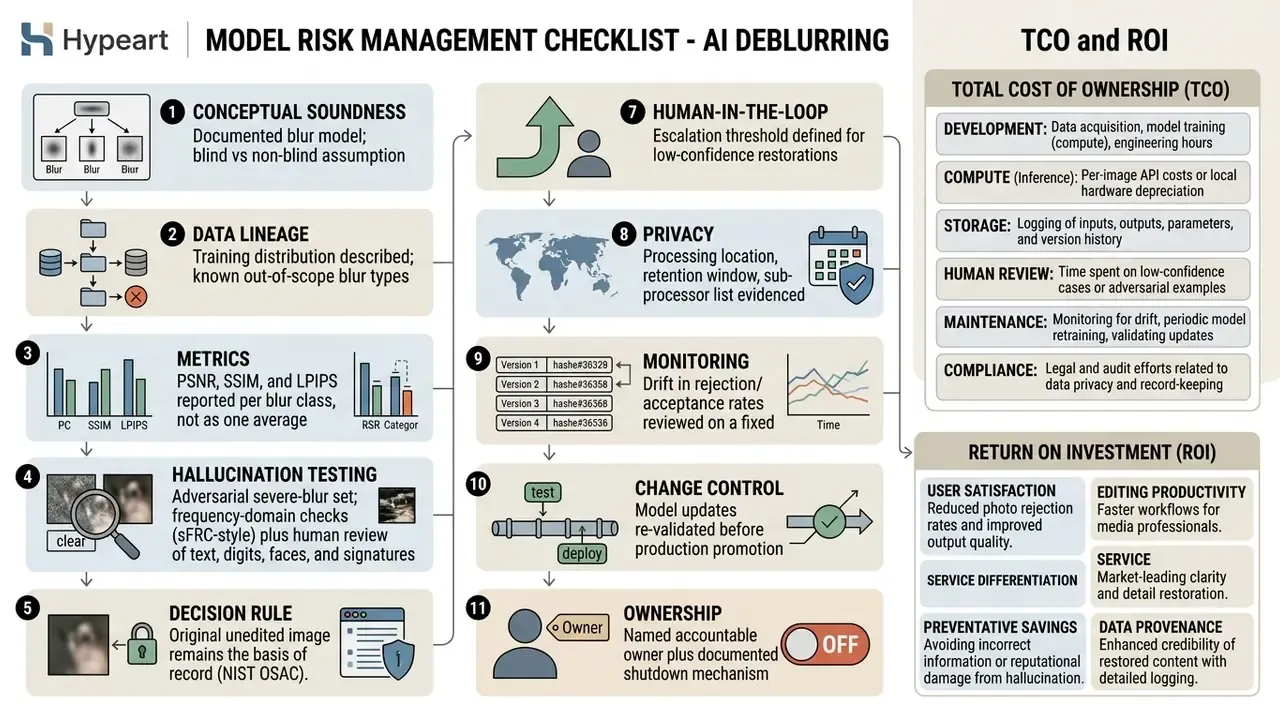
That last line is the one most inventories miss. No evidence, no autonomy.
Total Cost of Ownership and ROI Framing
A credible business case counts controls, not just credits. A workable framing:
TCO = (processing cost per image × volume) + (human QC minutes × loaded hourly rate) + integration and maintenance + validation and audit effort + residual error cost.
Benefit = (documents previously rejected × recovery rate × cost per manual re-request or lost conversion) − (cost of undetected restoration errors × their downstream impact).
Two variables dominate the outcome. The recovery rate on genuinely salvageable files, and the hallucination-review load required before restored images can be trusted. Measure both on a held-out sample before scaling. A model that recovers 60% of rejects while requiring manual review of every single output may be economically worse than a narrower deterministic fix. Unpopular, but true.
Limitations and Open Questions
AI Unblur Image FAQ
Can I Use AI Unblur Image on a Phone?
Yes. AI unblur tools work directly on mobile devices through a standard browser or a native app, with no installation needed on iOS Safari or Android Chrome. Mobile web processing can offload heavy GPU computation to cloud servers, so a smartphone delivers visible enhancement in a few clicks without draining the battery. Source reliability note. An earlier version of this guide cited a browser benchmark reporting warm execution latency near 5.6 seconds and cold start near 11.8 seconds on mobile Chromium. Those numbers come from a single vendor-adjacent benchmark and remain unverified by independent testing, so treat them as indicative only. The stable, peer-reviewed finding is narrower: computation, not network transfer, is the primary bottleneck for image workloads in mobile browsers. Efficiency data is stronger on the model side. Modern smartphone hardware uses built-in Neural Processing Units (NPUs) to run lightweight edge models inside gallery apps, and OEM features such as ASUS Gallery's AI Unblur (Gallery, Edit, Advanced, AI Unblur) apply on-device alignment and clarification to hand-shake blur.
«Swintormer reduces computation from 140.35 to 8.02 GMACs per iteration while maintaining a competitive 27.07 dB PSNR on defocus deblurring.» Chen & Liu, Swintormer, arXiv (2024). https://arxiv.org/abs/2401.05907
Can AI Unblur Videos and Extremely Blurry Photos?
AI can deblur video sequences and fix moderately blurry photos. Extreme physical blur sets a hard boundary. Video deblurring models use temporal frame aggregation, analyzing adjacent frames to reconstruct missing structure in motion-blurred shots. The NTIRE Video Deblurring Challenge frames the task explicitly as restoring high-frequency components, and recent methods add motion-magnitude priors because large inter-frame displacement destabilizes flow estimation. Event-based deblurring is now an active CVPR 2026 and NTIRE benchmark track, with top submissions reporting around 40.78 dB PSNR and 0.901 SSIM on challenge data.
«BlurDM integrates blur formation into the diffusion process, jointly removing noise and blur, with significant improvements across four benchmark datasets.» BlurDM: Blur Diffusion Model, arXiv (2025). https://arxiv.org/abs/2512.03979 When an image is extremely degraded, where long-exposure camera motion or total defocus has destroyed all edge contrast, no network recovers the original optical signal. Aggressive AI unblurring will either leave residual blur artifacts or generate visually plausible hallucinations that do not match the real subject. Vendors concede this themselves: extremely pixelated thumbnails and exposure-destroyed frames cannot be fully recovered. For footage with motion blur, temporal aggregation models weigh neighbouring keyframes to rebuild spatial edges. After frame-by-frame deblurring, editors can pass restored stills through secondary cleanup: AI object removal to clear background clutter, or automatic colorization to restore natural skin tones on archival film. Litigation and dispute teams evaluating restored media as exhibits can browse the hub for governance material, or compare options across heavy media restoration stacks.
How to Fix Blurry AI Generated Images?
Generated images blur for different reasons than photographs: low-step sampling, aggressive upscaling inside the generator, or a soft prompt that never specified focus. Three fixes, in order. First, re-render at higher steps and native resolution instead of enlarging a small output. Second, apply a restoration pass tuned for synthetic textures rather than optical blur, since there is no real blur kernel to invert. Third, upscale last, never first. This matters across generator families. Users asking whether can claude ai produce production-ready assets, or checking can deepseek generate images at usable resolution, run into the same ceiling: the export size caps the detail, not the prompt. Template-driven tools have their own quirks. Soft exports from canva ai art workflows usually improve more from a larger canvas than from any sharpening slider, a pattern our canva ai generator breakdown documents. Style-transfer pipelines such as cartoon to realistic ai conversions tend to soften facial edges during restyling, so run face-prior restoration after the conversion rather than before. And anyone experimenting with a celebrity ai image generator should note that likeness and publicity-rights constraints apply regardless of how sharp the output looks.
Does AI Unblur Work on Scanned Documents and Receipts?
Yes, and it is one of the highest-ROI applications available. Scan at 300 DPI for colour or greyscale and 600 DPI for bitonal text, keep pages square and complete, and avoid lossy re-encoding before restoration. Text-specific models deliver measurable gains (PSNR 15.55 to 20.41 dB, SSIM 0.62 to 0.88 at ×4). But any digits, signatures or legal clauses reconstructed by a generative model must be human-verified against the original scan before use. No exceptions in a regulated pipeline.
Which File Formats and Size Limits Should I Expect?
Consumer cloud engines commonly accept jpg, jpeg, png, bmp, webp, jfif, jfi, jpe, jif, ico and avif, plus HEIC/HEIF from Apple devices. Professional tiers add TIFF and RAW. Browser-local modes typically accept PNG, JPG and WEBP up to roughly 12 MB. Cloud services usually cap single-file online requests in the tens of megabytes, with batch jobs measured in hundreds of megabytes up to 1 GB.
Can I Unblur an Image Online Free Without Signing Up?
Several services run in guest mode with no sign-up and no watermark, and a few grant explicit personal and commercial rights on free exports. Others restrict free use to a fixed number of actions per month, stamp watermarks, or charge credits (for example, four credits per image after a ten-credit trial). Confirm three things before relying on any free tier: watermark policy, output resolution cap, and commercial-use wording. Those three, in writing.
Editorial Standards and Disclaimer