"When governance teams and digital creators evaluate zero-cost tools like the Perchance AI image generator, the real question is not image quality. It is whether creative experimentation can coexist with licensing transparency and model validation."
— Marcus Hale, author
Executive Summary
For creators: the Perchance AI image generator is a free, browser-based, no-sign-up text-to-image workspace. You pick a style preset and an aspect ratio, write a structured prompt, click generate, and download the result. There is no published daily credit counter. Practical limits come from public GPU host queues, not from a paywall. Sensible starting settings: Guidance Scale (CFG) 7.0 to 9.0, Steps 25 to 50 on quality models or 4 to 8 on turbo models, Seed = -1 for exploration and a fixed numeric Seed for series consistency.
For risk, compliance and governance leaders: this is a textbook Shadow AI vector. It requires no authentication, produces no audit log on the user side, routes text prompts to third-party public model hosts whose versions can change silently, and offers no SLA, no indemnification and no model-version pinning. That combination makes it unsuitable for regulated, repeatable production that must survive a model-risk audit. It is acceptable for non-critical ideation when a prompt-hygiene policy (no PII, no confidential data, no client names) is actually enforced, not merely published.
For legal and brand owners: platform terms permit commercial use, but permission to use is not the same as ownership. Under current US Copyright Office guidance, purely AI-generated visuals without human authorship are not registrable. Logos, trademarks and advertising creatives carry the highest exposure. Raw AI output cannot be defended exclusively, and diffusion models frequently produce accidental similarity to existing marks. Substantial human editing plus a documented human-intervention trail is the minimum viable control.
What the Perchance AI Image Generator Is and Which Tasks It Fits
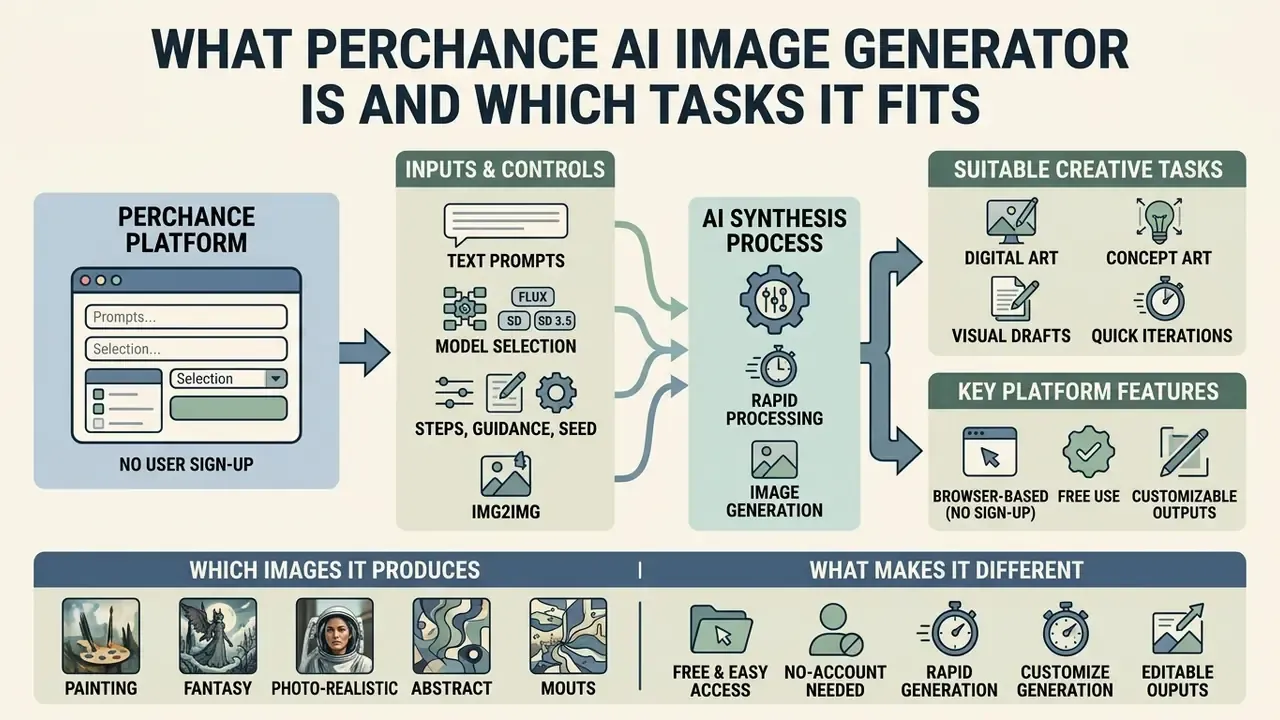
The Perchance AI image generator is a browser-based, no-sign-up text-to-image platform built for rapid synthesis of digital art, concept art and visual drafts, without subscription fees or daily credit caps. Creators, digital marketers and research teams use it to create unique visuals for personal projects and social media channels inside a standard web browser. Nothing to install. Nothing to authorise.
The tool sits inside the broader Perchance ecosystem, a platform originally created for building custom random text generators, which integrated AI image synthesis tooling around 2023. It takes plain text descriptions and turns conceptual ideas into digital assets: stylized illustrations, character portraits, environment concepts, graphic design drafts.
«Diffusion models iteratively remove noise from a random signal, training a network to reconstruct realistic images conditioned on text». — Zhang et al., Survey on Text-to-Image Diffusion Models, arXiv (2024). https://arxiv.org/abs/2403.04279
In enterprise and team environments, zero-barrier utilities get adopted spontaneously. That is how unmonitored shadow AI workflows begin: a designer bookmarks a page, a campaign ships, and nobody logged a thing. In a hypothetical audit of a financial services marketing unit, unvetted consumer AI image tools had been introduced to accelerate campaign mockups with no centralized oversight. An operational governance review cataloged the generation endpoints in use, then set standard prompt verification guidelines. Compliance exposure fell; creative iteration speed survived. Illustrative example, not a documented client result.
To evaluate broader digital asset tools and workflow integrations across enterprise creative pipelines, teams can browse the hub for structured technical analysis.
Which Images an AI Image Generator Like Perchance Produces
Perchance produces a wide range of visual styles, from fantasy world landscapes and 3D character renders to photorealistic portraits, digital paintings, pixel art and vector-style icon ideas.
With simple prompt modifications, users can generate detailed character concept art, product visualization mockups, isometric renders and atmospheric background art. Because the rendering behaviour rests on text-to-image diffusion, the generator handles very different aesthetic directions: oil paintings, watercolours, crisp digital art, realistic studio photography. Publicly documented preset families include Painted Anime, Soft Anime, 2D/3D Disney Character, Cinematic, Concept Sketch, Painterly, Oil Painting Realism, Fantasy Portrait, Studio Ghibli, Cyberpunk, Steampunk, Pop Art, Minimalist, Retro and Vaporwave. So the practical style library is far wider than the three or four generic categories most reviews mention. Users searching for an ai photo generator perchance page or an ai picture generator perchance variant usually land on one of these preset-driven front-ends.
What Makes Perchance Different as a Free AI Image Generator
Why choose a free ai tool over a licensed suite? Three reasons keep coming up: no account registration (no sign-up), no explicit daily usage quotas, and fast generation directly in the web interface.
Unlike proprietary enterprise generators that require monthly subscriptions, credit purchases or mandatory accounts, Perchance operates with zero login friction. Readers comparing equivalents can review other free image generators that work without registration before committing to one workflow. Creators can run repeated prompt iterations, adjust style settings and generate multiple image batches in one session without hitting a paywall. A structured AI image generator comparison helps match a tool to required resolution, licensing and control parameters. To contrast feature sets across platforms, including adjacent ai video tooling, creators can explore the hub for comprehensive media generation tools.
Fact-check note: third-party pages occasionally claim Perchance grants "three free generations per day". No such daily counter is documented on the platform itself. Real constraints are host-side: queues, cold starts, temporary outages and rate limits on the public GPU endpoints serving the request. Switching models is the standard workaround when one path stalls.
How to Use the Perchance AI Image Generator: Step-by-Step Instructions
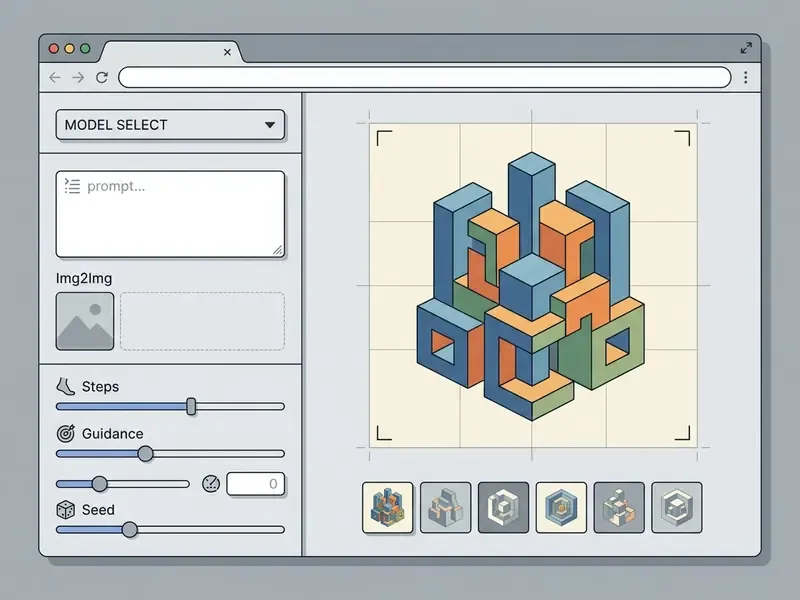
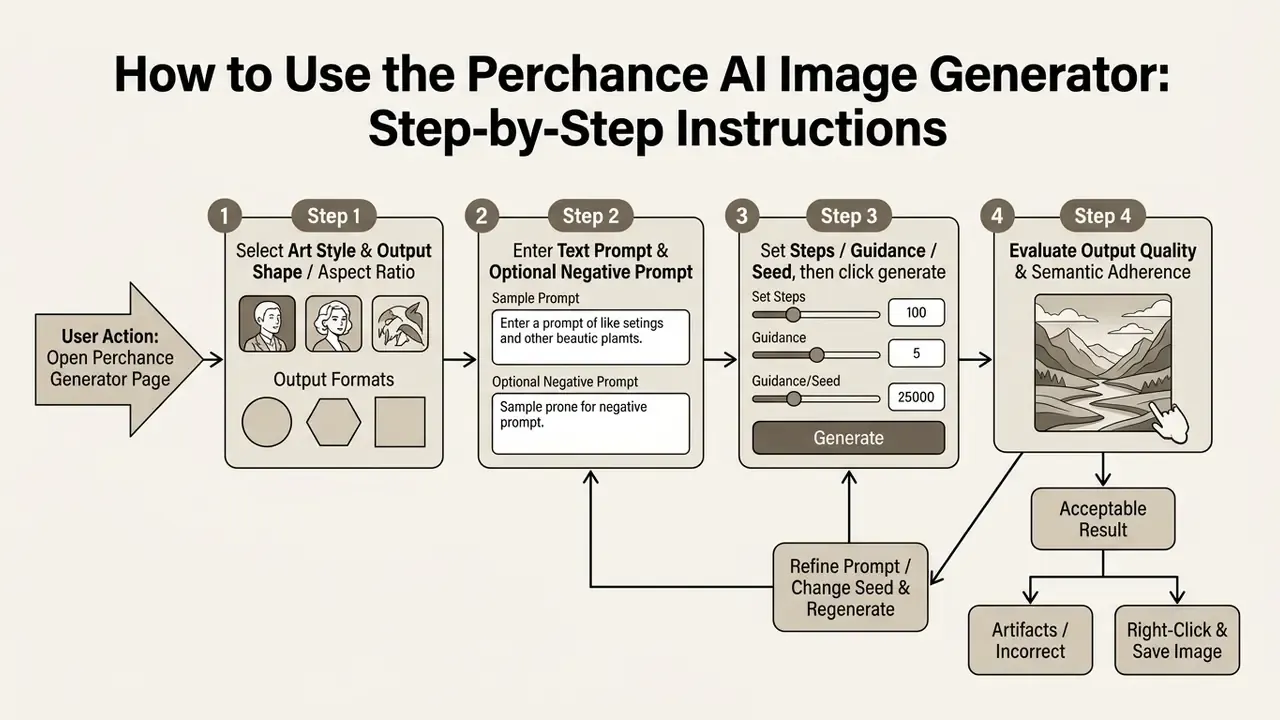
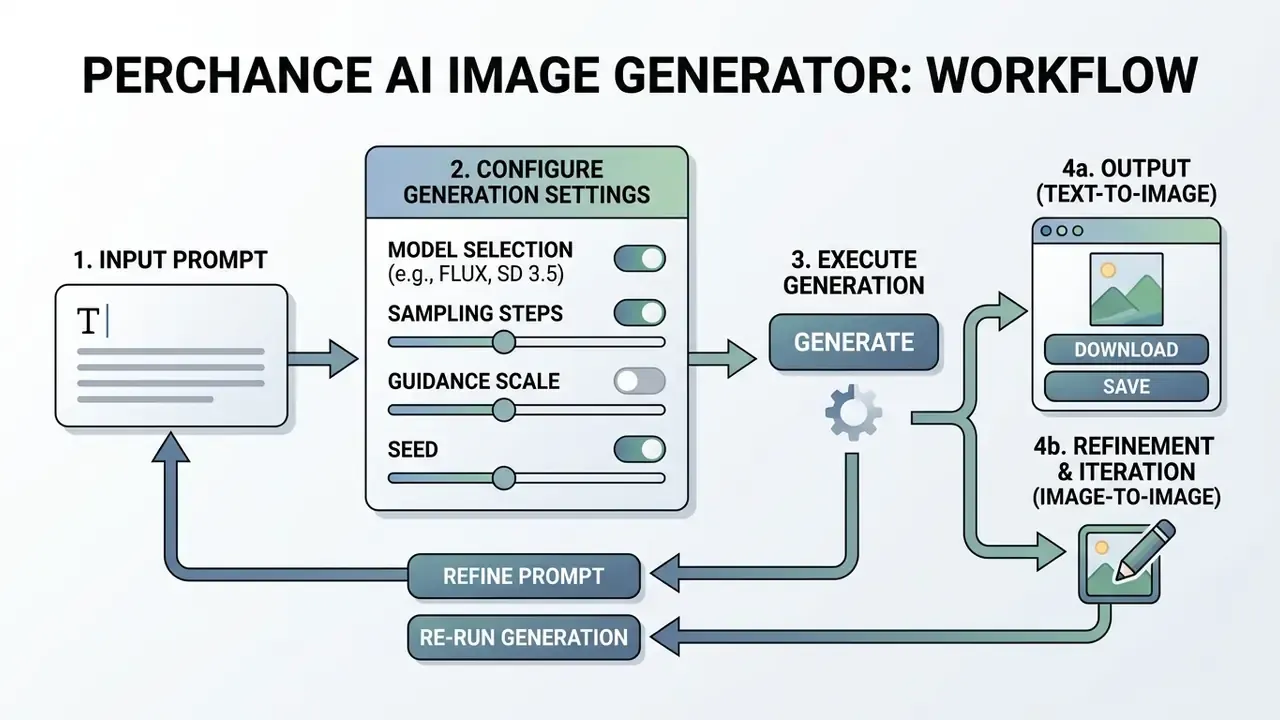
Using the perchance ai image generator means opening the web interface, choosing visual parameters, entering a structured text prompt, running generation, and downloading the asset. The workflow is built for fast iteration, with no registration step in the way.
Step-by-Step Generation Steps
- Open the workspace access the chosen Perchance AI image generator page in any standard desktop or mobile browser.
- Select style and shape choose an aesthetic preset (Photorealistic, Anime, Digital Art) and an aspect ratio (Square, Portrait, Landscape).
- Input the text prompt describe the intended subject in the prompt field, using concrete adjectives for lighting and setting.
- Add an anti-description (negative prompt) list what must not appear, such as artifacts, watermarks and anatomical errors.
- Click generate press the generate button to start backend diffusion sampling.
- Evaluate and save review the batch. Right-click, or long-press on mobile, to save the files you want. Otherwise adjust the prompt and run again.
How to Choose a Model and Style Before Generation
Before typing anything descriptive, set the visual direction. A style preset grounds the generator's latent space in the target artistic domain, which saves two or three wasted cycles later.
Choosing "Photorealistic" pushes the model toward natural camera lighting, lifelike skin texture and realistic depth of field. Selecting "Concept Art" or "Watercolor" signals the text encoder to favour painterly brushstrokes, expressive palettes and stylized line work. One nuance worth knowing: because Perchance generator pages are individually authored, model selection often happens by choosing a specific page rather than by flipping one global model switch.
How to Write Text Prompts for a Predictable Result
Effective text prompts put the central subject first, then environmental context, visual details, lighting conditions and composition framing, in plain concrete language.
Documentation for open-source diffusion plugins recommends splitting prompts into discrete semantic components:
[Main Subject] + [Setting/Background] + [Lighting & Color] + [Art Style] + [Camera Framing/Composition]. Drop vague adjectives such as "beautiful" or "amazing". Replace them with specifics: "dramatic golden hour side-lighting", "wide-angle cinematic perspective". That is most of how the image generator works in practice.
«Prompt adaptation via reinforcement-learning fine-tuning improves aesthetic scores and human preference over manual prompt engineering». — Hao et al., Optimizing Prompts for Text-to-Image Generation, NeurIPS (2023). https://arxiv.org/abs/2212.09611
How to Obtain and Evaluate the Generation Result
Evaluating a generated image means three checks: semantic alignment with the prompt, visual plausibility, and the absence of anatomical or structural artifacts.
«VQAScore-style metrics correlate with human judgments on compositional benchmarks better than CLIPScore, because they verify specific object attributes». — Hartwig et al., Evaluating Text-to-Image Generative Models: An Empirical Methodology, arXiv (2025). https://arxiv.org/abs/2501.09764
Audit outputs for the usual diffusion flaws: floating objects, shadows falling the wrong way, distorted hands, misspelled rendered text. A practical loop works like this. First, check semantic alignment clause by clause against your prompt. Second, test physical plausibility of shadows, reflections and supports. Third, check entity fidelity for logos, instruments and anatomy. Fourth, read any rendered text. If defects show up, adjust the prompt or extend the negative prompt before the next cycle. For post-generation cleanup, creators can apply AI tools that enhance image quality before publishing.
Perchance AI Image Generator Capabilities: Models, Styles and Parameters
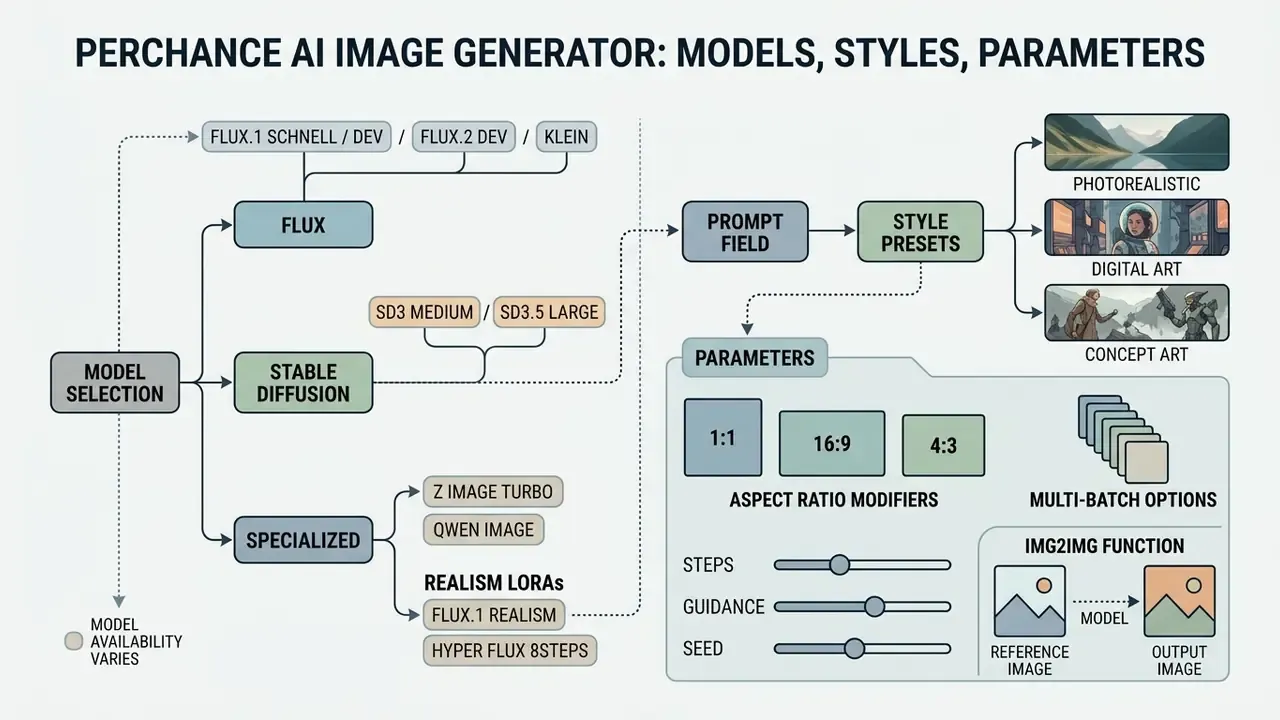
The generator gives users control through style preset selectors, aspect ratio modifiers, multi-batch options and customizable prompt fields. Those parameters calibrate resolution and composition to match editorial and artistic requirements.
The front-end looks simple, deliberately. Under it, individual generator pages can route prompts through different open-source backends, mostly derived from Stable Diffusion open-weights families. Understanding how the parameters interact is what makes ai image generation predictable rather than lucky.
Choosing an AI Model for Image Generation
Selecting a different generator variant or a community-built page changes the underlying perchance ai image generator model, which directly affects detail rendering, text adherence and visual coherence.
In open diffusion architectures, variants such as standard Stable Diffusion builds versus community fine-tunes like "perchance ai image gen pro" process text tokens with different degrees of precision.
«SD3-medium reaches an R2I-Score of 0.50; proprietary models outperform it by 57 to 71%, especially on spatial and numerical reasoning». — R2I-Bench: Reasoning-to-Image Benchmark, arXiv (2025). https://arxiv.org/abs/2501.09775
Switching between variants and mirrored multi-model front-ends lets users pick a backend suited either to photorealism or to stylized art.

Styles for Concept Art, Digital Art and Photorealistic Images
Built-in style presets act as automated prompt modifiers. They steer the engine toward a specific aesthetic: concept art, digital art, anime or high-detail photorealism.
When a user selects "Casual Photo", "Concept Art" or "Digital Painting", the system prepends or appends optimized style tokens to the primary prompt. You never see them, but they carry real weight.
Commercial style classifier: which preset to pick and what it injects into your prompt
| Category | Perchance-style preset | Purpose and injected tokens |
|---|---|---|
| Photorealism | Professional Photo / Casual Photo / Ultra Realistic | Adds tokens such as 8k resolution, DSLR, 85mm lens, f/1.8, natural skin texture, studio lighting. Best for headshots, product shots, lifestyle mockups. |
| Digital & Concept Art | Concept Art / Concept Sketch / Isometric 3D | Adds tokens such as octane render, trending on ArtStation, isometric view, game asset, detailed digital painting. Best for game assets and pitch decks. |
| Stylised Graphics | Studio Ghibli / Cyber Retro / Pixel Art / Vaporwave | Adds tokens such as hand-drawn anime, retro 80s aesthetic, 16-bit pixel style, vibrant color palette. Best for social content and merch drafts. |
| Painterly / Traditional | Oil Painting / Oil Painting Realism / Watercolor / Painterly | Adds tokens such as visible brush strokes, canvas texture, soft pigment bleed, classical composition. Best for editorial illustration. |
| Character Design | Painted Anime / Soft Anime / 2D-3D Disney Character / Fantasy Portrait | Adds tokens such as character sheet, cel shading, expressive eyes, full-body turnaround. Best for story and RPG projects. |
| Cinematic & Mood | Cinematic / Cinematic Ink / Ethereal Dream / Double Exposure | Adds tokens such as anamorphic lens flare, volumetric fog, high contrast grade, dramatic rim light. Best for banners and key art. |
For a deeper comparison of standalone commercial generators and enterprise design tools, see our analysis of adobe ai image generation frameworks, our review of Canva AI generator licensing and exports, and our breakdown of Ghibli-style AI image generators by style accuracy and usage rights.
Aspect Ratios and Output Quality Parameters
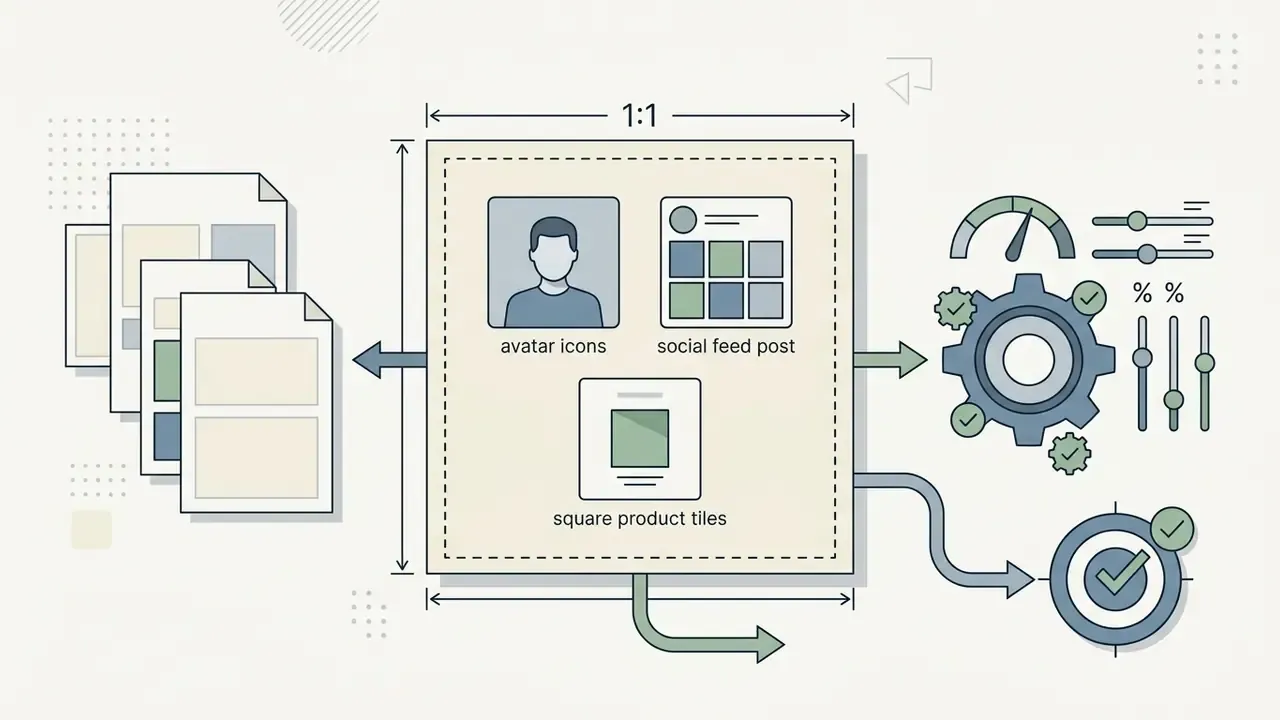
Aspect ratios (square 1:1, portrait 9:16, landscape 16:9) determine dimensions and composition framing, so the output fits the media layout you actually need.
Picking the target ratio before generation prevents distortion and unwanted cropping in post-processing. Native Perchance output sizes reported across generator pages sit between 512×512 and 768×1024, scaling toward 1024×1024 on newer backends. Which means print-ready assets almost always need an upscaling pass. No way around it.
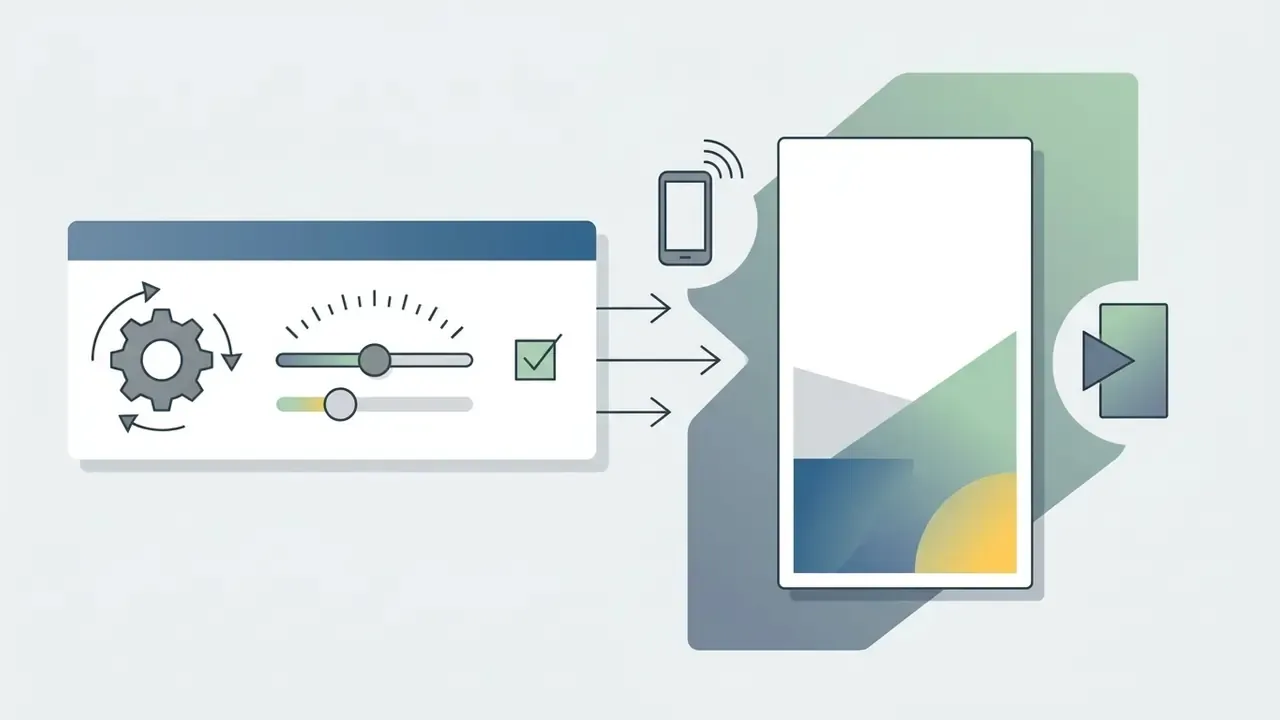
Advanced generation controls: Steps, Guidance Scale and Seed
- Guidance Scale / CFG (prompt adherence): the practical sweet spot is 7.0 to 9.0. Below 5.0 the model gets more creative latitude but drifts from the prompt. Above 12.0 colours oversaturate and edge artifacts creep in.
- Generation Steps: for fast drafts on FLUX.1 Schnell or Z Image Turbo, 4 to 8 steps are enough. For maximum detail on Stable Diffusion 3.5 or FLUX.1 [dev], set 25 to 50 steps. Past roughly 60 steps, gains are usually invisible while queue time grows.
- Seed: the default is
-1(random). To hold a character, palette or composition across a series, copy the numeric Seed ID of a frame that worked and reuse it while changing only environment details. - Reproducibility warning for audit contexts: a fixed Seed reproduces an image only while the same backend weights and sampler stay in place. Public hosts can update or swap model versions with no surfaced changelog, so a Seed alone is not reliable reproducible audit evidence. Worth repeating to anyone who assumes otherwise.
How to Use Image-to-Image (Img2Img) and Upscaling
Text-to-image is only half a working pipeline. Reference-driven generation (Img2Img) and resolution enhancement close the gap between a draft and a publishable asset.
Working with source images:
- Upload a referencedrag a JPEG, PNG or WebP file, typically up to 10 MB, into the Source Image field of an Img2Img-capable generator page.
- Set Image Strength (Denoising Strength)Set Image Strength (Denoising Strength):
- Describe the delta, not the whole scene
- with Img2Img, prompts work best when they state what should change ("convert to isometric 3D game asset, matte plastic material") instead of re-describing everything already visible.
- Upscaling
- for print or high-DPI web placement, run an upscaling pass from base resolution up to 2K or 4K, removing diffusion noise and recovering edge sharpness. Dedicated AI upscalers for raising resolution usually beat repeated regeneration at higher steps.
- Typical processing time
- reference-based transformations on public hosts commonly finish in 15 to 30 seconds, longer under peak load.
- Common Img2Img jobs
- landscape enhancement, 3D render upscaling, illustration refinement, professional photo enhancement, digital art restoration, vintage photo revival.
How to Write Prompts for High-Quality Images in Perchance AI
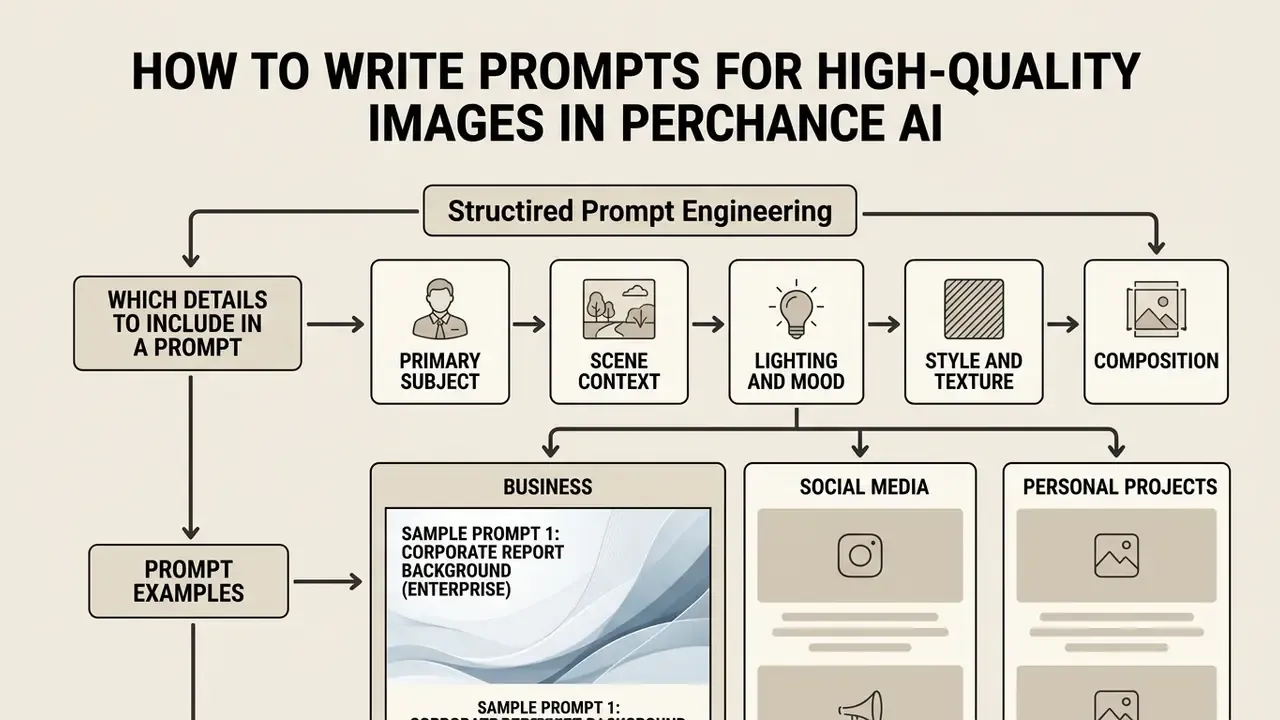
High-quality prompts come from structured prompt engineering: order subjects, environments, lighting parameters and negative constraints logically, and you direct the model's visual attention rather than hoping for it.
Because free diffusion generators process tokens sequentially, word order changes element weighting. Put critical subject details at the front and the text encoder prioritises your primary asset over background nuance. That single habit produces more high quality results than any secret keyword list.
Which Details to Include in a Prompt: Subject, Style and Visual Accents
A complete prompt defines five elements: primary subject, scene context, stylistic treatment, lighting, and camera perspective.
- Primary subject "An old mechanical clockmaker with brass spectacles..."
- Scene context "...working inside a cluttered Victorian workshop filled with gears and pendulum clocks..."
- Lighting and mood "...illuminated by warm lantern light casting long soft shadows, cozy atmospheric mood..."
- Style and texture "...detailed digital painting, concept art style, rich wood textures..."
- Composition "...close-up portrait shot, shallow depth of field, sharp focal clarity."
For workflows that need post-generation text overlays, creators can consult specialized methods to add text to AI-generated graphics cleanly.
What to Change When the Generation Result Misses the Idea
When output misses the concept, isolate one prompt variable, apply a negative prompt, or swap a descriptor. Do not rewrite everything, that destroys your ability to attribute the change.
Negative prompts (the Anti-Description field on many Perchance pages) tell the model what to exclude. Keep the core prompt stable, adjust one variable at a time, hold the Seed fixed, and fine-tuning becomes controlled instead of superstitious.
Ready-made universal negative prompt block. Paste this into the Negative Prompt / Anti-Description field for a fast cleanup pass:
blurry, low resolution, bad anatomy, extra fingers, mutated hands, poorly drawn face, text watermark, signature, cropped, oversaturated, deformed body structures
Targeted negative-prompt recipes:
| Problem observed | Add to Negative Prompt | Also adjust |
|---|---|---|
| Mangled hands and limbs | extra fingers, fused fingers, mutated hands, extra limbs | Raise Steps to 35 to 50; reframe to reduce hands in shot |
| Gibberish rendered text | text, letters, watermark, signature, logo | Switch to FLUX.1 [dev] or FLUX.2 for legible typography |
| Washed-out or neon colours | oversaturated, hdr artifacts, colour banding | Lower Guidance to 6.0 to 7.5 |
| Flat, generic composition | centered snapshot, flat lighting, plain background | Add camera and lighting terms; keep Seed and vary framing |
| Style bleed from preset | oil painting, anime (when photorealism is required) | Re-select the photo preset; move style tokens to the front |
Syntax note: many diffusion front-ends support emphasis weighting with parentheses, for example (brass spectacles:1.3) to strengthen a token, or brackets and lower weights to de-emphasise one. Support depends on the backend. If the weights are ignored, reorder the prompt instead, since earlier tokens carry more influence.
Quality, Speed and Retrieving Images from Perchance AI
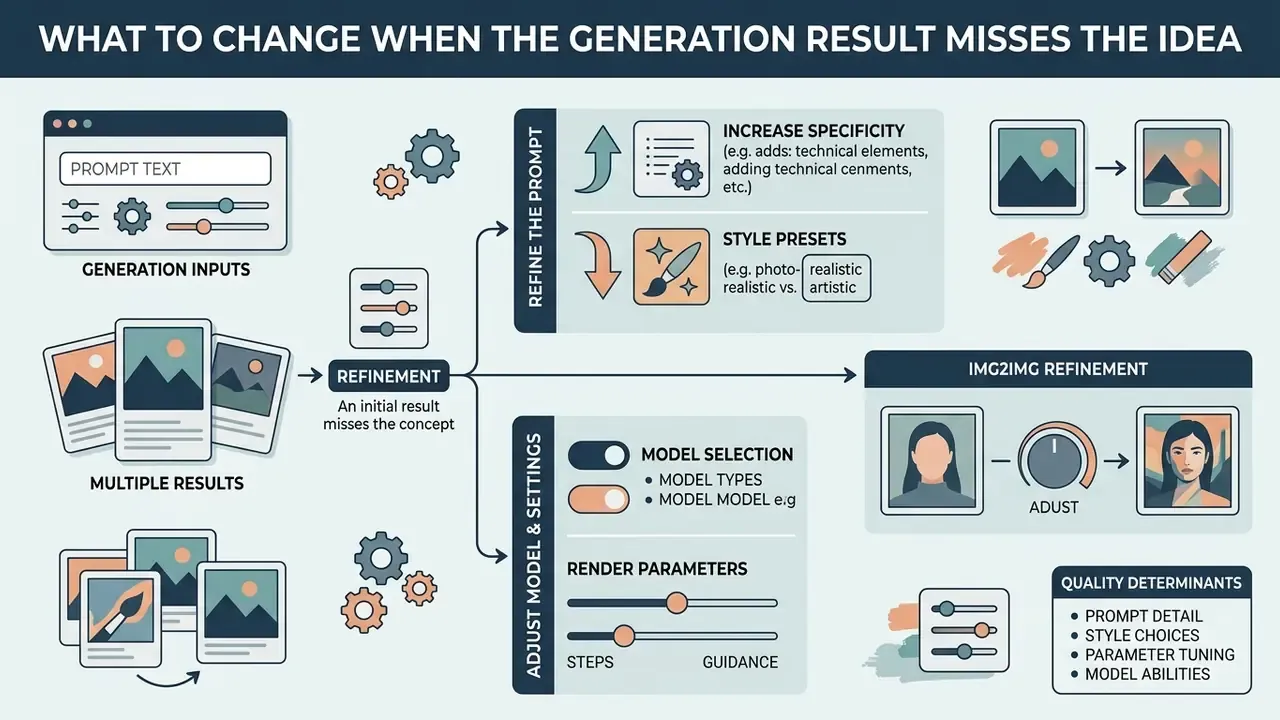
What Determines the Quality of AI Generated Images
Visual quality in ai generated images comes down to prompt specificity, the chosen style preset, rendering resolution, and the model's inherent limits in physical commonsense and entity fidelity. This is where ai technology still stumbles, despite the cutting edge marketing language around it.
«SD-XL reaches only 45.8% on single-concept recall and 28 to 51% on multi-concept composition tasks, indicating systematic factual errors». — T2I-FactualBench, arXiv (2025). https://arxiv.org/abs/2501.09136
«Instruct-Imagen averages 46.5 on image-entity alignment: aircraft 46.9, insects 21.9, reflecting frequent detail errors». — Kitten: Knowledge-Intensive Evaluation of Image Generation on Visual Entities, arXiv (2024). https://arxiv.org/abs/2410.16855
In practice, models routinely misrepresent specialised technical detail: complex aircraft wings, anatomical structures, medical illustrations, specific mechanical components. High quality results therefore depend on human review and iterative refinement, not on one lucky prompt. For resolution and detail recovery after generation, an AI upscaler workflow is usually the fastest fix.
How to Work With Multiple Generation Results
Multi-image batches and seed variations let creators compare several interpretations of a single prompt before choosing what ships.
Batch generation exposes differences in compositional layout, lighting and character framing under identical prompt conditions. Picking the strongest variant from a batch of four or eight statistically improves output quality while cutting prompt engineering overhead.
Batch and selection protocol:
- Fix prompt, style, aspect ratio and Steps. Vary only the Seed across the batch.
- Log prompt, Seed and model name for every kept candidate. This record feeds both series consistency and your human-review trail.
- Score candidates on three axes: prompt alignment, physical plausibility, brand or style fit. Discard anything failing plausibility, however pretty it looks.
- Promote one or two winners to an Img2Img refinement pass at Denoising 0.2 to 0.35, then upscale.
To build reproducible production pipelines and integrated design flows, teams can explore the hub for step-by-step technical guides.
Use Cases and Commercial Risk Assessment for Perchance AI Images
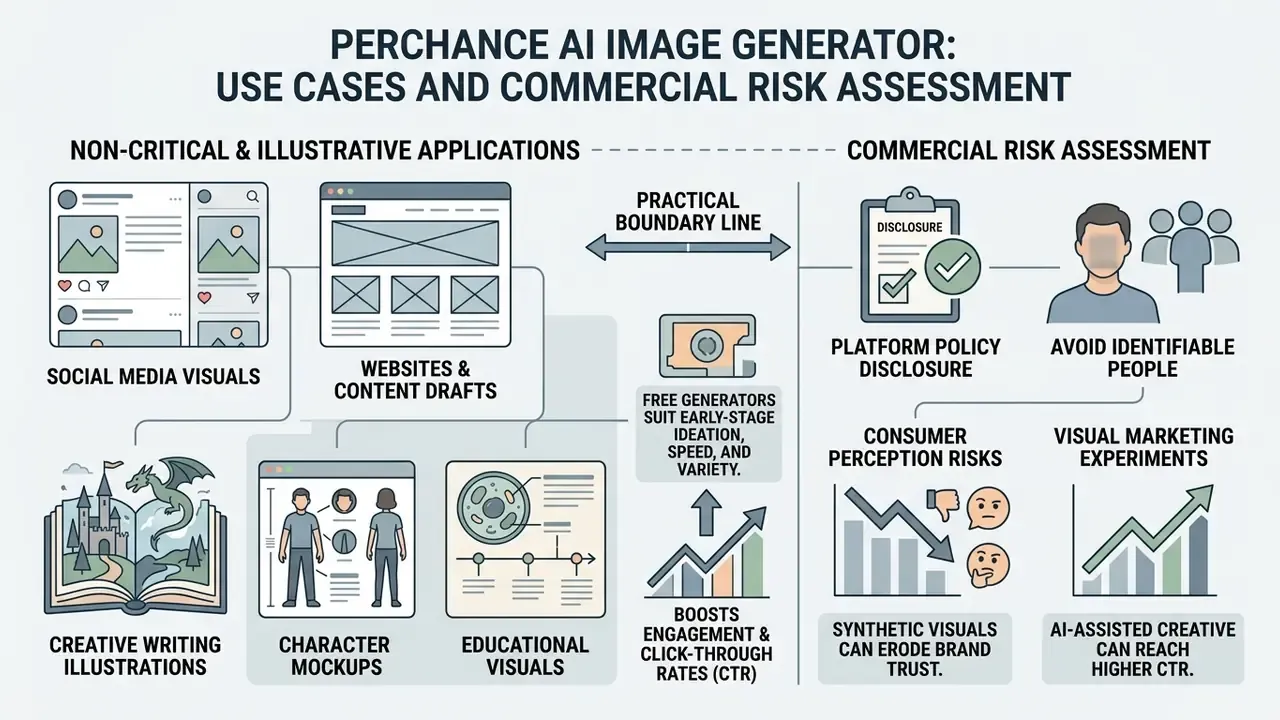
Images created here suit non-critical, illustrative applications: social media visuals, blog header drafts, creative writing illustrations, character mockups, educational presentation aids.
Free generators produce fast visual drafts, so they thrive in early-stage ideation where speed and variety outrank factual precision or print-grade resolution.
«Even DALL·E 3 systematically fails mechanics, thermodynamics and material-property scenarios; only optics shows relatively high accuracy». — PhyBench: Benchmarking Physical Commonsense for Text-to-Image Models, arXiv (2024). https://arxiv.org/abs/2406.06478
That is the practical boundary line. The weaker the physical realism requirement, the safer the use case. Technical diagrams, engineering visuals, safety instructions and medical explainers sit outside that boundary unless an expert reviews them.
Concept Art, Characters and Visuals for Personal Projects
For creative writers, game developers and tabletop RPG groups, Perchance offers rapid character portrait creation and fantasy world visualization with no financial barrier.
Character headshots, environment mood boards and item icons give immediate references for storyboarding and game design drafts. Free generation supports fast experimentation, letting authors and designers iterate on visual concepts before committing budget to final artwork. A comparative review of the best free AI image generators and of the best free AI art generators by limits and watermarks helps pick a free tier that survives long creative runs. Documented project clusters also include game concept art, marketing visuals, architecture and interior visualisation, flipbooks, short stories and classroom handouts.
Commercial Use of Perchance AI Images: What to Verify Before Publishing
| Scenario | What to check in the conditions | Commercial and compliance risk |
|---|---|---|
| Personal projects (non-commercial) | Usage permissions; attribution rules; basic acceptable use policies. | Low: minimal legal exposure; the main risk is personal disappointment and minor visual errors. |
| Social media content (organic) | Platform AI disclosure policies; FTC consumer transparency rules. | Moderate: reputational risk if visuals depict real people or mislead consumers about sponsorship. |
| Marketing and advertising | Ad platform policies (Google and Meta AI labelling); commercial model terms. | High: deceptive-claim exposure if images misrepresent real product capabilities or physical reality. |
| Website and blog illustrations | Commercial platform licensing; trademark clearance on depicted objects. | Moderate to high: possible copyright or trademark overlap if assets resemble protected IP. |
| Product concepts and mockups | Implied warranty limits; accuracy of functional depictions. | High: stakeholders can be misled when mockups show physically impossible structures. |
| Educational visuals | Factuality verification; medical and technical representation accuracy. | High: inaccurate anatomy or mechanics misinforms learners. |
| Gaming and character assets | Commercial game asset licensing; derivative work constraints. | Moderate: creative flexibility is high, but un-copyrightable raw output cannot stop a competitor copying it. |
| Logo generator and branding | Trademark registrability; third-party similarity clearance. | Very high: purely AI-generated logos lack copyright protection under US law and cannot guarantee exclusive ownership. |
«Models reach only 46.5 on entity-fidelity accuracy: logos and branding are especially exposed because of accidental similarity to existing trademarks». — Kitten: Knowledge-Intensive Evaluation of Image Generation on Visual Entities, arXiv (2024). https://arxiv.org/abs/2410.16855
In corporate governance settings, deploying a consumer AI tool is a legal question as much as a technical one. In a hypothetical compliance review at a mature fintech firm, marketing proposed open-web AI image tools for promotional banners. Model risk leaders ran a multi-tier review: they audited the underlying OpenRAIL licences, defined human modification criteria for copyright eligibility, and created an immutable asset audit trail. The workflow satisfied internal standards while allowing controlled commercial deployment. Illustrative scenario only.
To compare enterprise AI media solutions, licensing conditions and platform capabilities, review our AI Media Comparison Matrices and our head-to-head evaluation of Midjourney versus competing image generators. For ongoing intellectual property disputes and copyright precedent, creators can open the hub dedicated to legal developments in generative AI.
Fact Check and Policy Verification (as of January 2026)
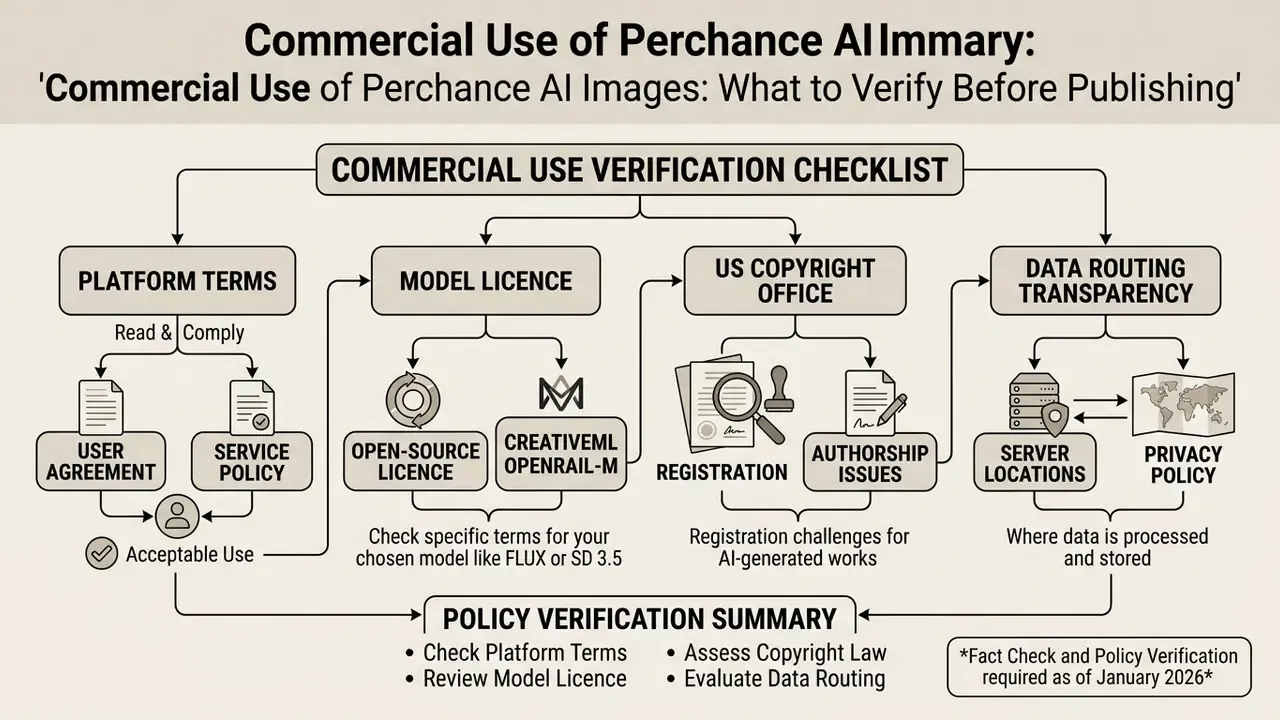
- Perchance platform terms the Perchance AI Art Terms of Service state that users retain commercial usage rights over generated outputs, subject to the Acceptable Use Policy, which bans illegal content, CSAM, deepfakes and harassment. Reference: Perchance Terms of Service, 2025/2026.
- Model licence terms most open diffusion models routing through Perchance operate under CreativeML OpenRAIL-M. OpenRAIL permits commercial distribution but explicitly prohibits harmful, deceptive or illegal use. Reference: Stability AI Stable Diffusion OpenRAIL-M License.
- US copyright law the United States Copyright Office (Copyright and Artificial Intelligence guidance, 2026) maintains that purely AI-generated visual outputs lacking human creative authorship are not eligible for registration. Human selection, arrangement or substantial digital editing is required to claim protection.
- Data routing transparency Perchance is a third-party service whose generator pages can proxy prompts to public model hosts. No primary public documentation discloses backend hardware, retention windows or log handling for those hosts. Treat prompts as potentially persistent third-party data.
What to Verify in Model Terms and Content Policy
Before publishing AI-generated assets, verify both the host platform's Acceptable Use Policy and the specific model licence governing the backend.
Content limits and NSFW policy. There is no single "disable censorship" switch. Filtering happens on two independent levels:
- Acceptable use policyconfirm the content does not breach rules on trademark infringement, deceptive impersonation or prohibited explicit material.
- Model licensing constraintscheck whether the backend model (for example Stable Diffusion under OpenRAIL-M) imposes downstream restrictions on commercial advertising or medical depictions.
- Data privacyconfirm no confidential or proprietary enterprise data entered the text prompts submitted to a public web generator.
- Page-level verificationbecause generator pages are individually authored and can change backend without a visible label, licence checks must repeat per page and per release, not once per platform.
- Perchance platform levelillegal content, non-consensual intimate imagery, CSAM, harassment and deepfakes of public figures without consent are categorically prohibited under the Terms of Service and Acceptable Use Policy.
- Model host levelif the selected endpoint enforces its own NSFW filter, you get a black frame, a blocked-prompt notice or a generation error. Hosts may refuse a prompt even where platform terms would permit experimentation. For sensitive artistic work such as anatomical studies or lawful fine-art nudity, switching to a differently configured backend in the Select Model dropdown is the only available lever, and local law still governs both prompt and output.
Can AI Images Be Used for Advertising, Branding and Logos
Platform policy does not restrict commercial use. Using raw AI output for corporate logos, brand identities and advertisements still carries distinct legal exposure.
Under current US Copyright Office guidance, visual assets generated solely by artificial intelligence without human authorship cannot be registered. So a business using an unedited AI logo cannot enforce exclusive ownership over the mark, and a competitor can copy it without copyright liability. That asymmetry surprises people. Teams weighing the trade-off should review how AI logo generators handle rights and registrability before adopting a generated mark.
There is a second layer. Because diffusion models train on broad web datasets, outputs may inadvertently resemble registered trademarks or protected corporate IP. And advertising platforms add their own rules: current Google ad policy requires visible AI labelling for AI-generated creative and bans AI-generated depictions of real identifiable people, while ICC marketing guidance flags transparency, claim substantiation and likeness consent as core AI-marketing risks. Organisations pursuing commercial deployment should pair AI generation with substantial human design work, both for legal defensibility and for brand distinctiveness.
Perchance vs Enterprise AI Image Generators: Governance Comparison
Free public generators and enterprise platforms differ less in raw image quality than in the controls a risk function can actually rely on. That is the whole comparison, honestly.
| Criterion | Perchance AI image generator (free public) | Enterprise AI generators (licensed suites) |
|---|---|---|
| Authentication and access control | None; anonymous browser access, no SSO, no role separation | SSO/SAML, roles, seat-level provisioning |
| Audit logging | No user-side generation log; prompts not retrievable for audit | Per-user prompt and output logs, exportable evidence |
| Model version pinning | Backend can change silently per generator page | Pinned model versions with release notes |
| Reproducibility | Seed reproduces only while weights and sampler stay unchanged | Versioned endpoints support reproducible re-runs |
| Training-data transparency | Not disclosed for most public backends | Documented or licensed training corpora in some suites |
| IP indemnification | None offered | Contractual indemnification on some plans |
| SLA and availability | Best-effort public hosts; queues and cold starts | Contractual uptime targets |
| API and pipeline integration | Not designed for governed API pipelines | Documented APIs, quotas, monitoring |
| Data handling for prompts | Third-party routing; retention undocumented | Contractual retention and deletion terms |
| Cost | Free | Per-seat or per-credit licensing |
| Best fit | Ideation, drafts, personal and non-critical creative work | Regulated production, client deliverables, brand assets |
No matching rows Clear one or more filters to restore the matrix.
Teams benchmarking specific vendors against this matrix can also consult our evaluations of Google AI image generation terms, Microsoft AI image generator access and limits and the broader best AI art generator comparison.
Shadow AI Self-Assessment Checklist for Risk Teams
Use this seven-point screen before allowing, or knowingly tolerating, a free public image generator inside a corporate environment.
- Endpoint discoverycan the tool's generation endpoints and CDN domains be identified in egress logs, and are they categorised in the web proxy?
- Prompt-data classificationis there an enforced rule that prompts may not contain PII, client names, unreleased product data or internal code names?
- DLP coveragedoes outbound inspection cover free-text form submissions to unclassified SaaS domains, not just file uploads?
- Output provenanceis every published asset tagged with tool name, model name, prompt, Seed, date and the responsible human editor?
- Human-authorship trailis there documented, substantive human modification for any asset intended to carry IP value?
- Licence re-verification cadencewho re-checks platform terms and model licences, and how often, given that backends change without notice?
- Permitted-use boundaryis use restricted to non-critical, non-regulated, non-customer-facing artefacts unless a named approver signs off?
Any "no" should either block that scenario or trigger a compensating control before publication.
FAQ: Perchance AI Image Generator
Is the Perchance AI image generator free?
Yes. It is free, browser-based, and needs no sign-up or payment. No daily generation counter is documented on the platform; practical limits come from public host queues and rate limits.
Do I need an account?
No. There is no login wall, which also means no per-user history and no audit log on your side.
Which models does it use?
There is no single global model. Generator pages route to different open-weights backends, most often from the Stable Diffusion family. Multi-model front-ends expose options such as Z Image Turbo, FLUX.1 [Schnell], FLUX.1 [dev], FLUX.2 variants, Stable Diffusion 3 Medium, Stable Diffusion 3.5 Large, Qwen Image and realism LoRAs. Names change as hosts update.
What Steps, Guidance and Seed values should I start with?
Guidance 7.0 to 9.0. Steps 4 to 8 on turbo models, or 25 to 50 on quality models. Seed -1 while exploring, then a fixed Seed to hold a character or style across a series.
What resolution can I expect?
Typically 512×512 to 1024×1024 natively, up to 768×1024 on portrait presets. For print or high-DPI web, upscale to 2K or 4K after generation.
How long does generation take?
Around 5 to 10 seconds for simple prompts under normal load, 15 to 30 seconds for complex scenes, and 2 to 5 minutes during peak queues or cold starts.
Can I upload my own image?
On Img2Img-capable pages, yes: JPEG, PNG or WebP, commonly up to 10 MB. Control the degree of change with Denoising Strength, roughly 0.2 to 0.4 for light restyling and 0.6 to 0.8 for full reinterpretation.
Is it uncensored?
No. There is no master switch. Platform terms ban illegal content, CSAM, non-consensual intimate imagery and deceptive deepfakes, and each model host applies its own filters on top.
Can I use the images commercially?
Platform terms permit commercial use, but that is a usage permission, not ownership. Purely AI-generated images are not registrable for copyright in the US, and trademark, publicity and advertising-disclosure rules still apply.
What if I do not like the result?
Change one variable at a time: add targeted negative prompts, adjust Guidance, raise Steps, or switch models. Keep the Seed fixed while testing so differences are attributable.
Is my prompt data private?
Treat it as not private. Prompts go to third-party public hosts whose retention and logging practices are not publicly documented. Never include PII or confidential business data.
Appendix A: Superseded Source References (Revision Log)
Preserved for transparency. Each statement below has been replaced in the main text by a version with explicit metrics, methodology and a resolvable URL.