Executive Summary for Decision-Makers
Last updated: January 2026. Reading time: about 18 minutes.
- What these tools actually do An ai slide deck generator converts a prompt, an outline, a PDF, a Word file, or a spreadsheet into an editable deck by parsing content, drafting a narrative outline, applying layouts, and writing speaker notes.
- Where the real gains are Drafting time, not thinking time. Microsoft Research found that heavy Copilot users (100+ sessions) increased productive actions by 21.2 to 27.0%, yet a parallel CSIRO trial documented a "productivity paradox": time saved on generation is partly consumed by verification.
- What breaks in practice Copilot tends to produce three short bullets (3 to 4 words each) plus a semi-random image on every slide. Gemini in Google Slides generates single slides and images rather than full automated decks. Gamma exports can distort card-based layouts when converted to
.PPTX. - What matters most for regulated teams SOC 2 Type II / ISO 27001 posture, contractual no-training guarantees on customer data, tenant residency, admin controls, and a documented audit trail (source, then prompt, then verified slide).
- The features most buyers overlook Guide Mode (AI asks qualifying questions before generating), Remix (reformat a raw text blob or an ugly legacy slide into a designed layout in one click), AI Inspector (automated validation of generated statistics against sources), Live Snapshots (auto-refreshing data cards), Canva Code (no-code interactive calculators and polls), and Remote Control Notes (phone-as-clicker with private speaker notes).
- Selection shortcut Native add-ins (Plus AI, Copilot, Gemini) for governance-heavy reporting and brand fidelity; standalone engines (Gamma, Beautiful.ai, Canva) for marketing velocity and visual storytelling; document converters (MagicSlides, SlidesAI) for turning long-form research into a structured first draft.
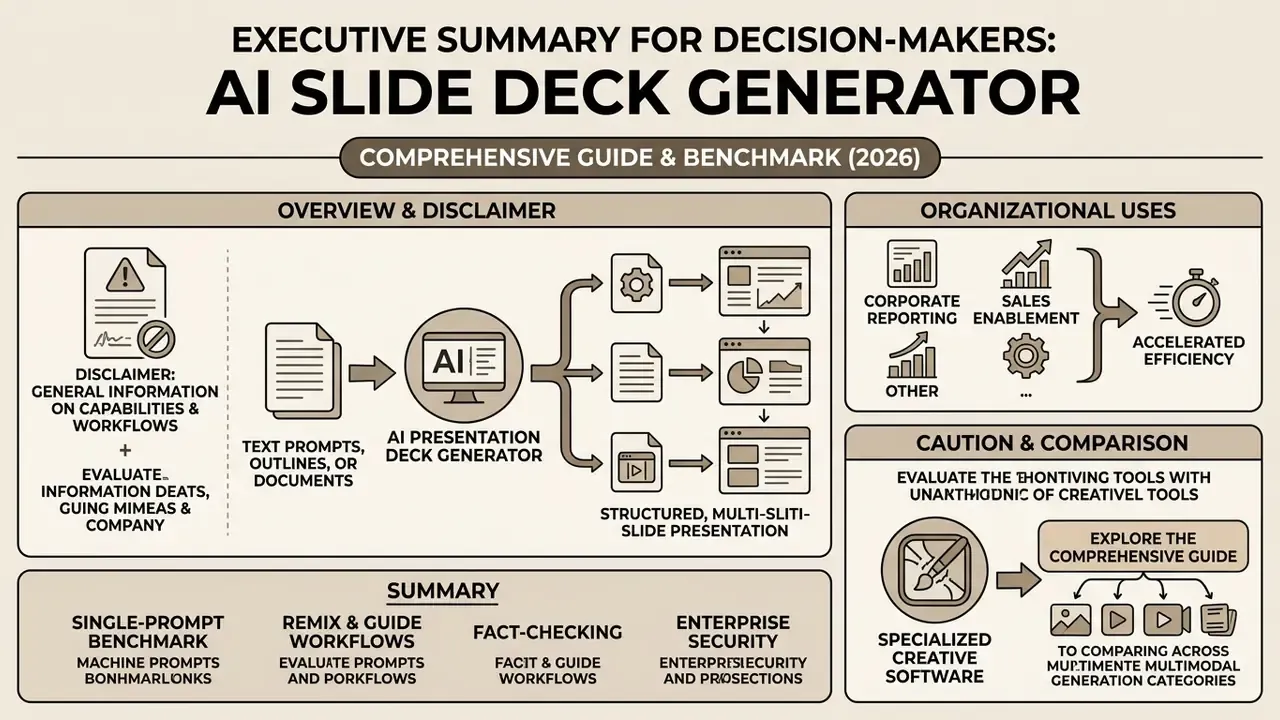
Organizations utilize an ai presentation maker to accelerate corporate reporting, sales enablement, and pitch deck creation. Rather than replacing human oversight, a presentation generator establishes a structural draft that teams can refine, audit, and format for executive review. Evaluating these platforms requires balancing creation speed against output editability, data governance, and design compliance.
One caution before the feature lists. Speed is the easy part to demo and the hard part to govern.
To compare specialized creative software across multimodal generation categories, explore our comprehensive ai presentation generator tools guide.
What Is an AI Slide Deck Generator and What Tasks Does It Solve
An ai slide deck generator is an automated software application that transforms structured or unstructured inputs into editable presentation files. It leverages large language models and design engines to handle content extraction, narrative outline creation, and automated layout formatting. In plain terms, it is artificial intelligence applied to the least interesting half of deck work.
The primary operational benefit lies in reducing drafting time from hours to minutes. Teams deploy these ai slide creation software options to generate slides for corporate reviews, investor updates, training modules, and client proposals without starting from a blank slide.
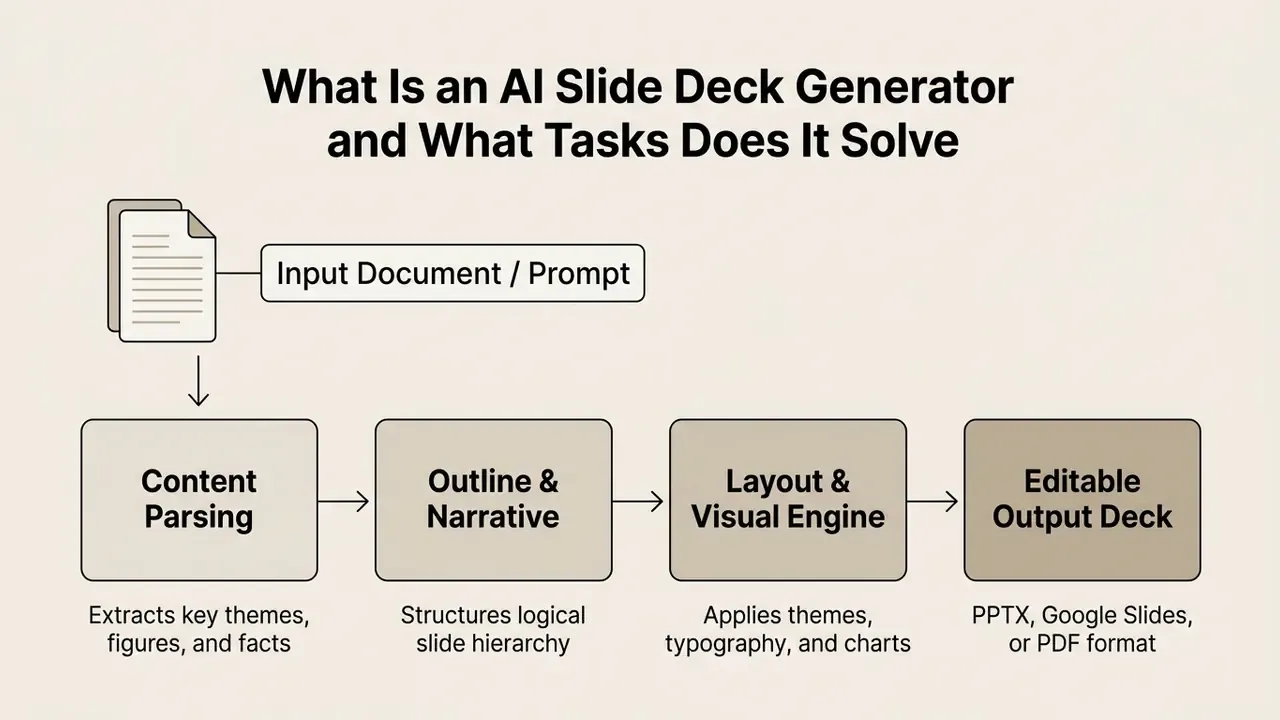
When evaluating document-to-presentation pipelines, research indicates that multi-stage architectures significantly outperform single-shot prompting in semantic coverage and structural coherence. Multi-step processing ensures that complex report data translates accurately into a full presentation suitable for a professional presentation setting, which is exactly what a credit committee expects.
«Multi-stage architectures outperform single-shot prompting in semantic coverage and structural coherence when converting documents into presentations.»
Two Operating Modes That Change Output Quality: Guide Mode and Remix
Most buyers evaluate generators on "prompt in, deck out." In practice, two secondary modes determine whether the first draft is usable or disposable.
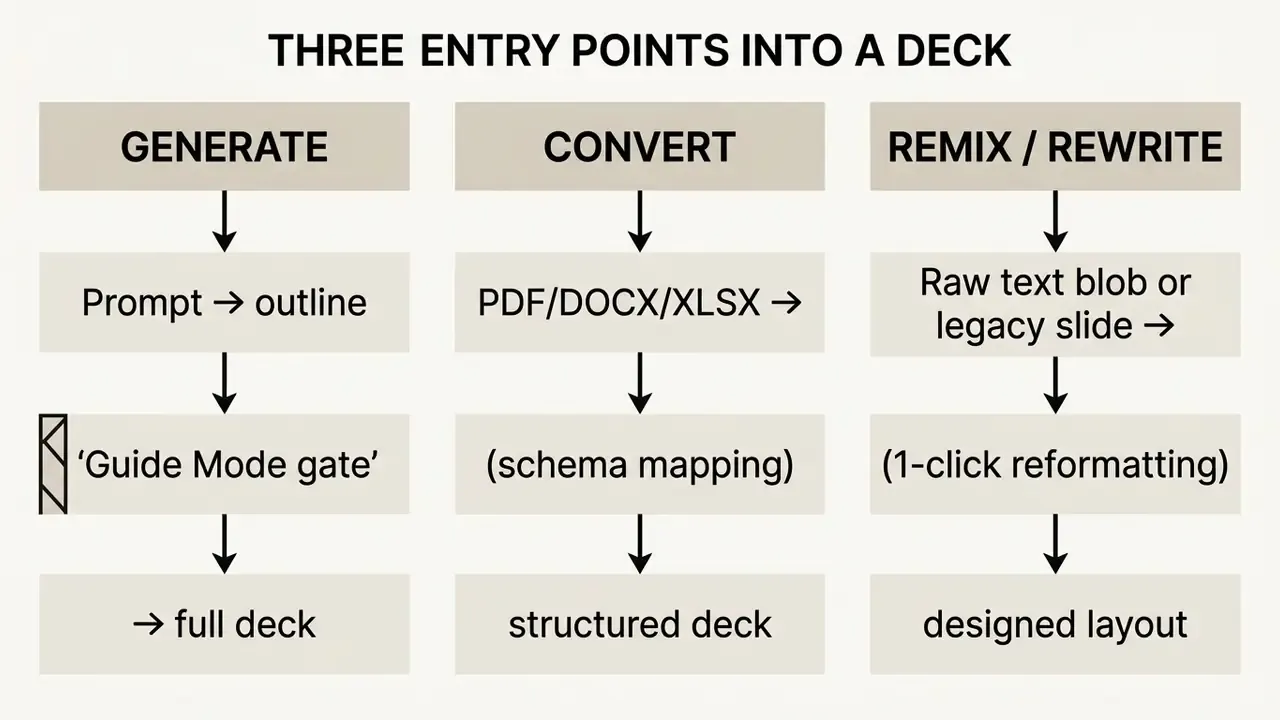
1. Guide Mode (interactive qualification before generation). Instead of generating blind from a one-line prompt, tools such as Genspark open a short dialogue: the system asks three to four clarifying questions about audience, tone, slide count, timing, and the desired call to action, then drafts an outline and waits for approval. This creates an outline gate, so you catch structural problems before 15 slides exist. For risk committees and board updates, this gate is the cheapest place to correct narrative errors.
2. Slide Remixing (unstructured text to designed layout). Plus AI's Remix function targets the opposite problem: you already have content, but it is an unformatted paragraph, a wall of bullets, or an inherited slide from a 2019 deck. Paste the text blob, choose a target layout, and the AI reformats it into cards, a timeline, a comparison matrix, a KPI row, or a two-column contrast in a single click. A companion Rewrite function elaborates, summarizes, or adjusts tone on an existing slide without regenerating the deck. For teams with large legacy libraries, remixing typically delivers more value than net-new generation.
From Idea and Prompt to Finished Deck
What Elements AI Can Automatically Create on Slides
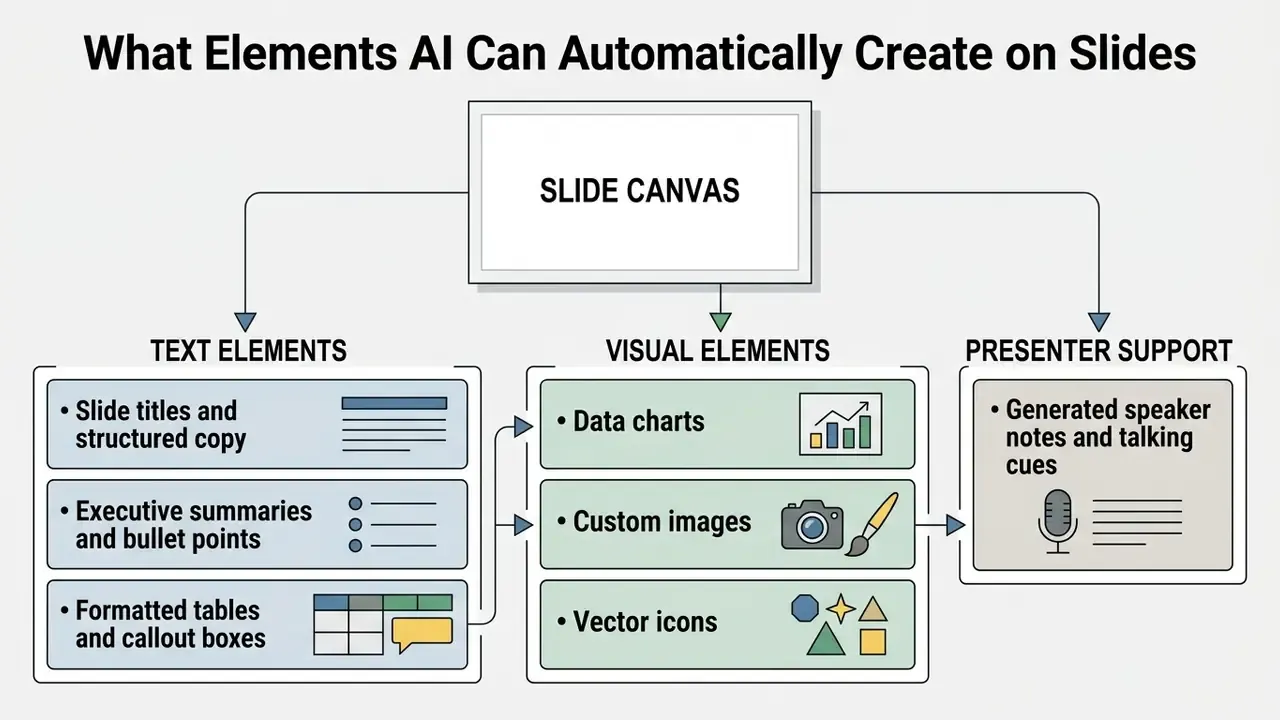
Modern ai slide deck creation systems generate both textual and visual assets across individual slides automatically. The automated engine populates slide layouts with structured copy, data tables, and formatted bullet points.
Key generated elements include:
- Generated content: Headline copy, structured summaries, and body text tailored to the slide context.
- Slide layouts: Automated placement of containers using visual hierarchy principles and presentation templates.
- Data visualization: Automated conversion of numerical tables into structured charts and comparisons.
- Speaker notes: Background context and talking points generated directly inside presenter notes fields. Microsoft documents Copilot generating notes for the current slide or for all slides, with a keep-or-discard step.
- AI image generation: Contextual background graphics and vector icons generated via targeted image prompts. Teams comparing visual engines separately can review our roundup of AI image generators.
According to technical benchmarks on GUI-based slide agents, automated tools reliably build slides with layouts and presenter notes, while automated table and chart creation still requires explicit schema mapping. You must tell the system which column is the axis, which is the series, and what the units are.
«The PPT-Eval agentic system scored 3.67 on average across three dimensions: content, design, and presentation coherence.»
Enterprise Security, Data Privacy, and Shadow AI Risk
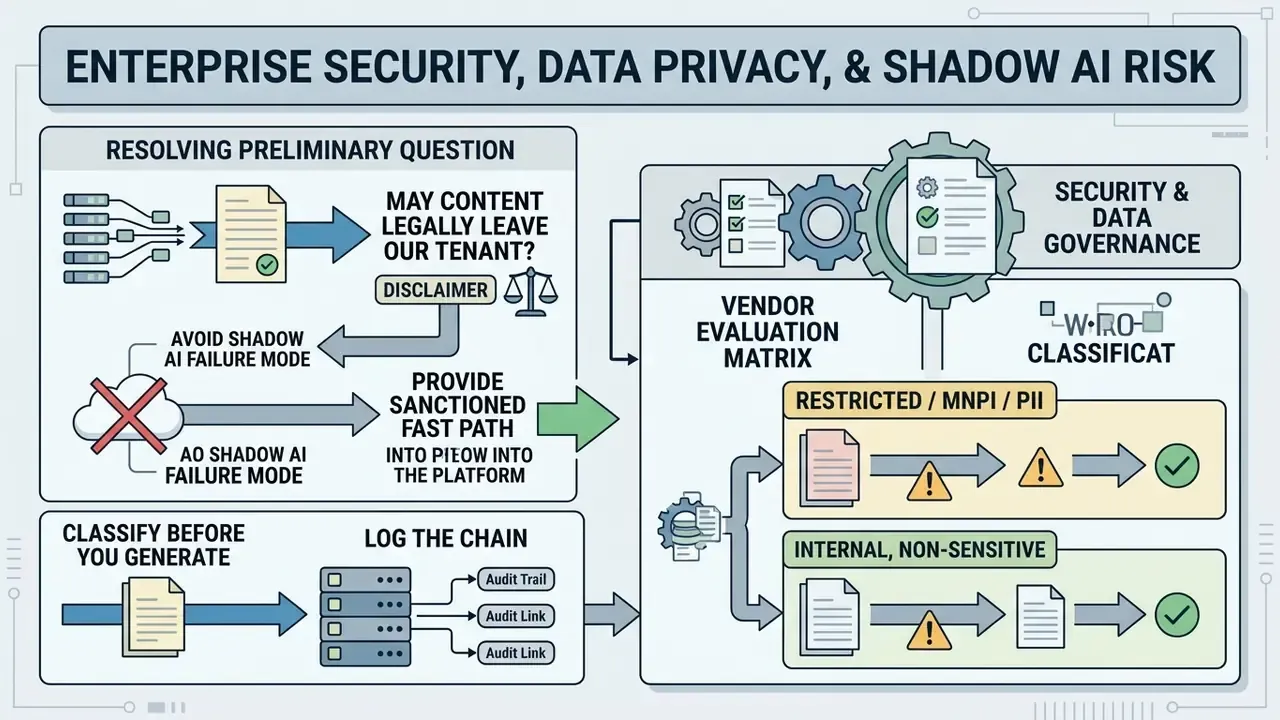
Before comparing features, regulated teams must resolve a prior question: may this content legally and contractually leave our tenant? Risk registers, model validation memos, MNPI, PII, and unreleased financials are exactly the material analysts are most tempted to paste into a public web generator. That is how Shadow AI enters an organization.
The Shadow AI Failure Mode
Shadow AI describes unsanctioned use of consumer-grade generative tools on corporate data. In presentation workflows it typically looks like this: an analyst uploads a confidential quarterly risk register to a free web deck builder at 11 p.m. to hit a morning deadline. The content is now processed by a third party under consumer terms, possibly retained, possibly used for model improvement, and entirely outside your audit trail.
Three controls reduce this materially:
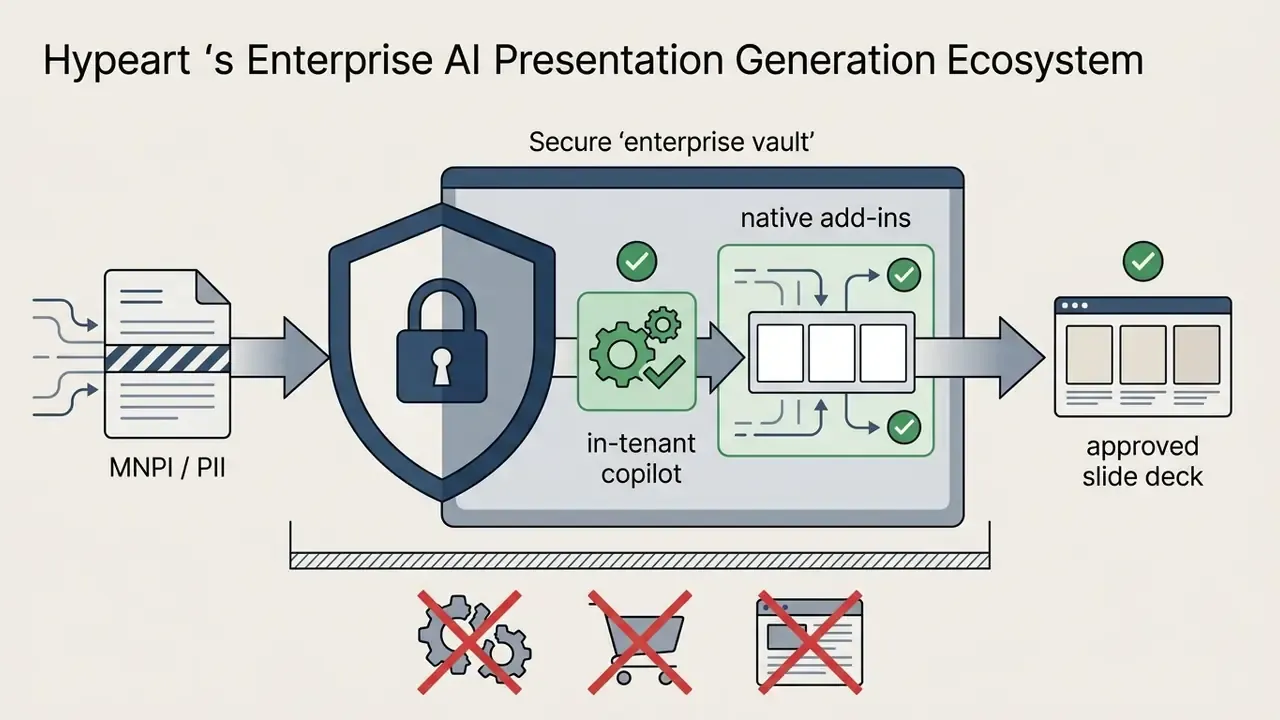
- Provide a sanctioned fast path.Shadow AI is usually a symptom of friction. If the approved tool is a native add-in already installed in PowerPoint or Google Slides, the incentive to paste into a random website drops sharply.
- Classify before you generate.Define which data classes may be used as AI input at all (public, internal, confidential, restricted), and publish that mapping next to the tool, not buried in a policy PDF.
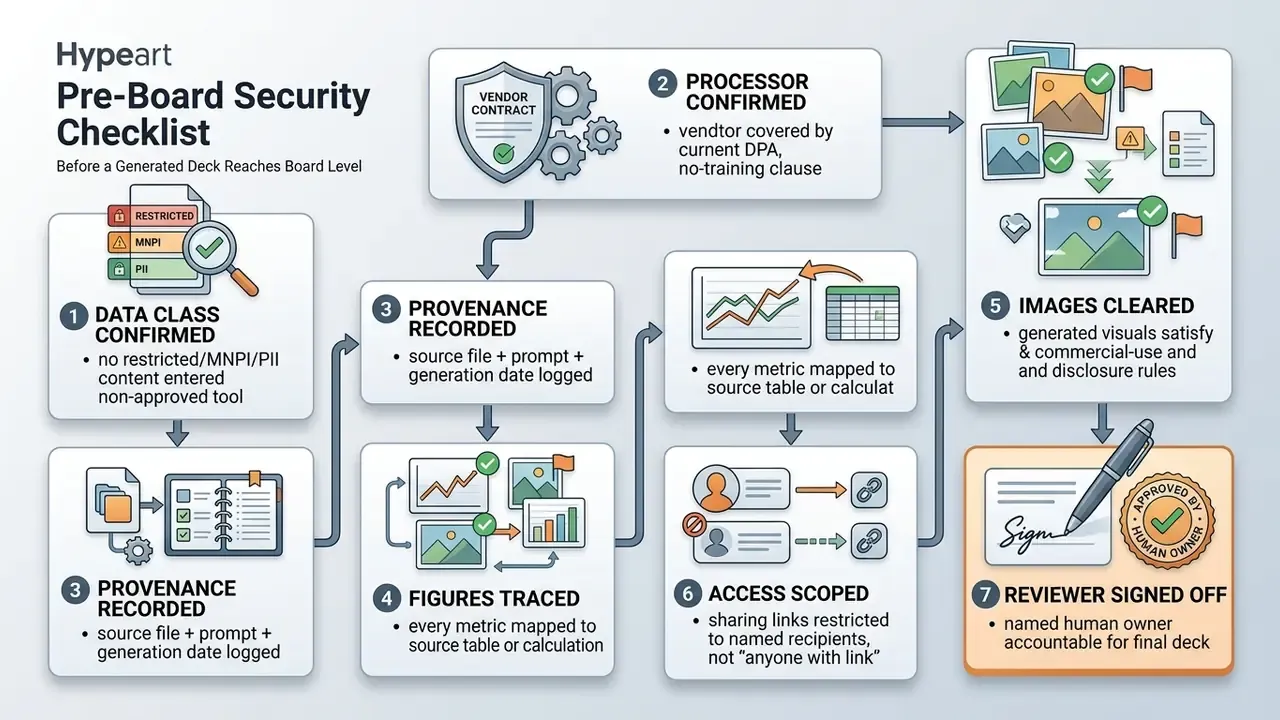
- Log the chain.Require that every generated deck carries the source file reference and prompt used, so reviewers can reconstruct provenance.
Vendor Evaluation Matrix: Security and Data Governance
| Security Criterion | What to Verify | Why It Matters for Regulated Teams |
|---|---|---|
| Certification posture | SOC 2 Type II, ISO 27001; sector attestations where relevant | Third-party assurance instead of vendor self-declaration. Plus AI publicly states SOC 2 Type II compliance |
| No-training guarantee | Contractual commitment that customer content is not used to train models | Prevents confidential narrative and figures from leaking into future model outputs. ChatSlide, for example, states confidential processing is not used for model training |
| Tenant and residency | Where data is processed and stored; regional options | Data localization requirements in EU/UK/APAC jurisdictions |
| Grounding scope | Whether the tool reads only referenced files (OneDrive/SharePoint/Drive) or the open web | Limits inadvertent exfiltration and reduces hallucinated external "facts" |
| Admin controls | SSO/SAML, role-based permissions, tenant-level feature disablement, retention settings | Enables Model Risk and CCO functions to enforce policy technically, not by memo |
| Audit exportability | Prompt logs, version history, generation timestamps | Produces the evidence chain committees ask for after the fact |
| Deployment surface | Native add-in inside the existing suite vs. external web app | Native add-ins keep files inside the approved tenant; external apps introduce a new data processor |
No matching rows Clear one or more filters to restore the matrix.
Practical split by data class:


Pre-Board Security Checklist
How to Choose AI Presentation Generator Tools for Your Workflow
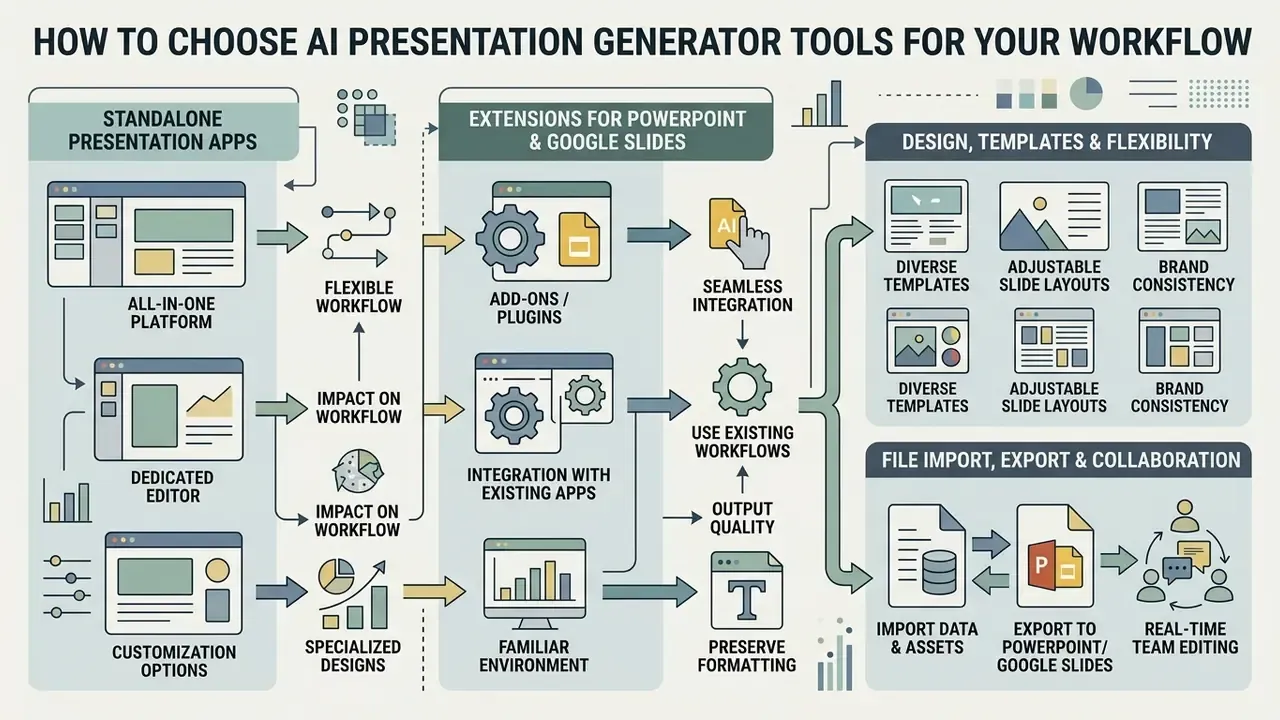
Selecting the right ai presentation generator tools 2025 shortlist, and refreshing it for the 2026 buying cycle, requires evaluating platform integration, export fidelity, and administrative controls. Organizations must determine whether a web-native presentation app or a native office suite add-in aligns with their existing technical infrastructure.
Security protocols, user permission tiering, and data retention policies form essential criteria for institutional buyers. Evaluating these requirements alongside paid plans and free tiers prevents operational friction post-deployment.
«Microsoft 365 Copilot users with more than 100 sessions showed a 21.2 to 27.0% increase in productive actions and a 7.1 to 13.0% increase in communication activity.»
| Selection Criterion | Standalone Web Apps | PowerPoint / Google Slides Add-ins |
|---|---|---|
| Primary Platform | Browser-based custom editor | Native inside MS PowerPoint or Google Slides |
| Input Sources | Prompts, PDFs, DOCX, web links | Prompts, Drive files, OneDrive documents |
| Layout Flexibility | High (web-native card and canvas systems) | Constrained by native office template rules |
| Export Formats | PDF, PPTX, HTML web link | Native .PPTX or Google Slides file format |
| Real-Time Collaboration | Multi-user cloud co-editing in real time | Native Microsoft 365 or Google Workspace sharing |
| Brand Governance | Custom CSS, uploaded brand kits | Built-in corporate slide masters and themes |
| Data Surface | New external processor; verify DPA and residency | Content generally stays inside the existing tenant |
| Collaboration Limits | Co-editing often gated to paid team tiers | Inherits existing Workspace/365 permission model |
| Brand Kit Availability | Brand kits and custom themes usually paid-tier only | Corporate masters available at no extra tier cost |
No matching rows Clear one or more filters to restore the matrix.
Teams that also need on-brand illustration and stylized visuals alongside slide generation can compare engines in our review of AI art generators.
Standalone Presentation Apps vs. Extensions for PowerPoint and Google Slides
Standalone presentation applications operate in dedicated browser interfaces optimized for rapid AI generation. These platforms provide flexible canvas layouts and dynamic card structures that diverge from traditional slide paradigms. Gamma, for example, is built around a card system rather than a fixed 16:9 grid, which is why it produces novel layouts, and also why export conversion is where its fidelity risk concentrates.
Conversely, extensions built for google slides and ai powerpoint work function directly inside established office environments. They allow teams to generate content against corporate slide masters while preserving native .PPTX editing capabilities. Plus AI states that it builds native PPTX output using its own Open XML renderer, which is the technical reason its exports retain template formatting instead of flattening into images or approximated shapes.
«Evaluation rubrics for PowerPoint Online agents reach Kendall's τb = 0.77 correlation with expert human ratings across 120 tasks.»
Standalone apps excel at fast visual ideation, whereas native add-ins minimize file conversion issues and preserve existing corporate branding standards. (Updated, evidence note:) this trade-off is supported by two documented constraints rather than vendor claims alone. First, standalone platforms depend on an export and import round trip, and card-based layouts do not map one-to-one onto fixed slide masters. Second, Google documents that Workspace add-ons require workspace execution approval, and AI feature access is plan- and rollout-dependent, so add-in advantages are real but conditional on licensing and admin configuration. Where an organization has no approved add-in path, a standalone tool plus a manual rebuild in the corporate template is often the safer governance choice than an unapproved integration.
Design, Templates, and Slide Formatting Flexibility
Design controls determine how effectively an AI tool maintains visual consistency across a deck. Advanced platforms offer pre-built design templates, custom brand kits, and slide layouts that enforce color palettes and typography rules. Before publishing externally, confirm licensing for any synthesized visuals using our guide to commercial-use image generation.
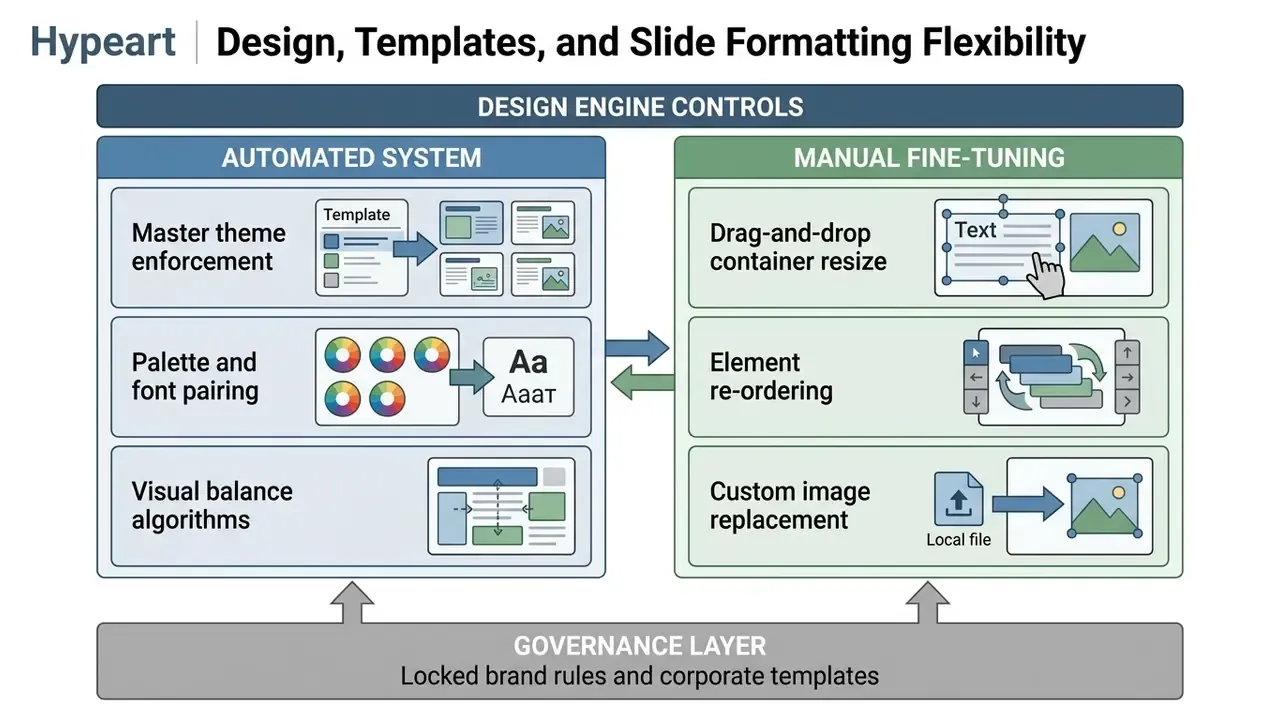
While AI handles initial visual placement, robust manual editing tools remain essential. Users must have the ability to modify individual containers, swap visual assets, and adjust line spacing without breaking the underlying template. Fine tuning of this kind is what turns a generated draft into a polished deck with a professional looking, executive-ready finish, even for people with no design skills.
«Computational aesthetic metrics reach Spearman ρ = 0.71 correlation with human preference across 1,500 annotated slides.»
Be aware of documented limits on automatic design. Canva's own help materials note that Magic Design can fail when a page holds too many elements, may omit text, may misplace images, and can create overlap when fonts carry over from a source file. Gamma's documentation distinguishes template-based generation (structure preserved) from prompt-based generation (AI determines layout), which means fully custom redesign of an existing structure is constrained by the generation path you choose. Beautiful.ai drives design through selectable preset layouts rather than unrestricted manual composition. Plus AI for Teams and Enterprise supports imported custom templates, logo, font and color enforcement, shared presets, and white-glove template conversion, the deepest fine-tuning tier among the tools reviewed here.
File Import, Export, and Real-Time Collaboration
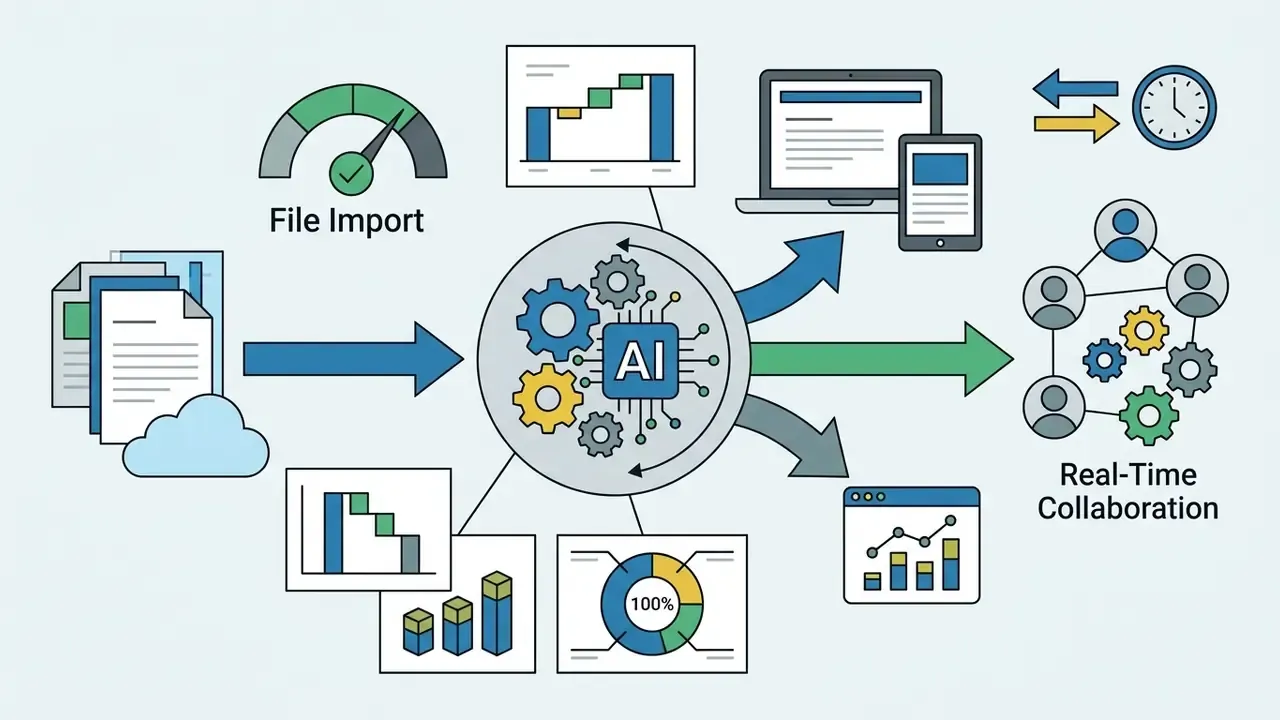
Enterprise workflows depend on seamless file ingestion and flexible export options. Leading tools accept source inputs from a word document, pdf files, or existing powerpoint files to generate structured slides. Adobe Express ingests PDF, DOCX, PPTX, TXT, XLS, and XLSX; Canva imports PDF and .pptx; Gamma accepts Word, PDF, PowerPoint, Google Docs, and Slides; Genspark accepts PDF, Excel, Word, and existing PPT files, and can convert an uploaded .pptx into a reusable branded template.
Export options must support editable .PPTX formats, standard PDF files, and web-hosted presentation links. Gamma exports to PDF, PPTX, and PNG; Presentations.AI exports to .pptx, Google Slides, PDF, or a live link; Canva adds video slideshow and website export; Napkin AI exports diagrams as .ppt, .png, .pdf, or .svg.
Collaborative features, such as real-time co-editing, inline commenting, and access sharing via email, allow multidisciplinary teams to audit drafts effectively and share presentations without version chaos. Genspark additionally allows sharing either the final slides only or the full project including the creative process, which is useful when an audit function needs to inspect how a deck was produced, not just what it says.
Working with complex financial tables from PDFs. Text extraction is reliable; tabular extraction is not. A practical sequence for a risk register or financial appendix:
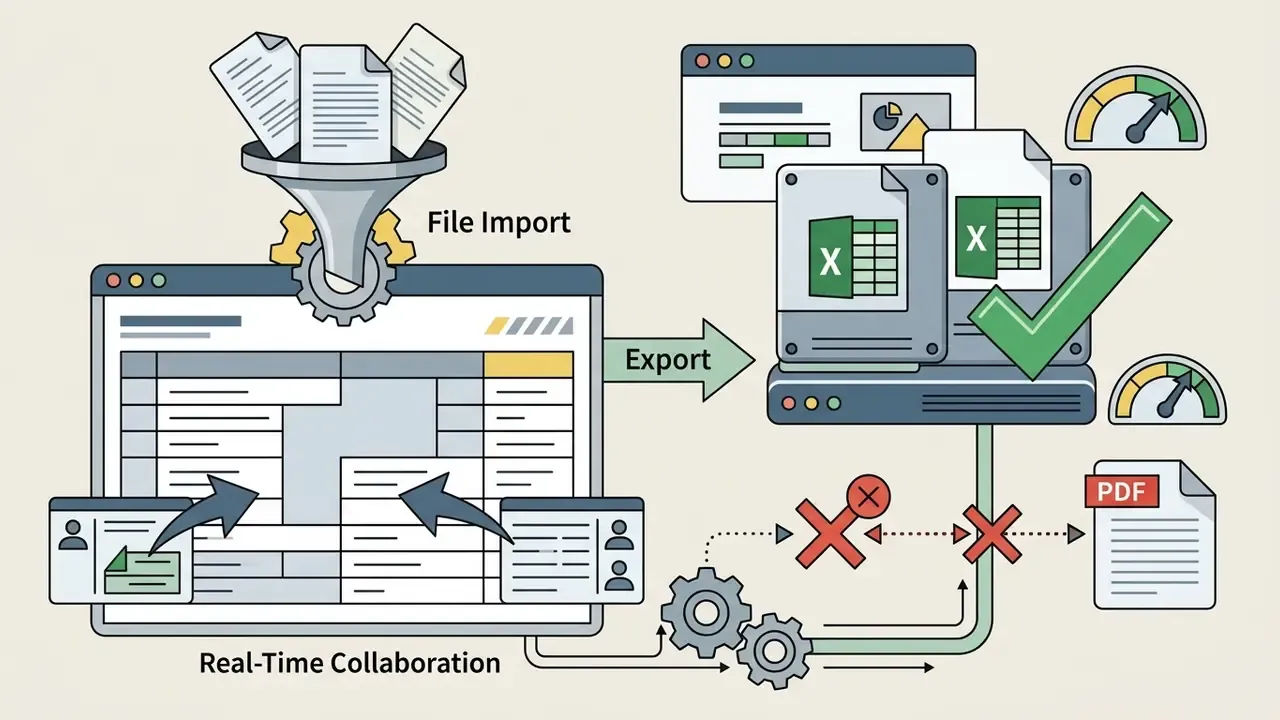
.xlsx or CSV rather than relying on PDF parsing, since OCR of merged cells and footnoted figures is the most common failure point.
Comparing the Best AI Slide Deck Generator Tools
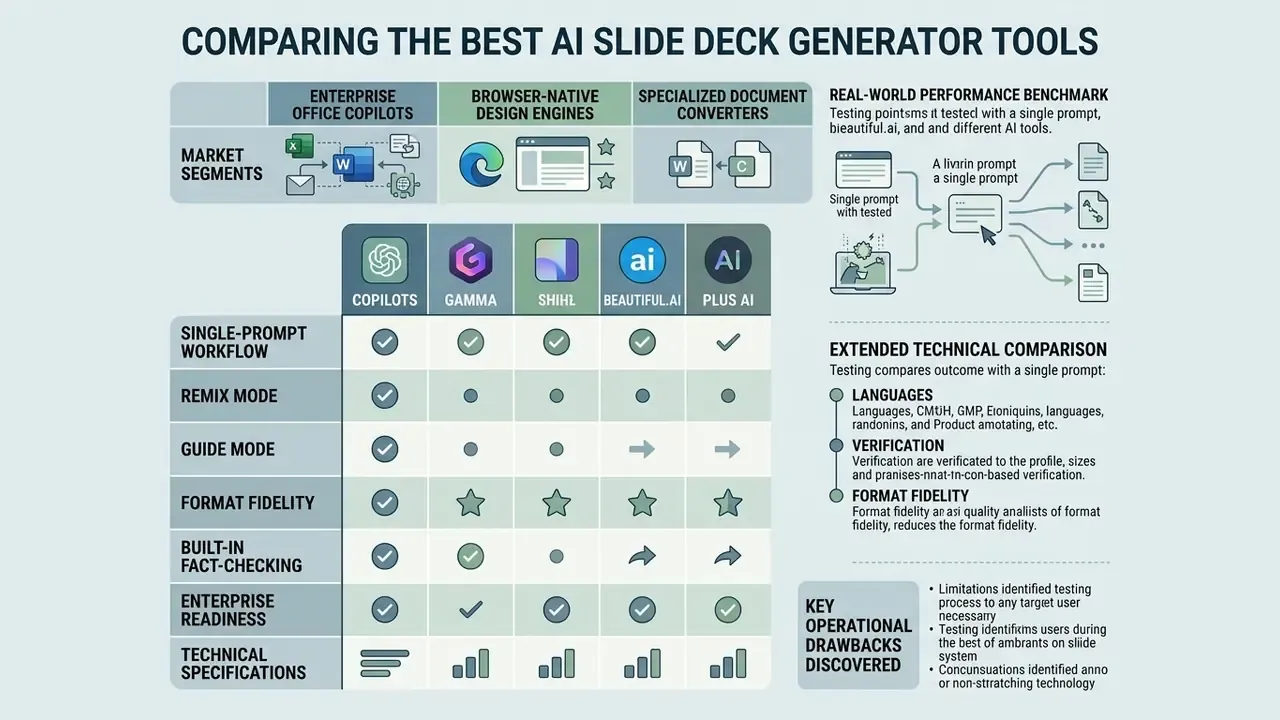
The market for ai tools for slide deck creation spans enterprise office copilots, browser-native design engines, and specialized document converters. Choosing the ai presentation maker best suited for your team requires comparing integration depth, template control, and pricing limits.
«Staged conversational refinement of outline and slides improves user-goal satisfaction while preserving narrative coherence.»
For specialized visual assets, explore our reviews on ai picture app platforms and multi-channel content workflows via ai social media coverage.
| Tool | Supported Platforms | Primary Strengths | File Handling | Pricing Model |
|---|---|---|---|---|
| Microsoft Copilot | MS PowerPoint (Web/Desktop) | Native 365 integration, OneDrive/SharePoint grounding, brand-kit adherence | DOCX, PPTX, PDF, SharePoint | $30/user/mo (Enterprise add-on, annual commitment plus qualifying M365 license) |
| Gemini for Workspace | Google Slides | Native Workspace integration, Drive grounding, in-Slides image generation | Google Docs, Slides, Drive files, DOC/DOCX/PDF/TXT/PPTX | Included in Google AI / Workspace tiers |
| Plus AI | Google Slides & PowerPoint | Custom brand templates, Remix/Rewrite slide editing, Live Snapshots, own Open XML renderer | Prompts, DOCX, PDFs, PPTX, text files | 7-day free trial; Basic $10/user/mo annual (Pro $20, Team $30, Max $200) |
| Gamma | Web Standalone | Web-native card layouts, rapid first drafts, 100+ themes, analytics | Prompt, Text, PDF, DOCX, PPTX, Google Docs | Free tier (about 400 signup credits); paid from roughly $10/user/mo |
| Beautiful.ai | Web Standalone | Smart layout constraints that auto-rearrange, visual polish, team style sharing | Prompts, PPTX import | Paid sub; trial options |
| Canva Magic Design | Web Standalone | Vast asset library, brand kit rules, Canva Code interactivity, Remote Control Notes | Prompts, PDF, PPTX import | Freemium (Magic Design about 10 free uses); Pro upgrades |
| MagicSlides | Google Slides Add-on | Fast document-to-slide text conversion, very broad language coverage | Text, URLs, PDFs, DOCX | Freemium; credit-based paid |
| SlidesAI | Google Slides Add-on | Text summarization into basic slides, low learning curve | Text input, short documents | Free tier (12 decks/yr, 120 credits/yr); paid monthly |
| Genspark | Web Standalone | Guide Mode qualification, live web research, AI Inspector verification | PDF, Excel, Word, PPT, templates | Free trial; credit-based (manual edits free) |
Extended Technical Comparison: Languages, Verification, and Format Fidelity
| Tool | Language Support | Built-in Fact-Checking | Native Open XML / PPTX Fidelity | Enterprise Security Signals |
|---|---|---|---|---|
| Microsoft Copilot | 30+ languages; in-deck translation | No dedicated verifier; grounding in referenced files reduces drift | Native, operates inside the real .pptx | Microsoft 365 tenant controls, admin policy, enterprise licensing |
| Gemini for Workspace | 30+ languages | No dedicated verifier | Native Google Slides format | Workspace admin controls, Drive-scoped grounding |
| Plus AI | Reads, writes, and translates nearly any language | No dedicated verifier; Live Snapshots reduce stale-data errors | Own Open XML renderer, genuine native PPTX output | Publicly states SOC 2 Type II compliance; enterprise template governance |
| Gamma | 30+ languages | No dedicated verifier | PPTX export available; card layouts can shift on conversion | Standard SaaS controls; verify DPA |
| Beautiful.ai | Multi-language generation | No dedicated verifier | PPTX export; strict grid limits reflow damage | Team style sharing; verify DPA |
| Canva Magic Design | 100+ languages via Translate | No dedicated verifier; prompt moderation only | PPTX export; imported-font overlap is a known artifact | Prompt moderation, brand controls, enterprise plans |
| MagicSlides | 136+ languages (vendor-reported) | No | Google Slides native; PPT/PDF export | Verify DPA; lighter feature set |
| SlidesAI | Multi-language | No | Google Slides native | Verify DPA |
| Genspark | 19 languages incl. English, Chinese, Japanese, Korean, Spanish, French, German, Portuguese; auto language detection | Yes, AI Inspector validates data and statistics against sources | PPTX, PDF, Google Slides export; fully editable output | Verify DPA; project-level sharing controls |
Note on pricing verification: official, current pricing pages were confirmed for Plus AI, Microsoft Copilot, and Google AI tiers. Figures for Gamma, Beautiful.ai, Canva, MagicSlides, and SlidesAI reflect publicly observed plans and free-tier measurements and should be re-checked at purchase time, since credit economics in this category change quarterly.
Real-World Performance Benchmark: Testing Tools with a Single Prompt
Abstract feature lists hide the failure modes that actually cost editing hours. To evaluate generation quality on comparable terms, every tool below was driven with one standardized benchmark prompt:
Each output was then scored on four axes: compatibility (does it fit existing workflows), content quality (is the copy contextual and sufficiently dense), layout diversity (does slide design vary with slide purpose), and usability (how much manual work remains before the deck is presentation ready).
Key operational drawbacks discovered
- Microsoft Copilot, oversimplification. Output tends toward a repeating pattern: three short bullet points of roughly three to four words each, plus one stock or generated image per slide. Images are occasionally unrelated to the slide topic. Without a rich grounding document, narrative depth is thin, and the deck reads closer to a school project than a board artifact. The chat-driven interface also obscures which editing capabilities are actually available.
- Gemini for Google Slides, scope limitation. It reliably inserts individual slides (typically four to five bullets plus a generated image) and creates standalone AI images inside Slides, but automated end-to-end full-deck construction remains limited. Synthetic educational imagery frequently shows classic artifacts: garbled text on whiteboards, malformed hands, and "uncanny" pencils. Building a complete presentation one slide at a time is slower than starting elsewhere.
- Gamma, export fragility. Layout diversity is the strongest in the set: the engine correctly selected a timeline layout for a process slide and nested column cards for comparison content. The cost is conversion. Exporting card-based designs to native
.PPTXcan break custom styling and fluid card boundaries, so decks that must live in PowerPoint need a formatting pass. - Beautiful.ai, contextual drift. Designer Bot chooses sensible standard business layouts and auto-rearranges elements as content changes, but generated copy sometimes feels generic rather than tailored to the specific slide's argument.
- Plus AI, interface constraint. Highest usable text density and the most professional structure inside PowerPoint and Google Slides, with hundreds of layouts and one-click Remix correction when content lands wrong. The trade-off is workflow style: generation is driven through preset forms and panels rather than free-form canvas manipulation.
- Genspark, chart verification burden. Best real-time web research integration and the only tool in the set with a built-in verification pass, but auto-generated charts still require manual reconciliation against the underlying raw data before external use.
- MagicSlides / SlidesAI, design ceiling. Both convert long documents into structured Google Slides quickly and cheaply. Neither produces layout variety comparable to design-first engines; expect a usable skeleton, not a finished deck. Independent third-party performance metrics for either tool were not available, so vendor claims are self-reported.
Benchmark verdict by need
| If your priority is… | Start with | Expect to manually fix |
|---|---|---|
| Board/committee decks in PowerPoint | Plus AI, Copilot | Charts, figure traceability, bullet density (Copilot) |
| Fast marketing and pitch visuals | Gamma, Canva | PPTX export formatting, font overlap |
| Research-backed decks with live data | Genspark | Chart-to-source reconciliation |
| Converting long reports to a skeleton | MagicSlides, SlidesAI | Layout variety, visual hierarchy |
| Strict template/brand adherence | Plus AI (Teams/Enterprise), Copilot brand kits | Minor spacing and container tuning |
Tools for PowerPoint and Google Slides: Copilot, Gemini, and Plus AI
AI Tools for Fast Design: Gamma, Beautiful.ai, and Canva Magic Design
Standalone design engines focus on aesthetic layout generation and fluid visual presentations. Gamma utilizes a web-based card system that breaks away from fixed aspect ratios while supporting standard slide exports, and adds templates, engagement analytics, interactive Q&A and polls, and custom theming.
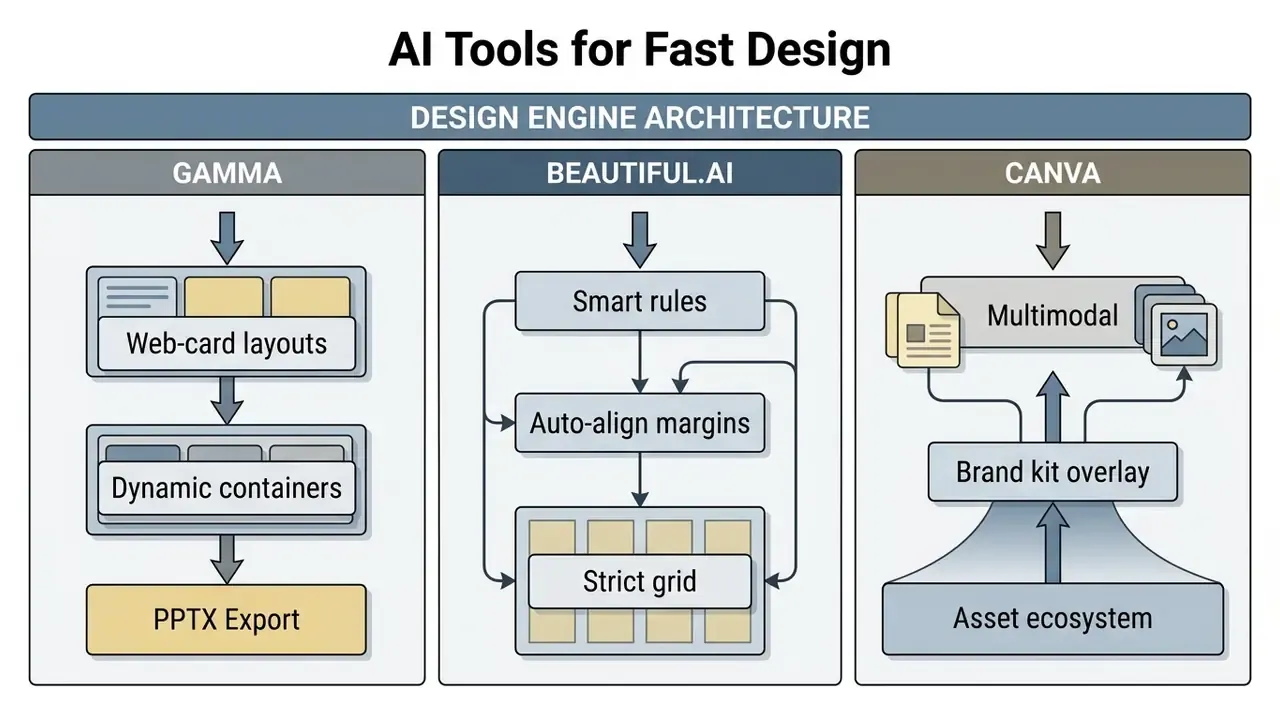
Beautiful.ai applies strict visual rules that adjust element spacing automatically as users edit content, with a large library of templates and slide types plus shared styles across team members. Canva magic design leverages a massive stock asset library and intuitive brand controls, which makes it a strong fit for marketing and social media teams; its Layouts panel suggests on-brand arrangements and Styles copies colors, fonts, and elements from another design in one click. Teams that extend slide narratives into motion formats can also review text-to-video AI tools.
For video-based presentation delivery, view our analysis of ai video editing software.
AI Slide Creation Tools for Generating Decks from Text and Documents
Text conversion specialists focus on converting long-form documents into structured slides quickly. Tools like MagicSlides and SlidesAI parse uploaded PDFs, text files, and web links to build structured outlines inside Google Slides. Think of them as an ai app to create slides rather than a full design studio.
These specialized ai slide creation tools prioritize text extraction and summarization over visual design. They provide an efficient route for generating a first draft from research papers, briefs, or meeting transcripts, and they save time when the deadline is tonight. The honest positioning: use them to get structure out of a 40-page document in minutes, then move the skeleton into a design-capable tool or a corporate template for finishing.
Generating Charts, Data Visuals, and Images for Presentations
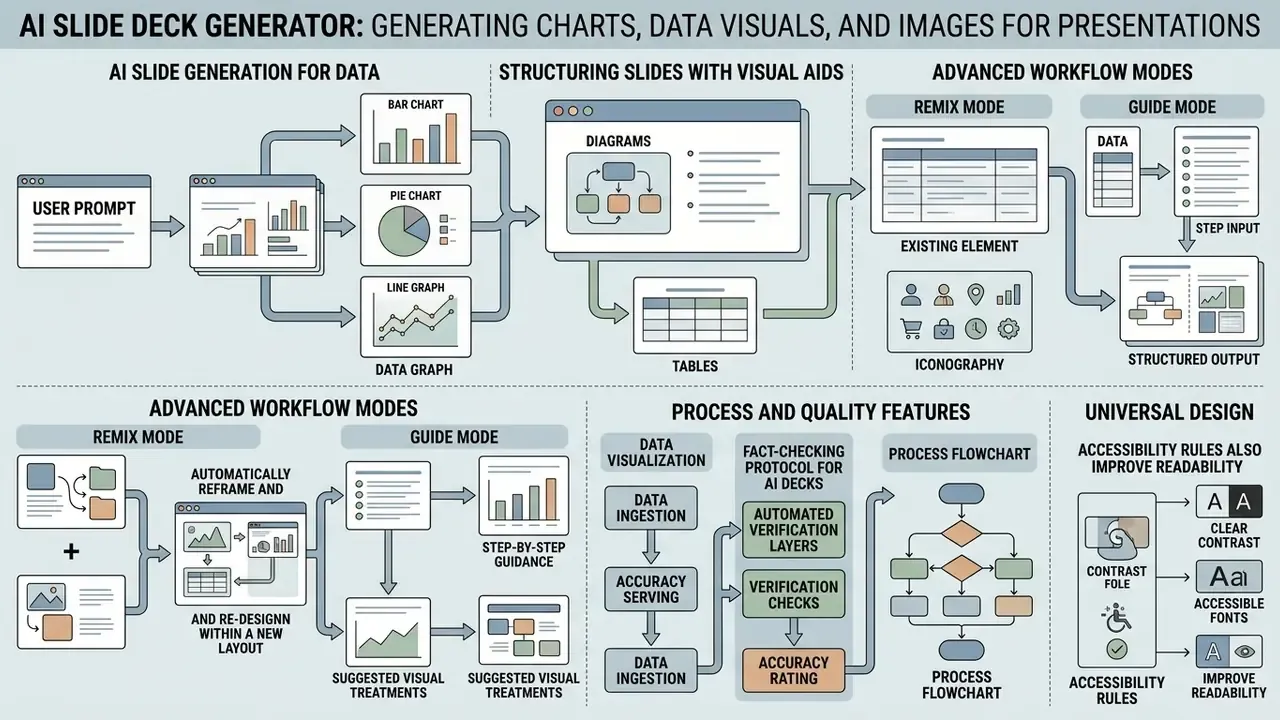
A professional presentation requires precise visual aids rather than decorative filler. For business and risk audiences, the hierarchy is unambiguous: quantitative exhibits first, process diagrams second, decorative imagery last. Leveraging ai presentation image generation tools allows teams to generate contextual diagrams, thematic backgrounds, and targeted imagery directly on the slide canvas. But the accuracy of the numbers on those slides is what determines whether a deck survives committee scrutiny.
«Top slide-generation systems reach 88.3% QuizBank accuracy overall, but performance drops to 61.6% on business-domain content.»
That 27-point gap between general and business-domain fidelity is the single most important number in this article for finance, risk, and strategy teams. It means that on exactly the content type executives rely on, roughly four in ten generated factual claims may need correction. Read that twice.
To incorporate synthesized voiceovers into visual decks, refer to our guide on ai video tools with text to speech capabilities.
Diagrams, Tables, and Icons Over Decorative Images
Data-heavy business reports demand functional visual structures rather than decorative artwork. Using structured tables, custom vector icons, and clear charts improves information retention and readability, and it keeps engaging presentations honest.
- Data visualization Translating complex numerical tables into bar charts, line graphs, or waterfall plots.
- Process flowcharts Mapping operational steps using standard container shapes and clear directional arrows.
- Iconography Placing visual anchor icons alongside text blocks to establish visual hierarchy. For decks delivered asynchronously with narration, compare options in our overview of AI voice generators.
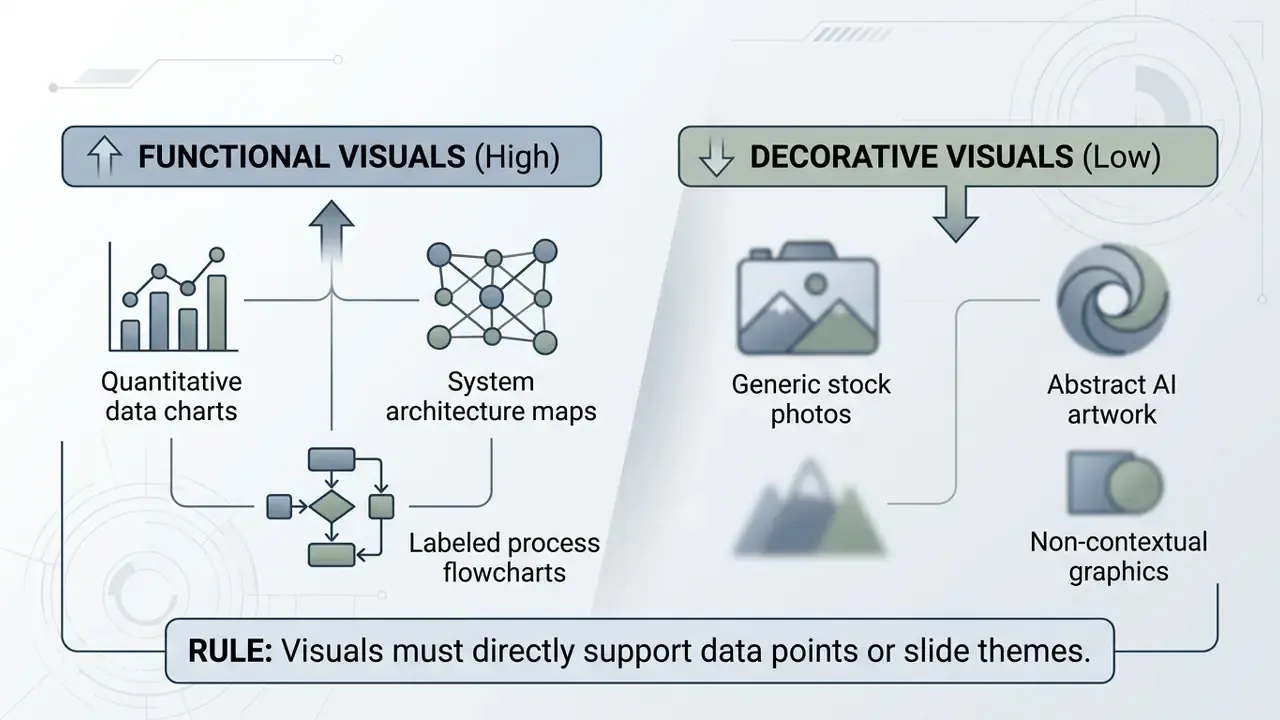
Accessibility rules that also improve readability: mark purely ornamental graphics as decorative so assistive technology skips them (WCAG uses empty alt="" for this), supply alt text for every meaningful image and chart, never encode meaning in color alone, hold at least 3:1 contrast for chart lines and non-text graphical objects against the background and 4.5:1 for text, give every slide a unique title, and avoid motion that flashes more than three times per second.
«The SlideAudit taxonomy covers 19 categories of slide design flaws, from illegible type to inconsistent padding, enabling systematic quality review.»
Fact-Checking Protocol for AI Decks
An internal audit of generative visual tools highlights that factual verification remains critical before executive delivery.
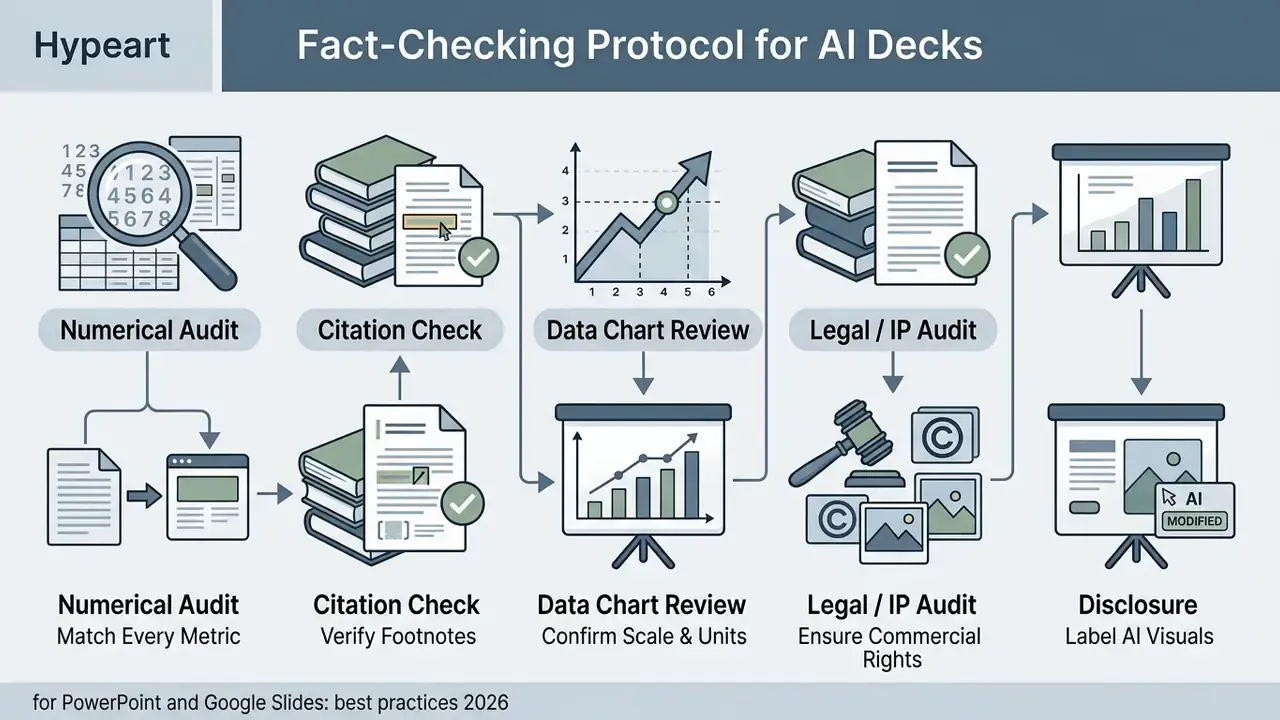
(Updated) Practitioner guidance converges on three concrete rules rather than generic caution. First, treat every AI-provided citation as unverified until you confirm the source exists, because fabricated references are the most common hallucination in generated decks. Second, trace each number to a specific source table or calculation and preserve units and denominators, recording source title, publisher, URL, publication date, access date, and the exact supporting location. Third, corroborate any AI-asserted claim against independent human-authored sources before it enters a committee document. Some scientific-publishing checklists add a pre-publication pass covering visual consistency, text legibility, data integrity against the source, and bias review.
Automated verification layers. Modern enterprise AI presentation platforms now integrate verification modules, with Genspark's AI Inspector being the clearest example. These engines parse every generated metric, cross-check numerical claims against live web sources or uploaded source documents, flag unverified or suspicious statistics in real time, and offer automated corrections before final export. Used correctly, an inspector pass is a first filter, not a substitute for human sign-off: it catches broken citations and internally inconsistent figures efficiently, but it cannot know your internal definitions, adjustment conventions, or restatement history.
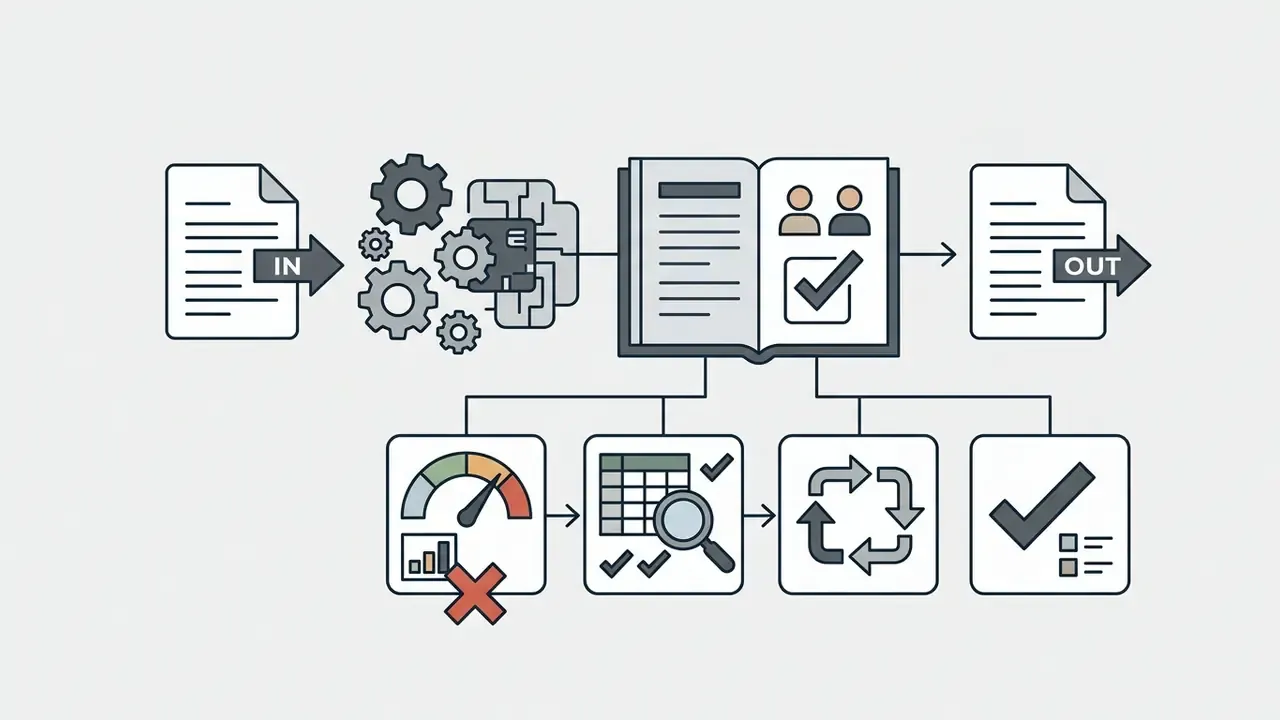
Building an audit trail. For regulated environments, record verification as a chain rather than a checkbox:
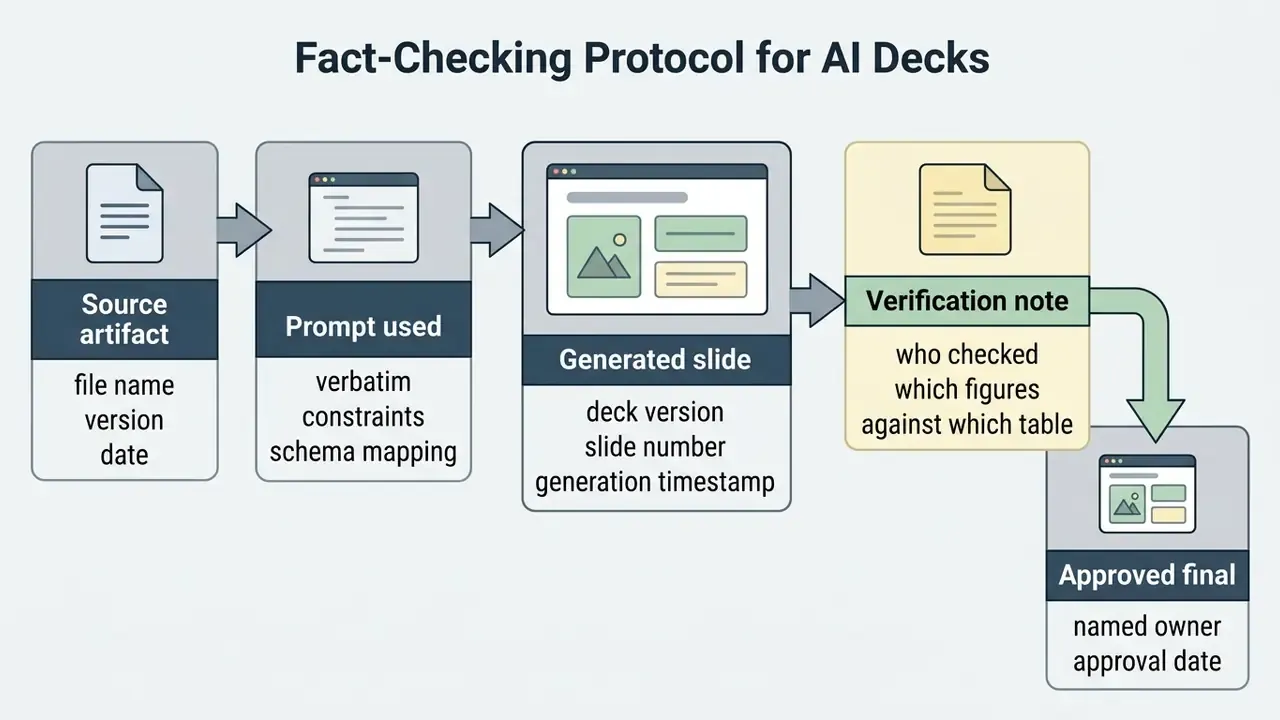
When to Use AI Image Generation in a Slide Deck
Generating custom images via an ai image generator is most effective when generic stock photos fail to represent a specific scenario. Strategic use cases include:
- Concept illustration Visualizing abstract business frameworks, technical architectures, or future-state models.
- Storytelling and pitch decks Creating custom visual imagery tailored to a specific client industry or target audience.
- Educational content Building simplified visual diagrams for training materials and lesson plans.
Visual assets must maintain consistent art styles, color schemes, and lighting across the entire deck to prevent visual clutter.
«Optimizing text and image relevance improves both human and GPT-4o ratings of page design and coherence.»
Beyond Static Slides: Interactive Widgets, No-Code Apps, and Mobile Remote Control
Modern AI presentation ecosystems extend beyond static bullet points by incorporating interactive, execution-ready elements directly onto the canvas:
- No-code interactive widgets (e.g., Canva Code) From a plain text prompt, Canva Code generates embedded experiences such as pricing and ROI calculators, mini-games, configurators, and live polling widgets, placed directly inside the slide deck with no coding required. For a sales deck, a live pricing calculator that reacts to the prospect's own inputs replaces three static pricing slides.
- AI-assisted data storytelling Magic Insights surfaces patterns and takeaways from uploaded data, and Magic Charts converts complex tables into interactive, on-brand charts, with the same verification caveat as any generated exhibit.
- Dynamic data updates (Live Snapshots) Plus AI's Snapshot technology connects live data cards to external sources so recurring metrics refresh automatically, which eliminates the monthly copy-paste ritual that is itself a major source of stale-figure errors in board packs.
- Mobile remote control and presenter mode Canva's Remote Control Notes lets a presenter use a phone as a wireless clicker while reading private speaker notes on the handset, advancing slides, tracking timing, and moving away from the laptop without losing the script. This matters most in rooms where the presenter must face an audience or panel rather than a screen.
- Motion and multimodal add-ons Magic Animate adds transitions and motion; AI voiceover apps, headshot tools, and avatar generators extend a static deck into asynchronous, self-serve formats.
Licensing for Canva-generated assets used in commercial decks is covered in our breakdown of the Canva AI Generator.
How to Create a Presentation with AI: Workflow from Prompt to Export
Building a high quality presentation with generative AI requires a structured, multi-step process. Skipping verification steps or relying on a single prompt often leads to generic copy and layout errors.
«A qualitative M365 Copilot trial documented a "productivity paradox": time saved through automation is offset by effort spent checking and correcting AI content.»
That finding should shape how you plan capacity. Budget verification time explicitly in the schedule. Teams that do not end up with the same total hours and a false sense of speed.
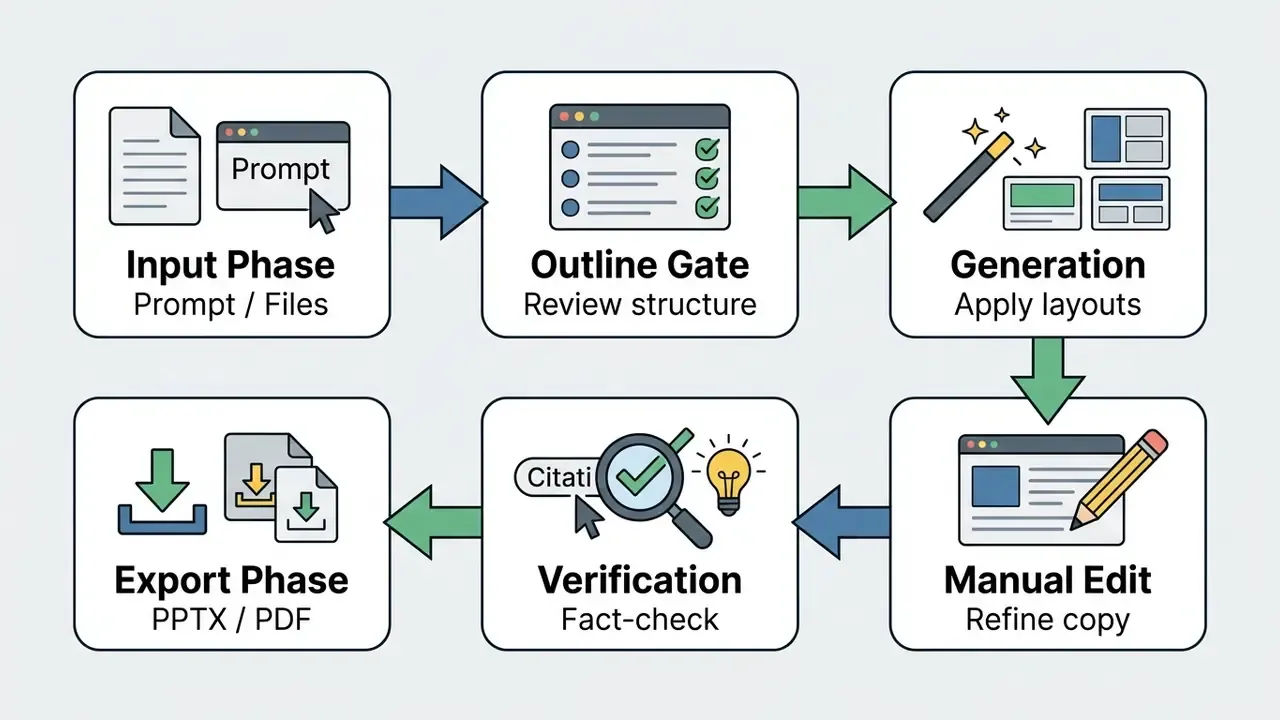
The full seven-step sequence documented across vendor workflows: validate the prompt, set slide count and attach source files, generate and approve the outline, select a template or smart design, create the draft, review and edit presentations as needed, then export as PDF for distribution or PPTX for continued editing.
To model ROI and token costs for automated tooling, use our AI software cost calculators.
Risk-Adjusted ROI: Calculating Real Savings, Not Demo Savings
Vendor math counts only generation time. Finance and operations leaders need the net figure after verification and licensing. A defensible formula:
Gross hours saved     = (Baseline hours per deck − AI drafting hours) × Decks per month
Verification cost     = Verification hours per deck × Decks per month
Net hours saved       = Gross hours saved − Verification cost
Net value             = Net hours saved × Fully loaded hourly rate
Risk-adjusted ROI (%) = (Net value − Licence cost − Rework/incident allowance)
                        ÷ (Licence cost + Rework/incident allowance) × 100
Inputs to insist on before signing:
| Input | How to estimate it honestly |
|---|---|
| Baseline hours per deck | Time-log three real decks, not a recollection |
| AI drafting hours | Run the standardized benchmark prompt on your own content, not a vendor demo |
| Verification hours | Assume higher on business-domain content; the SlidesGen-Bench 61.6% business-domain accuracy figure implies substantial checking |
| Licence cost | Seat price × seats plus any credit overages at realistic monthly volume |
| Rework/incident allowance | Cost of one corrected figure reaching a committee, however unlikely, times your expected frequency |
Two practical notes. First, credit-metered tools make volume forecasting essential: manual edits are free in some products (Genspark) but generation and regeneration consume credits, so iterative teams burn faster than expected. Second, the largest reliable saving in mature deployments is usually not net-new generation but reformatting and reuse, that is, Remix-style conversion of existing material, which requires far less verification because the facts were already approved.
How to Craft a Prompt for a Structured Presentation
A prompt must supply context, constraints, and structural directives to produce a coherent deck draft. Vague prompts generate generic outlines that require extensive manual rewriting.
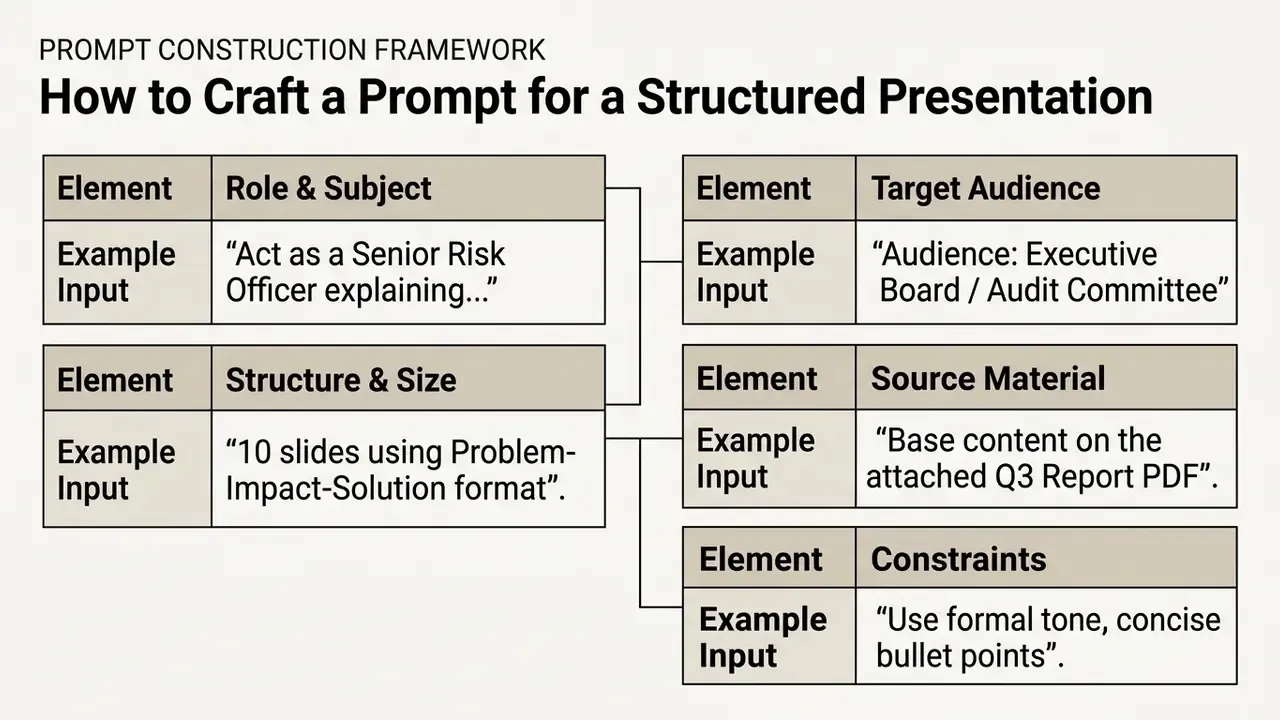
Published prompt frameworks converge on the same field set under different names. S-P-A-R-K-S specifies Subject, Purpose, Audience, Range, Key points, Style. Deck-vendor guidance uses topic and scope, audience, desired outcome, structure, and constraints, mapped onto recognizable narrative skeletons such as Problem, Solution, Proof, Ask for pitches and Context, Analysis, Recommendation for committee papers. More extended versions add content density, visual direction, evidence rules, and explicit exclusions.
Two additions that measurably reduce rework:
Providing specific parameters ensures the AI output aligns with enterprise communications standards. It also shortens the editing queue, which is where the hours quietly disappear.
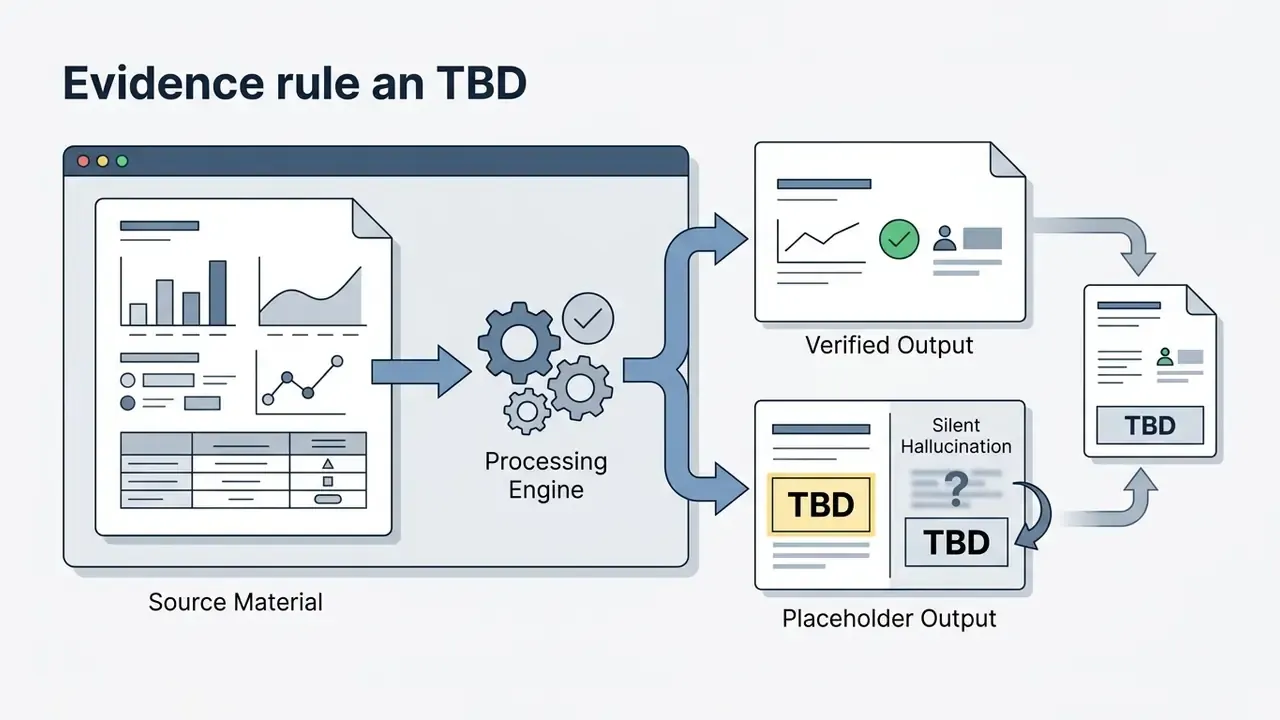
[TBD] instead of estimating." This converts silent hallucination into a visible placeholder.
How to Refine an AI-Generated Presentation Before Delivery
Once the initial generation completes, the user must transition into an editorial role. Reviewing individual slides ensures narrative flow, visual balance, and factual accuracy across the deck.
- Verify factual claimsConfirm that all figures, statistics, and dates align with source documentation, and that every footnote resolves to a real source.
- Refine text and densityShorten wordy paragraphs into concise, readable bullet points, and, for Copilot output specifically, expand three-word bullets into substantive statements.
- Check visual consistencyStandardize font sizes, container margins, and color palettes across all slides; run the SlideAudit-style flaw categories as a quick sweep.
- Audit presenter notesAdjust generated speaker notes to match the presenter's natural speaking style, then compress them into brief cues rather than paragraphs, so each slide carries one key takeaway, one supporting detail, and one transition. For narrated or recorded versions of the same deck, compare options in our guide to AI video editing software.
- Remix what fails rather than rewriting it manuallyif a slide's content is right but its layout is wrong, a one-click reformat is faster and safer than rebuilding boxes by hand.
Which AI Presentation Maker to Choose for Business, Sales, and Education
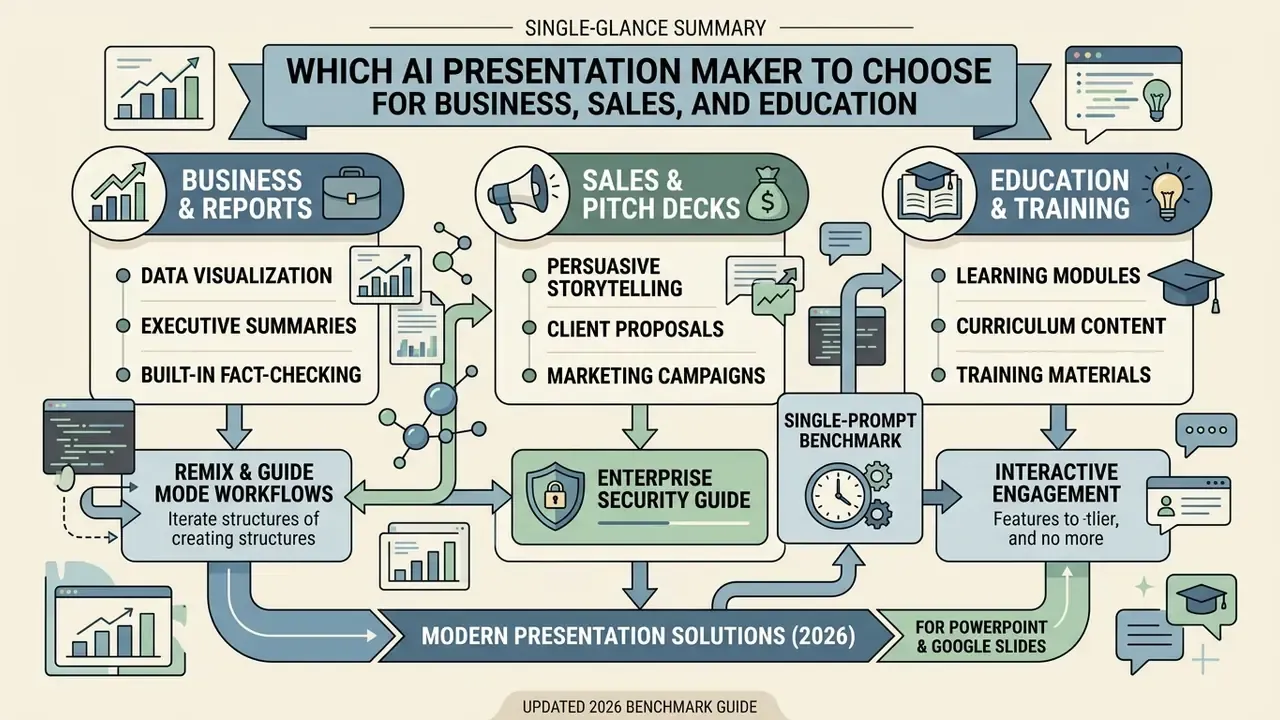
Different presentation scenarios require specialized software capabilities. A tool optimized for rapid sales pitches may lack the strict data formatting required for enterprise financial reporting.
To review licensing terms for commercial presentation collateral, visit the AI Media Commercial-Use Hub. For detailed tier comparisons across creative video generators, see our AI Video Pricing and Credits Comparison.
AI for Business Presentations, Reports, and Sales Decks
Enterprise reviews, financial updates, and sales decks require strict data accuracy, brand template adherence, and native office export options. An ai business presentation generator earns its seat price here or nowhere. Copilot for PowerPoint and Plus AI fit these environments by operating directly within .PPTX and Google Slides ecosystems, and Plus AI's own Open XML renderer is the technical reason its exports survive corporate templates intact.
AI for Pitch Decks, Marketing, and Training Materials
Startup pitch decks, creative marketing proposals, and educational lesson plans benefit from visual presentation platforms. Systems like Gamma and Canva Magic Design provide dynamic layouts that highlight visual storytelling and brand aesthetics, with Gamma delivering a usable first draft in roughly a minute and exporting to PowerPoint, PDF, or Google Slides. For venture-facing material, Genspark's pitch template targets the structure investors expect, covering problem and solution framing, TAM/SAM/SOM, traction timeline, and team bios in a 12 to 15 slide deck.
For educational environments, platforms like Mentimeter incorporate interactive elements, polls, and quizzes alongside slide generation to maximize audience engagement, and they document AI-generated interactive lesson presentations, quizzes, and classroom activities for teachers, lecturers, and trainers. Document-first tools such as PopAi and Slidespeak convert a lesson plan, course notes, or PDFs into structured training modules with learning objectives and knowledge checks.
«SlideBot embeds cognitive load theory and CTML principles into a multi-agent architecture, balancing text and visuals for effective instruction.»
That research framing is a useful design rule for training decks: limit simultaneous channels, pair each visual with the words that explain it, and resist the temptation to fill slides simply because generation is cheap.
FAQ About AI Apps to Create Presentations
These are the frequently asked questions we hear most often from buyers evaluating an ai app to create presentations under real governance constraints.
Can You Start with a Free AI Presentation Tool Without a Subscription?
Yes, several platforms offer free entry tiers, though they operate under strict usage limits. A best free option exists in most categories, but free tiers typically meter usage through credit allocations or presentation caps:
- Gamma: Offers initial signup credits (typically 400 credits), with roughly 10 slides generated per prompt, sufficient for drafting 10 to 12 slides.
- Canva Free: Magic Design is available up to about 10 uses free, shared across Canva's AI features.
- SlidesAI: Free plan around 12 presentations per year and 120 AI credits per year, with an input limit near 2,500 characters per presentation.
- MagicSlides: Freemium with credit-based caps on exports and input length.
- Slidesgo: Roughly 3 AI-generated presentations per month on the free tier, with attribution requirements on free templates.
- Plus AI and Genspark: Time-limited free trials (Plus AI documents a 7-day trial with 1,000 AI credits) rather than perpetual free tiers; file upload on Plus AI is gated to Pro or Team plans. Upgrading to paid plans unlocks custom brand templates, unlimited AI generation, higher document upload limits, and editable
.PPTXexports. If your immediate need is visual assets rather than full decks, our comparison of free AI image generators covers the no-cost options.
Do AI Presentation Tools Support Multiple Languages?
Most leading generative presentation tools support multi-language generation and output translation. Platforms powered by advanced LLMs parse inputs and generate slide copy in over 30 languages, including English, Spanish, German, French, and Japanese. Coverage varies widely by product: Genspark documents 19 languages with automatic language detection, Canva Translate reaches 100+ languages, Plus AI states it can read, write, and translate nearly any language, and MagicSlides claims 136+ languages (vendor-reported). Dedicated localization tools such as Smartcat's slides translator preserve layout while translating, and API-level options exist for programmatic multilingual pipelines. When producing multi-lingual decks, users must verify industry-specific terminology and localized formatting rules manually. Number formats, decimal separators, date conventions, and regulated product terminology are the usual failure points.
Can AI Generate Speaker Notes for Presentations?
Yes, leading tools automatically generate presenter scripts and talking points inside the slide notes field. Microsoft Copilot, Plus AI, and Gamma construct bulleted cues that summarize key takeaways for each slide, and Microsoft documents generating notes either for the current slide or for the entire deck with a keep-or-discard step. Presenters should review and edit generated notes to align with their natural delivery pace, time constraints, and audience expectations. Effective practice: specify audience, goal, and time limit before generation, then compress output into speakable cues (takeaway, one detail, one transition) rather than paragraphs, and fact-check notes against source material so unsupported claims do not survive into the spoken version. For decks repurposed into narrated video, see our overview of free AI video generators.
How Do I Fix a Bad Existing Presentation Instead of Starting Over?
Use a remix-style workflow rather than regeneration. Paste an unstructured paragraph, an inherited slide, or a wall of bullets into a tool with layout-reformatting capability (Plus AI's Remix is the clearest implementation) and select a target structure: cards, timeline, comparison matrix, KPI row, or two-column contrast. Because the underlying facts were already approved, verification load is far lower than for new generation, which makes reformatting the highest-ROI use of these tools in organizations with large legacy deck libraries. For individual sentences and tone, a Rewrite function elaborates, summarizes, or shifts register without touching layout.
Can AI Verify the Accuracy of the Slides It Generates?
Partially. Tools with built-in inspection modules, with Genspark's AI Inspector being the most explicit, review slides, validate data and statistics against sources, flag anomalies, and can apply automated corrections. This catches broken citations, missing sources, and internally inconsistent figures efficiently. It does not understand your internal definitions, adjustment conventions, restatements, or materiality thresholds, and benchmark evidence showing business-domain accuracy around 61.6% means human verification remains mandatory for committee-grade material.
Is It Safe to Upload Confidential Documents to an AI Presentation Tool?
Only under an enterprise agreement with verified terms. Check four things: a contractual no-training commitment on your content, certification posture (SOC 2 Type II, ISO 27001), data residency and retention settings, and admin controls including SSO and tenant-level feature restrictions. For restricted data, MNPI, or PII, restrict use to in-tenant copilots and approved native add-ins. Consumer and free tiers should be treated as public disclosure. Consult your information security and legal functions before any pilot involving real confidential material.
Do I Need to Disclose That a Deck Was Made with AI?
It depends on jurisdiction and context. In the United States, Copyright Office registration guidance (2023) requires applicants to disclose AI-generated content and describe the human author's contribution, excluding more-than-de-minimis AI material from the claim. In the European Union, transparency obligations for AI-generated content under Article 50 of the AI Act apply from 2 August 2026, supported by Commission guidelines and a voluntary code of practice. Professional bodies add their own rules. RSNA, for example, requires on-slide disclosure and source attribution for AI-generated or modified images. Build a disclosure line into your master template and confirm requirements with counsel for your jurisdiction and sector.
Can I Present from My Phone and See Private Speaker Notes?
Yes, on platforms with a synchronized presenter mode. Canva's Remote Control Notes turns a phone into a wireless clicker showing private speaker notes while the audience sees only the slides, which allows the presenter to move away from the laptop. Genspark, Gamma, and the native office suites also support direct presentation from the browser or app with presenter views. Test connectivity and note legibility in the actual room before a high-stakes session, since venue Wi-Fi is the most common point of failure. For comparative benchmarks across broader generative tools, explore our head-to-head tool comparisons, review developer integration options in the AI media API guide, or examine measured results in our AI model benchmarks index.
Appendix A: Editorial Revisions and Superseded Claims
For transparency, the following statements from earlier versions of this guide have been corrected or qualified. Original phrasing is preserved here; the main text carries the updated version.
| Superseded statement | Status | Current position in main text |
|---|---|---|
| "Gemini for Google Slides operates within Google Workspace, referencing Drive files to build slides and generate contextual images." | Overstated | Gemini aids single-slide generation and visual creation inside Workspace; full-deck automation remains limited, and generation is metered by tier |
"Microsoft Copilot in PowerPoint drafts decks from reference Word files, generates speaker notes, and updates layouts inside native .PPTX files." | Incomplete | Retained, with an added quality caveat on repetitive layouts and 3 to 4-word bullets requiring substantive editorial expansion |
| "The team reduced presentation prep time by 60% while maintaining strict compliance with corporate visual identity guidelines." | Unattributed metric | Reframed as a self-reported, unaudited single-team observation (roughly half or more of original effort) |
| "Manual slide assembly … averaged nine hours per analyst … drafting time dropped to 45 minutes." | Unattributed internal case | Retained with explicit attribution as a single-organization, self-reported observation, not an industry benchmark |
| "University guidelines on AI output verification emphasize cross-checking generated claims and metrics against at least two independent primary sources (University of Pretoria AI Guidelines, 2025)." | Weak sourcing | Replaced with the SlideAudit 19-category flaw taxonomy plus operational verification rules (citation existence, number-to-table traceability, independent corroboration) |
| "PPT-Eval Benchmark, 2026" cited without figures | Imprecise | Replaced with the PPT-Eval average score of 3.67 across content, design, and coherence (arXiv, 2025) and the GUI-agent rubric correlation τb = 0.77 (arXiv, 2026) |
| Placeholder anchors "browse the hub" / "open the hub" | Formatting defect | Replaced with descriptive anchors naming the destination resource |
Appendix B: Review Cadence and Open Questions
Two housekeeping items, because this category moves fast.
Recommended re-verification cadence. Re-check vendor pricing and credit economics quarterly, security attestations annually or on contract renewal, and language and feature coverage before any large multilingual rollout. Metering rules change without much warning; the Workspace slide caps effective 15 September 2026 are a good example of a limit that quietly reshapes capacity planning.
Questions we cannot yet answer with evidence. Whether agentic deck builders can maintain figure traceability across multi-document inputs at committee standard remains unproven. Independent, audited productivity data for document converters is also missing, so vendor-reported savings should stay labeled as hypotheses until your own time logs confirm them. If your organization has measured this properly, that data is worth more than any benchmark in this guide.
AI Media Comparison & Selection Matrix
To maintain long-term search authority and structural hub navigation across our comparison tools, consult our comprehensive directory:
- Hub Directory: AI Media Comparison