Executive Summary for Decision-Makers
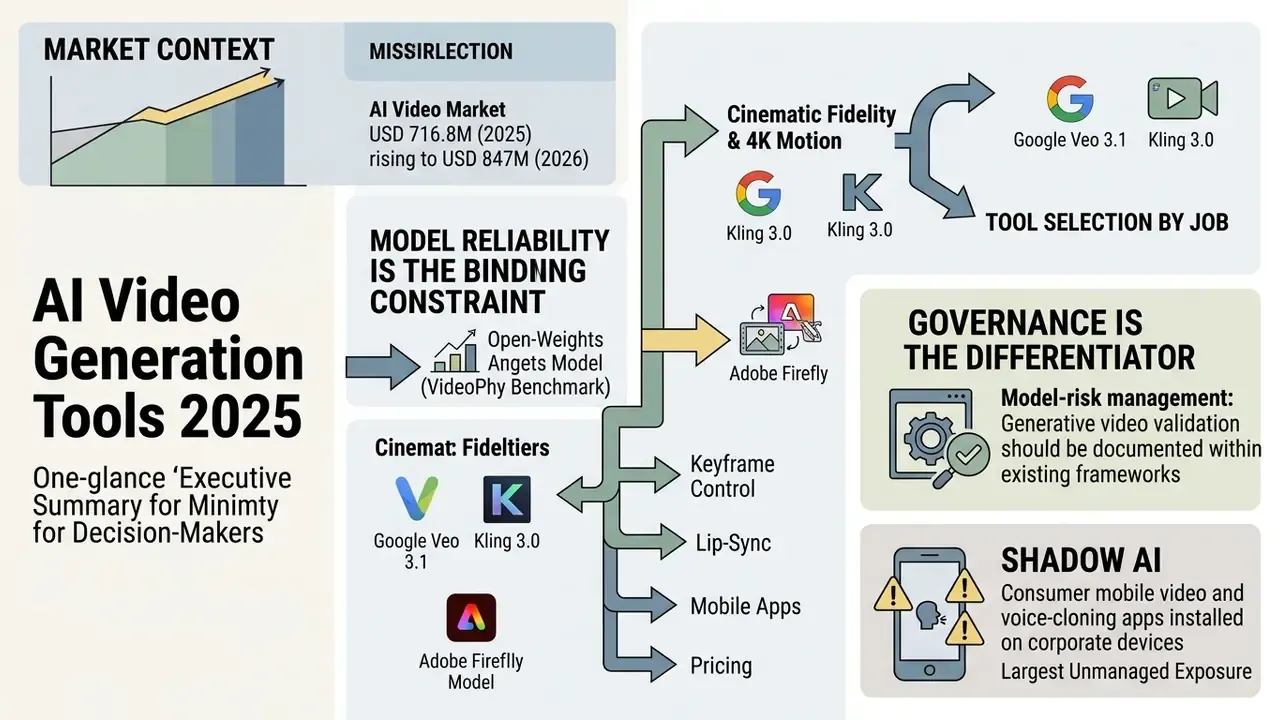
- Market context: Narrow "generation-only" estimates place the AI video generator market at USD 716.8M in 2025 rising to USD 847M in 2026 (Fortune Business Insights) and USD 788.5M to USD 946.4M (Grand View Research). Including editing, captioning and avatar production, the addressable market reaches USD 3.67B by 2026.
- Model reliability is still the binding constraint: the best open-weights model in the VideoPhy benchmark satisfied prompt adherence and physical commonsense in only 39.6% of generations. Treat generative video as a probabilistic model output requiring validation, not a deterministic rendering service.
- Tool selection by job: Google Veo 3.1 and Kling 3.0 for cinematic fidelity and 4K motion; Adobe Firefly for commercially safe, indemnified output with direct Premiere Pro and After Effects pipelines; InVideo AI for conversational prompt-to-edit production; HeyGen for multilingual avatar presenters and multi-speaker lip-sync.
- Governance is the differentiator, not resolution. Before approving any vendor, verify training-data provenance, copyright indemnification, prompt-retention policy (is your prompt used for training?), SOC 2 / ISO 27001 / SSO support, and C2PA provenance stamping.
- Regulated-industry framing: validation of generative video should be documented inside existing model-risk frameworks, specifically SR 11-7 (Federal Reserve and OCC Supervisory Guidance on Model Risk Management) and the NIST AI Risk Management Framework Generative AI Profile, with reproducible seeds, logged API calls and auditable output samples.
- The largest unmanaged exposure is Shadow AI: consumer mobile video and voice-cloning apps installed on employee devices create PII leakage, executive-likeness and right-of-publicity risk. Treat the mobile category as a control problem, not a procurement shortlist.
Who This Guide Is Written For, and How to Read It
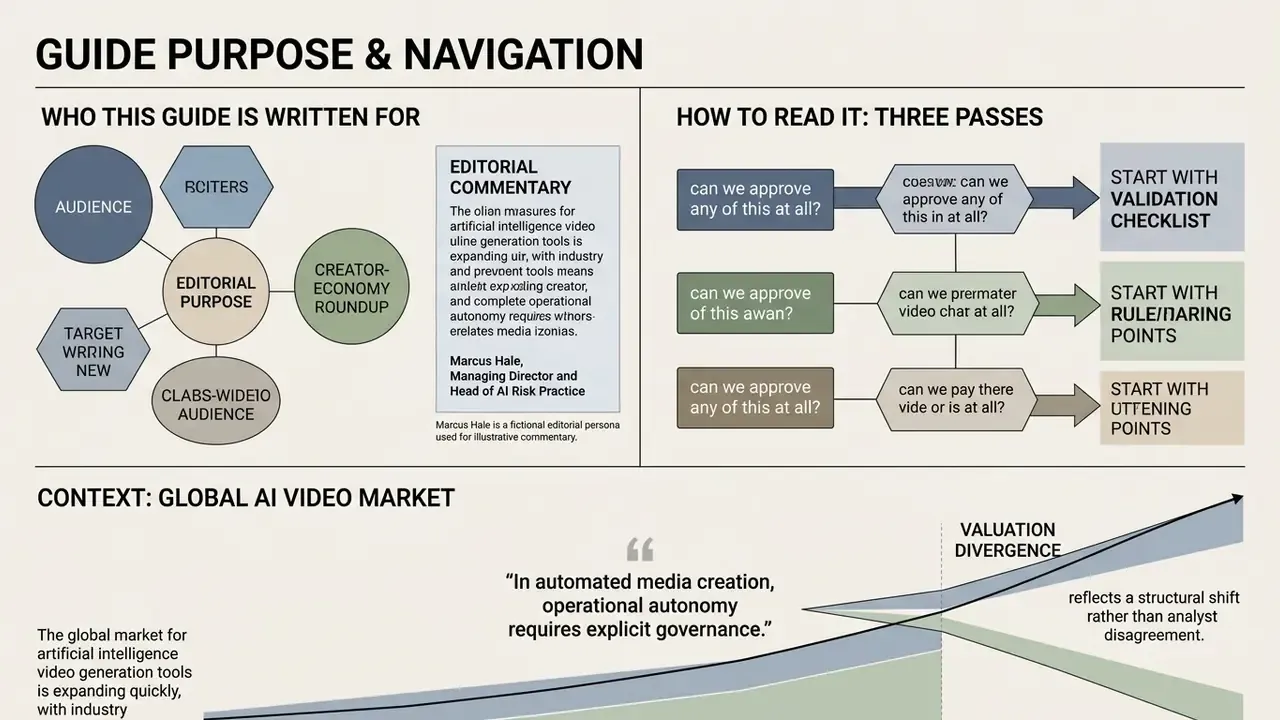
This is not a creator-economy roundup with a star rating at the end. It is written for the people who sign off: Chief Risk Officers, Chief Compliance Officers, Heads of Model Risk, and AI governance leads at US banks and mature fintechs. Marketing and learning teams will use these tools. Risk functions will own the consequences.
Read it in three passes, depending on your question.
If you are asking "can we approve any of this at all?", start with the validation checklist and the commercial-use section. If you are asking "which vendor for which job?", go to the comparison tables and the model-by-model breakdown. If you are asking "what is already happening inside my organization without approval?", jump straight to the Shadow AI control set. That third question is usually the urgent one, and it rarely appears in the procurement queue.
One framing note before the details. Every capability statement below is labelled by evidence class: independent benchmark, vendor documentation, or internal client observation. Where the evidence is vendor-supplied, we say so. Where no independent evaluation exists, and for workflow suites that is common, we say that too.
The global market for artificial intelligence video generation tools is expanding quickly, with industry evaluations splitting into distinct valuation tiers. According to Fortune Business Insights, the core AI video generator market is valued at USD 716.8M in 2025 and is projected to reach USD 847M in 2026 under a narrow generation-only classification. Alternative assessments by Grand View Research estimate the same narrow segment at USD 788.5M in 2025 and USD 946.4M in 2026. Expanded to include integrated video editing software, captioning engines and synthetic avatar production platforms, the total addressable market reaches an estimated USD 3.67B by 2026.
That valuation divergence reflects a structural shift rather than analyst disagreement. AI video tools are moving from novel media experiments into enterprise video production pipelines. For institutional users, selecting the best ai video generation tools 2025 means evaluating underlying foundation models, deployment topology (public SaaS versus private cloud versus API), mobile creation workflows, and strict compliance boundaries.
How We Evaluate the Best AI Video Generation Tools 2025
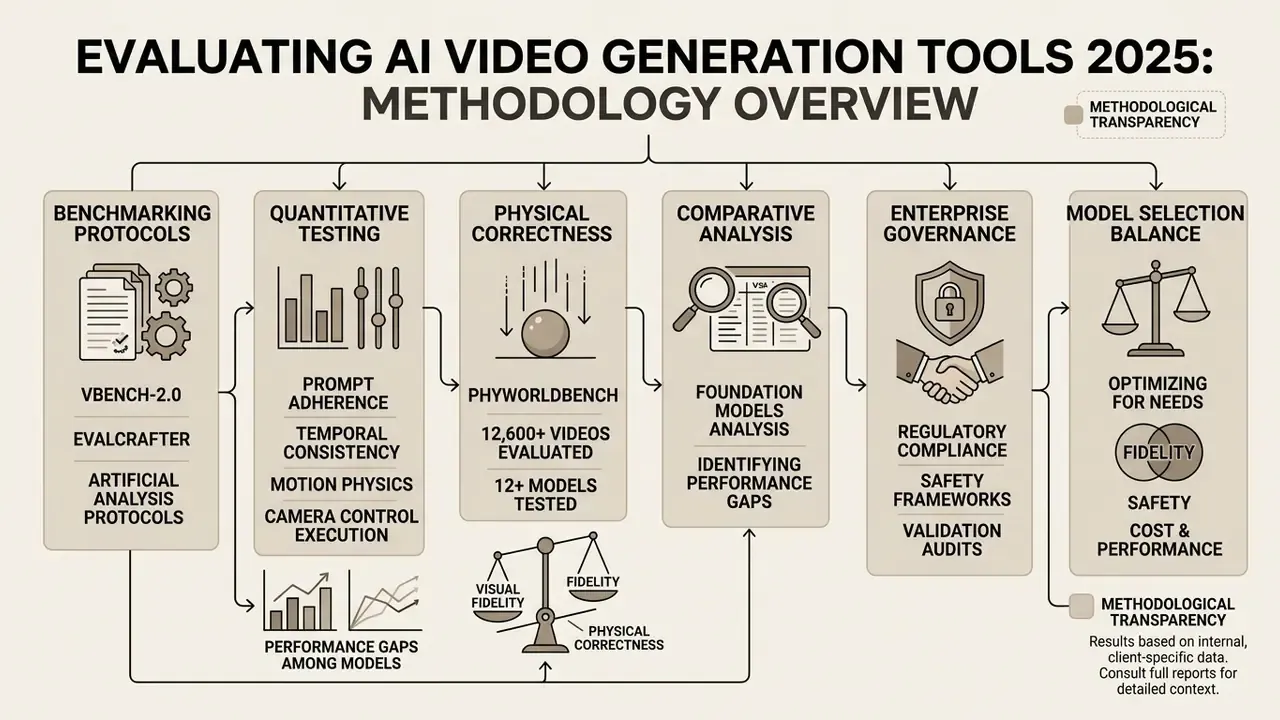
Evaluating ai tools for video generation 2025 requires standardized quantitative testing across prompt adherence, temporal consistency, motion physics, camera control execution and export flexibility. Standardized protocols hold baseline variables constant, specifically frame rate, resolution, aspect ratio, seed, guidance scale and inference steps, so that model performance can be compared across identical text prompts and source images.
Quantitative research highlights significant performance gaps among foundation models. Benchmark data from VideoPhy shows that top-performing open-weights models, such as CogVideoX-5B, satisfy both textual prompt adherence and physical commonsense laws in only 39.6% of generated instances. The evaluation used human annotators scoring prompts built around material-interaction scenarios (solid to solid, solid to fluid, fluid to fluid), which is why the failure rate sits far above what aesthetic-quality scores imply.
«The best performing model, CogVideoX-5B, generates videos that adhere to the conditioned text prompt and physical laws for 39.6% of the instances». VideoPhy, arXiv (2024). https://arxiv.org/abs/2410.02290
Similarly, PhyWorldBench evaluations across 12,600 generated videos and 12 models reveal that while closed models excel at balancing aesthetic lighting with physical laws, models frequently fail when executing complex temporal dynamics. In that study, Pika 2.0 delivered the strongest combined score for simultaneous semantic and physical-law compliance.
«PhyWorldBench evaluates 12 state-of-the-art models across 12,600 generated videos; Pika 2.0 achieves the best joint semantic and physical adherence». PhyWorldBench, arXiv (2025). https://arxiv.org/abs/2501.09038
So model selection has to balance visual fidelity against physical correctness and regulatory safety. Complementary benchmarks are useful precisely because they disagree. VBench decomposes quality into 16 dimensions with high human correlation, while DEVIL isolates motion dynamics and controllability. Teams that want to see how these evaluation families differ before running their own bake-off can open the hub of benchmark summaries.
In a recent model validation audit conducted for an enterprise video platform operated by a regulated financial-services institution, our team established a standardized testing harness across three foundation models to evaluate character consistency in synthetic training videos. By locking input seeds and applying strict camera trajectory parameters, we reduced structural face-warping by 42% across multi-shot renders. That framework let the client build a reproducible auditing pipeline before commercial deployment.
Methodological transparency note: the 42% reduction is an internal, client-specific result measured on a fixed harness of 240 multi-shot renders (three models × four seed groups × twenty prompts), scored by two independent reviewers against a frame-level warping rubric. It is not a public benchmark, it has not been externally replicated, and it should be read as directional evidence of harness value rather than a vendor performance claim. Independent, peer-reviewed comparisons of workflow-suite pipelines (InVideo AI, HeyGen and similar orchestration layers) remain scarce. The available evidence base is vendor documentation, so all suite-level quality statements below are attributed rather than benchmarked.
Enterprise AI Video Model Risk Assessment Checklist (SR 11-7 / NIST AI RMF)
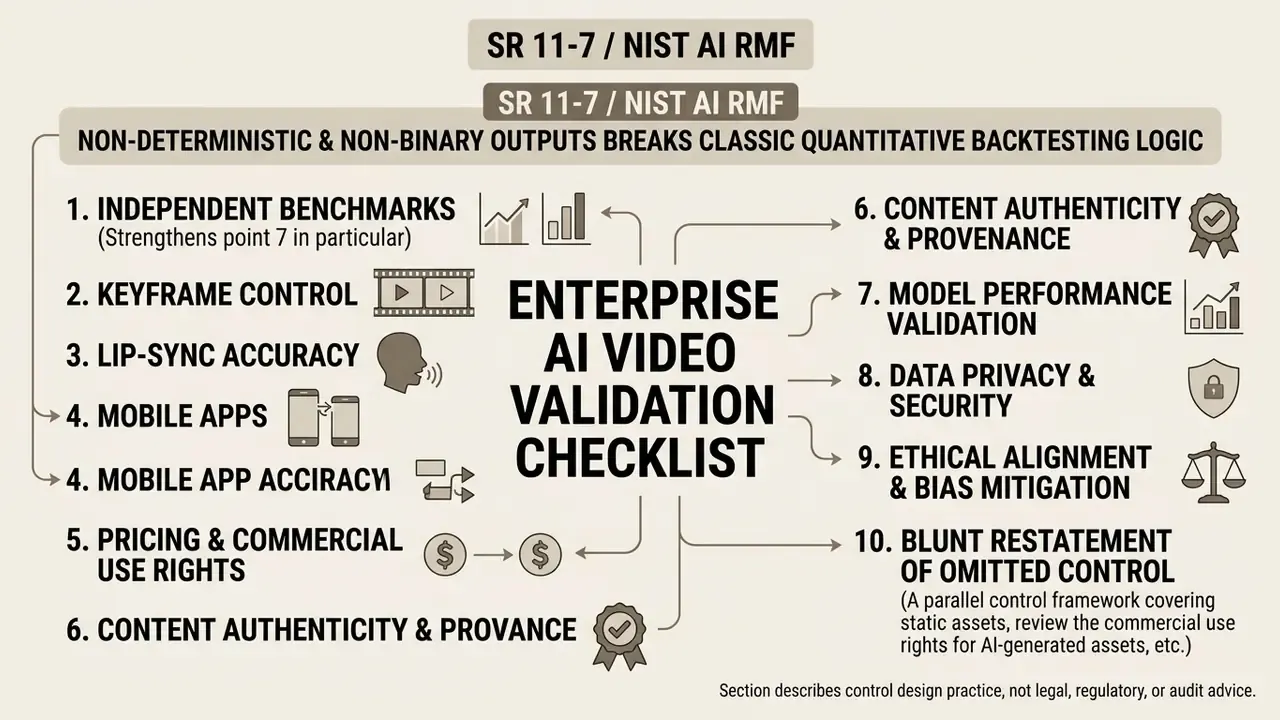
Generative video produces non-deterministic, non-binary outputs, which breaks the classic backtesting logic of quantitative model validation. The workaround adopted by regulated organizations is to validate the pipeline and its controls, not the individual frame. The checklist below maps onto the three SR 11-7 pillars (conceptual soundness, ongoing monitoring, outcomes analysis) and onto the NIST AI RMF functions (Govern, Map, Measure, Manage).
[10-POINT ENTERPRISE AI VIDEO VALIDATION CHECKLIST]
 1. Model Inventory Entry: Register the generative video model/vendor in the model inventory with owner,
    intended use, and prohibited use statements (SR 11-7 §V; NIST AI RMF GOVERN-1).
 2. Reproducibility Test: Fix seed, prompt, resolution, aspect ratio, guidance and inference steps; confirm
    output stability across three runs and document variance.
 3. Training-Data Provenance: Obtain written confirmation of licensed/public-domain training corpora and
    exclusion of scraped third-party IP.
 4. Prompt & Asset Retention Policy: Verify contractually that prompts, uploaded images, scripts and voice
    samples are NOT used for model training or human review.
 5. PII / MNPI Scrubbing Gate: Pre-generation screening that blocks customer data, account numbers,
    internal screenshots and material non-public information from entering any prompt or reference image.
 6. Likeness & Voice Authorization Register: Signed, scoped consent on file for every real person's face,
    body or voice used, including employees and executives.
 7. Adversarial / Misuse Stress Test: Attempt prohibited generations (executive deepfake, fabricated
    disclosure, false endorsement) and record refusal behaviour and bypass paths.
 8. Provenance Stamping: Confirm C2PA Content Credentials and/or invisible watermarking are applied at
    export, and that metadata survives platform re-encoding.
 9. Audit Logging: Route all generations through API or SSO-gated workspaces so prompt, user, model
    version, timestamp and output hash are retrievable for regulator or internal audit review.
10. Ongoing Monitoring & Recertification: Re-run the harness on every model version bump (for example
    Veo 3.1 to Veo 4), since vendor-side updates constitute an uncontrolled model change.
Independent benchmarks strengthen point 7 in particular. T2VSafetyBench found that safety performance is not monotonic across vendors, meaning "the most capable model" and "the safest model" are rarely the same vendor.
«No model excels in all aspects, with different models showing various strengths»
Point 10 deserves a blunt restatement, because it is the control most often missed. When a vendor silently upgrades a hosted model, your validated artefact is gone. No change ticket, no notification window, no rollback. Treat every version label in the API response as a monitored field and alert on it.
For a parallel control framework covering static assets, review the commercial use rights for AI-generated content documentation before extending approval from images to motion.
This section describes control design practice and is not legal, regulatory or audit advice. Confirm applicability with your own model risk, compliance and legal functions.
Best AI Video Generators at a Glance
| Tool / Model | Primary Use Case | Text-to-Video | Image-to-Video | AI Avatar | Native Audio | Platform Access | Commercial Use | Pricing Model |
|---|---|---|---|---|---|---|---|---|
| Google Flow / Veo 3.1 | Cinematic and multi-shot renders | Yes | Yes | No | Yes (native SFX/dialogue) | Web, API, Vertex AI | Yes (enterprise/paid) | Flow credits / Google AI Pro ($19.99/mo) / API per-second |
| Kling AI | Motion control and lip-sync | Yes | Yes | No | Yes (lip-sync API) | Web, iOS, Android, API | Paid plans only | Freemium / paid from $8.80/mo / API credits |
| Adobe Firefly Video | Commercially safe commercials | Yes | Yes | No | No | Web, Creative Cloud | Yes (Adobe Stock trained) | Generative credits / Creative Cloud subscriptions |
| InVideo AI | Script-to-video automation | Yes | Yes | No | Yes (AI voiceover) | Web, iOS, Android | Paid plans only | Free (watermarked) / Plus ($20+/mo) / Max |
| HeyGen | Digital avatars and presenters | Yes | Yes | Yes (500+ stock) | Yes (voice cloning) | Web, API | Paid plans only | Free (1 credit) / Creator ($29/mo) / Pro ($49/mo) |
| Pika 2.0 | Stylized effects and physics clips | Yes | Yes | No | Yes | Web, mobile web | Yes (includes free) | Free Basic (80 credits/mo) / paid tiers |
Pricing parameters valid as of Q1 2026 and subject to vendor updates; SaaS tiers and credit costs frequently change quarterly.
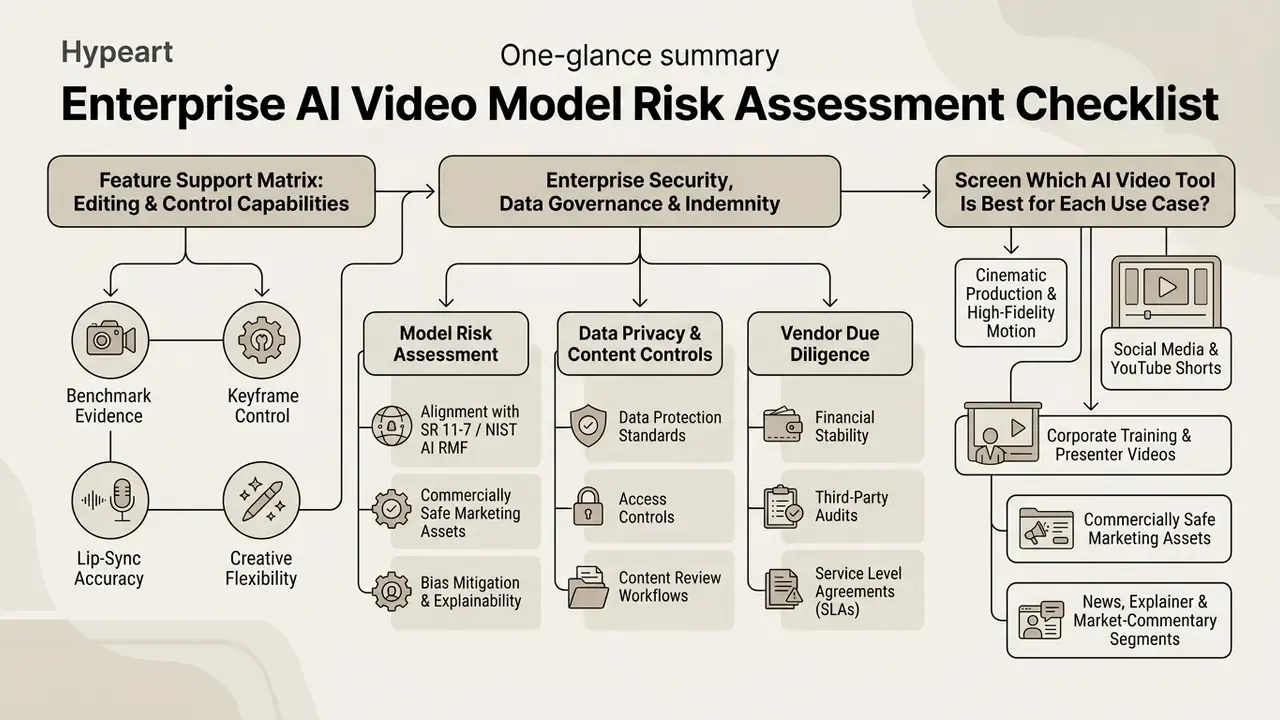
Feature Support Matrix: Editing and Control Capabilities
Resolution is the easiest specification to market and the least useful for pipeline design. The functional controls below decide whether a model can actually execute a storyboard.
| Tool / Model | First/End Frame Binding | Multi-Speaker Lip-Sync | Prompt-Based Editing | Direct NLE Plugin |
|---|---|---|---|---|
| Google Veo 3.1 | Yes (Ingredients / frame control) | No | No | No (API only) |
| Kling AI 3.0 | Yes | Yes | No | No |
| Adobe Firefly Video | Yes | No | No | Yes (Premiere Pro, After Effects) |
| InVideo AI | No | No | Yes | No |
| HeyGen | No | Yes | Yes | No |
| Pika 2.0 | Yes | No | Partial | No |
Enterprise Security, Data Governance and Indemnity Screen
For institutional buyers, the dimensions below outrank output resolution. Values marked "verify" must be confirmed in the vendor's current DPA, security whitepaper or enterprise agreement rather than on a marketing page.
| Tool / Model | Training Data Provenance | Prompt/Asset Used for Training? | Copyright Indemnification | Enterprise Controls (SSO / SOC 2 / audit logs) | Private Deployment Path |
|---|---|---|---|---|---|
| Google Veo 3.1 | Google-trained proprietary corpus | No for Vertex AI enterprise tier (verify contract) | Available via Google Cloud enterprise terms (verify scope) | Yes: Google Cloud IAM, org policy, Cloud Audit Logs | Yes: Vertex AI, regional endpoints |
| Kling AI | Kuaishou proprietary corpus (not publicly itemized) | Verify; consumer terms differ from API terms | Not publicly documented | Limited; API keys, no published SOC 2 | API only |
| Adobe Firefly Video | Licensed Adobe Stock plus expired-copyright public domain; Adobe states it does not train on Creative Cloud customer content | No (per Adobe policy) | Yes; Adobe offers enterprise indemnification for Firefly-generated content (verify plan) | Yes: Adobe Admin Console, SSO, enterprise storage | Adobe enterprise cloud |
| InVideo AI | Mixed: stock libraries plus third-party generative backends | Verify per plan | Not publicly documented | Team/Enterprise plan features; verify | No |
| HeyGen | Proprietary avatar/voice models plus consented talent | Verify enterprise terms | Not publicly documented | Enterprise workspace, seats, API keys; verify SOC 2 | API only |
| Pika 2.0 | Not publicly itemized | Verify | No | Consumer-grade | No |
Read those two tables together and a pattern appears. The strongest control posture and the strongest motion scores sit with different vendors, which is why single-vendor standardization tends to fail review. To build a working vocabulary before vendor calls, start from the fundamentals in our guide to the AI video generator category, which covers generation methods, credit mechanics and licensing baselines. Teams comparing zero-cost entry points can review the shortlist of free AI video generators, and buyers replacing an incumbent tool can scan the alternatives index.
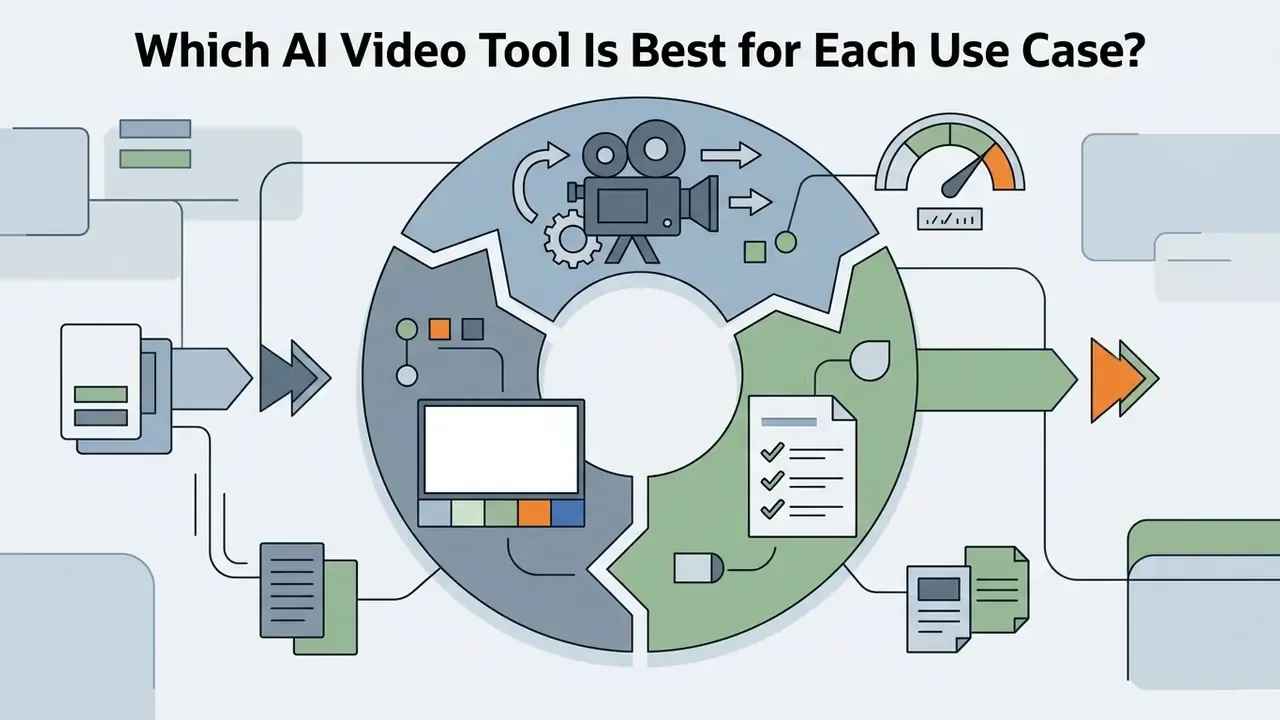
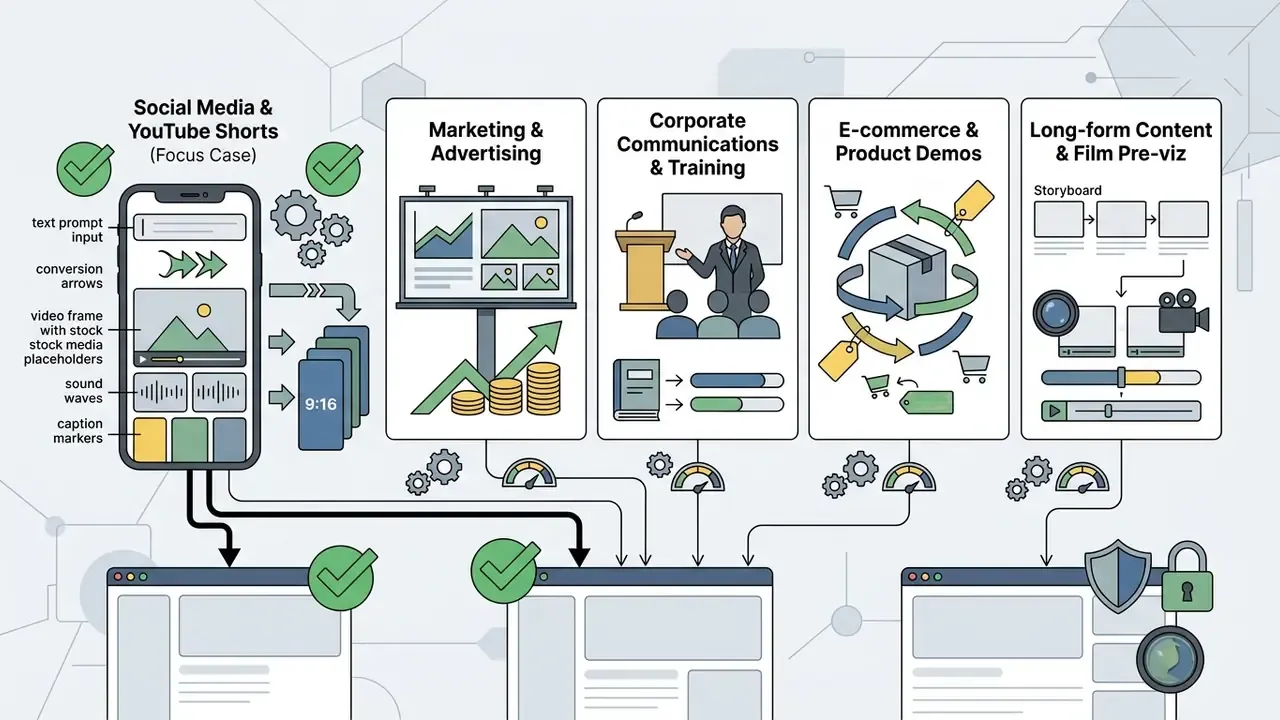
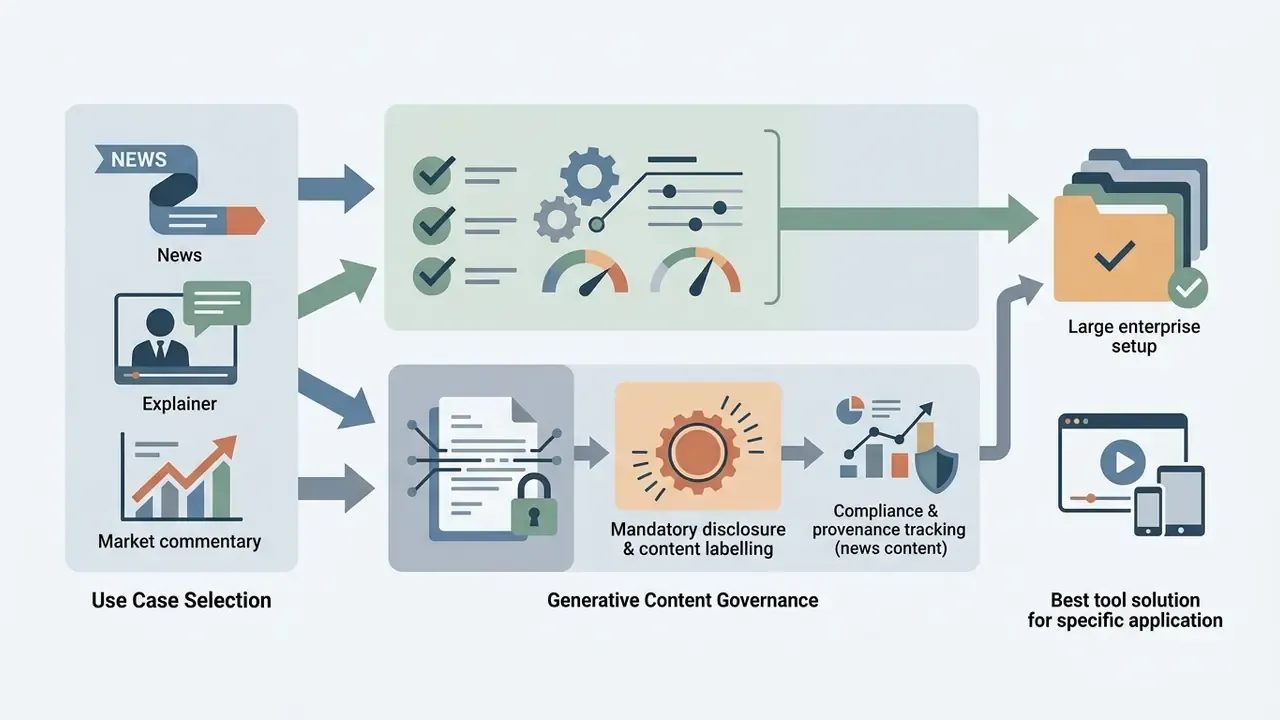
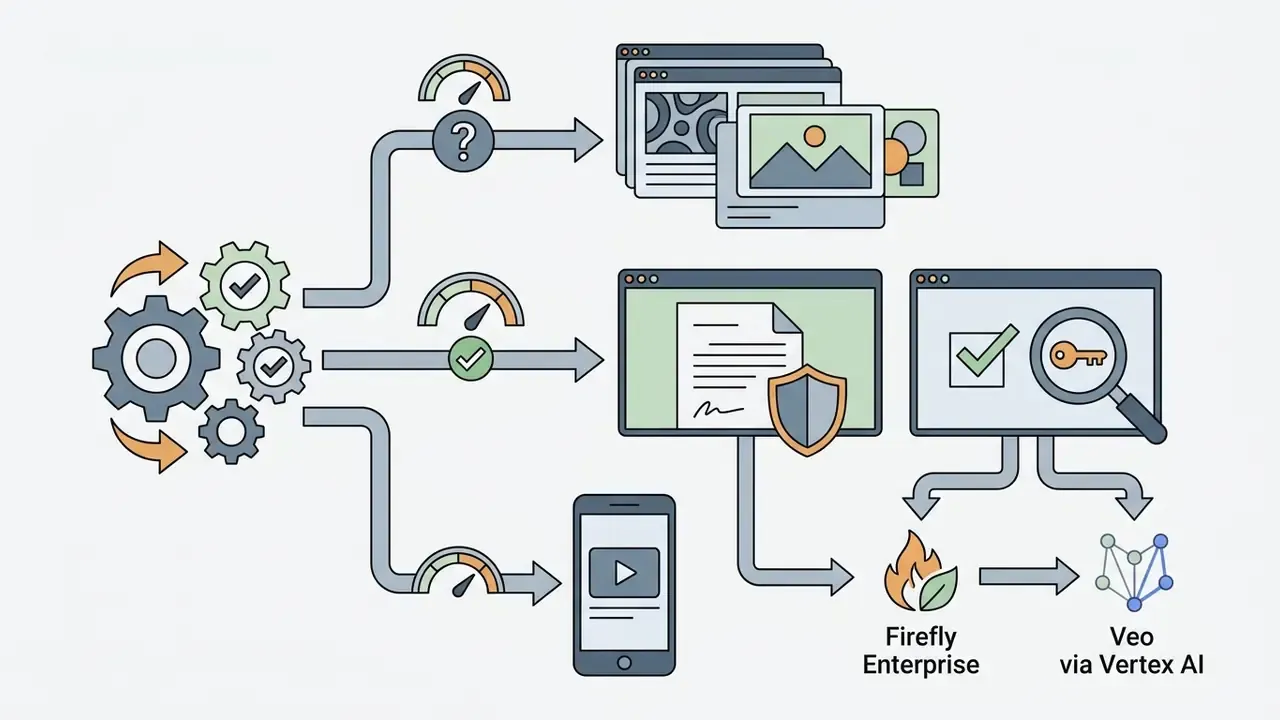
Which AI Video Tool Is Best for Each Use Case?
Different production pipelines demand specific model architectures.

Tiered Deployment Architecture: Avoiding Vendor Lock-In
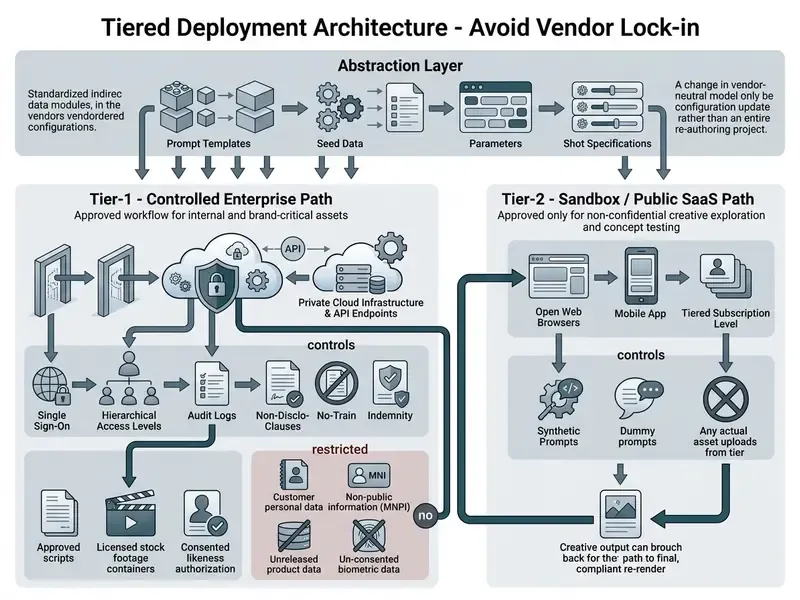
Multi-model independence is both a resilience requirement and a cost lever. A practical reference architecture separates the estate into two tiers.
Commercial Use, Copyright and Brand-Safe Outputs
Compare Output Quality, Creative Control and Export Options
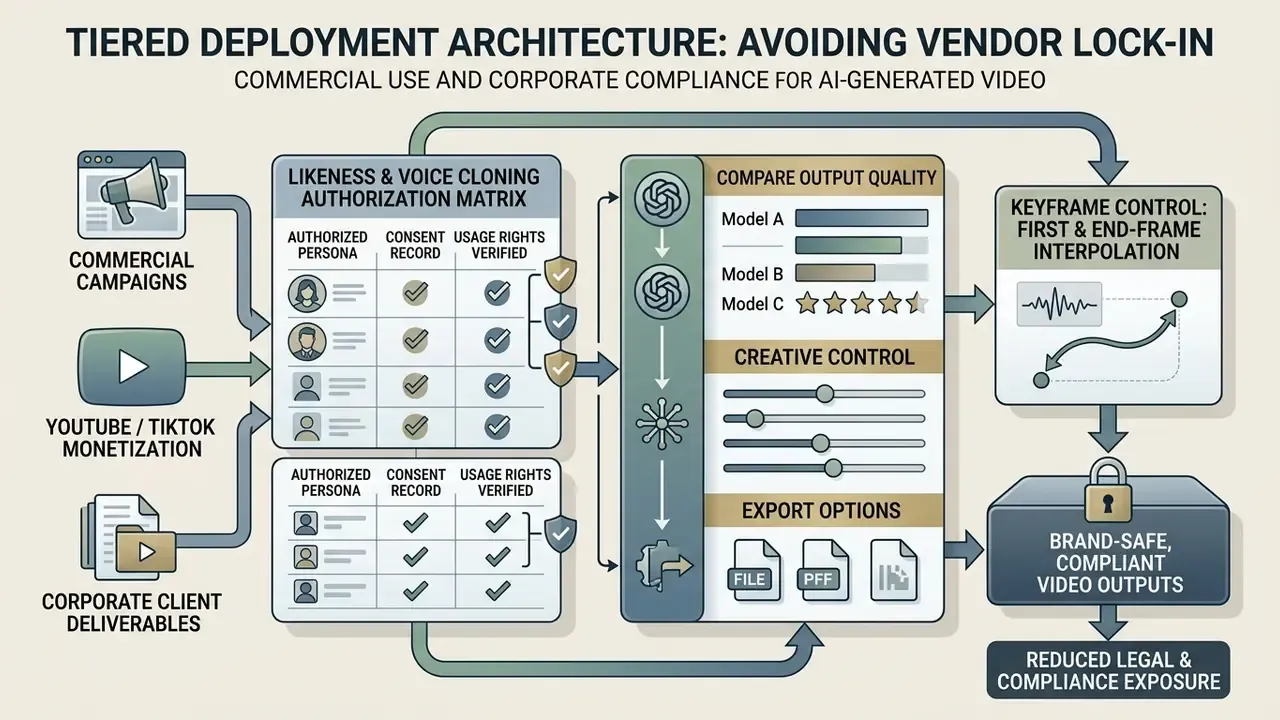
Output capabilities differ significantly between foundational ai models for video generation and consumer-facing editors. Foundation models such as Google Veo 3.1 and Kling 3.0 deliver native 1080p and 4K output, supporting 16:9, 9:16 and 1:1 aspect ratios. Creative control is maintained through specialized input parameters.
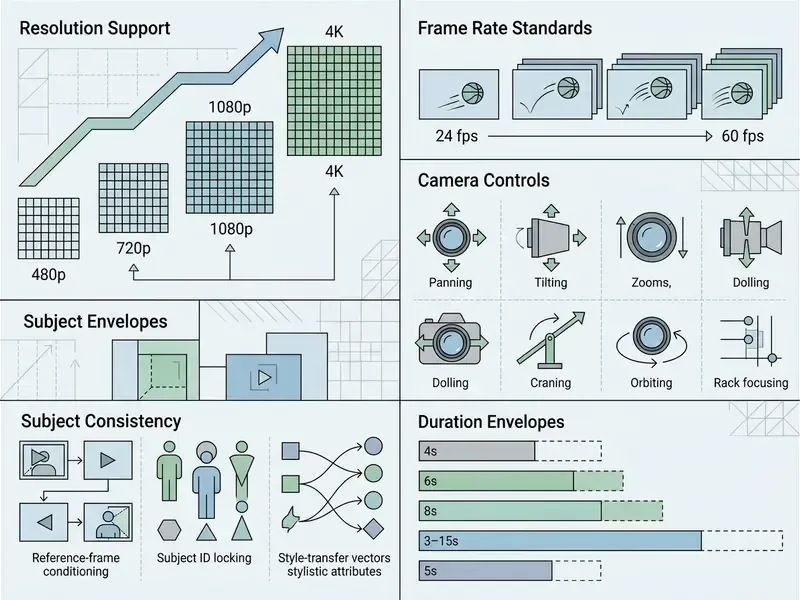
Technical benchmark analyses from EvalCrafter indicate that higher rendering resolutions do not automatically correlate with temporal coherence. While 4K exports improve per-frame sharpness, subject identity retention across multi-second cuts remains bounded by latent-space stability.
«EvalCrafter builds a prompt list of around 700 real-world-derived prompts and evaluates models with 17 objective metrics across visual quality, text-video alignment, motion quality and temporal consistency». EvalCrafter, arXiv (2024). https://arxiv.org/abs/2310.11440
Keyframe control: first-frame and end-frame interpolation. Advanced video models such as Adobe Firefly Video and Kling 3.0 support dual-keyframe conditioning. Creators can lock both the initial state (Frame A) and the terminal state (Frame B) of a sequence. The diffusion engine then calculates the latent motion trajectories required to bridge the two anchor images over a 5 to 10 second duration, which keeps transitions precise and limits visual drift. Operationally this converts generative video from a slot machine into a deterministic bridge: because both ends of the shot are pinned, the model can only vary the interpolation path, and that materially reduces re-render cycles for product turnarounds, logo reveals and scripted transitions. In Firefly's interface, the start image is uploaded under the first Frame box and the terminal image under the second; Kling exposes equivalent binding through its Elements and keyframe controls.
For delivery-side constraints such as bitrate ceilings and platform file limits, teams handling large 4K exports should pair the model choice with the compression strategies covered in our guide to video compressors.
Best AI Models for Text-to-Video and Image-to-Video Generation
Generative video architectures rely on diffusion models and transformer backbones to convert text prompts or static image inputs into dynamic sequences. Ai text to video generation tools construct motion trajectories directly from written prompts; see our reference material on text-to-video AI tools for method, pricing and workflow context. Conversely, an ai image to video generator 2025 uses a static reference frame, such as a photograph or synthetic render, as an anchor point that maintains visual identity while scene elements animate. The control surface of an image-to-video generator covers conditioning strength, start-frame placement and usage rights.
Technically, image conditioning is not a soft hint. Research systems such as STIV replace the noised first-frame latent with the un-noised latent of the conditioning image during both training and inference, which is why the source frame constrains the opening frame so tightly. Open implementations like LTX-Video expose this explicitly through conditioning media paths, conditioning start frames and conditioning strength. Those parameters are worth understanding even if you only ever touch a commercial UI, because every consumer slider maps back to one of them.
Teams that generate their anchor frames in-house usually face a second selection question first, namely what's the best ai image generator for their brand style, since the quality ceiling of ai image to video tools 2025 is set by the input frame. To evaluate foundation models against alternative image generation and media creation pipelines, video creators frequently compare options across foundation model libraries.
Google Flow and Veo 3.1 for Cinematic Text-to-Video
Google Veo 3.1, accessed via the Google Flow orchestration interface, the Gemini API and Google Cloud Vertex AI, represents a significant advance in ai models for video generation. The model generates 4-second, 6-second and 8-second clips at up to 4K resolution, with native audio generation that synchronizes dialogue, sound effects and ambient cues to visual action.
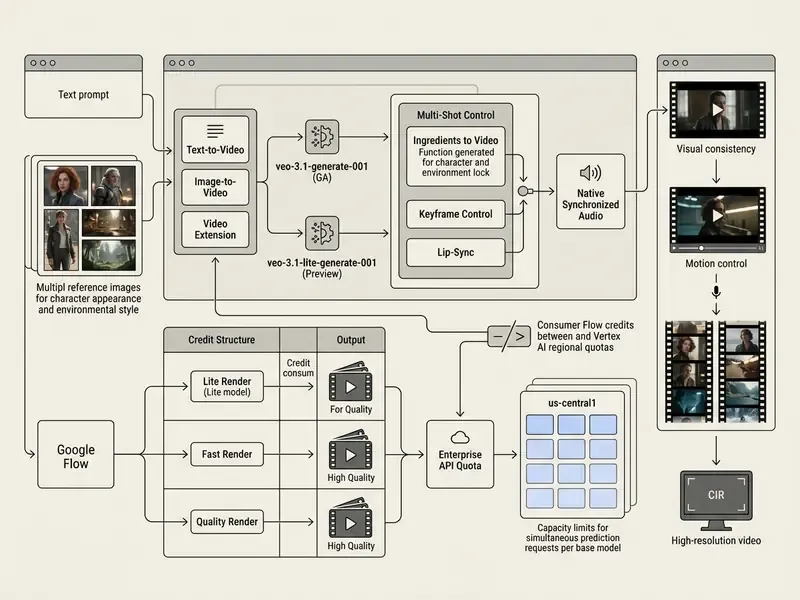
Documentation from Google AI for Developers states that Veo 3.1 uses advanced spatial-temporal attention mechanisms, allowing creators to prompt crane shots, orbits and dolly zooms without introducing visual distortion.
«VBench evaluates video generative models across 16 disaggregated dimensions, with evaluations strongly aligned with human perception». VBench, arXiv (2023). https://arxiv.org/abs/2311.17982
Because vendor pages rarely publish per-dimension scores, VBench-style decomposition is the practical way to test whether a camera-control claim survives contact with your own prompts. Motion smoothness and subject consistency can diverge sharply even inside a single model family. For integration economics, request quotas and per-second cost modelling, technical directors can consult our Google Veo API implementation guide and compare options across published API access tiers.
Kling AI for Motion, Character Consistency and Image-to-Video
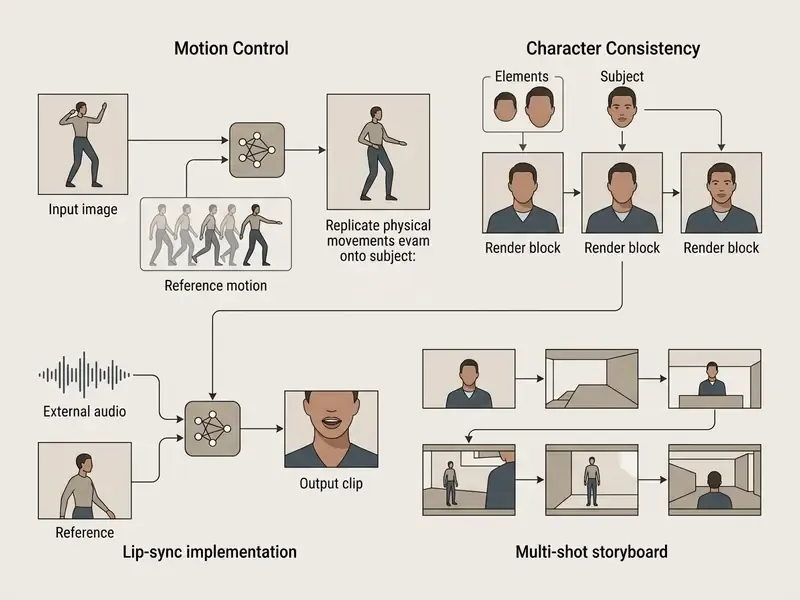
Developed by Kuaishou Technology, Kling AI is a leading ai image to video generator 2025 platform recognized for motion execution and subject retention. It handles complex image animation by applying explicit motion vectors to uploaded static photos.
Adobe Firefly for Commercially Safe Image-to-Video
The Adobe Firefly Video Model gives enterprise video creators a commercially safe generative pipeline integrated directly into Adobe Creative Cloud and the Firefly web application. Built to reduce intellectual property risk, Firefly Video is trained exclusively on licensed content from Adobe Stock and public domain media where copyright has expired.
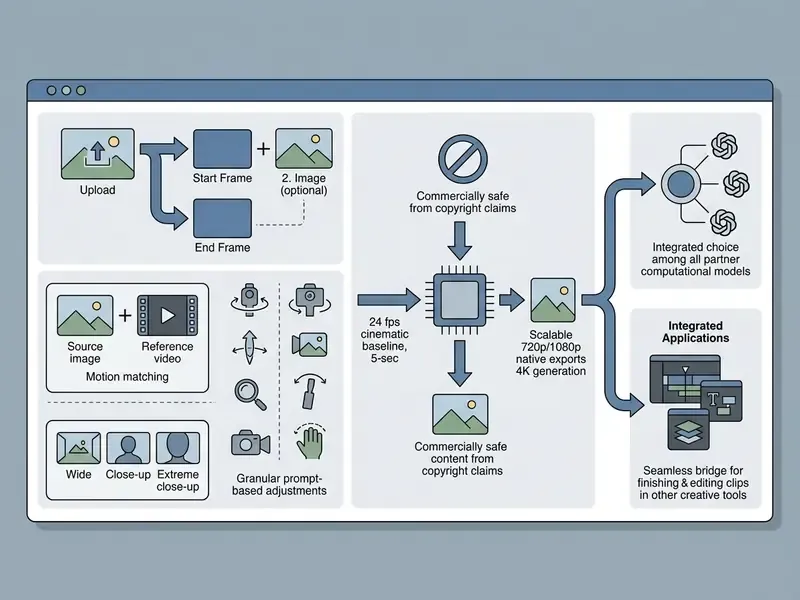
As detailed in official documentation from Adobe (2026), Firefly Video does not train on subscriber Creative Cloud assets, which establishes a verifiable audit trail for enterprise marketing teams. That combination of licensed-only training data, a published non-training policy for customer assets, an enterprise admin console and an indemnification posture is why Firefly tends to clear procurement review faster than higher-scoring but opaque alternatives, even when a competing model wins on raw motion fidelity.
The multi-model hub pattern matters strategically too: it turns model choice into a runtime decision. A team can render brand-facing hero shots on the indemnified Firefly model while routing experimental concept work to a partner backend, without maintaining separate contracts, credentials and export pipelines for each vendor.
Best AI Video Creation Suites, Editors and Avatar Tools
Beyond standalone generation models, complete creation suites integrate automated scriptwriting, stock media libraries, AI voiceovers and non-linear editing interfaces. These platforms function as full-stack ai content creation tools, letting non-technical operators produce finished video content inside one browser interface.
Conversational Video Editing (Prompt-to-Edit)
Integrated suites like InVideo AI replace timeline-based cutting with conversational editing engines. Users modify existing renders by typing operational commands into a natural language interface, for example "Replace the background clip with an aerial night shot" or "Change the voiceover accent to British English". The multi-agent orchestration layer re-renders target layers or swaps stock assets without disturbing unchanged project elements.
The command vocabulary in production tools is deliberately mundane. Delete scene. Change voiceover. Shorten to 45 seconds. Add a humorous intro. Which is precisely what makes it accessible to operators who have never opened a timeline. Google's own developer documentation describes comparable conversational editing behaviour at the model layer, including element replacement and perspective changes, a signal that prompt-to-edit is becoming a baseline expectation rather than a suite-level differentiator.
For risk-managed environments, conversational editing adds one control requirement. Because edits are issued as free text, the instruction log becomes part of the audit trail. Retaining the full command history alongside the render output preserves reconstructability of how a published asset reached its final state.
Invideo AI and Script-Based Video Creation
InVideo AI operates as an automated video production system that turns written ideas or detailed scripts into structured video projects. Using multi-agent orchestration, the platform drafts scripts, segments content into visual storyboards, pairs scenes with stock footage or AI-generated clips, and applies synchronized voice synthesis.
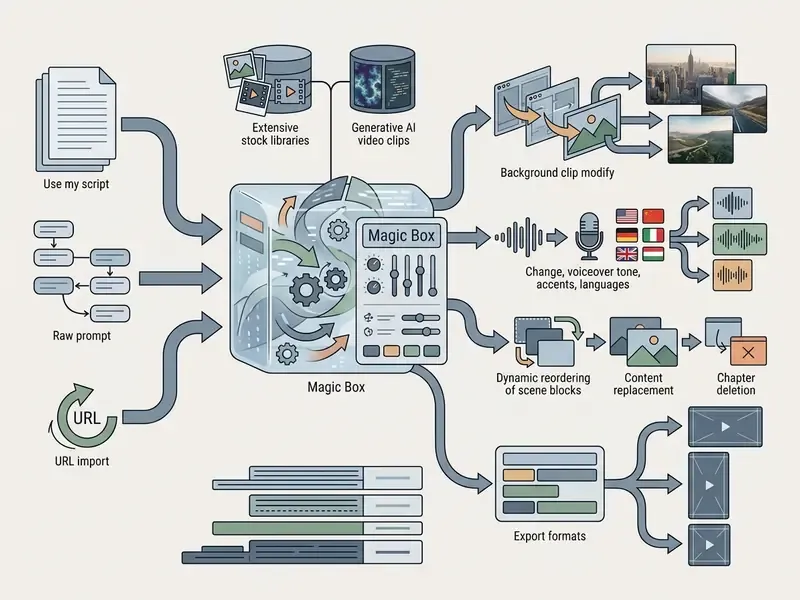
InVideo AI provides an accessible entry point for teams that need high-volume video production without manual timeline assembly. That positioning rests on vendor documentation and user-review aggregators (Capterra, Trustpilot) rather than independent benchmarks. No peer-reviewed evaluation of orchestration-suite throughput or output quality currently exists, so pilots should be measured against your own acceptance criteria: usable-clip rate per brief, edit cycles to approval, and rejection rate at compliance review.
HeyGen and AI Avatar Video Production
According to HeyGen's published product and developer documentation, the platform positions itself for digital presenter production, combining photorealistic AI avatars with neural speech synthesis. Independent third-party benchmarks of avatar realism or lip-sync accuracy are not currently available, so these capability statements are vendor-attributed. The platform is marketed as a replacement for traditional video shoots in corporate explainers, localized marketing and compliance training modules.
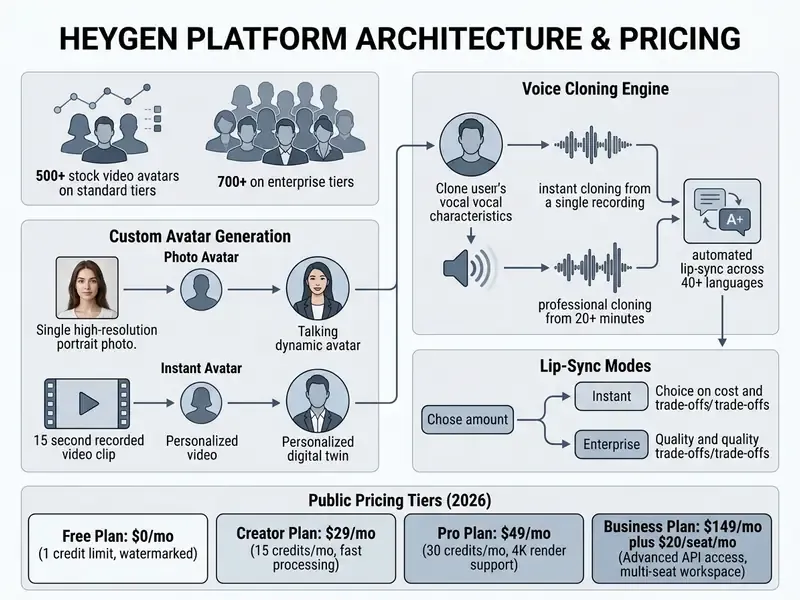
According to developer documentation from HeyGen (2026), the v3 API decouples avatar rendering engines from underlying voice models, so developers can route third-party audio streams into real-time interactive avatars. For regulated deployments that decoupling is a control point: the voice model and the likeness model can be authorized, logged and revoked independently, which supports the separation of duties described in the authorization matrix above.
Best AI Video Generation Apps for Mobile and Android: Shadow AI Risks and Controls
Mobile video generation applications adapt desktop foundation models for iOS and Android smartphones through touch-optimized interfaces and 9:16 vertical presets. Mobile operators rely on an ai video generation app mobile or an ai video creation app android to animate static photos, generate social clips and edit short-form media on handset hardware. A typical ai photo video generator app does one job well: take a camera-roll image, apply motion, export vertical.
For institutional environments, this category should be read as a risk surface first and a capability list second. Consumer ai video generation apps mobile typically run on permissive consumer terms of service, retain uploaded imagery on third-party infrastructure, and offer no SSO, audit logging or non-training guarantees. When employees install them on personal or BYOD devices, three exposures appear at once: uncontrolled upload of internal imagery and personal data, un-consented use of colleague or executive likenesses, and publication of unlabelled synthetic media under implied brand association. The appropriate posture is Tier-2 classification. Permitted for non-confidential exploration, blocked from any workflow touching customer data, prohibited as a publication path without a Tier-1 re-render.
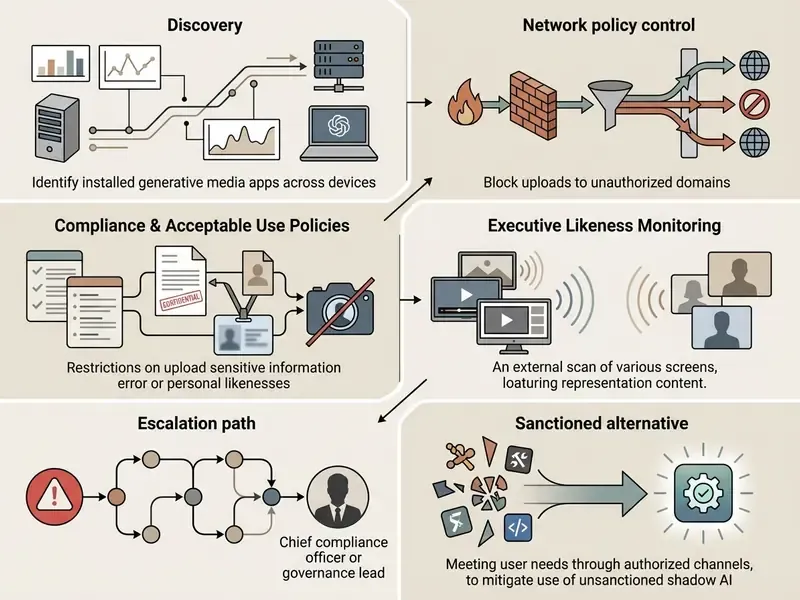
That last line carries most of the weight. In our experience, blocking without substitution simply moves the activity to personal devices, where you lose visibility entirely.
Mobile Apps for Text-to-Video and Social Media Clips
Mobile-first ai text to video generator apps use cloud API rendering to deliver clips straight to the handset. Applications such as Movi AI, Evoke and Vivideo process written prompts into 9:16 vertical clips optimized for immediate social distribution, and each functions as a general-purpose ai app for videos rather than a specialist model.
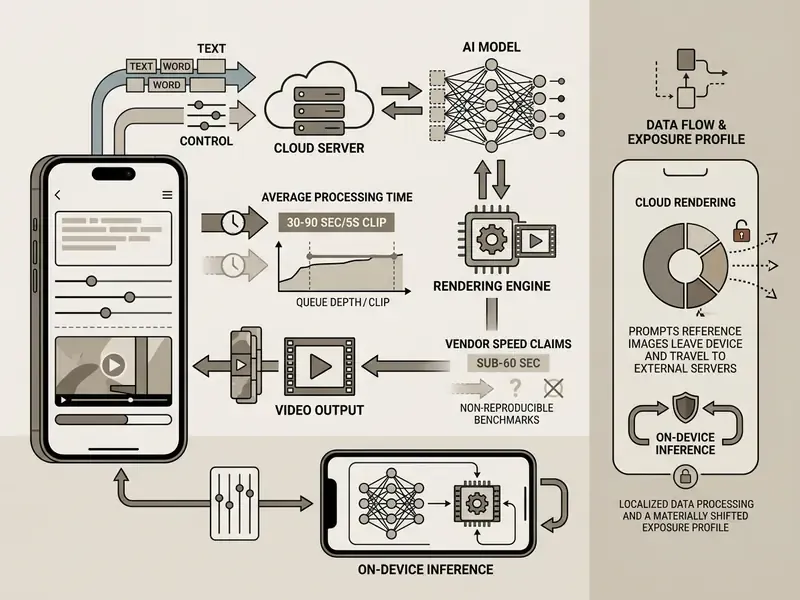
Mobile apps let field creators turn text concepts into published social videos without a desktop workstation, which is exactly why they bypass review gates so easily in large organizations. Convenience beats policy unless policy is equally convenient.
Image-to-Video Generator Apps for Photos and AI Images
Mobile ai image to video generator apps such as PixVerse, SeaArt.AI, Vidix-AI and Videos AI specialize in animating still photos, portraits and generated AI artwork. Users upload an image from the camera roll, pick a motion preset or type a movement prompt, and the app applies automated motion vectors. Any ai image video generator app in this class inherits the quality ceiling of its input frame, which is why ai image to video generator tools 2025 guidance starts with input hygiene rather than model choice.
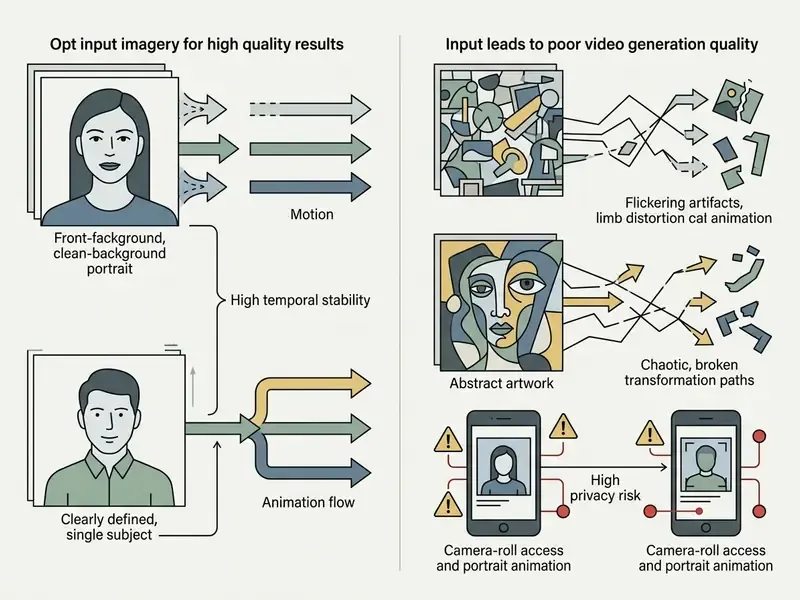
The compatibility matrix below details native platform support across major AI video tools.
Platform compatibility matrix for AI video generation tools (2025 to 2026):
| Tool / Application | Web Browser | iOS (iPhone/iPad) | Android | Windows Desktop | Mac Desktop |
|---|---|---|---|---|---|
| Google Flow / Veo 3.1 | Yes | Mobile web | Mobile web | Web access | Web access |
| Kling AI | Yes | Yes (native app) | Yes (native app) | Web access | Web access |
| Adobe Firefly Video | Yes | Mobile web | Mobile web | Creative Cloud | Creative Cloud |
| InVideo AI | Yes | Yes (native app) | Yes (native app) | Web access | Web access |
| HeyGen | Yes | Mobile web | Mobile web | Web access | Web access |
| Pika 2.0 | Yes | Mobile web | Mobile web | Web access | Web access |
| Evoke / Movi AI | No | Yes (native app) | Yes (native app) | No | No |
Reading the matrix: major foundation models prioritize browser interfaces and API endpoints, while mobile-first applications ship dedicated iOS and Android packages for on-the-go production. Note the governance asymmetry that creates. The tools with the weakest enterprise controls are precisely the ones with native app distribution straight onto employee devices.
AI Video Generation App Pricing, Free Plans, Enterprise TCO and Risk-Adjusted ROI
Understanding ai video generation app pricing means analyzing generative credit consumption, rendering limits and licensing restrictions. Free tiers serve as entry points but enforce restrictions such as embedded watermarks, lower resolution caps (480p to 720p) and explicit prohibitions against commercial use. Our overview of free AI video generators details credit limits, watermark policies and upgrade paths.
Free AI Video Tools, Credits and Paid Plan Limits
Generative video platforms use credit-based billing where deductions scale with clip duration, model complexity and export resolution.
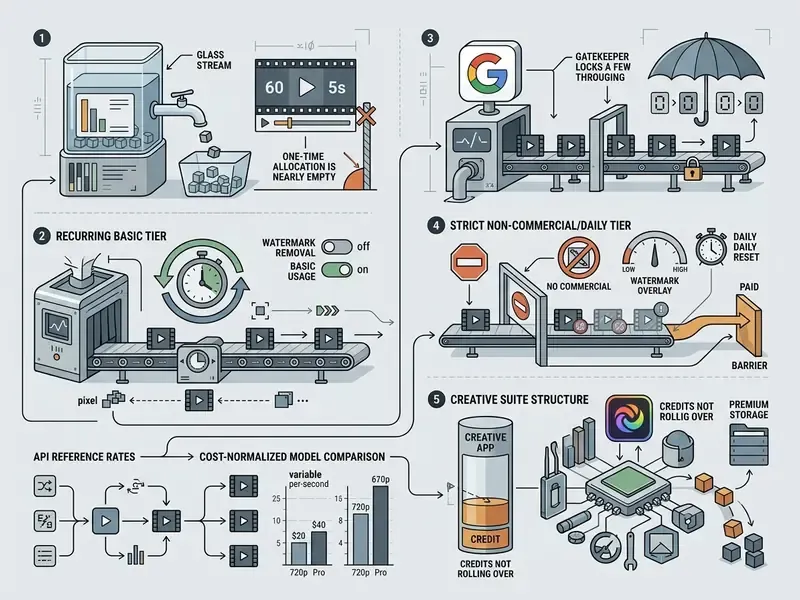
Pricing and credit allocations are accurate as of Q1 2026 and change frequently; verify current rates on vendor pricing pages before budgeting.
To compare tier structures across static, audio and motion media platforms, review the AI Media Pricing index.
Enterprise Cost Structure and Risk-Adjusted ROI
Consumer tiers at $8 to $49 per month are close to irrelevant for institutional budgeting. They understate true cost by omitting every control activity that makes output publishable in a regulated environment. A defensible total cost of ownership model has five layers.
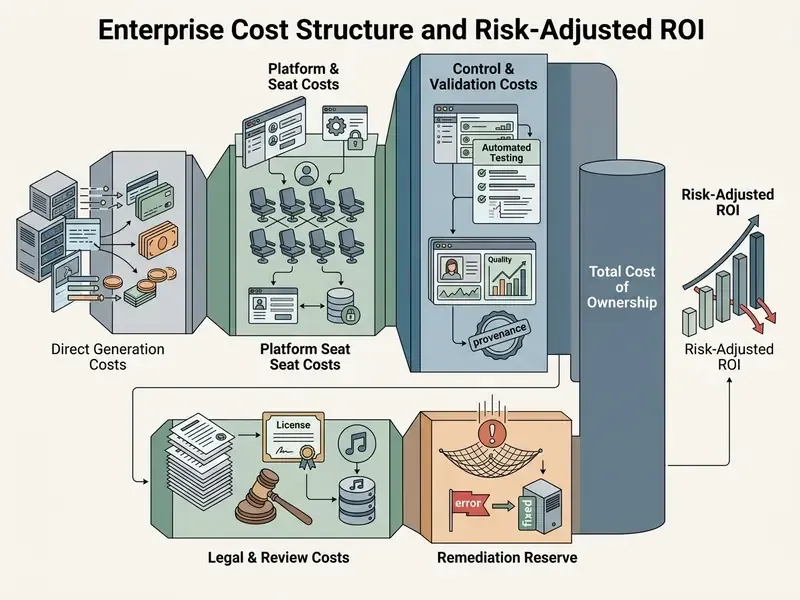
A simple, auditable framing of value:
Here is the estimated probability of a compliance, IP or deepfake incident per campaign cycle, and is the normalized severity of that incident across legal, regulatory and reputational dimensions. Both inputs are judgemental, and we would rather say that plainly than dress them up as precision. The practical consequence is counter-intuitive but consistent: paying more for an indemnified, audit-logged, non-training vendor often produces a higher risk-adjusted return than the cheapest high-scoring model, because the incident term dominates at enterprise publication volumes. Finance teams modelling these inputs alongside review-hour costs can see the overview of cost and ROI calculators.
How to Generate Better AI Videos: Prompt, Edit, Comply and Publish
Producing professional-quality AI video assets takes more than casual trial-and-error prompting. An optimized, reproducible pipeline delivers visual consistency, precise motion control, compliance with platform specifications and, critically for regulated organizations, an evidentiary trail.
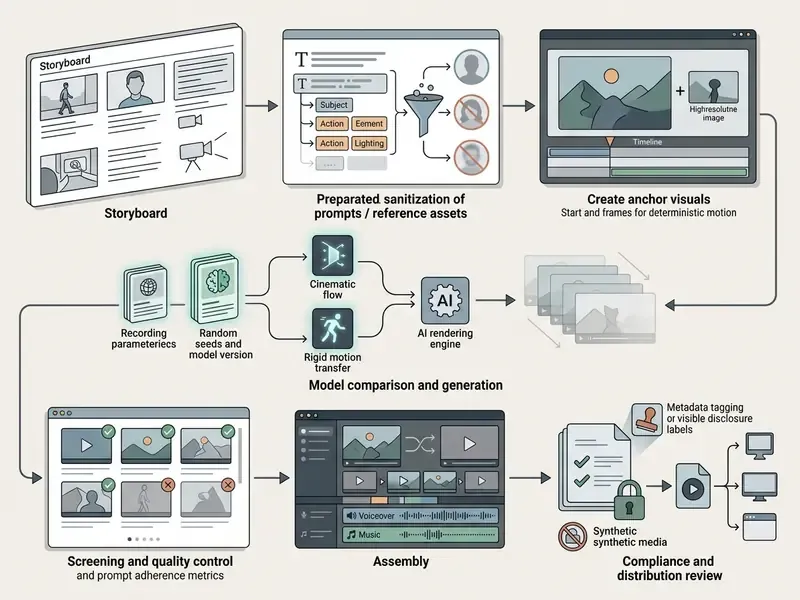
Write a Text Prompt That Produces Better Video Results
Prompt engineering for generative video needs specific camera and cinematic instructions, not vague aesthetic adjectives. Technical guides from Hailuo AI, Luma Labs and Runway converge on a standardized formula:
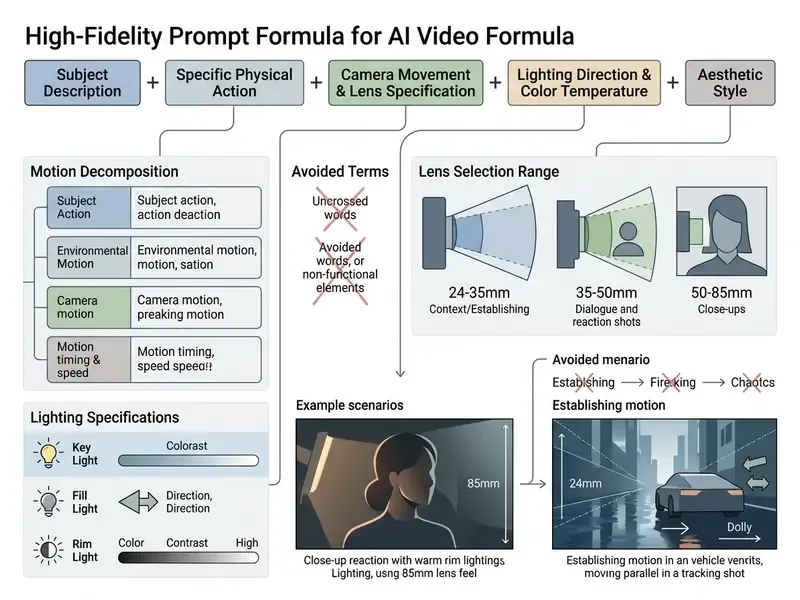
By defining focal lengths (24mm wide-angle versus 85mm portrait) and explicit trajectories ("slow tracking pan left" rather than "camera moves"), creators gain real control over output dynamics. Then you click generate, review, and fine tune the weakest clause. Usually it is the lighting.
«DEVIL evaluates text-to-video models on dynamics grades, with metrics achieving over 90% correlation with human ratings». DEVIL, arXiv (2024). https://arxiv.org/abs/2410.04500
That correlation is the empirical argument for explicit motion clauses. Dynamics are measurable, human-perceptible and highly sensitive to how movement is specified in the prompt, which makes them a design parameter rather than an aesthetic afterthought.
Generate, Edit, Export and Publish the Final Video
Relying on raw, unedited model output frequently produces visible glitches, temporal jumps or unaligned action. Research on refinement methodologies shows that post-generation screening and iterative editing yield measurable alignment gains across complex prompts.
«VideoRepair improves text-video alignment by +9.32% on Wan2.1 and +6.22% on VideoCrafter2 without retraining the underlying models». VideoRepair, arXiv (2024). https://arxiv.org/abs/2411.15115
The practical reading for production teams: refinement passes are a cheaper source of quality gain than upgrading to a more expensive model, because they sit on top of any backend and require no retraining.
During post-production, editors should import candidate clips into a non-linear editor for precise multi-turn editing.
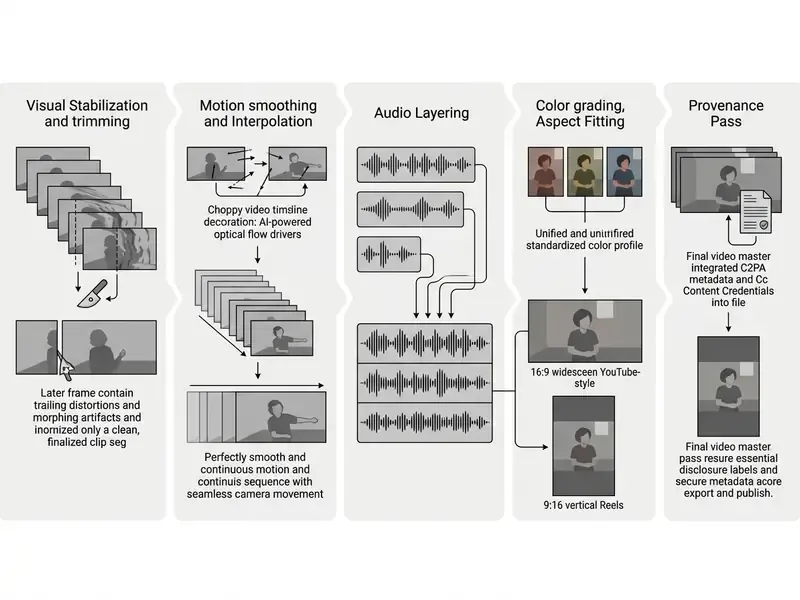
Creators evaluating dedicated editing software for final publishing can explore specialized workflows in our guide to YouTube video editors, while teams building a post-production stack without new licence spend can start from our comparison of free video editing software.
Direct NLE Pipeline Integration and Multi-Model Aggregation
Professional workflows use direct plugin integrations between generative engines and non-linear editors such as Adobe Premiere Pro, After Effects and DaVinci Resolve. Instead of exporting MP4 files by hand, editors generate B-roll, visual effects extensions and synthetic plates inside timeline tracks. Platforms like Adobe Firefly additionally act as multi-model hubs, letting creators switch between foundation backends (Runway, Luma AI, Google Veo) from a single control panel.
For B2B pipelines the integration benefit is operational rather than creative. Generating inserts and cutaways inside the timeline removes the export, reimport and conform loop, keeps colour management and project frame rate consistent, and, importantly for auditability, keeps generated assets inside a managed project structure with version history instead of scattered across individual users' download folders. Runway's documented B-roll workflow illustrates the two dominant patterns: transcript-driven stock matching for factual coverage, and script-driven generative shot creation where no footage exists.
FAQ About AI Video Generation Tools
Do AI Video Generators Require Video Editing Skills?
No, operating modern AI video generators does not require traditional timeline editing skills. Automated templates, prompt-driven editors and script-to-video agents handle scene composition for you. Platforms like InVideo AI let non-technical operators execute edits using natural language instructions (prompt-to-edit). A 2025 peer-reviewed study of AI-edited news clips found quality scores overlapping with human-edited versions, and AI editing largely undetected by participants. That said, professional-quality output still depends on basic skills in script structuring, prompt engineering and visual quality auditing. The skills required have shifted, not disappeared.
Can You Create Videos Without a Camera or Original Footage?
Yes. Complete camera-free video production is achievable by combining text-to-video foundation models, static AI image generation, digital avatars and licensed stock libraries. Synthetic workflows let organizations produce commercial explainers, marketing videos and social clips using artificial intelligence, with no filming equipment, crew or studio lighting. NIST, UNESCO and national AI authorities nonetheless treat synthetic media as requiring provenance, labelling and human oversight, so video without a camera is a production choice rather than a governance exemption.
Are AI-Generated Videos Subject to Model Risk Governance Such as SR 11-7?
If a generative video model informs or produces business output in a regulated institution, most model risk functions treat it as in-scope for the institution's model risk management framework. SR 11-7 principles (conceptual soundness, ongoing monitoring, outcomes analysis) are applied through the pipeline-and-controls approach described above, with the NIST AI RMF Generative AI Profile supplying the risk taxonomy. Because outputs are non-deterministic, validation evidence usually consists of reproducibility tests at fixed seeds, adversarial and misuse testing, logged prompt-output pairs, and documented human review, not classical statistical backtesting. Scope determinations should be confirmed with your own model risk and compliance functions.
How Does Deepfake Protection Work for Corporate Executive Likenesses?
Protection operates in four layers. Preventive: restrict avatar and voice-clone creation to a named team, require written scoped consent with an expiry date, and log every render against the consent register. Technical: apply C2PA Content Credentials and watermarking to all legitimate executive media, so authentic assets become verifiable by exclusion. Detective: monitor external platforms for synthetic media featuring leadership, and maintain an internal verification channel for employees who receive unexpected video or voice instructions. Responsive: pre-agree a takedown and disclosure playbook with legal, comms and security, referencing applicable state publicity statutes and NO FAKES Act-style requirements for written, scoped, time-limited licences.
Where Are Prompts, Reference Images and Voice Samples Stored, and Can They Contain PII?
Storage location depends entirely on deployment tier. Consumer web and mobile tools process prompts and uploads on vendor infrastructure under consumer terms that may permit human review or model training. Enterprise API and private-cloud paths, for example Vertex AI or Adobe enterprise deployments, can be contracted with regional data residency and explicit no-training clauses. Treat prompts and reference assets as an egress channel: any PII, customer data, internal screenshot or un-consented likeness entering a prompt has effectively left your control boundary. The Step 2 scrubbing gate exists for exactly this reason, and retained prompt logs should themselves be classified and access-controlled.
Does Commercial Use Permission Mean We Own the Output Exclusively?
No. Commercial use permission from a vendor is a licence to use, not a grant of exclusivity or a guarantee of clearance. Under U.S. Copyright Office guidance, purely machine-generated expressive elements are not protectable; only human-authored contributions such as script, editing arrangement, composition and post-production attract copyright. Several platforms state explicitly that they do not guarantee outputs are cleared for use. Exclusivity-sensitive campaigns therefore need human-authored creative layers on top of generated material, plus documented clearance for any depicted marks, artworks or people.
What Should a Pilot Measure Before Production Approval?
Measure four things and nothing else at first: usable-clip rate per brief (share of generations passing quality review), edit cycles to approval, compliance rejection rate, and fully loaded cost per approved minute including review hours. These metrics travel across vendors, survive model version changes, and feed directly into the risk-adjusted ROI formula above, unlike resolution or credit counts, which are vendor-specific and easily gamed.
Summary and Strategic Next Steps
Selecting among the best ai video generation tools 2025 means aligning production volume, quality requirements and legal risk tolerance with the right tool architecture.
- For high-fidelity cinematic media: deploy foundation models like Google Veo 3.1 (via Google Flow or the API) or Kling AI for native 4K rendering, multi-shot character retention, dual-keyframe conditioning and parametric camera control.
- For automated marketing and social media: use script-driven platforms like InVideo AI, including its conversational prompt-to-edit interface, or template engines like Canva, to turn text concepts into vertical 9:16 short-form media at volume.
- For corporate presenters and localization: implement avatar platforms like HeyGen to generate multilingual digital presenters with synchronized voice cloning and per-character lip-sync, governed by a documented likeness-consent register.
- For brand safety and commercial compliance: rely on models with transparent, licensed training provenance such as Adobe Firefly Video, with its direct Premiere Pro and After Effects pipeline, and enforce checks on rights of publicity, commercial audio licensing and synthetic-media metadata disclosure. Extend the same diligence to static assets using our reference on commercial use rights for AI-generated content.
«VBench-2.0 introduces five new dimensions, namely human fidelity, controllability, creativity, physics and commonsense, showing that even leading models struggle with complex instructions». VBench-2.0, arXiv (2025). https://arxiv.org/abs/2503.21755
That finding underwrites all four recommendations. Capability gaps persist in exactly the dimensions enterprises care about most: human anatomical fidelity, instruction controllability and physical plausibility. Which is why tool selection has to be paired with a validation harness, a compliance gate and a documented Shadow AI control set, rather than treated as a procurement decision alone.
A safe next step, if you are starting from zero. Do not begin with a vendor bake-off. Begin with an inventory: which generative video and voice tools are already installed across managed devices, and who is publishing with them. Then pick one low-severity use case, internal training video is the usual candidate, run it end to end through the ten-point checklist, and measure the four pilot metrics for one quarter. Small scope, full control set, documented evidence. That sequence produces an auditable precedent you can reuse, instead of a pilot you cannot defend.
For further comparative evaluations across AI design tools, foundation models and media generation platforms, creators can compare options across our full analytical research hub.
General information only. Nothing in this article constitutes legal, regulatory, audit or investment advice; verify vendor terms, pricing and regulatory applicability with qualified professionals before deployment.
Review cadence: this comparison is re-verified quarterly, and immediately after any major model version release (for example a Veo or Kling generation change), because vendor-side updates alter both capability claims and validated control evidence.