A free AI photo editing app automates visual changes by running machine learning models over your pixels: it corrects lighting, erases objects, and generates new graphic elements from short text instructions. In practice, these platforms replace manual layer masking and fiddly tool selection with instruction-based processing. The category spans single-click web utilities, mobile apps for quick edits, and full desktop suites that process images locally or on cloud servers.
Why does an AI-powered photo editor deserve a governance conversation at all? Because the upload button is the cheapest data-exfiltration path in most companies. One drag, one drop, and an unreleased product render sits on a vendor's server.
"Automated visual processing accelerates content workflows, but deployment speed must be balanced against output verification, data privacy and intellectual property controls."
Executive Summary
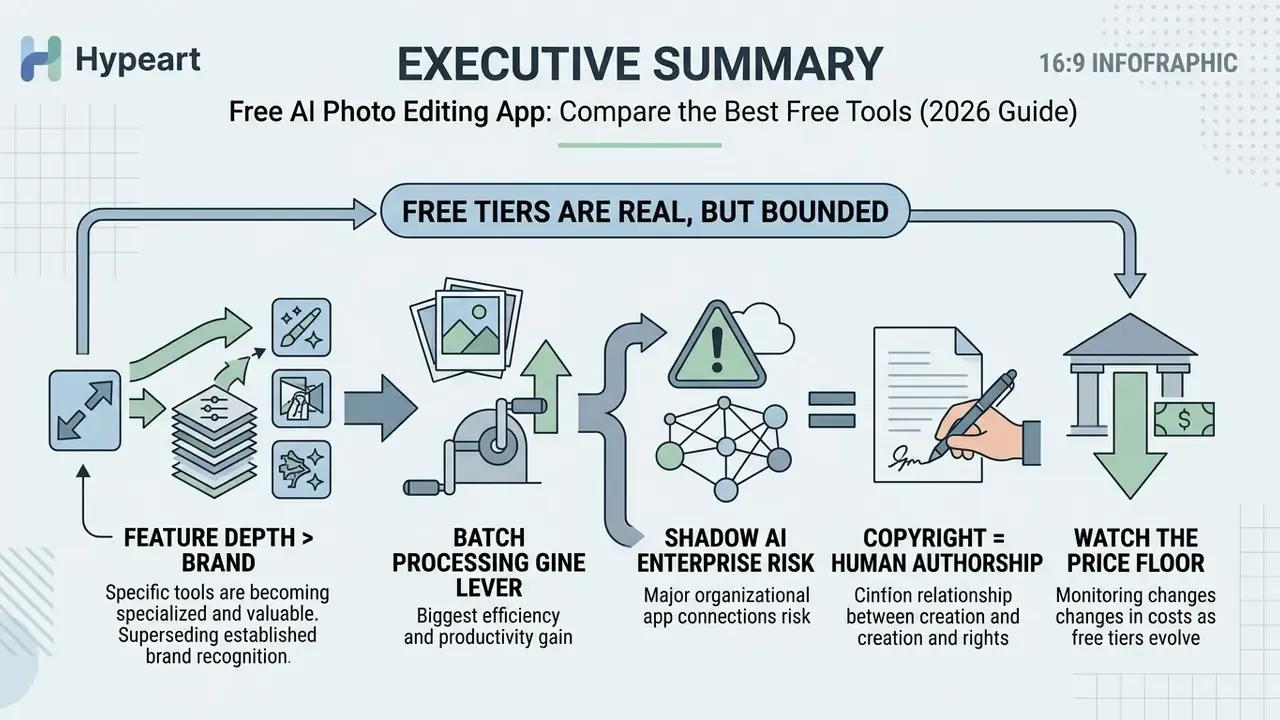
- Free tiers are real, but bounded. Vendors cap usage through daily credits, monthly generation quotas, watermarks or low-resolution preview downloads. Adobe Firefly refreshes free daily generations, Recraft allows up to 30 daily generations without watermarks, and Pixelbin limits anonymous use to roughly three executions per month before sign-in is required.
- Feature depth now matters more than brand. The decisive capabilities are object removal, background isolation, generative fill and expand, super-resolution upscaling, batch processing, sky replacement, black-and-white colorization and virtual fashion models.
- Batch processing is the biggest operational lever. Browser suites such as Fotor accept up to 50 images per queue, turning hours of per-file editing into one automated pass.
- Shadow AI is the main enterprise risk. Any employee can upload an internal dashboard screenshot into a free browser tool in seconds. Vendor privacy policies, training opt-outs and retention windows deserve an audit before the tools are tolerated on corporate devices.
- Copyright follows human authorship. United States Copyright Office guidance protects only human-created contributions. AI-assisted retouching of a human-captured photograph keeps protection over the human elements; purely synthetic output does not.
- Watch the price floor. Industry-standard ecosystems cost roughly $13 to $23 per month. Single-purpose tools charging $40 per month, or $10 per week for background removal, are a documented red flag.
Who This Guide Is For and How to Read It
This is a selection guide, not a feature parade. It is written for two readers: the creator who needs publishable output tonight, and the person who has to sign off on which AI apps for editing photos are allowed inside the company perimeter. Those two jobs pull in different directions, so both are treated explicitly.
If you are short on time, work through this evaluation sequence rather than reading end to end: Everything below follows that logic: capability first, vendor matrix second, workflow discipline third, legal and privacy constraints last. Shortlists of "ai photo editor tools 2025" buyers assembled a year ago have already shifted, mostly because the underlying model stacks changed, so treat any table, including ours, as a snapshot.
- Name the defect you actually have. Clutter, background, grain, resolution, aspect ratio, or missing colour in an archival scan? The answer narrows the field fast.
- Test the free tier on your own worst file, not on the vendor's demo image.
- Check the export, not the preview. Watermarks and resolution caps live there.
- Read the data-handling clause before you upload anything confidential.
- Only then compare price and ecosystem breadth.
Testing Methodology: How These AI Photo Editors Were Evaluated
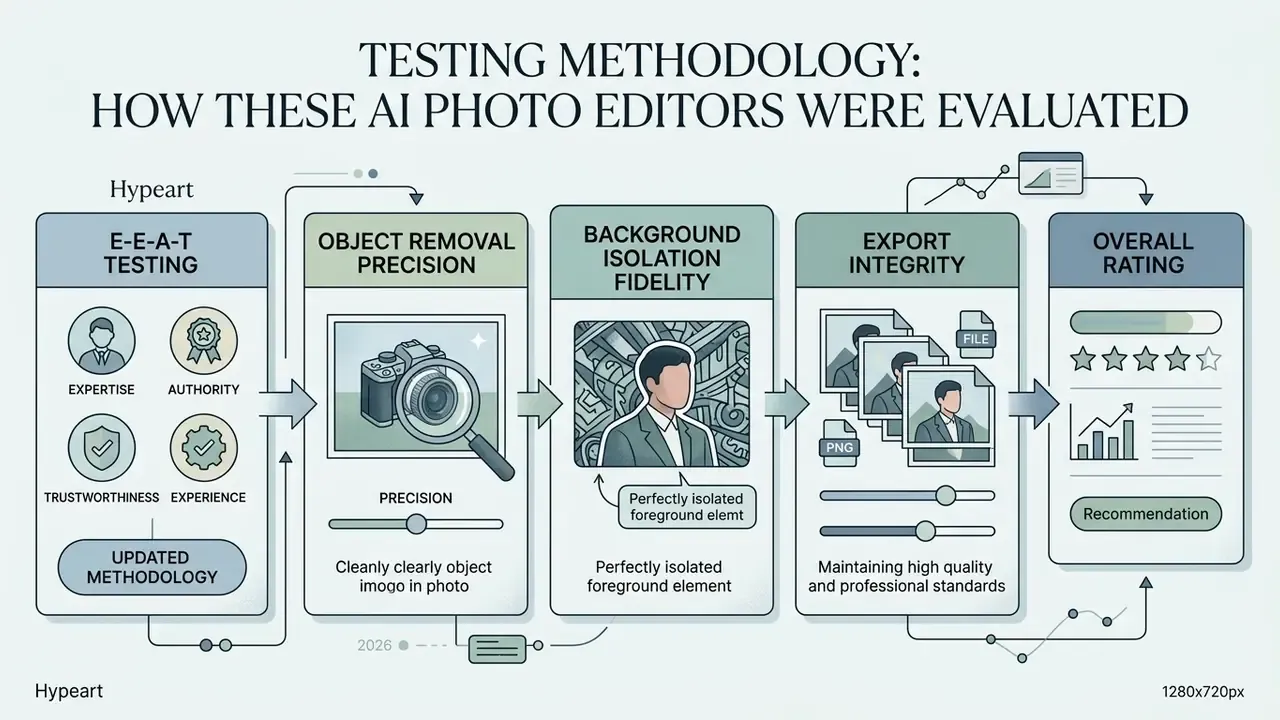
E-E-A-T testing methodology (updated):
Recent benchmark literature supports this task-separated approach and adds semantic verification alongside pixel-level checks.
"Removal should be checked for semantic alignment plus preservation of unedited areas using CLIP text-image similarity, CLIP image-image similarity, and L1 distance."
Exporting is the least standardized dimension in published research. Benchmark papers rarely define an export-fidelity metric, so this guide treats export integrity as a manual inspection step at 100% magnification, documented in the refinement checklist further down.
What a Free AI Photo Editing App Can Do
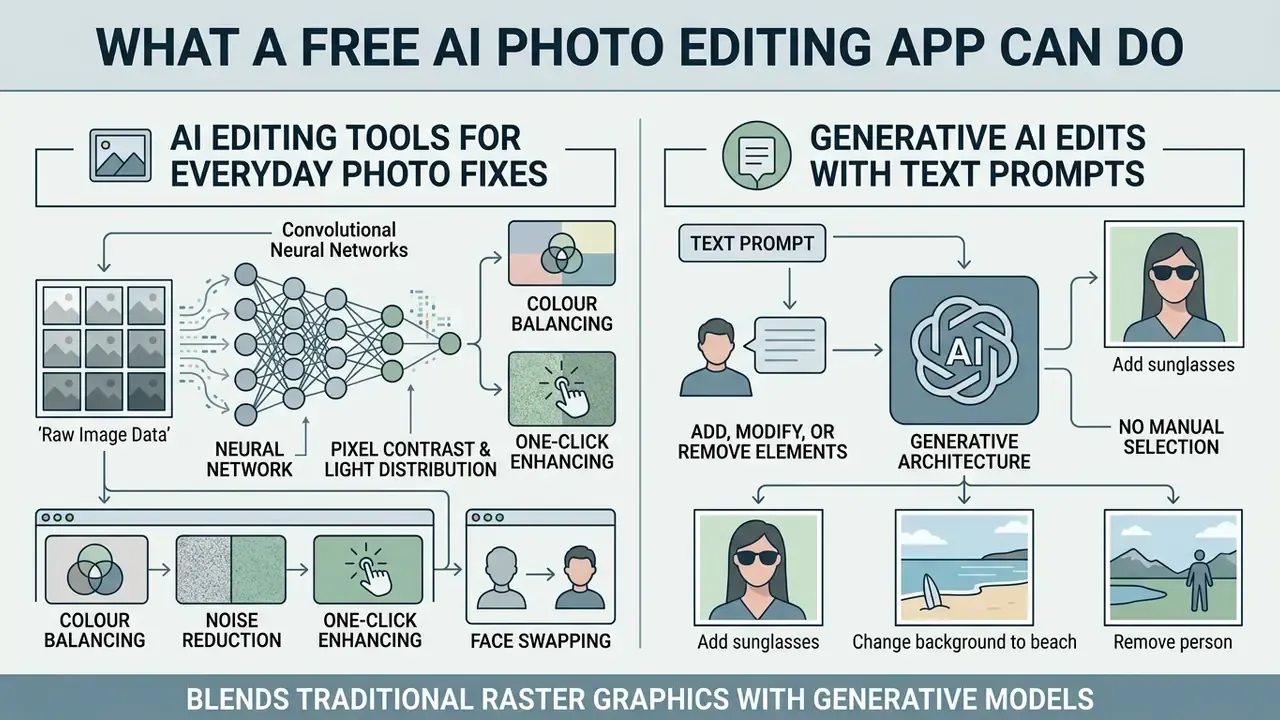
A free AI photo editing app uses neural networks to perform automated visual adjustments and content synthesis on existing images. The same platform handles small restorations and large compositional changes, using pre-trained computer vision and generative models.
Modern platforms blend traditional raster graphics processing with generative architecture. You can change image characteristics through automated buttons or through simple text prompts, whichever suits the task.
AI Editing Tools for Everyday Photo Fixes
Everyday AI editing tools automate rapid corrections: colour balancing, noise reduction, one click enhancement, image sharpening. Computer vision guidance published by the National Institute of Standards and Technology defines image enhancement as any process intended to improve visual appearance or specific image features, without inventing detail the sensor never captured. That second half is the part people forget.
Convolutional neural networks analyse pixel contrast and light distribution across the canvas. For low resolution source files, single-image super-resolution models reconstruct missing structural detail. Research on ESRGAN architectures shows neural upscaling reaching a peak signal-to-noise ratio of 27.03 dB and a structural similarity index of 0.8153 at 4× magnification on the Urban100 benchmark, which is a clear step up from bilinear interpolation.
"ESRGAN reaches 27.03 dB PSNR and 0.8153 SSIM at 4× upscaling on Urban100, clearly outperforming classical interpolation."
Beyond fundamentals, browser suites now ship niche generative extras: one-click AI face swapping for mockups, automatic layer decomposition for structural vector editing, AI denoise passes to remove noise from grainy sensor output, and instant transparent sticker generation from simple text prompts. Pixlr, for example, exposes face swap, layer decomposition through AI segmentation, a sticker generator and collage layouts alongside its core photo editor, all inside a single browser tab. Handy. Also a reminder that feature count and feature quality are different things.
Generative AI Edits With Text Prompts
Generative AI editing tools accept a text prompt to add, modify or remove elements inside an existing photo. Diffusion-based systems parse the instruction, manipulate latent cross-attention maps, and synthesize contextually plausible pixels over the selected region.
These instruction-driven workflows remove the need for manual selection paths or channel masking. Research on the GIE-Bench dataset shows modern diffusion editors follow appearance instructions well, for example altering textures or swapping object colours. The same evaluation exposes a persistent weakness: leading models often modify regions the user never asked them to touch.
"GIE-Bench spans over 1,000 editing cases across 20 categories; GPT-Image-1 leads on instruction following but tends to alter non-target regions."
Practically, that means prompt-based editing works best one change at a time, with an unedited reference copy kept for comparison. I have watched a single combined prompt ("remove the cup and brighten the room") quietly re-render a window frame. Users interested in broader generative media can explore the most realistic ai image generators, or turn static assets into motion with image to video ai tools.
AI Features to Compare Before You Edit Photos
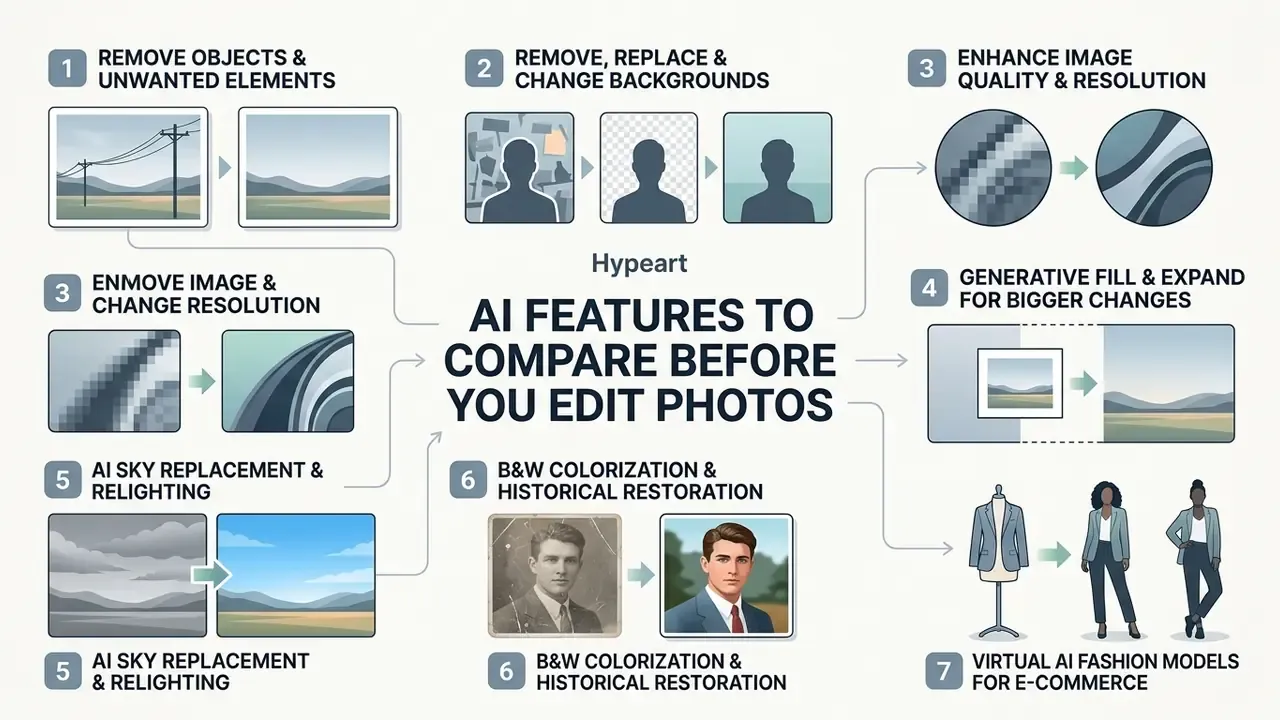
Understanding the core AI features helps you pick software engineered for your specific visual defects or transformation goals. Read this section before the comparison table. Once the feature vocabulary is clear, the vendor matrix becomes a shortlist exercise instead of a marketing comparison.
Different neural architectures excel at different tasks. A model tuned for semantic edge isolation can perform poorly when it has to synthesize missing background patterns.
Remove Objects and Unwanted Elements Naturally
AI object removal tools synthesize background patterns over the gap after you delete an item or a photobomber. Segmentation models generate precise object boundaries, then pass masked areas to context-aware inpainting networks. Magic eraser style brushes are the consumer-facing version of the same pipeline.
Peer-reviewed research on inpainting-driven mask optimization shows that expanding and refining the mask before generation prevents boundary blurring and keeps background texture continuous. Independent benchmarking, however, shows no single algorithm wins across every quality dimension.
"A de-photobombing benchmark evaluated ten inpainting methods using PSNR, SSIM and FID; no single algorithm dominated across all metrics."
Remove, Replace, and Change Backgrounds
Automated background removers isolate the subject from the backdrop by computing trimaps and alpha matte channels. Stronger systems handle fine hair strands, fur and semi-transparent glass without clipping edges. Adobe Firefly documentation claims automatic edge detection for hair, fur and transparent objects with PNG transparency export, and API-level background removal services recommend inputs of at least 1024 pixels on the short edge for cleaner masks.
Once isolated, the subject can sit on pure white, a custom brand colour, or an AI-generated studio environment. Teams that also need to enlarge the canvas around the isolated subject can review AI outpainting and background expansion tools. Organizations handling regulated image distribution should read the licensing requirements in the AI Media Commercial-Use Hub before rolling out automated background replacement at scale.
Enhance Image Quality, Resolution, and Color
AI image enhancers correct exposure, adjust white balance, reduce camera noise and upscale low resolution source files. Convolutional networks read global lighting distribution to open shadows without blowing out highlights, which is the part manual curves work usually gets wrong first.
NIST reference documentation on generative AI in image processing warns that upscaling can add artificial pixel information and produce twisted or unnatural facial detail when the source is heavily degraded. Over-sharpening can change mouth shape or invent colour around the eyes. Academic super-resolution research repeats the warning in different words.
"Models trained on urban scenes may behave differently on portraits and generate artifacts outside their training domain."
So evaluate enhanced images carefully, and make any forensic or identity-adjacent comparison against the original unedited file. Readers choosing between general enhancers and dedicated resolution tools can compare AI image upscalers for resolution enhancement. Desktop utilities such as Topaz Photo AI differ from generic web upscalers by bundling separate denoise and sharpen models, which is useful when motion blur or high-ISO grain, rather than pixel count, is the real defect.
Use Generative Fill and Expand for Bigger Changes
Generative fill modifies an internal canvas selection based on your prompt. Generative expand pushes the image boundary outward to change aspect ratios.
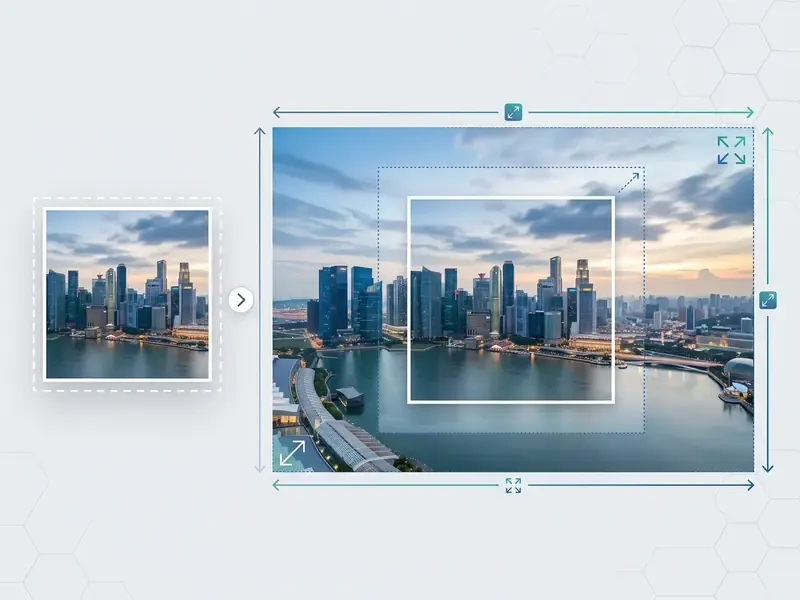
Generative expand lets you adapt a square 1:1 photo for a 16:9 presentation slide or a 9:16 vertical video thumbnail. The model reads border context and generates matching scenery to pad the outer margins. Adobe's own documentation notes that generative fill works from a selection, and that leaving the prompt blank tells the model to synthesize from surrounding pixels. That blank-prompt trick is the cleanest way to delete an object without describing a replacement.
"Diffusion models adapt the text-to-image mechanism for localized pixel synthesis beyond the original canvas boundary."
AI Sky Replacement and Environmental Relighting
Landscape and architectural photos often suffer from flat overcast skies. Tools such as Luminar Neo analyse depth maps to isolate the horizon automatically, swap in dynamic atmospherics, and recalculate directional light spill and reflections across foreground objects. Companion modules add controllable fog, haze and atmospheric density. Travel and real-estate photographers typically run sky replacement before any colour grading pass, because relighting after the swap avoids mismatched colour temperature between subject and backdrop.
B&W Colorization and Historical Restoration
Restoring damaged or archival black and white photos leans on deep pattern recognition. Generative restoration models, including those in PhotosRevive and Fotor's restoration toolset, identify scratches, remove grain, and infer plausible colour palettes for skin, clothing and natural backdrops. Best practice is two-stage: automated dust and scratch removal first for surface noise, then masked inpainting for tears, missing corners and removed areas. Tools that support manual colour markers let you correct the hue guesses the model gets wrong, which matters a lot for uniforms, flags and period fabrics. Readers going the other direction can also make an image monochrome with controlled tonal mapping rather than a flat desaturation.
Virtual AI Fashion Models for E-Commerce
E-commerce brands can skip some studio photography by using AI fashion model generators such as Photoroom. These systems isolate flat-lay garment photos and render them onto photorealistic, algorithmically generated human models across different ethnicities, poses and lighting setups. The commercial trade-off is disclosure: several marketplaces and advertising regulators expect synthetic models to be labelled, and brand risk teams should confirm that generated likenesses do not resemble identifiable individuals.
How to Choose the Best Free AI Photo Editor App
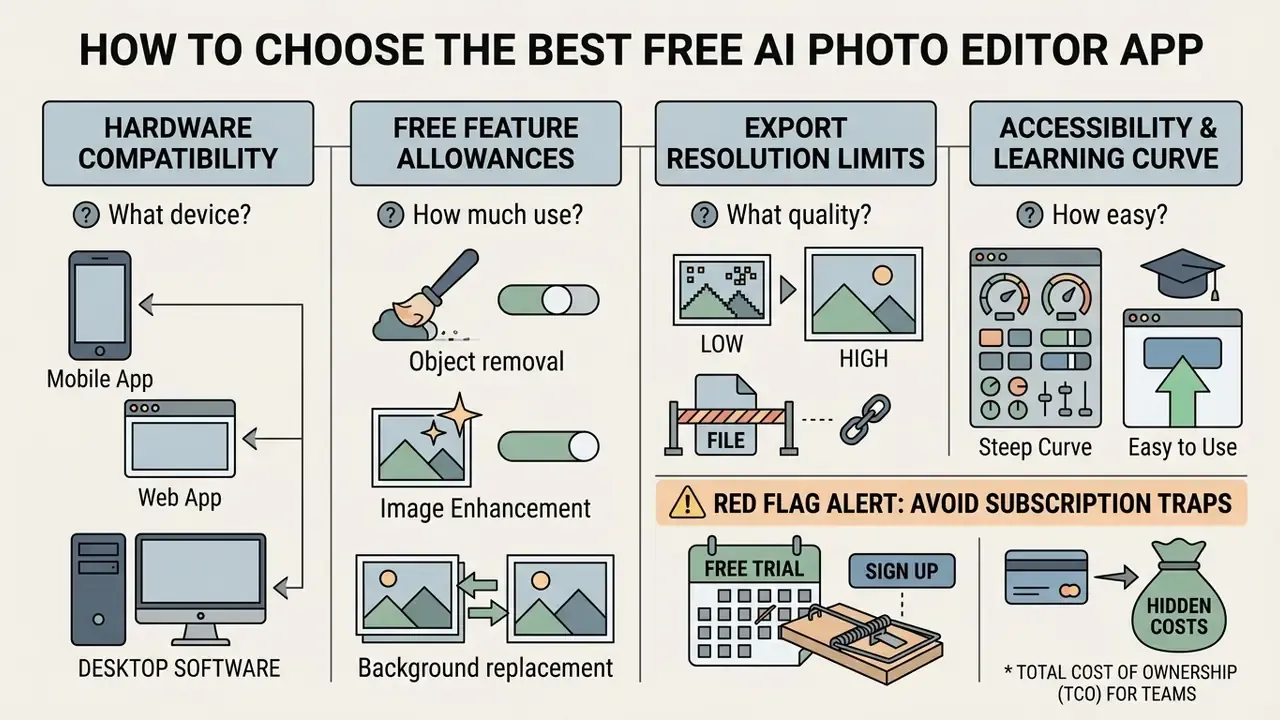
Choosing the best AI photo editor app means weighing hardware compatibility, free feature allowances, export resolution limits, accessibility and the learning curve. Individual creators and organizations both need to match platform capabilities to real technical requirements and privacy constraints.
Plenty of tools advertise zero-cost access, yet functional limits vary widely between vendors. Checking those operational limits before integration prevents workflow disruption and surprise subscription fees. Accessibility is an underrated criterion too: authoring-tool guidance from the W3C requires keyboard access to all features and communication with platform accessibility services, and WCAG requires text alternatives for non-decorative images. So an editor that generates or modifies visuals should also let you author alt text.
Free Plan Limits, Credits, Watermarks, and Export Quality
"No peer-reviewed comparative dataset of app-level free-tier limits has been published with a transparent methodology."
In other words, quota figures in any roundup, including this one, reflect vendor-published terms at review time and deserve re-verification before procurement. Readers modelling long-term operational cost can compare pricing tiers for AI image tools across enterprise and free access models, or open the hub for current plan structures.
⚠️ Red flag alert: how to avoid AI photo editing subscription traps
Mobile, Web, and Desktop AI Photo Editing Software
AI photo editing platforms live in three environments: web browsers, mobile applications and native desktop software. Web-based services process tasks on cloud servers, giving instant cross-platform access with no local hardware dependency.
Mobile apps on iOS and Android prioritise touch-based quick edits, portrait retouching and direct social media export. Desktop AI photo editing software for pc and macOS runs processing locally, which lets professionals edit sensitive images without sending data to third-party servers. For regulated industries that is often the deciding factor, not a nice-to-have. Teams that want zero-cost options with documented feature caps can review a structured overview of free photo editors before committing budget, and creators comparing full application suites can read evaluations of photo editor programs to judge local performance advantages.
Platform coverage is uneven even inside one brand. Adobe Firefly documents support across Mac, Windows, iOS, Android and major browsers, while some Photoshop AI assistant features shipped on web and mobile before desktop. Feature availability, not just OS support, belongs on your checklist.
Best Free AI Photo Editing Apps at a Glance
Comparing top free AI image editing apps exposes differences in generative power, underlying model stacks, supported platforms, free allowances and export restrictions. The matrix names the AI engines behind each product, because model choice, whether FLUX, SDXL, Recraft V4, Qwen or Seedream, drives output character more than the interface does.
| Editor App | Core AI Engines / Models | Standout Features | Platforms | Free Tier Limits | Export Quality & Constraints |
|---|---|---|---|---|---|
| Adobe Firefly | Firefly Image Model (curated set) | Generative Fill, Generative Expand, Background Remover | Web, mobile, tablet | Free daily generation allocation that refreshes | High resolution; free output may carry watermarking |
| Pixlr | FLUX, FLUX Pro, Recraft V4, SDXL, Stable Diffusion | Face Swap, Layer Decomposition, Sticker Generator, Generative Expand | Web, iOS, Android | Ad-supported, capped credit allowance | Standard web resolution; upscaling to ~25 MP on paid tiers |
| Canva | Proprietary Magic Studio stack plus partner models | Magic Edit, Magic Eraser, Magic Design, Auto-Enhance | Web, iOS, Android, desktop | Limited monthly AI operations; some edit tools premium | Standard web resolution |
| Fotor | FLUX, Seedream, Qwen, Wan | Batch editing (up to 50 photos), B&W restoration, style transfer | Web, iOS, Android, Windows, macOS | Credit-based free trial; advanced tools gated | Up to 8192 × 8192 input; watermark on some free output |
| Luminar Neo | NeoAI engine | SkyAI, AtmosphereAI, FaceAI, SkinAI, Erase | Windows, macOS, plus plugin use | Trial access, including via Setapp bundle | Native camera resolution, RAW-friendly |
| Topaz Photo AI | Denoise AI plus Sharpen AI (Gigapixel sold separately) | Deep-learning artifact removal, motion-blur recovery, upscaling | Windows, macOS, plugin | Trial with processing preview only | High-resolution lossless output |
| Recraft | Recraft V4 vector and raster models | Vector generation, palette control, inpainting | Web | Up to 30 free generations and edits per day | High resolution, no watermark on free tier |
| Photoroom | Proprietary vision AI | Product backgrounds, shadow generation, AI studio fashion models | Web, iOS, Android | Watermarked free exports | Web resolution on free plan |
| Pixelbin | Custom prompt engine | AI prompt editor, mass background removal | Web | About 3 free monthly executions, then sign-in for limited credits | Low to mid-resolution previews |
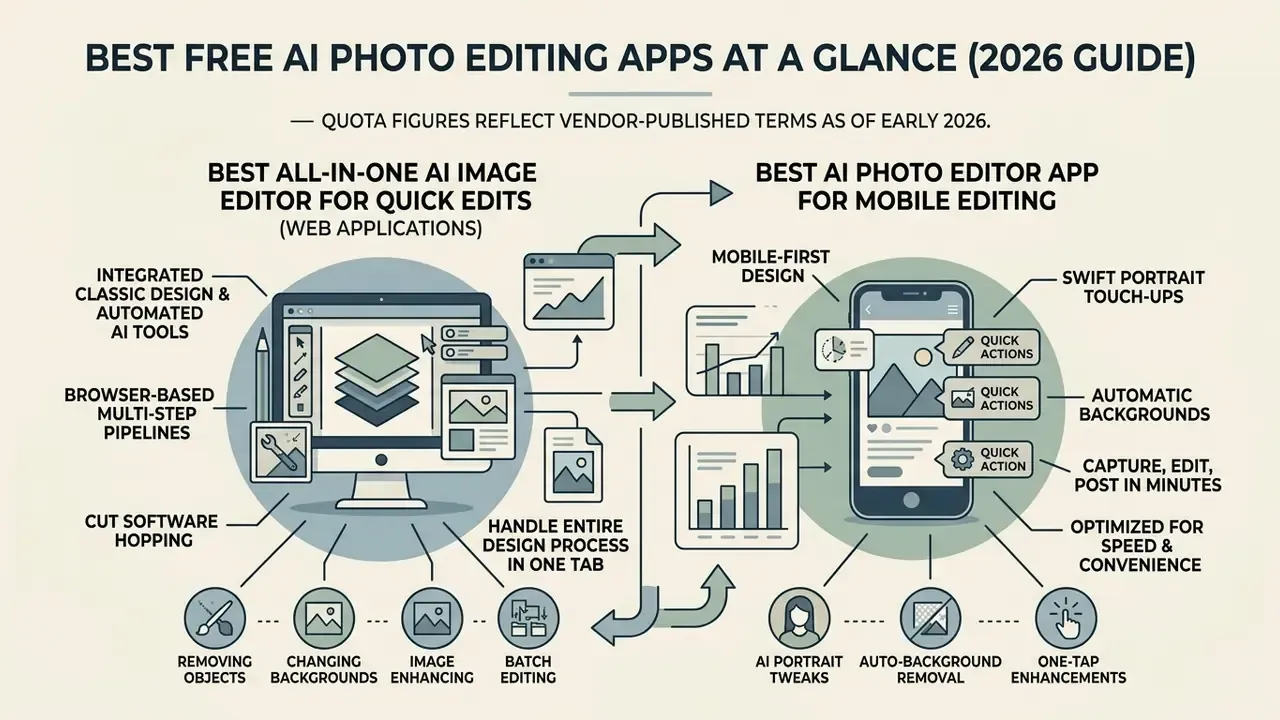
Quota figures reflect vendor-published terms as of early 2026. As of this update, Pixelbin includes roughly three free trial executions before account sign-in is required. Verify current limits directly with each vendor before procurement.
Read the table as two clusters. Browser suites (Canva, Pixlr, Fotor, Photoroom) win on speed and breadth; desktop tools (Luminar Neo, Topaz Photo AI) win on resolution integrity and local data control. Readers who want to move past editing into full image creation can compare the best AI image generators or review zero-cost creative options among free AI art generators. For swap candidates outside this shortlist, see the overview of adjacent ecosystems.
Best All-in-One AI Image Editor for Quick Edits
All-in-one web applications fold classic design templates and automated AI editing tools into one browser interface. Canva, Pixlr and Fotor let you apply one-click background removal, add objects through simple text prompts, and overlay marketing typography in the same session. Fotor ships 30 plus discrete AI tools and a template generator. Canva separates template design from its Magic Studio AI features. Pixlr keeps a simpler template-plus-tweak flow layered over a full raster editor with layers and masks.
These unified suites cut software hopping by handling multi-step design pipelines in a single tab. When a static promotional design needs to become a motion asset, creators often evaluate good video editing solutions alongside graphic suites.
Best AI Photo Editor App for Mobile Editing
Mobile-first AI photo apps free of desktop overhead focus on swift portrait touch-ups, automatic background swaps and canvas resizing on the phone itself. Picsart, YouCam Perfect, AirBrush and Remini run networks tuned for facial feature recognition and mobile sensor cleanup. Picsart positions itself as an all-in-one AI photo editor, video editor and design studio. YouCam Perfect documents background removal, face replacement and retouching. Remini concentrates on photo restoration and AI portrait generation.
Mobile pipelines let creators capture, edit and post within minutes. These apps also resize visuals automatically for Instagram, TikTok and LinkedIn frame specifications, which removes a surprising amount of manual cropping from a daily publishing routine.
Which AI Photo Editor Is Best for Your Use Case
Picking the ideal AI photo editor means aligning tool capability with a specific commercial, personal or creative workflow.
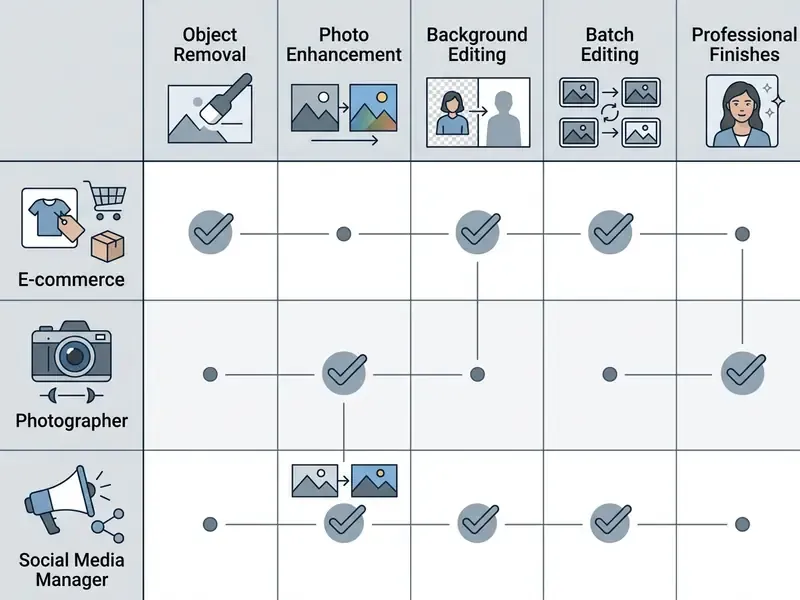
Different industries demand different output standards. Marketplaces mandate exact colour accuracy and pure white backgrounds; social channels reward eye-catching effects and fast turnaround.
AI Photo Editing for Product Photos and Marketing
"SmartMask achieves local FID 19.21, CLIP-score 0.261 and normalized background L2 of 0.098, outperforming baselines on insertion realism."
Teams standardizing on a template-driven marketing stack can review capabilities and licensing in the Canva AI Generator overview before scaling catalogue production.
AI Apps for Portraits, Selfies, and Retouching
Portrait software concentrates on skin texture smoothing, blemish removal, facial lighting balance and eye detail. Research on identity-preserving frameworks such as S²Edit confirms that explicit identity tokens during latent diffusion prevent structural facial change during a retouching pass.
"S²Edit applies orthogonality constraints in text space and object masks to steer cross-attention, enabling localized edits without identity drift."
Better portrait tools let you fine tune retouching intensity with precision sliders, and academic retouching systems such as AutoRetouch explicitly aim to preserve texture and distinctive features. Keep the pores and natural highlights. That single habit is what separates a natural looking result from the plastic finish aggressive blurring produces. Professionals producing business portraits at volume can compare dedicated AI headshot generators against general-purpose retouching apps.
How to Edit Images With a Free AI Photo Editor
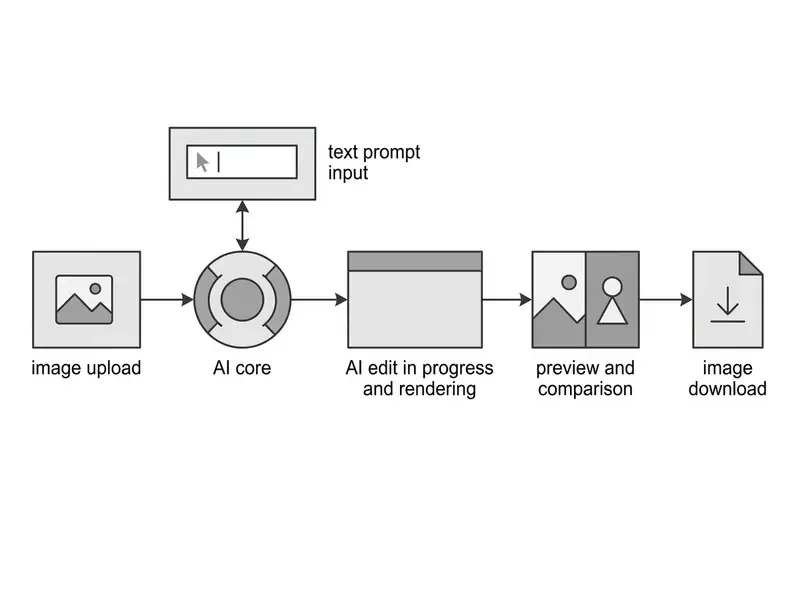
Getting professional quality results from a free AI photo editor takes a structured workflow: prepare the source file, apply targeted neural tools, inspect the boundaries, export uncompressed.
A systematic method prevents visual artifacts, edge bleeding and loss of fine detail. Skip it and you will notice the damage only after publication.
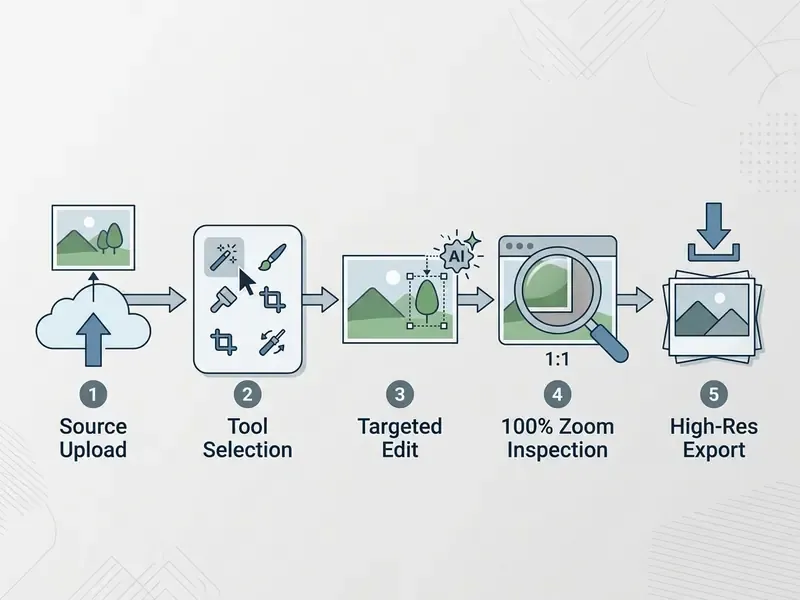
Upload an Image and Choose the Right AI Tool
Start with the highest resolution source available, ideally uncompressed TIFF or high-quality JPEG. Archival guidelines from FADGI recommend capturing at 300 to 600 DPI so neural models receive clear pixel data; archival restoration workbooks push that to 400 DPI or higher at real size, delivered as uncompressed TIFF.
"Higher input resolution supplies neural networks with sufficient pixel data to reconstruct structural detail accurately."
Technical upload checklist for AI processing:
- Supported formats: JPG, PNG, WEBP or TIFF. Avoid WEBP for generative expand tasks that need high colour depth.
- Maximum file size: stay under 40 MB per image to avoid browser timeouts on cloud endpoints.
- Optimal input resolution: between 2048 × 2048 px and 8192 × 8192 px. Images under 500 px wide lack edge density for accurate segmentation; background-removal APIs recommend at least 1024 px on the short edge.
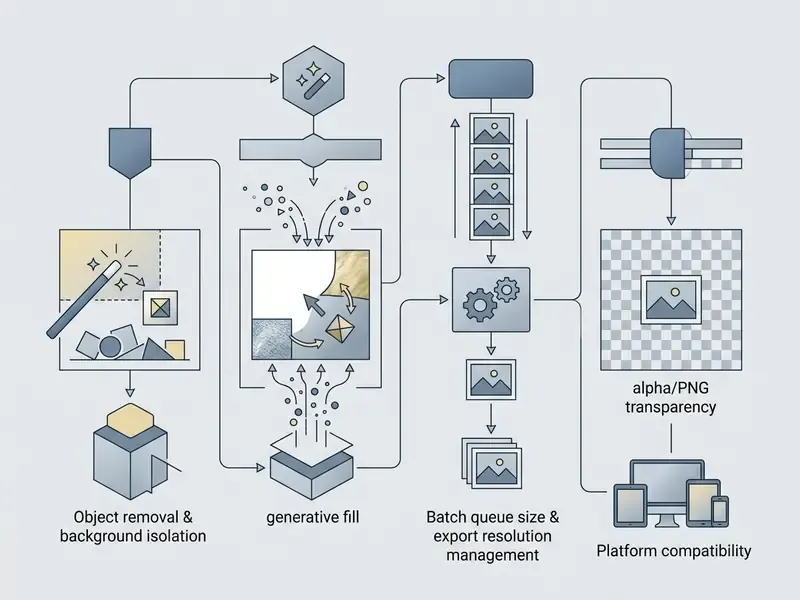
- Transparency: request PNG output with alpha preserved when the subject will be composited later.
- Pre-flight cleanup: crop, straighten and set white balance before upload, so the model is not asked to fix geometry and colour at once.
Then select the tool engineered for your actual defect. Targeted object removal for localized clutter. Automated background isolation for product shots. Dust-and-scratch passes for archival surface noise. Masked inpainting for tears and missing corners. Super-resolution upscaling for low-res scans.
Review, Refine, and Export High-Quality Results
"GRIG uses an iterative residual reasoning scheme combining CNNs and transformers, progressively removing texture artifacts across repeated passes."
Artifact audit checklist (100% zoom):
- Duplicated or smeared texture patterns inside filled regions
- Halo or colour fringing along the subject boundary after background removal
- Invented detail around eyes, teeth and mouth after face upscaling
- Warped straight lines, such as window frames, shelves and horizons, after generative expand
- Garbled or hallucinated text on packaging, signage and labels
- Mismatched shadow direction or colour temperature after sky replacement
- Alpha channel gaps in hair, fur or transparent materials
Export at native model dimensions to avoid needless resampling blur. For web publication, save PNG or high-quality WebP to hold visual fidelity. For print handoff, verify resolution at final trim size and confirm bleed and embedded assets separately from the AI pipeline.
Batch AI Processing for High-Volume Workflows
For catalogue updates or event coverage, editing image by image creates a real bottleneck. Browser-based editors such as Fotor and Pixlr now support batch pipelines of up to 50 concurrent uploads. Those queues apply standardized operations, including multi-subject background isolation, skin texture normalization, one click enhancement and canvas padding, across an entire set in a single pass.
For setup, keep source files under 40 MB each and inside 8192 × 8192 pixels to prevent browser memory overflow during local batch rendering. Two rules keep batch output trustworthy: run a 10-image pilot before queueing the full set, and sample-audit at least 10% of finished files at 100% zoom. One mis-tuned mask setting propagates silently across every asset in the queue, and nobody notices until a client does. Desktop tools such as Topaz Photo AI and Luminar Neo handle equivalent jobs locally, which is the preferred route when imagery cannot leave the corporate network.
Privacy, AI Models, and Commercial Use of Edited Images
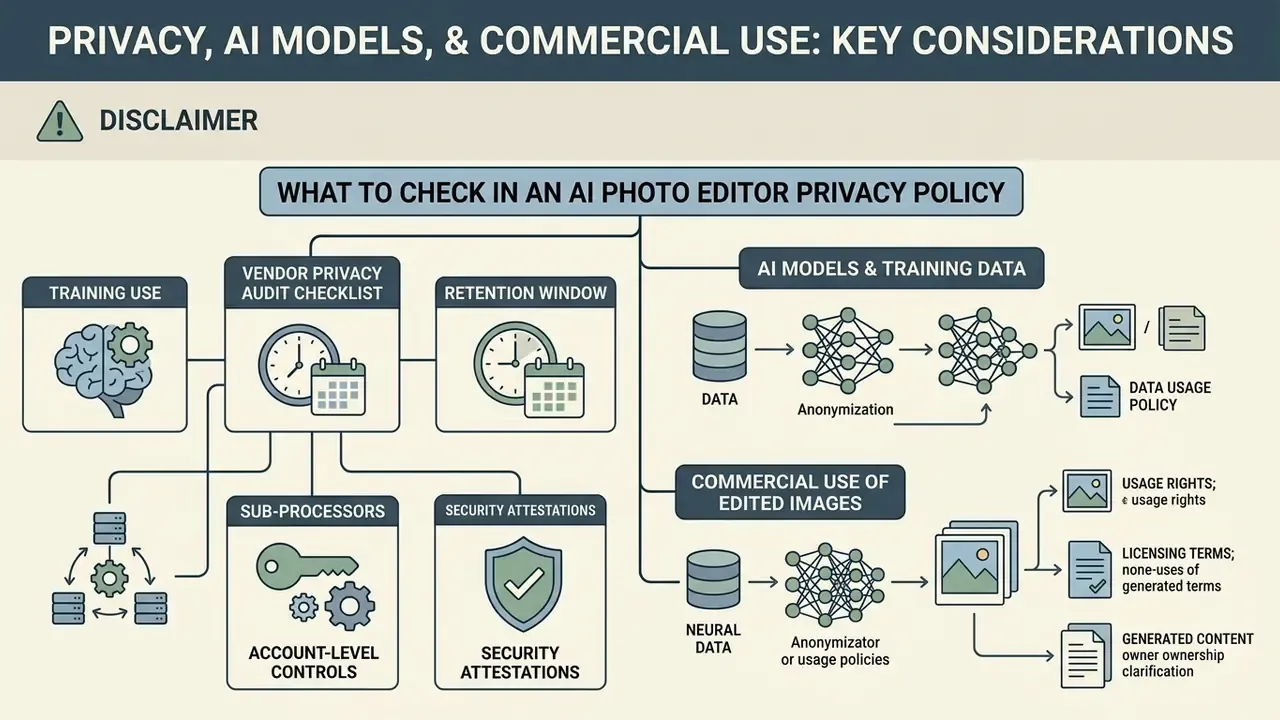
Publishing AI-edited photos in commercial, corporate or editorial environments raises questions about data privacy, copyright ownership and third-party intellectual property.
Organizations need clear policy on how user data travels and whether generated visual output can be protected or licensed at all. Provenance verification is the companion control: teams distributing mixed human and synthetic imagery should evaluate AI image detectors as part of the review chain, and compare governance approaches across competing vendors when they open the hub of head-to-head matchups.
What to Check in an AI Photo Editor Privacy Policy
Before uploading confidential corporate graphics, personal headshots or unreleased product photos, read the privacy policy on retention and model training. Some platform terms grant the operator the right to store uploads on public cloud infrastructure, or to use customer images to train future AI models. Policy patterns split into two camps: services that train on publicly posted photos by default, and services that exclude uploaded images from training unless you opt in. Regulators have confirmed the underlying obligation. Australia's OAIC states that privacy law applies to the collection, use and disclosure of personal information for training generative AI models, and its 2024 guidance ties use of commercially available AI products to existing privacy duties.
Corporate risk protocols should favour platforms that offer explicit data opt-out toggles, or that guarantee deletion of uploaded files immediately after processing. It is a short review. It saves long incident reports.
Shadow AI Risk: Unsanctioned Uploads of Corporate Images
The defining risk of free browser editors is how frictionless they are. A marketing coordinator can drop an unreleased product render, an internal dashboard screenshot or a customer-identifiable photo into an anonymous web tool in under ten seconds. No login, no procurement review, no audit log. Several free editors advertise no-account access as a feature, which is convenient for consumers and invisible to IT.
Practical controls that reduce Shadow AI exposure without banning the whole category:
- Sanction a short list. Approve one or two vendors with contractual no-training clauses, and publish the list where staff will see it before they start searching.
- Classify what may be uploaded. Prohibit unreleased product imagery, customer photos, identity documents and anything containing personal data from cloud editors, and route those assets to desktop tools with local processing.
- Prefer local processing for sensitive work. Desktop software on Windows or macOS keeps files on the device, which is the simplest way to meet confidentiality requirements.
- Log the exception path. Give teams a fast approval route for new tools. Unmanaged adoption usually signals a missing capability, not defiance.
- Train on output risk, not only input risk. Staff should understand that generative enhancement can invent detail, which matters when an image supports a claim, a specification or a piece of evidence.
Commercial Use, Professional Photos, and AI-Generated Elements
Under United States Copyright Office policy guidance, effective since March 2023, copyright protection applies strictly to human-authored creative contributions, and applicants must identify which parts of a submission a human created. Purely synthetic images produced without human creative input cannot be registered.
"A comparative analysis of six jurisdictions found that most legal systems require human authorship but diverge on what counts as sufficient creative contribution."
Photographs captured by a human photographer that later pass through AI-assisted editing, such as background removal, colour correction or minor retouching, keep copyright protection over the human-created elements.
"A 2024 tiered copyrightability model proposes three protection levels based on the density of human intent and the controllability of the generative process."
Platform terms can be stricter than copyright law. Adobe's generative AI terms prohibit inputs designed to reproduce substantially similar copyrighted works, and require rights or consent for third-party IP and personal data. Stock marketplaces additionally require contributors to hold all necessary rights before commercial licensing. Operators generating synthetic additions or using outpainting should review asset permissions across AI image generator commercial-use alternatives, and check content-safety policies separately for edge categories such as nsfw ai image generator apps.
Sample internal policy clause (template, not legal advice):
Frequently Asked Questions (FAQ)
Is a free AI photo editing app good enough for professional work?
For discrete tasks such as background removal, object erasure, one click enhancement and aspect-ratio expansion, free tiers regularly produce publishable results. The limits appear at export: watermarks, preview-only downloads and capped resolution are the usual blockers. Verify full-resolution export on the free plan before you build a workflow around a tool.
Can I copyright an image I edited with AI?
Human-authored elements can be protected; purely AI generated output generally cannot. A photograph you captured and then retouched with AI keeps protection over your human contribution, and you should be able to point to which elements those are. Rules differ by jurisdiction, so consult counsel for commercial launches.
Which free AI editor removes backgrounds most cleanly on hair and glass?
Tools that expose alpha-channel export and accept high resolution input perform best on fine edges. Feed at least 1024 px on the short edge, then inspect hair boundaries and transparent surfaces at 100% zoom. Halos and clipped strands are the failure signatures to look for.
How many photos can I edit at once?
Leading browser suites accept batch queues of up to 50 images per pass, with per-file ceilings around 40 MB and 8192 × 8192 pixels. Desktop batch processing sidesteps browser memory limits entirely and keeps files local.
How do I spot AI artifacts before publishing?
Review at 100% magnification against the unedited original, and work through the seven items in the artifact audit checklist above: duplicated texture, edge halos, invented facial detail, warped straight lines, garbled text, mismatched shadows and alpha gaps.
Are free AI photo editors safe for confidential corporate images?
Not by default. Cloud tools may retain uploads or use them for model training unless the policy says otherwise. For unreleased products, customer photos or personal data, use desktop software with local processing, or a vendor with a contractual no-training clause and a documented deletion window.
What is a fair price if I upgrade?
Full design and editing ecosystems sit in the $13 to $23 per month range. Perpetual desktop licences for specialist tools cost more up front but are one-time. A single-feature app charging more than a mainstream creative suite deserves extreme scepticism.
Does AI upscaling work on old, blurry family photos?
Partially. Super-resolution reconstructs plausible structure, but heavily degraded faces can acquire unnatural detail. Scan at 300 to 600 DPI, or 400 DPI and above for small prints, run dust and scratch removal first, then upscale conservatively and compare against the scan.
Appendix A: Source Notes and Original Statements
This appendix preserves earlier phrasings from previous revisions of the guide alongside the reason each was tightened, so readers can trace how a claim evolved.
- Super-resolution metrics.
- Original wording: "Research on ESRGAN architectures demonstrates that neural upscaling achieves a peak signal-to-noise ratio of 27.03 dB on standard benchmark datasets, delivering significantly higher clarity than traditional bilinear interpolation." Updated to name the benchmark (Urban100), the magnification factor (4×) and the SSIM value (0.8153), so the figure is verifiable.
- NIST enhancement definition.
- Original wording: "According to the National Institute of Standards and Technology (NIST) 2025 guidelines, image enhancement encompasses processes designed to improve visual clarity without inventing unverified features." Updated to a broader attribution to NIST computer vision and image-processing guidance, since document-year citations require direct verification against the published references.
- Generative upscaler warning.
- Original wording: "NIST 2026 reference documentation cautions that generative upscaler tools can synthesize artificial pixel details on degraded face photos." Retained in substance and reinforced with peer-reviewed super-resolution literature on out-of-domain artifact behaviour. Readers performing identity-sensitive comparisons should always work from the original unedited file.
- Inpainting citation.
- Original wording: "Peer-reviewed studies from CVPR 2024 demonstrate that optimizing inpainting masks prevents boundary blurring and preserves background texture continuity." Updated to reference named work on inpainting-driven mask optimization plus the 2024 de-photobombing benchmark, which reports PSNR, SSIM and FID across ten methods.
- Free-tier limits.
- Original wording: "Pixelbin: 3 free monthly uses, then sign-in required." Updated with an as-of date and a verification note, because vendor quotas change frequently and no peer-reviewed app-level benchmark of free tiers exists.
- Internal case studies.
- Three figures, namely 500 product shots in two hours at 98% texture consistency, 1,000 inventory items converted in an afternoon, and 12% micro-artifact incidence, are in-house benchmark measurements on fixed image sets. They are labelled as internal tests rather than independent studies, and academic comparators (SmartMask insertion metrics, GRIG iterative refinement) are cited alongside them.
- Reviewer attribution.
- Marcus Hale, author.