If you sit in risk, compliance, or model governance at a US bank or a mature fintech, creative AI probably reached your desk sideways. Marketing adopted it first. Legal asked questions later. Adobe Firefly is one of the few generative platforms that arrives with a licensing story you can actually put in front of an audit committee, which is exactly why it deserves a structured review rather than a shrug.
Adobe Firefly is an enterprise-grade generative AI suite that creates photorealistic images, scalable vector graphics, and video assets from natural-language prompts inside a commercially safer governance framework. Built directly into Adobe Creative Cloud, it lets designers, marketers, and risk-conscious organizations accelerate visual asset production while keeping data lineage and copyright protections intact.
«Copyright protects original expression created by a human author; prompts alone are not sufficient for protection.»
«Firefly models are trained on licensed Adobe Stock content and public-domain material, and Adobe provides intellectual-property indemnification for eligible Firefly outputs to enterprise customers.» Adobe Firefly Legal FAQs for Enterprise Customers (2024 to 2025). https://www.adobe.com/legal/licenses-terms/adobe-gen-ai-user-guidelines.html
Executive Summary for Decision-Makers
- What it is: A multimodal creative AI studio (images, vectors, video, audio) available on the web at firefly.adobe.com and embedded natively in Photoshop, Illustrator, Premiere Pro, Adobe Express, and Lightroom.
- Why enterprises choose it: Native Firefly models are trained on licensed Adobe Stock and public-domain content, outputs carry Content Credentials provenance metadata, and enterprise agreements include IP indemnification for eligible outputs.
- Hard technical limits to plan around: prompts capped at 750 characters; reference uploads accepted as JPG, PNG, WebP (plus HEIC for Generate Image in Safari on desktop); raster downloads as PNG/JPG up to 2000×2000 px; vectors as editable SVG; video as MP4.
- Commercial nuance: Commercial safety and indemnification apply to Adobe's own Firefly models. Partner models (Google Gemini, OpenAI GPT Image, FLUX, Luma AI Ray 3, ElevenLabs, Runway) are third-party engines, and the customer is responsible for assessing suitability and rights.
- Cost model: Free tier with limited daily generations; paid Firefly tiers from $9.99/month (2,000 credits) up to $199.99/month (50,000 credits plus unlimited Firefly Video Model); Creative Cloud plans include their own monthly credit allocation that resets each billing cycle and does not roll over.
- Measured impact: Teams report 30 to 70% faster ideation and 65 to 75% shorter asset review cycles after standardizing on Firefly, per Adobe's Forrester-based enterprise analysis.
- Governance verdict: Deployable in regulated environments, provided the model-risk checklist in this guide (provenance export, entitlement control, prompt logging, partner-model gating) is executed before production rollout.
How this guide is organized. It opens with what the generator actually does, moves through image-generation capabilities and the online workflow, then covers models and Creative Cloud integration. From there the focus shifts to governance: data privacy, provenance controls, commercial rights, indemnification boundaries, pricing and generative credits, an FAQ, and two appendices covering revised statements and a reusable prompt library. Risk readers can jump straight to the governance and commercial sections; creative operations leads will get more out of the middle.
What Adobe Firefly AI Art Is and Which Tasks the Generator Was Built For
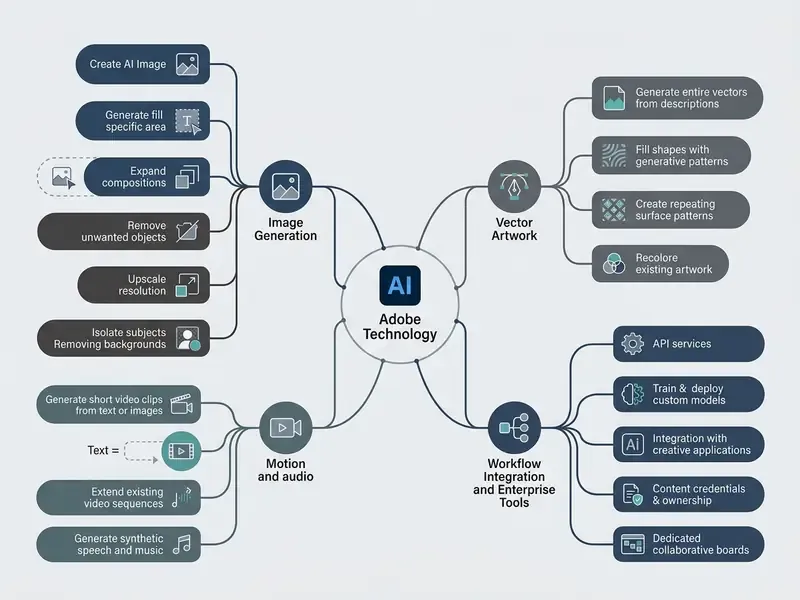
Adobe Firefly works as an integrated AI creative studio that turns natural-language descriptions into high-resolution visual assets, vector graphics, and video content. The platform targets three recurring jobs: ideation, automated asset resizing, and campaign localization across enterprise marketing and design teams.
Adobe states plainly that Firefly is neither a large language model nor a search engine. It converts text or image input into creative output: generative fill, canvas expansion, object addition or removal, custom vector graphics. That framing matters for risk teams, because the failure modes here are visual and rights-related rather than conversational. Different failure modes, different controls.
AI Art, Images, Illustrations, and Design Content
Adobe Firefly generates photorealistic imagery, editable vector graphics, and structured design elements built for commercial publishing. By selecting a content type (Photo, Art, or Vector), creators steer the engine toward the asset class they need, from product shots to scalable branding icons. According to Adobe's technical documentation, Firefly Vector produces fully editable SVG path objects inside Illustrator, so graphic designers can adapt elements without resolution loss. Readers comparing platform families can review a broader landscape of AI art generators before committing to a single production stack, or view the guide collection for adjacent tool categories.
Typical output categories in the 2025 to 2026 releases include:
- Photorealistic imagery product photography, portraiture, food and interior scenes, with Firefly Image Model 4 and Image Model 4 Ultra improving skin texture, foliage detail, lighting fidelity, and color accuracy. These are the adobe firefly ai photo generator features most marketing teams test first.
- Illustration and painterly work watercolor, gouache, charcoal, colored pencil, ink, collage, paper cutout, and printmaking looks. Used this way, Firefly behaves as an adobe ai illustration generator rather than a photo tool.
- Vector systems icons, logo concepts, seamless patterns, and scene illustrations exported as editable SVG paths. Teams building brand marks often pair Firefly Vector with a dedicated review of AI logo and vector generation workflows to compare licensing terms.
- Composited design assets social posts, banners, flyers, thumbnails, and template variants that continue into Adobe Express for layout and typography.
Who Benefits from Adobe Firefly
Firefly serves graphic designers, marketing directors, content creators, and enterprise operations teams pursuing controlled AI adoption. Designers prototype visual concepts quickly, marketers spin up multi-channel social variants, and enterprise teams automate batch pipelines through Firefly Services. The pattern we see repeatedly: adoption starts with one designer and ends up as an unmanaged workflow. That is precisely the shadow-AI problem governance teams are trying to close.
Segment-specific usage patterns documented by Adobe:
| Segment | Primary Firefly surface | Typical task |
|---|---|---|
| Graphic designers | Photoshop, Illustrator | Generative Fill, Generative Expand, Text to Vector Graphic, Generative Shape Fill, Generative Recolor |
| Marketing and brand teams | Firefly web, GenStudio | On-brand campaign visuals, localized asset variants across 100+ prompt languages |
| Social media specialists | Adobe Express | Format resizing for Instagram, TikTok, YouTube; scheduled publishing from Express |
| Illustrators | Illustrator, Firefly Boards | Image-to-vector conversion, style-driven artwork, pattern systems |
| Enterprise operations / IT | Firefly Services API, Custom Models | Batch rendering, workflow automation, private model fine-tuning |
When organizations review broader generative visual platforms, an enterprise-level comparison helps align production speed with a stated corporate risk appetite. To study available commercial design platforms, teams can review commercial-use terms across AI image generators alongside enterprise licensing models, and compare options across vendor ecosystems.
Key Capabilities of the Adobe Firefly AI Image Generator
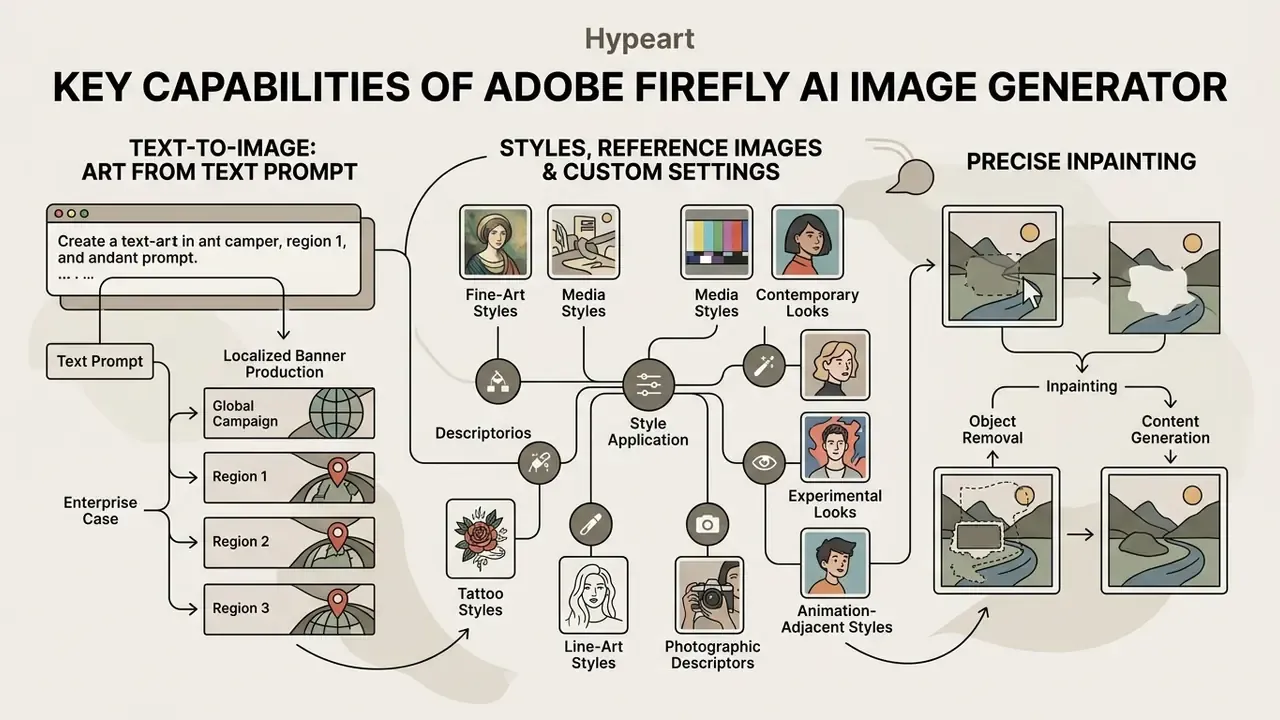
The core adobe firefly ai image generator features cluster around three things: controlled text-to-image synthesis, structural reference matching, and precise inpainting through Generative Fill. Together they give creators exact control over composition, lighting, style strength, and spatial layout.
Text-to-Image: Creating AI Art from a Text Prompt
The text-to-image function converts a natural-language description into four distinct visual variations. Users specify subject, camera angle, lighting setup, and mood to guide the underlying generative model. That is the practical shape of adobe firefly ai text to image capabilities: fewer knobs than a code-level pipeline, more control than a one-line prompt box.
Styles, Reference Images, and Custom Result Settings
Firefly exposes visual control sliders for Style Reference and Structure Reference to hold aesthetic consistency across image batches. Style Reference applies the look and feel of an uploaded image to new generations. Structure Reference enforces spatial outlines and composition depth on a 1 to 100 adherence scale (default 50 in the Firefly API structure.strength parameter). Custom model fine-tuning goes a step further, letting institutions train private models on proprietary corporate imagery.
Style vocabulary that reliably steers output from this adobe art generator:
Practical reference workflow, per Adobe documentation: browse the curated style gallery, upload your own JPG/PNG/WebP reference, or reuse an earlier Firefly generation as the style source. Then combine Style Reference with Structure Reference in a single generation to lock both aesthetic and geometry at once.
- Fine-art and media styles
- watercolor, impressionism, surrealism, cubism, pop art, charcoal, colored pencil, ink wash, oil on canvas, marble sculpture, clay ceramic, risograph print.
- Contemporary and experimental looks
- glitch art, paper cutout, layered collage, retro-futurism, cinematic lighting, neon, isometric 3D, vaporwave, brutalist poster.
- Tattoo and line-art styles
- blackwork, traditional (American traditional), neo-traditional, fine-line, minimalist, dotwork, Japanese irezumi, geometric, botanical linework.
- Photographic descriptors
- lens length, aperture, golden-hour sunlight, studio three-point lighting, moody shadows, dramatic backlighting, macro detail.
- Animation-adjacent styles
- cel-shaded, storybook illustration, anime-inspired, and studio-style painterly backgrounds, a category where teams frequently also compare stylized AI image generators for style accuracy and usage rights.
Generating Variations, Refining, and Editing the Result
Iterative refinement in Firefly pairs local variations with targeted editing through Generative Fill and Generative Expand. Creators paint over regions to add or remove objects, or expand the canvas to fit different social aspect ratios. Generative Expand supports Freeform plus preset ratios (1:1, 4:3, 16:9, 3:4), and the prompt field may stay blank so Firefly infers the extended background from existing pixels. Teams that reformat campaign assets weekly can also review dedicated AI outpainting and image-expansion tools for background generation at scale.
The refinement loop in practice: generate, select a variant, use Show similar for adjacent compositions, open Edit for the Generative Fill workspace, brush the target region, prompt the local change, keep one result and discard the rest, then hand off to Photoshop or Adobe Express for typography and layout. Simple enough. The discipline is in logging which variant shipped.
| Firefly Feature | Input | Expected Output | Primary Purpose |
|---|---|---|---|
| Text to Image | Text prompt + style settings | 1 to 4 raster images (up to 2K) | Initial concept and photo generation |
| Style Reference | Prompt + reference image | Image matching the reference aesthetic | Enforcing a single brand style |
| Structure Reference | Prompt + outline reference (strength 1 to 100) | Image with preserved composition | Exact geometry and depth reproduction |
| Generative Fill | Selection mask + prompt | Refined local region | Targeted object addition or removal |
| Generative Expand | Resized canvas (Freeform, 1:1, 4:3, 16:9, 3:4) | Extended background context | Format adaptation across media channels |
| Text to Vector Graphic | Prompt + vector content type | Editable SVG paths | Icons, logos, patterns, scene illustration |
| Edit / Refine | Generated image + prompt or sliders | Revised image (1K/2K, some partner models 4K) | Post-generation fine-tuning |
How to Use the Adobe Firefly AI Art Generator Online
Using Adobe Firefly ai art online means logging into the official web workspace, picking a generative module, defining prompt parameters, and refining the output. The browser interface handles this through structured controls, not code.
Step-by-Step: From First Login to Exported File
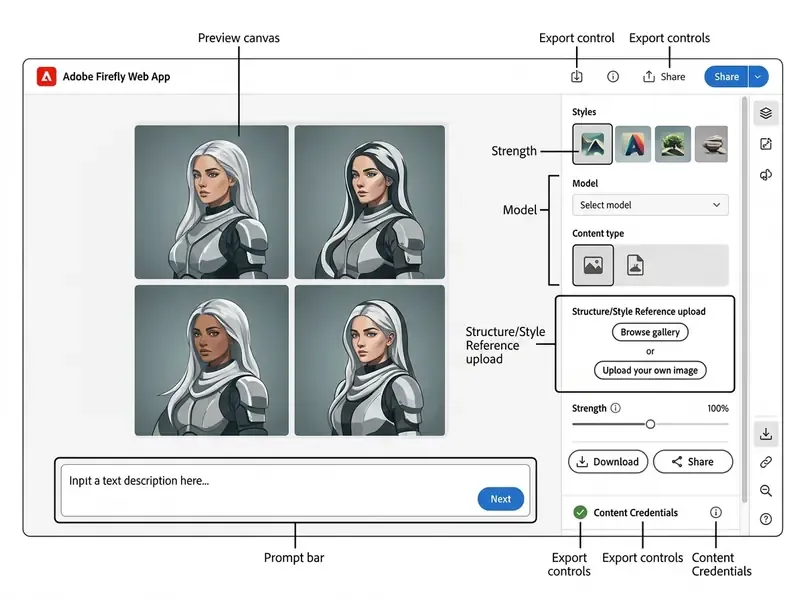
- Open the generator.Sign in at the official Firefly web workspace with an Adobe ID, or create a free account. Select the image, vector, or video module from the left navigation rail.
- Write the prompt.Start with at least four or five descriptive words, for example "product shot of a sushi roll underwater," then add keywords for lighting, angle, palette, and mood.
- Generate.Firefly returns four variations in seconds. Upload a reference sketch or photo if a specific layout or style is required.
- Refine and regenerate.Adjust the prompt, switch models, tune Visual intensity, Composition, Style, Color and tone, Lighting, and Camera angle, or open Generative Fill to add, remove, or transform elements.
- Save, export, or hand off.Download the asset, copy it to the clipboard, share it, or open it in Photoshop or Adobe Express for finishing. Generation history stays available in "Your stuff" alongside projects and shared files.
Opening the Generator and Working with the Firefly Interface
Access requires signing in at the official portal with an authenticated Adobe account. The left navigation rail switches between image generation, vector synthesis, video modules, and personal project storage. Opening the adobe firefly ai image generator official site puts a central prompt field in front of you, with a side configuration panel for aspect ratio, visual intensity, content type, and model selection.
Technical input limits (verify before rollout): the maximum prompt length in Firefly is 750 characters. Longer entries return the error "Prompt exceeds the max length of 750 characters." For Structure Reference and Style Reference uploads, the system accepts JPG, PNG, and WebP, with HEIC additionally supported for Generate Image in Safari on desktop or laptop. The Firefly video editor also accepts MOV and MP4 video, PNG/JPG/JPEG/WebP/HEIC images, and MP3/M4A/WAV/AIFF audio. Firefly requires JavaScript, and Safari Lockdown Mode is not supported. That last detail trips up locked-down corporate devices more often than you would expect.
How to Write a Prompt for AI Art
Effective prompting in Firefly relies on a repeatable sequence:
[Content Type] + [Subject] + [Composition/Angle] + [Lighting] + [Color Palette] + [Mood] + [Additional Details]
Adobe's own prompt guidance mirrors this template and recommends specifying medium, lens, aperture, and lighting setup for photographic realism. Adobe's prompt enhancement feature automatically expands simple descriptors into detailed queries for the Firefly Image 4 model, and the Show enhanced control in the prompt bar reveals the rewritten prompt so you can edit it. To suppress unwanted artifacts, creators use exclusion wording such as "no text overlay," "no people," or "no motion blur." One caveat: Adobe's public documentation does not expose a formal negative-prompt syntax, so exclusions behave as soft guidance rather than hard constraints. Treat them as preferences, not controls.
Three prompt patterns worth standardizing internally:

Photo of [product] on [surface], three-quarter angle, softbox studio lighting, [brand palette], premium and minimal, shallow depth of field.
Watercolor illustration of [concept], centered composition, diffuse daylight, muted earth tones, contemplative mood, visible paper texture.
Vector icon set of [subjects], flat geometric shapes, uniform 4px stroke, two-color palette, transparent background.How to Refine, Save, and Use the Image
Once a variant is selected, users refine details in the built-in editor or move the asset straight into Photoshop or Adobe Express. Final images download as PNG or JPG at resolutions up to 2000×2000 pixels, embedded with Content Credentials. Vector generations export as editable SVG paths, video generations as MP4. The image editor exposes 1K and 2K output resolutions, with selected partner models supporting up to 4K. For content teams managing specialized photographic assets, a comprehensive guide to online photo editors helps fold generative assets into existing editing pipelines.
Adobe Firefly Models and Image Generation in Creative Cloud
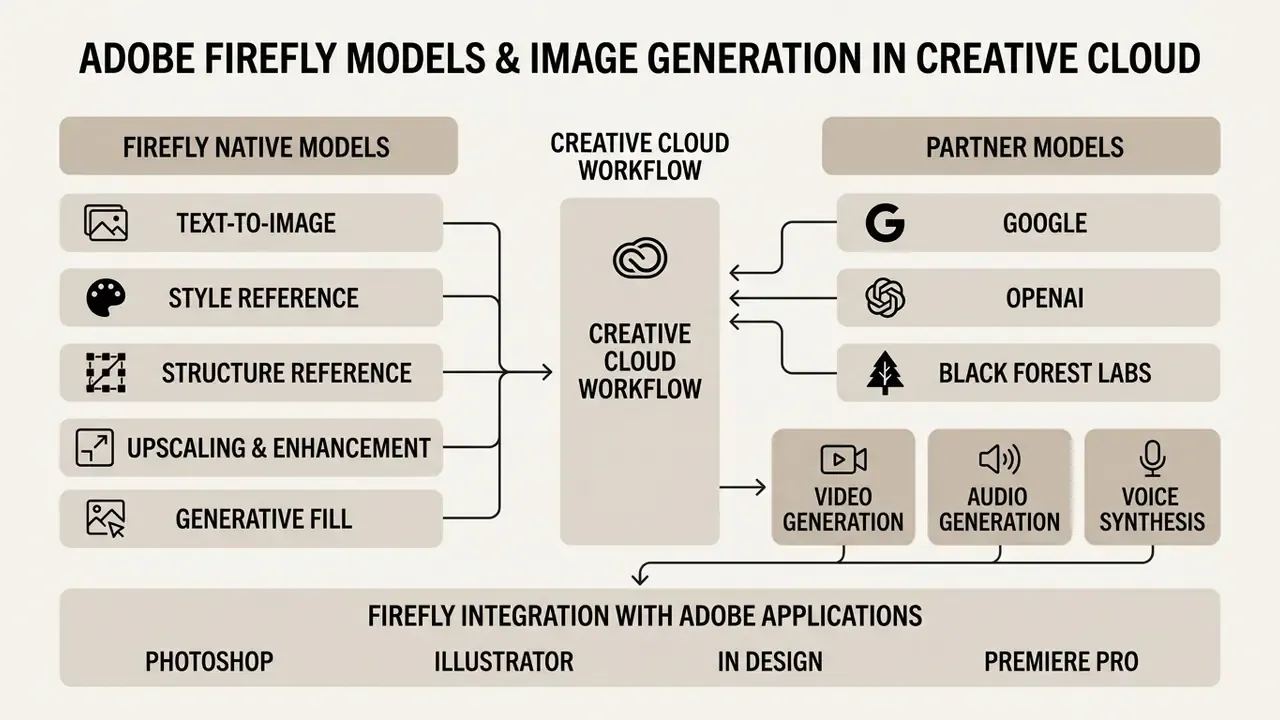
The Adobe Firefly family covers native generative models plus integrated third-party partner models inside one Creative Cloud workflow. This multi-model architecture lets creators pick an engine based on required style, output resolution, or credit cost. It also means your model inventory has more rows than most governance leads assume.
Firefly Models and Partner Models
Adobe provides proprietary models (Firefly Image Model 4, Firefly Image Model 4 Ultra, Adobe Vector Model, and the Firefly Video Model) trained exclusively on licensed and public-domain content. Image Model 4, Image Model 4 Ultra, and the Firefly Video Model reached general availability on Firefly web in April 2025. Teams planning motion work should also review broader AI video generation options and free tiers before allocating video credits.
The platform additionally surfaces a full stack of partner models directly in the workspace model dropdown:
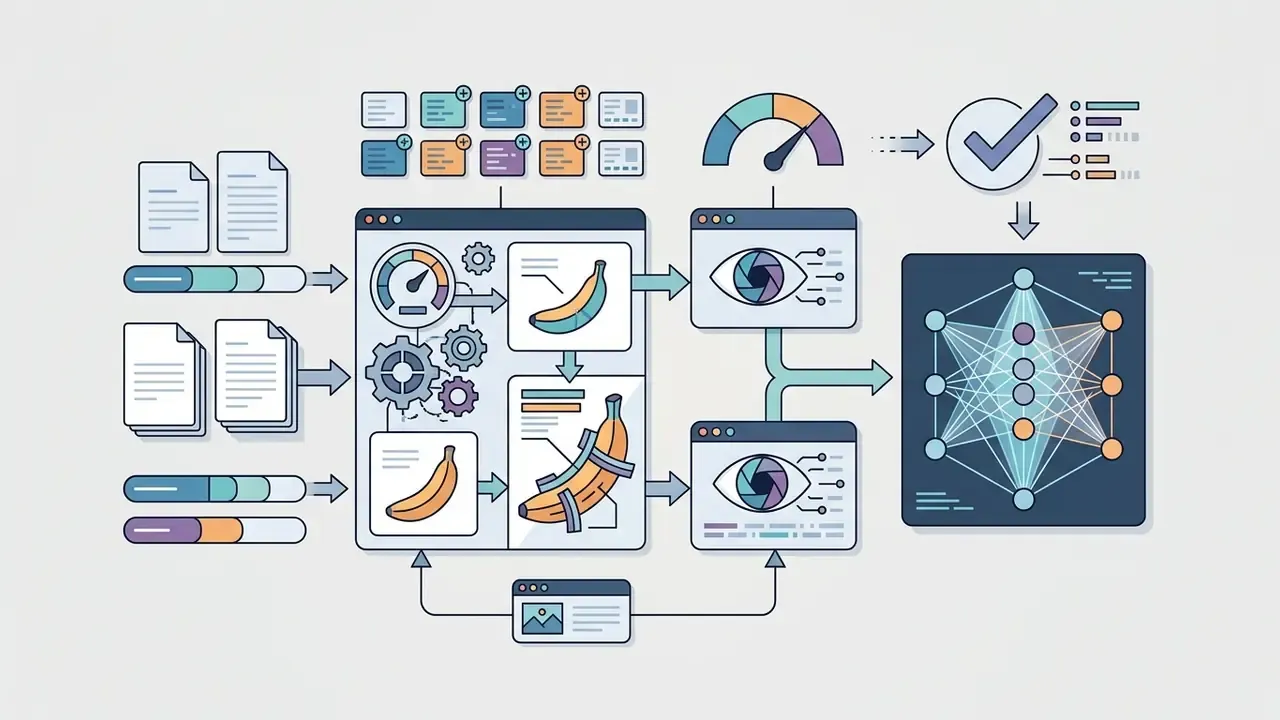

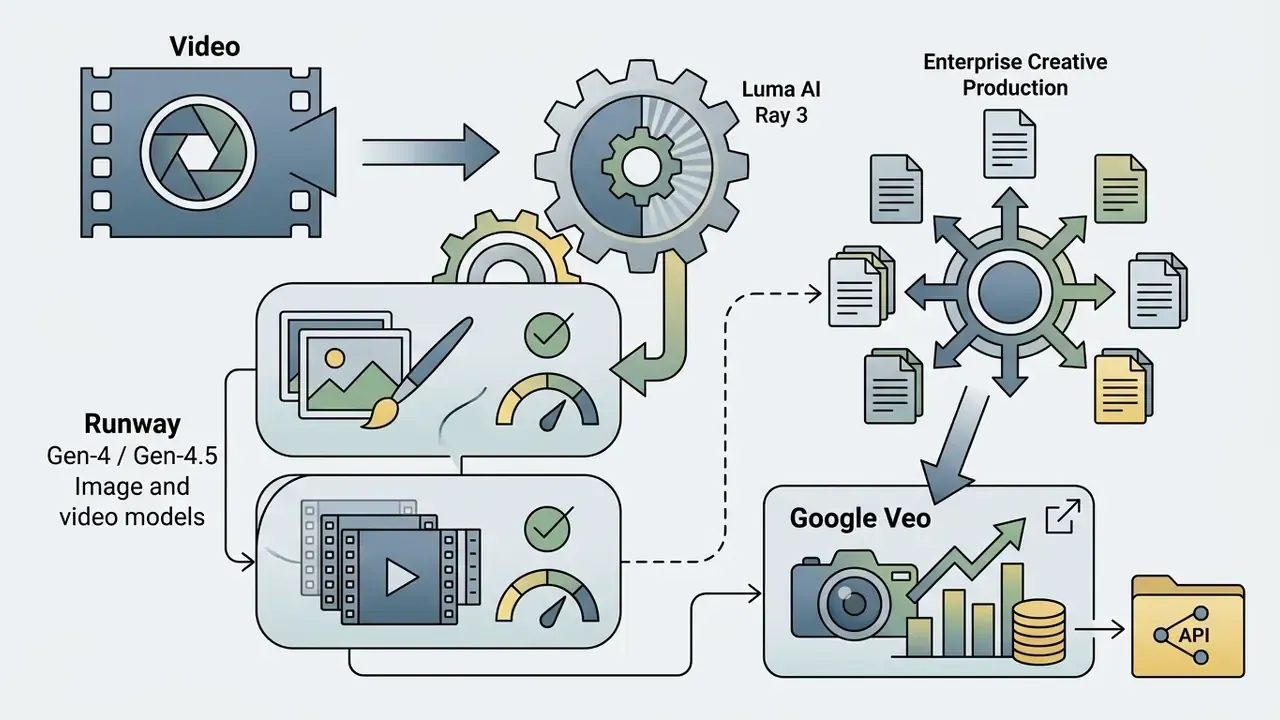


Each model consumes a specific allocation of generative credits based on computational intensity, and Adobe's Creative Cloud help pages publish per-generation credit costs for named partner models. Partner models appear in Firefly Boards, Text to Image, Text to Video, the Firefly video editor, Firefly Graph, Adobe Express, Photoshop, and Illustrator. Broad exposure, which is why entitlement gating matters more than user training here.
Firefly Integration with Adobe Applications
Firefly runs as a native generative layer inside Photoshop, Illustrator, Premiere Pro, Lightroom, and Adobe Express. Generative Fill in Photoshop supports non-destructive layer editing, while Text to Vector in Illustrator outputs fully scalable paths. Illustrator adds Generative Shape Fill, Text to Pattern, and Generative Recolor. Premiere Pro uses Generative Extend to lengthen clips and close timing gaps in a timeline. Motion-oriented teams often extend the same asset library into animation production workflows.
The Text Effects tool in Adobe Express, powered by Firefly, applies stylized textures and dimensional treatments to typography from a description, for example "letters made of stylized gold leaf and climbing vines." Adobe notes that Text Effects styles the described treatment rather than generating the letterforms themselves, which is why fine typographic detail still needs manual finishing. Adobe Express also supports Generative Fill and Text to Template for social and marketing layouts, and resized outputs can be scheduled straight to social channels, a workflow that pairs naturally with publishing and editing pipelines for video platforms.
For developers building enterprise automation, Firefly Services exposes generative and creative api endpoints, including Text to Image and Generative Fill, with batch execution, progress tracking, and per-asset results across large asset sets.
E-E-A-T verification / official source validation. According to official Adobe product documentation published across 2025 and 2026, Firefly models are explicitly trained on licensed Adobe Stock assets and public-domain content whose copyright has expired. Partner model availability (Google Gemini, OpenAI GPT Image, FLUX, Luma AI Ray 3, Runway, ElevenLabs) is managed through unified Creative Cloud entitlements, with Content Credentials automatically tracking model provenance for every generated asset. Adobe states that Firefly outputs from features without the beta label may be used in commercial projects, and beta outputs are permitted unless the product explicitly says otherwise.
Enterprise Governance, Data Privacy, and Provenance Controls
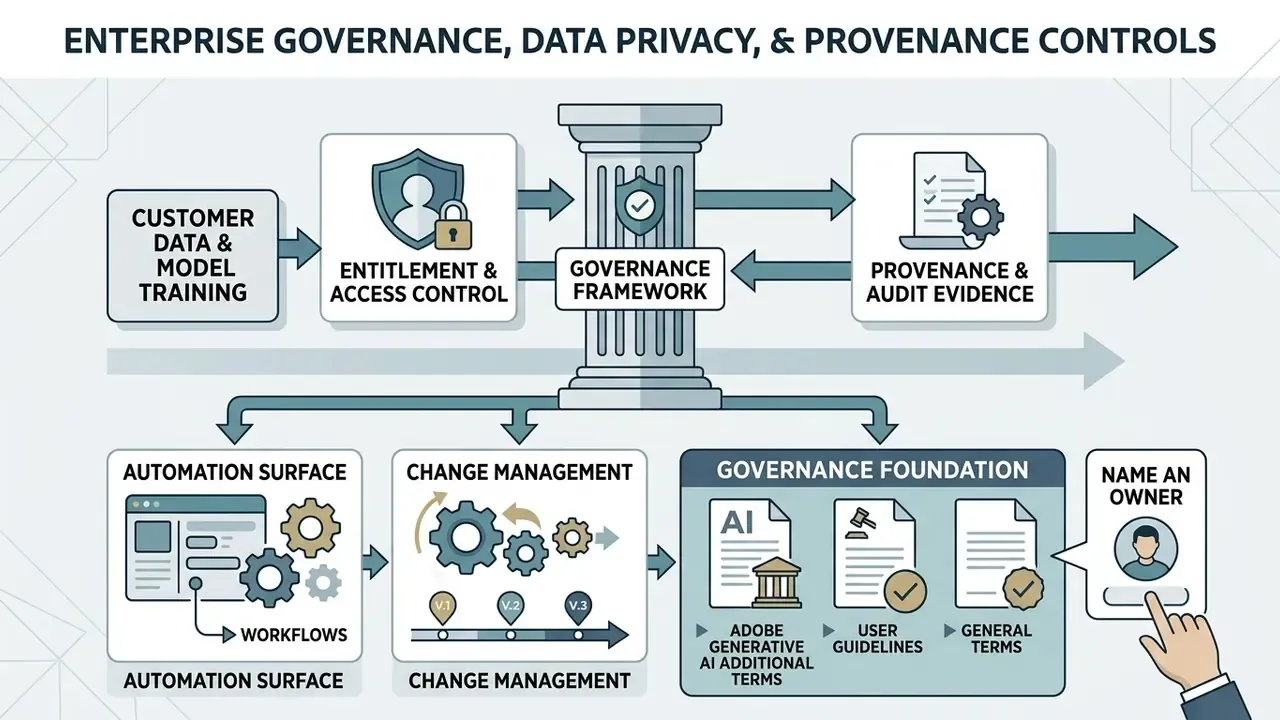
For risk, compliance, and AI governance functions, the decisive questions are not stylistic. They concern training-data boundaries, provenance evidence, entitlement control, and change management. Adobe's published position on each:
- Customer data and model training. Adobe states that Firefly does not train on customer or user content. The Firefly Legal FAQs for enterprise customers confirm that enterprise user content is not used for generative-AI training, with the exception of customer-specific fine-tuning features such as Custom Models, where the customer supplies and controls the training set.
- Provenance and audit evidence. Content Credentials attach to fully Firefly-generated assets, recording that generative AI was used and which model produced the asset. For audit purposes, credentials travel with the exported file and can be inspected downstream, giving model-risk teams a verifiable artifact instead of a self-declaration. Where provenance must be reconstructed after publication, reverse-image-search tooling complements credential inspection.
- Entitlement and access control. Partner-model availability and premium features are governed through Creative Cloud entitlements, so enabling or disabling third-party engines is an administrative decision rather than a per-user preference. Confirm current identity-federation and admin console capabilities (single sign-on, role assignment, deployment scoping) with Adobe for your specific enterprise agreement before rollout, since these controls are contract- and plan-dependent.
- Automation surface. Firefly Services provides the programmatic path for batch rendering, workflow orchestration, and integration with digital asset management systems. Workflow runs report per-asset status, which supports reconciliation against internal job logs.
- Change management. Adobe's Generative AI Additional Terms, Product Specific Terms, and User Guidelines are revised periodically (Additional Terms effective April 2024; Product Specific Terms effective June 2025; User Guidelines last updated May 2026). Governance owners should treat terms verification as a recurring control, not a one-time onboarding step.
One more control that costs almost nothing: name an owner. Creative AI in a regulated firm needs a single accountable person for model enablement, prompt library approval, and escalation. No owner, no evidence trail. Support questions about entitlement scope and admin roles are best routed through your account team rather than ticket queues; if you need the self-serve path first, open the hub.
Adobe Firefly for Commercial Projects: Safety, Rights, and Limitations
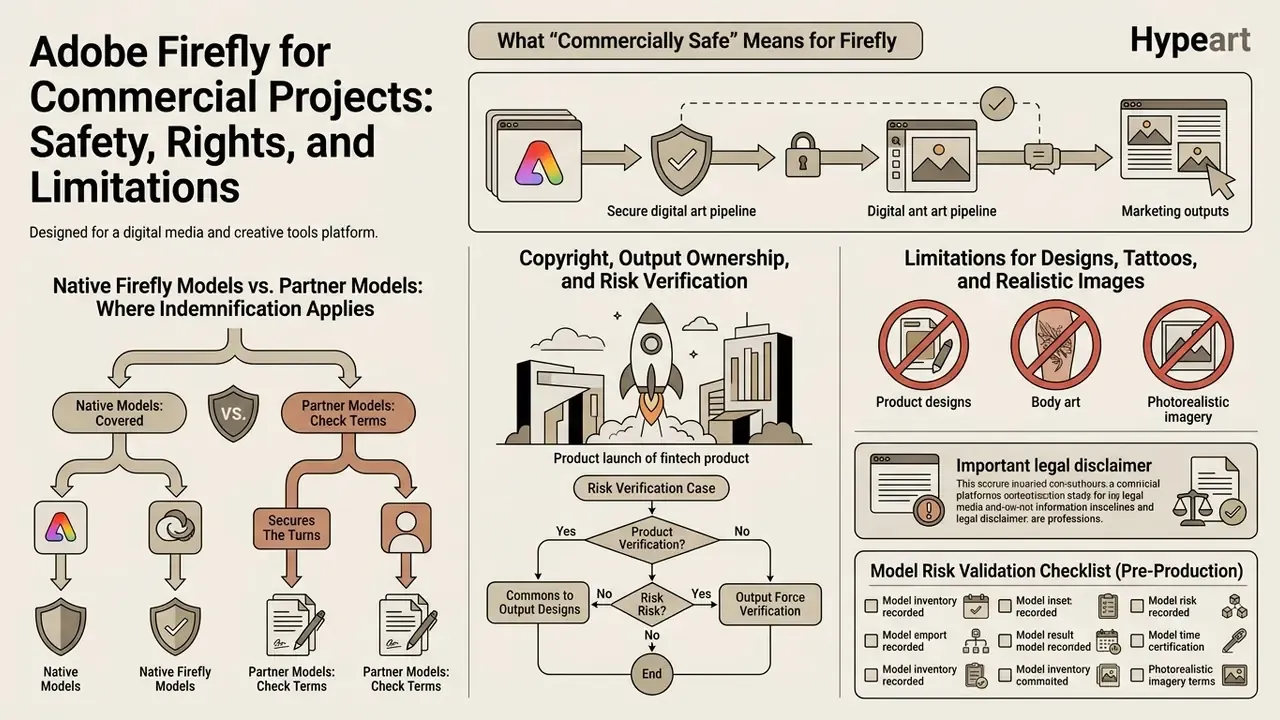
Adobe positions outputs from native Firefly models as "commercially safe" for enterprise marketing and brand publishing. That framework rests on three pillars: ethical data sourcing, contributor compensation, and contractual IP indemnification for enterprise clients.
What "Commercially Safe" Means for Firefly
Commercial safety indicates that the visual generation models were trained only on data where Adobe held explicit usage rights, avoiding scraped public internet art. This structure materially reduces exposure to third-party copyright, trademark, and right-of-publicity claims. It reduces exposure. It does not eliminate it.
Commercial safety does not extend automatic legal protection when a user deliberately prompts for trademarked brands. Adobe's Generative AI User Guidelines prohibit prompting, uploading, or sharing content that infringes third-party copyright, trademark, privacy, or publicity rights, which means intentional misuse shifts risk back to the user regardless of training provenance. Adobe also notes that outputs from beta-labeled features may be restricted to personal use where the product says so.
Native Firefly Models vs. Partner Models: Where Indemnification Applies
This distinction is the most common source of confusion in enterprise reviews, so let us draw the boundary explicitly. Adobe's commercial-safety claim and enterprise indemnification attach to Adobe's own Firefly models. Partner models are not developed by Adobe, and Adobe states the customer is responsible for deciding whether a given partner model suits a given project.
| Criterion | Native Firefly models (Image 4 / Ultra, Vector, Video) | Partner models (Gemini, GPT Image, FLUX, Luma, Runway, ElevenLabs) |
|---|---|---|
| Training data disclosure | Licensed Adobe Stock + public domain, stated by Adobe | Determined by the third-party provider |
| "Commercially safe" positioning | Yes, for non-beta features | Not asserted by Adobe |
| Enterprise IP indemnification | Available for eligible outputs under enterprise terms | Customer assessment required |
| Content Credentials on output | Applied | Model provenance recorded via Creative Cloud tracking |
| Recommended governance posture | Default engine for client-facing and regulated output | Gate by entitlement; restrict to exploration and internal ideation unless separately cleared |
Organizations benchmarking these positions against other vendors can review comparative commercial-use terms for Canva's AI generator and Microsoft's AI image generator to see how indemnification language differs across ecosystems. For teams tracking disputes over training data and output rights, the AI litigation tracker is a useful companion read.
Copyright, Output Ownership, and Risk Verification
Under current US Copyright Office guidance (2025 to 2026), purely AI-generated visual outputs lacking substantial human creative input are not eligible for federal copyright registration. Adobe contractually transfers ownership and control of generated outputs to the customer and asserts no intellectual-property rights in them. Brands still need to weigh residual legal risk, because contractual ownership and statutory copyrightability are two different things.
The practical consequence is easy to state and easy to miss: a brand may lawfully use a Firefly output commercially and still hold no registrable copyright in the purely AI-generated portions. Where exclusivity matters, think logos, mascots, recurring campaign characters, human authorship must be layered on top through documented creative editing. Keep that authorship trail. It is the artifact your counsel will ask for.
Case (fintech product launch). A corporate communications team generated custom marketing graphics with generative AI for an international product launch. During legal review, risk officers flagged potential trademark overlap in three generated background elements. By validating the assets through Content Credentials and re-generating the backgrounds with native commercially safe Firefly models, the team secured full enterprise IP indemnification coverage before publication, and logged both the prompt set and the model identifier in the campaign's approval record. Illustrative composite, not an audited customer result.
Limitations for Designs, Tattoos, and Realistic Images
Firefly enforces built-in safety filters that block generations involving public figures, trademarked brand logos, and explicit content. Adobe states that Firefly will not generate famous people or brands, and that prompts referencing a company, branded item, or famous person absent from Adobe Stock are excluded. Certain visual tasks still need manual post-processing in Photoshop: small text rendering, complex anatomy (hands, facial symmetry), and intricate line art such as the adobe firefly ai tattoo generator features designers experiment with. Adobe's own documentation notes limits in rendering realistic body features, and Text Effects does not output chosen letterforms as generated geometry.
For portrait-heavy pipelines that finding argues for structured review of generated people rather than trust in prompt wording. Teams handling employee or executive imagery frequently supplement Firefly with purpose-built AI headshot generation workflows plus human sign-off.
Important legal disclaimer. Terms governing commercial usage, IP indemnification eligibility, and generative credit consumption rates are subject to change by Adobe. Enterprise risk leaders must verify current product-specific terms and confirm non-beta model status before deploying AI-generated visual content in national or global advertising campaigns. This material is general information and does not replace advice from qualified counsel on copyright, trademark, publicity rights, or regulatory disclosure obligations relating to commercial use of AI-generated content.
Model Risk Validation Checklist (Pre-Production)
Checklist0 / 12
Free Adobe Firefly, Subscriptions, and Generative Credits
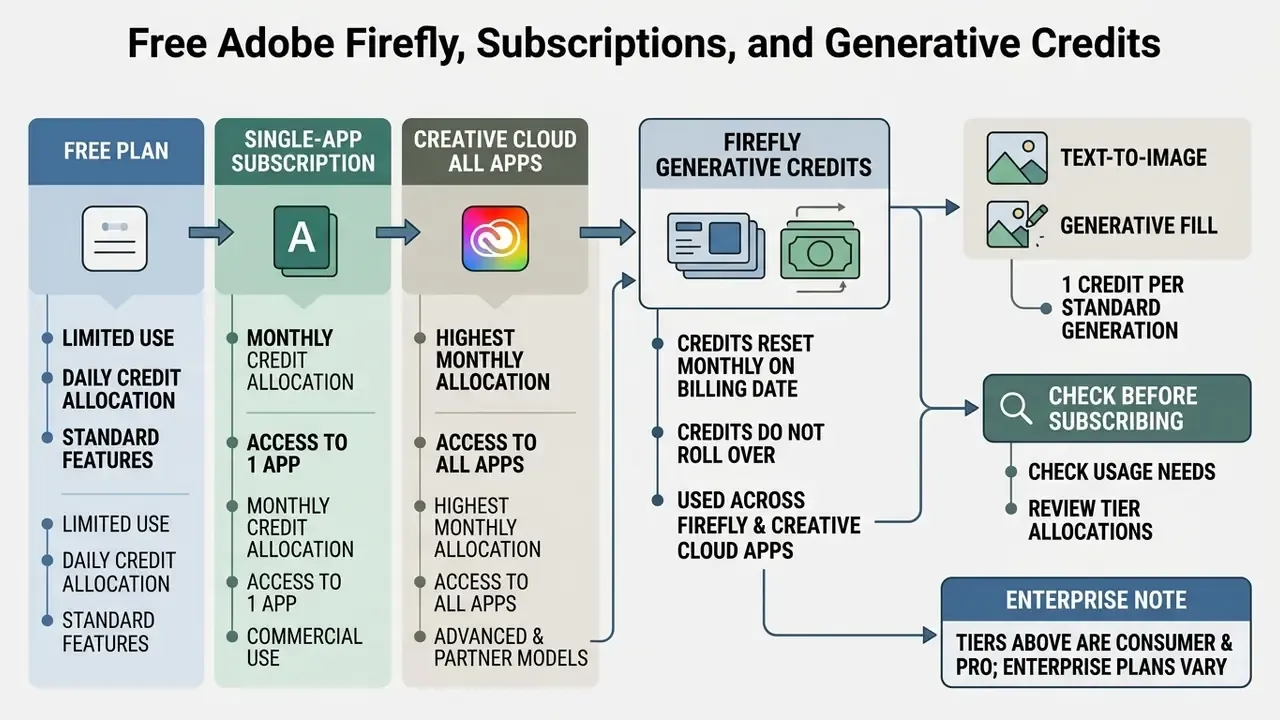
Adobe runs a credit-based consumption model across free, single-app, and full Creative Cloud tiers. Generative credits act as tokens, deducted whenever a user triggers an image, vector, video, or audio generation.
Can Adobe Firefly Be Used for Free?
Yes, with limits. Adobe offers a free plan for authenticated Adobe ID holders with a limited allocation of daily generative credits. Free-tier users can test basic text-to-image features, but generations carry usage caps and lower-priority rendering queues during peak traffic. Adobe's current plans page describes the free tier as "limited daily generations" rather than a fixed credit number. Earlier launch-era materials cited a fixed monthly figure, and that public description has since changed, which is a small but useful reminder that vendor pricing language drifts. Teams evaluating free adobe firefly access against alternatives should review the wider field of free AI art generators for watermark, resolution, and licensing limits before standardizing.
How Generative Credits Work and What to Check Before Subscribing
Generative credits reset monthly on the account billing date and do not roll over.
Per Adobe's documentation, most standard generative features, including Photoshop Generative Fill, consume 1 credit per generation, while premium video and audio features consume substantially more. Adobe illustrates a 4,000-credit premium allocation as roughly 40 five-second videos or about 13 minutes of video and audio translation. Adobe's 2026 help pages also state that standard generations are unlimited on certain Creative Cloud Pro, Firefly, and credit-based plans, which differs from earlier 2023 language describing extra credits as a separate purchase once the included allotment ran out. Additional credits are available through Firefly paid subscriptions and add-on tiers of 2,000, 4,000, 10,000, and 50,000 credits. Verify current allocations and per-feature costs on Adobe's official plans and generative-credits pages before committing budget, and cross-check against the AI Media Pricing overview when comparing vendors. For unit-economics modeling, see the overview of consumption calculators.
| Plan | Monthly Generative Credits | Commercial Rights | Premium / Partner Model Access |
|---|---|---|---|
| Free Plan | Limited daily generations | Standard terms of use (non-beta features) | Limited (no unlimited video or premium tiers) |
| Firefly Standard ($9.99/mo) | 2,000 credits | Full commercial rights | Standard access within credit limit |
| Firefly Pro ($19.99/mo) | 4,000 credits | Full commercial rights | Premium features within credit limit |
| Firefly Pro Plus ($49.99/mo) | 10,000 credits | Full commercial rights | Premium features within credit limit |
| Firefly Premium ($199.99/mo) | 50,000 credits | Full commercial rights | Unlimited Firefly Video Model access |
| Creative Cloud All Apps | 1,000 credits (plan-dependent) | Full commercial rights | Included within allocation |
| Single App (e.g., Photoshop) | 500 credits (plan-dependent) | Full commercial rights | Standard access |
Enterprise note: the tiers above are published consumer and pro-tier prices. Enterprise deployments are contracted separately, and credit volumes, indemnification scope, and administrative controls are negotiated per agreement. Do not model enterprise total cost of ownership from the $199.99 tier alone. For high-volume API pipelines, forecast cost as (expected generations per asset variant × variants per campaign × campaigns per month × credits per feature), then reconcile against the contracted allocation. Add the control cost too: review hours, provenance retention, and log storage rarely appear in the initial ROI slide, and their absence is the most common reason a creative AI business case fails second-line challenge.
FAQ: Adobe Firefly AI Art Generator
Which devices and browsers support Firefly?
Firefly runs as a web application supported on desktop Google Chrome, Microsoft Edge, Mozilla Firefox, and Apple Safari across Windows 10+, macOS 12+, and ChromeOS. Mobile browser access works on iOS 17.4+ and Android 9.0+ devices, and Adobe also publishes Firefly mobile apps. JavaScript must be enabled, and Safari Lockdown Mode is not supported. Adobe notes the app can be installed on iPad, though functionality is limited and technical support is unavailable for that surface. Adobe's help pages differ slightly by product surface and publication date, so plan enterprise rollouts around desktop browsers.
Which formats, resolutions, and prompt languages are supported?
Firefly supports text prompts in over 100 global languages, and the technical requirements page phrases this more conservatively: prompts may be entered in your preferred language, with a separate list of supported interface languages. Reference uploads accept JPG, PNG, and WebP, plus HEIC for Generate Image in Safari on desktop. Generated raster images download as PNG and JPG at up to 2000×2000 pixels, the image editor exposes 1K and 2K output options, and some partner models reach 4K. Vector outputs export as editable SVG paths, video generations as MP4.
What is the maximum prompt length?
750 characters. Longer input returns the error "Prompt exceeds the max length of 750 characters." Split complex briefs into a primary prompt plus reference images and panel settings rather than one long paragraph.
Do I own the copyright to images I generate in Firefly?
Adobe's terms treat outputs as customer content that you own and control, and Adobe asserts no IP rights in them. Whether copyright subsists depends on local law: under 2025 US Copyright Office guidance, purely AI-generated expression without sufficient human authorship is not registrable, even though the output may still be used commercially.
Are partner-model outputs commercially safe?
Adobe's commercial-safety statement and enterprise indemnification apply to Adobe's own Firefly models. Partner models are third-party engines, and Adobe states the customer is responsible for determining whether a given model is appropriate for a project. In practice, that means gating partner engines by entitlement and keeping them out of regulated client-facing output until separately cleared.
Which tattoo and art styles can Firefly generate?
Firefly handles realism, traditional and neo-traditional, blackwork, fine-line, dotwork, minimalist, geometric, and Japanese irezumi styles for line art, plus watercolor, impressionism, surrealism, cubism, charcoal, paper cutout, glitch, and retro-futurist looks for illustration. Intricate line work and small lettering usually need manual cleanup in Photoshop.
What evidence should we retain for audit?
At minimum: the prompt text, the template ID, the model identifier and version, the exported file with Content Credentials intact, the reviewer and approver names, and the date of the terms check that authorized the feature in use. Reproducible evidence beats recollection every time.
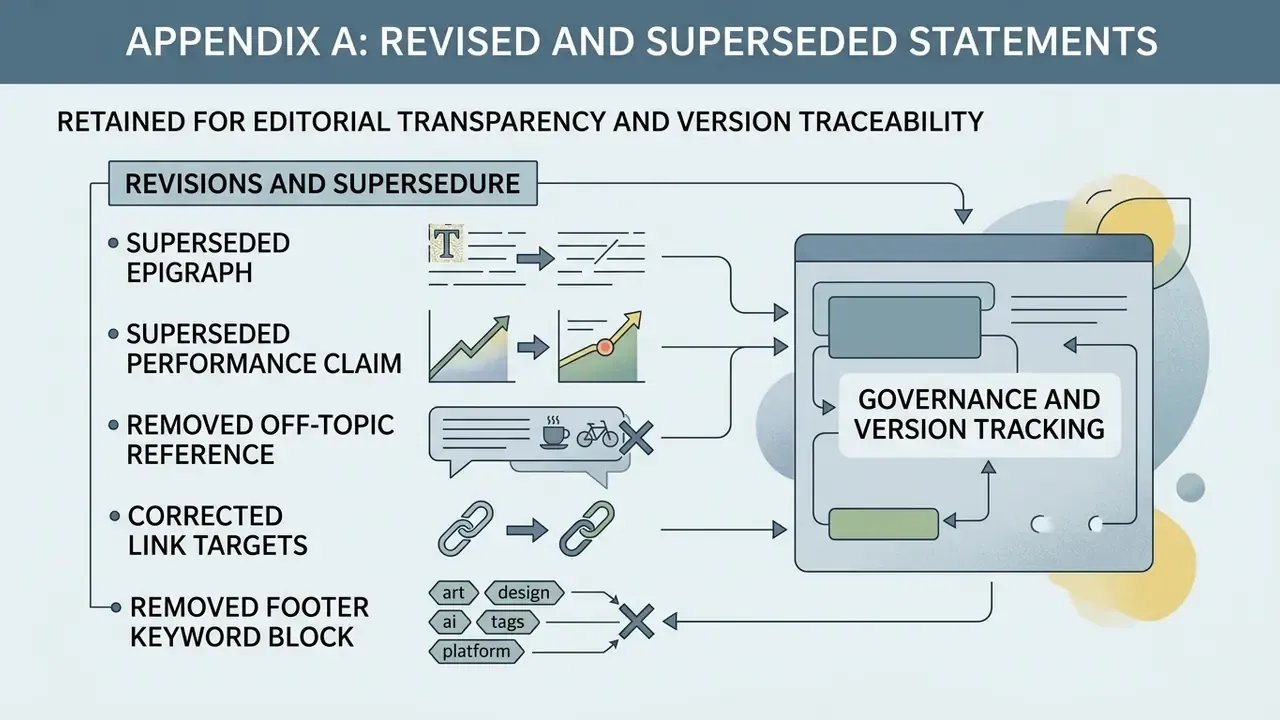
Appendix A: Revised and Superseded Statements
Appendix B: Prompt Template Library and Style Vocabulary
Reusable, review-friendly templates that stay inside the 750-character limit while preserving auditability.
| Use case | Template | Notes for reviewers |
|---|---|---|
| Product hero | Photo of {product}, {angle}, {lighting}, {palette}, {mood}, shallow depth of field, no text overlay | Lock {palette} to brand tokens; log the token set with the asset |
| Campaign background | {Style} background of {environment}, {lighting}, {palette}, negative space on the {left/right} third | Negative space request reduces later Generative Expand cost |
| Editorial illustration | {Medium} illustration of {concept}, centered composition, {lighting}, {palette}, {mood}, visible texture | Prefer medium keywords (watercolor, charcoal, ink wash) over artist names |
| Icon / vector set | Vector icon set of {subjects}, flat geometric shapes, uniform stroke weight, {two-color palette}, transparent background | Output as SVG; confirm path editability in Illustrator |
| Pattern system | Seamless {style} pattern of {motif}, {palette}, even distribution, no visible seams | Verify tiling at production size before handoff |
| Line-art concept | {Blackwork / fine-line / neo-traditional} line art of {subject}, symmetrical composition, high contrast, no shading gradients | Expect manual cleanup of fine linework |
| Typography treatment | Text effect: letters made of {material}, {lighting}, {palette} (Adobe Express Text Effects) | Effect styles the treatment, not the letterforms |
| Video extension | Extend {scene description}, maintain camera movement and lighting continuity | Premium credits; confirm allocation before batch runs |
Exclusion vocabulary that behaves as soft guidance: no text overlay, no watermark, no people, no visible logos, no motion blur, no duplicated limbs, no distorted hands.
Governance tip: store approved templates in a shared prompt library with a version number, owner, and approval date, then reference the template ID in the asset record. This turns prompting from tacit craft into a controlled input, and it is probably the cheapest single improvement to auditability in any generative pipeline.
Content Safety and Restricted Categories
Adobe applies safety filters that block generation of explicit content, depictions of identifiable public figures, and trademarked brand marks. The Generative AI User Guidelines also prohibit prompts or uploads that infringe third-party copyright, trademark, privacy, or publicity rights. This guide covers standard commercial visual generation workflows only. It does not describe, facilitate, or link to non-consensual or explicit content, and organizations should mirror these platform restrictions in their own acceptable-use policies, including in the incident-response playbook that governs takedown and disclosure.
Further Resources
For additional generative media guides, technical documentation, and enterprise AI compliance frameworks, consult the AI media glossary hub, the AI media tools glossary entry on photo editors, and the comparative reviews of AI art generators and AI image expansion tools. For contracted enterprise terms, indemnification scope, and administrative controls, contact Adobe's enterprise support channel directly, since those provisions are agreement-specific and change between renewals.