Here is the uncomfortable part for anyone in a regulated industry. A LinkedIn profile picture is not a vanity asset; it is an identity artifact attached to your name, your title and your employer's brand. For a CRO, a Head of Model Risk or a compliance lead, that means a free ai linkedin photo generator raises three questions at once: is the output credible, is the biometric upload safe, and does the licence allow the image on a company page?
Short version: the tooling is good enough. The governance around it usually is not.
"Evaluating generative image tools for executive positioning means balancing visual credibility with risk governance. No model output should be deployed without verifiable licence terms, privacy safeguards and identity alignment."
What Is a Free AI LinkedIn Photo Generator?
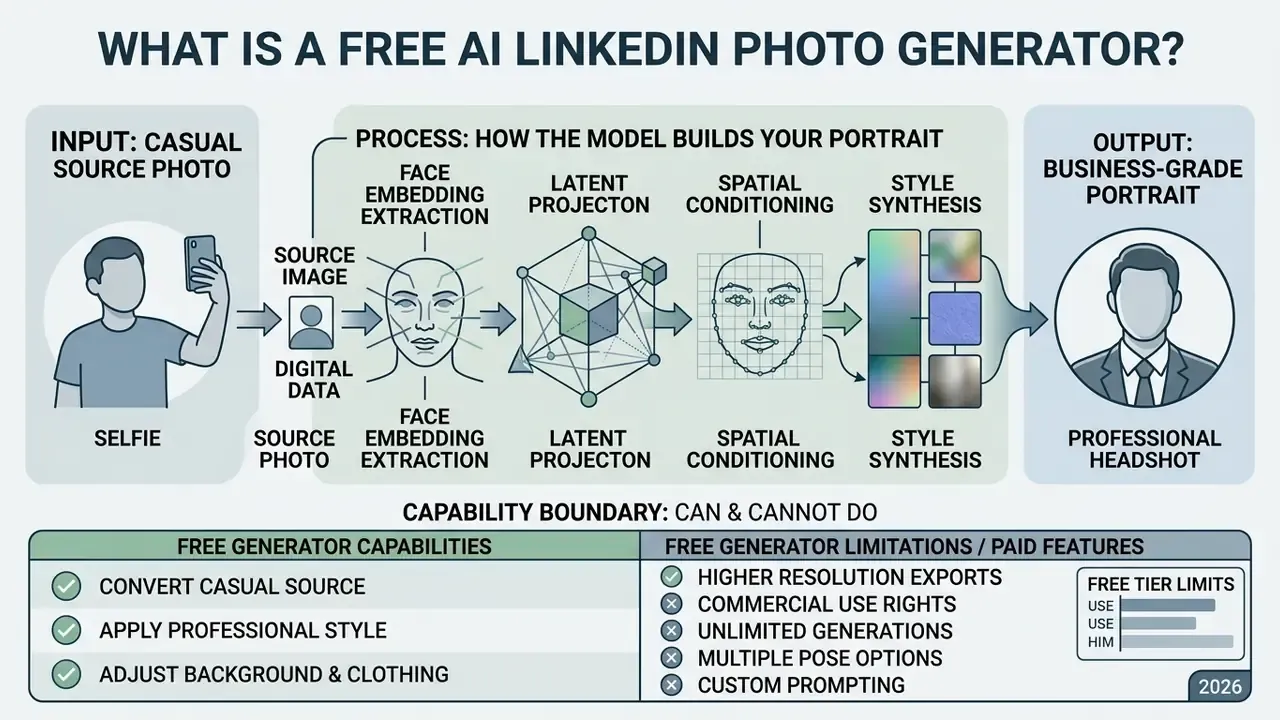
A free AI LinkedIn photo generator is a web application that converts a casual source photo, usually a selfie, into a business-grade portrait without a studio session. A standard editor performs deterministic pixel adjustments. An ai linkedin photo generator free service does something different: it synthesizes a new image conditioned on your facial geometry. Readers comparing broader platform categories can review our overview of AI image generators and the dedicated guide to AI headshot generators.
Traditional editor versus AI generator
| Feature | Traditional photo editor | AI photo generator |
|---|---|---|
| Core mechanism | Pixel tweaking and filters | Generative synthesis |
| Base image | Preserves the original photo | Reshoots in silico |
| Identity preservation | 100% deterministic | Neural embeddings |
| Outfit or scene swap | Manual compositing | Prompt or style map |
| Typical turnaround | 10 to 40 minutes of manual work | 10 to 60 seconds |
When people search for an ai generator linkedin photo or an ai image generator for linkedin, they are usually trying to compress two things: cost and calendar time. A traditional executive headshot session in the United States runs between $150 and $450, and scheduling, shooting and retouching commonly spans two to three business days. AI tools return several ai generated linkedin photo variants in roughly 15 seconds of average processing time, at little or no upfront cost.
"In 38 of 50 US states the average entry price for a professional photo session exceeds $250, reaching $400 in several markets."
Fidelity has already crossed the line where human observers struggle to separate synthetic portraits from camera-captured ones.
"Participants identified real photos correctly in 66.9% of cases, yet mistook AI-generated images for genuine photographs in 44.2% of trials."
That gap explains the appeal and the risk in one line. A well-generated portrait passes as authentic, so the burden of honest representation moves from the tool to you.
Under the Hood: How the Model Builds Your Portrait
Modern platforms rely on generative diffusion pipelines: Stable Diffusion fine-tuned with DreamBooth, identity adapters such as InstantID or IP-Adapter FaceID, or zero-shot multimodal models like Google Gemini 2.5 Flash Image. The pipeline works in four stages.
- Face embedding extraction.A face-recognition network converts your selfie into a mathematical identity vector, separating personal features from background noise.
- Latent projection.The embedding is injected into cross-attention layers of the diffusion U-Net backbone, so denoising is continuously steered toward your identity.
- Spatial conditioning.Control modules such as ControlNet apply five-point facial keypoint conditioning, locking head pose, eye position and facial proportions.
- Style synthesis.Clothing, studio lighting (key light plus fill) and neutral backgrounds are rendered as new pixels rather than pasted layers.
The practical consequence: the model runs an in-silico photo shoot instead of a smoothing filter. That is why skin texture, eye geometry and facial proportions can stay believable while attire and environment change completely. It also explains the failure mode. When the identity vector is weak, usually because the selfie was dim or angled, the model invents features rather than preserving them.
From Selfie to Professional LinkedIn Headshot
Turning a casual selfie into a professional portrait requires the model to separate your identity from environmental noise, then rebuild facial structure accurately while changing attire, hair styling and lighting.
Well-tuned pipelines keep natural skin texture, distinct eye geometry and recognizable proportions. Instead of applying a beauty filter, the network renders studio lighting onto the synthesized headshot while leaving your actual appearance intact. If you only need retouching rather than full synthesis, a conventional AI photo editor or a free photo editor is usually the safer and faster route. Fewer moving parts, fewer authenticity questions.
What Free AI Photo Generators Can and Cannot Do
Free AI headshot platforms handle background replacement, lighting correction and business wardrobe rendering. They also operate under hard computing and licensing constraints. Most free tools cap export resolution at web dimensions (720p or 1080p), limit style variations, or stamp watermarks on generated images.
"All five top-ranking services allow free image generation, yet each attaches a limitation: watermark, quota, or personal-use-only licence."
A 2026 technical audit by Nation.ai looked at top-ranking free headshot generators and confirmed the pattern. Platforms let you create images without payment, but free tiers almost universally enforce trade-offs: capped daily quotas, slower GPU inference queues, watermarked exports, or restrictive non-commercial licences. High-resolution 4K outputs, full commercial usage rights and multi-prompt custom styling sit behind premium tiers. If you want to skip registration entirely, review options for no-sign-up AI image generators, which run stateless inference in memory.
Capability boundary, free tiers, 2026
| Capability | Usually available free | Usually paywalled |
|---|---|---|
| Background replacement | Yes | Multi-scene batches |
| Business attire rendering | 1 to 3 presets | Full style library |
| Export resolution | 720p to 1080p | 2K and 4K upscaling |
| Watermark-free download | Sometimes | Standard on paid tiers |
| Commercial licence | Rare (Ideogram is the exception) | Standard on paid tiers |
| Bulk or team processing | No | API and enterprise plans |
Why a Professional Profile Picture Matters: Engagement and Hiring Signals
A profile photo is not decoration. It is the first credibility signal a recruiter, buyer or investor processes, often before your headline. According to internal platform analytics published by profile-picture vendors such as PFPMaker, users who replace casual snapshots with optimized professional portraits report up to 36 times more profile interactions and roughly 146% more engagement on inbound outreach. Those numbers come from vendor telemetry, not peer-reviewed research, so treat them as directional rather than absolute.
Independent academic evidence points the same way, and it is stronger.
"Freelancers whose profile photo looks the part for the role are hired more often, even when their ratings are lower."
That study analysed 63,014 completed contracts on Freelancer.com, which makes it one of the largest field datasets on visual role-fit and hiring outcomes. The takeaway is practical: alignment between your portrait and industry expectations moves conversion more than raw photographic polish. A slightly imperfect photo that reads as "credible risk executive" beats a flawless one that reads as "influencer".
How to Create a LinkedIn Photo With AI for Free
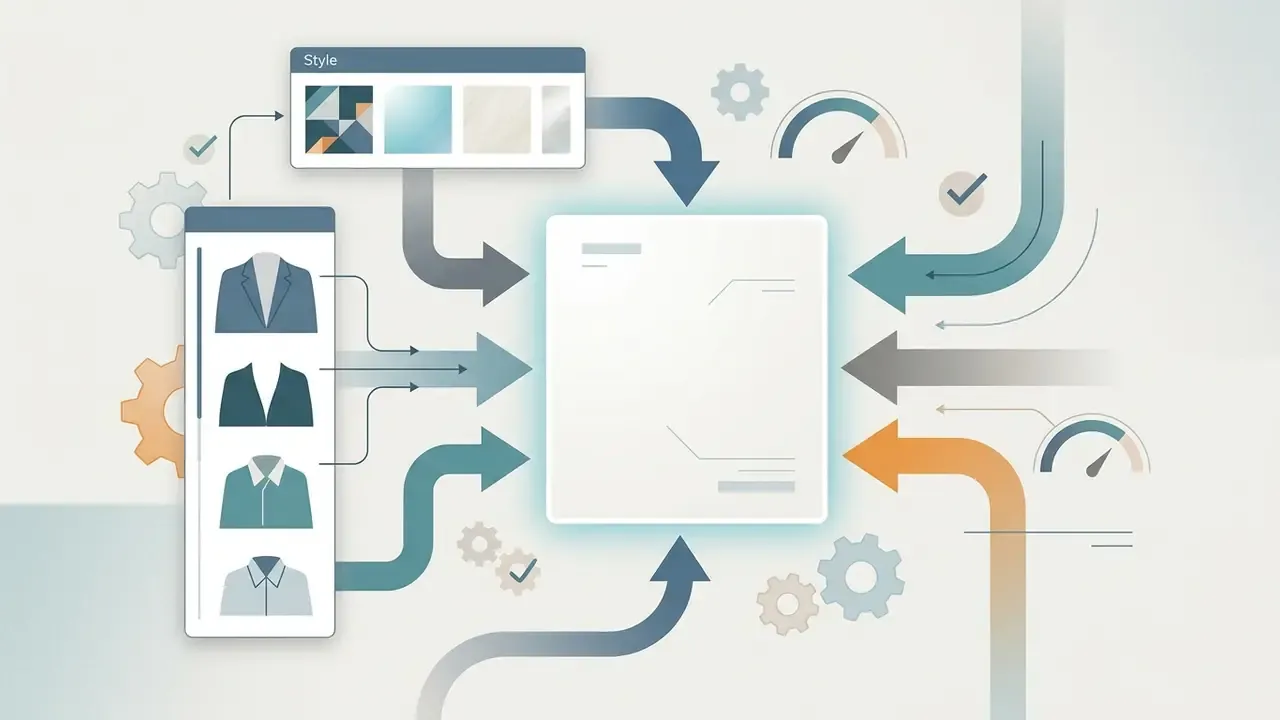
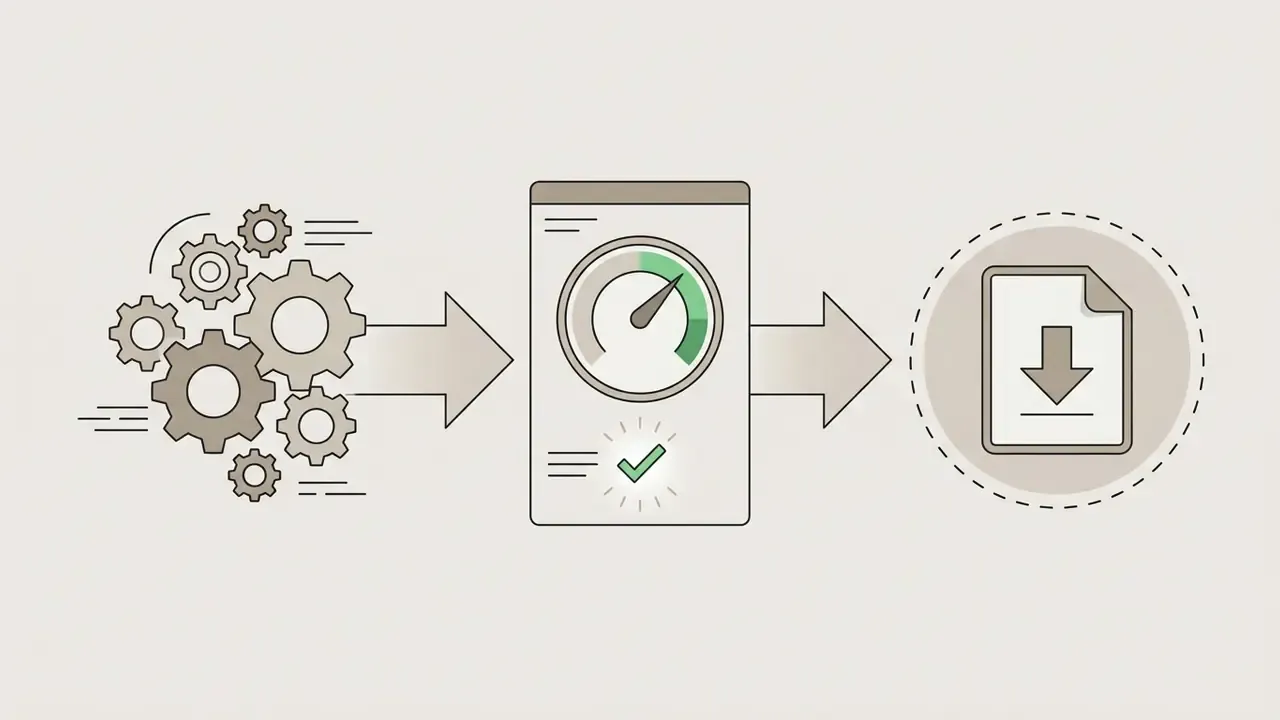
Creating a professional profile picture with a free AI generator is a four-step workflow: prepare a compliant source file, upload it, choose business-appropriate style parameters, then audit the output before download. Following that order cuts visual artifacts and produces results fit for enterprise representation.
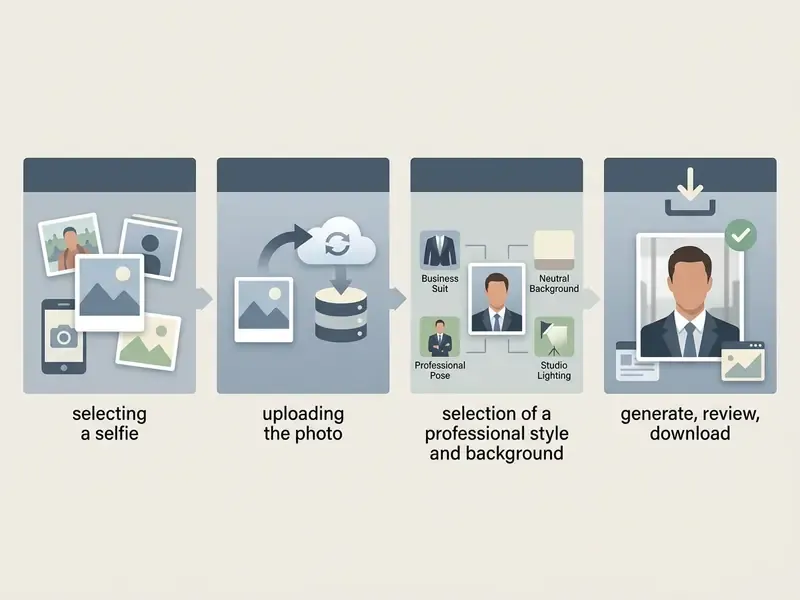
Figure 1: step-by-step workflow for generating an AI LinkedIn profile picture for free.
Input File Requirements: What to Upload
Most rejected uploads fail on file mechanics, not on face quality. Check these parameters before your first attempt.
| Input parameter | Technical requirement | Rejection threshold |
|---|---|---|
| Allowed formats | PNG, JPG, JPEG, WebP | HEIC, TIFF, RAW (convert first) |
| Max file size | 10 MB typical, 5 MB on some tools | Above 20 MB triggers server timeout |
| Min resolution | 600 × 600 px | Below 300 × 300 px causes pixelation |
| Number of selfies | 1 for zero-shot models, 8 to 12 for fine-tuned models | Mixed lighting sets degrade identity lock |
| Framing | Head fully inside frame, not cropped by edges | Cut-off crown or chin breaks background removal |
| Colour profile | sRGB | CMYK and exotic profiles shift skin tone |
Choose a Clear Selfie for AI Processing
The initial selfie dictates the realism and facial accuracy of the generated headshot. You want an unobstructed frontal face, balanced natural light, no strong shadows, no backlighting, no harsh flash reflection.
International Civil Aviation Organization (ICAO) portrait standards keep head rotation within ±5° of frontal alignment across roll, pitch and yaw. Facial sharpness should stay consistent from forehead to chin and ear to ear. Hold a neutral expression or a slight natural smile, eyes open, mouth closed, which prevents geometry warping during latent feature extraction.
One small observation from testing: bathroom-mirror selfies fail more often than any other input type. Mixed colour temperature confuses the model, and the identity lock drifts.
Select a Professional Style and Background
Attire and background should match industry expectations rather than personal taste. Sectors differ more than people assume.
- Finance and consulting: formal business attire, structured suits or blazers in dark navy, charcoal or dark gray, with clean white or light gray neutral backgrounds.
- Technology and fintech: smart-casual attire such as collared shirts, tailored sweaters or blazers without ties, set against modern blurred office or soft textured backdrops.
- Creative fields: personal style expression, textured backgrounds or subtle environmental context, with the frame kept uncluttered.
LinkedIn guidance is consistent on one point: backgrounds should stay low-contrast and non-distracting, so visual focus lands on the face.
Copy-ready prompts for text-driven editors and inpainting
[Formal Corporate]: "Professional executive headshot, dark charcoal tailored wool suit,
crisp white collared shirt, soft neutral studio background, 85mm lens,
realistic skin texture, volumetric studio lighting, eye-level camera."
[Tech / Startup]: "Smart casual professional portrait, navy tailored blazer,
dark gray crew-neck t-shirt, blurred modern office backdrop,
natural daylight from the left, shallow depth of field."
[Creative / Consulting]: "Editorial business portrait, textured olive knit sweater,
muted terracotta seamless backdrop, soft rim light, natural skin pores,
subtle warm colour grade, 50mm lens."
[Inpainting fix, wardrobe only]: "Replace jacket with dark navy single-breasted blazer,
keep face, hair, skin tone and lighting unchanged."
[Inpainting fix, background only]: "Replace background with light gray seamless studio wall,
match existing key light direction and colour temperature, preserve hair edges."
Keep experiments separate from your live profile. Playful prompt work belongs in a sandbox, and if that is what you are after, our collection of funny ai prompts is a better playground than your professional avatar.
Generate, Review and Download Your Profile Picture
Once inference finishes, usually 10 to 60 seconds depending on server architecture, run a visual quality audit before download.
Artifact audit: what to look for and how to fix it
| Artifact | Diagnostic sign | Corrective action |
|---|---|---|
| Plastic skin | No pores, uniform tone, glowing cheeks | Regenerate with "realistic skin texture" in the prompt |
| Asymmetric eyes | Pupils differ in size, mismatched catchlights | Discard the output; eyes rarely repair cleanly |
| Warped ears or earlobes | Melted or duplicated cartilage | Inpaint the ear region or crop tighter |
| Teeth anomalies | Extra or fused teeth on a smile | Choose a closed-mouth variant |
| Lighting mismatch | Face lit left, background lit right | Regenerate background only, matching the key light |
| Collar or lapel collapse | Shirt seam dissolving into the neck | Inpaint wardrobe with the prompt above |
| Text ghosting | Illegible characters on badges or walls | Remove background objects entirely |
Select outputs that hold high facial fidelity and show less than 2.5% radial distortion, in line with ICAO portrait-quality and FISWG forensic assessment practice. Download the final headshot as PNG or uncompressed WebP to avoid lossy compression artifacts before you upload to LinkedIn. If the free tier caps output at 720p, run the file through one of the AI image upscalers first.
Illustrative governance scenario, not a documented client result: imagine a model risk function that treats headshot pipelines as a low-severity model and requires the artifact audit above as a two-person review step. In that hypothetical, improper profile submissions drop sharply, mainly because a named reviewer, not the generator, owns the sign-off. The point is the control, not the number.
Generate a Matching LinkedIn Background Banner
A profile picture rarely works alone. LinkedIn renders a cover banner directly behind the avatar, and a mismatched banner quietly undermines an otherwise polished portrait.
| Banner parameter | Specification |
|---|---|
| Dimensions | 1584 × 396 px (4:1) |
| Formats | PNG, JPG, GIF |
| Max file size | 8 MB |
| Safe zone | Keep text right of the avatar circle and above the bottom 80 px |
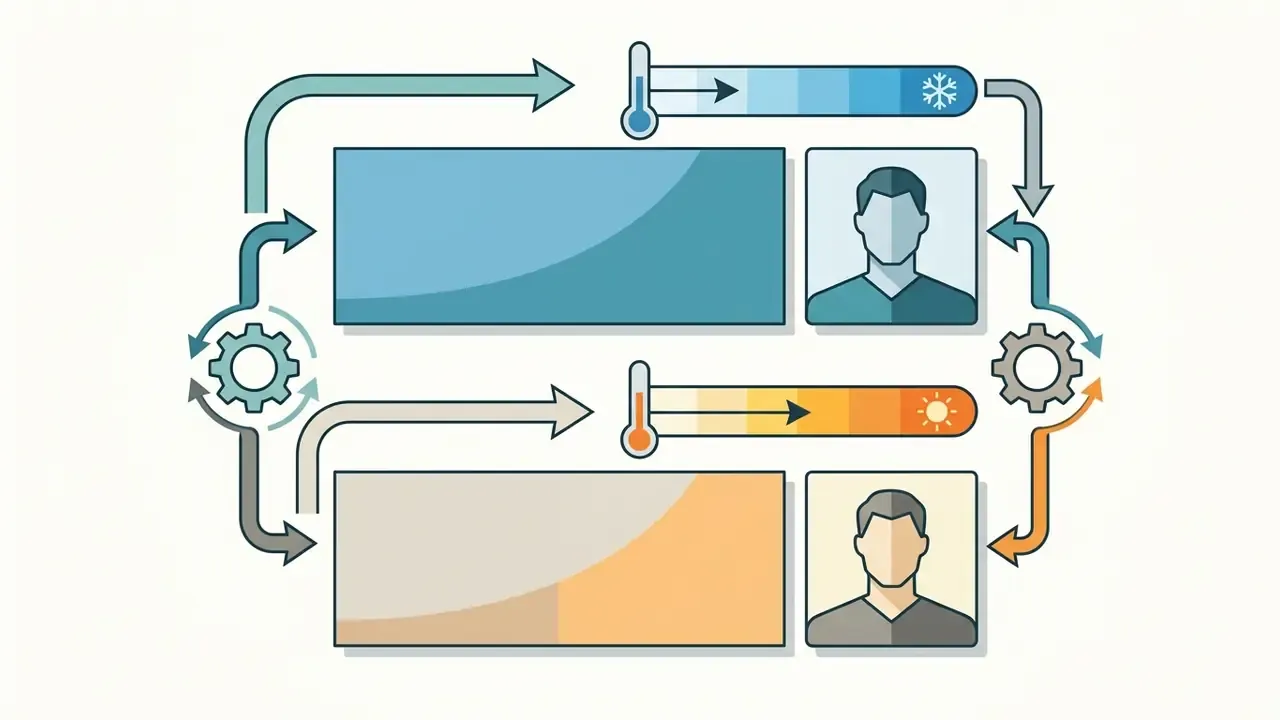
Alignment rules that make the set look intentional
Copy-ready banner prompts
[Corporate / Finance]: "Minimalist modern office interior, cool blue ambient light,
shallow depth of field, wide panoramic composition, no people, no text, 4k."
[Tech]: "Abstract dark gradient with subtle circuit-line texture,
cyan accent glow, ultra-wide banner composition, negative space on the right, 4k."
[Consulting / Creative]: "Soft warm concrete wall texture, diffused window light,
panoramic crop, generous empty space for headline text, 4k."
Standardizing Team Headshots with Enterprise AI Workflows
Individuals need one good portrait. HR and marketing need fifty consistent ones. Bulk generation has quietly become the main B2B use case for headshot AI.
How enterprise workflows are built
"A 160-employee corporate rollout recorded a 75% reduction in photo-related onboarding time and 60% lower photography spend."
Governance note for bulk deployments: employee facial images are biometric data in the EU and UK. Document consent, retention limits and a deletion path before the first batch goes up. If procurement wants a cost comparison against traditional shoots, explore the hub of calculators to model per-employee spend and control overhead together.
What Makes an AI-Generated LinkedIn Photo Look Professional?
A professional AI-generated LinkedIn picture follows core portrait composition principles, sane lighting ratios and platform formatting. Recruiters and executive peers judge visual cues within seconds, which makes natural composition a credibility factor rather than an aesthetic one.
Portrait composition and lighting
| Metric or parameter | Recommended professional standard |
|---|---|
| Frame coverage | Face fills 60% to 70% of the circular frame |
| Camera perspective | Eye-level position, frontal within ±5° |
| Lighting standard | Soft frontal key light, ISO 3664 daylight |
| Aspect ratio and size | 1:1 square, minimum 400 × 400 px, up to 8 MB |
A 2024 hiring survey by Ringover across 1,087 recruiters found that 76.5% preferred polished AI headshots over casual real photos in blinded comparisons. The same dataset carries a warning.
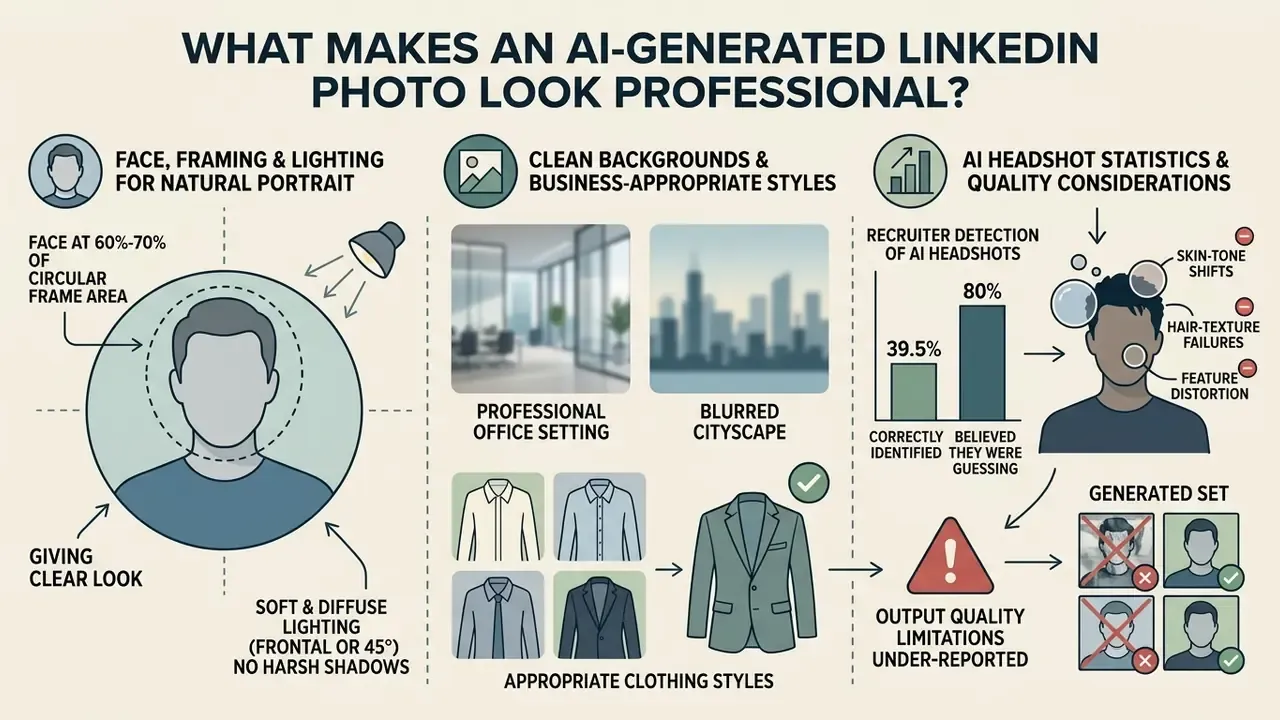
"66% of recruiters said they were put off by a candidate when they recognised an AI photo that had not been disclosed."
"Recruiters correctly identified AI headshots in only 39.5% of cases, while 80% believed they were guessing accurately or very accurately." — Ringover Recruiter Survey, June 2024, n=1,087. https://www.ringover.com/blog/ai-headshots
Read those two numbers together. Evaluators are confident but unreliable detectors, and they punish obvious synthetic tells. High realism therefore matters, and you can pre-screen your own output with AI image detectors before publishing.
Face, Framing and Lighting for a Natural Portrait
"Images of majority demographic groups are rated higher in quality, while minority groups show artifacts more frequently."
If your generated set keeps producing skin-tone shifts, hair-texture failures or feature distortion, the model is probably the constraint, not your selfie. Test a second platform before you accept a compromised result. This is also a fairness question worth logging if the tool is used across an entire workforce.
Clean Backgrounds and Business-Appropriate Styles
Backgrounds stay plain, uncluttered and neutral so they do not compete with the face. Solid light gray, muted blue, off-white or softly out-of-focus modern office environments work across formal corporate and mid-level management roles, which mirrors both LinkedIn's guidance and university career-services recommendations on non-distracting backdrops.
Styling reinforces institutional brand standards. Dark suits, dark blazers or clean collared shirts read as authority. Oversaturated colours, busy graphic patterns and artistic background renders read as noise. Field evidence backs the effort: the Marketing Science analysis of 63,014 Freelancer.com contracts cited earlier found role-congruent imagery raised hiring probability even for suppliers with weaker ratings.
Are Free AI LinkedIn Photo Generators Really Free?
The market for an ai generator for linkedin profile picture free platform runs on several monetization models, from genuine free-tier allocations to freemium upgrade funnels. Knowing the difference prevents surprise costs and export dead ends.
| AI platform | Free tier allocation | Watermark | Maximum resolution | Commercial rights included |
|---|---|---|---|---|
| Dr. Headshot | 1 photo sample | Yes | Standard (720 px) | No, personal use only |
| Fotor | Limited free credits | Yes | Compressed 1080p | Excluded in free tier |
| YouCam | 5 sign-up credits | Yes | 720p | Paid Pro plan only |
| Leonardo AI | 15 daily tokens | No | 1024 × 1024 px | Paid plan required |
| Ideogram | 10 daily credits | No | 1024 × 1024 px | Yes |
| FreeHeadshot | 3 samples per run | Yes on free samples | 1080p | Paid upgrade ($19) |
| Canva | 2 AI headshot credits, up to 2 profile shots per day | No | 1024 px class | Depends on plan terms |
| Pixelbin | 3 profile pictures per month | No | Source resolution (HD) | Check plan terms |
| HeadshotPro | 1 selfie to style variants, 1 HD download | No on HD download | HD | Paid tiers for full sets |
| BetterPic (free tool) | 8 to 12 selfies to 10 free outputs | No | 4K | Paid licence for full rights |
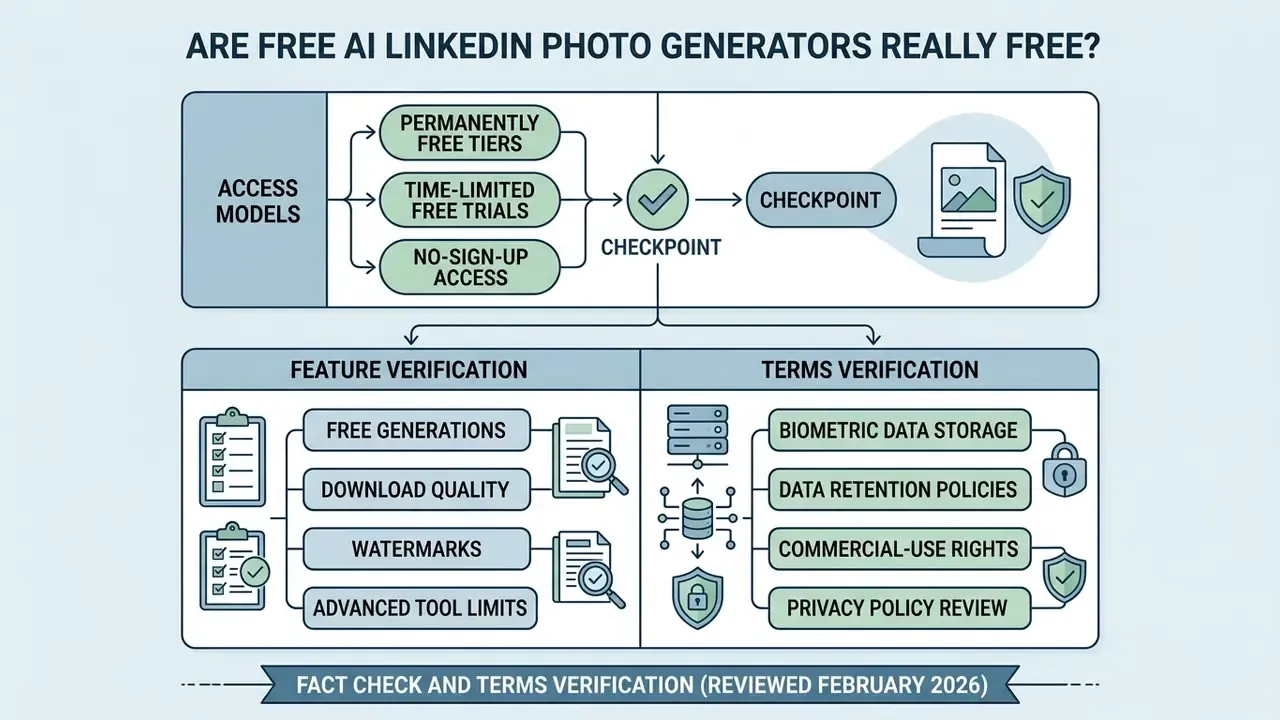
"Free access is real, but it almost always ends in a watermark, a quota, or a personal-use-only licence."
Tactics vary. Ideogram refreshes free tokens daily with permissive terms, while specialist headshot platforms typically charge for unwatermarked high-definition exports. Midjourney removed free trials in 2023 and remains paid-only, a hard wall before any download. To weigh broader tool costs, view the guide on media generation services, or compare the wider field of best free AI image generators and free AI art generators.
Free Forever Tools, Trials and No-Sign-Up Access
Free access generally comes in three shapes.
- Permanently free tiers.Recurring daily or monthly quotas that refresh automatically: Leonardo AI's daily allowance, Canva's standard AI quota, Google Cloud's non-expiring free usage limits.
- Time-limited free trials.Temporary access passes such as Google Cloud 30-day, 90-day or 12-month trials and AWS AI service trials, which expire on duration or token threshold.
- No-sign-up access.Browser tools that transform a single photo without account creation or email collection, running stateless inference in memory.
Check Downloads, Watermarks and Advanced Tool Limits
Before you invest time in an ai image generator for linkedin free workflow, verify export constraints. Typical free-tier limits include visible brand watermarks in image corners, downscaled dimensions (720 × 720 px), 7-day storage windows and disabled retouching tools.
Apps often gate the useful features, precise background replacement, facial spot correction and resolution upscaling, behind a subscription. Reference points from adjacent categories help calibrate expectations: Clipchamp's free plan exports 1080p without a watermark, VEED's free plan stamps a watermark and caps at 720p, and Descript's free tier watermarks exports while blocking AI tools entirely. Video-side limits follow the same logic, which you can see in our notes on any funny ai video generator free tier. To compare software features in depth, browse the hub, including our reviews of the Canva AI generator and the Google AI image generator.
Fact check and terms verification (reviewed February 2026)
How to Choose the Best Free AI LinkedIn Profile Picture Maker
Choosing the best free profile picture maker comes down to four things: output realism, face-data privacy, editing control and commercial usage rights. Our category guide to AI headshot generators breaks these down tool by tool.
Platform selection checklist
| Checkpoint | Key verification requirement |
|---|---|
| Visual realism | No plastic skin effect, accurate eye geometry |
| Privacy controls | Stateless processing, zero model re-training |
| Editing features | Mask-based inpainting, background replacement |
| Commercial licence | Explicit commercial rights in the user agreement |
| Export integrity | Unwatermarked PNG or WebP, 1080 px or higher |
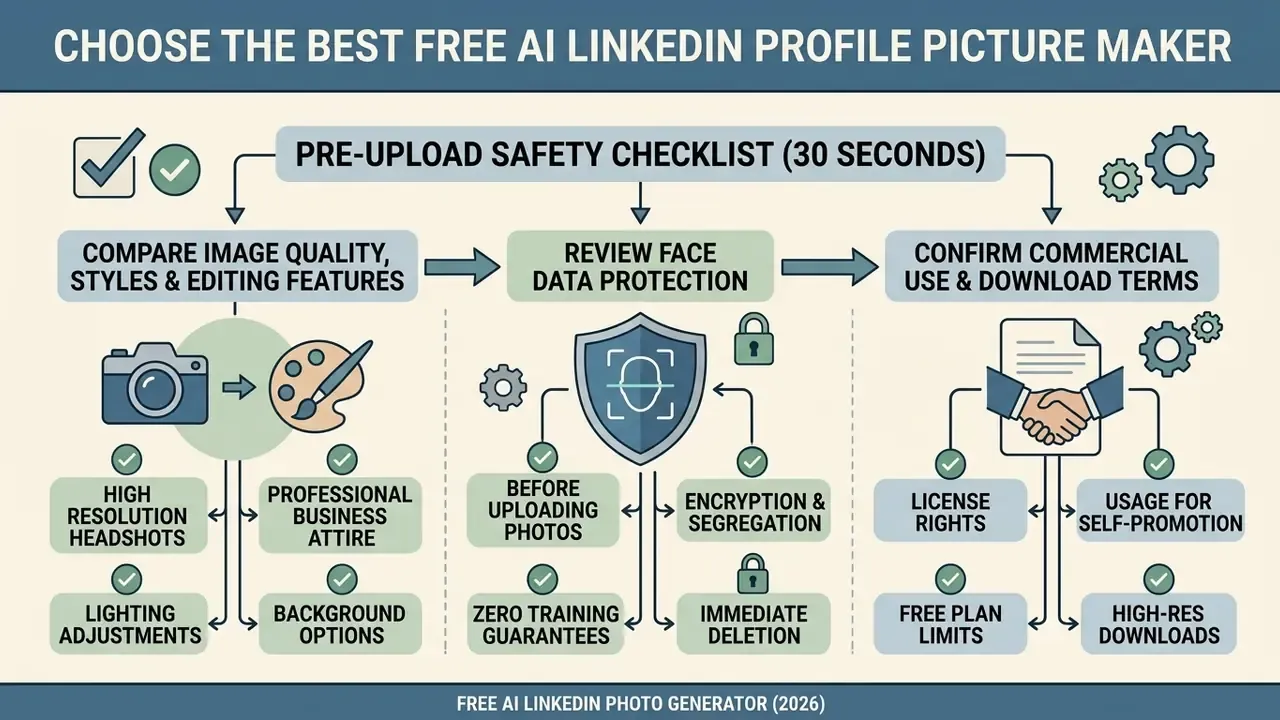
Pre-Upload Safety Checklist (30 Seconds)
- Does the privacy policy state a deletion window for source photos, 24 hours to 90 days?
- Is there an explicit "we do not train on your images" statement?
- Is the connection HTTPS, and does the upload endpoint sit on the vendor's own domain?
- Can you finish the flow without granting camera-roll or contacts permissions?
- Does the licence mention commercial use in plain language?
- Is there a data-deletion or account-deletion path you can actually find?
Two or more "no" answers? Use a different tool, especially for employer-facing imagery.
Compare Image Quality, Styles and Editing Features
Review Face Data Protection Before Uploading Photos
Biometric face-data processing carries real obligations under UK GDPR, the EU AI Act, EDPB guidance and FTC policy statements. The ICO treats facial images used for unique identification as special-category biometric data, requiring a DPIA, data protection by design and, in most commercial contexts, explicit consent. The EDPB adds that biometric templates should be deleted immediately after matching, stored separately from identity data and encrypted with documented key management. The FTC classifies measurements of a face in a photograph as biometric information.
Before uploading personal headshots, confirm the platform enforces:
- Encryption and segregation
- facial embeddings encrypted in transit and at rest, isolated from general user databases.
- Zero training guarantees
- an explicit statement that uploaded selfies never train foundation models or feed public datasets.
- Immediate deletion
- source images purged from server memory once inference completes.
"The source photo is processed in RAM only, never written to disk, and never used to train AI models."
This information is general and does not replace advice from a qualified data-protection specialist. Read the current privacy policy of the specific platform before uploading biometric data.
Confirm Commercial Use and Download Terms
Deploying an ai generated profile picture for linkedin across corporate channels means checking usage rights first. Under Article 50 and Recital 134 of the EU AI Act, deployers of synthetic visual assets must ensure that deepfake or realistic synthetic media is disclosed or detectably marked in machine-readable form, without blocking normal exploitation of the work.
Disclosure matters more than many marketers assume, because synthetic faces now out-perform real ones on perceived trust.
"Diffusion-generated faces scored a mean trustworthiness rating of 4.70 out of 5, significantly higher than real photographs (d = 1.26, p < 0.001)."
In the United States, the Copyright Office (2025 guidance, Copyright and Artificial Intelligence, Part 2: Copyrightability) maintains that purely AI-generated visual output without substantial human authorship cannot be registered, though a human author retains rights over broader authored works that incorporate the image. Confirm that platform terms grant unencumbered commercial deployment rights for marketing materials and professional profile usage. For deeper detail, review commercial use rights for AI-generated images and our general commercial use framework guide.
This section is general information, not legal advice. Consult a qualified lawyer on copyright, licensing and compliance with the EU AI Act or GDPR before large-scale commercial deployment.
How to Use an AI-Generated Photo on LinkedIn
Once you have an acceptable ai generated photo for linkedin, format it correctly and upload it through the profile interface.
LinkedIn technical image specifications
| Specification | Official technical boundary |
|---|---|
| Dimensions | Minimum 400 × 400 px, maximum 7680 × 4320 px |
| Aspect ratio | 1:1 square, masked to a circle in the UI |
| File formats | PNG, JPG, JPEG |
| File size limit | Maximum 8 MB |
| Banner dimensions | 1584 × 396 px, max 8 MB |
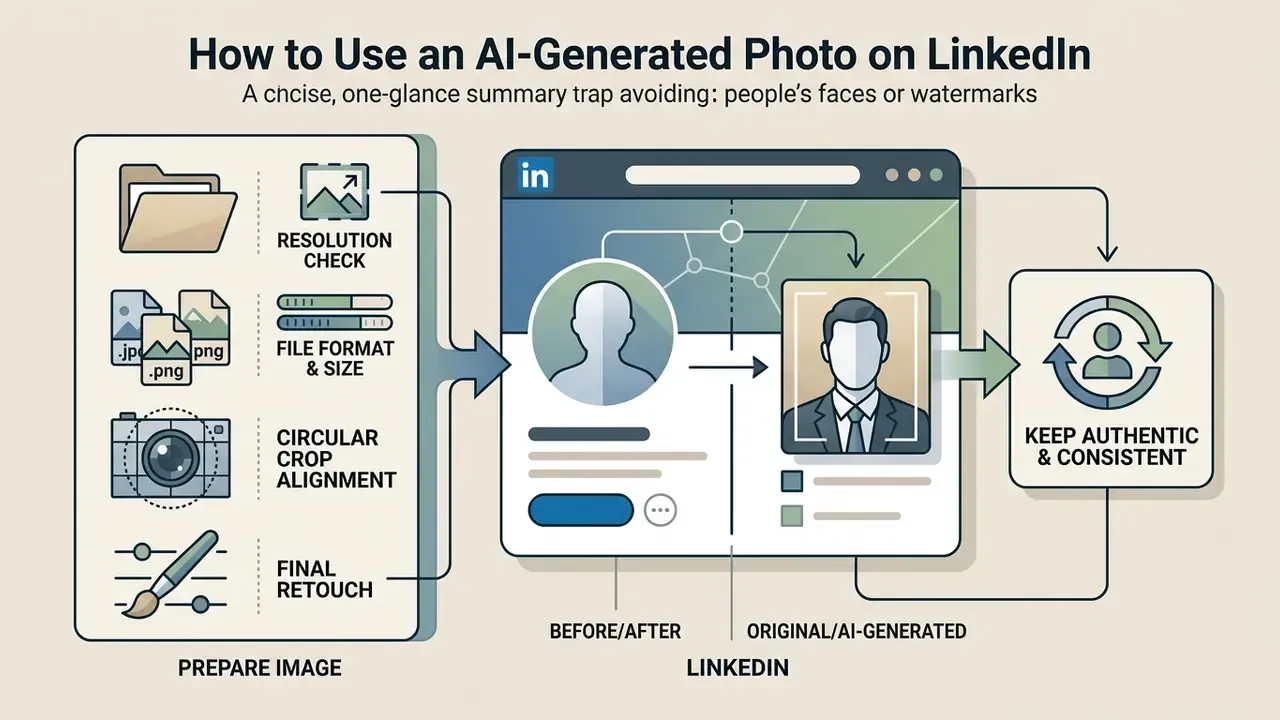
Prepare the Image Before Uploading to LinkedIn
- Resolution check at least 400 × 400 pixels, with 1080 × 1080 recommended for high-DPI displays.
- File format and size PNG or JPG, under 8 MB.
- Circular crop alignment preview inside a circular frame so the face is centred and the forehead and chin are not clipped.
- Final retouch use an AI photo editor or a standard online photo editor for last-mile fixes such as colour balance or a minor blemish.
Keep the Generated Headshot Authentic and Consistent
Authenticity here is an identity-lock problem across public touchpoints. The AI headshot must reflect your real appearance: eye colour, hairstyle, skin tone, age characteristics. LinkedIn's Help documentation is explicit that the profile photo must reflect your likeness, and images failing that test, including logos, stock imagery, other people's faces and imaginary characters, can be removed.
Then there is the meeting-room test. A stylized portrait that does not match your face on a video call quietly damages trust, and trust is the whole asset. Keep the same headshot across corporate directories, press kits and messaging channels, and refresh the full set at once when you update. Enterprise teams that centralize this through a shared prompt template and an API batch, as in the BetterPic 160-employee rollout cited above, cut onboarding time and photography spend together. If disputes arise over media usage rights, compare options on legal frameworks.
One procurement note before you sign anything. Prioritize vendors with verifiable model documentation, published retention policies and a named legal entity. Services with no architecture details, no retention terms and no corporate identity should not receive employer-facing biometric uploads, however good the samples look.
FAQ About Free AI LinkedIn Photo Generators
Does LinkedIn allow AI-generated profile pictures?
Yes, provided the image accurately represents your true physical likeness. Illustrations and artistic renderings of yourself are also permitted. LinkedIn's User Agreement prohibits photos that misrepresent your identity, impersonate others, or show stock photos, logos, animals or non-human entities. There is no separate AI-specific ban; enforcement turns on whether the image is recognizably you.
What file formats and sizes can I upload to an AI headshot generator?
Most platforms accept PNG, JPG, JPEG and WebP. Typical ceilings are 10 MB (Pixelbin) or 5 MB (PFPMaker), with some editors accepting up to 100 MB (Adobe Firefly). Convert HEIC, TIFF or RAW files first, and keep the source at 600 × 600 pixels or larger.
How long does it take to generate an AI LinkedIn headshot?
Zero-shot generators process a single selfie in 10 to 60 seconds, and vendor telemetry reports an average near 15 seconds. Platforms that require custom DreamBooth fine-tuning usually need 30 to 120 minutes to clear the training queue and return multi-style batches.
Are free AI-generated LinkedIn photos safe regarding face privacy?
It depends on the vendor's Terms of Service. Reputable platforms process selfies in volatile memory without writing to disk, purge uploads within 24 hours, and state that face images are never used for model training. Retention practice is not uniform: documented windows run from 24 hours to 90 days after account deletion, and up to one year where users consent to algorithm improvement. Read the privacy policy before uploading biometric data.
Can I use free AI headshots for commercial business purposes?
Commercial rights follow the licence, not the tool category. Some free tiers restrict outputs to personal, non-commercial use and require a paid plan for marketing materials, websites and sales collateral. Ideogram grants commercial rights on free outputs; Photoroom's free tier excludes commercial use. In the EU, realistic synthetic imagery also carries disclosure duties under the AI Act.
Can I generate a matching LinkedIn banner with the same tool?
Some platforms bundle a matching cover with the portrait, and general-purpose text-to-image tools can produce one from a prompt. Export at 1584 × 396 px, keep the composition low-contrast, and match the banner's colour temperature to your headshot lighting so the pair reads as one set.
Can AI generate consistent headshots for an entire team?
Yes. Bulk-editing APIs apply one locked style template, covering attire palette, background, lighting and crop, across dozens of employees, which removes the drift typical of multi-day on-site shoots. Document employee consent and retention limits before uploading staff photos, since facial images are biometric data in the EU and UK.
How often should I update my AI LinkedIn profile picture?
Every one to two years, or whenever your appearance changes noticeably: hairstyle, facial hair, glasses, age progression. LinkedIn asks for a recent photo that reflects your current appearance, and you can add, edit or delete the photo at any time. Regular updates keep your avatar recognizable during interviews and video calls.
"Smiling and direct eye contact with the camera positively influenced the perceived credibility of a LinkedIn profile." — Qualitative think-aloud study on LinkedIn profile pictures and recruiter credibility (2023). https://doi.org/10.1007/s10551-021-04934-8
Appendix A: Editorial Change Log
For transparency, these earlier formulations were revised in the current update.
- Fake2M citation (previous version)
- "human evaluators misclassify synthetic AI faces as real photos in 38.7% of cases". Updated to the study's differentiated figures: 66.9% correct on real photos, 44.2% false-positive rate on AI images.
- Ringover citation (previous version)
- cited only the 76.5% recruiter preference figure. Updated to include the 66% negative-reaction figure and the 39.5% detection accuracy figure.
- Vendor engagement metrics
- the "36 times" and "146%" figures are vendor telemetry and are now explicitly attributed rather than presented as independent research.
- Unverified vendor mention
- a closing reference to an unverifiable service was replaced with a general procurement standard for evaluating generative media vendors.
- Performance claim
- a specific 94% improvement figure attributed to an internal pilot was reframed as an illustrative governance scenario, since no verifiable dataset supports it.