- A free lyric video maker is a browser, app, or desktop tool that ingests an audio file (or a pasted URL), aligns song lyrics to vocal timestamps with ASR or forced alignment, styles the text, and exports an MP4 for YouTube, TikTok, Reels, or karaoke playback.
- Automated alignment saves hours, but every draft needs a human timing and spelling pass. Sung vowels, ad-libs, and distortion break machine timing.
- "Free" almost always means one of three models: a capped free plan, a time-limited trial, or a one-off credit pool. Watermarks, 480p/720p caps, and 30-second previews are the usual trade-offs.
- Watermark-free export is not music licensing. Commercial distribution of a copyrighted song still requires synchronization (and often master-use) rights.
- Before uploading unreleased masters or client audio to a free web tool, check retention, training-data, and confidentiality terms. This is where most "shadow AI" exposure happens.
Automated lyric generation without human oversight produces two failure modes with tiresome regularity: timing drift around choruses, and line breaks that split grammatical units. So the most reliable workflow pairs automated speech alignment with an explicit human verification pass before public release. That conclusion is supported both by accessibility guidance on auto-captioning and by empirical research on semi-automated lyric-video systems cited throughout this article.
A free lyric video maker is a web-based or software tool that lets musicians, content creators, and video editors synchronize song lyrics with audio or video tracks. These online video editors accept audio uploads or direct media links, align text with vocal timestamps, apply typography styles, and export finished MP4 files for distribution across streaming and social platforms. Same job, three different delivery shapes: browser, mobile app, desktop suite.
What Is a Free Lyric Video Maker and What Can It Create?
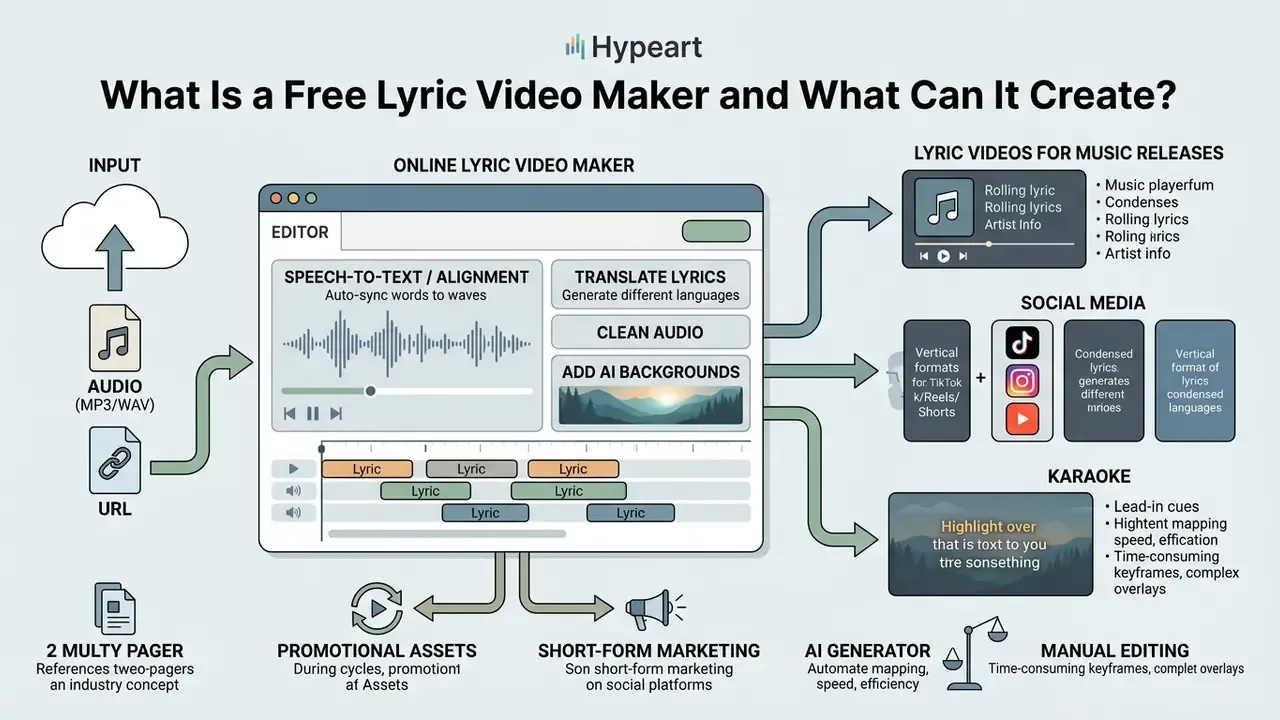
A free lyric video maker is an online video editor that automates or simplifies the process of overlaying synchronized text onto audio tracks, background images, or video clips. It lets creators turn raw MP3 or WAV files into engaging music videos without advanced video editing software, and without a render farm sitting under the desk.
Core architecture of an online lyric video maker
| Layer | Function | Typical inputs | Typical outputs |
|---|---|---|---|
| 1. Media ingestion | Accepts local uploads or pasted URLs from cloud storage and video platforms | WAV, MP3, AAC, M4A, FLAC, AIFF, OGG, MP4, MOV, MKV, WebM, WMV, JPG, PNG | Decoded waveform plus background asset track |
| 2. Alignment engine | ASR transcription or forced alignment against supplied lyrics | Audio plus optional lyric sheet | Line-level and word-level timestamps |
| 3. Rendering canvas | Typography, animation presets, background compositing, safe-zone layout | Timestamps, fonts, media | Live preview timeline |
| 4. Export pipeline | Encoding and aspect-ratio conversion | Project timeline | MP4 (H.264/AAC), 480p to 4K, 16:9 / 9:16 / 1:1 |
Modern web-based tools push uploaded media through speech-to-text algorithms or forced alignment engines to map song lyrics directly onto vocal onsets. Once synchronized, users customize text appearance with custom fonts, background animations, and kinetic typography presets. These platforms handle media inputs ranging from a single static background image to full dynamic video overlays. Creators use them to build promotional clips, social media teasers, and interactive sing-along media. If you are exploring broader automated content tools, review our guide to free AI video generators and their production workflows, then compare the shortlist against your delivery specs.
AI Lyric Video Generator vs Manual Video Editing
An AI lyric video generator uses automated speech recognition (ASR) and forced alignment to map song lyrics to audio timestamps, which speeds up initial assembly enormously compared with manual timeline editing. Sung vowels, heavy distortion, and complex ad-libs still demand manual repair of timing and line breaks.
«Captions must match the timing of the audio and remain on screen long enough to be read, a recommended range of roughly 1.5 to 6 seconds per line.»
That display-duration requirement is the practical reason auto-generated drafts cannot ship unreviewed. An ASR engine will happily emit a 0.4-second flash line in a fast rap passage, or hold a single syllable across an eight-bar instrumental. Neither reads.
Manual video editing software gives frame-accurate control over motion graphics and typography, but line-by-line manual timing eats a working day. Empirical evaluation from the Visual Lyrics project shows that semi-automated workflows, where AI generates initial word-level alignments and visual suggestions while humans refine timing, produce the best results for novices and professionals alike.
«The Visual Lyrics system enabled novices to easily produce high-quality animated lyric videos, with high ratings for enjoyment and inspiration.»
The division of labour is therefore predictable. Machines handle first-pass transcription and coarse alignment. Humans handle sung-vowel stretching, proper nouns, punctuation, and break logic. That split is also what makes an ai lyric video defensible when a label or client asks who approved the final text.
How to Choose the Best Free Lyric Video Maker Online
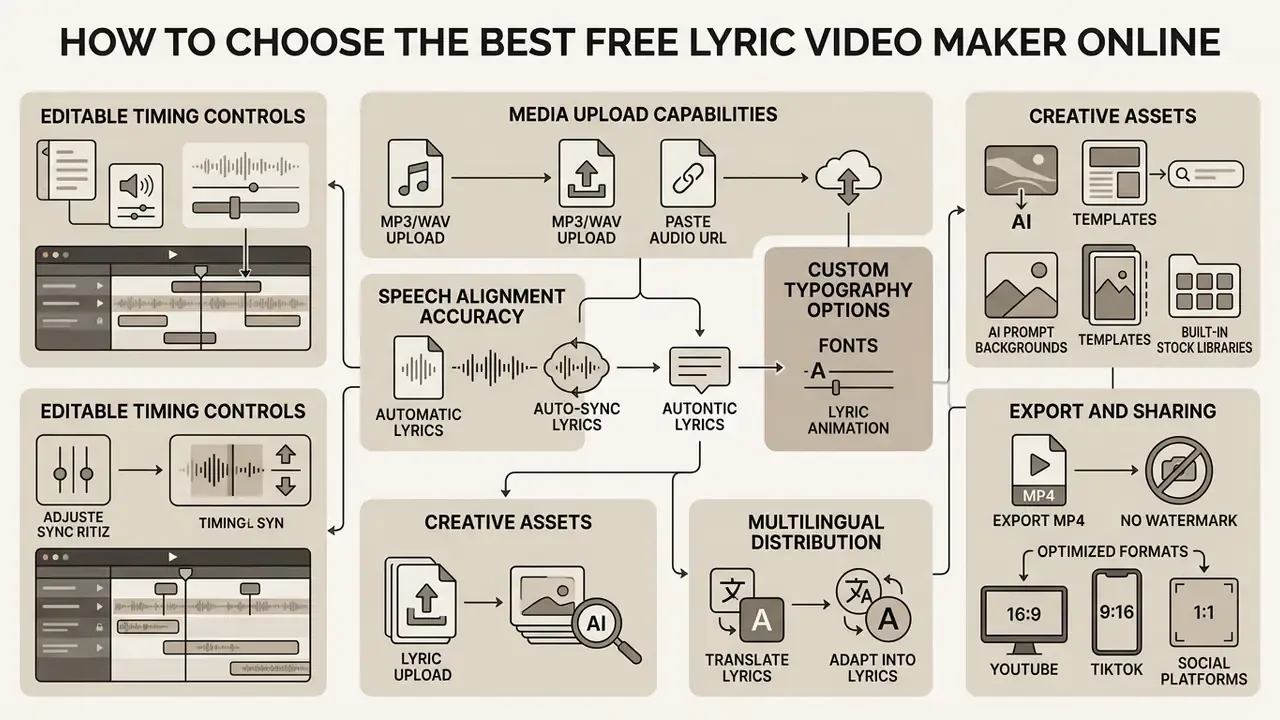
Choosing the best free lyric video maker online means evaluating media upload capabilities, speech alignment accuracy, custom typography options, export resolution, and watermark restrictions. Checking these parameters up front prevents an unpleasant surprise at export: a 480p cap or forced branding baked into a finished release asset. For a wider market view, compare our roundup of AI video generators before committing to a subscription.
| Feature Category | Technical Evaluation Criteria | Free Plan Limitations to Watch | Optimal Workflow Recommendation |
|---|---|---|---|
| Audio/Media Upload | Local upload and direct URL/link paste; supports WAV, MP3, AAC, M4A, OGG, FLAC, AIFF plus MP4, MOV, MKV, WebM background media | File size limits (for example 50 MB caps) or track length caps | Select tools supporting lossless WAV input for clean spectral analysis |
| Audio Cleanup | One-click noise suppression, vocal isolation, loudness normalisation | Cleanup often gated behind paid tiers | Denoise before running alignment to raise ASR accuracy |
| Auto-Sync and Timing | ASR forced alignment or word-level timestamp generation | Low transcription accuracy on stylized or distorted vocals | Use tools offering manual timeline dragging alongside auto-sync |
| Text and Styling | Custom font loading, kinetic typography, animation presets, multilingual translation | Restricted premium templates, locked font libraries, capped translation languages | Prioritize readable sans-serif fonts with outline and glow controls |
| Stock and AI Assets | Built-in royalty-free libraries (Pexels, Unsplash, GIPHY) and prompt-based background generation | Limited generations per month; watermarked stock previews | Use subdued loops or blurred plates so text stays dominant |
| Team and Brand | Brand Kit (logos, palettes, fonts), shared workspaces, timeline comments | Brand Kit and collaboration typically premium-only | Store approved typography centrally to keep releases consistent |
| Export and Watermark | Native 1080p or 4K MP4 (H.264/AAC) with configurable aspect ratios | Branding watermarks or downscaled 480p/720p output caps | Verify watermark policies on pricing pages prior to project setup |
Table 1: Operational comparison matrix for evaluating online lyric video tools.
Table 2: How mainstream lyric-video tools handle free access (based on published vendor documentation)
| Tool | Free-tier export | Watermark on free tier | AI lyric sync | URL / link import | Notable extras |
|---|---|---|---|---|---|
| Clipchamp | 480p, watermark-free | No | Not offered | Limited | Simple timeline, no lyric alignment engine |
| VEED | Watermarked export | Yes | Yes (transcription plus translation) | Yes | One-click noise removal, Brand Kit (paid) |
| Kapwing | Watermarked on free tier | Yes | Yes (auto-subtitles) | Yes, paste audio URL | GIPHY/Pexels stock, real-time team comments |
| Media.io | Claims no watermark | No | Yes (auto-subtitle) | Yes, paste media URL | Wide container support: MP4, MKV, WebM, WMV, MOV, MP3, WAV, OGG, AAC, M4A |
| Youka | 15 starter credits; MP4 up to 4K | No | Yes plus manual sync timeline | Audio or video file upload | Draft review, word and line drag on waveform |
| LyricMV | Free 480p, first 30 s preview | No watermark on preview | Yes (Whisper timestamps) | Drag-and-drop up to 50 MB | Full 1080p render consumes credits |
| Solmi | 1080p with small attribution mark | Attribution | Yes | n/a | Pro removes mark and unlocks 4K |
| Descript | Project-based | Plan-dependent | Word-level timing after transcription | WAV, MP3, AIFF, M4A, FLAC | Correct mode for text and timing edits |
| Adobe Express | Free plan available | Reported on free exports | Template-driven | Upload from device or Adobe Stock | Motion graphics templates |
| Somio AI | Claims watermark-free | No | Yes (auto-sync) | MP3/WAV upload or library track | Prompt-generated backgrounds, lip-sync and singing modes |
| Rotor | Try free, pay to download | n/a | Yes | n/a | Download-gated monetisation |
| SubtitleKit (LRC editor) | Free, unlimited | No | Auto-timestamps each line in-browser | n/a | Timing-only utility, no rendering |
When testing platforms, check whether the browser-based editor stays stable during heavy media processing. Long WAV files and 4K background plates are where cheap timelines stutter. A genuinely easy lyric video maker gives you immediate audio waveform feedback alongside an editable subtitle track, and it does not lose the project when the tab reloads. For pricing structures across media platforms, consult our AI Media Pricing Guides.
Automatic Lyrics, Editable Timing and Text Controls
The best lyric video maker free options combine automatic lyric detection with granular timing controls and a real text editor. Automatic transcript engines produce initial timestamps; singers then ruin them by stretching vowels, swallowing consonants, or rephrasing a line live in the booth.
What a professional timing interface must expose
| Control | Purpose | Documented example |
|---|---|---|
| Waveform plus timestamp blocks | Visual reference for vocal onset | Manual Sync view with drag-on-waveform correction (Youka Docs) |
| Editable Start / End / Text fields | Numeric precision per segment | Per-segment and per-word timing fields (AudioPod export and edit docs) |
| "Set start and offset the rest" | Propagates a fix through subsequent lines | Subtitle Edit timing shortcuts (Nikse, Subtitle Edit Help/FAQ) |
| Word-level timestamps | Highlighting and karaoke effects | Word-timing edits after transcription (Descript) |
| Punctuation and disfluency handling | Cleans raw ASR output | Display-text punctuation and disfluency removal (Microsoft Azure Speech-to-Text) |
Inspect generated text for spelling accuracy, capitalization, and logical line breaks. According to the English (USA) Timed Text Style Guide (Netflix Partner Help Center, current edition), line breaks should never divide natural linguistic units such as noun and adjective pairs or verb and object structures. An editor should also offer offset shortcuts so you can shift every subsequent line when the vocal cadence changes, rather than nudging forty blocks by hand.
Multilingual lyric distribution. Global release plans increasingly demand multilingual lyric integration. Modern AI engines auto-translate synchronized timing tracks into Spanish, Japanese, German, Portuguese and beyond, so creators can burn a secondary translated subtitle line onto the canvas for international fans without re-timing anything. VEED's transcription tool documents translating existing lyrics into additional languages and reviewing them before export, and Media.io's auto-subtitle flow asks for a target language at generation time. Review machine translations of idiomatic lyrics manually. Rhyme, slang, and double meanings rarely survive automated conversion intact. If your workflow needs external asset generation or batch rendering, refer to our AI Media API Guides.
Templates, Background, Fonts and Lyric Animation
A free lyric video template lets creators apply pre-configured visual themes, background videos, font pairings, and entrance animations to song lyrics. Picking typography and motion presets that match the genre and emotional register of the track matters more than adding another effect.
Research on generative video frameworks indicates that visual backgrounds must hold high temporal stability, otherwise they pull attention away from on-screen text.
«The Kubrick framework achieved the highest scores for prompt adherence, motion stability and overall quality among seven tested video-generation models.»
Background footage should stay subdued, blurred, or slow-moving whenever text layers are active. Published brand video systems give useful typographic anchors: Munich Re's brand video guide fixes headline text at 55 px and subline text at 35 px, while HARTMANN's Design Center specifies left-aligned titles with a fixed distance to the outer frame so animated typography stays consistent across formats. Adobe's own lyric-video guidance recommends motion graphics templates with separate background and text layers, adjusting size, position, angle and timing per lyric line, and notes that captions can be masked with text and inverted so the type interacts with the plate instead of sitting flat on top.
AI prompt backgrounds. When custom footage is unavailable, advanced lyric platforms embed text-to-image and text-to-video generators inside the editor. Type a descriptive prompt, for example "cyberpunk neon city in heavy rain, slow motion, moody low-key lighting", to synthesize a context-aware background directly on the canvas, then dim or blur it behind the lyric layer. Somio AI documents exactly this option ("upload a background image or generate one with a prompt") alongside aspect-ratio and lyric-position settings. Generated plates are the fastest route to a genre-appropriate look, though they still have to pass the contrast test described below.
Novelty and comedy formats. Not every lyric video is a serious release asset. Parody tracks, band in-jokes, and meme-adjacent Shorts pull from the same toolchain but a different visual library, so it helps to study what already lands: our collections of funny ai memes, funny ai prompts, and funny google ai answers show the tone that survives a scroll, while a funny ai video generator can produce the throwaway plate behind a joke chorus. Stylised fandom art tools, from a furry ai art generator to an adult-oriented futa ai generator, sit in a stricter compliance lane: check both the vendor's commercial-use terms and the destination platform's content policy before anything reaches a monetized channel. Brand safety first, laughs second.
Built-in stock libraries. If you lack custom media assets, use the royalty-free stock libraries in the editor sidebar. Pexels, Unsplash, and GIPHY integrations are standard in Kapwing, while Adobe Express pulls from Adobe Stock, so you can search and drop B-roll footage or looping graphic backgrounds straight onto the project track. That removes the need to source, license, and transcode footage in a separate application. For static artwork and cover-frame preparation, see our guide to online photo editors.
Data Privacy, Confidentiality and Shadow AI Risks When Uploading Audio
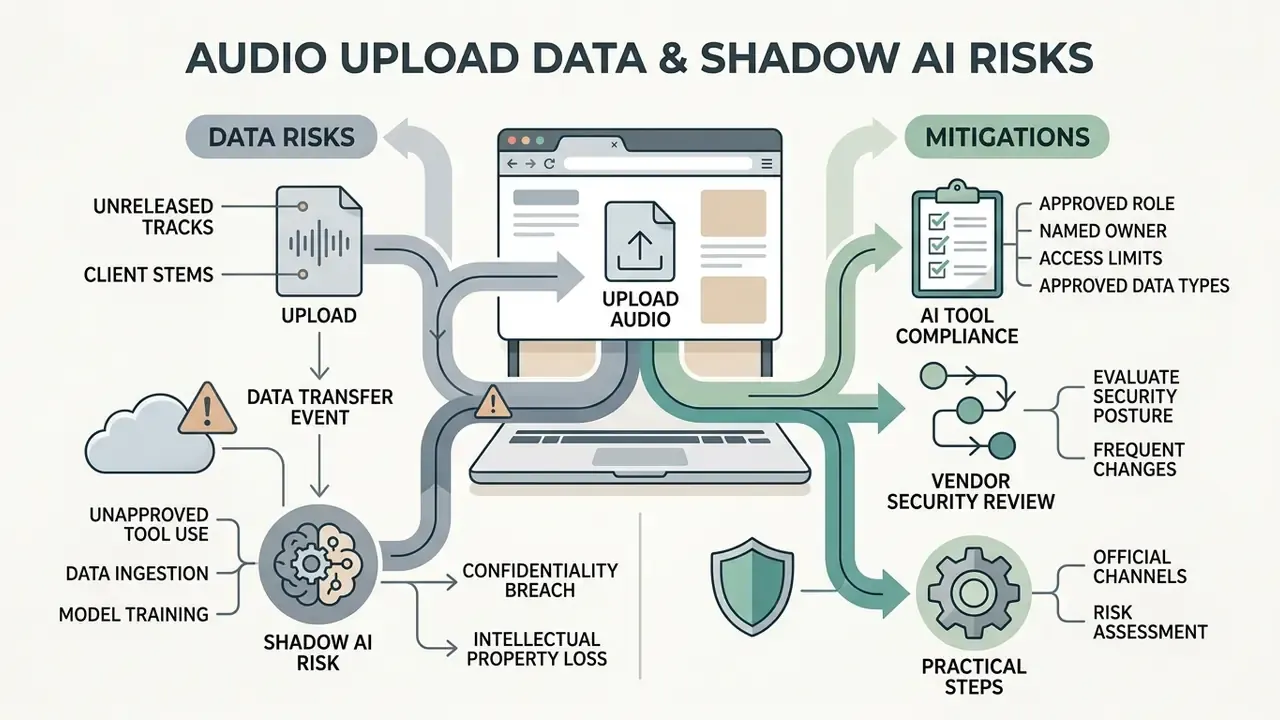
Uploading an unreleased master, a client's stems, or an internal corporate track to a free browser tool is a data-transfer event, not just an editing step. Free lyric editors run in the cloud, so the audio leaves your device and is stored, processed, and sometimes retained on third-party infrastructure.
Pre-upload due-diligence checklist
| Question to answer before uploading | Why it matters | Where to verify |
|---|---|---|
| How long are uploaded files retained after export? | Unreleased masters sitting in a vendor bucket are a leak vector | Privacy policy and data-retention clause |
| Is my audio used to train the vendor's models? | Training use may be incompatible with label or NDA terms | Terms of service, AI/ML clause |
| Are transcripts and lyrics stored separately? | Lyrics of unreleased songs leak as easily as audio | Product documentation |
| Are share links public or access-controlled? | Public preview links are indexable | Sharing settings |
| Does the vendor publish SOC 2, ISO 27001, or GDPR/DPA documentation? | Required for most corporate and label procurement | Trust and security page |
| Can accounts be centrally managed and revoked? | Prevents unmanaged "shadow AI" tool sprawl | Team or enterprise plan features |
| Is there a documented sub-processor list? | ASR is often outsourced to a third-party engine | DPA annex |
Practical mitigations. Bounce a low-quality reference mix for timing work and swap in the master only at final render. Use a work account rather than a personal one. Keep a register of approved tools so a marketing team does not silently onboard three new AI editors in a quarter. And for genuinely confidential material, prefer a local desktop application, for example an open-source Electron-based lyric display or a desktop NLE, where audio never leaves the machine. This is the same governance logic organisations apply to any generative tool; see our notes on commercial-use terms for AI image generators for a comparable evaluation pattern, and the AI Litigation and Case Timelines tracker for how these disputes are actually landing in court.
Vendor security posture changes frequently. Verify current retention and training-data language on the provider's own trust or privacy page before uploading confidential audio.
How to Create a Lyric Video Online for Free
Learning how to create lyric video online free comes down to a six-step workflow: media upload, lyric input, timing synchronization, visual customization, preview review, and final export. Following a standardized order minimizes rendering errors and keeps audio-visual alignment tight. Running these steps in sequence prevents timeline corruption and shortens render queues. Creators estimating project delivery timelines can review AI Media Calculators and our explainer on how an AI video generator allocates render credits.
- Upload Audio and Visual MediaDrag and drop your master audio file (WAV or MP3), paste a direct media URL, or pull a background from the editor's built-in royalty-free stock library (Pexels, Unsplash, GIPHY) or Adobe Stock panel.
- Input or Generate LyricsPaste verified song lyrics into the text editor, or run the automated ASR transcription engine and correct its output.
- Synchronize Lyric TimingAlign text blocks to the audio waveform using auto-sync tools or manual timeline markers.
- Customize Visual StyleSelect font styles, colour palettes, text positioning, background filters, prompt-generated plates, and animation effects.
- Preview Video PlaybackRun a real-time review of the complete track to verify sync accuracy and legibility.
- Export and Download MP4Render the finished project at the resolution and aspect ratio your target platforms need.
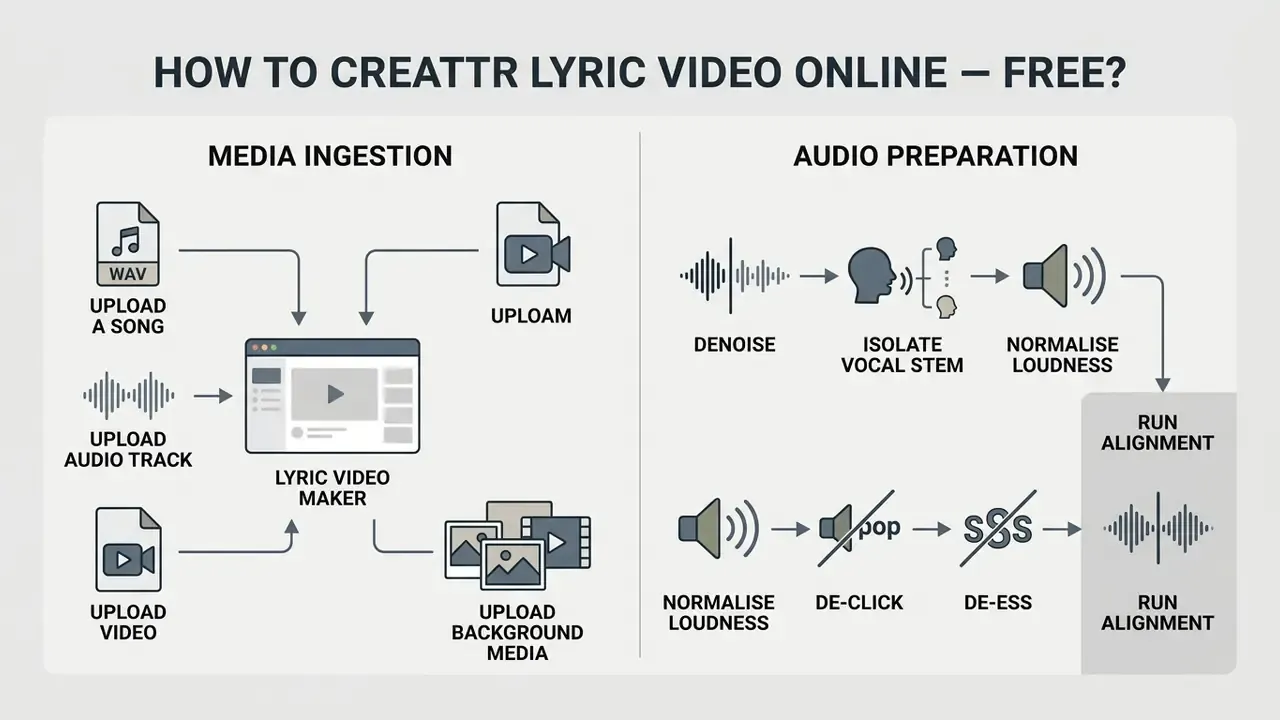
Upload a Song, Audio Track, Video or Background Media
Creation starts by importing the primary audio track and the background visual elements into the web editor canvas. High-quality sources, such as 24-bit WAV or 320 kbps MP3, give cleaner waveform representations for timing alignment.
«Audio or audiovisual content should be submitted as separate files when uploading electronic deposits.»
Ingestion methods and formats. Modern tools remove the download-and-re-upload detour by supporting direct URL pasting from cloud storage or video platforms. Kapwing accepts a copied audio link, and Media.io accepts a pasted media URL, so a track already hosted online never has to touch your disk. Alongside uncompressed WAV and 320 kbps MP3, professional platforms ingest MP3, WAV, AAC, M4A, OGG, FLAC, AIFF, MP4, MOV, MKV, WebM, WMV, JPG and PNG without manual conversion. Watch for hard caps: some free tiers reject files above 50 MB, which excludes long 24-bit WAV masters and forces a 320 kbps bounce. If a file is rejected on size, transcode it first; see our video compressor guide for a lossless-to-delivery conversion strategy.
You can also upload motion graphics, stock footage clips, or static images to sit underneath the synchronized lyrics. Make sure every background asset is rights-cleared or custom-created, or you invite copyright flags at distribution. Public-sector media guidance sets a sensible bar here: AHRQ requires third-party licences for stock footage, music, and graphics to grant worldwide rights in perpetuity, and requires copyright-holder permission before use. Reasonable for any commercial release asset.
Clean Up the Audio Before Auto-Sync (Noise Reduction and Vocal Isolation)
Before forced alignment runs, raw audio carrying ambient noise, room reverb, tape hiss, wind, traffic rumble, or air-conditioning hum, should pass through AI-powered vocal isolation or noise suppression. Separating vocal formants from background noise measurably improves ASR accuracy and gives you a cleaner reference for review.
Browser editors now ship this as a single control: VEED documents a one-click audio cleanup tool that detects and removes wind, humming, and traffic noise, and Kapwing exposes an equivalent "Clean Audio" utility. A practical pre-alignment order of operations:
- Denoisethe vocal or full mix to strip broadband hiss and hum.
- Isolate the vocal stemif the instrumental is dense, since alignment engines lock onto vocals, not pads or drums.
- Normalise loudnessso quiet verses are not read as silence and skipped by the transcriber.
- De-click and de-essonly if artefacts are audible; heavy processing smears consonants and hurts recognition.
- Run alignment, then re-attach the untouched master audio for the final export so no processing artefacts reach listeners.
For voiceover intros, DJ tags, or narrated sections layered over a lyric video, our AI voice generator guide covers loudness and clarity expectations for synthetic tracks.
Add Lyrics and Sync Them with the Song
To add lyrics to video online, paste verified song text into the editor or let the built-in speech alignment engine generate initial line timestamps. With automated tools, recognition maps vocal onsets to text lines for you, which handles perhaps 80 percent of a clean pop vocal on the first pass.
When manual adjustment is needed, drag lyric blocks against the visual waveform. Forced alignment services such as the ElevenLabs Forced Alignment API show how word-level timestamps can be produced programmatically (ElevenLabs Docs), and research systems push further still:
«Visual Lyrics uses multimodal music analysis and an LLM to generate word-level animations, including words with vibrato and pitch shifts.»
Documented manual correction methods worth learning in any editor: open Manual Sync, select the mismatched words or lines, and drag them along the timeline using the waveform as a reference (Youka Docs); use "Set start and offset the rest" to fix one late entry and propagate the correction through every remaining line (Subtitle Edit Help/FAQ); and in desktop NLEs, synchronize by clip start, clip end, timecode, clip marker, or audio channel (Adobe Premiere Pro documentation). Fine-tuning start and end points per verse is what makes on-screen text land exactly on the vocal entry.
Customize Lyrics Style, Position and Visuals
Customizing lyric typography means defining font parameters, colour schemes, text alignment, screen coordinates, and entrance or exit animations. Placing text inside safe zones keeps lyrics from disappearing behind platform interface elements on TikTok or YouTube Shorts.
Platform safe zones for vertical 9:16 lyric text
| Screen region (9:16) | Approx. share of frame | Risk | Recommendation |
|---|---|---|---|
| Top band | Top 10-12% | Account and search UI, "Following/For You" tabs | Keep clear of all text |
| Right rail | Right 12-15% | Like, comment, share, sound icons | No text or logos |
| Bottom band | Bottom 25-30% | Caption text, handle, CTA buttons, progress bar | Never place lyric lines here |
| Centre-third safe area | Vertical 25% to 70% | Clean on TikTok, Reels, and Shorts | Primary lyric placement zone |
Empirical research from the Visual Lyrics system sets out three stylization dimensions for lyric presentation:
«Visual Lyrics identifies three stylization strategies: visual (font, colour, scale), animation (rhythmic motion presets) and image (supporting graphic elements).»
Set font size for high contrast against dynamic backgrounds and legibility on small screens. MEI positioning guidance treats on-screen text as either absolutely or relatively coordinated, which is exactly the mental model to apply when locking lyric layers to a safe zone instead of eyeballing placement. For rhythm-driven animation, the classic LyricText research prototype visualised beat and measure with a pulsating indicator, a good reminder that motion should follow the metre, not the frame rate. Creators experimenting with generated visual layers can review text-to-video AI tools for prompt and motion-control conventions, plus our animation maker guide for keyframe basics.
Pre-Publish Quality Control Checklist
Run this list on the rendered file, not the project timeline, before anything goes public.
Checklist0 / 13
Is a Free Lyric Video Maker Really Free?
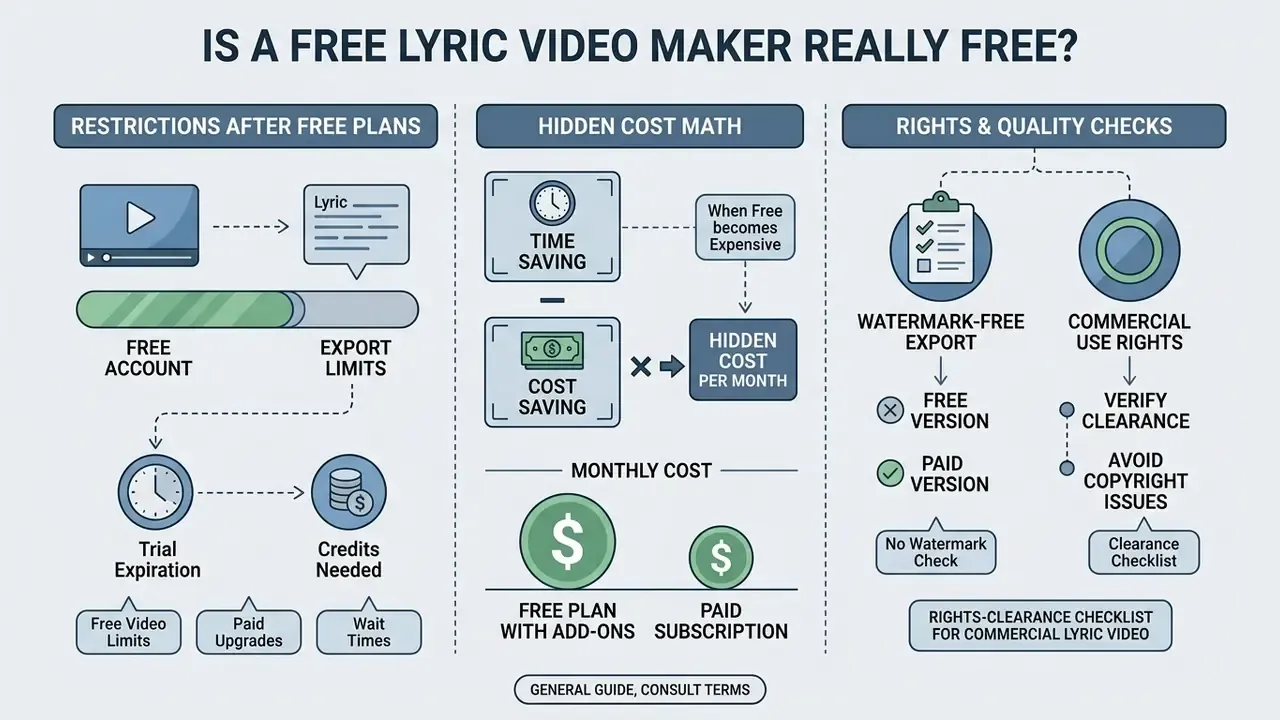
Plenty of online video editors market themselves as a free lyric video maker online free, then apply restrictions the moment you hit export. Common limits include resolution caps, monthly render credits, duration ceilings, and mandatory platform watermarks on the finished file.
Understanding the difference between trial access, credit allotments, and paid tiers is what keeps a release schedule from stalling on the afternoon of the deadline.
Free Plans, Trials and Paid Credits
Online video generators generally use one of three free access models: a recurring free plan with capped capabilities, a time-limited trial, or a pay-as-you-go credit pool.
| Access model | How it behaves | Documented examples |
|---|---|---|
| Recurring free plan | Fixed monthly allowance or permanently capped features, often watermarked | Creatify's free plan grants 10 monthly credits with watermarked exports; Clipchamp offers 480p watermark-free exports but no AI lyric alignment; Lyric Video Maker's $0 tier lists 150 one-time credits with watermarked output |
| One-time starter pool | Non-expiring credits granted at signup | Youka grants new accounts 15 free credits; Runway deposits a one-time 125-credit allowance that does not expire |
| Time-limited trial | Full features for a fixed window, then a hard stop | Higgsfield's 1-day trial unlocks unlimited generation for 24 hours; Rotor lets users build for free and pay only to download |
| Paid credits / subscription | Consumption-based scaling after the free allowance | LyricMV renders a free 480p, 30-second preview without a watermark while full 1080p output consumes credits; Solmi exports 1080p free with a small attribution mark and removes it on Pro alongside 4K; Freebeat lists $0 Free, $4.99/week Basic, $9.99/month Standard, and $24.99/month Pro |
Watermark behaviour is the single most consequential variable. VEED states that removing its watermark requires a paid plan, Kapwing applies branding to free-tier exports, and 2026 coverage of Adobe Express reports watermarked free exports with watermark-free 4K unlocked on paid plans. Clipchamp is the notable outlier: watermark-free at 480p, but with no automated lyric alignment engine at all, so the trade-off shifts from branding to resolution and manual labour. Always confirm current terms on the vendor's pricing page. Free-tier limits change without notice, sometimes mid-quarter.
Watermark-Free Export and Commercial-Use Checks
Finding a free lyric video maker no watermark option means reading vendor terms on export rights and commercial usage, not just clicking the download button. A watermark-free export is a platform output feature. It is not legal clearance for commercial music distribution.
«Pairing copyrighted musical compositions or sound recordings with visual media for public streaming requires explicit synchronization licensing, regardless of the software used to generate the video.»
Two distinct rights are usually in play. A synchronization licence covers the underlying composition; a master-use licence covers the specific sound recording, as the Copyright Alliance sets out. Universal Production Music states that pairing copyrighted music with video without a sync licence is infringement even for short clips, and Fox Music notes that uploading to a platform does not grant sync rights for commercial music. A Content ID claim is not a substitute for a licence.
Rights-clearance checklist for a commercial lyric video
| Asset | Right required | Who grants it |
|---|---|---|
| Composition (melody and lyrics) | Synchronization licence | Publisher or songwriter |
| Sound recording | Master-use licence | Label or recording owner |
| Printed lyrics on screen | Display and reproduction permission (often bundled with sync) | Publisher |
| Stock footage, images, GIFs | Commercial licence, ideally worldwide and perpetual | Stock provider |
| Fonts | Desktop or broadcast embedding licence | Type foundry |
| AI-generated visuals | Vendor commercial-use terms | Tool provider (for example, Freebeat states AI-generated assets are covered by a commercial-use licence under its Terms) |
| Editing software | Software licence, not a content licence | Tool provider |
Note that last row. The licence you accept when you sign up for an editor governs the software, never the music. Artists publishing lyric videos to monetized YouTube channels or paid social campaigns need synchronization rights for the underlying song. Using royalty-free audio or your own master keeps you clear of enforcement systems such as YouTube Content ID. If you are relying on a limitation or exception rather than a licence, the U.S. Copyright Office points to statutory routes such as fair use or the section 115 licence for musical works; assess these with counsel, not assumption. For broader guidance on commercial asset rights, visit our AI Media Commercial-Use Hub and our overview of commercial-use terms for AI image generators.
How to Make a Lyric Video Look and Sound Professional
Professional-quality lyric videos come down to four disciplines: text readability, line-break logic, precise audio-visual synchronization, and audio fidelity. Strip the visual clutter, kill the timing drift, and the video holds attention without tiring the viewer.
Contrast and readability reference
| Text and background relationship | Measured contrast | Verdict |
|---|---|---|
| Light grey type on bright moving footage | ~1.8:1 | Fails; illegible on mobile |
| White type on mid-tone footage, no treatment | ~3:1 | Fails for body-size lyric text |
| White type with 2-4 px outline on mid-tone footage | ~4.5:1 or better | Passes WCAG 2.2 AA minimum |
| White type on a 40-60% dark scrim or blurred plate | ~7:1 | Recommended for dynamic backgrounds |
| Large display type (chorus hook) on dark plate | 3:1 or better required | Passes at large scale |
Following established subtitling standards prevents the amateur tells: crowded text blocks, misaligned word entries, a chorus that reads like a paragraph. Professional creators test draft renders on both a phone and a desktop display before sending anything to a client.
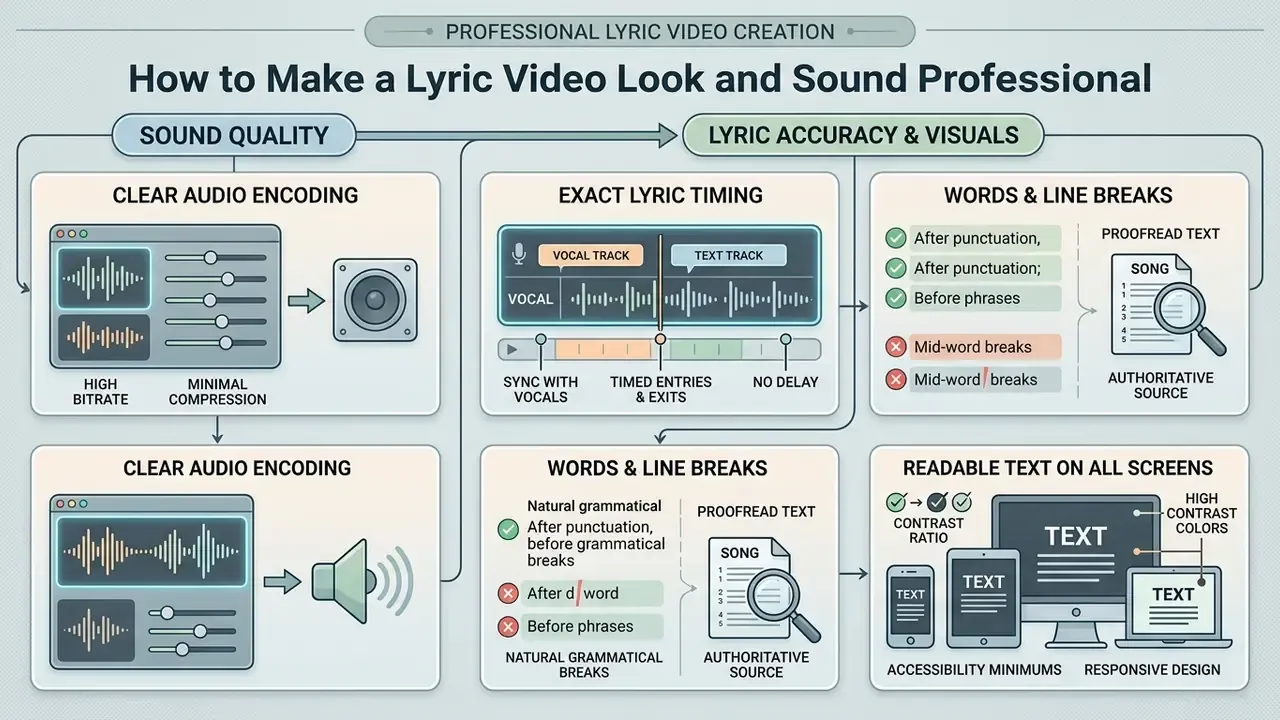
Check Lyric Timing, Words and Line Breaks
Accurate lyric timing means text appears exactly when the vocal starts and clears when the phrase ends. Subtitle display duration guidance recommends a minimum of 1.5 seconds on screen for comfortable reading (MSU Denver Accessibility Standards, 2020).
«An analysis of roughly 5,000 subtitles showed that the "six-second rule" is justified as a general guideline balancing readability and screen time.»
«Subtitle lines should break at natural grammatical boundaries, such as after punctuation marks or before conjunctions, and must never split noun-modifier pairs.» Source: English (USA) Timed Text Style Guide, Netflix Partner Help Center (current edition)
Apple Music's provider guidance adds a lyric-specific rule set: lyrics must use line and section breaks, with stanzas separated by a double space, and break points should follow verse, chorus, tempo, or delivery changes. Section 508 captioning guidance converges on the same principle, that line breaks should start and end at the most logical point, usually punctuation, and requires correcting auto-captions for capitalisation, punctuation, grammar, and misheard names or places. Adobe's lyric-video guidance adds a blunt practical note: when words stay on screen for only one or two seconds, letters must be large and immediately readable.
Proofread the text layer against an authoritative song sheet. DIY Musician's release advice is unsentimental about checking the words repeatedly before publication, because a typo in a lyric video lives forever in every repost. Keeping to a two-line maximum per screen prevents clutter and keeps attention on the performance.
Keep Audio Clear and Lyrics Readable on Any Screen
Clear audio and legible text across screen sizes depend on encoding choices and typographic styling. Export audio at uncompressed 24-bit quality or high-bitrate MP3/AAC to avoid distortion, and apply any noise reduction to the alignment reference rather than baking it into the delivery master.
Text layers should use high-contrast colour pairs that meet or exceed accessibility minimums.
«WCAG 2.2 sets a minimum contrast ratio of 4.5:1 for normal text and 3:1 for large text against any background.»
Two further W3C parameters matter for lyric layouts. WCAG 2.1 added a minimum line height of 1.5 times the font size for readable text blocks, and the WCAG 3.0 draft requires text to remain legible at 320 CSS pixels in the text's own orientation without scrolling, a workable proxy for "does this still read on a phone." Subtle outlines, drop shadows, or semi-transparent background blocks guarantee legibility over bright or rapidly changing footage; masking the caption with the type and inverting it, as Adobe suggests, keeps the text integrated with the plate rather than pasted on top. Validate by sampling the brightest frame under each lyric line with a contrast checker instead of judging by eye. Eyes adapt. Meters do not.
Online Lyric Video Maker, App or Software: Which Format to Use?
You can build lyric videos in a browser, in a mobile app, or in desktop video editing software. The right choice depends on project complexity, hardware, required export resolution, confidentiality constraints, and how much time you actually have.
Platform decision matrix
| Requirement | Browser tool | Mobile app | Desktop software |
|---|---|---|---|
| Zero installation, any OS | Best (Kapwing documents use on iPhone, Android, Mac, Windows) | Partial | No |
| Fast social clip turnaround | Yes | Yes | Partial |
| Auto-sync plus auto-translate | Yes | Yes | Depends on plugin |
| Beat-level manual keyframing | Partial | Partial | Best |
| 4K multi-layer compositing | Partial | Partial | Best |
| Reusable templates and project reuse | Yes | Partial | Best |
| Confidential audio never leaves device | No | Partial | Best (for example, open-source Electron lyric-display apps for live production) |
| Team review and shared assets | Best | No | Partial |
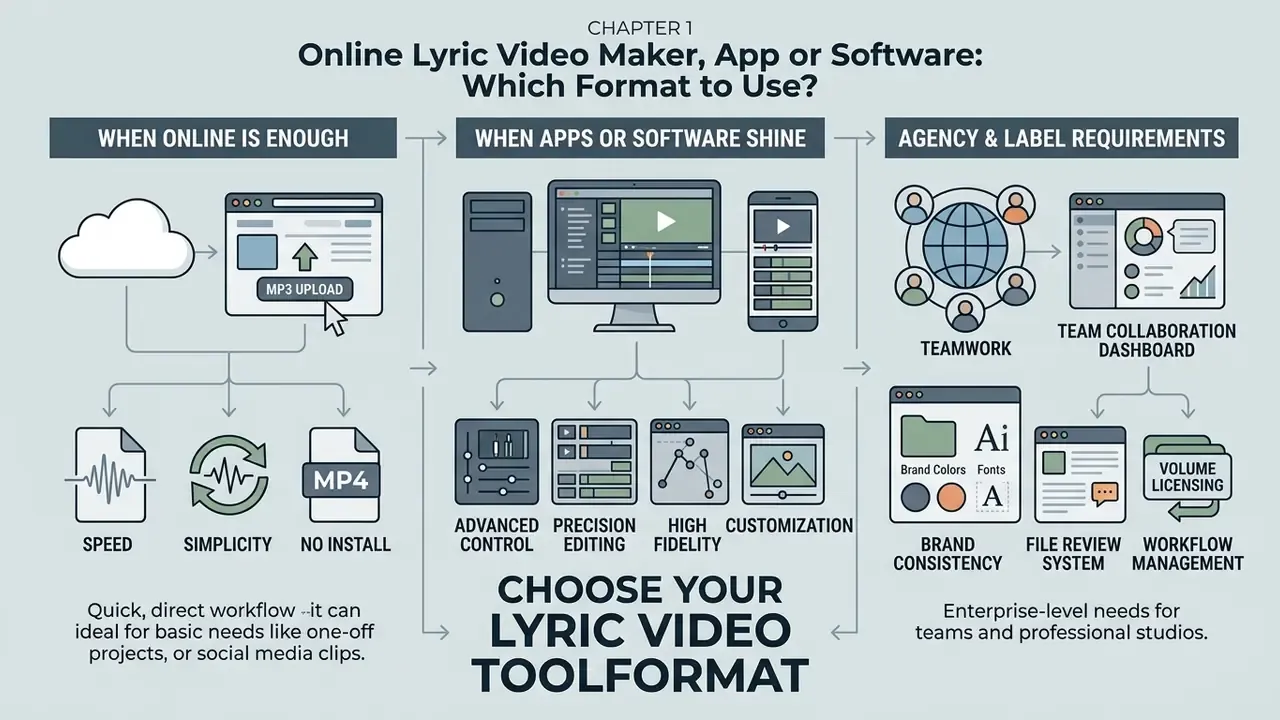
A free online lyrics video maker in the browser gives instant access with no install, which is why it wins for quick social clips. Desktop software brings advanced keyframe animation, precise colour grading, and multi-track audio mixing for complex productions. Mobile apps suit creators shooting footage and cutting short-form lyric clips on the phone; a documented mobile workflow runs: open a project, import music and visuals, align lyric lines on the timeline using beat detection and waveform preview, add text animations, then export up to 4K.
When an Online Lyric Video Maker Is Enough
A browser-based online lyric video editor is enough for creators who need synchronized lyric videos quickly and without installing anything locally.
«In a randomised experiment, AI-generated instructional videos showed comparable information-retention outcomes to traditional recordings, with reduced cognitive load.»
Web tools handle standard 1080p rendering, social canvas resizing, and straightforward template customization without complaint. Documented complete-use scenarios include YouTube lyric videos for song releases, fan sing-along clips, music lessons, workout tracks, social teasers, and karaoke-style videos where the original song stays in the mix.
These platforms run efficiently in modern browsers on Windows, macOS, and Chromebook hardware. For independent musicians releasing promotional singles or cutting fast TikTok lyric teasers, a browser tool delivers enough functionality with almost no setup time.
When to Use a Lyric Video Maker App or Software
A dedicated free lyric video maker app or free lyric video maker software becomes necessary when projects involve multi-layered visual compositions, custom kinetic typography keyframing, heavy 4K rendering, or confidentiality requirements that rule out cloud upload entirely.
Desktop suites support advanced plugins, frame-accurate timeline scrubbing, and lossless multi-channel audio processing; compare capabilities against cloud alternatives in our roundup of the best free AI video generators. Template-based desktop pipelines also let you save perfected timing, typography, and lyric settings as a reusable project for recurring releases, which is exactly where per-render credit models stop being economic. Mobile editing apps offer touch timeline controls for creators cutting vertical videos on the phone; our overview of video editing tools and workflows maps the feature tiers. Choosing dedicated software also avoids browser crashes halfway through a long-form project or a heavy effects render.
Brand Kits and Team Collaboration for Agencies and Labels
For marketing agencies and record labels, cloud-based lyric editors offer Brand Kits and real-time collaborative workspaces. Teams store custom typography, brand colour palettes, and logo overlays centrally, then apply them to every release asset, so a catalogue of lyric videos looks like one catalogue rather than twelve freelancers.
VEED documents adding logos, brand colours, and custom fonts through its Brand Kit and saving finished videos as reusable templates (Brand Kit and custom templates are premium features). Kapwing documents shared team workspaces where multiple editors create, review, and leave real-time comments in the editor, working synchronously or asynchronously, with assets saved to a Brand Kit for reuse. Practical governance for teams: keep one master template per aspect ratio, lock the type styles, restrict who can publish, and log every approved tool centrally so the privacy checks described earlier are actually enforced rather than merely written down.
Free Lyric Video Maker FAQ
Do I need prior video editing experience to use a free lyric video maker?
No. Most online lyric video tools assume none. Modern web editors use drag-and-drop interfaces, automated speech alignment, and pre-designed typography templates, so a beginner can produce a synchronized lyric video in minutes.
«Nearly half of 170 students could not determine whether a video was AI-generated or human-made, rating it as high-quality and accurate.» Source: Stanford SCALE Lab, descriptive study of AI-video perception (2023) In other words, the ceiling on perceived quality now sits with your timing and typography discipline, not your software budget.
Can I make a lyric video on my phone using a free lyric video maker?
Yes. Many browser-based editors and dedicated mobile apps are optimized for iOS and Android browsers. They let you upload audio, auto-sync lyrics, adjust text position, and export vertical 9:16 videos straight to TikTok and Instagram Reels. A typical phone-only flow: upload an MP3 or WAV, upload or prompt-generate a background image, set aspect ratio, lyric position, language, and subtitle style, then preview and download.
Can I upload a song by pasting a link instead of a file?
Yes. Several editors accept a pasted media URL alongside local uploads. Kapwing documents copying and pasting an audio link, and Media.io documents pasting a media URL, which removes the download-and-re-upload step for tracks already hosted online. Confirm that you hold the rights to the linked audio; URL ingestion is a convenience feature, not permission.
Which audio and video formats do lyric video makers support?
Common inputs are MP3, WAV, AAC, M4A, OGG, FLAC and AIFF for audio, MP4, MOV, MKV, WebM and WMV for video, plus JPG and PNG for stills. Free tiers frequently impose file-size caps (50 MB is a documented example), so bounce a 320 kbps MP3 or a compressed reference if a 24-bit WAV master gets rejected.
How can I fix background noise or poor audio quality before generating lyrics?
Use the built-in AI audio cleanup tools in modern browser editors to filter hum, wind, or traffic noise in one click. Isolating the vocal improves transcription accuracy. Run cleanup on the copy used for alignment, then swap the untouched master back in before final export so no processing artefacts reach listeners.
Can I translate my lyrics into other languages automatically?
Yes. Subtitle and transcription engines in tools such as VEED and Media.io translate an already-timed lyric track into additional languages while preserving timing, so you can burn a secondary translated line onto the canvas or ship a localised version per market. Always review machine output manually, because slang, rhyme, and wordplay usually need a human editor.
Can I use copyrighted music in my lyric video and publish it online?
You can upload any audio file for private creation, but publishing a video containing copyrighted music requires synchronization licensing from the rightsholders, plus master-use rights if you are using someone else's recording. Platforms such as YouTube may apply Content ID claims or copyright strikes when copyrighted music is uploaded without permission, and a Content ID claim does not function as a licence.
How do I fix sync errors when an AI lyric generator misplaces words?
Open the editor's manual sync or timeline panel. Select the mismatched text block and drag its start or end marker along the waveform to the exact vocal entry point. Most tools allow word-level editing and offset adjustments, and a "set start and offset the rest" style command fixes one late entry while shifting every subsequent line by the same amount. Much faster than repairing a whole chorus by hand.
What is the best aspect ratio for publishing lyric videos on social media?
It depends on the destination. Use 16:9 widescreen for standard YouTube uploads and desktop viewing, 9:16 vertical for TikTok, YouTube Shorts, and Instagram Reels, and 1:1 square for traditional Instagram feed posts. Keep vertical text inside the centre-third safe area so platform UI never covers the lyrics.
Why does my exported lyric video have a watermark?
Watermarks are applied by freemium platforms to exports made on unpaid tiers. To get a free lyric video maker online no watermark result, either choose a platform that genuinely exports clean (Clipchamp's 480p export and Media.io's stated no-watermark policy are documented examples) or upgrade to a paid plan. Some tools take a middle path and apply a small attribution mark on free 1080p exports, removing it on paid tiers.
Is it safe to upload unreleased music to a free online lyric video maker?
Treat it as a data transfer, not just an edit. Check the vendor's retention period, whether uploads train models, whether share links are public, and whether the provider publishes security documentation such as SOC 2, ISO 27001, or a GDPR data-processing agreement. For material under NDA or embargo, time the video against a low-quality reference mix and render finals in a local desktop tool.
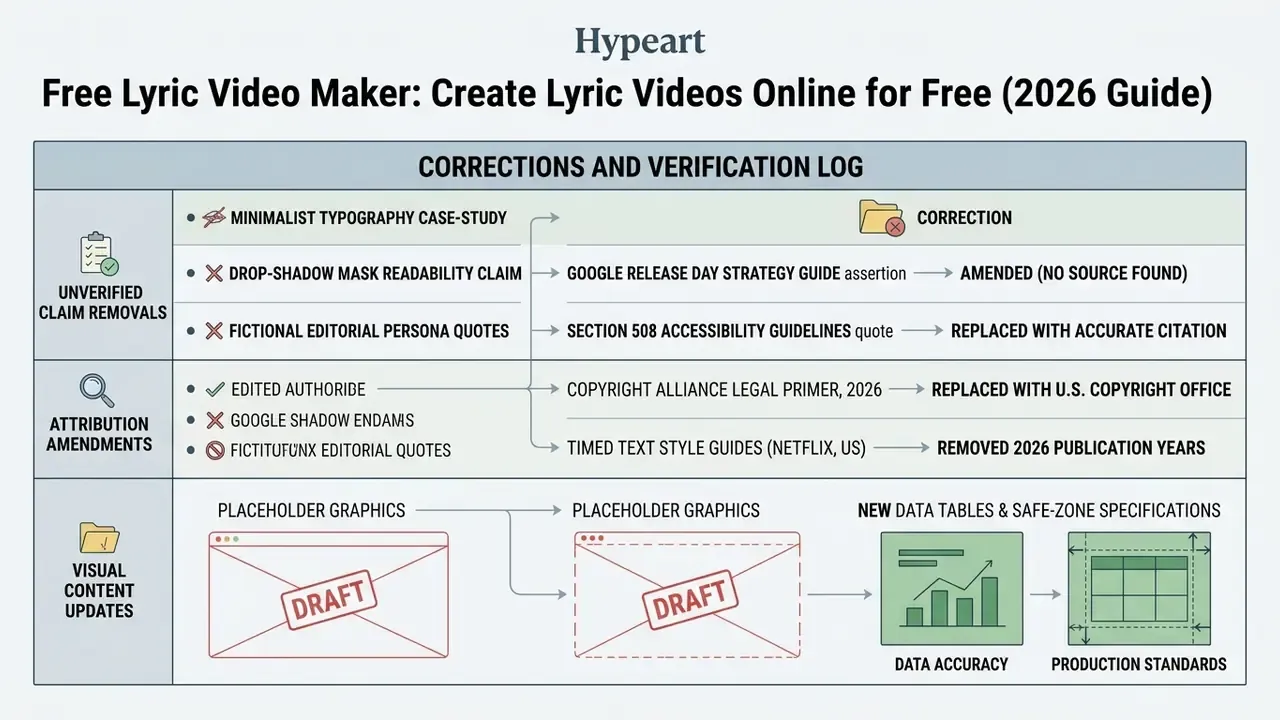
Appendix A: Editorial Corrections and Verification Log
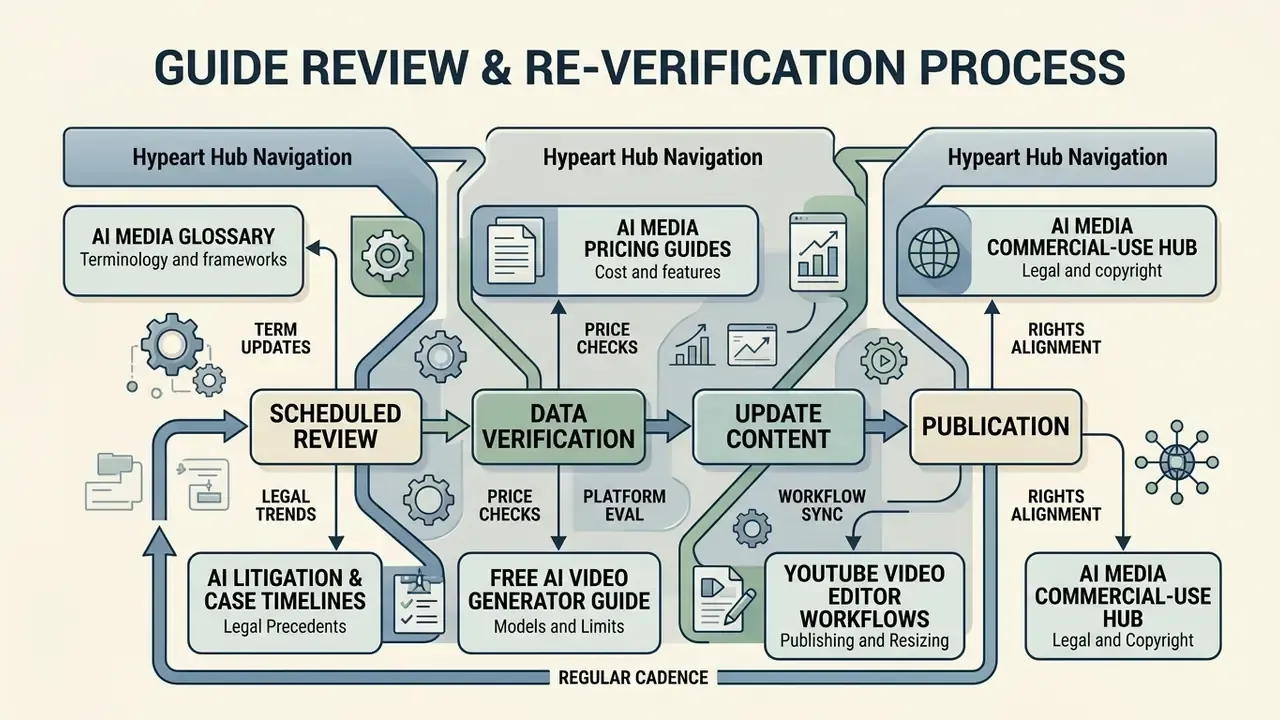
Review Cadence and How to Re-Verify This Guide
Free-tier terms move faster than editorial calendars, so treat every pricing and watermark statement here as a snapshot dated 2026. Three checks keep your own shortlist current: open each vendor's pricing page and confirm export resolution and watermark policy; open the trust or privacy page and confirm retention plus training-data language; then run one 60-second test render and measure whether the auto-sync output actually needs less than 30 minutes of correction. If it needs more, the tool is not saving you money, whatever the plan says. We re-verify vendor tables and platform delivery specs on a quarterly basis and log material changes in Appendix A.
AI Media Glossary and Hub Navigation