A free image to video AI tool converts static photos into short, dynamic video clips using temporal diffusion architectures and generative neural networks. Modern enterprise platforms lean on this capability to produce visual assets without render farms, editing suites, or a single manual keyframe.
Why should a bank or a mature fintech care about a consumer-grade video toy? Because marketing teams are already using one. Usually on a personal account, usually with a real product photo, and usually without telling anyone.
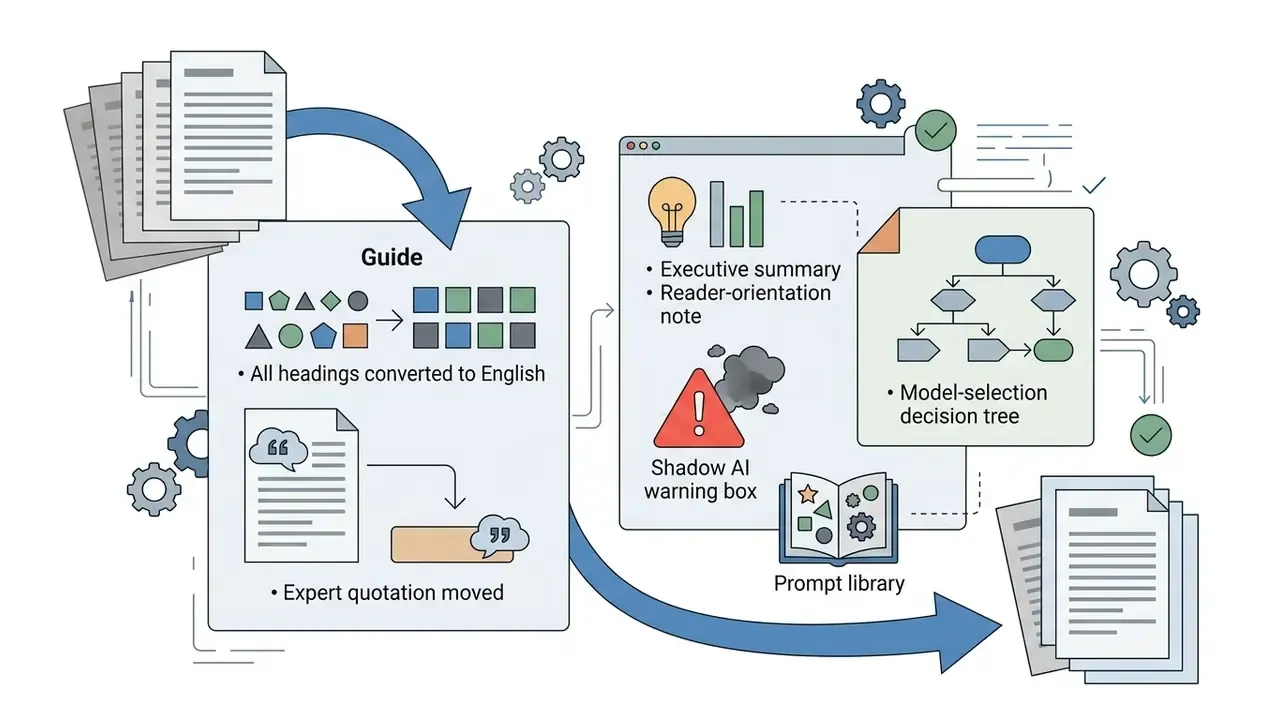
Executive Summary for Decision-Makers
- Technical core: Image-to-video systems encode a still photo into a latent representation, then a Diffusion Transformer denoises video tokens across spatial-temporal attention layers. The uploaded photo acts as a deterministic visual anchor, which reduces hallucination compared with text-only generation.
- Free-tier reality: Most free plans cap clips at 3 to 8 seconds, restrict resolution to 480p or 720p, apply visible watermarks, and route jobs into low-priority queues. Watermark-free free exports exist (ImagineArt at 720p, some Firefly tiers), but almost always with non-commercial terms.
- Governance recommendation: Treat every uploaded image as a data-egress event, verify output licensing in the platform's Terms of Service before paid media use, and preserve prompt, seed and model metadata as an auditable model-lineage record.
How to read this guide. The first half is operational: formats, prompts, parameters, post-processing. The second half is the part your second line of defence will ask about: free-tier economics, watermarking, licensing, provenance, and the failure modes that make synthetic video unsafe for regulated communications. Skim the operational parts if you already generate video weekly. Do not skim the licensing section.
What Free Image to Video AI Is and How Generation Works
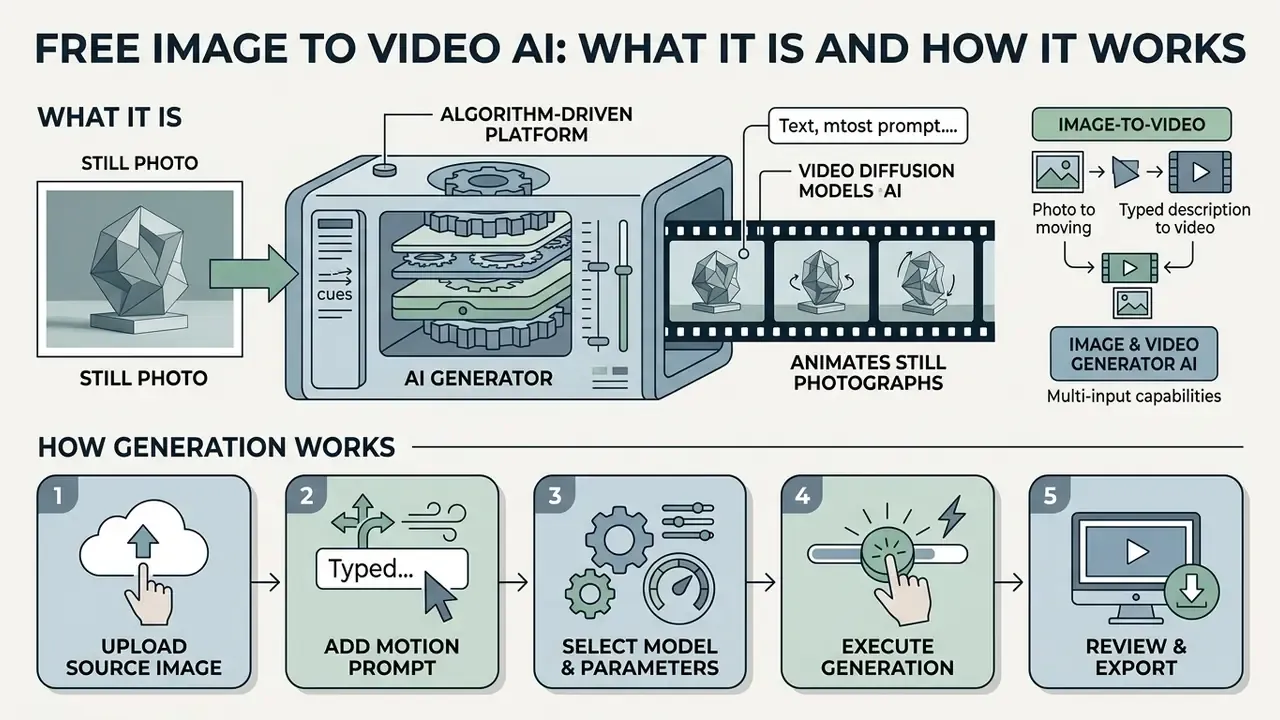
A free image to video AI generator is an algorithm-driven platform that animates still photographs using text prompts and video diffusion models. These tools process uploaded visual anchors to synthesize spatial continuity, character movement, and camera trajectories across consecutive frames. In other words: your photo stays the ground truth, the model only invents time.
How an AI Image Video Generator Creates Motion From a Single Image
An ai image video generator creates fluid motion by encoding a static source image into a lower-dimensional latent representation. Advanced systems apply Diffusion Transformers (DiT) and spatial-temporal attention blocks to predict frame-by-frame pixel displacement. Survey literature from 2024 to 2026 confirms that contemporary image-to-video architectures have largely replaced CNN hierarchies with Transformer blocks operating directly on video tokens, extracting spatio-temporal tokens before modeling the video distribution in latent space.
Models infer depth maps and segment key visual elements to separate foreground subjects from static backgrounds. The typical pipeline runs in four stages: monocular depth estimation from RGB, instance or colour segmentation into foreground and background masks, depth-aware inpainting of occluded regions, and finally layered or trajectory-aware motion synthesis with frame warping.
«Latent flow fields warp the initial spatial features while preserving the underlying artistic style and subject identity without distorting geometry.»
This mechanism allows an image ai video generator to synthesize complex optical trajectories without warping facial geometry or brand elements. Character-animation research reinforces the point: architectures using a dedicated ReferenceNet merge reference-image detail features through spatial attention, explicitly preserving appearance from the source frame, while a separate pose guider constrains movement. Two jobs, two modules. That separation is exactly why an ai image generator for video pipeline holds a face together better than a text prompt alone.
Image-to-Video, Text-to-Video and Image and Video Generator AI: The Difference
The primary distinction between text-to-video models and image-to-video generation lies in the presence of a deterministic visual anchor. Pure text-to-video models must construct both scene geometry and motion vectors solely from textual embeddings, which raises the risk of structural drift.
«Conditioning on a reference image significantly improves visual fidelity and reduces artifacts compared with text-only generation.»
Conversely, an image and video generator ai uses the uploaded reference photograph as a spatial boundary condition. The model restricts generative hallucination to temporal movement, preserving character likeness and composition. Identity-preserving text-to-video work such as ConsisID illustrates the inverse problem: text-only pipelines need extra control signals to keep a face consistent across frames, because language supplies no fixed visual identity.
Multi-modal architectures let operators upload initial images, guide dynamics via text prompts, and introduce audio cues at the same time. That is the practical meaning of free ai video generation from image and prompt: the photo fixes identity, the prompt fixes behaviour. For a broader catalogue of platforms and their usage rights, review our overview of image-to-video AI tools.
- Step 1, upload source image
- Insert a high-resolution visual reference into the model input pipeline.
- Step 2, add motion prompt
- Define camera movement, environmental dynamics, and subject action.
- Step 3, select model and parameters
- Choose neural architecture, resolution, frame rate, and aspect ratio.
- Step 4, execute generation
- Process latent flow diffusion across spatial-temporal attention layers.
- Step 5, review and export
- Validate temporal stability, check for visual artifacts, download final media.
How to Create Video From a Photo With AI for Free: Step-by-Step
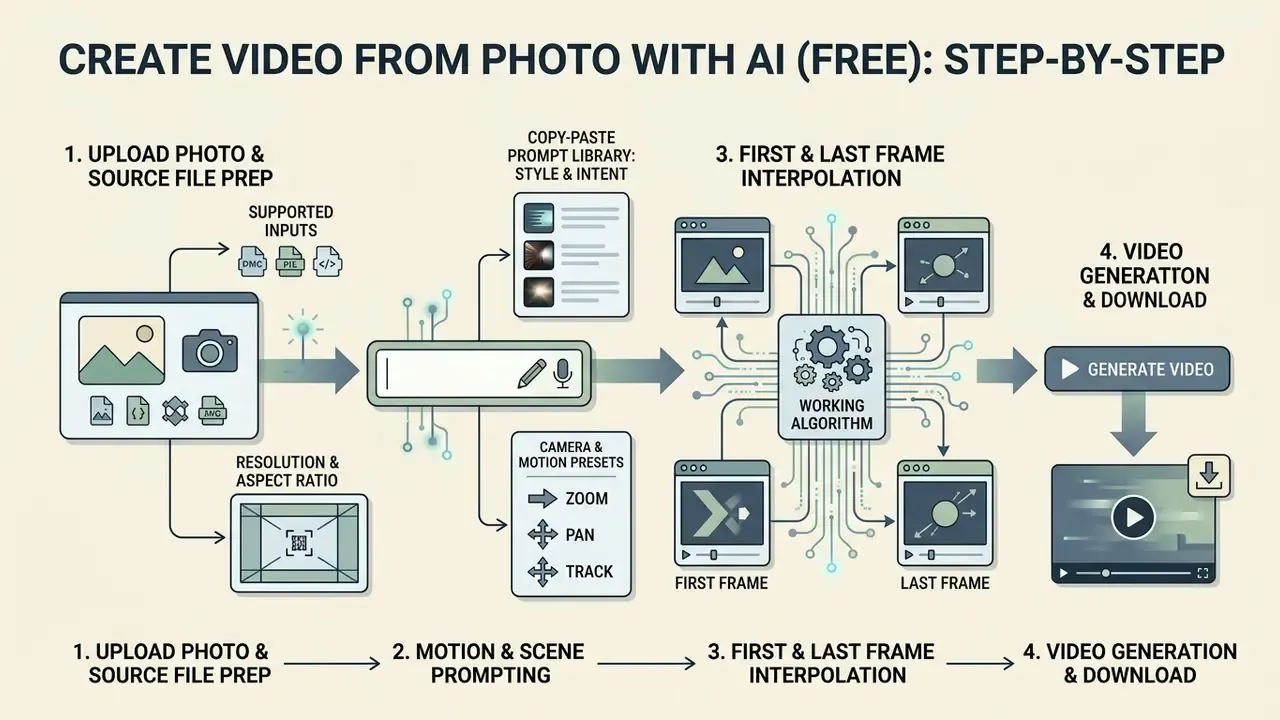
To convert image to video free ai workflows require systematic input preparation, precise motion prompting, and targeted parameter calibration. A structured sequence keeps quality reproducible while you operate inside free-tier credit allocations. It also keeps your credit burn predictable, which matters more than it sounds when a single 5-second render costs a third of your monthly allowance.
Upload a Photo or Reference Image and Prepare the Source File
To create video from photo ai engines require input files with balanced exposure, sharp edge contrast, and clear subject separation. Uploading an uncompressed source image prevents spatial artifacts from propagating into temporal noise across generated frames.
«Models achieve the best alignment when source images are high-resolution, aesthetically sound and structurally coherent.»
Supported input formats. Mainstream browser-based generators accept JPG, PNG and WebP. To eliminate compression artifacts before they become temporal flicker, upload a 24-bit PNG or a lossless WebP rather than a re-saved social-media JPG. Avoid screenshots, heavily denoised phone exports, and images with burned-in text overlays. The diffusion model treats overlay pixels as scene geometry and will happily bend your legal disclaimer into a wave.
Resolution and aspect ratio. Enterprise imaging guidance such as the GS1 Product Image Specification Standard sets a documented floor of 600×600 px for product photography and requires balanced overall contrast and exposure without high-contrast effects. For generative video pipelines practitioners raise that floor substantially, and vendor guidance for models in the Kling family recommends a minimum of 1024×1024 px, preferably 2K or above, with no compression artifacts and even lighting. Note the caveat: GS1 is a retail imaging standard, not an AI-generation specification. It is cited here as a floor for input hygiene, and the 1024×1024 figure comes from vendor documentation rather than peer-reviewed benchmarking.
Matching the source photograph's aspect ratio to the intended video output format prevents automatic cropping distortions. Runway's Gen-4 documentation publishes fixed output resolutions, namely 1280×720 (16:9), 720×1280 (9:16), 960×960 (1:1), 1104×832 (4:3), 832×1104 (3:4) and 1584×672 (21:9), while LTX notes that source images are auto-resized but produce the best results when they already match the target ratio.
| Target Channel | Aspect Ratio | Working Resolution | Notes |
|---|---|---|---|
| YouTube, desktop web, presentations | 16:9 | 1920×1080 (render 1280×720) | Default horizontal delivery per W3C recorded-video guidance |
| TikTok, Instagram Reels, YouTube Shorts, Stories | 9:16 | 1080×1920 (render 720×1280) | Vertical social video; crop-safe zones matter for captions |
| Marketplace product cards, feed posts | 1:1 | 1080×1080 (render 960×960) | Square renders most consistently across devices |
| Cinematic brand pieces | 21:9 | 1584×672 | Available on select models only |
When preparing a commercial asset, verifying image rights up front prevents downstream legal exposure. If the only available source is soft or low-resolution, run it through AI-powered photo enhancement tools before generation rather than asking the video model to invent detail that was never captured.
Write a Prompt for Motion, Scene and Camera
Writing effective prompts for an ai video generator from a photo starts with separating camera trajectory from subject action. A workable governance formula: [Camera Motion] + [Subject Action] + [Environmental Context].
«Short user inputs are often insufficient for high-quality video; model-aware prompt enrichment measurably improves metrics and user satisfaction.»
Vendor guidance converges on the same separation of concerns. Runway's image-to-video pattern is The camera [motion description] as the subject [action]. [Additional descriptions], and its documentation explicitly instructs users to describe the motion rather than re-describing the input image. Adobe structures video prompts as Shot Type + Character + Action + Location + Aesthetic, while Google's Veo prompting guide uses Cinematography + Subject + Action + Context + Style & Ambiance. These are vendor recommendations, not independently benchmarked findings, so treat the "short, descriptive prompts outperform dense stylistic prose" heuristic as practitioner consensus that still needs A and B validation inside your own pipeline.
For example, a prompt reading "Pan right slowly as the subject walks forward in a softly lit studio" isolates directional movement. Avoid redundant adjectives that duplicate visual information already present in the uploaded reference photograph. The model can see the photo. It cannot see your intent.
Copy-Paste Prompt Library by Style and Intent
| Style / Intent | Prompt Formula | Ready-to-Use Example |
|---|---|---|
| Realistic portrait | [Subject action] + [Micro-expression] + [Camera motion] | A woman turns her head slowly towards the camera, subtle smile, soft eye blink, static studio background, cinematic lighting, 8k |
| Anime / 2D illustration | [Art style] + [Dynamic action] + [Environmental effect] | Anime style, vibrant dynamic wave action, wind blowing hair, cherry blossom petals floating, slow motion pan left |
| 3D render / digital art | [Render style] + [Object motion] + [Light behaviour] | Stylized 3D render, character gently breathing, rim light shifting across the surface, slow orbit right, no background change |
| E-commerce product | [Product interaction] + [Rotation angle] + [Lighting] | Commercial studio shot, 360-degree smooth rotation of the sneaker, soft shadows, pristine white reflections, static camera |
| Landscape / atmosphere | [Environmental motion] + [Camera vector] + [Atmosphere] | Slow drone push-in over the mountain ridge, clouds drifting left, morning haze, warm golden ambiance |
| Archive / family photo | [Micro-motion] + [Restraint instruction] + [Static framing] | Gentle natural motion only: soft breathing, slight blink, hair moving faintly, static camera, preserve original grain and identity |
| Animated logo | [Reveal motion] + [Material] + [Loop instruction] | Metallic logo reveal, light sweep from left to right, slow zoom out, clean seamless loop, transparent-style background |
Camera and Motion Keyword Presets
Use explicit motion verbs rather than adjectives. Kling's camera-control documentation lists a usable vocabulary: pull back, pan left, pan right, tilt up, tilt down, track forward, orbit slowly, static camera. For subject-level micro-templates, short imperative fragments work best: character laughing, gentle breeze, wave, cheers, slow blink, product rotation, dynamic zoom.
Never combine pan, zoom and tilt in one prompt while also requesting a complex subject action. Multi-axis conflict is the single most common cause of morphing. One axis. That is the rule.
First and Last Frame Interpolation: Working Algorithm
Boundary conditioning is the most under-used control in free tiers, yet it is documented across vendor APIs. MiniMax exposes first-frame and last-frame image inputs, Google's Gemini API exposes lastFrame for interpolation plus up to three referenceImages, and Alibaba Cloud documents generation "between specified first and last frame images."
- First frame (start state)Fix the opening subject position, framing and lighting. This frame governs identity.
- Last frame (end state)Fix the closing composition, for example a product shown closed, then open; a character facing away, then facing camera.
- Match the pairKeep focal length, white balance and background identical between the two frames. Mismatched exposure forces the model to interpolate a lighting change, and geometry drifts with it.
- Prompt guardWrite an interpolation-constraining prompt such as
Smooth transition from state A to state B, maintaining physical object identity, no shape change, static camera. The model then generates motion vectors instead of morphing geometry. - ValidateScrub the midpoint frame first. Midpoint failure is where interpolation artifacts concentrate.
Configure Settings, Generate and Post-Process the Video
When configuring an ai video generator with image input, parameters such as frame rate, motion strength, and random seed dictate output stability. Lower motion buckets reduce object deformation, while higher settings add kinetic energy at the cost of potential visual artifacts.
«Motion intensity that is too low yields static, uninteresting video, while excessive intensity breaks temporal consistency and physical plausibility.»
Typical exposed parameters across current services include aspect_ratio presets (21:9, 16:9, 4:3, 1:1, 3:4, 9:16), seed for reproducibility (with -1 commonly meaning random), a motion-strength or motion-bucket slider, and a camera_fixed toggle that separates camera stability from subject motion. Frame rate is frequently fixed by the vendor: Runway Gen-4 outputs at 24 fps, and several 2026 cloud model lines render MP4 at 30 fps.
Start the generation and evaluate the resulting short clip for structural integrity. If subject geometry distorts or camera panning jitters, adjust the motion intensity parameter or refine the text prompt. Iterative rendering across fixed random seeds lets operators isolate specific movement variables without altering scene composition. Log the model version, prompt, seed and parameter set for every accepted render. That record is the minimum viable audit trail for model lineage when a generated asset later enters a regulated marketing review. It takes ten seconds. Reconstructing it six months later takes a week.
Post-Processing Pipeline: From Raw Clip to Publishable Asset
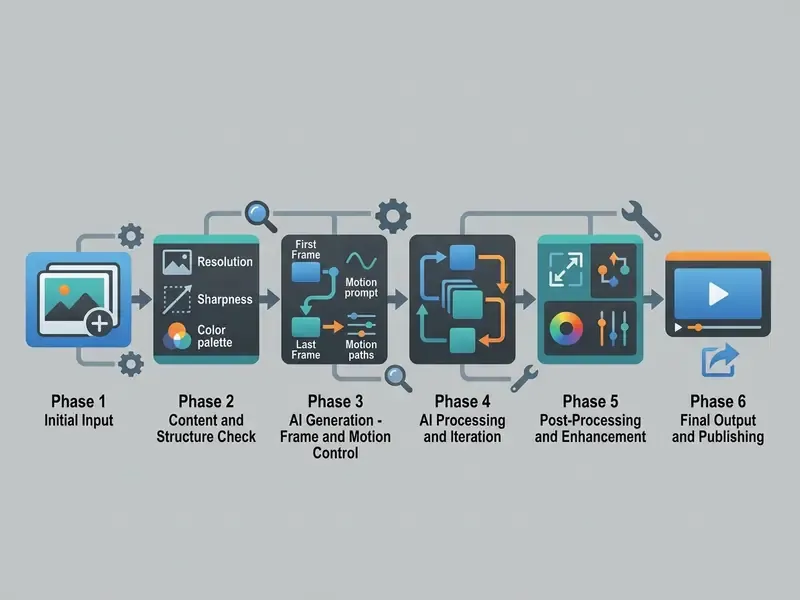
Generation is the starting point, not the finish line. A raw 5-second 720p clip is rarely publication-ready:
- Upscaling Free tiers commonly return 480p to 720p. Run the clip through an AI upscaler to reach 1080p or 4K without softening edges; preview a short segment first and check sharpness, motion smoothness and detail retention before processing the full file. If the source photo was the bottleneck, fix it upstream with AI image upscalers and regenerate rather than upscaling a flawed render.
- Audio, voiceover and lip-sync Layer background music or generate a scripted voiceover; lip-sync systems can align articulation to an animated speaker. Our guide to AI voice generators covers voice quality, language coverage and commercial licensing.
- Subtitles and brand overlay Add burned-in dynamic captions and logo overlays above the generated layer. Vertical social placements in particular depend on captions for silent-autoplay retention.
- Assembly and delivery Stitch multiple 5-second generations into a longer sequence, then export MP4 with H.264 at the highest available bitrate to prevent pixelation in motion scenes, keeping the frame rate identical to the render. Established video editing workflows and animation makers handle this stage; compress only at the final step, using guidance from our video compressor overview.
Checklist0 / 7
How to Choose an AI Video Generator Image Model for Your Result
Selecting the optimal ai video generator image platform depends on required motion physics, visual style consistency, and operational compute constraints. Enterprise teams evaluate generative models across spatial alignment benchmarks, inference latency, and fine-grained camera controls. Independence from a single vendor belongs on that list too, and it rarely is.
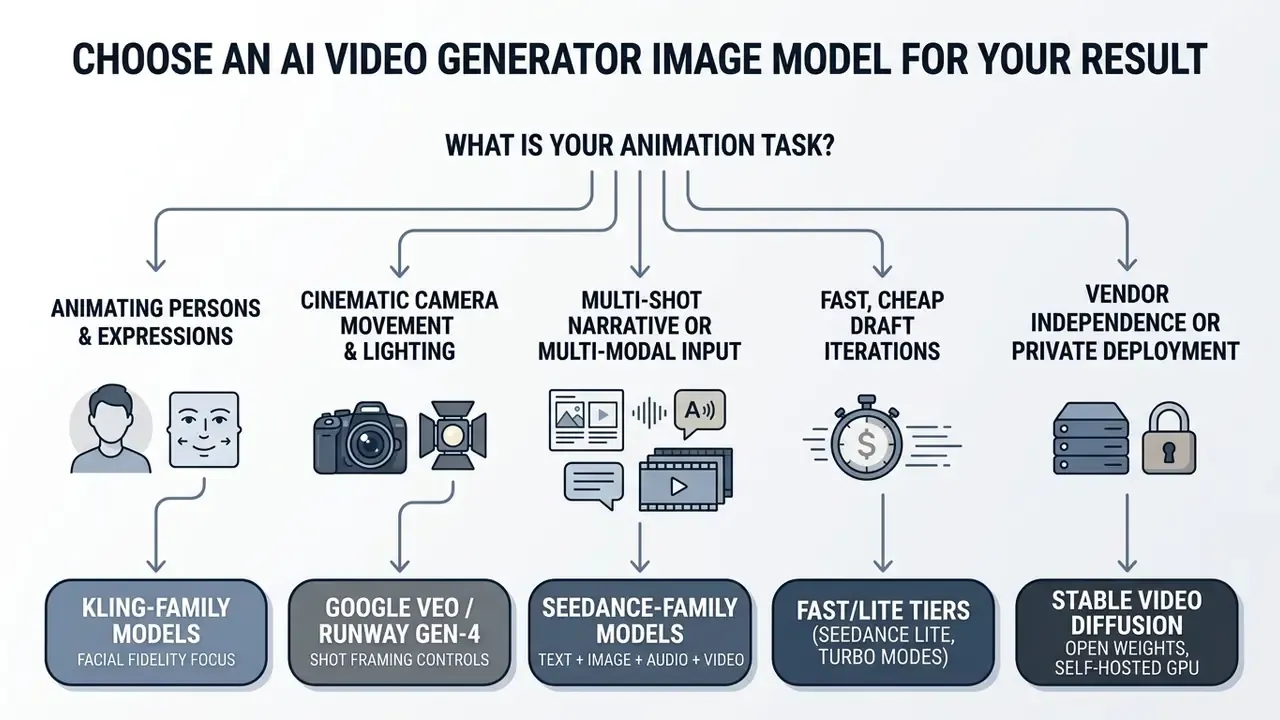
Which Video Models Suit Realistic and Cinematic Motion
Different generative architectures specialize in specific motion paradigms. The image video ai generator landscape now features specialized neural models trained on distinct dataset distributions, and the gap between them is widest exactly where you care: human bodies and physical contact.
Models in the Kling family (v1.5, v2.x, v3.0) show high fidelity in complex human motion and multi-angle camera tracking; Kling's Motion Control accepts a static character image plus a motion reference video and recommends full-body or half-body source images. Google's Veo line (3.x) excels at cinematic camera control, high dynamic range rendering, and photorealistic lighting, supports 4s, 6s and 8s durations at 720p, 1080p or 4K, and exposes shot-framing parameters for image-to-video. ByteDance's Seedance line (1.0, 2.x) provides multi-shot narrative sequencing with strong temporal alignment; Seedance 2.0 accepts four modalities, namely text, image, audio and video.
«Seedance 1.0 tops external public leaderboards for both text-to-video and image-to-video, exceeding Veo 3 and Kling 2.0 by more than 100 points on I2V metrics.»
«SVD shows high motion dynamics (Flow-Square-Mean 2.52), while Pika and Gen-2 lead on structural similarity to the source image (SSIM 0.800 and 0.803).» AIGCBench: A Comprehensive Benchmark for AI-Generated Video Evaluation, TBench (2024). https://arxiv.org/abs/2401.07004
Version numbering shifts every few months, so evaluate by model family and capability class rather than by minor index. Independent research also tempers vendor claims: motion-coherence work such as VideoJAM reports improved human-motion consistency over baselines, camera-controllable systems condition explicitly on both human and camera motion, but physics benchmarks including PhyWorldBench find that general-purpose video generators still violate basic physical laws for object and body motion.
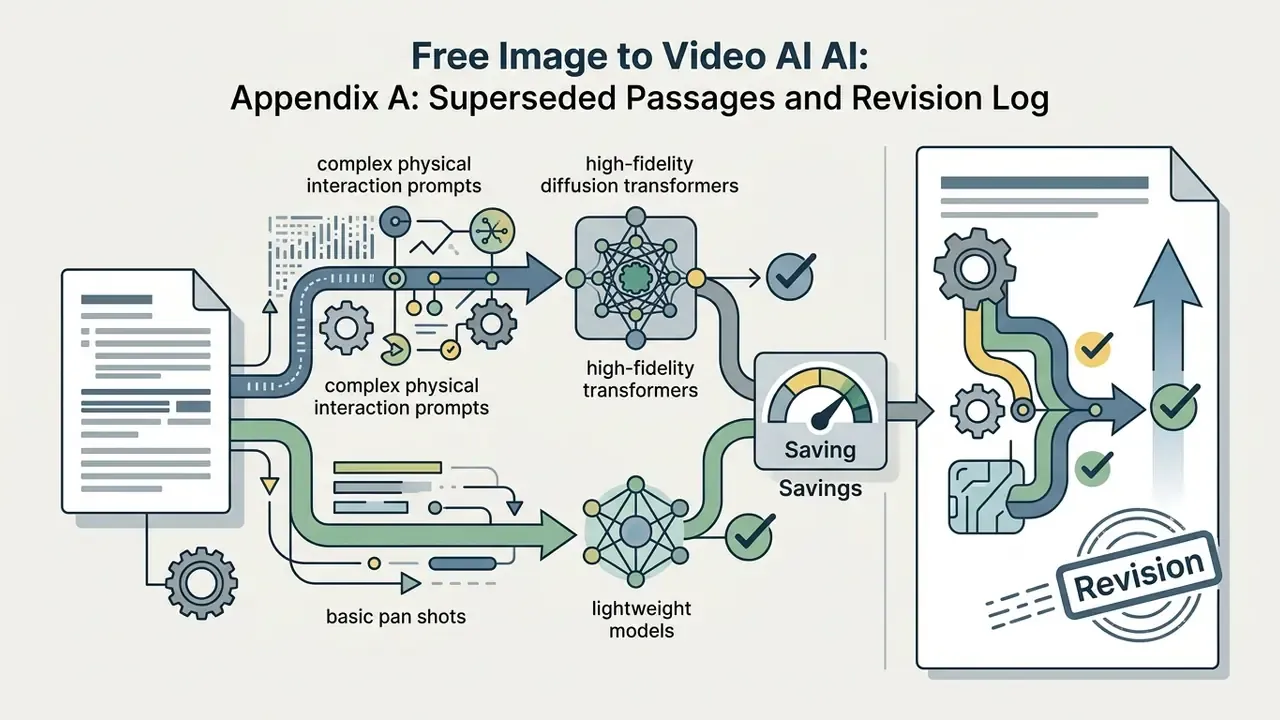
Governance note on model routing. A defensible cost strategy is tiered routing: send complex physical-interaction prompts to high-fidelity diffusion transformers and basic pan or push-in shots to lightweight fast models. Practitioners report meaningful compute savings from this pattern, but the numbers are workload-specific. Measure your own credit spend before quoting a percentage, and model the scenarios in our AI Media Calculators rather than trusting a vendor slide.
For regulated and self-hosted deployment. Where full vendor independence is mandatory, a common constraint in banking and insurance, Stable Video Diffusion open weights can be deployed inside a private cloud or VPC. Selection criteria: single-frame conditioning is sufficient for the use case, GPU capacity and inference latency budgets are approved, model weights and version hashes are pinned for reproducibility, and prompt and output logging stays inside the controlled perimeter.
When You Need Reference Images, First and Last Frames and Style Controls
Advanced workflows use start and end frame conditioning to enforce strict boundaries on short clips. Supplying both initial and final images forces the model to interpolate spatial changes smoothly across time. The step-by-step interpolation algorithm sits in the prompting section above, so it is not repeated here.
Boundary control also prevents narrative drift during automated video stitching. Style reference images let creative directors hold brand identity across diverse promotional materials: MiniMax separates "First & Last Frame Video Generation" from "Reference Generation" for character, motion, camera, style, voice and editing rhythm, and Gemini's Veo endpoint accepts up to three style or content reference images. An image generator to video workflow that starts from a brand-locked still is far easier to defend in review than one that starts from a paragraph of adjectives.
| Model / Architecture | Primary Motion Strength | First and Last Frame Support | Ideal Commercial Application | Free Tier Constraints |
|---|---|---|---|---|
| Kling (v2.x to v3.0) | Complex human motion and physical interaction | Supported (start and end) | E-commerce model animation, short ad clips | Daily credit allotment, visible watermark, 720p |
| Google Veo (3.x) | Cinematic camera movement and lighting | Supported (keyframe interpolation, lastFrame) | High-end product showcases, brand storytelling | Limited API trial credits, resolution caps, SynthID marking |
| Seedance (1.0 to 2.x) | Multi-shot transitions and character stability | Supported (multi-frame conditioning) | Narrative social content, multi-angle promos | Promotional trial credits, non-commercial default |
| Runway Gen-4 | Controlled camera vectors, fixed output sizes | Supported (image conditioning) | Agency-grade ads, iterative creative testing | 125 one-time credits, 720p, visible watermark |
| Stable Video Diffusion (SVD) | Open-source spatial flow and camera panning | Single frame conditioning | Custom pipeline integration, private deployment | Free open weights; requires self-hosted GPU compute |
Read the table as a routing map, not a ranking: facial fidelity, camera language, narrative length and deployment control are four different purchases. For a deeper capability-by-capability breakdown, see our AI video generator comparison, the wider AI Media Comparison Matrices, and the implementation-level Google Veo API guide alongside our broader AI Media API Guides.
Free AI Image Video Generation: What Is Genuinely Free
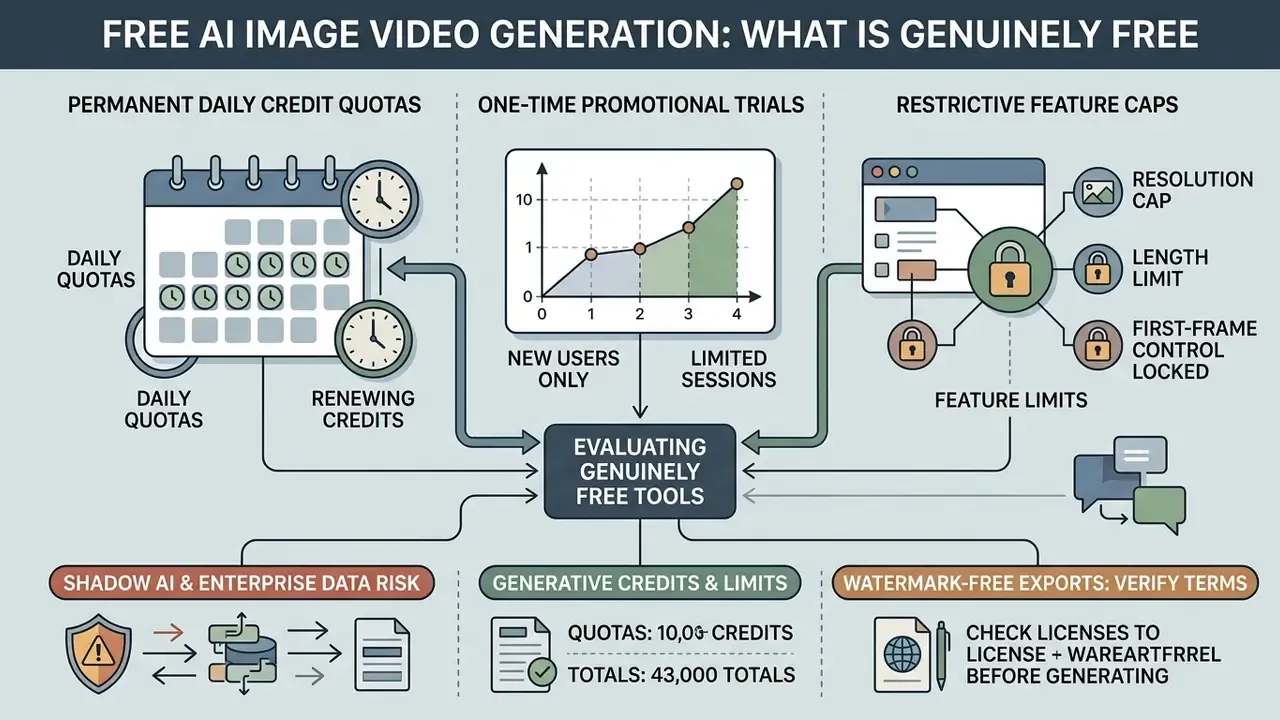
Evaluating free ai image video generation tools means separating three different things: permanent daily credit quotas, one-time promotional trials, and restrictive feature caps dressed up as generosity. Most vendors monetize higher resolution, longer clips, and watermark removal. That is the business model, and it is fine, as long as nobody in your organization mistakes a trial for a licence.
Warning: shadow AI and enterprise data ingestion risk
Uploading corporate photography, customer imagery, internal documents, identity documents or unreleased product assets to a public free-tier generator is a data-egress event. Free plans are frequently the tiers where inputs may be retained, reviewed, or used for model improvement, and where opt-out controls are unavailable or opt-in by default. For financial institutions and other regulated organizations this typically breaches both the internal data perimeter and the platform's own terms.
Practical controls: restrict free-tier experimentation to synthetic or already-public imagery; require an enterprise agreement with contractual no-training and retention terms before any confidential asset is uploaded; route sanctioned generation through an approved API with logging; block unmanaged consumer generators at the network layer; and maintain a register of approved tools so teams do not improvise. Verify current retention and training clauses in each vendor's data-processing terms before onboarding.
Free Trials, Generative Credits and Generation Limits
A free trial image to video ai offer typically grants a single allotment of computational credits on registration. Runway's free plan, for example, is documented as a one-time 125-credit deposit rather than a monthly refresh, with Gen-4.5 priced around 60 credits per 5-second video. Roughly two renders before the balance is gone. Test carefully.
Recurring credit models behave differently, supplying daily allowances that reset every 24 hours. Adobe Firefly documents exactly this pattern, offering free daily generations that reset each day with an Adobe account. Pika has been reported at 80 credits per month on free access, and Kling with daily free credits at 720p. An ai photo to video free trial almost always throttles rendering speed as well, placing jobs into lower-priority server queues.
Clip length on free plans generally lands between 3 and 8 seconds at standard definition (480p or 720p). Veo supports 4s, 6s and 8s durations, Runway Gen-4 outputs 5s or 10s clips, and Sora caps ChatGPT Plus and Business users at 720p and 10 seconds versus 1080p and 20 seconds on Pro. Anyone searching for a free ai video generator with watermark removal on a zero-cost plan should expect a trade: either resolution, or duration, or commercial rights.
«No peer-reviewed study since 2023 systematically analyses free-access conditions, credits or watermarking across image-to-video AI tools.»
Because these terms change frequently and vary by region and signup state, treat every third-party roundup, including ours, as a starting hypothesis and verify on the vendor's own pricing page. Our overview of free AI video generators and our AI Media Pricing Guides track limits and export conditions in more detail, and the same feature-gating logic applies across adjacent categories such as free photo editors.
Watermark-Free Exports: How to Verify Terms Before Generating
Finding an ai video generator watermark free option on a free account tier remains uncommon among commercial SaaS providers. Vendors standardly overlay branding graphics onto exported media unless the user upgrades.
To verify export conditions before spending credits, audit the platform's pricing documentation and the export settings themselves. Certain platforms do permit unwatermarked exports on free tiers but restrict resolution to 720p or prohibit commercial monetization. Technical watermarking, such as invisible C2PA metadata or Google SynthID provenance markers, may still be embedded in the output file structure even when no visible logo appears.
Be sceptical of blanket marketing claims. Aggregator platforms advertising "no watermarks on any exports" typically achieve that by capping resolution at 720p or by routing free jobs to promotional fast tiers of the Seedance Lite class, while premium models such as Veo or Kling Pro consume paid tokens on the same platform. Two claims must always be checked separately: is there a visible watermark, and which model actually ran? An ai video picture generator that silently downgrades your model choice is not free, it is just cheap in a different currency.
To compare specific tools side by side on credits, duration caps and watermark policy, see our roundup of the best free AI video generators.
Can You Use AI Video Made From Photos in Commercial Projects?
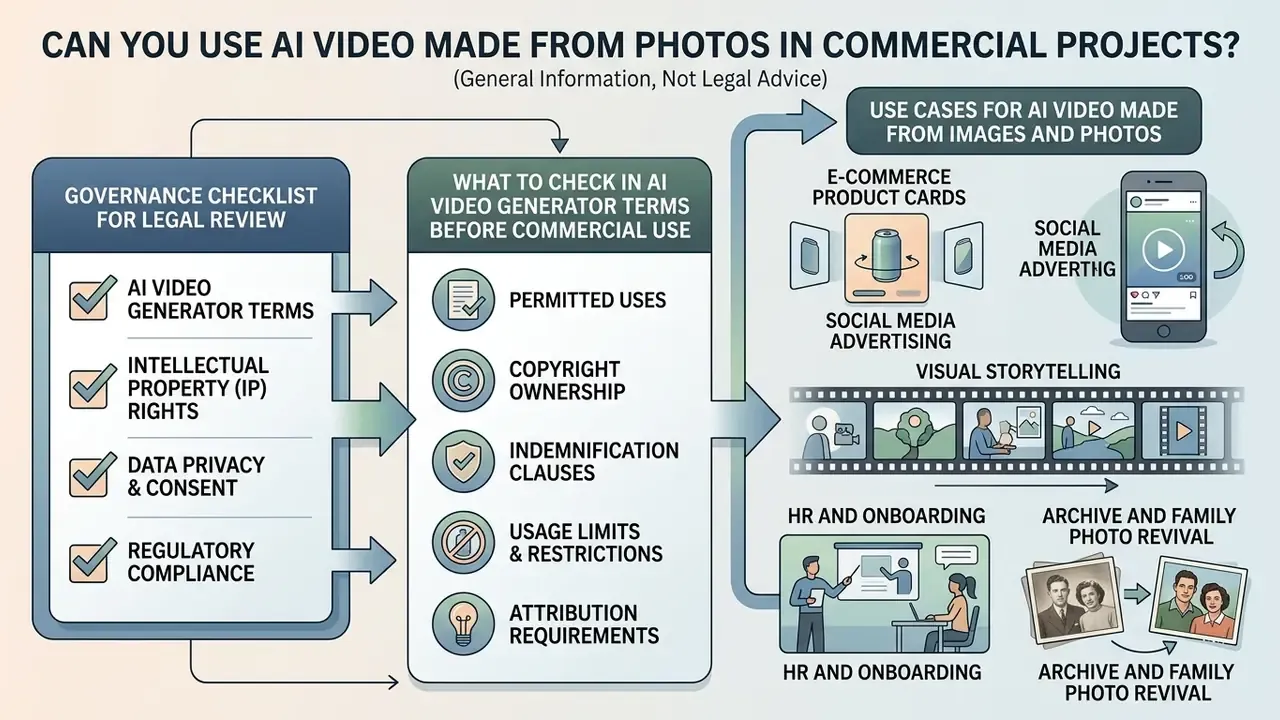
This section is general information, not legal advice. Platform licensing terms change frequently; verify the current Terms of Service and data-processing agreement before any commercial deployment, and consult qualified counsel for jurisdiction-specific questions.
Deploying an image and video ai generator asset inside a commercial campaign requires analysing intellectual property ownership, source image clearance, and platform licensing. Synthetic media in marketing or product representation raises specific legal considerations, and they do not resolve themselves at the export button.
What to Check in AI Video Generator Terms Before Commercial Use
Before embedding synthetic video into paid media, review the platform's Terms of Service on output ownership. Some vendors grant full commercial rights for generated media. OpenAI's Terms of Use, for instance, state that the user retains ownership in Input and is assigned the provider's right, title and interest in Output, with permitted commercial use. Others restrict free-tier outputs strictly to personal or educational evaluation. Our analysis of commercial use of AI generators and the wider AI Media Commercial-Use Hub cover the adjacent licensing landscape for still imagery.
From a regulatory perspective, current US Copyright Office guidance states that fully synthetic media lacking substantial human creative input cannot be registered for federal copyright protection; Congressional Research Service analysis frames the same point as copyright extending only to human contributions. The critical distinction is contractual permission versus copyright ownership. A platform can licence you to use an output commercially even where that output is not itself protectable. Those are two separate questions, and legal teams conflate them constantly.
«Academic and benchmark reports do not analyse end-user rights to generated video; those questions are governed exclusively by platform terms of service.»
Use Cases for AI Video Made From Images and Photos
Marketing, HR and content teams use an ai video maker with photos to accelerate asset production across digital channels. Documented commercial deployments include Dresma generating product photos and videos for ecommerce storefronts on Google Cloud, and Zepto converting product images into shopping-ad videos with music and captions "in mere minutes." Common deployment scenarios:
- E-commerce product cards Animating static catalogue images to show angle rotations on marketplace listings. A documented workflow feeds a product image plus metadata into a video generation API, then fans the output out to Reels, TikTok, paid social and email.
- Social media advertising Converting promotional photography into short vertical video ads, where motion outperforms static creative in crowded feeds.
- Visual storytelling Creating atmospheric background videos for corporate presentations, news feeds, and digital signage.
- HR and onboarding Turning static policy documents, safety instructions and manuals into dynamic training clips, including animated presenter frames, which cuts the cost of refreshing onboarding material each quarter.
- Archive and family photo revival Animating vintage portraits with restrained natural motion (micro-expressions, blinking, faint hair movement) for documentaries, memorial projects and personal storytelling. Keep motion strength low. Heritage imagery is the least tolerant of morphing.
- Animated logos and brand graphics Converting vector logos and brand packs into short video stingers for presentation intros, website headers and stream overlays.
- Education and instructional guides Converting static teaching illustrations into step-by-step video explainers, optionally paired with AI voiceover for accessibility.
An ai video generator photo workflow is also increasingly used inside creative production chains that already rely on tools like an ai ad generator or an ai album cover generator: the still is produced first, the motion layer second.
| Deployment Scenario | Source Image Rights Required | Platform Licence Needed | Watermark Policy Impact | Recommended Governance Action |
|---|---|---|---|---|
| Paid ad campaigns | Full commercial rights and model releases | Commercial paid plan licence | Watermarks prohibited by ad networks | Audit contract terms; verify C2PA metadata compliance and channel disclosure rules. |
| Organic social media | Standard brand asset ownership | Free or Pro tier, per Terms | Watermarks lower engagement metrics | Use native commercial plans for clean visual output. |
| Marketplace listings | Proprietary product IP ownership | Commercial usage licence | Watermarks violate platform guidelines | Ensure output resolution meets platform standards (1080p or above) and product depiction is accurate. |
| HR and internal training | Employee consent for likeness use | Paid plan or private deployment | Watermarks acceptable but unpolished | Obtain written consent; keep assets inside the controlled perimeter. |
| Archive and personal storytelling | Family or estate permission | Free or paid tier, non-commercial acceptable | Watermarks acceptable for personal use | Label output as reconstructed, not documentary footage. |
| Internal demonstrations | Internal asset or fair-use reference | Free evaluation licence | Watermarks acceptable for internal review | Label outputs clearly as synthetic evaluation drafts. |
Two criteria decide most of these rows: whether you can prove rights in the source photo, and whether the licence covering the render survives contact with a paid media buy. Everything else is polish.
How to Improve Image-to-Video Output and Avoid Common Errors
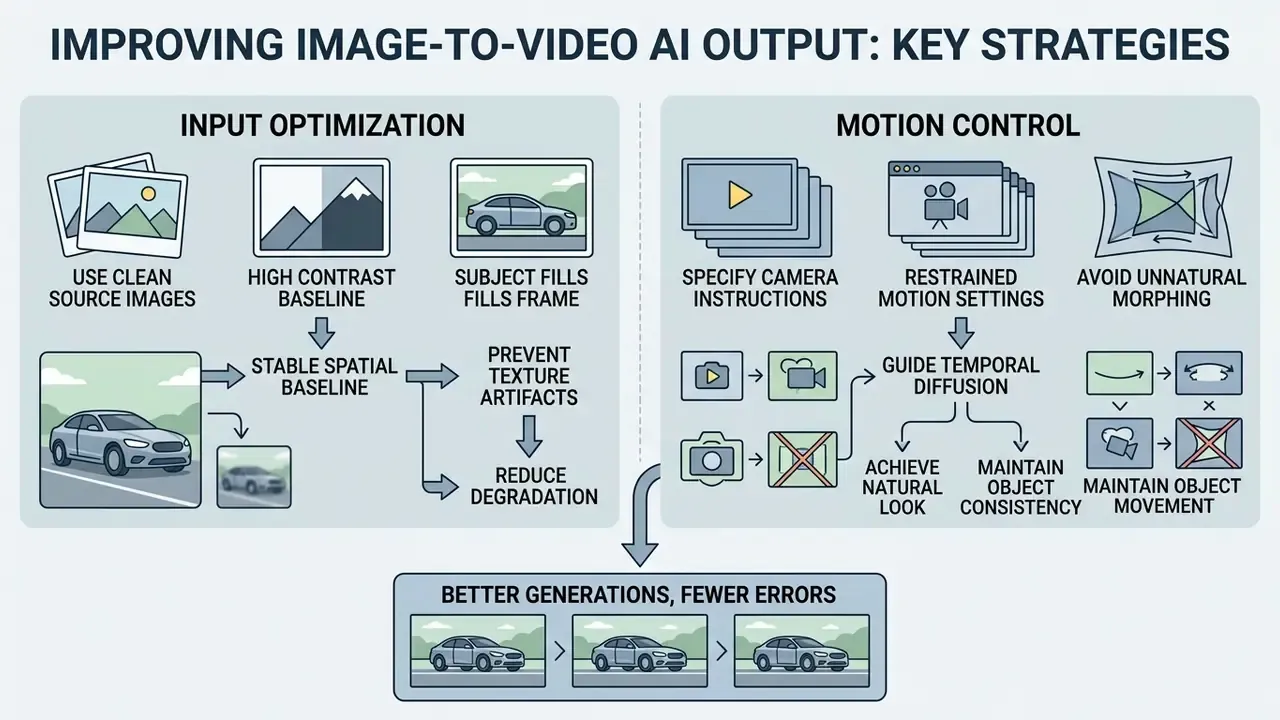
Optimizing image-to-video output means understanding how spatial-temporal diffusion fails. Unnatural morphing, spatial blur, and subject warping come from flawed source assets or conflicting parameters, rarely from bad luck.
«Existing benchmarks mainly focus on video quality and temporal consistency, overlooking a model's ability to understand semantics and comply with physical laws.»
Academic and vendor guidance intervene at different levels. Research addresses model and control optimization (reward fine-tuning, pose and camera conditioning), while vendor documentation addresses prompt and settings remediation (quality over speed, refiner passes, artifact-free inputs, motion control). Both describe the same artifact classes, which is mildly reassuring.
Why Low-Quality Source Images Degrade the Video
«Models achieve the best alignment when source images are high-resolution, aesthetically sound and structurally coherent.»
Other failure patterns worth pre-empting: subjects that occupy too little of the frame, so the model has too few pixels of identity to preserve; unclear subject and background separation; and overloaded prompts requesting several simultaneous actions.
Clean, uncompressed, high-contrast imagery gives the model a stable spatial baseline for motion synthesis. Where only a degraded source exists, restore it first with AI image upscalers or a conventional photo editor rather than expecting the video model to compensate. Stylized inputs behave the same way, whether the still came from an ai animal generator, an ai animal hybrid generator, an ai aging filter or an AI headshot generator: clean geometry in, stable motion out.
How to Control Motion and Camera So the Video Looks Natural
To prevent unnatural object morphing, apply restrained motion settings and precise camera instructions. Explicit vectors such as "slow pan left" or "static camera with gentle foreground movement" reduce generative ambiguity.
Understand what each control actually does. Pan is horizontal rotation from a fixed camera position; tilt is vertical rotation from a fixed position; zoom changes focal length without moving the camera body. Because pan and tilt preserve camera position, they are structurally safer than dolly or orbit motions, which force the model to synthesize genuinely unseen geometry.
Avoid conflicting directional instructions in one prompt, such as simultaneous pan, zoom and tilt while a subject performs a complex action. Incremental adjustments let operators isolate motion defects and build reproducible rendering profiles. No primary source publishes numeric motion-strength thresholds that guarantee morph-free output, so the practical method remains unglamorous: fix the seed, sweep motion strength in small steps, and record the highest setting that survives frame-by-frame review.
«While models generate visually convincing content, experiments record frequent violations of fundamental physical laws; physical commonsense is far from solved.»
Vendor documentation converges on the same operational rule: Runway's Gen-4 guidance states that a high-quality input image free of visual artifacts yields the best results, and instructs users to focus on describing the motion rather than the input image. Stability therefore depends on two variables you fully control, input fidelity and prompt clarity, before any model-side parameter is touched. When a render still fails repeatedly, our AI Media Support and Troubleshooting notes cover the artifact-by-artifact diagnosis.
FAQ About Free Image to Video AI
Do I Need to Install Apps to Use Image-to-Video AI?
No local software installation or specialized GPU hardware is required for modern image-to-video web services. Generative processing happens entirely on cloud infrastructure. Adobe Firefly, for example, documents a browser-based flow: sign in with an Adobe ID, upload a static image, generate. Cloud APIs such as Alibaba Cloud Model Studio expose image-to-video over HTTP, with SDK installation required only for SDK calls rather than browser use. Users interact through standard browsers, uploading source assets and receiving rendered videos remotely. Self-hosting an open-weight model like Stable Video Diffusion is the exception, and that path does require GPU capacity plus an approved deployment pattern.
What Image Formats and Aspect Ratios Are Supported?
Mainstream generators accept JPG, PNG and WebP. Use sharp, well-lit, non-pixelated images with a clearly identifiable subject; lossless PNG or WebP beats a re-compressed JPG. Supported output aspect ratios commonly include 16:9, 9:16, 1:1, 4:3, 3:4 and, on some models, 21:9. Pre-crop the source to the target ratio to avoid automatic cropping. Photos, illustrations, anime frames, sketches and digital art all work, and any decent image generator video pipeline will preserve the original style while adding motion.
How Long Does It Take to Generate Video From a Single Image?
Rendering a standard 5-second clip typically takes between 30 seconds and 3 minutes, depending on model architecture, render resolution, and platform load. Cross-model measurements report roughly 33 to 540 seconds for a 5-second clip, with fast or turbo tiers at 30 to 60 seconds and high-fidelity 4K or audio-enabled tiers at 180 to 540 seconds. During peak usage, free-tier queues stretch that considerably. One documented 15-second 1080p render took about 20 minutes under heavy platform load.
«One-step diffusion reaches FVD 171.15 on OpenWebVid-1M, approaching 25-step SVD quality (FVD 156.94) at far lower compute cost.» OSV: One Step is Enough for High-Quality Image to Video Generation, arXiv (2024). https://arxiv.org/abs/2409.11367
Architecture, not just queue position, drives latency. Step count is the dominant variable. Our overview of AI video generators compares generation methods and pricing models in more depth.
Which Formats Suit Exporting AI-Generated Videos?
The standard export format is MP4 encoded with H.264, which travels well across digital platforms; W3C recorded-video guidance names MPEG-4 or MP4 as the recommended container with WebM as an alternative, at 16:9 and 1080p. GIF remains an option for short silent loops but sacrifices colour depth and file efficiency. Match aspect ratios to delivery channels: 16:9 for widescreen platforms and corporate sites, 9:16 for vertical mobile feeds (Reels, TikTok, Stories), 1:1 for square marketplace blocks, which render most consistently across devices. Keep the export frame rate identical to the render frame rate and use the highest available bitrate; our guides to video editors for post-production cover downstream assembly.
Can I Extend a Clip Beyond 5 to 8 Seconds on a Free Plan?
Rarely in a single generation. The practical method is chaining: generate clip A, use its final frame as the first frame of clip B, continue. Multi-shot-capable models of the Seedance family and last-frame conditioning make the seams less visible, but expect gradual identity drift after three or four links. Stitch the segments in an editor and place cuts on motion beats to hide residual inconsistency.
Is Image-to-Video Reliable Enough for Regulated Industries?
Only with controls. Physics benchmarks show current models still violate basic physical laws, so generated video should never be presented as documentary evidence, product performance proof, or factual demonstration in regulated communications. Acceptable uses skew toward atmospheric, decorative and illustrative content with clear synthetic labelling, human review sign-off, provenance metadata retained, and a logged model-lineage record for each published asset. Anything stronger than that needs validation evidence you can put in front of internal audit.
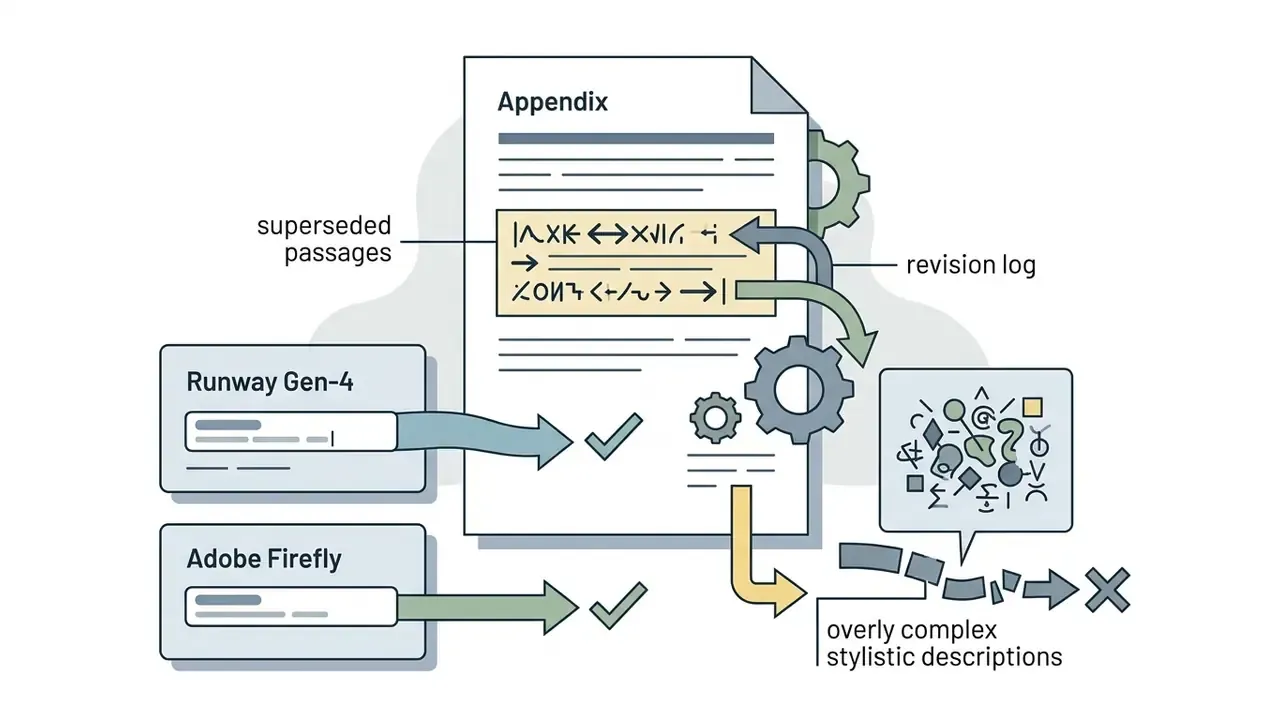
Appendix A: Superseded Passages and Revision Log
Retained for transparency and version traceability. Each entry records the original wording and why it was replaced in the main text.
Reason for revision: The citation carried no resolvable URL and a publication year ahead of the verifiable literature base. The claim itself is supported by artifact-taxonomy and video super-resolution benchmark work and by AIGCBench alignment findings, so the substance was retained and re-sourced.
Reason for revision: Attributed to an unnamed publication with no author, year, or URL. Replaced with an attributed PhyGenBench citation plus vendor-documented Runway Gen-4 guidance expressing the same operational rule.
Reason for revision: Anonymous case study with no disclosed methodology or verifiable data. The routing strategy itself is sound and was retained without the unverifiable percentage.
Reason for revision: Minor version indices date quickly. Rewritten to model families with version ranges, with vendor-documented capabilities and benchmark citations attached.
Reason for revision: Vendor documentation is not an independent source and no metrics or methodology were published. Reframed as practitioner consensus requiring internal validation, alongside the independently published Prompt-A-Video finding.
Reason for revision: Removed as irrelevant and reputationally incompatible with the governance, risk and compliance audience of this resource.