That is the whole tension of this category. One side sells frictionlessness. The other side has to sign off on it.
Executive Summary: What Risk, Legal, and Creative Leaders Need to Decide
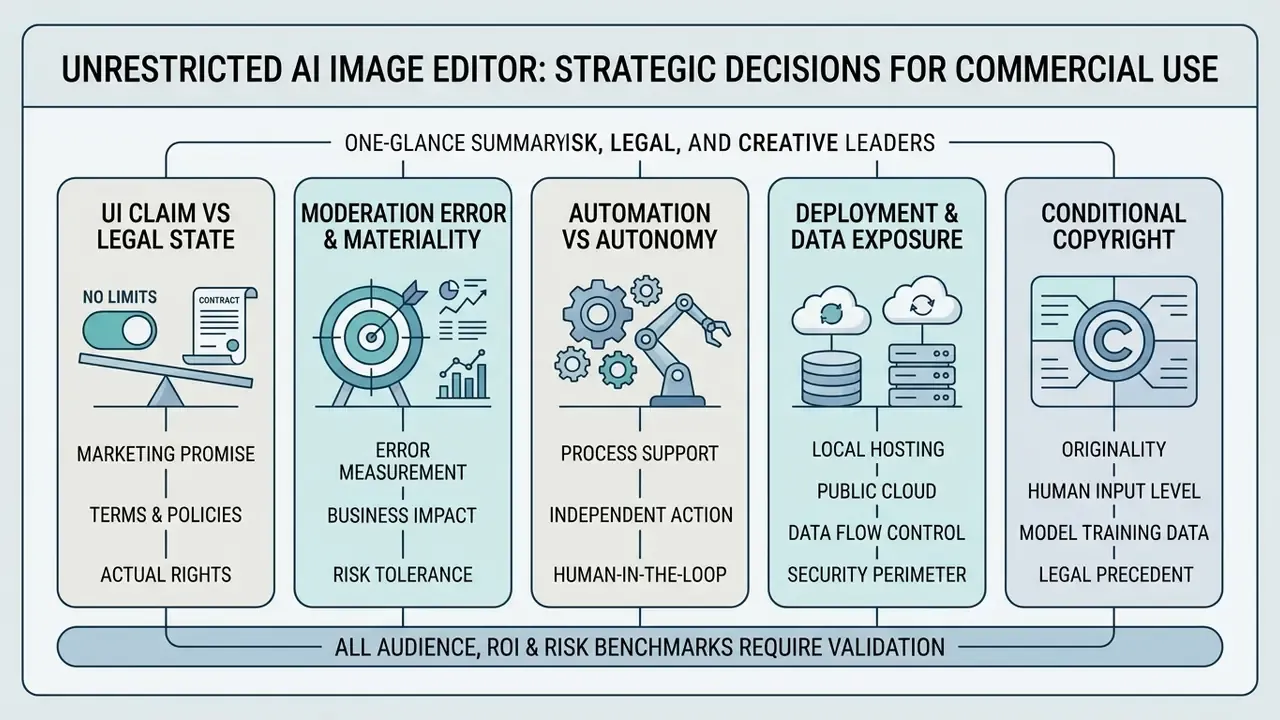
What "AI Image Editor No Restrictions" Means in Practice
An ai image editor no restrictions is a visual editing tool that minimises platform-enforced operational barriers, things like usage limits, export watermarks or feature locks, while still executing prompt-based edits. Technically, an ai image editor without restrictions gives you flexibility across varied edit types, letting you modify uploaded images or generated images with plain text instructions. Teams comparing editing workflows against synthesis workflows can review AI image generators to see where each category fits. For ongoing vendor movement in the segment, the running coverage at ai image tools news is a reasonable starting point.
Vendor documentation reinforces that editing and generation are architecturally distinct modes. OpenAI's image documentation separates Generations ("from scratch") from Edits ("modify existing images"), where the edit endpoint consumes an uploaded image plus a mask or reference image. Adobe Firefly similarly splits an Edit tab for uploaded JPEG, PNG and WebP files, capped at 100 MB, from a Generate tab for previously created assets. Prompt-based editing, then, is a constrained edit mode. Not unrestricted synthesis.
Marketing claims about an ai image editor with no restrictions rarely mean an absolute absence of operational rules. Platforms separate flexibility in image editing capability from platform-level governance. An image editor ai no restrictions framework may enable complex image-to-image transformations while backend content safety filters and platform terms continue to apply, quietly, on every request.
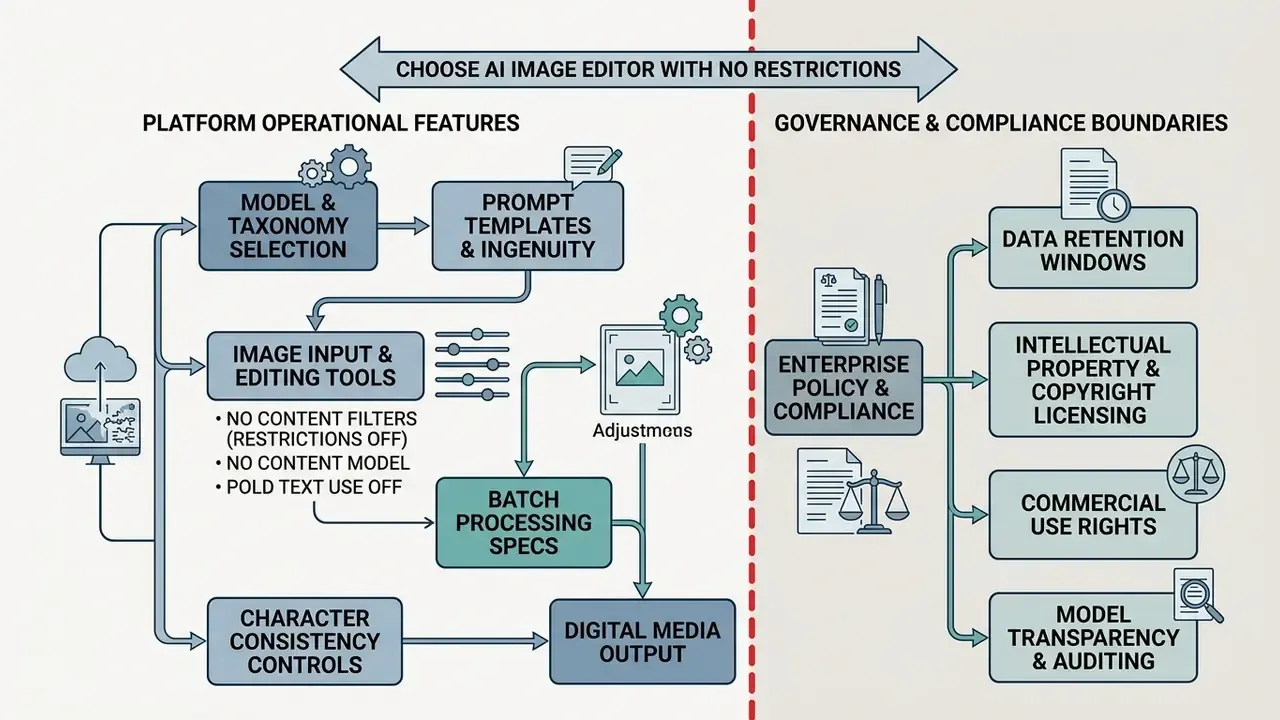
Which Restrictions Users Seek to Bypass: Limits, Watermarks, and Locked Tools
People searching for a no restriction ai image editor are mostly trying to remove friction from production. The recurring commercial pain points:
- Generation and credit caps. Hard limits on daily or monthly rendering cycles. Recraft's free plan, for example, permits limited credits and up to three image uploads per day, with paid-only credit top-ups.
- Export watermarks. Mandatory branding overlays on exported files. Free tiers on mainstream editors frequently pair watermarks with 720p export ceilings, so you lose twice.
- Feature locking. High-resolution exports or specialised tools sitting behind a premium paywall. Some platforms block export entirely when premium stock assets appear in a composition.
- Account requirements. Registration barriers that slow down a two-minute asset fix.
- Resolution restrictions. Silent downscaling of high-definition source files at export.
- Commercial-use exclusion. Photoroom's free plan caps exports at 100 per month and excludes commercial use. Invisible in the interface. Decisive for business deployment.
Clearing these obstacles is what keeps a design or marketing team in a fluid creative workflow instead of a queue. Practitioners weighing free against paid tiers can compare structural limits in a free photo editor overview, and a content creator working solo will usually reach a different verdict than a regulated brand team.
Why "No Restrictions" Does Not Always Mean "No Rules"
Unrestricted visual tools remain bound by technical boundaries, acceptable-use policies and law. According to Riccio et al. (2024), an audit of text-to-image platform moderation found that 24.17% of prompt attempts across sensitive social dimensions hit automated censorship, including prompt blocking or output obfuscation, despite not violating core safety guidelines.
«The authors recorded six distinct censorship modes, from outright prompt refusal to blurred or obfuscated outputs, triggered even by neutral requests, across 805 attempts spanning 161 prompts and five models.»
The operational implication is that moderation failure runs in both directions. Filters under-block harmful content and over-block legitimate commercial categories. So false-positive rates belong in your procurement scorecard, not in the "annoying but survivable" column.
Platforms serving commercial purposes also enforce strict prohibitions on illegal, non-consensual or defamatory imagery. A product advertising no limit ai image editor functionality still runs backend safety classifiers to prevent safety violations and protect its own corporate compliance posture. Published acceptable-use policies say so plainly: several 2026 vendor policies ban content marketed as "NSFW", "uncensored", "18+" or "no filter", and state that the prohibition applies equally to free, paid, private and internal use.
Handling Sensitive Categories (Apparel, Medical, Aesthetics)
Editors serving fashion, dermatology and medical aesthetics trip standard filters constantly. Lingerie campaign photography, post-operative documentation, oncology patient imagery: all routinely misclassified. Enterprise-grade platforms handle this by relaxing aggressive front-end keyword matching while retaining mandatory legal back-stops against non-consensual and illegal content, ideally with encrypted transport for sensitive uploads.
Operationally, that means four asks before signature:
- Request documented false-positive ratesfor your vertical, not a global average.
- Confirm an appeals or allowlist pathfor regulated clinical and apparel categories.
- Verify that "no filters" marketing is not contradictedby the acceptable-use annex of the same contract. This asymmetry is the single most common compliance trap in the segment.
- Check output-license reuse clauses.At least one major vendor's hosted-gallery terms grant a perpetual, worldwide, royalty-free license over submitted input and output for marketing reuse, which flatly contradicts "no restrictions" positioning.
Shadow AI and Data Exfiltration Risk in Regulated Environments
The highest-severity risk here is not censorship. It is an unsupervised marketing or operations team uploading customer-identifiable or pre-release product imagery into a free consumer editor with undisclosed retention. Because free web editors are frictionless and need no procurement ticket, they are a textbook Shadow AI vector.
Shadow AI control checklist:
| Control | Implementation | Evidence Artifact |
|---|---|---|
| Egress classification | Block or log uploads to unapproved image-editing domains at the proxy or CASB layer | Proxy allow/deny list with review date |
| Data-class gating | Prohibit any asset containing customer faces, account numbers or unreleased SKUs in consumer-tier tools | Data classification policy mapping |
| Approved-tool register | Maintain one sanctioned local (WebAssembly or on-prem) path and one zero-retention enterprise API path | Vendor register with DPA references |
| Retention verification | Obtain written retention windows (immediate discard, 1 day, 30 days, 90 days) per vendor | Signed DPA or retention addendum |
| Provenance logging | Require C2PA manifest retention for all externally published edited assets | Manifest archive with asset hash |
| Training-use opt-out | Contractually exclude enterprise uploads from model training | Enterprise terms clause reference |
Retention practice in this segment varies enormously, and the variance is verifiable. Some services process entirely in-browser and never transmit files. Others discard uploads immediately after processing but keep server logs for 30 days. Others retain images for 30 days on free plans and 90 days on paid plans, where files are automatically deleted only after that window closes. Treat the retention window, not the marketing claim, as the control.
What Tasks an Unrestricted AI Photo Editor Solves
An ai photo editor with expanded operational limits compresses high-volume asset production by automating retouching that used to be manual. Readers new to the category can start with a structured overview of AI photo editors and their core capabilities. Using text prompts and instruction-based models, creators can edit photos, perform localised object removal, execute clean background removal, and enhance images without installing complex software.
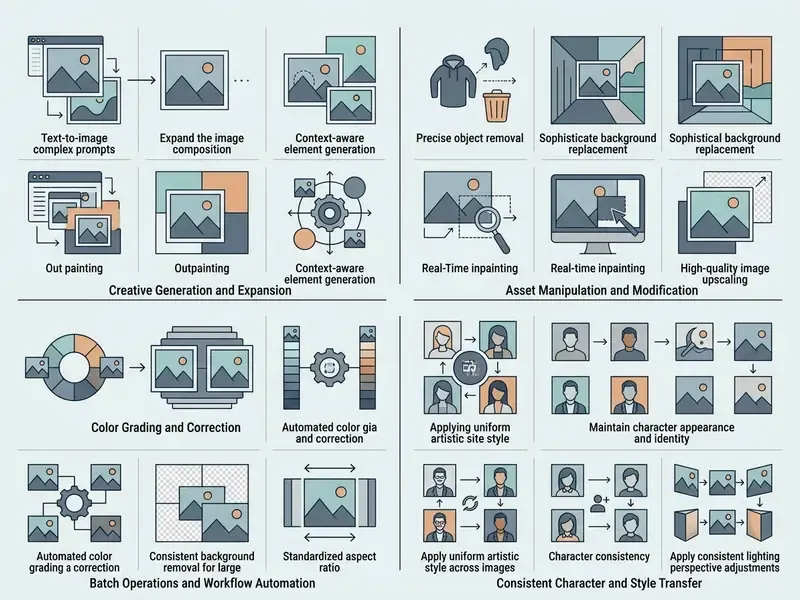
Across 2024 to 2026 vendor documentation, commercial usage consolidates into six task families:
- Object and background removal erasing elements and isolating subjects.
- Quality enhancement and upscaling repair, denoise, resolution increase.
- Style transfer and restyling applying reference aesthetics to existing assets.
- Prompt-based local correction targeted regional edits via natural language.
- Typography and brand-asset integration placing copy, logos and watermarks natively into scenes.
- Spatial and interior redesign re-imagining rooms, layouts and environments from a single photograph.
Spatial and Interior Redesign: Beyond Product Photography
Unrestricted editors are increasingly deployed well outside e-commerce catalogues. Real-estate marketing, furniture retail, hospitality and architectural practices use image-to-image editing to test interior concepts before anyone pays for physical staging:
- Virtual staging turning an empty listing photo into a furnished, styled room while preserving window placement, ceiling height and structural walls.
- Style variant testing generating Scandinavian, mid-century and industrial treatments of the same living room for A/B testing in ad creative.
- Renovation previsualisation swapping flooring, cabinetry or wall finishes in a kitchen photo to support a quote or design proposal.
- Layout exploration repositioning furniture groupings to communicate flow without a physical reshoot.
The governance caveat is material. In property marketing, a materially altered visual of a real asset can constitute misrepresentation. Disclosure labelling, whether a visible caption, watermark or embedded metadata, is the recommended control, and in the EU transparency obligations apply to realistic AI-manipulated content that could pass as authentic. Teams needing to extend the frame rather than restyle it can use AI outpainting tools to widen a room shot while keeping perspective intact.
Removing Objects, Replacing Backgrounds, and Enhancing Photo Quality
Commercial product workflows demand clean, high-impact visuals. An ai picture editor no restrictions platform accelerates e-commerce preparation through targeted automation:
- Object removal. Erasing unwanted elements, cables or blemishes via AI inpainting while reconstructing underlying texture. Modern APIs support removal by mask or by text description.
- Background removal. Isolating subjects to produce transparent PNGs for catalogue integration.
- Quality enhancement. Upscaling resolution and sharpening micro-texture on product photos and product shots, commonly at 2× to 4× scale factors. Teams working at scale often route this through a dedicated ai image upscaler for high-resolution output, with specialised AI image enhancers handling denoise and micro-contrast recovery.
Documented input best practice is consistent across vendors: studio images with even lighting, uniform backgrounds and well-defined subject edges produce the strongest background-removal results. Guided removal documentation recommends source files above 1000 px on the longest side, or a 2× upscale before processing.
A large-scale empirical study of everyday editing requests by Taesiri et al. (2025) evaluated over 83,000 real-world editing tasks and found that contemporary AI editors fulfilled roughly 33% of precise requests without human intervention. The same study flagged that models struggle most on low-creativity, high-precision work, exact identity preservation above all, which is why human oversight stays mandatory for professional grade deliverables.
«Models failed most often on low-creativity, high-precision tasks, notably preserving exact facial identity across edits.»
Typography Integration: Blending Text, Captions, and Logos Natively
Placing copy inside an image is a different technical problem from object editing, because the model has to match perspective, surface curvature, lighting direction and material response all at once. A production-grade approach:
- Specify the surface, not just the text.Tell the model where the type sits ("on the matte packaging face", "on the glass storefront") so perspective is inferred from geometry.
- Declare the material treatment.Embossed foil, screen print, debossed leather and vinyl decal each imply different specular behaviour.
- Lock the preserved elements.State that surface texture, perspective angle and surrounding reflections stay unchanged.
- Render at 2K or higher.Small glyphs degrade first; text legibility is the most common failure mode in low-resolution passes.
- Verify letterforms at 100 to 200% zoom.Diffusion models still deform tight kerning and thin serifs. Brand logotypes should be composited manually when exact geometry is contractual.
For cross-market campaigns, embedded copy can be localised with an ai image translator once the layout is final.
Prompt-Based Editing and Visual Style Transfer
Prompt-based editing lets operators describe visual adjustments in ordinary language. Instead of masking layers by hand, you type a command to change lighting, shift a colour palette, or apply style transfer.
Using ai models tuned for instruction following, the editor reads the structural layout of uploaded images and reapplies a visual style, turning a plain outdoor capture into a branded graphic. Because style transfer is a subset of the wider category, creators comparing engines can review image-to-image generators alongside pure editing tools. For narrower stylistic work, the guides on ai image style go deeper.
Methodologically, structure-preserving editing between 2024 and 2026 rests on three research lines: cross-attention manipulation (the Prompt-to-Prompt family), explicit disentanglement of structural and appearance features, and edge-aware structure-preservation losses that penalise pixel-level drift during the edit. In practice these determine whether a restyle keeps your product silhouette intact or quietly reshapes the bottle.
How to Choose an AI Image Editor With No Restrictions for Your Workflow
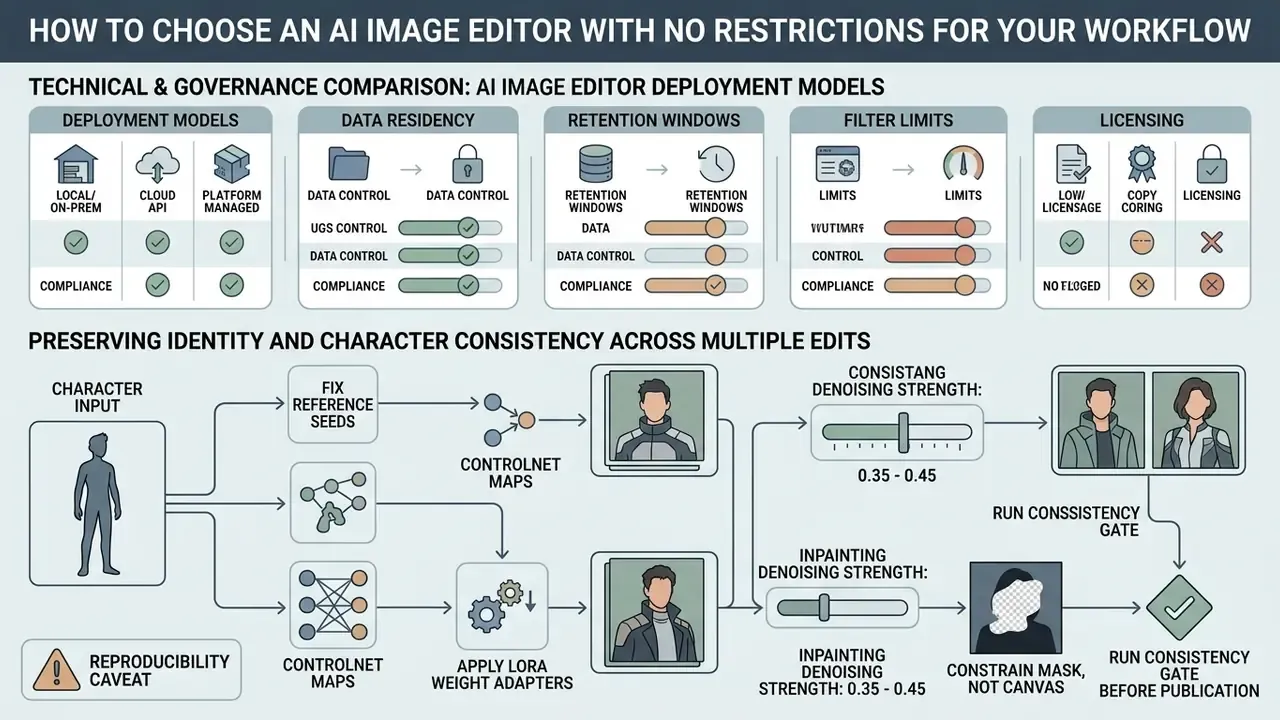
Choosing the best ai editing tool means testing platform architecture against your own constraints, not against a demo reel.
«A survey of 380 users showed that non-professionals prize accessibility of AI image tools, while professionals prioritise output quality and copyright certainty.»
That split explains why one tool rarely satisfies both a solo creator and a regulated enterprise. The first optimises for zero friction. The second optimises for defensibility. Key criteria therefore include support for multiple ai models, robust editing features, transparent data retention, audit-trail generation, and unambiguous licensing for social media and paid commercial publishing.
Technical and Governance Comparison of AI Image Editor Deployment Models
| Deployment Model | Usage Limits & Access | Watermark Policy | Account Requirements | Supported Formats | Commercial Rights | Data Privacy & Retention | Enterprise Security Posture | Audit Trail (C2PA / Logs) | Vendor Lock-In Risk |
|---|---|---|---|---|---|---|---|---|---|
| Open-source local models | Unlimited local processing; hardware-dependent performance | No forced visible watermarks | No registration or online account required | JPG, PNG, WebP; unlimited resolution | Governed by model weights license (e.g. OpenRAIL) | Complete local privacy; zero server data transmission | Inherits your own controls (ISO 27001 or SOC 2 scope of your infrastructure); no third-party processor | Self-implemented; C2PA signing must be added deliberately | Low. Weights and pipelines are portable |
| Cloud-based enterprise APIs | Tiered credit quotas with SLA guarantees | No visible watermarks; embedded C2PA or SynthID metadata | Mandatory API key and corporate account | JPG, PNG, WebP; structured resolution tiers | Full commercial rights granted under paid tiers | Enforced retention windows; zero training on enterprise data | Typically SOC 2 Type II or ISO 27001 attested; DPA and sub-processor list available; GLBA and GDPR addenda negotiable | Native C2PA manifests plus request-level logs suitable for reproducible audit evidence | Medium. Prompts and presets port over, model behaviour does not |
| Consumer web editors | Freemium daily caps; unlimited on paid tiers | Visible watermarks on free tier, removed on paid tiers | Required for export or advanced tools | Standard JPG and PNG; resolution limits on free tiers | Varies; often restricted to paid subscriptions | Uploaded assets may be retained for model optimisation | Rarely attested; no DPA on free tiers; primary Shadow AI exposure | Usually none exposed to the user; no exportable evidence chain | High. History, presets and assets are trapped in the account |
Preserving Identity and Character Consistency Across Multiple Edits
When you run sequential updates for a campaign, holding facial structure, mascot geometry and brand-asset proportions steady is the hardest constraint in the workflow. It is also the failure mode Taesiri et al. identified as dominant. To keep identity fidelity:
- Fix reference seeds and ControlNet maps. Freeze subject geometry with a structural ControlNet depth or canny map, then change background components via prompt editing. Published diffusion experiments deliberately vary five seeds to demonstrate non-randomness, which confirms that seed control is a prerequisite for repeatable output.
- Apply LoRA weight adapters. For proprietary mascots, recurring talent or hero SKUs, train low-rank adaptation weights to lock micro-features before any style transfer runs.
- Set inpainting denoising strength between 0.35 and 0.45. Higher values alter underlying features. Lower values fail to apply the requested change at all.
- Constrain the mask, not the canvas. Regional inpainting preserves unedited pixels exactly; full-canvas re-synthesis does not, whatever the interface implies.
- Run a consistency gate before publication. Compare embedding distance, for example a face or object similarity score, between source and edit, and reject anything beyond an agreed threshold.
Reproducibility caveat. Even with fixed seeds, editing pipelines stay hyperparameter-sensitive. Research on diffusion editing reports that omitting inversion significantly degrades faithfulness, and that different Gaussian noise draws yield different outputs unless the model is stabilised. Interfaces that hide seed or strength controls cannot deliver deterministic repeat runs. For regulated production, that alone is disqualifying.
Selecting AI Models for Image-to-Image and Prompt-Based Editing
Different underlying architectures behave very differently on image-to-image tasks. Diffusion-based models are strong at creative restyling; targeted inpainting networks are better at local geometry preservation. Checking whether a platform lets you switch models keeps you flexible across creative projects. Buyers benchmarking engines can also review leading AI image generators and the wider field of best AI art generators.
Model architecture selection matrix for editing tasks
| Model Class | Representative Engines (2026 market) | Optimal Task | Known Weakness |
|---|---|---|---|
| Spatial-intelligence models | SeeDream 4.5 / 5.0 class | 4K photorealistic textures, complex background swaps, camera-perspective alignment | Higher credit cost per render; can over-restyle unmasked regions |
| Instruction-following models | GPT-Image and conversational-edit class | Multi-turn iterative prompting ("change shirt colour, then add soft lighting") | Drifts on identity across long turn chains without a seed lock |
| Character-uniformity models | Nano Banana and Nano Banana Pro class | Face and proportion continuity across poses, outfits and backgrounds | Less flexible on radical stylistic departure |
| LoRA-driven consistency engines | Qwen-architecture class | Industrial design, precise typography integration, stable logo geometry | Requires adapter training and curation effort |
| Regional inpainting networks | Dedicated inpaint and erase endpoints | Object removal with exact preservation of unedited pixels | Not suited to global restyle or scene generation |
| Local open-source diffusion | Stable Diffusion and FLUX family with ControlNet | Deterministic, auditable, on-premise pipelines | Hardware dependent; quality ceiling varies by checkpoint |
One more thing model choice changes, and almost nobody discloses it: filter behaviour.
«Testing eight image safety classifiers on 10,000 images showed detection accuracy degrades on AI-generated content due to distribution shift in style and quality.»
The governance implication cuts both ways. A platform's filter may over-block your legitimate apparel shoot and under-detect genuinely unsafe synthetic material. Neither behaviour is visible from the pricing page. Note also that several vendors now bundle video generation into the same account and the same acceptable-use annex, which widens the surface you are signing for.
Quality Criteria: Edit Accuracy, Resolution, and Detail Preservation
To deliver high quality visual assets, an editor has to hold structural fidelity in the regions you did not touch. Evaluation metrics worth scoring:
- Local edit accuracy. Precise mask alignment around the target zone. Benchmarks decompose this into region accuracy, modification quality and overall accuracy.
- Resolution retention. Export at full resolution without forced compression artifacts.
- Texture fidelity. No artificial smoothing on skin, fabric or product materials.
- Preservation of unchanged content. Measured with L1 and PSNR for reconstruction fidelity, LPIPS for perceptual similarity, and DINO or CLIP-based preservation scores.
- Artifact and realism screening. FID for distributional realism plus no-reference scores (MUSIQ, MANIQA, NIQE class) for artifact detection. One benchmark treats a drop of more than 4% in classifier probability after editing as evidence of an artifact.
These metric families disagree by design. Reference-based fidelity, no-reference realism and task-specific alignment target different edit types and different ground-truth availability. So a procurement scorecard should sample at least one metric from each family rather than leaning on a single number. For broader tool evaluations, organisations can examine an AI Media Comparison.
Integrating AI Editing Into Model Risk Management and Audit Frameworks
For organisations under model-risk supervision (SR 11-7-style validation regimes) or aligning to the NIST AI Risk Management Framework, an image editor is a model in the inventory. Not a design utility. A practical validation package contains:
C2PA is the practical backbone of that evidence chain. The manifest records creator, software, edit history and AI involvement in a tamper-evident structure linked by asset hashes and signatures.
- Model inventory entry.Engine name and version, deployment mode, owner, business purpose, and the date the version changed. Version pinning matters because vendors retire engine generations quietly.
- Documented intended use and exclusions.For example: "approved for catalogue background replacement; excluded from any depiction of real identifiable customers or clinical outcome imagery."
- Reproducibility evidence.Seed, denoising strength, mask, prompt text, model version and timestamp stored with each published asset, so an examiner can regenerate the output.
- Outcome monitoring.Sampled human review with a recorded acceptance rate. Anchor expectations to the roughly 33% unaided success rate reported by Taesiri et al., not to a vendor demo.
- Identity and integrity controls.A similarity threshold gate for faces and brand marks, plus a prohibition on edits that alter a product's material attributes (colour, dimensions, condition) in a way that could mislead a buyer.
- Provenance retention.C2PA manifests and request logs retained for the campaign's regulatory look-back window.
- Third-party risk file.SOC 2 Type II or ISO 27001 report, DPA, sub-processor list, retention addendum, training-exclusion clause and breach notification terms.
- Change management.Re-validation triggered by engine upgrade, filter policy change or retention-policy amendment.
Free AI Image Editor No Restrictions: Where Free Access Ends
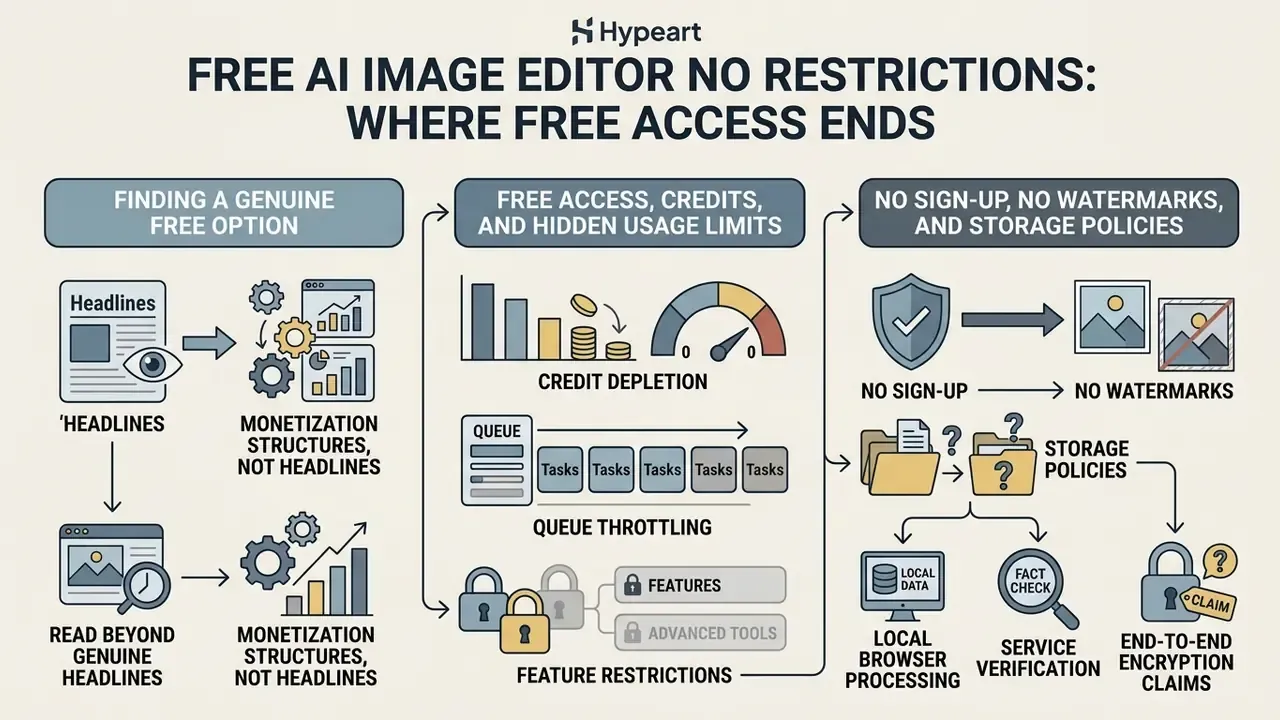
Finding a genuine free ai image editor no restrictions option means reading monetisation structures, not headlines. Plenty of tools advertise themselves as an ai image editor free no restrictions platform while operational boundaries sit two clicks below the hero banner.
No Sign-Up, No Watermarks, and Storage Policies for Uploaded Images
Some platforms let you edit image files without creating an account (no sign, no account) and export with no watermark. Convenient. But security leads still need to know what happens to the uploaded images afterwards.
Fact check / service verification
- Temporary cloud storage. Cloud editors process uploads on remote servers and retain files from 1 to 30 days before automated deletion. Some keep anonymous uploads for zero seconds while retaining logged-in user history for 30 days; others run 30 days free and 90 days paid.
- Visible versus invisible watermarks. A platform may omit the visible logo overlay yet embed invisible metadata, such as C2PA manifests or SynthID digital watermarks, to track synthetic origin and edit provenance.
«The invisible watermark survives with over 90% accuracy even after cropping that leaves only 10% of the original image.» The Stable Signature: Rooting Watermarks in Latent Diffusion Models, ICCV (2023)
Removing a visible overlay therefore says nothing about traceability. And attribution is possible even with no embedded mark at all:
Organisations that need to verify inbound assets, whether supplier catalogues, influencer submissions or user-generated content, should pair this with AI image detectors and, for tracing a published visual back to its origin, AI reverse-image-search tools.
A note on end-to-end encryption claims. Several vendors advertise E2E encryption alongside server-side processing and multi-day deletion. Those claims sit in technical tension: a server cannot process plaintext pixels it is unable to decrypt. The meaningful distinction is between true local processing, where nothing is transmitted, and encrypted transport with server-side decryption in memory, which is transmission plus a retention window. Ask which one you are actually buying.
Can You Use Results from AI Image Editing for Commercial Purposes?
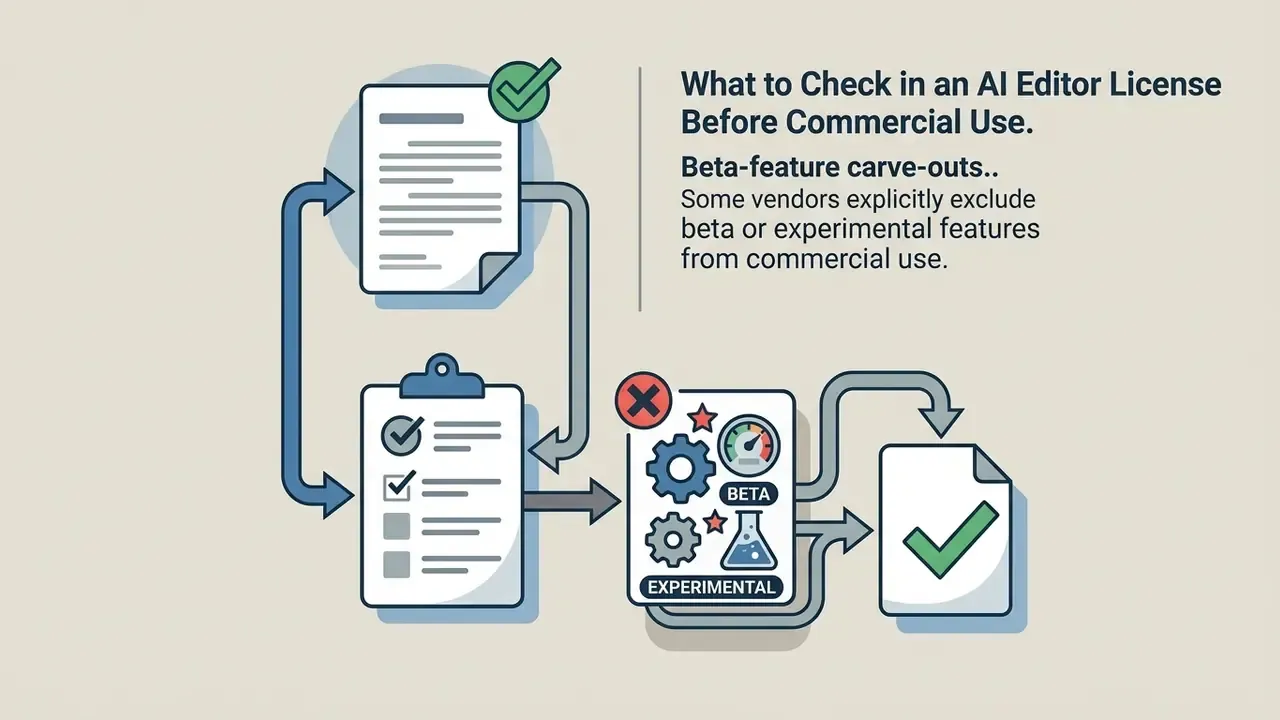
What to Check in an AI Editor License Before Commercial Use
Before edited graphics run in corporate campaigns, legal teams should review platform terms for:

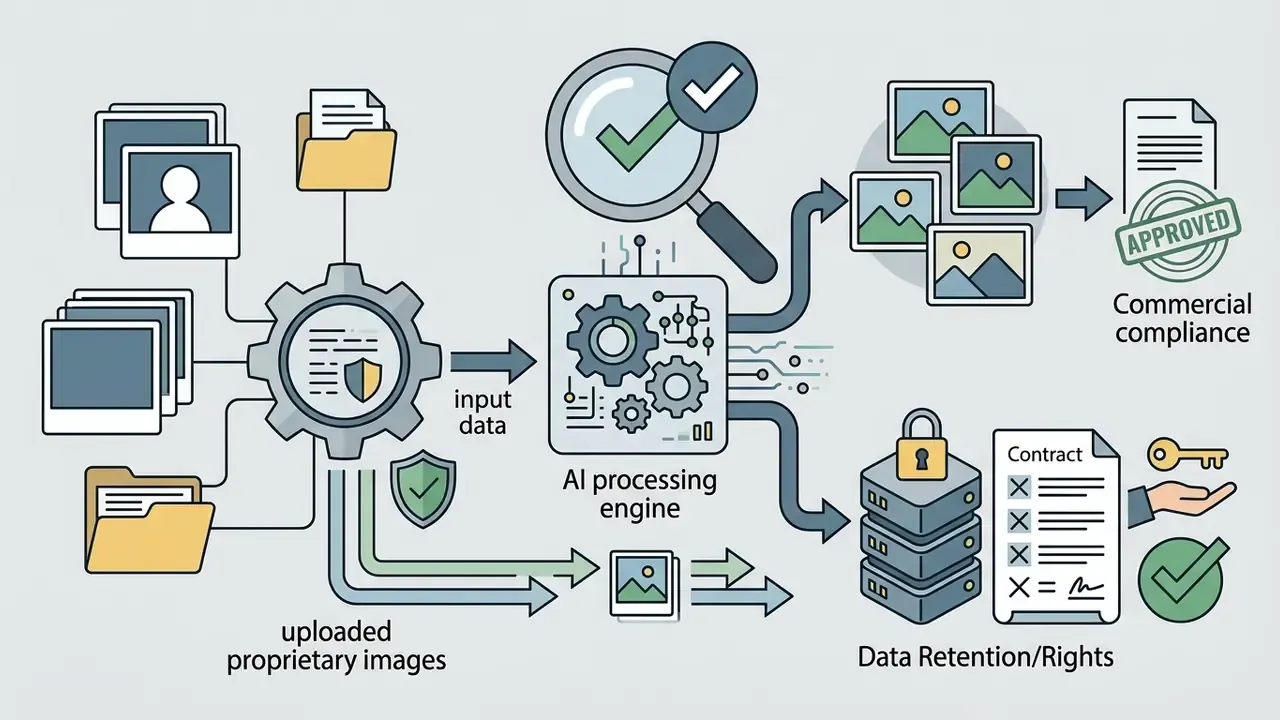





Note the structural divergence, because it trips up otherwise careful teams: copyright law governs ownership, while platform terms govern permitted use. A vendor can grant you broad commercial rights over an output that remains, as a matter of law, uncopyrightable. Both layers need checking independently.
Using AI Editors for E-Commerce, Marketing, and Social Media
In e-commerce and digital marketing, AI editors mainly buy throughput. Teams use ai to generate variant backgrounds for product shots, re-format assets for different social media placements, and localise ad copy without a reshoot.
Vendor-measured ROI figures show the scale of the efficiency case. Adobe reports 357% ROI on AI workflow tooling, up to 40% faster content creation for non-designers, and annual small-business savings of 175 hours and $5,816 on social media content plus 67 hours and $2,226 on social advertising. These are vendor studies, not independent benchmarks. Treat them as directional hypotheses to re-test against your own campaign analytics, ideally with control costs and residual risk included in the denominator, which vendor ROI models rarely do.
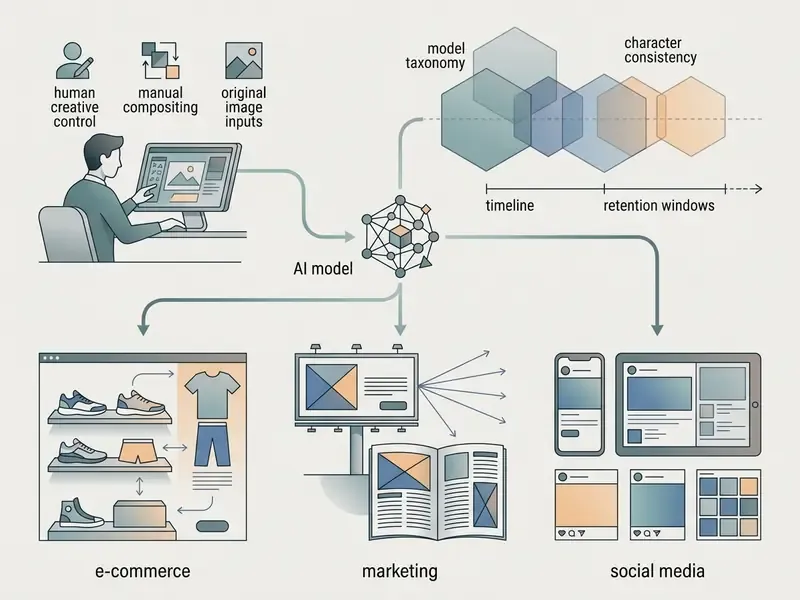
That incentive collides head-on with transparency law. ICC marketing guidance advises obtaining permission where AI is used to generate the likeness of real identifiable people or to materially alter an existing image. Australian business guidance recommends visible labels, watermarks or metadata to indicate AI creation or modification. EU AI Act transparency rules, as summarised in 2026 guidance, require disclosure for realistic AI-generated or AI-manipulated content that could be mistaken for authentic, marketing assets and product visuals included. The practical resolution is to do both: document human authorship and disclose AI involvement, rather than trading one against the other.
The ethical dimension is not abstract either:
«An experiment with 200 participants showed that AI video built from edited images implanted false memories 2.05 times more often than original photographs.»
For consumer-facing brands, that is reputational and regulatory exposure in one package. Hyper-realistic edits of real products, premises or people can durably distort what an audience remembers seeing. For broader guidance on regulatory compliance and intellectual property policy, teams can browse the hub.
How to Edit Images in an Online AI Editor: Upload, Prompt, Download
Operating an editor online platform follows a streamlined three-step pattern that skips software installation entirely. The same pattern recurs across vendors: OpenAI's images.edit method, Adobe Firefly's Edit tab, Midjourney's Editor (upload from device or URL, then "Upscale to Gallery" or "Download Image"), and Ideogram's edit endpoint, which accepts uploaded files or URLs and requires a prompt.
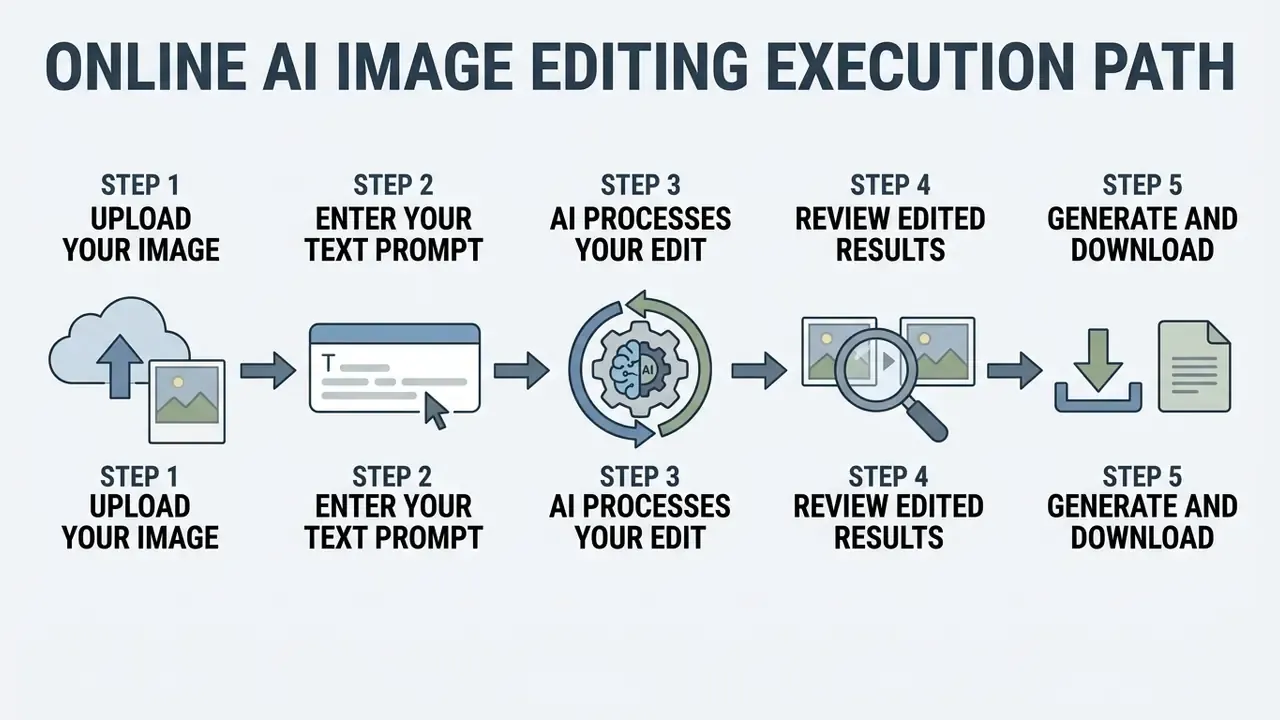
Upload Your Image: Preparing Uploaded Images for Editing
The pipeline begins when you upload your image. For clean AI processing, source files should meet a few technical standards:
- Formats. High-density jpg png or WebP files.
- Resolution. Vendor minimums diverge sharply. Some computer-vision APIs recommend no less than 640×480 px, while enhancement platforms require 4 MP to 100 MP and file sizes of 1.5 to 250 MB. When in doubt, supply the largest clean original you have.
- Lighting and contrast. Well-defined subject boundaries with balanced illumination.
- Clean source material. No severe compression noise or chromatic distortion. At least one platform states outright that images with chromatic noise will never be accepted.
- Upload ceilings. Common limits are 24 MB, 50 MB and 100 MB depending on vendor. OpenAI's edit path accepts PNG, WebP or JPG up to 50 MB.
When resizing assets before editing, teams can slot an ai image resizer into the preparation pipeline. For a baseline view of non-AI editing, see the guide to online photo editors.
How to Write Text Prompts for Precise AI Editing
Effective prompt engineering is mostly about structure. An optimal edit prompt built from simple text has four components:
Prompt = [Action] + [Target Subject] + [Desired Change] + [Preserved Elements]
Example: "Remove the power lines in the background, enhance sunset lighting, keep the foreground building structure unchanged."
Three operating rules raise hit rate materially: name the exact object rather than a category, state an explicit preservation clause for lighting, composition and surrounding objects, and limit each turn to one operation, using a selection mask whenever the region is hard to describe in words.
Ready-to-Use Enterprise Prompt Templates
| Use Case | Production Prompt Template | Variables to Replace |
|---|---|---|
| E-commerce background swap | [Action: Replace background] of [Subject: studio photo] with [Desired Change: minimalist marble countertop, soft warm shadows], keep [Preserved: product edge details, original reflections] unaltered. | [Subject], [Desired Change], [Preserved] |
| Typography and logo insertion | [Action: Render text] "[Desired Text]" on [Target Subject: packaging surface] using [Style: embossed gold foil], maintaining [Preserved: perspective angles, original surface texture]. | [Desired Text], [Target Subject], [Style] |
| Spatial and interior redesign | [Action: Transform room visual] from [Target Subject: modern living room] to [Desired Change: Scandinavian interior with oak furniture, neutral tones], preserve [Preserved: window placements, structural walls]. | [Target Subject], [Desired Change], [Preserved] |
| Localized retouching | [Action: Erase] [Target Subject: background power lines and stray cables], inpaint using [Desired Change: seamless clear sky texture], preserve [Preserved: roof silhouette]. | [Target Subject], [Desired Change], [Preserved] |
| Identity-locked variant | [Action: Change outfit colour] on [Target Subject: model in frame], to [Desired Change: deep navy matte fabric], preserve [Preserved: facial identity, pose, hair geometry, studio lighting]. Seed: [fixed seed]. Denoise: 0.38. | [Target Subject], [Desired Change], [fixed seed] |
| Campaign style transfer | [Action: Apply reference style] to [Target Subject: product hero shot] matching [Desired Change: reference image colour grade and grain], preserve [Preserved: product silhouette, label legibility, proportions]. | [Target Subject], [Desired Change], [Preserved] |
Prompt library governance. Treat prompts as versioned production assets, not disposable text in a Slack thread. A minimal management schema: prompt name, tags (channel, SKU family, model class), model and version, seed, denoise strength, approved or blocked status, owner, and last-updated date. Teams that store prompts this way get three benefits: reproducible output, faster onboarding, and an audit artifact showing exactly which instruction produced a published asset.
For specialised tasks such as expanding canvas boundaries beyond the original frame, creators can consult the tooling documented in the ai landscape generator guide.
Generate and Download: Verifying Edited Results Before Export
Before hitting generate and download, inspect the output at 100% zoom:
- Check for visual artifacts or blurred boundary edges around the edited zone.
- Confirm that unedited regions kept their original detail.
- Verify that export settings hold full resolution with no forced downscaling.
Production QA gate, three stages. For assets bound for paid media or catalogue publication, turn visual inspection into a repeatable control:
- Artifact detection.Scan for blank or clipped regions, deformed text, duplicated limbs or fingers, broken reflections, and leaked interface chrome.
- Fidelity verification.Confirm the title-critical attributes survived: product colour, material, dimensions, labelling and any regulatory copy. Where a similarity score exists, gate on a documented threshold rather than on opinion.
- Export parameter confirmation.Verify format, colour profile, pixel dimensions and that the correct export path was invoked, then confirm provenance metadata survived the export.
Log the reviewer, timestamp, decision, and the prompt and seed pair. That log is your reproducible audit evidence. To review complete operational workflows, practitioners can view the guide.
Technical Specifications of AI Picture Editors: Formats, Resolution, and Speed
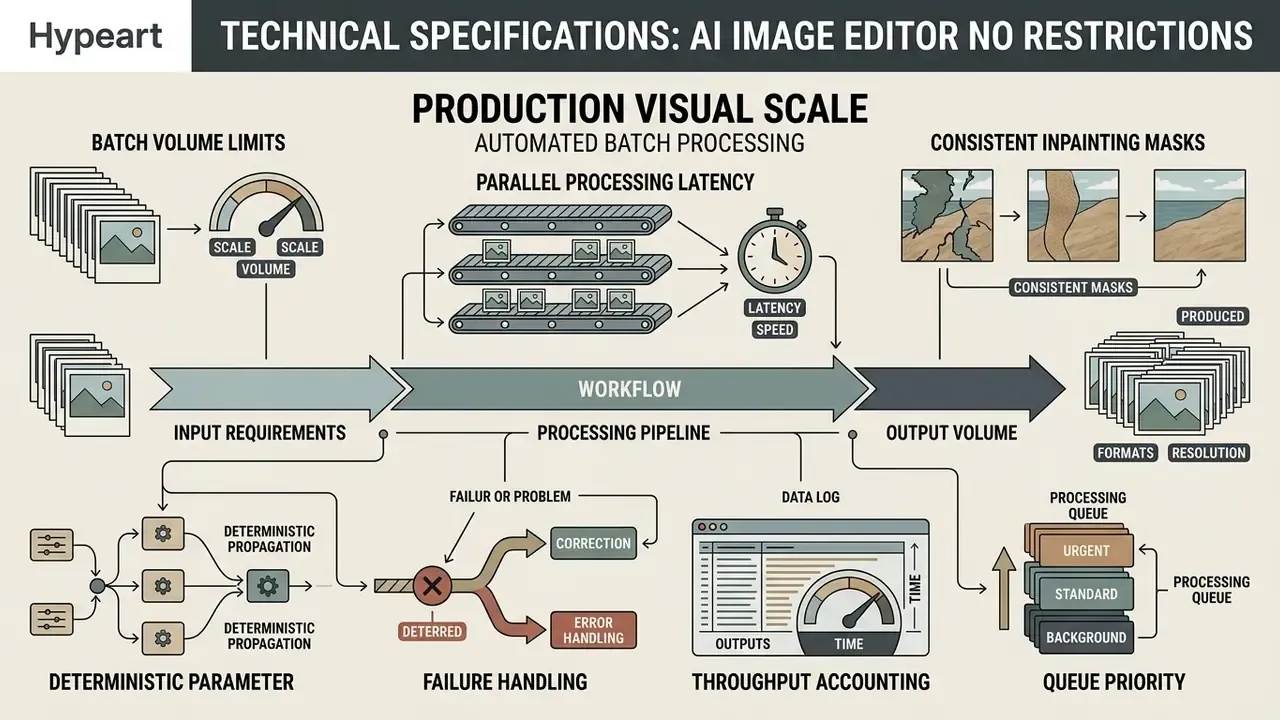
Choosing an enterprise ai picture editor no restrictions solution means matching documented specifications to production requirements. API constraints give concrete anchors: GPT-image-class endpoints support arbitrary output dimensions divisible by 16 up to 3840×2160, with aspect ratios bounded to 1:3 and 3:1, and total pixels between 655,360 and 8,294,400.
Automated Batch Processing Parameters for Enterprise Visual Scale
Catalogue updates need genuine batch capability, not sequential single edits dressed up as a queue. Verify these pipeline metrics:
- Batch volume limits. Standard commercial API and web endpoints support 20 to 50 concurrent images per batch iteration; premium consumer tiers commonly advertise up to 50 images at once.
- Parallel processing latency. GPU-backed pipelines (A100 and H100-class clusters) process a 50-image batch in under 45 seconds on simple operations, roughly 0.9 s per 1080p asset. Complex diffusion edits scale well above that.
- Consistent inpainting masks. Confirm the editor supports applying a unified background-removal or mask template across identical product frames simultaneously, instead of re-deriving a mask per file.
- Deterministic parameter propagation. The same seed, denoise strength and model version must apply across the whole batch, or catalogue consistency breaks between rows.
- Failure handling. Require per-item status codes and partial-batch retry, not whole-job failure.
- Throughput accounting. Map credit consumption per batch against catalogue size before committing to a tier. Per-image credit costs in the 2 to 18 range are typical across model classes, so a 5,000-SKU refresh is a budget event, not a routine task.
- Queue priority. Check whether batch jobs share the free or standard queue. Throttling silently turns a 45-second job into a multi-hour one.
Supported Formats: JPG, PNG, and Uploaded Images
Compression choices feed straight into model accuracy. Uncompressed PNG files retain exact pixel values, which makes them ideal for complex masking. Lossy JPG files process faster but carry compression artifacts that confuse edge-detection during object removal.
Concretely: PNG uses lossless compression and preserves transparency, keeping edits numerically faithful at a larger file size; JPG discards detail on every re-save, so repeated edit-and-export cycles accumulate visible degradation; WebP supports both modes plus transparency, and Google reports lossless WebP files are 26% smaller than PNG while lossy WebP runs 25 to 34% smaller than comparable JPEG at equivalent quality. For AI editing specifically, the operative issue is how much detail remains available for reconstruction. Heavier lossy compression leaves fewer fine textures, edges and colour transitions for the model to preserve. Output support also varies: some vendors document PNG, JPEG and WebP output, while others expose PNG and JPEG only for the same underlying workflow. Any photo editor online intended for brand work should state its output matrix explicitly.
For cross-border marketing localisation, workflow managers often route embedded copy through an ai image translator to adapt text elements per market.
High Quality, Full Resolution, and Processing Speed
Modern web-based platforms lean on GPU acceleration to deliver fast results. Per published vendor documentation, cloud-based diffusion edits typically complete within seconds for simple operations, while complex prompts can take up to 60 seconds. Treat any specific latency range as vendor-reported and validate it against your own asset mix rather than assuming a fixed 5 to 30 second window. Related evidence: some PDF and image enhancement services report real-time processing previews and multi-second enhancement, while page-by-page upscaling of large documents is documented as taking several minutes.
JPEG input is documented as faster to process than PNG, so format choice is a throughput lever as well as a quality one. Choosing an editor online free platform that maintains native canvas resolution prevents fidelity loss across multi-pass editing, and if your reviewers approve assets on mobile devices, check that the preview is not silently downscaled before sign-off.
FAQ About AI Image Editor No Restrictions
Is an AI Image Editor Equally Suitable for Real Photos and Generated Images?
An ai image editor no restrictions free workflow behaves differently on real photos than on synthetic generated images:
- Real photos. Natural sensor noise, consistent optical depth, fixed geometric relationships. AI editors handle localised object removal and background swaps well here, as long as lighting context is preserved.
- Generated images. Often carry subtle synthesis artifacts, irregular background geometry or anatomical inconsistency. Running a second AI edit on a synthetic image can amplify those structural distortions unless the model re-synthesises the full canvas. Research supports the asymmetry. Studies of diffusion outputs document persistent artifacts and implausibilities in anatomy, physics and background coherence, while human-study results show detection accuracy varying with scene complexity and curation. Because generated images are synthesised pixel by pixel rather than captured through optics, object removal, relighting and face repair fail in different places on each class.
Does "No Restrictions" Mean the Platform Has No Content Filters At All?
No. Reputable platforms keep backend safety classifiers regardless of marketing language, and any provider incorporated in the US or EU carries legal obligations against CSAM and non-consensual intimate imagery. What legitimately varies is the aggressiveness of front-end keyword blocking and the false-positive rate on lawful commercial categories. A claim of literally zero content filtering should be treated as unverified and, in regulated procurement, as disqualifying.
How Do We Prove Human Authorship for Copyright Purposes?
Retain the evidence chain, not just the final file. In practice that means archiving the original source photograph you own, the prompt text and its revisions, seed, mask and strength parameters, intermediate versions, manual compositing or retouch steps, and the reviewer's acceptance record. The U.S. Copyright Office requires AI-generated portions to be identified and disclaimed on registration, and protection attaches to the human-authored expressive elements. Mere prompting has been held insufficient.
How Do We Audit AI Edits Under NIST AI RMF or SR 11-7-Style Validation?
Register the editor as a model, pin its version, document intended use and exclusions, and store reproducibility parameters with each published asset. Add outcome monitoring with a sampled human-review acceptance rate, an identity-similarity gate for faces and brand marks, and C2PA manifest retention for provenance. Re-validate whenever the vendor upgrades an engine, changes filter policy or amends retention. All three alter model behaviour with no change whatsoever on your side, which is exactly why they belong in change management. The full validation package sits in the model-risk section above.
Are Watermark-Free Exports Really Untraceable?
No. Absence of a visible overlay does not imply absence of provenance signals. C2PA manifests and invisible watermarks such as SynthID are widely embedded, and the Stable Signature work (ICCV 2023) demonstrated invisible marks surviving crops that retain only 10% of the original frame. EditTrack research goes further, showing attribution is feasible through model-characteristic artifacts even with no embedded mark at all. Plan communications on the assumption that synthetic origin is discoverable.
What Is the Safest Architecture for Confidential or Regulated Imagery?
Local inference on infrastructure you control: open-source weights with ControlNet and LoRA, running on-premise or in your own VPC. It eliminates third-party transmission, gives you full seed and parameter control for reproducibility, and keeps audit scope inside your existing ISO 27001 or SOC 2 boundary. The trade-offs are real, though: hardware cost, checkpoint-dependent quality, and in-house MLOps ownership. Where cloud is unavoidable, insist on a zero-retention enterprise API with a DPA, a training-exclusion clause and documented sub-processors.
Can Free-Tier Output Be Used Commercially?
Frequently not. Free tiers commonly restrict output to personal use, attach commercial rights only to paid plans, or cap exports; one platform limits free plans to 100 exports per month and excludes commercial use outright. Some vendors additionally exclude beta features from commercial deployment, and at least one grants itself a perpetual royalty-free license over gallery submissions. Verify the specific plan's licence text, not the landing page, before publication.
How Many Images Can We Process in One Batch, and How Fast?
Commercial endpoints generally accept 20 to 50 images per batch iteration. GPU-backed pipelines can return a 50-image batch of simple operations in under 45 seconds, around 0.9 s per 1080p asset, while complex diffusion edits, 4K output or multi-turn instruction chains extend well beyond that. Confirm per-item retry behaviour, queue priority and credit consumption per batch before scaling a catalogue refresh.
Enterprise Decision Checklist: Evaluating Unrestricted AI Editors
| # | Check | Evidence Required | Pass Condition |
|---|---|---|---|
| 1 | Deployment mode matches data class | Architecture diagram plus data classification map | Confidential imagery never leaves controlled infrastructure |
| 2 | Retention window documented | DPA or retention addendum | Written window; zero-retention option available |
| 3 | Training exclusion | Enterprise terms clause | Uploads contractually excluded from training |
| 4 | Security attestation | SOC 2 Type II or ISO 27001 report | Current report, scope covers the editing service |
| 5 | Commercial licence for the specific plan | Licence text extract | Explicit grant covering ads, sale, merchandising |
| 6 | Beta and feature carve-outs reviewed | Terms annex | No commercial use of excluded features |
| 7 | Provenance support | C2PA manifest sample | Manifest generated and exportable |
| 8 | Reproducibility controls exposed | UI or API parameter list | Seed, mask, denoise strength, model version all settable |
| 9 | Identity-consistency method available | ControlNet, LoRA or reference-image support | At least one geometry-locking mechanism |
| 10 | Batch specification | API docs | 20 or more images per iteration with per-item status |
| 11 | Model version pinning | API docs or changelog | Version can be pinned; deprecation notice period stated |
| 12 | False-positive appeals path | Support policy | Documented allowlist or review process for regulated categories |
| 13 | Format and resolution ceilings | Technical docs | Meets your largest deliverable without downscaling |
| 14 | Human review gate defined | Internal SOP | Sampled review with recorded acceptance rate |
| 15 | Disclosure workflow | Marketing SOP | Labelling or metadata applied where realism could mislead |
| 16 | Vendor exit plan | Migration assessment | Prompts, presets and assets exportable |
For operational definitions and asset standards, professionals can see the overview.
A Reasonable Next Step
You do not need a programme to start. Pick one live use case, say catalogue background replacement, and run it through four checks: which deployment mode the data class allows, what the written retention window is, whether seed and strength are exposed, and who signs off on the output. Document the answers once. If a candidate tool fails the reproducibility check, it fails the audit later, just more expensively.
Then widen the scope. Open questions remain, and it is worth naming them: false-positive rates by vertical are almost never published, cross-vendor benchmarks for edit fidelity are thin, and disclosure practice under EU transparency rules is still settling. Until that evidence firms up, treat vendor claims as hypotheses and your own sampled review as the control that actually holds.