An ai image resizer is a specialized neural network application designed to adjust image dimensions, increase pixel density, or expand visual canvases while reconstructing missing high-frequency details. Unlike classical geometric interpolation, an image resizer ai analyzes deep feature maps to maintain structural integrity, preserve salient subjects, and prevent perceptual distortion across target platforms.
Executive Summary
- What it does An AI image resizer changes pixel dimensions, aspect ratios, or canvas boundaries using learned models (CNN super-resolution, latent diffusion outpainting) instead of fixed interpolation kernels.
- Three distinct operations Resize remaps existing pixels, Upscale synthesizes new high-frequency detail, Extend (outpainting) generates content beyond the original frame.
- Three geometry modes Fit (letterboxed, zero pixel loss), Fill (smart crop to cover canvas), Generative Extend (canvas grows, subject untouched).
- Measurable gains Deep-learning super-resolution outperforms bicubic interpolation by several decibels of PSNR at ×4 scaling.
- Hard limits Super-resolution is an ill-posed problem. Below a minimum information threshold, detail is synthesized, not recovered, so human review stays mandatory for evidentiary, medical, or compliance-sensitive assets.
- Practical rule For sources under roughly 800 × 800 px, upscale first, then resize or extend.
- Typical limits in production tools up to 20 MB per input asset and a 4096 × 4096 px maximum processing canvas.
- Enterprise checklist retention window, no-training clauses, SOC 2 / ISO 27001 posture, GDPR basis, local (browser/WASM) vs cloud processing, audit logging, and human-in-the-loop sign-off.
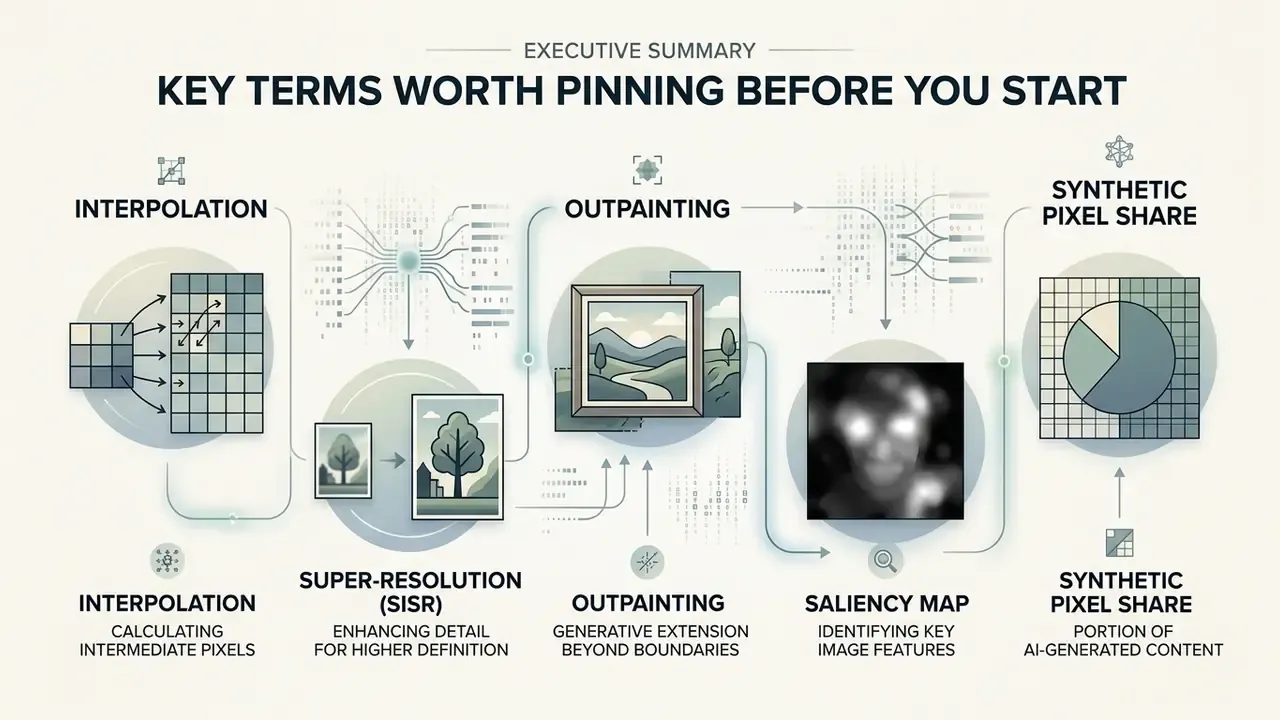
Five Terms Worth Pinning Before You Start
Definitions drift between vendors, and that drift is where control gaps appear. A shared vocabulary costs nothing and prevents an awkward conversation with internal audit later.
- Interpolation. Fixed math that averages neighbouring pixels. No new information, no invention, no surprises.
- Super-resolution (SISR). A trained model predicts plausible detail at higher resolution from one input frame.
- Outpainting. Generative expansion of the canvas beyond the original border, usually mask-driven.
- Saliency map. A per-pixel importance ranking that tells the engine which regions must not be squeezed or cropped.
- Synthetic pixel share. The percentage of the final canvas produced by the model. This is the number your reviewers should actually sign off on.
Keep that last metric visible. It converts a vague design preference into an auditable threshold, and teams that track it argue far less about whether an output is acceptable.
What Is an AI Image Resizer and When to Use It
An ai image resizer is an automated visual processing system that uses deep learning architectures to recalculate and reconstruct pixel layouts for a designated digital canvas. You should reach for this kind of ai tool when scaling low-resolution assets for modern high-definition displays, adapting multi-channel digital ad assets, or extending artwork boundaries without losing primary subject fidelity. Managing image size through neural models eliminates the blurring, edge-haloing, and aspect-ratio compression typically produced by legacy graphic tools.
AI Resize Image vs Traditional Resizing
Traditional image resizing relies on predefined geometric kernels, such as nearest-neighbor, bilinear, or bicubic interpolation, that recalculate pixel colors based solely on adjacent spatial values. These algorithms execute fast. They simply cannot infer missing scene data, which is why expansion looks soft or pixelated. Comparative benchmarks put bilinear resampling at roughly 0.007 seconds per operation, versus about 0.010 seconds for bicubic and Lanczos on identical scaling tasks: quick, but structurally blind. Lanczos retains the most detail of the three classical kernels, yet it introduces ringing and halo artifacts around high-contrast edges.
An ai resize image model employs convolutional neural networks (CNNs) or latent diffusion models to perform intelligent, content-aware spatial adjustment. These networks evaluate contextual semantics to synthesize new texture data, keeping lines crisp and boundaries defined.
«Deep-learning models consistently outperform bicubic interpolation by several decibels of PSNR at ×4 upscaling.»
AI Resizing vs. Image Downscaling (Shrinking)
It is critical to distinguish an AI resizer from a traditional image downscaler (or image shrinker):
- An image shrinker strictly reduces pixel dimensions or raises file compression ratios to lower disk footprint. Example: shrinking a 5 MB photo so it clears an email attachment limit or loads faster on a product page.
- An AI resizer / extender performs dual-directional spatial adjustment. It downscales high-resolution assets without aliasing or moiré, or expands canvas boundaries by synthesizing new contextual pixels.
The technical difference is anti-aliasing behavior. Quality-focused pipelines apply low-pass filtering before downsampling and preserve aspect ratio to avoid artifacts that degrade perceptual quality scores. That practice is documented in image-quality-assessment research on resize preprocessing. A naive shrinker skips the filter step and introduces jagged edges on fine typography and product line art. You notice it first on thin serifs and on white-on-dark disclosure text.
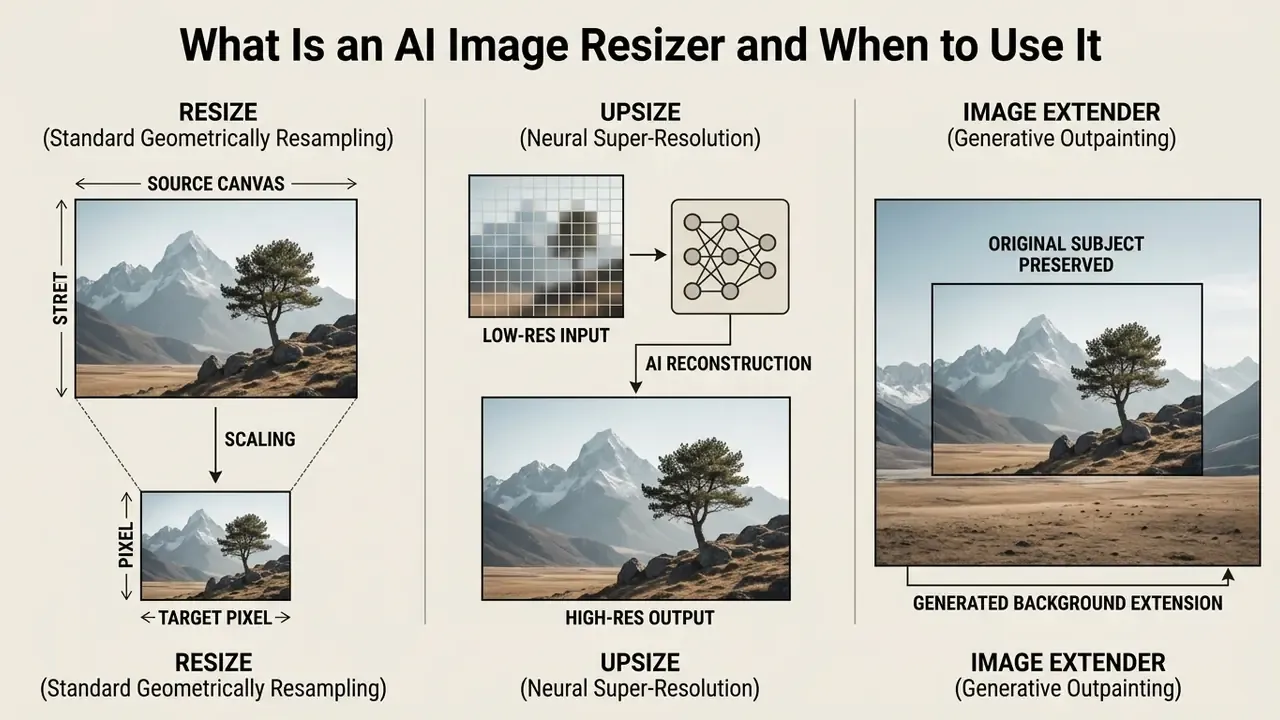
Resize, Upsize and Extend an Image: What Is the Difference
- Resize Image AI: Modifies overall pixel count or canvas aspect ratios while dynamically protecting key focal elements from compression or distortion.
- Upsize Image AI: Applies learned single-image super-resolution (SISR) to scale up resolution images by 2x, 4x, or higher while generating missing texture detail. Some commercial implementations cap learned upscaling at ×4 and fall back to bicubic supersampling above that factor.
- AI Image Extender: Executes generative outpainting, expanding canvas borders beyond original frame boundaries by synthesizing semantically matching background pixels. Readers building this into a production pipeline can review dedicated AI outpainting tools and their licensing terms.
«Resize, upsize and extend rely on fundamentally different algorithms, from CNN filters to diffusion-based outpainting.»
Processing Modes: Fit vs. Fill vs. Generative Extend
When configuring an ai image resizer, you must choose how the engine handles spatial mismatch between your source graphic and the target aspect ratio:
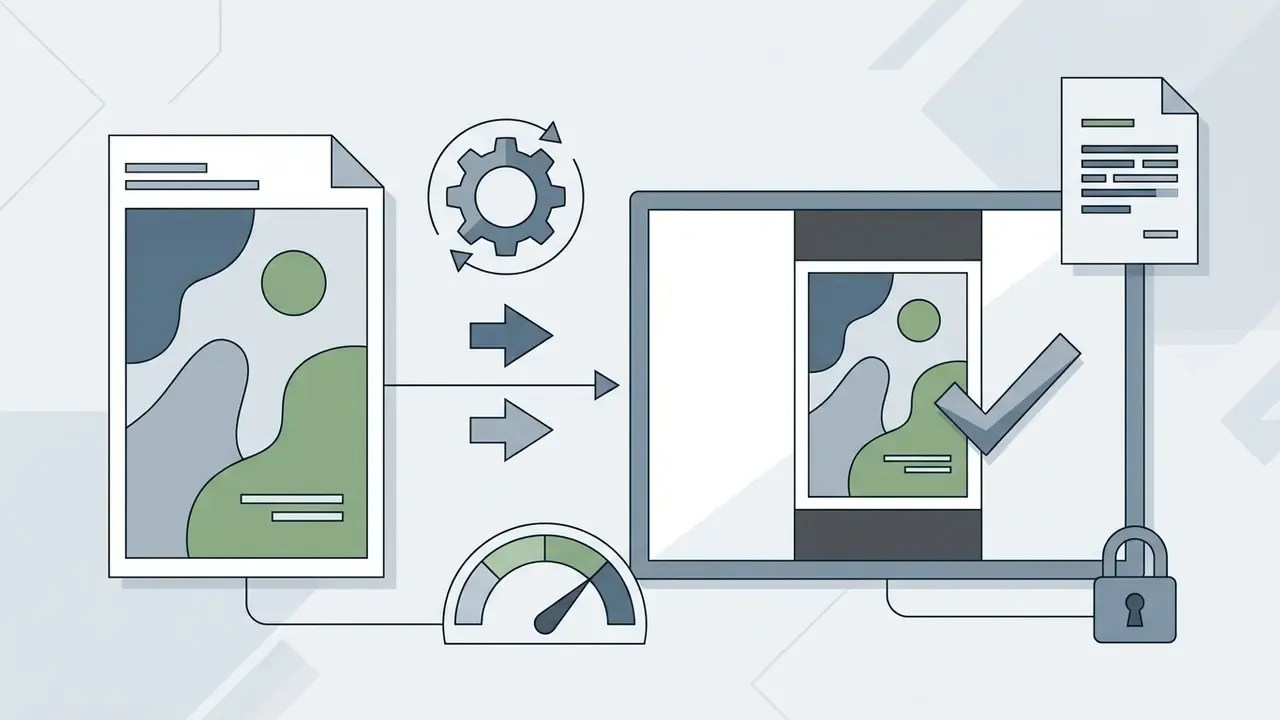
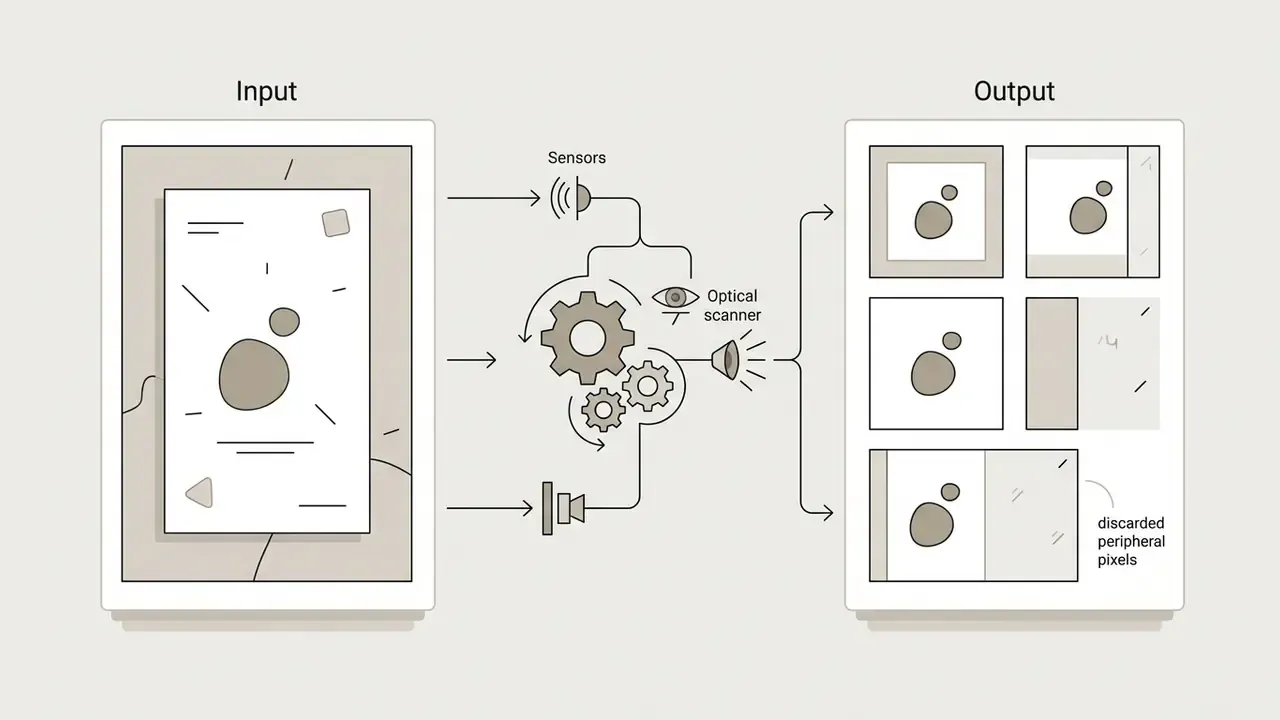
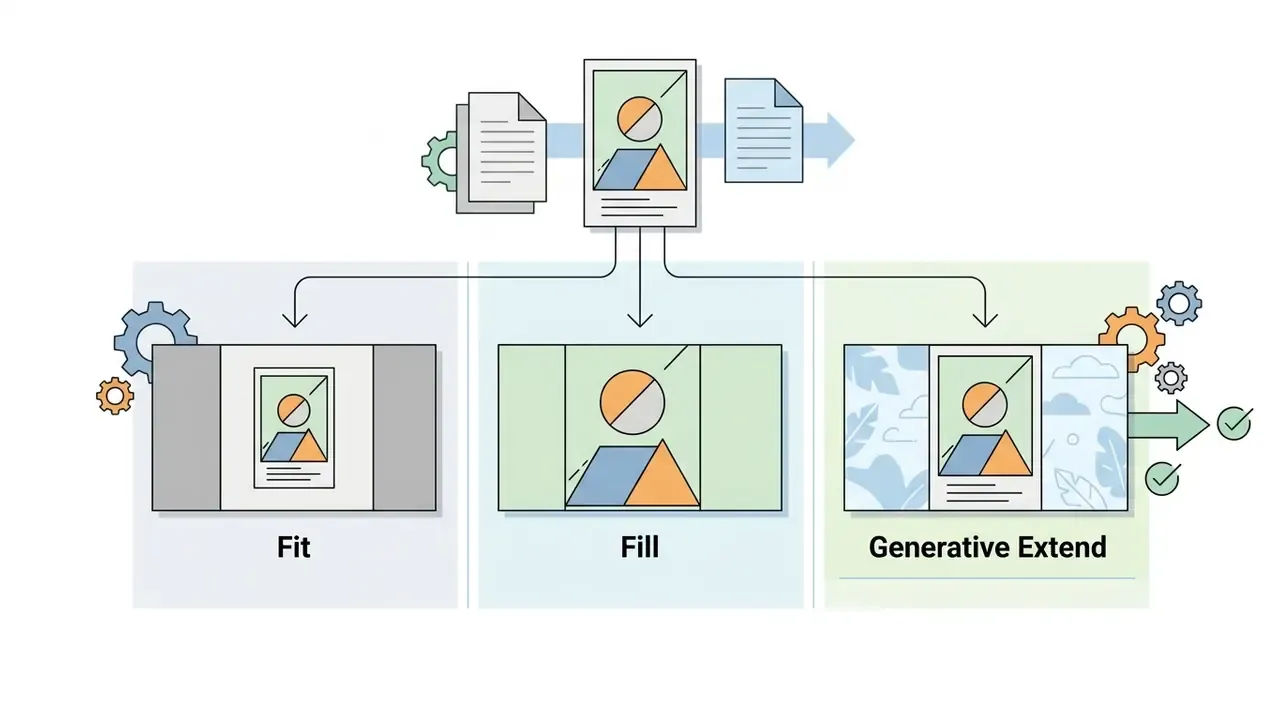
| Mode | Original pixels preserved | Canvas coverage | Synthetic pixels generated | Best for |
|---|---|---|---|---|
| Fit | 100% | Partial (letterbox bars) | None | Archives, documents, audit trails |
| Fill | Cropped subset | Full | None | Feeds, grids, marketplace cards |
| Generative Extend | 100% | Full | Yes (borders only) | Banners, ads, aspect-ratio pivots |
One caveat on Fill: "smart" crop is still a crop. If a disclosure line or a price badge sits near the edge, the saliency model may treat it as background and discard it. Check the corners.
How to Choose the Right Image Size and Aspect Ratio
Selecting the correct image size and aspect ratio means balancing target platform specifications against visual composition rules. Standardizing these metrics prevents unexpected geometric stretching and ensures that visual assets render predictably across desktop, mobile, and web applications.
| Target Platform / Use Case | Recommended Dimensions (Pixels) | Aspect Ratio | Primary Composition Objective |
|---|---|---|---|
| Instagram / TikTok Reels & Stories | 1080 × 1920 | 9:16 | Full-screen vertical coverage; keep critical subjects in the central 80% visual safe zone. |
| Instagram Posts (Portrait) | 1080 × 1350 | 4:5 | Maximizes vertical feed real estate on mobile screens. |
| Instagram / Marketplace Square | 1080 × 1080 | 1:1 | Uniform framing; subject centered with balanced padding. |
| Facebook Posts (Link Share) | 1200 × 630 | 1.91:1 | Centered visual weight; clear horizontal safe zones for text overlays. |
| Facebook Posts (Vertical Feed) | 1080 × 1350 | 4:5 | Vertical spatial coverage; subject fills central vertical channel. |
| Twitter / X Post Visuals | 1600 × 900 | 16:9 | Wide horizontal display; prevents automatic cropping in timeline previews. |
| Pinterest Pins | 1000 × 1500 | 2:3 | Vertical ratio optimized for multi-column feed engagement. |
| LinkedIn Landscape Post | 1200 × 627 | 1.91:1 | Professional feed framing with room for overlaid headline text. |
| YouTube Thumbnail | 1280 × 720 (upload up to 3840 × 2160) | 16:9 | High-frequency edge sharpness; focal subject offset to avoid timestamp overlay. |
| E-Commerce Product Cards (Amazon/Shopify) | 1200 × 1200 (or 1000 × 1000) | 1:1 | High-density pixel grid supporting interactive customer zoom features. |
| Website Hero Banners | 2560 × 1440 | 16:9 | Ultra-wide backdrop framing with low-contrast space for typography. |
| Corporate Slide Decks & Report Figures | 1920 × 1080 | 16:9 | Presentation-safe margins; legible axis labels at projector scale. |
| Document & ID Scans for Internal Systems | 1654 × 2339 (A4 @ 200 DPI) | ≈1:1.41 | Full-page Fit mode only; never generative extend on evidentiary documents. |
| Mobile App / Banking UI Screenshots | 1170 × 2532 | ≈9:19.5 | Device-native ratio; avoid cropping status bars or disclosure footers. |
Note the two constraint bands in this table. Social formats tolerate generative expansion. Document, ID, and interface captures must be processed in Fit mode and verified pixel for pixel. Applying outpainting to a scanned statement or an identity document injects synthetic content into a record, and that is an unacceptable outcome in any audited workflow.
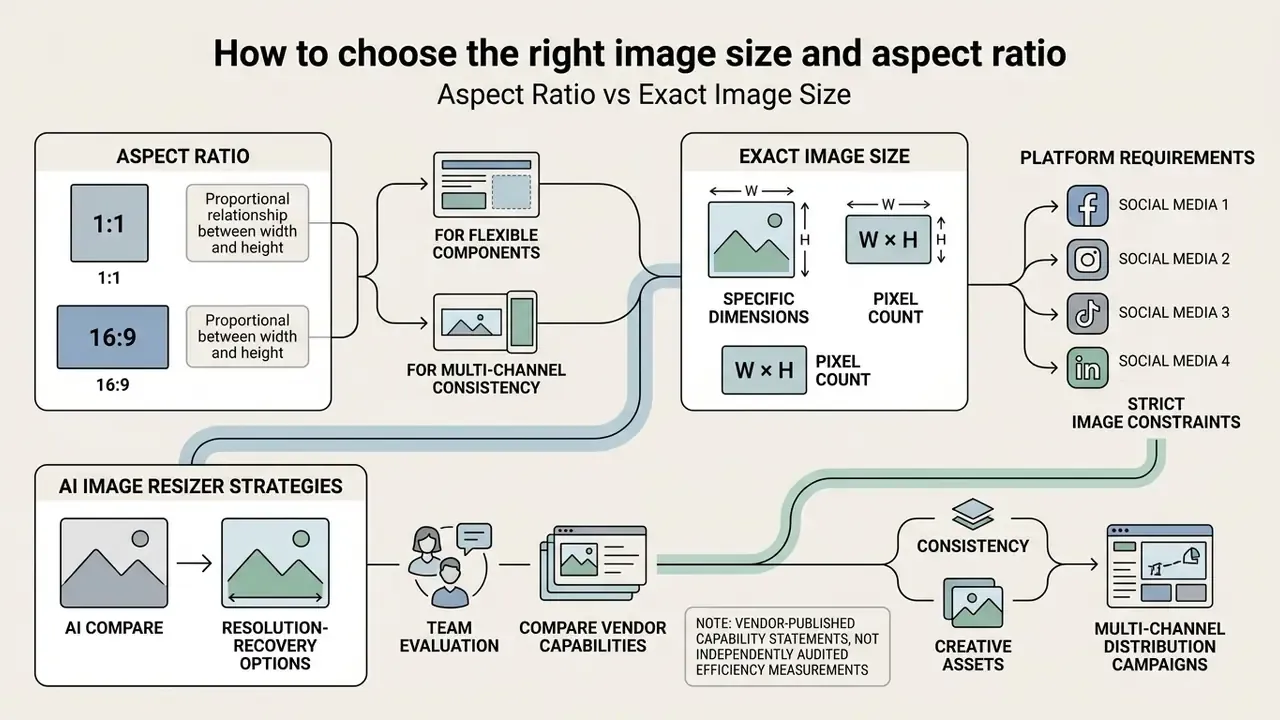
Aspect Ratio vs Exact Image Size
An aspect ratio defines the proportional relationship between width and height (16:9 or 1:1, for instance), regardless of absolute display scale. Exact dimensions dictate the precise horizontal and vertical pixel count, for example 1920 × 1080 pixels, required by server processing rules or target layout containers. Two files can share an identical 4:5 ratio while one measures 1080 × 1350 px and the other 4000 × 5000 px.
Prioritize fixed aspect ratios when designing flexible, responsive components that scale across varied screen sizes. Supplying exact dimensions becomes mandatory, though, when submitting creative files to ad networks or content management systems with rigid validation rules. Industry specifications reflect this pairing directly: the OAAA digital aspect ratio bulletin maps a 16:9 viewable ratio to a 1920 × 1080 pixel art board, and the W3C PNG specification encodes intended pixel size or aspect ratio in the pHYs chunk, so ratio and geometry travel inside the file itself.
To examine end-to-end design architectures and resolution-recovery options, teams can compare AI image upscalers alongside their resizing stack.
How to Resize an Image With AI in Three Steps
A controlled resize image with ai workflow runs through three stages designed to protect visual clarity while hitting the required platform dimensions. No matter which vendor you pick, the sequence rarely changes.
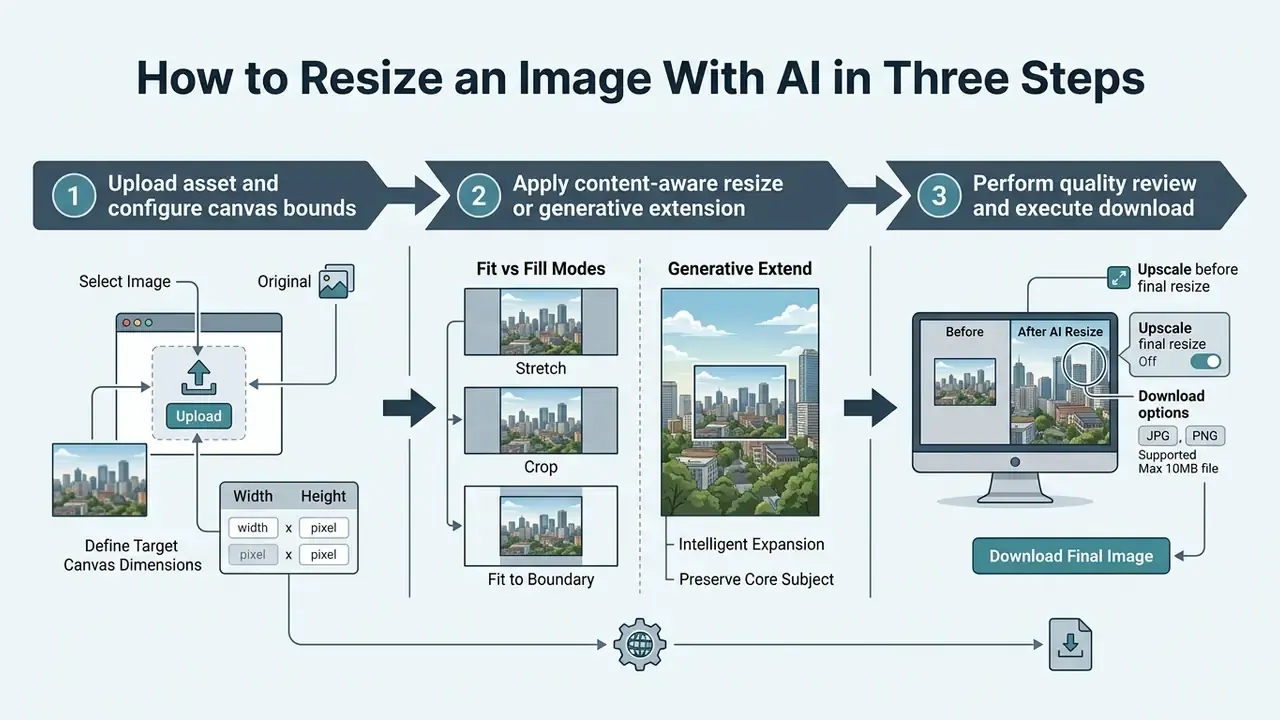
Upload Your Image and Select the Target Canvas
First, drag and drop your source file into the web editor interface. Supported formats typically include standard JPG, PNG, WEBP, BMP, static GIF, and TIFF files up to 20 MB, within a maximum processing canvas of 4096 × 4096 pixels. Published tool limits vary in the other direction too: some resizers reject inputs below 40 × 40 px, so verify both floor and ceiling before batch submission.
Next, choose your destination format. You can select platform-specific presets, such as Instagram Story or LinkedIn Banner, or enter custom dimensions to establish new dimensions tailored to your software interface. At this stage, also set the geometry mode: Fit, Fill, or Generative Extend. That single choice determines whether the engine pads, crops, or invents.
Resize or Expand the Image Without Awkward Cropping
Select the processing mode based on compositional requirements. If the target aspect ratio differs sharply from the original, apply an ai image extender to synthesize outer background pixels instead of forcing an awkward cropping decision.
The algorithm detects central visual subjects through salient object recognition, maintaining native subject proportions while generating clean outer padding. Practical sequencing matters here. Expand the canvas outward, keep the key object inside the original image area, and generate only the new border regions. Vertex AI and Runware documentation both describe outpainting as filling exclusively the new outer area while preserving base pixels. If the subject starts to drift, regenerate the border or adjust the prompt rather than re-running the whole frame.
Creative teams benchmarking model behavior can test image-to-image AI generators or review AI outpainting tools for expanding images to see how varied latent diffusion models handle facial geometry, architectural lines, and fabric texture during canvas adjustments. For portrait-heavy libraries, the behavior of an AI headshot generator offers a useful comparison point on identity preservation.
Check the Result and Download Your Image
Before final export, zoom in and inspect critical visual boundaries, edge transitions, and fine background textures. Verify that no hallucinated artifacts or unexpected color shifts crept in during inference.
Run a structured visual audit against five checkpoints:
- Seam continuity: do generated borders align with original perspective lines and horizon level?
- Identity and geometry: are faces, logos, and product silhouettes unchanged in shape and proportion?
- Lighting coherence: do shadows and reflections in generated regions match the original light direction?
- Text and fine detail: is typography still legible, without warped glyphs or invented characters?
- Color consistency: no banding, hue shifts, or tone breaks at the boundary between original and synthesized pixels.
Once verified, select the optimal file container (PNG for lossless transparency, JPG for web publishing, WEBP for lightweight delivery, PDF for print-ready handoff) and execute the file download. For recurring campaigns, save the verified settings as a preset. It sounds trivial, yet it is the cheapest way to keep two designers from shipping two different crops of the same hero asset.
How AI Resizing Preserves Image Quality
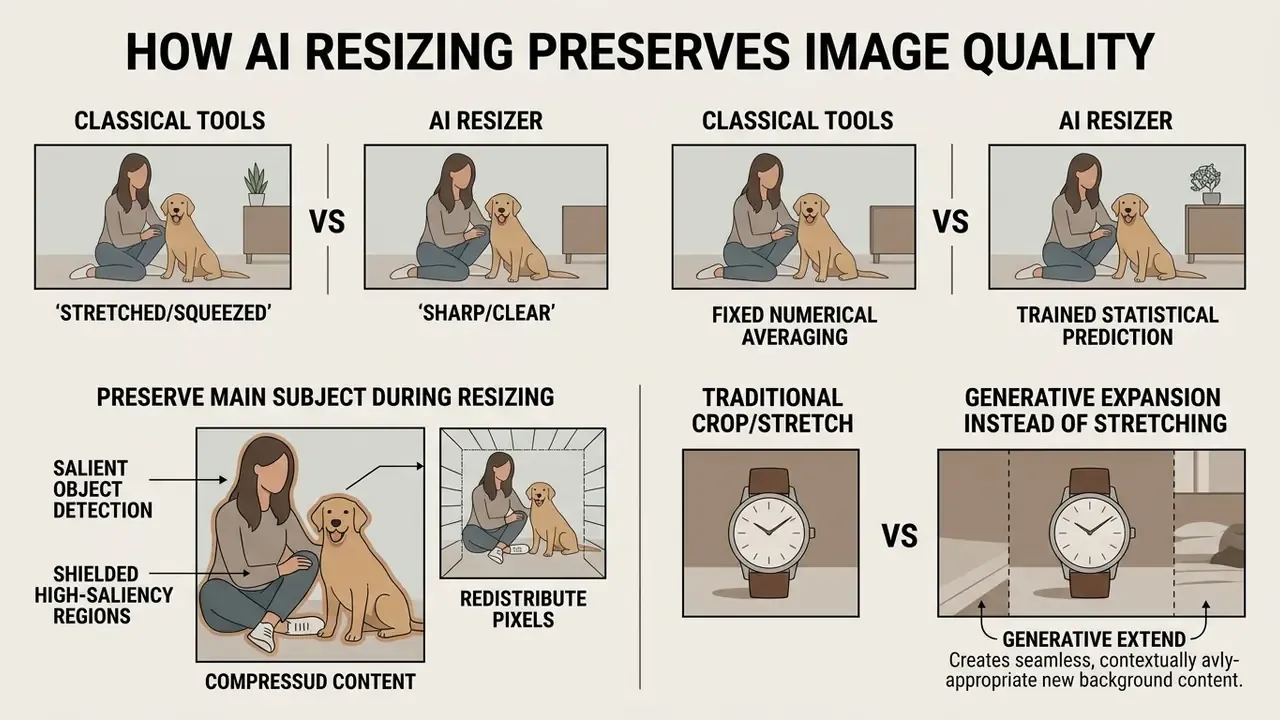
An ai image resizer preserves perceived sharpness by replacing fixed numerical averaging with trained statistical prediction. These networks restore lost edge gradients and reconstruct missing high-frequency detail, which is how creators resize images without losing quality in practice rather than in theory.
«The DRCT model reached 31.18 dB PSNR and 0.86 SSIM on the NTIRE 2024 ×4 super-resolution test set.»
Architectural research points the same way. The ICCV 2023 MULLER multilayer Laplacian resizer shows that a learned resizing layer can preserve content for both human and machine perception while changing resolution, and that is precisely the failure mode of naive resampling.
Preserve the Main Subject During Resizing
Modern smart-resizing pipelines incorporate Salient Object Detection (SOD) to calculate pixel-importance maps across the input frame. These maps isolate foreground subjects from surrounding context. Content-aware retargeting literature formalizes the approach: an importance map ranks pixels or regions, derived from saliency, object detectors, or both, and the resize operation then executes under that constraint. Visually prominent regions survive intact rather than being sliced by seam carving.
Transparency note: the case above is an anonymized composite from production workflows. Client name, model version, and cost figures are withheld under NDA. Treat the outcome as directional, not as an audited benchmark.
When resizing runs, the engine shields high-saliency regions from spatial compression and redistributes dimensional change across low-saliency background areas. That redistribution is what separates content-aware behavior from a plain stretch.
«Cascaded super-resolution improved PSNR by 0.76 dB on Set5 and 0.621 dB on Set14 versus the baseline method.»
Generative Expansion Instead of Stretching
When altering canvas aspect ratios, classical tools stretch or squeeze existing pixels and introduce unnatural distortion. An ai image resizer answers this by combining outpainting models with generative ai fill mechanisms.
Instead of expanding pixels, the model predicts and generates plausible surrounding context (extending sky, foliage, or a studio backdrop) based on learned natural image priors.
«Diffusion models such as SR3 and SRDiff integrate generative modeling into upscaling, synthesizing realistic high-resolution detail.»
Arbitrary-scale work extends the principle further. A 2024 arXiv study pairs a latent diffusion model with an implicit neural decoder to perform super-resolution at arbitrary scale factors rather than at a handful of fixed ratios. That flexibility is what lets one pipeline serve both 1.2× padding and 4× enlargement.
Users seeking dedicated enhancement tools can evaluate a free ai image enhancer, compare broader AI image enhancers, or try a free ai enhance workflow to weigh spatial upscaling against generative outpainting.
Enterprise Validation and Model Risk Control
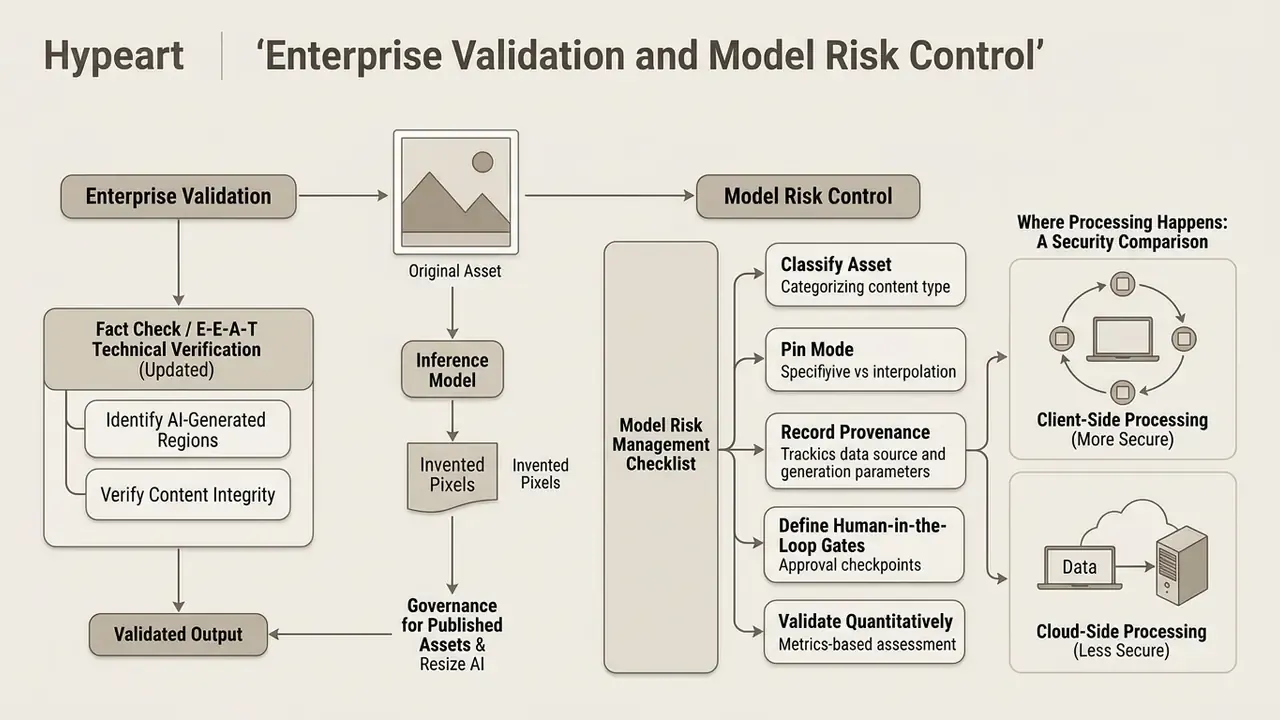
Generative resizing raises a governance question classical interpolation never did: some pixels in your published asset were invented by a model. For regulated industries, marketing compliance teams, and anyone producing evidence-adjacent imagery, that demands an explicit control layer.
Fact Check / E-E-A-T Technical Verification (Updated):
The academic literature explains why this ceiling exists rather than merely asserting it:
Classical signal theory supports the same conclusion. The accepted version of Limits on Super-Resolution and How to Break Them (IEEE TPAMI) shows that at large magnification factors, smoothness priors yield overly smooth outputs with very little high-frequency content, even when many low-resolution inputs are available. NYU's Towards a Mathematical Theory of Super-Resolution describes recovery as "completely hopeless" once event separation falls below roughly half the observed cutoff wavelength.
Where Processing Happens: A Security Comparison
| Deployment model | Data leaves the device? | Typical retention | Governance strengths | Main residual risk |
|---|---|---|---|---|
| Free browser / WASM tool (client-side) | No, pixels processed locally | None (nothing uploaded) | Strongest confidentiality posture; no server-side copy | Limited model size, no batch/API, no audit log |
| Free cloud web tool | Yes | Commonly 8 to 24 hours per published policies | Fast, zero setup | Shadow AI exposure; unclear training clauses; no DPA |
| Enterprise API / paid tier | Yes | Contractual, often zero-retention option | DPA, no-training commitments, SSO, logging | Vendor concentration; cross-border transfer review needed |
| On-premise / private cloud | No (inside perimeter) | Defined by internal policy | Full audit control, residency guarantees | Higher cost, GPU capacity and MLOps overhead |
Official cloud policies illustrate the spread. Claude Platform documentation states that chat, file, and project content follows the organization's retention policy, with Files API objects retained until deletion or a configured expiration. Google's Workspace Privacy Hub notes that Gemini app prompts and responses can be kept up to 36 months, while Gemini Notebook uploaded files are not retained after the session ends. Google's zero-data-retention documentation for its enterprise agent platform commits to not using customer data to train or fine-tune models without prior permission. Microsoft's Azure OpenAI data policy similarly states that prompts, completions, embeddings, and uploaded training data are not used to train foundation models without explicit instruction, with a 30-day abuse-monitoring window. Consumer tiers trend toward longer retention and default training use; enterprise tiers trend toward contractual restriction.
Model Risk Management Checklist for Neural Resizing
Before promoting an AI resizer into a production or regulated workflow:
- Classify the asset.Marketing creative, product photo, document scan, or evidentiary image. Only the first two categories should ever touch generative extend.
- Pin the mode.Force Fit mode, with no synthesis, for documents, ID scans, statements, and audit artifacts.
- Record provenance.Log source hash, model name and version, geometry mode, target dimensions, and operator ID for every batch job.
- Define human-in-the-loop gates.Require named sign-off on any output where synthetic pixels exceed an agreed share of the canvas.
- Validate quantitatively.Track PSNR/SSIM for reconstruction tasks and perceptual metrics (LPIPS, FID) for generative tasks; store thresholds in the model inventory.
- Review the vendor contract.Confirm retention window, no-training clause, sub-processor list, encryption in transit and at rest, and SOC 2 / ISO 27001 attestation status.
- Establish a legal basis.For GDPR/CCPA scope, document lawful basis, data-minimization rationale, and cross-border transfer mechanism before uploading customer imagery.
- Close the Shadow AI gap.Publish an approved-tools list. Unapproved free web resizers remain the most common uncontrolled egress path for internal imagery.
- Map to existing frameworks.Align documentation with your model risk governance regime, for example supervisory guidance on model risk management, and note obligations arising from AI transparency rules that apply to synthetic media in your jurisdiction.
- Re-test on model upgrades.Vendors swap checkpoints quietly. Re-run your validation set after any version change.
A small point that teams often miss: image models usually sit outside the formal model inventory, because nobody classifies a resizer as a model. It is one. Give it an owner, a role, an access boundary, and a documented shutdown path, exactly as you would for any digital worker.
AI Image Resizer Use Cases for Content and Business
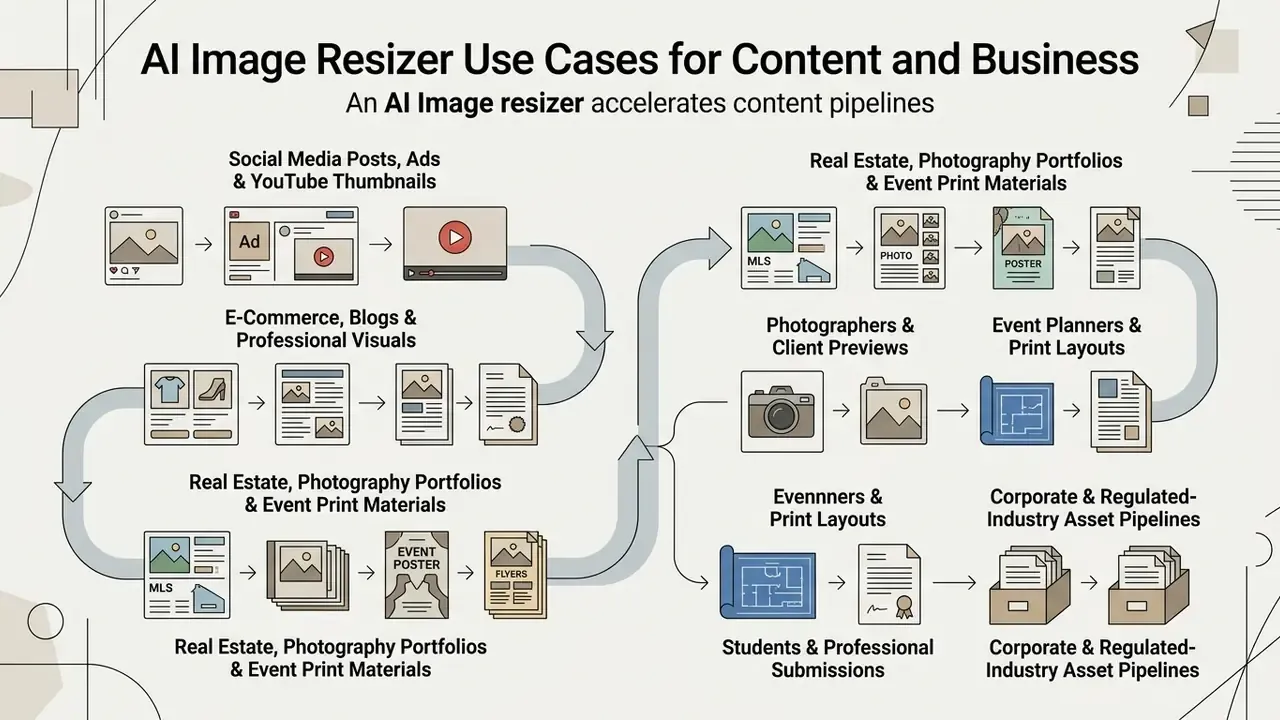
Integrating an image resizer ai into organizational workflows accelerates content pipelines by automating repetitive graphic adaptation. It also helps teams save time on work that never deserved a designer's afternoon in the first place.
E-Commerce, Blogs and Professional Visuals
E-commerce managers need uniform framing across massive catalogs. Standardizing product photo sizing with an automated resizer keeps items aligned on category pages regardless of original camera distance. Documented API workflows push this further: Claid.ai states that its API automatically edits every product image to maintain the same look and feel across differing source sizes and orientations, which is exactly what catalog standardization requires.
Corporate blog managers and media teams benefit similarly. Standardized header graphics stay crisp on high-DPI displays without inflating page-load budgets, and nobody has to open a complex photo editor to resize photos for a routine post.
Teams evaluating standalone generation applications can review a free ai image generator app to assess mobile performance, or study a free photo editor comparison to understand export restrictions on no-cost tiers.
Real Estate, Photography Portfolios, and Event Print Materials
Beyond standard digital marketing, automated AI resizing clears technical distribution bottlenecks in specialized industries:
- Real Estate & MLS Listings Agents feed photos to Multiple Listing Services under strict resolution caps. AI resizers standardize heterogeneous property photos into uniform 4:3 or 16:9 framing, preserving room geometry without distortion, then re-export the same shot for portal listings and Facebook ads.
- Photographers & Client Previews Photographers build web-optimized preview galleries from massive RAW exports. Automated batch resizing cuts file weight while keeping fine focus detail on high-DPI retina displays, so proofing links load fast without looking soft.
- Event Planners & Print Layouts Adapting a theme across print flyers, digital posters, and mobile invites requires rapid aspect-ratio shifts. AI outpainting extends background elements to fit vertical poster prints without compressing central event typography.
- Students & Professional Submissions Presentations, reports, résumés, and portal uploads often enforce hard file-size or dimension caps. An ai resize picture workflow meets the constraint without visibly degrading the asset.
Corporate and Regulated-Industry Asset Pipelines
Enterprise use extends well past social feeds. Internal communications teams normalize screenshots for knowledge bases, HR standardizes employee portrait crops, and finance and operations teams prepare report figures at deck-native 16:9. Two rules govern this category:
Teams handling mixed media libraries may also need adjacent utilities, such as a video compressor for oversized attachments, or an AI reverse image search tool to verify provenance before republishing third-party visuals. When in doubt about scope, see the overview of the tooling categories covered across this site.
What to Look for in a Free AI Image Resizer
Evaluating an online free ai image resizer means looking past headline marketing claims to the underlying processing controls, privacy guarantees, and output constraints.
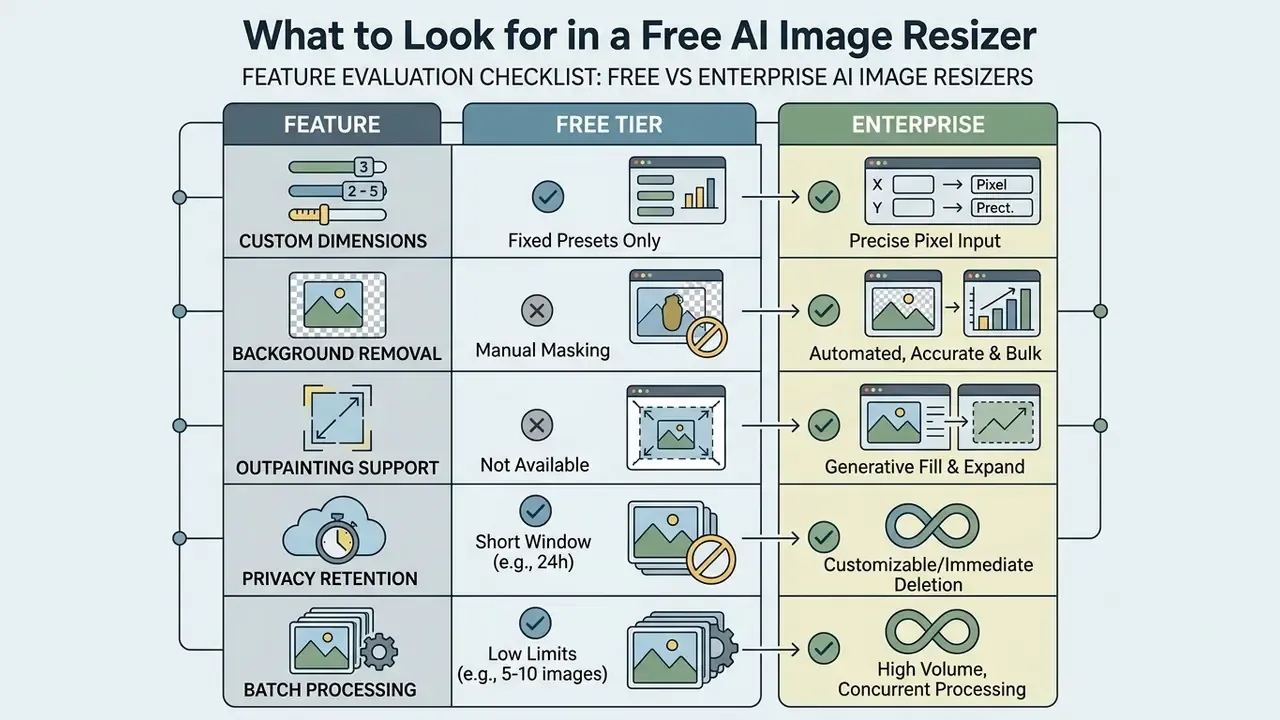
Features That Matter for Commercial Use
- Exact Dimension Controls Ability to specify precise pixel height and width values or standard aspect ratios, the feature vendors label "custom dimensions."
- Integrated Utilities Availability of complementary tools such as an automated background remover or a generative extender. Product documentation from Instasize, fal, and Photoroom consistently bundles this trio, exact sizing plus background removal plus AI canvas expansion, as the commercial baseline.
- Batch Processing Support for concurrent multi-file uploading so you can quickly resize an entire creative library.
- High-Resolution Export Ability to download final files without forced compression or intrusive platform watermarks. Readers comparing enlargement quality can review AI image upscalers side by side with resizing engines.
- Geometry Mode Selection Explicit Fit / Fill / Extend switching rather than one hidden default.
- Audit and Access Controls Job history, seat management, and SSO for team accounts.
For enterprise deployment, verify compliance frameworks and content safety boundaries before processing commercial visual assets through cloud-based neural models. That review covers acceptable-use terms, output ownership, and whether generated pixels are licensed for commercial distribution.
When a Free Tool Is Enough
A free web-based resize tool is perfectly adequate for low-volume, non-sensitive tasks, such as re-framing the occasional blog graphic or handling an ai resize images job for a handful of social posts. Users exploring no-cost options can compare free AI image generators and free AI art generators against the same criteria: watermark-free output, original-resolution export, and no daily quota are the practical pass/fail checks.
Organizations needing automated API integration, zero-data-retention guarantees, or high-volume batch throughput must move to enterprise tiers. Three concrete triggers mark the crossover, and they mirror how major AI vendors structure plans: batch queues (documented as unsupported on free tiers), high-quality or high-resolution output (priced per image at premium levels), and API throughput (unavailable without a paid plan). A fourth trigger is degradation complexity, since real-world blur and noise routinely exceed what lightweight free models handle.
FAQ: Frequently Asked Questions About AI Image Resize
Which Image Formats Can an AI Image Resizer Support?
Professional ai image resizer systems handle a broad matrix of raster formats for input ingestion and production export:
- Supported Input Formats: JPG, JPEG, PNG (with full alpha-channel transparency), WEBP, BMP, GIF (static frame processing), and high-density TIFF files up to 20 MB per asset. Maximum single-canvas processing resolution is commonly 4096 × 4096 pixels.
- Supported Export Containers:
- PNG: Lossless compression retaining visual sharpness and background transparency.
- JPG: Optimized web publishing with selectable quality compression sliders.
- WEBP: Next-generation lightweight container balancing low payload with crisp line detail; supports both lossy RGB and lossless alpha.
- PDF: Vector-wrapped raster output ready for commercial print workflows and corporate documents. Formats carrying an alpha channel, such as PNG and WEBP, preserve background transparency during AI processing. Converting transparent PNG files to JPG flattens transparency against a solid background color, because the JPEG specification carries no alpha channel data. PNG stores unassociated, non-premultiplied alpha, which is why it remains the canonical lossless choice when transparency must survive an AI edit. In short, the jpg png decision is a transparency decision first and a file-weight decision second. Note: Exporting a transparent PNG to JPG flattens the alpha channel against a clean white or custom solid background color.
«NTIRE benchmarks use PNG for reproducibility; RAW formats are also supported by modern SR models within ISP pipelines.» - NTIRE 2024 RAW Image Super-Resolution Challenge, arXiv (April 2024). https://arxiv.org/abs/2404.16223
Can I Resize Multiple Images at Once?
Yes. Many commercial platforms offer batch processing that applies standardized dimension rules, aspect ratios, or upscaling policies across dozens of files at once. Batch jobs leverage parallel GPU inference pipelines, which cuts manual editing effort sharply for large e-commerce catalogs. The implementation is well documented at both API and kernel level: Claid.ai exposes a Batch API for editing multiple files in a single request, NVIDIA DALI's dynamic resize operator defines a minibatch_size parameter with a default of 32 images per kernel call, and NVIDIA NPP provides ResizeBatch functions that apply per-pair scale factors inside a supplied batch. E-commerce teams building a full content stack can also review AI image generators for commercial use to pair batch resizing with batch asset creation.
Are Uploaded Images Stored and Protected?
Data handling policies vary sharply between web-based tools, and the difference is architectural rather than contradictory. Local, browser-based tools process pixels entirely on your client device, so source files never reach a remote server. ImageResizer.bd states that resize, crop, compress, convert, flip, and rotate all run in the browser with no upload, storage, or logging, and IMResizer describes on-device background removal with no third-party transmission. Cloud-based tools, by contrast, upload assets temporarily to processing servers. Published retention windows differ by vendor. ImageResizer.com states that uploaded files are stored temporarily for service delivery and deleted automatically within 8 hours after conversion, while other services publish 24-hour or 7-day windows. ResizeFlow discloses cloud processing via secure servers and third-party AI providers, confirms files are not used for training, and notes that no transmission method is 100% secure. Reputable providers therefore enforce a documented privacy policy that deletes uploaded assets within a stated window and explicitly forbids using customer data for public model training. Verify the specific figure in the vendor's current policy rather than assuming an industry default, because consumer tiers sometimes retain data far longer than enterprise agreements.
Should I Use Fit, Fill, or Generative Extend?
Choose Fit when no original pixel may be lost and letterbox bars are acceptable: documents, archives, compliance records. Choose Fill when the canvas must be fully covered and peripheral content is expendable, as with feed thumbnails and uniform grids. Choose Generative Extend when you need both full coverage and full subject preservation, and synthetic background pixels are permissible for that asset class: banners, ads, cross-format campaigns.
Can AI Fully Restore a Very Low-Resolution Image?
No. Super-resolution is mathematically ill-posed, since a single low-resolution input maps to many plausible high-resolution reconstructions. Below a minimum information threshold, a model invents detail consistent with its training priors instead of recovering the original scene. Some commercial engines cap learned upscaling at ×4 and revert to bicubic supersampling beyond that. For anything used as evidence or for identification, the original file must remain the basis of the final determination.
Does AI Resizing Change File Size as Well as Dimensions?
Yes, and the two are independent controls. Reducing pixel dimensions lowers payload; raising compression lowers payload further at the cost of fidelity. Many resizers expose a quality slider or low/medium/high presets, so you can trade file weight against sharpness before export. Handy when a platform enforces both a dimension spec and a maximum megabyte limit.
Is an AI Image Resizer Free to Use?
Most platforms offer a free tier with daily usage caps, watermark-free export on some plans, and a limited feature set. Free access usually covers individual, low-volume, non-automated work. Batch queues, API access, premium high-resolution output, and zero-retention guarantees sit behind paid plans across the major vendors.
Internal Hub Navigation
To explore commercial licensing models, enterprise creative tool evaluations, and governance guidelines, open the hub. For adjacent tooling, review the AI voice generator guide, the animation maker guide, and the Canva AI Generator overview.
A Safe Next Step
Start narrow. Pick one asset class, usually marketing creative, run a 50-image pilot through a single approved tool, log provenance for every job, and record the synthetic pixel share. Compare reviewer time against your current manual baseline. If the numbers hold and no control gap appears, extend the same pattern to the next class. Then, and only then, discuss API automation. Last updated: 2026. Prepared by the editorial team with governance review by Marcus Hale, author.
Social Media Posts, Ads and YouTube Thumbnails
Marketing departments usually build a single core hero visual for a major product launch. With automated generative expansion, operators convert that one asset into square facebook posts, vertical mobile ad units, and 16:9 youtube thumbnail graphics in seconds.
The adaptation removes repetitive manual retouching while keeping brand framing intact, and it works even for coordinators with no design experience. Developers integrating scalable design tools into corporate stacks can open the hub to review the best AI image generators and adjacent AI art generators when evaluating enterprise software options.