"Selecting enterprise-ready AI animation software requires moving past promotional claims to audit verifiable model controls, frame-level consistency, and clear commercial data boundaries."
Executive summary for decision-makers
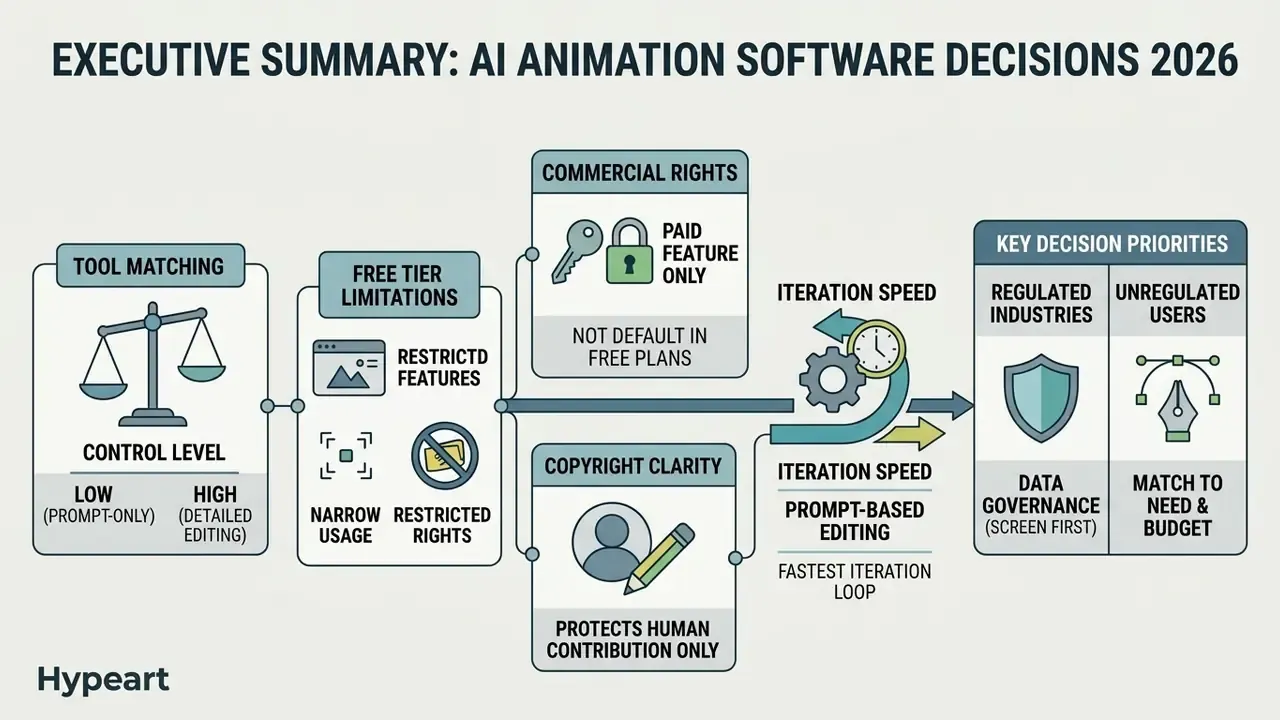
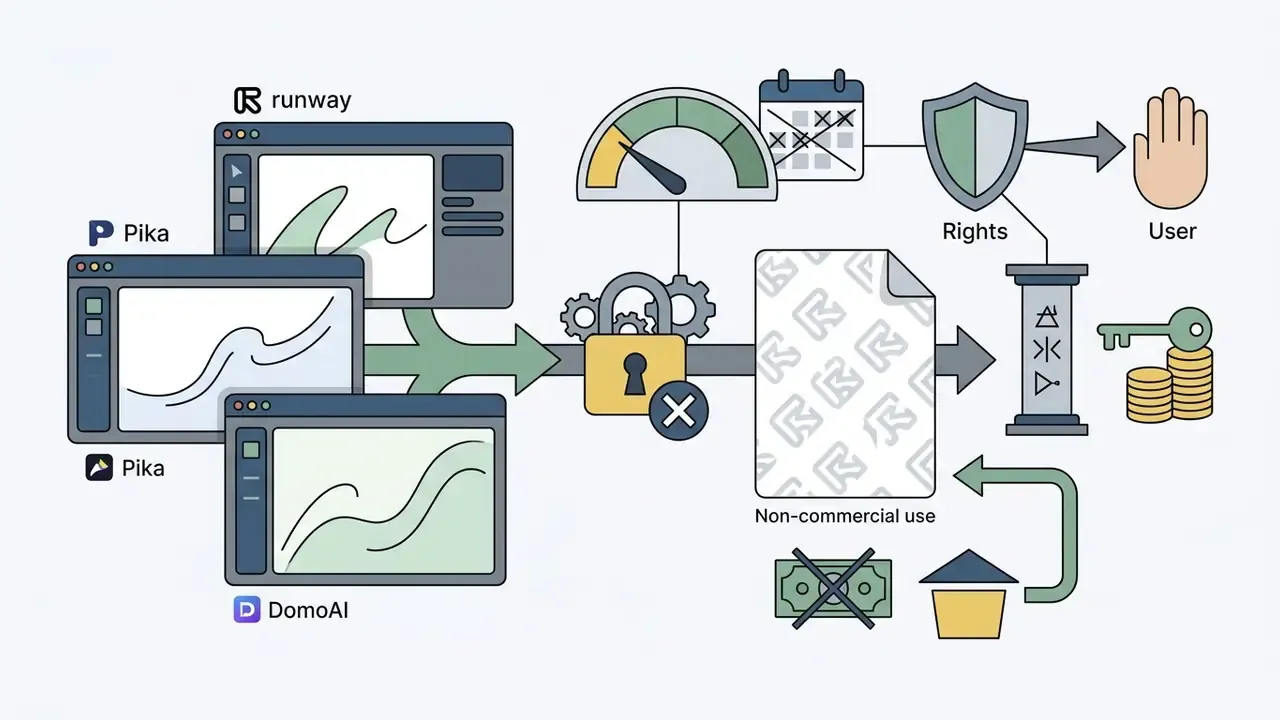
- Free tiers are narrow and rights-restricted. Most free plans cap you at a handful of exports per week or month (invideo AI: 2 video minutes per week, 1 AI credit, 4 exports per week; Viggle: up to 5 generations per day; Runway: a one-time 125 credits, personal use only), apply forced watermarks, and explicitly exclude monetized use.
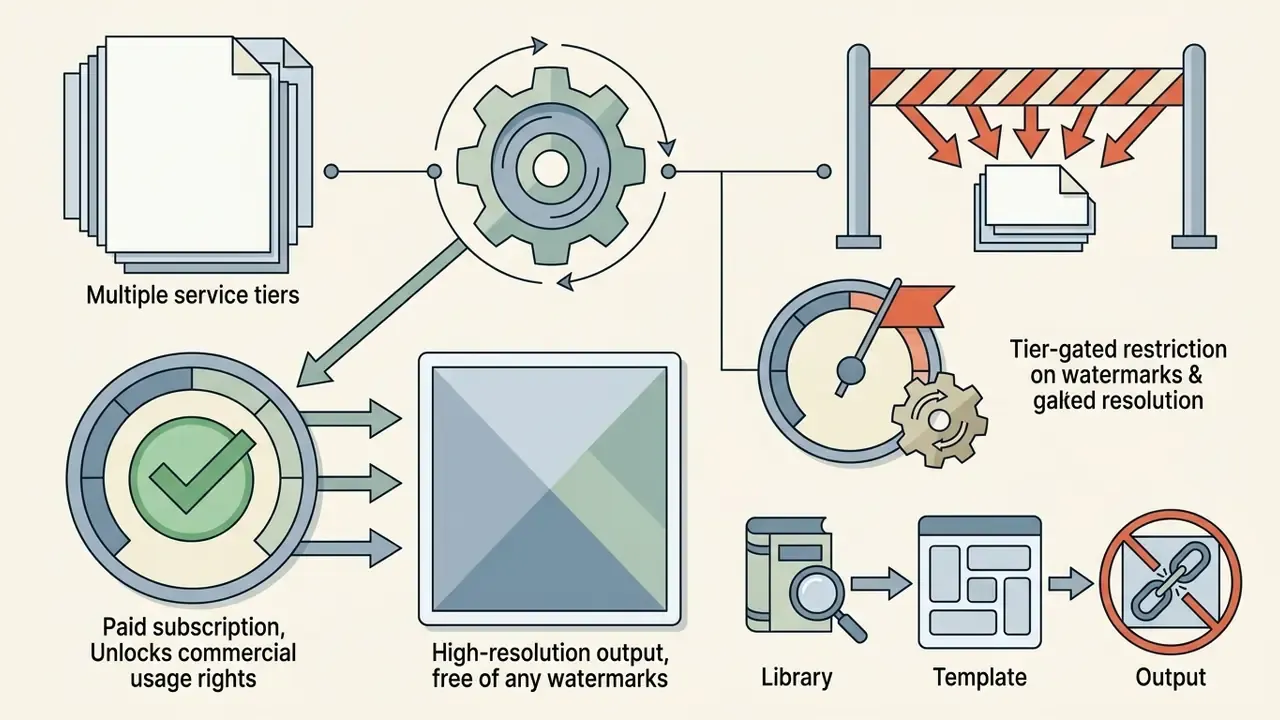
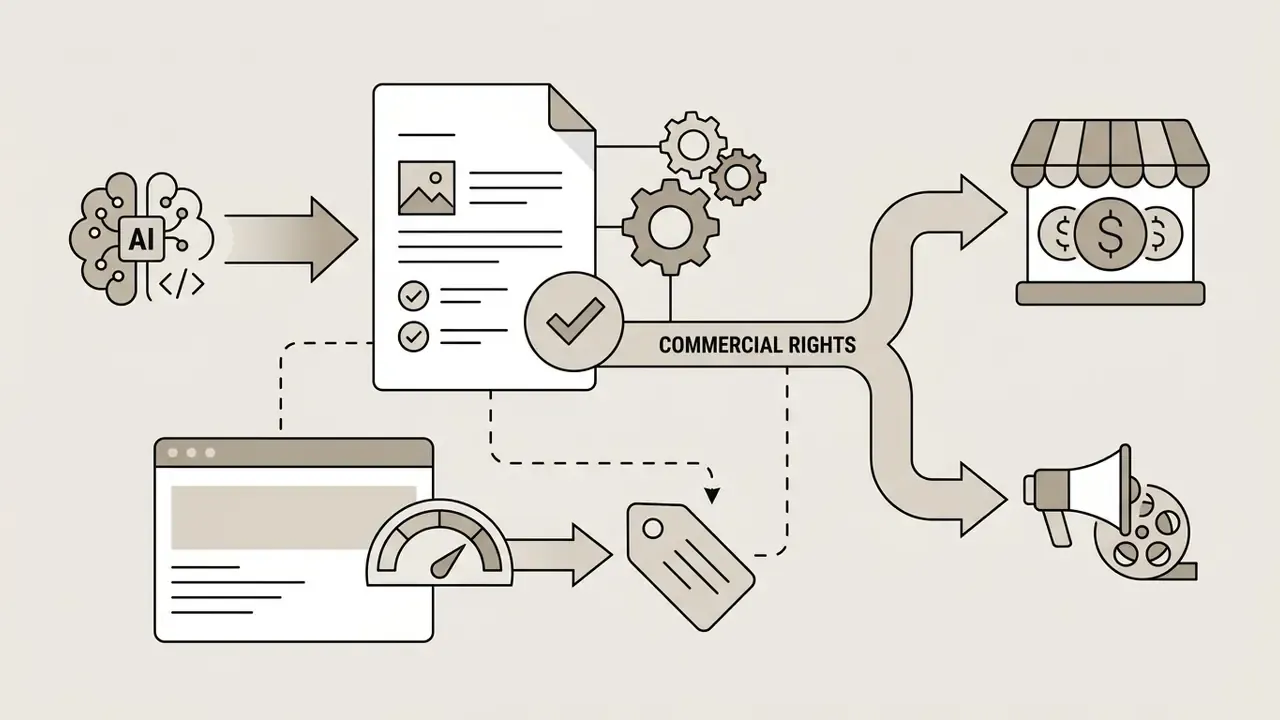
- Commercial rights are a paid-tier feature, not a default. Paid plans on platforms such as invideo and Animaker grant a royalty-free, worldwide commercial license. Free credits on Runway, Pika, and DomoAI are generally limited to non-commercial presentation and personal testing. Always confirm the license text, not the marketing page.
- Copyright protects the human contribution only. Under the U.S. Copyright Office position (2025), fully machine-generated visual elements without substantive human authorship are not registrable. Prompts alone do not create authorship.
- Prompt-based editing is now the fastest iteration loop. "Magic box" text-to-edit commands (
delete scene 3,change the accent to UK English,add a funny intro) have replaced manual first-cut re-timing on template platforms. - Match the tool to the control level you need. Template engines (Animaker, Renderforest, Toonly, VideoScribe) for explainers; diffusion engines (Sora, DomoAI, Leonardo, Firefly) for stylized output; professional suites (Adobe Animate, Blender plus AI plugins, PowerDirector) for keyframe-level control.
- For regulated industries, screen for data governance first. No-retraining commitments, on-device versus cloud processing, SSO and SOC 2 availability, prompt-history retention. All of that comes before any creative feature comparison.
Who this guide is for, and how to read it
Two very different readers land on a page about the best AI animation software. The first is a solo creator who wants an animated short by Friday. The second sits in a bank or a mature fintech and has to answer a harder question: can marketing, HR, or L&D use a generative video tool without opening a data or licensing hole?
This guide serves both, in that order of caution. Creative capability is the second filter here, not the first.
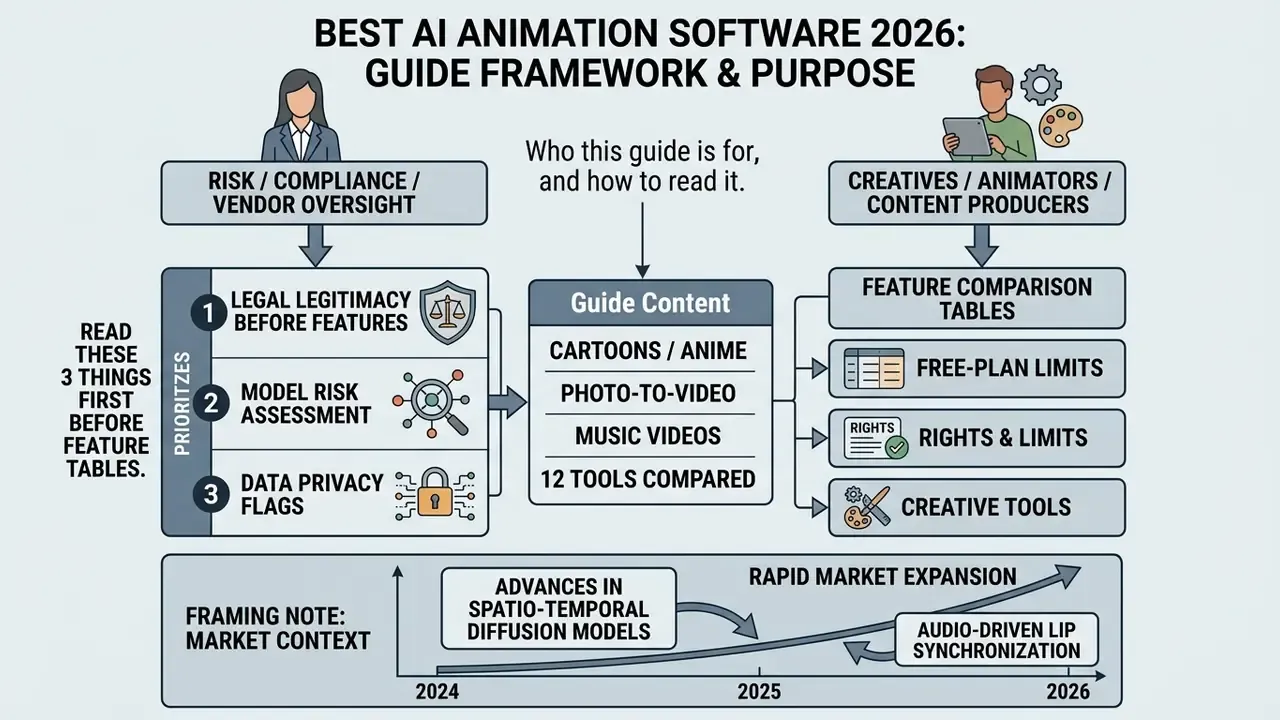
If you own model risk, compliance, or vendor oversight, read three things before the feature tables: the data-handling flag column, the rights section, and the pre-production checklist at the end. If you are a creator or a marketing lead, start with the task-based comparison and the decision tree.
One more framing note. An AI animation platform is a model with a business owner, an approved use case, an access boundary, and an audit trail, or it is shadow AI with a nice interface. There is not much middle ground.
The generative AI animation market is undergoing rapid expansion, with industry reports estimating its valuation between $1.51 billion and $3.23 billion in 2026 (Precedence Research, "Generative AI in Animation Market," 2026, projecting a 40.06% CAGR to 2035; Research and Markets, "Generative AI in Animation Market Report 2026," projecting USD 3.23B for 2026 at a 30.2% CAGR to 2030). The spread between those two figures is not an error. It reflects different forecast windows, baselines, and segment definitions, which is exactly why procurement teams should treat market sizing as directional rather than contractual.
Growth is driven by advances in spatio-temporal diffusion models, audio-driven lip synchronization, and automated character consistency pipelines. For content creators, digital marketers, and enterprise risk leaders, evaluating these tools means looking past automated marketing generation and toward controls, export flexibility, and legal compliance. A quick aside worth saying out loud: most "best ai animation video maker 2024" listicles still circulating are stale, because free-tier limits and license clauses were rewritten at least once since then.
How we selected the best AI animation software
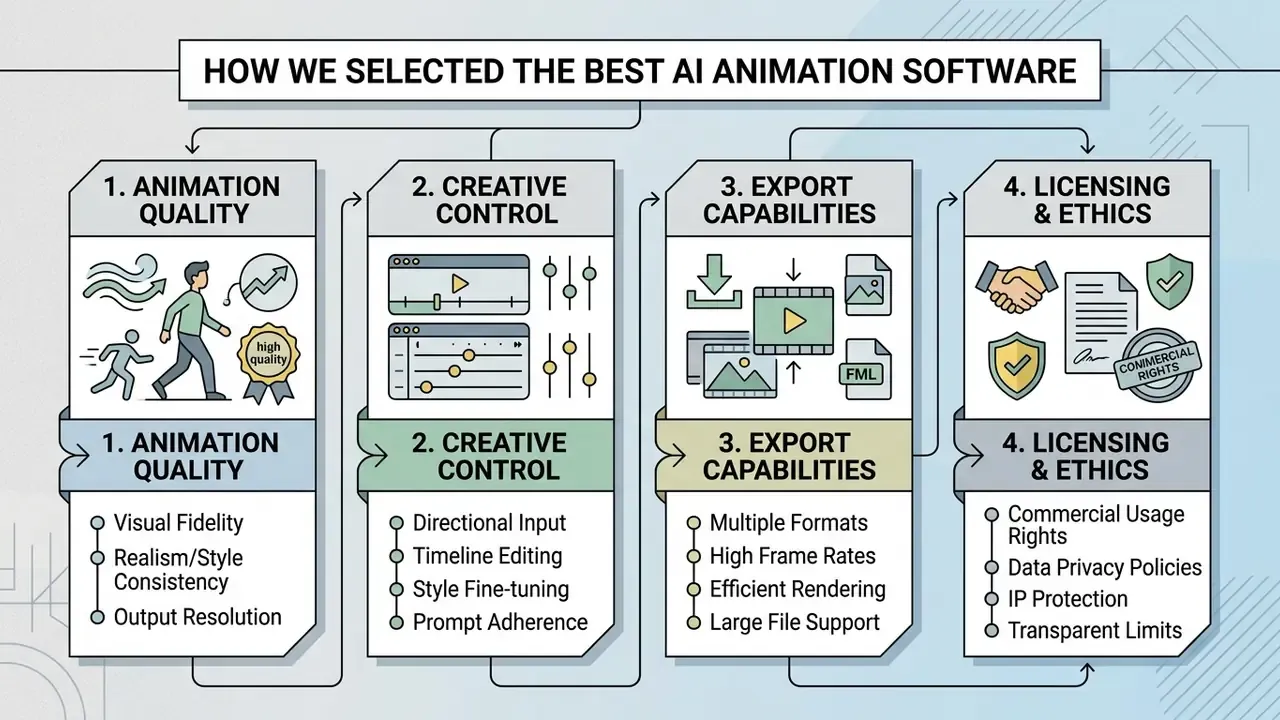
We evaluated AI animation software across four core criteria: output visual quality, granular creative control, pipeline export compatibility, and commercial licensing terms. According to European Parliament governance studies on generative AI ("Generative AI and Copyright," European Parliament study, 2025), copyright relevance and operational utility depend on how much human control is maintained during visual generation and post-editing. (The EP study is cited here as a policy framing document; readers auditing this claim should retrieve the current version directly from the European Parliament think tank portal, since the analysis is periodically revised.)
Control is not a soft criterion. It is measurable. Research on conditioned video diffusion shows that adding explicit motion and structure conditioning materially improves prompt fidelity:
"Controllable text-to-video models, integrating motion priors and reward feedback, achieve the highest prompt alignment scores and lowest depth map errors compared to prior methods."
Evaluating the best ai animation software means testing models under standardized benchmark conditions instead of trusting vendor showreels. Practically, fix the prompt set, the seed policy, the output resolution, and the number of retries per tool. Then score artifacts, temporal flicker, and identity drift on identical material. Same inputs, same scoring sheet, same reviewers.
Generation capabilities: text-to-video, image-to-video, and character animation
Modern AI video generation architectures rely on text-to-video and image-to-video diffusion pipelines that turn prompts and still images into temporal frame sequences. Academic literature, such as the IEEE survey on text-to-image and text-to-video generators (IEEE, 2023), classifies image-to-video as animating a static visual using learned motion priors. Readers who want a terminology baseline before comparing vendors can review our glossary on text-to-video AI tools.
Specialized character generation and lip sync run through dedicated face-animation and phoneme-to-mouth mapping models. Universal lip-synchronization frameworks such as OmniSync (NeurIPS 2025) model speech-driven mouth movement as a distinct diffusion task rather than a post-processing filter. That distinction shows up in output quality, especially on side angles and fast speech.
Enterprise APIs from providers like HeyGen and Kling AI expose these capabilities as separate endpoints for text-to-video, image-to-video, avatar generation, and audio-driven lip sync. That matters for cost modeling, because each endpoint is metered differently and a single 30-second clip can hit three of them. For a deeper breakdown of still-image animation specifically, see our reference page on image-to-video AI. To review baseline media generation platforms side by side, creators often open the hub of head-to-head matchups.
Black Forest Labs' generate_video documentation illustrates the practical envelope of current APIs: text-to-video, image-to-video from keyframes, and video continuation, with duration parameters typically bounded at 5 to 20 seconds per call. Long-form episodic animation therefore remains an assembly problem, not a single-generation problem. Anyone promising a ten-minute film from one prompt is selling the roadmap, not the product.
Editing, export, and project security
Professional deployment of the best ai animation video tools requires precise aspect ratio management, high-resolution rendering, and verifiable data privacy controls. Commercial video production workflows demand exports reaching 1080p or 4K across standard aspect ratios, including 16:9, 9:16, 1:1, 4:5, and 21:9. High quality output formats such as ProRes 4444, H.264/HEVC MP4, HEVC with alpha, image sequences, and Lottie JSON are essential for post-production integration.
Data security models vary sharply between cloud-based generative AI systems and on-device processing architectures. Some reframing and cropping tools (Reframer, for example) state that smart reframing runs entirely on-device with no uploads to servers, while most generative platforms are cloud-native by design. Enterprise testing frameworks such as the OWASP AI Testing Guide (2025) emphasize checking whether user uploads and prompt histories are ingested into model retraining sets.
For risk and compliance owners, the operational questions are narrow and answerable:
- Are prompts, uploaded footage, and brand assets excluded from model training by default, or only on request?
- Is there a documented retention window for generated assets and prompt logs?
- Does the vendor offer enterprise SSO, role-based access, audit logs, and a SOC 2 Type II or ISO 27001 attestation?
- Is inference region-pinned, and can domestic-only or EU-only processing be contractually guaranteed?
- Does the free or trial tier route data differently from the enterprise tier? That last one is the most common shadow AI failure mode: staff piloting on a consumer plan that carries training rights the enterprise contract would prohibit.
Organizations evaluating creative tools can explore the hub to assess commercial data privacy guarantees before deployment. Retrieve each vendor's own privacy policy and data-processing addendum as well; Adobe, HeyGen, and OpenAI publish those separately from their marketing pages, and the wording rarely matches the landing page.
Best AI animation tools: comparison by task
Leading AI animation tools serve distinct operational functions, from automated marketing explainers to advanced diffusion engines and professional hybrid suites. Choosing a platform depends on whether your primary need is automated template assembly, stylized neural video generation, or keyframe-level timeline control. For a broader taxonomy of production methods, see our guide to animation makers.
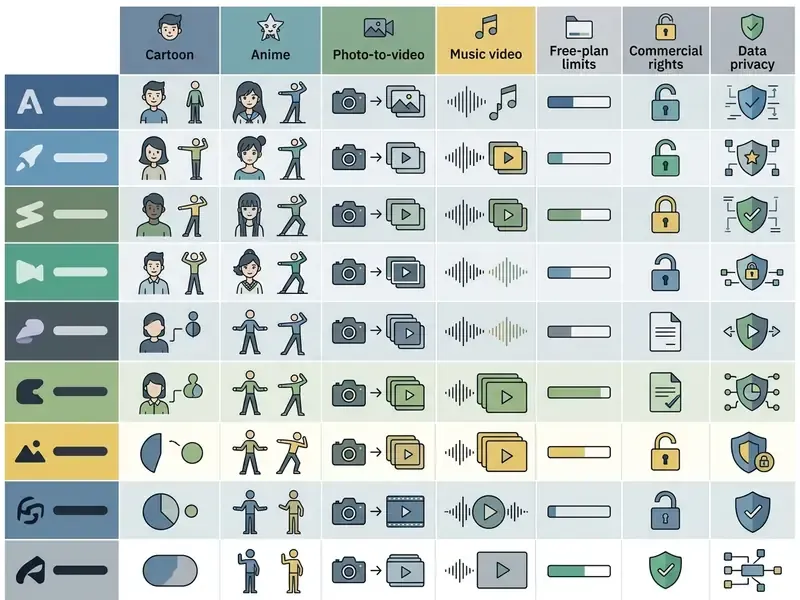
| Tool | Generation type | Cartoon / anime capability | AI voice & lip sync | Editing & export | Free plan (concrete limits) | Asset library / style volume | Data handling flag | Primary use case |
|---|---|---|---|---|---|---|---|---|
| DomoAI | Image/video-to-video, text-to-video | High (40+ style presets, footage-to-anime transfer) | Automatic lip sync, talking avatars | Max 10s per generation; MP4 out (MP4, MOV, AVI input) | Yes: 15 starter credits on signup; watermark on free output; credits from ~$0.04/sec (faster model) to ~$0.10/sec (advanced) | 40+ stylization presets, anime frameworks | Cloud; verify training opt-out in ToS before uploading client footage | Video stylization, anime conversion, short social clips |
| Animaker | Text-to-animation, template-based | 2D cartoons, vector characters, whiteboard, infographic | AI voices, auto-subtitles, auto lip sync | Multi-track scene editor, subtitles, "2x faster" rendering (vendor claim) | Yes: approx. 5 exports/month, 720p ceiling, forced watermark | 10,000+ editable templates; 100M+ asset library; 1,000+ character poses (vendor-published) | Cloud; brand-kit storage; enterprise plans required for team controls | Marketing and explainer videos |
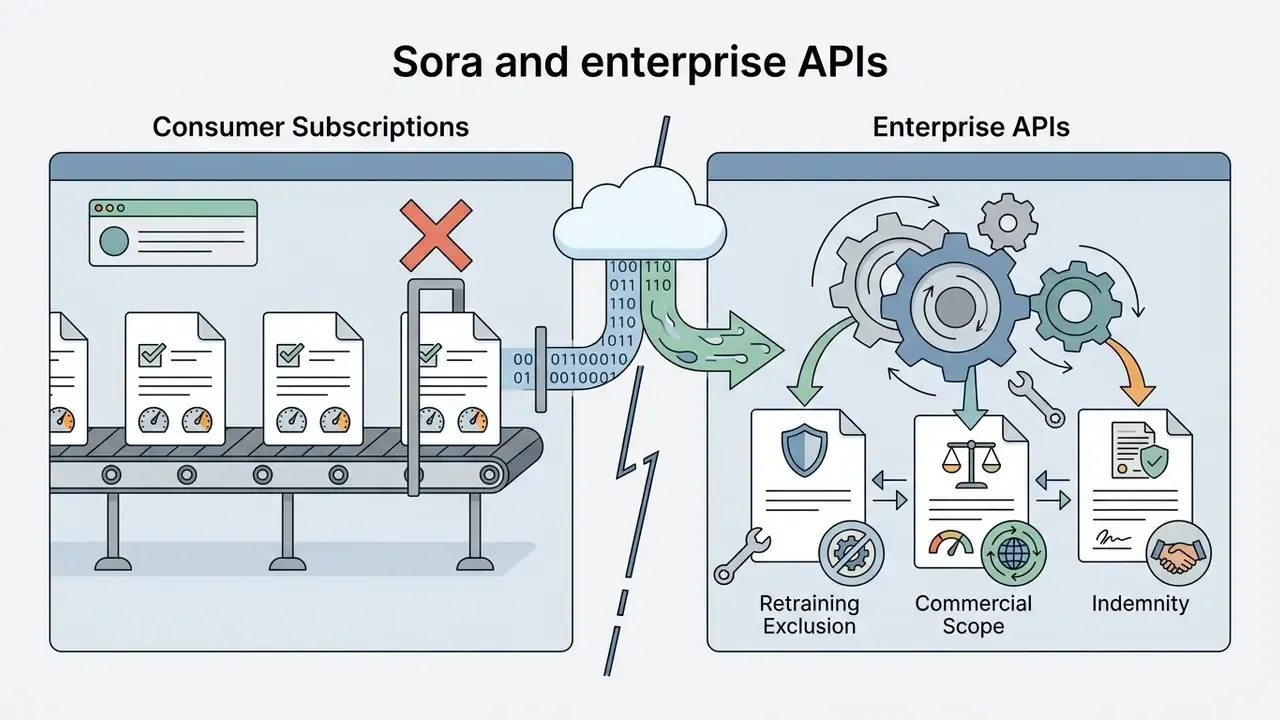
| Sora AI (OpenAI) | Text-to-video, image-to-video, video extension | High realism and complex stylization | Needs external integration for voice and lip sync | Clips up to ~60 seconds; scene-context preservation | No standalone free tier; paid access via ChatGPT Plus/Pro or enterprise API; re-verify availability, since OpenAI has changed Sora's distribution | No stock library (purely generative) | Cloud; enterprise API terms differ from consumer terms | Cinematic and artistic generation |
| Adobe Animate | Vector 2D plus AI plug-ins | Full custom 2D design support | Audio integration, manual or assisted lip sync | Professional timeline, JavaScript API, CPSDK, scripted export automation | No perpetual free tier; 7-day trial, then paid Creative Cloud subscription | Custom assets plus Creative Cloud Libraries; unlimited user-built symbols | Desktop processing; Adobe publishes separate generative-AI data commitments | Professional 2D animation and interactive content |
| Toonly | Drag-and-drop 2D animation | Whiteboard and 2D cartoon scenes | Basic audio overlay (no native AI voice) | Simplified scene editor, MP4 export | No free tier; paid license only (trial or refund window varies by promotion) | Bundled character and scene packs (counts vary by license tier) | Desktop app; assets stored locally | Simple presentations and training videos |
| Renderforest | Idea-to-video, text-to-video | 2D/3D templates, animated scenes | AI voiceover and speaker selection | Online template and branding editor, real-time preview | Yes: approx. 500 MB storage, 360p export ceiling, limited asset access, watermark or branding | 1,000+ video templates, branding scene categories; vendor cites 25M+ clients, 50M+ projects | Cloud; brand-kit storage on paid tiers | Fast video marketing and social content |
| VideoScribe | Whiteboard animation | Hand-drawn 2D animation | Voiceover import; no native AI voice cloning | Canvas and element editing, timing control | 7-day free trial; exports carry a watermark; no permanent free plan | "Ever-expanding" video and GIF template library plus hand-drawn image sets (no published count) | Cloud plus desktop; standard SaaS retention | Educational and hand-drawn explainer video |
| Krikey.ai | Text/prompt-to-3D animation | 3D avatars and characters | Voice AI for dialogue, character speech sync | 3D clip export, social-media presets | Yes: basic free tier with limited credits and watermarked exports | 3D avatar and motion-library presets | Cloud; avatar likeness uploads require consent review | 3D character animation for social media |
| Gooey.ai | API workflow orchestration | Stylized neural animation via swappable models | Modular lip sync through API endpoints | Parametric model control, workflow chaining, third-party API integration | Yes: trial credits on signup; metered per-run pricing after | Hot-swappable catalog of private and open-source models | Cloud; model provenance varies per selected model, audit each | Building custom AI animation pipelines |
| PowerDirector | Video editor plus AI Anime module (added Feb 2024) | AI anime generation from imported footage | Full audio editor, voice tools | Professional NLE timeline, effects, 4K export | Yes: free version with basic features and watermarked export; AI Anime is credit-based | Built-in effects packs plus licensed stock integration on paid tiers | Desktop rendering; AI features processed in cloud | Hybrid editing and footage stylization |
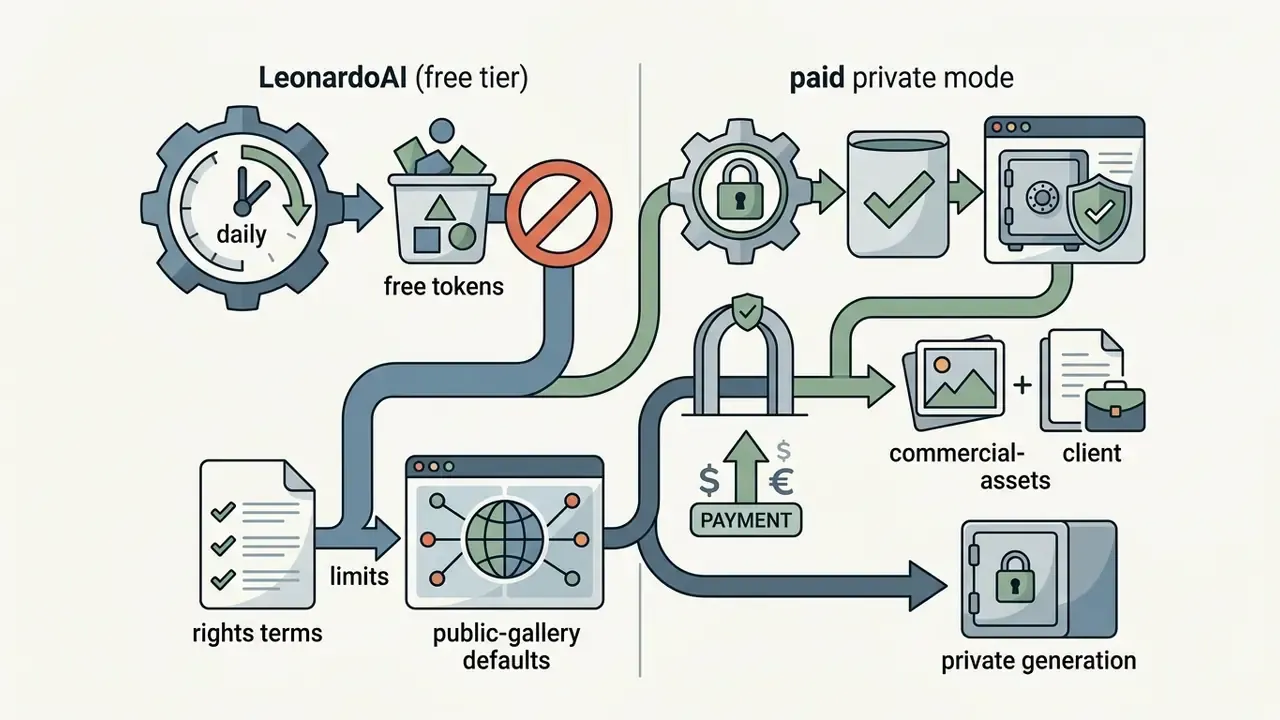
| LeonardoAI | Text/image-to-motion | Anime and concept-art generation | External voiceover required | Motion strength control, seed and style reuse | Yes: daily refreshing token allowance (approx. 150 fast tokens/day); free output generally non-commercial | Large community and fine-tuned model/preset catalog | Cloud; public-gallery default on free tier, switch to private mode for client work | Animated concepts and art generation |
| Blender (with AI add-ons) | 3D modeling and animation plus AI plug-ins | Any 3D and 2D style (Grease Pencil) | Full control via 3D scene and audio sync | F-curves, drivers, constraints, rigging, Mixamo AI add-on, ProRes and PNG sequence export | Free forever, open source (GPL), no export caps, no watermark | Open-source add-on ecosystem plus free community asset libraries | Local processing by default, the strongest option for confidential material | Professional 3D production and VFX |
Vendor-published library counts, render-speed claims, and credit allowances change frequently. Re-verify on the official pricing page before purchase.
Read the table as three clusters. Template engines win on speed and brand control. Diffusion engines win on style. Desktop suites win on precision and data containment. Blender is the outlier that satisfies both "free" and "local," which is why it keeps appearing in regulated shortlists despite the learning curve.
AI tools for fast marketing and explainer videos
"DEVIL metrics show Pearson correlation above 90% with human judgments, confirming that motion dynamics is a key dimension of AI video quality."
Creators who also need stills for scene backgrounds can review the best free ai art generator comparison guide.
Advanced AI video generators for stylized animation
Advanced generative networks, including Sora AI, DomoAI, LeonardoAI, Gooey.ai, and Adobe Firefly, focus on high-fidelity synthesis from complex prompts and image conditioning. OpenAI's Sora works as a diffusion-based video model capable of clips up to one minute while preserving scene context, though it shows recognized physical limitations with complex object collisions.
"Surveys of Sora record that the model generates high-quality video respecting physical constraints, yet struggles with long-range temporal dependencies and precise control of behavioral detail."
Professional software for full animation control
Professional suites such as Adobe Animate, Blender with AI plugins, and PowerDirector offer frame-by-frame control, custom rigging, and granular timeline management. Adobe Animate exposes a robust JavaScript API and Custom Platform Support SDK (CPSDK), so developers can automate export settings, build internal tools, and extend editing controls. Blender delivers precision through keyframes, F-curves, constraints, drivers, actions, and rigging; the Blender manual treats these as the core toolkit rather than an AI add-on.
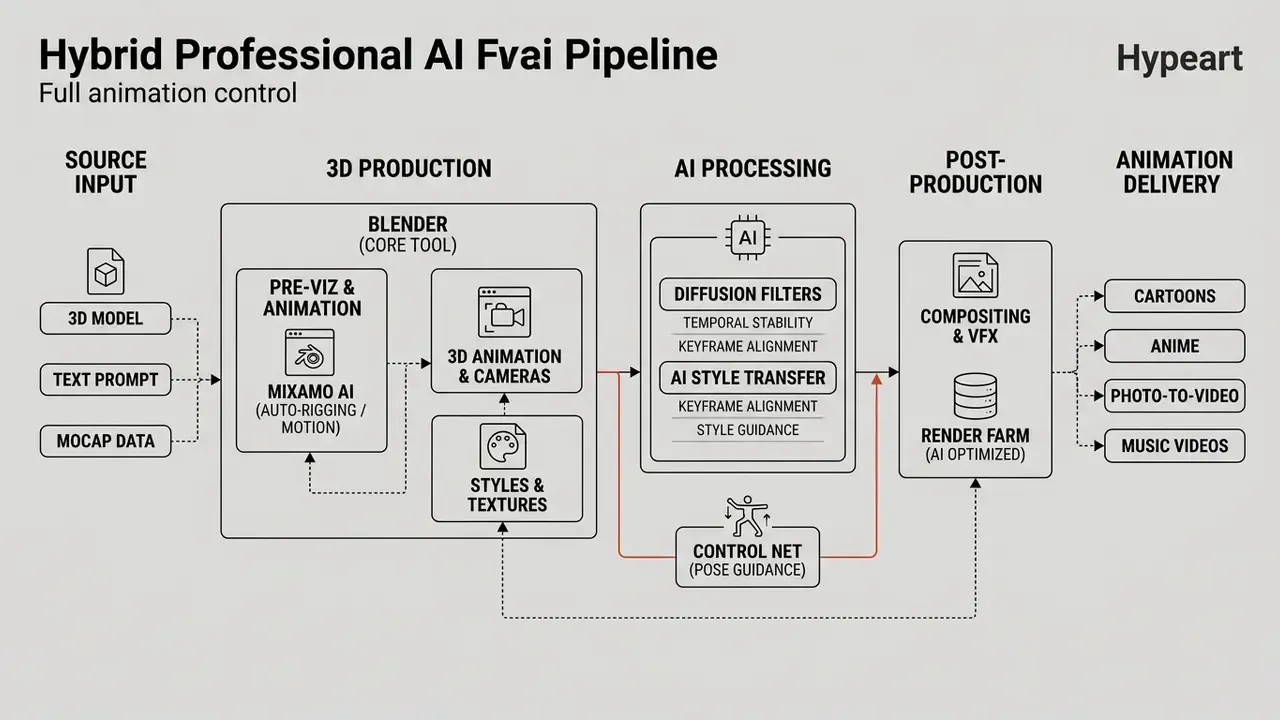
Plugins such as Adobe's Mixamo add-on for Blender use machine learning to generate one-click inverse kinematics (IK) rigs and bake character motion sequences. CyberLink's PowerDirector adds credit-based AI Anime features, letting editors transform imported camera footage into stylized anime sequences without leaving the timeline.
Distillation research is shrinking the latency gap between professional iteration and generative preview:
"AnimateDiff-Lightning applies progressive adversarial diffusion distillation, achieving lightning-fast video generation while preserving anime and cartoon style quality."
Fast scene editing with text commands (Magic Text-to-Edit)
Beyond timelines and keyframes, prompt-first platforms such as invideo AI and CapCut now support revisions through a text interface, often branded a "magic box." Instead of re-cutting the video stream by hand, you type an instruction into the edit field:
Delete scene 3 and redistribute the voiceoverChange the narrator's accent from US to UK EnglishReplace the background with an animated vector cityscapeAdd a funny 3-second intro before the first sceneSwap the background music for something slower and remove the subtitles
The model re-renders only the affected scenes, keeps the remaining timeline intact, and re-times narration automatically. In practice this compresses the first-cut approval phase. Teams working this way report cutting stakeholder iteration rounds by roughly 40% to 50% compared with manual re-editing, mostly because feedback can be applied verbatim instead of translated into editor actions.
Two caveats matter for professional use. First, text-to-edit is destructive at the scene level, so keep a locked master version before issuing structural commands. Second, prompt-based edits shrink the documented human creative input, which can weaken your copyright position if no manual authorship remains. More on that in the rights section.
Best AI tools for cartoon, anime, photo animation, and music videos
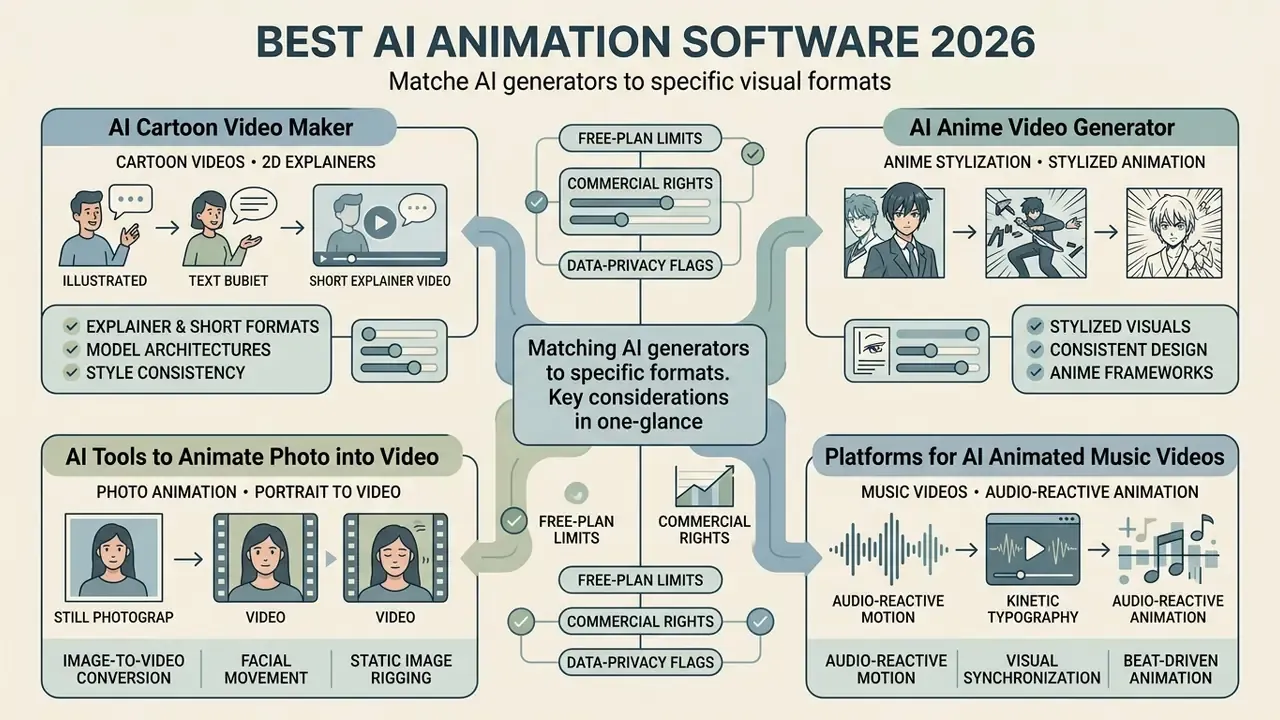
Matching an ai animation generator to a specific visual format means evaluating model architectures built for 2D cartoon explainers, anime design consistency, portrait animation, or audio-reactive synthesis. A tool that nails whiteboard explainers will usually fail at beat-synced visualizers, and vice versa.
Best AI cartoon video maker for explainers and Shorts
Faceless cartoon explainers and YouTube Shorts rely on template-driven 2D platforms that pair automated script generation with character libraries. Canva, Powtoon, and CapCut supply pre-animated 2D character models with configurable facial expressions and actions. Canva includes a Character Creator, Powtoon ships hundreds of explainer templates with branded characters, and Cartoon Animator converts imported body-part templates into animatable 2D rigs.
A capable best ai cartoon video generator lets you assemble scenes quickly by combining character assets with auto-generated subtitles and voiceovers. In other words, the best ai tools for creating cartoon videos compete less on rendering and more on asset breadth and brand lock. Platforms like Revid optimize rendering specifically for the vertical 9:16 formats required by TikTok, YouTube Shorts, and Instagram Reels. Users hunting standalone image engines for visual assets can browse the hub of workflow tools, and creators publishing to YouTube can follow our YouTube video editor workflow guide. For teams comparing a best ai cartoon video maker against a full editor, the deciding factor is usually whether characters must stay consistent across a series.
Best AI anime video generator for stylized animation
Anime-style animation demands models that hold character identity across sequential frames. Academic architectures such as Animate Anyone (CVPR 2024) use ReferenceNet and spatial attention to preserve visual details from a single reference image.
Research models such as AniSora and AnimeGamer (ICCV 2025) use curated anime datasets to maintain structural consistency across dynamic shot transitions. AnimeGamer reports improved character consistency, semantic consistency, and motion control relative to baselines. Note the caveat: each paper uses a different evaluation protocol, so the consistency claims are not directly comparable across publications.
PhysAnimator (CVPR 2025) attacks the same problem from a physics angle, targeting physically plausible anime-stylized motion generated from a single static illustration.
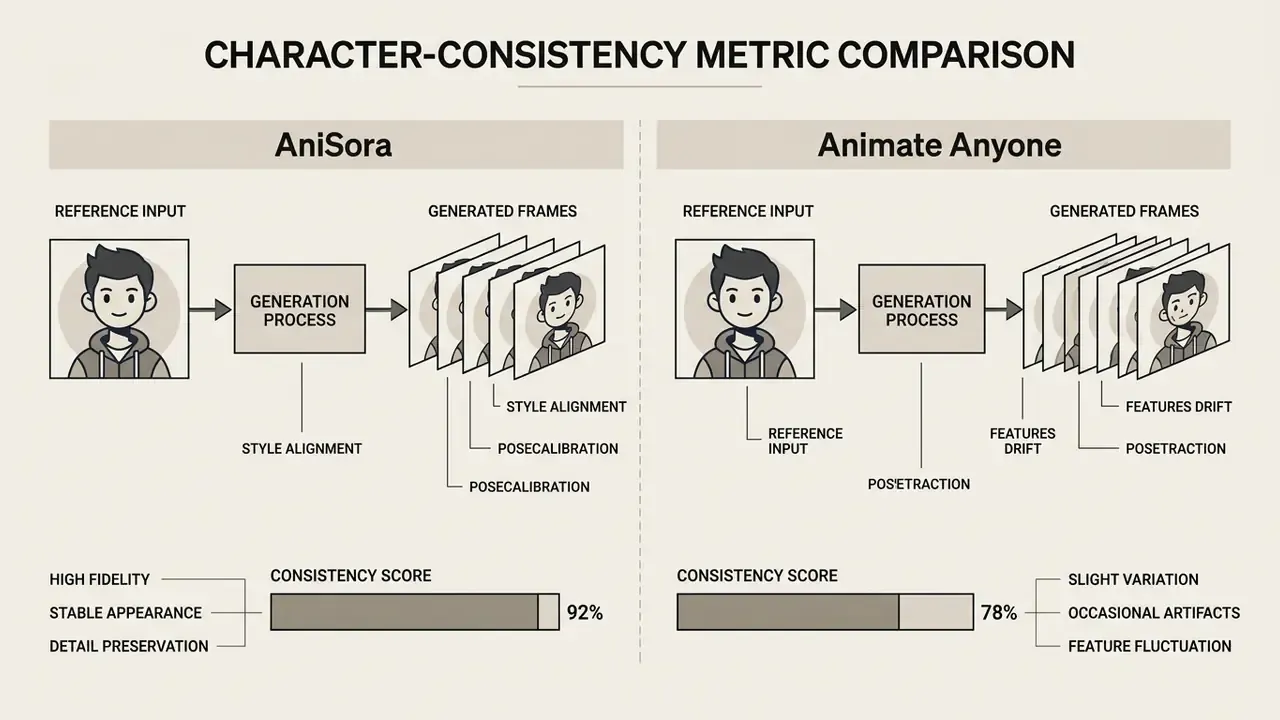
A strong best ai anime video generator turns static character sketches into fluid sequences without redrawing the face every shot. DomoAI applies style transfer directly to real-world footage, which remains the shortest path for automated anime video production. Teams weighing the best anime ai video generator options, or the best ai tools for anime video creation more broadly, frequently consult the best anime ai art generator evaluation guide first, because a locked character sheet beats prompt luck.
AI tools to animate a photo into video
Converting static portraits into moving clips relies on single-image diffusion models, pose-guided driving signals, and neural lip-sync engines. Updated: current peer-reviewed work shows that a full-body talking avatar can be reconstructed from one still image.
"One Shot, One Talk builds a photorealistic whole-body talking avatar from a single image using pose-guided diffusion and a hybrid 3DGS-mesh representation."
Complementary lip-sync research quantifies the accuracy now achievable. NeRF-LipSync (ISPRS Archives, 2025) reports FID 2.75, SSIM 0.56, PSNR 18.32, and a Sync confidence score of 9.06 on VoxCeleb2, while READ Avatars (BMVC 2022) separates emotion control from pure mouth alignment.
Deploying the best ai tools to animate photo into video lets content teams animate corporate headshots for virtual presentations or training modules. Models such as Wav2Lip-HQ apply generative adversarial networks (GANs) and face segmentation to reach high-resolution mouth alignment. This is also where a best ai motion generator matters more than raw image quality, since motion artifacts are what viewers actually notice. For a functional overview of the category, see our reference on the AI video generator landscape. For headshot creation before animation, creators often review the best free ai headshot generator guide and the AI headshot generator glossary.
One governance note specific to this format. Animating a real person's likeness requires documented consent, and in regulated communications it may also require disclosure that the presenter is synthetic. Silence is not a defensible default.
Platforms for AI animated music videos and audio-reactive animation
Audio-reactive platforms build animated music videos by analyzing uploaded track frequencies, stem structures, and rhythm beats, then driving frame-by-frame visual change. Neural Frames uses an 8-stem audio extraction engine, mapping specific elements such as bass or vocals directly to visual motion parameters, and advertises frame-perfect synchronization.
A dedicated best ai music video platform for animated videos gives musicians and editors beat-synchronized visualizers without manual keyframing. Media.io accepts MP3 and WAV uploads and analyzes frequency patterns to adjust camera zooms, color transitions, and particle movement automatically. Freebeat supports full-song output with beat-synchronized generation from uploaded audio or pasted links. ACE Studio takes a different route, with an AI "Director" that handles scriptwriting, casting, scene design, choreography, storyboarding, generation, and editing; its default model is flagged as best suited to animation, anime, and illustrated styles.
The practical difference is depth of control. Neural Frames exposes stem-level mapping, while Media.io and Freebeat operate mainly on beat and rhythm detection. A best ai motion video generator for music, then, is whichever one gives you the tightest hook-to-visual alignment. Creators reviewing editing software can explore the best app to edit videos directory.
How to choose an AI animation video maker for your scenario
Choosing a platform means matching user skill, content complexity, avatar requirements, and governance needs. Skip any one of those and you get a tool nobody is allowed to use.
"The standardized T2VHE protocol reduces human evaluation costs for AI video by nearly 50% while maintaining high annotation quality."
For teams running a formal tool selection, that protocol is a useful template: fix the rater pool, score a fixed prompt set, and record disagreement. Do not judge on a single cherry-picked demo render.
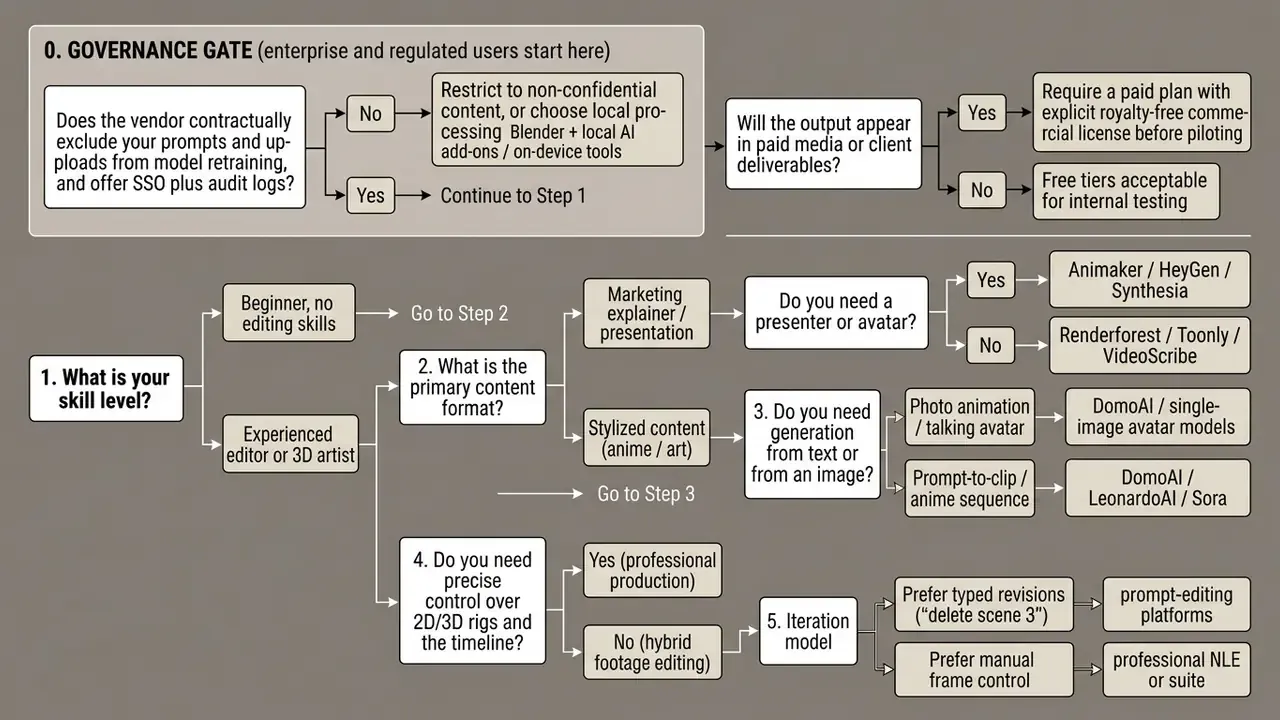
decision tree, reproduced as text
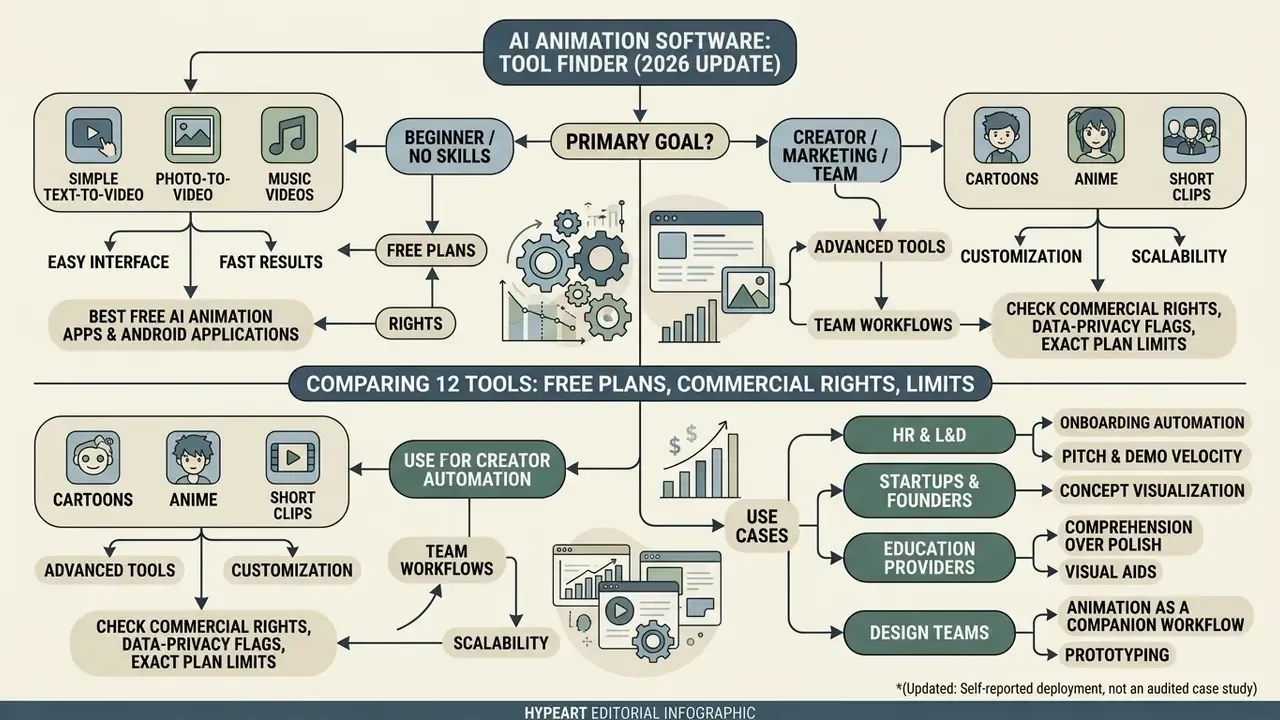
Tools for beginners with no animation skills
Entry-level AI video generators remove keyframing and rigging complexity by leaning on text prompts and pre-designed asset libraries. Viggle lets users upload static character images and drive movement with "no animation software, no rigging, no keyframing knowledge required," per the vendor's own positioning. Animaker markets the same removal of friction with "no scripting experience needed," generating scenes, characters, voiceover, lip sync, and transitions in a single pass.
Using a best ai video animation maker of this type, a novice can ship a narrated explainer clip in minutes. Renderforest provides guided workflows where users pick "Text-to-Video" or "Idea-to-Video," paste narrative text, choose a style and a speaker, then render with real-time preview before export. Is the result broadcast-grade? No. It is good enough for internal comms, which is often the actual requirement.
Tools for creators, marketing, and teams
Enterprise marketing teams need platforms that support multi-user collaboration, centralized brand kits, and multi-language voiceover synthesis. Brand management features store core identity elements, including color palettes, typography, and logos, to enforce visual consistency across AI generations. Implementations differ in shape: Microsoft Copilot lets users upload .pptx or .potx templates into a Brand kit and then generate on-brand content; Contentstack treats Brand Kit as a centralized repository with collaborator invitations and ownership controls; AirOps stores brand context as portable personas including Foundations, Product Lines, Content Types, Audiences, and Regions. That last field is what makes multi-market generation repeatable.
Updated (self-reported deployment, not an audited case study): an international educational publisher rolling out localized training modules across five regional markets deployed an enterprise AI video platform with integrated brand kits and multi-language text-to-speech. The team reported generating 120 localized video variants in two weeks and estimated a 75% reduction in translation and voiceover spend against its previous agency baseline. Figures are client-reported and not independently verified; treat them as order-of-magnitude indications.
Beyond marketing, four role-specific requirement profiles keep recurring:
- HR and L&D, onboarding automation. Converting internal policies, safety regulations, and onboarding scripts from static PDFs into 2D explainer videos with AI-narrated avatars. Requirements: brand kit lock, multi-language voiceover, versioning (policies change quarterly), LMS-compatible export (MP4 plus SCORM-ready packaging), and a strict no-retraining guarantee, because internal policy text is confidential.
- Startups and founders, pitch and demo velocity. Assembling animated product demos and pitch-deck videos without contracting 2D or 3D artists. Requirements: fast first cut, prompt-based revision (investor feedback arrives as sentences, not storyboards), 16:9 and 9:16 exports from one project, and commercial rights on the cheapest paid tier.
- Education and training providers, comprehension over polish. Turning lecture material into visual schematics and interactive animation. Requirements: diagram-friendly asset libraries, caption accuracy, and a consistent character or mascot identity across a course series. Instructional-design literature associates well-designed animated visualization with better retention than text-only delivery; validate the effect on your own cohorts before quoting a percentage.
- Design teams, animation as a companion workflow. Generating motion drafts from text to support presentations and campaign concepts, then finishing in a professional suite. Requirements: layered or alpha-channel export (HEVC alpha, ProRes 4444, PNG sequences, Lottie JSON) so AI output can be composited rather than used flat.
Organizations reviewing adjacent tooling can check best ai website management options, compare vendor alternatives in the alternatives hub, and standardize narration with our guide to AI voice generators.
Best free AI animation apps and Android applications
Mobile creators use an ai cartoon video maker app android side of the market to generate short-form videos directly on a phone, though free tiers enforce hard export limits. Viggle offers a free mobile tier allowing up to five video generations per day, with paid plans raising both daily counts and export quality. FlipaClip supports mobile frame animation export to MP4, GIF, and transparent PNG sequences, with project length and layer counts gated by in-app purchases. PixVerse AI ships a full Android client for prompt-based generation; its public store listing does not publish explicit free-export caps, so verify credit limits in-app before planning a batch.
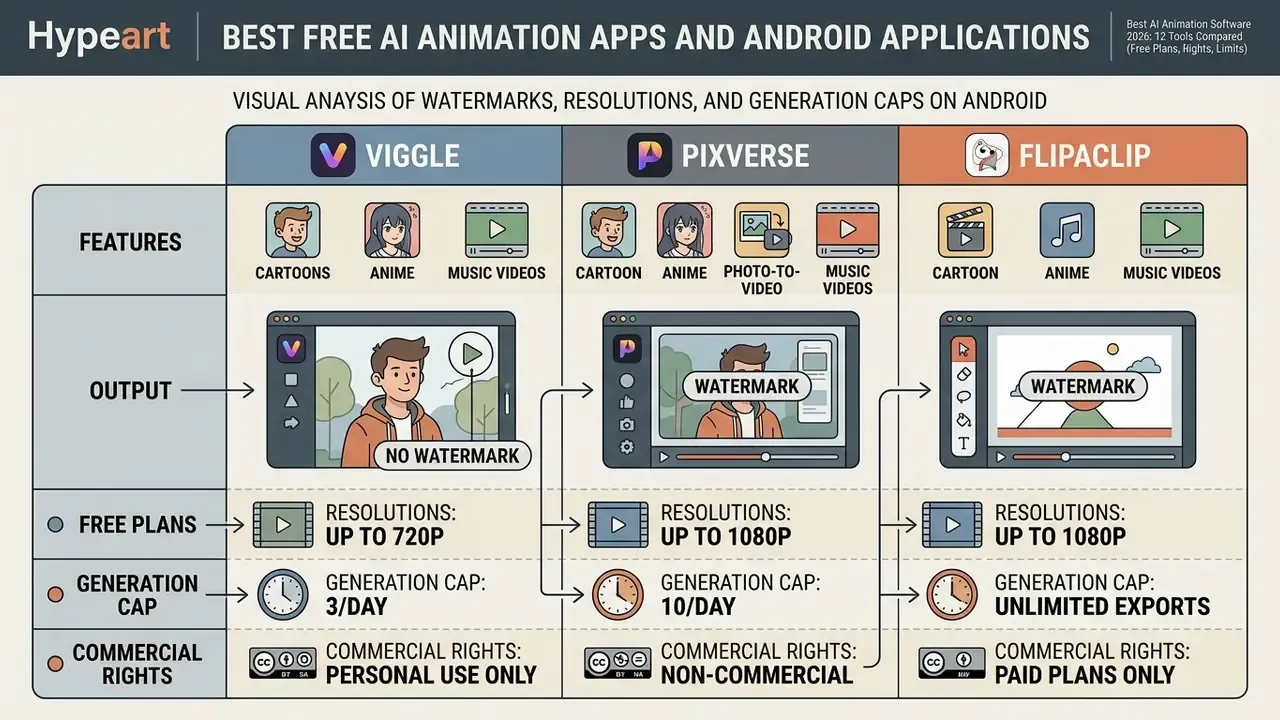
The best free ai animation apps are best treated as capability tests, not production tools; a best free ai animated video generator will almost always watermark output or cap resolution. For a wider set of no-cost options, see our comparison of the best free AI video generators. Creators evaluating mobile editing can review the best android photo editor comparison guide.
How to create an AI animation video: from idea to publication
A professional AI animation project follows a predictable sequence: brief and script preparation, shot breakdown and storyboard, style and character lock, asset generation, audio integration, review and iteration, editorial finishing, rendering, and multi-platform publication with archiving. Skip the style lock and you will pay for it in retries.
Prepare the idea, script, and text prompt
An effective AI animation prompt starts by breaking the narrative into discrete scene beats with explicit camera, lighting, and subject movement parameters. Prompt engineering practice recommends defined blocks: subject, environmental context, specific action, visual style, camera angle, mood lighting, plus optional audio and continuity notes.
"T2V-CompBench tests 23 models across 7 compositionality categories, from attribute binding to object interaction, on 1,400 text prompts."
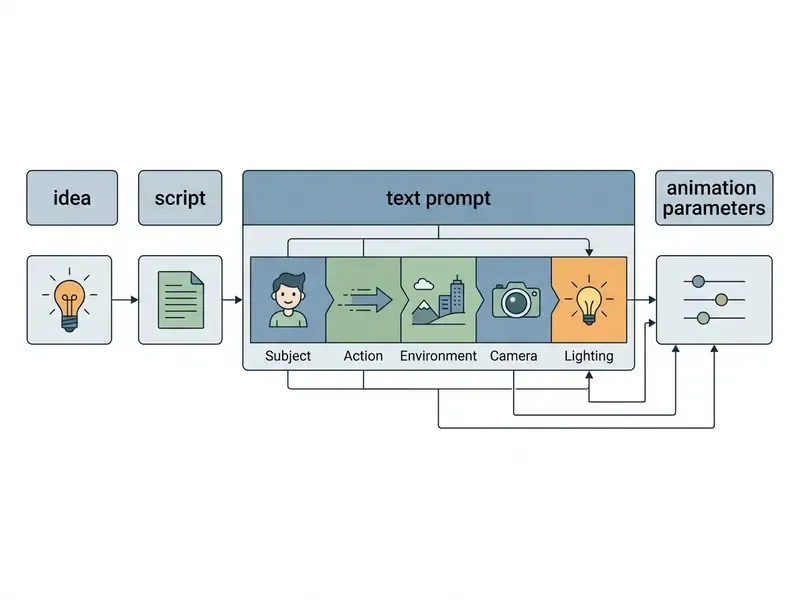
Writing a fresh prompt for each distinct scene transition keeps the model from introducing temporal distortion artifacts. A practical rule from 2D prompt-writing guides: start a new scene whenever the action, expression, emotion, camera angle, lighting, environment, or focal subject changes. One variable per iteration, if you can manage the discipline.
Choose the style, characters, and AI-generated visuals
Holding character design steady across multiple generated scenes requires locking base visual style references and using multi-frame attention. Updated: instead of relying on a single unverified method citation, the pattern documented in both research and vendor tooling is reference conditioning plus style locking.
CharaConsist (ICCV 2025) extends the same principle to fine-grained foreground and background consistency, across continuous shots within a scene and discrete shots between scenes.
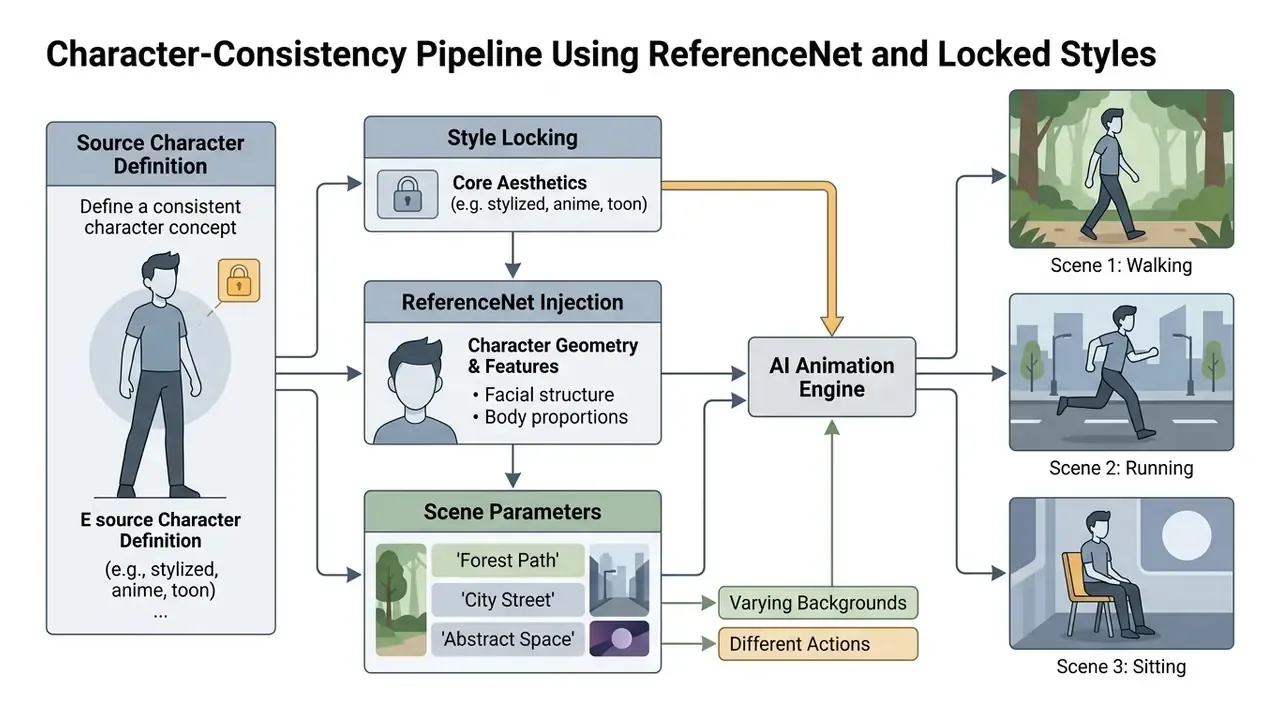
Recraft enforces character consistency by letting creators save custom style seeds and reference frames across iterative prompt builds. FLUX.2 documentation describes the equivalent workflow as multi-reference editing, where one or more reference images preserve identity while pose or context changes. Teams generating the underlying stills first can compare engines in our roundups of the best AI image generators and the best AI art generators.
Add voice, lip sync, music, and editing
Audio assembly combines synthetic or cloned voiceovers with phoneme-level lip synchronization and stem-aligned background music. Multilingual pipelines transcribe the input script (Whisper or equivalent), translate the text, synthesize speech either from a stock TTS voice or a cloned model trained on roughly 10 to 20 minutes of consented samples, then map phonemes to facial landmark sequences using alignment models such as Wav2Lip before remuxing with FFmpeg.
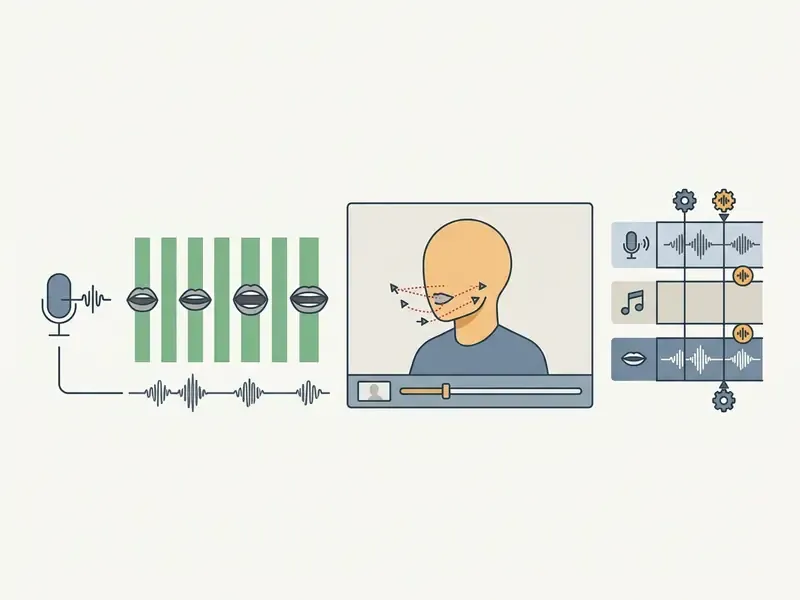
Final mixing means balancing voiceover levels against background score stems so the narration stays intelligible. Published pipelines specify synchronization and muxing steps but not formal music-bed mixing thresholds, so set your own house standard (a common practical target is ducking the music bed well below the narration peak) and apply it consistently across a series.
Set the aspect ratio, export, and publish
Conforming exports to platform specs prevents distortion and unwanted cropping during distribution. Technical delivery guidance recommends 9:16 (1080x1920) for TikTok, Instagram Reels, YouTube Shorts, Snapchat Spotlight, and Pinterest Idea Pins; 4:5 (1080x1350) for Instagram, Facebook, and LinkedIn feeds; 1:1 (1080x1080) as a single-export cross-posting fallback; and 16:9 (1920x1080) for long-form widescreen publishing.
Export master files in uncompressed or lightly compressed formats to preserve fidelity through final upload encoding. Deliver the platform-specific H.264 or HEVC derivative, but archive the master; re-rendering from a compressed copy is how a clean animation turns muddy. Teams finishing AI output in a conventional editor can compare options in our guide to free video editing software and to video compressors for delivery-size control.
Free plans, paid tiers, and rights to AI-generated video
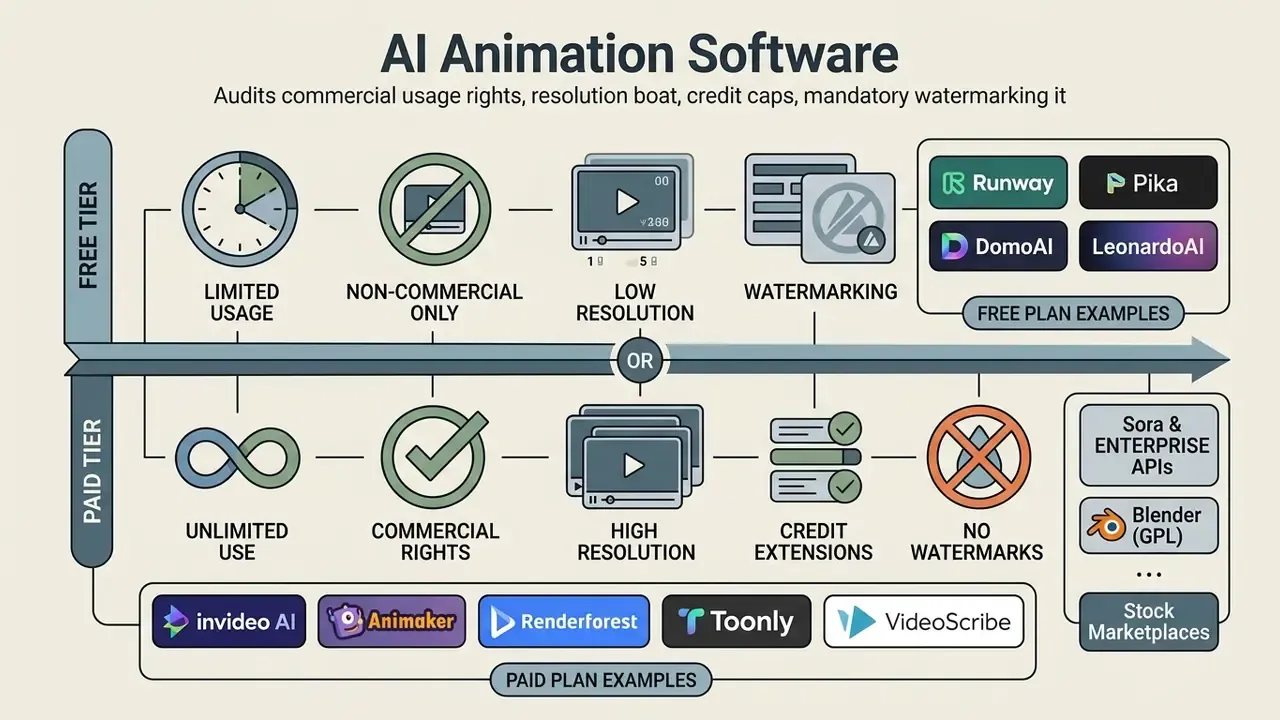
Comparing free versus paid AI animation tiers means auditing commercial usage rights, resolution boundaries, credit caps, and mandatory watermarking rules. Features are the easy part. Rights are where projects stall.
E-E-A-T alert box: legal risk and commercial rights
"Generative AI shifts the locus of copyright: creativity increasingly resides in formulating the right prompts, while the model performs the work the law has traditionally protected."
FAQ: frequently asked questions about AI animation software
Short answers to the questions that usually remain open right before a purchase decision.
Can AI create 2D or 3D animation for commercial video?
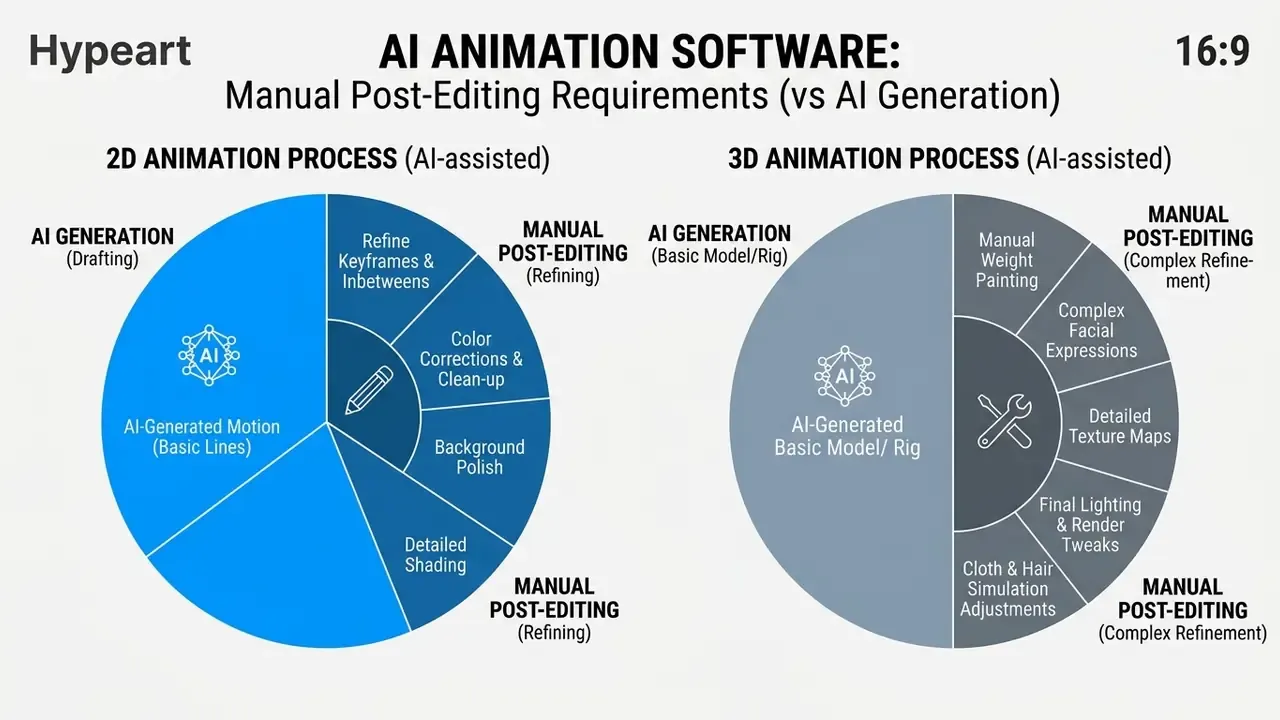
Generative AI can automate large parts of 2D and 3D animation pipelines, but fully automated commercial output without human post-editing remains impractical in 2D cel animation and 3D studio workflows. Updated with sourcing: research on 2D production reports that AI in-betweening tools cut time spent on that stage by up to 70% under controlled studio conditions, while noting that animators still refine the results for better emotional expression. The same research records that in-betweening typically accounts for 40% to 60% of total production labor in a 2D project, which is why a stage-level saving does not translate into an equivalent project-level saving. Netflix Japan's The Dog and the Boy (2023) is frequently cited as an early practical demonstration of reduced resource requirements in a hybrid AI pipeline.
Quality control at scale needs multi-dimensional measurement, not a single "looks good" verdict:
"VBench++ evaluates video generation across 16 dimensions, from subject identity consistency to motion smoothness, with human preference annotations for each." VBench++: Comprehensive and Versatile Benchmark Suite for Video Generative Models, arXiv (2024). https://arxiv.org/abs/2411.13503
In 3D pipelines, AI models speed up preliminary asset modeling, rigging generation, facial animation editing, and render denoising. Professional commercial production still demands manual keyframe editing, lighting adjustments, and composite polishing. Published sources describe these tools as stage accelerators rather than replacements for post-editing, and no quantified 3D post-editing estimate exists in the literature we reviewed. Independent 2025 evaluations of generated motion also found classical animation principles unevenly applied: Squash and Stretch, Anticipation, and Exaggeration were largely absent, while Timing and Follow-Through were inconsistent. To review benchmark data on AI media models, technical teams can consult AI Media Benchmarks and Review Proof.
What is an AI animation generator?
An AI animation generator converts inputs, whether a text prompt, a still image, a document, or an existing video clip, into animated output by generating scripts, visuals, voiceovers, and subtitles through machine learning models. It removes the need for manual frame-by-frame drawing or rigging, which makes short-form animated content viable for marketing, education, and internal communication teams with no dedicated animator on staff.
Is AI animation software free to use?
Free access exists, but it is capped. Typical patterns in Q1 2026: invideo AI's free plan allows 2 video minutes per week, 1 AI credit, 1 Express avatar, and 4 exports per week; Viggle allows up to 5 generations per day; Animaker's free tier watermarks output and limits resolution to 720p; Renderforest restricts storage to about 500 MB and export to 360p; Runway grants a one-time 125 credits for personal use. Blender is the only genuinely unlimited free option in this comparison, because it is open-source desktop software rather than a metered service.
Can I use AI-generated animations commercially?
On paid plans, usually yes. Platforms such as invideo grant a royalty-free worldwide license that covers ads, social media content, client work, and product launches. On free plans, usually no. Separately from the platform license, copyright protection over the output depends on human authorship: per the U.S. Copyright Office (2025), more-than-de-minimis AI-generated content must be excluded from registration, so the protectable layer is your script, edit, and design contribution rather than the raw generation.
Do I need to download software to create AI animation?
Not for most prompt-based platforms. invideo AI, Renderforest, Animaker, and Krikey.ai run in the browser across Chrome, Safari, and mobile devices. Downloads are required for professional suites: Adobe Animate, Blender, and PowerDirector are desktop applications, which is also what makes them the safer choice when footage cannot leave your network.
What kinds of voices and languages are available?
Template platforms typically offer male and female synthetic voices with language, accent, and delivery-style selection; invideo advertises realistic AI voiceovers in over 50 languages. Voice cloning is a separate capability and usually needs 10 to 20 minutes of consented reference audio. For enterprise localization, confirm that the voice license covers advertising use and that consent documentation exists for any cloned voice.
How do I keep a character looking the same across scenes?
Lock a reference. Save a custom style or seed, reuse the same reference image or frame across generations, and change only one variable per iteration. Multi-reference editing (FLUX.2) and reference-conditioned architectures (ReferenceNet in Animate Anyone, spatio-temporal masking in AniSora) exist precisely to hold identity while pose, camera, and environment change. If drift still appears, generate the character as a still first, approve it, then animate from that approved frame.
Which tool should a complete beginner start with?
Start with a template platform that has a real free plan: Renderforest or Animaker for explainers, Viggle for photo-driven motion. Produce one complete 30-second piece end to end. Then decide whether your bottleneck is style control (move to DomoAI or Leonardo) or timeline precision (move to PowerDirector, Adobe Animate, or Blender).
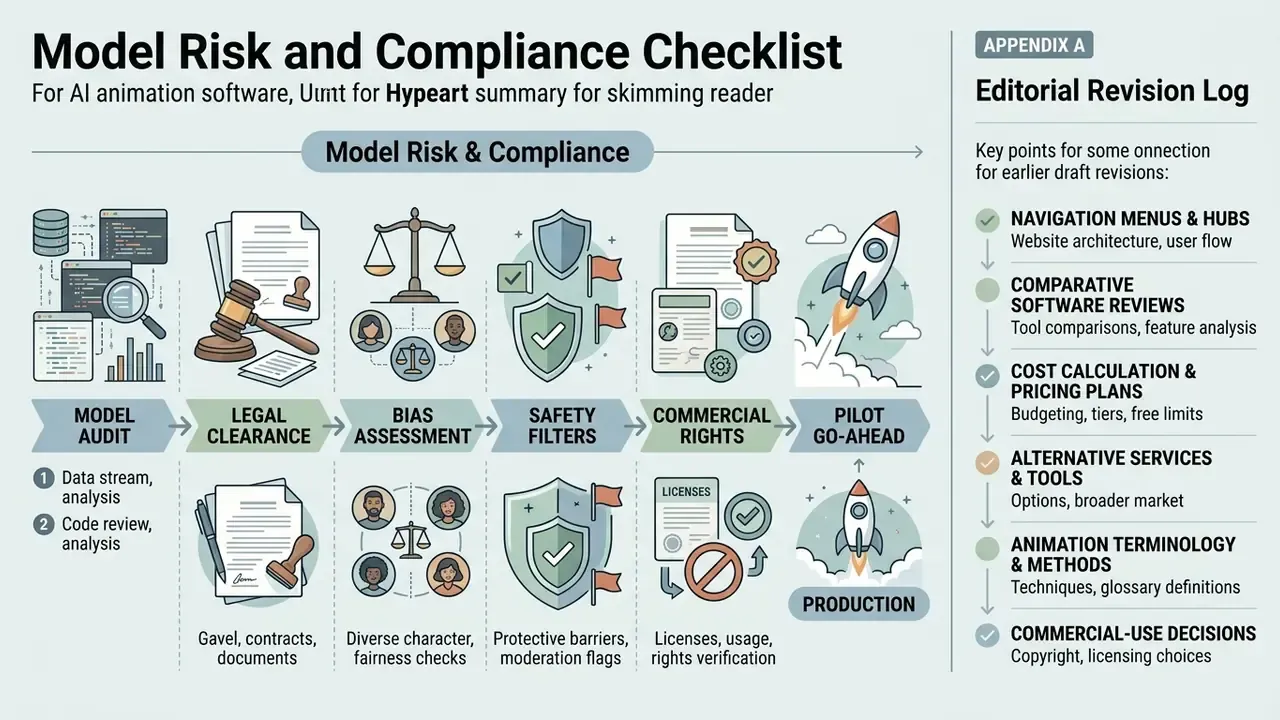
Model risk and compliance checklist before the pilot goes to production
- License scope confirmed in writing.The specific plan you will buy grants royalty-free commercial rights for the intended channels, including paid advertising and client deliverables.
- Retraining exclusion documented.The contract or DPA states that prompts, uploads, and generated assets are excluded from model training, and free-tier usage is blocked by policy to prevent shadow AI drift.
- Human authorship preserved and evidenced.Prompt logs, edit history, and named reviewers are retained so the human contribution is demonstrable for copyright and audit purposes.
- Security attestations in place.SOC 2 Type II or ISO 27001 coverage, SSO, role-based access, audit logging, and a defined retention window, with processing region confirmed where required.
- Likeness and voice consent captured.Written consent for any real person's face or cloned voice, with a defined revocation path.
- Disclosure standard set.Rules for labeling synthetic presenters and AI-generated visuals in public and regulated communications, aligned with marketing-approval workflows.
- Output QA defined.A fixed prompt set, acceptance thresholds for temporal consistency and identity drift, and a named approver, evaluated with a standardized protocol rather than ad hoc demos.
A safe next step, if you are early: pick one low-risk use case, one owner, and one 60-day evaluation window. Publish the scoring sheet internally. That is usually more persuasive to a risk committee than any vendor deck.
Appendix A: editorial revision log