Executive Summary for Decision-Makers
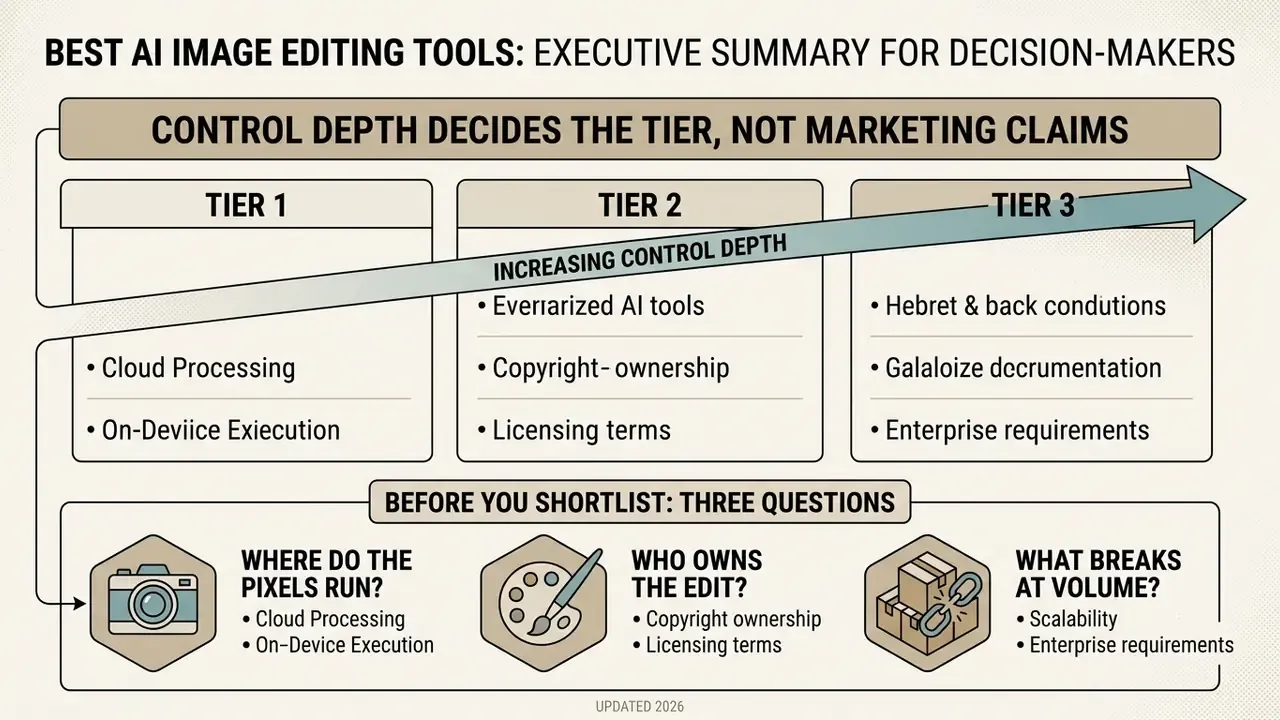
- Control depth decides the tier, not marketing claims. Adobe Photoshop and Lightroom remain the reference standard for RAW-native, non-destructive generative editing. Topaz Photo AI and Luminar Neo lead dedicated enhancement (denoise, deblur, upscale, restoration). Canva, Pixlr, Fotor, and Picsart win on time-to-asset for templated marketing output.
- Processing location is a governance decision. Desktop suites (Photoshop, Lightroom, Luminar Neo, Topaz Photo AI, DxO PhotoLab) execute inference locally on Apple Neural Engine or NVIDIA CUDA, keeping proprietary assets off external networks. Browser suites (Canva, Pixlr, Fotor, PhotoRoom, Cutout.pro) require binary upload to remote clusters, which makes them unsuitable for PII, KYC documents, statements, or identity scans without an enterprise agreement.
- Scale cost, not entry price, determines value. Per-credit tools become the most expensive option above roughly 300 generative edits per month. Flat-fee desktop licences push effective cost per export below $0.006 at volume. Budget for human post-validation, because independent evaluations show AI editors satisfy only a minority of complex requests without manual correction.
Before You Shortlist: Three Questions
- Where do the pixels run? Local inference keeps regulated imagery inside the corporate boundary. Cloud inference does not, unless contract terms say otherwise.
- Who owns the edit? Every generative change needs a named operator, a version, and a retrievable prompt. Otherwise audit reconstruction is guesswork.
- What breaks at volume? Daily AI ceilings, credit expiry, and reviewer hours decide the real bill, not the headline monthly price.
Best AI Image Editing Tools 2025: Quick Picks by Use Case
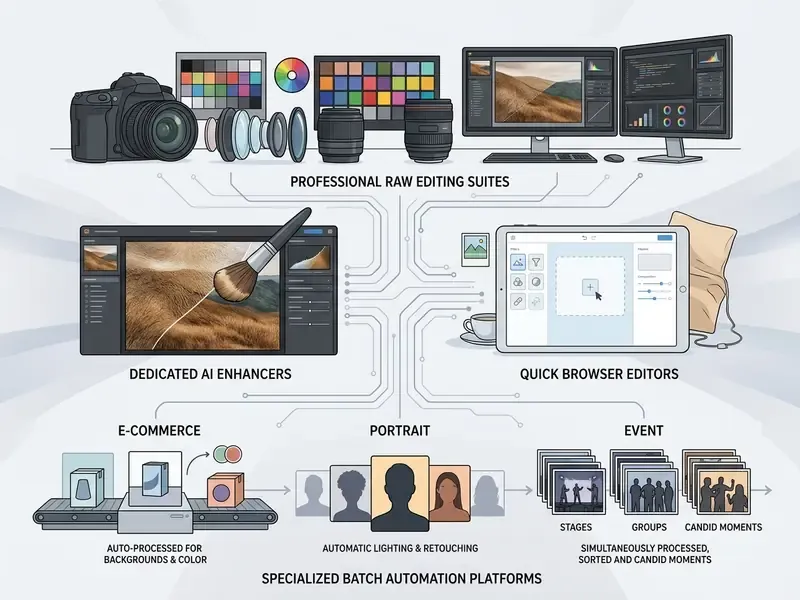
Selecting the best ai image editing tools 2025 depends on whether an organization prioritizes raw pixel precision, batch enhancement, or rapid asset creation. The top rated ai photo editor software options fall into four operational tiers based on control depth, processing location, and output reproducibility.
Most teams overbuy. A marketing group producing 40 social crops a week does not need a 16-bit print pipeline, and a print studio cannot survive on a templated browser editor. Route by task first, then by budget.
Adobe Photoshop and Lightroom: Best for Professional Photo Editing
Adobe Photoshop and Lightroom remain the standard for high-resolution RAW photo editing, non-destructive compositing, and controlled generative modifications. They combine deep manual tools with Firefly generative fill models to preserve original image integrity across complex commercial projects.
In enterprise creative operations, maintaining strict color management across RAW pipelines is mandatory. Adobe Camera Raw integrates generative expansion directly after HDR merging, Denoise, Raw Details, and Super Resolution stages, preserving 16-bit color fidelity. Photoshop's recommended color-managed workflow uses 16-bit ProPhoto RGB with soft proofing for final print control (Adobe Systems, 2025-2026). Generative Fill requires Photoshop 25.0 or later, and Adobe's release notes confirm that partner models, including Google Gemini 2.5 Flash Image and Black Forest Labs FLUX.1 Kontext, now sit alongside native Firefly Image Models inside the same Generative Fill panel.
Independent academic evaluation, not vendor documentation, supports the quality claim for text-guided editing layers:
Because generative layers are added as separate non-destructive objects, original photo pixels survive iterative client review cycles without irreversible loss. That matters in regulated advertising, where the approved frame and the final frame must both be recoverable. Organizations seeking alternative editing architectures can compare desktop and cloud-based models in our overview of AI photo editors.
Luminar Neo and Topaz Photo AI: Best for Image Enhancement
Teams comparing dedicated enlargement engines against suite-based enhancement can review specialized AI image upscalers, and analysts evaluating overall platform performance can see the overview for detailed metric breakdowns.
For E-Commerce Workflows, AI Headshots, Portrait Batching, and Virtual Try-On
Specialized AI tools outperform full desktop suites when executing repetitive single-intent edits at scale, because they replace manual masking with API-addressable presets.
- PhotoRoom and Claid AI automated batch generation of studio shadows, white-background cutouts, and marketplace-compliant sizing (Amazon, Shopify) across 1,000+ SKUs. Both expose APIs, which makes them the correct choice for catalog pipelines rather than art direction.
- Evoto AI purpose-built for high-volume portrait retouching, covering skin-texture smoothing, blemish removal, body reshaping, and expression adjustment while preserving natural skin pores across large batch datasets. Sold on credits (from roughly $80/year for 800 credits), which makes cost-at-scale math mandatory.
- Aftershoot and Imagen AI AI culling plus style-learning edits for wedding and event photographers processing thousands of frames per shoot. Aftershoot is flat-fee (Select from $120/yr, Edit from $360/yr); Imagen adds per-photo charges on top of a base subscription.
- AI Ease, AIEnhance, and Remini consumer and micro-business tools providing zero-code virtual outfit try-ons, hairstyle previews, restoration of low-resolution archival photos, and automated business-grade headshots without a studio booking. Entry pricing typically runs from free credit allowances up to $9.99/mo.
Readers evaluating portrait generation specifically can compare options in our guide to AI headshot generators.
AI Image Editing Software Comparison: Features, Platforms, Scores, and Best Fit
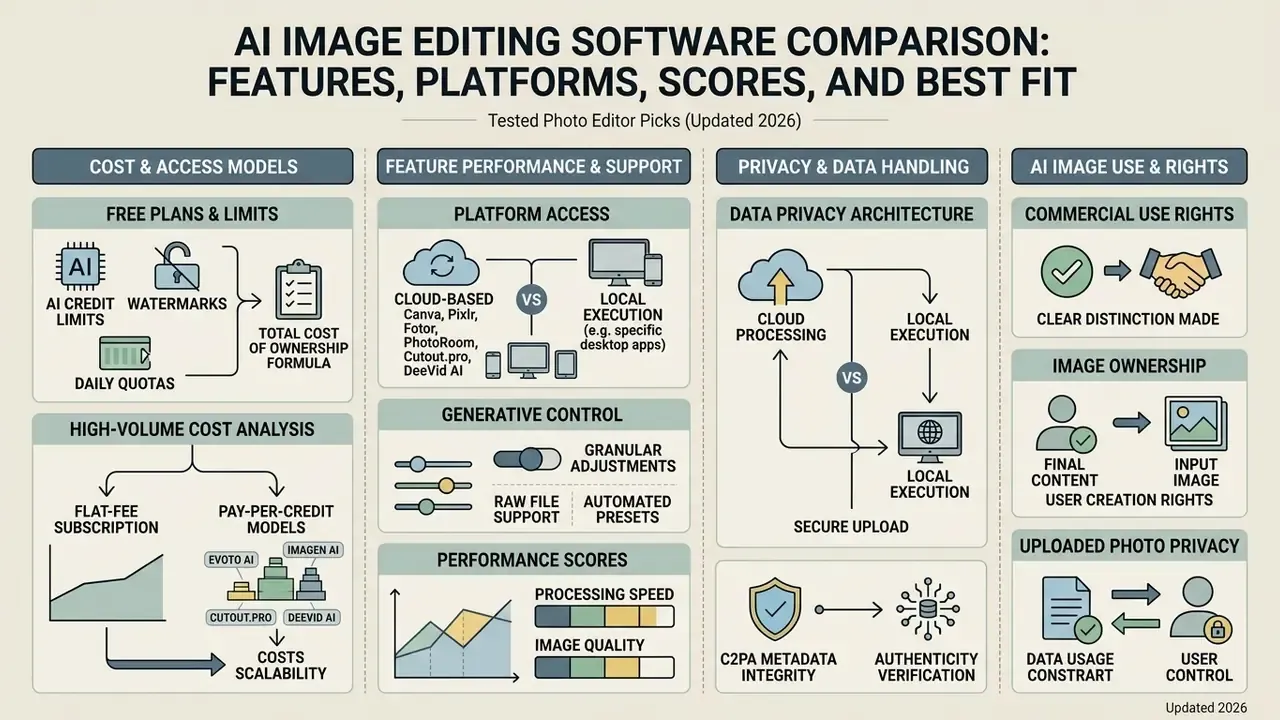
An ai image editing software comparison demonstrates clear trade-offs between subscription costs, platform access, RAW file support, processing location, and generative control. Evaluating these applications side-by-side reveals which tool aligns with specific operational workflows, and, equally important, which teams should skip each option.
| Tool | Score (0-10) | Core AI Features | Supported Platforms | Free Version / Trial | Paid Plans | Removal & Fill Capabilities | RAW Support | Processing Location | Zero-Retention / Enterprise SSO | Limitations | Who Should Skip | Best Use Case |
|---|---|---|---|---|---|---|---|---|---|---|---|---|
| Adobe Photoshop | 9.3 | Generative Fill, Generative Expand, Remove Tool, Harmonize, Generative Upscale | Windows, macOS, Web, iPad | 7-day free trial; 20 free web/mobile generations | From $22.99/mo | Advanced generative fill, object removal, background swap | Full RAW (Camera Raw) | Local (desktop) plus cloud for Firefly calls | Zero-retention on Enterprise CC; SSO/SAML available | Steep learning curve; high CPU/GPU load during Generative Expand; subscription-only | Casual mobile creators; non-technical marketers; budget-only buyers | Professional compositing and retouching |
| Adobe Lightroom | 9.1 | Generative Remove, Lens Blur AI, AI masking, Adaptive Profiles | Windows, macOS, iOS, Android, Web | Free mobile tier | From $11.99/mo | Object erasure, background masking | Full native RAW | Local catalog processing; cloud sync optional | Zero-retention on Enterprise CC; SSO/SAML available | No layers; limited pixel-level compositing | Teams needing generative compositing or text layers | Photography cataloging and batch color editing |
| Luminar Neo | 8.2 | Noiseless AI, Supersharp AI, Upscale AI, Photo Restoration, Sky AI, GenErase | Windows, macOS | Free trial | From $9.95/mo, or lifetime licence from $99 | Object removal, sky replacement, generative erase | Full RAW support | Local (desktop) | No enterprise SSO; local processing by default | Slower on large files; plug-in stability varies; generative tools require annual renewal after year one | Pros needing deep RAW control and soft proofing | Automated portrait and landscape enhancement |
| Topaz Photo AI | 8.8 | AI Denoise, AI Sharpen, AI Upscale (up to 6x), dust and scratch restoration | Windows, macOS | Free trial (no export) | Subscription model (from ~$39/mo, or annual update licence) | Noise and artifact removal, scratch repair | RAW and DNG support | Local (offline capable) | Fully offline; no upload required | Single-purpose; no layers, text, or background replacement; expensive upgrade path | Users needing compositing, layout, or generative fill | High-resolution upscaling and image restoration |
| Canva | 8.0 | Magic Eraser, Magic Edit, Magic Expand, Background Remover, Magic Design | Web, iOS, Android, Windows, macOS | Free tier (up to 20 Standard AI uses) | Pro from $120/yr; Business ~$20/user | One-click background and object removal | Limited (converts to PNG) | Cloud | Zero-retention on Canva Enterprise; SSO available | Not a pixel editor; limited RAW; AI credit caps by tier and region | Photographers needing pixel-level or 16-bit control | Marketing assets and social media design |
| Pixlr | 7.5 | AI Clear, Object Remover, Generative Transform, AI cutout, batch tools | Web, iOS, Android | Free tier (with ads) | From $1.99-$4.90/mo | Quick object and background removal | Basic image formats | Cloud | No enterprise zero-retention tier documented | Quality trails desktop editors; daily AI credit caps; extended high-res export is paid-only | Print-resolution professional work; regulated data | Fast browser edits for beginners |
| Fotor | 7.3 | One-tap Enhancer, Background Remover, Magic Eraser, AI Enlarger, Face Retouch | Web, Windows, macOS, iOS, Android | Free tier (watermarked) | From $8.99/mo | Background removal, object erasure | Limited RAW conversion | Cloud | No enterprise zero-retention tier documented | Template-heavy; limited layer editing; ~200 AI uses/day cap on Pro | Pros needing fine masking control | E-commerce product shots and social posts |
| Picsart | 7.2 | AI Replace, Smart Eraser, Background Change, Style Transfer, AI Template Generator | iOS, Android, Web, Windows | Free tier (limited, ads) | From $5.00-$15.00/mo | One-click removal and replace | Standard formats only | Cloud | Free/Pro AI and export limits not officially published | Cluttered UI; ads on free tier; undocumented quotas | Professional photo editing; audit-sensitive teams | Mobile content creation and creative effects |
| PhotoRoom | 8.3 | Auto background removal, shadow generation, batch resize, API | Web, iOS, Android | Freemium | Pro paid; API priced separately | Automated cutouts and background generation | No | Cloud / API | API contracts available; verify retention clause | Not a general photo editor; marketplace-preset oriented | Landscape and portrait photographers | E-commerce catalog automation |
| Evoto AI | 8.2 | AI skin retouch, body reshape, batch headshots | Windows, macOS | Limited free credits | Credit-based (from ~$80/yr for 800 credits) | Blemish and background cleanup | Partial | Local app with cloud credit validation | Verify retention clause per contract | Portrait-only focus; credits expire; limited general editing | Product and landscape photographers | High-volume portrait retouching |
| Aftershoot | 8.3 | AI culling, AI editing, style learning | Windows, macOS | Free trial | Flat fee (Select $120/yr; Edit $360/yr) | Culling and tonal edits only | Full RAW | Local | Local-first; no upload required for core culling | Culling and editing only; not a full editor | Non-photographers; single-image workflows | Wedding and event batch processing |
The comparative data illustrates that high-control software such as Adobe Photoshop requires a higher financial commitment and steeper technical expertise. Browser suites offer lower entry barriers but lack deep 16-bit color depth processing, and they impose daily AI ceilings.
One pick changed materially since our March edition: Topaz Photo AI moved from a perpetual $199 licence to a subscription model. Buyers who require a perpetual licence should now evaluate DxO PhotoLab (Elite ~$239.99) or a Luminar Neo lifetime licence instead. Anyone relying on best ai photo editor reviews 2024 should re-check that single line before approving a renewal, because the licensing model, not the feature set, is what shifted.
Decision-makers evaluating enterprise pricing models can compare options across software licences, teams weighing substitutes can see the overview of adjacent products, and readers who want a feature-by-feature primer can read our guide to AI photo editor features.
AI Photo Editor Pricing, Credits, Licensing, and Privacy
Free Plans, Watermarks, and AI Credit Limits
Free software tiers typically restrict export resolutions, append visible watermarks, or enforce monthly credit quotas on generative tools. Organizations must budget for paid tiers once operational processing volume exceeds basic introductory allowances.
For example, Canva Free limits standard AI generation usage, whereas Canva Pro expands allowances up to 200 Premium AI credits monthly, and the figure varies by tier and region (Canva, 2026). Specialized media tools such as Runway enforce a 125 lifetime credit allocation capped at 720p output resolution on free tiers. HeyGen's trial grants a single credit with a non-removable watermark, and Gamma caps free usage at 400 lifetime credits with watermarked exports. Free browser editors follow the same pattern: SnapEdit grants up to 25 free credits daily, YouCam starts at 5 free credits, and PicTools.AI offers 2 free credits before paywalling. Creators seeking cost-effective options can evaluate the best free AI art generators and our guide to free photo editors.
High-Volume Cost Analysis: Flat-Fee versus Pay-Per-Credit
When scaling production to 5,000 photos per month, pricing architectures diverge dramatically, and entry price becomes an unreliable proxy for total cost.
- Pay-per-credit models (Evoto AI, Imagen AI, Cutout.pro, DeeVid AI): at an average of $0.05 to $0.10 per export, processing 5,000 images costs $250 to $500 per month, plus overage risk during seasonal peaks.
- Flat-fee and unlimited subscription models (Aftershoot, Adobe Photoshop, Luminar Neo, Topaz Photo AI desktop): fixed pricing between roughly $22.99/mo and $39/mo, bringing effective cost per export below $0.006.
- Total cost of ownership formula:
TCO = (licence or credit spend) + (human validation hours × loaded hourly rate) + (rework rate × reprocessing cost). At a 20% manual-correction rate and 90 seconds of review per image, 5,000 images consume roughly 25 reviewer hours per month, frequently a larger line item than the software itself.
Rule of thumb: operations exceeding roughly 300 generative edits per month should transition to a flat-fee desktop architecture to avoid runaway operational expenditure. Below that threshold, credits remain cheaper than a seat licence. Finance teams can model both paths and open the hub to estimate tooling and oversight costs before committing to a contract term.
Commercial Use, Image Rights, and Uploaded Photo Privacy
Teams that must verify whether an asset was synthetically produced can evaluate AI image detectors and AI reverse-image-search tools as part of intake controls.
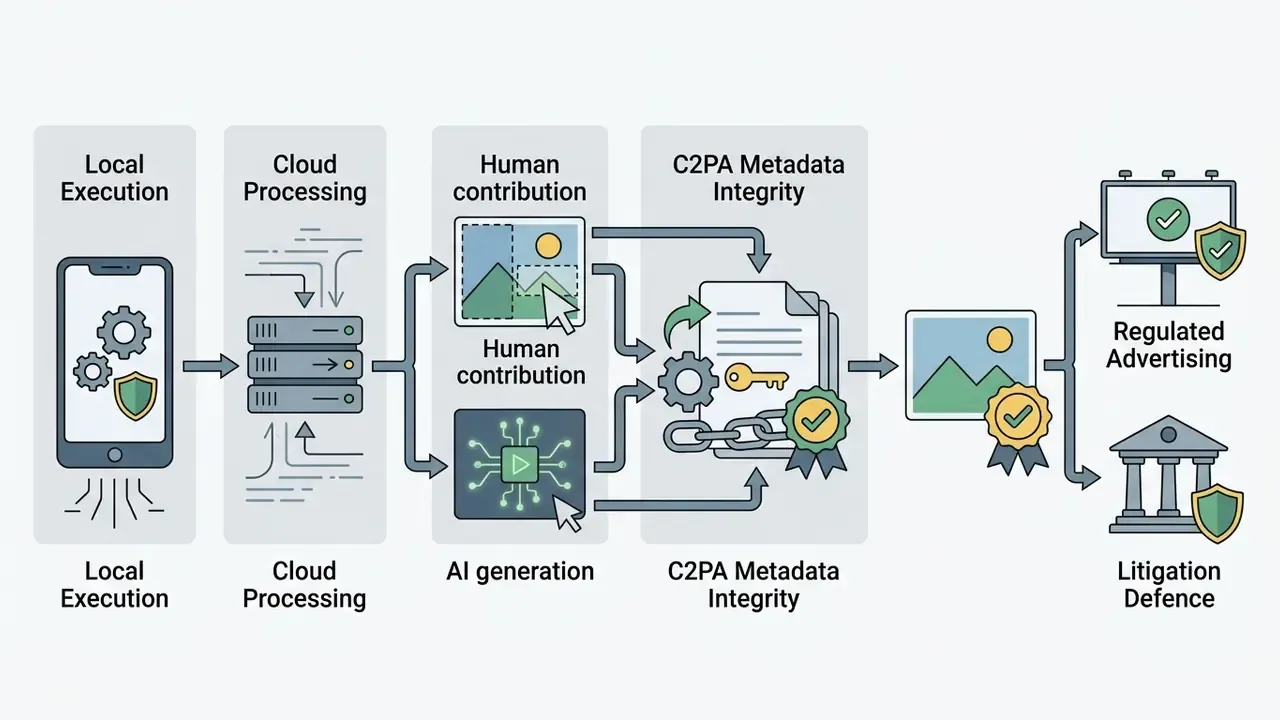
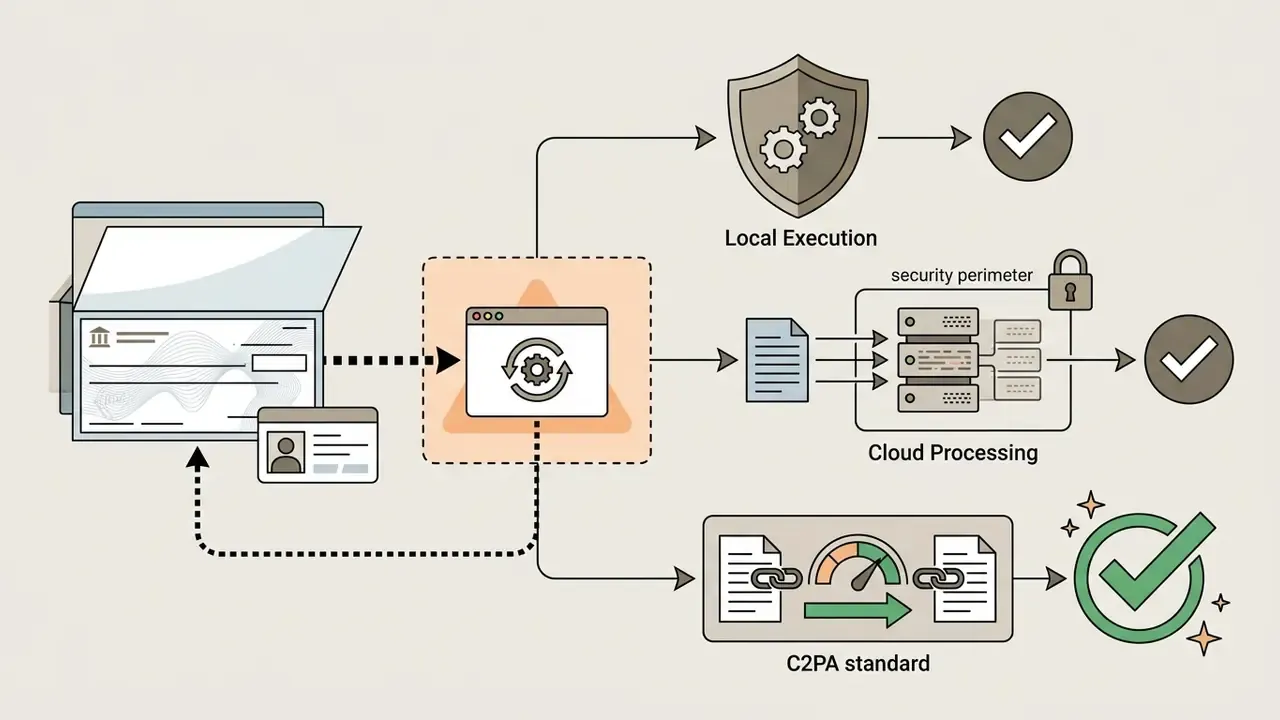
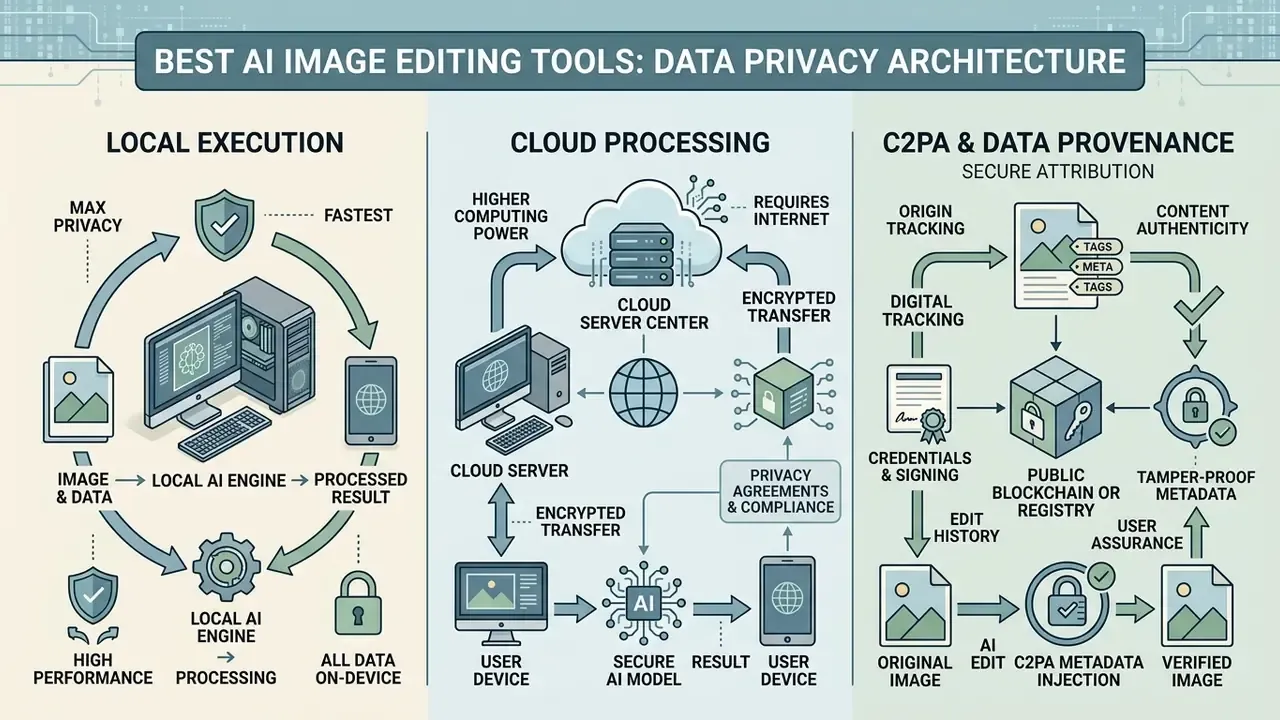
Data Privacy Architecture: Local Execution, Cloud Processing, and C2PA
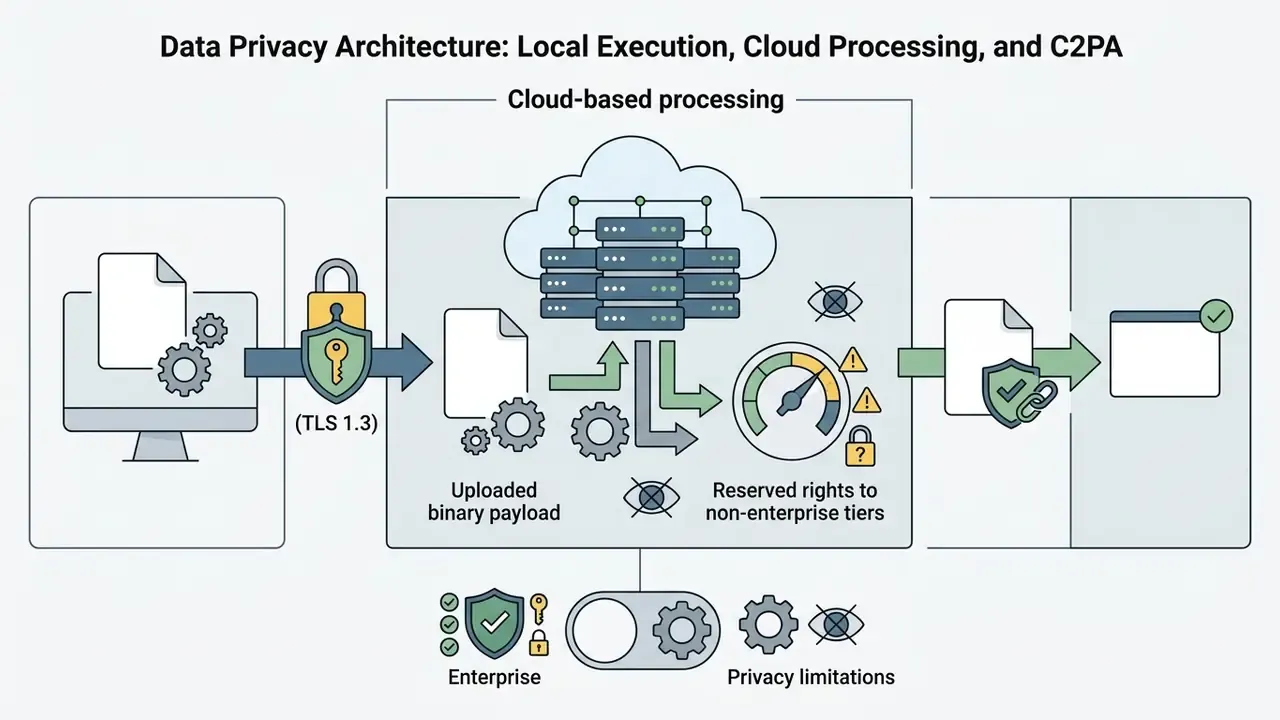
Enterprise data governance mandates isolating proprietary visual assets from public training loops. Processing location, not brand reputation, is the decisive control.
- Local on-premise and desktop processing (Photoshop non-Firefly operations, Lightroom, DxO PhotoLab, Topaz Photo AI, Aftershoot): pixels are processed locally via Apple Neural Engine or NVIDIA CUDA. Zero asset transmission occurs over external networks, which materially simplifies HIPAA, GLBA, and GDPR alignment and keeps evidence inside the corporate boundary.
Terms, privacy, and verification notes
How We Tested and Scored AI Photo Editors
Standardized Tests for Backgrounds, Objects, and Image Enhancement
Standardized evaluation relies on paired test datasets, measuring background removal edge accuracy, object removal artifacting, and high-resolution preservation. Structural fidelity is measured using Peak Signal-to-Noise Ratio (PSNR), Structural Similarity (SSIM), and Learned Perceptual Image Patch Similarity (LPIPS).
For object removal testing, we use real-world datasets such as RORD (1,000 paired scenes) and CORNE (280,000 removal pairs) to evaluate whether algorithms erase secondary lighting reflections and cast shadows alongside target subjects. Reference-free metrics such as ReMOVE (2024) are applied where no ground-truth target frame exists.
High-resolution upscaling tests use DIV2K and DIV8K/UHD benchmarks, assessing whether neural networks introduce false synthetic textures during 4x magnification (ICCV, 2021). The five standardized tasks are: (1) background removal on a portrait with flyaway hair; (2) object removal from a crowded scene; (3) generative expand of canvas by 30%; (4) portrait retouch with skin-texture preservation scoring; (5) 2x upscale plus denoise of a noisy low-light RAW file. Technical teams implementing automated asset pipelines can see the overview of available API architectures.
Scoring Editing Quality, Control, and Ease of Use
Scoring balances raw AI automation against manual fine-tuning options, interface accessibility, and masking control. A high score requires zero hallucination artifacts, reversible non-destructive editing layers, and minimal cognitive friction for operators.
Quality scoring incorporates NIST AI evaluation dimensions: technical precision, comprehensibility, contextual consistency, and demonstrable user oversight under deployment-like conditions (NIST, 2025). NIST supplies the governance frame; user studies supply the practical confirmation.
Weighted rubric: editing quality and realism 25%, control and precision 15%, speed and performance 10%, RAW and color management 10%, batch and automation 10%, UX and learning curve 10%, pricing and value 10%, privacy and data handling 5%, licensing and commercial rights including C2PA 5%. Two reviewers scored independently, and the published figure is the rounded average.
HCI research demonstrates that users achieve higher satisfaction when software provides explicit masking boundaries and manual override options during generative editing (CHI, 2024). We excluded pure text-to-image generators (Midjourney, DALL·E, Stable Diffusion), unmaintained tools, and products that failed baseline output quality.
Methodology transparency
AI Editing Features That Matter Most for Real Photos
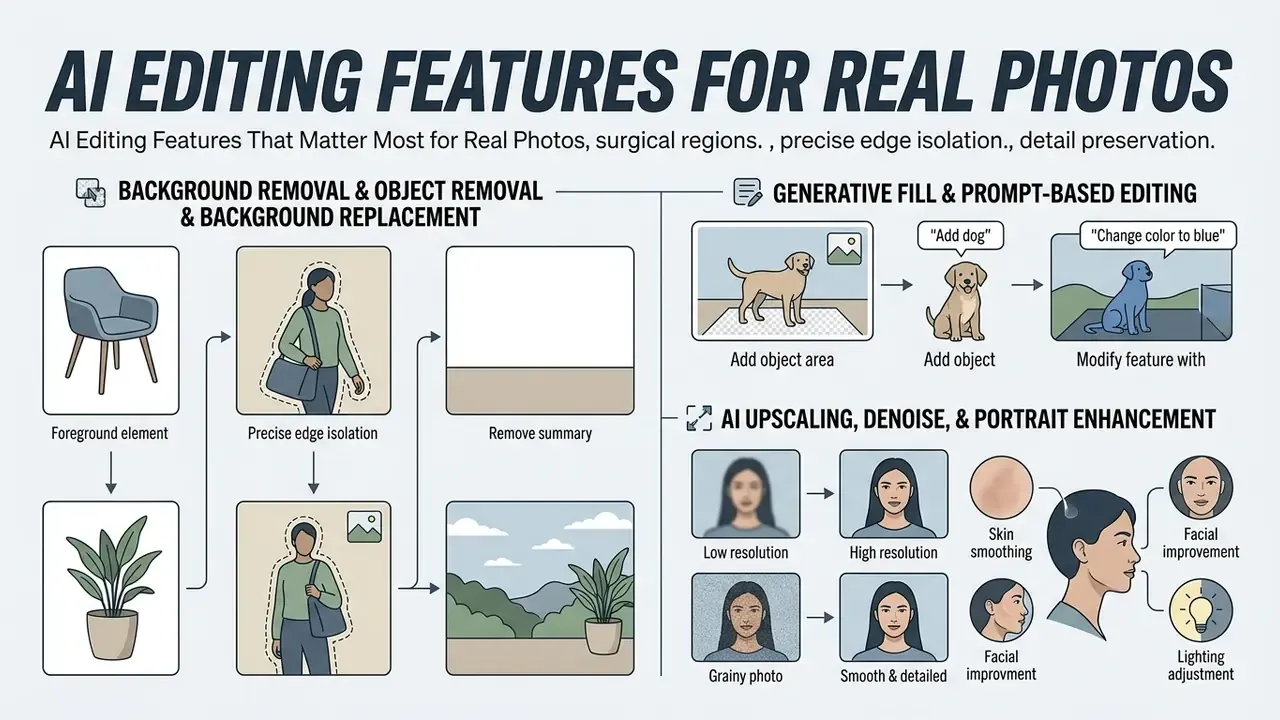
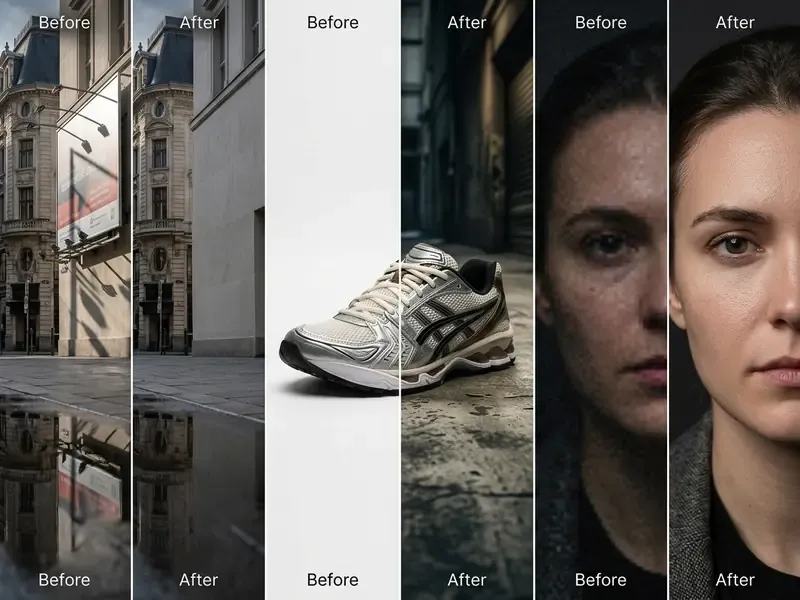
Essential AI editing features for existing photos focus on surgical region adjustments, precise edge isolation, and detail preservation rather than synthetic text-to-image creation. Commercial workflows prioritize background replacement, object erasure, and resolution restoration to maintain visual authenticity.
Background Removal, Object Removal, and Background Replacement
Background removal and object erasure use deep segmentation and diffusion-based inpainting to isolate subjects and fill masked regions seamlessly. Advanced algorithms account for natural shadow casting, optical reflections, and fine edge boundaries such as hair or transparent glass.
Generative Fill and Prompt-Based Editing
Generative fill enables targeted modifications inside isolated image selections based on text prompts or blank context-aware sampling. Non-destructive generative layers keep original photo pixels unaltered outside the active boundary selection. Leaving the prompt blank instructs the model to sample surrounding pixels, which is the preferred cleanup mode for portraits and product shots.
In multi-task editing benchmarks (ImgEdit-Bench, 1.2 million editing pairs), models fine-tuned specifically on instruction-following datasets demonstrated up to 21.7% higher accuracy in executing precise regional modifications compared with base generative models.
A practical governance habit: log the prompt, the model version, and the seed with the exported asset. Without those three values, an edit cannot be reproduced six months later, and an auditor will reasonably treat it as unverifiable. Operators who want to understand adjacent transformation pipelines can explore image-to-image AI generators and prompt-based creation in the Microsoft AI Image Generator overview.
AI Upscaling, Denoise, and Portrait Enhancement
AI upscaling and noise reduction reconstruct missing pixel data by analyzing structural patterns across deep learning neural networks. High-resolution photo enhancers restore low-light imagery and refine portrait textures while avoiding synthetic facial distortion. Teams needing a broader shortlist can compare dedicated AI image enhancers.
Restoration architecture claims are supported by published accuracy figures rather than a bare conference tag:
Recent computer vision work also shows diffusion-based facial restoration and regional GAN-inversion face editing outperform older global smoothing filters on texture retention (WACV, 2025; CVPR, 2023). Denoising algorithms separate digital sensor noise from structural image detail, allowing clean exports for large-format print media (Image Denoising: The Deep Learning Revolution and Beyond, SIAM Journal on Imaging Sciences, 2023).
Is it the highest rated ai beauty photo editor? That question has no clean answer, and vendors know it. Beauty and face swap scores rest on subjective preference, so we score only measurable outcomes: pore retention, lash and nostril detail, and absence of identity drift. Evoto and Luminar Neo perform well on batch portrait texture; consumer apps tend to over-smooth, which reads as plastic in print.
How to Choose the Best AI Photo Editor for Your Workflow
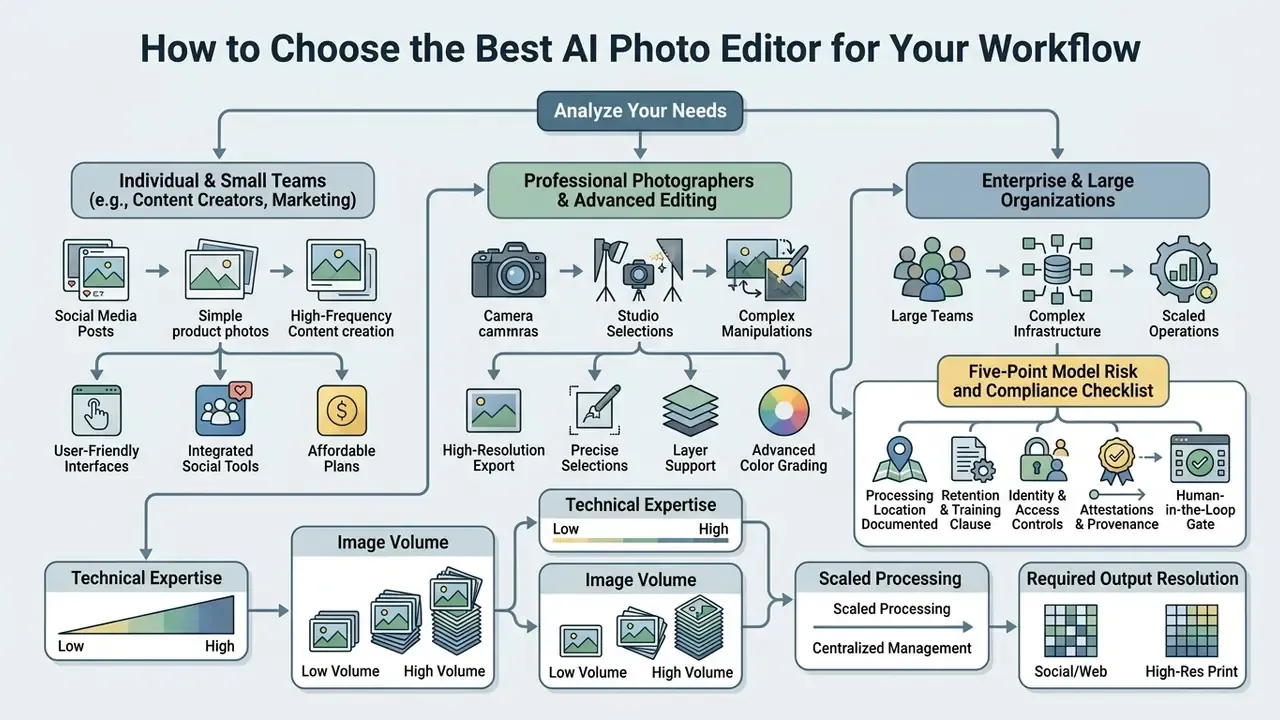
Choosing the right ai photo editing software recommendations depends on an organization's internal technical expertise, image volume, required output resolution, processing-location constraints, and governance limits. Matching software capabilities directly to team roles prevents operational bottlenecks.
Five-Point Model Risk and Compliance Checklist
Before a creative team onboards any AI editor, Risk and Compliance should sign off on five verifiable items.
- Processing location documented.Confirm in writing whether inference runs locally (Neural Engine or CUDA) or requires upload, and record the answer in the tool inventory.
- Retention and training clause.Obtain the contractual retention window and an explicit opt-out from model training. Absence of a stated retention period counts as a finding, not a neutral fact.
- Identity and access controls.Require SSO/SAML, role-based access, and named-seat attribution so every generative edit is traceable to a human operator.
- Attestations and provenance.Request SOC 2 Type II or ISO/IEC 42001 evidence, and verify C2PA Content Credentials can be preserved through export.
- Human-in-the-loop gate.Define which asset classes require documented human review before publication, and log seed, version, and prompt for each generative edit to support audit reconstruction.
No evidence, no autonomy. That principle applies to a background remover as much as to a credit model, because both produce artifacts someone will later have to defend.
For Professional Photographers and Advanced Image Editing
Professional photographers require software with full RAW color management, 16-bit depth processing, soft proofing, and precise manual masking. Photoshop, Lightroom, and Luminar Neo deliver the necessary fine-tune controls while offering non-destructive generative assistance. Lightroom Classic defaults raw files to Adobe Raw profiles with Adobe Color as the starting point, while Photoshop's documented color-managed workflow recommends 16-bit ProPhoto RGB for print-critical delivery.
An illustrative example: an agency specializing in architectural photography required non-destructive element removal without altering original RAW color profiles. By adopting Lightroom Camera Raw's Generative Remove pipeline, the agency preserved native camera color spaces while eliminating background obstructions across 800 high-resolution deliverables.
Teams evaluating competitive software head-to-head can review our detailed versus analysis framework and our AI photo editor guide for feature-level pricing context.
For Content Creators, Marketing Teams, and Social Media
Marketing teams and social media managers require template-integrated suites with rapid batch processing, brand kit locking, and automated multi-platform resizing. Canva, Picsart, and Fotor streamline campaign creation while keeping visual assets consistent.
Canva Magic Design and Picsart Flow enable marketing teams to generate complete promotional asset sets from brief text prompts, with Picsart adding community templates and multi-model workflow automation across image, video, and text (Canva, 2026; Picsart, 2026).
Marketing leads formalizing brand guardrails should note published institutional guidance. Routine AI edits such as background cleanup, standard retouching, and colour or fit adjustments are generally acceptable. Drastic background swaps that change context, and any alteration of talent appearance, race, or ethnicity, are prohibited (Ohio State University brand-photo guidance, 2026). Teams standardizing on a single suite can review the Canva AI Generator breakdown and compare output styles against the best AI art generators.
Small Business, Beginner, and Personal Use
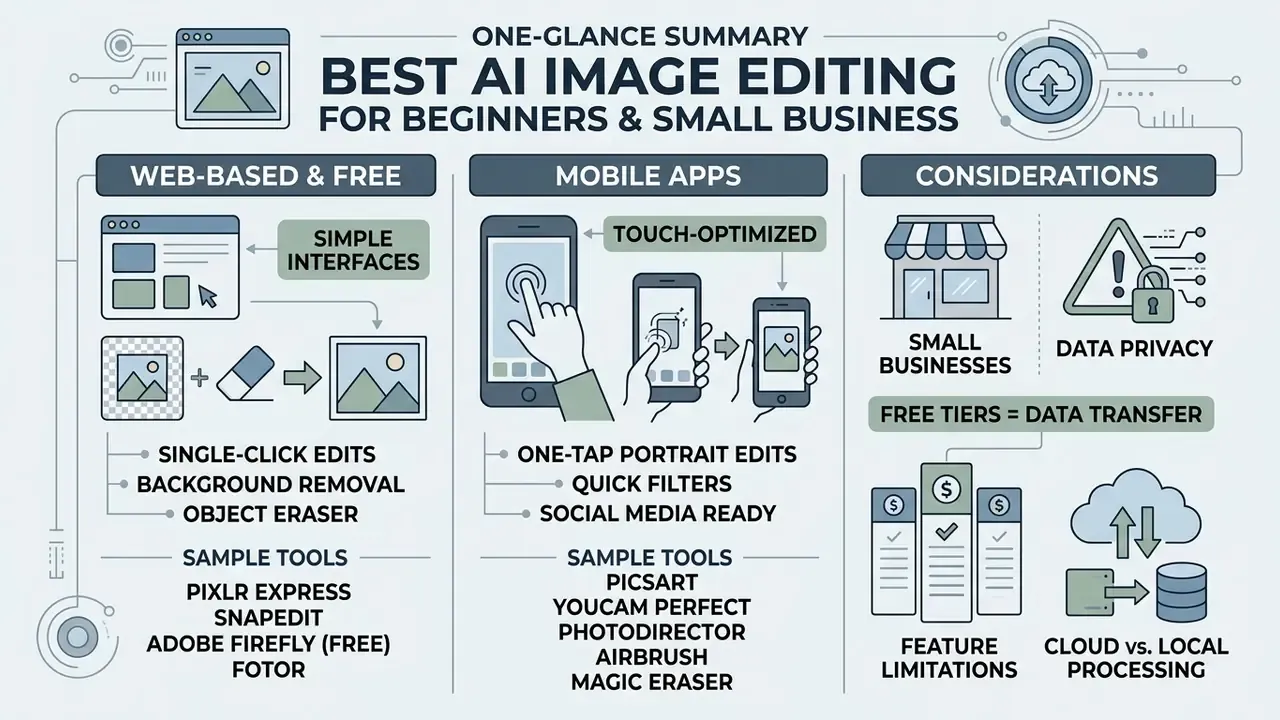
This section isolates consumer-grade and micro-business tooling so the enterprise evaluation criteria above are not diluted by free-tier feature comparisons.
For Beginners and Free AI Photo Editing
Beginners and casual users benefit from single-click, browser-based tools that execute background removal and basic retouching automatically. Free plans provide immediate accessibility without complex software installations or steep learning curves.
Free tools such as Pixlr Express, SnapEdit, Adobe Firefly's free tier, and Fotor allow users to simply upload images, apply one-tap enhancement filters, and download completed edits (Pixlr, 2026; SnapEdit, 2026; Adobe, 2026). However, free tiers frequently cap output resolution at 720p, meter daily credits (SnapEdit up to 25 per day, YouCam 5 starter credits, PicTools.AI 2 credits), or attach visible export watermarks. Users comparing entry-level options can explore our guide to free photo editors and the broader online photo editor landscape before upgrading.
One caution for small business owners: a free tier is still a data transfer. If the photo contains a customer's document, invoice, or badge, treat the upload as a disclosure event.
Which AI Photo Editing App Is Best for Mobile Use?
Mobile applications such as Picsart, YouCam Perfect, Fotor, PhotoDirector, AirBrush, and Magic Eraser lead iOS and Android platforms for on-the-go AI editing. They deliver full-featured object erasure, face retouching, and quick social media exports directly from mobile devices.
Picsart and YouCam Perfect provide touch-optimized interfaces for one-tap background removal and portrait retouching on devices running iOS 15+ or Android (App Store, 2026). Fotor lists iOS 12.1+ compatibility and supports cross-platform sync across web and mobile, so creators can start an edit on a phone and finish it in a desktop browser. CyberLink's PhotoDirector covers both platforms but gates object removal and unblur behind a trial-to-paid upgrade. Google Photos added text- and voice-driven editing in August 2025, initially on Pixel 10 in the US, which makes natural-language mobile edits a default consumer expectation rather than a differentiator.
AI Image Editing Tools FAQ
This section provides clear, evidence-based answers to common operational questions regarding AI photo editor capabilities, legal boundaries, outsourcing options, and mobile performance. Readers new to the category can first review our primer on online photo editors.
Can AI Photo Editors Replace Manual Photo Editing?
AI photo editors cannot fully replace manual photo editing in high-stakes commercial environments. While AI automates routine tasks such as background removal and noise reduction, human oversight is required to fine-tune edge boundaries, ensure anatomical fidelity, and maintain strict brand compliance. Computer vision research evaluating generative editing capabilities across everyday tasks demonstrated that current AI models fully satisfy only about one-third of complex user editing requests without manual correction. The dominant failure modes were edits leaking outside the target region and unwanted changes to essential details, including subject identity (Understanding Generative AI Capabilities in Everyday Image Editing Tasks, WACV, 2026).
"Evaluation of text-guided editing models exposed substantial limitations in existing metrics and confirmed the need for manual refinement in complex scenarios." Source: An Evaluation of Text-Guided Image Editing Models, IEEE CICN (2024). https://ieeexplore.ieee.org/ Common failure points include edge bleeding, unintended background distortion, loss of lash and nostril detail, and over-smoothed skin gradients. Google Cloud's responsible-AI guidance for Imagen additionally documents bias amplification, insufficient context, and misrepresentation as standing limitations of AI image editing.
What if internal teams lack the expertise to run AI photo editing software?
Organizations can use hybrid human-in-the-loop workflows by contracting specialized digital retouchers, either through freelance marketplaces or dedicated retouching agencies, who operate enterprise AI backbones such as Photoshop Firefly, Topaz Photo AI, or Evoto. This delivers studio-grade output without internal training overhead, with typical market rates of roughly $5 to $15 per finalized commercial deliverable. Two governance caveats apply. Never transmit assets containing PII or confidential documents to an external retoucher without a signed DPA, and require delivery with C2PA Content Credentials intact so provenance remains auditable.
What Is the Difference Between an AI Image Editor and an Image Generator?
An AI image editor modifies, cleans, or enhances an existing source image using localized selections and targeted prompts. An AI image generator synthesizes a completely new visual asset from scratch using text prompts alone, without an input photo. Software such as Photoshop Generative Fill operates in an image-to-image mode, preserving surrounding pixel context while altering selected regions (Adobe, 2026).
"ImgEdit-Bench defines nine editing tasks: addition, removal, alteration, replacement, style transfer, background change, motion change, hybrid edits, and extraction." Source: ImgEdit: A Unified Image Editing Dataset and Benchmark, arXiv (2025). https://arxiv.org/abs/2503.14978 Text-to-image generators such as Midjourney synthesize entirely new pixel grids, offering creative exploration but lacking direct structural reference to original photographs. Readers can compare synthesis engines in our roundup of AI image generators and the head-to-head Midjourney evaluation.
Do AI photo editors store my uploaded private photos?
Storage policies vary by vendor tier and by processing location. Desktop tools such as Topaz Photo AI, Lightroom Classic, and Aftershoot can run offline, so nothing leaves the machine. Paid enterprise plans (Adobe Creative Cloud for Enterprise, Canva Enterprise) enforce zero-retention policies with SSO/SAML support. Free browser-based tools may retain uploaded images temporarily for processing or service optimization as outlined in their standard privacy policies, and several publish no fixed retention window at all, which should be treated as a procurement finding.
Can I legally use AI-edited images for commercial projects?
Yes, provided the tool's Terms of Service explicitly permit commercial licensing and the edit involves sufficient human creative oversight. According to US Copyright Office guidance, images generated purely by AI without human authorship cannot be copyrighted, whereas real photographs edited with AI assistance retain commercial protection. Attach C2PA Content Credentials to exports to evidence the human contribution chain.
Are free AI photo editors completely free without hidden fees?
Most free AI photo editors operate under freemium models. They offer basic tools and introductory credits at no cost, but restrict high-resolution exports (frequently capping downloads at 720p), append brand watermarks, meter daily AI credits, or require paid subscriptions once monthly processing limits are reached.
Which tool is cheapest at 5,000 images per month?
Flat-fee desktop or unlimited-subscription architecture. At $0.05 to $0.10 per credit, 5,000 exports cost $250 to $500 monthly on credit-based platforms, versus roughly $23 to $39 monthly on flat-fee licences, an effective cost below $0.006 per export. Add human validation hours to both sides of the comparison before signing.
How do we prevent Shadow AI in marketing teams?
Publish an allowlist of approved local-processing editors, block consumer editor domains on managed endpoints, apply DLP inspection to image uploads containing OCR-detectable account or document identifiers, and route any exception through a documented approval with a named risk owner.
Appendix A: Updated and Superseded Claims
Retained for transparency and version traceability. Each item below appeared in an earlier edition of this guide, and the main text now carries the corrected or strengthened version.
Open questions we could not close. Three gaps remain, and we would rather name them than paper over them. First, no vendor in this set publishes a retention period in days for free-tier image uploads. Second, independent reproduction of maximum upscale ceilings is still missing. Third, C2PA preservation through third-party export chains is inconsistent, so provenance can silently drop. Re-test before your next procurement gate.
- Superseded pricing
- "Topaz Photo AI, $199 one-time purchase." Topaz transitioned to a subscription model in 2026 (from approximately $39/mo or an annual update licence). Buyers seeking a perpetual licence should evaluate DxO PhotoLab or a Luminar Neo lifetime licence.
- Superseded citation
- a bare "(IEEE CICN, 2024)" reference supporting non-destructive generative layers, now replaced by the quoted Imagic and Forgedit evaluation finding.
- Superseded citation
- a bare "(OmniPaint, 2025)" reference for structural fidelity, now replaced with the FID, CMMD, LPIPS, and SSIM result across 3,300 real-world removal scenes.
- Superseded citation
- a bare "(ACM, 2025)" reference for browser-suite turnaround times, now replaced with the measured 2.5 mean usage-frequency finding, and a duplicate instance replaced with the 2024 Democratizing Design through Generative AI result.
- Superseded citation
- a bare "(WACV, 2025)" reference for diffusion-based facial restoration, now supported by MGAN-CRCM accuracy figures (96.59% on ImageNet, 96.70% on Places2).
- Unverified vendor claims flagged
- Luminar Neo "600% enlargement" and Topaz Photo AI generative sharpening descriptions derive from vendor documentation and remain independently unreproduced at the stated ceilings.
- Qualified allowance
- "Canva Pro expands allowances up to 200 Premium AI credits monthly" now reads "varies by tier and region."
- Replaced internal links
- anchors pointing to free video editing resources have been re-pointed to topically relevant photo-editing, upscaling, enhancement, detection, and outpainting resources.