Finding the best ai tattoo generator lets you turn a raw idea into a structured visual reference in seconds. Modern platforms lean on specialized diffusion models and generative pipelines to convert text descriptions or uploaded photos into clean line art, blackwork, traditional flash, or realistic tattoo concepts. Marketing copy sometimes calls these products an ai tattoo artist. That label is wrong, and the difference matters once a needle is involved.
Fastest picks for three common goals
| Your goal | Recommended pick | Why it wins | Entry cost |
|---|---|---|---|
| Commercially safe ideation & fine-line concepts | Adobe Firefly | Cleanest minimalist linework, licensed training data, daily free credits | Free tier / $9.99+ mo |
| Tattoo-native workflow: presets, stencil prep, body preview | BlackInk AI or Tat Ink | 12 to 40 tattoo presets (dotwork, irezumi, cyber sigilism), stencil converter, 2K to 4K export | Free credits / $8.79 to $15 mo |
| Placement planning & virtual try-on | Ink Studio AI (3D) or Tatship (2D/3D preview) | Skin mapping, scale and curvature preview before stenciling | Free daily generations |
Bottom line: general engines win on artistic depth; tattoo-specific engines win on stencil readiness and try-on. Most readers end up using both, one for the idea, one for the stencil.
Where credits usually get burned
Before the comparison tables, a quick reality check. In our test rounds, most wasted spend came from three habits, not from picking the "wrong" platform.
- Writing mood words ("epic", "mystical") instead of structural constraints such as line weight, contrast and background.
- Judging line quality on a laptop screen rather than at final print size in millimetres.
- Paying for a subscription before checking whether the free tier exports without a watermark.
Fix those three and even a modest ai tattoo generator produces something an artist can work from.
How to choose the best AI tattoo generator for your design
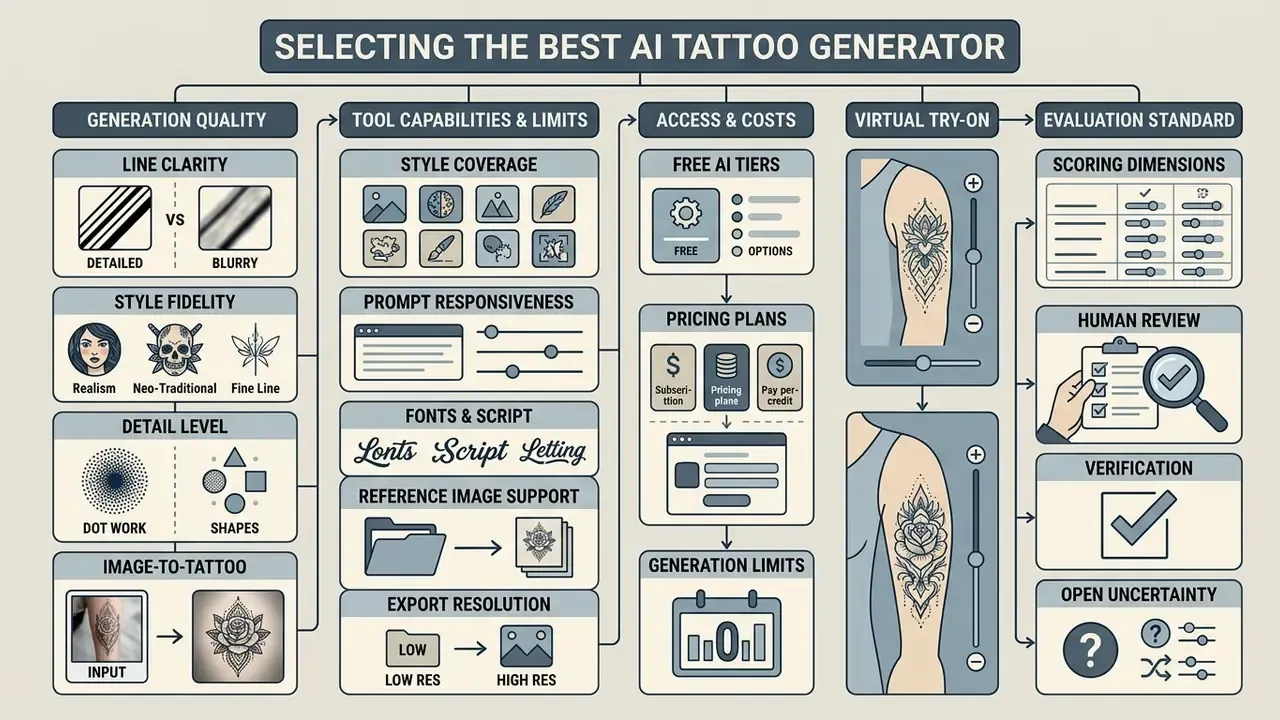
Selecting the best ai tattoo generator means evaluating line clarity, style coverage, prompt responsiveness, reference image support, export resolution, and virtual try-on capability. A reliable tool has to bridge creative ideation and the blunt technical constraints of physical tattooing.
When comparing a best tattoo ai generator, prioritise platforms that hold line stability and expose explicit tattoo style controls. General-purpose engines frequently produce visually striking images that fail as stencileable art, because they lack clean vector-like boundaries. Structured frameworks help here: the NIST ARIA evaluation framework (2024) and ICE-Bench (ICCV 2025) both quantify prompt-following accuracy and reference consistency across complex design tasks.
In practice, no single score, not aesthetic rating, not FID, predicts whether a design survives a needle. Score each candidate engine across six ICE-Bench dimensions (aesthetic quality, imaging quality, prompt following, source consistency, reference consistency, controllability) and then add two tattoo-specific dimensions of our own: line survivability (minimum stroke width at final print scale) and stencil separability (how cleanly the subject isolates from the background).
Total cost deserves the same scrutiny. Plenty of platforms advertise a free ai tattoo workflow, yet output resolution on standard tiers is usually capped, so high-resolution files suitable for stencil printing sit behind a paid upgrade.
Generation quality, detail level and tattoo style fidelity
Generation quality comes down to how accurately an engine reproduces specific tattoo style conventions while maintaining professional quality line work. Fine line and single-needle concepts need ultra-clean contours without blurred pixels. Blackwork needs high-contrast fills and deliberate negative space. Those are different demands on the same model.
General image models routinely render lines that look razor-sharp on a 27-inch monitor yet fall below the physical threshold a needle can reproduce. On-screen crispness is a misleading proxy. Rather than trusting vendor-side comparison posts, judge line quality through documented human-evaluation protocols, because automated scores systematically overstate perceived quality:
Independent 2026 testing round-ups echo the same practical split. Firefly tends to produce the cleanest fine line and minimalist contours, while tattoo-trained engines such as BlackInk AI, Tat Ink and Ink Studio AI hold up better on traditional and Japanese style rules. Watercolor and photoreal portrait work remain the hardest categories. Honest grading of those outputs is usually "good after retouch" or "needs redraw", not stencil-ready.
Testing engines across different styles, from Japanese irezumi and traditional tattoo flash to neo traditional and watercolor, quickly reveals whether a model preserves stylistic rules or simply drapes a filter over stock imagery. Before committing to a subscription, benchmark the same text prompt across two or three of the best ai image generator options to see which base platform actually respects your line-weight instructions.
Visual reference matrix: what a correct output looks like per style
| Style | Correct output signals | Failure signals to reject |
|---|---|---|
| Fine line / single needle | Uniform 1-px-equivalent strokes, 1 to 2 mm gaps at final scale, zero grey wash | Hairline strokes that vanish on zoom, faded antialiased edges |
| Blackwork | Solid black masses, hard edges, deliberate negative space | Grey gradients pretending to be fill, muddy mid-tones |
| Dotwork / geometric | Even stipple density, clean compass-true geometry | Random dot clumping, broken symmetry axes |
| Japanese irezumi | Bold outer contour, wind and water background flow, layered subject | Outline-free "painting", background merging into subject |
| Realism / black & grey | 6 to 8 distinguishable grey values, single light direction | Micro-texture noise below needle resolution, flat contrast |
| Trash polka | Red-and-black split, collage strokes, graphic chaos with a readable focal point | Pink-tinted reds, illegible layering |
Free AI tiers, pricing and limits on generated designs
Free tiers split into two families: daily credit resets and one-time promotional trials. If you want a free ai route, read the export terms first, because free generations often carry a visible watermark or ship as compressed files. Before you download anything for a paying client, check the licensing rules for commercial use of AI image generators. "Free to generate" and "free to sell" are not the same permission.
Adobe Firefly grants recurring daily generative credits on standard accounts. BlackInk AI, by contrast, offers three trial credits before a paid plan becomes mandatory. Tat Ink and Ink Studio AI reset free daily generations, while TattooAI-style credit tools price extra generations from roughly $0.20 each. Paid tiers run from $8.79 to $15 per month up to $119+ per month for studio volume, or move to credit packs; they unlock uncompressed PNG, SVG, or 2K to 4K downloads needed for direct stencil preparation.
That economic delta is the real argument for a paid tier. One $100 to $200 custom sketch fee saved usually covers a year of credits. To model credit spend per finished concept rather than per image, explore the hub; for full tier breakdowns across generative platforms, explore the hub, and compare zero-cost routes in our review of free AI art generators.
Which AI tattoo generator to choose for different tasks
The right tool depends on whether you are running early ideation, building a custom tattoo from photos, or mapping placement on a body model. Matching intent to capability raises design fidelity and stops credits from evaporating. Reading this task map before the comparison table makes the specification columns far easier to interpret.
To compare generative frameworks across media types, decision-makers can review the AI Media Versus Comparisons overview for structural insights.
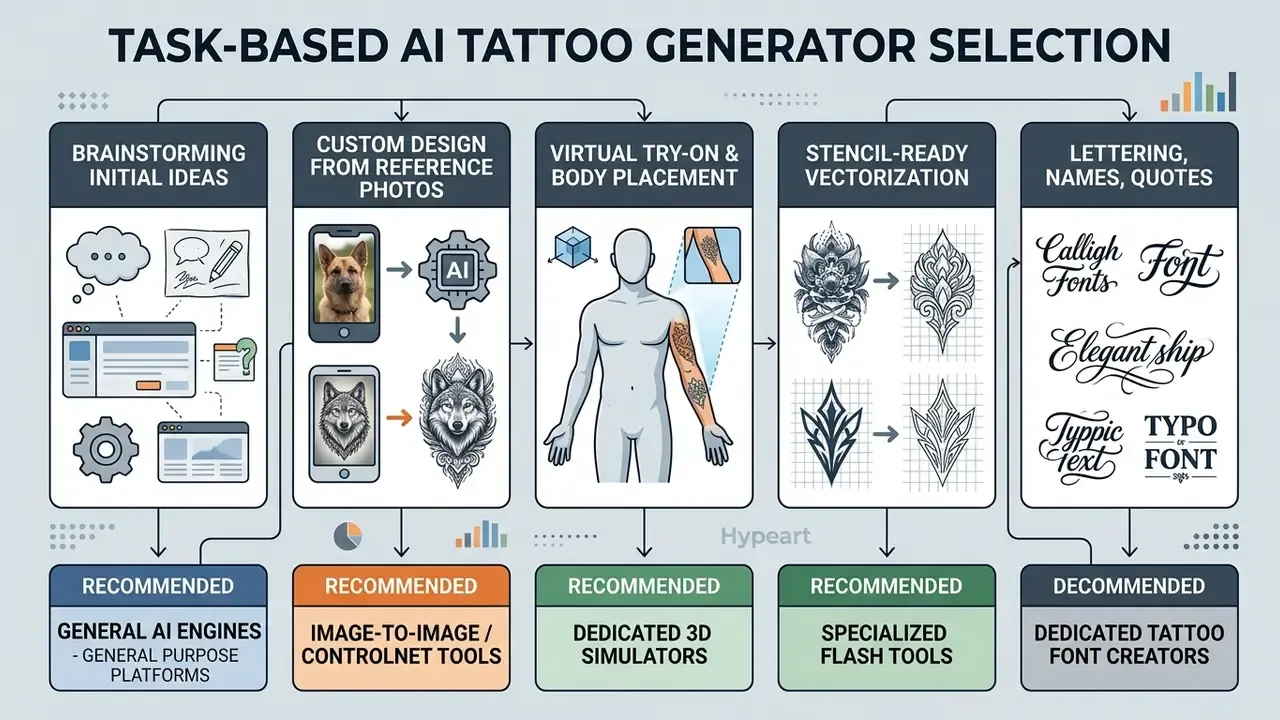
For finding tattoo ideas and your first tattoo concept
Early ideation rewards speed and breadth. General text-to-image engines suit this stage best, since they let you generate tattoo ideas from unusual subject combinations without preset boundaries.
With simple prompts you can produce dozens of initial tattoo concepts in minutes. Those outputs act as a starting point for a personal tattoo and help clients articulate their taste to a professional tattoo artist before formal drawing begins. Vendor guidance converges on the same order of operations: start from symbols, words, themes or emotions, compress them into one short prompt ("sun and moon with floral accents in blackwork style"), then iterate. High-intent motifs worth testing include memento mori, cyber sigilism, compass, lotus, grim reaper, koi, cherry blossom and mythological subjects such as Medusa.
A small observation from intake sessions: clients who bring three generated variants decide faster than clients who bring thirty. Volume is not clarity.
For creating a custom tattoo design from references
Building custom tattoo designs from existing imagery requires strong image-to-image conditioning. Platforms that accept reference inputs let you keep key subject elements while applying a new stylistic layer. If you work mainly from photographs, review dedicated image-to-image generators before paying for a general subscription.
Research on StyleDiffusion (Wang et al., 2023) shows that disentangling content from style in latent space lets an algorithm preserve the structural geometry of a reference photo, a family portrait or a pet, while rendering it cleanly in fine line or blackwork.
That capability is what allows you to fine tune a composition built from several visual sources: a pet portrait's silhouette merged with dotwork sacred geometry, or a sketch plus a theme image blended into one unique tattoo concept, an approach documented in reference-driven generation research such as ARGAN.
For virtual try-on and body placement planning
Virtual try-on tools preview how a flat graphic conforms to three-dimensional body geometry. Dedicated platforms superimpose generated art onto body photos and adjust scale, perspective and curvature.
The closest measured evidence for try-on reliability still comes from apparel research and adoption modelling, not tattoo-specific trials. Worth keeping in mind.
Practically: a preview is trustworthy for size and placement, less so for final commitment. Check perspective distortion and scale on the skin plane before stenciling. Virtual try features do help you evaluate composition, negative space and readability on the forearm, ribs or calf before committing to ink.
How to prepare a body photo for accurate try-on (5 steps)
- Shoot flat, even light.Diffuse daylight, no direct flash; harsh highlights break skin-tone blending.
- Keep the limb relaxed and perpendicular to the lens.Flexed muscle and oblique angles inflate perceived size by 10 to 20%.
- Include a scale reference.Place a credit card (85.6 × 53.98 mm) or an A4 sheet in frame so the app, or you by hand, can convert pixels to millimetres.
- Frame the whole placement zone plus margin.For a forearm sleeve, capture wrist to elbow; cropped frames force the engine to guess curvature.
- Check readability at arm's length.View the rendered preview on your phone from about 70 cm. If lettering or dotwork blurs at that distance, it will blur on skin too.
Modern simulators (Ink Studio AI, Tat Ink, Tatship, InkHunter-class apps) handle contour detection, skin-tone blending and drag/rotate/resize; some render a preview in roughly 8 to 15 seconds. Academic AR work (UFBA, 2016; IEEE/SIBGRAPI, 2015) explains why body-surface deformation and occlusion modelling matter: a flat overlay on a curved bicep will always under-represent distortion at the edges of the design.
Comparison of the best AI tattoo generators (12 tools)
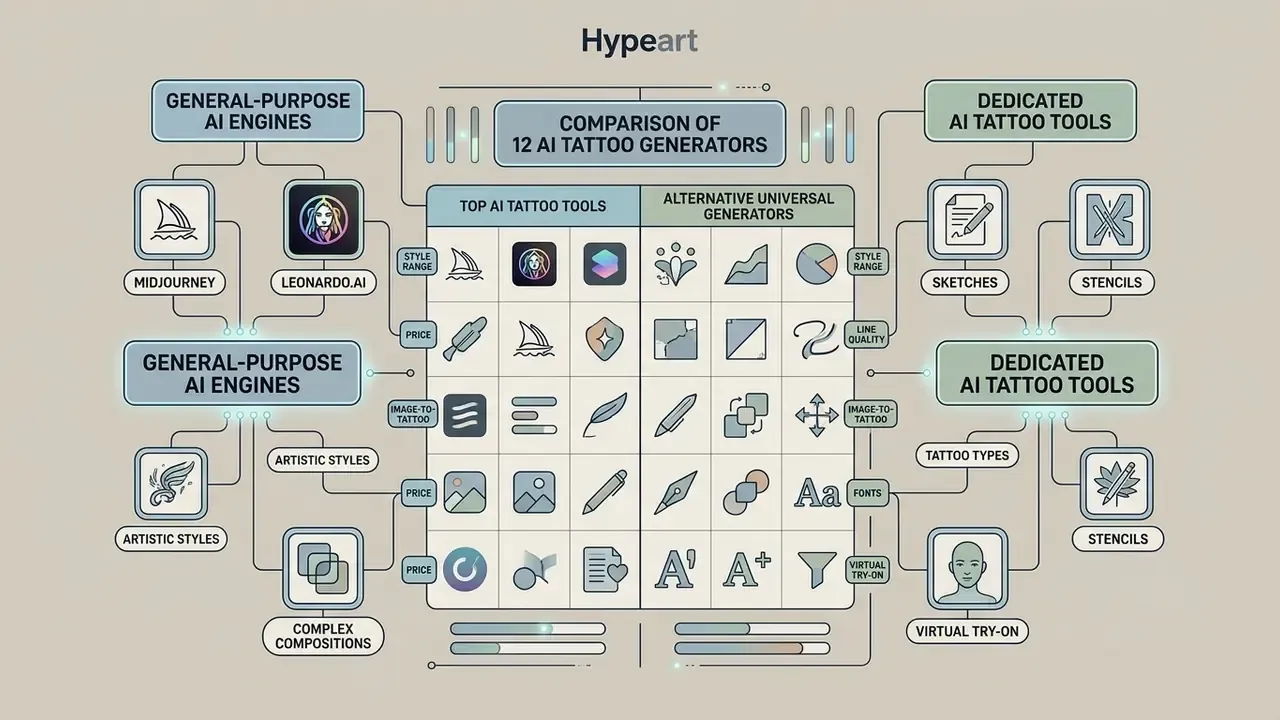
The market splits into general-purpose AI image engines and dedicated ai tattoo maker platforms. Ranking the best ai tattoo generator 2025 shortlists against 2026 releases is mostly a trade-off between broad artistic flexibility and domain features such as stencil vectorization and body placement preview. Lists from the best ai tattoo generator 2024 era leaned almost entirely on general engines; tattoo-native tooling has matured a lot since.
General engines like Adobe Firefly and Canva bring robust infrastructure and commercial safety guarantees, which suits initial ideation. Benchmark data also confirms that generalist engines are not interchangeable:
That gap hits tattoos directly. Portrait realism and counting prompts ("three roses, two swallows") fail far more often on weaker engines. Specialized tattoo generator systems such as BlackInk AI, Tat Ink, Ink Studio AI and Tatship instead integrate skin-mapping algorithms and curated ai tools tuned for the best ai to create tattoo designs.
Best tools for AI tattoo art and complex styles
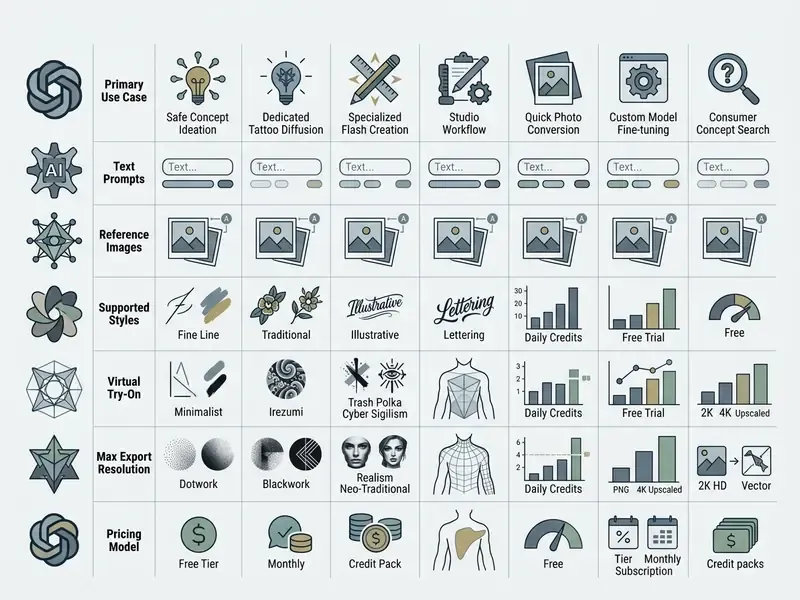
Complex ai tattoo art, think multi-layered realism, Japanese bodysuits, or intricate neo-traditional pieces, demands models with a deep stylistic vocabulary. General-purpose platforms lead this category thanks to parameter scale and richer latent space representation.
Adobe Firefly is strongest at clean line art and minimalist concepts while guaranteeing commercial safety, and its line-art mode converts a reference image into fine-line drawings suited to stencil workflows. For a wider view of style handling and output quality, see our breakdown of the best AI art generators. Creators exploring open-source setups will find useful context in best ai image generator without restrictions, which covers unrestricted style modelling and its trade-offs.
Alternative universal generators (why Midjourney and Leonardo.ai sit apart)
Midjourney and Leonardo.ai score high on texture depth in watercolor and realism, though both need manual prompt tuning to isolate the subject from dark background art. They appear in the table for completeness, but they are not tattoo-native: neither exposes line-weight presets, stencil extraction or body try-on, and Midjourney has no free tier at all. Use them as concept engines, then move the winning composition into a tattoo-specific tool, or into an artist's hands, for stencil conversion. A side-by-side view of pricing and control depth sits in our Midjourney versus competing generators analysis, while Canva's ecosystem-level limits are covered in the Canva AI Generator overview.
Specialized tattoo generators for sketches and try-on
Dedicated platforms ship features engineered for the studio workflow: automatic background removal, line-weight adjustment, complexity and colour controls, image-to-stencil conversion, and custom aspect ratios for full sleeves or filler work. BlackInk AI, Tat Ink and Ink Studio AI let you select explicit presets (single-needle, traditional, blackwork, dotwork) before generating a single pixel.
These tools shorten the trip from raw idea to studio reference. In a trial setup at a regional studio, an artist used Ink Studio AI to produce five flash concepts during client intake, cutting consultation time from two hours to roughly thirty minutes while establishing visual alignment before the final stencil was drawn. Studio owners describe the same pattern with Remaker-class tools: clients arrive with a generated concept, and the talking stage halves. To compare general design platforms and their ai tattoo tool equivalents, browse the hub.
How to create a tattoo design with AI: step-by-step process
Using ai to create a tattoo concept works best as a structured workflow: define the brief, engineer a precise prompt, select a style, refine the draft, then prepare the file for an artist. A deliberate method is what turns generated output into a wearable stencil.
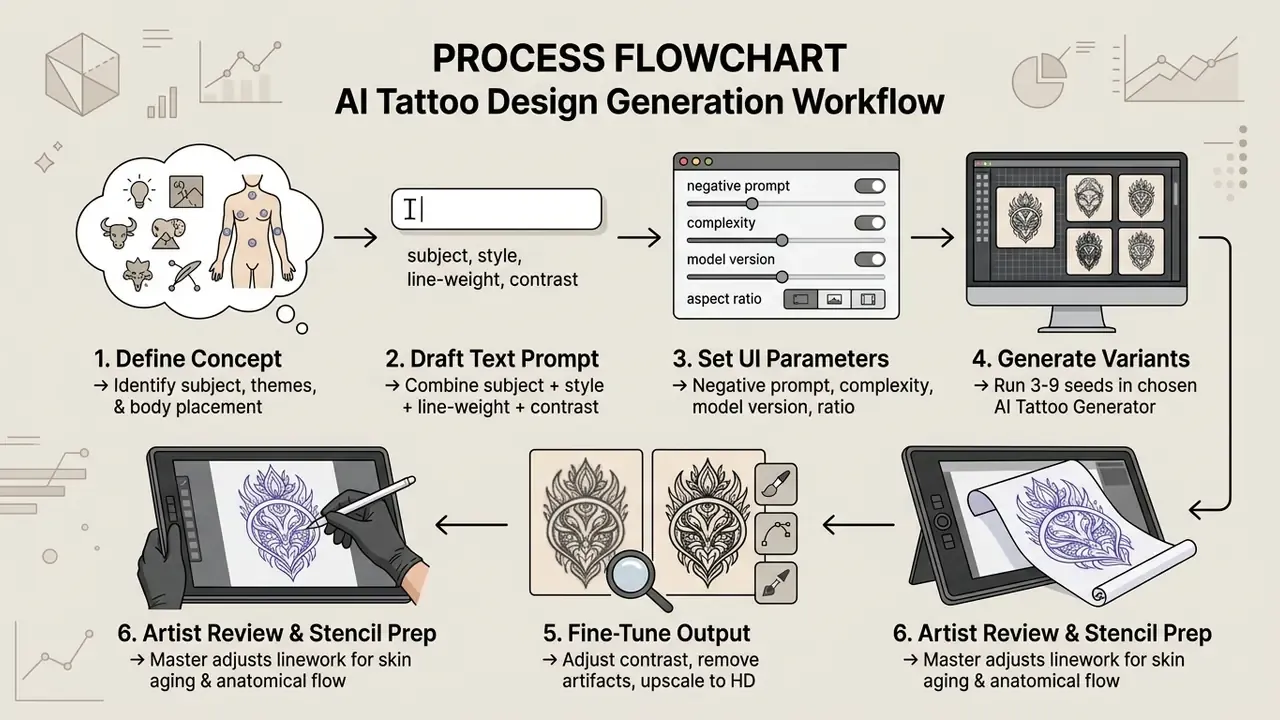
Prompt-engineering research supports that loop shape: write, generate with several seeds, mark preferred and non-preferred elements, revise, regenerate. Columbia University and ACM CHI (2022) guidance recommends 3 to 9 seeds per prompt, because model variability is high, and advises naming subject and style keywords explicitly instead of relying on vague mood words.
How to write a text prompt for precise tattoo art
An effective text prompt stacks specific descriptors: subject, tattoo style, composition, line weight, contrast, and negative space. Declaring negative space explicitly stops the generator from filling the background with clutter that ruins stencil transfer.
A structured formula gives consistent results:
[Subject] + [Tattoo Style] + [Line Weight / Detail Level] + [Composition / Placement] + [Background Constraint] + [Avoid list]
Put plainly: longer, constraint-dense prompts are measurably better tracked by current evaluation methods, and in practice they separate a poster illustration from a transferable stencil.
For a dragon tattoo concept, for instance:
This keeps the engine focused on the structural linework you need to create tattoo design assets rather than photographic realism.
Basic vs professional prompt: a side-by-side comparison
Sketch quality tracks the number of constraints you specify. Two approaches to the same dragon:
- ❌ Basic prompt:
Dragon tattoo for forearm- Result: a volumetric 3D illustration with a dark background, photoreal smoke and blurred edges. Impossible to transfer to thermal paper.
- ✅ Optimized prompt:
Japanese Irezumi dragon wrapped in S-curve, bold black outlines, fine-line scale detailing, high contrast blackwork, no background shadows, stencil ready, 8k resolution- Result: an isolated vector-like contour with deliberate negative space, ready for an artist to refine.
The same escalation works across subjects. "Minimal dragon tattoo, fine line, forearm placement, no shading" gives an elegant but generic outline; "full sleeve, waves and clouds background, bold blackwork with red accents, highly detailed traditional design" gives a layered, culturally coherent composition.
AI tattoo prompt library for popular subjects
To get predictable results, start from templates adapted to the physics of tattooing. Copy, then swap subject and placement.
1. Wolf tattoo, realism / blackwork
Large masculine piece (shoulder, back):
Fierce male wolf portrait, sharp facial features, thick mane, high-contrast black and grey shading, geometric dotwork background, stencil lines, white background, no gradients.Minimalist / watercolor:
Minimalist line art wolf head, continuous fine line, watercolor splash in cyan and magenta, subtle geometric accents, clean vector outlines.Tribal-influenced:
Grey-furred wolf with piercing yellow eyes, tribal-inspired black markings, standing on a rocky cliff, full moon behind, bold outer contour, isolated on white.
2. Medusa tattoo, neo-traditional / grey wash
Detailed narrative piece:
Mythological Medusa portrait, intertwined venomous snakes as hair, piercing eyes, neo-traditional tattoo style, bold outer contours, smooth greyscale shading, isolated on white background.Gender-neutral ornamental variant:
Graceful Medusa with sinuous snake locks, coiled around an ornate mirror with ancient symbols, tattoo style, clean linework, controlled negative space.
3. Butterfly & moth, fine line / micro-realism
Botanical double exposure:
Botanical butterfly with floral wings, fine line tattoo style, single-needle details, symmetrical composition, crisp line work, zero background noise.Black-and-white graphic:
Striking butterfly with bold wing patterning in solid black, perched on a stylized minimalist flower, blackwork tattoo, hard edges, no grey wash.
4. Cyber sigilism & sacred geometry
Avant-garde style:
Cyber sigilism pattern, sharp aggressive lines, chrome metallic effect converted to black ink, organic biomechanical flow for forearm placement, vector stencil design.Geometric dotwork:
Sacred geometry mandala with precise dotwork gradients, compass-true symmetry, thin outer ring, spine placement, 9:16 composition, white background.
5. Rose, floral and memorial motifs
Classic neo-traditional rose:
Single rose with intricately detailed petals, thorned vines wrapping downward, vintage pocket watch nestled among the vines, bold outlines, tattoo style, isolated on white.Memento mori:
Memento mori composition: skull, hourglass and wilting flower, engraving-style hatching converted to tattoo linework, high contrast, no photographic shading.
6. Trash polka & mixed-media
Graphic collage:
Trash polka composition, red and black ink only, layered graphic strokes over a realistic raven head, collage-style fragments, strong focal point, white background.
Configuring AI generator UI parameters
To produce a sketch that actually transfers to skin, configure the interface like this:
- Negative prompt (exclusions): always enter a block list:
3d render, realistic skin, shadows, photo background, color gradients, blurry lines, watermark, noise, extra limbs, garbled text. - Detail & complexity:
- For fine line and minimalism, choose
Simple / Low Complexity. - For realism and Japanese irezumi, choose
Complex / High Detail. - Model selection: if the service exposes versions (say Tattoo Diffusion V1 vs V2), use V2 for complex narrative compositions and V1 for clean abstract contours. Leonardo-style platforms behave the same way: pick tattoo-specific LoRAs over general art models.
- Aspect ratio / body part: set
1:1for small standalone flash,9:16for sleeves, spine and rib planning, and use the "body part / proportion" selector where available so the engine respects placement geometry. - Background removal & privacy: enable
Remove Backgroundbefore export, and switch on private or stealth mode if you do not want your sketch published in a community feed. - Style remix: where offered, combine two presets (for example Minimalist + New School) instead of writing contradictory adjectives into one prompt.
How to refine a generated tattoo into a stencil for your artist
A raw output is rarely stencil-ready. The image needs artist refining: isolating the subject, adjusting contrast, and upscaling to high resolution.
To prepare a file for a studio session:
AI tattoo font and lettering generation
Image to tattoo: turning photos or AI images into tattoo sketches
The ai picture to tattoo workflow converts photographs, digital drawings or complex AI artwork into clean, tattooable line art. Turning an ai image into a functional design requires edge detection, contrast simplification and style filtering.
With image-to-image conditioning, an image generator can read the primary subject of a reference photo, a portrait or an architectural element, and re-render it as minimalist linework. That preserves a personal memory while adapting it to skin-safe aesthetics. Commercial stencil services follow the same three-stage logic: upload, choose style and density, export as true-size PDF/PNG/SVG, with some tools advertising 2K output and millimetre-accurate print scaling.
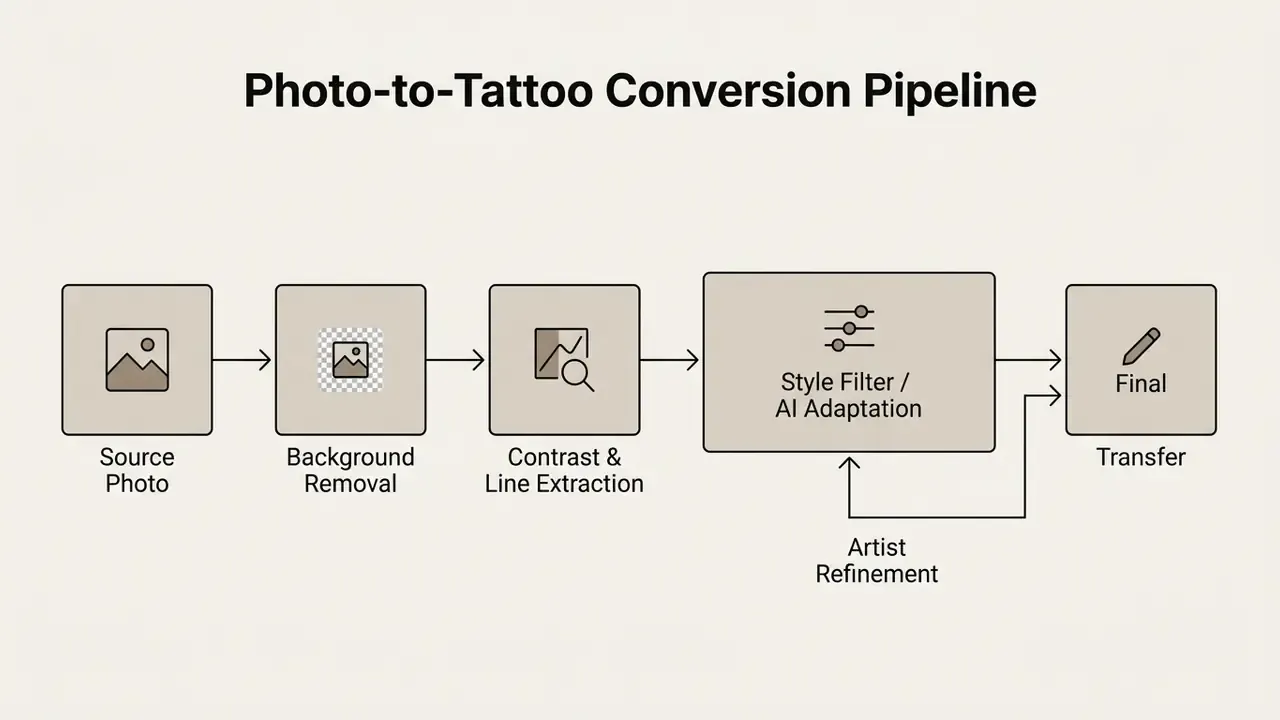
Which images work for photo-to-tattoo generation
Not every image converts cleanly into a stencil. According to the U.S. Department of Homeland Security's Best Practices for Tattoo Recognition (Tatt-BP), optimal source images need high subject-to-background contrast, sharp focus and clear lighting.
How to adapt an AI image for fine line, blackwork and realism
Adapting an ai art tattoo to a specific technique means simplifying micro-details that would otherwise bleed together over time.
- Fine Line Adaptation isolate core outline paths, remove heavy shadow blocks, and keep line spacing at least 1 to 2 millimetres apart at physical print scale.
- Blackwork Adaptation convert smooth grayscale gradients into high-contrast solid black shapes, cross-hatching or clean dotwork; replace texture with line-and-space structure rather than grey noise.
- Realism Adaptation preserve smooth value transitions and 6 to 8 distinct grayscale steps while removing micro-textures that exceed needle capability, and keep one consistent light direction.
That framing matters. Skin is a semi-transparent, scattering medium, so colour and micro-contrast shift after healing. Test every adapted design at real size and check readability from 70 to 100 cm before approving it. For raster clean-up, contrast curves and background removal, standard editors are enough; see the online photo editor guide for the tooling landscape.
Limitations of AI tattoo design and verifying a sketch before your session
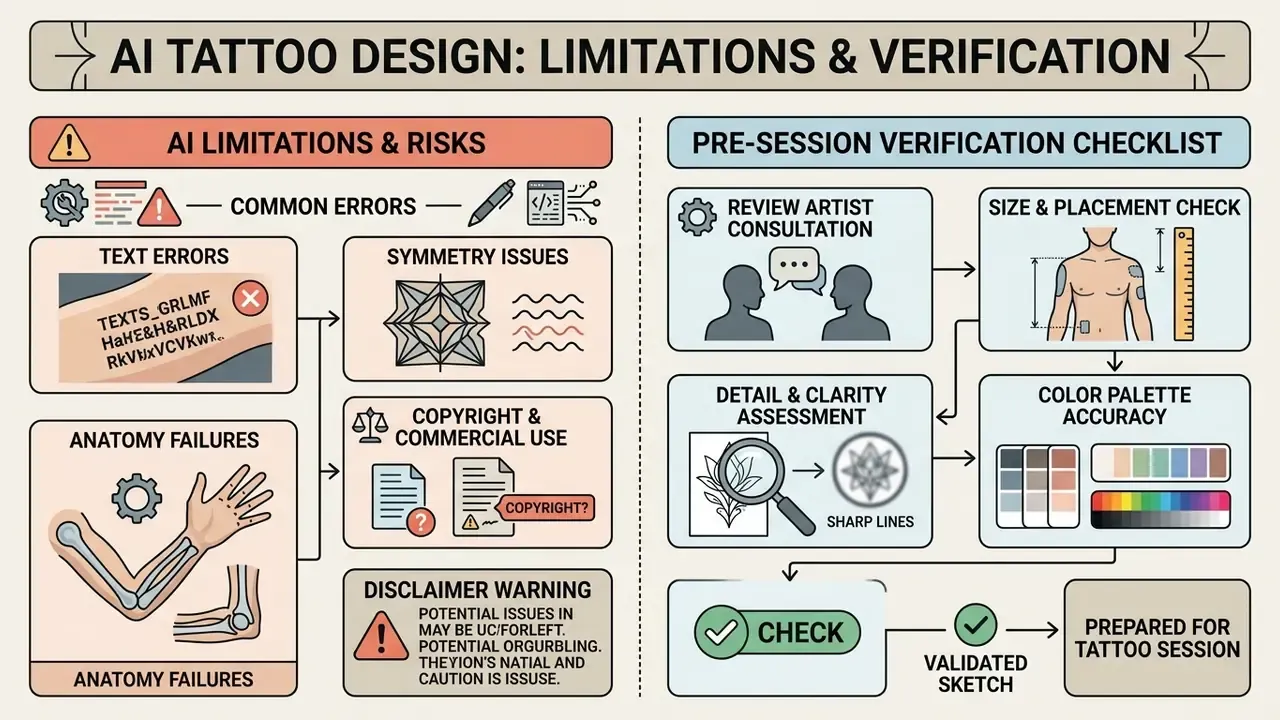
An ai generated tattoo gives excellent visual direction, yet artificial intelligence cannot account for skin physics, ink spreading or muscle movement. Treating output as an absolute blueprint, without professional review, risks slow aesthetic degradation you only notice three years later.
Every generated flash piece needs verification by an experienced professional artist. A human expert judges whether lines are thick enough to survive healing, reorients layout for body fluidity, and checks that the design respects anatomical movement lines. No published standard currently treats AI output as a validated stencil source. The design is a draft until a licensed artist signs off on it.
Pre-session verification checklist
Checklist0 / 8
AI errors in text, symmetry and anatomy
Generative engines show predictable structural failure modes in body art. The usual suspects: garbled or misspelled lettering, anatomically impossible limbs and fingers, and rigid axial symmetry that looks unnatural on a curved shoulder.
So the recurring failure classes are forecastable: unstable glyphs and mirrored characters; misshapen hands with extra, missing or fused fingers; flat, centred compositions that ignore the asymmetry of shoulders, ribs and flexion lines. Text rendering in particular remains unstable across diffusion architectures. Lettering generated by any tattoo artist ai feature should be replaced with clean typography or hand-lettering drawn by a human. For dedicated lettering generators, the best ai logo generator guide covers vector text styling in depth.
Copyright and commercial use of AI tattoo art
Ownership of AI art depends on regional legal frameworks and platform terms. Under U.S. Copyright Office guidance (2023) and federal court rulings, purely AI-generated images lacking substantial human creative input are not eligible for copyright protection.
Enterprise platforms such as adobe firefly offer commercially safe frameworks built on licensed training data, with indemnification for qualifying plans; Adobe states it does not assert IP rights in Firefly outputs. For a personal tattoo, copyright exposure is minimal. Artists who substantially redraw and modify an AI draft, however, can claim copyright over the final custom stencil, which is exactly why the redraw step has legal as well as technical value. For a broader analysis of rights across generative platforms, see the overview on enterprise licensing, plus the platform-by-platform rules for commercial use of AI image generators. Studios producing promo reels around finished work should also check track licensing in our best ai music roundup, and the archived best ai music comparison for older tools.
FAQ about the best AI tattoo generator
Can you use ChatGPT or Stable Diffusion for tattoo design?
Yes. Both ChatGPT (DALL·E 3) and Stable Diffusion generate workable tattoo concepts, though they occupy different roles. ChatGPT is strong at prompt expansion and turning a conversational brief into visual ideas. Stable Diffusion, paired with ControlNet and custom LoRAs, gives precise control over line weights and stencil extraction.
"T2I-FactualBench reports factual accuracy of 68.9 for Stable Diffusion 3.5 versus 37.6 for SD v1.5, a substantial gain for realistic concept work." Source: T2I-FactualBench (2024). https://arxiv.org/abs/2405.21042 Version choice therefore matters as much as tool choice. An outdated local checkpoint will hallucinate structure a current model handles correctly. Specialized tattoo art ai interfaces simplify this by pre-packaging diffusion controls into style toggles. Weighing a subscription engine against an open-source stack? Compare Midjourney against competing generators first.
Do AI tattoo generators store the designs you create?
Privacy policies vary by vendor and tier, sometimes sharply. Midjourney and Leonardo.ai display user generations in public community feeds by default unless a paid "Stealth" or "Private" mode is active. Leonardo.Ai's own documentation states that with Private Mode off, generations appear in the public feed and may be used by other members, while private outputs are not shown to others. If you upload personal reference photos or private artwork, read the terms before you click generate. Tattoo-specific tools often keep unsigned sessions for a limited window, seven days is common, before requiring an account for permanent storage.
What quality can you download an AI generated tattoo design in?
Standard free tiers usually cap downloads at compressed JPG or PNG files around 72 to 96 DPI. Fine for screen previews, useless for printing. Professional stencils need 300 DPI minimum (600 DPI preferred for fine line) or scalable vector formats (SVG/PDF/EPS/AI). High quality exports keep line clarity when the design scales up to a full sleeve or back piece. If budget is the binding constraint, our roundup of free AI image generators flags which tiers still allow watermark-free export.
Can you mix several tattoo styles in a single AI prompt?
Yes, it is usually called Style Remix. You can combine opposing aesthetics, for example: Neo-traditional panther face combined with geometric dotwork and Trash Polka red accent strokes. The model hybridizes elements and produces sketches that are hard to conceive by hand. Two practical rules: mix no more than two dominant styles per prompt, and let one style own the outline while the other handles texture or colour accents. Otherwise line logic collapses.
Which tattoo styles do AI generators handle worst?
Watercolor and photoreal portrait realism. Watercolor depends on soft bleeding edges that contradict stencil logic, and realism demands tonal precision that models tend to swap for micro-texture noise. Blackwork, dotwork, geometric and minimalist fine-line work are the most reliable categories, because their rules are structural rather than tonal.
How many generations should you expect before a usable sketch?
Plan for 3 to 9 seeds per prompt variant and two or three prompt revisions, roughly 10 to 25 generations per finished concept. Credit-based pricing makes this the main hidden cost of "free" tools, so budget credits per concept, not per image.
Can an AI tattoo generator replace a tattoo artist?
No, and the gap is not closing quickly. Generators cover ideation, style exploration and reference preparation. They do not model needle depth, ink diffusion, healing behaviour or how a design reads on a flexing shoulder. The useful framing: no evidence, no autonomy. A tool earns more responsibility only once its output has been verified at real scale by a named human who signs off on it. To test API workflows or wire generative pipelines into studio management systems, developers can open the hub for technical documentation, or review comparative performance data across engines in our explore the hub directory.
Footer Navigation / Hub Links
- AI Media Comparison - Explore comprehensive comparisons across AI image, video, and audio platforms.
- AI Media Versus Comparisons - Side-by-side technical evaluations of leading generative models.
- Commercial Use Hub - Licensing, indemnification and rights analysis per platform.