Executive summary
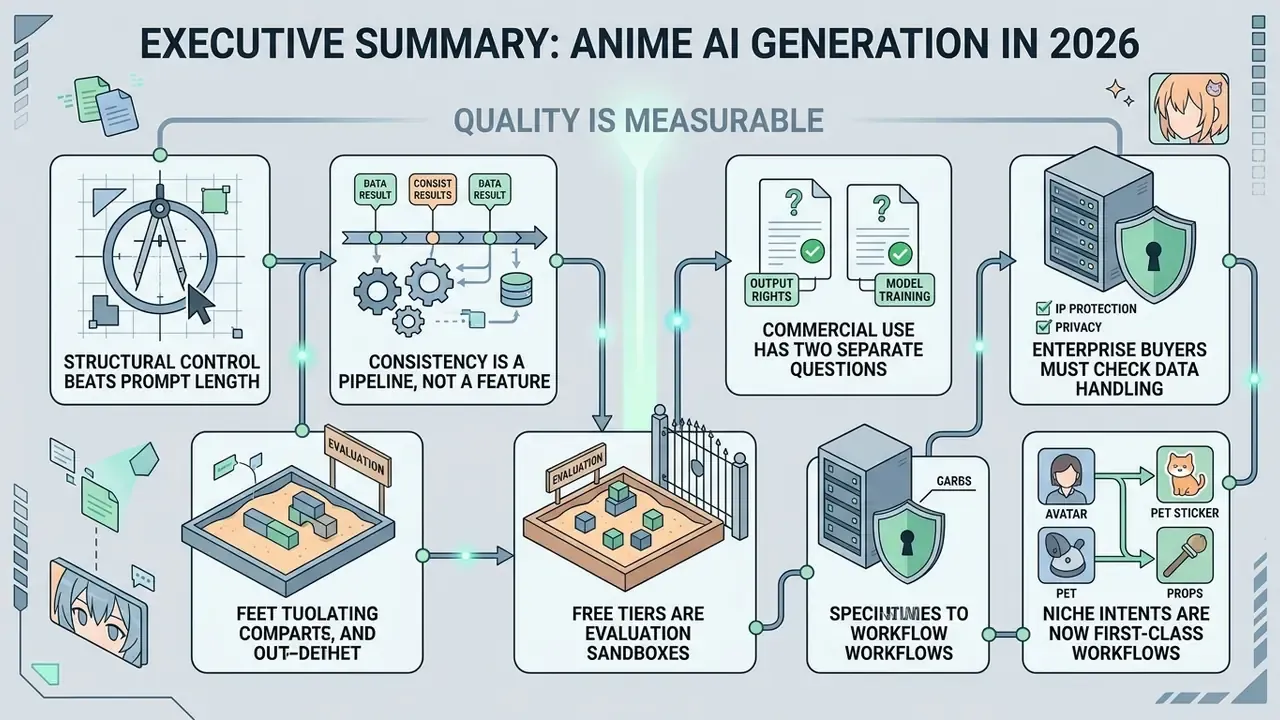
- Quality is measurable, not subjective. Compositional benchmarks (GenEval, DPG-Bench) and distribution metrics (FID, IS, FVD) separate capable anime backbones from basic web filters. FLUX-2 scores 0.854 on GenEval and 0.870 on DPG-Bench, well above SD3.5-Large (0.691).
- Structural control beats prompt length. ControlNet conditioning (Canny, Depth, Lineart, OpenPose), 3D pose editors, LoRA adapters, and reference images are what hold a character's identity stable across scenes. Longer text prompts do not.
- Consistency is a pipeline, not a feature. A dual-pass ControlNet plus LoRA workflow delivered 400 concept drafts at 88% character-consistency in an enterprise asset review, cutting iteration cycles by 60%.
- Free tiers are evaluation sandboxes. Expect 10 to 150 daily credits, 512×512 or 720p caps, watermarks, public community feeds, and in most cases no commercial rights.
- Commercial use has two separate questions. Whether you may sell the output (vendor licence, for example CreativeML Open RAIL-M or Adobe Firefly commercial builds) and whether you can own it (U.S. Copyright Office guidance excludes purely AI-generated output from registration without substantial human authorship).
- Enterprise buyers must check data handling. Data retention, model-training opt-outs, prompt logging, SOC 2 and ISO 27001 posture, plus IP indemnification decide whether a tool is deployable inside a governed organisation. Image quality alone decides nothing.
- Niche intents are now first-class workflows. Genshin-style OCs, Demon Slayer OCs, chibi stickers, fursonas, pixel-art sprites, pet-to-anime avatars, face swap, and script-to-video anime with AI voice are distinct pipelines with distinct settings.
Who this guide is for and how to read it
This guide serves two very different readers, and they need different things from the same comparison.
The first is an individual creator or small studio buying an ai anime art generator app for character work, fan art, channel assets or client illustration. For that reader, the decisive columns are style range, control depth, credit economy, and whether the licence permits selling the result.
The second is anyone who has to answer for the asset later: a brand team, an agency legal lead, or a governance function in a regulated organisation where every generated file eventually needs a provenance record. Same tools, different failure modes. Their questions are about retention, training opt-outs, reproducibility and indemnity.
Five questions to settle before you compare product names:
If you cannot answer question five, the rest of the evaluation is decorative. That is not a scare tactic, it is just what audits ask for first.
- What exactly must stay identical across images: a face, an outfit, a palette, or all three?
- Do you need pose control, or is text-only conditioning enough for your shots?
- Where does the asset get published, and does that channel demand disclosure of AI use?
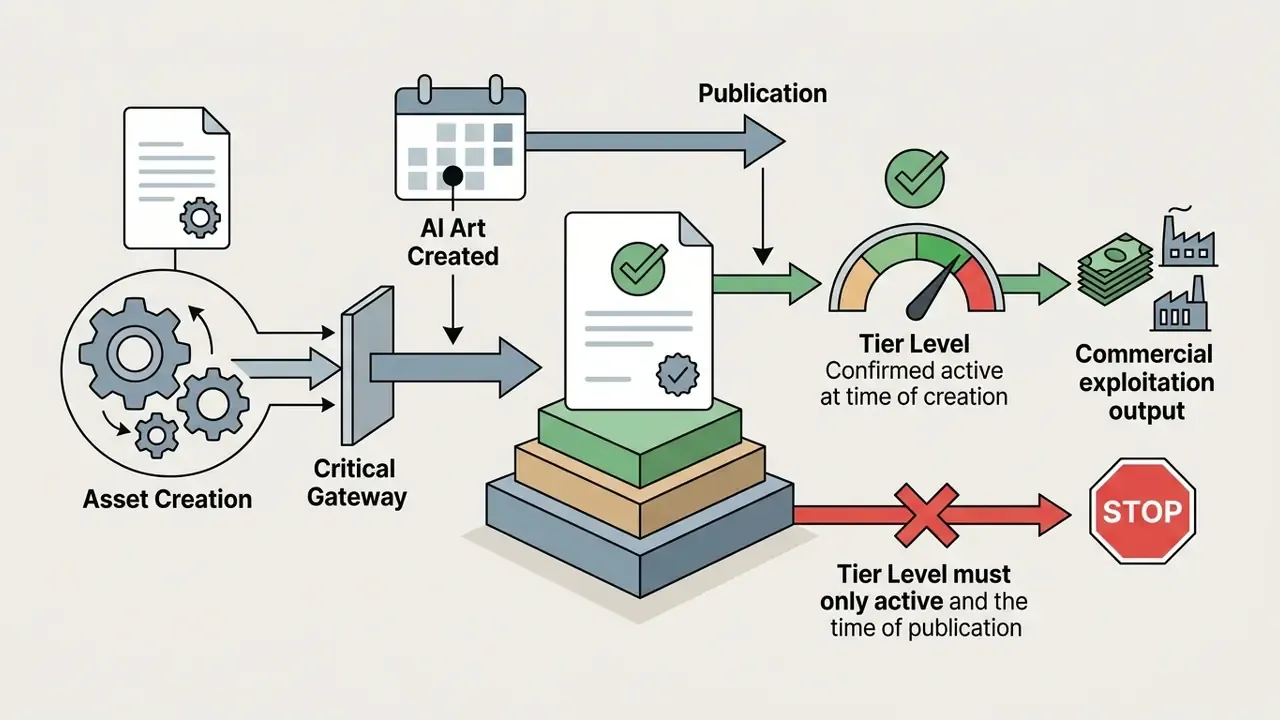
- Which licence tier is active at the moment of generation, not at the moment of publication?
- Can you reproduce any published image six months later from a stored seed and prompt?
What makes the best anime AI art generator for your project
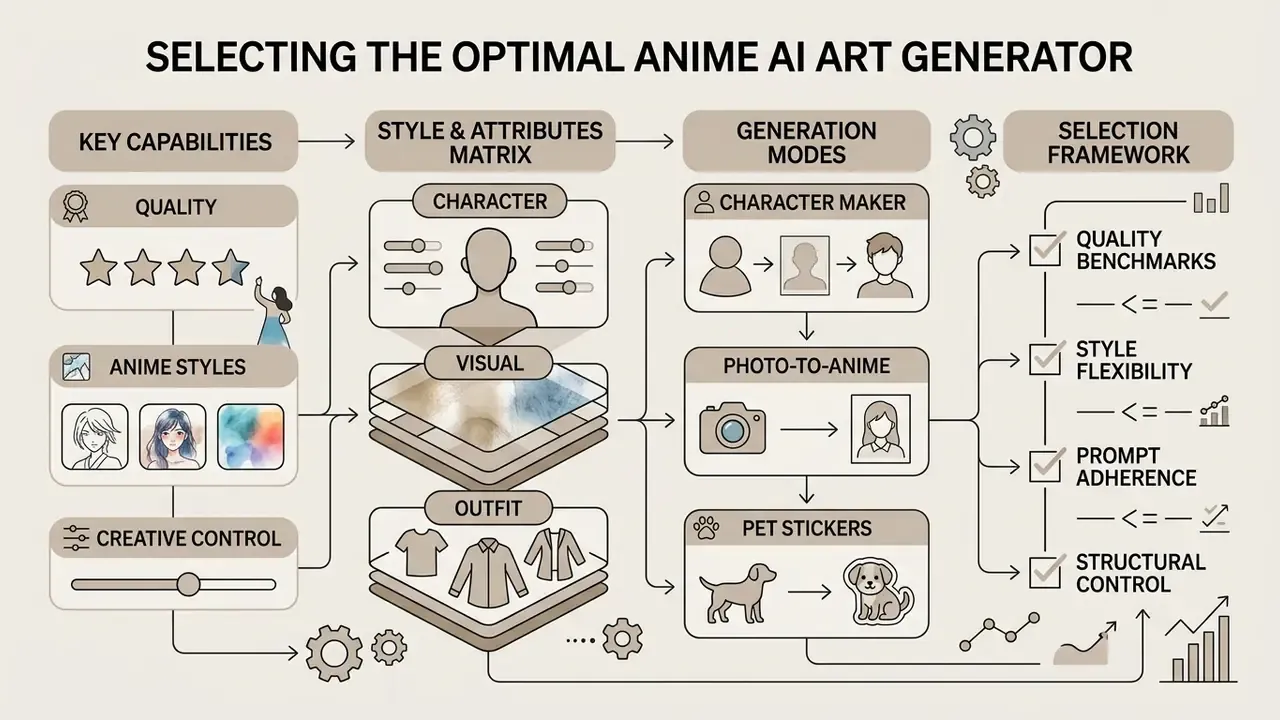
The best anime AI art generator is defined by its ability to maintain structural character consistency while offering fine-grained control over anime aesthetics. Strong platforms combine a high-capacity text-to-image diffusion model with conditional control layers, which lets users without formal artistic skills produce high quality anime visual assets.
To deliver consistent results, an ai anime generator app must balance prompt compliance with stylistic flexibility. Updated: standard benchmark frameworks, including GenEval, DPG-Bench, T2I-CompBench and emerging public AI evaluation protocols, treat prompt compliance as a primary measurable output. Structural adherence, in other words, dictates image quality directly.
"FLUX-2 reaches 0.854 on GenEval and 0.870 on DPG-Bench, outperforming SD3.5-Large (0.691) on compositional tasks."
Whether you are generating original character designs or rendering complex scenery, control over linework, shading, and background details separates production-grade tools from basic web filters.
Quality, anime styles and creative control
Quality anime art generation depends on four visual levers: linework, cel-shading, colour saturation, and surface texture. Systems built for ai tools for anime style image generation let creators specify sub-styles that range from clean ink line art and manga style rendering to vibrant anime key visual lighting and Studio Ghibli painterly aesthetics.
Fine-tuning aesthetic outputs requires steering latent feature representations through conditioning inputs or low-rank adaptation (LoRA) modules. Research on artistic style generation reports that conditional GAN architectures (C-GAN) and fine-tuned diffusion models produce lower Fréchet Inception Distance (FID) scores when controlled via explicit attribute vectors.
"USE-CMHSA-GAN, trained on an anime-face dataset, achieves substantially lower FID and higher Inception Score than DCGAN, VAE-GAN and WGAN baselines."
"Conditional GAN architectures (C-GAN) produce anime character images with lower FID and higher expert human ratings than baseline GAN and DCGAN models." GANime, research on anime and manga character generation (2025)
That level of control enables precise rendering of expressive eyes, costume folds, and signature hair colours without visual distortion. Cel-shading in particular is defined by hard shadow edges, a limited number of shading steps, and minimal gradients. Which is exactly why prompt tags such as flat cel shading and minimal gradients behave as structural instructions, not decorative adjectives.
Anime style and attribute matrix (character, visual, outfit)
Most consumer generators advertise "100+ anime styles". Those catalogues are really three orthogonal tag families: who the character is, how the image is rendered, and what the character wears. Combine one tag from each column and you have a reproducible style recipe rather than a lucky roll.
| Category | Tags / keywords | Practical settings |
|---|---|---|
| Character type | Catgirl, Chibi, Kawaii girl, Elf, Furry / fursona, Maid, Mecha pilot, VTuber avatar, Waifu, Chubby, DnD adventurer | Lineart ControlNet weight 0.70 to 0.80 |
| Visual style | Manga (monochrome screentone), Ink, Watercolour, Pixel art 16-bit, 3D cel-render, Realistic-anime hybrid, Dark fantasy, Cyberpunk, 90s retro anime, Key visual shading, Studio Ghibli painterly | Style anchor tags placed early in the prompt; base model FLUX-2, SDXL or an anime-tuned checkpoint |
| Outfit | Academy uniform, Gothic lolita, Cyberpunk techwear, Ceremonial armour, Miniskirt, Office wear, Shorts, Stockings, Mecha suit, Haori / kimono, Swimwear | Prompt weight 1.1 to 1.3 on garment tags to prevent outfit drift |
| Lighting and camera | Dramatic rim light, golden hour, volumetric rays, rainy neon night, low-angle hero shot, wide-angle establishing shot | Fixed seed plus identical lighting tags across a batch |
| Mood / genre | Shōnen action, shōjo romance, slice of life, horror, isekai fantasy, lo-fi vibe | Combine with negative prompts to suppress style bleed |
Repeating identical descriptors and reusing seeds or LoRAs across a batch is the documented method for holding a style stable over dozens of generations. Unglamorous, and it works.
Generation modes that expand anime creation
Modern anime image creation tools support several workflows beyond basic text-to-image synthesis. Core functional modes include photo-to-anime transformation, sketch-to-anime rendering, pose-to-image generation, face swapping, and reference-image guided character creation.
By applying latent space transformation algorithms, such as Color Canny ControlNet or AnimeGAN-family architectures, creators can turn real-world portraits or rough graffiti drafts into stylized anime artwork.
"Real Time Animator combines InST, IPT and DCT-Net, outperforming AdaAttN on style-transfer accuracy and content preservation."
For dynamic media projects, composite image-to-video pipelines use initial anchor frames to generate temporal sequences, expanding static concept art into short animation clips. Published anime video pipelines typically generate an initial 16-frame block from text, an anchor image, or both, score it with FID and FVD, then refine and extend it through a streaming text-to-video stage.
Choosing an AI Anime Generator
Checklist0 / 10
How to choose an AI anime generator: key features to compare
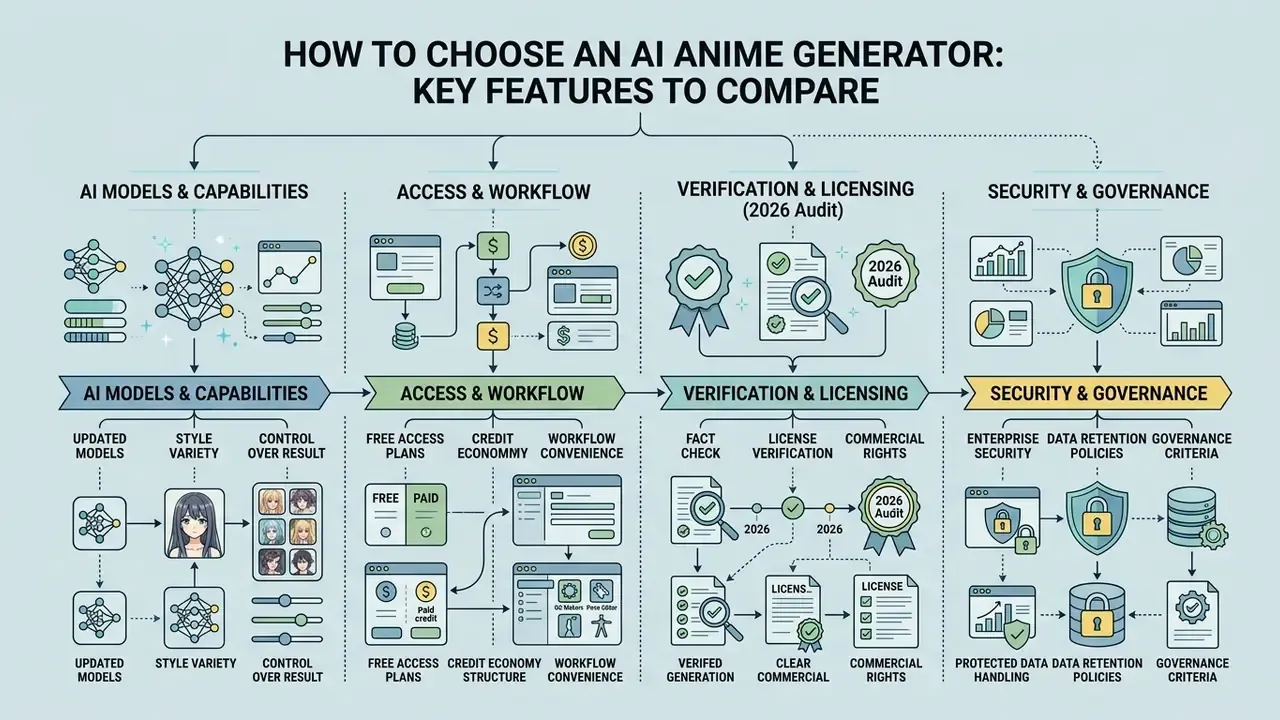
Choosing an ai picture generator anime platform means evaluating model architecture, prompt compliance scores, credit economy structures, and data-handling terms before you start comparing product names. Objective evaluation relies on standardized metrics rather than interface marketing claims.
A defensible comparison protocol fixes the prompt set, the number of outputs per prompt, the resolution, the sampler and step count, and the hardware tier. Only then do you record: model identity, seconds per image, available editor controls (inpainting, outpainting, image-to-image, prompt editing), credits consumed per finished asset, and credits consumed per refinement pass. Normalising cost as credits per finished image and credits per edit pass stops batch-size differences from distorting apparent price.
Cross-model comparisons show that high-capacity diffusion transformers consistently outperform legacy architectures on compositional metrics like GenEval and DPG-Bench. When choosing an engine, verify whether the platform supports direct conditioning inputs or relies solely on basic prompt processing. If a vendor cannot answer that question in one sentence, treat the omission as an answer.
"GenEval 2 records up to 17.7% absolute error between automatic scores and human judgement for current models, indicating benchmark saturation."
Benchmark drift matters commercially. A vendor can advertise a leading GenEval figure while human reviewers still reject a meaningful share of outputs. Treat published scores as a shortlist filter, then run your own prompt battery. Ten prompts, fixed settings, one afternoon.
Performance of base diffusion backbones on compositional benchmarks
| Base model | GenEval (overall) | DPG-Bench | Notable sub-scores | Practical read for anime work |
|---|---|---|---|---|
| Lumina-DiMOO | 0.88 | n/a | Single object 1.00; two objects 0.94 | Strongest reported multi-subject binding; useful for two-character scenes |
| FLUX-2 | 0.854 | 0.870 | Leads compositional tasks in DiffusionBench | Reliable for complex outfits plus background depth |
| GPT-4o (image) | 0.84 | n/a | Strong instruction following | Good prompt obedience, weaker anime-native styling |
| FLUX.1 | 0.82 | n/a | n/a | Solid general backbone; anime styling via LoRA |
| Janus-Pro | 0.80 | n/a | n/a | Mid-tier compositional control |
| SD3.5-Large | 0.691 | n/a | Compositional gap vs FLUX-2 | Usable, but attribute bleeding rises in crowded scenes |
| UAE (unified model) | n/a | Entity 91.43 / Attribute 91.49 / Relation 92.07 | Top DPG-Bench category scores | Best documented spatial and attribute adherence |
| SD v1.5 (legacy) | n/a | n/a | Concept accuracy 40.5 / 52.9 / 37.6 (T2I-FactualBench) | Largest anime LoRA and ControlNet ecosystem, weakest factual precision |
"Lumina-DiMOO reaches 0.88 on GenEval, above FLUX.1 (0.82), Janus-Pro (0.80) and GPT-4o (0.84), with single-object accuracy 1.0."
Two caveats on that table. Scores move between releases, and none of these numbers were produced on anime-specific prompt sets, so read them as evidence of compositional discipline rather than of style fidelity.
AI models, styles and control over the result
The underlying AI model directly determines pose accuracy, line art sharpness, and prompt adherence. Modern backbones, including FLUX-2, Qwen-Image, and Lumina-DiMOO, demonstrate stronger spatial reasoning and colour attribute binding than older SD v1.5 baselines.
DiffusionBench evaluations confirm that models scoring above 0.84 on GenEval retain fine-grained control over complex prompts, such as binding specific hair and eye colours to two distinct characters in a single frame. The presence of ControlNet adapters, depth conditioning, 3D pose editors, and custom LoRA support gives you the control needed to produce unique anime artwork.
Pose-conditioned research supports this. Diffusion models with explicit skeleton guidance report stronger pose accuracy than prompt-only baselines, and diffusion-prior pose estimators reach 81.3 AP on COCO validation and 71.2 AP on HumanArt, the stylized out-of-distribution set that most resembles anime source material.
For broader context on how these engines compare beyond anime, see the analysis of model backbones and commercial licensing across general-purpose generators, the roundup of best ai image generation tools 2025, and the practical review of which is the best ai for general image generation once anime is not your only requirement.
Free access, credits and workflow convenience
Free tier structures vary from daily credit refreshes to trial-based allocation models. Evaluating an anime ai art free platform involves measuring generation latency, queue priority, and watermark policy. Free tiers also frequently place users in a low-priority or shared queue, where waits stretch from roughly 30 seconds to several minutes during peak traffic. That is a material factor when you need 50 variations rather than one.
| Generator platform | Daily free credits | Resolution caps | Watermark status | Commercial usage terms |
|---|---|---|---|---|
| Adobe Firefly | Varies by account tier | Full resolution | Removed on current builds (historically applied on free downloads) | Permitted on commercially released builds |
| AnimeGenius | ~10 free images/day | 512×512 / standard | Clean | Paid subscribers only |
| SeaArt | 150 daily credits | Standard GPU tier | No watermark | Plan-dependent commercial terms |
| Getimg.ai | 100 monthly credits | Plan-dependent | Clean on paid tiers | Paid plans include commercial rights |
| PixAI | Daily credit tasks and community rewards | Plan-dependent | Clean | Personal and most commercial uses permitted |
| Pixlr AI | 250 credits (7-day trial) | Export limits apply | Clean on export | Permitted during valid trial |
| Manus AI | Free daily credits for new users | Plan-dependent | Clean | Commercial use depends on plan tier |
| Monica AI | Free tier with daily limits | 10 MB upload cap (JPG/JPEG/PNG) | Advertised as no watermark | Plan-dependent; verify tier terms |
| Elser AI | Free tier with credit allocation | Plan-dependent | Watermark on some free outputs | Commercial use tied to paid subscription |
If you specifically want to skip account creation, compare free AI generator plans with no sign-up and the wider field of free AI image generators by output quality and limits. To model credit burn against a monthly asset target before committing, see the overview of cost calculators.
Fact Check and License Verification (2026 Audit):
This information is general in nature and does not replace advice from a qualified professional.
Enterprise security, data retention and governance criteria
Image quality is the easy half of a procurement decision. For regulated teams, the blocking questions are about data flow, auditability, and indemnity.
| Governance criterion | What to verify | Why it blocks deployment |
|---|---|---|
| Training on user data | Explicit opt-out or a contractual "we do not train on customer inputs" clause | Uploaded reference art or unreleased character IP can leak into future model behaviour |
| Data retention window | Zero-retention option, or a defined deletion SLA for prompts and uploads | Prompts often contain campaign names, release dates, or client identifiers |
| Prompt and asset logging | Exportable generation history: prompt, seed, model version, ControlNet inputs, timestamp | Without seed and prompt logs an output cannot be reproduced or defended in an audit |
| Certifications | SOC 2 Type II, ISO 27001, regional hosting options, encryption at rest and in transit | Standard vendor-risk gate for enterprise and financial-sector reviews |
| IP indemnification | Written commitment to cover third-party IP claims arising from generated output | Determines who absorbs legal cost if a training-data claim is filed |
| Access control | SSO/SAML, role separation, per-seat usage caps | Prevents shadow AI usage outside sanctioned workflows |
| Community visibility | Whether free-tier generations are published to a public feed by default | Public feeds expose pre-launch character designs |
A practical control is a Model Risk Ledger entry per published asset: tool name, model version, seed, full prompt stack, ControlNet and LoRA references, licence tier active at generation time, plus the name of the human who edited the output. One record answers the reproducibility, licensing, and human-authorship questions at the same time. Teams that add this after the first legal query always say the same thing: it should have been there from image one.
If you plan to automate generation at scale rather than click through a web editor, compare options for programmatic access, since logging discipline is far easier to enforce at the API layer than in a browser tab.
Best AI anime generators compared by use case
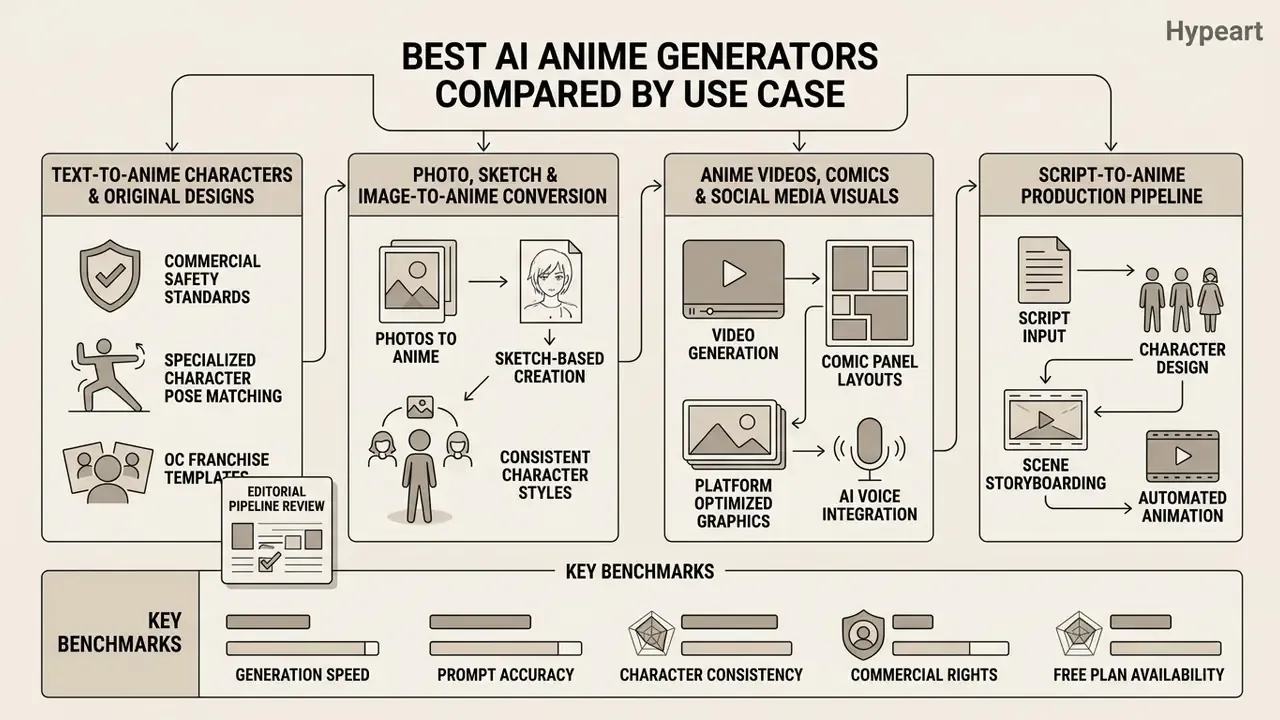
Selecting the optimal anime ai generator app depends on whether your workflow prioritizes general commercial safety, specialized character pose matching, OC franchise templates, or automated multi-panel layout generation. Platforms differ significantly across model backbones, control interface design, and commercial licensing.
Commercial production workflows require evaluating these ai tools for anime creation against explicit operational constraints. Adobe Firefly emphasizes commercially safe training datasets and enterprise rights, whereas specialized systems like AnimeGenius focus on deep pose manipulation and anime-specific checkpoints.
| Tool | Text-to-anime | Photo-to-anime | Reference image / structural control | Key styles | Character consistency | Video output | Free access | Data handling to verify | Commercial terms |
|---|---|---|---|---|---|---|---|---|---|
| Adobe Firefly | Yes | Yes | Yes (style and structure reference) | Anime, vector, concept art | High (via reference) | Yes (T2V and I2V, up to 1080p) | Yes (free Adobe account) | Enterprise agreements available; check training-data and retention clauses | Commercial use allowed on commercially released builds |
| AnimeGenius | Yes | Yes | Yes (7 image-to-image modes, 3D pose-to-image, face swap) | Manga, cel-shaded, fantasy, 100+ style tags | Medium-High | Image-to-video | Yes (up to 10 daily images) | Community feed visibility; verify retention | Subscribers only; CreativeML Open RAIL-M compliance |
| SeaArt | Yes | Yes | Yes (ControlNet / LoRA / checkpoints) | Chibi, cyberpunk, Ghibli | High | Yes | Yes (150 daily credits) | Free-tier outputs may be community-visible | Commercial rights tied to paid plan tiers |
| Getimg.ai | Yes | Yes | Yes | Custom anime, SDXL | High | No | Yes (100 monthly credits) | Verify workspace privacy settings | Paid plans include commercial rights |
| PixAI | Yes | Yes | Yes (large LoRA library) | Fan art, OC styles | High | No | Yes (daily credit tasks) | Publishing earns credits, so check default visibility | Personal and most commercial uses permitted |
| Pixlr | Yes | Yes | Yes | Anime filter, line art | Medium | No | Yes (250 trial credits) | Standard editor storage terms | Commercial usage allowed under trial terms |
| Manus AI | Yes | Yes | Yes (Design View element-level editing) | Ghibli, cyberpunk anime, shōnen, shōjo | Medium-High (iterative Design View passes) | No (image focus) | Free daily credits | Account required to save history | Commercial use depends on selected plan |
| Monica AI | Yes | Yes (portrait, animal, scenery) | Upload-driven (JPG/JPEG/PNG, 10 MB cap) | Portrait anime, pet stickers, scenery anime | Medium | Yes (separate video generator) | Yes (free tier, daily limits) | Creations stored in account after sign-up | Plan-dependent commercial terms |
| Elser AI | Yes | Yes | Template-driven (OC makers, motion control) | Franchise OC templates, chibi, pixel art, Ghibli filter, manga | Medium (character reference reuse) | Yes (script-to-video, lip sync, motion control) | Free tier with credits | Verify template and IP terms | Commercial use tied to paid plans; fanart of third-party IP remains restricted |
Two adjacent names appear in most roundups and deserve a note rather than a row: Fotor and Pixelbin both ship anime filters and batch tooling, but their tier wording shifted through 2025, so read the current licence text at checkout instead of trusting a review summary. Same advice applies to any tool whose pricing page changed in the last quarter.
Tools for text-to-anime characters and original designs
Dedicated platforms for original character creation rely on tag-driven prompt parsing and attribute locking to generate custom anime avatars. With specialized ai image generation tools for anime characters, creators can establish original characters (OCs) with consistent costumes, expressions, and physical proportions. NovelAI's own documentation formalises this: consistent-character prompts begin with subject tags such as 1girl, 1boy, 1other, or 2girls, then repeat attribute tags to stabilise identity.
Internal case (editorial pipeline review). During an enterprise asset pipeline review, a digital design team needed 400 consistent character concept drafts within two weeks. By running a dual-pass ControlNet workflow paired with custom LoRA adapters, the team locked structural outlines and achieved an 88% character-consistency score across scene variations, cutting iteration cycles by 60%. Consistency was scored as cosine similarity between generated character features and a stored reference embedding, the same measurement approach used in recent anime video-generation research. This case is illustrative and internal, not an audited industry benchmark.
"Instance-level loss functions improve object-count accuracy, spatial precision and attribute consistency in complex multi-character scenes."
Academic work supports the LoRA route as well. LoRA-based identity methods report consistent character generation from a single prompt across varied settings, and consistency-focused papers ("The Chosen One", "Consistent Characters in Text-to-Image") report improved identity and style retention over untuned baselines.
Tools built on tag-driven frameworks let you isolate specific traits, such as silver hair, twin tails, or ceremonial armour, across varied camera angles. That is also what separates a decent tool from the best ai anime character generator for your project: not the style list, but whether traits survive a change of camera. To compare top-tier text-to-image backbones across standard benchmarks, view the guide on performance metrics.
Tools for photo, sketch and image-to-anime conversion
Transforming existing photos or sketches into high-quality anime style image outputs requires algorithms that preserve input geometry while shifting visual textures. Advanced ai image generation tools for anime style use depth maps and edge detection to hold facial proportions and background composition in place. For a deeper breakdown of image-to-image generation for anime style, compare conversion engines by identity retention rather than by filter count.
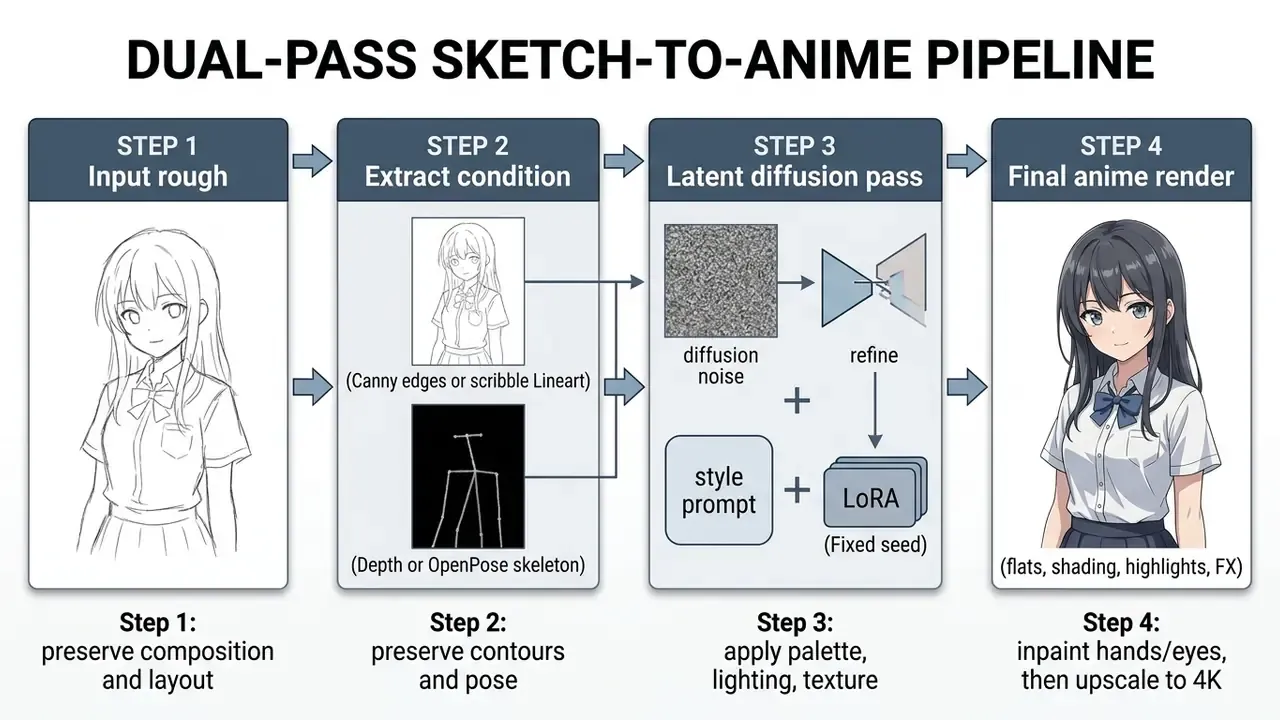
In sketch-to-image pipelines, models map hand-drawn line art directly into latent space, filling in cel-shading and key lighting according to text prompts. This converts rough conceptual drawings into finished quality anime art without losing the underlying pose or scene balance. Recent research reinforces the method mix: NijiGAN uses pseudo-paired data with semantic-segmentation filtering for real-to-anime translation, ACCV 2024 work adds augmented stylistic modules and prior-knowledge integration for photo animation, CartoonizeDiff layers Color Canny ControlNet and Reflect ControlNet onto a pretrained latent diffusion model, and ColorizeDiffusion (WACV 2025) targets reference-based sketch colorization specifically for anime output.
When the conversion is nearly right but not quite, an editor beats a re-roll. Compare the best ai image editors for masked retouching before you spend another 20 credits regenerating the whole frame.
Tools for anime videos, comics, voice and social media visuals
Creating dynamic content for digital distribution needs tools that handle multi-panel storyboarding and frame-to-frame temporal stability. Specialized ai video models and comic generators format raw images into structured panels or sequential clips.
Frameworks like AIdeaLab's AnimeGen (text-to-video and image-to-video variants, released under Apache-2.0) and Adobe Firefly Video generate short animated sequences from single anchor frames or text prompts, with Firefly exporting MP4 up to 1080p.
"An improved motion model built on AnimateDiff achieves lower Fréchet Video Distance than AnimateDiff and AnimateLCM, producing smoother motion."
Meanwhile, layout tools automate panel placement and speech bubble formatting, so an ai comic generator can produce complete manga strips for social media marketing. Comic-strip generators can convert a selfie or a pet photo into a multi-panel anime comic with dialogue balloons while reusing one character reference across panels. An ai cartoon generator preset sits in the same family, just with softer linework and simpler shading.
The script-to-anime production pipeline
The strongest competitive workflows no longer stop at a still image. A full script-to-screen pipeline chains six stages, and each stage has its own failure mode:
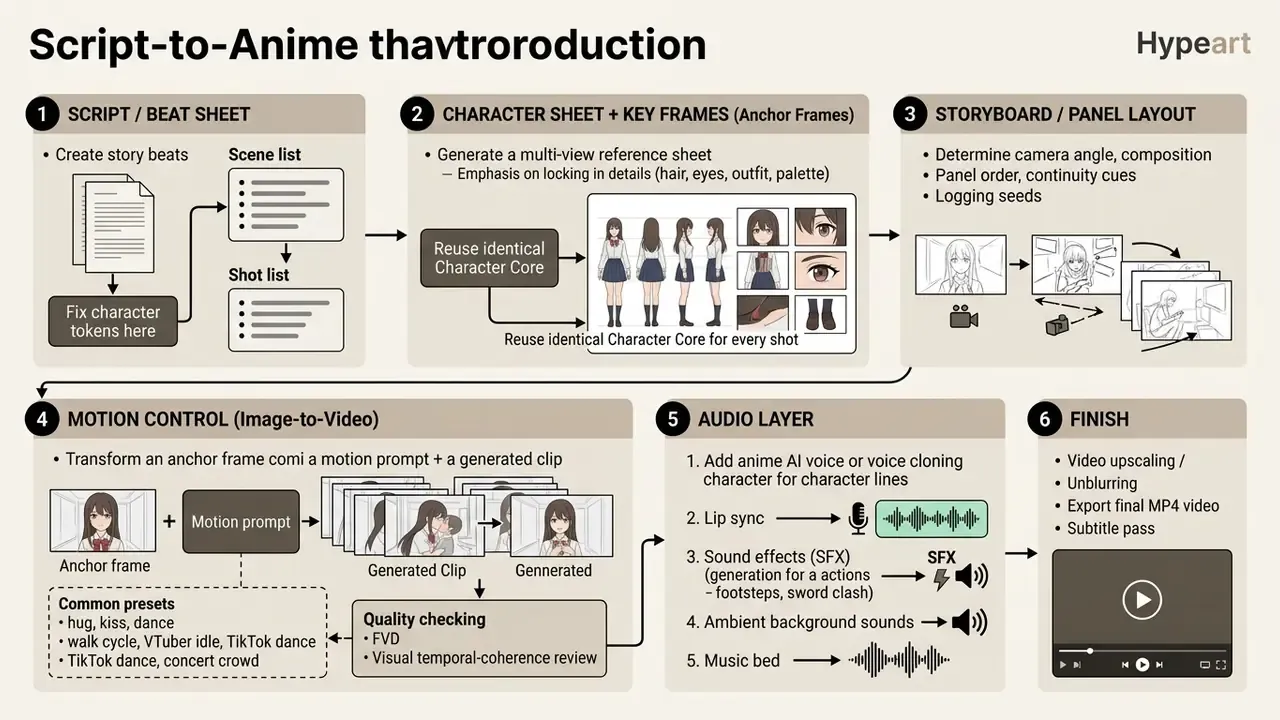
Motion control works by treating the generated key frame as an anchor and constraining movement to a named action. That is why "hug", "kiss" and "dance" presets produce more stable results than open-ended motion prompts: the action label narrows the temporal search space. On the audio side, character voice synthesis plus lip sync closes the loop from script to finished clip, and SFX generation fills the ambience layer that otherwise makes AI anime clips feel inert.
One warning on voice. Cloning a real performer's voice without written permission is a separate legal exposure from image rights, and it is not covered by any image licence.
To evaluate alternative commercial media engines, explore AI Media Alternatives for enterprise production, or compare AI video generators for animation projects by clip length, motion stability and licensing.
OC (original character) generators and franchise prompt templates
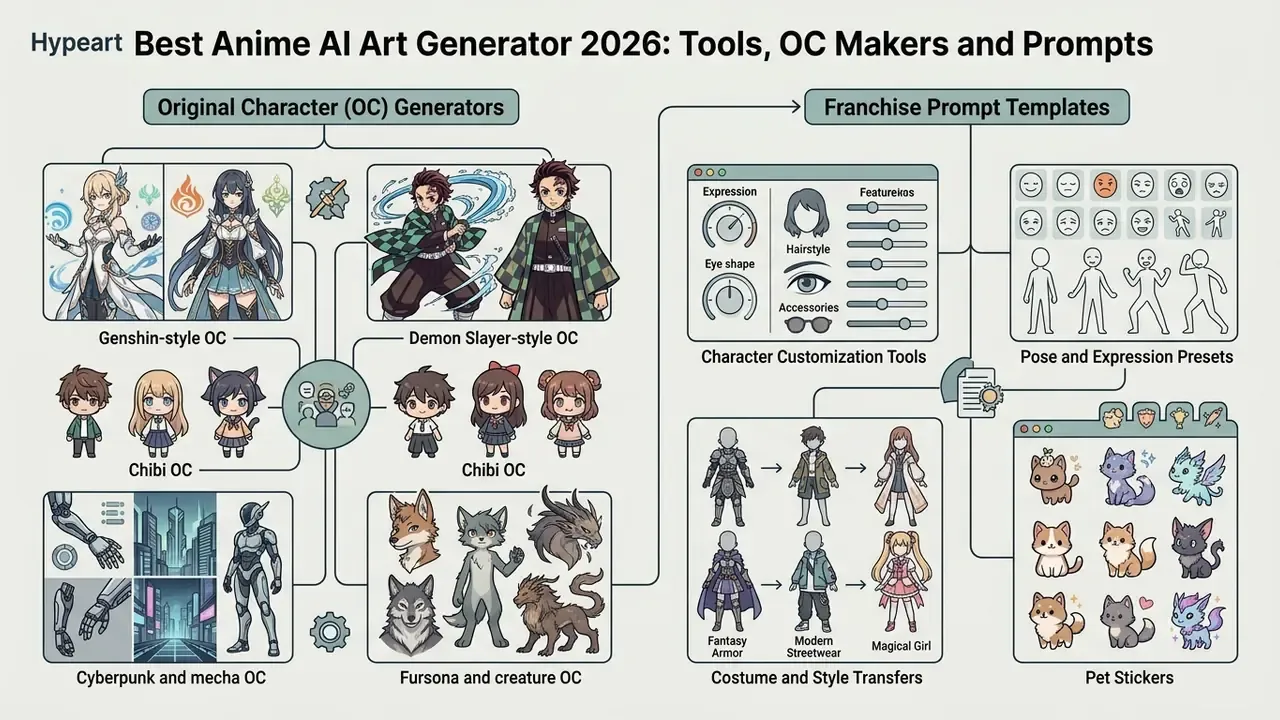
Original character creation is the single largest niche in anime AI search behaviour. "OC maker" traffic splits into franchise-flavoured sub-intents, each with a recognisable visual grammar. The productive approach is not a separate tool per franchise but a reusable tag skeleton per aesthetic.
Standardising these skeletons also serves governance. A shared, versioned prompt library makes outputs reproducible across a team, which is the prerequisite for auditing generated assets at all.
Genshin-style OC
[Character Core]: 1girl, solo, 19 years old, long teal hair with braided crown, amber eyes, pale skin
[Vision Element]: Anemo vision, glowing turquoise gem set in ornate gold frame at hip
[Region Aesthetic]: Liyue-inspired silk motifs, Inazuma lacquered accents
[Outfit Block]: layered ornamental armor over flowing silk robe, asymmetric skirt,
                gold filigree trim, thigh-high boots, floating ribbon sash
[Pose & Action]: mid-cast spell, wind swirl around feet, hand raised, cape lifting
[Environment]: mountain shrine at dusk, floating leaves, teyvat-style architecture
[Style Anchor]: gacha game key visual, clean line art, soft cel shading, high saturation
[Negative Prompt]: realistic skin texture, western cartoon, extra limbs, watermark, text
Demon Slayer-style OC
[Character Core]: 1boy, solo, 17 years old, black hair with crimson tips, slit pupils, scar across cheek
[Weapon Block]: nichirin blade, deep indigo blade glow, wrapped hilt
[Outfit Block]: Demon Slayer Corps uniform, black gakuran jacket, haori with geometric
                wave pattern in indigo and white, tabi boots
[Pose & Action]: sword drawn mid-slash, breathing-technique water effect, dynamic diagonal composition
[Environment]: misty bamboo forest at night, moonlight shafts, drifting embers
[Style Anchor]: taisho-era shonen anime, bold ink line art, dramatic rim light, high contrast
[Negative Prompt]: modern clothing, blurry, bad hands, deformed sword, text, watermark
Chibi OC and sticker sets
[Character Core]: chibi, 1girl, oversized head, tiny body, 2-head-tall proportions,
                  pink twin buns, huge sparkling eyes
[Outfit Block]: pastel hoodie, oversized sleeves, star hairpin
[Expression Set]: happy, crying, angry, sleepy, surprised (generate as batch)
[Style Anchor]: sticker illustration, flat colors, thick white outline, transparent background
[Negative Prompt]: realistic proportions, detailed background, shadows, text
Cyberpunk and mecha OC
[Character Core]: 1other, androgynous, 20s, undercut with neon-blue fringe, chrome ocular implant
[Outfit Block]: cyberpunk techwear, segmented exosuit plating, utility harness, LED piping
[Pose & Action]: crouched on rooftop edge, hand on holstered weapon, low-angle shot
[Environment]: rainy neon megacity, holographic signage, reflective puddles, distant skyscrapers
[Style Anchor]: 90s retro anime cel look, heavy film grain, saturated magenta and cyan lighting
[Negative Prompt]: daylight, pastel palette, chibi, extra fingers, watermark
Fursona and creature OC
[Character Core]: anthro wolf, 1other, silver-grey fur with black markings, heterochromia (gold/blue)
[Outfit Block]: bomber jacket, bandana, fingerless gloves
[Pose & Action]: three-quarter portrait, confident grin, arms crossed
[Style Anchor]: clean anime line art, flat cel shading, character reference sheet layout, front/side/back views
[Negative Prompt]: realistic animal photo, human face, distorted muzzle, text
Three rules make these templates reusable. First, the [Character Core] block never changes between shots. Second, describe franchise aesthetics through visual attributes (armour type, weapon, pattern, palette) rather than by naming copyrighted characters. Third, generate a multi-view reference sheet before any scene work, so later poses are validated against a fixed identity instead of against the last output.
"All open-source models score below 45% accuracy on reasoning prompts, underlining the need for structured instructions."
How to create anime art with AI from a text prompt
Getting high-quality results from an ai create image anime workflow means structuring text prompts into clear, hierarchical layers. Rather than typing unstructured sentences, good prompt engineering separates subject parameters, environmental context, and artistic style modifiers. Vendor guidance converges on the same order: subject first, then context and background, then style, then iterate by adding detail.
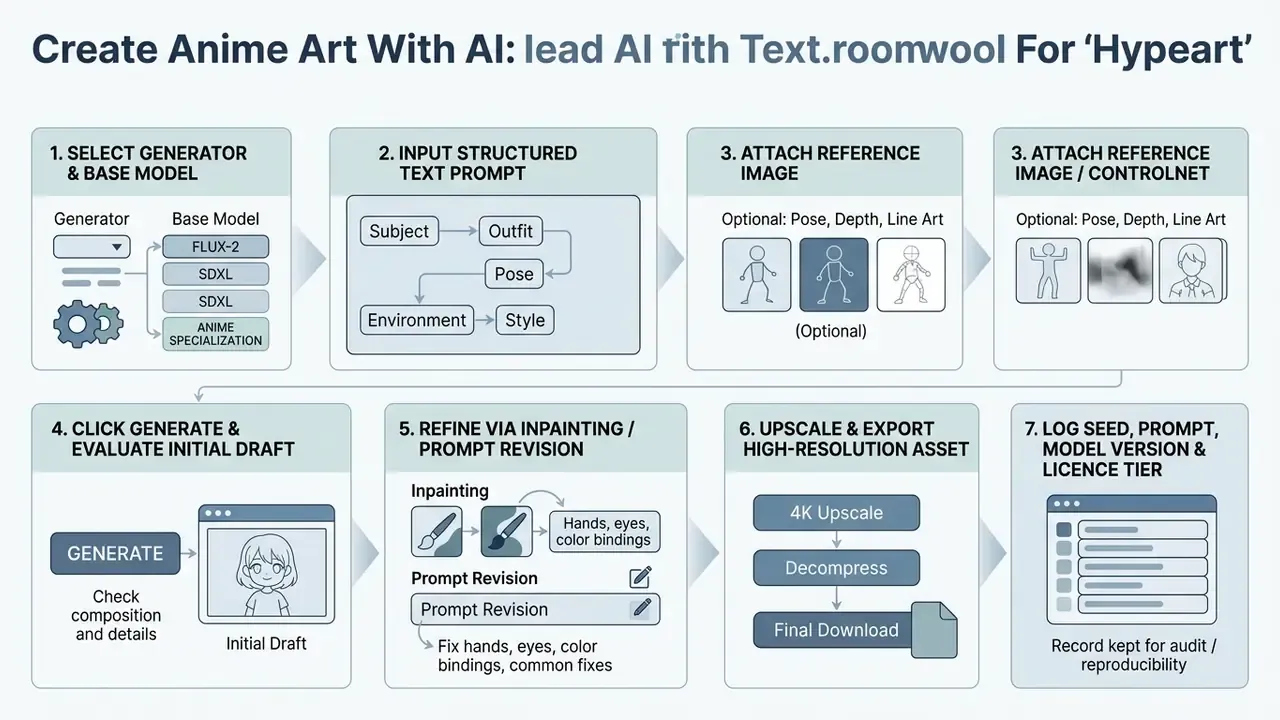
Describe an anime character, scene and visual style
To create anime art predictably, order descriptors by importance. Begin with explicit subject tags (1girl, solo, mecha pilot), then physical attributes, outfit specifications, action poses, lighting conditions, and aesthetic anchors. Identity blocks work better when they are concrete: "a calm silver-haired swordswoman in her twenties" outperforms "a girl", because every named attribute becomes a conditioning signal.
Effective prompt construction avoids vague words like "stunning" or "hyperrealistic". Use concrete technical tags instead: cel shading, clean line art, key visual, dramatic rim lighting, manga style illustration. Then click generate, read what actually came back, and change one layer at a time.
"The PARM chain-of-thought strategy improves the Show-o baseline by 24% on GenEval, surpassing Stable Diffusion 3 by 15%."
Layered prompting is therefore not a stylistic preference, it measurably raises compositional accuracy. For specialized headshot character workflows, see the overview of portrait AI generators for characters, and for realistic professional portraits rather than stylized ones, the best ai headshot comparison covers a different quality bar entirely.
Generate, refine and save anime artwork
Once the first image lands, iterative post-processing gets it to production standard. Use inpainting masks to correct localized anatomical artifacts, such as hand geometry or eye symmetry, without regenerating the whole canvas. Inpainting is formally defined as filling missing or damaged regions so that textures, colours and patterns blend with the surrounding area, which is exactly why a tight mask beats a full re-roll.
"FiMR improves GenEval and T2I-CompBench scores through multi-step iterative corrections, achieving first-pass rates above 80% in several categories."
After fixing local errors, pass the asset through an AI upscaler for higher resolution, such as Real-ESRGAN or a creative upscale service, to expand resolution to 4K while removing JPEG compression noise. Documented upscale services offer 2x to 40x enlargement to 4K with input limits from 64×64 up to roughly one megapixel, optional face correction, and a separate decompress operation for JPEG artifacts. Keep artifact removal and upscaling as distinct passes: upscaling a compressed source amplifies the very noise you wanted gone. For detailed image editing tool comparisons, review the best ai image editing tools 2025 analysis.
How to turn photos and sketches into anime style images
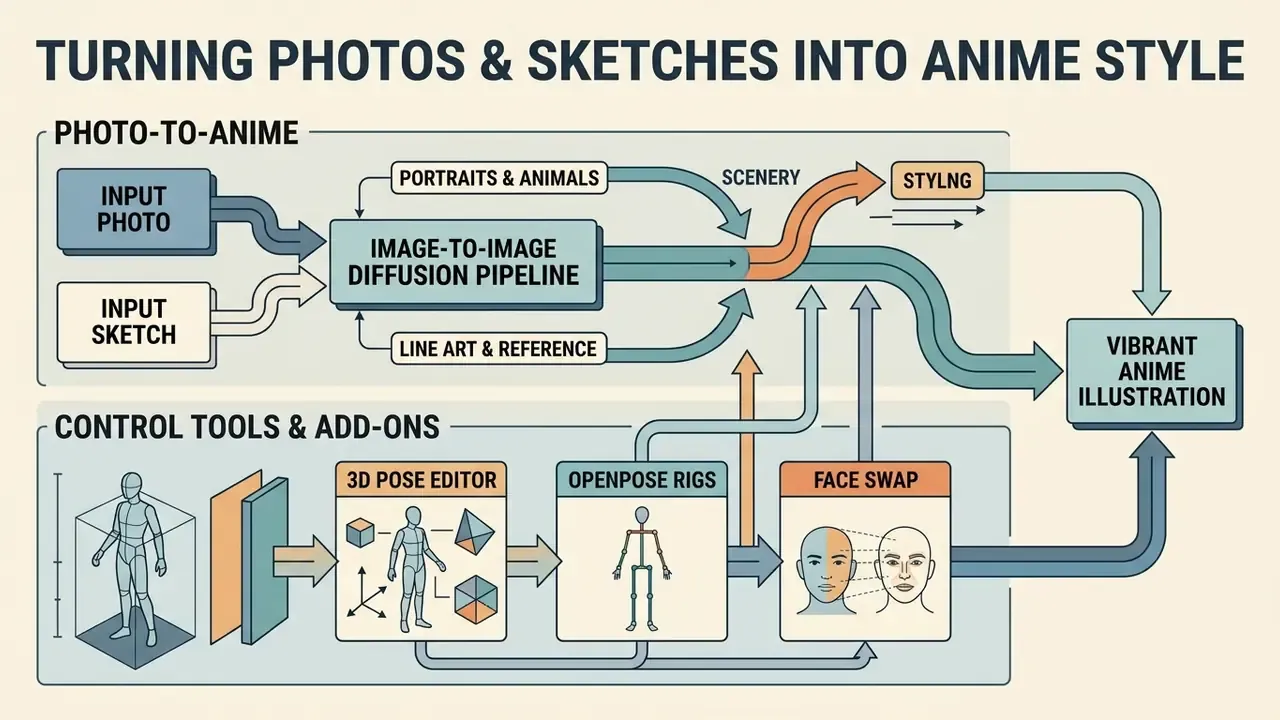
Converting real-world photography or raw drafts into vibrant anime illustrations relies on image-to-image diffusion pipelines. The process preserves the source image's geometry while shifting visual characteristics toward stylized anime aesthetics.
With an ai image generator anime style engine, creators translate portraits, pet photos, and urban landscapes into hand-drawn style visuals. The image strength or denoising parameter dictates how closely the output adheres to the original source. Get that single slider wrong and nothing else in the prompt saves the image.
Photo-to-anime for portraits, animals and scenery
Converting portrait photos into anime avatars requires locking facial landmark geometry while replacing skin textures, hair strands, and lighting. Moderate denoising strength (0.4 to 0.6) lets the model shift visual style without distorting subject identity.
"Real Time Animator experiments on a landscape and architecture dataset show superiority over AdaAttN in style-transfer accuracy and content preservation."
Feature-preserving style transfer research is explicit about the mechanism: the method is designed to retain hair, eye and mouth detail while changing style. That is why identity survives a style shift at moderate denoising but collapses above roughly 0.7.
For landscapes and architecture, match the output aspect ratio precisely to the source frame. This prevents cropping of key structural elements and keeps perspective lines true to the original photograph. Scenery conversion has its own commercial value: coastal views, mountain vistas and urban skylines convert cleanly into wallpaper-grade anime scenes and channel art. Coherent portrait-to-anime video work adds frame interpolation plus latent-code smoothing when the source is a clip rather than a still.
Sketch, line art and reference image workflows
Rough sketches and line drawings act as structural boundaries when paired with ControlNet conditioning modules. Applying a ControlNet Lineart or Canny edge detector forces the generative engine to paint inside the hand-drawn contours. ControlNet documentation separates the modes clearly: depth preserves scene layout using the full 512×512 depth map, canny preserves edges and outlines, lineart / anime lineart is trained specifically on line drawings, and scribble/sketch is tuned for rough hand-drawn input.
3D pose editors, OpenPose rigs and face swap
Prompt text is a weak instrument for complex anatomy. Interactive 3D pose editors solve that directly: you place a posable mannequin in the viewport, manipulate the skeletal rig (an OpenPose-style bone manipulator), and the resulting skeleton becomes the conditioning map. This bypasses prompt limitations for dynamic battle scenes, weapon stances, multi-character interactions, and foreshortened camera angles that text alone rarely reproduces.
A practical pose-to-image sequence looks like this:
Face swap works on a different axis. You upload a facial photograph and the engine transfers facial identity onto an existing anime render. It is the fastest route to a personalised avatar, and it is also the highest-risk feature from a rights perspective. A face is personal data, and swapping a third party's likeness without consent creates exposure independent of any AI licence. Restrict face swap to your own likeness or to subjects with documented, written permission.
To analyze specialized platforms with looser content policies, the guide to best ai image generators without restrictions provides additional architectural insight, along with the moderation trade-offs that come with it.
3D pose editors, OpenPose rigs and face swap
Option 1
Load or drag a 3D model into the pose editor and set the camera angle.
Option 2
Adjust limbs, spine rotation and hand orientation until the silhouette reads correctly at thumbnail size.
Option 3
Export the pose as an OpenPose skeleton map at the target resolution.
Option 4
Enter the character and style prompt, attach the skeleton as the ControlNet input, and set control weight around 0.8 to 1.0 for strict adherence.
Option 5
Generate a batch with a fixed seed, then vary only the outfit or environment layer.
Pet and animal-to-anime workflows
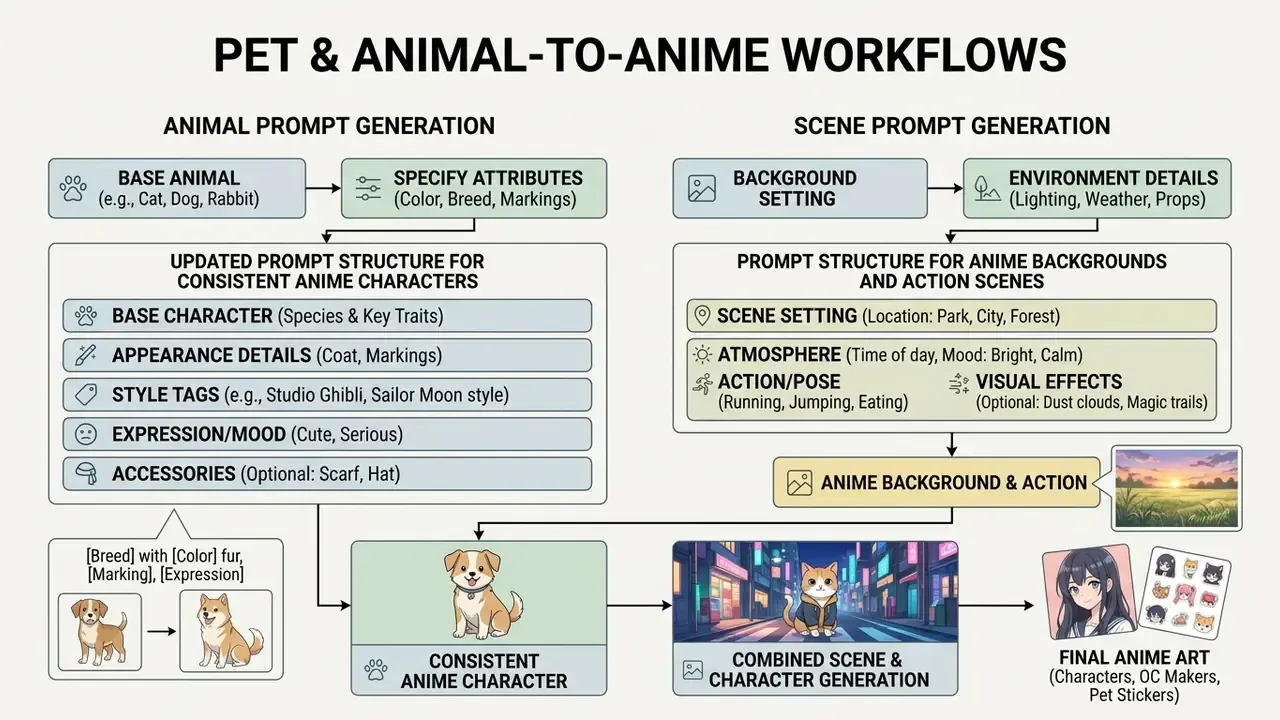
Turning a pet photo into an anime character is a distinct pipeline, not a portrait preset. The optimisation target changes: humans are judged on facial geometry, animals on markings, muzzle shape, ear set and coat pattern. Get those wrong and the owner says "that isn't my dog", no matter how pretty the render is.
Step-by-step pet-to-anime process:
- Sticker set:
chibi pet avatar, vibrant anime eyes, soft shading, thick sticker outline, transparent background - Portrait illustration:
anime pet portrait, clean line art, cel shading, warm rim light, blurred garden background - Anthro character:
anthro version of this pet, standing, wearing casual jacket, character reference sheet
- Choose the source frame.Use a well-lit, eye-level photo where both eyes and the full muzzle are visible. Avoid extreme wide-angle phone shots, which distort snout length. Typical upload limits sit around 10 MB for JPG/JPEG/PNG.
- Match the aspect ratioto the source so the animal's body proportions are neither cropped nor stretched.
- Set denoising strength to 0.45 to 0.55.Below 0.4 the output stays photographic; above 0.6 markings drift and breed identity dissolves.
- Describe the animal factually before styling itbreed, coat colour, marking placement, eye colour, ear shape, collar.
tabby cat, orange coat with white chest blaze, green eyes, folded left earbeatscute catevery time. - Add style modifiersfor the intended output format:
- Generate an expression batchwith a fixed seed: happy, sleepy, grumpy, surprised, begging. That is what turns one image into a usable sticker pack.
- Inpaint the failure points.Eyes, whiskers, paw geometry and marking edges are where pet conversions break first.
- Upscale and exportwith a transparent-background PNG for stickers, or a 4K flatten for print gifts.
Commercially, this workflow feeds personalised gifts, pet-brand social content, channel mascots and messenger sticker packs. The same settings extend to scenery and multi-pet group portraits, where matching the source framing matters even more, because the model has more composition to preserve.
Prompt formulas for better anime characters and scenes
"All open-source models score below 45% accuracy on reasoning prompts, underlining the need for structured instructions."
Prompt structure for consistent anime characters
To hold visual identity across many generations, build a reusable "character core block" of permanent physical descriptors. Append scene-specific action tags and negative constraints around that fixed core.
[Character Core]: 1girl, solo, 20 years old, silver hair in twin tails, sharp blue eyes, red ribbon hairpin
[Outfit Block]: wearing dark navy academy uniform, white collar, pleated skirt
[Pose & Action Block]: standing confidently, mid-action, hand on sword hilt, dynamic angle
[Environment Block]: ruined stone temple, golden hour lighting, cherry blossom petals falling
[Style Anchor]: key visual, clean line art, cel shading, highly detailed anime illustration
[Negative Prompt]: bad anatomy, extra limbs, blurry, realistic skin texture, 3d render, watermark, text
Reusing the identical [Character Core] block across runs keeps hair colour, eye shape, and signature features stable against changing backgrounds. For drift-prone runs, extend the negative prompt with identity-specific exclusions: different hair color, different eye color, different outfit, deformed, lowres, bad hands.
An alternative tag ordering, used widely in anime checkpoints, is: [quality / meta / year tags], [subject count], [character], [series], [artist], [general tags]. Whichever ordering you adopt, keep it fixed across the project. The ordering itself is part of the reproducibility record.
Prompt structure for anime backgrounds and action scenes
Building dynamic action scenes or background environments means declaring foreground, midground, and background depth layers inside the prompt.
[Subject & Action]: 2girls, fighting back-to-back, magical effects, mid-jump
[Foreground Layer]: shattered glass floating, sparks, motion blur
[Midground Layer]: cobblestone street, glowing runes on ground
[Background Layer]: futuristic cyberpunk city, neon signs, rainy night, distant skyscrapers
[Composition & Lighting]: wide angle lens, low perspective, dramatic cinematic lighting, volumetric light rays
[Style]: action manga cover style, saturated colors, intense contrast
[Continuity Constraints]: no text, no perspective shift, consistent palette across panels
Declaring environmental depth explicitly stops the engine from flattening background elements or merging character features into scenery assets.
"UAE achieves top DPG-Bench results across Entity (91.43), Attribute (91.49) and Relation (92.07), demonstrating reliable adherence to instructions."
For manga storyboards, extend the same skeleton with panel-level fields: panel number, character token, action, camera and lens, composition, lighting, emotion, environment, palette, seed. Logging the seed per panel is what lets you regenerate a single panel later without breaking the sequence.
Free plans, commercial projects and image rights
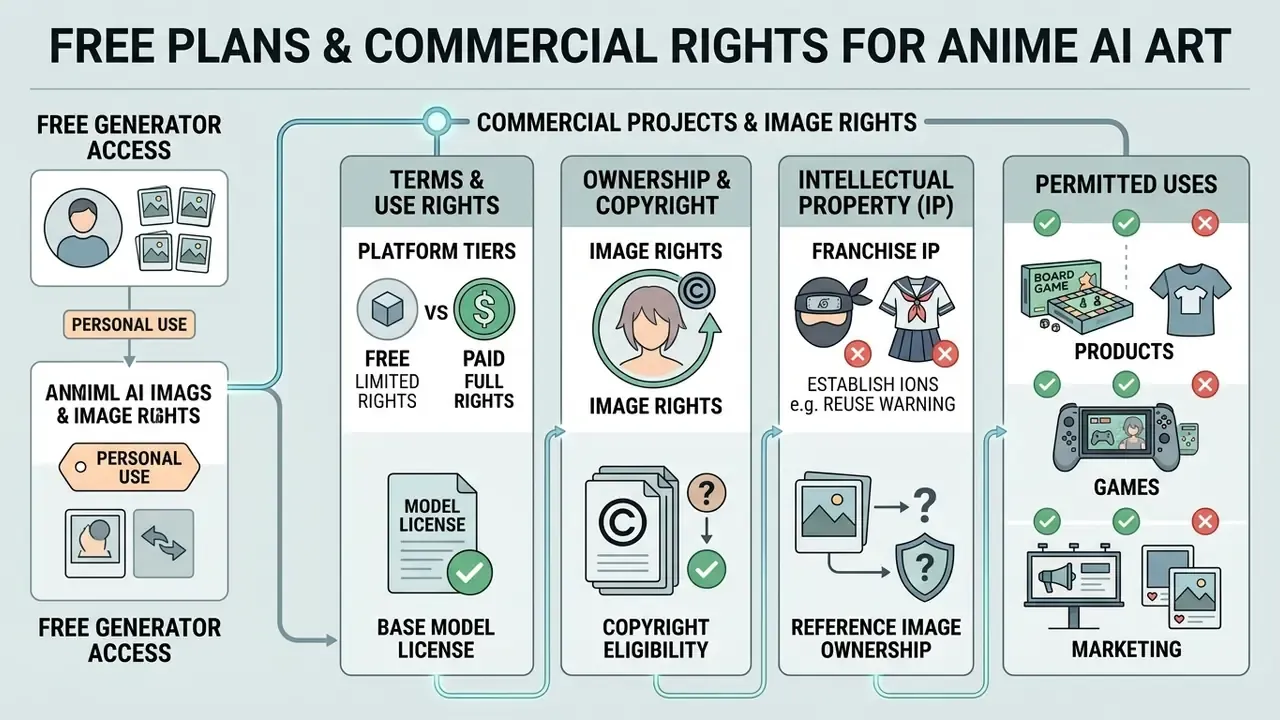
Commercial rights and intellectual property terms decide whether generated anime images can enter products, games, or marketing collateral at all. Licensing permission comes from vendor terms plus applicable legal frameworks, not from the download button.
Platform marketing may advertise anime ai art free access, yet free plan outputs are frequently restricted to personal, non-commercial evaluation. Paid tiers typically grant commercial usage rights, subject to base model licensing constraints.
What free AI anime generator access usually includes
Free access tiers mostly serve as product evaluation environments. Common limitations on unpaid accounts:
- Daily credit caps ranging between 10 and 150 generations.
- Standard-speed queues with longer peak-hour waits, and low-priority queues that add 30 seconds to several minutes per image.
- Resolution limits capping exports at 512×512, 480p or 720p.
- Mandatory public availability of generated assets in community feeds.
- Watermarking on downloadable outputs.
- Explicit personal, non-commercial licence terms on the free tier.
To compare pricing schedules and credit cost structures across AI generation engines, open the hub for detailed breakdowns.
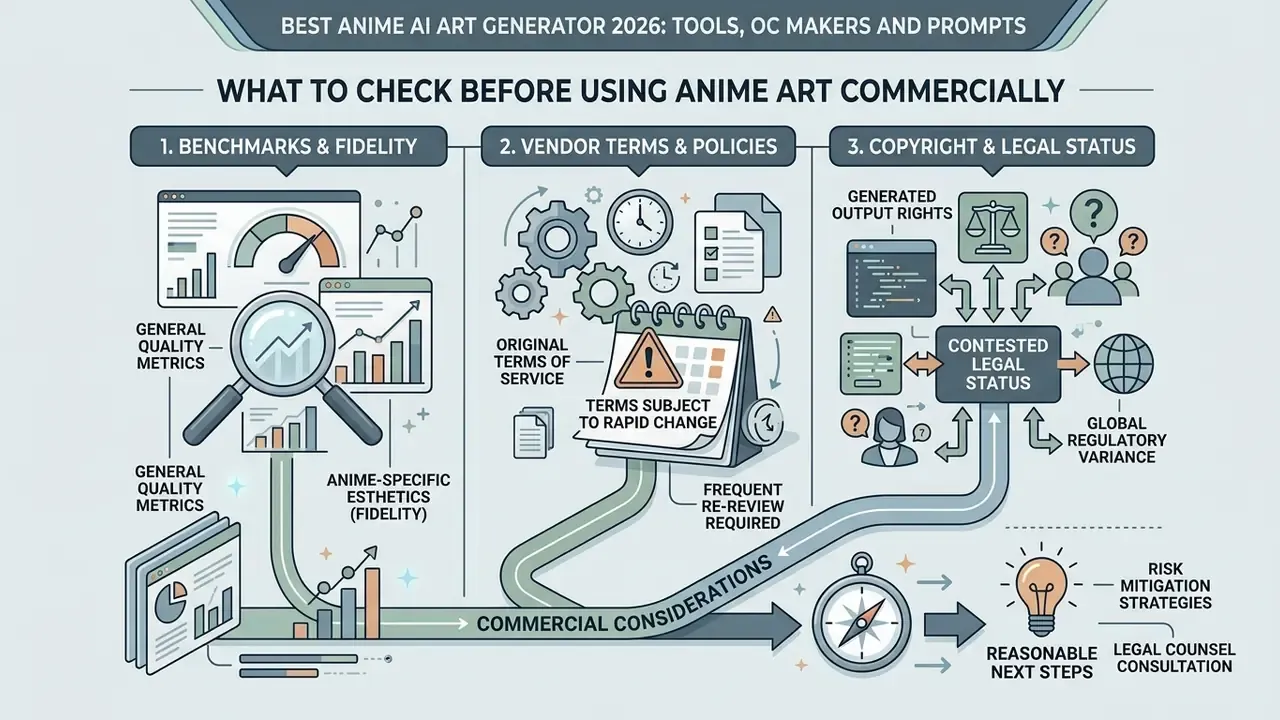
What to check before using anime art commercially
Before deploying generated anime art in commercial campaigns, verify the legal position of both the platform and your input assets. See also the overview of commercial use of AI image generators for platform-by-platform rights.
This information is general in nature and does not replace advice from a qualified professional. Copyright and AI-disclosure obligations vary by jurisdiction and by sector regulator.
In an audit of commercial media pipelines, one team assessed four web generators for licensing compliance. They limited automated output to platforms providing explicit indemnification and CreativeML Open RAIL-M tracking, which removed unverified training risk across 1,200 published assets. Illustrative, but the shape of the decision generalises.
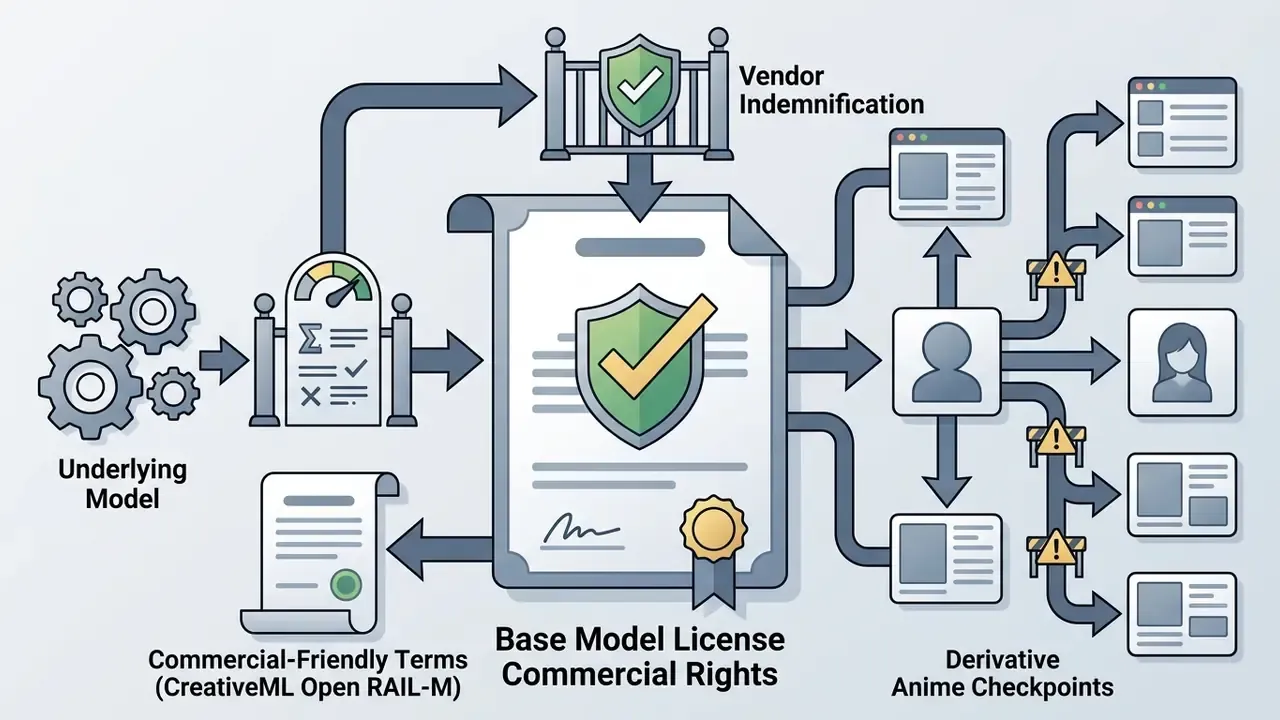

For commercial work that gap compounds. A more accurate backbone needs fewer regeneration passes, which lowers credit spend and shortens the human-review queue. To evaluate commercial licensing rules across major generative platforms, browse the hub for regulatory guidance.
Limitations and open questions
Frequently Asked Questions (FAQ) about AI anime art generators
Can an anime AI art app create avatars, pixel art and comics?
Yes. Modern anime ai art app builds support specialized output formats, including social media avatars, ai pixel art, and multi-panel comic strips. By selecting dedicated sub-style models or entering specific prompt tags, such as pixel art generator, 16-bit sprite, or manga comic panel, creators can produce non-standard artistic formats. Dedicated comic platforms add pre-formatted panel templates and text bubble overlays, so a full digital comic comes together without external graphic software. App listings in 2026 advertise photo-to-anime conversion, avatar creation, Ghibli-style transformation and multi-panel comics with speech bubbles, though most quality claims there are vendor marketing rather than benchmark results. If you want to experiment first, compare free AI art generators for anime styles.
Can I use an AI anime generator without signing up?
Technically yes, and the trade-offs are consistent. No-sign-up tools usually enforce aggressive watermarks, hard rate limits, lower output resolution, advertising interstitials, and no saved history, which means you cannot retrieve a seed, re-edit an image, or prove when an asset was generated. Several also default to public galleries, exposing work you may not want visible. Standard platforms require an account precisely because prompt history, private storage, credit allocation and commercial-licence attribution all attach to an identity. For governed or client work, account-based generation is the only auditable option.
How do I keep the same character across many images?
Use three mechanisms together instead of trusting prompt text. First, freeze a [Character Core] tag block and reuse it verbatim. Second, attach a visual anchor: a reference image, a multi-view character sheet, or a trained LoRA. Third, constrain structure with ControlNet (Lineart, Depth, or an OpenPose skeleton from a 3D pose editor) and hold the seed fixed while varying one layer at a time. Consistency can then be measured rather than eyeballed, by comparing cosine similarity between generated character features and a stored reference embedding.
Which model should I pick for multi-character anime scenes?
Prefer backbones with strong reported two-object accuracy and relation scores, because crowded scenes fail through attribute bleeding rather than low fidelity. Lumina-DiMOO reports 0.94 two-object accuracy and 0.88 overall GenEval; FLUX-2 reports 0.854 GenEval and 0.870 DPG-Bench; UAE leads DPG-Bench relation scoring at 92.07. Reinforce with per-character prompt segmentation and instance-level constraints, since research on instance-level instructions shows measurable gains in object counting, spatial precision and attribute consistency.
Can I train a model on my own artwork?
Fine-tuning a LoRA on art you personally own is the standard route to a proprietary anime style, and it is the strongest way to hold a house style steady. Three cautions apply. Check whether the platform's terms grant it any licence to reuse your uploaded training set or the resulting adapter. Confirm whether training data is deleted after the job completes. And verify the base checkpoint's licence, since a non-commercial parent model can restrict commercial deployment of a derivative adapter you trained yourself.
How do I prevent sensitive data leaking through an art generator?
Treat prompts as uncontrolled text egress. Prohibit client names, unreleased product or character names, launch dates and internal codenames in prompts, substitute neutral placeholders, and re-label assets after export. Prefer vendors offering zero data retention or a defined deletion SLA, an explicit no-training-on-customer-data clause, SSO with role separation, and private-by-default workspaces instead of public community feeds. Log every generation in a central ledger so usage can be reviewed without querying the vendor.
Does any vendor cover me if a copyright claim is filed?
Some enterprise agreements include IP indemnification for outputs generated inside the sanctioned product; many consumer tiers explicitly exclude it. Because purely AI-generated output is generally not registrable without substantial human authorship, indemnification and copyright are separate questions. A vendor may permit you to sell an image you cannot register. Request the indemnification clause in writing, confirm which product tiers and which models it covers, and note that indemnities rarely extend to outputs derived from third-party franchise IP or from reference images you did not own.
What should I record for each published asset?
Tool name, model and model version, seed, the complete prompt stack including negatives, any ControlNet or LoRA inputs with their weights, the licence tier active at generation time, the human edits applied, and the editor's name. That record supports reproducibility, evidences the human-authorship contribution relevant to copyright claims, and satisfies most internal AI-usage disclosure requirements. To explore additional generative options and comparative tool breakdowns, see the overview of current AI image creation systems. For broader head-to-head analysis across the generative ecosystem, review the comparison of the best AI art generators.
Appendix A: revision and verification log
This appendix preserves earlier phrasing revised during the audit, so readers can trace what changed and why.
| Original statement | Status | Revised handling |
|---|---|---|
| "Standard benchmark evaluations, such as the NIST 2025 GenAI Pilot for Image Generators, treat prompt compliance as a primary measurable output." | Needs external verification | Retained here for traceability. Main text now reads: "standard benchmark frameworks, including GenEval, DPG-Bench, T2I-CompBench and emerging public AI evaluation protocols, treat prompt compliance as a primary measurable output." Public NIST evaluation planning does describe metric-based generator assessment, but the specific pilot nomenclature was not independently confirmed for this edition. |
| "According to research on artistic style generation, conditional GAN architectures (C-GAN) and fine-tuned diffusion models produce lower FID scores..." | Supported, citation added | Now accompanied by USE-CMHSA-GAN (2024) and GANime (2025) findings in the main text. |
| "Research from NovelAI and diffusion prompt studies demonstrates that placing style anchor tags near the beginning of the text prompt..." | Partially verified | NovelAI's public art-style documentation states style tags have greater effect near the start of a prompt; the broader "diffusion prompt studies" attribution was softened and supplemented with R2I-Bench (2025). |
| "During an enterprise asset pipeline review... 88% character-consistency score." | Internal case | Labelled explicitly as an internal editorial pipeline review, with the measurement method (cosine similarity against a stored reference embedding) stated. |
| Infographic placeholder: "Performance Metrics of Base Diffusion Models on Anime Benchmarks." | Replaced | Converted into the benchmark table in "Performance of base diffusion backbones on compositional benchmarks." |
| Diagram placeholder: "Dual-Pass Sketch-to-Anime Pipeline." | Replaced | Converted into the pipeline diagram in "Sketch, line art and reference image workflows." |
| Adobe Firefly free-tier watermark status | Conflicting sources | Adobe community statements from 2023 to 2026 disagree; both positions recorded in the Fact Check block and treated as build-dependent. |
| SeaArt free-tier commercial rights | Conflicting sources | Site copy advertises 150 daily credits with no watermark; third-party reviews report no commercial rights on the free tier. Both recorded. |
| Table of contents with in-page anchor links | Removed | Replaced by "Who this guide is for and how to read it", which adds the five pre-purchase questions rather than duplicating the heading list. |
No matching rows Clear one or more filters to restore the matrix.
For full model analysis across every comparison in this series, explore the hub.