Selecting the best AI headshot generator means balancing four things at once: photorealism, processing cost, data privacy, and commercial licensing rights. Executives, job seekers, recruiters and internal comms teams now lean on generative image models to produce studio-grade portraits without booking a photographer, a studio, or a travel day. Platforms differ sharply, though. Some retain your facial geometry almost perfectly; others hand you a polished stranger. Some delete your biometrics in seven days; others keep input photos for a year so re-renders stay possible.
That gap is the reason a structured risk-and-performance framework matters. Treat the choice the way a bank treats a vendor model: check the inputs, check the controls, check the evidence, then decide.
Executive Summary
- Do not use general-purpose chatbots for this. ChatGPT/DALL·E 3 and Midjourney lack identity-retention architectures, so they produce a plausible lookalike with plastic skin instead of a recognizable you.
- Refunds hinge on GPU compute, not downloads. Once model training starts, the vendor's compute is already spent. Remedies then shift to a free redo or paid human retouching (around $8 per image).
- Privacy is the main enterprise blocker. Require documented deletion windows (7 to 30 days), an explicit prohibition on training public base models with client uploads, AES-256 at rest, and TLS 1.3 in transit.
- Upload variety beats upload perfection. Eight to fifteen unfiltered photos shot on different days, in different light, with different expressions will outperform fifteen identical selfies taken in one minute. Every time.
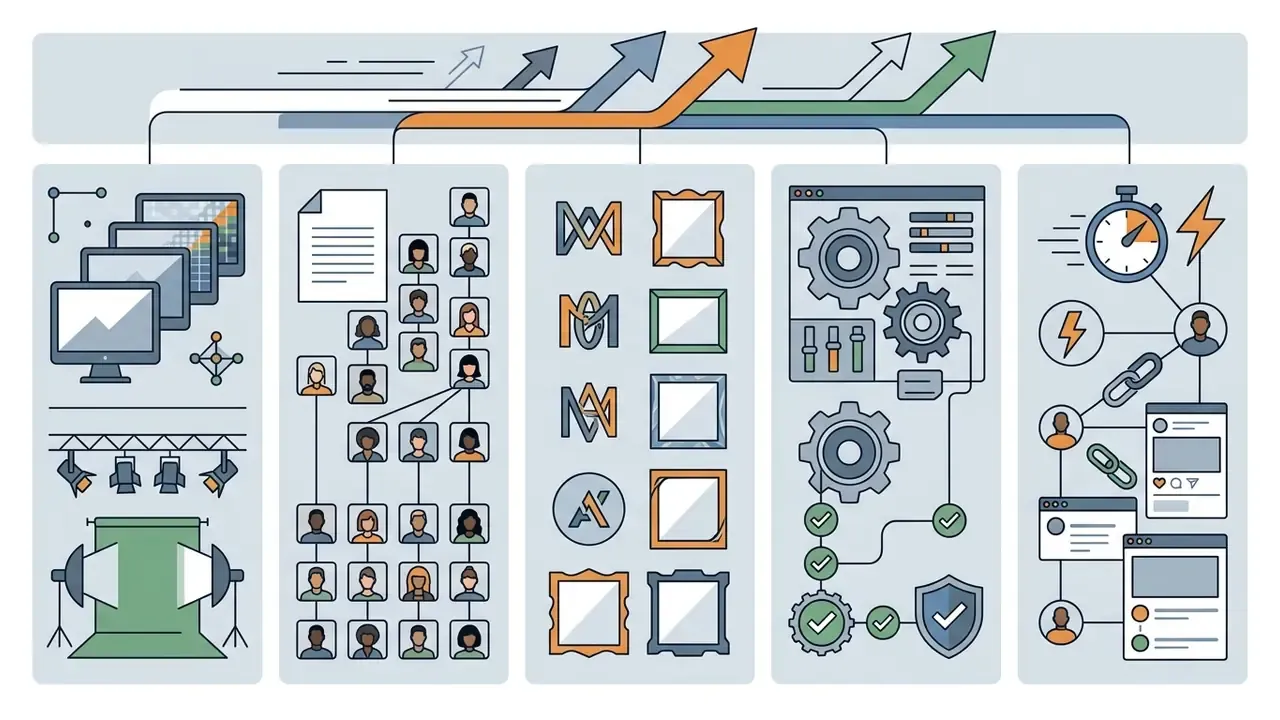
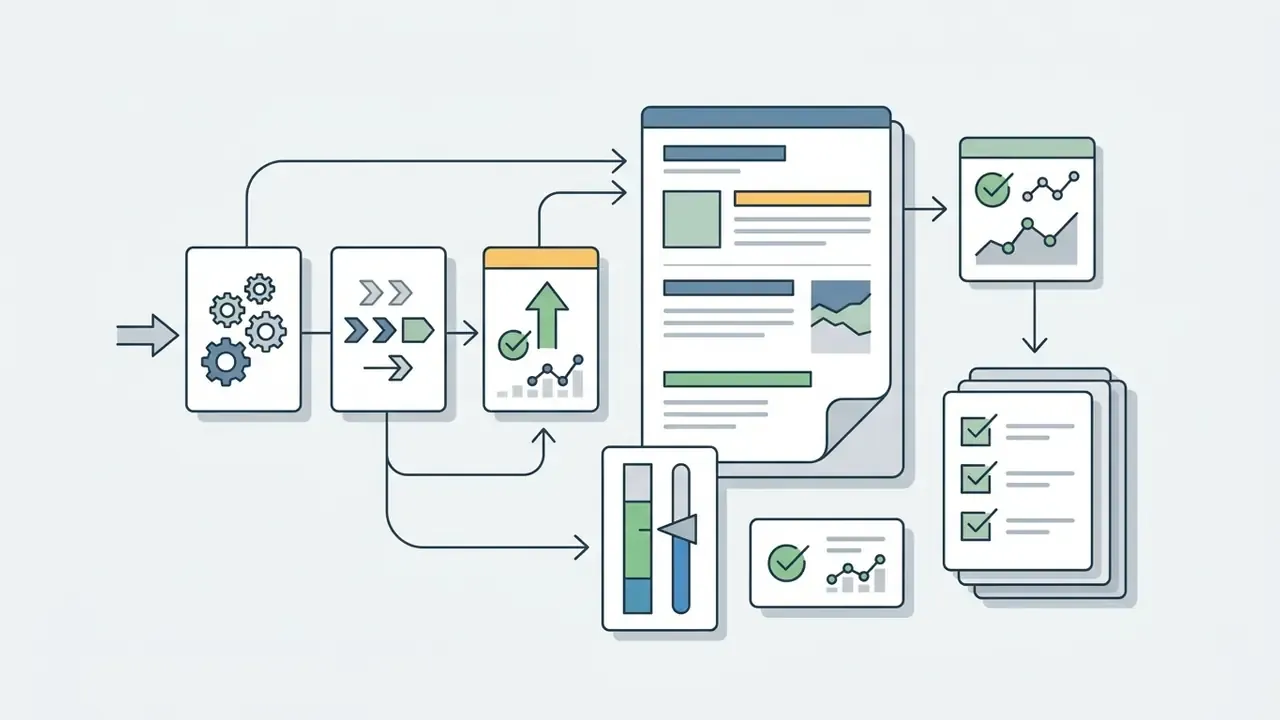
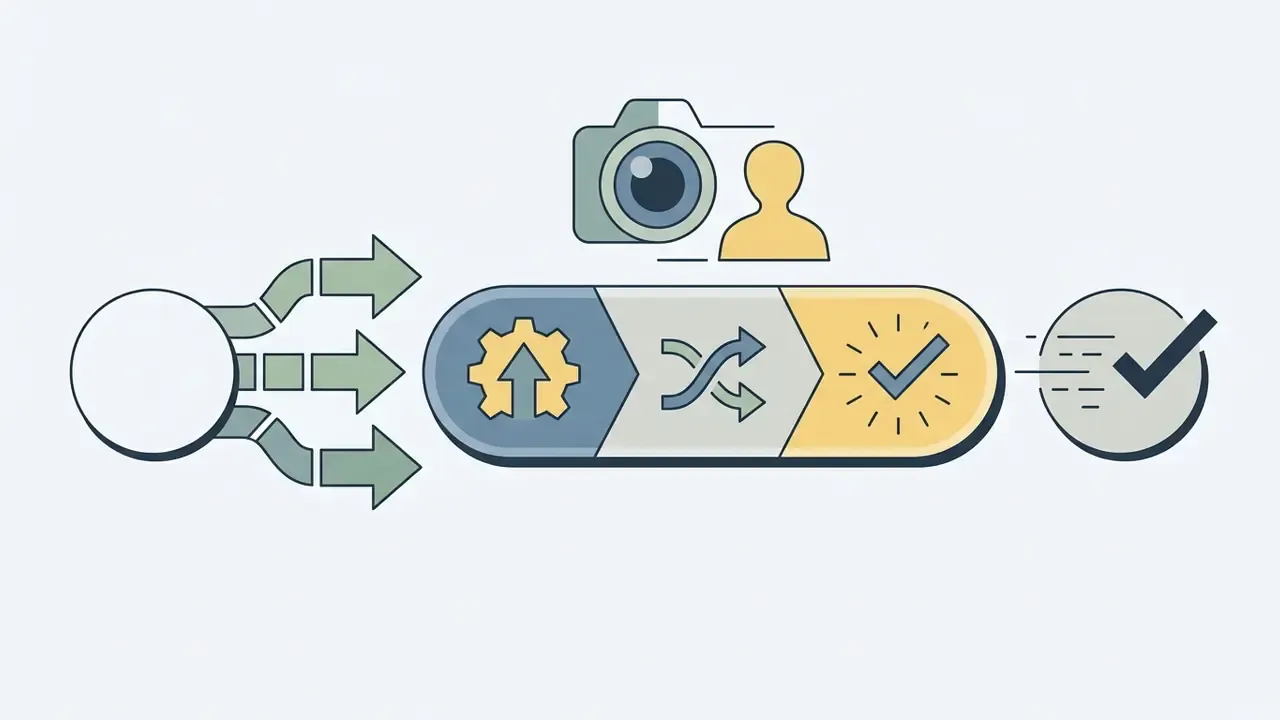
How to choose the best AI headshot generator
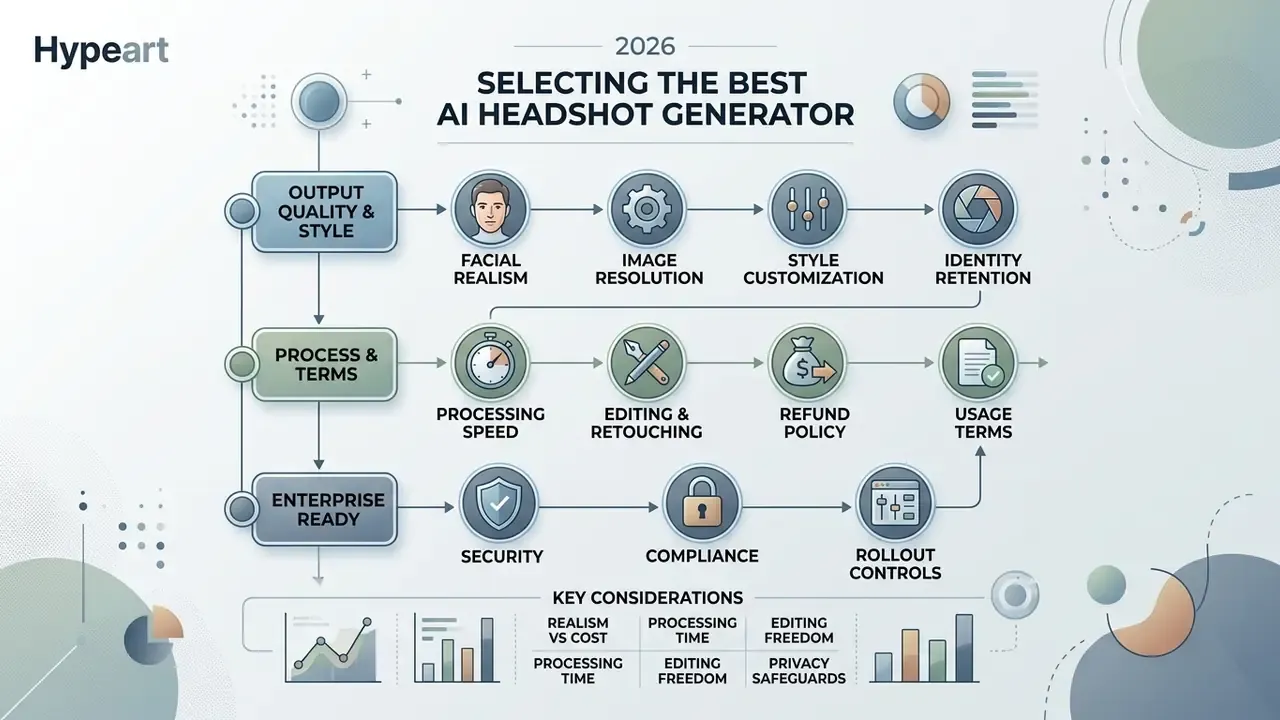
Choosing between AI headshot generator tools comes down to six measurable factors: face identity retention, image resolution, style customization, processing speed, editing controls, and the legal privacy terms behind the upload button. A high-performing tool preserves your recognizable facial features while generating believable lighting, attire, and professional studio backdrops. Enterprise buyers should weigh those technical capabilities against pricing, data retention windows, and commercial usage rights before a single employee photo leaves the corporate network.
Facial realism, image quality and style range
A top-tier AI headshot generator must maintain recognizable identity features while producing natural skin texture and balanced lighting, with no digital artifacts creeping in at the edges. Identity-preserving architectures such as ConsistentID and InstantID use multi-modal encoders and identity attention networks to lock facial geometry across different poses and styles (ConsistentID, 2024; InstantID, 2024).
"ConsistentID is trained on the FGID dataset of more than 500,000 facial images and outperforms prior methods in identity preservation and diversity."
High quality tools deliver outputs in 2K or 4K, which removes the blurry skin and distorted eye reflections that instantly signal synthetic origin. Reviewers keep landing on the same tells: inconsistent lighting, missing skin texture, and small details rendered wrong. Not the composition. Composition is the easy part. Post-processing gaps can usually be closed with dedicated AI photo editors rather than a full regeneration run, which saves both credits and time.
Synthetic portraits are not automatically read as "fake" by human viewers, either:
"Synthetic faces were classified with the intended emotion more accurately than posed photographs: mean accuracy 0.94 versus 0.86 for female faces (p < 0.001)."
Beyond fidelity, the style library decides whether the result fits your industry. A partner at a law firm and a product designer at a Series B startup do not need the same wardrobe. Practitioner guidance converges on one visual recipe regardless: clean distraction-free backgrounds, natural skin tones, sharp focus from nose to ears, premium but low-contrast clothing with visible fabric texture, and 2K minimum resolution for final delivery.
Price, speed, editing and usage terms
Evaluating commercial AI tools requires looking past the headline package price. Turnaround time, editing flexibility, and data privacy commitments all carry real cost. Most dedicated services run a one-time credit model between $29 and $79, delivering batch outputs in 15 to 120 minutes. Better platforms add interactive photo editing, prompt adjustment, or manual human retouching so you can fix minor flaws before final download. BetterPic, for example, accepts unlimited edit requests at $8 each for jobs like fixing clothing errors, removing dark circles, or softening expression lines.
Legally, verify two clauses. First, that the privacy policy mandates automatic deletion of uploaded source photos. Second, that the licence grants full commercial usage rights for AI-generated images for corporate branding, ads and press use. Vague wording here is not a detail; it is the whole risk.
Enterprise readiness: security, compliance and rollout controls
| Requirement | What to verify before procurement |
|---|---|
| Encryption | AES-256 at rest, TLS 1.3 in transit, documented key management |
| Certifications | SOC 2 Type II, ISO 27001, continuous monitoring (Vanta-style audit tooling) |
| Retention | Published deletion window for source photos and trained model weights (7 to 30 days is the current market norm) |
| Training exemption | Written prohibition on using client uploads to train public foundation models |
| Identity and access | SSO/SAML support and role-based admin for HR-led rollouts (offered on enterprise tiers by HeadshotPro) |
| Scale | Documented support for 5 to 1,000+ employees, credit pooling, volume discounts |
| Brand control | Company-level template for crop shape, background, border and logo overlay |
| Sub-processors | Named list of downstream processors, with hosting jurisdictions |
One practical note from HR rollouts: the security review usually takes longer than the generation. Budget for procurement, not for GPUs.
Specialized generators vs ChatGPT and Midjourney
Most people try a general-purpose model first. ChatGPT/DALL·E 3, Gemini, Midjourney. These systems generate images beautifully, but they lack the dedicated identity-retention networks that bind facial geometry to one specific person. The result is a convincing stranger who vaguely resembles you, which is precisely the worst outcome for a professional profile.
| Criterion | Specialized AI headshot generator | ChatGPT / Midjourney / general-purpose models |
|---|---|---|
| Likeness retention | High: identity encoders (InstantID / ConsistentID class) map landmark geometry from 8 to 15 references | Low: produces a "similar double" rather than you |
| Skin texture | Pores and blemishes preserved at 2K to 4K | Plastic sheen, over-smoothed highlights, odd smiles |
| Artifact control | Fixed proportions for eyes, teeth, ears; batch QA and redo options | Asymmetric pupils, warped ears, unpredictable hands |
| Consistency across a batch | Consistent lighting and framing across 20 to 120 outputs | Quality swings between generations |
| Privacy posture | Documented biometric deletion within 7 to 30 days, no public-model training | Upload destination and retention frequently opaque |
| Upload workflow | Guided validation wizard for angles, lighting and resolution | Manual prompt trial-and-error with no feedback loop |
| Professional dependability | Commercial licence, redo, human retouch | Not dependable for high-stakes professional use |
If you still want to benchmark the general-purpose route yourself, compare our evaluations of the ChatGPT picture generator and Midjourney image generation against dedicated portrait pipelines before you commit a company-wide rollout to a chatbot. One test subject, one afternoon. It will settle the argument faster than a memo.
Best AI headshot generator tools compared
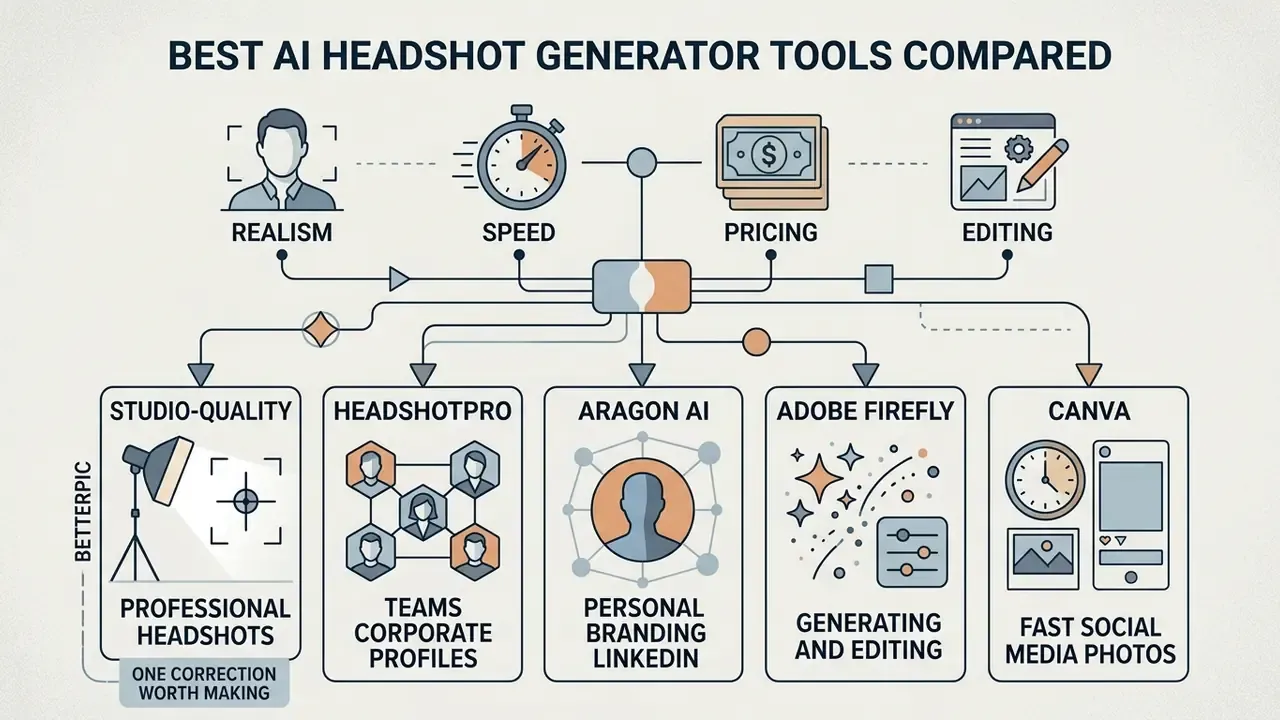
Comparing AI headshot generator software means analysing rendering realism, processing speed, pricing tiers, and editing flexibility together rather than one at a time. Specialized portrait platforms invest in deep identity modelling for executive profiles. Multi-purpose design platforms give you fast graphic tools for casual social media assets. Different jobs, different tools.
Comparison of AI headshot generators (2026 verification snapshot)
| Service | Entry price | Free tier | Realism and output quality | Styles and customization | Generation speed | Editing options | Usage rights |
|---|---|---|---|---|---|---|---|
| BetterPic | $35 (20 photos) | No (limited trial generations) | High (4K studio) | 150+ outfits and backgrounds | 30 to 60 minutes | AI edits, human retouching ($8/edit), redo | Full commercial licence |
| HeadshotPro | $29 (30 photos) | No | High (up to 4K executive) | Wide corporate selection plus company template | 15 to 120 minutes | Style selection, free redo tier, 4K upscale | Full commercial licence |
| Aragon AI | $29 to $35 (40 photos) | No | High (photorealistic) | 20 to 50 outfits and locations; glasses and headgear selectors | 30 to 60 minutes | Re-roll options, style filters | Full commercial licence |
| Adobe Firefly | Included in CC ($20+/mo) | Limited credits | High (prompt dependent) | Custom prompts and reference images | Near-instant | Generative Fill, Generative Expand, Photoshop tools | Commercially safe workflow plus enterprise IP indemnification |
| Canva | Free / Pro ($15/mo) | 50 lifetime credits | Moderate (graphic avatar) | Template library and AI filters | Near-instant | Background Remover, Magic Edit | Standard platform terms |
Readers evaluating a broader creative stack alongside portrait tools can cross-reference our rankings of leading AI image generators, the best AI art generators and the best ai photo editor shortlist to see exactly where identity-preserving portrait models diverge from general text-to-image systems.
BetterPic for studio-quality professional headshots
HeadshotPro for teams and corporate profiles
HeadshotPro is engineered for corporate teams that need consistent portrait alignment across a whole workforce. HR and operations leads set unified company parameters for background, lighting and attire covering 5 to 1,000 employees, with a single brand template controlling crop shape, background, border and logo placement on every portrait. Pricing runs $29 to $59 per individual shoot. Company headshots are quoted from roughly $39 per person, and volume discounts of up to 50% start stacking at six credits. Credits do not expire, which quietly removes renewal risk from an annual HR budget.
Turnaround runs 15 minutes to 2 hours depending on tier. Exports come as PNG (128 to 1024 px), JPEG, or a full ZIP set, with portrait and landscape 4K downloads on the Executive tier and complete commercial rights. Public review data shows 4.7/5 across 3,552 reviews, and published case studies describe multi-thousand-employee rollouts using volume pricing, SSO and a formal security review.
Aragon AI for personal branding and LinkedIn
Aragon AI targets individual personal brand work, producing headshots tuned for LinkedIn profile use and executive resumes. Each set generates 40 to 100 variations, with a broad assortment of business casual and formal styling. Unusually for this category, it offers explicit selectors for whether glasses and headgear appear in all, some, or none of the outputs. That control matters enormously for anyone who wears a hijab, turban, or prescription frames every day. Turnaround typically runs 30 to 60 minutes, up to 120 on basic tiers, with controlled lighting and a believable professional depth of field.
"Aragon AI's cost per usable LinkedIn shot works out to roughly $0.72, with about 10 keepers from 40 generated images."
Independent test reports are mixed on batch-level consistency. Reviewers praise the clean corporate styling and controlled light, while also noting smoothed or subtly altered distinctive features and occasional eye distortion in individual frames. Expect to discard most of any batch, whatever the vendor. That is normal, not a defect.
Adobe Firefly for generating and editing headshots
Adobe Firefly folds generative AI directly into professional graphic workflows through text prompt input and reference image guidance. Instead of a pre-set avatar pipeline, you upload a source portrait and apply Generative Fill to change wardrobe, refine the background, or rebalance lighting, then Generative Expand to stretch a tight crop into a proper head-and-shoulders frame. Because Firefly models train on licensed Adobe Stock and public domain content, outputs carry explicit IP indemnification for qualifying enterprise customers, and Adobe states it does not train on subscribers' personal or generated content. Content Credentials attach provenance metadata naming the AI tool and the actions applied, which auditors increasingly like to see.
The platform generates single-image variations near-instantly, making it the natural pick for designers who want manual control over every pixel. One caveat: Adobe's own documentation distinguishes commercially safe Firefly web workflows from certain in-app Photoshop generative features, so verify the licence surface for your specific tool version before publishing.
Canva for fast social media photos
Canva covers the entry level: AI avatar and photo editing tools built for rapid social media graphics and basic profile picture refreshes. With one-click background removal, magic edit brushes, and style filters (Sketch, Cartoon, Anime, Art, Mystic), you can modify an existing headshot in a few clicks. Free plans include 50 lifetime Magic Media text-to-image uses. Pro, Teams, Nonprofit and Education plans grant 500 monthly credits that reset at UTC month-end. Canva also publishes a dedicated LinkedIn profile picture workflow with direct posting.
Where it falls short is identity fine-tuning. Canva has no per-person model training, so high-stakes executive headshots are outside its range, and output quality depends heavily on the resolution of whatever you upload. Graphic designers will still reach for it daily. For a deeper feature breakdown, see our Canva AI generator overview.
For structured selection of the final keepers, a published avatar-quality framework offers a ready-made scorecard:
"The avatar quality framework scores ten dimensions, including realism, trustworthiness, job appropriateness, eeriness, formality and emotion accuracy, from 26 ratings under ITU-T P.910."
AI headshot generator pricing: what the leading services cost
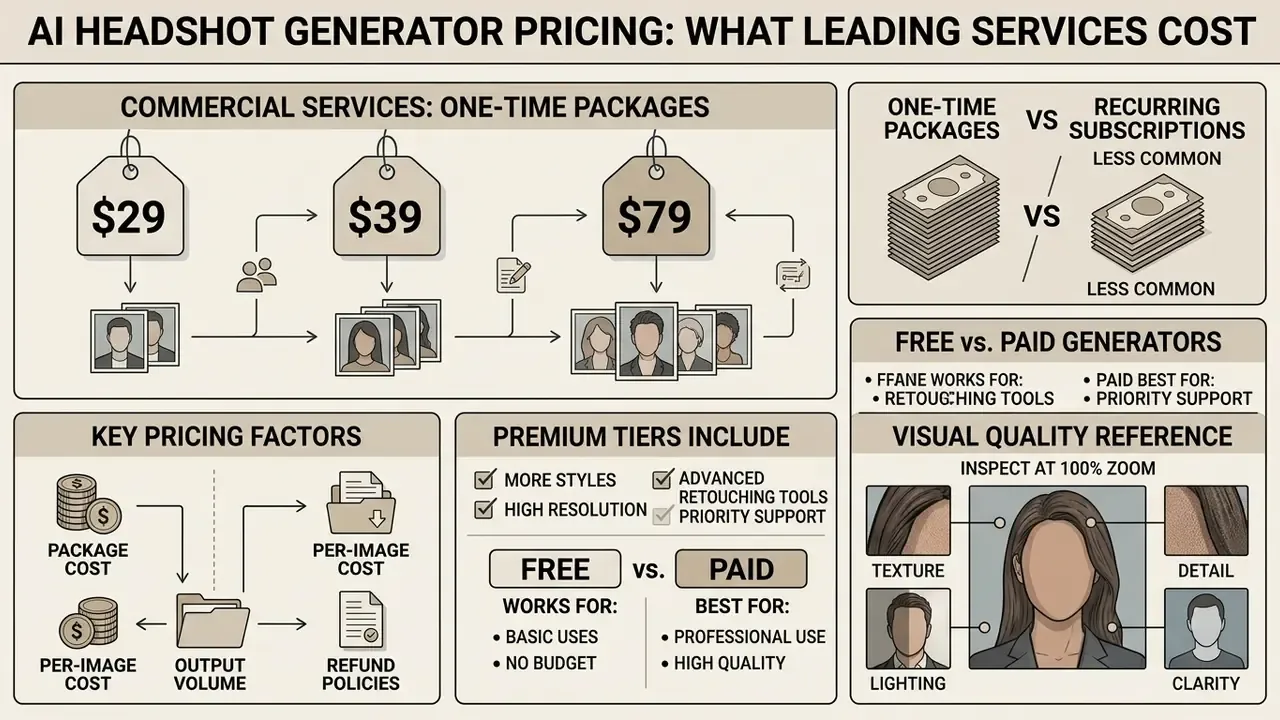
Commercial services price mainly through one-time packages from $29 to $79 rather than recurring subscriptions. Base packages deliver 20 to 40 headshots. Top tiers push up to 120 portraits with expedited turnaround. The number that actually matters is cost per usable image, not raw output volume, and the two diverge more than vendors like to admit.
AI headshot generator pricing and feature comparison (verified June 2026)
| Service tier | Price | Generated headshots | Turnaround | Edit and redo features | Refund policy |
|---|---|---|---|---|---|
| BetterPic Basic | $35 | 20 (1 style) | ~2 hours | 2 AI edits; human edits $8 each | 7-day policy, valid only BEFORE model training starts |
| BetterPic Pro | $39 | 60 (3 styles) | ~1.5 hours | 4 AI edits; paid redo (~$10) | 7-day policy, valid only BEFORE model training starts |
| BetterPic Expert | $79 | 120 (6 styles) | ~1 hour | 8 AI edits, human edit, 1 free redo | 7-day policy, valid only BEFORE model training starts |
| HeadshotPro Basic | $29 | 30 | ~2 hours | Standard generation | 14-day full refund if no generated photos downloaded |
| HeadshotPro Executive | $59 | 70 (4K quality) | ~15 minutes | 4K upscale, 1 free redo within 14 days | 100% realism guarantee (at least one usable headshot) |
| Aragon AI Starter | $29 to $35 | 40 | ~60 minutes | Standard generation, re-rolls | 14-day refund request window |
One-time packages, subscriptions and output volume
One-time pricing dominates the portrait generation market, which spares individual users a long-term commitment. A single purchase buys one model training run and a fixed batch of variations. Cost per usable image averages $0.70 to $1.50 depending on selection yield. Aragon AI benchmarks near $0.72 per keeper, while a traditional photographer charges $100 to $300 per session for 5 to 12 retouched files, roughly $50 to $65 per delivered portrait. The arithmetic is not subtle.
Teams that refresh portraits continuously do better with bulk enterprise credit packs: predictable cost, no recurring billing friction, and credits that never expire. Subscription-style editing suites cost less per month but cap AI credits, storage or resolution at the base tier, and you are renting access rather than owning a finished portrait set. For most HR budgets the pooled-credit model wins on both governance and price. The 2025 pricing baselines, incidentally, have barely moved into 2026; compute cost fell, package prices did not.
When a free AI headshot generator works, and when it does not
A free AI headshot generator is fine for a casual social avatar or preliminary style testing. It is not fine for a formal business profile. Most free platforms export at low resolution (720p is common) and stamp visible watermarks across the frame; a minority publish clean 1024×1024 HD downloads that are genuinely profile-ready. Independent testing of free tiers routinely returns cartoonized skin, unrendered hair, and faces any viewer identifies as synthetic within seconds. Reviewers flatly refuse to publish those on LinkedIn, and they are right to.
Free tools also rarely run dedicated identity training, so facial drift and synthetic artifacts appear quickly. Executive profiles, corporate press releases and legal resumes need paid platforms with guaranteed high-resolution output and explicit privacy protection. To weigh the trade-offs across categories, compare free AI image generators against paid identity-preserving pipelines before committing your public face to a watermarked export.
Visual quality reference: what to inspect at 100% zoom
Side-by-side crops tell the story faster than prose, so use this inspection checklist in place of a gallery when auditing vendor samples:
| Zone | 4K studio-grade output | 720p free-tier output |
|---|---|---|
| Skin | Visible pores, subtle blemishes, uneven tone | Waxy, uniform, airbrushed |
| Eyes | Symmetric pupils, coherent catchlights | Mismatched pupils, missing or doubled reflections |
| Hair | Individual strands resolved at the temple line | Blurred mass, strands merging into background |
| Glasses | Continuous temple arms, single frame edge | Broken arms, doubled rims, warped lenses |
| Collar and lapel | Aligned seams, consistent fabric weave | Asymmetric collar points, dissolving buttons |
| Jewellery | Correct clasp geometry | Melted or duplicated earrings |
How to get a realistic headshot that actually looks like you
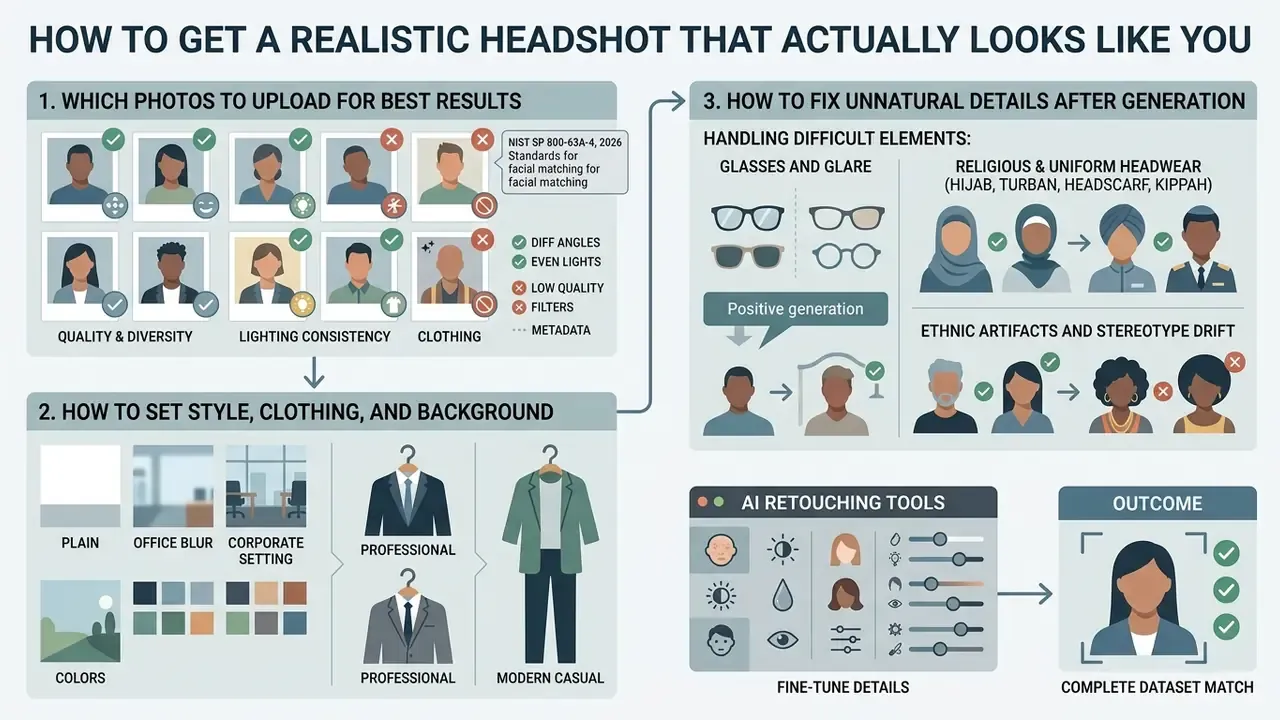
Facial resemblance in AI-generated portraits depends almost entirely on the quality, diversity and lighting of what you upload. Identity-preserving diffusion pipelines map features from your reference set onto new synthetic poses. Feed them low-resolution, filtered, or obstructed photos and the model distorts, producing outputs that look artificial or simply unrecognizable. Garbage in, stranger out.
Which photos to upload for the best results
Optimal training needs 10 to 15 clear, unedited photographs taken under bright diffuse light. The set should mix front-facing portraits, three-quarter angles, and natural smiling expressions. Skip heavy makeup, sunglasses, hats and strong facial shadows. Under biometric photo standards, clean face visibility is what lets the encoder map eye spacing, jaw geometry and subtle skin features accurately (NIST SP 800-63A-4, 2026). NIST's face-image quality specification adds precise tolerances: full-face frontal pose within ±5° of roll, pitch and yaw, evenly distributed lighting with no directional shadows, neutral expression with mouth closed and eyes open, and focus sharp enough to resolve detail from chin to crown. Boosting weak source frames with AI image enhancers before upload beats letting the encoder guess at soft edges.
- NIST SP 800-63A-4, 2026
How to set style, clothing and background
Natural wardrobe choices and neutral backgrounds stop the model generating exaggerated, faintly theatrical portraits. Business formal attire, say a dark blazer and a tailored shirt, paired with solid grey, navy, or softly blurred office backdrops, earns the highest professional acceptance. LinkedIn's own guidance is blunt: frame head and shoulders with the face occupying roughly 40 to 60% of the crop, use natural light, keep the background plain, look into the lens, and "wear what you'd wear to work."
"FaceLit reaches an FID of 3.5 on FFHQ, the best result among 3D-aware GANs, while providing explicit control of illumination and viewpoint with preserved facial geometry."
If you are writing a custom text prompt, keep it short and weight it toward balanced lighting and realistic fabric texture. The phrasings that recur in successful LinkedIn-style outputs are compact: ultra-realistic DSLR-quality, head and shoulders only, plain neutral background, balanced professional lighting, natural colours. Change one attribute at a time rather than rewriting the whole prompt, and pick outfits that match what you actually wear to the office. Authenticity is the point of a personal brand, after all.
How to fix unnatural details after generation
When a synthetic headshot arrives with warped jewellery, an asymmetric collar line, or skin smoothed into wax, post-generation editing restores balance without a fresh training run. Built-in AI photo editor tools support targeted repainting, or inpainting, to repair a specific blemish while leaving facial structure untouched. Research on artifact correction describes two workable approaches: single-pass instruction-guided editing, or an iterative diagnose-then-correct loop that alternates inspection and refinement. Integrated AI image upscalers sharpen focus and restore physical skin texture before export. For critical media assets, a manual human edit adds the final layer of quality control, typically around $8 per image with unlimited requests at leading vendors.
Handling difficult elements: glasses, headwear and ethnic artifacts
Identity models degrade predictably on certain inputs. Plan for these three failure modes rather than discovering them at download:
Readers exploring broader image transformation workflows can view the guide to compare generation platforms, or inspect a dedicated best ai photo suite for post-processing adjustments.
How to create a professional AI headshot: step-by-step
Generating a corporate-ready AI headshot online follows a defined pipeline, from input validation to final selection and export. Following the steps in order is what keeps identity fidelity high and generation errors low.
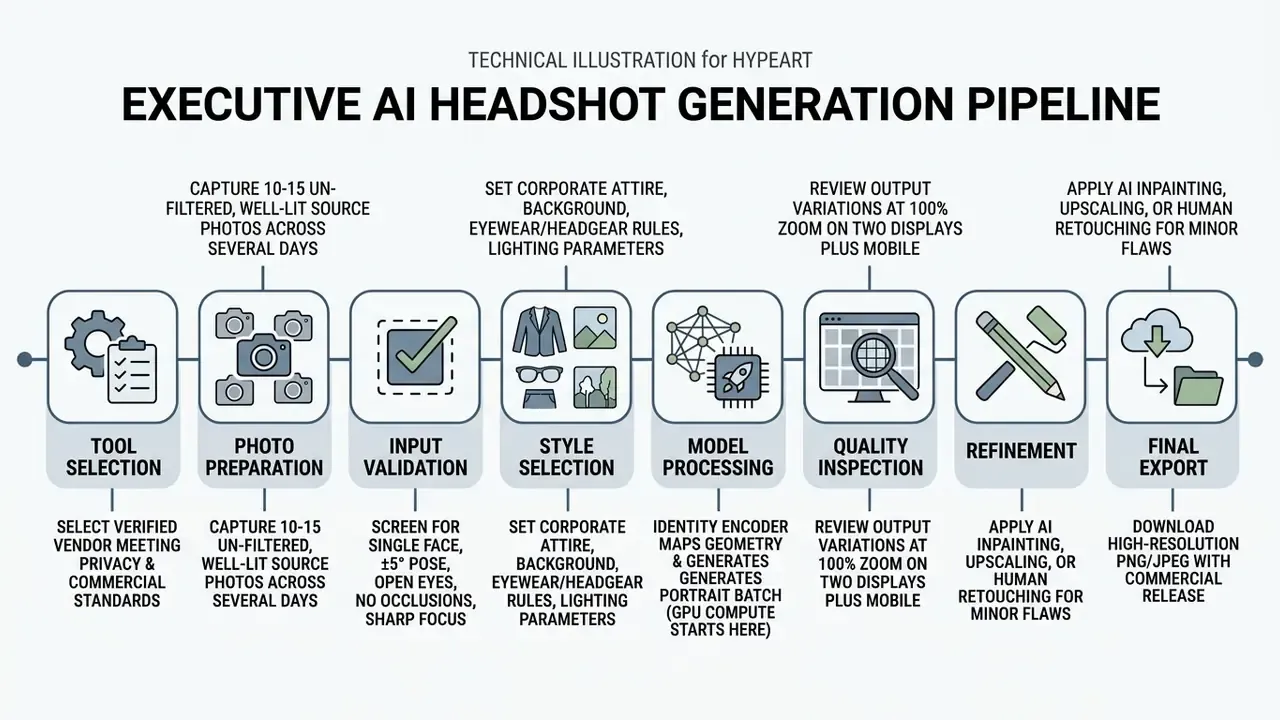
Web platforms or a mobile app (iOS/Android)?
A few services ship native apps. HeadshotMaster, for instance, offers iOS and Android builds advertising generations in roughly 30 seconds, with no-signup trial credits, which makes it the closest thing to a best AI headshot generator app for casual use. Most premium corporate generators (BetterPic, HeadshotPro, Aragon AI) run entirely in the browser instead. That is not a limitation: cloud GPU clusters handle the diffusion training, so your phone never overheats, never drains its battery, and never caps resolution because of on-device memory. To work from a smartphone, open the best AI headshot generator website in mobile Safari or Chrome and upload straight from your camera roll. Native apps win on speed to first image. Web platforms win on 4K output, style depth, redo policy and the ability to pass an enterprise security review.
Uploading photos and preparing the AI models
The process starts when you just upload prepared reference images to the vendor's secure server. Identity encoders extract facial landmark data and build an ephemeral mathematical model of your facial geometry (InstantID, 2024). Under the hood this mirrors established face-pipeline practice: detection and extraction, alignment to a canonical crop, quality filtering, then identity-conditioned fine-tuning on your specific set. Clean inputs let the encoder separate identity from background noise, which is what keeps your face stable across every wardrobe option. Once feature extraction finishes, you configure style parameters: lighting, background setting, clothing formality.
One governance detail worth flagging to procurement. The paid compute clock, and therefore your refund window, opens at this training step. Not at download.
Generating, selecting and downloading the final image
Model processing usually completes within 15 to 60 minutes, after which the platform delivers a batch of portrait variations. Inspect candidates at 100% zoom on more than one display to verify eye alignment, skin texture and edge sharpness. Two devices catch the colour and tone shifts a single monitor hides. Out of a standard batch of 40, expect 8 to 12 images to clear a strict professional bar. Shortlist two to four finalists, score them for realism, trustworthiness, job appropriateness and formality, then apply retouching or upscaling. Export final picks as high-resolution JPEG or PNG for digital deployment, remembering that JPEG cannot hold transparency, so use PNG or WebP if you need a cut-out subject for directory templates. A strong portrait still has to earn its keep, and a great first impression on a profile page is usually decided in under a second.
Privacy, usage rights and commercial use of AI headshots
Uploading facial biometrics to an online generator creates data security, privacy and copyright exposure at once. Enterprise leaders and individuals both need to audit vendor terms for data protection, regional privacy compliance, and unencumbered commercial ownership of output. This is the section most buyers skip. It is the section that generates the incident reports.
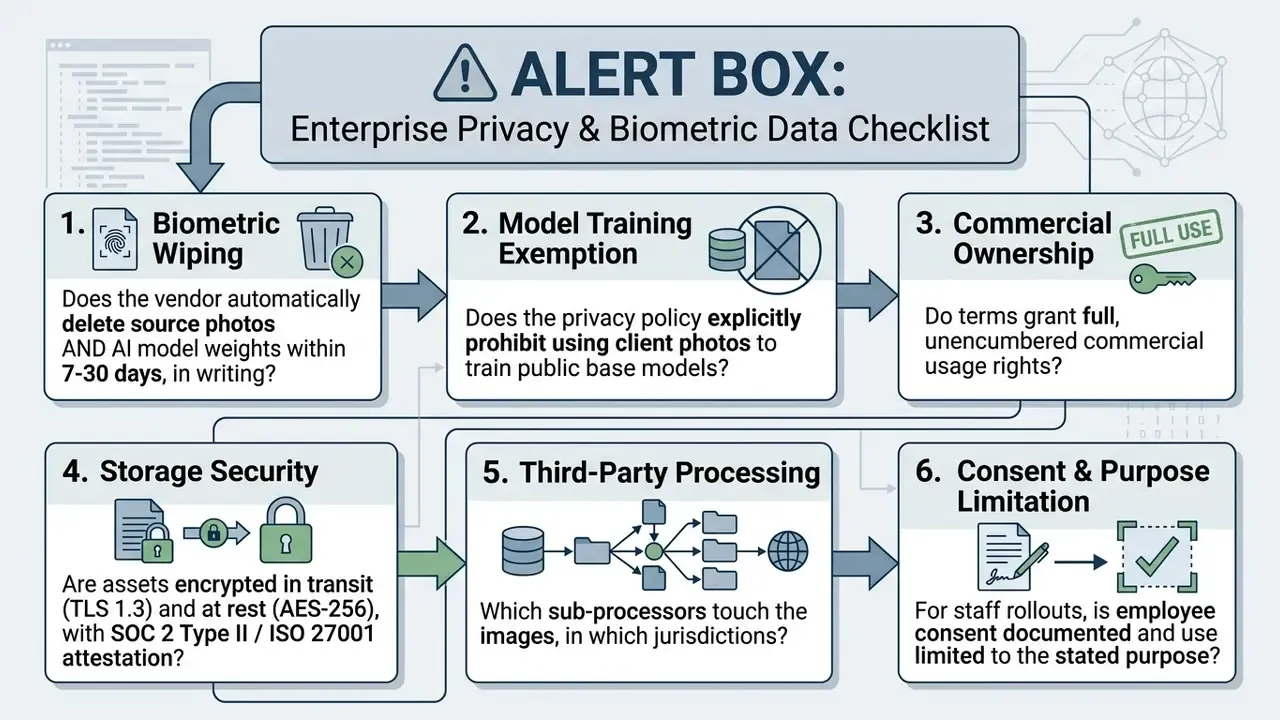
What to check in a privacy policy before uploading photos
"Membership inference attacks revealed leakage of original training samples in all six synthetic face recognition datasets examined."
That risk is exactly why explicit opt-out clauses and automated deletion belong in the contract, not the FAQ. For individuals who prefer technical protection over contractual assurance, adversarial cloaking now exists at portrait level:
"IDProtector applies imperceptible adversarial noise in a single pass and remains robust to JPEG compression, resizing and affine transforms, blocking InstantID, IP-Adapter and PhotoMaker."
Note also that vendor pages frequently contradict each other on retention. The same provider may publish 7 days on a privacy page, 30 days in a security blog, and up to one year for input photos in its legal terms so re-renders stay possible. Treat the longest published figure as operative until you hold a contractual commitment to something shorter.
FAQ: common questions about the best AI headshot generators
Do I still need a professional photographer for a business headshot?
A professional photographer brings creative direction and physical studio lighting that software still cannot fully replicate. For routine digital profiles, though, modern AI headshot generators are a cost-effective alternative: $29 to $79 one time versus $100 to $300 per studio session. High-profile corporate announcements and executive magazine covers may still justify an in-person shoot. Most directory pages do not.
Can I get a quality headshot without a photo shoot?
Yes. Upload 10 to 15 well-lit mobile selfies from varied angles, taken on different days, and an identity-preserving generator will construct high-resolution 4K portraits with professional backgrounds and formal wardrobe, no photo shoot booked, no studio hired.
Why does my AI headshot not look like me?
Facial distortion usually traces back to source photos that were low-resolution, heavily filtered, dimly lit, or obscured by hats and sunglasses. Or, just as often, every upload came from the same pose, the same light, the same minute. Aggressive style choices and over-smoothing filters push rendering into the uncanny valley and quietly alter facial geometry. Perception research suggests input quality is the culprit rather than synthesis itself: Bayesian analysis found deepfake and real video clips were rated equally authentic in emotional intensity, while cruder morphs were judged significantly less natural (Becker et al., 2024). With clean, varied inputs, request a free redo before concluding the tool cannot capture you.
Which platforms are AI portraits suitable for?
LinkedIn profiles, corporate directory pages, executive resumes, email signatures, conference speaker bios, and digital press releases, provided the image represents your current appearance honestly. Social media profiles are the easiest case; regulated filings and identity documents are not appropriate use cases.
Are free AI headshot generators good enough for work?
Generally, no. Free tiers export lower resolution (720p is common), embed visible watermarks, lack identity fine-tuning, and offer weaker privacy protection than paid platforms. Independent testers repeatedly describe free-tier results as cartoonized and unusable on LinkedIn. Fine for a style test. Not for a profile that carries your name.
Can I use ChatGPT or Midjourney instead of a dedicated headshot tool?
You can generate a portrait, but not reliably your portrait. General-purpose models lack identity-retention networks, so likeness drifts, skin renders plastic, and quality swings between runs. They also give you no upload guidance, no batch consistency, no redo policy, and often no clarity about where your uploaded photos end up. For anything customer-facing, use a dedicated generator.
Will glasses, a hijab or a turban work with AI headshots?
Yes, with the right vendor and the right source set. Choose a service with explicit eyewear and headgear selectors, include at least five source photos wearing the item, and never mix covered and uncovered frames in one session. If frames or fabric distort in the output, inpaint the affected region instead of regenerating the entire batch.
Can AI headshots be retouched by a human afterwards?
Yes, and this is the standard remedy when output is close but not right. BetterPic accepts unlimited edit requests at roughly $8 each for tasks such as fixing clothing errors, removing dark circles and softening expression lines. HeadshotPro and Dreamwave bundle human touch-ups into higher tiers instead.
Can I get a refund on AI headshots?
Usually only before model training begins, because that is the moment GPU compute is spent. BetterPic refunds purchases made within the previous 7 days provided training has not started. HeadshotPro offers a 14-day full refund if no generated photos were downloaded, plus a redo and realism guarantee. Aragon AI accepts refund requests within 14 calendar days. Some providers, ProShoot among them, state no refunds at all.
Can I use AI headshots for a vision board or future career positioning?
Yes. People routinely generate Executive or Public Speaker styles long before holding the role, for personal presentations, career maps, conference pitch decks and speaker-profile mockups. Keep the likeness honest: the image should show you on your best day, not somebody else entirely.
What file types can I upload, and what do I get back?
Major services accept JPEG, JPG, PNG, AVIF, GIF, TIFF and WebP. Delivery is typically PNG or JPEG, with ZIP archives for team sets and 4K portrait or landscape variants on executive tiers. Use PNG or WebP when you need transparency for directory templates, since JPEG cannot preserve it.
Additional media and comparison resources
For adjacent creative workflows, extend the same evaluation logic to other generative categories: compare general text-to-image quality, examine free AI art generators for low-stakes assets, or review reverse-image-search tools to monitor where published portraits circulate. Teams assembling a complete brand asset set can also inspect a best ai music generator, evaluate a best ai music video generator for campaign footage, or review platform options via see the overview.
About this review
This comparison was produced by the AI Media Comparison editorial desk, which benchmarks generative media tools against face-image-quality criteria derived from NIST FIQA/FATE work and evaluates vendor terms from a model-risk and commercial-licensing perspective. Pricing, retention windows and feature claims reflect vendor documentation verified in June 2026. Vendors change pricing faster than review articles get updated, so confirm current terms on the provider's own pricing page before purchase. Marcus Hale, author.