One more angle most roundups skip. If you work inside a regulated organisation, a free editor is also a data decision, not just a budget one.
Fast Track: The Quickest Path to a Watermark-Free Export
If you read one section, read this one. The bullets and table compress the whole guide into decision-ready findings, including the desktop, mobile, and browser layers.
- Truly watermark-free, zero-cost, no ads VN Video Editor (iOS, Android, Windows, macOS) and Apple iMovie (iOS, iPadOS, macOS). Both export without branding; VN reaches 4K at 60 fps, iMovie reaches 4K at 30 fps.
- Best free desktop NLE overall DaVinci Resolve (Windows, macOS, Linux), a complete post-production suite with two editing interfaces, Fairlight audio mastering, Fusion effects, and a Deliver page. The free tier exports up to 4K UHD at 60 fps in 8-bit colour, while 8K, advanced neural-engine tools, noise reduction, and multi-user collaboration remain Studio-only.
- Best free open-source editors Shotcut, Kdenlive, and OpenShot. Cross-platform (Linux included), no watermarks, no ads, no accounts, no cloud upload of source media.
- Highest export ceiling on a free tier CapCut desktop, with exports up to 8K at 60 fps in containers including H.264, HEVC, and Apple ProRes 422, plus GIF output.
- Best for templates and trend-driven short videos CapCut (thousands of free trending templates, AI auto-captions, background removal, beat-sync).
- Best browser-based editors Microsoft Clipchamp (1080p watermark-free export on the free plan, 5 GB cloud storage, AI subtitles in 80+ languages, native screen and webcam recorder) and Adobe Express (watermark-free MP4 export, real-time collaboration, and a built-in Content Scheduler for Reels, TikTok, and Facebook Stories).
- Free tiers that still watermark you VEED (720p cap plus watermark), FlexClip (non-removable watermark on free exports), WeVideo (watermark plus 1 GB storage and 5 minutes of export per month), Magisto (720p, 60-second cap, watermark).
- Security-first pick for confidential footage local-rendering desktop or WebAssembly editors that never upload source files. That matters for regulated teams; see the data-privacy matrix below.
| If your priority is… | Choose | Platform | Free export ceiling |
|---|---|---|---|
| No watermark, no ads, precise timeline | VN Video Editor | iOS, Android, Win, macOS | 4K 60 fps (H.264/HEVC) |
| Professional grading and audio | DaVinci Resolve | Win, macOS, Linux | 4K UHD 60 fps, 8-bit colour |
| Open-source and Linux support | Shotcut / Kdenlive / OpenShot | Win, macOS, Linux | Source-resolution export |
| Highest resolution and codec range | CapCut (desktop) | Win, macOS, Web | Up to 8K 60 fps, ProRes 422 |
| Trending templates and captions | CapCut (mobile) | iOS, Android | 4K 60 fps |
| Browser editing plus scheduling | Clipchamp / Adobe Express | Web | 1080p, watermark-free |
| Apple-native simplicity | iMovie | iOS, iPadOS, macOS | 4K 30 fps / 1080p 60 fps |
Regional note for readers searching for free video editing apps india 2025: the line-up is identical, since every tool above ships globally on the same free tiers. Only paid pricing, bundles, and occasionally the music catalogue differ by region.
How We Chose the Best Free Video Editing Apps in 2025
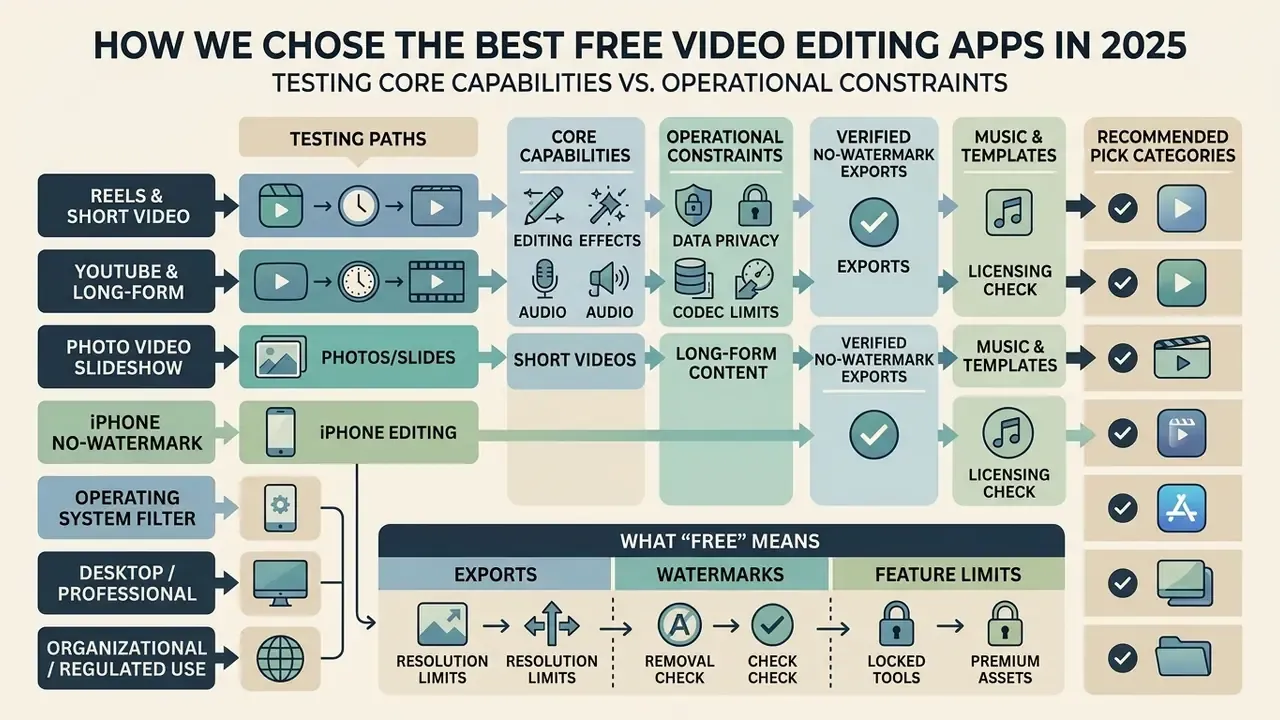
Selecting the best free video editing apps 2025 means testing core capabilities against operational constraints rather than trusting a promotional feature list. Our methodology isolates five variables: watermark policies on free exports, maximum output resolution and codec support, feature availability inside the free tier, the data-handling model (local versus cloud rendering), and cross-platform reliability across iOS, Android, Windows, macOS, Linux, and desktop web.
Why those five? Because each one is a hard stop. A missing transition is an inconvenience; a locked 4K export at midnight before a client deadline is a project failure.
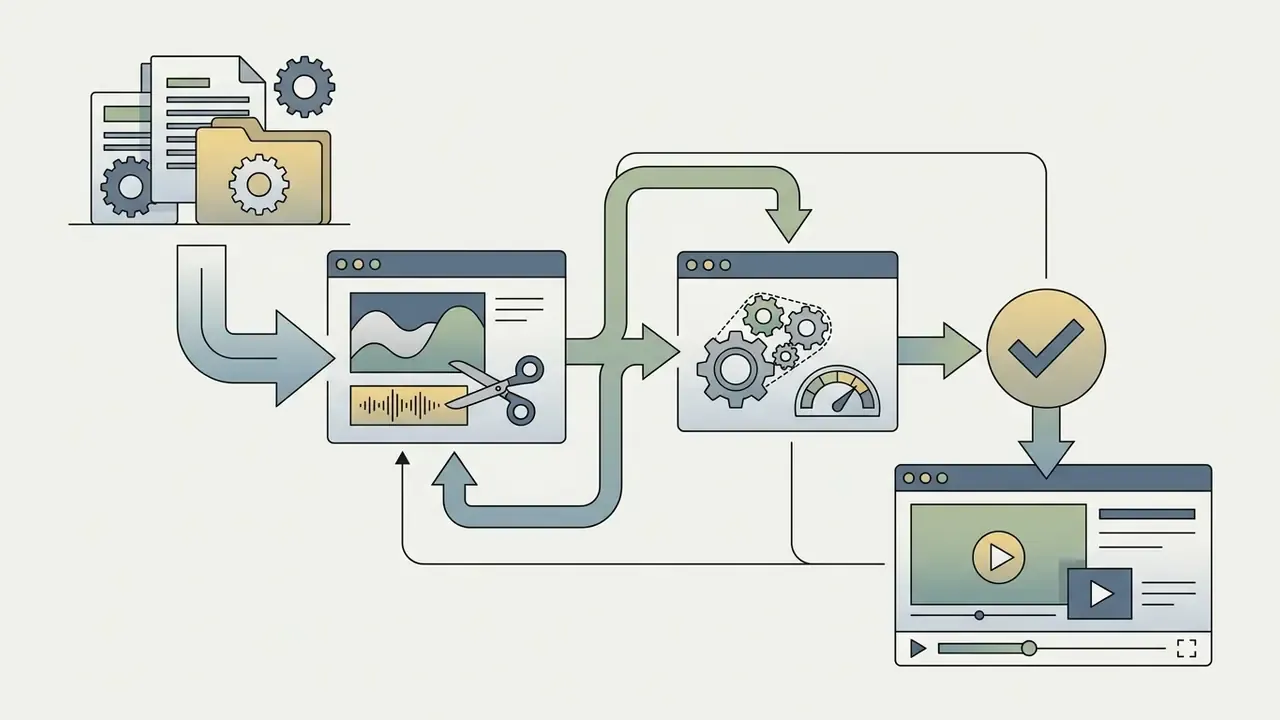
Decision diagram, textual breakdown:
- Path 1 (short videos and Reels)needs vertical 9:16 aspect ratio, automatic speech-to-text captions, quick trim tools. Recommended: CapCut, InShot.
- Path 2 (YouTube and long-form)needs multi-track timeline control, keyframe editing, and high quality 1080p or 4K video export without duration limits. Recommended: VN Video Editor, Microsoft Clipchamp.
- Path 3 (photo video and slideshow)needs photo-to-video auto-assembly, stock photos, transitions, and royalty free audio synchronisation. Recommended: Canva Video Editor, Magisto.
- Path 4 (iPhone no-watermark editing)needs full platform integration, zero export watermarks, and direct hardware acceleration. Recommended: iMovie, Adobe Premiere for iOS.
- Path 5 (operating system filter)Windows and macOS users can run every desktop option listed. Linux users route to DaVinci Resolve, Shotcut, Kdenlive, or OpenShot. Web-only users route to Clipchamp, Adobe Express, Canva, or the CapCut web editor. iOS and iPadOS users route to iMovie, VN, CapCut, Edits, or Premiere for iPhone. Android users route to CapCut, VN, InShot, or KineMaster.
- Path 6 (desktop and professional route)needs node-based or curve-based colour grading, chroma key with keyframes, multi-track audio mastering, and fully local rendering. Recommended: DaVinci Resolve, Shotcut, Kdenlive.
- Path 7 (organisational or regulated use)needs a named tool owner, documented data residency, and evidence that source media never leaves managed endpoints. Recommended: local desktop NLEs only, with the licensing checklist below completed before rollout.
What "free" means: exports, watermarks and feature limits
A video editing app qualifies as genuinely free when it permits project creation and video export without inserting mandatory brand overlays or pushing you to a paid tier at the export screen. Plenty of vendors market a free version that allows basic timeline edits, then applies a persistent watermark, caps resolution at 720p, or limits file size on save.
Free tiers cluster into three recognisable patterns. The first is genuinely watermark free output with a 1080p-to-4K ceiling (VN, iMovie, Clipchamp, DaVinci Resolve, Shotcut). The second is watermark-gated output with a 720p or 1080p cap, where removing branding is the upgrade (VEED, FlexClip, WeVideo, Magisto). The third is a social-first model that pairs platform-ready presets and templates with cloud processing limits, export minutes, or premium-asset gating (Adobe Express, Canva, Kapwing). Working out which pattern a tool follows before you build a complex timeline is, honestly, the highest-value check in this entire guide.
Leading no watermark applications, by contrast, let creators edit videos and export high quality 1080p or 4K files at zero cost. Understanding the distinction prevents lost productivity halfway through a complex project, and it helps teams document which video editing tools and workflows are approved for production use. Creators evaluating a broader media stack can review our commercial use guidelines for asset rights and licensing terms, then dig into the detail in our free video editing software comparison.
Data Privacy, Shadow AI and Enterprise Licensing Before You Edit
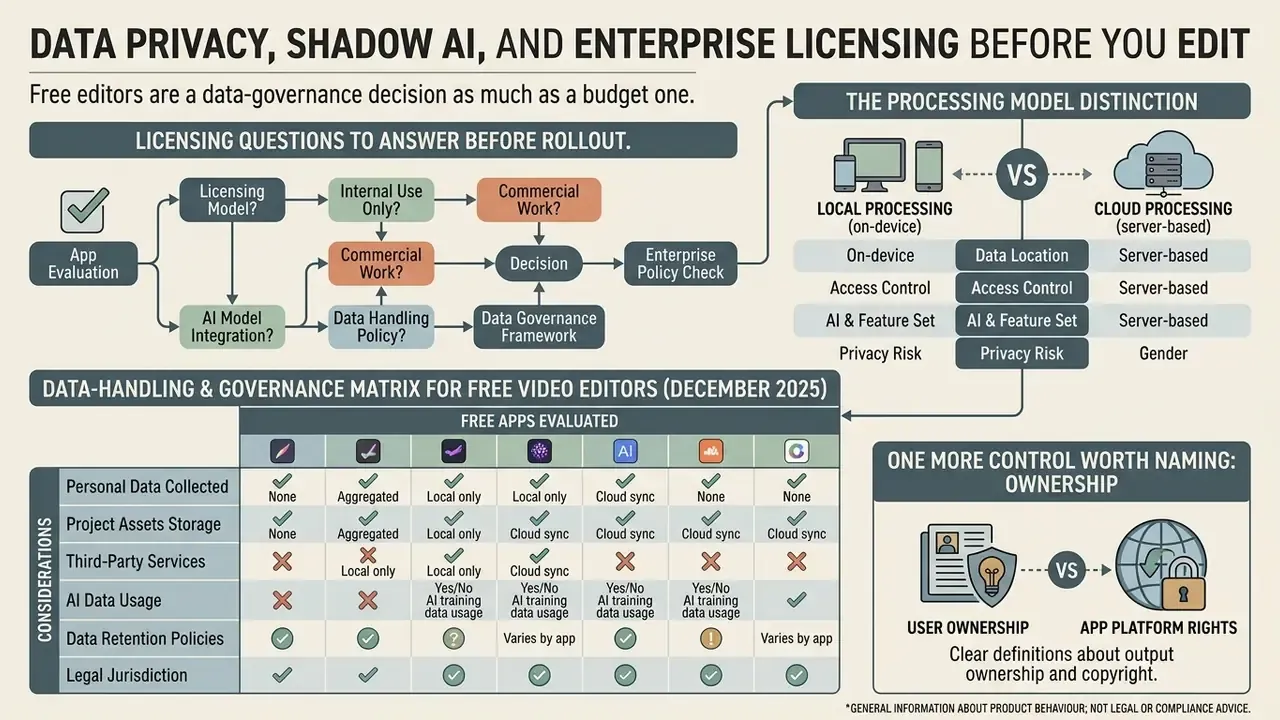
Free editors are a data-governance decision as much as a budget one. The moment an employee uploads unreleased product footage, customer-identifiable video, or internal training material into a cloud-rendered web editor, that media leaves the organisation's control boundary. This is the classic Shadow AI pattern: a well-intentioned individual adopts a free tool faster than security review can assess it.
The practical distinction is the processing model. Desktop NLEs such as DaVinci Resolve, Shotcut, Kdenlive, and OpenShot render entirely on local hardware and require no account, which keeps source media inside managed endpoints. Browser tools built on WebAssembly, plus screen recorders such as Screenity that keep recordings on the device, also avoid server upload. Cloud-rendered platforms (WeVideo, VEED, FlexClip, Kapwing, and the web editors from Adobe, Canva, and CapCut) transfer source files to vendor infrastructure, where residency, retention, and subprocessor terms become the controlling factors. Browser capture APIs add one baseline safeguard: MediaDevices and getDisplayMedia() only operate in secure contexts (HTTPS or localhost-class origins) and require explicit user permission before camera, microphone, or screen capture starts.
Data-handling and governance matrix for free video editors (December 2025)
| Tool | Rendering model | Account required | Source media leaves device | Governance note |
|---|---|---|---|---|
| DaVinci Resolve | Fully local (Win/macOS/Linux) | Optional registration | No | Lowest-risk option for confidential footage; cloud collaboration is Studio-only. |
| Shotcut / Kdenlive / OpenShot | Fully local, open source | No | No | Auditable codebase; suitable where vendor terms cannot be reviewed. |
| iMovie | Local on Apple silicon | Apple ID for sync only | No, unless iCloud sync is enabled | Check iCloud Photo Library sync policy before editing sensitive media. |
| VN Video Editor | Local on-device render | Optional | No | No ads and no watermark; review vendor privacy terms for optional cloud features. |
| CapCut (mobile/desktop) | Local render; AI features may be server-side | Yes for AI and templates | Partially (AI tools, cloud assets) | ByteDance-operated; AI background removal and captions may process off-device. Confirm vendor jurisdiction against internal policy. |
| Clipchamp | Browser-based with OneDrive or cloud backup | Microsoft account | Yes (project backup, 5 GB free) | Sits inside Microsoft 365 tenancy controls where an enterprise agreement exists. |
| Adobe Express / Canva | Cloud project storage and rendering | Yes | Yes | Auto-save is cloud-side; collaboration links can widen access if shared broadly. |
| WeVideo / VEED / FlexClip | Cloud rendering | Yes | Yes | Free tiers also impose watermarks and export-minute caps; least suitable for confidential media. |
Licensing questions to answer before rollout. Does the free tier grant commercial-use rights to the exported video? Do bundled music and stock assets carry rights-cleared commercial licences, or personal-use terms only? Does the vendor claim any licence over uploaded content? And does the free plan permit use by an organisation rather than a single individual? Free plans frequently differ from paid plans on exactly those clauses, and in practice the audio library is the most common source of copyright exposure. A production-ready permission record should document visual, voice, music, and likeness clearances for every asset on the timeline.
One more control worth naming: ownership. Assign a single accountable owner for each approved editor, log where its output is published, and set a review date. Without that, tool sprawl becomes indistinguishable from Shadow AI.
Best Free Video Editing Apps 2025: Top Picks for Most Creators
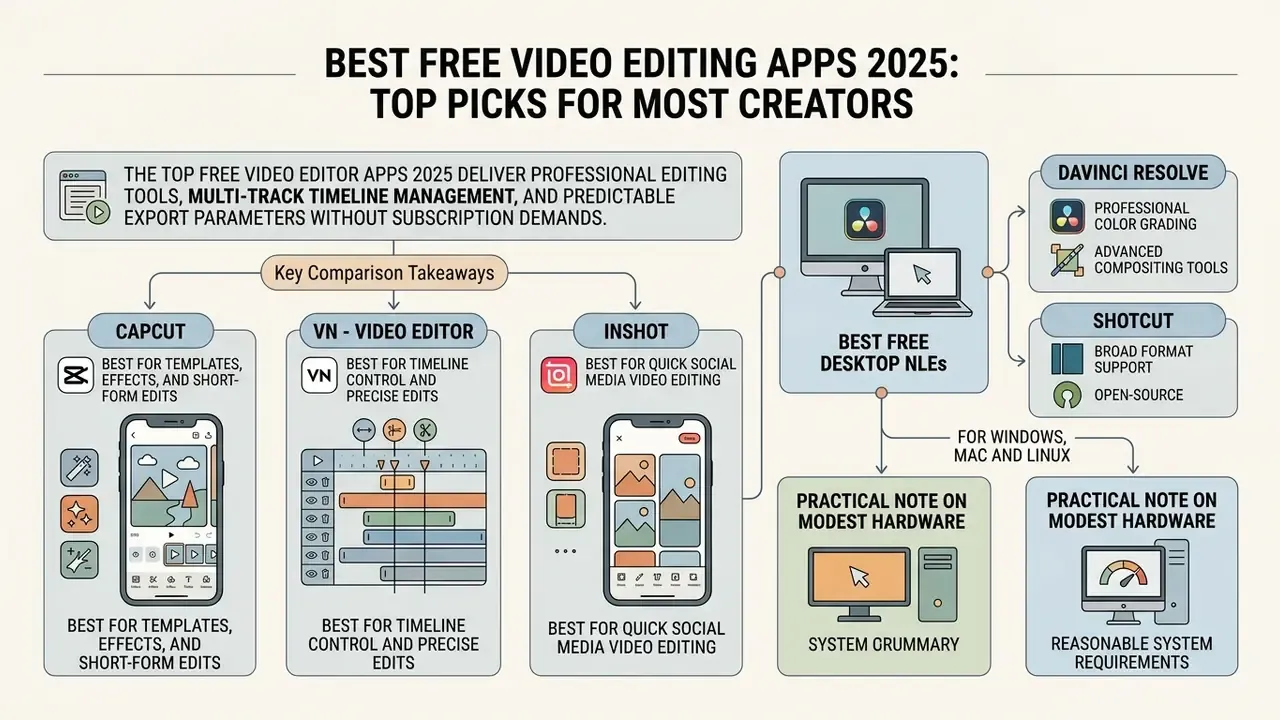
The top free video editor apps 2025 deliver professional editing tools, multi-track timeline management, and predictable export parameters without subscription demands. CapCut, VN Video Editor, and InShot cover most mobile content creators, while DaVinci Resolve, Shotcut, and Clipchamp handle the desktop and browser layers, with flexible support for short videos, social media publishing, and high quality rendering. Creators weighing whether to shoot and cut footage at all can compare generative alternatives in our overview of AI video generators.
Comparison of top free video editing applications in 2025 (mobile, desktop and web)
| Application | Platforms | Primary use case | Free version model | Watermark policy | Max video export and codecs | Video templates | Royalty-free music | Short videos and iPhone |
|---|---|---|---|---|---|---|---|---|
| CapCut | iOS, Android, Windows 7+, macOS 10.14+, Web | Trending short videos, Reels, TikTok | Freemium, full base suite | Watermark free after manual ending delete; Pro-marked assets may re-add branding | Up to 8K 60 fps on desktop (H.264, HEVC, Apple ProRes 422, GIF); 4K 60 fps on mobile | Thousands of free trending templates | Built-in audio library | Excellent (iOS and Android) |
| VN - Video Editor | iOS, iPadOS, Android, Windows, macOS | Precision timeline and multi-track editing | Free, no ads | Completely watermark free | 4K up to 60 fps, adjustable bitrate (H.264/HEVC; Dolby Vision HDR on iPhone 12+) | BeatsClip and AutoCut | Import and stock tracks | Excellent (iOS and Android) |
| InShot | iOS, iPadOS, Android | Quick mobile clips and ratio adjustments | Freemium, ad supported | Free removal via ad view; Pro removes permanently | 1080p / 4K (H.264 MP4) | Standard presets | Built-in tracks and effects | Very good (iOS and Android) |
| iMovie | iOS, iPadOS, macOS 14.6+ (4 GB RAM) | Apple ecosystem long and short edits | 100% free, system bundled, no paid tier | Zero watermarks | 4K 30 fps / 1080p 60 fps (H.264, HEVC) | Trailers, Storyboards, Magic Movie | Dynamic Apple themes | Native iOS and macOS |
| DaVinci Resolve | Windows, macOS, Linux | Professional grading, VFX, audio mastering | Free full suite; Studio adds pro extras | Zero watermarks | 4K UHD 60 fps in 8-bit colour (H.264, HEVC, ProRes on macOS); 8K is Studio-only | Edit and Cut page presets, Fusion templates | Fairlight audio tools; bring your own tracks | Vertical timelines supported; no mobile parity |
| Shotcut | Windows, macOS, Linux | Open-source timeline editing on modest hardware | Free and open source, forever | Zero watermarks | Export up to source resolution; wide FFmpeg codec range (H.264, HEVC, ProRes, WebM) | Filter presets rather than social templates | Import your own audio | Manual 9:16 presets; desktop only |
| Microsoft Clipchamp | Web, Windows | Browser editing, screen and webcam capture | Free plan; Premium adds 4K | Watermark free on free plan | 1080p free (480p/720p/1080p selectable); 4K requires Premium | Microsoft stock templates | Royalty-free stock music library | Good 9:16 presets; browser-based on iPhone |
| Adobe Express / Canva | Web, iOS, Android | Template-led social video and scheduling | Free plan with premium-asset gating | Watermark free when only free assets are used | High-resolution MP4 (H.264); HD watermark-free export on Canva mobile | Thousands of free templates | Adobe Stock / Canva audio, rights-cleared | Strong 9:16, 1:1, 16:9 presets; mobile apps available |
Key comparison takeaways:
- CapCut offers the largest automated asset library for social creators and the highest export ceiling of any free tier (up to 8K with ProRes 422 on desktop), but you must delete a default closing logo frame and avoid Pro-marked assets.
- VN Video Editor gives you an entirely ad-free, watermark-free experience built for precise frame-by-frame cuts and keyframe animation, with trimming accurate to 0.05 seconds.
- InShot wins on immediate mobile aspect-ratio conversion, using an ad-supported mechanism for watermark removal on free exports. Note that the separate "Remove Ads" purchase is not the same product as InShot Pro.
- DaVinci Resolve and Shotcut anchor the desktop tier: local rendering, no accounts, no watermarks, full codec control. The right answer whenever footage must not touch a vendor cloud.
- Clipchamp and Adobe Express win on convenience and team workflow (browser access, recording, collaboration, scheduling) at the cost of cloud processing and a 1080p free ceiling.
CapCut: best for templates, effects and short-form edits
CapCut remains the dominant free short video maker app, developed by ByteDance for tight integration with short-form platforms. It runs on iOS, Android, Windows 7 and later, macOS 10.14 and later, plus a separate web editor. TikTok account linking, though, exists only in the mobile app, so desktop and web users must export locally before publishing. The free tier includes thousands of trending video templates, dynamic filters, AI subtitles in multiple languages, background removal, and speed controls.
Two free capabilities get overlooked. The first is text-based editing: CapCut analyses your clips, generates a transcript, and lets you cut the video by deleting words as if editing a text file. For talking-head and interview content that is the fastest route available, full stop. The second is the depth of free colour work: inside a clip's properties you get a chroma-key tool in the Remove BG section with colour picker and keyframe controls, separate RGB curve adjustments, LUT support, tint, exposure, and contrast. Features usually reserved for paid desktop NLEs.
According to market intelligence from SensorTower, CapCut's weekly active iOS audience in the United States grew from roughly 14.9 million to nearly 19.2 million users over the fourth quarter of 2024, based on weekly tracking metrics rather than a single month-end snapshot.
Free exports support 1080p and 4K without watermarks on mobile, provided you delete the default closing logo clip on the timeline. The desktop build pushes that ceiling to 8K at 60 fps across H.264, HEVC, and Apple ProRes 422, and can render GIFs too. Premium AI features that rely on tokens (generated avatars, for instance) and some advertised in-app effects stay Pro-only, with subscriptions starting around $9.99 per month or $89.99 per year.
Its reach is not limited to North America. SensorTower's regional reporting shows similar dominance across Latin America, which matters if you localise campaigns.
VN - Video Editor: best for timeline control and precise edits
VN - Video Editor gives you multi-track timeline control aimed at creators who need granular frame accuracy without subscription fees. It supports keyframe animation, multi-layer picture-in-picture tracks (video, photos, stickers, text), curved speed ramps with preset easing, and custom LUT colour grading, at a frame-accurate timeline resolution of 0.05 seconds.
Store documentation confirms VN operates as a free app with zero advertisements and guaranteed watermark free output on exports up to 4K at 60 frames per second, with bitrate adjustable in the export settings. On iOS the listing explicitly advertises HDR editing with Dolby Vision support on iPhone 12 and newer. Codec handling covers standard H.264 MP4 delivery plus HEVC ingest, so footage from modern phones usually drops onto the timeline without conversion. The clean editing interface makes it a favourite for creators moving between mobile devices and desktop workspaces, since VN also ships Windows and macOS builds.
DaVinci Resolve and Shotcut: best free desktop NLEs for Windows, Mac and Linux
For professional colour grading, multi-track audio mastering, and advanced keyframing without watermarks, DaVinci Resolve offers an almost implausible free tier. The free edition caps output at 4K UHD 60 fps in 8-bit colour while still bundling two editing interfaces (the traditional Edit page and the faster Cut page), Fusion visual effects, Fairlight audio post-production, and a Deliver page with direct upload to platforms including YouTube and TikTok, complete with chapters, thumbnails, and titles. The paid Studio tier unlocks 8K rendering, several neural-engine AI tools, advanced noise reduction, and multi-user collaboration, features most solo creators never touch. The trade-off is the learning curve. Resolve rewards commitment, and it is overkill for a 20-second Reel.
For open-source, cross-platform editing on Linux and older hardware, Shotcut gives full timeline control with native GPU acceleration options, an FFmpeg-backed codec range (H.264, HEVC, ProRes, WebM), and export up to the source resolution with no arbitrary file size ceiling. Kdenlive is the strongest alternative for Linux users who prefer a KDE-native interface with a large effect library, chroma keying, and audio/video sync tools. OpenShot is free to download and use forever, with the simplest interface of the three for straightforward cut-and-caption projects. None of them requires an account, shows advertising, or uploads media to a vendor server, which is exactly why they remain the default recommendation for footage under confidentiality constraints.
Practical note on modest hardware. High-bitrate 4K HEVC or Log footage will stutter on 8 GB laptops in any editor. Generate proxy or optimised media before editing: transcode to a lower-resolution H.264 proxy or to Apple ProRes for smoother scrubbing, enable the preview-quality toggle in Resolve or Shotcut, and switch back to full-resolution media only at the delivery stage. Practical limits for browser and mobile editors are usually tied to device RAM rather than a published resolution cap.
Best Free Video Editing Apps for Reels, Shorts and Social Media
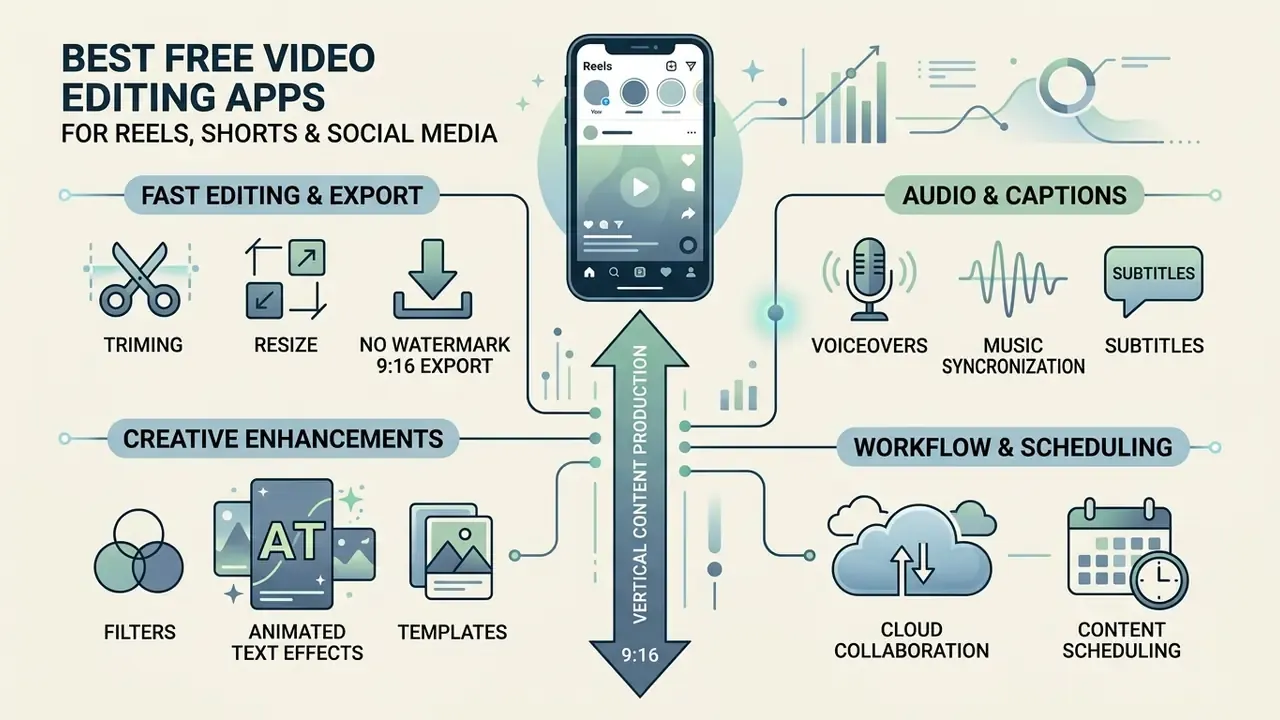
Producing content for Instagram Reel feeds, YouTube Shorts, and TikTok requires tools that handle 9:16 vertical video export and fast audio synchronisation. The top free video editing apps for reels streamline short-form production through automated clipping, dynamic text overlays, and direct audio integration. Beyond the general-purpose editors profiled above, three vertical-first tools stand out: Edits from Meta (a free mobile editor with capture, trimming, effects, and access to the Instagram music catalogue, exporting 4K with no watermark), Reels Editor (a free browser tool that trims, crops to 9:16, adds audio, and exports MP4 without an account or subscription), and MakeAIReel (a browser editor that turns long videos into 9:16 shorts with AI highlights, captions, music, and voiceover, no install required).
When producing multi-format visual campaigns, creators often combine vertical clips with custom imagery generated through our best ai image generator without restrictions tools.
Apps for fast trim, resize and vertical video export
Templates, filters and animated effects for engaging clips
Pre-designed video templates and animated effects hold attention by keeping visual pacing brisk through short videos. Recent audience engagement research indicates that visual variation, defined as changes in scene transitions, colour shifts, and dynamic visual effects, has a positive effect on consumer engagement in short-video marketing, while excessive visual complexity can work against sustained attention.
«Short-video applications are deeply embedded in the daily lives of young adults and are used in substantial volumes». Computers in Human Behavior (2023), cross-national study of excessive short-video application use among students. https://www.sciencedirect.com/journal/computers-in-human-behavior
Complementary time-series work on viewing experiences found that scene cuts boosted attention, while high visual complexity had a delayed negative effect on attentional synchrony. A useful reminder that "more effects" is not the same as "more retention." Free editing apps offer built-in filters and transitions that let creators build visually striking content without manual keyframing; the discipline is applying variation at scene boundaries rather than stacking effects inside a single shot.
Music, subtitles and voiceover tools for short videos
Audio integration drives short-form performance more than most creators expect. Free video editing apps with music built in, such as KineMaster, Clipchamp, and CapCut, also include AI auto caption generators that transcribe spoken audio into dynamic, synchronised subtitles across dozens of languages. KineMaster documents Auto Captions in 36 languages alongside a royalty-free music library, while Clipchamp's AI subtitle generator covers more than 80 languages and pairs with an AI background-noise remover.
To explore dedicated voice generation, review our best ai music generator guide and our practical breakdown of AI voice generators. Built-in royalty free music libraries and AI voiceover generator tools let creators add narration and background audio without triggering copyright strikes. That said, "royalty-free" inside a free tier does not automatically mean "cleared for commercial use", so verify the licence attached to each track before using it in paid client work.
Best Free Video Editor Apps for iPhone in 2025
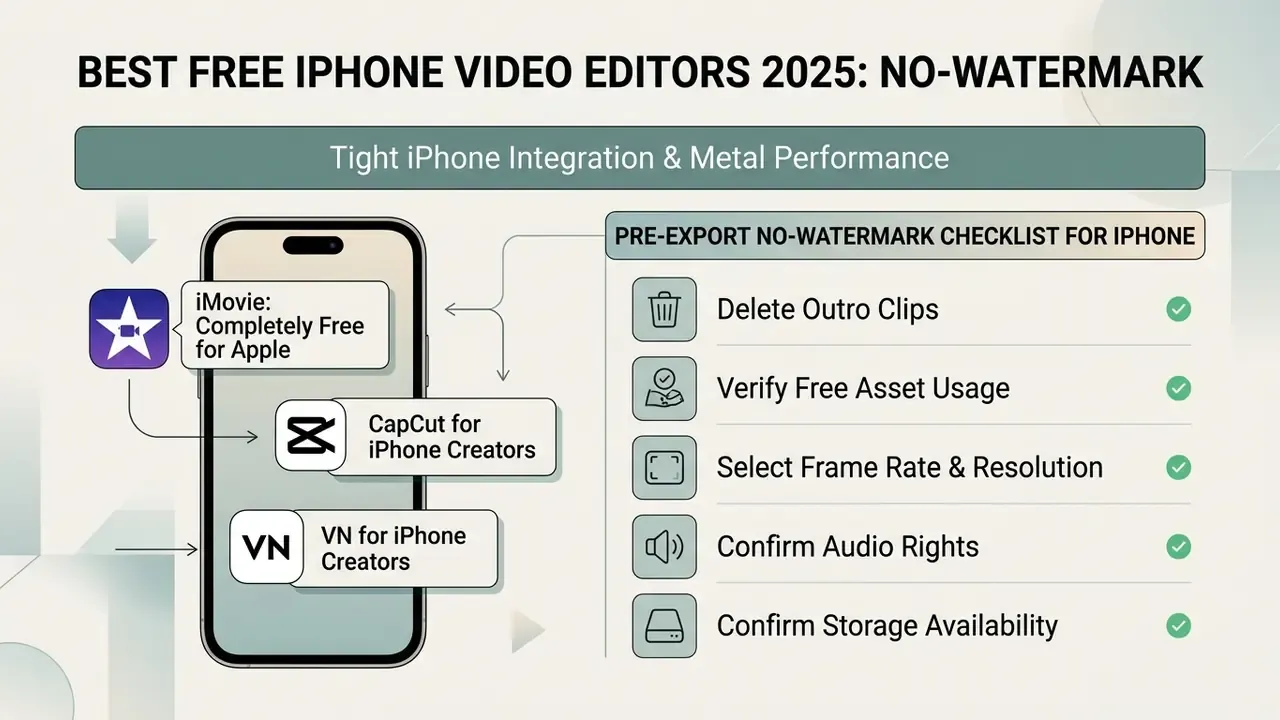
iPhone creators benefit from tight hardware integration and high-performance Metal rendering in mobile iOS editing apps. Picking the best free video editor iphone no watermark 2025 usually means choosing between Apple's native utility, iMovie, and feature-rich third-party tools such as CapCut, VN Video Editor, Edits from Instagram, and Adobe Premiere for iPhone, the last of which Adobe documents as free with unlimited 4K exports and no watermarks. One caveat: Apple's "fueled by the power of Apple silicon" performance claims apply to the paid Final Cut Pro for iPad, not to the free apps here. The free tools do benefit from hardware acceleration, but they publish no comparable silicon-specific benchmarks.
iMovie: completely free editing for Apple users
Apple's iMovie is a completely free, pre-installed editing utility for iPhone, iPad, and Mac. Ad-free interface, zero watermarks on any export, full 4K video export at 30 fps, and seamless project transfer across Apple devices through AirDrop. There is no paid tier or subscription inside iMovie at all, and Mac requirements stay modest: macOS 14.6 or later, 4 GB of memory, roughly 4.6 GB of disk space.
Apple's official documentation confirms iMovie includes built-in trailer templates, Storyboards, and Magic Movie generation, the last of which automatically assembles selected clips and photos with a soundtrack and transitions (Apple Support, 2025). Theme soundtracks adjust their length to match the project, and music can also come from the Music app library or imported files. It lacks native AI auto-captioning, trend templates, and multi-platform publishing tooling, yet its reliability makes it ideal for traditional YouTube video editing workflows and personal edits. iMovie is also strictly Apple-only. No Windows version, no Android version.
CapCut and VN for iPhone creators
Third-party editors like CapCut and VN Video Editor use iOS hardware acceleration to deliver multi-layer editing and advanced effects on iPhone, and the iOS-specific differences are worth knowing before committing a project. VN explicitly supports Dolby Vision HDR editing and high-bitrate 4K rendering at 60 fps on iPhone 12 and newer, which makes it the stronger pick when you shoot HDR and want to preserve it end to end.
CapCut's iOS guidance likewise allows importing and exporting HDR footage from iPhone 12 and later through an HDR toggle on compatible devices, and it adds iOS-only conveniences including direct TikTok account authorisation and mobile asset sync, capabilities its desktop and web builds do not offer. No vendor currently publishes controlled iOS-versus-Android render-time benchmarks for either app, so platform speed claims should be treated as unverified rather than assumed. Both apps give iPhone creators keyframe animation and speed curves that basic native editors simply lack.
What to check before exporting a no-watermark video on iPhone
To guarantee a clean, watermark free export on iPhone, verify project settings before you render.
- Delete outro clips.Scroll to the end of the timeline in apps like CapCut, then tap and delete the default promotional end-card clip.
- Verify free asset usage.Check that every applied filter, text style, template, and sticker is labelled "Free" rather than "Pro". A single Pro-marked asset can reinstate branding at export.
- Select frame rate and resolution.Set export parameters to 1080p or 4K at 30 or 60 fps based on the source footage. In iMovie, 4K projects share as 3840×2160 at 30 fps, and the 60 fps option appears only when more than half the project's media was captured at 1080p or 4K 60 fps; Apple also notes that 1080p or lower at 60 fps or lower is the most broadly compatible combination for older devices.
- Confirm audio rights.Check that every music bed, sound effect, and voice track carries a licence covering your intended distribution, commercial use included.
- Confirm storage availability.Verify the device has room for high-bitrate video export files.
- Run a five-second test export.Export a short segment and inspect it full screen before committing to a long render. This catches watermarks, wrong ratios, and audio drift in seconds rather than minutes.
Best Photo Video Maker Apps 2025
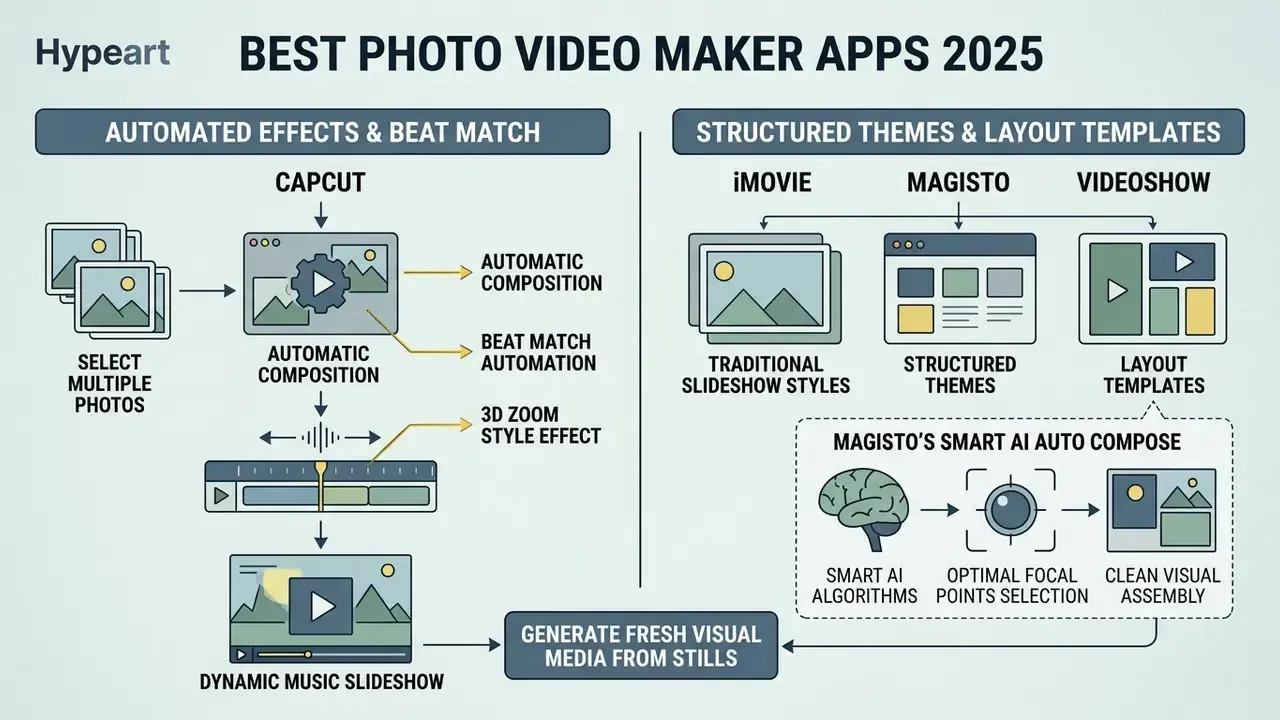
Photo video maker apps assemble still images, live photos, and graphic illustrations into dynamic slideshows synchronised with background music. Creators who want to animate stills rather than simply pan across them can also compare dedicated image-to-video AI tools. The best photo video maker app 2025 tools provide automated transition timing, pan-and-zoom keyframing, and customisable video templates to turn photo collections into publishable video assets. Readers who bookmarked a best free photo video maker app 2024 shortlist will recognise most names here; the notable change is how much beat-sync and auto-timing has moved into free tiers since then.
Creators looking to generate fresh visual media for slideshow projects can evaluate our best ai image overview for creative generation options.
CapCut for photo videos with templates and effects
CapCut works as a capable photo video maker through its automated Beat Match and 3D Zoom features. Its photo beat-sync templates detect audio beats in the selected background music track and snap image transitions to the rhythm, removing manual timing work entirely.
Select multiple photos from the camera roll, apply the 3D Zoom style effect from the Effects panel, add a trending track from the Sounds tab, and export dynamic vertical slideshows ready for social media platform publishing without touching timing controls. Transitions, filters, and overlays can then be layered on top before a single export step. For a family album or a product carousel, this is often a ten-minute job.
iMovie, Magisto and VideoShow for slideshow-style videos
For traditional slideshow styles, iMovie, Magisto, and VideoShow offer structured themes and layout templates. iMovie for iOS includes built-in soundtrack themes that adjust audio fade curves and length to match total project duration, and audio can be supplemented from the Music app library or imported files.
Magisto uses smart AI auto compose algorithms to select optimal focal points within photos, assembling clean slideshows on its basic free tier. The free limits are strict, though, and worth checking before you start. Magisto's own help documentation describes a Basic plan with full Smart Editor access, videos up to one minute, unlimited 720p HD downloads, a Magisto watermark on output, and an input ceiling of ten photos plus ten video clips per video; free users are also restricted to free templates and styles, with PRO-labelled templates excluded (Magisto Help & Learning Center, 2025). Note that Magisto's store listing has at times stated a stricter 30-second free limit than its help article, so verify in-app before planning a longer edit. VideoShow provides basic slide transitions, frame borders, and sticker overlays for quick mobile creation; its current free-tier limits, watermark policy, and export parameters are not documented in official vendor material we could verify, so treat third-party summaries with caution.
Best Free AI Video Editor App 2025
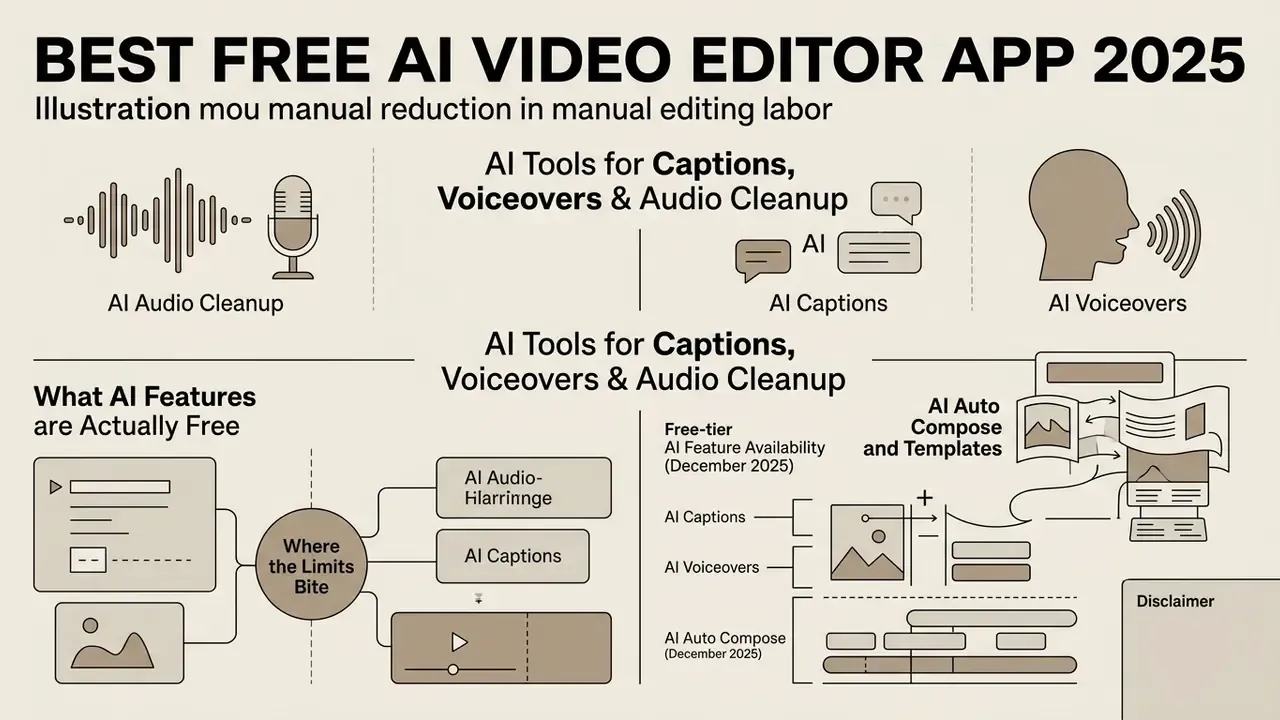
Artificial intelligence inside free video editing applications has cut manual editing labour substantially, and the pace of change is not slowing.
«A 2024–2025 survey records a sharp rise in generative AI and LLM systems for video across generation, understanding, and summarisation». A Survey on Generative AI and LLM for Video, arXiv (2024). https://arxiv.org/
Choosing the best free ai video editor app 2025 lets creators automate subtitle generation, remove background noise, generate synthetic narration, and assemble clips through automated algorithms. Readers comparing generation rather than editing can consult our free AI video generators comparison.
For specialised creative enhancement, tools like our best ai image upscaler pick can improve asset resolution before final rendering.
What AI features are actually free, and where the limits bite
Free AI tooling is real but quota-bound, and the quota is usually expressed in minutes, exports, or asset tiers rather than in feature access. The table consolidates the free-tier behaviour we verified during testing.
Free-tier AI feature availability and limits (December 2025)
| Tool | Auto captions | Background removal | AI voiceover / TTS | Auto compose / highlights | Principal free-tier limit |
|---|---|---|---|---|---|
| CapCut | Yes, multi-language | Yes, documented as available without watermark | Yes (text-to-speech) | Yes (auto-cut, beat sync, text-based editing) | Token-based premium AI (avatars, for example) and Pro-marked assets are paid |
| Clipchamp | Yes, 80+ languages | Yes (AI editing tools) | Yes (text to speech) | Partial | 1080p export cap; 4K is Premium; 5 GB free cloud storage |
| Kapwing | Yes | Yes | Yes | Yes | Export length and quality restrictions on the free plan |
| VEED | Yes | Yes | Yes | Partial | Watermark plus 720p cap and minute limits on free tier |
| KineMaster | Yes, 36 languages | Yes | Yes (AI Voice) | Limited | Watermark and asset-store gating on free tier |
| MakeAIReel | Yes | No | Yes | Yes (long-to-short AI highlights) | Browser-based; free usage volume varies |
The financial read-through is simple. If your monthly need exceeds a free tier's export minutes or demands watermark-free 4K, the cheapest paid tier of one tool almost always costs less than the productivity loss of stitching three free tools together. Conversely, if you publish a handful of 1080p social clips per week, nothing on this list will force an upgrade.
AI tools for captions, voiceovers and audio cleanup
Modern free AI video editors include speech-to-text engines that generate closed captions with high word-level accuracy, and research assistants are starting to sit on top of the timeline itself.
«The LAVE LLM-powered assistant improved editing efficiency and editor–client communication in user studies». Wang et al., LAVE: LLM-Powered Agent Assistance and Language Augmentation for Video Editing, ACM IUI (2024). https://dl.acm.org/doi/proceedings/10.1145/3640543
AI auto compose and templates for faster video creation
AI auto compose features analyse long recordings and extract highlight moments for you. Frameworks like Adobe Premiere's Scene Edit Detection and transcript-based editing cut scenes automatically instead of requiring manual boundary marking, while web tools such as MakeAIReel evaluate visual variation and audio peaks to slice raw footage into structured 9:16 clips.
«An agentic prompt-driven system autonomously understands the narrative structure of long videos and performs edits from text instructions». Ding, Wang, Chen, Shen, Kristensson, Prompt-Driven Agentic Video Editing System, ACM (2025). https://dl.acm.org/
Academic work in 2025 formalises this pipeline in two directions: one framework extracts the top k highlights from a video and then selects opening and ending scenes around each highlight, while the prompt-driven system above retrieves semantically relevant scenes from multi-hour footage to build highlight reels, character retellings, and coherent summaries. For creators, the practical value is converting multi-minute recordings into published short videos with one click, cutting both manual trimming and the tedious hunt for edit points. A governance footnote, since agentic editing is genuinely new: keep a human approval step before publication, because an automated cut can misread context, clip a disclaimer, or drop a required attribution without any visible error. Creators building videos from scripts rather than footage can also review text-to-video AI tools.
Free Video Editor Limits: When a Free Version Is Enough
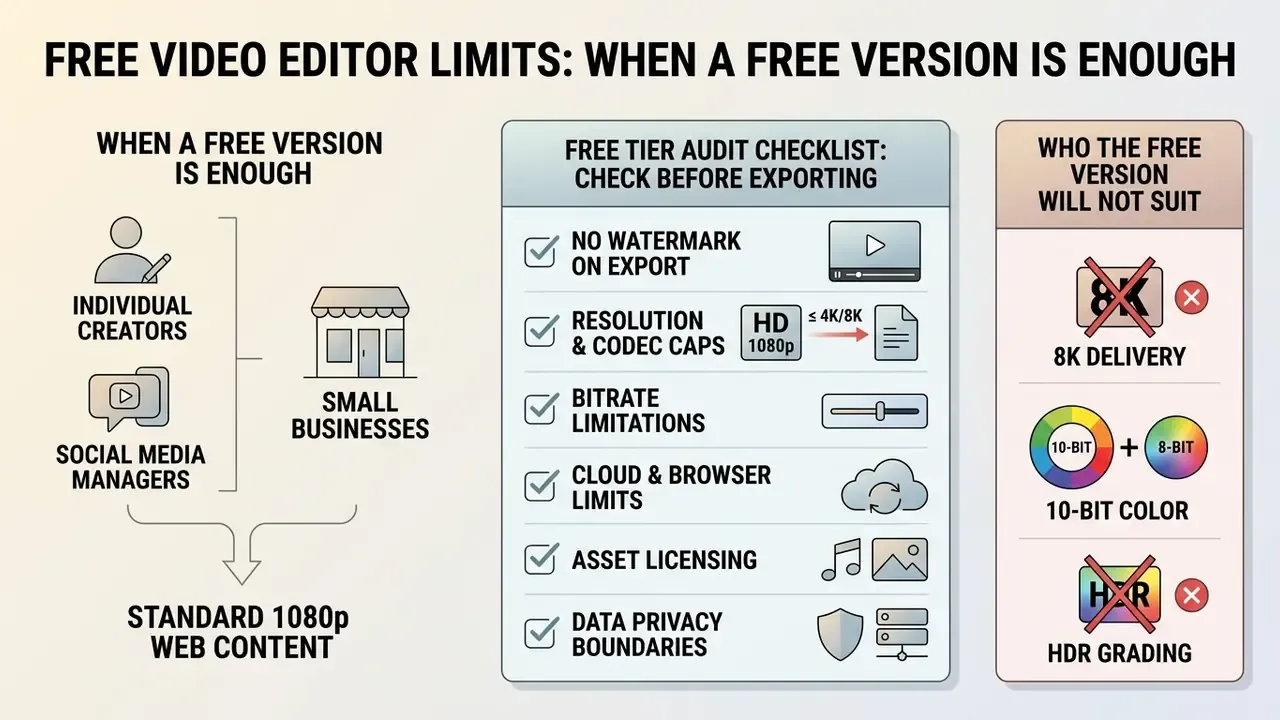
A free online video editor or mobile app is fully sufficient for individual creators, social media managers, and small business owners producing standard 1080p web content. Free tiers comfortably cover short social clips, internal drafts, product demos, basic trimming, and caption work. Knowing the boundaries, though, is what tells you when a free version genuinely meets the brief and when paid NLE software becomes unavoidable.
Who the free version will not suit
Free tiers stop being sufficient at identifiable technical thresholds rather than at some vague "professional" line. Upgrade, or move to a different tool class, when any of the following applies:
- You need 8K delivery or 10-bit and HDR grading. DaVinci Resolve's free edition renders 4K UHD 60 fps in 8-bit colour; 8K output, advanced noise reduction, and several neural-engine tools require Studio.
- You need ProRes or broadcast-mastering codecs as standard. CapCut desktop is the notable free exception; most free mobile and browser editors deliver H.264 MP4 only.
- You need chroma key with fine spill suppression at 10-bit. Free chroma-key tools handle clean green screens, not compressed 8-bit footage with soft edges.
- You need simultaneous multi-user editing on one project. Real-time collaborative editing on a shared timeline is a paid capability in desktop NLEs, and link-based browser collaboration is not a substitute for locked, versioned project management.
- You exceed export minutes or cloud storage. WeVideo's free plan allows 1 GB of storage and five minutes of export per month; Clipchamp's free plan provides 5 GB of storage with a 1080p ceiling.
- You cannot permit third-party cloud processing. Any cloud-rendered free tool is out of scope; route to local desktop NLEs.
- You need watermark-free delivery from a watermark-gated tool. With VEED, FlexClip, WeVideo, and Magisto, the watermark is the paywall. No configuration removes it.
Watermark, export quality, file size and browser restrictions
FAQ: Frequently Asked Questions About Free Video Editing Apps
This section answers the operational questions that come up most: browser security, hardware recording, social publishing, codec compatibility, commercial licensing, and platform support across free video editing tools.
Are free online video editors secure and private for sensitive media?
Browser-based editors operate under two processing models: cloud server rendering and local in-browser execution. Tools using local WebAssembly processing render media directly on your device without uploading source files, and browser capture APIs such as getDisplayMedia() only run in secure HTTPS contexts with explicit user permission. When using cloud-rendered web editors, review vendor privacy policies, data-residency commitments, retention periods, and encryption standards before processing confidential files. For regulated environments, local desktop editors such as DaVinci Resolve, Shotcut, or Kdenlive keep recordings and source media inside your own infrastructure.
Which web browsers does an online video editor support best?
Modern Chromium-based browsers such as Google Chrome and Microsoft Edge deliver the best performance for web-based editing, thanks to robust WebGL and WebCodecs API support. Safari and Firefox are broadly supported on desktop too, though high-bitrate multi-track editing runs most efficiently in 64-bit Chromium environments with hardware acceleration enabled. Mobile browsers frequently do not support screen recording, so capture-heavy workflows should stay on desktop.
What video formats and codecs provide the smoothest playback during free timeline editing?
Standard H.264 MP4 files offer the broadest hardware acceleration compatibility across mobile and web editors. Heavily compressed formats like HEVC (H.265) or RAW footage may require proxy creation or transcoding to Apple ProRes for fluid multi-track playback on budget systems. Most free editors accept MP4, MOV, and M4V ingest; on export, H.264 MP4 is universal, HEVC is common on mobile, and Apple ProRes 422 appears in a small number of free tiers such as CapCut desktop. If playback stutters, enable the preview-quality or proxy toggle rather than lowering your project resolution.
Can I use videos made in a free version commercially?
Usually yes for the edit itself, but the binding constraint is asset licensing, not the editor. Free plans routinely mix open-access assets with premium items whose licences do not extend to commercial distribution, and bundled music libraries vary between "royalty-free for personal use" and fully rights-cleared commercial terms. Before client or paid work, confirm three things in writing: that the free tier grants commercial-use rights, that every music, stock, font, and template asset in the project is cleared for your distribution channel, and that the vendor claims no ownership licence over content you upload. This is general information, not legal advice; have counsel review terms for regulated or high-value campaigns.
Can I publish video exports directly to social media platforms from free apps?
Yes. Mobile applications such as CapCut and InShot offer direct OAuth account integrations for one-click publishing to TikTok, Instagram, and YouTube, and DaVinci Resolve's Deliver page uploads directly to YouTube and TikTok with chapters, thumbnails, and titles. Adobe Express adds a Content Scheduler for planning Reels, TikTok videos, and Facebook Stories in advance. Remember that CapCut's TikTok account linking works only in the mobile app, not on desktop or web. Exporting the finished file to device storage before manual posting is still recommended, both for a local backup and for a final quality check.
Do free video editing apps include built-in screen and webcam recorders?
Many do. Microsoft Clipchamp and Canva provide native browser screen and webcam recorder tools that capture display and camera feeds simultaneously, dropping the recorded clips onto the editing timeline automatically. Privacy-focused extensions such as Screenity keep recordings on the device rather than uploading them, which suits internal or confidential capture. Vendor documentation for browser recorders typically lists Chrome, Edge, Firefox, and desktop Safari as supported.
Which free editor should I pick for Linux?
DaVinci Resolve is the most capable free option on Linux and covers editing, colour, audio, and effects in one suite, though its Linux build is the most hardware-sensitive of the three. Kdenlive is the strongest native open-source alternative, with a large effect library, chroma keying, and clip-sync tools, while Shotcut suits older hardware and offers broad FFmpeg codec support with experimental GPU rendering. All three render locally with no watermark and no account.
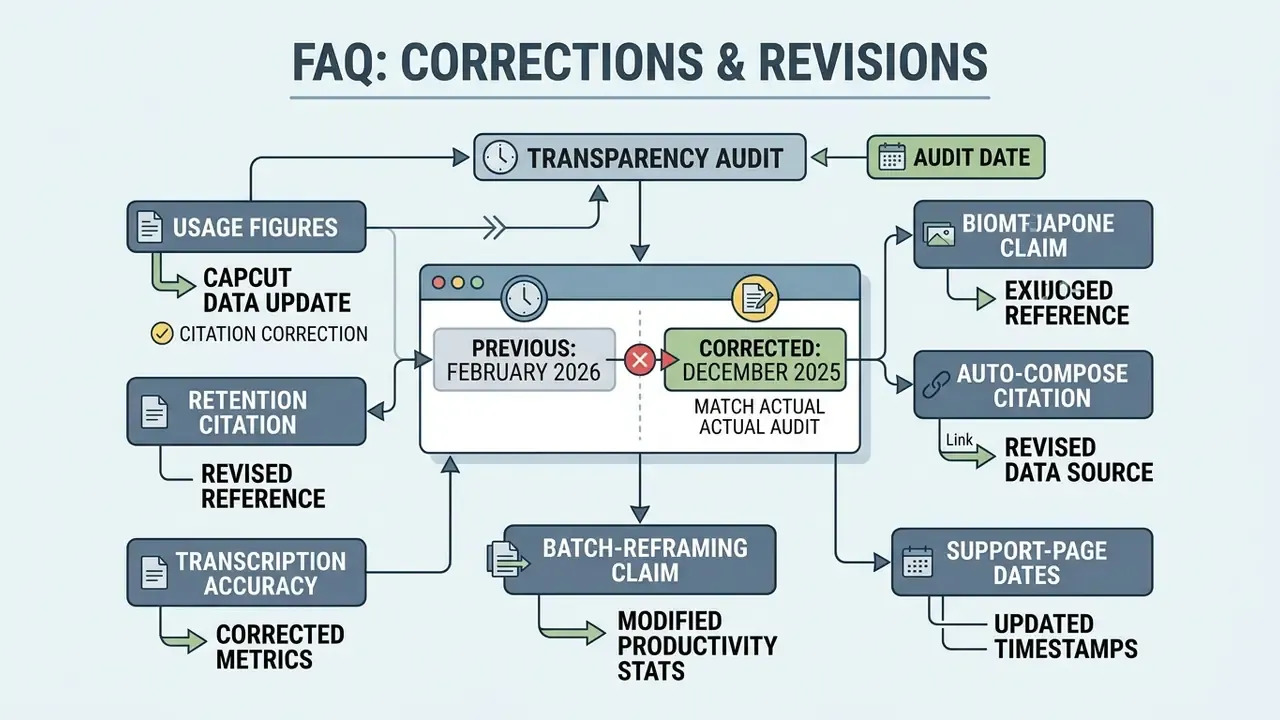
Appendix A: Corrections, Superseded Claims and Revision Notes
Open Questions and What We Will Test Next
Two gaps remain, and it would be dishonest to paper over them. First, no vendor publishes controlled render-time benchmarks across iOS and Android for the same project file, so mobile speed comparisons here stay qualitative. Second, there is no shared public methodology for caption accuracy, which makes every vendor percentage effectively unfalsifiable. Our next update aims to publish a fixed 40-clip test set, identical export settings, and per-tool render times on two hardware tiers, so readers can reproduce the results instead of trusting them.
Additional Resources and Tool Categories
To refine your content creation pipeline further, explore our specialised analytical hubs and cost-comparison tools:




Comprehensive Comparison Index
To compare software frameworks across all creative media categories, see the overview in our comprehensive comparison directory.