How We Choose the Best AI Logo Generator
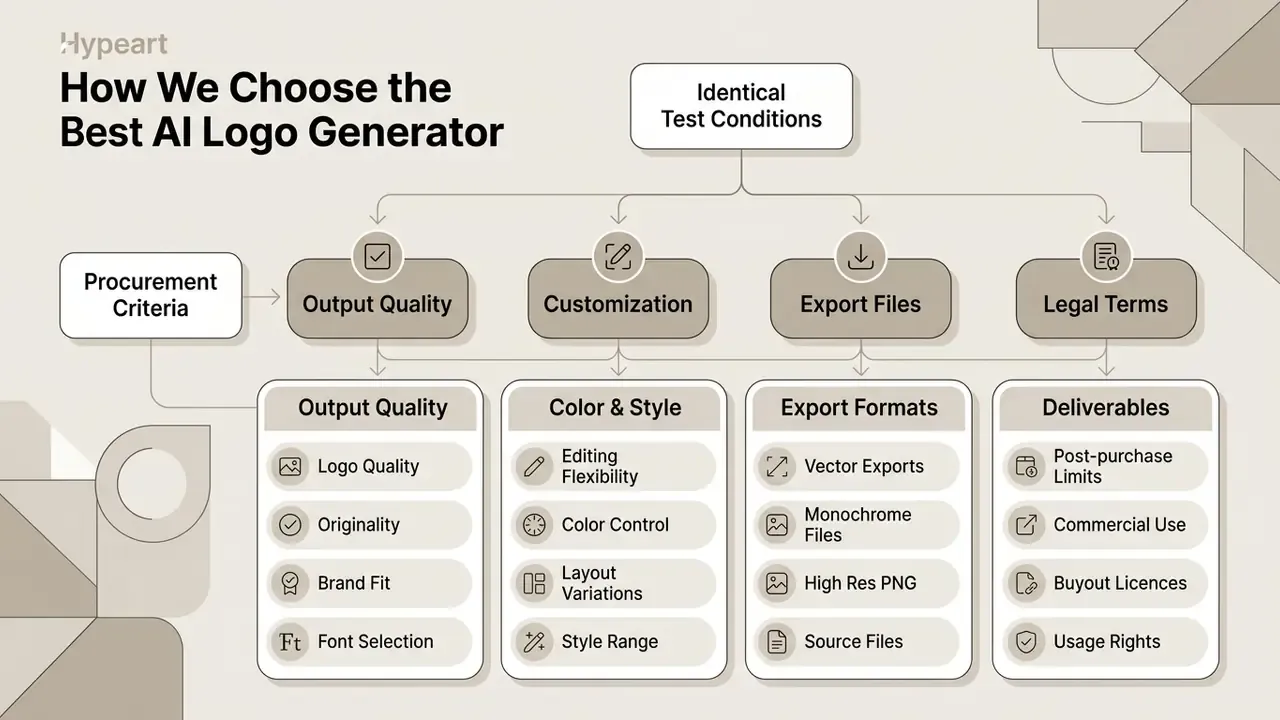
Our selection process weighs output quality, editing flexibility, technical deliverables, and legal terms under identical test conditions. Every candidate for the best AI logo generator title has to prove one thing repeatedly: can it produce a professional logo that actually matches a brand brief? A reliable platform generates distinctive logo concepts, which is the baseline expectation for modern AI logo generators. It also offers intuitive editing tools, delivers flexible file formats, and guarantees commercial ownership with no hidden export toll at checkout.
Logo Quality, Originality and Brand Fit
We score logo quality on visual legibility, typographic balance, and semantic alignment with the stated industry. A high quality result must produce unique logos that clearly carry the brand name and business name. The engine should hold optical contrast, balance colors fonts pairings, and deliver a professional looking mark across several logo variations instead of recycling the same stock icon set.
That gap is closable. But only when originality is paired with meaning, not novelty for its own sake.
«High innovativeness combined with strong semantic relevance increases sustained user attention to AI-generated logos.»
In practice, the shortlisted mark has to pass two tests at once: is it visually differentiated from category competitors, and does the symbol still communicate what the business does? A tidy geometric abstraction that could belong to any fintech, insurer, or SaaS vendor fails the second test even when it sails through the first. We saw this three times during testing, each time with a pleasant-looking shape that meant nothing.
Customization, Export Files and Commercial Use
Production-ready output needs granular customization plus complete vector and raster exports. You must be able to adjust spacing, typography, and icon alignment inside the built-in editing tools, not just swap a palette.
«Design-education research identifies limited customization as the key constraint of AI logo generators, particularly for complex projects.»
Professional deployment demands clean transparent background options, scalable vector files (SVG and EPS), and high resolution raster formats at 300 DPI. W3C specifications explain why format choice matters at the technical level: SVG graphics are resolution-independent and scale across display densities, while PNG carries an alpha channel where an alpha value of 0 is fully transparent (W3C, Scalable Vector Graphics 1.1, 2011, https://www.w3.org/TR/2011/PR-SVG11-20110609/single-page.html; W3C, PNG Specification, 2003, https://www.w3.org/TR/2003/REC-PNG-20031110/).
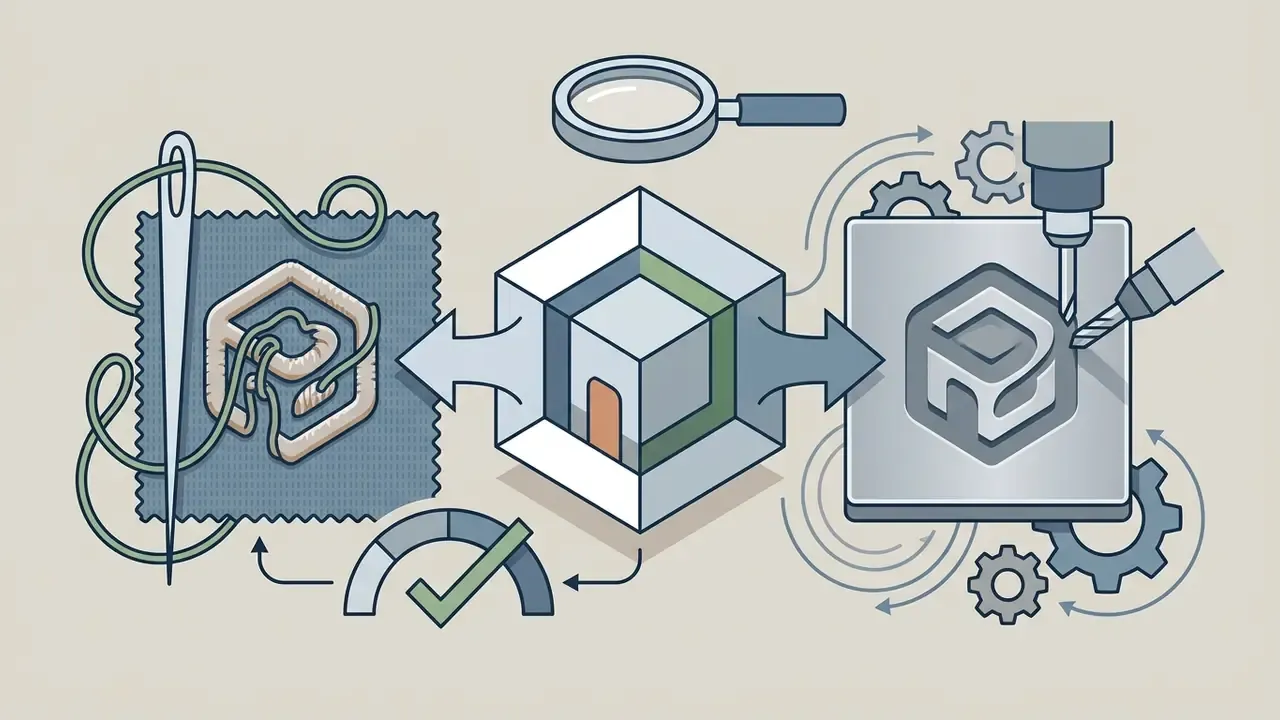
Your download archive should also carry pre-formatted monochrome variants: a solid black (#000000) and a solid white (#FFFFFF) version on a transparent background. Looka, for example, explicitly ships "an all-black version and all-white version of your logo on a transparent background". Invoices, faxed contracts, laser engraving, embroidery, and single-colour screen printing cannot reproduce gradients. Ever.
Explicit logo files licensing must then cover full commercial usage and asset ownership for both digital and print distribution. Read the licence text closely. A standard commercial licence grants the right to use the mark; an exclusive buyout retires the underlying icon from the vendor's public library so no competitor can generate the same symbol. For the wider rights picture across generative media, see the overview.
One caveat most vendor marketing pages bury: template-based platforms often lock the company-name text field after purchase. Looka states plainly that "the text and layout of the logo/company 'Name' field cannot be edited after purchase," even though colours, icons, and layout stay editable. Verify spelling, capitalisation, and legal suffixes (LLC, Ltd, Inc.) before you check out.
AI Logo Generator Procurement Criteria
Checklist0 / 12
Best AI Logo Generator Tools Compared
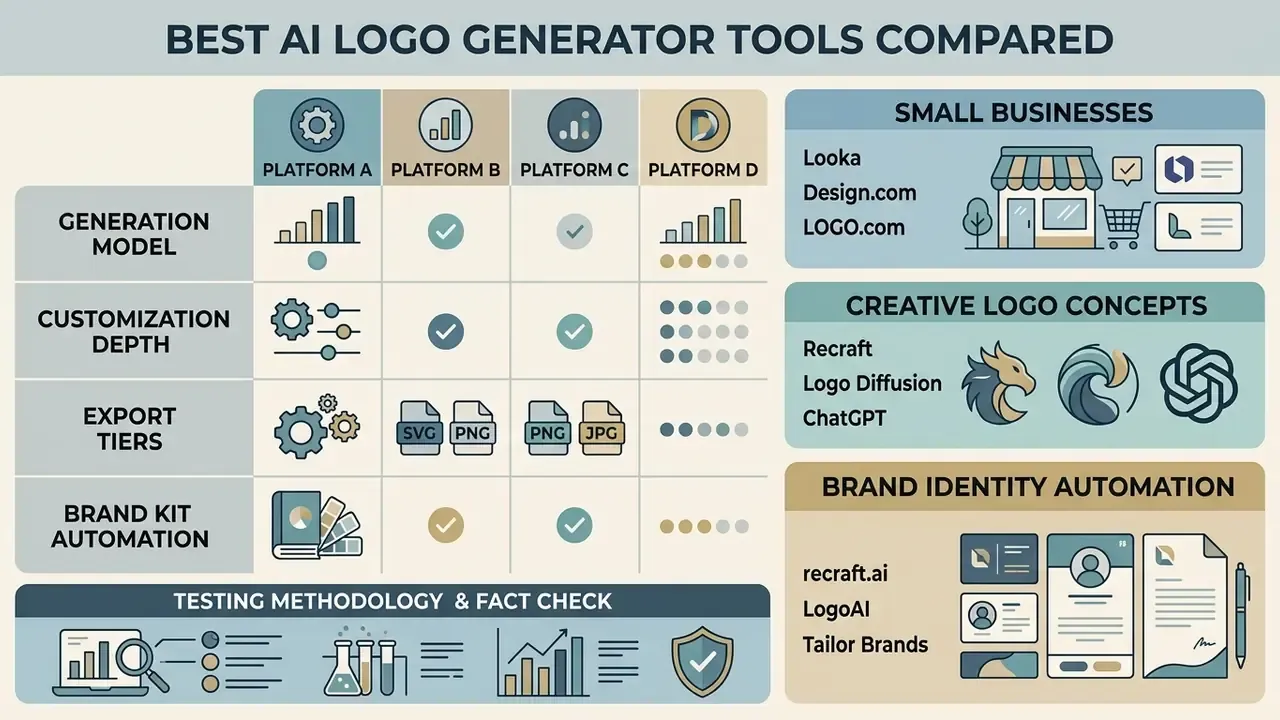
Comparing the leading ai logo maker platforms exposes real differences in generation models, customization depth, export tiers, and brand kit automation. The market splits into two camps: template engines like Looka and LOGO.com, and direct generative systems like Recraft and ChatGPT 4o. Working through this ai logo generator list helps a team choose based on design experience, vector requirements, and budget rather than marketing copy. Many of the 2025 shortlists still circulating online are out of date on both pricing and export sets.
| Tool Name | Generation Approach | Customization Depth | Free Tier Access | Indicative Price | Export Formats | Post-Purchase Edits | Human Designer Option | Brand Kit Included | Commercial Usage | Best Use Case |
|---|---|---|---|---|---|---|---|---|---|---|
| Looka | Wizard & Template AI | Medium (Web Editor) | Free to preview | $20 basic / $65 premium one-time; ~$96/yr Brand Kit | PNG, JPG, SVG, EPS, PDF, all-black & all-white | Icon/Color only (Name Locked) | No | Yes (300+ assets) | Paid tiers | Small business brand kits |
| LOGO.com | Algorithmic Custom Icons | Medium (Web Editor) | Free low-res PNG | Paid tiers for SVG / brand kit | PNG, SVG, PDF | Web editor (re-download) | No | Yes (1,200+ templates) | Included on paid | Fast startup identity launch |
| Design.com | Template & Layout Engine | Basic to Medium | Free preview; limited free templates only | Paid licence for most vectors; extended/buyout licences available | PNG, JPG, SVG, EPS, PDF | Unlimited web edits | Support-assisted (24/7 chat) | Yes (Social & Cards) | Paid tiers + exclusive buyout | Social media & business cards |
| Recraft | Direct Generative Vector AI | High (Canvas & Paths) | Free daily credits (30/day) | Paid plans unlock full export set | SVG, PNG, JPG, Lottie, PDF | Unlimited (Native Vector) | No | Manual / Multi-asset | Full on user generations | Custom vector concepts & icons |
| LogoAI | Automated Identity AI | Medium (Style Studio) | Free preview | $29 Basic / $59 Pro / $99 Brand one-time | PNG, JPG, SVG, PDF | Studio re-edits | No | Yes (Automated) | Included in Pro/Brand | Automated brand guidelines |
| Tailor Brands | Guided Questionnaire AI | Medium (Platform Suite) | Free preview | Subscription tiers | PNG, High-Res Vector | Platform editor | No | Yes (Website & Suite) | Paid plans | All-in-one business formation |
| Logomakerr.AI | Template & Preference AI | Medium (Web Editor) | Free generation, pay on download | Paid download tiers | PNG, SVG, PDF | Full Web Editor | Yes (Designer Fix) | Yes (200+ templates) | Paid tiers | Non-designers wanting human help |
| Logo Diffusion | Image-to-Vector Diffusion | High (Grid Control) | 20 credits/mo | ~$24 Basic / $49 Pro / $99 Elite per month | Layered SVG, PNG | Regenerate & re-vectorize | No | Partial / Exports | Paid tiers | Raster-to-vector transformation |
| ChatGPT 4o | Multimodal Prompt Model | Low (Prompt-based) | Tiered GPT access | Included in ChatGPT plans | PNG (Requires trace) | Re-prompt only | No | Manual assembly | Subject to OpenAI terms | Broad concept brainstorming |
Pricing reflects publicly listed vendor tiers verified during testing in early 2026 and may vary by region, currency, and promotional billing. Confirm the live checkout price before purchase, or browse the hub for current subscription tiers. For direct feature benchmarking between two specific tools, explore the hub.
Looka, Design.com and LOGO.com for Small Businesses
Template platforms serve small businesses by pairing fast layout generation with turnkey marketing assets. Looka generates cohesive logo options alongside print-ready business cards, formatted social media headers, and a full brand kit in minutes. Its own documentation describes a two-minute flow from business name to hundreds of candidate marks, and the Brand Kit lists 20 social profile files, 55+ covers, 50+ post templates, and 10 story templates (Looka, 2025, https://looka.com/ai-logo-generator/).
LOGO.com takes a different route. It builds custom algorithmic icons rather than pulling static stock assets, and packages them inside a user friendly design suite at an accessible price.
Design.com offers streamlined branding packages built for quick web and print deployment: business cards, letterheads, email signatures, and a template library that auto-applies your logo, colours, and fonts. One nuance on its "free" positioning. Design.com advertises free AI logo templates with high-resolution and vector files included, but that access covers a limited subset of templates. Most library icons need a paid licence, and genuine exclusivity requires an extended or buyout licence that pulls the icon out of the shared library altogether.
Recraft, Logo Diffusion and ChatGPT for Creative Logo Concepts
Generative AI image engines and advanced ai platforms let teams generate logo designs far outside template bounds. They sit on the same model families covered in our review of best image generating ai tools and our comparison of AI image generators. Recraft produces native SVG with clean vector paths, so a designer can shape a designed logo directly on an infinite canvas. Its documentation describes outputs as "real SVGs" with organized layers, suitable for logos, icons, illustrations, and brand assets (Recraft, 2026, https://www.recraft.ai/docs/recraft-studio/image-generation/how-to-generate-a-logo).
LogoAI and Tailor Brands for Brand Identity Automation
Automation-first platforms push logo creation into a wider visual system. According to LogoAI's product documentation, its design studio selects logo, colour, and font combinations automatically, then generates matching email signatures (with HTML installation for Gmail, Outlook, and Apple Mail), AI business cards, branded stationery, and print- or web-ready files in SVG, PNG, and PDF. Those assets act as automated digital guidelines for holding a consistent brand identity across channels. Tailor Brands links logo generation to business registration tools, a native website builder, and automated marketing templates inside one dashboard. Its published documentation is clearest on the website builder, so verify signature and print deliverables against the current feature list before subscribing.
Testing Methodology & Fact Check:
Free vs Paid AI Logo Makers: What You Actually Get
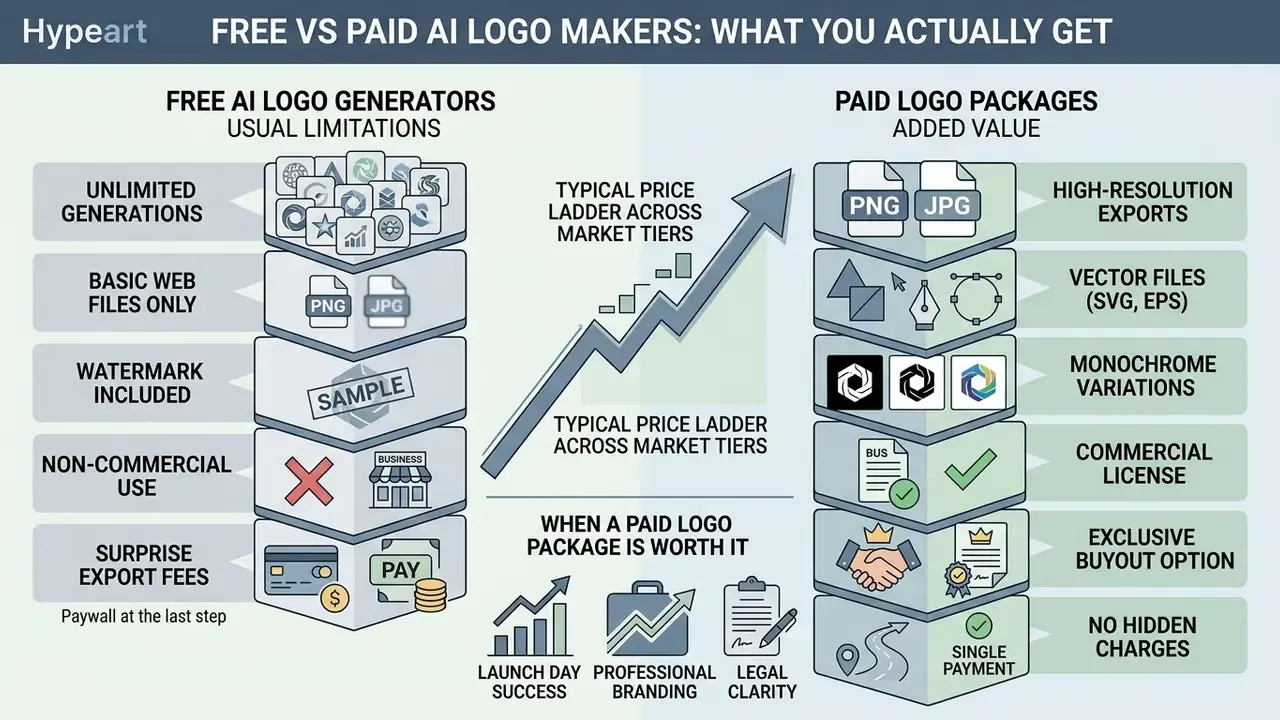
Understanding how ai logo maker free tiers are structured saves you from a surprise export fee on launch day. Most platforms let you generate and preview concepts at no cost. Downloading usable, high-resolution production files almost always requires a paid upgrade or a one-time licence.
What Free AI Logo Generators Usually Include
Free tiers typically open up basic generation wizards, browser previews, and draft-quality logo options. They are genuinely handy for testing colour palettes and icon directions with zero commitment. The limits appear at download: low-resolution raster only, often without a transparent background, no scalable vector files, and sometimes a vendor watermark that blocks any formal commercial use of AI images.
«Platform comparisons confirm that vector files and transparent backgrounds are generally paywalled. Both Looka and LOGO.com place SVG behind a paid tier.»
Recraft is the notable structural exception. Its free plan issues daily credits (roughly 30 per day) that still yield vector-style generations, though the full export set and higher-volume use sit behind paid plans. Logo Diffusion's free plan grants 20 credits per month, which works out to about 10 designs with a single concurrent generation job.
Typical Price Ladder Across Market Tiers
| Tier | Typical Price | What It Unlocks | Who It Suits |
|---|---|---|---|
| Preview / Free | $0 | Concept generation, watermarked or low-res PNG, personal evaluation | Idea validation, name testing |
| Basic one-time | ~$20–$29 | Single high-res PNG, limited variations, no vectors | Pre-launch side projects |
| Vector / Premium one-time | ~$59–$65 | SVG, EPS, PDF, transparent + monochrome variants, colour variations | Any business printing or trademarking |
| Brand kit subscription | ~$96–$129/year | 200–300+ branded templates, guidelines, social sets, re-download rights | Small businesses running multi-channel marketing |
| Generative vector subscription | ~$10–$49/month | Credit pools, native SVG, canvas editing, Lottie/animation exports | Designers and agencies iterating at volume |
To model these tiers against your own production volume, open the hub of design and campaign ROI calculators.
When a Paid Logo Package Is Worth It
A paid tier becomes necessary the moment the logo touches commercial operations, print production, or trademark filing. Paid packages supply production-grade vector files (SVG/EPS) for large-format scaling, grant explicit commercial usage rights, and bundle a full brand kit. They also save hours by pre-formatting assets for business cards, social profile graphics, and web use.
«Qualitative research on AI in small business confirms that platforms like Looka let owners produce attractive logos with minimal effort by analysing user preferences and current design trends.»
The break-even maths is blunt. A $65 premium package with vectors and monochrome variants costs less than one hour of agency retouching later. It also prevents the genuinely expensive scenario: reprinting signage that was produced from an upscaled PNG.
Standard Commercial License vs Exclusive Buyout
These two rights get confused constantly, and the difference is material. A standard commercial licence lets you use the delivered logo across marketing, packaging, and products. On template-driven platforms the underlying icon usually stays in the vendor's public library, where a competitor can pick the same symbol tomorrow. An exclusive or buyout licence, offered by vendors such as Design.com, retires that icon from the library, "helping ensure exclusivity, originality, and brand protection."
Take the buyout path if you plan to file a trademark, enter a crowded category, or invest heavily in one mark. Stay on the standard licence for a short-term campaign, an internal product, or a venture still validating its positioning.
Which AI Logo Maker Is Best for Your Brand
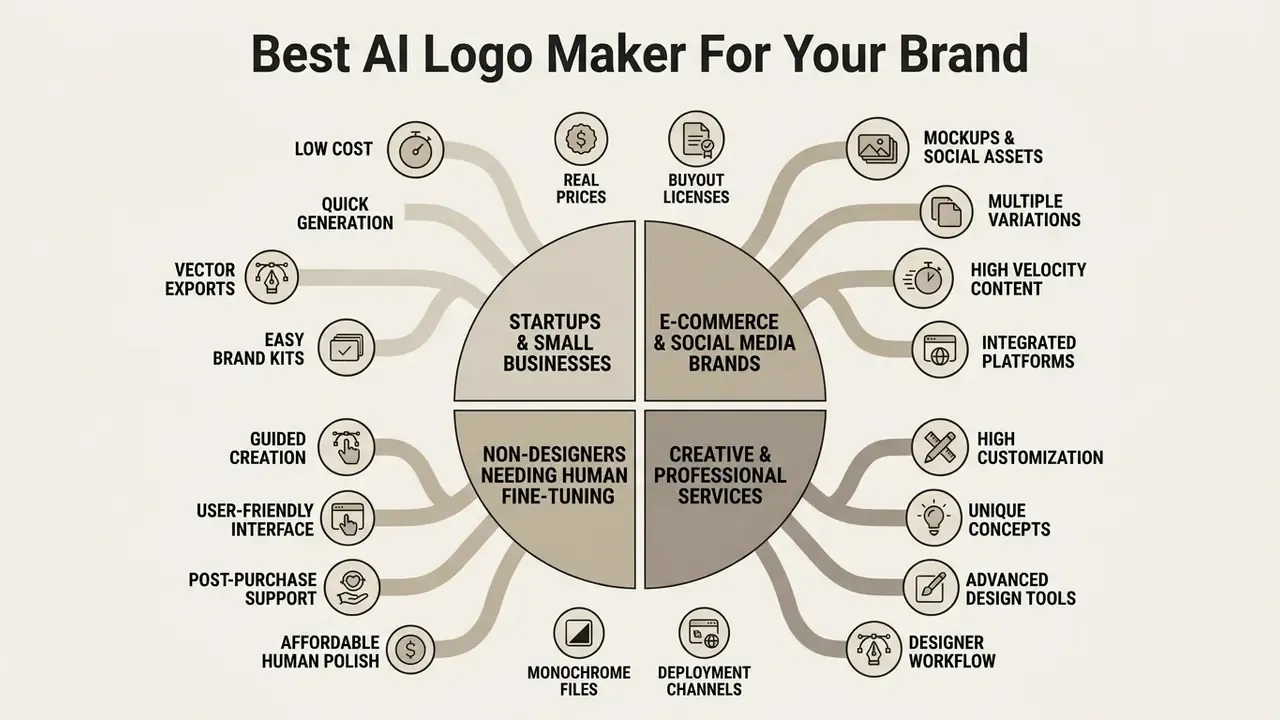
Picking the best ai app for logo creation depends on your operating model, in-house design expertise, and deployment channels. Choosing the best ai app to create a logo is really an exercise in matching platform capability to workflow, not chasing the highest feature count.
Best AI Logo Tools for Startups and Small Businesses
Early-stage startups and small businesses need speed and predictable cost. Automated platforms such as LOGO.com and Looka let founders stand up a complete visual identity without an external agency. They output cohesive launch assets: app icons, website headers, printable business cards, and social sets.
«A study of Indian SMEs recorded an AI logo cost of about ₹8.54 versus ₹6,000 for a designer, with production time of 10–60 minutes instead of over an hour.»
Those economics explain the adoption curve. They also explain the quality gap. The saving is only real when the founder reinvests it into iteration, testing, and a proper vector package rather than pocketing it.
Best Options for Creative and Professional Services
Agencies, studios, and professional service firms need unique logos that carry strategic differentiation and typographic precision. Generative vector tools like Recraft provide advanced ai controls, so experienced creators can fine tune anchor points, adjust custom typography, and produce professional design assets for corporate use.
«An empirical experiment in brand visual identity design found AI delivers greatest value during concept generation, while coherence evaluation and final decisions remain with designers.»
Teams producing campaign imagery, illustration systems, or editorial art alongside identity work should benchmark their whole stack before consolidating on one vendor. Our review of AI art generators covers the illustration side; for animated brand assets, compare a best image to video ai generator and the limits of best image to video free tiers. Post-production matters too: mobile-first studios often finish social cuts in a best ipad video editor and retouch product shots in a best iphone photo editor before the logo lockup goes on.
Best Options for Non-Designers Needing Human Fine-Tuning
When AI layout tools stall on complex kerning or icon alignment, pick a platform with a human fallback. Logomakerr.AI offers an optional in-house designer fix, described in its own feature list as "let our in-house designer help fine-tune your logo." This hybrid route pairs instant generation with professional touch-ups, usually at a fraction of a full identity engagement.
Use it when three symptoms show up together: the direction is right but optical spacing looks off, the icon and wordmark refuse to share a baseline, and the mark breaks down below 24 px. Those are precisely the corrections a template editor cannot make and a designer fixes in under an hour. If cost is the sticking point, open the hub of software alternatives and compare hybrid providers side by side.
How to Create a Professional Logo With AI
A structured, step-by-step method is what turns an ai app to create logos into a reliable source of brand-aligned assets. Follow an iterative workflow to create logos efficiently and dodge the usual generative pitfalls.
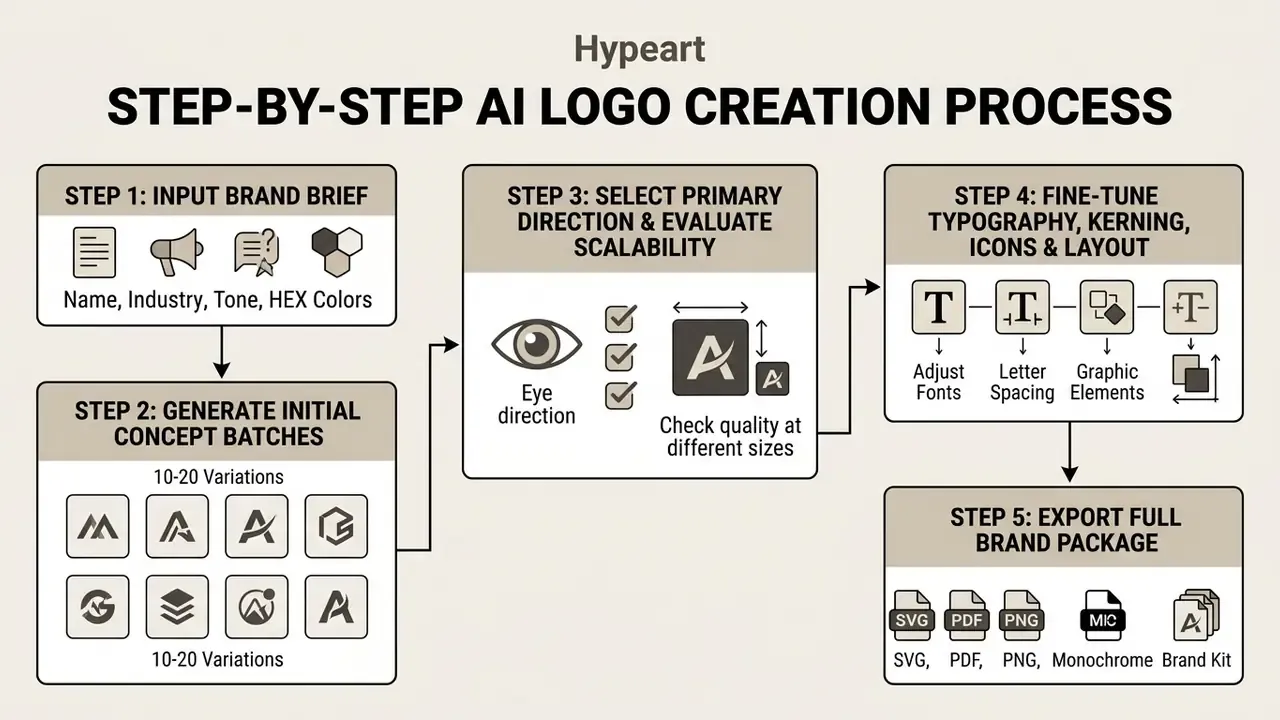
Start With Your Brand Name, Industry and Logo Style
Define the core visual parameters before you generate anything. Enter the exact brand name and business name, pick the industry category, and state your primary brand values. Then set style preferences (minimalist geometric, vintage emblem, modern wordmark) to steer the model's baseline output. Standardise the name string first. Corporate identity guides typically strip extraneous words and special characters before any asset is produced, which prevents mismatched lockups later (University of North Carolina, Branding and Identity Guidelines, 2022). A few clicks here save a rebuild later.
Generate Multiple Logo Concepts and Select a Direction
Run a broad first batch to produce varied logo concepts and logo variations. Do not settle on output number one. Review 15 to 20 distinct alternatives, minimum.
«A study of idea types found AI outperforms designers at concept expansion, offering a wider range of directions, while humans are stronger at combining and refining ideas.»
Assess each candidate for visual balance, category relevance, and distinctiveness, then carry one direction into refinement. Apply a formal down-select rather than gut feel: eliminate on hard criteria first, score the survivors on relevance and legibility, and document why the winner won. That alternatives-analysis discipline mirrors federal project guidance, and it also gives you an audit trail if a stakeholder reopens the decision three months later.
Fine-Tune Colors, Fonts, Icons and Layout
Now use the integrated editing tools to fine tune the chosen mark. On platforms with path and typography controls (Recraft, or web editors with kerning sliders), adjust letter spacing, line spacing, and font weight for readability. Simpler wizard tools may only allow font swaps and preset spacing steps, which is worth knowing before you commit. Enter custom HEX codes to match your palette, scale icon proportions against the wordmark, and rebalance the layout until the composition reads as professional looking rather than assembled.
Watch the font licence. Some platforms use proprietary typefaces, for instance Design.com's library of 500+ exclusive fonts. If your brand adopts an AI-paired proprietary font, confirm the licence includes desktop installation files (.OTF/.TTF) so decks, contracts, and corporate documents match the logo. Otherwise you end up with a wordmark you cannot reproduce anywhere else. That is an awkward conversation with a sales team.
One last check before checkout: re-read the post-purchase policy. Colours and icons are usually editable indefinitely, but the company-name text field often freezes the second payment clears.
Prompt Templates That Produce Clean Vector Logos
Generative platforms respond to constraint, not adjectives. Each template below was used during testing with the Apex Dynamics brief. Wrap literal text in quotation marks so the model renders it verbatim instead of paraphrasing.
- Flat vector monogram
Flat vector logo, minimal geometric monogram of the letters "AD", single continuous stroke, uniform 8pt line weight, no gradients, no shadows, deep navy #12233F on pure white, centered, generous negative space, SVG-ready clean paths. - Negative-space symbol
Minimalist vector mark for a financial technology company, abstract upward arrow formed by negative space between two rounded shapes, two colours only (#12233F and #1FD1C1), flat, symmetrical, high contrast, no text. - Full wordmark lockup
Horizontal logo lockup, geometric sans-serif wordmark reading "APEX DYNAMICS", tight even letter spacing, small abstract shield icon to the left, aligned optical baseline, flat vector, navy and electric teal, white background, print-ready. - Monochrome stress test
Same mark, solid black #000000 version on transparent background, no gradients, no strokes thinner than 2pt, legible at 16 px. - Refinement follow-up (chat models)
Keep the composition identical. Increase the counter space inside the icon by 15%, reduce detail so the mark stays readable at 16x16 px, and output a version with a transparent background.
Change one variable per run: colour, icon, or layout. That way you can attribute an improvement to a specific change instead of regenerating blindly and hoping.
How to Check an AI-Generated Logo Before Downloading
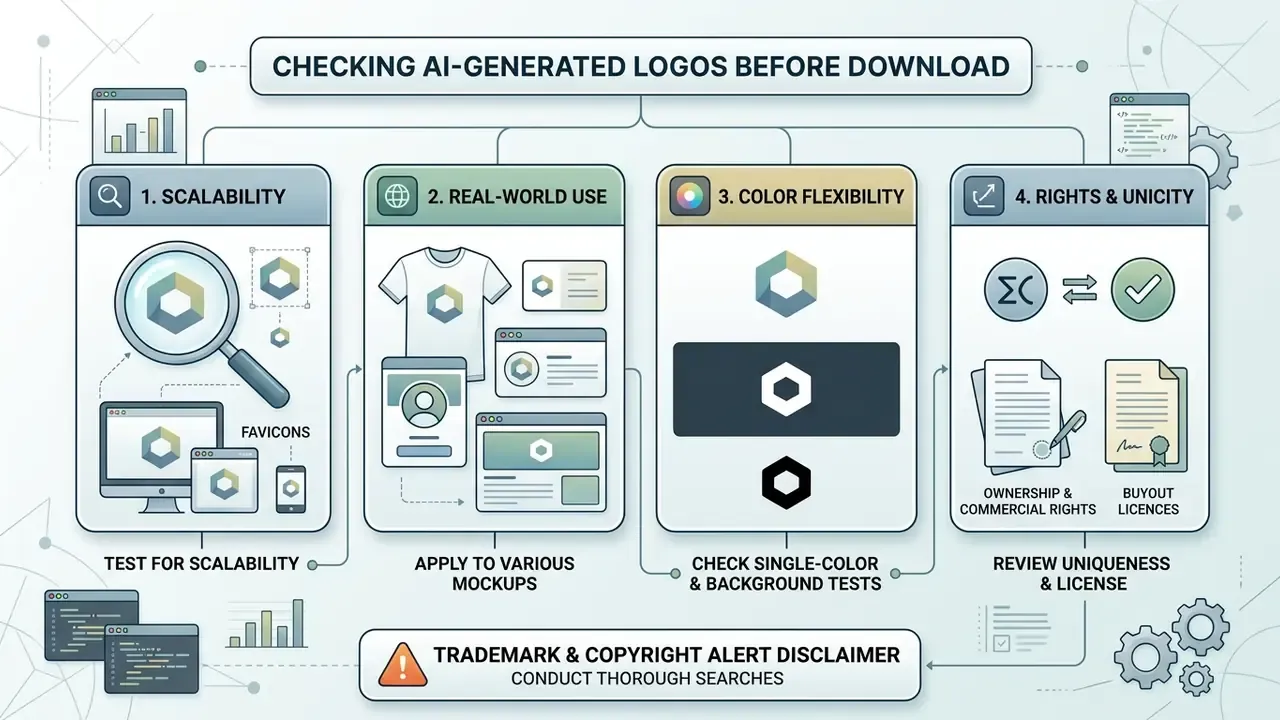
A thorough pre-download review prevents rendering failures and licence headaches once an ai generated logo goes into commercial production. Ten minutes now, or a reprint invoice later.
Test the Logo for Scalability and Real-World Use
Check legibility across every intended medium. Render the mark as a 16x16 pixel browser favicon, a 32x32 favicon, an app icon, a business card mark on a 3.5x2 inch card (logo roughly 1 to 1.5 inches wide), a letterhead lockup around 1.5 to 2 inches wide, and a large-format sign mockup viewed at distance. Confirm typography stays clear, thin lines do not blur at small sizes, and high resolution vector exports keep crisp edges on both light and dark backgrounds.
- Convert the mark to 100% greyscale. Do distinct brand colours collapse into one tone?
- Render it solid black on white and solid white on black. Does any element vanish?
- Check the thinnest stroke at 16 px. Still visible, or now a grey smudge?
- Confirm the package ships ready-made all-black and all-white transparent PNGs instead of forcing manual recolouring.
Review Uniqueness, Ownership and Commercial Rights
Before campaigns go live, verify ownership and licence boundaries. Confirm your tier includes explicit commercial exploitation rights, and decide whether you need the standard licence or an exclusive buyout. Run AI reverse image search checks and preliminary trademark database queries so the generated mark does not accidentally echo a registered logo.
Two compliance checks get skipped almost every time. First, data handling: confirm whether the platform retains your brand brief, business name, and generated embeddings for model training, because embeddings derived from buyer data are the hardest artefacts to audit or delete after the fact. Second, filing integrity: the USPTO's April 2024 guidance warns that AI-assisted trademark submissions must be reviewed for truthfulness, and that AI-generated specimens do not demonstrate actual use in commerce (USPTO, 2024).
⚠️ Trademark & Copyright Alert:
Common AI Logo Design Mistakes to Avoid
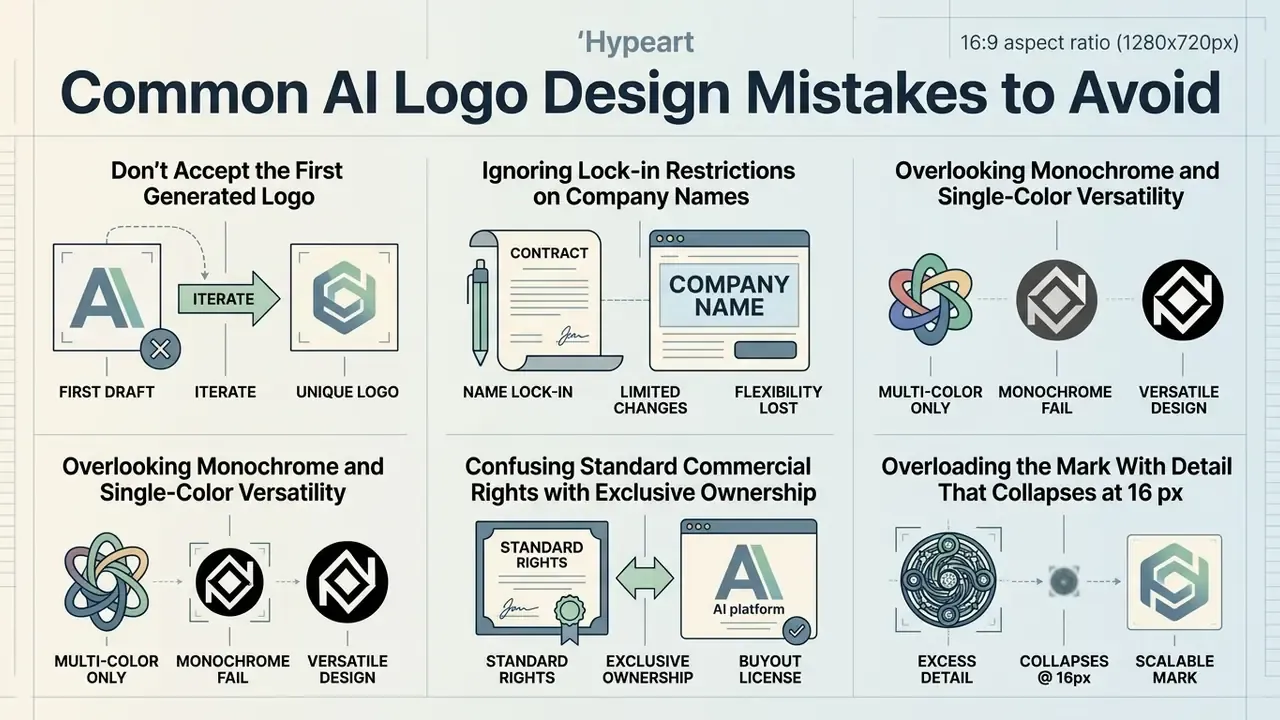
Avoiding a handful of predictable errors is what separates a durable identity from a throwaway graphic. Across 2025–2026 practitioner guides and peer-reviewed design research, five failure patterns keep recurring: vague prompts, excessive complexity, unreadable AI-rendered text, skipped size and background checks, and neglected originality review.
Don't Accept the First Generated Logo
Shipping the first raw generation usually produces a generic, templated mark. Generative tools are excellent at concept expansion; human review and iterative editing still do the finishing work. Test multiple logo options, try alternative colors fonts combinations, and adjust layout spacing until the identity reads as yours.
«Research on Indian SMEs showed that careful tuning of AI inputs and selection across many variants were necessary to achieve high cultural resonance and user preference.»
Usability research backs the same discipline. The Nielsen Norman Group states that a first draft is "never good enough" and recommends at least two redesign iterations, meaning three versions in total, each evaluated before revision (Nielsen Norman Group, 2024, https://www.nngroup.com/articles/parallel-and-iterative-design/).
Ignoring Lock-in Restrictions on Company Names
Many template-based tools freeze the text and layout of the company-name field the moment you pay. Double-check spelling, capitalisation, character spacing, and legal suffixes before finalising, because changing the name later often means buying a new package. Still testing names? Stay on the free preview tier until the legal entity is registered. A premature $65 download is a small loss; rebuilding collateral around a corrected wordmark is not.
Overlooking Monochrome and Single-Color Versatility
Confusing Standard Commercial Rights with Exclusive Ownership
Standard paid tiers grant usage rights, but the underlying icon template may stay in the platform's public library for anyone else to pick. To secure real exclusivity, check whether the vendor sells a buyout that retires the icon from circulation. Budget for that upgrade in advance if trademark filing is on the roadmap, because retrofitting exclusivity after launch costs far more than buying it at checkout.
Overloading the Mark With Detail That Collapses at 16 px
Diffusion generators reward visual richness on screen and punish it in production. Intricate line art, layered gradients, hairline outlines, and micro-text all disappear at favicon scale and clog embroidery and screen-printing workflows. Peer-reviewed work notes that AI logo makers frequently randomise layouts and under-apply core visual-design principles. That is exactly why detail-heavy outputs look impressive in a preview grid and unusable on a product label. Cut back to two or three defining attributes, then re-test at 16 px before you commit.
FAQ About AI Logo Generators
Will an AI-generated logo look cheap or generic?
An ai generated logo looks generic only when it ships without real customization or human editing. Raw automated templates can feel repetitive, yes. Use advanced vector controls, choose custom typography, and tune the palette, and you get a distinct custom logo that supports professional branding. Brand guideline manuals push the same point: keep one approved master artwork, never re-create it by hand, and respect clear-space and minimum-size rules so the mark always presents at full quality.
Do I own full copyright to a logo created by AI?
Ownership depends on the jurisdiction and on how much human design work went in. Under current US Copyright Office guidance, purely autonomous AI output cannot be copyrighted. Substantial human fine-tuning, custom layout work, and original vector modification do establish human authorship eligible for protection and trademark registration. Our overview of commercial rights for AI images goes deeper on that distinction.
«Detailed research on generative AI in graphic design emphasises that authorship and copyright questions become central as designers shift toward curator and ethical-oversight roles.» Study on generative AI in graphic design (2025) EU materials cited in policy discussions are stricter still. They treat works generated autonomously, without human intervention, as unprotected in the absence of a specific legal rule.
What file formats do I need for print and web?
Web work needs high-resolution PNG files with transparent backgrounds plus lightweight SVG vectors. Print production, including signage, merchandise, and stationery, needs scalable vector formats such as SVG, EPS, or print-ready PDF at 300 DPI to avoid pixelation at large sizes. Finish the archive with pre-formatted all-black and all-white transparent PNGs so single-colour vendors never have to improvise on your behalf.
Can I generate a logo for free and use it commercially?
Most free tiers cover concept generation and low-resolution drafts for personal evaluation only. Commercial deployment normally requires a paid plan or a commercial licence purchase to unlock high-resolution vector assets and formal usage rights. If budget is the constraint, map the limits documented in our guide to free AI image generators before committing to a paid identity package.
Can I change my business name in the logo after purchase?
Often not. Looka states explicitly that the text and layout of the logo/company "Name" field cannot be edited after purchase, while colours, icons, and layout stay adjustable and re-downloadable. Native vector platforms such as Recraft impose no such limit, because you own and edit the SVG paths directly. Confirm the policy before checkout and treat name finalisation as a prerequisite, not a later revision.
What is the difference between a commercial licence and an exclusive buyout?
A commercial licence lets you use the delivered logo in business contexts. An exclusive buyout additionally removes the source icon from the vendor's library, so no other customer can generate the same symbol. Buyouts cost more and are sold as extended licences by vendors such as Design.com. They are the right call when trademark registration, a crowded category, or long-term brand equity are in play.
Do AI logo platforms keep my brand brief and business name?
Treat this as a procurement question, not an afterthought. Verify in the vendor's terms what happens to inputs, outputs, embeddings, and logs, whether prompts feed future model training, and whether you can request deletion or export. Public multimodal models, including chat-based image tools, apply their own platform terms to any brand information you type in. That matters if the name or product concept is still confidential.
How much should I budget in total?
Plan for total cost of ownership, not the headline download price. A realistic small-business budget: $20 to $65 one-time for a vector-complete package, optionally $96 to $129 per year for a brand kit, plus any buyout licence, designer-fix fee, and font licence if a proprietary typeface is involved. Designers iterating at volume should budget a $10 to $49 monthly generative-vector subscription instead and skip the template tiers entirely.
About This Review
Marcus Hale, author. His stated focus is design production pipelines and generative media tooling, with emphasis on vector asset integrity, licensing risk, and total cost of ownership for brand systems. All hands-on testing described here was performed on the standardized Apex Dynamics brand brief above.
Editorial independence and freshness: tool behaviour, export packages, and pricing tiers were verified against official vendor documentation in February 2026. No vendor sponsored, reviewed, or approved this article. Where a claim could not be confirmed from primary vendor documentation, it is flagged in the text as requiring verification.
What we could not verify: several vendors publish feature lists without dated changelogs, so signature, stationery, and animation deliverables may shift between billing cycles. Regional pricing and promotional bundles also vary. Re-check the checkout screen, the licence text, and the export manifest at the moment of purchase rather than trusting any comparison table, including this one.