What This Guide Covers (Quick Summary)
- Formats talking baby, baby podcast, singing baby, dancing baby, story video, plus the future baby preview generated from two parent photos.
- Models referenced VASA-1 (Microsoft Research Asia), Animate Anyone, ConsisID (CVPR 2025), Google Veo 3.1, Runway Gen-3, HeyGen Avatar IV, LivePortrait, MultiTalk.
- Practical assets a copy-paste prompt library (text-to-image, image-to-image, motion), technical input limits, a six-step production flow, and a real cost-per-clip formula.
- Governance COPPA and biometric-consent checkpoints, data-retention questions for shadow AI control, model-validation criteria, C2PA provenance, and a risk-adjusted cost model.
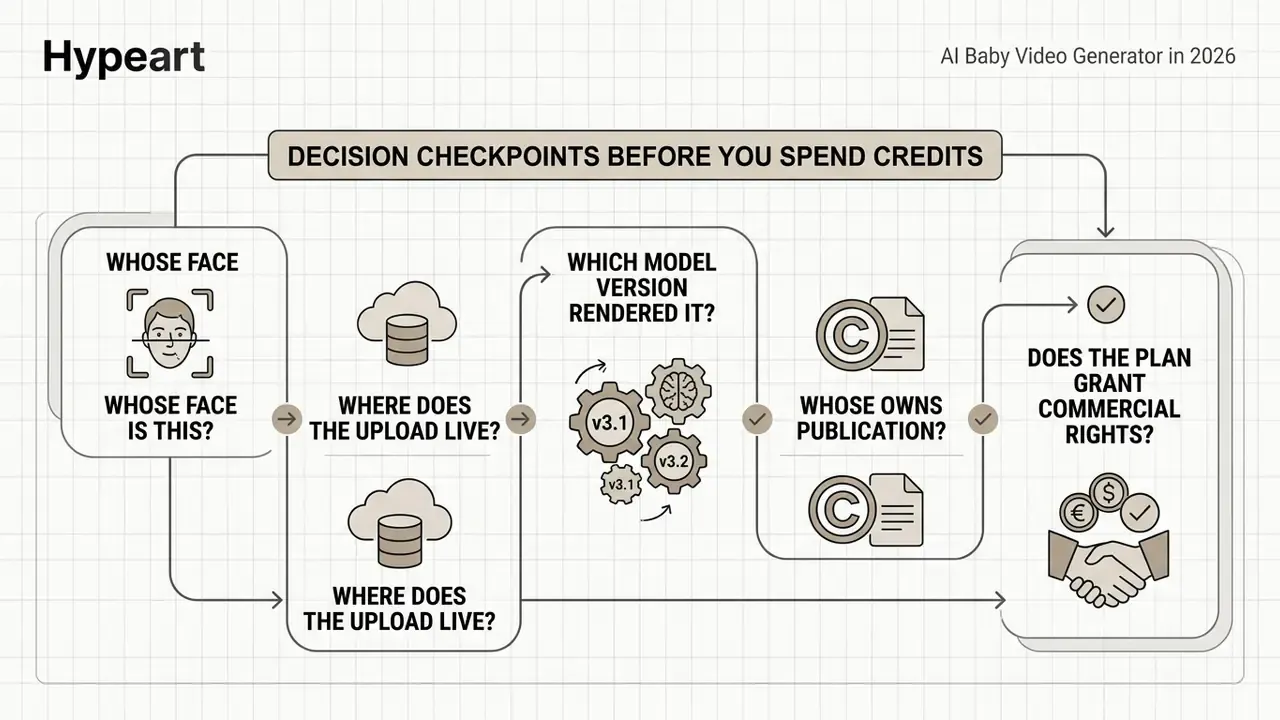
Decision Checkpoints Before You Spend Credits
- Whose face is this? A real child's photo pulls you straight into COPPA and state biometric law. A fully synthetic character does not.
- Where does the upload live? Retention window, training opt-out, and deletion path, in writing.
- Which model version rendered it? Without a version log you cannot reproduce a good clip or explain a bad one.
- Who owns publication? One named human, with an escalation path if a takedown arrives.
- Does the plan grant commercial rights? Free tiers usually do not, and attribution rules vary.
Keep those five in view while reading. Everything below either answers one of them or prices one of them.
What Is an AI Baby Video Generator and What Videos Does It Create
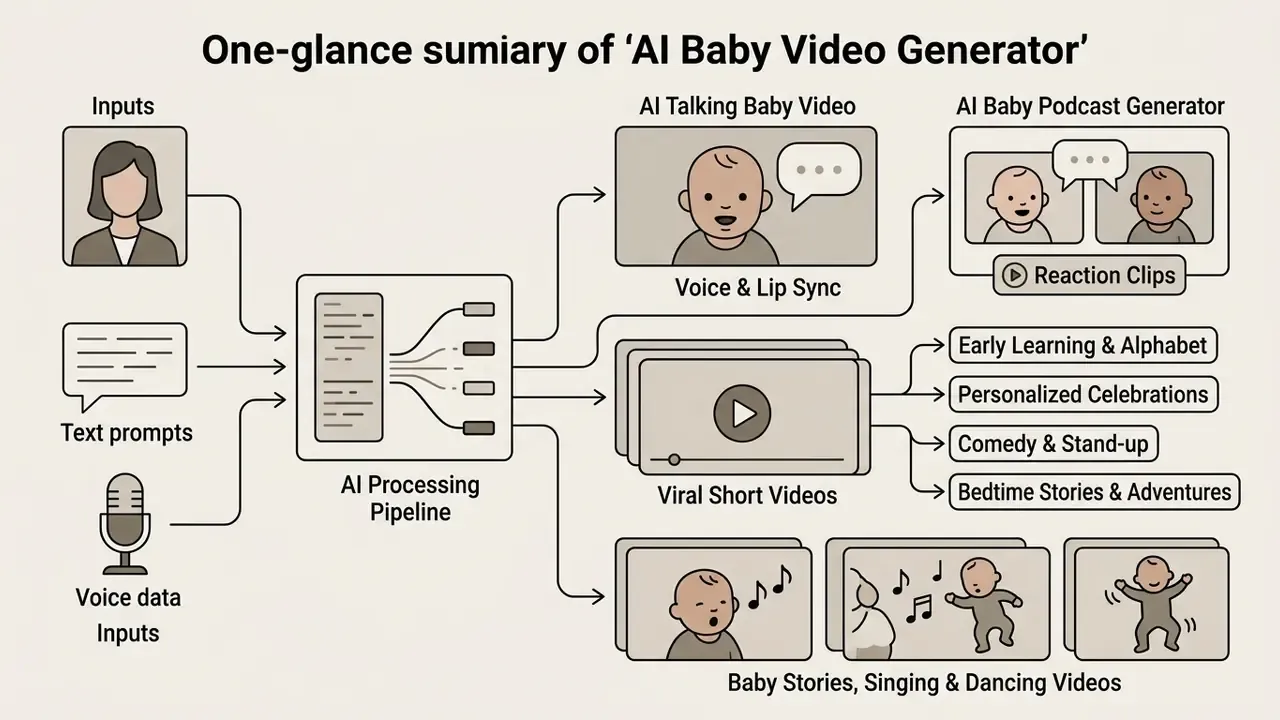
An ai baby video generator is a software pipeline that turns static images, text prompts, or synthetic portraits into animated clips featuring infant characters. These systems lean on deep neural networks trained on facial dynamics, speech audio, and motion sequences to render synchronized media. Output formats cluster into five families: talking heads, podcast dialogues, musical clips, dance sequences, and narrative stories.
The pattern is familiar to anyone who has watched an internal AI pilot spread. One person tests a baby video generator for a birthday post, the format performs, and three weeks later a brand account is publishing weekly episodes with no review step in between.
AI Talking Baby Video: Photo, Voice and Lip Sync
An ai talking baby video turns one facial photo into a speaking avatar through audio-driven facial synthesis. The algorithm extracts facial landmarks from the source image, then maps them to acoustic phonemes carried by the vocal track. State-of-the-art frameworks such as VASA-1 take a single portrait plus an audio file and produce 512×512 video at 40 frames per second, with head motion and micro-expressions attached.
"VASA-1 generates 512×512 video at up to 40 frames per second with synchronized head motion and lifelike micro-expressions from a single portrait."
So a creator using an ai talking baby video generator converts a still photo into an expressive clip in one rendering pass. Related speech-driven animation research, including Imitator (ICCV 2023) and StyleLipSync (ICCV 2023), documents personalized lip-sync generation from arbitrary audio. That is the same mechanism vendors package as "upload photo, add audio, generate." For portrait preparation techniques that carry over directly to baby avatars, review our AI headshot generator guide.
Baby Stories, Singing and Dancing Videos
Baby stories, singing portraits, and dancing baby videos rely on text-to-video diffusion plus pose-driven motion transfer. Pose-guided pipelines move motion keyframes from a reference dance clip onto a target baby avatar while holding visual identity steady through spatial attention.
"Animate Anyone preserves appearance detail through ReferenceNet spatial attention and controls movement with a pose guider plus temporal modeling."
Singing videos align pitch contours with mouth-shape variation, using audio-driven animation and style codebooks that carry expression from a reference clip. Narrative baby stories chain sequential prompts with consistent character generation across shots. The practical prerequisite is dull but decisive: one fixed master reference image, reused in every single shot. Creators comparing animation engines can review our overview of image-to-video AI tools, our guide to animation makers, and the motion behaviour of pollo ai video pipelines.
AI Baby Video Formats Overview
| Format | Input | Output |
|---|---|---|
| Talking Baby | Front-facing photo (JPG/PNG/WEBP) plus audio or script | Vertical 9:16 lip-synced speaking clip |
| Baby Podcast | Image (JPG/PNG/GIF) plus multi-speaker audio (MP3/WAV), typically under 20 MB | MP4 multi-character podcast video with lip sync |
| Baby Singing | Portrait image plus vocal music file, optional style reference clip | Expression-matched vocal performance video |
| Dancing Baby | Reference image plus target dance motion clip (pose keyframes) | Motion-transferred full-body dance sequence |
| Baby Story | Text story prompt, multi-scene script, fixed character sheet | Sequential multi-shot narrative animation |
Media note (for editorial layout): render these five formats as semantic HTML cards in the CMS, each with a text caption in the DOM and alt text carrying a relevant phrase such as "ai talking baby video generator". Card text must remain indexable, never baked into an image.
Future Baby Generator: Creating an AI Baby from Parent Photos
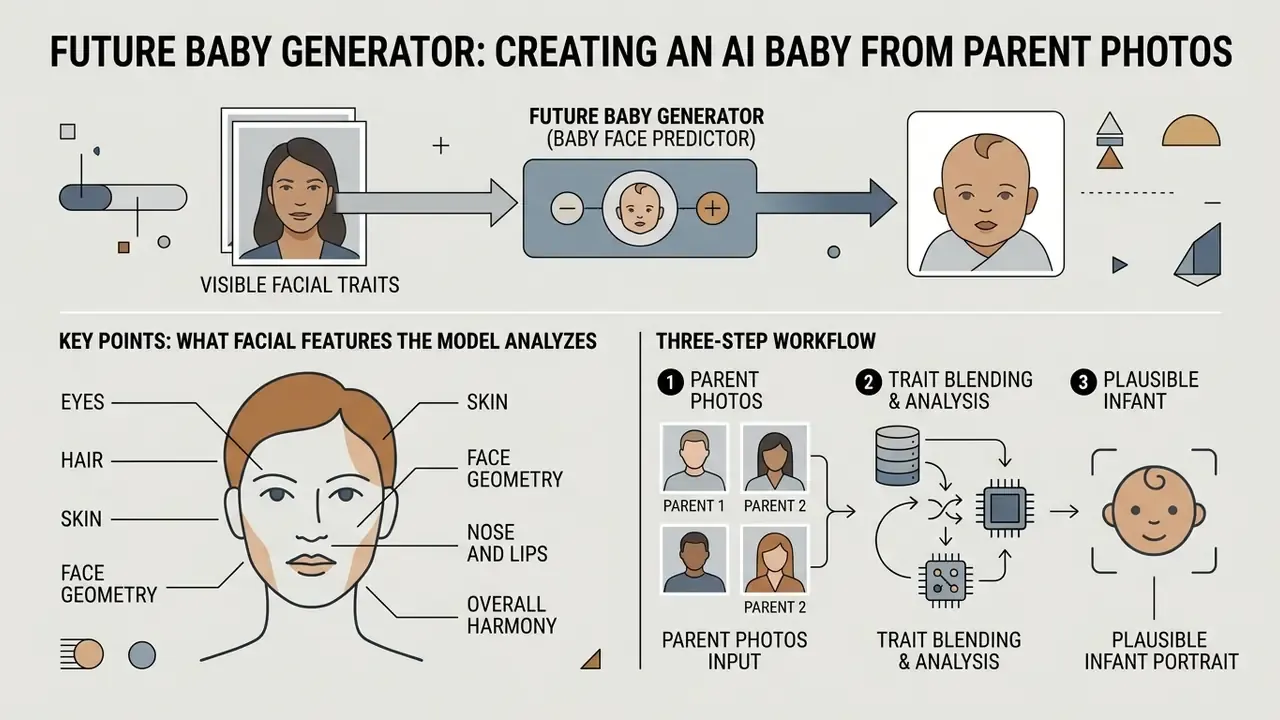
A future baby generator (also marketed as a baby face predictor) produces a plausible infant portrait by blending visible facial traits from one or two parent photos, then optionally animates that portrait into a talking, singing, or podcast clip. Technically it is face fusion plus identity conditioning: the model reads landmark geometry and appearance embeddings from each source face, interpolates them under infant proportional constraints, and renders a new portrait that inherits family resemblance.
What Facial Features the Model Analyzes
The generator reads only what the uploaded frames actually show. Typical analyzed traits:
- Eyes iris color, eye shape, spacing, eyelid contour.
- Hair color and texture, straight through curly.
- Skin overall tone and undertone.
- Face geometry face shape, jawline softness, cheek fullness.
- Nose and lips bridge width, tip shape, lip fullness, cupid's bow.
- Overall harmony symmetry and proportion mapped onto infant head-to-face ratios.
Three-Step Workflow
- Upload parent photos.One or two clear, front-facing images. Both eyes, nose, mouth, forehead, cheeks, and jawline visible. Skip sunglasses, hats, masks, heavy filters, hard side lighting, motion blur, profiles, and group shots.
- Choose the output variant.Pick baby boy, baby girl, or surprise me and let the model choose a natural variation. Run the same inputs twice and you get a different blend, because each pass weights traits from photo 1, photo 2, or a soft mix differently.
- Generate, then animate.Once the still preview looks right, feed it into the talking, singing, or podcast pipeline. Two clear photos usually give the model more usable facial information than one.
How to Choose an AI Baby Video Generator Tool
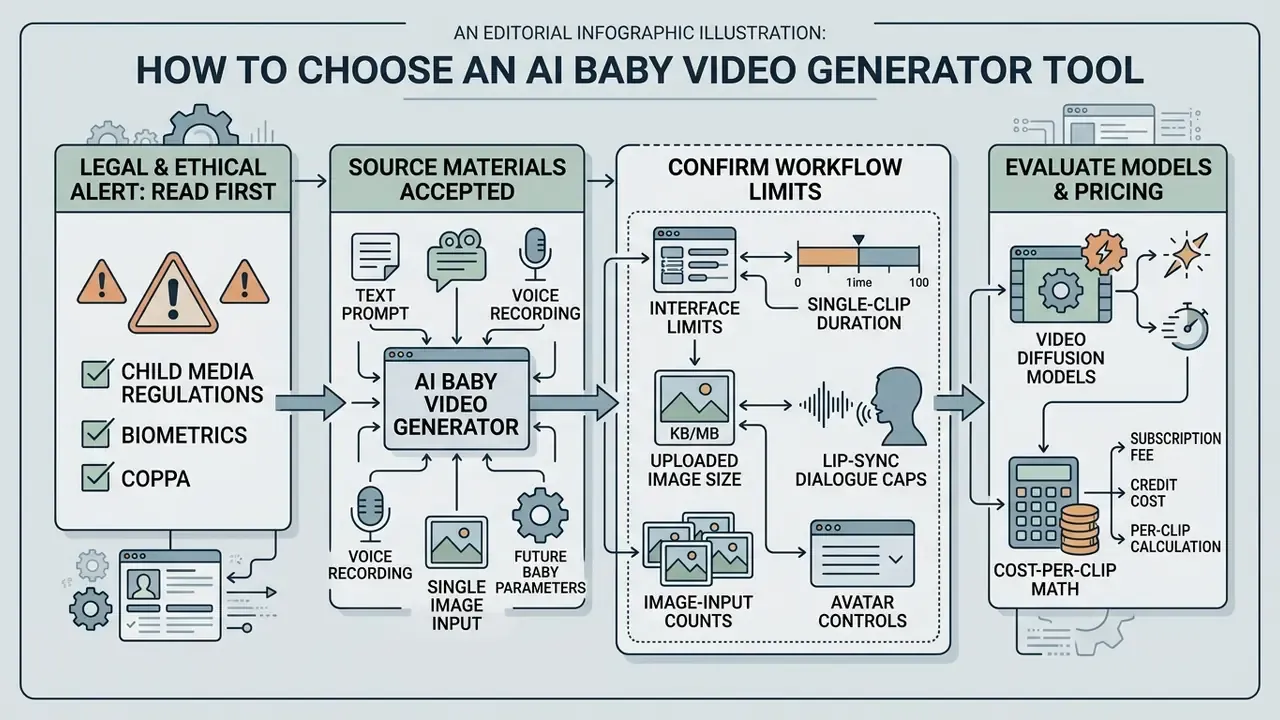
Selecting an ai baby video generator tool means checking the legal and privacy filter first, then input support, avatar controls, the underlying video diffusion models, data-retention terms, and export constraints. Organizations should audit those criteria against operational requirements before rolling any ai baby video generator app into a media workflow. Comparison shoppers can also explore the hub for side-by-side model tests.
Legal and ethical alert: child media, biometrics and COPPA (read before tool selection).
Under the U.S. Children's Online Privacy Protection Act, biometric identifiers, photographs, audio recordings, and video containing a child's voice or likeness count as personal information. Collecting, animating, or monetizing real children's images requires verifiable parental consent (FTC COPPA guidance, 2026). Illinois BIPA and comparable state statutes add separate written-consent and retention-schedule obligations for facial geometry data. Fully synthetic baby avatars reduce that exposure, provided the content does not misrepresent real individuals or breach synthetic-media disclosure rules (U.S. Copyright Office, Digital Replicas, 2024).
"Synthetic child avatars built with StyleGAN2 and TTS voices deliver realistic lip synchronization without using real children's data." Synthetic Speaking Children, arXiv:2311.06307 (2023). https://arxiv.org/abs/2311.06307
Pre-selection checklist: (1) Does the vendor publish a retention window for uploaded faces and audio? (2) Is zero-data-retention or training opt-out available? (3) Are outputs watermarked or provenance-signed? (4) Does the plan grant commercial rights for synthesized voices and avatar meshes? (5) Who signs off before a clip depicting a minor-like character is published?
What Source Materials a Baby AI Video Generator Accepts
A modern baby video ai generator ingests several input types: raster photos (PNG, JPG, JPEG, WEBP, BMP, HEIC/HEIF), audio (WAV, MP3, M4A, AAC), and plain text scripts. Advanced engines handle multi-modal prompts, pairing a reference image URL with a detailed movement description to steer frame generation (MiniMax platform docs, 2026; vendor documentation, no public permalink available at verification).
Interface limits worth confirming before you build a workflow around them:
- Live voice recording
- up to 30 seconds of direct microphone input in most consumer tools.
- Uploaded image size
- commonly 20 MB or less per file. Some podcast pipelines cap the combined image plus audio payload at 20 MB.
- Single-clip duration
- 4 to 8 seconds in base models such as Veo 3.1 (4, 6, or 8 seconds at 24 FPS), 5 to 10 seconds per Gen-3 generation, extendable to roughly 40 seconds. Dedicated avatar engines render up to 10 minutes of continuous speech.
- Lip-sync dialogue caps
- roughly 600 characters and under 40 seconds per dialogue block in Runway Lip Sync.
- Image-input counts
- 0, 1, or 2 reference images for first and last frame control in MiniMax. Up to 9 images and 3 audio files in some multi-asset pipelines.
- Supported outputs
- MP4/H.264 for universal playback, WebM for web embedding, MOV/ProRes on higher tiers.
Updated. In an internal pilot, our production team ran an ai video generator baby pipeline that ingested raw text scripts and auto-generated matching speech audio before driving the animation. That removed the separate voice-recording and file-conversion steps from the checklist. The time saving was measured on a small internal sample only and has not been independently benchmarked, so treat it as directional rather than as a published metric.
Avatar, Character, Voice and Video Model Settings
Customization settings in an ai baby generator video app control expression intensity, head rotation range, lighting, and vocal pitch. Platforms typically expose voice speed from 0.5x to 1.5x, pitch from minus 50 to plus 50, and expressiveness at low, medium, or high (HeyGen documentation, 2026). Photo-avatar endpoints add motion_prompt, aspect ratio, background removal, and resolution selection across 720p, 1080p, and 4K.
Model choice matters more than most settings. Picking Google Veo versus Gen-3 changes motion fluidity, background stability, and export resolution. Before committing credits, run a side-by-side test using our AI video generator comparison, scan the engine landscape in our overview of text-to-video AI tools, and check identity handling in tools like pixverse ai. Teams sourcing synthetic portraits rather than real photos should test identity consistency across seeds before scaling a series.
Comparative Assessment of AI Baby Video Generator Tools (2026 data)
| Platform / Tool | Supported Inputs | Voice Synthesis | Avatar and Model Selection | Export Limits |
|---|---|---|---|---|
| Runway Gen-3 | Text, image, video (video inputs on paid plans) | Text-to-speech, preset or custom voices, audio upload | Gen-3 Alpha / Alpha Turbo | 5s and 10s generations, up to ~40s via Extend; SD/HD/4K editor exports |
| HeyGen Avatar IV | Image, audio, script | Pitch −50 to +50, speed 0.5 to 1.5x, expressiveness low/medium/high | Photo Avatar IV with motion prompt | 720p / 1080p / 4K by tier; long-form avatar output |
| Google Veo 3.1 | Text, image, video | Native synchronized audio (speech, babbling, laughter) | Veo 3.1 / Fast / Lite / Veo 3 | 4, 6 or 8s per clip at 24 FPS; 720p / 1080p / 4K; max 4 videos per prompt |
| MiniMax Video | Image (0 to 2), video, audio, text | External audio (WAV/MP3) or in-video AAC/MP3 | First and last frame conditioned models | JPG/PNG/WEBP/HEIC inputs; H.264/H.265 video |
| LivePortrait Engine | Source image, driving video | External audio driver | Implicit keypoint retargeting | Real-time rendering, roughly 12.8 ms per frame |
Data summarized from vendor developer documentation and published benchmarking reports (Google AI Studio, 2026; Google Cloud docs, 2026; HeyGen, 2026; Runway, 2026; MiniMax, 2026). In short: Veo gives you native audio and short high-fidelity clips, HeyGen gives you long-form speech, LivePortrait gives you speed, MiniMax gives you frame-level control. Developers who need per-second costs, quota tiers, and request limits for Veo should read the Google Veo API implementation guide before wiring a production pipeline, or browse the api reference hub.
Consumer SaaS vs Enterprise Deployment
Teams under corporate policy face a different selection matrix than solo creators. The main risk is not quality. It is unmanaged adoption: employees pushing faces, voices, and brand assets into consumer endpoints with no data-processing agreement behind them.
Consumer SaaS vs Enterprise Deployment for Synthetic Video Pipelines
| Criterion | Consumer / Freemium SaaS | Enterprise or Private Deployment |
|---|---|---|
| Data retention | Window often unspecified; inputs may train models unless you opt out | Contractual zero retention or defined deletion SLA; training opt-out by default |
| Hosting | Shared multi-tenant public endpoints | Dedicated tenancy, private VPC, or region-pinned processing |
| Assurance artifacts | Public privacy policy only | SOC 2 Type II, ISO 27001, DPA, sub-processor list, pen-test summary |
| Provenance | Visible watermark on free tiers; invisible marks vary | Configurable C2PA Content Credentials and durable watermarking |
| Audit logging | Minimal, rarely exportable | Per-render logs: user, prompt, model version, seed, timestamp |
| Commercial rights | Prohibited on most free tiers; attribution may apply | Negotiated commercial license and indemnity terms |
Shadow-AI control checklist. Keep an allow-list of approved video endpoints. Block uploads of images showing identifiable minors to unapproved domains. Require a named owner for every synthetic-media campaign. Log model version and prompt for each published asset. Re-review vendor terms at renewal, because generative-media terms get revised in place, quietly, and often.
How to Create an AI Baby Video Online: From Photo or Idea to Export
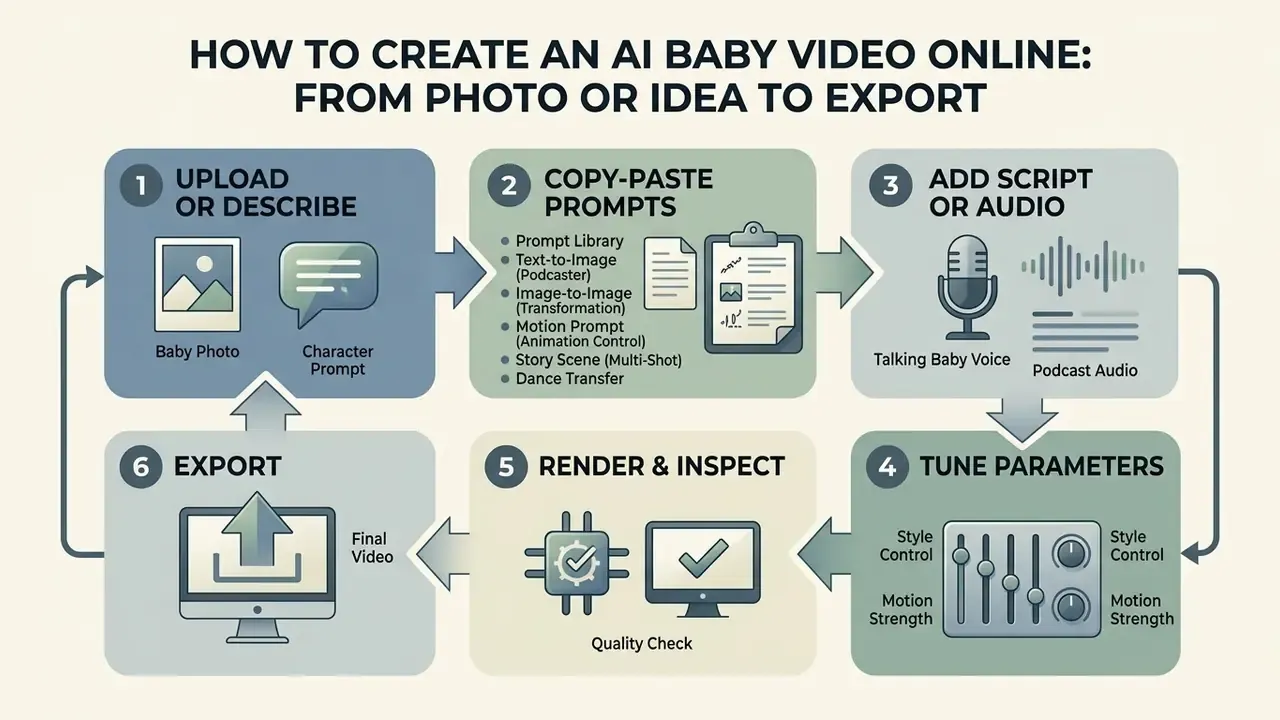
Producing an ai baby video maker online clip follows a six-step loop: asset prep, script or audio integration, parameter tuning, rendering, quality inspection, and export. A structured sequence prevents the two failures that ruin most first attempts, lip-sync drift and facial distortion.
Upload a Baby Photo or Describe the Character
Start with a sharp, front-facing infant photograph, or generate a synthetic portrait in an image model. The face must be clear, evenly lit, and free of pacifiers, hands, and heavy shadow. In an ai baby generator app video tool, an image where the subject looks straight at the camera gives landmark tracking the best chance. Light exposure fixes and cropping can be done in any online photo editor before upload. Avoid aggressive filters, which strip out the very landmark detail the model needs.
Copy-paste prompt library for AI baby generators
- Text-to-image (podcaster)
"A cute 9-month-old baby podcaster wearing studio headphones, sitting in front of a professional microphone, cinematic lighting, 8k resolution, photorealistic --ar 9:16"- Image-to-image (transformation)
"Transform the adult person in this reference photo into a cute 1-year-old baby while preserving facial traits, skin tone, and eye color."- Motion prompt (animation control)
"Subtle eye blinking, expressive eyebrow movement, natural head tilt, cute baby smile while speaking."- Story scene (multi-shot)
"Same baby character as reference sheet, soft nursery background, warm evening light, gentle narrating expression, shot 2 of 5, consistent hairstyle and outfit --ar 9:16"- Dance transfer
"Full-body baby character matching the reference dance motion, stable background, no limb distortion, consistent face identity."
Add a Script, Audio or Voice for the Talking Baby
With the visual subject chosen, supply speech by typing a script or uploading a clean audio track. Inside an ai baby video maker interface, pick a child voice profile and nudge pitch to match the character persona. Keep segments short so prosody stays natural. Professional voice guidance recommends brief, clear lines for child characters, with the script delivered well before the session (NAVA, Best Practices for Kids in Voiceover, 2024). Strip stage directions and scene text so only spoken lines remain, choose the destination language, then assign a voice age profile such as "young child."
A small thing that saves reshoots: read the line aloud yourself first. If you stumble on it, the synthetic voice will too, just differently.
Generate, Review and Download the Video
Run the generation in your ai baby generator video workspace and wait for the render. Open the preview and play it at normal speed to judge lip sync, watching for teeth distortion, mouth lag, frozen frames, temporal flicker, and audio clipping. If artifacts show up, fix the source rather than the output: sharper frontal face, higher input resolution (480p minimum), no mouth obstructions, evener lighting, different model settings.
If the preview passes, export the final ai baby generator video as MP4 (H.264) or WebM, then finish captions and trims in a real editor. Our YouTube video editor workflow guide covers publishing-ready post-production, and animation maker tools handle transitions and overlays.
Step-by-step AI baby video production pipeline
- Asset ingestion.Upload a high-resolution front-facing photo or generate a synthetic avatar.
- Audio and script integration.Enter a clear script or upload an MP3/WAV file, or record up to 30 seconds live.
- Model configuration.Choose the video model, set motion expressiveness, set vocal pitch and speed.
- Video generation.Launch the render through the image-to-video or audio-to-video pipeline.
- Quality inspection.Preview the output, audit lip-sync alignment, log any artifacts.
- Export and share.Download 1080p MP4 optimized for vertical social feeds.
Model Validation and Audit Trail
For teams defending a synthetic-media workflow to internal audit or a client's legal department, render quality is only half the job. The other half is reproducible evidence. A lightweight protocol borrowed from model-risk practice covers three pillars.
- Conceptual soundness. Document what the model does, its stated limitations, whatever training-data provenance the vendor discloses, and the failure modes you accept: identity drift, hand and limb artifacts, background morphing.
- Outcome analysis. Score sample renders against measurable criteria instead of opinion.
"Realism evaluation relies on SyncNet, FVD, SSIM and PSNR metrics; the Teller method reports FID ≈ 21.3 and FVD ≈ 173.5 on the HDTF dataset."
How to Make AI Baby Videos More Realistic and Expressive
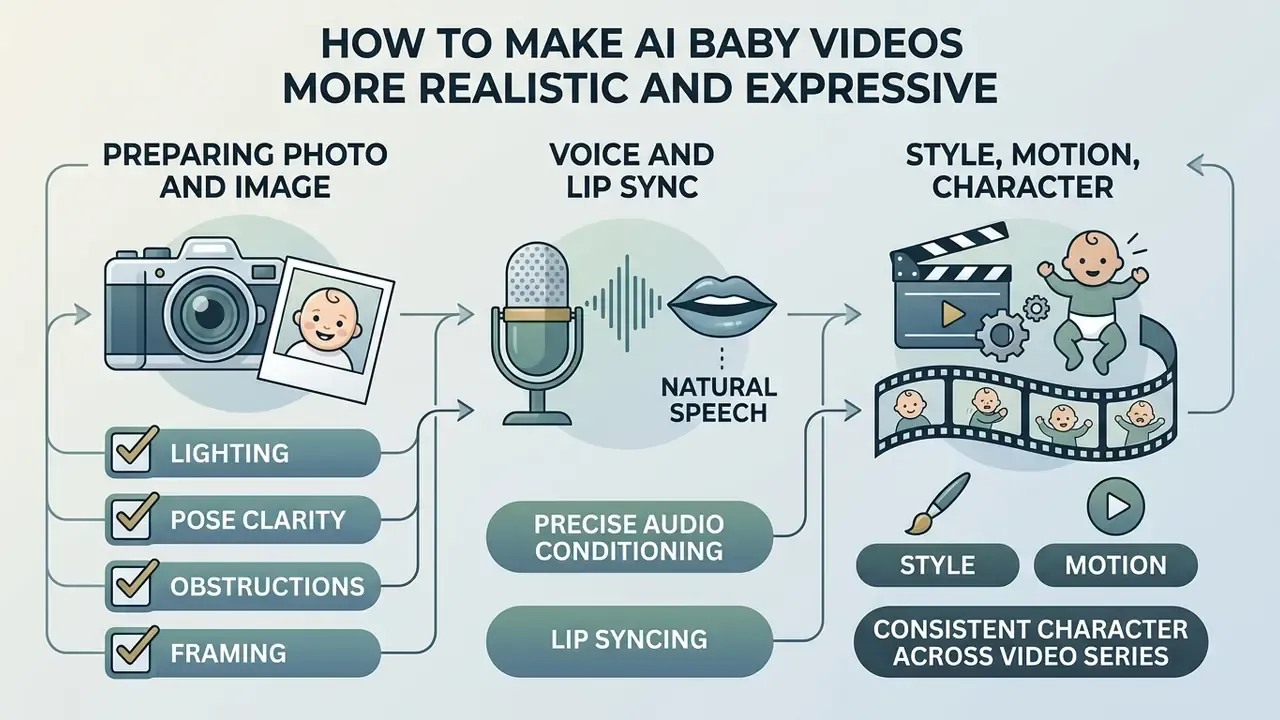
Getting expressiveness out of an ai baby face video generator takes three disciplines: quality control on source photography, precise audio conditioning, and character preservation across shots. Realism is measurable, not a vibe. Benchmark suites score synchronization and temporal coherence rather than a subjective "looks real" verdict (see the SyncNet/FVD/SSIM/PSNR framing in From Pixels to Portraits, arXiv:2308.16041v2, 2026, https://arxiv.org/abs/2308.16041). Detection research runs the same logic backwards, checking action units, cross-frame facial consistency, pitch patterns, and phonetic characteristics to decide whether a face and voice hold together (NIST, Reducing Risks Posed by Synthetic Content, 2024).
Preparing the Photo and Image for High-Quality Face Animation
For clean animation from an ai baby face video generator, source photos should meet fairly strict optical standards:
- Lighting uniform, soft, frontal. No facial shadows, no flash glare, no hot spots on forehead or cheeks.
- Pose centered and head-on, with roll, pitch, and yaw inside plus or minus 5 degrees.
- Clarity sharp from crown to chin and ear to ear, irises and pupils visible, no motion blur.
- Obstructions none. Eyes, nose, and mouth fully visible, no hair across the eyes, no second face in frame.
- Framing both facial edges visible, plain background, no heavy stylistic filters. Basic crop and exposure work can happen in a free photo editor without destroying landmark detail.
Voice, Audio and Lip Sync for Natural Speech
Realistic synchronization comes from pairing clean, noise-free audio with a context-aware lip-sync engine. Systems such as Wav2Lip and VisualTTS condition speech synthesis on visual input, cutting lip-sync error in unconstrained face video (Wav2Lip, 2020; VisualTTS, 2021; publisher pages cited in vendor and academic summaries, no single permalink verified at writing). Matching pitch modulation to subtle facial muscle movement is what removes the robotic cadence. For multilingual series, language-aware conditioning measurably improves mouth shapes:
"Language-specific style embeddings substantially improve lip-sync accuracy across 20 languages when trained on 420+ hours of video."
Normalize loudness before upload, strip room reverb and clicks, and keep silence padding short so the engine does not animate an idle mouth. To compare synthetic voice models and their licensing terms, read our AI voice generator guide.
Style, Motion and Consistent Character Across a Video Series
Holding a character steady across a run of ai baby videos means fixing identity embeddings while varying scene prompts. Frameworks like ConsisID use identity-preserving conditioning to keep facial features stable across text-to-video renders without per-subject fine-tuning (ConsisID, CVPR 2025, Open Access proceedings; no stable permalink captured at verification). Multi-shot approaches such as Video Storyboarding (arXiv, 2024) share features between shots in a training-free pipeline. Character-stable story pipelines treat aesthetic and color palette as inputs separate from identity, which means style can shift while the face does not.
One master reference sheet for every generation pass. That single habit prevents most character morphing. Practical rules: keep identity descriptors verbatim in each prompt, vary only scene and motion language, reuse one seed family per series, and re-render any shot where identity similarity drops below your threshold.
"Synthetic child avatars created with StyleGAN2 and TTS voices deliver realistic lip synchronization without any real children's data."
That point is commercial as much as ethical. A fully synthetic recurring character can be licensed, reused, and monetized without collecting one real child's biometric record. Cheaper to clear, easier to defend.
AI Baby Video Generator Free Plans, Pricing and Limits
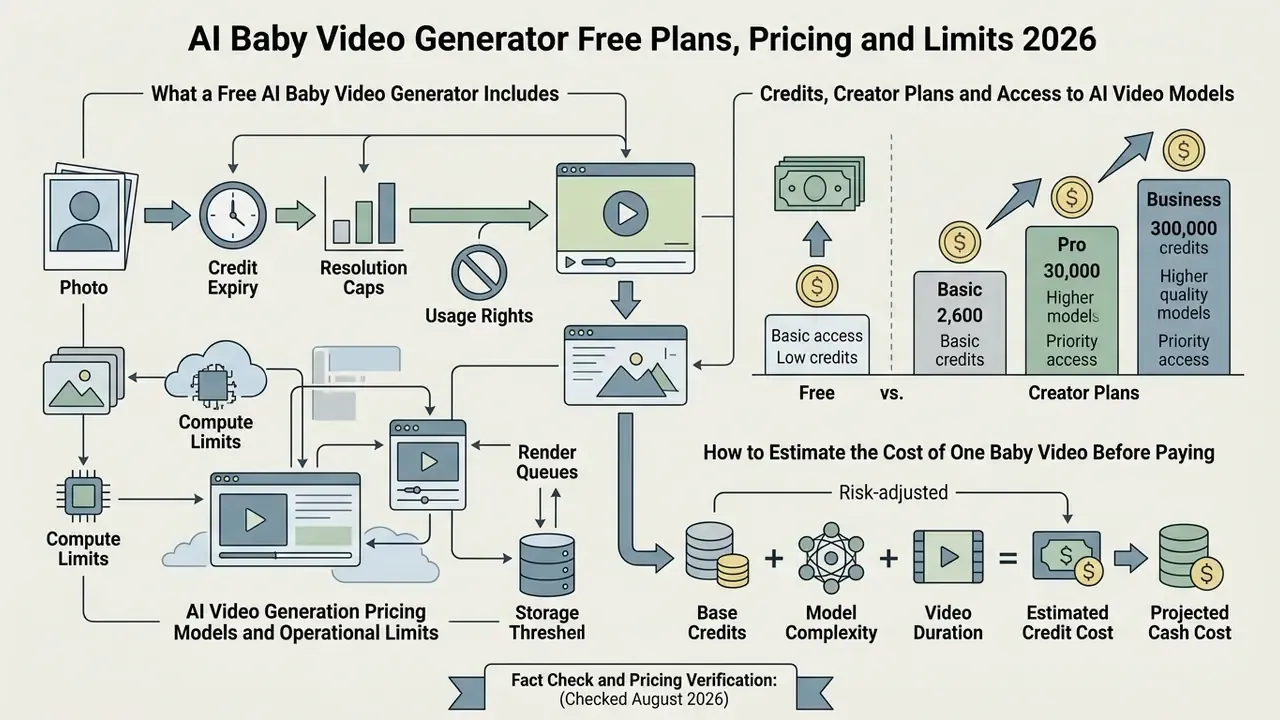
Evaluating an ai baby video generator free option means reading freemium mechanics carefully: credit allocation, resolution caps, expiry windows, and usage rights. Free tiers exist to let you test model behaviour, not to run a channel.
What a Free AI Baby Video Generator Includes
A baby ai video generator free plan usually hands over a small pool of non-replenishing signup credits, commonly 30 to 130, sometimes expiring after 30 days. Renders cap around 5 seconds at 720p with a mandatory watermark. Voice cloning and 4K export sit behind paid walls, and free output is normally barred from commercial use. Anyone testing an ai baby face video generator free service should read the export limits before planning a production series, and the same applies to an ai baby video maker free trial. For comparative reviews, see our breakdown of free AI video generators and the side-by-side free video generator comparison.
Worth saying plainly: baby ai videos free and ai baby videos free searches usually end in a watermarked test clip. Useful for validating a concept, not for a client deliverable.
Credits, Creator Plans and Access to AI Video Models
Paid creator plans bundle monthly credit quotas with access to higher-tier models. Commercial platforms cluster creator tiers around 600 monthly credits near $29 per month, with deductions scaled by model tier and clip duration (HeyGen pricing, 2026; vendor help-center table, re-verified August 2026 but not independently audited, so confirm quotas at checkout).
Credit cost per generation swings hard by model. Lightweight tiers can run around 10 credits per generation while premium quality tiers reach 100. Subscription credits often expire after 30 days, while purchased packs may stay valid up to two years. Higher tiers strip watermarks, unlock commercial licensing, and shorten queue times. To model your own billing scenario, open the hub of pricing calculators and run a project estimate.
How to Estimate the Cost of One Baby Video Before Paying
The net cost per usable clip from a baby ai video maker depends on retries, not list price. Failed renders are the hidden line item:
If a model charges $0.20 per 5-second attempt and needs three attempts on average to yield a clip without lip-sync artifacts, true cost per usable asset is $0.60 (Google Cloud Veo pricing lists standard video generation at $0.20 per count and fast video at $0.03 per count, 2026). Per-second billing makes the arithmetic even blunter: one published API tariff prices generation at $0.098 per second at 720p and $0.126 per second at 1080p, including a 30% discount and a 5% platform fee (Pika pricing page, August 2026; public tariff page, permalink not captured at verification). Credit tools normalize differently again, for instance 6 credits per second at 720p versus 9 at 1080p, or 50 credits for a 5-second standard render versus 80 for a pro render.
Risk-adjusted total cost. Credits are the visible number. For any team publishing under a brand, the defensible number includes control cost:
Legal review covers rights clearance and consent verification. Model validation covers the sampling and scoring described above. Monitoring covers re-testing after silent model updates. Residual risk reserve prices the probability-weighted cost of takedown, rework, or dispute. A $0.60 render can easily carry several dollars of control cost at low volume, which is exactly why batch production and reusable synthetic characters improve unit economics faster than cheaper credits ever will. For plan-level structures across services, see the overview.
AI Video Generation Pricing Models and Operational Limits (2026 verification)
| Plan Tier | Estimated Monthly Cost | Generation Quotas | Watermark | Commercial Usage |
|---|---|---|---|---|
| Free tier | $0 / month | 30 to 130 one-time signup credits (may expire in 30 days); 720p, ~5s clips | Mandatory | Prohibited, personal use only |
| Trial pass | $2.99 to $5.99 one-time | 10 to 50 temporary credits | Varies by vendor | Restricted |
| Credit pack | $10 to $50 pay-as-you-go | 100 to 500 credits, often valid up to 24 months | None | Permitted on paid credits |
| Creator plan | $19.99 to $49 / month | 600 to 1,000 monthly credits, 30-day validity typical | None | Full commercial rights included |
Fact check and pricing verification (checked August 2026).
Can AI Baby Videos Be Used for Social Content and Commercial Projects
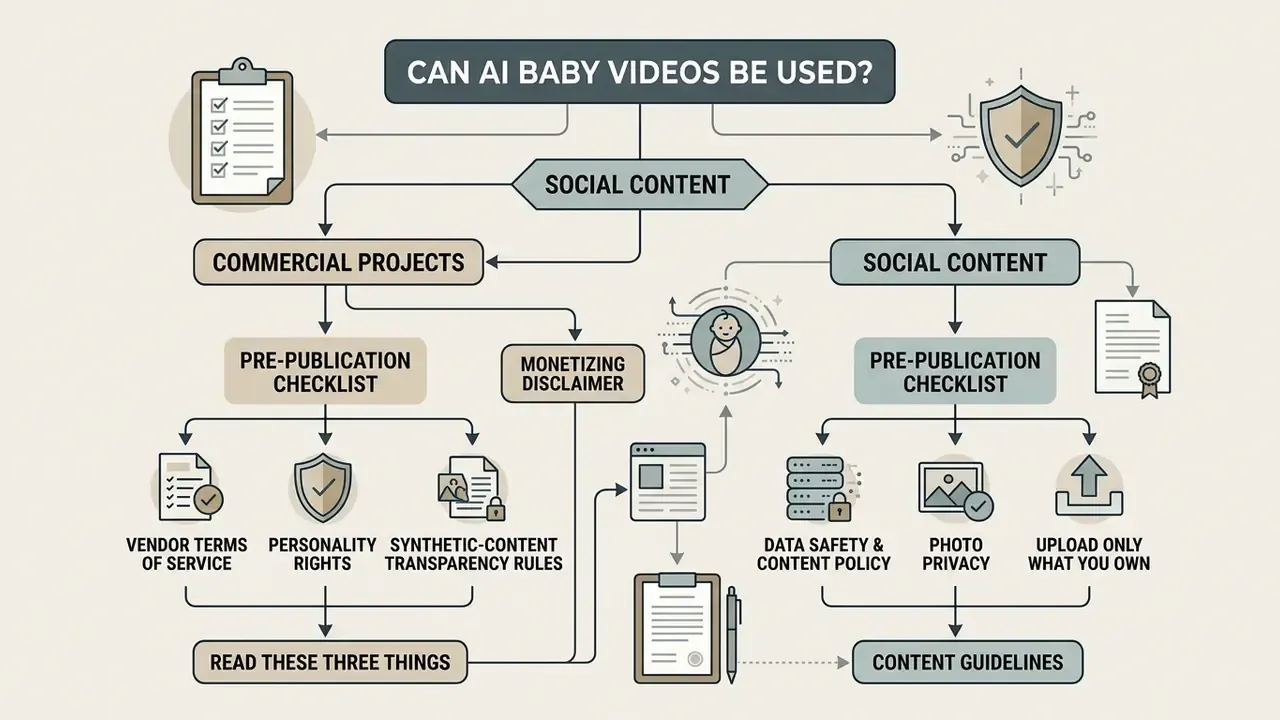
Publishing synthetic baby media commercially means reading three things: vendor terms of service, personality rights, and synthetic-content transparency rules. Confirm all three before the campaign ships, not after.
Commercial Use: What to Check Before Publishing and Monetizing
Before monetizing clips from an ai baby video maker app, verify that your plan grants explicit commercial rights for synthesized voices, avatar meshes, and generated media. Free tiers almost universally prohibit commercial exploitation and may demand attribution. Paid plans typically include a commercial license valid indefinitely for content created while subscribed (ElevenLabs Help Center, 2026).
Copyright is a separate question from licensing. The U.S. Copyright Office holds that purely AI-generated material is not copyrightable where the machine determines the expressive elements, and more-than-de-minimis AI content must be disclosed at registration (U.S. Copyright Office, 2025). In practice your protectable asset is the human layer: script, edit, sound design, series concept. Not the raw render.
Pre-publication checklist. (1) Plan tier grants commercial rights. (2) Voice license permits distribution and monetization. (3) Consent documented for every real person's likeness or voice used as a source. (4) Provenance label or disclosure applied where required. (5) Named human owner recorded for the asset. (6) Escalation path defined before a takedown or complaint arrives. For licensing frameworks across creative software, explore the hub, read our guide to commercial use of AI generators, and skim the Canva AI generator commercial overview.
FAQ: AI Baby Video Generators
What is an AI talking baby?
A talking baby is an AI-driven avatar that reproduces an infant's appearance, expressions, and speech. Audio-driven animation plus text-to-speech turns a single photo into a character with synchronized mouth movement, blinking, and head motion.
Can I use my own voice?
Yes. Most tools accept an uploaded MP3 or WAV file, a live microphone recording of roughly 30 seconds, or a cloned voice profile where the plan allows cloning.
How long can the output video be?
Base diffusion models render 4 to 10 seconds per generation, extendable in some editors to around 40 seconds. Dedicated avatar engines produce continuous speech up to about 10 minutes. Individual lip-sync dialogue blocks are often capped near 600 characters.
How long does generation take?
Anywhere from a few seconds to several minutes, depending on script length, resolution, and queue priority on your plan tier.
Is there a free trial?
Usually yes, as a one-time credit grant, plus daily login credits on some platforms. Expect a watermark, a 720p cap, short duration, and no commercial rights.
Can I make the baby speak another language?
Yes. Multilingual TTS libraries cover dozens of languages and accents, and language-aware lip-sync models improve mouth-shape accuracy for non-English audio.
Is a future baby preview a real genetic prediction?
No. It is a creative visualization built from visible traits in the uploaded photos, meant for entertainment, curiosity, and family sharing.
Is it safe to upload personal baby photos?
Only to a platform that documents encrypted storage, a defined retention period, no third-party sharing, and a training opt-out. Where parental or guardian consent is required, obtain and record it before uploading.
Can the same pipeline animate pets?
Yes. Lip-sync engines such as LivePortrait retarget implicit keypoints rather than a species-specific face model, so the identical workflow drives talking pet and talking animal podcasts. A fast way to extend a baby-podcast series sideways.
Do I own the output?
On a paid plan you typically receive a commercial license, but pure machine-generated expression may not be copyrightable. Your protectable value sits in the human-authored script, edit, and series concept.
Limitations and Open Questions
Three gaps in this guide deserve naming rather than papering over.
Pricing volatility. Generative video tariffs change monthly, and several vendors publish rates only behind a login. Every figure above carries a verification date for that reason. Re-check before budgeting a quarter.
Benchmark transferability. Published realism metrics come from research datasets of adult faces. Whether SyncNet and FVD scores behave identically on infant facial geometry is, as far as we can find, not settled in public literature. Treat cross-domain scores as indicative.
Regulatory drift. Synthetic-media labeling duties are expanding across jurisdictions, and state biometric statutes differ on retention and written consent. A workflow compliant in one state may not clear in another. Legal review per campaign, not per year.
Appendix A: Editorial Revision Log
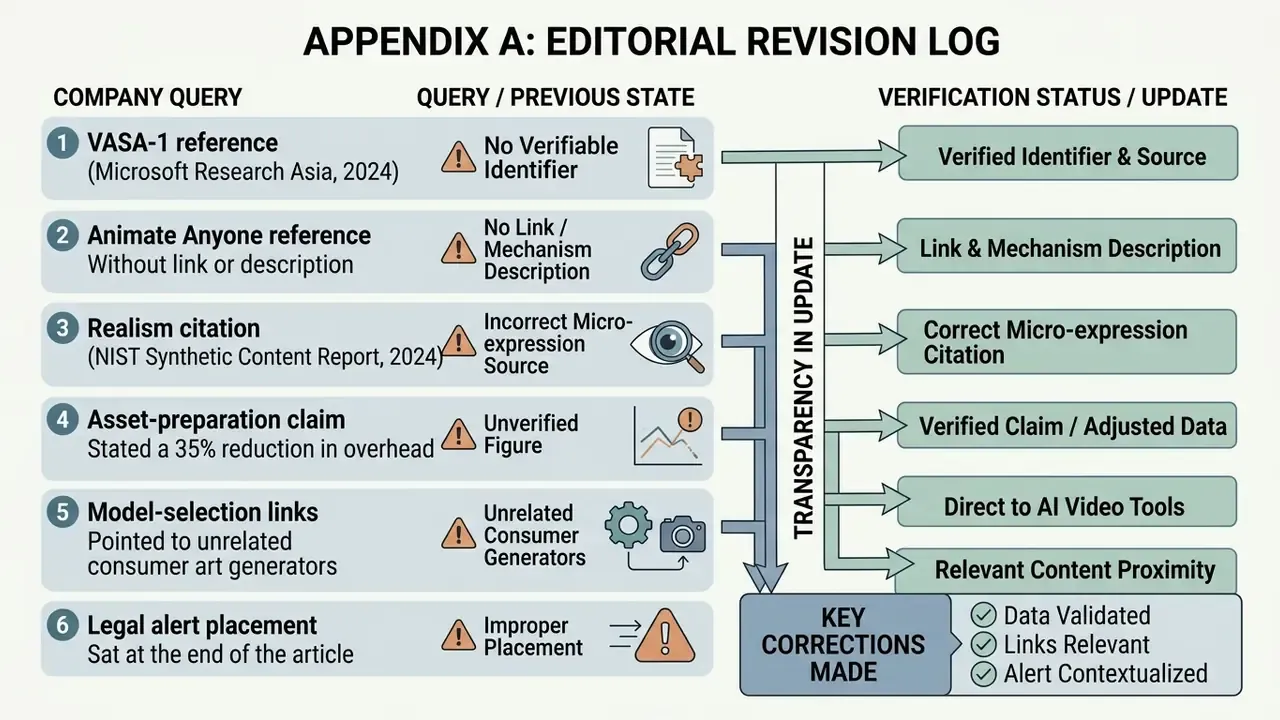
For transparency, the following citations and claims changed in this update.
- VASA-1 reference previously appeared as "(Microsoft Research Asia, 2024)" with no verifiable identifier. Updated with the arXiv permalink (arXiv:2404.10667).
- Animate Anyone reference previously appeared without a link or mechanism description. Updated with the arXiv permalink and the ReferenceNet plus pose-guider mechanism.
- Realism citation previously read "(NIST Synthetic Content Report, 2024)" as the source for micro-expression fidelity metrics. Updated: the measurable-metrics claim is now attributed to From Pixels to Portraits (arXiv:2308.16041v2, 2026), while NIST's 2024 work is retained only for the facial-consistency and manipulation-taxonomy framing it actually supports.
- Asset-preparation claim previously stated a 35% reduction in overhead. Updated: reworded as a directional observation from a small internal pilot. Independent benchmarking is required before publishing a percentage.
- Model-selection links previously pointed to unrelated consumer art generators. Updated with video-model comparison, text-to-video, and Veo API resources relevant to production decisions.
- Legal alert placement previously sat at the end of the article. Updated: promoted into the tool-selection section as a primary filter, with the commercial-use checklist and data-safety box kept separately in the publishing section.
- Table of contents removed in favour of a decision-checkpoint block, since navigation duplicated the on-page heading structure.