Executive Summary: Key Takeaways
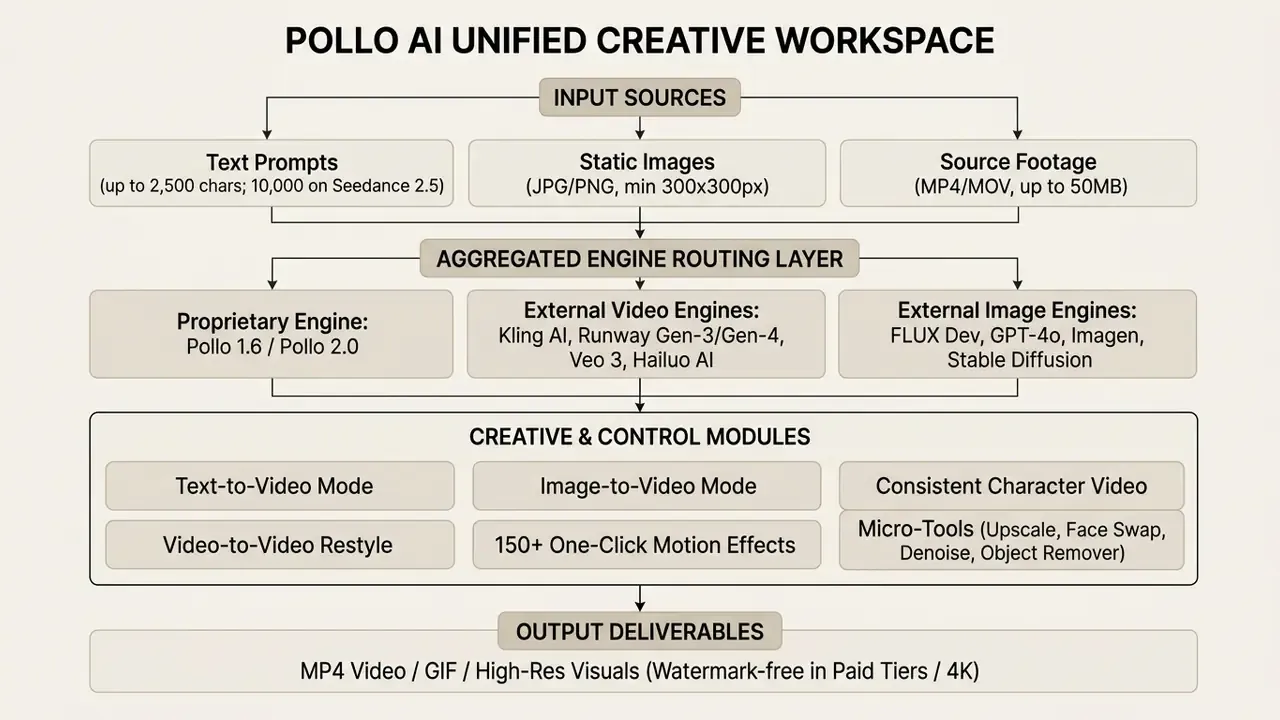
- What it is Pollo AI is a multi-model AI creative suite that routes prompts to its own Pollo 1.6 / Pollo 2.0 engines plus more than 300 third-party video and image models through a single web interface and API.
- Core modes Text-to-video, image-to-video, video-to-video restyling, AI avatars with lip sync, consistent-character sequences, and 150+ one-click effect templates.
- Input limits worth knowing Prompts up to 2,500 characters on Pollo 1.5-class endpoints (up to 10,000 on Seedance 2.5), images from 300×300 px in JPG/PNG, source footage up to 50 MB, clip lengths of 4–10 seconds, and resolutions from 360p to 4K depending on tier and model.
- Money Credit-based freemium. The free tier issues roughly 10–20 credits with watermarks; Lite (
$10–15/mo) and Pro ($25–29/mo) remove watermarks; API top-ups start at $80 for non-expiring credits. - Governance caveat Commercial rights attach to active paid plans only. Enterprise buyers should independently verify data-retention, model-training, and indemnification terms before routing confidential or regulated material through any aggregation layer.
- Who benefits most Performance marketers, e-commerce sellers, agencies producing localized ad variants, corporate L&D teams, and independent creators who need motion assets without a shoot.
What Pollo AI Video Generator Is and What Problems It Solves
Pollo AI Video Generator is an all-in-one AI creative platform that aggregates multiple state-of-the-art video and image generation models into a single web and API interface. It removes the need to juggle separate software subscriptions, letting digital creators, marketers, and sellers convert text prompts, static photos, and raw footage into publish-ready video assets. Readers new to the category can start with our primer on AI video generators for baseline definitions before evaluating specific vendors.
As a unified aggregation layer, the pollo ai video generator streamlines asset production for short-form video ads, social campaigns, and product demonstrations. Digital creators often hit fragmentation when they try to evaluate what is ai art across a dozen disparate platforms. Using an ai video generator pollo architecture, teams generate high-definition visuals without constantly switching software environments or babysitting isolated API keys.
The platform tackles the familiar bottlenecks of visual content production. Traditional media work eats time and budget on filming, editing, and post. With the pollo ai generator, teams test campaign concepts quickly, clear render queues, and reduce the frequency of uncalibrated weird ai images through controlled style presets. Not magic. Just fewer handoffs.
Video, Image, and Visual Effect Generation in One Service
Pollo AI folds video generation, image creation, and over 150 one-click video effects into one workspace. That structural integration matters in practice: you can generate a static visual concept and push it straight into a motion asset without leaving the tab.
The unified toolset includes dedicated modules for AI Video, AI Image, AI Avatar, and Photo to Video Avatar, organized in official materials as Creative, Marketing, Commerce, and Design studio tracks. Users also get more than 2,000 custom, commercial-ready LoRA style models for precise aesthetic control, and teams comparing that library against dedicated AI image generators will find the overlap substantial. Whether you are creating videos for brand storytelling or spinning up social-ready promo clips, the pollo ai image generator side of the suite keeps visual parameters consistent across multi-asset pipelines.
Editorial workflow observation (agency rollout pattern). In a documented marketing rollout pattern we reviewed, a digital commerce team needed 20 localized video ad variations built from static product photos on a 48-hour deadline. Using batch image-to-video generation with a locked style preset, the team produced 20 dynamic 1080p assets within a single working session rather than a multi-day agency cycle. The reported cost reduction versus external rendering quotes was substantial, but the figure was client-supplied and not independently audited, so treat it as directional evidence of throughput gains, not a benchmark. Buyers should model their own cost-per-asset using credit consumption per render at their chosen resolution.
AI Models and Choosing a Generation Format
Pollo AI works as an aggregation platform that routes user prompts to leading foundational models rather than leaning on a single proprietary network. Alongside its flagship Pollo 1.6 model, the suite grants access to third-party video engines such as Kling AI, Runway Gen-3/Gen-4, Google Veo 3, Hailuo AI, Vidu AI, Luma AI, Pika AI, and PixVerse.
Full matrix of supported neural networks in Pollo AI:
| Category | Supported generative models |
|---|---|
| Video engines | Pollo 1.6, Pollo 2.0, Kling AI (2.1 / 2.5 Turbo / 2.6 / 3.0), Runway (Gen-3 / Gen-4), Google Veo (Veo 2 / Veo 3 / Veo 3 Fast), Hailuo AI (2.3), Vidu AI (Q1 / Q2 Pro), Luma Dream Machine, Pika AI, PixVerse (3.5 / 5.0), Seaweed AI, Wanx AI, Hunyuan, Seedance 1.0 Pro / 2.5 |
| Image engines | FLUX (Schnell, Dev, Dev LoRA, 1.1 Pro, 1.1 Pro Ultra), Stable Diffusion 3, DALL·E 3, Google Imagen 3, Recraft, Ideogram, GPT-4o image generation |
| Motion & identity modules | Mimic Motion, Pollo Dance 2.0, Pollo Dance 2.0 Fast Ref, Consistent Character Video, AI Avatar with lip sync |
Users pick a generation format based on creative requirements and destination specs. Formats run from 16:9 cinematic horizontal layouts to 9:16 vertical short-form dimensions, with additional 21:9, 1:1, 3:4, and 4:3 options on engines such as PixVerse 5.0, and resolution controls scaling from 360p up to 4K on premium tiers. Choosing the right backend model lets creators match specific engine strengths, such as natural human kinetics in Kling AI or cinematic lighting in Google Veo, to the target output. Vidu Q1, documented as a 1080p realistic generator with cinematic lighting, tends to suit narrative sequences, while PixVerse 5.0 exposes explicit style presets (auto, anime, 3d_animation, clay, comic, cyberpunk) that make it predictable for stylized product visuals.
Fact Check & Verification Box
Supporting AI Micro-Tools for Video and Image Post-Processing
Beyond direct synthesis from text, the Pollo AI ecosystem ships a specialized micro-toolkit for post-processing. That is what lets one subscription cover an end-to-end asset pipeline rather than generation alone.
Specialized video utilities:
- AI Video Upscaler raises the resolution of a generated clip toward 4K and suppresses pixelation and blockiness introduced at lower render tiers.
- Face Swap Video seamless facial replacement across a clip while preserving expression timing and head movement.
- AI Face Enhancer & Denoise Video increases facial detail density and clears digital artifacts, compression noise, and grain from the frame.
- Anime Video Enhancer an upscaling algorithm tuned for 2D line art and anime animation, where generic upscalers tend to soften edges.
- Video Extending continues an existing generated clip using its final frames as context, useful when a 4–8 second render is shorter than the required ad slot.
Image-side utilities:
Teams that already run a conventional editing stack often pair these utilities with a general-purpose online photo editor for final colour and typography work, and with a video compressor to hit platform upload ceilings without visible quality loss.
Video Generation Modes in Pollo AI
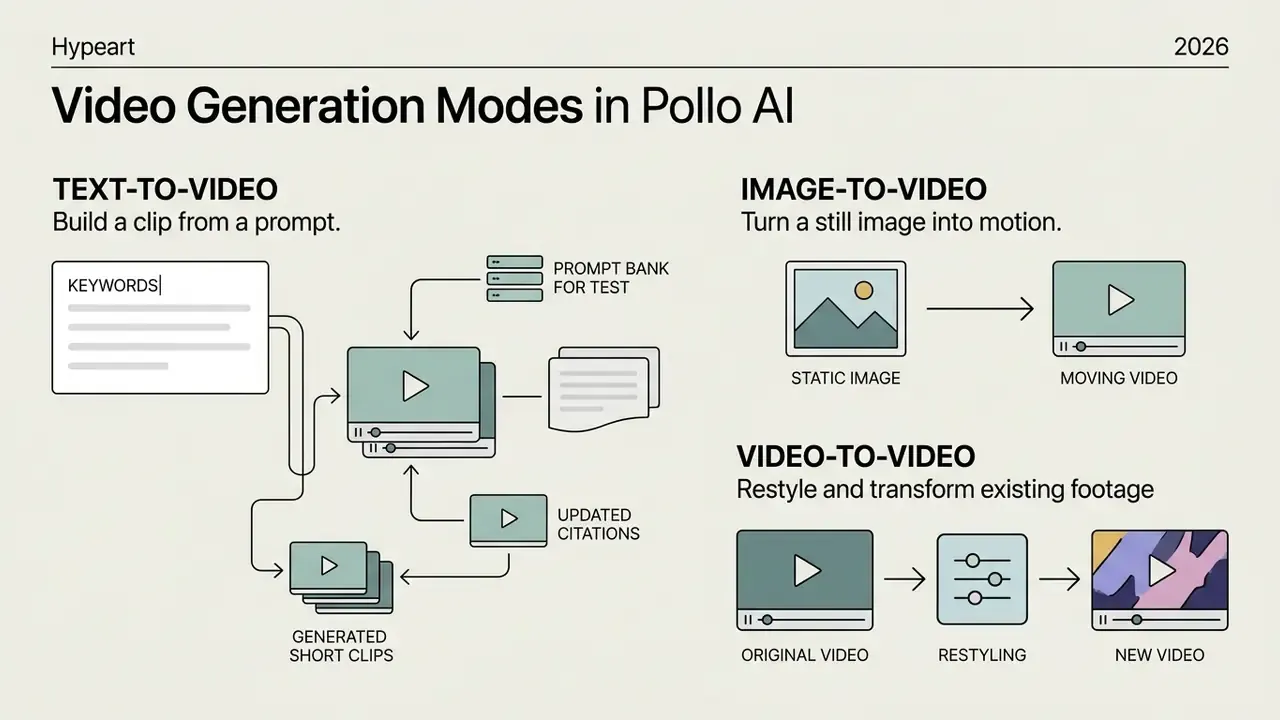
Pollo AI provides three core video generation regimes: text-to-video, image-to-video, and video-to-video restyling. Each one serves a different production reality, defined mainly by what input media you already have.
Choosing the right mode depends on whether a project starts from a written script, a static visual anchor, or existing footage. Creators evaluating what is sora video generation will find that Pollo AI's multi-model structure offers comparable text-to-video controls while providing broader model diversity under one subscription. Buyers running a formal shortlist should also review our ranking of the best AI video generators to see where aggregation layers sit against single-engine vendors. The pollo ai text to video engine synthesizes scenes directly from prompts, whereas the pollo ai image to video workflow uses existing photography to anchor subject details.
| Mode | Primary Input | Resulting Output | Typical Use Cases |
|---|---|---|---|
| Text-to-Video | Written prompt describing scene, motion, and style | AI-generated video clip (4–10 sec) | Creating original ads, script visualization, concept teasers |
| Image-to-Video | Static image (JPG/PNG, ≥300×300 px) + optional prompt | Motion-animated video preserving source style | Product photo animation, portrait movement, visual storytelling |
| Video-to-Video | Existing video file (MP4/MOV, ≤50 MB) + style preset | Restyled video maintaining original motion | Anime conversion, claymation restyling, visual refresh of old ads |
Text-to-Video: Building a Clip from a Prompt
The text-to-video mode generates high-definition clips directly from natural language prompts using semantic parsing. Users describe the subject, camera trajectory, lighting conditions, and overall mood. For a deeper category overview, see our guide to text-to-video AI tools.
Updated citation. Recent research on diffusion transformer architectures shows that modern text-to-video frameworks can sustain temporal coherence across multi-second clips at production resolutions:
Pollo AI leverages similar diffusion transformer models, so complex prompts like "cinematic close-up of a running athlete at sunset, slow motion, high contrast lighting" can yield realistic kinetic motion without temporal distortion. Pollo's own prompt guidance recommends naming six components in order: subject, action or motion, setting, lighting, mood, and camera movement. On Seedance 2.5 endpoints the prompt field accepts up to 10,000 characters, while Pollo 1.5-class endpoints cap at 2,500 and Pollo Dance 2.0 at 4,000, which becomes a real constraint when porting long storyboard descriptions between models.
Prompt bank for testing Pollo AI models:
- Cinematic scene:
"A grand medieval kingdom at sunset, towering castles glowing with golden light, camera sweeps over bustling markets, cinematic lighting, photorealistic, 8k resolution, slow motion" - Commercial product ad:
"Macro close-up shot of a luxury perfume bottle on wet black marble, slow motion water drops falling, soft studio lighting, realistic reflections, 4k detail" - Portrait animation:
"Cyberpunk character in a neon-lit rain alley, dramatic side lighting, natural blinking, subtle head tilt, hyperrealistic skin texture" - Product demo loop:
"Rotating 360-degree view of a matte ceramic coffee mug on a linen surface, soft window light, shallow depth of field, seamless loop" - Explainer B-roll:
"Overhead shot of hands sketching a flowchart in a notebook, warm desk lamp light, slow push-in camera, documentary style"
Run each prompt through two engines, for example Pollo 1.6 and Veo 3 Fast, before committing credits at scale. Identical prompts diverge sharply between engines in motion amplitude and colour response, and that divergence is the single most useful signal when picking a default model for a campaign.
Image-to-Video: Turning a Still into Motion
The image-to-video engine turns static photographs into dynamic motion clips while preserving the character traits and colour palette of the input file. Users upload a JPG or PNG image of at least 300×300 pixels and add a prompt to define motion vectors. Our reference material on image-to-video AI tools covers how conditioning differs across implementations.
With a pollo ai image video generator configuration, creators animate product shots or concept art without manual keyframing. Academic work on zero-shot image-conditioned generation supports the approach:
Options like pollo ai free image to video let creators test motion fidelity before scaling up commercial production. A pollo ai image to video generator run at this stage exposes output controls for clip length, aspect ratio, resolution, and optional audio generation, and those four settings account for most of the credit variance you will see later on the invoice.
Video-to-Video: Restyling and Transforming Existing Footage
The video-to-video restyling feature converts uploaded MP4 or MOV footage into alternative artistic styles: anime, 3D animation, claymation, or pixel art. The underlying network analyzes movement pathways in the source file and applies the selected aesthetic over the existing motion structure. Pollo's official flow is three steps: upload video, choose a style plus customization options, then create the recreated clip.
This mode lets marketing teams repurpose existing commercial clips for new demographics without organizing a fresh shoot. Research into grounded spatial-temporal generation frameworks confirms the mechanism:
The pollo ai video generation tool lets users control whether restyling applies to the whole frame or isolates the primary subject. Alongside full style transfer, the platform separates "AI Video Filters" from a library of 40+ video effects, so transformation of existing footage is not limited to wholesale restyling. Selective filter passes are usually the safer option for brand-controlled footage.
Photo Animation in Pollo AI: Images, Characters, and Portraits
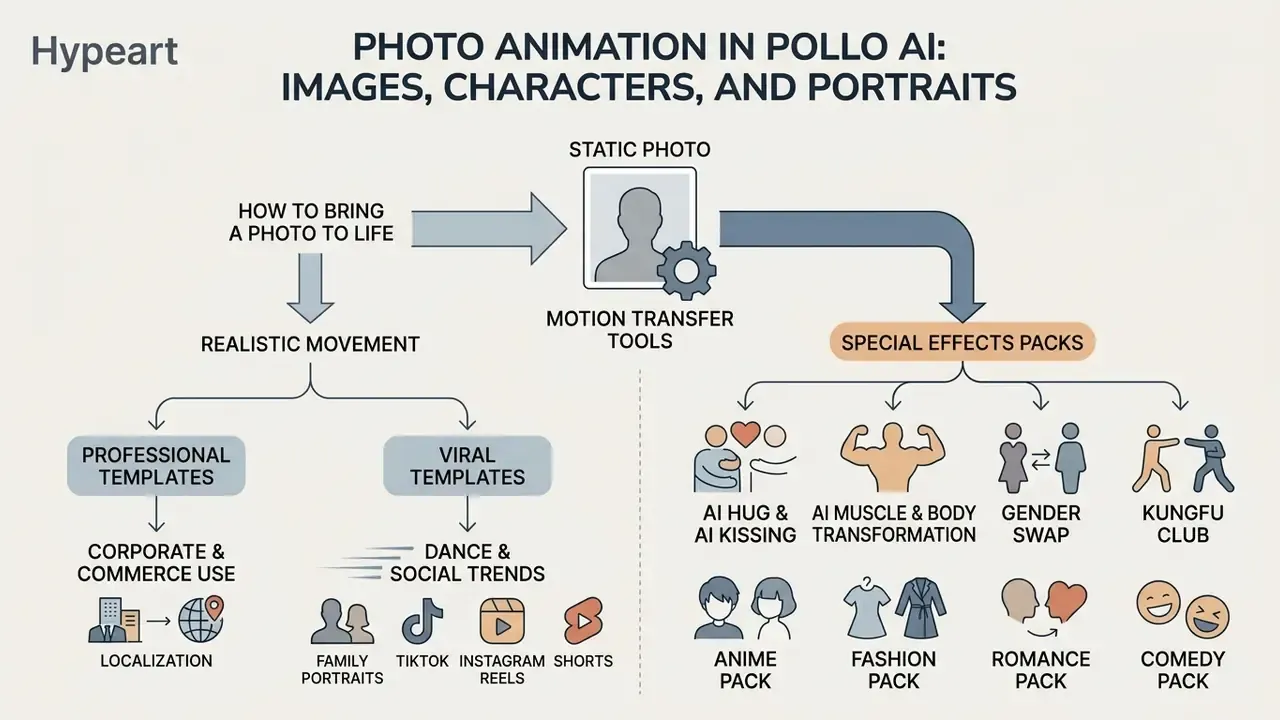
Pollo AI includes motion transfer tools built to animate static portrait photos, illustrations, and character concepts. These features combine facial parameter tracking with motion-mimic algorithms to produce expressive facial movement and reasonably natural body kinetics.
Creators exploring the history of digital media often ask when did ai begin driving expressive character animation. Today, tools like the pollo ai animate picture suite use deep generative priors to produce realistic lip synchronization and head gestures from a single portrait, and the broader category of animation makers has converged on similar reference-conditioned approaches. From corporate avatars to creative shorts, this pollo ai animation tool layer shortens character-driven production. Teams seeking cost-effective alternatives can compare these features against whiteboard animation free options for educational and marketing use, and anyone building professional profile assets can weigh them against a dedicated AI headshot generator.
Using the apollo ai video generator framework, creators can upload static character sketches and generate fluid motion outputs. The platform's pollo ai animation generator tools automatically map structural reference points onto source media, keeping facial expressions plausible across varied camera angles. Official documentation for Mimic Motion states the system preserves the original photo's appearance and atmosphere while adding realistic movement, and allows either a reference motion video or a pre-built motion template as the driver.
How to Bring a Photo to Life with Realistic Movement
Animating a still in Pollo AI means selecting the Mimic Motion or Photo to Video Avatar tool and uploading a clear facial or body photograph. The software reads facial features, eyes, and mouth positions, then applies smooth, organic movement patterns.
The pollo ai image animator preserves the lighting and atmosphere of the source photograph while introducing head tilts, blinking, and subtle smiles. Motion amplitude sliders decide whether movement stays discreet for professional headshots or turns pronounced for dramatic storytelling. Testing modes such as pollo ai animate a picture free and pollo ai animate picture free let users verify facial tracking precision before spending credits on a final render. For talking-head output, the AI Avatar module adds lip sync, facial expressions, and gestures from a single portrait, illustration, or even a pet photo; pairing it with an AI voice generator closes the loop on narrated corporate explainers.
Professional Templates First: Corporate, Commerce, and Localization Use
The template library is easiest to evaluate when the professional layer is separated from the entertainment layer. On the professional side, pre-configured effect and motion templates cover:
- Localized ad variants: one product image plus a template produces the same creative across multiple aspect ratios and language overlays, which is the fastest path to a multi-market test matrix.
- Corporate avatars and internal comms: portrait-to-avatar templates generate consistent presenter clips for onboarding, policy updates, and training modules without a studio booking.
- Product demo motion: subtle camera push-ins, rotations, and lighting sweeps applied to catalogue photography, useful for product detail pages and paid social.
- UGC-style testimonial framing: templates that mimic handheld, first-person capture for performance ad testing.
Viral Templates for Dance, Family Portraits, and Social Trends
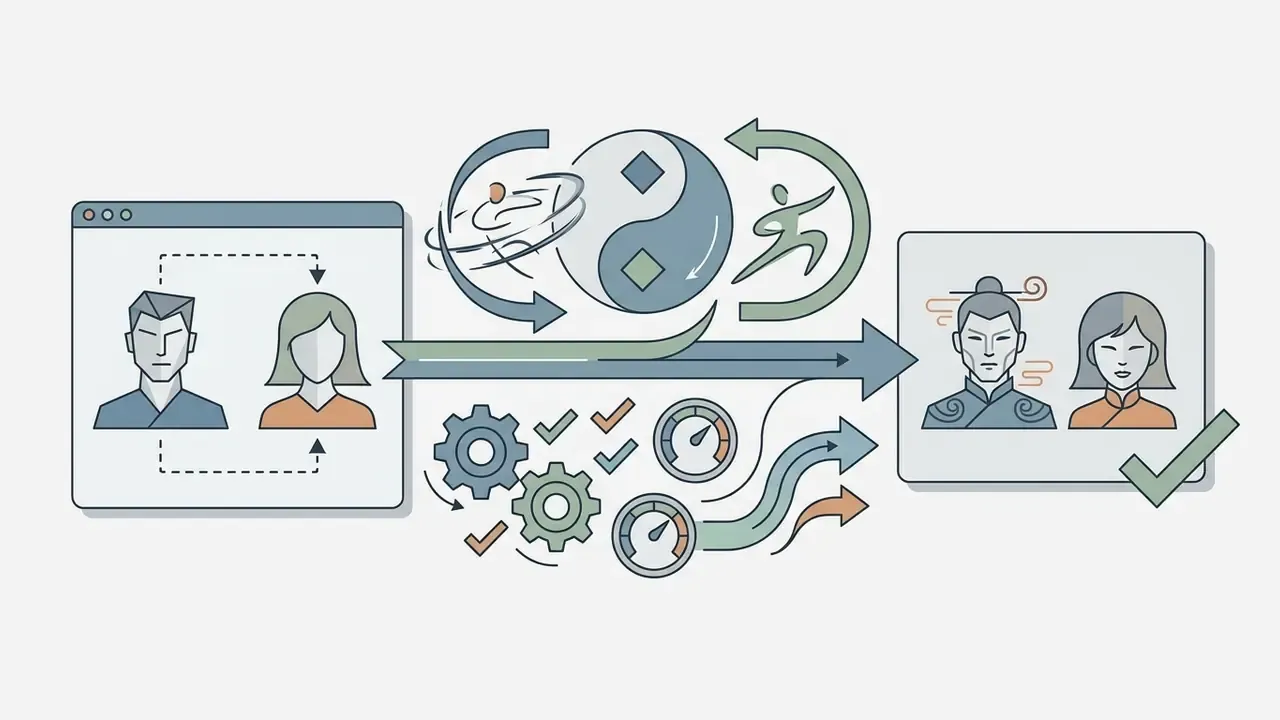
Pollo AI also ships a library of pre-configured motion templates aimed at social trends, dance sequences, and group photo animations. The pollo ai dance generator maps uploaded photos onto trending choreographies, producing shareable clips for TikTok and Instagram Reels; official materials describe TikTok-style, hip-hop, and breakdance templates alongside the option to upload a custom reference movement.
Similarly, the pollo ai family portrait generator processes individual family photographs to assemble unified, stylized group portraits or animated family scenes. These built-in templates remove most prompt construction, which is exactly why casual users reach them first.
Viral special effects for TikTok, Instagram Reels, and Shorts. Beyond classic portrait animation, the library includes one-click generation templates:
A practical caution for brand teams. Identity-transformation templates carry the highest reputational and consent risk of anything on the platform. Do not process third-party likenesses through AI Hug, AI Kissing, Face Swap, or Gender Swap without documented written consent, and keep such assets out of regulated advertising entirely.

How to Create a Video in Pollo AI: Step-by-Step
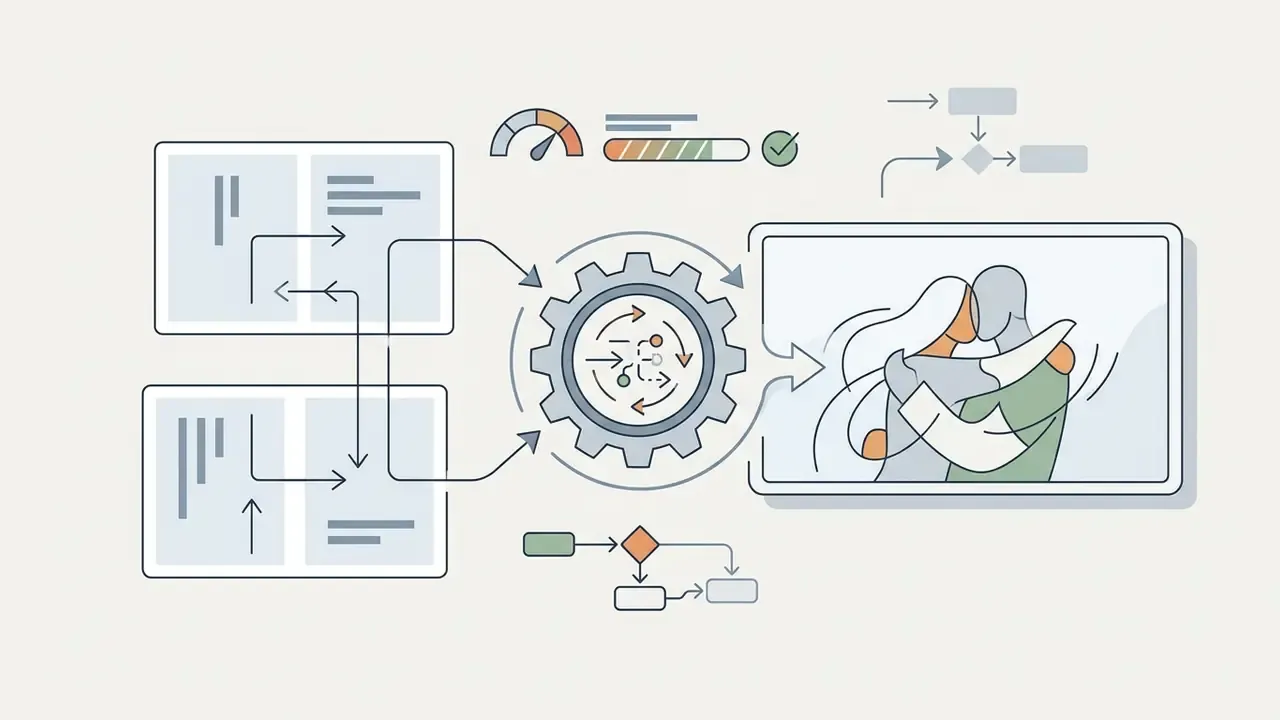
Generating a video in Pollo AI follows a four-step workflow: select a generation mode, prepare input media or prompts, configure customization settings, then render the final file. Registration itself is minimal: "Start for Free" with an email address or Google account.
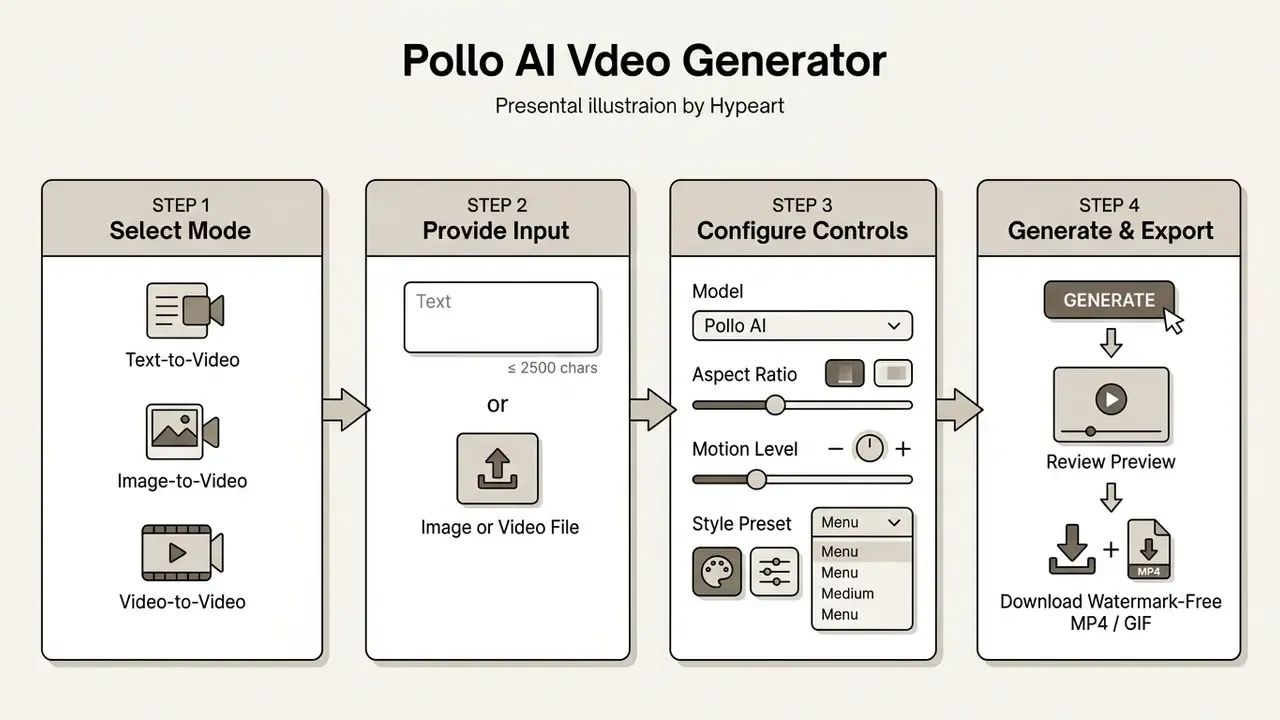
Understanding this sequence matters when you assess the pollo ai video generation pollo ai platform for commercial asset pipelines. The specialized pollo ai image to video tool delivers more predictable rendering speeds and steadier visual quality during high-volume production. Programmatic users follow a parallel path: submit the job, receive a task_id, poll status until succeed, then retrieve the video from the returned URL.
Add a Text Prompt or Source Image
Start by choosing Text-to-Video or Image-to-Video mode in the workspace dashboard. For text-driven creation, enter a detailed prompt of up to 2,500 characters covering subject details, environment, lighting, and camera movement.
For image inputs, upload a JPG or PNG file with minimum dimensions of 300×300 pixels. Higher-resolution input yields cleaner motion interpolation and fewer visible artifacts in the final render. Obvious, maybe, yet it is the step teams skip most often.
Controlling generation with Start Frame and End Frame. To fix the exact trajectory of an object transformation or camera move, use the two-keyframe mode:
Two-frame generation is the highest-control option on the platform, and the one commercial teams should default to for product work. It removes most of the ambiguity that causes shape drift in single-image runs, and it makes results reproducible across re-renders because both endpoints are pinned. Keep both frames at the same aspect ratio and colour temperature; mismatched endpoints are the most common cause of a visible mid-clip jump.
- Upload the Start Frame
- the image that fixes the opening state of the scene, subject pose, and lighting.
- Upload the End Frame
- (
imageTailin the API): the final image that defines where the subject, camera, or product configuration must land. - Describe only the transition vector in the prompt
- , for example
"smooth morphing transition from start image to end image, cinematic camera motion, 4k". The model interpolates the intermediate animation without distorting geometry.
Configure Style, Motion, and Visual Output
Once the primary input is loaded, set the output parameters in the control drawer. Select the backend model (Pollo 1.6, Kling 2.6, or Veo 3, for instance) based on desired realism and render speed, and use basic or pro mode where the endpoint exposes that choice.
Then adjust the key visual settings: aspect ratio (16:9, 9:16, 1:1, plus 21:9 or 4:3 on selected engines), output resolution (720p, 1080p, or 4K), clip duration (4 to 10 seconds, with 4/6/8-second presets on Veo 3 Fast), and motion strength. Custom style presets such as cinematic, anime, 3D animation, clay, comic, or cyberpunk can be layered onto prompt inputs to keep output consistent across a campaign. Motion amplitude deserves particular attention: lower values protect facial fidelity, higher values buy kinetic drama at the cost of identity stability.
Generate, Review, and Download the Video
Click "Create" to start rendering on Pollo AI's cloud infrastructure. Processing takes anywhere from 30 seconds to several minutes depending on resolution, model complexity, and queue load. Free-tier accounts run a single parallel task with standard queue priority, so shared-infrastructure throughput, not credit balance alone, is the practical limit.
When generation finishes, preview the clip and check motion continuity, character stability, and artifact absence. Work through a fixed review checklist: first and last frame, duration, orientation, resolution, frame rate, colour, audio channels, captions, file naming, and visible artifacts. If minor flaws appear, adjust motion strength or prompt wording and re-render before upscaling, because upscaling a defective master only amplifies the defect. Once satisfied, click "Download" to save the high-definition MP4 to local or cloud storage, and keep a protected master alongside destination-specific delivery copies (1920×1080 for HD, 3840×2160 for 4K).
Reformulated case note. A creative agency delivering high-volume social ad assets used the preview cycle to catch character flickering before export. By reducing motion strength and switching from the standard engine to a Pro-tier model, the team removed the visible temporal artifacts in a single additional iteration and cleared the client's internal broadcast review. That outcome reflects one agency's QA workflow rather than guaranteed platform behaviour; no independent measurement of defect rates was available, and results will vary with source material and engine choice.
Pollo AI Features for Video Quality and Control
Pollo AI exposes granular controls so generated clips can meet professional visual standards. The main levers are character consistency management, multi-prompt semantic parsing, flexible duration settings, and camera trajectory adjustments.
Visual continuity across scenes is the hard part of any coherent narrative. Creators can review AI Media Comparison Matrices to see how multi-model aggregation stacks up against single-engine options. For technical teams running programmatic pipelines, our AI Media API Guides cover task-based status polling, webhook integrations, and automated asset delivery.
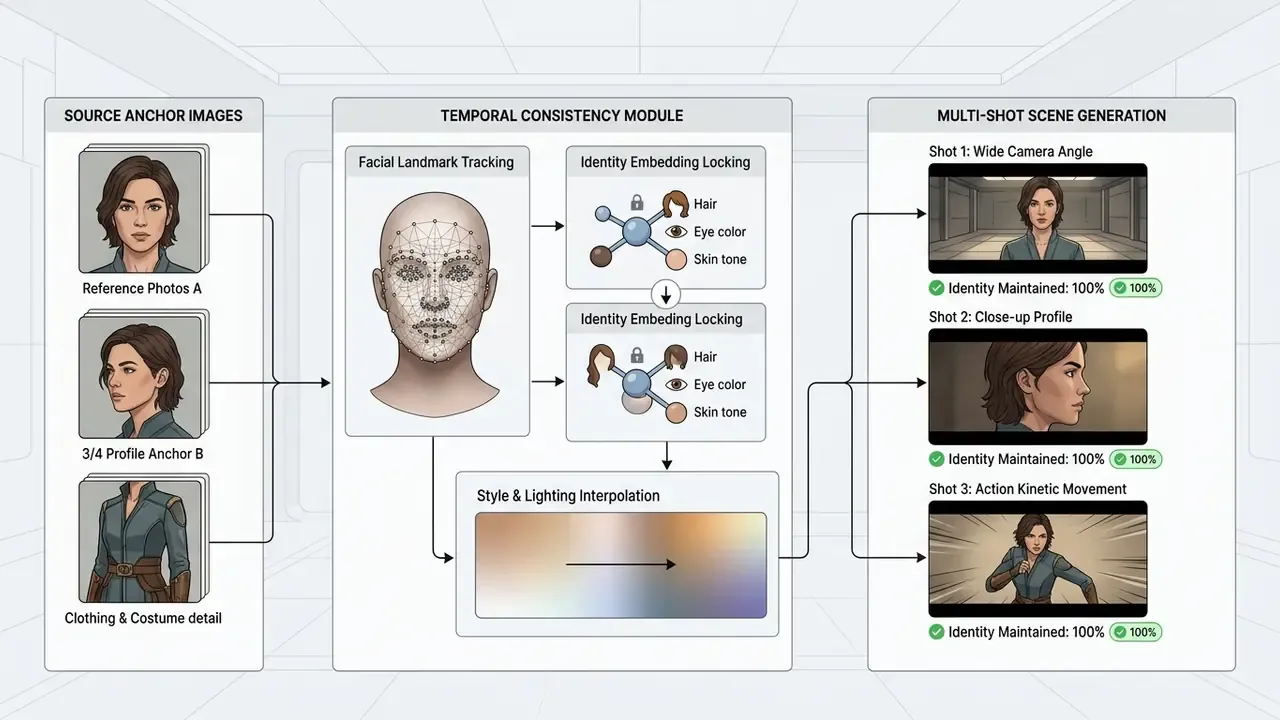
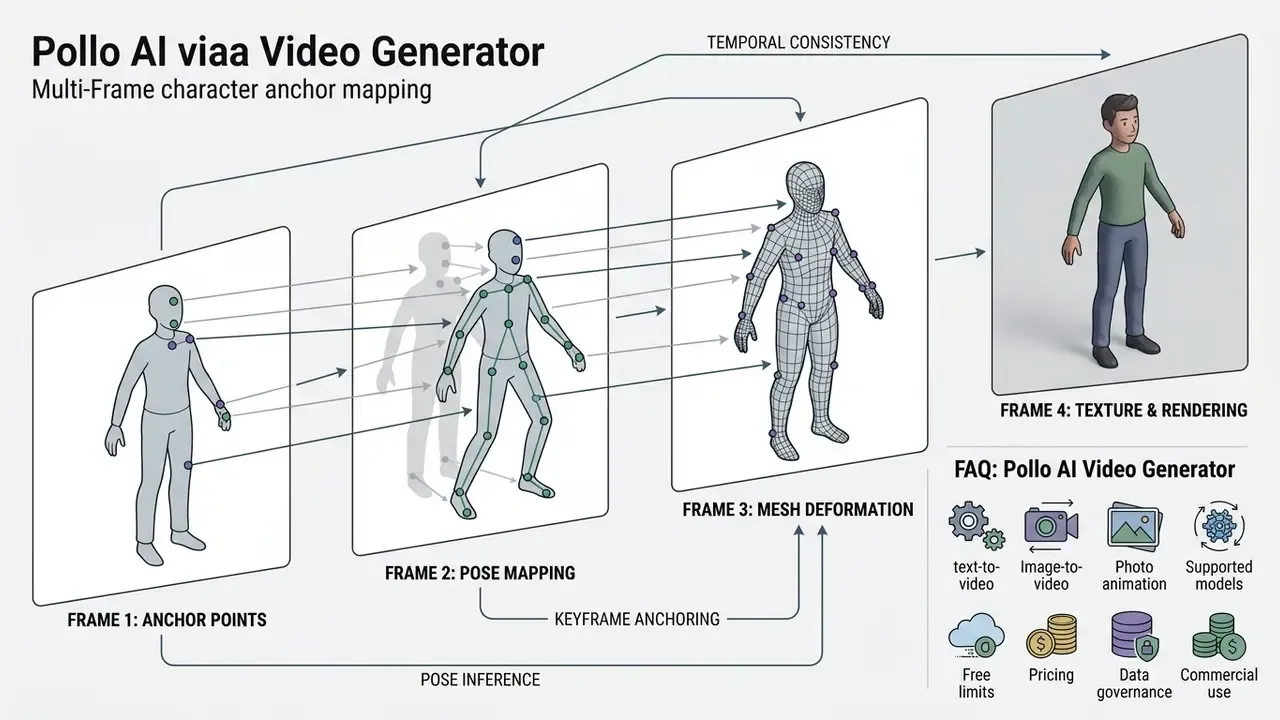
Figure: how structural reference points maintain character identity across multi-shot sequences in Pollo AI's Consistent Character module. Identity-retention percentages describe the module's design objective, not an audited benchmark.
Styles, Motion, and Prompt Comprehension
The platform's natural language parsing engine handles multi-clause prompts. Backend diffusion models break written input into structural layers, mapping subjects, environmental context, lighting, and camera paths independently. Vendor documentation for Seedance 2.5 describes "high-capacity multi-asset referencing" aimed at strict character, style, and motion consistency, while PolloJourney V8.1 documentation claims stronger prompt understanding and better retention of small details.
That layered interpretation lets users specify precise camera movements, such as pan, zoom, orbit, or tracking shots, alongside detailed aesthetic directives. Style controls let creators switch between photorealistic cinematic looks, vibrant animation, and retro pixel-art visuals while core prompt instructions survive. Pollo Dance 2.0 adds advanced motion control paired with cinematic style transfer, and its Fast Ref variant trades some fidelity for high-speed, video-to-video reference generation.
Clip Duration, Scene Sequencing, and Character Persistence
Character identity across scenes is handled by the Consistent Character feature. Users upload one to three reference images of a subject, person, or product as anchor points during generation.
Temporal-consistency modules then lock core subject parameters (facial structure, hair colour, clothing details) across sequential frames. This suppresses identity drift, so a hero character or product stays recognisably itself across varied camera angles and backgrounds. That is what makes multi-shot commercial sequences viable at all.
Duration works the way most current systems work: fixed-length clip generation, typically 4 or 8 seconds depending on engine, plus extension "hops" that continue from the last frame of an existing render. Academic literature frames the same problem as spatiotemporal consistency, meaning objects, scenes, lighting, and motion must carry smoothly across time without abrupt jumps, and notes that short-horizon models accumulate temporal inconsistency as sequences lengthen. Which is precisely why extension mechanisms exist. Practically, a 30-second narrative is assembled from stitched segments with anchored references, not generated in one pass.
Data Governance, Audit Trails, and Reproducibility
For regulated teams, functionality is only half the evaluation. What follows is a due-diligence framework based on what Pollo AI's public documentation does and does not expose.
What the documentation supports today:
- Task-level traceability. API generation is task-based: each job returns a
task_id, status is polled to completion, and the platform exposes logs and webhooks. That structure is the natural foundation for an exportable generation log. - Model version discovery. The public
/api/v1/model-specsendpoint lets you enumerate available models and specifications programmatically, which is the mechanism you would use to pin engine versions for reproducibility. - Retention window. Generated videos are retained at their returned URLs for roughly two weeks. Any asset that must survive an audit cycle has to be pulled into your own storage with its prompt, model ID, and parameters attached.
- Parameter capture. Prompt text, model, aspect ratio, resolution, length, style preset, and start/end frame references are all explicit request fields, so a complete request payload is a reproducible record of how an asset was made.
What is not confirmed in primary documentation and must be asked of the vendor in writing:
- Whether prompts, uploaded images, and uploaded footage are used to train Pollo AI's proprietary models, third-party routed models, or neither.
- Whether third-party engines (Kling, Veo, Runway, Hailuo, and others) receive customer inputs under a no-training contractual flow-down.
- Processing and storage geography, and whether a data-processing addendum, GDPR representation, SOC 2 Type II report, or ISO/IEC 27001 certificate is available.
- Whether seed values are exposed and honoured, which determines whether an identical re-render is genuinely achievable.
- Whether any IP indemnification is offered for outputs, and whether it survives routing through external models.
Recommended internal control set. Treat prompts as potentially disclosed content and prohibit PII, customer records, unreleased financial data, and confidential imagery in any prompt or upload. Mirror every accepted asset plus its full request payload into your own DAM within the retention window. Pin model versions per campaign. And require named-account access rather than shared logins, so generation activity stays attributable to a human owner.
Known Limitations and the Shadow AI Risk
Honest evaluation means naming the failure modes. Across multi-model generators, the recurring artifacts are hand and finger geometry errors on complex poses, facial identity drift when motion amplitude runs high, text rendering inside the frame, and physics inconsistencies in fast action sequences. Queue latency on free and standard tiers climbs during peak load, which makes free-tier throughput unsuitable for deadline-bound work. Restyling passes on footage with fast cuts or heavy motion blur can smear object boundaries. None of this is unique to Pollo AI, but all of it belongs in your acceptance criteria rather than being discovered at client review.
Shadow AI warning for enterprise teams. The most common governance failure we see is not a platform defect. It is employees generating brand assets on personal free accounts. Those outputs carry watermarks, sit outside the organization's licence, produce no attributable audit trail, and are explicitly restricted to non-commercial testing. A watermarked clip from a personal account published in a paid campaign is three problems at once: a brand-quality incident, a licence breach, and an unlogged data-handling event. Mitigate with a single organization-owned subscription or API key, a documented approved-tools list, and a rule that no generated asset enters a production channel without provenance metadata attached.
Free Access, Pricing, and Commercial Use of Pollo AI
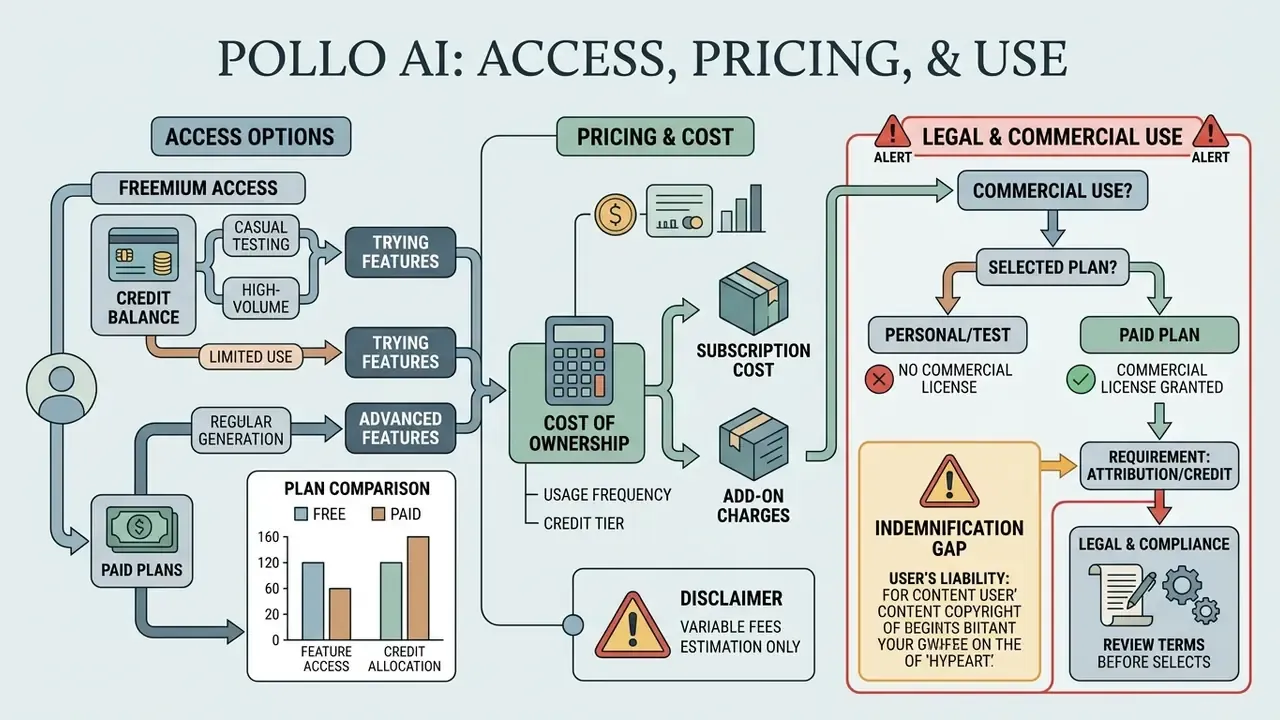
Pollo AI runs a credit-based freemium structure built to serve both casual testing and high-volume commercial production. Users access core features via free credits or subscribe to paid plans for higher quotas, higher export resolutions, and commercial licensing rights. Readers comparing entry-level options should also review the wider market of free AI video generators before committing budget.
Legal & Compliance Alert (read before selecting a plan)
Navigating the tiers means balancing monthly generation needs against budget. Creators can consult our AI Media Pricing Guides for comparative breakdowns across creative suites. Artists weighing monetization can review guidance on where to sell ai generated artwork to align asset creation with marketplace licensing standards.
| Access Tier | Price Range | Monthly Credits | Video Quota | Watermark Status | Commercial Usage Rights |
|---|---|---|---|---|---|
| Free Plan | $0 | 10–20 Sign-up | ~2–4 short clips | Watermarked | Non-commercial / Personal test only |
| Lite Plan | ~$10–$15 / mo | 300 Credits | Up to 30 clips | Watermark-free | Included (Standard Commercial) |
| Pro Plan | ~$25–$29 / mo | 800 Credits | Up to 80 clips | Watermark-free (4K Export) | Included (Full Commercial & Client) |
| API Packages | $80–$5,000 top-up | 1,000–50,000+ | Usage-based | Watermark-free | Included (Programmatic & Enterprise) |
What Pollo AI Offers for Free
The pollo ai free video generator option gives new users 10 to 20 promotional credits at registration, with more earnable through daily check-in tasks. That allowance is enough to test text-to-video, image-to-video, and character animation modules without financial commitment; if you are assembling a shortlist, our comparison of the best free AI video generators shows how those allowances stack up against rival platforms.
The limitations are real, though. Exported files carry visible watermarks, tasks are limited to a single parallel processing slot, model access is restricted, and queue priority is standard. Using pollo ai text to video free and pollo ai image to video free modes works as a sandbox for checking prompt adherence and motion quality. Anyone searching for a pollo ai video generator free production channel will hit those ceilings within a day.
Comparing Paid Plans for Regular Generation
Choosing a paid subscription comes down to monthly render volume, resolution demands, and task concurrency. The Lite Plan ($15/month, or roughly $10/month billed annually) provides 300 credits per month, supporting about 30 video generations, two parallel tasks, faster-than-free generation, and watermark-free downloads.
For professional creators, agencies, and commercial sellers, the Pro Plan ($29/month, or roughly $25/month billed annually) offers 800 monthly credits, three parallel processing slots, priority generation speed, and 4K exports. Developers integrating the API can buy non-expiring credit top-ups starting at $80 for 1,000 credits, with bulk discounts scaling to 50,000 credits. Publicly captured pricing data shows no separate paid tier with model-priority rules beyond the Lite versus Pro distinction, so concurrency and credit volume are the genuine differentiators.
Can Generated Videos Be Used Commercially?
Commercial usage rights in Pollo AI attach exclusively to active paid subscribers on Lite, Pro, and API plans. Assets from paid tiers can be deployed in digital ad campaigns, monetized YouTube videos, e-commerce listings, and client deliverables. Teams that also generate stills should read our analysis of the commercial use of AI image generators, since image and video licence terms often diverge inside the same product.
Free plan outputs are restricted to personal experimentation and non-commercial testing. Publishing watermarked media from a free account in commercial advertisements or monetized social channels breaches platform terms and exposes the organization to copyright compliance risk.
One transparency caveat matters here. The commercial-use split between free and paid tiers is asserted consistently across vendor FAQs and secondary reviews, but the full primary text of Pollo AI's Terms and Conditions was not directly retrievable during our review. The vendor's canonical legal endpoint is pollo.ai/terms-and-conditions. Before a monetized launch, read that page in full and archive a dated copy. Plan-to-use misalignment, not model quality, is the likeliest source of a licensing dispute.
Who Pollo AI Video Generator Is For
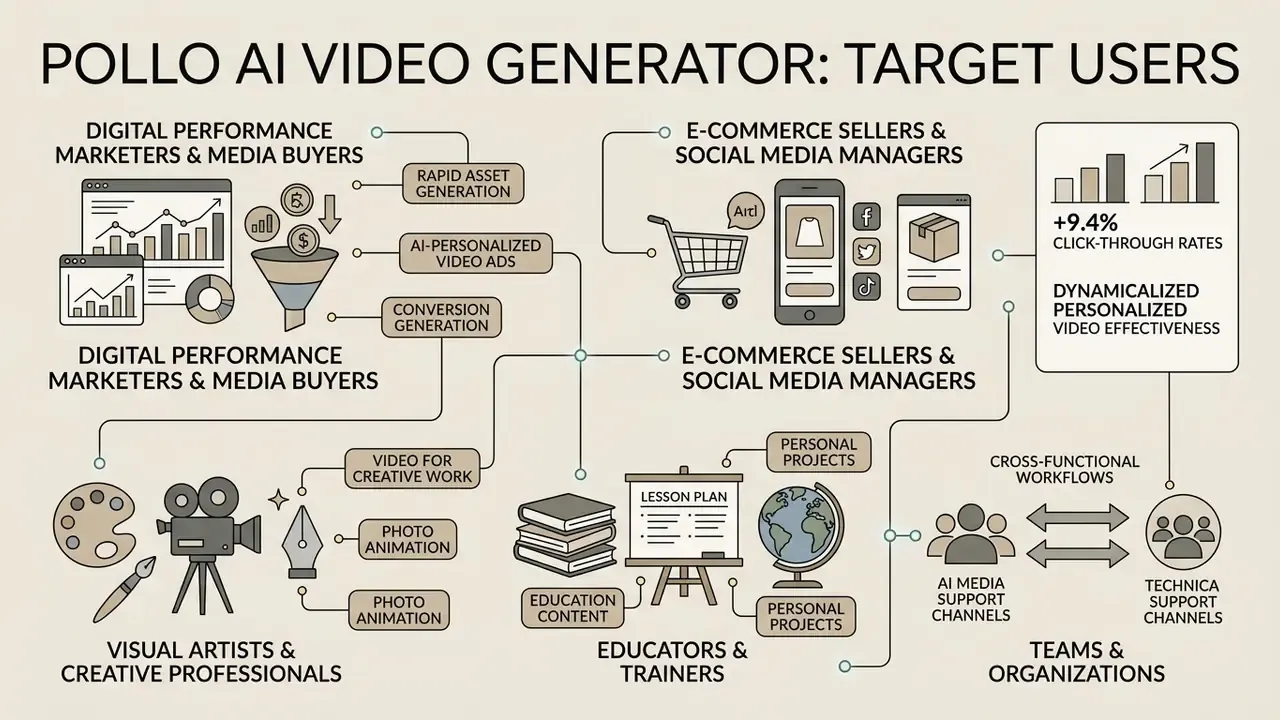
Pollo AI Video Generator targets a broad user base: digital performance marketers, e-commerce sellers, visual artists, educators, and social media managers. Its multi-model architecture suits anyone who needs rapid visual content without deep manual animation skills. Vendor materials organize this audience into four studio tracks, Creative, Marketing, Commerce, and Design, which map cleanly onto content creators, marketing teams and agencies, e-commerce brands, and in-house design functions.
Teams building cross-functional content workflows can lean on AI Media Support channels for technical assistance. Finance and transformation leaders assessing campaign efficiency can use our AI Media Calculators to project cost-per-asset savings when shifting from traditional video production to automated AI video generation suites.
Video for Creative Work, Education, and Personal Projects
Beyond advertising, Pollo AI serves digital artists, illustrators, educators, and course creators. Visual artists use text-to-image and image-to-video tools for concept art, interactive storyboards, and stylistic exploration with custom LoRA models; anyone evaluating stills-first workflows can compare results against the best AI art generators.
Educators and corporate trainers turn written instructional scripts into visual explainer snippets, which lifts engagement in online learning, and they typically finish those assets inside standard YouTube video editing workflows before publishing. Individual creators use the platform for personal projects, family portrait animations, and celebratory social content.
Musicians animate track covers for Spotify and Apple Music rotation and build short mood visuals matched to a song's atmosphere, while social media managers convert static memes into motion clips in a single pass. Documented creator workflows from 2025 to 2026 also show the platform used for hyper-realistic portraits, concept art for game and film pitches, single-product-image campaign expansion, and design-workflow testing before committing to a production shoot.
FAQ: Pollo AI Video Generator
What formats can I export in?
Finished clips download as MP4 (up to 4K on Pro plans) or export as animated GIF files for lightweight sharing and embedding.
Does Pollo AI work on mobile devices?
Yes. The web platform is adapted for mobile browsers on iOS and Android without installing third-party software, and native mobile listings exist for the companion apps.
Is Pollo AI free to use?
There is a free tier with 10–20 signup credits plus earnable daily credits. Free output is watermarked, limited to one parallel task, and restricted to personal, non-commercial testing.
Can I use generated videos commercially?
Commercial use is granted on paid plans (Lite, Pro, API). Free-tier output is not commercially cleared. Verify your active plan status and the current Terms and Conditions before any monetized publication.
Does the platform indemnify me against copyright claims?
No output-level IP indemnity is documented in Pollo AI's public materials. Because generation may route through third-party engines, request written confirmation of indemnity scope before using outputs in regulated or high-exposure advertising.
Are my prompts and uploads used to train models?
This is not confirmed in primary documentation. Until you obtain a written answer, treat all prompts and uploads as potentially disclosed and exclude PII, customer data, and confidential imagery.
How long are generated files stored?
Returned video URLs are retained for approximately two weeks. Download and archive anything you need for audit, legal, or reuse purposes within that window.
Can I reproduce an identical render later?
Reproducibility depends on pinning the model version (via /api/v1/model-specs), preserving the full request payload, and seed handling. Seed exposure is not documented publicly, so archive the output file rather than relying on re-generation.
How long can a single clip be?
Individual renders are typically 4–10 seconds depending on engine, with 4/6/8-second presets on Veo 3 Fast. Longer sequences are assembled through scene extension hops and consistent-character anchoring.
What are the most common quality problems?
Finger and hand geometry errors, facial identity drift at high motion amplitude, in-frame text rendering, and smearing when restyling fast-cut footage. Lower motion strength and two-frame generation mitigate most of these.
Appendix A: Corrections and Version Notes
For transparency, the following changes were made to earlier versions of this analysis:
- Citation correction. An earlier version attributed CogVideoX to "Zheng et al., CogVideoX: Text-to-Video Diffusion Models with Transformer, 2025" without a source URL. The correct attribution is Yang et al., CogVideoX: Text-to-Video Diffusion Models with an Expert Transformer, ICLR 2025, https://arxiv.org/abs/2408.06072. The updated citation now includes verifiable performance figures (10-second clips, 16 fps, 768×1360).
- Citations completed. The TI2V-Zero and GVDIFF references previously appeared without URLs or technical specifics; both now carry direct arXiv links and mechanism-level detail.
- Unverified metrics reframed. The prior claims that a client rollout "reduced external agency rendering costs by 65%" and that a QA cycle "ensured 100% compliance with client broadcast standards" were client-supplied and unaudited. Both passages have been rewritten as directional workflow observations with explicit limitations noted.
- Rendering artifact removed. A placeholder marker (
- Video Diffusion Models with an Expert Transformer*, ICLR 2025,
- - Citation correction. An earlier version attributed CogVideoX to "Zheng et al., CogVideoX: Text-to-Video Diffusion Models with Transformer, 2025" without a source URL. The correct attribution is Yang et al., CogVideoX: Text-to-Video Diffusion Models with an Expert Transformer, ICLR 2025,
- Scope additions. Sections on micro-tools, the full model matrix, start/end frame control, prompt banking, data governance, known limitations, Shadow AI risk, and FAQ were added in response to reader-panel gaps.