Last updated: 2026. Free-tier limits, credits and model versions change monthly, so re-check the vendor's pricing and privacy pages before you rely on the numbers below.
A free ai dance generator free service turns a static portrait or a full-body image into a dynamic dance video in seconds. All the user has to do is upload an ai dance picture, pick a ready-made motion template or a personal reference clip, and the neural network transfers the choreography onto the character automatically.
Thanks to the fast progress of Pose Transfer algorithms and diffusion synthesis, a modern ai dance generator online can hold onto facial features, silhouette and clothing details while avoiding heavy artefacts and harsh frame flicker. Not always. But often enough to be useful.
In this guide: what these tools actually generate, exact file specs plus a good/bad source checklist, the step-by-step workflow, advanced prompt, seed and engine controls, what drives realism (with research metrics), a free-tier comparison including data-retention notes, legal, biometric and AI-labeling rules, and a closing FAQ.
What Is AI Dance Generator Free and What Videos Does It Create
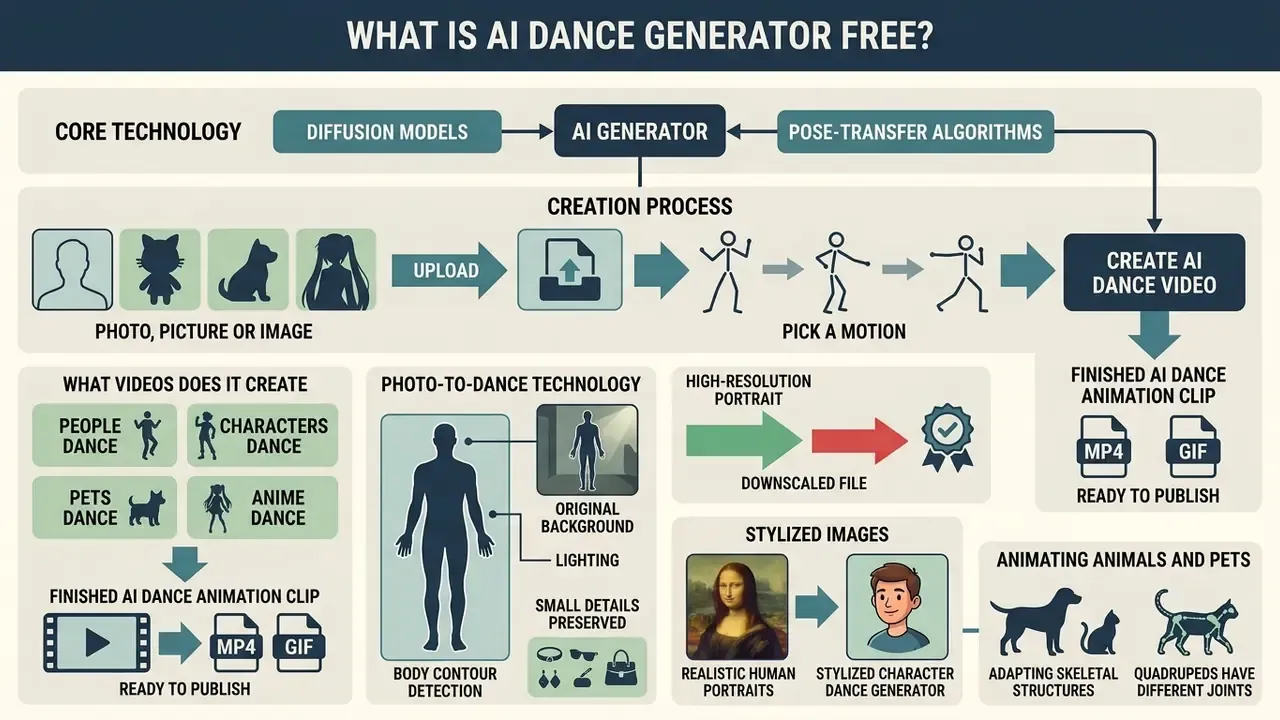
A free ai dance generator free is an online tool built on diffusion neural networks (Diffusion Models) and pose-transfer algorithms. It generates short clips, usually 3 to 10 seconds, of a dancing character from one static image. The service extracts visual data from the source photo and maps it onto a vector skeletal motion map, producing a complete ai dance video. If you want the broader technical context first, start with the fundamentals of image-to-video AI and the general overview of AI video generators.
After processing, the user receives a finished ai dance animation clip in MP4 or GIF, ready to publish. Such tools remove the need for manual 3D modelling, rigging, mocap suits or complex editing. Everything happens in the browser, on someone else's GPUs.
Dance Animation From a Photo, Picture or Image
Photo-to-dance technology analyses the uploaded file (ai dance image), detects the body contours of the character, masks the subject from the background, and links anatomical keypoints to the selected motion template. In Animate Anyone (2023–2024) the authors showed how a dedicated ReferenceNet module extracts appearance and texture details from photos:
«ReferenceNet, through spatial-attention mechanisms, extracts appearance details and ensures frame-to-frame continuity during generation.»
Because of this, an ai dance generator from photo preserves the original background, lighting and small clothing details, producing smooth image dance motion without proportion distortion. Users can also switch to universal formats such as photo to video, or test apps in the photo to video ai app class to feel the difference between a basic animated GIF and a fully moving scene.
One practical detail people miss: a 4 MP portrait shot on a modern phone in daylight beats a downscaled 800-pixel screenshot every single time, even if both "look fine" on a phone screen.
People, Characters, Pets and Anime Dance
A modern ai character dance generator works not only with realistic human portraits, but also with stylised art objects, 3D renders and anime characters. Ai anime dance generator algorithms adapt anime proportions to human-pose motion, smoothing the transition between drawn style and realistic body physics. If you plan to work with drawn or rigged characters regularly, it is worth reviewing adjacent animation makers and their template libraries.
Animating animals and pets requires adapting skeletal structures, because quadrupeds have different joint kinematics. Networks apply retargeting models so that the animal in an ai dance photo performs a funny, viral dance without losing fur texture. Still, animal motion remains the harder case: capture data is sparse and joint counts differ across species, which is why recent research generates species-specific motion instead of directly retargeting human skeletons.
«We generate diverse motions for target animal species in 3D scenes from single-view internet video.»
«The main difficulty in animal animation is limited capture data and inconsistent motion representation, because animals have different joint counts and kinematics.» Generate Human and Animal Avatars with Arbitrary Motion, arXiv (2024)
In practice this means pet clips look best with short, low-amplitude motion templates. Complex human choreography applied to a dog or a cat usually produces limb artefacts, and the tail is often the first thing to melt.
How to Create an AI Dance Video From a Photo: Step-by-Step
Creating a clip through an ai dance generator online takes less than three minutes and comes down to three core steps: preparing and uploading the image, choosing the choreography, and final rendering. Below is the visual workflow scheme.
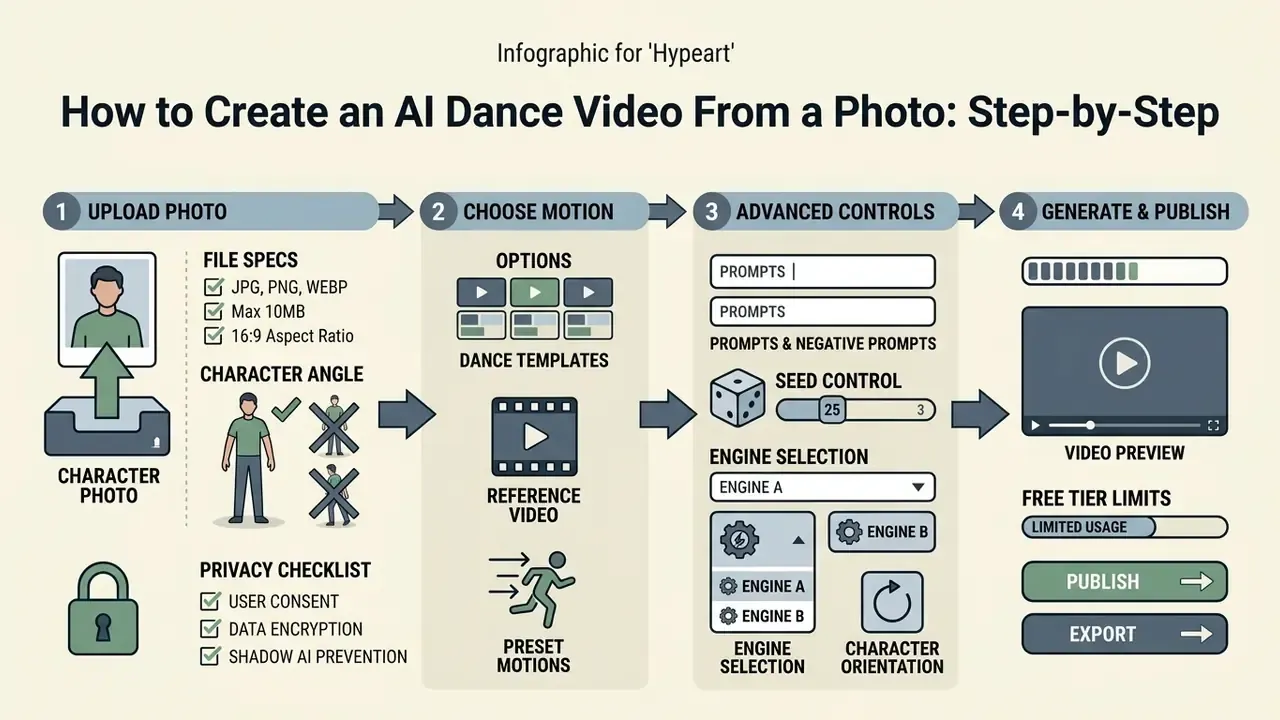
- Step 1. Upload the photoa sharp full-body, front-facing image (JPG/JPEG/PNG/WEBP, 4 MP or higher, up to 20 MB) with even lighting.
- Step 2. Choose the motionpick a dance template, a viral filter, or upload your own reference clip (MP4/MOV/WEBM, 3–30 s, 720p or better).
- Step 3. Generate and downloadpress "Generate", wait for server-side rendering, then download the finished MP4 (720p/1080p, 9:16 or 1:1).
Purpose of the block: a visual first-run guide for an ai dance generator from photo.
Markup rules for publication: render the three steps as an ordered list duplicated in text, wrapped in a figure element with a caption; the illustration must never be the only carrier of the instructions.
Upload a Photo With the Right Character Angle
For ai dance video generation tools to work correctly, you need an image with a clearly visible silhouette and nothing covering the arms or legs. The network builds a keypoint map, so a frontal full-body angle delivers the most realistic result with no joint distortion.
If you use photos with cropped limbs or a blurred background, the system may reconstruct the missing elements incorrectly during intense turns. That is where you get those visual "tears" in the finished ai dance video generator clip: a third arm, a foot that slides through the floor, a hand that becomes a mitten.
Technical specifications for uploaded files:
| Parameter | Requirement |
|---|---|
| Image formats | JPG, JPEG, PNG, WEBP |
| Max image size | up to 20 MB per file, from 4 MP resolution |
| Reference video formats | MP4, MOV, WEBM (up to ~100 MB on Kling-based engines) |
| Reference duration | 3–30 s (many services cap "image orientation" mode at 10 s) |
| Minimum reference quality | 720p, stable framing, one subject in frame |
| Aspect ratio | 9:16 for TikTok/Reels/Shorts, 1:1 for avatars |
| Output | MP4 (720p/1080p), GIF for short loops |
The perfect source checklist, good versus poor:
| ✅ Works well (Good) | ❌ Avoid (Poor) |
|---|---|
| Sharp full-body shot, front-facing, no tilt | Lying-down or slouched sitting poses |
| Contrasting single-tone or isolated background | Cluttered background merging with clothing |
| Even lighting across the whole body | Dim lighting, harsh drop shadows, backlight |
| Arms and legs fully inside the frame, joints visible | Cropped limbs, hands hidden in pockets |
| One clearly separated subject | Group shots with overlapping people (occlusion) |
| Feet visible and in contact with the ground | Profile view, bag/coat/object covering the torso |
Research on full-body relighting and animatable avatars explains why these rules matter: pose-aware light-visibility and occlusion functions require complete visible body geometry, so hidden limbs and self-occlusion become the main sources of distortion. Pose-guided animation papers report the same failure modes, namely extra body parts, large limb shifts and body-part overlap, and solve them by segmenting the foreground into separate parts such as arms and legs.
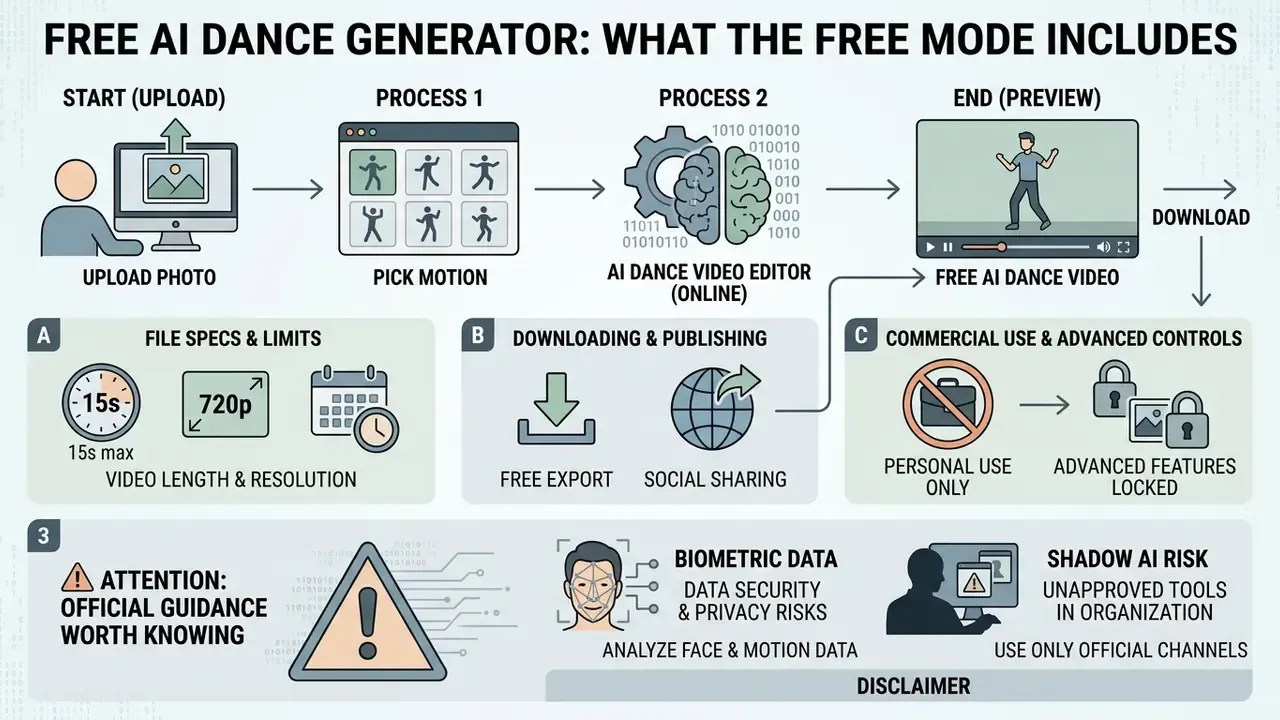
Privacy checklist before you upload (Shadow AI prevention):
- Do not upload corporate badge photos, ID scans, medical images or minors' portraits to free consumer endpoints.
- Strip EXIF geolocation from the source file. A basic photo editor does this in one export.
- Prefer services that offer an explicit "do not use my data for training" toggle, and read retention windows in their privacy policy.
- Inside organisations, route such requests through an approved tool list instead of letting employees paste customer or staff photos into random free clouds.
A small aside, but it matters more than the render quality: a fun dance clip is a low-stakes creative task, and a leaked face template is not.
Choose a Dance Motion, Template or Reference Video
At the configuration stage the user selects a motion trajectory from a dance template library, or uploads their own clip. Modern ai dance video creation tools offer styles from classical ballet to contemporary K-Pop and shuffle moves. Vendor documentation typically exposes controls such as dance_style and motion_amplitude, plus a reference image or audio track that drives synchronised motion.
Using a reference video (Motion Transfer) copies a performer's choreography precisely and transfers it onto your ai dance maker character while preserving the rhythm and amplitude of the original. The reference should show a single dancer, keep the full body in frame with enough empty space, and avoid cuts, abrupt camera movement and frequent zooms. Low resolution, occlusion, handheld shake and fast edits are the documented causes of poor motion extraction.
Advanced Generation Controls: Prompts, Seeds and Engines
Free tools are often presented as a black box. In reality, most current studios expose the same professional parameters that paid pipelines use.
- Prompt and negative prompt. The positive prompt describes the target result (
smooth full-body movement, stable facial identity, 8k detail, consistent clothing), while the negative prompt suppresses defects (blur, flicker, distorted limbs, extra fingers, warped face, background morphing). - Seed control. Fixing the seed makes a successful generation reproducible: same character, same framing, same lighting. That lets you re-roll only the motion instead of losing a good result to chance.
- Character orientation. A switch between "image" and "video" orientation defines whether the model follows the geometry of your photo or the framing of the reference clip. The image mode usually caps the reference at about 10 seconds.
- Engine choice. Studios that aggregate multiple engines let you A/B test one photo across models. Kling 3.0 Motion Control currently gives the most stable body tracking for dance, Sora 2 and VEO 3.1 deliver the most photorealistic environments and lighting, and Seedance 2.5 prioritises speed and cheaper credits. Faster variants (VEO 3.1 Fast, Seedance Fast) trade fine detail for render time.
- Prompt enhance or preset prompt. An automatic rewriting layer expands a short instruction into a detailed motion description. Useful for beginners, yes, but it can quietly override deliberate stylistic choices, so switch it off when you rely on a fixed seed.
For teams that need programmatic rendering rather than a web UI, the cost and quota logic differs substantially. Compare it against the Google Veo implementation guide before committing to a pipeline, and use the generation cost calculators to compare options per clip.
Which Motions and Styles Are Available in AI Dance Animation
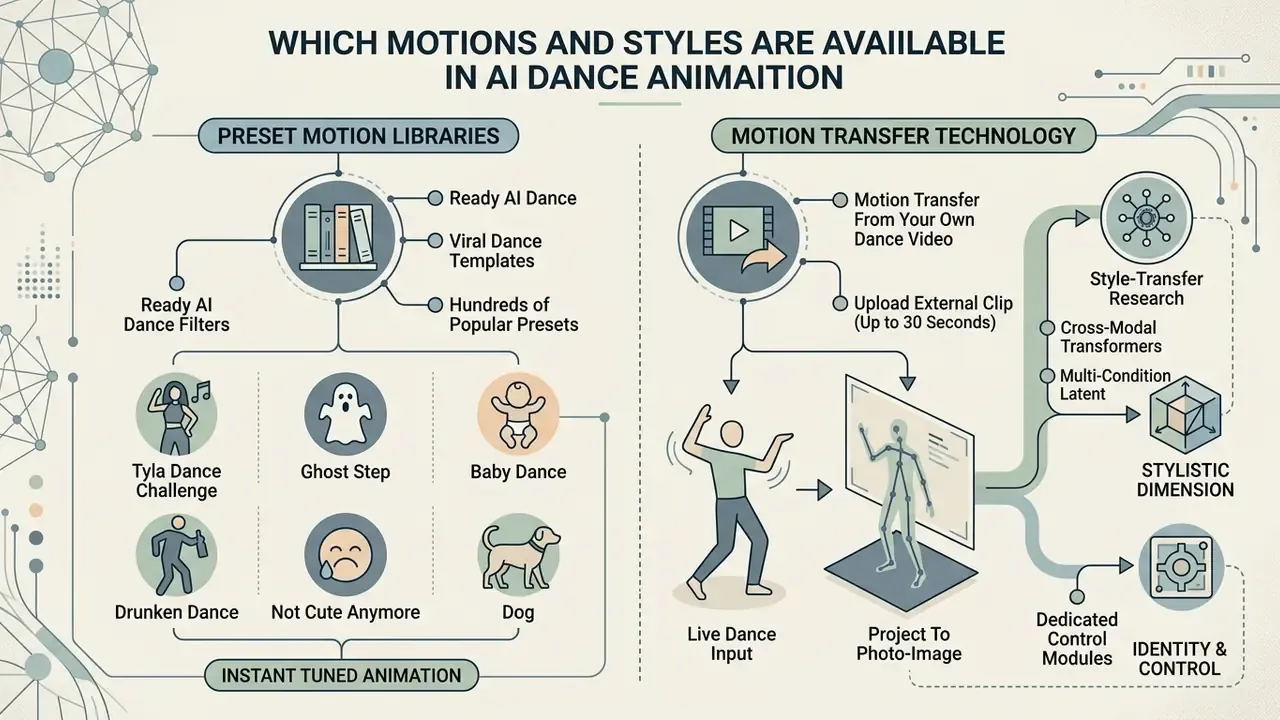
The range of available choreography is set by the network's training data and the built-in template libraries. Ai animation dance services offer both prepared presets of viral challenges and precise copying of user-supplied motion.
Motion Transfer From Your Own Dance Video
Motion Transfer lets you upload an external clip of a live dance, up to 30 seconds long, and project the choreography onto a photo character. According to Reenact Anything (2024):
«Optimising compact motion-text inversions transfers motion semantics onto a static subject without retraining the entire model.»
The identity side of the same problem is handled by dedicated control modules:
«DreaMoving uses a Video ControlNet for motion control and a Content Guider for identity preservation, generating high-quality personalised dance videos.»
In one internal test project we animated a static brand mascot illustration for a marketing campaign. We uploaded a clean full-body render plus a 10-second shuffle reference, and produced a publishable clip in roughly three minutes on a single free-tier generation, replacing what would normally cost a 3D animator a day of rigging. The campaign clip performed well as organic short-form content. Exact reach figures depend on the account and were not independently audited, so we report the production saving rather than a view count. Honest limitation, and worth stating plainly. If you are interested in the full production chain from text or frames to video, review our breakdown of pictory ai text to video.
What Determines the Realism of an AI Dance Video
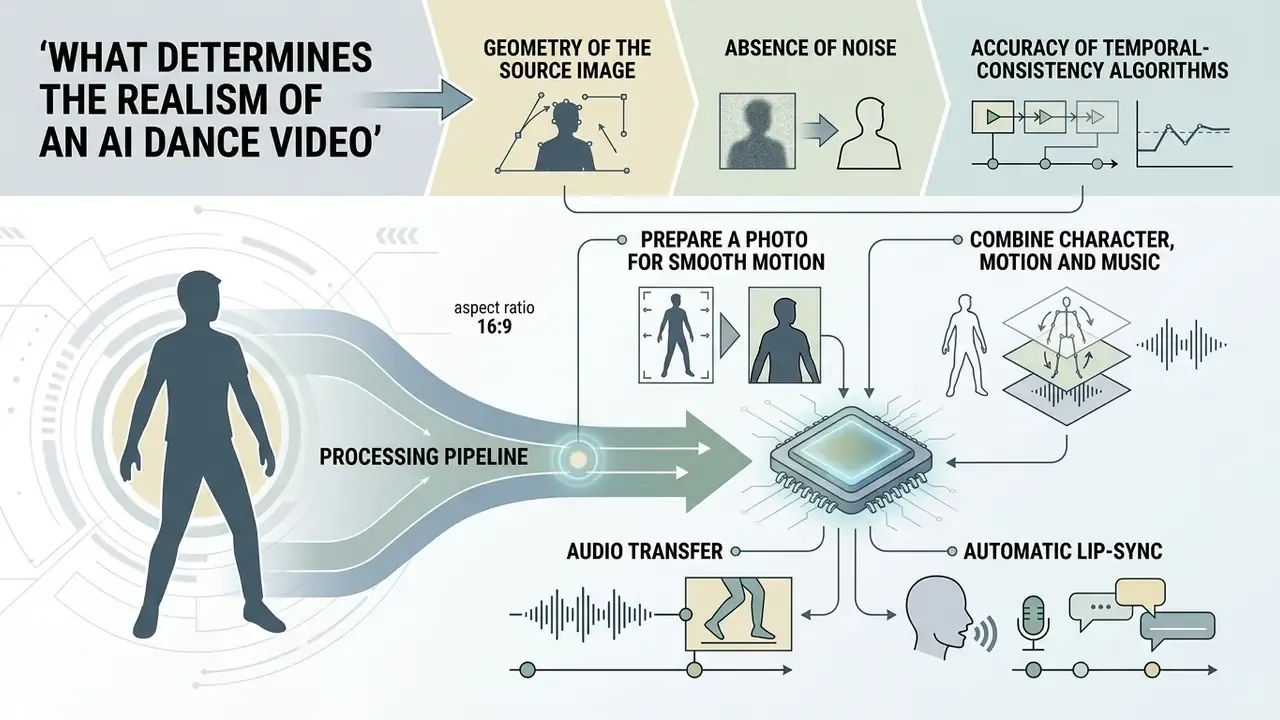
The quality of the generated clip depends directly on the geometry of the source image, the absence of noise, and the accuracy of temporal-consistency algorithms. Blur and flicker appear when the network misjudges scene depth or joint positions.
«Temporal loss reduces flicker and motion artefacts, while reconstruction and perceptual losses increase fidelity and detail in generative video training.»
Low-pass filtering suppresses high-frequency noise and visible flicker, but pushed too far it also softens edges. That is why over-smoothed free-tier output can look clean and plastic at the same time (Improving Temporal Consistency and Fidelity at Inference, arXiv, 2026. https://arxiv.org/html/2510.25420v1).
How to Prepare a Photo for Smooth Motion
To make an ai dance video from photo as realistic as possible, the source image should be high-resolution (from 1920×1080), evenly lit, and free of harsh cast shadows. An isolated or single-tone background simplifies segmentation and prevents background deformation when the arms and legs move.
«Disentangled control of appearance and motion lowers Fréchet Video Distance from 66.36 to 29.37, preserving crisp body contours even during fast steps.»
Additional pre-processing of the portrait can be done by exploring photo to painting ai or converting the source into a line drawing via photo to sketch. Practical illustration prep matters too: separating movable parts onto individual layers, keeping rounded ends at joint connection points, and planning feet and toes in advance all reduce limb artefacts during walking and jumping frames.
How to Combine Character, Motion and Music
Beat syncing is achieved by tying the key phases of the dance to the timestamps of the audio beats (BPM). ChoreoMuse (2025) uses two-phase diffusion, in which a 3D skeleton is first adapted to the audio signal and then used to synthesise the final video:
«ChoreoMuse reaches PSNR 27.85 versus 25.98 for DabFusion and SSIM 0.934 versus 0.895, with LPIPS 0.243 vs 0.325 and FVD 178.6 vs 195.2, meaning higher sharpness and stronger temporal coherence.»
This approach makes jumps, squats and arm swings land on the strong beats of the track, which is most of what separates a "professional" clip from a floaty one. Music-driven animation systems typically map musical events to time-stamped beat positions and can trigger both motion and lighting changes from the same event stream, while older motion-capture pipelines simply resample recorded movement to the target tempo.
Audio Transfer and Automatic Lip-Sync
When you use Motion Transfer, modern services offer a Keep Original Sound switch. The algorithm extracts the audio track from the reference MP4/MOV file, preserves the original tempo, and synchronises the character's articulation (Lip-Sync) and body movement with the musical beats. No external editing needed.
Practical notes:
- If the reference clip has audio, you normally do not need to add music manually; the generator keeps the original track with frame-accurate lip-sync.
- If you mute the reference, the character still moves on the extracted motion curve, but final beat alignment must be done in an editor.
- Reference audio carries the rights of the original recording. For commercial publishing, replace it with a licensed track or a synthetic voice-over. See the guide to AI voice generators for licensing terms.
- For multi-clip sequences, align everything on a single BPM grid in a YouTube video editor workflow before export.
Free AI Dance Generator: What the Free Mode Includes
Most online services run a Freemium model: free access with daily generation limits, basic resolution (usually 480p or 720p), and often a watermark on the exported file. If you are choosing between platforms, our overview of free AI video generators explains how credits, tokens and daily quotas differ.
| Service | Free limit | Export resolution | Watermark | Custom reference video | Mobile | Data use / retention |
|---|---|---|---|---|---|---|
| Viggle AI | 1 clip without sign-in; 5 dance videos/day when signed up | 720p | Product page says no watermark on free output; pricing page lists "Remove Watermark: No" for Free, so verify before publishing | Yes (Motion Control) | Web / iOS / Android | Not disclosed in a single clause; check the current privacy policy for a training opt-out |
| Pika Labs | Daily credits (Basic) | 480p / 720p | Basic tier reported as download without watermark, 480p, image-to-video only | Yes | Web | Check ToS; commercial use reported as allowed on all plans |
| Renoise AI | 1 clip on signup credits | 480p (4 s) | Yes | No (presets only) | Web | Not disclosed; assume server-side storage of uploads |
| Wan 2.2 / FreeWan | Basic tokens | 480p (6 s) | Reported as none | Yes | Web | Not disclosed; avoid sensitive portraits |
| Kling-based studios (e.g. EaseMate) | Daily check-in / invite credits | up to 1080p, ~10 s | Watermark-free export advertised | Yes (3–30 s, MP4/WEBM/MOV) | Web / iOS / Android | Vendor-specific; look for an AI-training opt-out toggle |
Free Online, App or AI Dance Video Editor
The choice between the web version (ai dance generator free online) and mobile software (ai dance generator app) depends on the task. Web services need no installation and run on powerful cloud servers, while a mobile ai dance animation app offers fast editing, filter overlays and gallery integration right on the phone.
Specialised editors such as an ai dance video editor provide extended storyboarding, multi-layer work and precise audio alignment. Browser-based video editors generally expose more editing features in-browser, whereas mobile apps prioritise portability and quick posting. Free specialised AI editors differ mainly by quota model: Descript offers a free plan with no card required, OpusClip gives 60 minutes of processing per month after a Pro trial, and CapCut's web editor advertises HD export without a watermark. Fans of animated content may also find the photo video maker tool useful for stitching finished clips into one project.
Downloading, Publishing and Commercial Use of AI Video
Finished ai dance videos can be downloaded in MP4 as soon as rendering completes. Before using the content for advertising or any commercial purpose, though, read the specific platform's rules carefully, and compare them with our notes on the commercial use of AI images, where the licensing logic is nearly identical.
Key rules reported across 2026 free-tier reviews: most free plans watermark output and restrict monetised channels, client work and paid distribution. The absence of a watermark does not by itself create commercial rights. Pika is the frequently cited exception, with watermark-free downloads and commercial use permitted on all plans.
What AI Dance Videos Are Used For
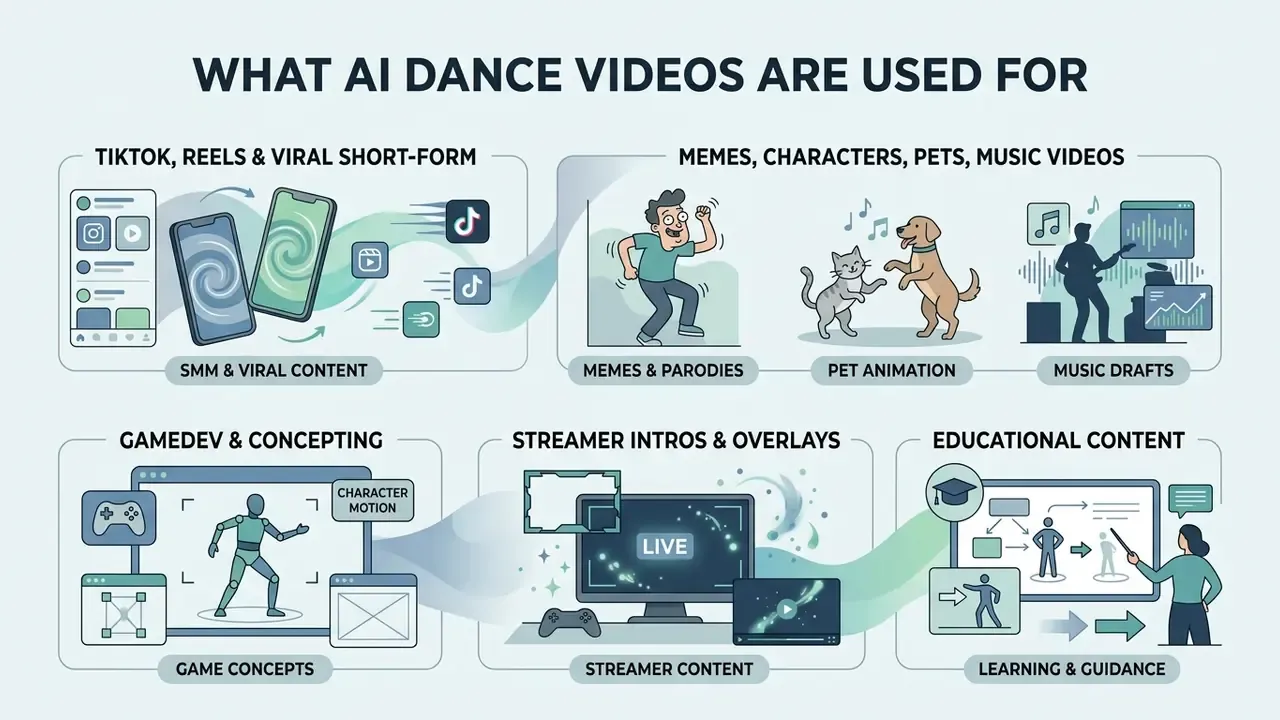
Generating dance clips has become a standard instrument for SMM specialists, bloggers, marketers, and plenty of people who just want a laugh in the group chat.
Memes, Characters, Pets and Music Videos
- Memes and parodies rapid transfer of viral dances onto historical figures, statues and meme faces.
- Pet animation turning photos of cats and dogs into dancing characters for entertainment pages.
- Gamedev and concepting testing game-avatar and anime-hero animation without hiring 3D riggers.
- Music drafts fast video prototyping for independent musicians, the cheapest pre-production tool for choreography ideas before booking dancers.
- Streamer intros and overlays animated dancing avatars for Twitch and YouTube openers, donation alerts and end-screen sign-offs.
- Educational content "reviving" historical figures, scientific mascots or classical paintings in dance formats to hold students' attention.
- Brand campaigns mascots dancing for product launches, seasonal promos and founder-led social content.
- Personal occasions birthdays, anniversaries, weddings and save-the-date reveals built around a familiar face.
- Tribute edits warmer alternatives to standard supercuts for athletes, artists or imaginary characters.
FAQ About AI Dance Generator Free
Can I make a group dance video with several characters?
Yes. Modern algorithms such as TCDiff++ (2024) support synchronous motion generation for a group of people:
«TCDiff++ generates non-intersecting trajectories for multiple dancers and uses a Footwork Adaptor to eliminate foot sliding.» TCDiff++: Trajectory-Controllable Diffusion for Group Dance Generation, arXiv (2024). https://wanluzhu.github.io/TCDiffusion/ In practice, a group photo raises the risk of occlusion and deformation of individual details, and dance-video datasets flag motion blur, occlusion and dramatic pose changes as the hard cases. Use images with clear separation between subjects, or generate each character separately and composite them in an editor. Most consumer tools recommend exactly that, since they animate one subject per generation.
How fast is an AI dance video created?
It depends on clip length and the server queue. A 5-second clip typically renders in 20–90 seconds. On free tiers during peak load the wait can grow from minutes to 24 hours or more, because free submissions are processed after paid ones. Paid subscriptions add priority queueing and faster model variants rather than a fixed guaranteed time (see the vendor help-centre figures cited above).
Can the generator be used for something other than dancing?
Yes. Most Image-to-Video networks are general-purpose action models. Documented non-dance use cases include:
- Walking, running and sports motion. Action2video (International Journal of Computer Vision, 2022) generates diverse prescribed human actions through an action2motion plus motion2video pipeline.
- Gesture and presenter clips. Animating a portrait into a talking, gesturing spokesperson for explainers and product demos.
- Emotional micro-expressions. Smiles, nods and surprise reactions for reaction content and thumbnails.
- View-changing action shots. Synthesising a person performing a specified action from a reference image via pose inputs (University at Buffalo technical report, 2024).
- Physics-grounded object motion. PhysGen (ECCV, 2024) turns a single image plus force and torque inputs into temporally consistent physical motion, and RealWonder (arXiv, 2026) adds action-conditioned control for forces, robot actions and camera moves.
What file formats and limits should I plan for?
Images: JPG, JPEG, PNG, WEBP, up to 20 MB, 4 MP or more. Reference videos: MP4, MOV, WEBM, 3–30 seconds (10 seconds in image-orientation mode), up to ~100 MB on Kling-based engines, 720p or better. Output: MP4 at 480p to 1080p depending on tier, GIF for short loops, 9:16 or 1:1 aspect ratio.
Do free services train their models on my photos?
It varies, and it is often unstated. Some vendors publish an explicit opt-out, others reserve broad rights to process uploads for "service improvement". Before uploading identifiable faces, open the privacy policy, look for retention periods and training clauses, and prefer tools with a documented deletion path. For organisational use, put this check into your vendor-approval workflow rather than leaving it to individual employees.
Do I have to label the video as AI-generated?
If the clip was created or substantially edited with AI, enable the platform's AI-content disclosure on TikTok, Instagram Reels and YouTube Shorts. It protects reach, satisfies platform guidelines, and reduces the risk of complaints when a recognisable likeness appears in frame.
Where can I ask a technical or licensing question?
Developer integration details live in the AI video API documentation, so open the hub when you need endpoints and quotas. Account and rendering issues go to AI Media Support. For head-to-head tool selection, browse the hub of comparisons, and for per-clip budgets use the generation cost calculators. Prefer to start from definitions rather than tools? Compare options in the AI media glossary, then come back and run your first render.