Executive Summary for Decision-Makers
- What the technology is: A photo to video AI app converts a static image into a short clip using latent diffusion or Diffusion Transformer (DiT) backbones, a Variational Autoencoder (VAE) for latent compression, and motion, camera and style conditioning modules. The uploaded photo acts as a hard spatial anchor. That is precisely why identity retention beats pure text-to-video.
- Where the compute happens: In 2026, the overwhelming majority of commercial generations still execute on cloud GPU clusters. On-device execution on NPU-equipped flagship phones is technically demonstrated (On-device Sora, MobileI2V, SnapGen-V) but remains limited to very short, lower-resolution clips. Treat it as early-stage, not production-default.
- Format decision: Native store-vetted apps and mobile web or PWA are both acceptable delivery formats for an organization. Sideloaded APKs are a critical supply-chain risk and should be blocked at MDM level.
- Cost structure: Freemium dominates. Free tiers give one-time or daily credits (Runway around 125 one-time credits; Pika Basic around 80 monthly credits at 480p; Kling around 66 daily credits), and typically cap clips at 4 to 10 seconds with watermarks. Vendor quotas change monthly.
- Legal position: Under US Copyright Office guidance, output produced entirely by a machine without human creative contribution is not registrable. Commercial rights depend on each platform's Terms of Service, and free tiers frequently exclude commercial monetization.
- Governance minimum: Log the source image hash, prompt, seed, model version, and human reviewer for every published asset. Require Zero Data Retention (ZDR) commitments, SSO with role-based access control, and DLP coverage before approving any tool for corporate media assets.
Who This Guide Serves and How to Read It
What Is a Photo to Video AI App and How Image Generation from Photos Works
A photo to video AI app is a mobile or cross-platform application that uses latent diffusion models, Diffusion Transformers (DiT), or spatio-temporal neural networks to turn static photographs into moving video clips. By reading the structural geometry, semantic layers, and pixel distribution of an uploaded image, the underlying video model synthesizes motion vectors, estimates depth maps, and predicts frame-by-frame temporal transitions.
When a user opens an ai photo to video app and uploads a visual asset, the system does not simply apply a 2D filter or a panning animation. Instead, the application compresses the high-resolution source image into a lower-dimensional latent space using a Variational Autoencoder (VAE). The ai image to video generator app then runs a reverse denoising process conditioned on the initial latent state, producing sequential frames that preserve the original subject while introducing believable movement, lighting shifts, and camera trajectories.
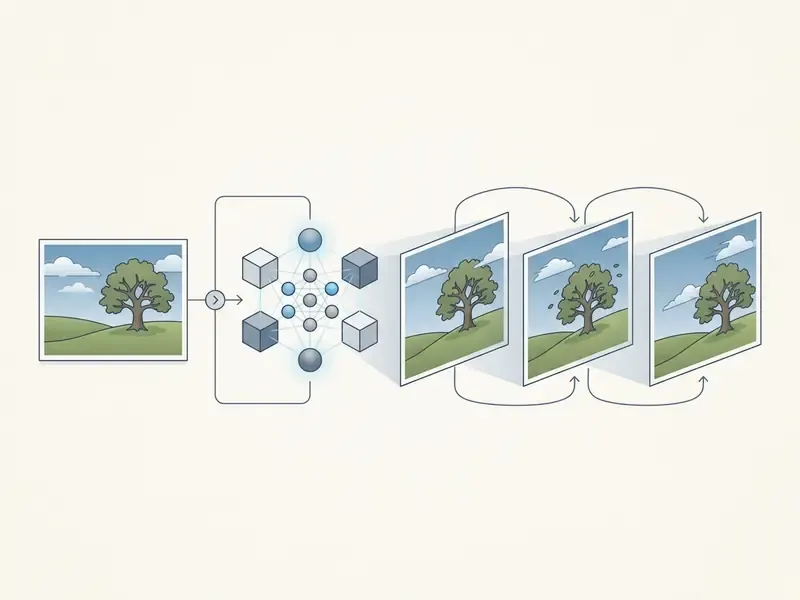
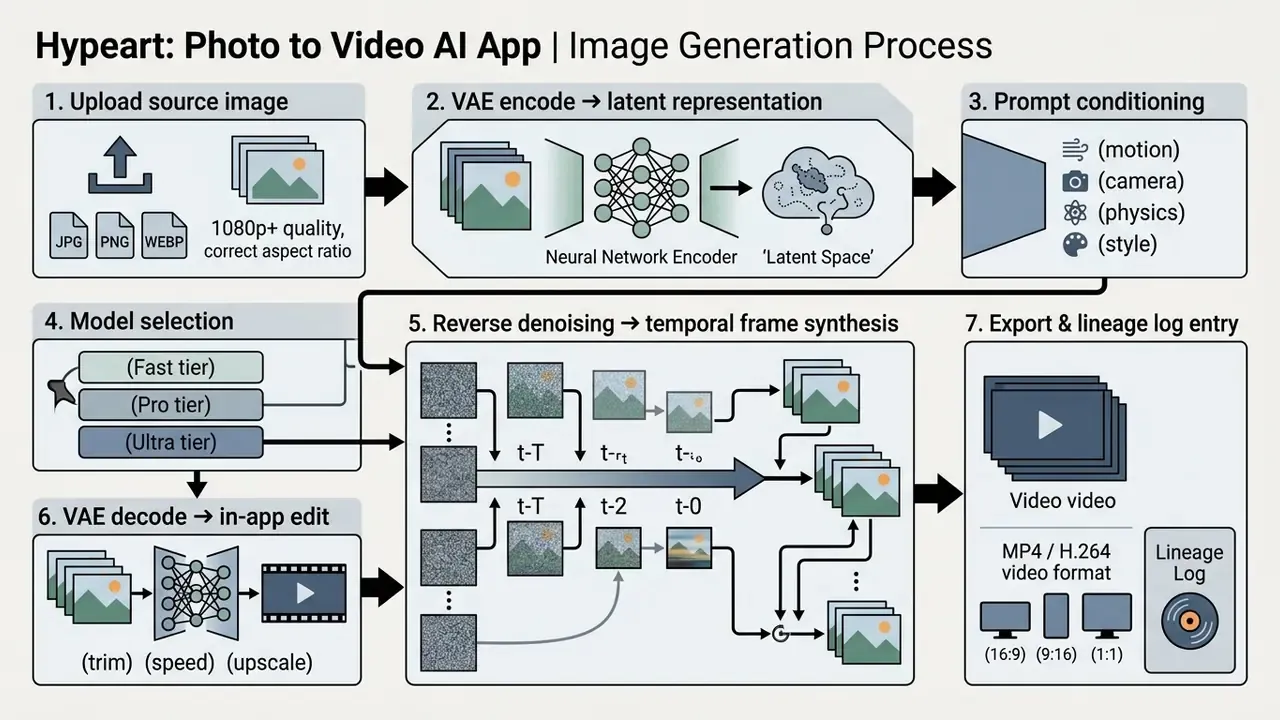
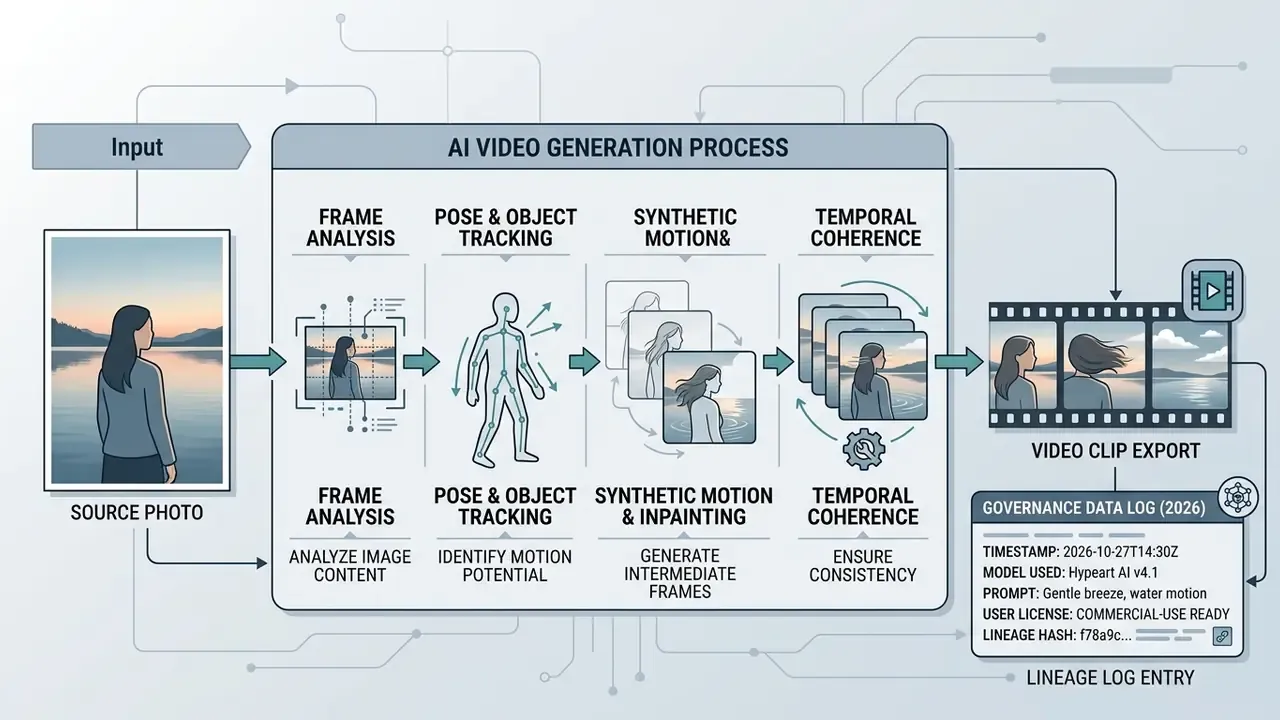
Image to Video, Photo to Video, and Text to Video: Key Differences
Image-to-video (I2V) and photo-to-video workflows use a hard visual reference as an anchor. Text-to-video (T2V) relies only on semantic prompt interpretation to synthesize both scene layout and subject identity from nothing.
In a standard T2V pipeline, the neural network infers composition, subject appearance, and motion purely from text tokens. Variance across generations is high, and identity retention is weak. An ai video from photo app works differently: the uploaded photo becomes a spatial conditioning signal. As conditional diffusion research shows, injecting the reference image through convolutional feature layers anchors subject placement, facial features, and background geometry.
«The model perceives the reference image via convolution layers and concatenates it with noisy latents to preserve details.»
«TI2V-Zero uses a repeat-and-slide strategy that modulates the reverse denoising process frame by frame, preserving the visual detail of the source photo without any model fine-tuning.» TI2V-Zero, CVPR 2024 preprint. https://arxiv.org/abs/2404.16306
When users add a text prompt inside an ai photo to video converter app, the text acts as a secondary conditioning mechanism (TI2V). It directs dynamic actions such as camera movement or facial expression without rewriting the subject's core visual identity.
A related but distinct mode deserves its own line: reference-to-video. Instead of treating one photo as the literal first frame, the system loads several orthogonal reference angles (front, side, rear, close-up) and locks that identity context across multiple clips. Image-to-video is the right choice for a single approved still. Reference-to-video is the right choice for multi-shot campaigns where a face, package, or logo must survive across a sequence. Choosing the wrong one is the most common cause of "the model changed my product halfway through the ad".
How AI Video Models Control Motion, Camera, and Style
Modern generative video models govern frame progression through three control mechanisms: motion field prediction, parametric camera transforms, and temporal style preservation.
- Motion field prediction. To animate static objects, models estimate optical flow and trajectory vectors. Mobile-oriented frameworks such as Motion-I2V (SIGGRAPH 2024) split generation into two stages: first predicting sparse trajectory maps from the reference image, then using motion-augmented temporal attention to warp image features across subsequent frames.
«Motion-I2V first predicts sparse trajectory maps from the reference image, then applies motion-augmented temporal attention to propagate features across frames.» Motion-I2V, SIGGRAPH 2024. https://arxiv.org/abs/2401.15977
- Parametric camera control. Virtual camera shifts such as panning, zooming, tracking, or orbiting are handled by parameterizing viewport coordinates. In camera-conditioned models like CamCo (2024), epipolar attention modules enforce 3D geometric constraints across feature maps, so perspective shifts keep spatial realism.
«CamCo parameterizes camera poses with Plücker coordinates and applies an epipolar attention module to enforce 3D consistency under viewpoint change.» CamCo (2024). https://arxiv.org/abs/2406.02523
- Style preservation. Style consistency comes from first-frame attention conditioning and low-frequency noise initialization (ConsistI2V, 2024). That combination suppresses subject warping, flickering, and unintended texture drift between frames.
«ConsistI2V adds spatiotemporal attention over the first frame and initializes noise from its low-frequency band, suppressing subject deformation and flicker.» ConsistI2V (2024). https://arxiv.org/abs/2402.04324
For model risk teams extending an existing Model Risk Management (MRM) framework to generative video, three acceptance signals are practical: Fréchet Video Distance (FVD) for distributional fidelity, a temporal consistency score for frame-to-frame stability, and a prompt-alignment score for instruction adherence. None of the three is sufficient alone. Together they give a validator something numeric to threshold instead of an opinion about whether a clip "looks fine".
For terminology and architecture definitions, see our comprehensive AI Media Glossary and the reference entry on animation makers and motion tooling.
How to Choose an AI Image to Video App for Mobile Devices
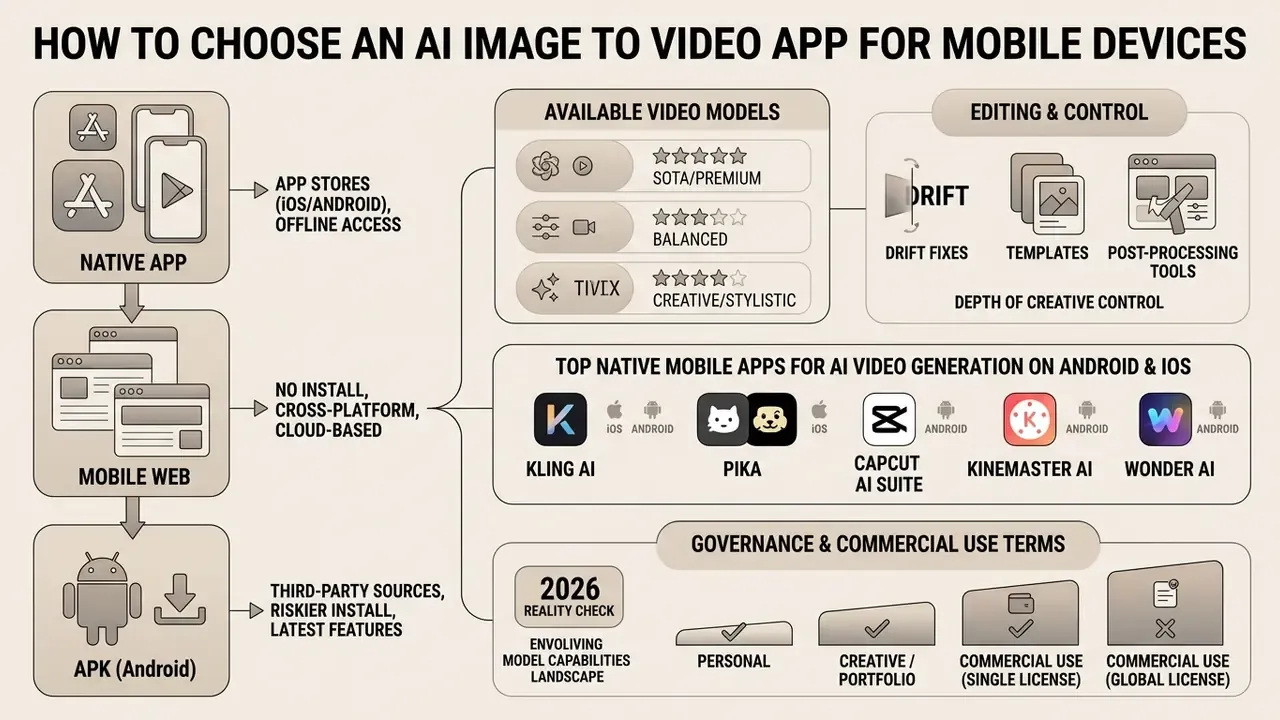
Selecting an ai image to video app means evaluating four things at once: deployment architecture (native app versus mobile web versus APK), available video models, editing features, and device-side compute. For any organization publishing to owned channels, add a fifth, and put it first: licensing and data-retention terms.
Yes, before the creative feature set. A gorgeous render you cannot legally run as a paid ad is not an asset.
To pick the right mobile setup, weigh installation convenience against data privacy, rendering performance, and model choice. Mobile-optimized architectures such as MobileI2V (2025) show that a compressed 270M-parameter Diffusion Transformer can generate 17 frames of 720p video in roughly two seconds on a flagship mobile chip.
«MobileI2V applies step distillation, cutting sampling from 20+ steps to one or two, delivering roughly a tenfold speed-up while holding 720p quality.»
2026 reality check: the great majority of commercial photo-to-video tools still route generations to cloud GPU clusters. Local NPU inference is a genuine research result, not yet a production default. Treat on-device generation as beta-grade capability limited to very short, lower-resolution clips.
Native App, Mobile Web, or APK: Which Format to Select
Native mobile applications offer tight operating system integration and hardware acceleration. Mobile web removes installation entirely. Sideloaded APK files introduce risk that no creative upside justifies.
- Native mobile apps (Android and iOS). Distributed through Google Play or the Apple App Store, a native ai image to video android app gives optimized memory management, GPU access via Metal or Vulkan, and secure local file access. Native distribution is also the only channel where genuine on-device inference is realistic today. Note that an ai video generator app download from an official store still deserves a permissions review before rollout.
«On-device Sora generates video on an iPhone 15 Pro with quality comparable to high-performance GPUs, using three compute-reduction techniques and no model retraining.» On-device Sora (2025). https://arxiv.org/abs/2501.05219
- Mobile web and PWA. Browser-based platforms run over HTTPS and offload processing entirely to cloud servers, which makes them hardware-agnostic and instantly accessible. PWAs inherit ordinary web risks (XSS, weak CSP, push abuse), so review them like any other SaaS surface.
- APK sideloading. Downloading an ai video generator apk from a third-party repository bypasses store review. Sideloaded packages bring tampered binaries, stolen API credentials, failed or silently altered renders, and malware exposure. Modded APKs also miss server-side updates, which produces crashes and broken model calls. There is no scenario where this is worth it for corporate media.
| Feature / Criteria | Native Mobile App | Mobile Web / PWA | Sideloaded APK |
|---|---|---|---|
| Installation friction | Requires store download | Instant access via URL | Manual install and permissions |
| Compute location | On-device or hybrid cloud | 100% cloud server | On-device or cloud |
| Model access | Vendor-specific models | Broad access to foundation models | Unverified, possibly altered |
| Security trust level | High (store-vetted) | High (browser sandbox, HTTPS) | Critical risk (unvetted supply chain) |
| Local editing tools | Full device OS integration | Responsive web controls | Variable, unstable |
| SSO and RBAC support | Common on enterprise tiers | Common on enterprise tiers | None or unverifiable |
| Zero Data Retention option | Vendor-dependent, contractable | Vendor-dependent, contractable | Not contractable |
| DLP and MDM controllability | High (managed app config) | Medium (proxy plus URL policy) | Effectively none |
| Encryption in transit and at rest | TLS plus OS keychain | TLS 1.2+ / HTTPS mandatory | Unverified |
| Audit log or API export for GRC | Available on business tiers | Available on business tiers | Absent |
Disclaimer: this information is general in nature. Consult your information security team before installing APK packages from third-party sources, and block sideloading via MDM policy wherever corporate media assets are involved.
For a broader landscape of no-cost tooling and its constraints, see our comparison of free AI video generators.
Top Native Mobile Apps for AI Video Generation on Android and iOS
Enterprise infrastructure usually leans on cloud web interfaces, yet native ai image to video apps still earn their place: camera roll integration, push notifications when a render lands, touch-optimized masking. Credit policies below shift often. Verify current quotas and Terms of Service on the vendor page before you standardize on any tool.
- Kling AI mobile app (Android, iOS).Roughly 66 daily free credits, matching its cloud web tier, with push notifications on completion and direct camera roll export. Trade-off: needs 200 MB or more of storage, and image pre-processing or cropping is cramped on a small screen.
- Pika mobile app (iOS).Specialized in region-based touch effects (inflate, melt, explode). Painting motion masks by finger is genuinely more precise than mouse work. Trade-off: iOS only as of early 2026, with fewer advanced model parameters than the web build.
- CapCut AI Suite (Android, iOS).Combines generative image-to-video with a multi-track editor and short-form publishing templates. The same model families appear across mobile, desktop, and web, although a canvas-style studio stays web-only. Trade-off: lower raw fidelity than standalone foundation models, and the best features sit behind Pro.
- KineMaster AI (Android, iOS).Timeline editing plus generative clip creation, tuned for mid-range Android chipsets. Trade-off: free-tier clip length is capped and exports carry a mandatory watermark.
- Wonder AI (Android, iOS).Mobile-first and lightweight, producing roughly 4-second watermark-free clips, about three generations per day. Trade-off: no parametric camera controls and no custom motion trajectories.
Which Video Models and Editing Tools Matter Most
An effective ai video generator app mobile setup pairs strong foundation models with precise frame-level editing.
When evaluating an ai video generator app, prioritize multi-model selection (Google Veo 3.1, Runway Gen-3 and Gen-4, Pika), see our comparison of leading AI video generators for current benchmarks, plus granular camera controls (pan, zoom, tilt speed), keyframe adjustments, and direct aspect ratio formatting for 9:16, 16:9 and 1:1. Built-in trimming, optical-flow speed adjustment, and resolution upscaling remove the round trip to a desktop editor.
Multi-model access is also vendor-lock mitigation. If one provider changes quotas or licence terms overnight, production continuity survives.
| Model tier | Representative models | Max clip duration | Ideal operational use case | Render latency (cloud GPU) |
|---|---|---|---|---|
| Fast | Seedance Lite, Kling V1.5 Flash | 4 to 15 seconds | Storyboard drafting, high-volume iteration, pre-visualization | 15 to 30 seconds |
| Pro | Kling V2 and V3, Runway Gen-3, Pika 2.1 | 5 to 10 seconds | Commercial social ad creative, smooth face and body mechanics | 45 to 90 seconds |
| Ultra | Google Veo 3.1, Luma Dream Machine | 8 to 10 seconds | Cinematic hero visuals, photorealistic dynamic lighting | 120 seconds or more |
For sequences longer than a single model ceiling, mature platforms auto-split the script into clip-sized segments and stitch them, so a 30-second asset plays as one take even though several generations sit underneath. For benchmark detail across mobile and desktop platforms, review our AI Media Comparison Matrices, plan-level costs in the AI Media Pricing Guides, and implementation economics in the Google Veo API implementation guide. Teams already standardized on one design suite should also check the canva ai video generator entry, since an existing licence often beats adding a new vendor.
How to Create an AI Video from an Image in a Mobile App
Creating an ai video from image app project follows a structured workflow built around three variables: input visual quality, prompt fidelity, and render parameters.
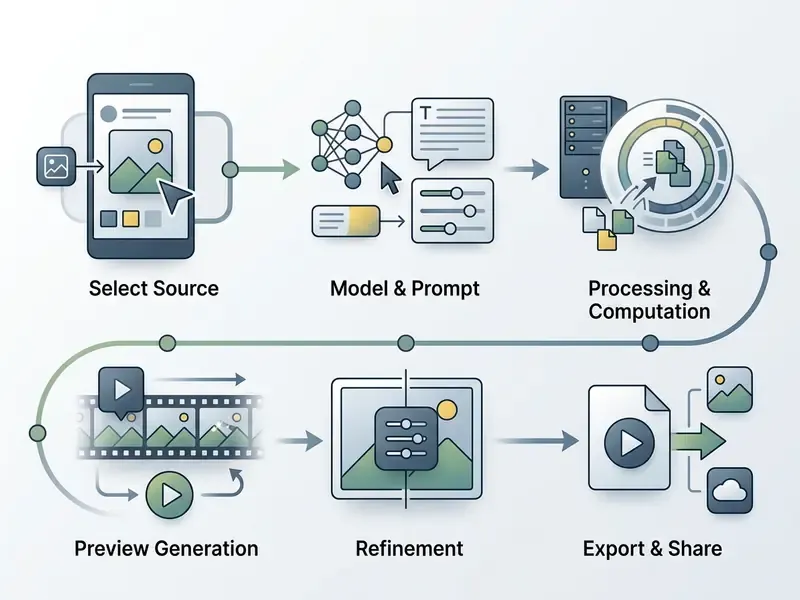
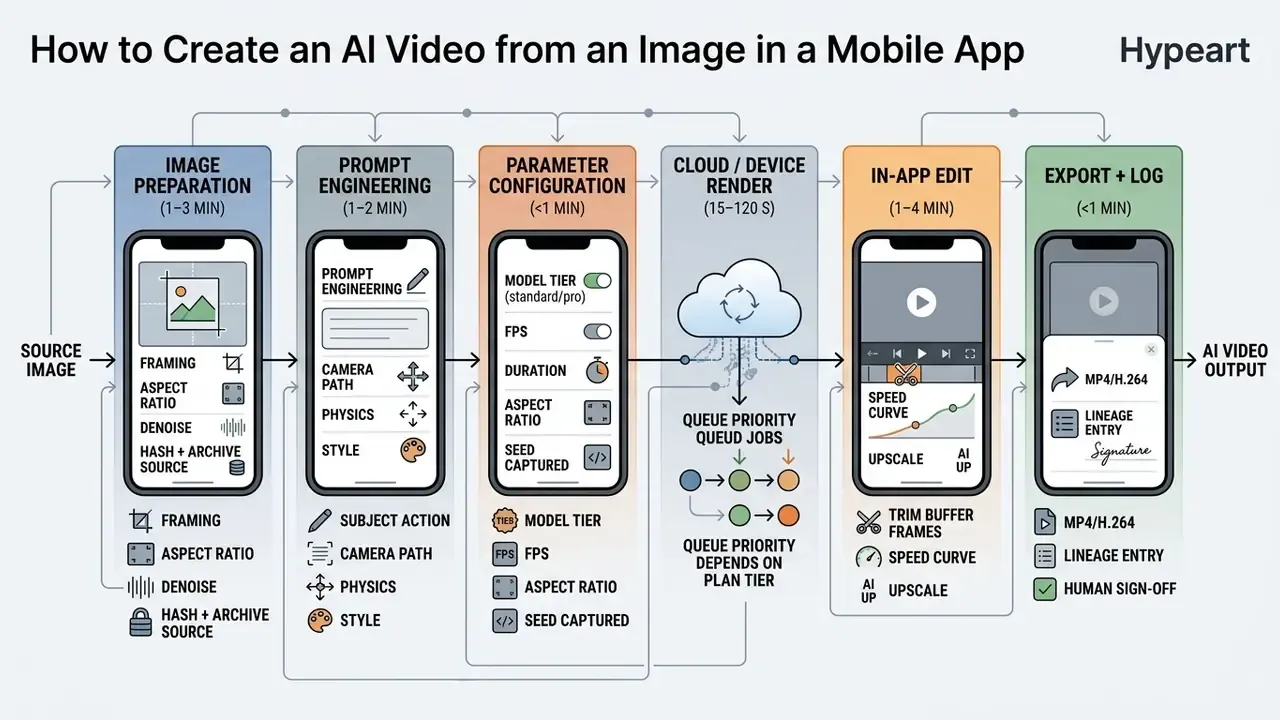
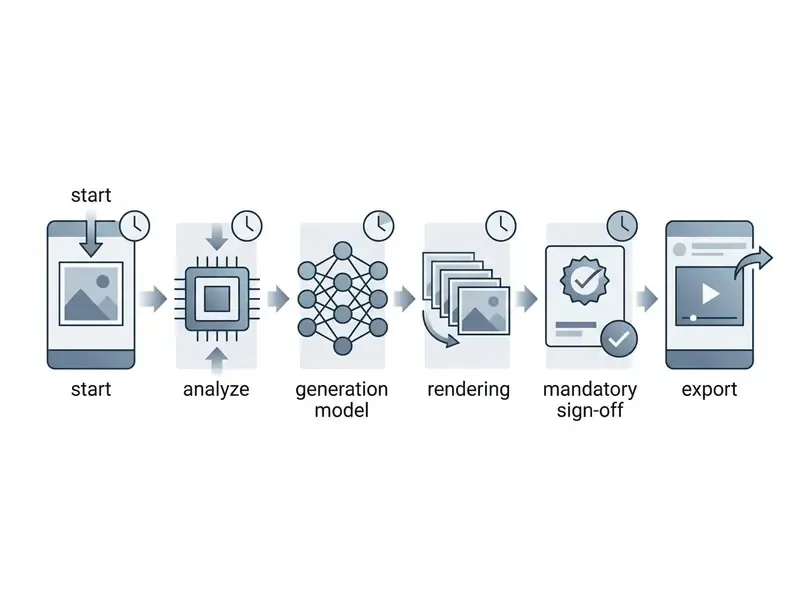
Uploading Photos or Images and Preparing the Source Visual
Output quality from an ai app generate video from image flow depends directly on the composition, lighting, and resolution of the input photo. Garbage in, flicker out.
When you prepare to upload an asset into an ai video from photo app, check the source against these parameters:
- Resolution and framing. Minimum 1080p with subject margins. Avatar generation guidelines suggest minimums around 1152 by 1152 px; leaving space around head, shoulders, and chest prevents clipping when the camera pans or tilts.
- Aspect ratio. Match the source ratio to the target platform, for example 9:16 for mobile vertical video. Most APIs preserve aspect ratio during resizing, so a mismatched source produces letterboxing or an unintended crop.
- File format and size. JPG, PNG, and WEBP are universally accepted, with upload ceilings commonly around 20 MB per image.
- Clarity and noise. High-contrast images with clean subject separation give clearer optical flow predictions than low-light or heavily compressed files.
If you need to fix framing, remove a background, or retouch before generating, do it in a controlled preparation step. See our guides to online photo editors, free photo editors with export and privacy limits, and the canva ai photo editor walkthrough for teams already inside that ecosystem.
Troubleshooting Visual Drift, Scale Inaccuracy, and Style Corruption
Standard video diffusion models default to photorealistic rendering weights. Feed them non-photographic or complex retail assets and four failure modes show up repeatedly.
- Illustrated and hand-drawn style drift. Animating vector art, anime, or 3D renders often makes the model inject photorealistic skin, gradients, or background texture. The result resembles neither your brand style nor a clean photograph. Fix: define render physics, colour palette, and texture explicitly in the conditioning prompt, for example "flat cell-shaded 2D vector, saturated pastel palette, no realistic gradients, hard ink outline". Photographic sources rarely show this, since the model is already in its native style.
- Product scale mismatch. Models frequently misjudge the true volume of packaged goods against background elements, so a 250 ml bottle reads as a 2-litre canister. Fix: supply reference images where the product sits in a human hand or beside a standard calibration object, hard-coding physical scale into the context.
- Multi-shot identity reset. Start-and-end frame chaining only "sees" the last still frame, so lighting, camera, and geometry get re-derived from scratch on every subsequent clip. For multi-shot commercial ads, use reference-to-video context locking (front, side, rear, close-up loaded as locked references) rather than sequential frame-stitching. That single change prevents most face and logo distortion across a sequence.
- Flicker and temporal instability. If frames shimmer, reduce motion intensity, shorten the clip, and re-generate with the same seed instead of piling on prompt complexity. Flicker is usually a sampling artefact, not a prompt failure. I have watched teams rewrite a prompt six times when trimming two seconds would have solved it.
Writing Prompts for Motion, Camera, and Style, Plus Prompt Governance
Effective image-to-video prompts describe dynamic change, camera path, and lighting transition. They do not re-describe static elements already visible in the reference photo.
In a regulated or brand-sensitive context, prompts are not throwaway text. They are reproducible control inputs. Version them, review them, share them across the team, and prevent brand-unsafe output at the input layer instead of catching it at review.
When writing prompts for an ai photo to video maker app, follow a structured framework:
- Subject action.State the primary motion, for example "the subject turns head toward the camera and smiles". One or two actions per clip, no more.
- Camera path and speed.Use active movement verbs, for example "slow dolly zoom forward" or "smooth 45-degree orbit right". Again, one or two moves.
- Environmental physics.Describe secondary scene motion, for example "gentle breeze rustling trees in background" or "volumetric sunlight filtering through smoke".
- Style and mood.Specify lighting or atmosphere, for example "cinematic golden hour lighting, 35mm film grain".
Skip redundant text that restates static attributes such as "a man wearing a red shirt". It consumes prompt weight and buys no motion.
«Moonshot decouples text and visual conditioning inside a multimodal video block, so motion and style instructions are processed independently of subject appearance.»
Brand-safety guardrails worth standardizing across a team: maintain an approved prompt library per campaign; add explicit negative constraints (no logos other than the approved mark, no third-party trademarks, no minors, no medical or financial claims); freeze the seed for approved renders so the asset can be regenerated identically during an audit; and require a named human reviewer per published clip. Where a logo or wordmark appears in frame, confirm the mark itself is cleared, and if it was machine-generated, check the ownership question first in our canva ai logo reference.
Generating, Editing, and Exporting the Final Video
After the prompt is set, choose rendering parameters: motion intensity, frame rate (24 fps versus 30 fps), and generation length, commonly 4 to 15 seconds depending on model tier. Then generate.
Production benchmark (internal, directional). In an internal media-operations exercise, a marketing team converted 150 static catalog images into vertical short-form promotional clips inside a 48-hour window. Using a mobile-optimized ai video generation from image app workflow with a standardized prompt library, hands-on production time per clip fell from roughly 45 minutes to under 3 minutes at comparable brand consistency.
That figure is a gross production metric and it is not audited. It excludes compliance review, rights clearance, and hallucination re-checks, all of which a regulated organization must add. A more defensible risk-adjusted view:
Risk-adjusted saving = (baseline production time − generation time) − (human review time + rights-clearance time + re-render rate × generation time)
In practice, adding roughly 2 to 4 minutes of reviewer time per clip and a 15 to 25 percent re-render rate still leaves a large net saving. The honest ratio, though, is closer to 5 to 8 times than to 15 times. Measure your own re-render rate before publishing an internal ROI claim, or the first person to reproduce your numbers will find the gap for you.
Once rendering finishes, use in-app editing to trim start and end buffer frames, apply colour grading, and upscale to 1080p or 4K. Export as MP4 or H.264 for cross-platform distribution; GIF still earns its keep for lightweight email and messaging placements. For delivery weight control, review our guide to video compressors and quality-loss trade-offs. For automated pipelines, see the AI Media API Guides and the YouTube publishing workflow guide.
Practical Use Cases for an AI Photo to Video Maker App
A capable ai photo to video maker app lets creators, digital marketers, and in-house media teams convert static brand assets into motion content that actually holds attention.
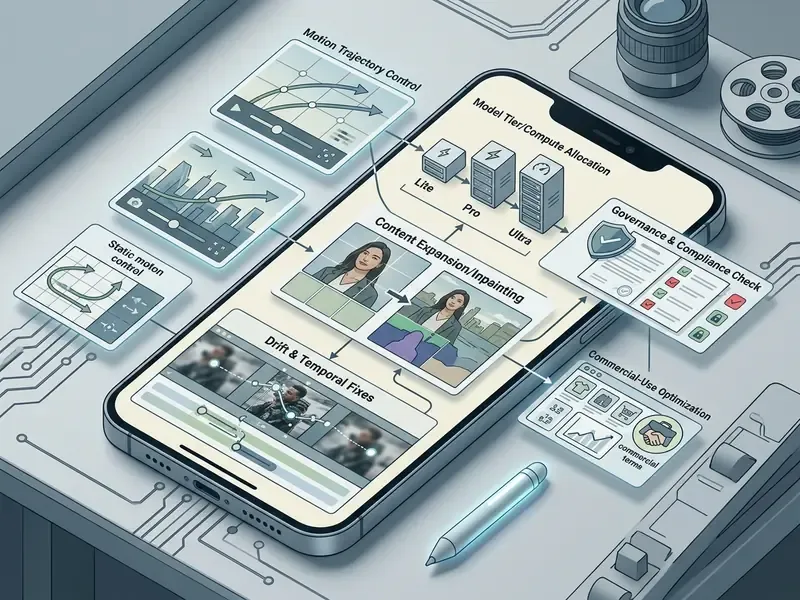
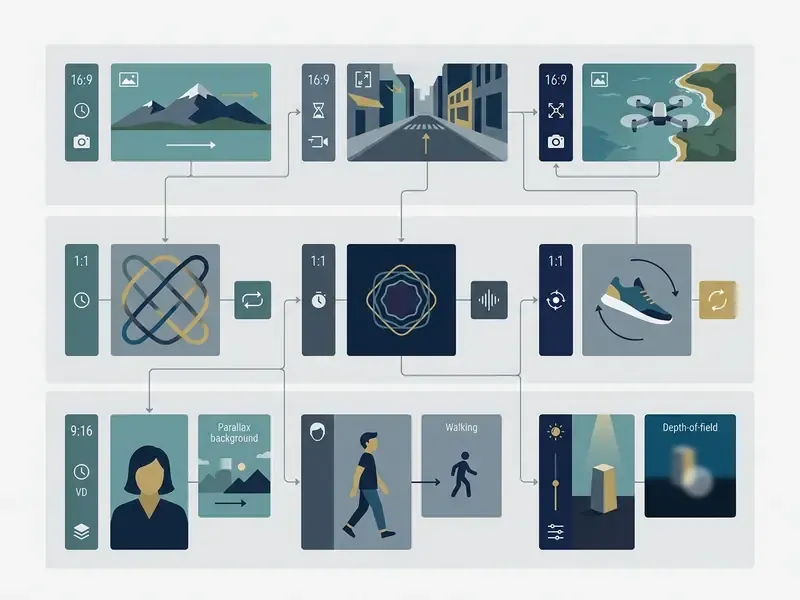
| Asset type | Target ratio | Typical length | Primary control priority |
|---|---|---|---|
| Social short-form clip | 9:16 | 5 to 10 s | Motion intensity, hook in first second |
| E-commerce product demo | 1:1 or 4:5 | 5 to 8 s | Scale accuracy, packaging fidelity |
| Portrait or avatar animation | 9:16 | 4 to 8 s | Facial landmark stability |
| Corporate explainer or onboarding | 16:9 | 8 to 15 s (stitched) | Reference locking, voiceover sync |
Product Videos, Ads, and Visuals for E-Commerce
E-commerce brands use image-to-video to turn flat product photography into lifestyle commercials and dynamic ad creative.
With an ai picture to video app, sellers animate listings: apparel movement, light travelling across jewellery, a 360-degree product flythrough. Practical retail workflows run in five stages, namely asset management, transformation, customization, optimization, and delivery, with catalog photos or listing URLs as the entry point and 9:16, 16:9 and 1:1 MP4 exports as the output.
Audio lifts conversion further. To add voice synthesis, consult our guide to AI voice generators, language support, and commercial licensing, and the canva ai voice entry if you are staying inside one suite. Where a background must be widened for a different placement ratio, see our comparison of AI outpainting and image-expansion tools.
Animating Photos, Portraits, and Creative Visuals
Creative directors and archivists use photo animation to revive historical photography, concept sketches, and executive portraits.
With facial landmark motion modules, an ai text to video app android workflow can produce talking-head portraits or subtle expressive animation from one selfie or headshot. Documented consumer workflows include animating scanned family prints, turning sketches and character designs into animated scenes, and building cinematic music-video visuals from a single still. For corporate portrait work, review our guide to AI headshot generators, privacy, and professional use and the canva ai headshot reference. For stylized output, check the comparison of Ghibli-style AI image generators and their usage rights before you animate anything derivative.
Corporate Training, HR Onboarding, and Multi-Language Voiceover
Beyond social marketing, mobile photo-to-video shortens internal communications work:
- HR documentation into dynamic onboarding video. Teams extract key instructional diagrams from static PDF manuals and pass them into image-to-video workflows, producing animated step-by-step guides that new hires finish rather than skim.
- Technical specification explainers. Product schematics and architectural renders animate with parametric camera orbits, explaining hardware detail to clients without commissioning a physical shoot.
- Instructional and compliance guides. Text procedures convert into visual step clips, one scene per step, which improves recall for field and frontline staff.
- AI voiceover and accent synchronization. Modern mobile pipelines pair generative visuals with synthetic voice engines supporting 50 or more languages and regional accents. Animated headshots plus localized script audio produce a mastered corporate presentation from a tablet.
- Governance note. Internal training assets often carry confidential process detail. Route them through a ZDR-contracted vendor only, never through a sideloaded app or a free consumer tier whose terms permit training on uploads.
Free AI Photo to Video Apps, Pricing, and Generation Limits
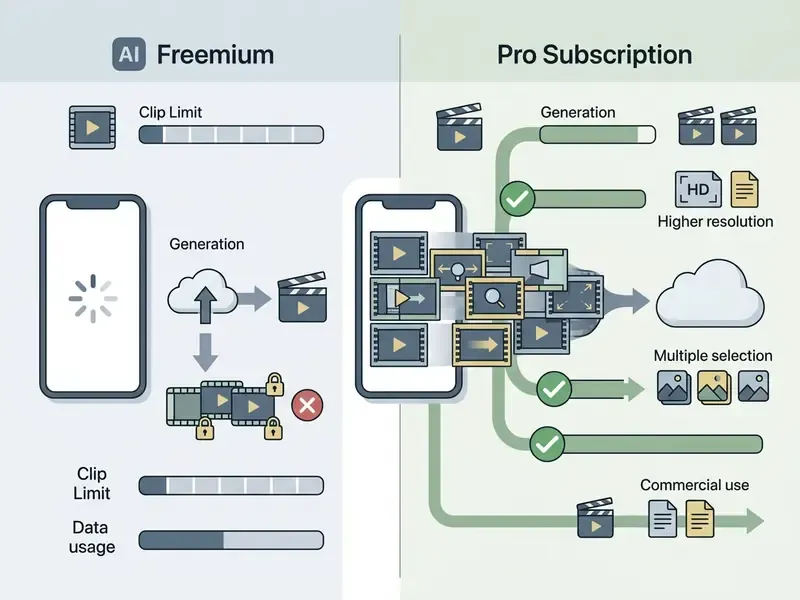
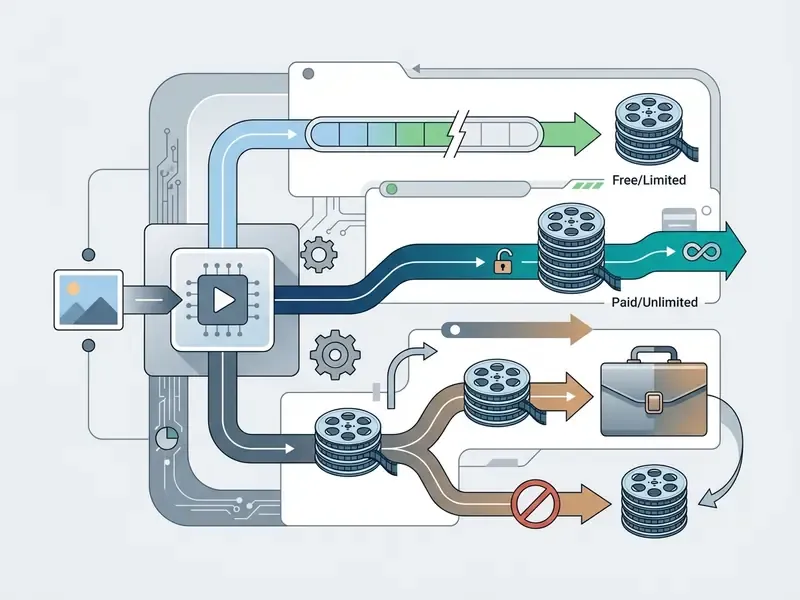
Commercial models for mobile photo-to-video applications almost always follow a freemium structure: limited daily trial credits up front, with high-resolution exports and commercial licences behind a subscription. Paid mobile tiers in 2026 commonly sit between roughly $6.99 and $19.90 per month, with credit top-ups sold on demand.
«The AI video generator market reached $614.8 million in 2024, and 49% of marketers had integrated AI video generation into production workflows by that year.»
| Parameter | Free tier (typical) | Paid tier (typical) |
|---|---|---|
| Credits | One-time (around 125) or daily and monthly refresh (around 66 per day or 80 per month) | Monthly allowance plus on-demand top-ups |
| Resolution | 360p to 720p, 480p common | 1080p, 4K upscale on higher tiers |
| Clip length | 4 to 6 s | 5 to 15 s, auto-stitched sequences |
| Watermark | Usually present, some vendors clean | Removed |
| Queue priority | Lowest | Priority or dedicated capacity |
| Commercial rights | Often restricted or excluded | Usually granted, ToS-dependent |
| Enterprise controls (SSO, ZDR, audit log) | Absent | Business and Enterprise plans only |
What Is Included in a Free AI Video Generator
A standard ai photo to video app free tier gives entry-level access to basic generation models, fenced in by credit quotas, lower resolutions, and watermarks.
- Credit allocations. Free plans offer either one-time initial credits (Runway's 125 non-recurring credits) or small recurring top-ups (Pika Basic's 80 monthly credits, Kling's roughly 66 daily credits).
- Resolution caps. Free generations are frequently limited to 360p, 480p, or 720p.
- Export watermarks. Most free tiers burn in a visual watermark. A minority, including certain Pika and mobile-first apps, allow clean downloads.
- Queue priority. Free renders get lower server priority, so peak-hour waits stretch.
- Volatility. Vendor credit policies change monthly. Any quota cited in an article, including this one, must be re-verified against the current Terms of Service before it informs a budget decision.
To evaluate a ai photo to video free app shortlist without hidden fee structures, use our AI Media Calculators to estimate per-render cloud cost, and the guide to free AI art generators and their watermark and licensing limits for adjacent static assets.
Mobile Operational Tactics: PWA Setup and Free Tier Stacking
Mobile web platforms skip App Store review delays and hand you direct cloud GPU execution. You can get app-like access without installing anything:
- Hailuo AI (web): around 10 daily renders, no watermark
- Haiper (mobile web): around 10 daily renders, no watermark
- Kling (mobile app): around 6 daily renders from roughly 66 credits
- Luma Dream Machine (web): around 5 daily renders
- Wonder AI (app): around 3 daily renders, watermark-free 4-second clips
- Total yield: roughly 31 to 34 clips per day at zero direct cost.
- Progressive Web App deployment.On iOS Safari or Android Chrome, open a responsive web interface (Hailuo AI or Luma Dream Machine, for instance) and choose "Add to Home Screen". That creates a sandboxed launcher icon and full-screen generation without address-bar clutter. Unlike an APK, it keeps the browser security model intact.
- Multi-platform daily credit stacking.Rather than burning one vendor limit, aggregate daily quotas across mobile PWA and app instances:
- Save immediately.Generated files are often retained for a limited window only. Download to the camera roll the moment a render completes (long-press then "Save to Photos" on iOS, download button on Android).
- Track remaining quota per platformso you do not waste time on a depleted account, and note which platforms watermark free output before building a publishing plan around them.
- Enterprise caveat.Credit stacking is legitimate for individual creators and prototyping, and nothing more. Free consumer tiers commonly exclude commercial use and may permit training on uploads. They are not an acceptable channel for confidential or client-owned source imagery.
How to Verify Commercial Usage Rights for AI-Generated Videos
Disclaimer: this section is general information and does not constitute legal advice. AI platform terms are updated frequently. Always verify the current Terms of Service on the vendor's official page and consult qualified counsel before a commercial launch.
Commercial deployment of AI-generated video requires verifying platform-specific Terms of Service and copyright ownership rules. Both, not one.
Fact check and legal verification directive. Before using output from an ai photo to video generator free app in advertising, corporate branding, or monetized social channels, media managers should complete this compliance audit:
- Licence verification.Confirm whether the app's terms grant commercial usage rights on free tiers, or restrict monetization to paid subscriptions. Some vendors state plainly that users retain ownership of uploaded and generated content and that product advertising is permitted. Others grant the platform a broad licence to reproduce and promote publicly shared output.
- Third-party IP protection.Ensure the source photograph contains no unauthorized copyrighted elements, trademarks, or publicity-right violations. Under US Copyright Office guidance, fully machine-generated output lacking human creative intervention cannot be registered. See also our analysis of commercial use of AI image generators and the Microsoft AI image generator commercial-use terms.
- Data privacy terms.Verify that uploaded photos are not retained for model re-training without explicit organizational consent, and obtain a written Zero Data Retention commitment where source imagery is confidential.
- Synthetic media disclosure.Where an audience could reasonably be misled, disclose that content is AI-generated. Transparency obligations for synthetic media under the EU AI Act, plus general truth-in-advertising expectations from consumer-protection regulators such as the US FTC, both point toward visible labelling and durable provenance metadata.
- Likeness and voice consent.For animated portraits or cloned voices, retain signed consent covering the specific generated use, territory, and duration.
- Provenance verification.Where the source image origin is uncertain, run a reverse image search check before publication.
For legal guidelines and corporate risk frameworks, visit the AI Media Commercial-Use Hub and our tracking of AI copyright litigation.
Enterprise Audit and Data Lineage Checklist
Publishing generative video into commercial channels is defensible only if each asset can be reconstructed and explained. Use this checklist as the minimum artefact set for internal and external audit.
Per-asset lineage record, stored alongside the exported MP4:
| Field | Why auditors ask for it |
|---|---|
| Source image hash (SHA-256) plus rights basis | Proves which approved asset was animated and under what licence |
| Full prompt text plus negative constraints | Demonstrates intentional human creative direction |
| Seed value | Enables identical regeneration during review |
| Model name and version (Veo 3.1, Kling V2) | Version drift changes output, so reproducibility depends on it |
| Generation parameters (duration, fps, ratio, motion strength) | Reconstructs the render configuration |
| Vendor, plan tier, and ToS version in force at render date | Establishes the commercial licence actually held |
| Human reviewer name, timestamp, decision | Evidences human-in-the-loop oversight |
| Post-processing log (trim, upscale, audio added) | Separates model output from human edit |
| Disclosure applied (label, metadata, watermark) | Supports synthetic-media transparency obligations |
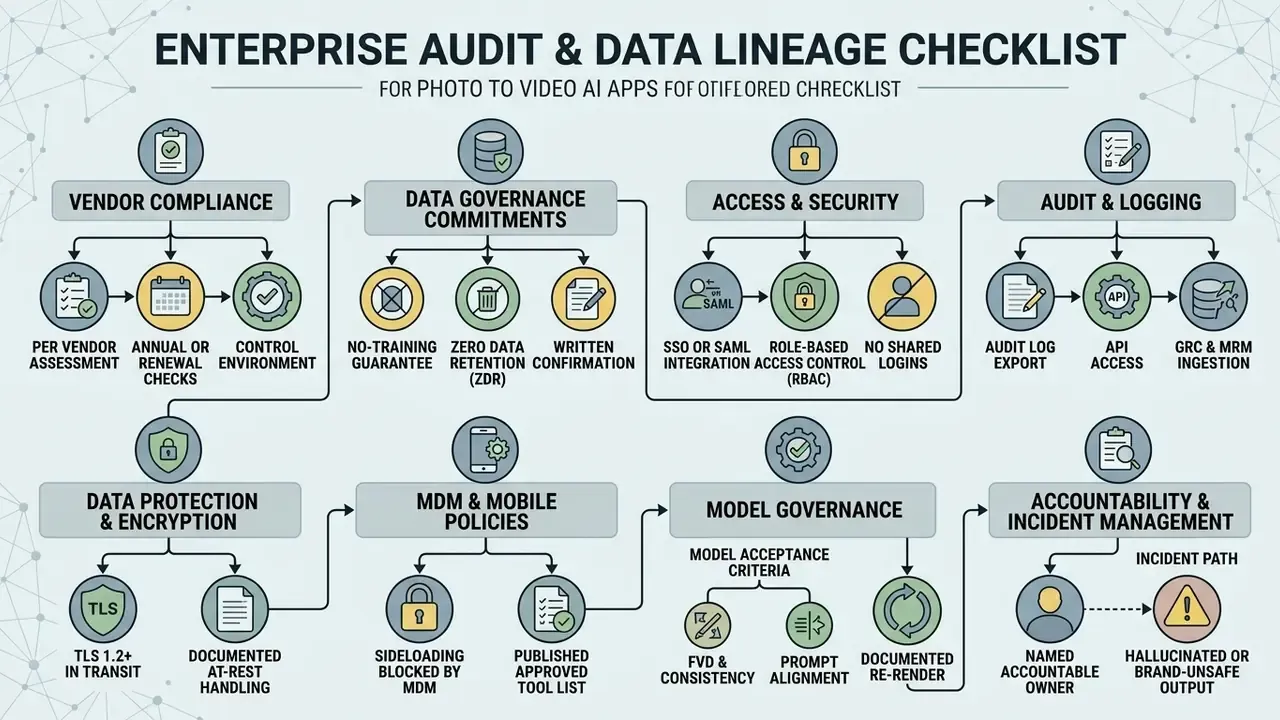
Control-environment checks, per vendor, annually or on contract renewal:
- Zero Data Retention or no-training-on-uploads commitment, in writing.
- SSO or SAML plus role-based access control, with no shared logins.
- Audit-log export or API access for GRC and MRM ingestion.
- Encryption in transit (TLS 1.2 or higher) and documented at-rest handling.
- Sideloading of generative APKs blocked by MDM policy, with an approved tool list published to staff to suppress shadow AI.
- Model acceptance criteria defined (FVD, temporal consistency, prompt alignment) with a documented re-render and rejection rate.
- A named accountable owner for the tool, and an incident path for hallucinated or brand-unsafe output.
One caution on scope. This checklist covers marketing and communications media. It is not a substitute for validation of a customer-facing decisioning model, and it should not be presented to a regulator as though it were.
FAQ on AI Apps Image to Video on Mobile Devices
Do You Need a Powerful Phone for AI Video Generation, and Does It Work Offline?
Most mobile photo-to-video generation runs on cloud GPU infrastructure, so processing happens on remote servers rather than local phone hardware. If a smartphone can run a modern browser or a current mobile OS, it can submit AI video requests. A mid-range device from the last three or four years is enough, because render speed is set by the provider's servers, not your chipset. A fast connection still helps with uploads and downloads.
Emerging on-device frameworks such as On-device Sora (2025), MobileI2V (2025), and SnapGen-V show that high-end devices with Neural Processing Units and at least 8 GB of high-bandwidth memory can generate short clips locally, no internet required.
«MobileI2V generates 17 frames of 720p video in under two seconds on an iPhone 16 Pro Max, with per-frame latency below 100 ms under one-step sampling.» MobileI2V (2025). https://arxiv.org/abs/2504.02507
Important qualification. Offline generation today means very short, lower-resolution clips. It does not replace cloud foundation models such as Google Veo or Runway. Standard mobile ai apps image to video still need an active cellular or Wi-Fi connection to upload photos and stream rendered files.
How Much Mobile Data Does Generation Consume, and Can You Use a Tablet?
Data consumption depends on input upload size and output bitrate. As empirical planning estimates rather than vendor-published figures:
- Upload overhead: a high-resolution 1080p source photograph typically consumes 2 MB to 8 MB.
- Download overhead: a 5 to 10 second rendered 720p or 1080p MP4 typically consumes 15 MB to 50 MB at standard H.264 bitrates. Lightly compressed 720p 5-second clips can be as small as 3 MB to 8 MB.
- Daily consumption: generating 10 to 15 clips generally consumes roughly 150 MB to 500 MB of cellular data, depending on resolution and how many previews you pull down.
These ranges are compression-dependent. Measure your own usage if you work under a strict data cap.
Tablets, yes. Android tablets and iPadOS devices fully support image-to-video generation, and many iPad titles require iPadOS 13.0 to 17.0 or newer. Mobile web interfaces and native tablet builds give you more screen, which makes timeline editing, prompt entry, and mask selection noticeably easier.
Is Mobile App Video Quality Lower Than Desktop?
When a mobile app connects to the same cloud foundation models as its desktop counterpart (Google Veo, Runway Gen-3 and Gen-4, Pika), raw generated quality is identical.
«Video generated on an iPhone 15 Pro with LPL and TDTM optimizations is comparable in quality to results from high-performance GPUs, without model retraining.» On-device Sora (2025). https://arxiv.org/abs/2501.05219
Differences usually trace to mobile export compression settings, network-optimized preview bitrates, or a simplified mobile editor, not to model capability. Feature scope is the real gap, not fidelity: some vendors keep advanced editing surfaces desktop-only while exposing generation everywhere. High-tier mobile apps with 4K upscaling and high-bitrate MP4 export reach parity with desktop production tools. To dig into dedicated platforms and post-processing, read the Canva AI generator commercial-use overview, our YouTube video editor workflow guide, and the procedures in AI Media Support and Troubleshooting.
Which Common Technical Problems Should Mobile Teams Expect?
Reported issues cluster by platform. On iOS, in-app browser (WKWebView) upload flows have crashed when the camera is invoked directly during upload on iOS 17, while photo-library and file uploads behave normally; video uploads can also stall in a "processing" state. On Android, complaints skew toward feature gaps against the iOS build, connection interruptions during upload, and inconsistent export quality between app versions.
Practical mitigations: upload from the photo library rather than live camera capture, keep the app updated, retry stalled uploads on Wi-Fi, and fall back to the responsive web interface when a native build lags behind.
How Long Does a Generation Take, and Which Clip Length Should I Choose?
Most single clips render in under 60 seconds on Fast and Pro tiers, and up to two minutes or more on Ultra. Choose the shortest duration that carries the message. Shorter clips drift less, flicker less, and cost fewer credits. For anything beyond a model's ceiling, commonly 4 to 15 seconds, generate segments and stitch them, using reference locking to hold identity across shots.
Can Free-Tier Output Be Used in Paid Advertising?
Often not, and this is where teams get burned. Several vendors reserve commercial rights for paid plans, and some grant themselves a licence to reuse publicly shared output for promotion. Before a single dollar of media spend goes behind an ai video generation from images app asset, read the current Terms of Service, record the ToS version in your lineage log, and get sign-off from whoever owns brand risk. If the terms are ambiguous, escalate rather than assume.
Appendix A: Superseded and Unverified Claims
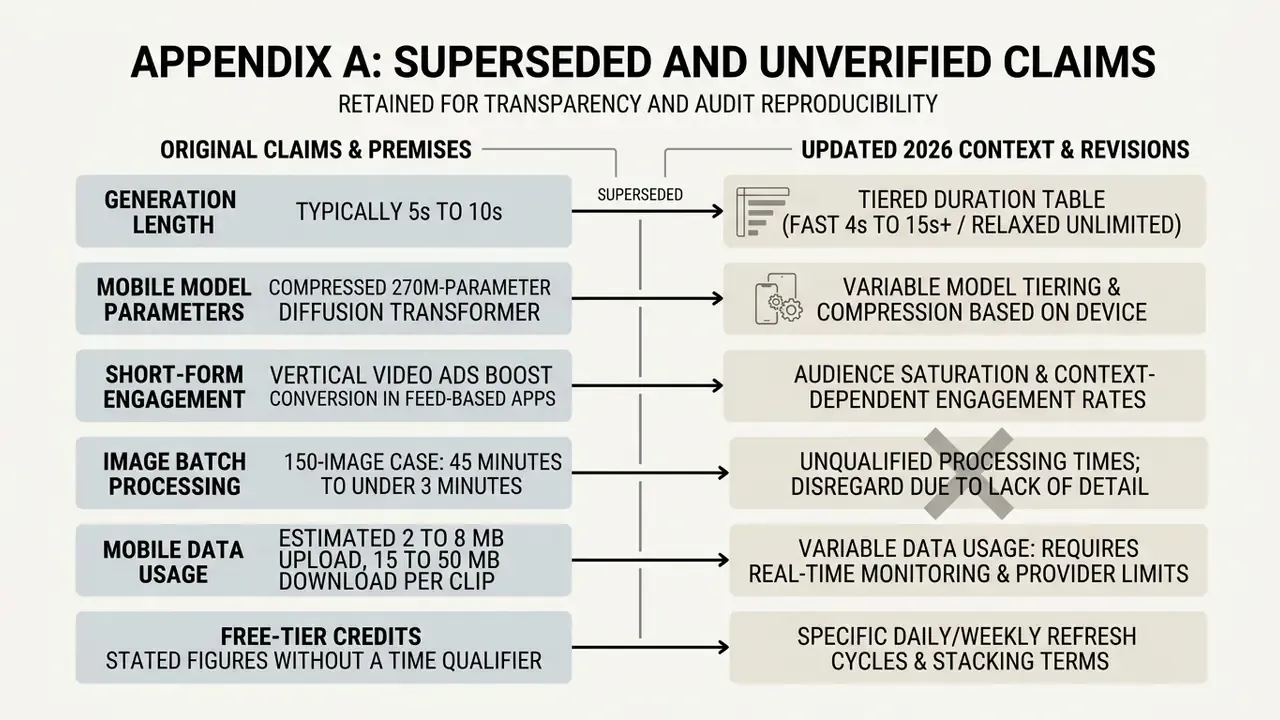
Retained for transparency and audit reproducibility. Each item appeared in an earlier version of this guide and has been corrected or qualified above.
- Original: "Generation length (typically 5s to 10s)." Superseded by: the tiered duration table (Fast 4 to 15 s, Pro 5 to 10 s, Ultra 8 to 10 s), because ceilings are model-specific rather than uniform.
- Original: "MobileI2V (2025) demonstrates that a compressed 270M-parameter Diffusion Transformer can generate 17 frames of 720p video in under two seconds on a high-end mobile chip." Status: experimental research result, now cited with source and qualified. As of 2026 the large majority of commercial generators execute on cloud GPUs, and local NPU builds remain beta-grade.
- Original: "Studies on short-form engagement (ScienceDirect, 2025) indicate that vertical video ads featuring animated photo elements achieve significantly higher viewer completion rates than static image posts." Status: the underlying study measures audiovisual features and engagement behaviour on TikTok, but the specific completion-rate comparison is not an audited figure. Replaced in the main text with the CHI 2024 creator-workflow citation plus an explicit "measure in your own account" caveat.
- Original: the 150-image case presented as "45 minutes to under 3 minutes" without qualification. Status: retained as a directional internal benchmark and reframed with a risk-adjusted formula that accounts for reviewer time and re-render rate.
- Original: mobile data figures (2 to 8 MB upload, 15 to 50 MB download) stated as fact. Status: retained as compression-dependent planning estimates, not vendor-published specifications.
- Original: free-tier credit figures stated without a time qualifier. Status: retained with an explicit volatility warning. Vendor quotas and watermark policies change monthly and must be re-verified against current Terms of Service.
A Safe Next Step
Pick one campaign, not a platform. Run five clips end to end through the workflow above, log every field in the lineage table, and record your actual re-render rate and reviewer minutes. Then decide whether the tool earns a wider rollout.
Small pilots surface licence and drift problems while they are still cheap to fix. Large ones surface them in public.
Social Media Clips for Instagram, TikTok, and YouTube
Short-form ranking systems reward motion over static graphics, which makes animated photos a cheap route to retention.
By converting static infographics, promotional graphics, or brand photos with an ai photo to video converter app, creators produce 9:16 vertical clips built for Instagram Reels, TikTok, and YouTube Shorts. Our comparison of free AI video generators for social channels flags the tools with genuinely usable daily limits.