Last reviewed and fact-checked: editorial audit completed for the 2026 tool landscape. Sources include U.S. Copyright Office registration guidance still operative through the 2025–2026 policy cycle, peer-reviewed neural style transfer literature (2023–2024), and vendor limits published on live pricing pages.
Executive Summary
- The technology has two lineages. Optimization-based Neural Style Transfer (NST) preserves the geometry of your photo and repaints only texture and color. Image-to-image diffusion re-synthesizes the scene and can change shape, material, and lighting. Denoising strength between 0.4 and 0.7 is the practical control band for keeping a subject recognizable.
- Input quality dominates output quality. One dominant light source, clear subject and background separation, faces occupying at least 30% of the frame, and a minimum of 1024×1024 px produce clean stroke definition. Blur, noise, and clutter get amplified into blotches.
- Free tiers are strictly capped. Expect 3 to 5 generations per day, watermarks, web-resolution exports (roughly 1000 to 2000 px on the long edge), and uploads capped at 10 to 25 MB. Paid and enterprise tiers unlock 300 DPI print exports, high-volume or unlimited priority GPU queues, and uploads up to 60 MB.
- Commercial use is a two-lock problem. Lock one is the platform license tier. Lock two is copyright and publicity law. Under U.S. Copyright Office guidance, purely machine-generated output lacks human authorship protection, and identifiable people require a signed model release.
- Enterprise buyers need more than a style menu. Data retention terms, SOC 2 or ISO 27001 attestations, API auditability, model inventory integration, and Shadow AI controls decide whether a pilot can move into a governed production contour.
Hypothesis: the audience statements in this guide (creator, marketing, and governance personas) are working hypotheses derived from search intent patterns. They remain unvalidated until confirmed by analytics, interviews, or CRM data.
How to Read This Guide
Three reader paths run through the same material, and they need different depths.
If you want a print for the wall, read the style table, the tuning tips, and the resolution checks. Skip the control frameworks. If you buy creative tooling for a marketing team, start at pricing and commercial rights, then look at the enterprise tier criteria. If you sit in risk, compliance, or model governance at a bank or a mature fintech, the sections on Shadow AI, model inventory, and risk-adjusted ROI are the reason this page is longer than a tutorial.
One caveat before the technical part. Every number quoted from a vendor page is a snapshot. Quotas move, watermark policies change quietly, and pixel ceilings differ between upload widgets inside the same product. Verify on the widget you are actually using.
What Is Photo to Painting AI and How Does It Work?
In two sentences: A photo to painting AI reads the content structure of your photograph and the statistical texture signature of a painting style, then recombines them into one rendered image. Whether the result keeps your subject intact or reinvents it depends on the architecture and on how aggressively the strength parameter is set.
A photo to painting converter uses deep neural networks to transform an input image into a painterly artwork. The system analyzes the subject, structural contours, and color palette of your uploaded file, then applies brushstrokes and textures. People reach for an ai image to painting engine to convert photo to painting ai style for wall art, digital portraits, social content, and personalized gifts. Same engine, very different tolerance for error.
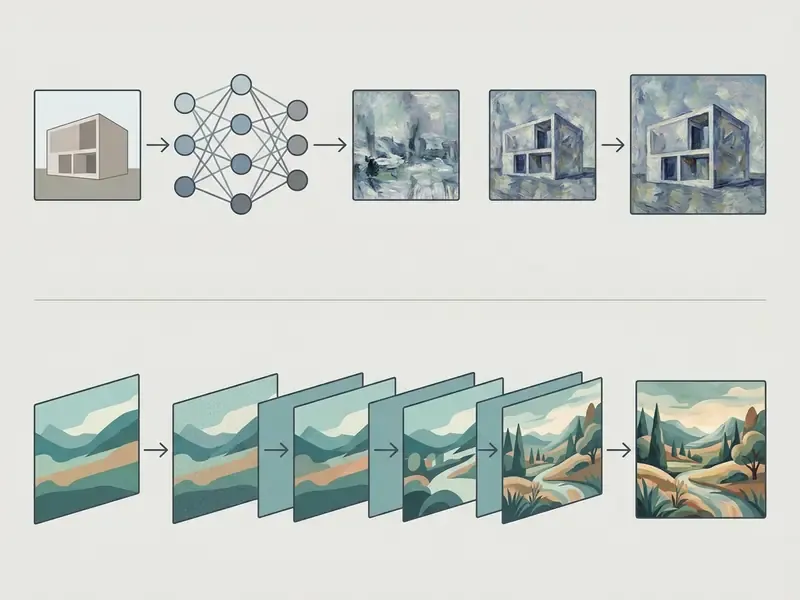
Traditional systems relied strictly on Neural Style Transfer, which maps the style features of a reference painting onto the content features of a source photo. The original formulation matches a photo's content features and a painting's style features inside a CNN feature space, then iteratively optimizes pixels to minimize both losses. Contemporary image to painting ai models use image-to-image diffusion and stroke-based neural rendering instead.
By adjusting denoising strength (typically 0.4 to 0.7), these systems alter surface aesthetics while retaining the core visual identity of the subject. Lower values preserve more source detail. Higher values produce a stronger stylistic departure. A related branch, Deep Photo Style Transfer, adds photorealistic constraints that suppress geometric distortion, so the output keeps photograph-like structure instead of painterly warping.
AI Painting Filters vs. AI Painting Generators
An AI painting filter applies a stylistic overlay directly to the geometric framework of an existing image. The underlying content stays virtually unchanged in shape. Only surface texture, line weight, and color distribution move.
«Users consistently prefer results that balance pronounced stylization against preserved recognizability, rather than either extreme.»
Evaluation in Neural Style Transfer, survey article (2024). https://doi.org/10.1145/3696415
So a photo editor painting effect keeps facial features and fine details highly recognizable. That is the same structural-preservation principle behind conventional AI photo editors and general-purpose online photo editors.
An ai photo to paint generator works differently. It re-synthesizes the scene from learned artistic representations. Stroke-based neural painters predict individual brushstroke sequences. Generative diffusion models can rewrite material texture, background geometry, and lighting.
«Stroke-based rendering with dynamically predicted painting regions reduces boundary artifacts and improves visual coherence compared with uniform block-wise rendering.»
Stroke-based Neural Painting and Stylization with Dynamically Predicted Painting Region, preprint (2023). https://arxiv.org/abs/2309.03504
An ai picture to painting generator delivers richer artistic depth, but it needs strict prompt or weight control to stop the model from redesigning your subject. Diffusion literature openly describes transforming semantics, material, object shape, brushstrokes, and colors. That is exactly why recent methods add dedicated content-preservation terms and report SSIM and LPIPS scores. Preservation is engineered. It is not a default property of a high-capacity generator.
Reproducibility note for model risk teams: optimization-based NST recomputes a fresh solution per input and is sensitive to initialization. Feed-forward and diffusion pipelines depend on seed, scheduler, and strength. If you need repeatable output for audit purposes, pin the seed, log the strength value, and archive the model or endpoint version alongside each generated asset. Without those three fields, you cannot reproduce the artifact you shipped, and an auditor will notice.
Which Photos Work Best for a Painting Effect?
High-quality input photographs produce the most reliable results, on ai turn photo into painting free tiers and paid plans alike. Source images with single-direction key lighting, high color contrast, and clear separation between subject and background yield clean stroke definition. Flat, even lighting flattens value structure and visual hierarchy. Overexposed or underexposed frames lose detail in highlights or shadows that no model can invent back. When you upload a photo with distinct edge contours, the network separates main figures from environment details easily.
Portraits, pets, family photos, and architectural subjects all do well under pic to painting ai processing.
«Multi-scale algorithms handle diverse backgrounds better, though detailed quantitative analysis of background complexity remains an open research area.»
Evaluation in Neural Style Transfer, survey article (2024). https://doi.org/10.1145/3696415
The reverse case is predictable. Heavy blur, extreme noise, uneven flat lighting, or cluttered backgrounds tend to cause visual artifacts. When spatial boundaries are unclear, an ai picture into painting converter may read background noise as figure detail and smudge key elements together.
Painting Styles Available for Photo Conversion
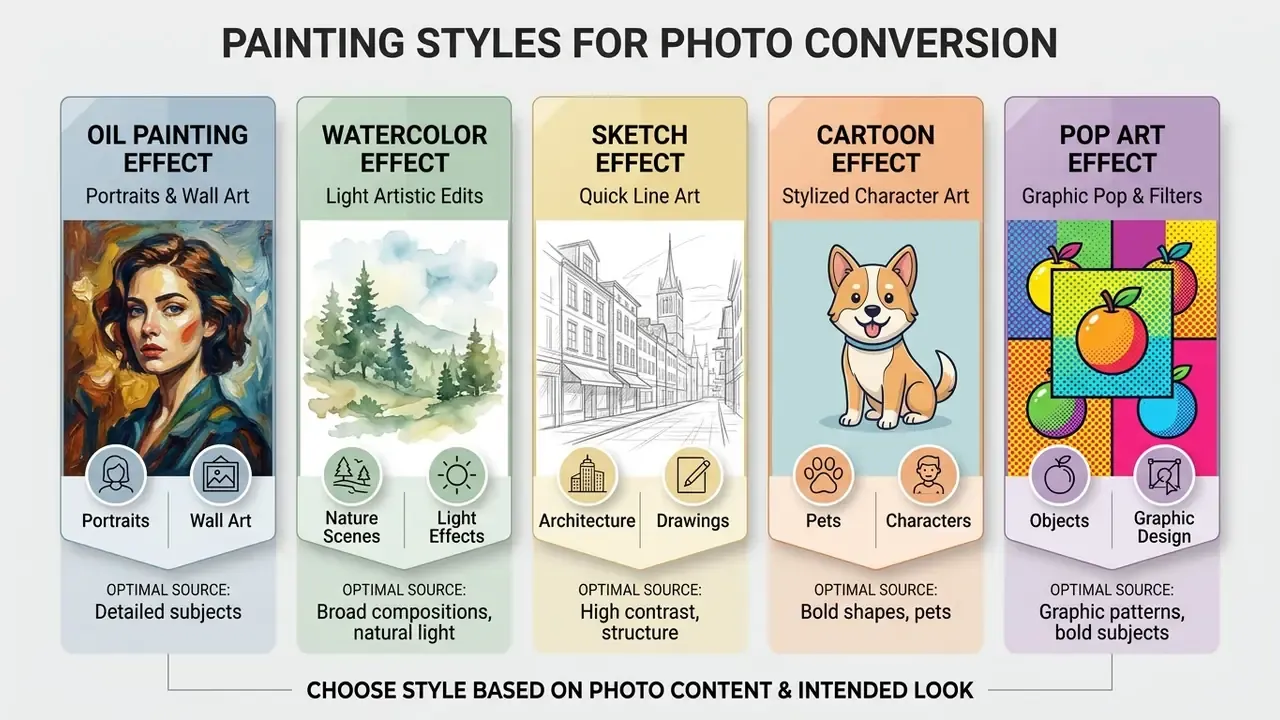
In two sentences: Five presets dominate the category, oil, watercolor, sketch, cartoon, and pop art, and each one implies a different optimal source photo. Matching style to input structure matters more than how many filters a platform advertises.
Modern painting converter tools offer diverse painting styles built to mimic traditional fine art mediums. Choosing well depends on your source material, intended output resolution, and subject. Whether you want to turn your photo into a classical masterpiece or a flat modern graphic, alignment between style and input photo structure is what produces an artistic result rather than a mess.
| Style | Visual Effect | Best Source Photo Type | Optimal Applications |
|---|---|---|---|
| Oil Painting | Thick visible brushstrokes, canvas texture, impasto depth, rich color blending | Portraits, pet photos, landscapes with strong lighting contrast | Wall art, canvas prints, framed home decor, pet memorial prints, memorial gifts |
| Watercolor | Translucent color washes, soft diffuse edges, pastel tones, paper texture | Family photos, outdoor scenes, well-lit travel shots | Greeting cards, digital invitations, web graphics, pet keepsake art, light edits |
| Sketch | Pencil or charcoal lines, cross-hatching, monochrome contour emphasis | High-contrast portraits, architectural shots, iconic objects | Book illustrations, concept art, architectural mockups, technical mockups, profile pics |
| Cartoon | Bold outlines, flattened color regions, simplified shading, vector feel | Single-subject portraits, pets, expressive group photos | Social media avatars, stickers, personalized merchandise |
| Pop Art | Saturated primary colors, halftone dot patterns, high graphic contrast | Close-up portraits, iconic products, high-contrast figures | Event posters, digital marketing, graphic art prints |
| Classical / Costume Portrait | Renaissance or academic finish, smooth blending, traditional color balance, optional period costume (Elizabethan, royal, Victorian) | Front-facing portraits, couples, family groups with even facial lighting | Novelty gifts, royal-style mugs and prints, anniversary and wedding keepsakes |
Before committing to a paid plan, benchmark style fidelity across platforms using our comparison of the best AI art generators and the shortlist of free AI art generators. Ten minutes of side-by-side testing on your own photo beats any feature list.
Oil Painting Effect for Portraits and Wall Art
An oil paintings preset replicates the visual weight and impasto texture of physical pigment on canvas.
That preference explains why oil remains the default for formal portraits, pet likenesses, and large-format wall prints. Teams producing professional portraits at volume often pair this workflow with dedicated AI headshot generators to standardize framing and lighting before stylization.
Brush stroke scale has to match subject resolution. Practical tool documentation exposes brush size on a 1 to 10 scale: small values give fine, portrait-friendly brushwork that protects eyes and hair, while larger values give bold impressionist strokes better suited to broad backgrounds. Some engines also overlay a woven fabric grain so the output reads as stretched linen. For physical canvas printing, export high-resolution PNG so compression artifacts do not fight the simulated weave.
Optimizing Pet Portraits and Memorial Art
Fur is a special case. Converting pet photographs into oil or watercolor memorial prints needs contrast tuning, because pets with dark or solid-black coats lose anatomical definition under heavy diffusion presets. To prevent that:
- Raise source photo midtone brightness by roughly +15% before conversion.
- Choose medium-stroke Oil Painting or wet-on-wet Watercolor presets rather than maximum-intensity variants.
- Make sure the key light produces eye reflections (catchlights). Neural rendering anchors fine facial strokes to visual focal points.
- Keep a soft or contrasting backdrop behind the animal so the model can separate silhouette from environment. Traditional animal painters apply the same readability rule to their reference photos.
Watercolor and Sketch Effects for Light Artistic Edits
Paintings watercolors effects introduce translucent pigment washes, soft edge bleeds, and subtle paper grain. The treatment suits light, airy imagery: outdoor weddings, travel landscapes, children's portraits. By damping hard photographic contrast, watercolor stylization produces an elegant, handcrafted look.
«AesFA achieves higher SSIM with lower style loss than baseline arbitrary NST models across resolutions from 256 pixels up to 4K.»
AesFA: Aesthetic Feature-Aware Arbitrary Neural Style Transfer, preprint (2024). https://arxiv.org/abs/2307.09724
Sketch filters convert image gradients into line work, simulating graphite, charcoal, or ink. Combining sketch outlines with subtle watercolor fills gives a clean architectural or illustrative look, which is why the pairing shows up constantly in urban and building visuals. These lighter treatments fit creators building custom graphics, card designs, and social assets, and they sit naturally alongside broader AI art generators in a working toolkit. For budget planning on specialized design assets, the AI Media Pricing Guides and the AI Media Commercial-Use Hub cover enterprise media production workflows in more detail, and the AI Media Calculators help estimate credit burn before you commit.
Pop Art, Cartoon and Famous Painting Filters
Pop art and cartoon filters apply aggressive domain transformations. Cartoonization models flatten tonal gradients into solid color regions bounded by prominent dark contours.
«A CycleGAN approach to photo-to-cartoon translation showed the lowest training time per epoch and the smallest parameter count among the compared methods.»
Photo-to-Cartoon Translation with CycleGAN, research study (2023). https://doi.org/10.1109/ACCESS.2023.3290456
Pop art presets borrow from mid-century graphic screenprinting: saturated primaries, black-and-white accents, thick contour lines, halftone dots.
Famous painting filters map iconic artistic signatures, Van Gogh's swirling strokes or Monet's impressionistic dabs, onto user photographs. These expressive styles are built for social media avatars, personal brand icons, and decorative posters. You can weigh rendering fidelity across platforms in our review of the best AI image generators. Because avatars get consumed at thumbnail scale inside circular crops, simplified features and high contrast matter far more than fine detail. Front-facing, well-lit selfies remain the strongest input. And since these filters rewrite geometry heavily, they perform best on close-up subjects against simple, uncluttered backgrounds.
How to Turn a Photo into a Painting with AI
In two sentences: Every mainstream platform reduces to the same three-step pipeline: upload, style and tune, generate and export. The quality differentiator sits almost entirely in step two's strength parameter and in the preflight inspection you run before download.
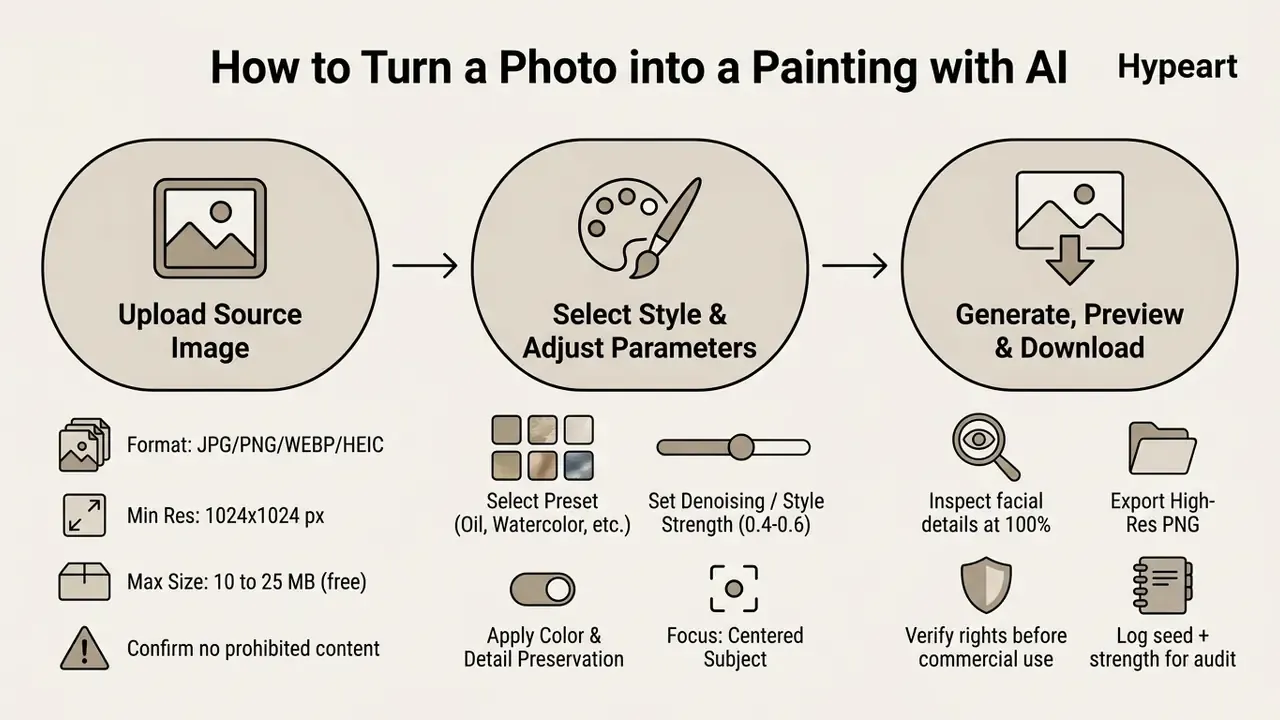
Converting a standard image into a digital painting is a short process. With a modern painting tool you can make an image look like a painting in under a minute, no graphic editing skills required.
Upload a Photo and Prepare the Image
Start by uploading to your chosen ai turn a photo into a painting platform. Most accept standard raster formats: JPG, PNG, WEBP. For processing speed and rendering clarity, pick a photo where the primary subject is centered and sharply in focus. Public image guidelines recommend 1:1 or 4:3 crops and a minimum of 300×300 px, though 1024×683 px is a more honest working floor.
Crop away background distractions before you convert. Removing busy peripheral elements lets the network allocate parameter weight to your primary subject instead of wallpaper patterns. If your source file is small, run an upscale pass first so the painting generator has enough pixel data to work with.
Upload governance step, the one most people skip: confirm you hold rights to the uploaded image, and screen the subject matter against the platform's prohibited-use policy. Major vendor documentation treats both checks as an explicit precondition of processing, and generation may be blocked outright for disallowed content.
Choose a Painting Style and Adjust the Effect
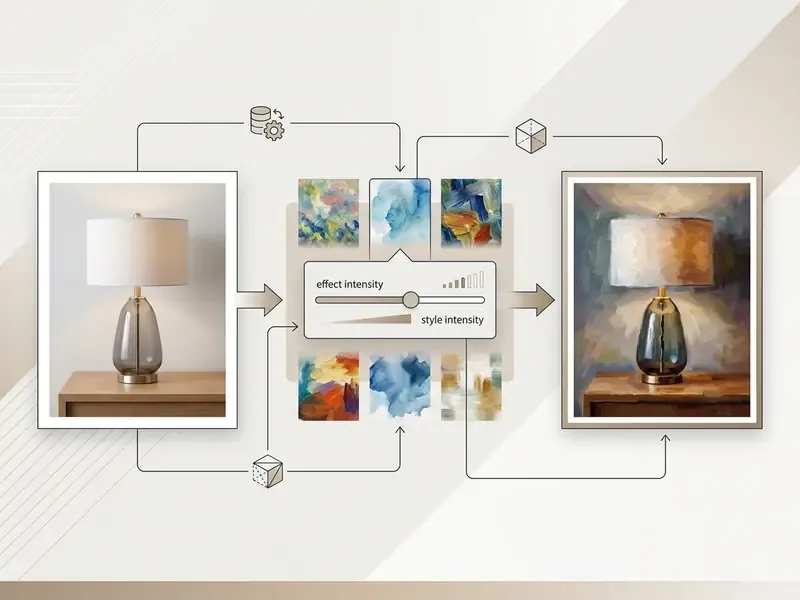
Select your artistic preset from the style library. Options run from classic oil and watercolor to modern vector and cartoon renderings. Then find the style intensity or denoising strength slider, which controls how aggressively the model rewrites the original photo.
Generate, Preview and Download Your Artwork
Hit generate. Most cloud-based ai convert image to painting tools finish in 2 to 10 seconds, although vendor-published ranges of 10 to 30 seconds are common for higher-resolution oil renders.
Then inspect. Treat the preview window as a formal preflight gate, not a courtesy screen. Professional export workflows in design software separate "preview" from "export" for exactly this reason: defects get caught before a file is committed.
Zoom to 100% and check facial features, edge transitions, and background areas for unexpected artifacts. If facial structure looks distorted, lower style intensity and regenerate. Once satisfied, download the final artwork as high-resolution PNG for digital use or print production.
How to Get Better AI Photo to Painting Results
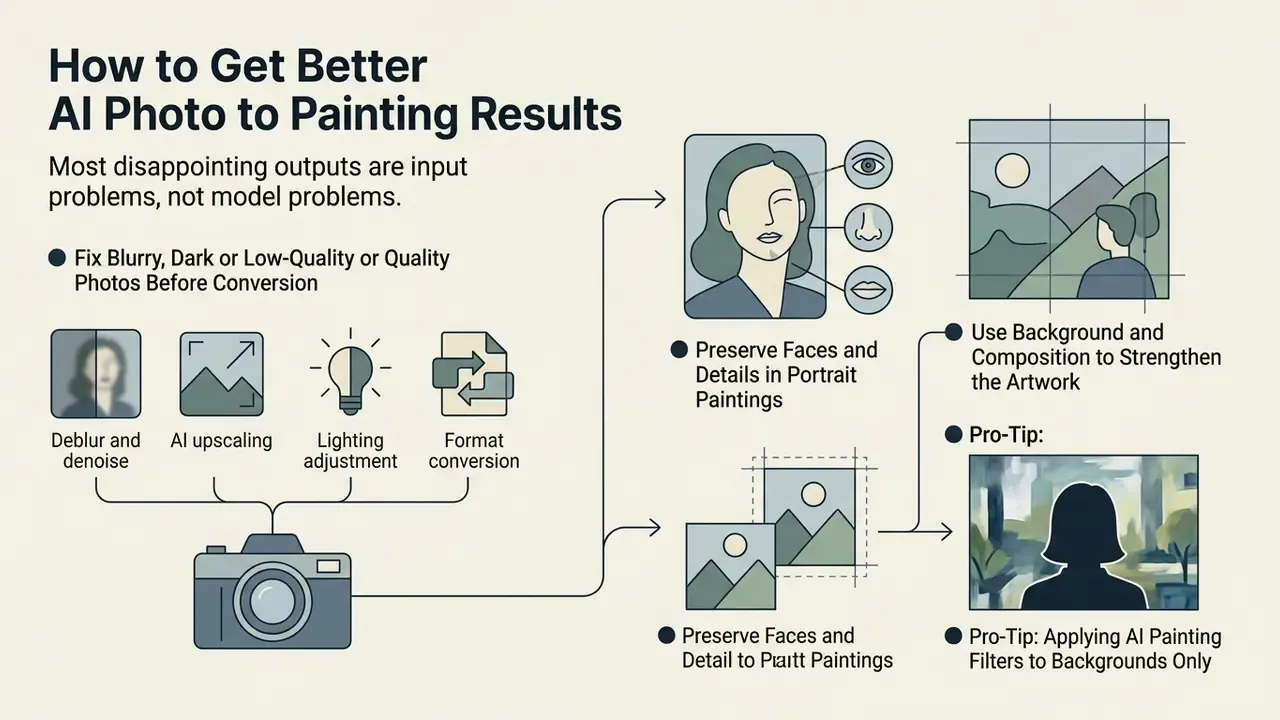
In two sentences: Most disappointing outputs are input problems, not model problems. Fixing exposure, resolution, background separation, and strength settings before generation resolves the majority of artifact complaints.
Professional-grade output when you convert photo to painting ai style comes from source preparation plus parameter tuning. Small adjustments to lighting, composition, and input quality change final fidelity dramatically. Sometimes embarrassingly so.
«ArtScore quantifies how closely an image resembles authentic artworks and correlates better with human judgments than Gram loss or ArtFID.»
ArtScore: Quantifying Artness for AI-Generated Images, IEEE Transactions on Multimedia (2024). https://doi.org/10.1109/TMM.2024.3372806
For teams that need a defensible acceptance criterion rather than subjective taste, ArtScore (artness), SSIM (structural preservation), and LPIPS (perceptual distance) combine into a simple two-gate review: SSIM above your internal floor for identity retention, ArtScore above your floor for stylistic conviction.
Preserve Faces and Details in Portrait Paintings
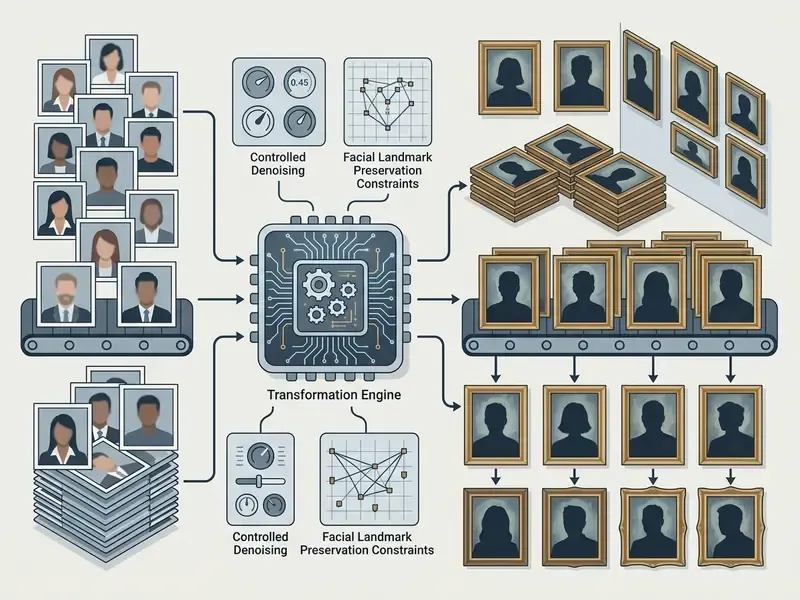
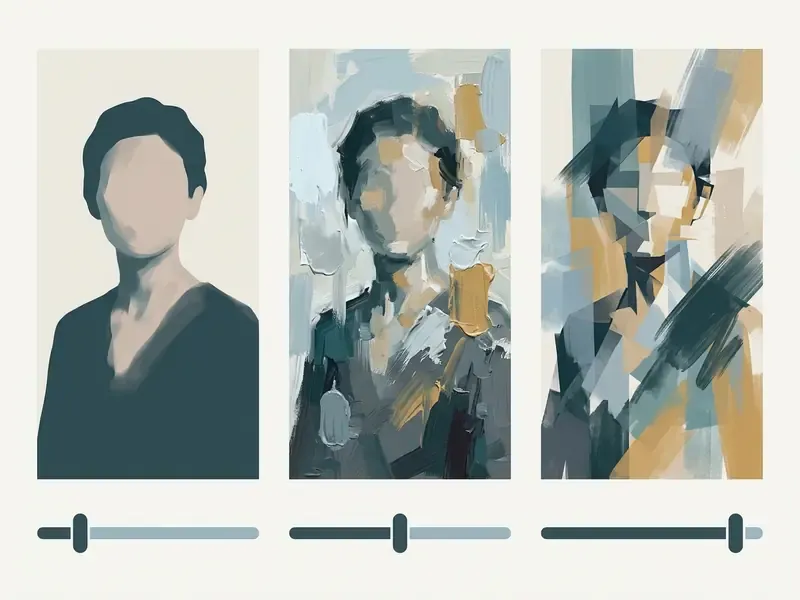
Facial recognizability is sensitive to geometric distortion. When an ai that turns pictures into paintings lays heavy brushwork over small features, eyes, teeth, and nostrils warp or lose definition.
«Some methods work well on landscapes but introduce undesirable artifacts on faces, deformed eyes or unnatural skin textures.»
Evaluation in Neural Style Transfer, survey article (2024). https://doi.org/10.1145/3696415
The research consensus is blunt: facial fidelity has to be purchased with an explicit constraint. A CVPR 2022 exemplar-based portrait style transfer paper uses a regularization term to keep residual features near zero and preserve intrinsic facial structure, reporting λ_reg = 0.005 as the trade-off point, with larger values over-preserving the mouth. A 2025 facial stylization study found that weak semantic loss fails to retain fidelity while excessive semantic loss suppresses stylization and adds artifacts, settling on λ_semantic = 1 and λ_paired = 1.
To protect facial features:
- Choose source photos where faces occupy at least 30% of the frame.
- Make sure features are evenly lit, with no harsh shadow across eyes or mouth.
- Use moderate style intensity, or pick tools with explicit face-preservation algorithms.
- If distortion appears, run a face-restoration pass or lower the transfer strength.
- For batch work, define a rejection threshold in advance. Example: any output where reviewers cannot match eye, nose, and mouth geometry to the source at 100% zoom gets regenerated, not shipped.
Use Background and Composition to Strengthen the Artwork
Background structure dictates how cleanly an ai turn image into painting model isolates the main subject. A cluttered or low-contrast backdrop confuses edge detection, and subject borders bleed into surrounding scenery.
Isolating the subject before processing gives noticeably cleaner output. An automated background remover, or a neutral studio gradient replacing a complex backdrop, forces brushstroke detail onto the figure. Background removal exists precisely to isolate a subject and concentrate attention on a specific area, and exporting the cutout as a high-resolution PNG carries that composition cleanly into the next step. Clean composition reinforces subject hierarchy and reads as gallery work rather than a filter.
Fix Blurry, Dark or Low-Quality Photos Before Conversion
Motion blur, severe compression, and underexposure produce muddy, artifact-heavy paintings. Because ai convert photo to painting models read high-frequency pixel noise as structural detail, digital grain gets amplified into blotches that look like mold.
Pre-processing steps for low-quality photos:
Governance, Model Risk and Enterprise Selection Criteria
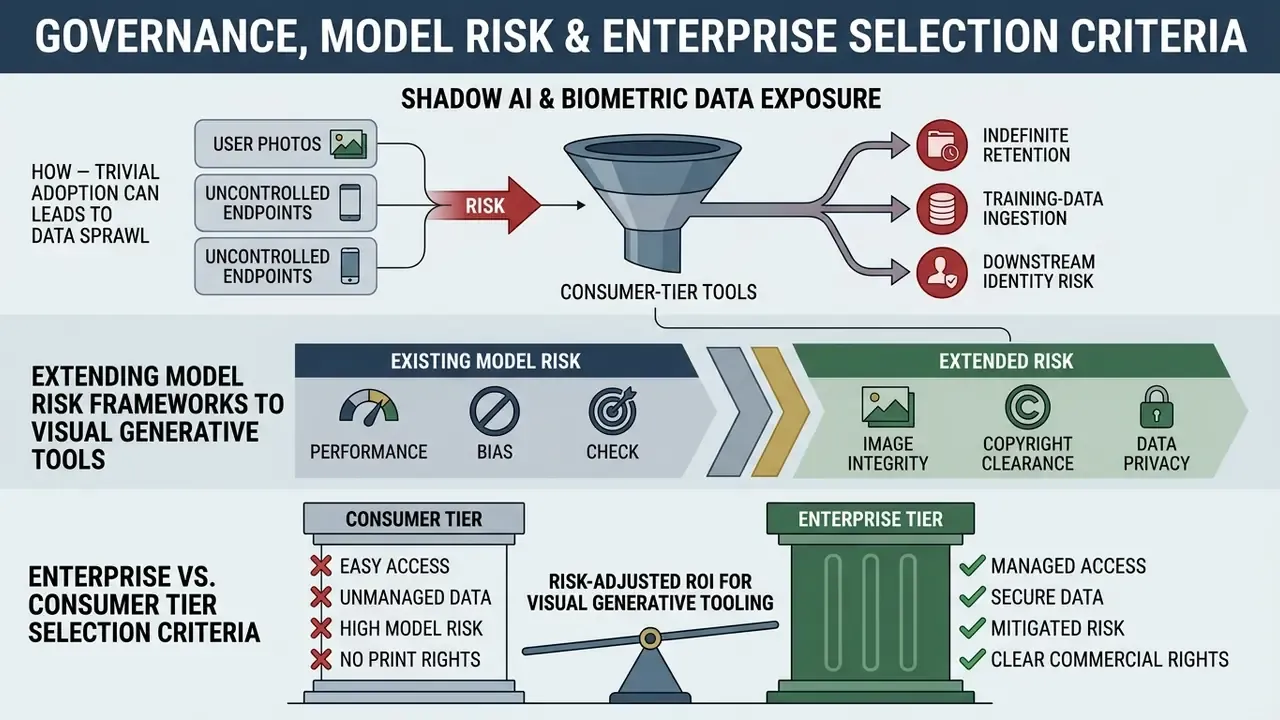
In two sentences: Consumer photo-to-painting tools are trivial to adopt, and therefore trivial to adopt without permission, which is what makes them a Shadow AI vector in regulated organizations. Bringing them into a governed contour means treating a style engine like any other model in inventory: documented inputs, logged parameters, reviewed outputs, contractual data terms.
Hypothesis: readers arriving from governance, model risk, and compliance functions are assumed to need vendor-selection and control criteria rather than gift-shop use cases. That segmentation is an untested working assumption.
Shadow AI and Biometric Data Exposure
A photo-to-painting upload is, in most cases, a biometric upload. Employee headshots, customer photographs, and family images all carry facial data. The moment a staff member drags one into an unvetted free web tool, the organization has performed an unapproved third-party transfer of personal data. The pattern is mundane, which is why it keeps happening:
- Uncontrolled endpoints. Free tiers require no registration, leave no corporate audit trail, and never appear in procurement records.
- Indefinite retention. Vendor claims that images are "not stored permanently" or "not used for training without permission" are self-attested marketing statements. They need verification against the written privacy policy and, ideally, a data processing agreement.
- Training-data ingestion. Absent an explicit contractual carve-out, uploaded imagery may become model training input.
- Downstream identity risk. Even heavily stylized output can stay recognizably attributable to a specific individual.
Practical controls: publish an approved-tool list, block unapproved generative image domains at the network edge, route all image stylization through one sanctioned API with request logging, and mandate that any photograph containing an identifiable person, a customer, or internal documentation never leaves that path. NIST guidance on upload handling recommends restricting accepted file types to only those required, a simple and effective narrowing of the attack surface for any image intake pipeline. NIST SP 800-88 Rev. 2 (2025) additionally covers sanitization of media, including mobile devices with storage, which matters when stylization happens on employee handsets.
One more failure mode worth naming. Disclosure. Where AI-assisted imagery reaches customers, institutional policy often requires a label, and text sitting beside that image may face the same scrutiny. Teams evaluating disclosure workflows sometimes also assess ai to human rewriting tools for accompanying copy. The governance question is identical in both cases: who reviewed the output, and where is the record?
Extending Model Risk Frameworks to Visual Generative Tools
Style engines are non-deterministic by default, which is precisely the property traditional model validation frameworks were built to interrogate. Mapping a photo-to-painting deployment onto existing structures is not exotic work.
| Governance Question | What to Document for a Style Engine |
|---|---|
| Model inventory | Vendor, model or endpoint version, architecture family (NST or diffusion), date onboarded |
| Intended use and limits | Approved subject categories, prohibited subject categories, marketing versus regulated-disclosure use |
| Input controls | Accepted formats and max size, rights-clearance check, PII and biometric screening gate |
| Reproducibility evidence | Seed, strength or denoising value, resolution, scheduler; re-run sample to confirm output stability |
| Output drift monitoring | Periodic re-generation of a fixed reference set; flag deviation in SSIM or ArtScore beyond tolerance |
| Human review | Named reviewer, acceptance criteria, rejection log, escalation path |
| Third-party risk | SOC 2 Type II or ISO 27001 status, data retention clause, subprocessor list, breach notification terms |
| Change management | Vendor model-update notifications; re-validation trigger on version change |
Organizations already operating under supervisory model-risk expectations, SR 11-7-style validation practice for example, or aligning to the NIST AI Risk Management Framework, can slot visual generative tools into the same lifecycle: identify, measure, monitor, control. The novelty is the output modality, not the control philosophy. No evidence, no autonomy.
Enterprise vs. Consumer Tier Selection Criteria
| Criterion | Consumer / Freemium Tool | Enterprise-Grade Deployment |
|---|---|---|
| Access model | Public web UI, optional login | SSO, role-based access, per-seat provisioning |
| API availability | None or rate-limited demo key | Documented REST or SDK endpoints, prepaid or pay-as-you-go credits |
| Auditability | No usage logs exposed to the customer | Per-request logs with user, timestamp, parameters, output hash |
| Data retention | Vendor-defined, often unstated | Contractual retention window, deletion on request, no-training clause |
| Security attestation | Rarely published | SOC 2 Type II or ISO 27001, penetration test summaries |
| Isolation | Shared multi-tenant inference | Dedicated capacity, private networking, or on-premise and VPC deployment |
| SLA | Best-effort, queue-based | Uptime commitment, support response targets, dedicated account manager |
| Brand control | Vendor watermark, vendor UI | White-label embedding, configurable editor, own assets and fonts |
| Volume | 3 to 5 generations per day | Bulk and batch processing, volume-discounted credit rates |
| Legal terms | Click-through ToS | Negotiated MSA, indemnification, IP allocation clauses |
Enterprise creative platforms in this category commonly expose editor SDKs, mobile web SDK support, white-labelling, bring-your-own-asset pipelines, enterprise security and SLAs, and dedicated account management. None of that appears in the free tier of the same product. If your evaluation criteria are "how many styles" and "is there a watermark," you are evaluating the wrong product tier. For programmatic integration patterns and cost modelling, our AI Media API Guides cover request structure, throughput, and credit accounting, and AI Media Support handles integration questions that fall outside documentation.
Risk-Adjusted ROI for Visual Generative Tooling
Headline conversion metrics quoted by vendors ignore the cost of control. A defensible business case models total cost of ownership, including the human and compliance overhead that makes output usable in the first place.
Net Value = (Baseline Manual Cost − Tooling Cost − Human Review Cost
             − Compliance & Legal Review Cost − Rework Cost) − Residual Risk Exposure
where:
  Baseline Manual Cost   = assets × (illustrator hours × blended rate)
  Tooling Cost           = subscription/API spend + credits consumed (incl. regenerations)
  Human Review Cost      = assets × review minutes × reviewer rate
  Rework Cost            = assets × rejection rate × (regeneration + re-review cost)
  Compliance Cost        = vendor due diligence + DPA negotiation + periodic revalidation (amortized)
  Residual Risk Exposure = P(IP or publicity claim) × expected remediation cost
                           + P(data incident) × expected notification/remediation cost
Two practical notes. First, rejection rate is the hidden multiplier. A pipeline that discards 30% of outputs consumes about 1.43 times the credits and 1.43 times the review minutes you budgeted. Track it from day one, not from the first invoice surprise. Second, residual risk does not go to zero for identifiable people or third-party source photography. Documentation reduces it: releases, licenses, disclosure. Tooling choice does not eliminate it.
Can You Use AI Paintings for Commercial Projects?
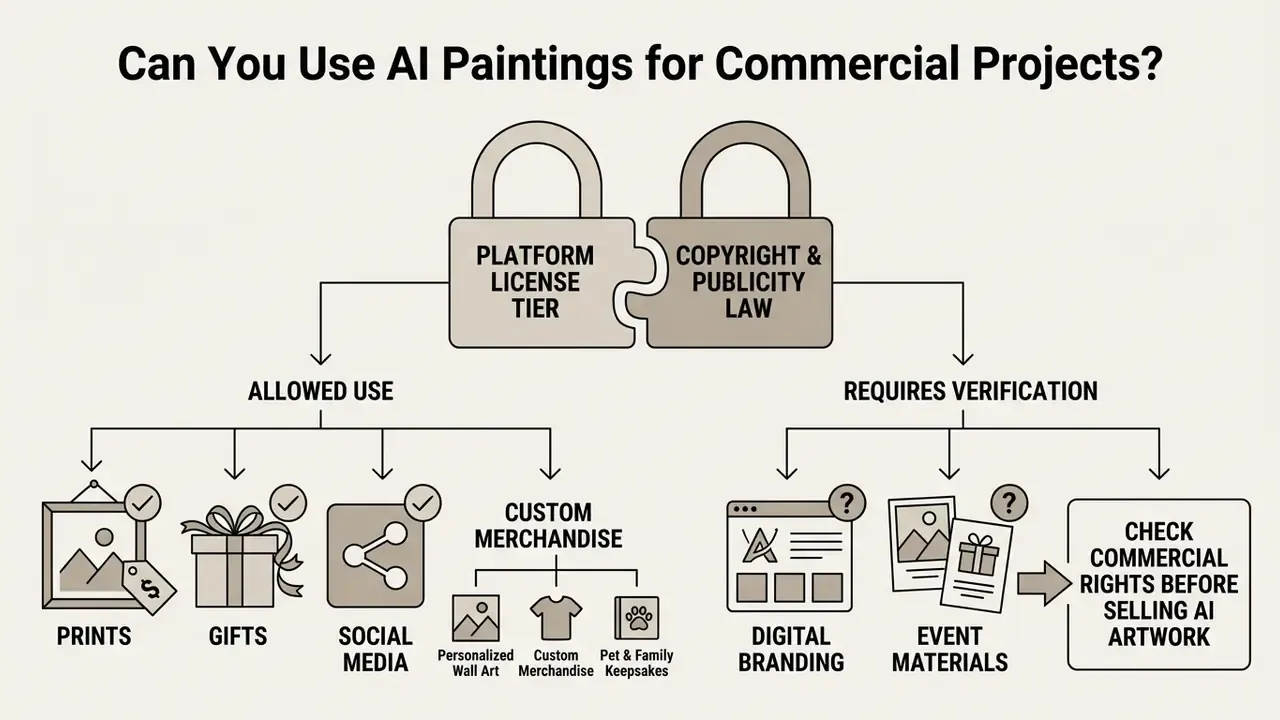
In two sentences: Commercial viability depends on two independent locks, the platform's license tier and the underlying copyright and publicity law. Clearing one without the other leaves you exposed.
Using generated artwork in commerce, print-on-demand merchandise, client branding, digital assets, or paintings to NFT art, requires compliance with tool licensing agreements and intellectual property law. For a deeper treatment of usage rights across engines, see our guide to commercial use of AI image generators.
Check Commercial Rights Before Selling AI Artwork
Commercial rights depend on both platform terms of service and broader legal frameworks. Under U.S. Copyright Office policy, protection applies only to aspects of a work produced through direct human creative control. Entering a basic prompt, or running an automated style transfer, does not grant full statutory copyright over the raw AI output.
«Human creativity is the sine qua non at the core of copyrightability, and increasing human distance from generation raises difficult questions of authorship.»
Generative AI and copyright: principles, priorities and…, Journal of Intellectual Property Law & Practice (2023). https://doi.org/10.1093/jiplp/jpad049
Here is the distinction that trips up most sellers. A platform's terms can contractually assign output rights to you, but a contract cannot manufacture copyright where the law recognizes none. You may be perfectly free to sell an image while holding no exclusive right to stop anyone else from selling a near-identical one.
Selling prints or merchandise featuring identifiable human figures also requires a signed model release, no matter how heavily stylized the photo becomes. The same principle applies to image-to-image generators for commercial use, where the source photograph carries rights obligations independent of the output. On marketplaces like Etsy, sellers must disclose AI tool usage under platform transparency rules. Jurisdictional divergence matters too: the U.S. position denies protection to purely machine-generated expression, while other jurisdictions, including ongoing UK consultation positions, contemplate protection for some AI outputs under different statutory rules. For updates on intellectual property disputes in generative media, consult the AI Litigation and Case Timelines tracker.
Free Photo to Painting AI: Limits, File Sizes, Downloads and Pricing
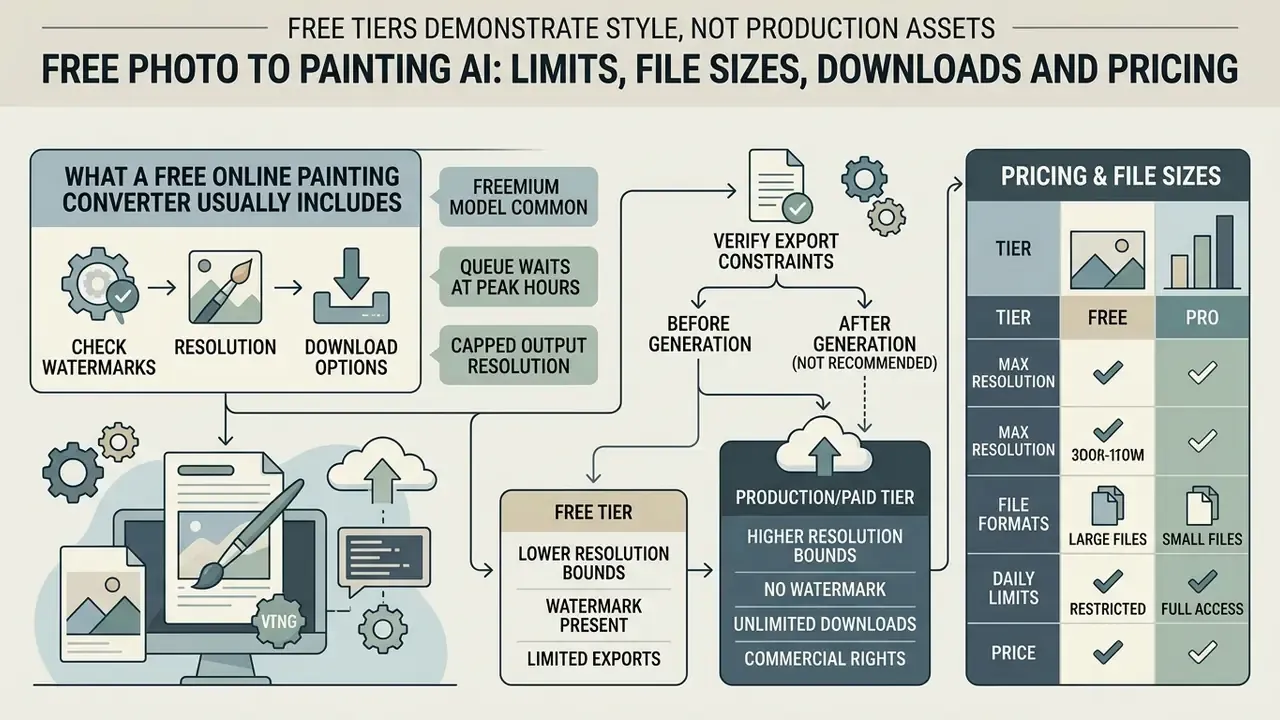
In two sentences: Free tiers exist to demonstrate style quality, not to deliver production assets. The three constraints that actually block commercial work are daily generation caps, watermarks, and export resolution.
Working with an ai photo to painting generator free tool means understanding platform limits, export resolutions, and licensing tiers. Many platforms advertise free access while gating commercial features and high-definition exports behind subscriptions. Cross-tier tradeoffs are broken down further in our comparison of free AI image generators and our guide to free photo editors.
| Feature / Metric | Free Online Tier | Paid / Subscription Tier |
|---|---|---|
| Style Access | Basic presets (3 to 7 standard filters) | Full style library (50+ presets) plus custom text prompt engines |
| Daily Generations | Strictly limited, commonly 3 to 5 free generations per day (some services grant 3 lifetime trials, others about 10 daily credits) | Tiered daily quotas (Basic 10 / Pro 15 / Unlimited 20 per day) or high-volume and unlimited priority GPU generation (100+ daily) |
| Max Upload Size | Standard capped file size, 10 MB to 25 MB | Enterprise limits, up to 60 MB high-resolution uncompressed files |
| Batch Upload | Single image at a time | Bulk queues (25 to 100 images per batch on print and enterprise platforms) |
| Watermark Policy | Watermark applied to export, or watermarked "draft" download | Watermark-free clean downloads |
| Export Resolution | Standard web resolution (1000 to 2000 px long edge) | Print-ready high definition (4K+ / 300 DPI) |
| Processing Speed | Standard queue priority, wait times at peak hours | High-priority fast GPU processing |
| Commercial License | Personal non-commercial use only on many platforms | Full commercial and merchandising rights granted |
| API / Automation | Not available | REST API, SDK, prepaid or pay-as-you-go credits |
| Security & Data Terms | Click-through ToS, unstated retention | SOC 2 or ISO 27001 attestation, contractual retention and no-training clauses, SLA |
| Typical Consumer Pricing | $0 | Roughly $4.99 per week or $29.99 per year on app-based plans; $10 to $25 per month on major creative suites; custom enterprise pricing |
Watch the credit-consumption mechanic that catches new users. On several platforms a single high-quality image costs multiple credits, commonly 5, so a 5-credit signup bonus equals exactly one finished export. Not five.
What a Free Online Painting Converter Usually Includes
Most photo to painting ai free online web tools run a freemium model. Unregistered users typically get 3 to 5 trial generations to evaluate the platform, and several services require no account at all for the first use. Basic free tiers give you standard oil, watercolor, and sketch presets with default intensity controls. Some add cartoon and pop art.
Free platforms may impose queue waits at peak hours and cap output resolution. Still, these entry-level services let you test how an ai picture to painting system handles your specific photographs before buying premium credits. Observed patterns vary widely across vendors: 3 lifetime free trials followed by credit charges, 3 free uses per month after signup, roughly 10 free credits per day. Verify the specific quota model before planning a project around it.
Check Watermarks, Resolution and Download Options
Verify export constraints before you generate, not after. Many free platforms stamp visible brand watermarks across the center or corner of downloaded files, and some issue a deliberately watermarked "draft" when a design includes premium elements. Watermarked exports are fine for testing and useless for presentation or physical display.
Resolution limits differ sharply between tiers. Free exports are usually constrained to standard web resolution (1080p on the long edge), which looks fine on screen and pixelates the moment you scale it to canvas size. For canvas printing, you need a minimum of 300 DPI at full physical dimensions, which remains the widely published print recommendation.
Check the upper bounds as well, not just the lower ones. Print vendors reject files above their pixel ceiling and below their floor. Real-world error states include "your image exceeds the 60 MB limit," "the resolution of your photo is not enough for the selected product," and "the number of pixels of the uploaded image is too high." Accepted formats at print-on-demand platforms commonly include .jpg, .jpeg, .png, .gif, and .webp, with batch caps of 25 to 100 images per upload session.
Limitations and Open Questions
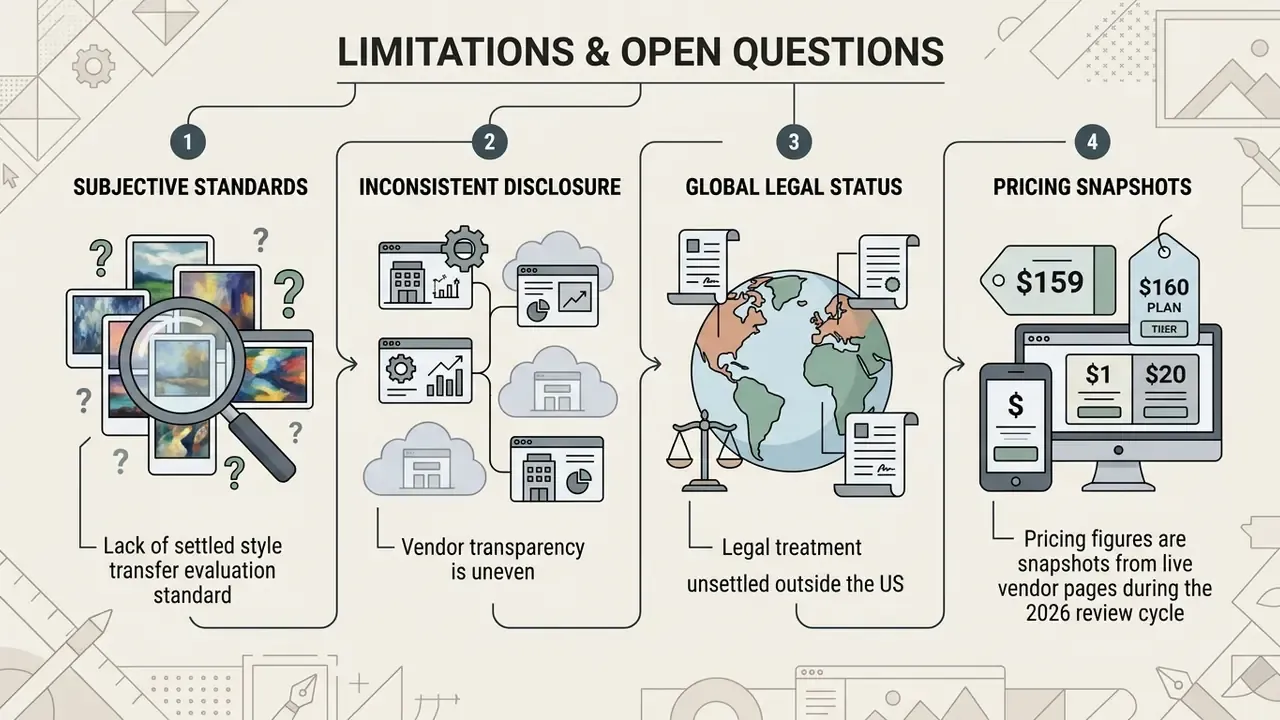
Honest gaps, since this category is still moving.
Style transfer evaluation lacks a settled standard. ArtScore, SSIM, LPIPS and ArtFID measure different things, and none of them fully predicts whether a client will accept a portrait. Human review remains the deciding gate, which means your acceptance criteria are only as good as the reviewer you named in the log.
Vendor disclosure is uneven. Retention windows, training-use terms, and subprocessor lists are frequently absent from public pages, so due diligence often requires direct written confirmation. Treat anything unwritten as unverified.
Legal treatment is unsettled outside the United States. The U.S. authorship position is comparatively clear; other jurisdictions are mid-consultation, and cross-border merchandising may land under conflicting rules.
Finally, the pricing figures above are snapshots from live vendor pages during the 2026 review cycle. They drift. Re-check before you build a budget on them.
Photo to Painting AI FAQ
Does Photo to Painting AI Work on Mobile Devices?
Yes. Modern picture to painting ai converters run on mobile web browsers, iOS, and Android apps. Mobile tools use responsive interfaces that import photos straight from the camera roll or photo library, and most support drag-and-drop or tap-to-select uploads with previews rendering in under 10 seconds.
Mobile operating systems require explicit permission grants for storage access. On iOS, apps need Photo Library approval, implemented through NSPhotoLibraryUsageDescription for reading and NSPhotoLibraryAddUsageDescription for saving. Android manages gallery imports through media permissions, with legacy configurations sometimes relying on requestLegacyExternalStorage on Android 10. Finished artworks can be saved back to the mobile photo library or shared directly to social channels.
Mobile web apps process image files through browser-level WebGL instances or cloud APIs. When uploading from iOS, choose "Full Access" in the Photo Library prompt so the engine reads RAW or HEIC color profiles instead of a downsampled proxy. On Android, pick uncompressed files from the System Storage picker rather than compressed messaging-app folders, which strip resolution and destroy the edge detail the model needs for accurate stroke mapping.
How Long Does It Take and Which Image Formats Are Supported?
Standard conversion takes 2 to 10 seconds on cloud-accelerated platforms. Vendor-published ranges extend to 10 to 30 seconds for high-resolution oil renders, and up to 60 seconds for multi-face family or group portraits where the system analyzes several subjects. Speed depends on queue load, output resolution, and model complexity. Efficient arbitrary style transfer networks are demonstrably fast: a pruned GoogLeNet-based transfer network reached 68.03 FPS on 512×512 inputs in WACV 2023 benchmarking (https://doi.org/10.1109/WACV56688.2023.00334), while complex multi-scale optimization models need far longer.
Supported input formats for turning any photo into artwork:
- JPG / JPEG: standard photographic format, supported everywhere.
- PNG: best for high-detail inputs and pre-processed transparent backgrounds.
- WEBP: modern web format, supported by most updated online platforms.
- HEIC: standard mobile format; modern web converters convert HEIC automatically on upload.
- GIF / TIFF: accepted by some print-oriented platforms; TIFF is preferred for archival scans.
Published size limits vary by upload path even inside one vendor's documentation. One major image platform lists a 10 MB limit for its storage product and 100 MB on its general limits page, because the two apply to different intake routes. Always trust the limit shown on the widget you are using.
Is It Free to Convert a Photo into a Painting Using AI?
Many online tools offer free access with daily credit caps, commonly 3 to 5 generations per day, or watermarked downloads. High-resolution exports and commercial licenses typically require a paid plan, with consumer pricing clustering around $4.99 weekly, $29.99 yearly, or $10 to $25 monthly on full creative suites.
What Image Resolution Is Required for Printing on Canvas?
Export your final image at a minimum of 300 DPI at full physical dimensions, for example 3000×4000 pixels for a 10×13 inch print. Also confirm the vendor's maximum file size and pixel ceiling, since uploads above 60 MB or beyond the platform's pixel cap are commonly rejected outright.
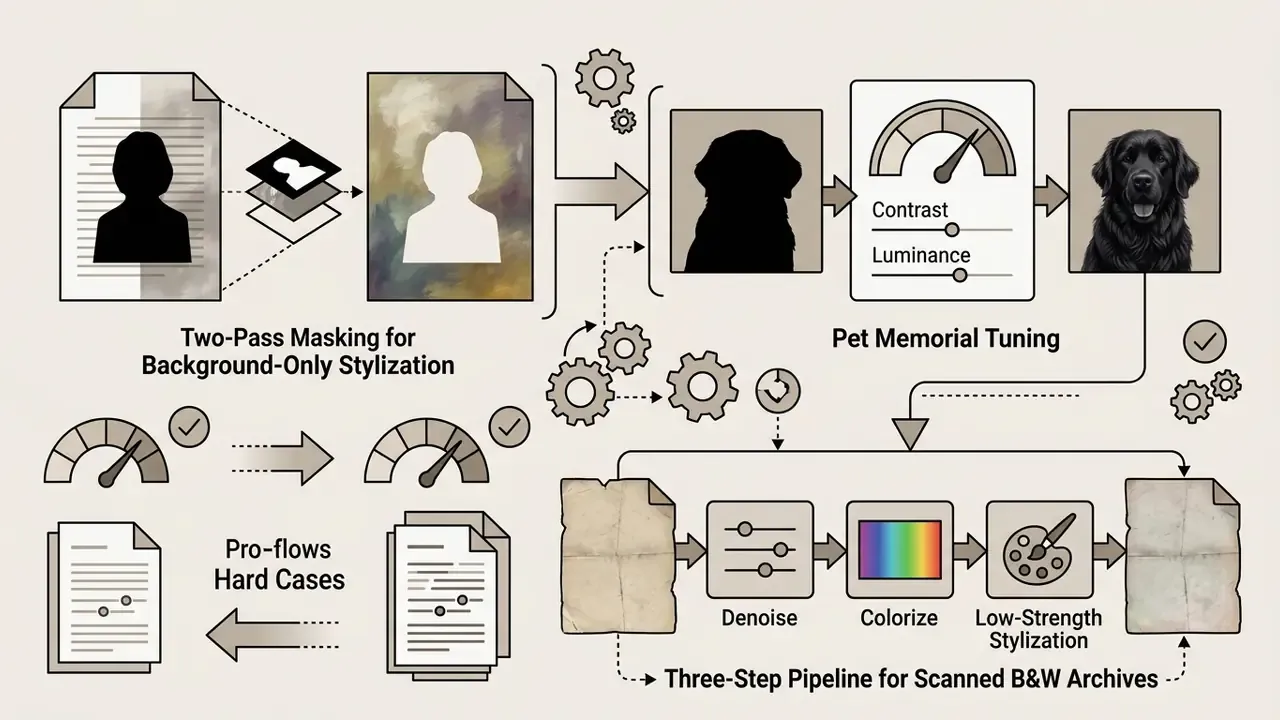
How Do I Apply a Painting Filter to Only the Background of My Photo?
Most AI painting filters apply globally to the whole frame. Use the two-pass masking workflow: generate the full painted render, run a background remover on the untouched original to isolate the subject, then layer the photographic subject over the painted background. Facial pixels never pass through the model, so accuracy is fully preserved.
What Settings Work Best for a Pet Memorial Painting?
Oil and watercolor presets are the most popular for memorial pieces. For dark or black fur, raise midtone brightness by roughly 15% before conversion and choose a higher-contrast, medium-stroke preset to prevent anatomical detail loss. Make sure catchlights in the eyes are visible, because neural renderers anchor fine facial strokes to those focal points.
Can I Convert Old, Blurry, or Scanned Black-and-White Photos?
Yes, though historical scans need a three-step pre-processing pipeline. Neural painting generators read scan grain and motion blur as structural features, which produces muddy blotches if you skip preparation.
Recommended workflow:
- Denoise and upscale: run the scan through an AI image enhancer to remove paper texture, dust, and scratches, then upscale 2x or 4x. Scan originals in color at high resolution and store as PNG or TIFF rather than JPEG.
- Colorize first: apply an automated AI colorization pass before any artistic style filter. Style engines render depth noticeably better over colorized gradients than over monochrome input.
- Set low denoising strength: use a conservative style strength of 0.35 to 0.45 so the model does not redraw historical facial features.
Is It Safe to Upload Private Family or Employee Photos?
Treat every photo upload as a biometric data transfer. Vendor claims about encryption, non-retention, and no-training use are self-attested and should be checked against the written privacy policy and, for organizational use, against a signed data processing agreement. In regulated environments, route stylization through one sanctioned tool with request logging instead of tolerating ad-hoc use of free web converters.
Do I Keep Copyright Ownership of My AI-Generated Painting?
You retain rights to your original uploaded photograph. The AI-generated stylistic additions themselves may not qualify for standalone copyright protection under current U.S. guidance without significant human creative modification. A platform's terms may still grant you contractual permission to use and sell the output, which is a separate matter from owning copyright in it.
Appendix A: Revision Log and Superseded Statements
Retained for transparency and version traceability. Each entry shows the earlier wording and why it was superseded.
| # | Superseded wording | Replaced with | Reason |
|---|---|---|---|
| 1 | "Research by Galerne et al. (2024) demonstrates that multi-scale optimization models preserve global composition while synthesizing realistic brushstroke textures." | Direct quotation from the EGSR 2024 perceptual study, with DOI link. | Original reference cited no methodology, figures, or URL. Updated. |
| 2 | "Research on facial stylization demonstrates that keeping semantic loss weights balanced prevents severe artifacts." | Verified quotation from the 2024 NST evaluation survey, plus specific λ values from CVPR 2022 and a 2025 facial stylization study. | Original claim identified no source, author, or dataset. Updated. |
| 3 | "The batch conversion completed in under two hours, maintaining 100% subject recognizability…" | Reworded to describe the internal human review protocol, with an explicit note that it is not a standardized quantitative metric. | "100% recognizability" was unfalsifiable without a stated measurement method. Updated. |
| 4 | "…yielding a 28% increase in catalog conversion rates." | Reworded as vendor-reported, non-audited, directional evidence, with sample size and duration disclosed as unavailable. | Business metric lacked source, sample, and methodology. Updated. |
| 5 | "Fast arbitrary style transfer networks complete inference in milliseconds." | Replaced with the WACV 2023 benchmark figure (68.03 FPS at 512×512) and DOI. | Speed claim had no benchmark reference. Updated. |
| 6 | "Daily Generations: Limited (3 to 10 credits or daily cap)." | Replaced with observed vendor quota grids (3 to 5 free per day; Basic 10 / Pro 15 / Unlimited 20) and explicit max upload sizes. | Abstract credit language gave readers no planning basis. Updated. |
| 7 | Resource Navigation Hub entries pointing to adult-oriented and non-editorial image tools. | Removed and replaced with governance, pricing, API, and comparison resources appropriate for professional and enterprise readers. | Reputational and brand-safety risk for regulated-sector audiences. Updated. |
| 8 | Anchor-linked table of contents at the top of the page. | Replaced with a short reader-path section explaining which parts serve creators, marketers, and risk functions. | Anchor navigation added no value over the visible heading structure. Updated. |
Appendix B: QA and Audit Acceptance Checklist
Use this as a pre-publication or pre-delivery gate for any batch of AI-painted assets.
Checklist0 / 21
Next Step
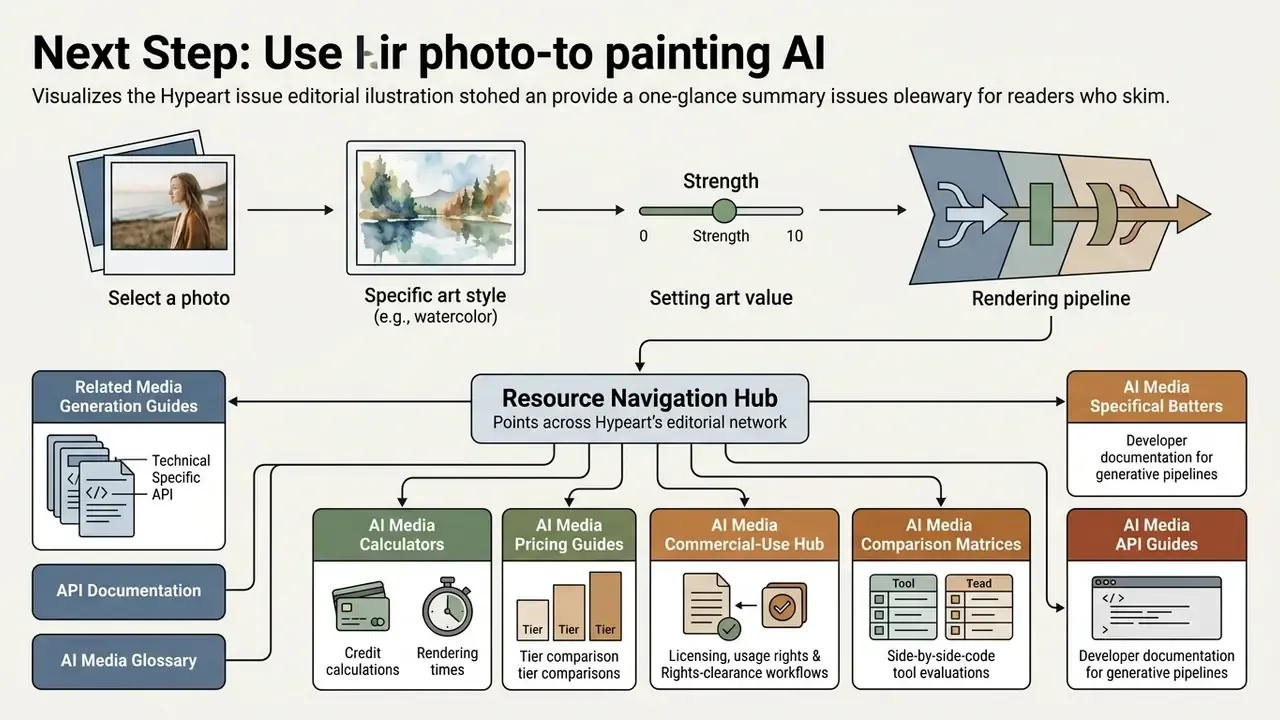
Pick one photo, one style, and one strength value. Run it, log the seed, and inspect at 100%. If the output survives that, you have a workflow. If it does not, you have a preprocessing problem, which is cheaper to fix than a licensing one.