H HypeartAI media decision support
Start for Free
Esc
↑↓ navigate↵ openEsc close
On this page

AI Menu Generator: Create a Restaurant Menu With AI

Definition

Last updated: January 2026 · Reviewed for operational and licensing risk by: Marcus Hale, AI Governance & Operational Risk Analyst ****

Term type
Glossary / Entity
Last checked
· Reviewed for operational and licensing risk by: Marcus Hale, AI Governance & Operational Risk Analyst
Source status
Manual check

An AI menu generator is an automated software system that converts raw dish lists, business descriptions and pricing data into structured, visually styled restaurant menus. These platforms handle typography selection, category alignment, grid layout and multi-format export for print and digital channels without a designer opening a canvas.

Why does that matter beyond aesthetics? Because a menu is a priced, allergen-bearing legal document. Every generated line carries operational risk.

In this guide: what AI menu generators produce · the five-step workflow from raw text to press-ready PDF · ready-to-copy prompt templates for four venue concepts · professional design standards (grid, typography, imagery) · food-photo conversion data and delivery-aggregator rules · POS and stop-list synchronization · free-tier limits and commercial rights · a selection matrix for single venues and multi-unit chains · a human-in-the-loop pre-flight checklist · FAQ.

What an AI Menu Generator Is and Which Menus It Creates
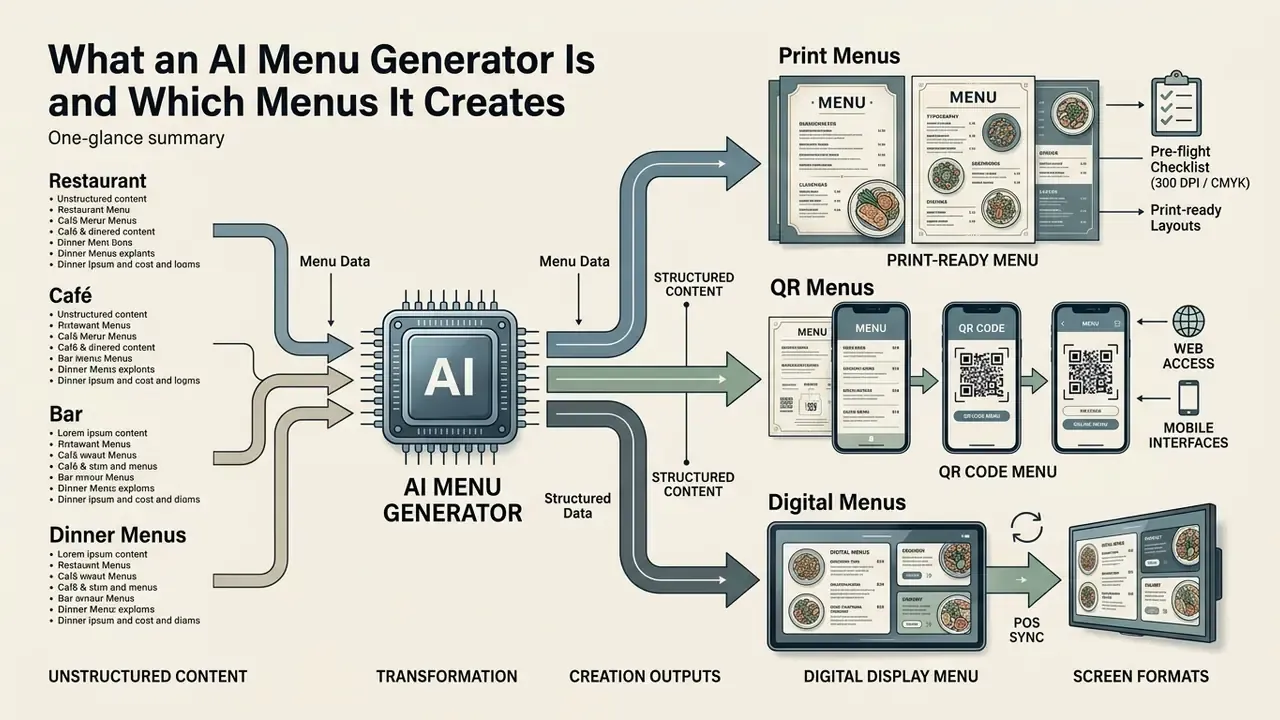
Infographic showing how an AI menu generator transforms raw text into print, QR, and digital formats

An AI menu generator is a specialized tool built to transform unstructured menu text into print-ready and digital layouts without manual canvas editing. Traditional graphic editors rely on hand composition. An ai menu generator instead uses natural language processing plus automated spatial grid rules to structure categories, align prices and apply brand typography in one pass.

Modern menu generator platforms accept raw text, PDFs or spreadsheet imports and build cohesive assets across service channels. Vendor documentation describes machine-vision import as standard practice: categories, dish names, prices, descriptions, allergens and photos are extracted from a PDF, photo, spreadsheet or Word file, then re-composed into a structured layout. Research on digital menu adoption confirms that system quality, clear visual hierarchy and information accuracy directly influence customer trust, food desire and average check size (Journal of Gastronomy, Hospitality and Travel, Kılıç, 2023).

«Perceived information quality, system reliability and QR-menu interactivity jointly improve perceived performance, shaping green attitudes and customer satisfaction.»

- Bytes to Bites study, Taylor & Francis (2025). https://www.tandfonline.com/doi/full/10.1080/15378020.2025.2466873

One practical note from operators: the cleaner the source spreadsheet, the fewer layout corrections afterwards. Messy input produces confident, wrong output.

Restaurant, Café, Bar and Dinner Menus

An ai restaurant menu generator produces specialized layouts tailored to distinct dining concepts, from high-end fine dining to casual cafés and high-volume bars. Fine dining configurations prioritize restrained typography, generous white space and unadorned prices to signal exclusivity. A casual café or ai dinner menu generator leans the other way, emphasizing category segmentation and fast legibility under bright daylight.

Design guidance for upscale venues is fairly consistent: a maximum of two typefaces (one elegant serif for headers plus one supporting sans-serif), generous white space, prices printed without currency symbols and heavy uncoated or off-white paper stock. Bar and cocktail lists produced by an ai generator menu focus on beverage pairing hierarchy, spirit origins and concise flavor notes, and they often need multi-price columns for wines by glass, carafe and bottle. For banquet events, an ai menu creator structures fixed-course dinner menus with dedicated branding, custom motifs and clear course transitions.

A quick example. A 40-seat bistro running a seasonal five-item prix fixe needs a single-page vertical sheet. A 300-cover brasserie with 90 items needs a three-column grid and a separate beverage folio. Same tool, very different grid decisions.

What AI Can Generate From Menu Text

From basic raw input, an ai food menu generator parses dish titles, descriptions, dietary flags and pricing, then outputs formatted sections and readable typography. The system identifies entity relationships, placing appetizers, mains and desserts into logical visual clusters while holding standardized price alignment across the document.

Generative text engines refine dish descriptions by standardizing culinary terms, highlighting key ingredients and producing concise copy that improves diner engagement. Research on digital menu optimization indicates that informative dish descriptions strengthen purchase intentions and overall customer satisfaction (Optimizing Digital Menus, Tandfonline, 2024).

«Menu visual appeal significantly strengthens the desire to try a dish, which in turn directly increases purchase intention.»

- Optimizing Digital Menus, Taylor & Francis (2024). https://www.tandfonline.com/doi/full/10.1080/23311975.2024.2432536

Comparison of restaurant menu formats and AI-generated outputs

Menu formatPrimary use case in hospitalityTypical AI-generated output from menu text
Dine-in print menuTable-side physical ordering and brand representation300 DPI CMYK PDF with structured categories, aligned pricing and bleed margins
Mobile QR menuContactless table-side ordering and dynamic updatesResponsive mobile page or single-column portrait PDF optimized for fast scanning
Web and delivery menuOnline ordering, website display, delivery integrationStructured HTML text with web-safe typography and clear allergen filters
Social media menuPromoting daily specials and seasonal eventsVertical or square promotional graphic cards formatted for digital feeds
Event and dinner menuFixed-course banquet ordering and private eventsSingle-page elegant layout with event branding and structured course order
Takeaway and pickup menuCounter ordering and packaging insertsCompact list layout with fast-scan pricing blocks and combo groupings

Summary: dine-in print menus yield high-resolution CMYK PDFs for physical printing. Mobile QR menus output responsive digital pages for rapid scanning. Web, takeaway and social assets provide adaptable HTML and promotional image cards for multi-channel reach.

How to Create a Restaurant Menu With AI: From Text to Download
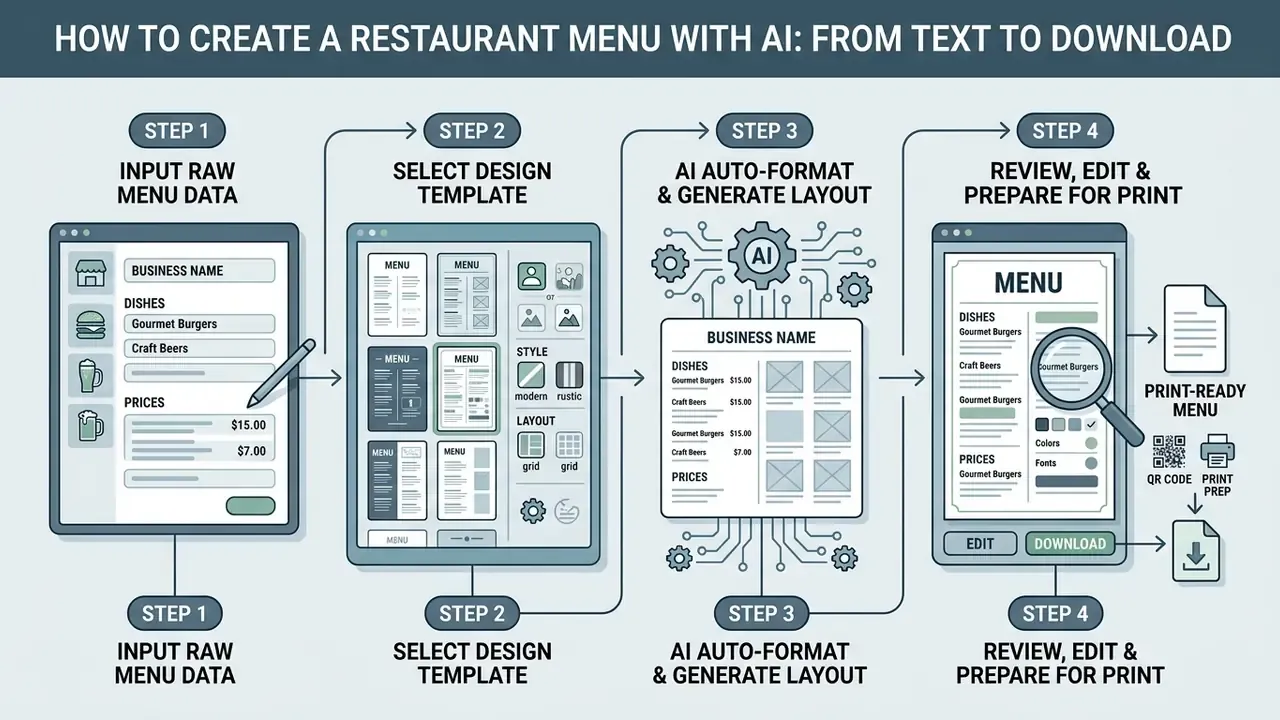
Flowchart showing four steps to design a restaurant menu using an AI menu generator tool

To create a restaurant menu with ai, the user enters raw menu item data, picks a design template, lets the model auto-format the grid, edits visual details and exports the artwork. This end-to-end workflow removes manual graphic composition while preserving structured alignment. If you want the broader licensing picture behind that export step, see the overview first.

«Designers report advantages of AI in generating creative content, increasing efficiency and automating routine tasks while retaining quality control.»

- Where AI and Design Meet, University of Lapland (2024). https://lacris.ulapland.fi/ws/portalfiles/portal/40696061/Where_AI_and_Design_Meet_-_Designers_Perceptions_of_AI_Tools.pdf

Add the Business Name, Dishes and Prices

Initial setup requires the official business name, menu categories, dish titles, descriptions, dietary tags and exact pricing. Structured source text prevents extraction errors and helps the software map each menu item to the right visual container.

Standardizing input formats, for instance separating prices from descriptions with clear delimiters, lets the underlying language model parse dynamic values accurately. Platform engineering guidance recommends passing dynamic values (dish names, prices, allergen flags) as typed fields or a schema and keeping instructions separate from the data. That single habit materially reduces extraction ambiguity. Before layout generation, verify that dish names, currency symbols and allergen markers match the verified POS record, not last season's spreadsheet.

Choose a Template, Style and Layout

Choosing a template means matching visual aesthetics, grid structure and color contrast to the venue concept. An ai menu design generator presents curated presets ranging from modern minimalist sheets to traditional multi-column grids.

Template selection must prioritize legibility and brand alignment over decorative complexity. Accessible contrast ratios (minimum 4.5:1 for body text and 3:1 for large text, icons and selected-state indicators) keep printed and digital menus readable under candlelight, patio glare or dim bar lighting (W3C Web Content Accessibility Guidelines). Information must never be conveyed by color alone, which is why vegan, gluten-free and spice-level markers need icons or text labels alongside color coding.

Edit, Download and Prepare the Menu for Print

The final phase covers reviewing generated text, refining spacing, downloading high-resolution files and verifying print pre-flight specifications. Editors adjust line heights, fine-tune column padding, check logo placement and make sure promotional items receive the intended emphasis.

Conversational AI editing (chat-based micro-adjustments). Advanced generators now support layout correction through plain-language instructions instead of dragging objects. Typical commands:

  • "Make the category headers two shades darker and switch them to a serif typeface."
  • "Replace the green Vegan color marker with a leaf icon."
  • "Remove the background from the uploaded logo and center it in the header."

Systems with computer vision automatically strip the background from uploaded PNG or JPG logos, generate a transparent layer, crop the mark and fit it inside brand clear-space zones without ragged edges. Where a vector file exists, storing brand colors as SVG swatches keeps CMYK print output and RGB screen output visually consistent. For retouching dish photography before it enters the layout, an AI photo editor handles color correction, background cleanup and cropping. Teams that also generate technical drawings or floor plans for the same brand refresh sometimes pair this with an ai cad drawing generator, which keeps signage dimensions and menu board sizing in sync.

For physical production, artwork must be exported as a press-ready PDF at 300 DPI, in CMYK, with 3 mm bleed on all sides. Low-resolution source photography should be processed with image resolution upscaling before placement so printed dish images stay sharp on press. Digital versions for web or QR distribution should be exported separately in RGB, without crop marks, to protect mobile load times.

  1. Step 1, text inputenter structured business name, categories, dish titles, descriptions and exact POS pricing into the generator interface.
  2. Step 2, template selectionchoose a design template, color scheme and typography pairing aligned with brand identity.
  3. Step 3, AI layout generationthe engine parses items, establishes grid alignment and produces a structured visual layout.
  4. Step 4, human review and editingrefine typography spacing, adjust column margins, insert corporate logos, verify price accuracy.
  5. Step 5, export and deploymentdownload 300 DPI CMYK PDFs for print or responsive RGB formats for digital and QR use.

Human-in-the-Loop Pre-Flight Checklist

Treat this as the mandatory sign-off gate before any AI-generated menu reaches a printer, a kiosk or a QR landing page.

Checklist0 / 12

Ready-to-Use AI Prompt Templates for Menu Generation
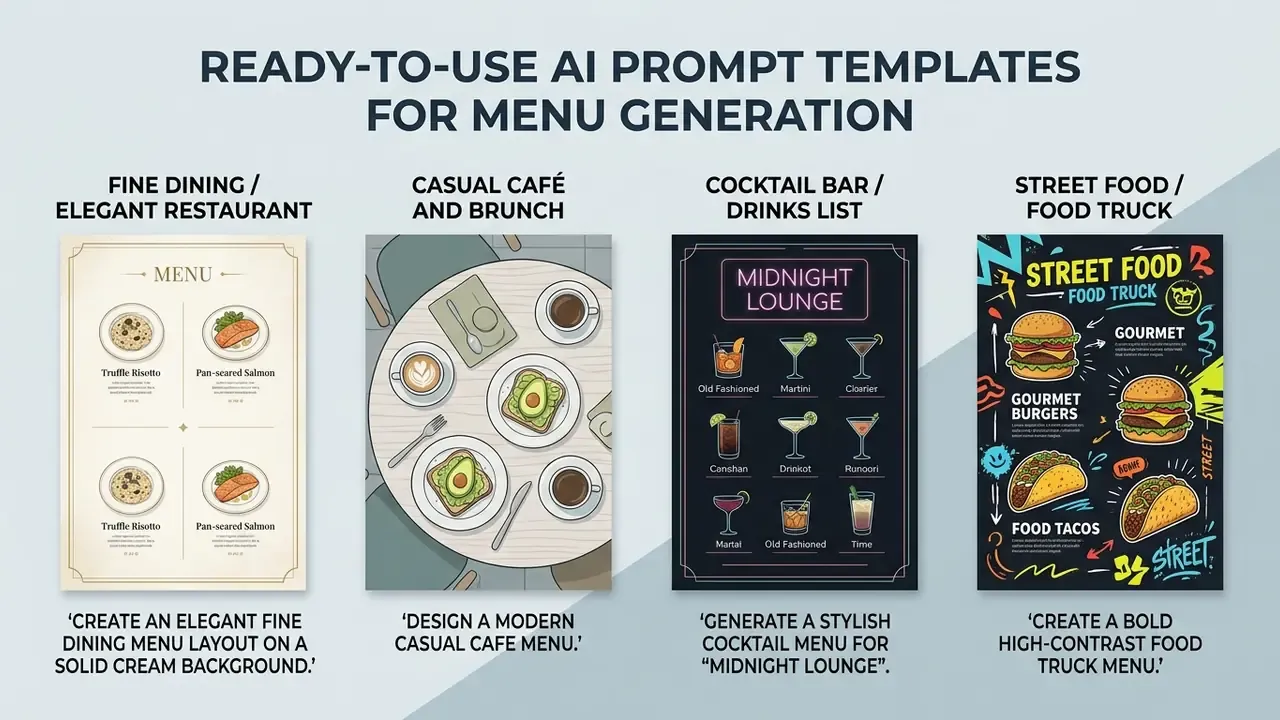
Four distinct restaurant menu design examples paired with their corresponding text prompts

Precise prompts produce far better grids than vague style requests. State the venue name, sections, exact items with prices, color scheme, typography direction and output constraints. Copy the templates below and swap in your own data.

1. Fine dining / elegant restaurant:

Create an elegant fine dining menu layout on a solid cream background. Restaurant Name: "L'Etoile". Use classic serif typography, subtle gold rule lines, generous white space. Appetizers: Truffle Foie Gras - 28, Oysters on the Half Shell - 22, Chilled Pea Velouté - 18. Mains: Filet Mignon with red wine reduction - 48, Pan-Seared Sea Bass with lemon butter - 38, Duck Confit with cherry gastrique - 42. Desserts: Crème Brûlée - 12, Chocolate Lava Cake - 14. Prices without currency symbols, high contrast, clean single-column alignment, isolated flat layout with no background scene, press-ready 300 DPI composition, vertical single-page format.

2. Casual café and brunch:

Design a modern casual cafe menu. Title: "Urban Bean Cafe". Minimalist sans-serif fonts, warm beige and sage green color scheme. Breakfast (until 11 AM): Avocado Toast with poached egg - $12, Buttermilk Pancakes with maple syrup - $10, Classic Breakfast with eggs and hash browns - $11. Lunch: Caesar Salad - $11, Cafe Burger with fries - $14, Turkey Club Sandwich - $13. Drinks: Cold Brew - $5, Oat Latte - $6, Fresh Juice - $5. Clean vertical layout, clear allergen tags (VG, GF), high legibility, footer with hours and phone number. No background scene, solid color background only, print-ready flat layout.

3. Cocktail bar / drinks list:

Generate a stylish cocktail menu for "Midnight Lounge". Dark moody background (#121212), gold and neon blue text accents. Drinks: Smoked Old Fashioned (bourbon, bitters) - $18, Yuzu Spritz (prosecco, yuzu) - $15, Electric Blue Margarita (tequila, blue curacao) - $16, Black Cherry Sour (bourbon, cherry) - $17. Two-column grid layout, spirit origins highlighted in small caps, modern sleek aesthetic, footer note: "Happy Hour 6-8 PM - Live Music Fridays". Sophisticated typography, easy to read in low light.

4. Street food / food truck:

Create a bold high-contrast food truck menu. Title: "Taco Barrio". Vibrant colors (yellow, dark charcoal), clear pricing containers, checkbox-style item alignment for fast ordering. Items: Carne Asada Tacos (3 pcs) - $12, Al Pastor Tacos (3 pcs) - $12, Quesabirria - $14, Veggie Burrito - $9. Sides: Chips & Guacamole - $5, Elote - $4. Drinks: Horchata - $3, Mexican Soda - $2. Include footer note: "Cash & Card Accepted" and social handle. Playful display fonts, high visibility from three meters, flat print-ready layout with no background scene.

Prompt rules that measurably improve output. List every item and price explicitly instead of asking the model to invent them. Specify aspect ratio and orientation. Add the constraint "isolated menu design on a solid background, flat graphic view, not a styled photo" to suppress decorative table scenes. Then re-run the same prompt with one variable changed (palette, column count) rather than rewriting it from scratch. Vendor benchmarks in 2026 put a full text-to-layout cycle at roughly 20 to 30 seconds and cents per image, which makes iteration cheap next to manual layout hours. Worth noting: cheap iteration also tempts teams into skipping review. Don't.

One more caution on style. Prompts that chase viral aesthetics, the visual register of ai brainrot animals and similar meme-driven output, may perform on social feeds but rarely survive contact with a fine dining brand book.

How to Get a Professional AI Menu Design for a Restaurant
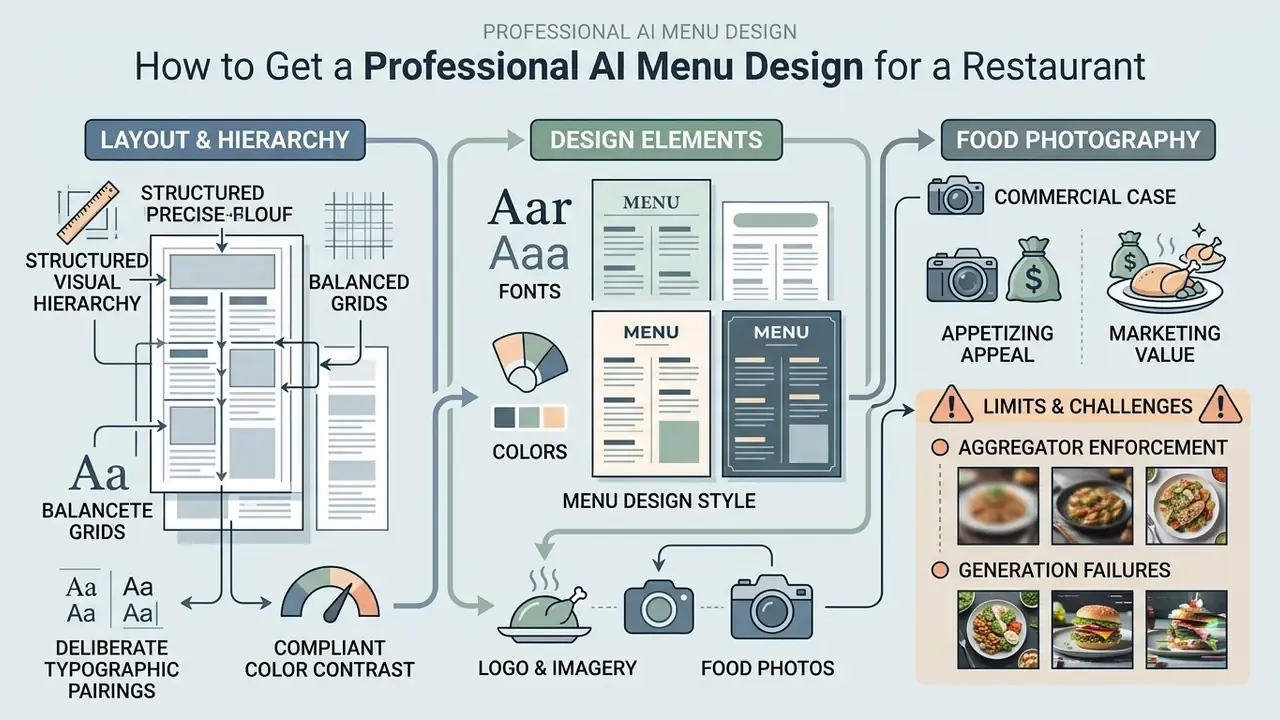
Diagram detailing menu layout, typography, color schemes, and the role of food photography in design

A professional ai menu design rests on structured visual hierarchy, balanced grids, deliberate typographic pairings and compliant color contrast. Those standards let guests scan categories effortlessly, weigh dish options and find pricing without friction. For the legal side of AI-generated design assets, open the hub and read the case summaries before you commit a template to 5,000 printed covers.

Consistent alignment rules prevent clutter and build a logical scanning path across single-page or multi-page formats. Adding verified brand assets, such as custom logo vectors and high-contrast palettes, turns generic template output into distinctive commercial collateral. Operators who need to prepare dish photography first can start with photo editing for menus and then import corrected files into the layout engine.

Layout, Grid and Visual Hierarchy of Menu Items

Effective layout design uses structured grid alignment, single-sided text margins and distinct spacing between categories. A clear hierarchy means prominent category headers, legible dish titles and prices placed in soft alignment, so guests do not immediately filter the entire menu by cost.

Accessibility guidance recommends avoiding fully justified text blocks, which create irregular spacing rivers (W3C WCAG Guidelines). Menus should also preserve a logical reading order, which matters for tagged PDFs and screen readers, and keep enough white space that text does not collide when a guest zooms a QR menu on a phone. Proper white space around each menu item speeds visual scanning and spares diners the cognitive fatigue of a 120-item wall of text.

Fonts, Colors and Menu Design Style

Typographic pairing should stay within two complementary families: usually one expressive serif or display face for headers and a clean sans-serif for item descriptions. Color schemes should reinforce brand identity while respecting WCAG contrast thresholds.

Neuromarketing and hospitality research suggests that subtle font styling in item descriptions can raise perceived service quality without harming readability.

«Subtle stylistic font treatment in dish descriptions raises perceived service quality without distracting from core readability.»

- Journal of Culinary Science & Technology (2015), Taylor & Francis. Finding: italicized description type significantly affected guests' perceptions of service quality. (Cite the verified article DOI rather than a publisher homepage.)

Menu-development research adds a pricing-salience rule: prices should not be emphasized with heavier weight, contrasting color or a different typeface, so attention stays on descriptions rather than cost comparison. Color choice also shapes perception. Natural greens signal fresh or organic sourcing, warm oranges stimulate appetite, deep tones read as upscale, and red works best when reserved for a small number of high-margin signature dishes.

Logo, Imagery and Food Photos in the Design

Integrating corporate logos and brand graphics requires strict clear-space zones around vector files. When adding imagery, operators choose between verified high-resolution photography of real dishes and curated stock graphics, and they should review the rules governing commercial use of AI images before publishing any synthetic asset.

The commercial case for food photography, and its limits. Grubhub data cited across industry coverage shows that restaurants adding pictures to menu items receive upwards of 70% more orders and 65% higher sales compared with listings without images. On the digital-ordering side, convenience and foodservice operators using location-based digital ordering are reported to generate $2.30 more per fueling transaction from guests already on site (Paytronix industry report, 2025). Photography and digital menu logic are revenue levers, not cosmetic upgrades.

Aggregator enforcement and generation failures. The operational catch is authenticity. Delivery marketplaces police imagery: DoorDash states that customers «should see a realistic representation of what they will receive when ordering online» and removes photos that do not properly represent the item. Uber Eats and Grubhub apply comparable accuracy expectations. Generative image models also produce frequent artifacts: blue-tinted cheese, moldy-looking buns, implausible ingredient counts, inflated portions. Early text-to-image menu tools built on DALL·E showed exactly this failure mode. A request for "a burger with blue cheese and bacon" returned light-blue buns and an unrealistic slab of blue-colored cheese.

Consumer perception studies flag a real operational risk: diners frequently detect synthetic food photos, which lowers perceived naturalness, healthiness ratings and willingness to consume (Journal of Sensory Studies, Stright et al., 2025).

«Participants were able to identify AI food images; negative perception of AI correlated with lower willingness to consume and lower naturalness ratings.»

- Stright et al., Journal of Sensory Studies (2025), experiment with 154 participants. https://onlinelibrary.wiley.com/doi/full/10.1111/joss.70015

Recommendation: use AI mainly for retouching, background removal and color correction of real photographs shot in your own kitchen, and reserve synthetic generation for decorative patterns, textures and icons rather than the dishes themselves. Authentic, well-lit photography of actual kitchen output prevents the classic complaint, that the plate looks nothing like the picture. When selecting a tool for supporting graphics, compare the best AI image generators by license terms as well as output quality.

Free AI Menu Generators: Capabilities, Limits and Commercial Use
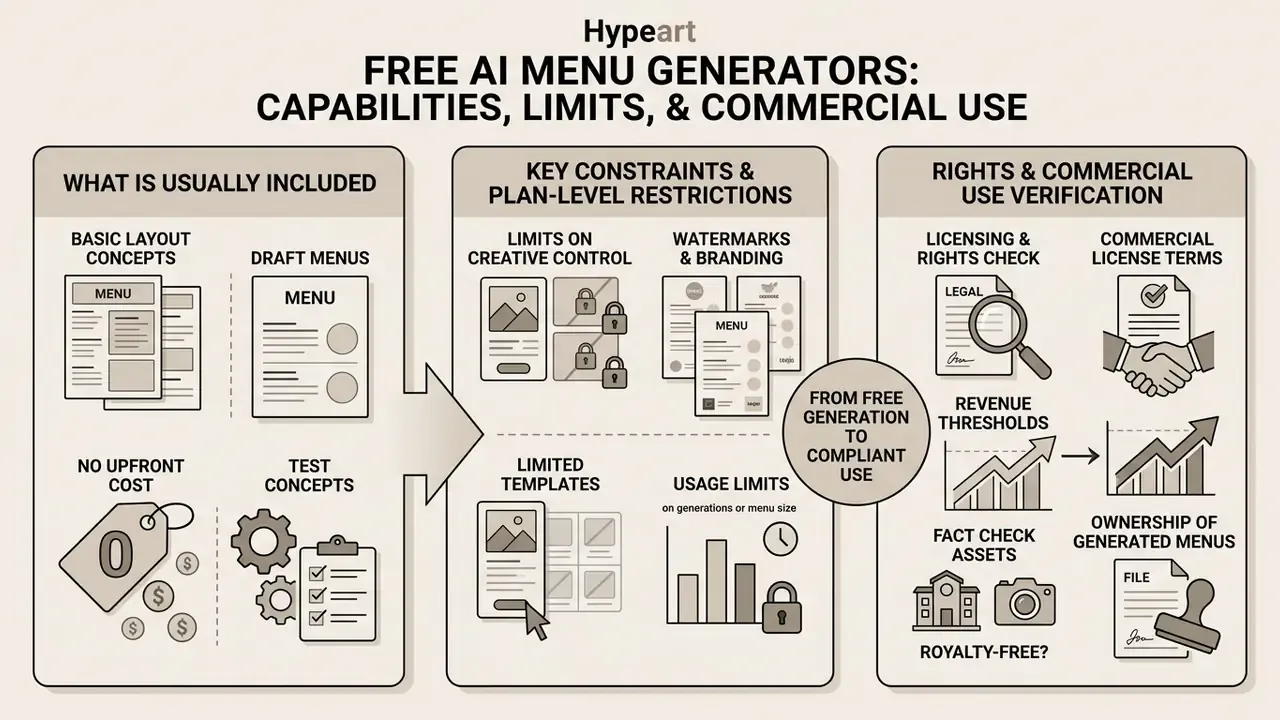
Infographic detailing features, plan constraints, and commercial licensing requirements for menu design tools

Using a free ai menu generator lets operators test layout concepts and draft menus without upfront software cost, though free tiers impose real constraints. Common limits include watermarked PDF exports, capped resolution, restricted template selection and daily credit caps. Our calculators help estimate the point at which a paid tier costs less than the design hours it replaces.

Commercial use rights for generated assets depend heavily on platform license terms and legal thresholds regarding human creative authorship. Verify license agreements before printing or publishing free-tier menu designs for business operations. Yes, that means reading the terms. It takes ten minutes and prevents a reprint.

What a Free AI Menu Maker Usually Includes

A free ai menu maker typically offers basic text-to-layout generation, standard templates and browser preview. Users can input dish lists, test font combinations and evaluate automated formatting without entering payment details. Developers wiring generation into internal tooling should check whether the vendor exposes an api on free plans, since most restrict programmatic access to paid tiers.

Exporting final artwork from a free menu maker ai, however, often yields watermarked documents or low-resolution raster images unsuitable for commercial printing. Free-tier behavior varies widely. Some platforms allow unlimited generation but stamp a wordmark on every PDF download. Others grant a small quota of roughly three to five watermark-free designs. Several offer daily credits with capped export resolution, then require an upgrade to paid commercial plans. If your search intent is "create a menu with ai free" for a pop-up that runs three weekends, a free tier may genuinely be enough. For permanent signage, it usually is not.

Rights to Images, Logos and Generated Menus

This information is general in nature and does not replace consultation with a qualified attorney on copyright and AI-content licensing questions.

Commercial usage rights for AI-generated layouts, synthetic images and logos are governed by vendor license terms and copyright regulation. Official guidance from the U.S. Copyright Office states that purely AI-generated outputs lacking substantial human authorship are not eligible for copyright protection (U.S. Copyright Office Registration Guidance, 2023).

«In most EU jurisdictions, AI-generated content is not protected by copyright without sufficient human creative contribution.»

- European Parliament, "The development of GenAI from a copyright perspective" (2025). https://www.europarl.europa.eu/meetdocs/2024_2029/plmrep/COMMITTEES/JURI/DV/2025/05-12/2025.05.12_item6_Study_GenAIfromacopyrightperspective_EN.pdf

There is a practical consequence that vendor marketing rarely mentions. When a platform advertises that "all AI menu designs are royalty-free for commercial use without copyright concerns," it is describing its own permission to use the file, not exclusivity. A layout produced with no meaningful human authorship may be unprotectable, meaning a competitor across the street could legitimately reproduce a near-identical design. Human editing, arrangement and creative modification are therefore both a legal and a competitive necessity. The same authorship logic applies to brand marks, which is why operators evaluating AI logo generators should review copyright and trademark implications before committing a mark to signage and menus.

Fact check: licensing and commercial rights verification

When a Free Menu Generator Is No Longer Enough

Free platforms become inadequate once you need high-resolution CMYK print files, custom vector logo integration, multi-unit location management or POS synchronization. Professional operations require unwatermarked 300 DPI exports to guarantee sharp results on heavy menu stock.

Growing brands and multi-location chains also need centralized brand governance, permission management and multi-format distribution. Public pricing illustrates the threshold: multi-location restaurant platforms are commonly priced per location per month, for example roughly $41 per location per month for design suites with teams, permissions, multi-brand support and POS integrations, and $49 to $149 per location per month for restaurant POS tiers, with custom pricing above five locations. See current plan structures on AI Media Pricing. In these scenarios, commercial plans supply the administrative controls, enterprise integrations and verified licensing rights that free tools cannot.

How to Choose the Best AI Menu Generator for a Restaurant
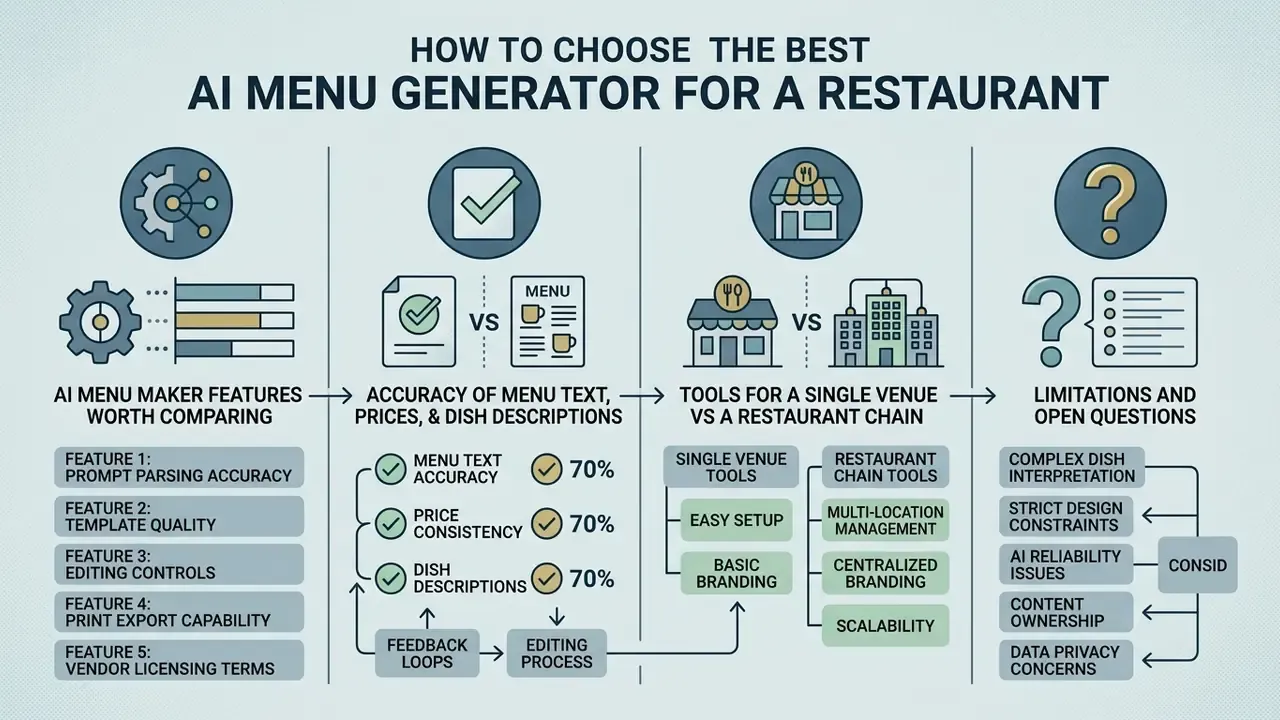
Comparison chart outlining key features, accuracy metrics, venue scaling, and potential software limitations

Selecting the best ai menu generator means evaluating prompt parsing accuracy, template quality, editing controls, print export capability and vendor licensing terms. Test candidates with your ugliest real dataset, not the demo one. A 90-item menu with three price columns and seven allergen flags reveals more in ten minutes than a week of feature comparison.

Measuring options against objective operational standards also prevents platform lock-in. Teams already standardized on general design suites should weigh AI design tools with commercial licensing against purpose-built menu platforms, and anyone comparing categories can explore the hub for side-by-side reviews. A structured matrix helps decision-makers align capability with requirement.

AI Menu Maker Features Worth Comparing

Key features to evaluate include text-to-layout parsing speed, grid customization, brand asset management and export flexibility. The software should accept custom brand fonts, vector SVG logos and custom color swatches to maintain design compliance.

Export versatility matters just as much: the system must generate CMYK print-ready PDFs and responsive mobile pages from a single source dataset. Column-count control (one, two or three columns), real-time preview, reusable export presets for reprinting, OCR import from an existing PDF or photo, and reviewed allergen fields separate professional menu platforms from generic design generators. Automated translation, where leading tools advertise 50-plus target languages, plus allergen tagging, further extends usefulness for international or high-volume venues. A search for "best ai menu generator free" will surface plenty of options, but almost none of them clear the export and governance bar above.

Accuracy of Menu Text, Prices and Dish Descriptions

Automated text generation carries inherent risks: model hallucination, inaccurate ingredient descriptions, pricing errors. Misrepresenting dish components or omitting an allergen warning creates operational, legal and health exposure.

This information is general in nature and does not replace consultation with a food-safety or allergen-compliance specialist.

Governance guidance from federal standards bodies emphasizes that generative outputs containing factual statements or prices must undergo mandatory human verification before public release (NIST AI Risk Management Framework). NIST names this failure mode precisely, confabulation, a system «confidently presenting erroneous or false content». In a menu context that means an invented ingredient, a wrong allergen flag or a mistyped price reaching the guest.

«Practitioners cite time savings and personalization as key AI benefits, while also flagging data-privacy risks and technology dependence.»

- Khan & Khan, Journal of Global Hospitality and Tourism (2024), survey of 163 hospitality professionals. https://digitalcommons.usf.edu/cgi/viewcontent.cgi?article=1046&context=jght

Set strict editorial review protocols. Kitchen managers verify ingredients and prices against POS records before printing, and any generated factual claim (sourcing, region of origin, "organic", "wild-caught") gets cross-referenced with a trusted internal record. Where synthetic imagery is suspected in supplied marketing assets, AI image authenticity verification adds one more control before publication.

Tools for a Single Venue vs a Restaurant Chain

Single-location venues need intuitive, low-cost tools focused on fast editing, seasonal updates and simple QR menu hosting. Their criteria center on ease of use, template variety and a clean PDF download flow.

Multi-location chains demand enterprise governance: multi-brand management, role-based access, centralized template locking and automated multi-unit pricing updates. Enterprise platforms hold brand consistency by restricting local managers to location-specific items and operating hours while core branding stays locked. The practical split is between immutable layers (brand voice, legal disclaimers, menu architecture) and editable layers (address, hours, local specials, regional pricing), backed by cross-location dashboards that surface deviations from brand standards.

«AI and machine learning are systematically associated with more personalized content, improved timing and resource optimization, changing consumer engagement patterns.»

- Cunha et al., GeoJournal of Tourism and Geosites (2024). https://gtg.webhost.uoradea.ro/PDF/GTG-2-2024/gtg.53214-1226.pdf

POS synchronization and real-time stop-list management. The decisive difference between a static PDF and a dynamic AI menu platform is integration with the point-of-sale and inventory layer (Toast, Square, NCR Aloha and similar). When an ingredient runs out, a properly integrated layout engine:

Architecturally, ask whether the vendor offers a documented API, native POS connectors, or only manual CSV import. That answer determines whether your stop-list stays accurate during a Friday rush. Dynamic menus remove the worst guest-experience failure, an item refused after the order is accepted, and free the vacated slot to promote a higher-margin alternative. Operators implementing availability-aware menus commonly report double-digit uplift on substituted high-margin items, though the figure should be validated per location rather than assumed. Lifecycle coverage matters as much as creation: the platform should deploy one menu source to print, web, QR, kiosk and POS displays, and it must stay usable for non-technical marketing and operations staff.

Evaluation matrix for selecting an AI menu generator
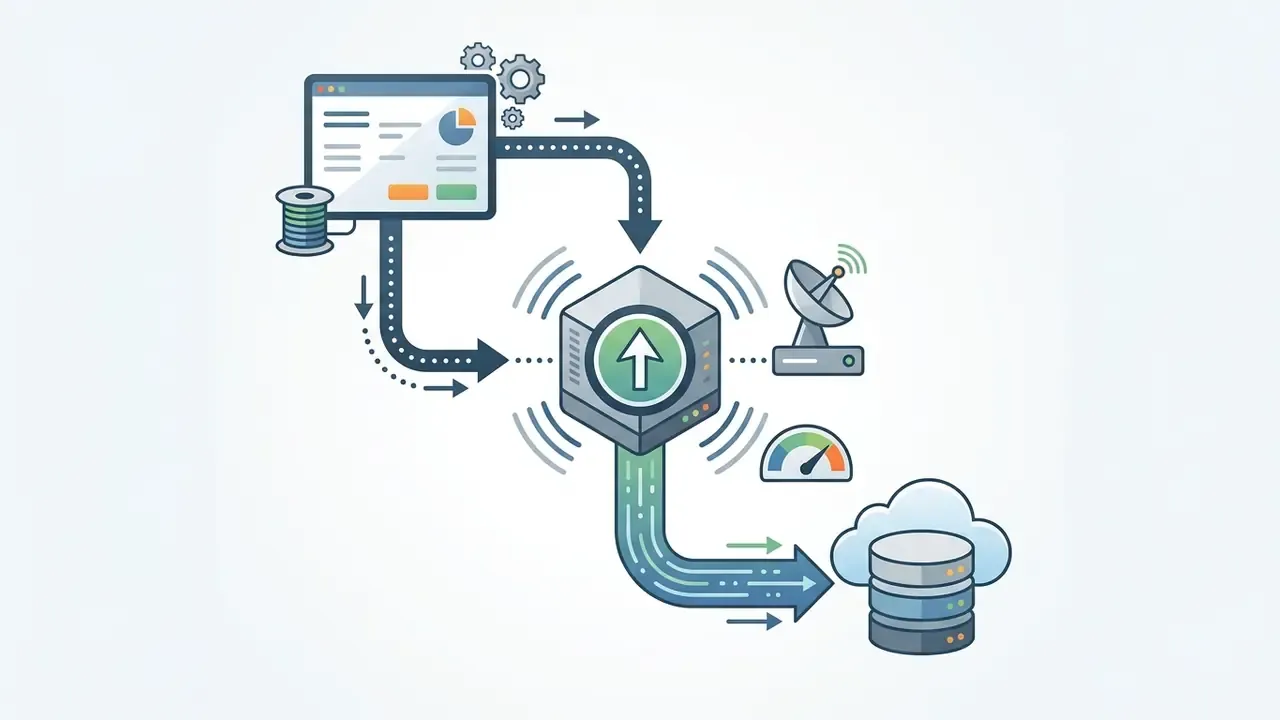
Data flow diagram showing a central hub receiving information from a dashboard and sending it to the cloud
Receives a webhook signal from the POS or inventory system.
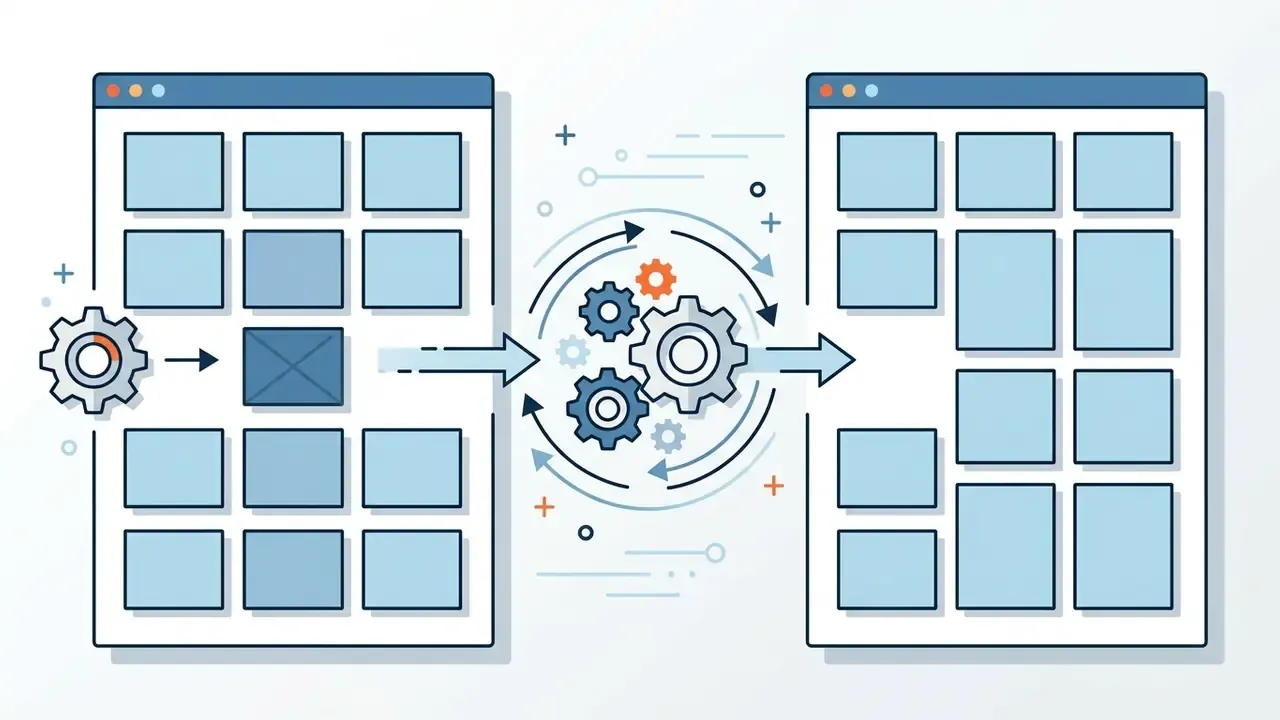
Two grid layouts connected by a central gear mechanism showing how items shift to fill empty spaces
Recalculates the grid automatically, hiding the unavailable item without leaving visual holes or broken column balance.
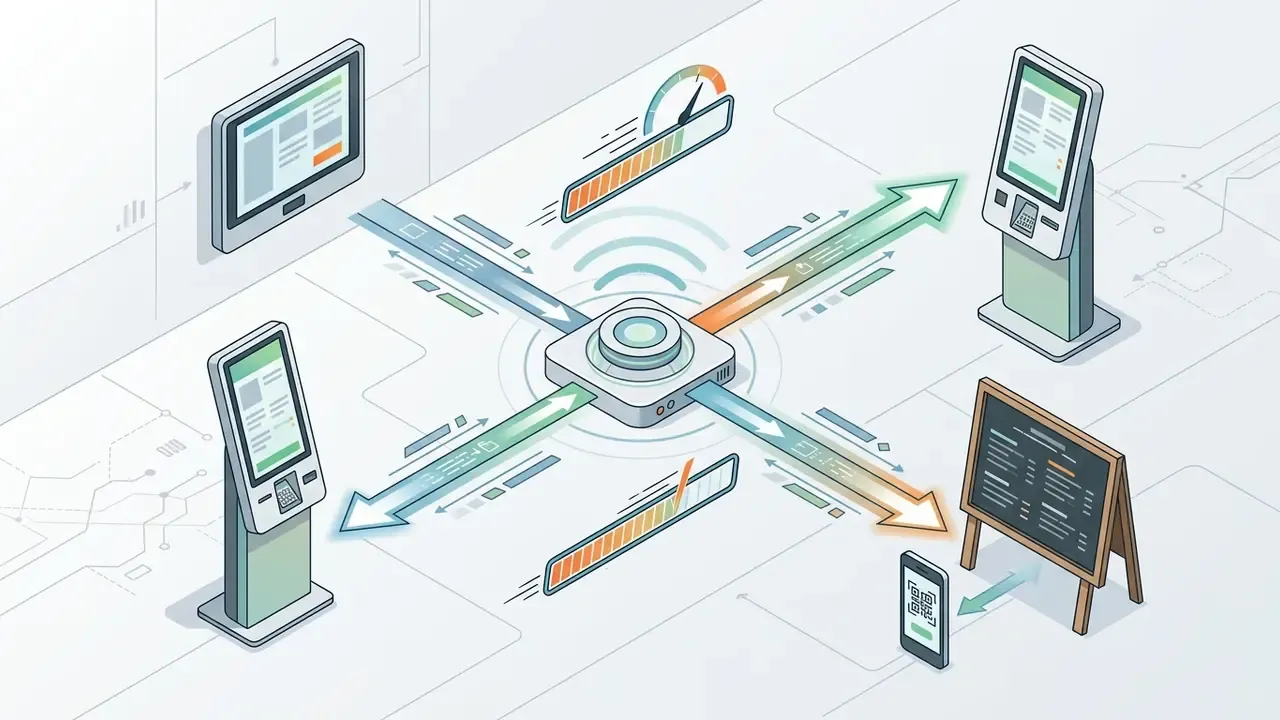
Central hub broadcasting data to digital kiosks, tablets, and mobile devices with speed indicators
Pushes the update to digital QR menus, ordering pages and self-service kiosk screens in under two seconds.
Evaluation criterionSingle venue needsMulti-location chain needsOperational impact
Prompt and text parsingBasic text import from Word or PDF filesDirect POS database integration and multi-language parsingCuts manual data entry time and removes price transcription errors
Brand control and stylingPre-made templates with basic color adjustmentsLocked corporate brand kits, custom fonts, vector logo managementHolds brand identity compliance across all operating units
Inventory and availability syncManual hiding of sold-out items in the editorWebhook-driven POS and inventory sync with automatic grid recalculationPrevents out-of-stock orders and protects guest experience at peak service
Export capabilitiesStandard 300 DPI PDF download and static QR linksAutomated multi-format output (print CMYK, mobile web, POS, social)Guarantees press-ready quality and dynamic digital updating
Licensing and governanceBasic commercial rights on standard subscription tiersEnterprise agreements, compliance audit trails, data security guaranteesMitigates copyright risk and protects proprietary operational data
Review and approval workflowSingle-owner sign-off before downloadRole-based approval chain with recorded approver and revision historyCreates reproducible evidence that a human verified prices and allergens

Summary: single venues benefit from low-complexity platforms focused on rapid template customization. Multi-unit chains require enterprise governance, locked brand controls, direct POS syncing, availability-aware layouts, an auditable approval chain and robust compliance licensing.

Limitations and Open Questions

A few things remain unsettled, and pretending otherwise would be dishonest. Vendor-published speed and conversion figures are rarely independently audited. Copyright treatment of AI-assisted layouts is still evolving in both US and EU practice. Aggregator image policies change without notice. And the double-digit uplift figures quoted for availability-aware menus come from operator reports, not controlled trials. Treat all of it as a hypothesis to validate against your own analytics, POS exports and guest feedback.

FAQ About AI Menu Generators

Can ChatGPT create a restaurant menu design?

ChatGPT and similar large language models can write dish descriptions, organize categories and generate structured JSON or HTML, but they do not output graphic design files directly. They act as textual content engines that prepare raw menu text for dedicated visual tools or automated layout software. For a visually styled, print-ready layout, that structured text must be imported into a specialized generator. Specialized platforms add what chat output lacks: template libraries, column control, brand fonts and palettes, QR generation, real-time preview and press-ready PDF export. Combining conversational text generation with a structured layout tool delivers both polished copywriting and precise spatial typography.

Do you need design skills to use an AI menu maker?

No formal graphic design training is required to produce a functional, visually balanced menu with a menu ai maker. Modern platforms automate grid alignment, typography sizing, padding and color pairing through built-in heuristics and pre-configured templates. Basic operational judgment still matters, though. Vendors themselves position editing, font changes, palette adjustment and layout refinement as post-generation user tasks. Operators must review whether font choices are readable at arm's length, whether pricing aligns cleanly and whether brand colors hold sufficient contrast in the actual dining room.

Will AI-generated food photos look like the real dishes?

Synthetic image tools can produce realistic-looking food, but consumer research shows guests frequently identify AI imagery and react negatively. Studies report lower ratings for healthiness, naturalness and willingness to consume (Journal of Sensory Studies, Stright et al., 2025).

«Participants in Atlantic Canada could distinguish AI from real food images; AI perception correlated negatively with willingness to consume.» - Stright et al., Journal of Sensory Studies (2025). https://onlinelibrary.wiley.com/doi/full/10.1111/joss.70015 Synthetic images also misrepresent portion sizes, plating and ingredient proportions. Image-to-reality mismatch is empirically linked to lower post-consumption satisfaction, reduced trust and weaker repurchase intention. Use authentic photography of actual preparations wherever possible.

How does POS and inventory synchronization work with an AI menu platform?

The POS or inventory system sends a webhook when stock for an ingredient is depleted. The menu engine recalculates the grid, removes or greys out the affected item without breaking column balance, and republishes digital QR menus, ordering pages and kiosk screens within seconds. Print files are regenerated at the next scheduled reprint. Before purchasing, confirm whether the vendor provides a documented API, native connectors for your POS (Toast, Square, NCR Aloha) or only manual CSV upload.

What exactly must be checked before sending an AI-generated menu to press?

Confirm trim size, 3 mm bleed on all sides and text inside the safe zone. Verify CMYK color mode and 300 DPI minimum image resolution. Embed or outline all fonts. Include crop marks in the PDF. Check body-text contrast at 4.5:1 and icon or header contrast at 3:1. Validate every price against POS records. Have the kitchen manager sign off on ingredients and allergen markers. Export the digital RGB version separately, without crop marks or bleed.

How should a prompt be written to get an accurate menu layout on the first attempt?

List the venue name, every section and every item with its exact price rather than asking the model to invent content. Add explicit style parameters (palette, typeface family, column count, orientation) and constraints such as "isolated menu design on a solid background, flat graphic view, not a styled photo, print-ready layout". Then iterate by changing one variable per run. Pass dynamic values such as prices and allergen flags as structured fields, and keep instructions separate from the data.

Do delivery platforms allow AI-generated dish photos on menu listings?

Marketplaces require imagery to represent the actual item. DoorDash states that customers should see a realistic representation of what they will receive and removes photos that do not properly represent the item. Uber Eats and Grubhub enforce comparable accuracy expectations. Fully synthetic dish images therefore carry removal risk. Use AI for retouching, background removal and color correction of genuine kitchen photography instead. Note that some platforms offer complimentary professional photo shoots to merchants without assets.

Can layout changes be made by chat instead of manual editing?

Yes. Conversational editing lets you issue plain-language instructions, for example darken category headers, swap a color marker for an icon, remove a logo background and center it, and the system applies them to the generated file. Computer-vision features strip backgrounds from uploaded PNG or JPG logos, produce a transparent layer and fit the mark inside brand clear-space zones. Manual editors remain available for pixel-level corrections.

Can menus generated by free AI tools be legally used for commercial dining operations?

Commercial rights depend on the platform's terms of service and legal standards for human authorship. Purely AI-generated output without human modification may lack copyright protection in both the United States and most EU jurisdictions, meaning competitors could reproduce the design. Free tiers may also restrict commercial usage outright, sometimes permanently for assets created on that tier. Always verify license terms, embedded stock and font licenses, and revenue thresholds before commercial publishing.

Internal Hub Navigation

For related design tools, automation platforms and licensing frameworks:

  • Access the complete technical terms catalog in the glossary.
  • Review commercial software plan structures on the AI Media Pricing page.
  • Get technical assistance and operational guidance via AI Media Support. Editorial note: this guide is maintained by our AI tooling research desk. Marcus Hale, author. Regulatory guidance on AI-generated content changes frequently; verify vendor terms and jurisdictional rules at the time of purchase.
Hypeart

Welcome to Hypeart

Sign up and generate for free

OR

Already have an account?