*Author note: Marcus Hale writes this analysis. The stated focus areas (model risk, AI governance, document automation in regulated industries) are illustrative and *
Executive Summary
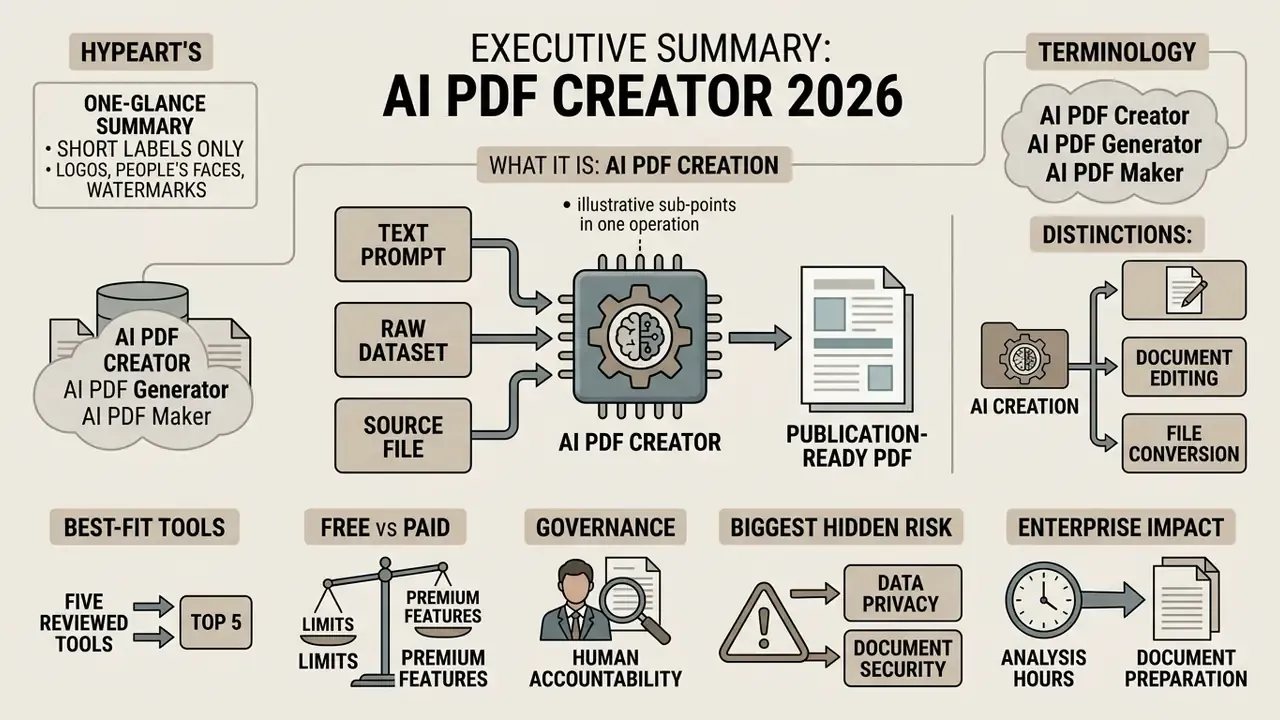
- What it is. An AI PDF creator turns a text prompt, a raw dataset, or an existing source file into a formatted, publication-ready PDF in one operation: content drafting, sectioning, layout, and export included.
- Terminology. In 2026, AI PDF creator, AI PDF generator, and AI PDF maker are marketing synonyms for the same architecture. No standards body distinguishes them.
- Creation is not editing, and neither is conversion. Generation authors new text and layout; editing modifies existing blocks; conversion only changes file format.
- Best-fit tools. Gamma and LightPDF for prompt-to-document work, Microsoft Fabric RTI and Stimulsoft for data-driven reports, PDF Generator API for programmatic volume, Adobe Acrobat AI Assistant for enterprise archives, Canva and Venngage for brand-governed one-pagers, Inkfluence AI for multi-format book exports.
- Free vs paid. Free tiers cap volume (3 to 60 documents per month, or lifetime credits), often watermark exports, and frequently restrict commercial rights. Paid tiers unlock unwatermarked output, PDF/A and PDF/UA export, SOC 2 or ISO 27001 controls, and zero-retention processing.
- Governance. Automated generation does not remove human accountability. Preflight QA, prompt controls (NIST SP 1353), and model validation under SR 11-7 and OCC 2011-12 remain mandatory in regulated environments.
- Biggest hidden risk. Not the model. The export boundary: fonts that fail to embed, uncompressed raster images, and rasterized tables that destroy selectable text.
This guide walks through definitions, document types, real use cases, five reviewed tools, free versus paid limits, a selection framework, a six-stage workflow, preflight QA, risk-adjusted ROI, and a closing FAQ.
In enterprise environments, document preparation quietly eats hours that belong to analysis. Automated document platforms now let organizations turn complex data feeds and unstructured drafts into publication-ready files. Modern software workflows combine natural language processing, computer vision, and structured layout synthesis to produce standardized PDF files on demand.
Why does this matter to a bank or a mature fintech? Because the document is where the model's output meets the auditor.
What an AI PDF Creator Is and Which Problems It Solves
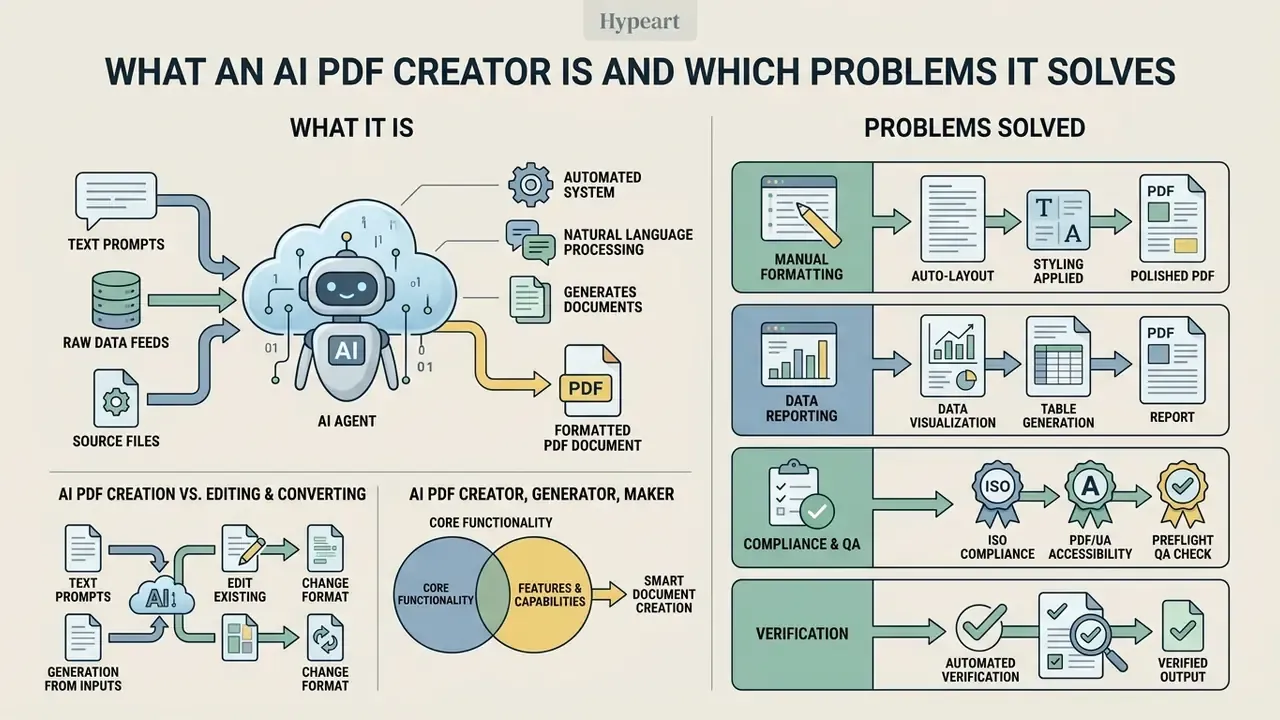
An AI PDF creator is an automated software system that transforms text prompts, raw data feeds, or existing source files into formatted PDF documents using natural language processing, layout synthesis algorithms, and computer vision models. Unlike static file converters or manual desktop publishing tools, an ai pdf creator handles content drafting, section organization, visual hierarchy, and formatting in a single operational step.
These platforms attack a narrow but expensive bottleneck: the last mile of corporate documentation. Organizations deploy an ai pdf generator to automate document assembly, convert unstructured data into structured reports, and enforce consistent visual governance across teams. Applied inside a business process, an ai pdf maker removes manual typesetting, speeds up ai pdf creation, and keeps every generated ai document aligned with formal branding guidelines.
«AI systems for PDF creation combine intent recognition, entity extraction, and layout generation to produce professional documents with measurable quality.»
AI PDF Creator, Generator and Maker: Is There a Real Difference?
Software vendors in 2026 treat ai pdf creator, pdf generator ai, and ai pdf maker as functional synonyms. The difference lives in marketing copy, not in software architecture. All three labels describe systems that analyze user instructions, structure section hierarchies, draft written copy, apply visual formatting, and output complete pdf files.
Product documentation from LightPDF, Presentations.ai, and Aspose.ai shows the same core loop. These ai powered tools process an input prompt or source document, generate formatted layout structures, and export final pdf documents. Enterprise buyers can treat the labels as equivalent during vendor evaluation. No ISO standard, regulator, or peer-reviewed publication defines creator, generator, and maker as separate technical categories. Useful signal, that: when a vendor claims category exclusivity, ask which specification defines the category.
How AI PDF Creation Differs from Editing and Converting PDFs
The real line sits between content generation and format transformation. Traditional tools edit pdf files by altering existing text blocks, modifying images, or reordering pages inside an established layout. Conversion tools transform a source document from DOCX or XLSX into a fixed layout without writing new narrative text or changing structural hierarchy.
Ai pdf creation does something else. It generates original written content and custom document layouts directly from raw data or unstructured instructions. Generative pipelines apply language models and content-aware layout transformers to author new text, build structured sections, and inject data visualizations into a newly rendered PDF. No converter performs that operation, and it is worth being blunt about it.
Quantified verification:
«The tender document generation system reached F1 = 86.8% for entity recognition and ROUGE-1 = 73.2% for generated text, against zero generation in converters.»
So there are three product classes: generators (new content plus new layout), editors such as Adobe Acrobat and Wondershare PDFelement (existing content, modified in place), and converters (format transformation only). Buying an editor when the requirement is generation remains the single most common procurement error in this category. I have watched a procurement cycle stall for two quarters over exactly that mismatch. Teams that also handle visual assets alongside documents should review the rules for commercial use of AI images before publishing generated material externally.
Which Types of PDFs You Can Create with AI
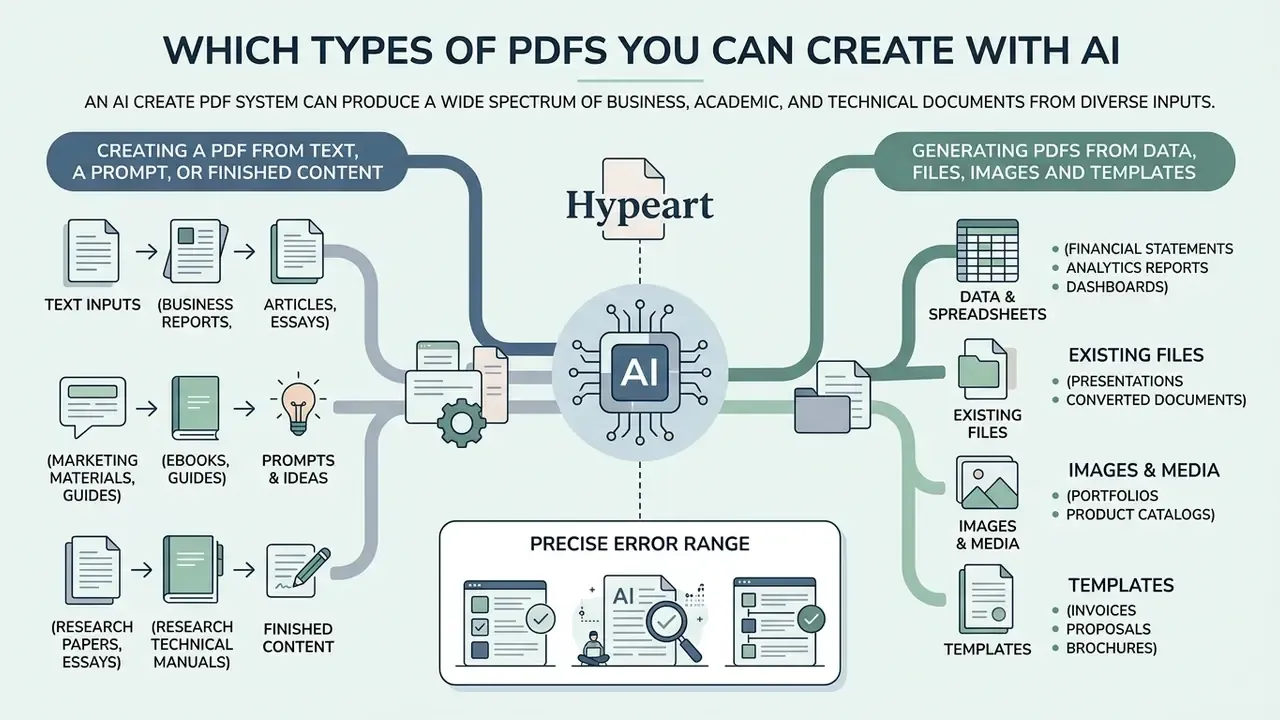
An ai create pdf system can produce a wide spectrum of business, academic, and technical documents from diverse inputs. Modern document models ingest unstructured text prompts, financial spreadsheets, images, slide decks, and legacy files to generate fully structured documents and professional documents.
Organizations use ai create pdf from text engines to turn raw manuscript notes or executive briefs into published briefs. With an ai pdf generator from text, teams convert multi-format input into standardized pdf documents while keeping structural fidelity and selectable text on every page.
Documented input coverage in 2026 is broad. OpenAI file-input APIs accept .pdf, .txt, .md, .json, .html, .xml, .doc, .docx, .ppt, .pptx, .csv, .xls, and .xlsx. Google Document AI additionally handles GIF, TIFF, JPEG, PNG, BMP, and WebP. Gemini multimodal models accept up to 3,000 files per request with a 1,000-page ceiling per file. Output coverage typically spans PDF, Markdown, structured JSON, and, for tabular extraction, CSV or XLSX.
Creating a PDF from Text, a Prompt, or Finished Content
Text-to-PDF generation lets users submit a short prompt or an entire manuscript and receive a formatted document. The writing engine analyzes the input, establishes a logical heading structure, generates complementary body text, and applies page-break rules to keep pages visually balanced.
Platforms such as GenPDF and BuildPDFs read prompts to construct outlines, tables of contents, and stylized typography automatically. Research on DocSynthv2 (Biswas et al., 2024) shows that joint text-and-layout modeling lets generative algorithms structure headings and body blocks coherently.
«DocSynthv2 trains on the PubGenNet dataset, combining layout and text attributes, which allows generation of arbitrary-length documents with consistent section structure.»
Vendor documentation converges on the same three-stage mechanism: the prompt is decomposed into sections, heading hierarchy and body blocks are assigned, then layout, typography, spacing, and page-break rules are applied. Venngage separates these responsibilities explicitly. Its writing assistant rewrites copy without rebuilding layout, while its designer adjusts visual hierarchy, spacing, and font pairing independently. For teams that also generate decorative text artifacts for covers or headers, an ascii art text generator covers a narrower but adjacent need.
Generating PDFs from Data, Files, Images and Templates
Data-driven PDF generation ingests structured databases, spreadsheets, raster images, and legacy source files to build automated reports. Multimodal architectures such as Google Document AI and OpenAI file processing engines extract data points from CSV, XLSX, PNG, and PDF sources to populate pre-designed layout templates. When source material arrives as scans or screenshots, pair the pipeline with text recognition from images to recover machine-readable values before generation.
In a study on government report automation, Gupta et al. (2025) demonstrated that Gemini Pro and GPT-3.5 Turbo can parse embedded charts from a source PDF, update the underlying data tables through knowledge base retrieval, and re-render revised graphics back into the document.
Precise error range:
«Mean data error in regenerated visualizations ranged from 0.87% to 17.46%; with an internal knowledge base, several scenarios reached 0% error.»
The methodological takeaway matters for risk owners. Error rates are not a fixed property of the model; they are a function of retrieval scope. Grounding generation in a governed internal knowledge base collapsed the error rate to zero in several documented scenarios, while open external retrieval produced the 17.46% upper bound. Same model, very different exposure.
ISO documentation frames the output side. ISO 32000-2:2017 defines PDF as a device-independent electronic document form aimed explicitly at software that creates PDF files. ISO 19005-4:2020 (PDF/A-4) states that PDF 2.0 can preserve page-based documents over time and embed any other content type as an attachment. ISO 24517-1 covers engineering workflows, and ISO 15930-7 and 15930-9 cover print exchange with CMYK, RGB, gray, spot colour, transparency, and optional content.
Where AI PDF Generators Are Actually Used
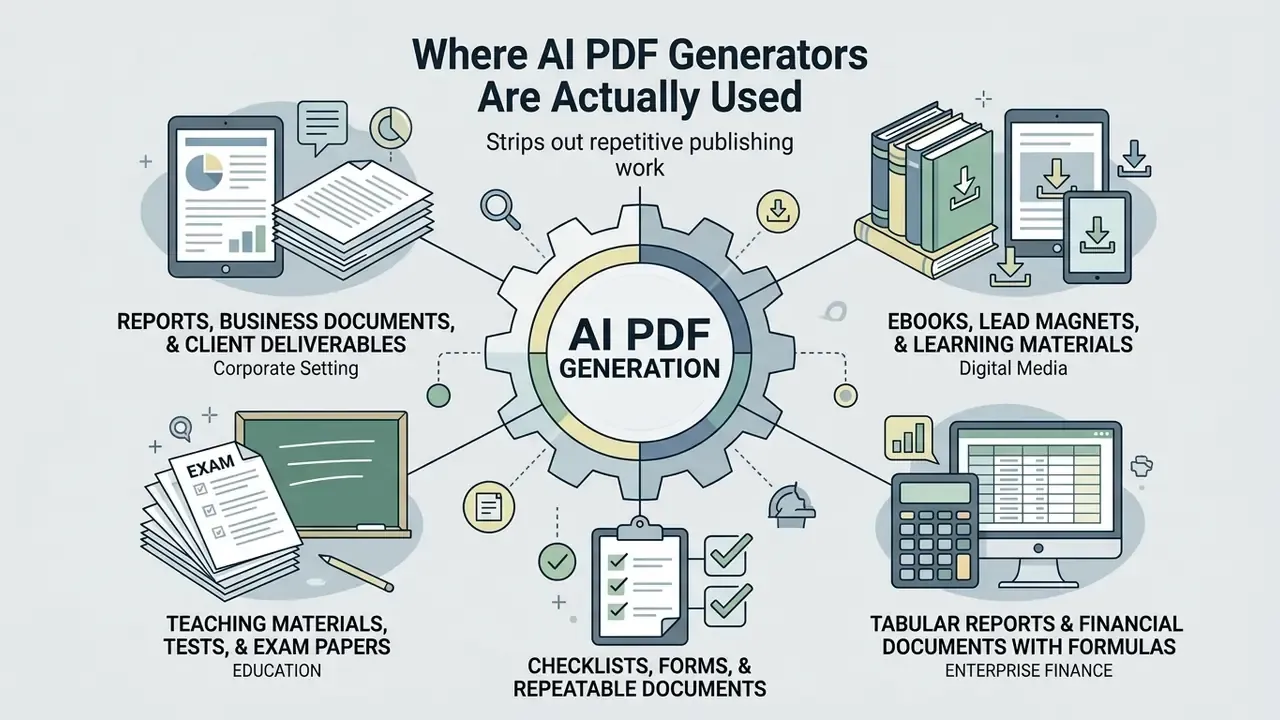
Organizations deploy an ai pdf generator tool across commercial, educational, and enterprise operations to strip out repetitive publishing work. With an ai pdf generator in place, teams remove formatting delays and produce consistent professional documents tuned to specific audiences and regulatory frameworks.
Choosing the right pdf generator ai depends on the document type and the actual document needs. Client proposals, internal compliance records, public educational resources: each carries different layout governance. Note the asymmetry documented across sources. Vendor use-case lists are permissive and automation-focused, while education-sector and public-sector guidance adds mandatory human review, disclosure of AI-generated content, and integrity controls.
Reports, Business Documents and Client Deliverables
Finance and operations teams use AI PDF generators to author executive briefings, market analysis reports, client proposals, and compliance audits. Venngage and Gamma auto-apply enterprise Brand Kits, including exact brand fonts, corporate colour palettes, and official logos, across every generated page. Gamma additionally ingests Word, PDF, and Google Docs sources, applies a visual theme, and exports consistently formatted PDF or DOCX output. Teams assembling branded visual assets alongside documents can consult our overview of AI photo editors for corporate materials.
One corporate risk team used automated report generation to synthesize monthly operational risk logs into executive summary PDFs. The system ingested raw incident data from internal databases, applied standard compliance templates, and compiled a formatted PDF report in minutes. That shift reduced report compilation time by roughly 85% in that internal deployment while removing manual layout errors from monthly audit filings.
«Automating government reports with Gemini Pro and GPT-3.5 Turbo removes labour-intensive manual data lookup and visualization revision, unreachable with traditional methods.»
Ebooks, Lead Magnets and Learning Materials
Marketing organizations and educational institutions use AI PDF makers to design multi-page ebooks, promotional lead magnets, course workbooks, and study guides. Modern platforms generate full narrative content, design stylized title pages, format multi-column layouts, and build automatic tables of contents, including publication furniture such as title page, copyright page, and contents.
Tools such as Inkfluence AI let creators generate complete multi-chapter publications from an initial topic outline or uploaded research notes, with cover generation and PDF or EPUB export in the same workflow. One caution: multi-format export is not unique to any single vendor. Gamma, Designrr, and several ebook builders also export beyond PDF, so treat "only tool that does X" claims with a raised eyebrow. For design teams seeking complementary image automation, our guide to the automatic photo editor online free outlines automated media asset creation, and an auto video editor covers the same idea for motion assets.
Teaching Materials, Tests and Exam Papers
AI PDF generators let instructors and instructional designers build assessment materials with automatic typesetting. A properly configured system can:
- Generate test variants, including multiple-choice (MCQ) question banks, from an uploaded textbook, lecture deck, or syllabus.
- Produce a separate answer key page with adjustable difficulty levels and restricted distribution, so the key exports as a distinct PDF.
- Compress a chapter into revision cheatsheets using a compact two-column print layout.
- Assemble structured exam papers mixing MCQ and essay formats with consistent numbering, mark allocation, and page-break control.
Education-sector guidance is explicit here: this output requires teacher approval and clear identification of AI-generated content before it reaches students. Automation shortens production. It does not transfer pedagogical accountability.
Tabular Reports and Financial Documents with Formulas
Unlike plain text editors, AI PDF makers such as DocPDF and AI Doc Maker accept Excel input and build PDF reports on top of it, preserving dynamically recalculated formulas, embedded sparkline charts, and pivot-style sales summaries. Practical patterns include:
- Spreadsheet-to-PDF financial packs where the AI writes the executive commentary while the formula layer stays intact in a parallel XLSX export.
- Invoice and certificate runs generated from JSON or SQL rows, with per-record personalization.
- Reconciliation appendices where numeric columns render as vector tables rather than screenshots, so selectable text survives for audit search.
Checklists, Forms and Repeatable Documents
Recurring administrative workflows benefit most from automated template population. Agencies and corporations use AI form generators to produce standardized operational checklists, fillable customer application forms, and recurring maintenance logs.
Federal agencies, including the U.S. Administration for Children and Families (ACF) and the Federal Highway Administration (FHWA), mandate fillable PDF templates to standardize recurring submissions. ACF's NOI Checklist Template captures required submission data, while its Automated Function Checklist documents automated CCWIS functions. Platforms like DocuPotion ingest structured database records, detect and map form fields once, then populate fillable fields individually or in bulk, delivering completed PDF files without manual intervention.
Free AI PDF Creator: What Free Plans Include and When You Must Upgrade
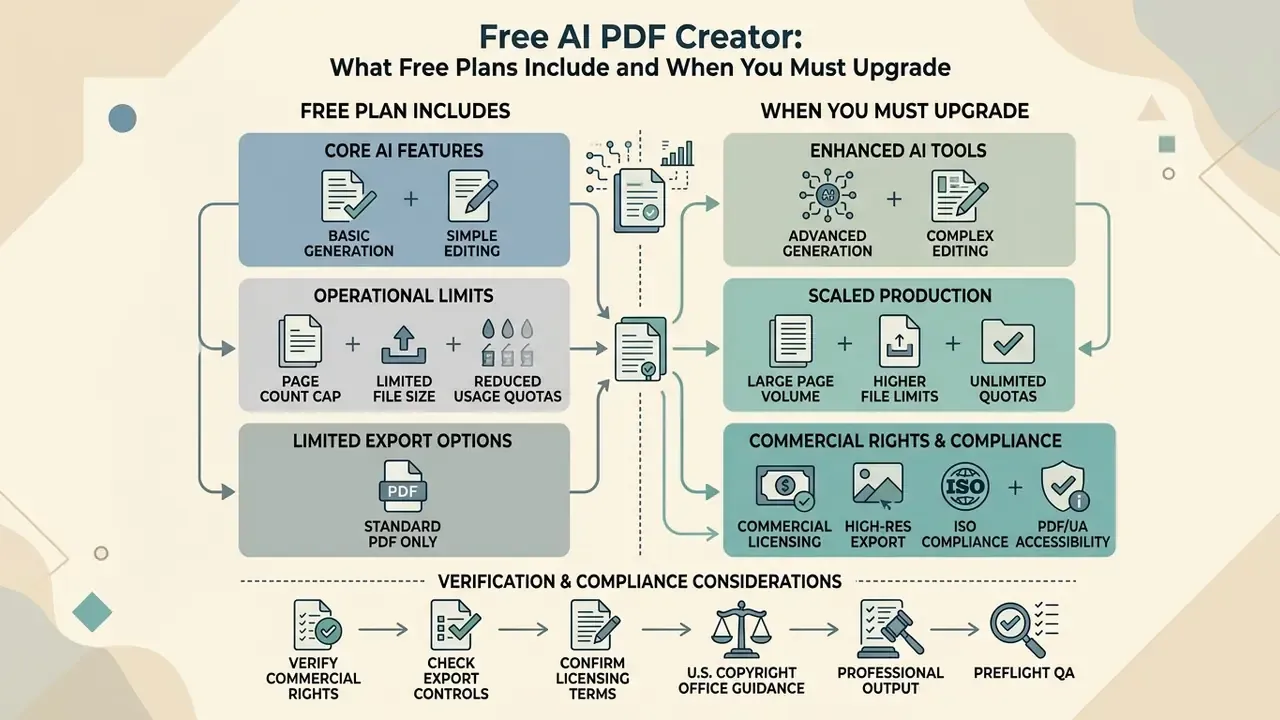
Evaluating a free ai pdf solution starts with the operational limits baked into vendor pricing. A free ai pdf creator or ai pdf generator free tier is fine for testing. Production environments usually need a paid plan for unlimited exports, removal of platform branding, and full commercial usage rights.
Comparison of free vs paid AI PDF creator tiers
| Feature & capability | Free tier (free AI PDF tools) | Paid enterprise tier (commercial) |
|---|---|---|
| Document generation volume | Capped, e.g. 3 to 60 documents per month, or lifetime credit limits | Unlimited or high-volume enterprise monthly allowances |
| Watermark policy | Mandatory platform watermark or footer credit on export | Clean, unwatermarked exports with custom branding options |
| Template access & styling | Standard layout templates, limited font and colour customization | Full Brand Kit integration, custom fonts, advanced themes |
| Export formats & resolution | Basic standard-resolution PDF export | High-resolution PDF, PDF/A archival, PDF/UA, EPUB, DOCX |
| Commercial usage rights | Restricted, or granted for non-commercial personal use only | Full commercial rights and legal copyright indemnification |
| Data privacy & security | Public cloud processing; possible model training on inputs | SOC 2 and ISO 27001 compliance, zero data retention, private instance |
| Regulated-data handling (PII / MNPI) | No contractual guarantees; unsuitable for client or market-sensitive data | DPA, regional data residency, audit logging, VPC or air-gapped deployment |
Documented tier examples confirm the pattern. PDF Generator API free allows up to 5 templates with watermarked download and a single user, while $29 per month removes the watermark and the template cap. Gamma Free provides 400 lifetime AI credits and stamps a "Made with Gamma" watermark on PDF export. Piktochart's free plan allows up to 60 documents and 60 AI credits per month with unwatermarked export on standard templates. Adobe's AI Assistant caps individuals at 1,000 requests per user per month. Tenorshare PDNob's trial permits 20 watermark-free exports, 5-file batches, 15 MB uploads, and 120-page documents. Sources disagree on whether free tiers always watermark: some stay clean until quota exhaustion, others watermark only test documents.
For teams whose blocker is budget rather than capability, the open-source route is genuinely viable. MIT-licensed pipelines can be self-hosted inside a private network, which also solves the data-residency problem that free SaaS tiers structurally cannot.
Understanding these tier distinctions tells you when an ai pdf maker free online platform stops being enough. To analyze cost structures across complementary productivity utilities, compare options in our software calculator directory.
What a Free AI PDF Maker Typically Includes
Free tiers for tools like Piktochart, ZenDoc AI, and Inkfluence AI provide entry-level generation. Users can produce short documents from text prompts, access standard layout templates, and run basic PDF utilities such as page merging, compression, and simple OCR. ZenDoc AI's free plan, for example, allows 3 AI generations and 5 document-tool uses per day across 25 document types, with PDF and DOCX export.
Restrictions are consistent across free platforms. Vendors enforce daily or monthly generation quotas (3 generations per day, 2 PDFs per day, 60 lifetime credits) and cap upload file sizes. Inkfluence AI caps by chapters rather than documents: 5 chapters upfront plus 5 more monthly. Formatting features that usually survive into free tiers include AI chat, citations, templates, themes, charts, callouts, table of contents, and page numbers. What disappears first: brand control, archival export presets, and unwatermarked output.
How to Choose the Best AI PDF Generator Tool
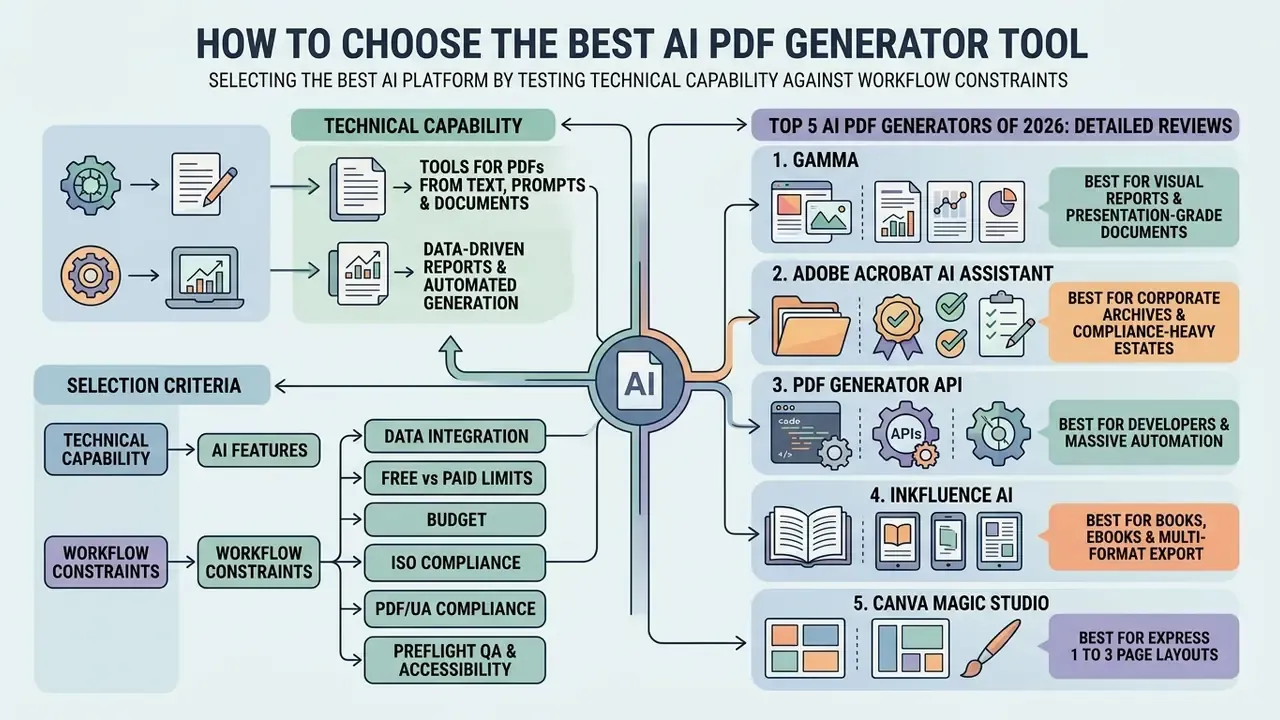
Selecting the best ai platform means testing technical capability against workflow constraints. Decision-makers should assess ai pdf creation tools, ai pdf generator tools, and ai pdf maker tools on rendering fidelity, compliance standards, data security, and customization depth.
Comparative matrix of AI PDF tools by operational scenario
| Use-case scenario | Primary tool category | Key technical features | Recommended target platforms |
|---|---|---|---|
| Prompt-to-document creation | Text-to-PDF generators | NLP outline generation, auto-sectioning, visual themes | Gamma, LightPDF, GenPDF, Aspose.ai |
| Data-driven corporate reports | Programmatic and real-time engines | Database connectors, dynamic chart rendering, scheduled PDF export | Microsoft Fabric RTI, Stimulsoft AI, Runable AI |
| Brand-governed client deliverables | Design and layout platforms | Brand Kit enforcement, custom typography, high-res PDF export | Venngage AI, Piktochart AI, Canva AI |
| Interactive forms and applications | AI form builders | Automatic field detection, fillable PDF field tagging, webform conversion | PlatoForms, Anvil Document AI, Instafill.ai |
| Archival and compliance publishing | Standards-aware PDF engines | ISO 32000-2 (PDF 2.0), ISO 19005-4 (PDF/A-4), ISO 14289-2 (PDF/UA-2) | Adobe Acrobat Pro, Quarto with Typst, Docling pipeline |
| Model-risk-governed generation (regulated) | Self-hosted or private-instance engines | VPC or air-gapped deployment, audit logging, no vendor lock-in, validation evidence | Docling, Quarto with Typst, PDF Generator API (private deploy) |
«OmniLayout-LLM, trained on one million document layouts, substantially outperforms specialised experts and general-purpose LLMs on the M^6Doc dataset.»
Layout quality is therefore measurable, not purely aesthetic. Ask vendors which layout model backs their renderer, and on what document distribution it was trained. The answer separates serious engines from wrappers. To explore technical customer resources, open the hub in our support platform.
Tools for PDFs from Text, Prompts and Existing Documents
For prompt-driven generation, the market leaders are Gamma, LightPDF, Jenova AI, Venngage, and Aspose.ai. These tools accept text prompts or uploaded manuscript files (DOCX, TXT, PDF) and generate structured PDF layouts with automated section hierarchy and body copy. Input scope is the practical differentiator: Gamma and Jenova ingest the widest range of existing material (Word, PDF, Google Docs, URLs, images), while prompt-only generators expect you to paste content manually.
These platforms use contextual transformer models to extract key narrative points and format them into readable visual sections. Conversational document review sits nearby too, since the same multimodal stack lets you ask ai with an image attached. To analyze alternative tool comparisons, explore the hub in our software matrix directory.
Top 5 AI PDF Generators of 2026: Detailed Reviews
1. Gamma, best for visual reports and presentation-grade documents
- Pros: generates structure and design from a single prompt; ingests Word, PDF, and Google Docs; built-in view analytics; exports to PDF, PPTX, and DOCX.
- Cons: limited control over classic prepress PDF/X output; free exports carry a "Made with Gamma" watermark.
- Pricing: free tier with 400 lifetime AI credits; Plus and Pro from roughly $15 to $20 per user per month, which removes the watermark.
- Verdict: the strongest default for internal decks, briefings, and client summaries that must look designed rather than typeset.
2. Adobe Acrobat AI Assistant, best for corporate archives and compliance-heavy estates
- Pros: full ISO standards support (PDF 2.0, PDF/A, PDF/UA, PDF/X presets); cross-document Q&A and summarization over batches ("PDF Spaces"); enterprise security posture including SOC 2 and HIPAA-aligned offerings; deep Creative Cloud integration; industry-standard Preflight engine.
- Cons: it is an editor and analyst, not a from-scratch generator, so it will not author a new document from a bare prompt; AI Assistant requests cap at 1,000 per month per individual user; NFR and non-commercial licences forbid commercial use of generated material.
- Pricing: Acrobat Pro with AI Assistant from about $19.99 per month.
- Verdict: buy it for validation, remediation, and archival export. Not as your generation engine.
3. PDF Generator API, best for developers and massive automation
- Pros: REST API generating 10,000 or more PDFs per hour from JSON with HTML and CSS templates; sub-second generation; clean per-record personalization for invoices, certificates, and compliance packs.
- Cons: no visual no-code editor for business users; free tier limited to 5 templates with watermarked download and a single seat.
- Pricing: free (5 templates, watermarked); from $29 per month for unlimited watermark-free templates; team plans around $199 per month.
- Verdict: the right choice when the document is a data artifact, not a narrative.
4. Inkfluence AI, best for books, ebooks and multi-format export
- Pros: one workflow from idea to outline to draft to design to export; simultaneous PDF, EPUB, and DOCX output; built-in cover generator; audiobook narration; the free plan explicitly grants commercial rights with only a small footer credit.
- Cons: optimized for long-form text rather than dense tabular reporting; free tier caps by chapters (5 upfront plus 5 monthly); multi-format export is not exclusive to this vendor despite the marketing.
- Pricing: free tier available; paid plans from roughly $20 per month.
- Verdict: best fit for lead magnets, workbooks, and multi-chapter publications.
5. Canva Magic Studio, best for express 1 to 3 page layouts
- Pros: thousands of templates; Brand Kit enforcement; Magic Write text generation; resizing and translation; PDF export inside the same canvas.
- Cons: weak on long-form, since beyond roughly ten pages the block-fitting turns manual; limited archival and prepress presets.
- Pricing: free tier; Pro around $14.99 to $19.99 per month.
- Verdict: ideal for one-pagers, social PDFs, and quick client handouts. For a deeper feature and licensing breakdown, see our Canva AI Generator overview.
Honorable mentions: Wondershare PDFelement (AI grammar correction, batch conversion, improved OCR, from $79.99 per year, and note it is an editing suite rather than a generator), Venngage AI (brand-governed business documents with stated commercial-use rights), and Piktochart AI (60 documents per month, unwatermarked on standard templates).
Solutions for Data-Driven Reports and Automated Generation
Enterprise reporting needs engines that connect straight to live data repositories. Microsoft Fabric Real-Time Intelligence, Runable AI Reports, and Stimulsoft AI Designer automate multi-page report generation from SQL databases, Jupyter notebooks, or real-time event streams. Microsoft documents Fabric RTI as an end-to-end solution for event-driven, streaming, and data-log scenarios with real-time dashboard and Power BI rendering. Runable researches current data, organizes sections, and builds reports in real time before PDF export. Stimulsoft's AI-powered Designer creates reports from a single text prompt against connected sources.
These systems apply pre-configured templates to streaming data, calculate quantitative summaries, render charts, and export compliant PDF files automatically.
«Enhanced PDF structure recognition in the ChatDOC RAG system produced more accurate answers in 47% of cases, against 15% degradations versus baseline RAG.»
That asymmetry, 47% improvements against 15% regressions, is the practical argument for investing in structure-aware parsing before scaling any data-driven report pipeline. Not a glamorous line item. It is the one that decides answer quality. Developers evaluating programmatic integration can browse the hub to examine our platform API specifications.
Selection Criteria: Content Quality, Design, Customization and Export
Technical selection criteria should start with compliance against international PDF standards. Enterprise platforms should support ISO 32000-2 (PDF 2.0) for document interchange, ISO 19005-4 (PDF/A-4) for long-term preservation, and ISO 14289-2 (PDF/UA-2) for accessibility. ISO 24495-1:2023 on plain language principles becomes a hard criterion whenever the generator produces public-facing or consumer-facing documents. Teams benchmarking AI tooling across formats can also review our comparison of the best AI image generators for a parallel evaluation framework.
Platforms should also offer advanced typography controls, custom cover page layouts, and support for high-resolution print export profiles such as ISO 15930-9 (PDF/X-4). Open toolchains compete well here: Quarto with Typst documents highly customizable templates and supports PDF/UA-1, PDF/A-1 through PDF/A-4, and explicit PDF versions 1.4 through 2.0.
A practical scoring order for regulated buyers: (1) accessibility and archival standard support, (2) data residency and retention controls, (3) layout-model quality on your document class, (4) platform independence and export portability, (5) AI feature depth, (6) price. Price last, yes. Teams reviewing commercial licensing criteria can open the hub in our commercial rights portal.
Model Risk and Governance Fit (Regulated Industries)
In banking, insurance, and asset management, an AI PDF generator that touches reporting becomes a model-adjacent control point. Align procurement with existing supervisory expectations:
- SR 11-7 and OCC 2011-12 (model risk management) document intended use, data lineage, limitations, and independent validation evidence for any generator whose output feeds regulatory or investor reporting.
- Shadow AI control free consumer tiers processing PII or MNPI are the primary leakage vector. Enforce an allow-list and route confidential generation to a private instance.
- Audit reproducibility retain the prompt, the input dataset hash, the model or version identifier, and the exported file together, so a generated document can be reproduced during examination.
- Human accountability generation transfers no responsibility. A named reviewer signs off before distribution, full stop.
How to Create a PDF with AI: Step-by-Step from Idea to Download
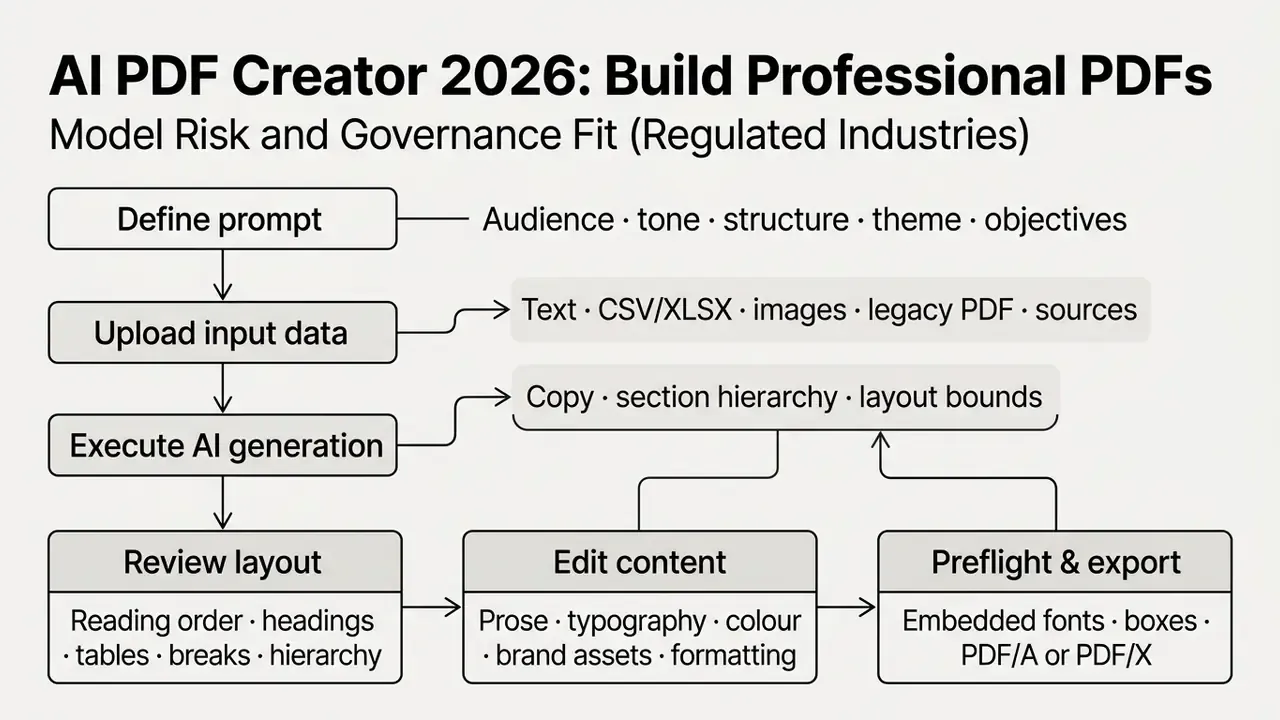
Six-stage workflow for generating professional PDF documents with AI engines (alt text: ai create pdf from text).
- Define prompt and objectiveswrite precise instructions covering target audience, tone, document structure, and visual theme.
- Upload input data and sourcesimport raw manuscript text, database files, spreadsheets, or reference images.
- Execute AI generationrun the generative engine to synthesize copy, establish section hierarchy, and build layout bounds.
- Review layout and hierarchyverify structural reading order, heading levels, table formatting, and page-break placement.
- Edit content and formattingrefine generated prose, adjust typography, fine-tune colour schemes, upload official brand assets.
- Preflight and export PDFrun preflight checks for embedded fonts and margins, then download the final PDF document.
Follow this pipeline and output quality stops depending on who happened to build the document. To review legal documentation governance, browse the hub in our legal portal.
Describe the Goal, Audience and Document Type
Effective generation begins with a well-structured prompt. Established prompt engineering frameworks, including NIST SP 1353, the Harvard HUIT GenAI guidelines, and the CO-STAR pattern (Context, Objective, Style, Tone, Audience, Response), all emphasize five core parameters: context, objective, style, target audience, and response format.
When authoring a document brief, define the reader explicitly ("executive board members"), the required tone ("analytical and authoritative"), the section outline ("executive summary, risk analysis, recommendations"), and the output format constraints. Clear framing is most of the battle.
Universal prompt template for a production-grade PDF (copy and fill in):
[Context]: I am producing a [document type, e.g. internal audit report]
           for [target audience, e.g. the board risk committee].
[Objective]: Persuade leadership to approve [decision / action].
[Structure]: 1. Executive summary  2. Analytical section with a data table
             3. Prioritised recommendations  4. Appendix with assumptions
[Style & design]: Strict corporate tone. Two-column grid.
             Palette #0F172A (primary) / #38BDF8 (accent). Font Inter or Arial.
[Data rules]: Use only the figures in the attached file. Flag any value you
             cannot verify instead of estimating it.
[Output format]: Deliver H2/H3 markup, finished text blocks, table markup,
             and document metadata ready for PDF/A-4 export.
The [Data rules] line is the single highest-value addition for regulated use. Instructing the model to flag unverifiable values rather than interpolate them converts silent hallucination into a visible review item.
Add Text, Source Documents, Data or Images
Output quality tracks input preparation almost linearly. In line with NIST Secure Software Development Framework (SSDF) guidance for generative AI, source datasets and uploaded files should undergo cleaning, curation, filtering, sanitization, fact-checking, deduplication, and noise reduction before ingestion. NIST's public-facing AI documentation templates additionally require that preprocessing steps be recorded as part of the dataset profile, which is exactly the artifact an examiner will ask for.
«Input data quality directly drives error: with an internal knowledge base the system reached 0% visualization error, against 17.46% with external sources.»
Make sure uploaded spreadsheets carry clear column headers, tabular data is structured logically, and images hold sufficient resolution for rendering. Where source imagery is low-resolution, run AI image quality enhancement before ingestion rather than after export. Upscaling a placed raster inside a finished PDF is far more destructive, and rarely recoverable. Clean input also reduces hallucination risk in generated reports. Formatting guidance for AI-readable sources is consistent across vendors: use consistent heading styles, strip repeated headers and footers that add noise, and always generate the PDF from the source document so text stays selectable rather than rasterized.
Review Content and Layout, Then Download the Final PDF
The final stage is rigorous preflight QA before distribution. Using Adobe Acrobat Pro Preflight or a comparable validation tool, inspect the generated PDF for structural and visual defects. Adobe documents Preflight explicitly as a workflow for analyzing a PDF and correcting problems before delivery.
Final PDF quality-assurance checklist
CONTENT              ☐ Figures reconciled against source data
                     ☐ Prose reviewed for clarity and grammar
                     ☐ Unverifiable values flagged, not estimated
                     ☐ AI-generated content disclosed where required
LAYOUT               ☐ MediaBox / TrimBox / BleedBox correct
                     ☐ No text overlapping visual elements
                     ☐ Page count, size and orientation as specified
                     ☐ Bleed applied per printer's technical brief
TYPOGRAPHY & ASSETS  ☐ All fonts fully embedded (subset permitted)
                     ☐ Raster images meet target DPI
                     ☐ Colour spaces correct (CMYK / RGB / spot)
                     ☐ Transparency model matches the export preset
ACCESSIBILITY        ☐ Semantic heading tags present
& EXPORT             ☐ ALT text on every meaningful image
                     ☐ Logical reading order verified
                     ☐ Language metadata set
                     ☐ Text contrast ≥ 4.5:1
                     ☐ Exported with the target PDF/A, PDF/UA or PDF/X preset
One preset nuance worth remembering: PDF/X-4 preserves live transparency, while PDF/X-1a flattens at high resolution. Use the preset named in your printer's technical brief instead of whatever the dialog defaults to.
- Content verification
- fact-check generated numbers against raw source data; review prose for clarity and grammar. For teams publishing externally, AI content detectors for document verification add a pre-publication check on generated assets.
- Layout integrity
- confirm MediaBox, TrimBox, and BleedBox margins; check that text blocks do not overlap visual elements.
- Typography and assets
- ensure every font is fully embedded; verify raster images meet target DPI.
- Accessibility and export
- validate semantic heading tags, inspect image ALT text, confirm logical reading order, then export with the target PDF/A or PDF/X preset. PDF/UA (ISO 14289) requires tagged structure, logical reading order, alternative text, language metadata, and usable semantics for assistive technology. AI output frequently produces plausible-looking but non-compliant heading and table tagging, so automated remediation still needs a human pass.
Risk-Adjusted ROI and Total Cost of Ownership
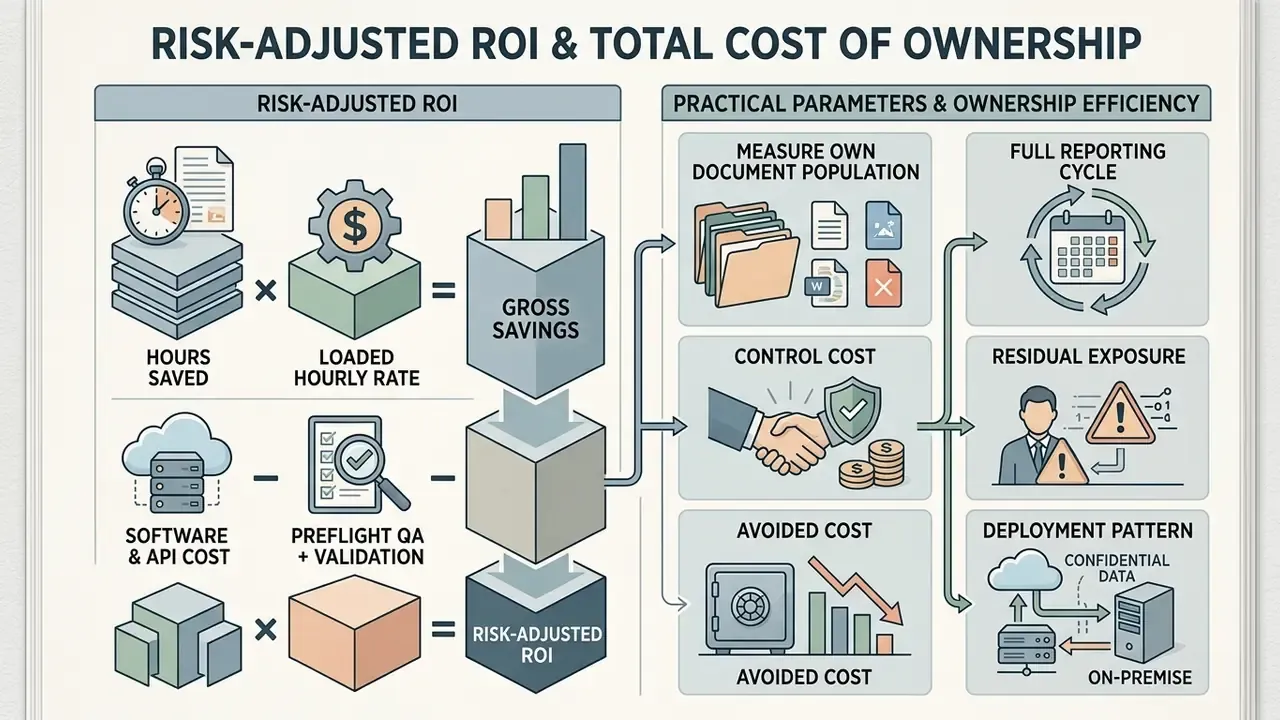
Efficiency claims in this category are usually gross, not net. A defensible business case prices the controls alongside the savings:
Risk-Adjusted ROI = (Hours saved × Loaded hourly rate)
                  − (Software & API cost)
                  − (Preflight QA + validation labour)
                  − (Residual hallucination / rework exposure)
Practical parameterisation:
- Hours saved. Measure on your own document population over a full reporting cycle, not on a vendor demo. The 85% reduction cited earlier came from one internal risk-reporting deployment; treat it as an upper bound.
- Software cost. Include per-seat subscriptions, API generation volume, and the private-instance premium where data residency is required.
- Control cost. Budget explicit hours for preflight QA, accessibility validation, and, in regulated settings, independent model validation aligned to SR 11-7 and OCC 2011-12.
- Residual exposure. Anchor on documented error ranges: 0.87% to 17.46% factual error in regenerated visualisations, collapsing toward 0% when retrieval is restricted to a governed internal knowledge base. Multiply the residual error rate by the cost of a single downstream misstatement.
- Avoided cost. Include the value of eliminated manual layout defects, which in audit filings often exceeds the drafting time saved.
Deployment pattern for confidential data. For generation touching PII or MNPI, the reference architecture is a private-cloud VPC or an air-gapped contour. The document engine and layout model run inside the network boundary, read from the governed data warehouse over an internal connection, write outputs to controlled storage with audit logging, and never egress prompts or source records to a public endpoint. MIT-licensed pipelines such as Docling make that economically viable, with a documented median of 0.79 seconds per page on CPU.
What remains unresolved. Three gaps deserve honesty. First, there is no independent, cross-vendor benchmark for layout fidelity on regulated financial documents, so vendor claims stay unverified until you test them. Second, accessibility tagging quality in generated PDFs is measured inconsistently, and remediation labour is routinely underestimated in budgets. Third, licensing positions shift faster than procurement cycles, which means a right-to-use assessment made twelve months ago may already be stale. Plan for re-verification, not for a one-time sign-off.
FAQ: Common Questions About AI PDF Creators
Enterprise teams evaluating ai that can create pdf software keep returning to the same questions: language support, interactive forms, accessibility compliance, and operational security. Short answers below.
Can an AI PDF Creator Produce Documents in Multiple Languages?
Yes. Modern ai that can create pdfs tools use multilingual large language models capable of generating and translating content across dozens of languages, and several vendors claim 50 or more. Keeping layout intact during translation is the harder part. Text expansion and contraction, font glyph embedding, and right-to-left (RTL) script reflow are the dominant failure modes. Sourced metric:
«Direct editing of layout metadata cuts processing time by 57% while preserving structural formatting across language variants of a document.» "Visually-grounded multilingual PDF translation", arXiv (2026). https://arxiv.org/abs/2503.16585 The supporting corpus covers 3,956 PDFs across 15 language pairs with original layout metadata preserved, which is what makes layout-grounded evaluation possible in the first place. When source documents arrive as scans, combine the pipeline with text recognition from images for multilingual documents so glyph recovery precedes translation rather than following it.
Can AI Build a Fillable PDF Form?
Yes. Advanced AI form builders turn natural language descriptions or static PDF files into interactive fillable forms. PlatoForms, Google Workspace AI Form Builder, Anvil Document AI, and Instafill.ai all automate field creation. Google's AI Form Builder generates forms from prompt text and from uploaded PDFs via extraction and OCR. PlatoForms drafts a document from a single sentence, then converts it into a downloadable PDF or an online form with text, layout, fields, tables, and signature placements. Anvil turns a flat PDF into a fillable PDF with auto-detected fields. Instafill scans layout patterns and inserts typed text, date, checkbox, and signature fields for review. These platforms scan static layouts, identify field boundaries, and insert interactive text inputs, radio buttons, checkboxes, dropdown menus, and digital signature fields. The resulting PDF keeps its visual formatting while enabling digital data collection.
«RIDGE generates hierarchical structured text with entity categories and relations, learning from OCR data without manual annotation, a foundation for automatic form creation.» RIDGE, "Relation-Rich Visual Document Generator", arXiv (2026). https://arxiv.org/abs/2503.16585
Are AI-Generated PDFs Accessible by Default?
No. Accessibility must be verified, never assumed. PDF/UA (ISO 14289, with ISO 14289-2:2024 for PDF 2.0) requires tagged structure, logical reading order, alternative text, language metadata, and semantics usable by assistive technology. AI-generated PDFs commonly ship with heading levels that look right visually but carry no tags, tables rendered as images, and missing ALT text. Remediation tooling helps. A human accessibility review is still mandatory before public distribution.
Can I Use AI-Generated PDFs Commercially?
It depends entirely on the vendor's ToS and on how much human authorship the document contains. PDFgen and Inkfluence AI grant commercial rights on generated documents. PDFlash restricts output to personal educational use. Adobe forbids commercial use of NFR-licensed output and claims broad downstream rights over gallery submissions. Separately, the U.S. Copyright Office requires that more-than-de minimis AI-generated content be disclosed and excluded from a registration claim. Verify both layers, vendor licence and copyright posture, before monetising anything.
Does an AI PDF Generator Replace a PDF Editor?
No. Generators author new content and layout. Editors such as Adobe Acrobat and Wondershare PDFelement modify existing files, run preflight, remediate tagging, and manage forms. Mature workflows use both: generate in one tool, validate and export to standard in another.
What Is a Safe First Step for a Regulated Team?
Pick one recurring, low-sensitivity document, for example an internal operations summary, and run it through a single governed pipeline for one reporting cycle. Log the prompt, the dataset hash, the model version, and the reviewer name. Measure hours saved and defects caught. Then decide whether to widen scope. Small, boring, reversible.
Navigation & Glossary Hub
To explore our full repository of technical documentation, software guides, and automated workflow resources, please see the overview in our central navigation hub. Related evaluations include our guide to free photo editors for asset preparation, our comparison of the best AI art generators for illustration sourcing, and lighter-weight utilities such as the avs video editor and the baby name generator ai for readers arriving from adjacent tool searches.
Compliance and Editorial Disclaimer
This article is informational and does not constitute legal, financial, or regulatory advice. Automated PDF generation does not relieve an organization of accountability to auditors, supervisors, or clients: generated documents remain the responsibility of the named human reviewer and of the institution distributing them. Vendor pricing, licence terms, quota limits, and data-retention policies change frequently, so verify current terms directly with the provider before procurement or commercial deployment. In regulated environments, validate any generation pipeline against your internal model risk management framework prior to production use.
Appendix A: Superseded Wording (Retained for Transparency)
- Original claim on generation vs conversion: "Academic research by Gupta et al. (2025) and Gao et al. (2026) demonstrates that AI creation pipelines apply generative language models and content-aware layout transformers to author new text, build structured sections, and inject data visualizations into a newly rendered PDF document." Replaced in the main text with the F1 = 86.8% and ROUGE-1 = 73.2% citation.
- Original claim on data-driven error rates: "re-render revised visual graphics directly back into the document with low factual error rates (0.87% to 17.46%)". Replaced with the fully sourced 0.87% to 17.46% range including the 0% internal-knowledge-base condition.
- Original claim on multilingual processing: "Academic research on visually-grounded multilingual PDF translation (arXiv, 2026) demonstrates that layout-preserving pipelines must account for text expansion/contraction, font glyph embedding, and Right-to-Left (RTL) script reflow." Retained above, now paired with the cited 57% processing-time figure and full URL.
- Original efficiency claim: "This operational shift reduced report compilation time by 85% while eliminating manual layout errors across monthly audit filings." Retained in the main text with an explicit verification note marking it as a single-deployment result rather than an industry benchmark.