Author note: Marcus Hale writes this analysis. Commentary attributed to him is illustrative.
Executive Summary for Risk, Compliance and Media Operations Leaders
- What the technology does An auto video editor converts raw footage into structured semantic data (transcripts, shot boundaries, speaker labels, saliency scores), then executes cuts, reframes, denoising, and captioning automatically. Manual frame-by-frame timeline work largely disappears.
- Documented efficiency Peer-reviewed evaluations show automated clip composition processing two hours of footage in under five minutes on a single GPU. NASA-TLX mental demand dropped from μ=4.58 to μ=2.17 (Z=2.96, p<0.01) versus traditional timeline editing.
- Residual quality risk Automated rough cuts remain first drafts. Human reviewers still rate manual edits higher (4.58 vs. 4.13 on Likert quality scoring), which makes a human-in-the-loop (HITL) gate mandatory, not optional.
- Primary governance exposure Shadow AI. Uploading unreleased earnings commentary, customer-identifying interviews, or internal town halls into consumer-grade editors can transfer confidential media into third-party model-training pipelines.
- Control requirements to demand from vendors zero-data-retention contract clauses, tenant isolation, SOC 2 Type II and ISO 27001 attestation, SSO/SAML, immutable audit logs of who approved each cut, and exportable transcripts for records retention.
- Correct financial framing Use risk-adjusted ROI. Subscription cost alone understates total cost of ownership; add control costs (review labor, validation, legal review) and residual risk overhead.
- Fastest wins silence trimming, caption generation, and aspect-ratio reframing. Those three tasks show the highest measured time savings and the lowest editorial risk.
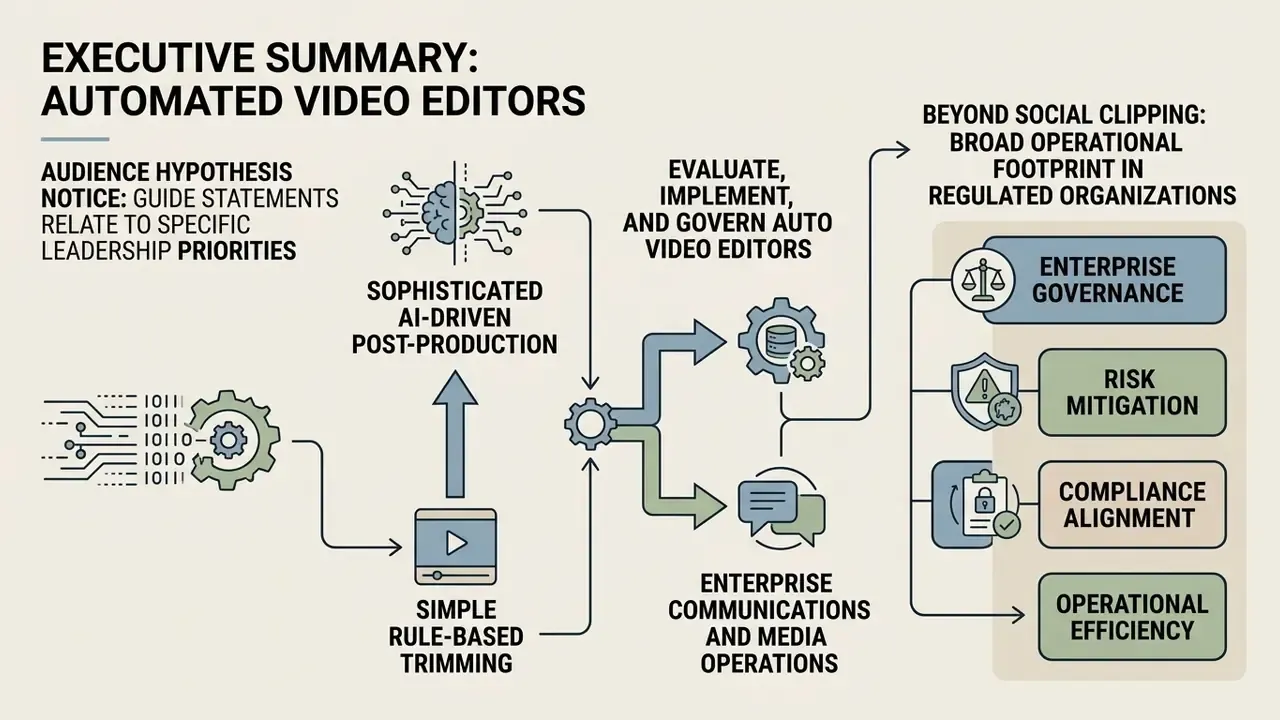
Automated video post-production has evolved from simple rule-based clip trimming into sophisticated AI-driven editing architectures. The global AI video generation and editing software market is projected to reach USD 3.67 billion in 2026, expanding at a CAGR of 21.4% through 2036, according to recent industry forecasts (Grand View Research, 2026). Modern software solutions process raw video footage, transcribe spoken audio, identify salient highlights, and reframe content across multiple aspect ratios within minutes.
«AI video generation and editing software is projected at USD 3.67B in 2026, expanding at 21.4% CAGR through 2036.»
Understanding how to evaluate, implement, and govern an auto video editor allows enterprise communications teams, independent creators, and digital media operators to scale output while maintaining visual consistency and operational oversight. Search behavior in this category is noisy, by the way: queries such as "auto editor video", "video auto editor", and "video editor automatic" describe the same job, which is turning long raw recordings into publish-ready clips with minimal manual labor.
Inside regulated organizations, the operational footprint is broader than social clipping. Automated editing now touches investor-relations recaps, quarterly earnings summaries, mandatory compliance training modules, onboarding libraries, internal town halls, and customer-service knowledge videos. Each category carries records-retention, disclosure, and accessibility obligations. That is why the same pipeline that saves an editor forty minutes can simultaneously create an unreviewed disclosure artifact when governance gates are missing.
What Is an Auto Video Editor and How Does It Work?
An auto video editor is a software application powered by computer vision, natural language processing (NLP), and machine learning models that automates technical post-production tasks: silence removal, shot selection, audio cleanup, reframing, and captioning, all without manual frame-by-frame timeline editing. It converts unedited raw video into structured semantic data, letting users execute timeline modifications through automated rules or text prompts.
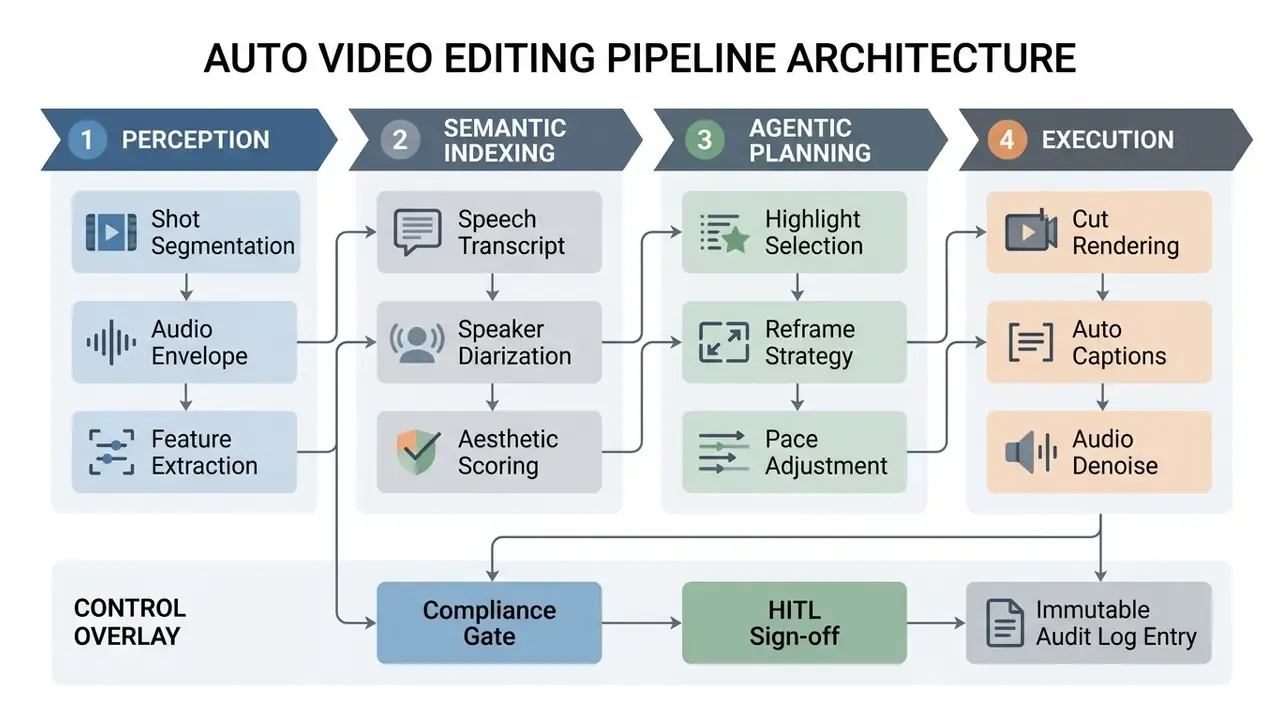
The underlying technical architecture operates across four distinct operational layers:
- Perception Module: Analyzes raw video streams to detect scene transitions, sample frame vectors, measure decibel thresholds, and isolate face or subject keypoints using convolutional neural networks (CNNs) and visual foundation models.
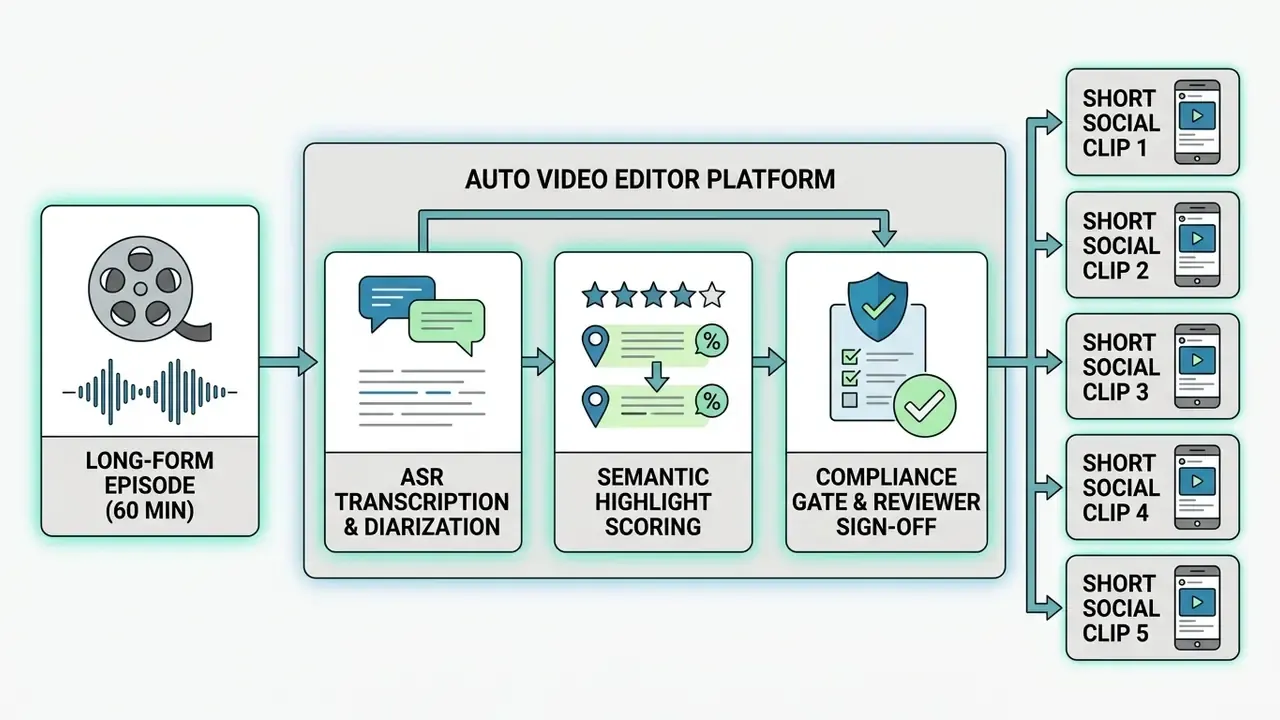
- Semantic Indexing Layer: Generates time-stamped text transcriptions via automatic speech recognition (ASR) engines such as OpenAI Whisper, assigning speaker diarization tags and metadata attributes to specific timestamps.
- Planning & Decision Engine: Uses large language models (LLMs) or dynamic optimization algorithms to score scene saliency, sequence selected clips into storyboards, and apply editing strategies based on target duration or prompt rules.
- Execution Module: Renders technical edits directly on the video timeline, executing cuts, applying auto-reframe crop boxes, balancing audio tracks via FFmpeg or native rendering engines, and embedding synchronized subtitles.
A fifth layer, absent from most consumer tools but required in regulated environments, is the control overlay: a compliance gate that records the model version used, the parameters applied, the reviewer who approved the output, and the transcript diff between machine draft and published master. Without that overlay, the pipeline produces media that cannot be reconstructed during an audit. That is not a theoretical concern. It is the first question an internal auditor asks.
For institutions managing regulated media workflows, examining tool definitions in the AI Media Glossary helps clarify foundational concepts surrounding algorithmic content processing, while the broader video editing tools reference explains how automated modules sit alongside conventional non-linear editors.
AI Auto Editing vs. Manual Video Editing
AI auto editing automates footage ingestion, clip segmentation, pattern recognition, and initial rough-cut assembly. Manual video editing relies entirely on human intervention for every trim point, color adjustment, and track alignment. Manual work offers total creative control, yet it creates substantial cognitive and time overhead when someone has to search through hours of raw recordings.
Research evaluating human-computer interaction in video post-production demonstrates the operational difference between the two approaches:
- Task Duration (Updated): Peer-reviewed evaluation of automated text-based clip composition reports that a two-hour source recording can be processed into candidate clips in under five minutes on a single GPU, while human raters scored automated output at 4.13 versus 4.58 for fully manual edits on a five-point quality scale. Large speed gains, with a measurable and non-zero quality gap.
«Automatic clip composition processes two-hour footage in under five minutes on one GPU; user rating 4.13 versus 4.58 for manual editing.» — Automatic Text-Based Clip Composition for Video News, ACM ICMIP (2024). https://dl.acm.org/doi/10.1145/3665026.3665031
- Cognitive Load: Studies measuring mental demand using NASA-TLX metrics found that script-driven automatic video editors reduced mental demand from () in traditional timeline editors down to () (), indicating a significant reduction in cognitive effort for operators.
«AVscript reduced mental demand from μ=4.58 to μ=2.17 (Z=2.96, p<0.01) across twelve blind and low-vision editors.» — AVscript: Accessible Video Editing with Audio-Visual Scripts, ACM CHI (2023). https://dl.acm.org/doi/10.1145/3544548.3581560
- Interface Interaction: Observational studies of novice editors using natural language AI interfaces show that conceptual editing commands (for example, "remove pauses and highlight key answers") bridge the gap between creative intent and timeline execution more effectively than manual keyframing.
«Combined text-and-sketch input helped novices realize conceptual editing ideas more accurately than conventional timeline editors (N=10).» — ExpressEdit: Video Editing with Natural Language and Sketching, ACM IUI (2024). https://dl.acm.org/doi/10.1145/3640543.3645147
- Rework Load: Automated first drafts frequently require rhythm and pacing correction before publication. Public benchmark literature does not yet converge on a single rework percentage, so teams should measure their own correction rate during pilot phases rather than adopting vendor-quoted figures. (See Appendix A for the superseded figure previously cited in this guide.)
Manual vs. Automated Workflow: Step-by-Step Time Comparison
| Production Step | Manual Editing Workflow | Automated AI Workflow | Time Saved (%) |
|---|---|---|---|
| Rough Cut & Silence Trimming | 20–30 mins per video hour | 1.5–3 mins (automated) | ~90% |
| Subtitle Typing & Syncing | 45–60 mins per video hour | 2–4 mins (ASR generated) | ~92% |
| Aspect Ratio Reframing (16:9 → 9:16) | 15–25 mins per clip | ~30 seconds (auto-reframe) | ~95% |
| Audio Cleanup & Denoising | 10–15 mins per track | One-click spectral cleanup | ~90% |
| Highlight Identification (1-hour source) | 30–45 mins of scrubbing | 1–2 mins (saliency scoring) | ~95% |
| Compliance Review & Sign-off | 5–10 mins | 5–10 mins (not automatable) | 0% |
Which Video Tasks Can Be Automated?
Modern automatic video editor platforms automate a defined set of post-production operations to convert raw footage into publish-ready assets:
| Automated Task | Underlying Technology | Operational Benefit |
|---|---|---|
| Silence Removal | Audio envelope decibel thresholding & ASR endpoint detection | Automatically cuts non-vocal gaps and long pauses. |
| Filler-Word Deletion | Text transcript parsing (identifying "um," "uh," "like") | Removes hesitations from both audio track and captions. |
| Caption Generation | Multilingual ASR with temporal timestamp alignment | Creates synchronized subtitles exportable to SRT/XML. |
| Multi-Format Reframing | Computer vision subject tracking & visual saliency mapping | Recrops 16:9 widescreen footage into 9:16 vertical video. |
| Audio Balancing | Spectral noise profiling & RMS volume normalization | Suppresses background hums and balances voice levels. |
| AI Eye Contact Correction | Gaze-redirection neural networks & facial mesh tracking | Redirects off-camera gaze back toward the lens, useful for teleprompter-read executive messages. |
| Contextual Auto B-Roll | NLP semantic analysis & stock library vector indexing | Automatically inserts relevant stock overlays matching spoken dialogue topics. |
| Smart Jump-Cut & Auto-Zoom | Visual saliency detection & dynamic cropping algorithms | Injects subtle digital zooms on emphasis points to sustain viewer attention. |
| Multi-Camera Switching | Speaker diarization mapped to camera angle metadata | Automatically cuts between angles as speakers change in podcast or panel recordings. |
| Transcript Translation & Dubbing | Multilingual ASR plus neural machine translation and TTS | Produces localized subtitle tracks and synthetic voiceovers for regional audiences. |
Two of these functions deserve explicit governance framing. AI eye contact correction modifies the biometric appearance of a speaker; in regulated communications, synthetic alteration of an executive's gaze or voice may trigger disclosure expectations and should be documented in asset metadata. Contextual auto B-roll pulls third-party stock assets into a branded asset, which makes license provenance a legal question rather than an aesthetic one.
Teams optimizing media ingestion should route source recordings through secure enterprise media ingestion paths: sanctioned digital asset management systems, permissioned cloud buckets, or authenticated conferencing exports. Unauthorized online video grabber utilities remain a common shadow-IT shortcut, and they usually breach both information-security policy and platform terms. Where file weight is the constraint, a governed video compressor workflow reduces transfer volume without moving assets outside approved storage. (See Appendix A for the superseded recommendation.)
Enterprise Data Governance, Shadow AI and Confidential Footage
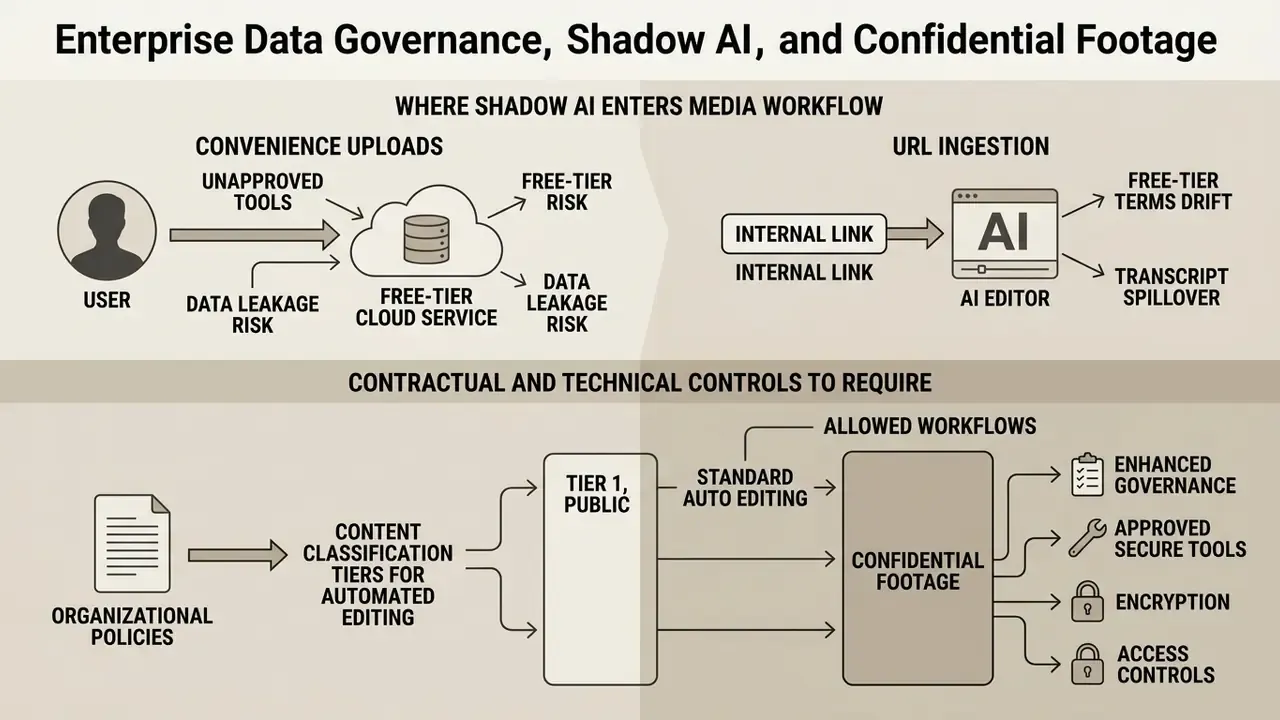
The single largest unmanaged risk in automated video editing is not output quality. It is uncontrolled data movement. A marketing associate who drags an unreleased product demo or an internal risk-committee recording into a consumer web editor has, in one action, transferred confidential material to an external processor whose default terms may permit model training, human review, or indefinite retention.
Where Shadow AI Enters the Media Workflow
- Convenience uploads Browser-based editors require no procurement approval, no installation, and no admin rights, making them the path of least resistance for deadline-driven teams.
- URL-based ingestion of internal links Pasting a private conferencing cloud URL into a third-party editor can grant that vendor durable access to a recording archive.
- Free-tier terms drift Free plans commonly reserve broader data-use rights than paid enterprise agreements. A team that pilots on a free tier may have already exported regulated content under unfavorable terms.
- Transcript spillover Even when video is deleted, generated transcripts, embeddings, and vector indexes may persist in the vendor environment, and they are rarely covered by consumer-grade deletion promises.
Contractual and Technical Controls to Require
| Control Domain | Minimum Enterprise Requirement | Verification Method |
|---|---|---|
| Data retention | Contractual zero-data-retention or defined short retention window with certified deletion | Written clause in MSA/DPA, not marketing copy |
| Model training use | Explicit opt-out from training on customer media, transcripts, and embeddings | Named clause plus vendor attestation |
| Tenant isolation | Logical or dedicated isolation of media, transcripts, and derived vectors | Architecture diagram plus penetration-test summary |
| Security attestation | SOC 2 Type II and ISO/IEC 27001 in scope for the media service, not just the corporate website | Current report with bridge letter |
| Identity & access | SSO/SAML, SCIM provisioning, role-based permissions, session controls | Live configuration test in pilot tenant |
| Auditability | Immutable, exportable logs of uploads, edits, approvals, and deletions | Log sample export during pilot |
| Deployment options | VPC, private cloud, or on-premises rendering for restricted classifications | Vendor deployment documentation and SLA |
| Sub-processors | Complete list of downstream model providers and storage regions | Sub-processor register with change notification |
| Data residency | Region pinning for processing and storage where required by law or policy | Contractual commitment plus configuration proof |
| Human review | Disclosure of whether vendor staff or contractors can view customer media | DPA clause on confidentiality and access |
Content Classification Tiers for Automated Editing
A practical control pattern is to classify footage before it ever reaches an editor:
- Tier 1, public and marketing Product launches, conference talks, published campaigns. Cloud SaaS editing acceptable with standard enterprise terms.
- Tier 2, internal Onboarding, training, all-hands. Requires zero-data-retention terms, SSO, and audit logging.
- Tier 3, restricted Pre-release financial commentary, customer-identifying interviews, litigation material, security operations footage. Requires VPC or on-premises processing, or manual editing only.
Mapping each content type to a tier converts a subjective vendor debate into a repeatable routing rule that media producers can follow without calling security on every project.
Model Risk Management: Validating an Auto Editor Under SR 11-7
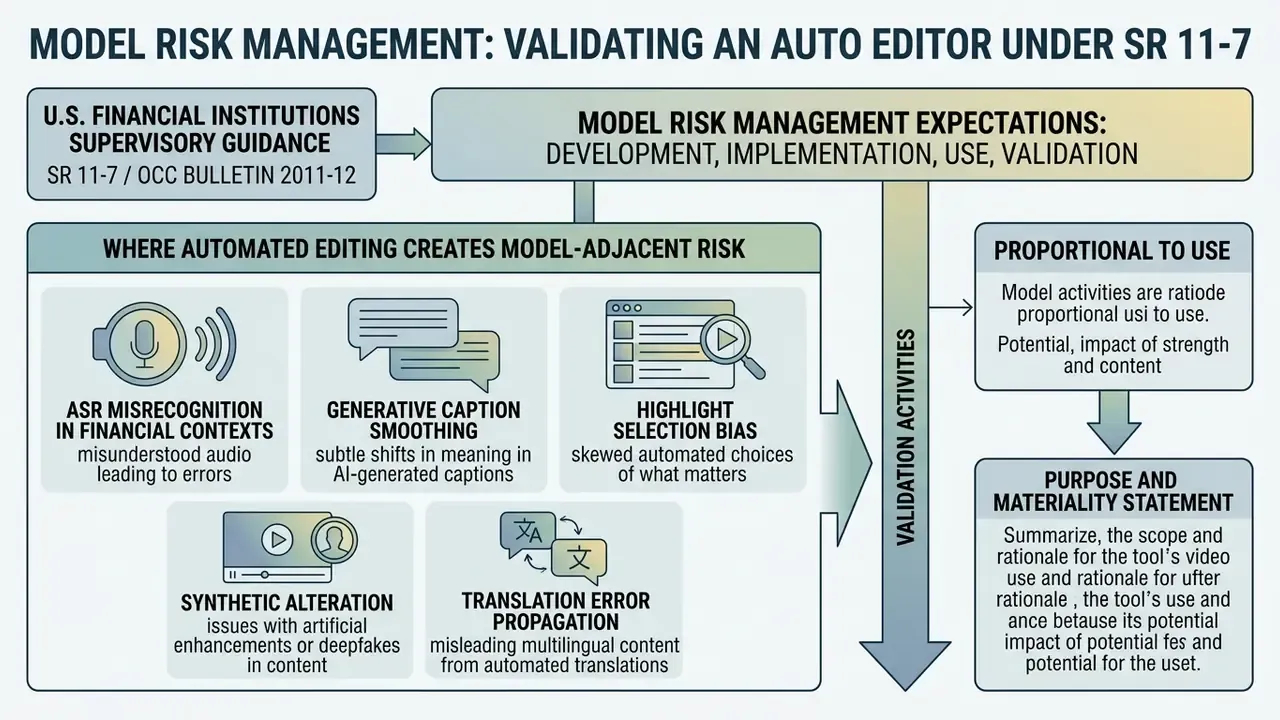
In U.S. financial institutions, supervisory guidance on model risk management (Federal Reserve SR 11-7 and OCC Bulletin 2011-12) sets expectations for development, implementation, validation, and ongoing monitoring of models used in business decisions. An auto video editor is not a credit or capital model. Still, the components it embeds, namely ASR transcription, saliency scoring, gaze redirection, and translation, are statistical models whose failures can produce inaccurate public-facing statements.
Where Automated Editing Creates Model-Adjacent Risk
- ASR misrecognition in financial contexts Numerals, tickers, product names, and negations are common error classes. A caption that renders "we do not expect a rate cut" as "we now expect a rate cut" is a disclosure defect generated by a model.
- Generative caption smoothing Some tools "clean up" transcripts using an LLM, which can introduce paraphrase drift away from what the speaker actually said.
- Highlight selection bias Saliency models trained on engagement signals systematically favor emphatic or emotional statements. That can skew a compliance-sensitive summary toward the most quotable segment rather than the most accurate one.
- Synthetic alteration Eye contact correction, voice cloning, and dubbing modify the recorded likeness or voice of a speaker.
- Translation error propagation Localized subtitle tracks inherit source ASR errors and add translation error on top.
Validation Activities Proportional to Use
- Purpose and materiality statementDocument which content tiers the tool is approved for, and which are prohibited.
- Accuracy testing on institutional vocabularyMeasure word error rate on a held-out sample of recordings containing product names, regulatory terms, and the speaker accents actually present in your organization.
- Verbatim-fidelity checkConfirm whether the tool alters transcript wording, and require a verbatim mode for regulated content.
- Benchmark-informed reviewUse published evaluation frameworks to structure testing instead of relying on vendor accuracy claims.
- Change managementRequire vendor notification of model version changes, and re-test after major upgrades, since silent model swaps can shift error profiles overnight.
- Ongoing monitoringTrack correction rates from human reviewers as a leading indicator of model drift.
- Documented sign-offRetain reviewer identity, timestamp, and the diff between machine draft and approved master.
For caption accuracy specifically, standardized evaluation is a live research question rather than a solved vendor metric:
«A corpus of roughly 17,000 live captions across the UK, US and Canada (2018–2022) shows automatic and human captions increasingly coexisting, requiring systematic accuracy assessment.»
For generative components, benchmark datasets provide a structured way to interrogate vendor claims:
«GAIA spans 9,180 videos from 18 models with 971,244 annotations covering subject quality, action completeness, and action-scene interaction.»
Risk-Adjusted ROI and Total Cost of Ownership
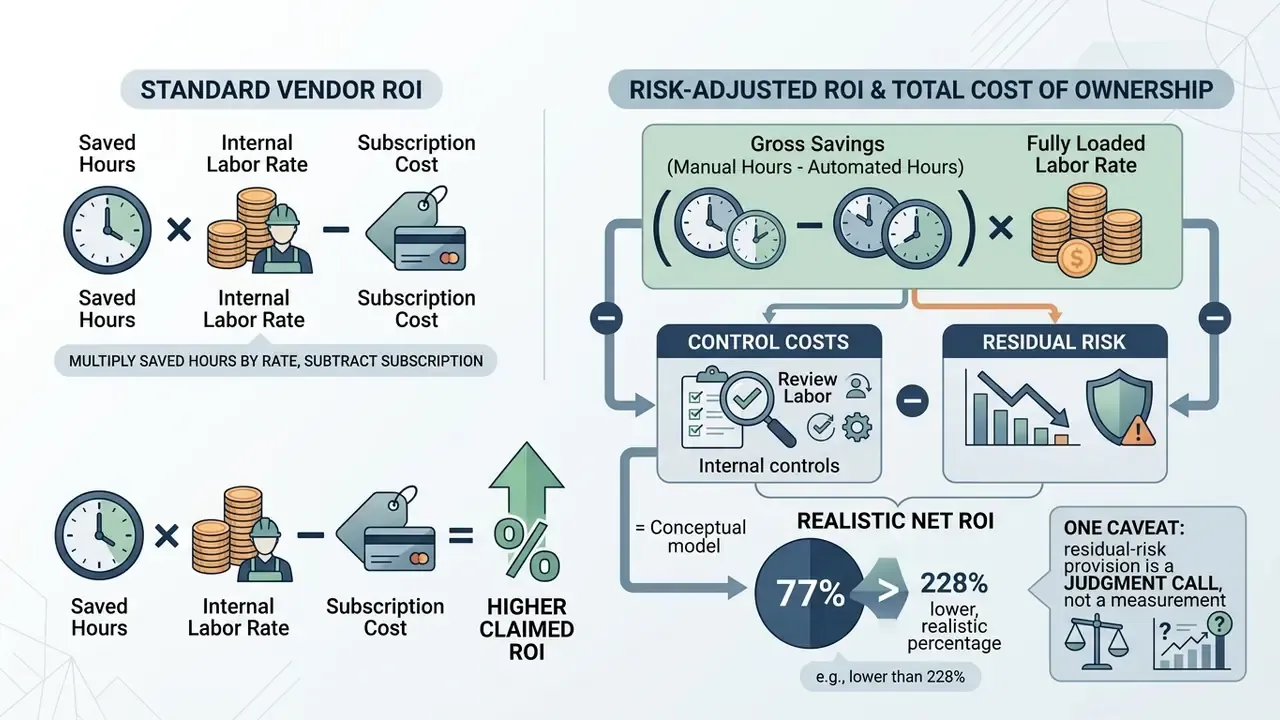
Standard vendor ROI math multiplies saved editing hours by an internal labor rate and subtracts the subscription. That model systematically overstates value in regulated environments, because it omits the cost of the controls that make the tool usable at all.
Risk-Adjusted ROI Formula
Gross Savings      = (Manual Hours − Automated Hours) × Fully Loaded Labor Rate
Control Costs      = Review Labor + Validation/Testing + Legal & Procurement Review
                     + Security Assessment + Training + Audit Log Storage
Platform Costs     = Subscription/Render Minutes + SSO/Enterprise Fees
                     + VPC or Private Deployment Premium + Integration Build
Residual Risk      = P(control failure) × Expected Impact
                     (remediation, republication, regulatory exposure, reputational cost)
Risk-Adjusted ROI  = (Gross Savings − Control Costs − Platform Costs − Residual Risk)
                     ÷ (Control Costs + Platform Costs)
Worked Example (Illustrative, Internal-Comms Department)
| Line Item | Annual Value |
|---|---|
| Hours saved (600 videos × 0.9 hr) | 540 hours |
| Gross savings at $85/hr fully loaded | $45,900 |
| Enterprise platform + SSO + render capacity | −$14,000 |
| Human review labor (600 × 0.15 hr × $85) | −$7,650 |
| Initial validation, security review, legal review (amortized) | −$9,000 |
| Training and workflow documentation | −$2,500 |
| Residual risk provision (2% × $60,000 expected impact) | −$1,200 |
| Net benefit | $11,550 |
| Risk-adjusted ROI | ≈ 35% |
The same deployment modeled without control costs would report roughly 228% ROI. The gap between those two numbers is exactly the figure risk committees ask about, and presenting the conservative version first materially shortens approval cycles. Teams building their own models can start from the interactive AI Media Calculators and then add the control-cost and residual-risk lines above.
One caveat worth stating plainly: the residual-risk provision is a judgment call, not a measurement. Treat it as a parameter to revisit each quarter as incident data accumulates.
How to Choose the Best Automatic Video Editor
Selecting the best auto video editor requires matching tool functionality against organizational content goals, technical delivery specifications, media storage workflows, and compliance restrictions. Rather than prioritizing superficial AI features, decision-makers should evaluate hard integration filters.
Key decision criteria include:
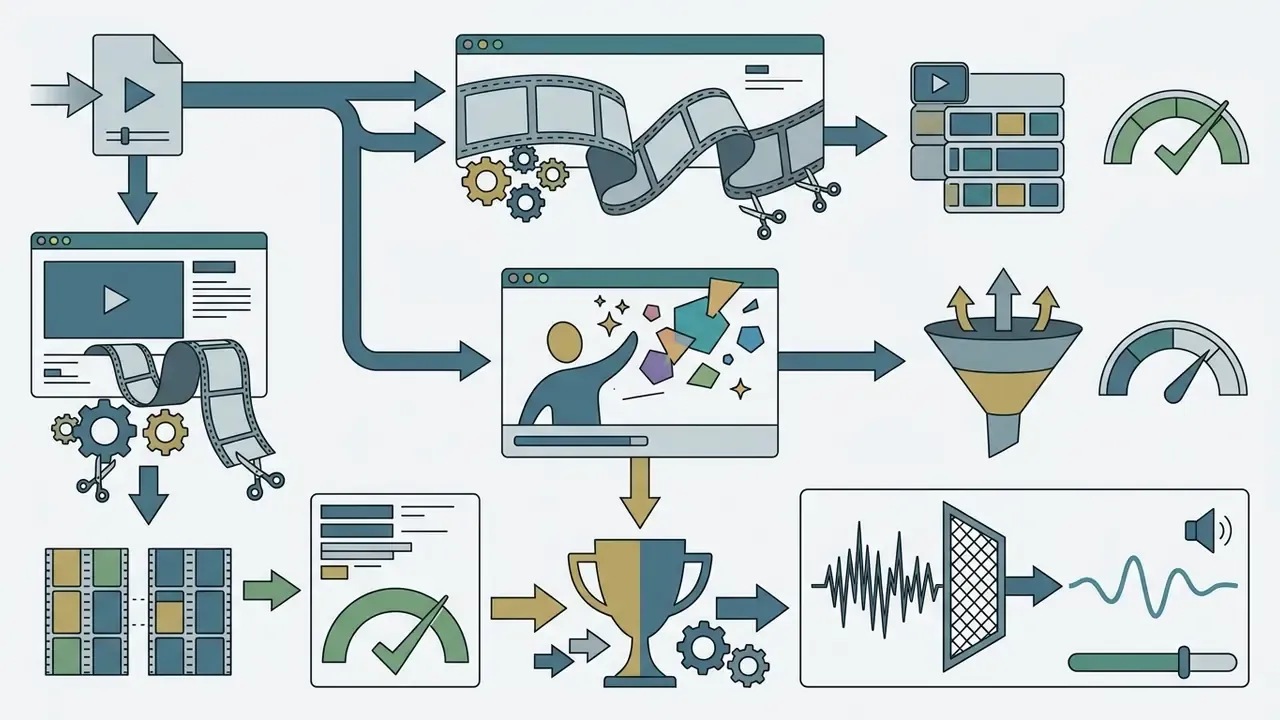
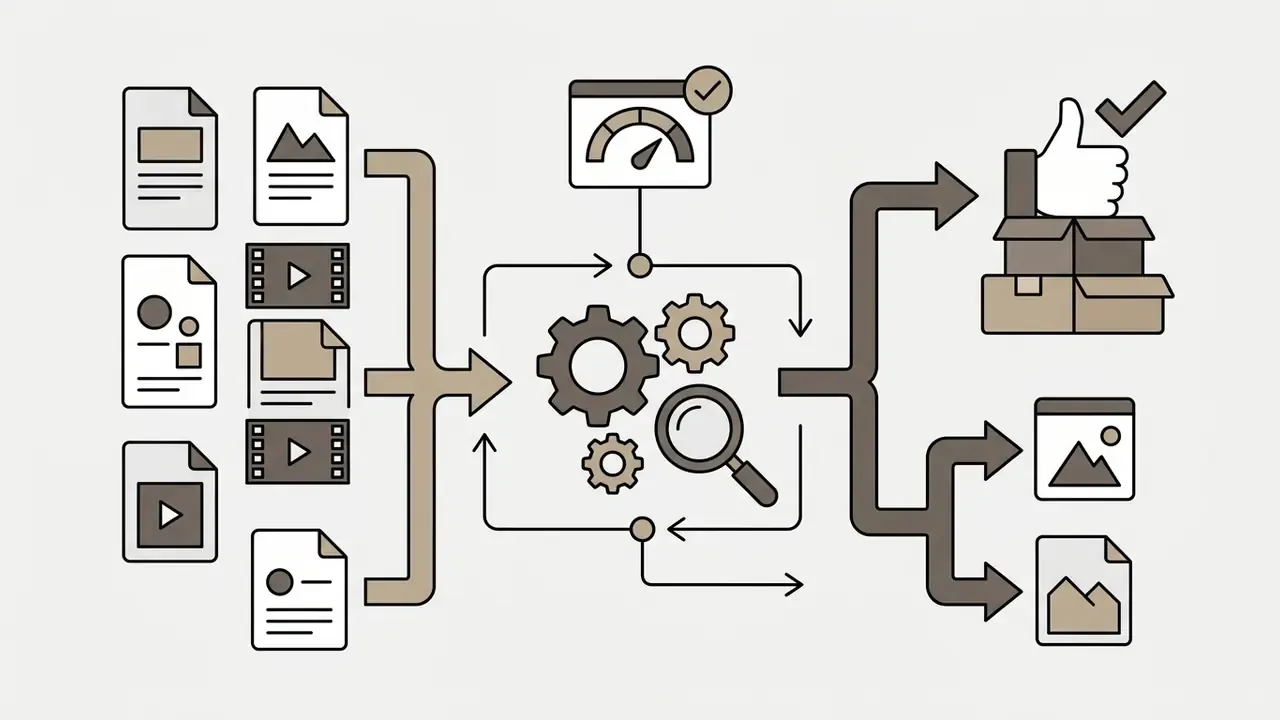
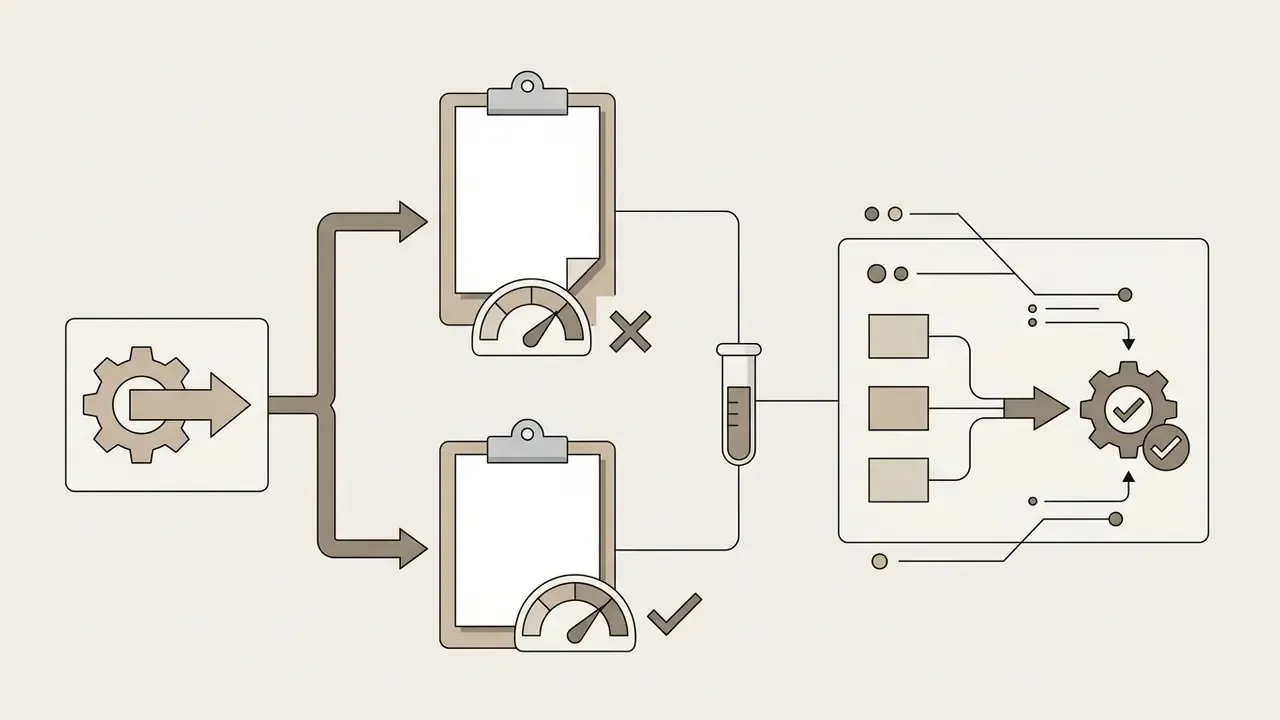

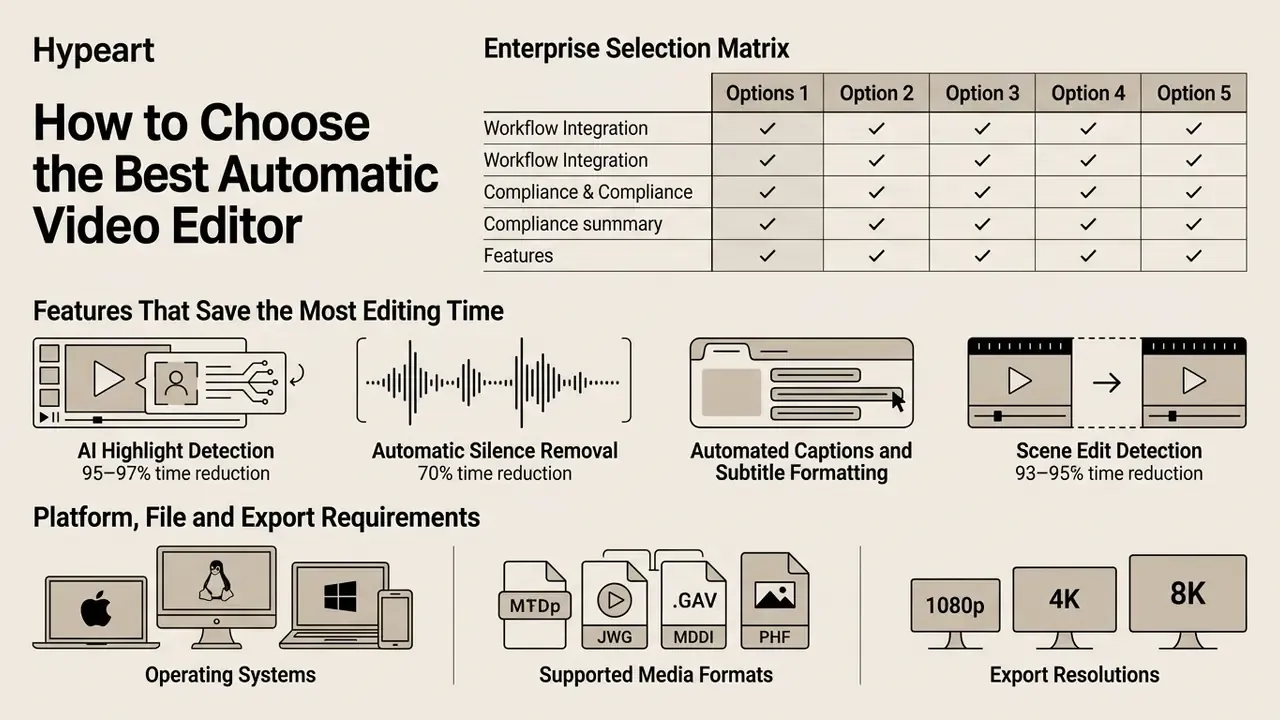
Enterprise Selection Matrix (Beyond Feature Checklists)
| Evaluation Criterion | Why It Matters | Pass Condition |
|---|---|---|
| Deployment model | Restricted content cannot leave controlled infrastructure | VPC/private cloud or on-prem option available |
| Identity integration | Prevents orphaned accounts and shadow usage | SSO/SAML + SCIM deprovisioning |
| Audit trail export | Reconstructs who approved which cut | Machine-readable log export via API |
| Verbatim transcript mode | Prevents LLM paraphrase drift in regulated statements | Toggle to disable generative rewriting |
| Model transparency | Enables change-triggered revalidation | Documented model versions and change notices |
| Accessibility output | Supports WCAG/ADA obligations | Caption export in SRT/WebVTT with editable timing |
| Records retention fit | Video and transcripts may be retained records | Configurable retention and legal hold support |
| Interoperability | Avoids single-vendor lock-in on the AI layer | EDL/XML/Premiere/Resolve round-trip export |
| API and automation | Enables governed batch pipelines | Documented REST API with scoped keys |
| Commercial licensing clarity | Prevents downstream IP disputes | Written commercial-use grant covering AI outputs |
Because generative components differ sharply in maturity, teams comparing platforms should review both the best AI video generators landscape and structured AI Media Comparison Matrices before shortlisting.
Features That Save the Most Editing Time
Empirical studies on smart video editing workflows show that specific automated capabilities deliver higher quantitative time savings than generalized filter application:
Automated Task Time Reduction Metrics (Empirical Benchmarks):
========================================================================================
[AI Highlight Detection]  | ■■■■■■■■■■■■■■■■■■■■■■■■■■■■■■■■■■■■■■■■■ 95–97% Time Saved
[Scene Cut Detection]     | ■■■■■■■■■■■■■■■■■■■■■■■■■■■■■■■■■■■■■■■   93–95% Time Saved
[Silence / Gap Removal]   | ■■■■■■■■■■■■■■■■■■■■■■■■■■■■■■            70% Time Saved
[Auto-Captioning & Sync]  | ■■■■■■■■■■■■■■■■■■■■                      50–60% Time Saved
========================================================================================
- AI Highlight Detection (95–97% time reduction)Algorithms scan long video files, rank scene saliency, and extract core moments. In news clip composition studies, automated clip extraction reduced manual processing of 1-hour recordings from 45 minutes down to 1–2 minutes (Quandt et al., ACM ICMIP, 2024 — https://dl.acm.org/doi/10.1145/3665026.3665031).
- Automatic Silence Removal (70% time reduction)Decibel-based trimming strips dead space automatically, converting tens of minutes of manual ripple-deleting into a sub-two-minute automated operation.
- Automated Captions and Subtitle FormattingGenerates synchronized transcript lines automatically, eliminating manual typing and timestamp alignment.
- Scene Edit Detection (93–95% time reduction)Detects existing cuts in flattened exports and rebuilds sub-clips or timeline markers automatically, which accelerates reversioning of previously delivered masters.
Evaluating these features through systematic comparison helps teams select software aligned with measurable operational benchmarks rather than demo-reel impressions.
Platform, File and Export Requirements
Technical reliability depends on supporting target resolution profiles, container formats, and hardware rendering paths. Enterprise delivery specifications published by official standards organizations, including U.S. FADGI digitization guidelines and PBS distribution standards, establish baseline parameters:
Organizing enterprise assets within a dedicated online video hosting infrastructure keeps file handoffs between recording devices and automated editing platforms predictable.
- Export Resolutions
- Software must support export options ranging from standard HD (1080p) up to UHD 4K (3840x2160).
- Frame Rates (Updated)
- Native support for standard frame rates (24, 25, 30 fps) plus 60 fps for smooth motion delivery. Archival guidance from the Federal Agencies Digital Guidelines Initiative stays within the 24–30 fps range for preservation masters, so 60 fps should be treated as a separate delivery profile rather than an archival default. PBS global technical specifications additionally require a single, consistent frame rate throughout a delivered file. (See Appendix A for the superseded citation.)
- Container Compatibility
- Ingestion pipelines should handle MP4, MOV, MKV, and AVI containers without requiring third-party transcoding before upload.
- Aspect Ratio Discipline
- HD deliverables should fit a 16:9 raster with square pixels and preserve the original aspect ratio of source material, avoiding the stretched or double-pillarboxed output produced by careless auto-reframe passes.
- Deployment Architecture
- Web-based platforms offer rapid accessibility for distributed social media teams, whereas native desktop applications process uncompressed multi-gigabyte source files faster.
Types of Automatic Video Editors for Different Content Goals
Selecting a video auto editor requires understanding how different software architectures serve distinct production goals. Tools designed for social short-form clipping differ fundamentally from generative AI video systems or audio cleanup utilities.
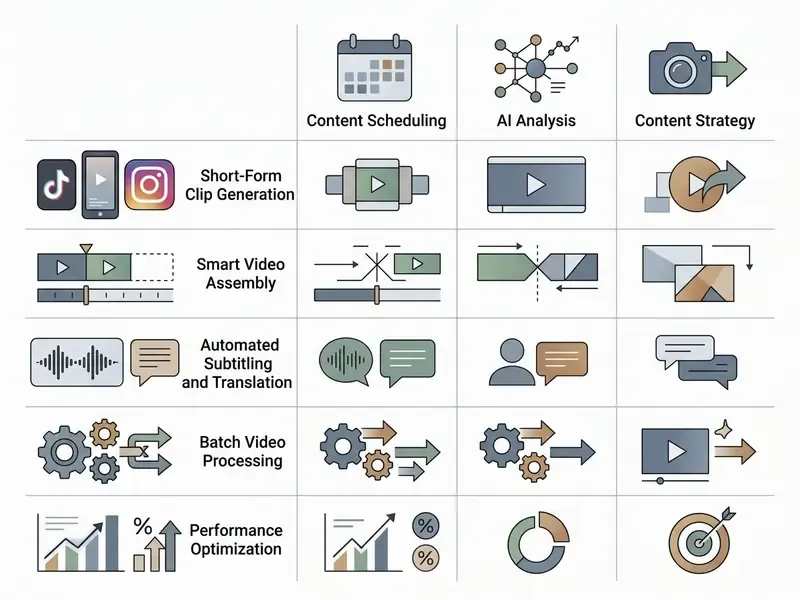
- Target Placement: Immediately following the taxonomy overview.
- DOM Text Replication: The complete comparative dataset is reproduced below as an accessible data table.
Table: Comparative Analysis of Automatic Video Editor Categories (2026 Standards)
| Editor Category | Primary Production Task | Core AI Capabilities | Typical Editing Output | Suitable Content Types |
|---|---|---|---|---|
| Social-First Editors | Rapid short-form content creation for mobile platforms | Auto reframe (9:16), animated dynamic captions, sticker/emoji placement, scene split | Vertical shorts (15–60 sec) with stylized kinetic captions | TikTok clips, YouTube Shorts, Instagram Reels, promotional teasers |
| Long-Form Repurposing | Extracting highlights from extended recordings | Transcript indexing, speaker diarization, topic segmentation, saliency scoring | Curated clip bundles with context hooks and headline overlays | Webinars, long podcasts, executive keynotes, panel discussions |
| Technical Cleanup Tools | Improving visual and audio signal quality | Audio denoise, silence strip, filler-word removal, face restoration, stabilization | Cleaned, high-clarity source footage ready for master assembly | Executive interviews, educational lectures, field recordings |
| Generative AI Makers | Synthesizing footage from scratch or text prompts | Text-to-video diffusion, synthetic voiceover generation, automated B-roll assembly | Fully generated video scenes without original camera footage | Product explainers, training tutorials, concept storyboards |
| Data-Driven Platforms | Automating enterprise marketing video pipelines | Template population, programmatic API rendering, SEO metadata tag generation | Multi-variant localized video ad campaigns | Personalized sales videos, programmatic ads, localized corporate media |
| Transcript-First Editors | Editing footage by manipulating text rather than timelines | Word-level timestamped transcripts, text search, ripple-delete synchronization | Document-like editing sessions producing clean dialogue cuts | Podcasts, interviews, internal training and compliance videos |
Readers evaluating prompt-driven synthesis specifically should review how text-to-video AI tools differ from editors that only rearrange existing footage, since licensing and disclosure obligations diverge sharply between the two.
Repurposing Tools for Long Videos and Podcasts
Repurposing engines process lengthy media files, including webinars, podcasts, and quarterly earnings calls, to identify shareable key takeaways. These tools generate a complete text transcript, score video segments by conversational density or audience engagement data, and extract isolated clips automatically.
«Rhapsody covers 13,000 podcast episodes and uses YouTube "most replayed" metadata to train highlight-selection models.»
The software applies opening video hooks, trims off-topic digressions, and generates headline captions for each clip. Longer-form research pipelines add a three-stage pattern: segment the video, describe each segment with a vision-language model, then score saliency with an LLM. That sequence produces more defensible highlight rankings than raw engagement heuristics alone.
AI Video Generators and Automated Video Makers
Data-Driven Automation: Batch Rendering via Data Feeds and APIs
For enterprise organizations requiring massive content personalization, such as localized ad campaigns, dynamic real-estate listings, multilingual compliance notices, or automated performance reports, data-driven auto editors bypass visual timelines entirely.
Instead of manual assembly, these platforms integrate directly with motion graphics templates (Adobe After Effects projects, .mogrt packages, or cloud-native frames) and external data streams:
- Data Ingestion Sources
- Connect CSV files, Google Sheets, Airtable bases, product information management systems, or direct REST API endpoints.
- Dynamic Layer Mapping
- Programmatically replace variable text layers, swap image and video assets, adjust background color vectors, inject localized legal disclaimers, and synthesize localized audio tracks.
- Cloud Concurrency
- Render hundreds or thousands of localized video variations simultaneously in cloud infrastructure, eliminating local GPU bottlenecks and queue contention on designer workstations.
- Commercial Metering
- Most platforms in this category price by render minutes rather than seats, which makes volume forecasting a procurement input rather than an afterthought. Entry tiers commonly start near $69/month for roughly 50 render minutes and scale into four-figure monthly plans for unlimited concurrency, with enterprise tiers adding dedicated infrastructure, SLAs, and advanced security.
- Governance Hooks
- Because output volume is high, approval must shift left. Mature pipelines validate the data source and the template once, then treat each render as a deterministic instantiation, logging the template version, data row hash, and render timestamp for every asset.
Workflow Scenario: A global e-commerce brand feeds a spreadsheet containing 500 localized product SKUs and discount codes into a programmatic rendering engine. The system inserts localized text, updates price tags, overlays localized audio promos, applies region-specific disclosure text, and exports 500 render-ready vertical ads in under fifteen minutes, with a single template approval covering the entire batch.
Regulated-Industry Scenario: A financial institution generates 40 localized versions of a mandatory product-disclosure explainer. The disclosure copy is sourced from a controlled compliance database rather than typed per version, so one approved text record propagates to every rendered variant. Any subsequent legal wording change triggers an automatic re-render of the affected set.
Developer teams building these pipelines should review integration patterns in the AI Media API Guides before committing to a vendor's rendering model.
How to Automatically Edit Videos with an AI Video Editor
Implementing automated post-production requires a structured operational sequence to move raw files from initial ingest to final publishing.
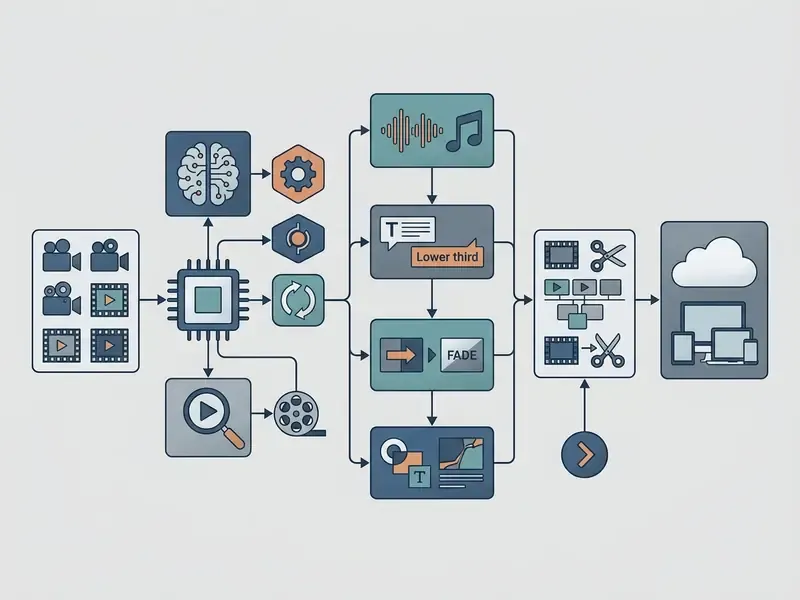
- DOM Text Blueprint: Stage 1: Ingest Source Footage → Stage 2: Configure Prompts & Style Rules → Stage 3: Execute AI Auto-Edits → Stage 4: Review, Compliance Gate & Fine-Polish → Stage 5: Export & Distribute.
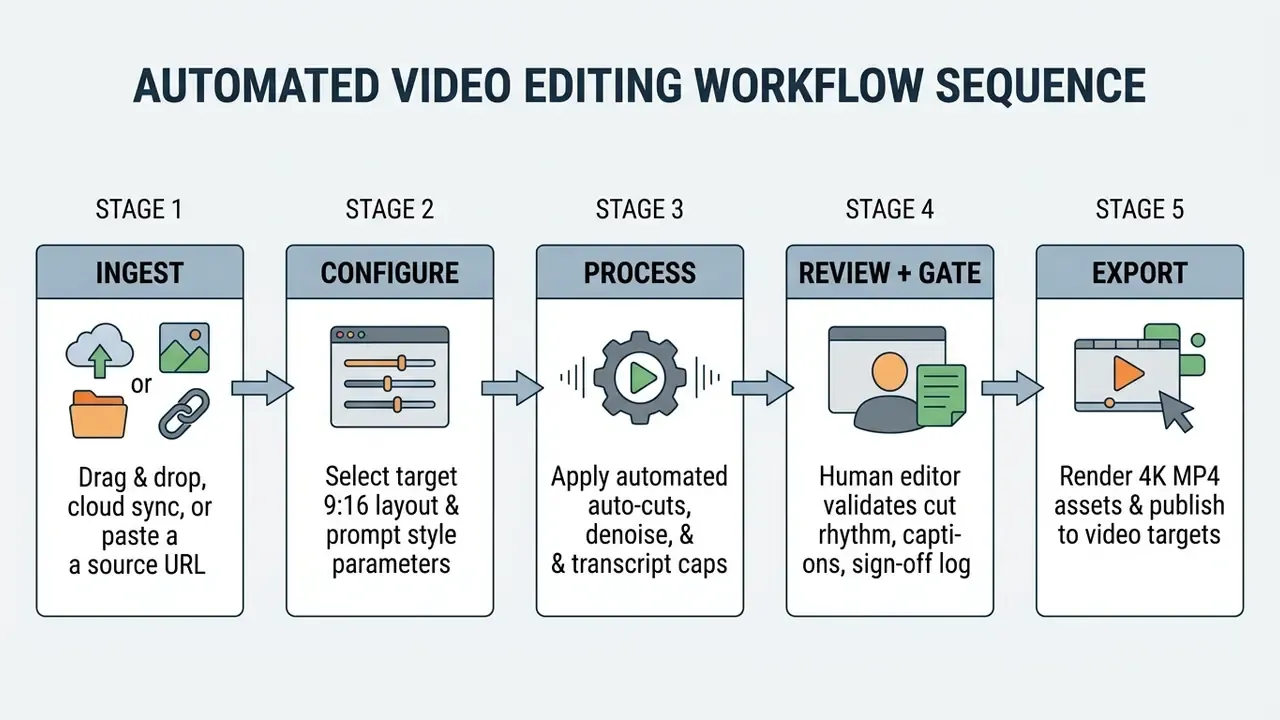
Ingest Source Media: Direct Upload, Cloud Sync, or URL Parsing
The ingestion pipeline supports three distinct pathways:
Governance note for pathway 3: URL ingestion is the fastest option and the easiest to misuse. Restrict it to public or Tier 1 assets, and prohibit pasting authenticated internal recording links into third-party tools unless the vendor sits inside your approved processor register.
- Direct File Drag-and-Drop
- Upload container formats (MP4, MOV, MKV, AVI) directly from local hardware queues, including uncompressed and intermediate codecs where the platform supports them.
- Cloud Drive Integrations
- Connect directly to enterprise storage buckets and review platforms (Google Drive, Dropbox, Frame.io, AWS S3) for high-speed server-to-server transfers that never touch a laptop.
- Direct Streaming URL Ingestion
- Paste external video links, including YouTube streams, Vimeo links, or conferencing cloud recording URLs. The system streams the file straight to cloud processing servers, bypassing local download and re-upload latency and removing an entire copy of the asset from endpoint devices.
Upload Footage and Tell the AI What You Need
The editing process begins by loading source video files into the application interface via direct drag-and-drop, cloud storage integration, or link parsing.
When using prompt-driven auto editors, explicit instructions improve generation quality. Leading AI research whitepapers (Adobe Firefly Prompting Guide, 2026; Runway ML Research, 2026) recommend organizing prompt structures into standardized parameters:
- Poor Prompt: "Make a cool short clip from this tech talk."
- Structured Prompt: "Extract a 30-second highlight clip featuring the main speaker discussing cloud security. Apply vertical 9:16 framing, dynamic bold captions at the lower third, cinematic lighting tone, and fast pacing."
Two further prompting rules recur across vendor documentation: keep one action per prompt instead of chaining "then/next/after that," and build prompts for short segments, since most generative engines produce five- to ten-second clips per pass.
«Combined text-and-sketch input helped novices realize conceptual editing intent more accurately than conventional timeline interaction (N=10).»
Apply Auto Cuts, Cleanup and Captions
Once media files and parameters are set, the video editor automatic processing engine performs timeline assembly in a single computational pass:
- Silence TrimmingScans the master audio track, flags decibel drops below the configured noise floor (for example ), and trims silent segments longer than 0.5 seconds.
- Audio Noise SuppressionApplies spectral denoise filters to remove continuous background environmental noise, such as HVAC hums or fans, from dialogue channels.
- Transcription & SubtitlesExecutes ASR transcription, generates line-by-line subtitle overlays, and applies word-level timestamp synchronizations.
A repeatable four-step operator methodology reduces variance across editors: select the timeline range to analyze, set silence and noise thresholds explicitly rather than accepting defaults, preview detected cut markers before committing, then apply cuts, denoise, and transcript-driven captions in one pass. Tools differ in whether silences are detected from decibel thresholds, from transcription endpoints, or from subtitle timing. Document which method your approved tool uses, because it changes how aggressively short breaths and dramatic pauses disappear.
Operators reviewing web-based editing capabilities can inspect embedded media playback using an online video player component to verify audio-to-video lip sync after auto-cuts.
Transcript-Based Video Editing (Editing Footage via Text)
Modern automated editors bridge text processing and timeline cutting by converting video streams into interactive transcripts. Instead of scrubbing timelines to place cut points:
- Automatic TranscriptionThe ASR engine converts dialogue into a word-level timestamped text document, optionally tagged by speaker.
- Text Striking & DeletionHighlight and delete unwanted sentences, false starts, repeated takes, or filler words directly within the transcript interface. Deleting a sentence in the transcript removes that entire segment from the sequence.
- Automated Ripple EditingThe underlying video engine removes the corresponding frames instantly and executes seamless cross-fades or jump-cuts on the timeline, closing the gap without leaving black frames.
- Search-Driven AssemblyBecause the transcript is indexed, editors can search for a phrase across dozens of uploads and assemble a montage of every instance in seconds.
- Prompt-Level InstructionAdvanced tools accept natural-language edit requests over the transcript, such as "cut to the first thirty seconds," "remove all stutters," or "reorder so the pricing answer comes first," and translate them into timeline operations.
For regulated content, transcript-based editing has an underrated governance advantage: the edit is expressed as a text diff. Storing the pre-edit and post-edit transcripts creates a human-readable audit artifact showing exactly what was removed. Far easier for a reviewer or auditor to assess than a rendered video comparison.
Review, Fine-Polish and Export the Video
Automated engines generate strong initial drafts. A human-in-the-loop review step still decides whether the asset ships:
- Rhythm & Cut Verification Inspect auto-cut points to confirm that sentence endings are not clipped prematurely.
- Text & Spelling Corrections Review subtitle transcriptions for proper noun spellings, corporate terms, numerals, and punctuation accuracy, with particular attention to negations and figures in financial or medical content.
- Compliance Gate Confirm that no confidential names, screen-shared data, customer identifiers, or unreleased figures survive into the published cut, and that any synthetic modification (dubbing, gaze correction, voice cloning) is disclosed per internal policy.
- Audit Trail Capture Record model version, parameters, reviewer identity, approval timestamp, and transcript diff into the asset's metadata or DAM record.
- Export Parameter Selection Select output parameters based on distribution requirements, for example 1080p for social media or UHD 4K (3840x2160) at 60 fps for archived master files.
- Escalation Path Define what happens when the reviewer finds a substantive ASR error or hallucinated caption: who is notified, whether the asset is quarantined, and whether the failure is logged as a model performance issue.
Core Features of an Automatic Video Editor
The best automatic video editors combine advanced machine learning components into unified editing environments. Evaluating these building blocks clarifies how tools process complex media tasks, and standardized benchmarks now exist to make those evaluations comparable rather than anecdotal.
«EditBoard proposes nine automatic metrics across four dimensions, namely frame accuracy, semantic score, consistency and aesthetics, for standardized evaluation of text-based video editing models.»
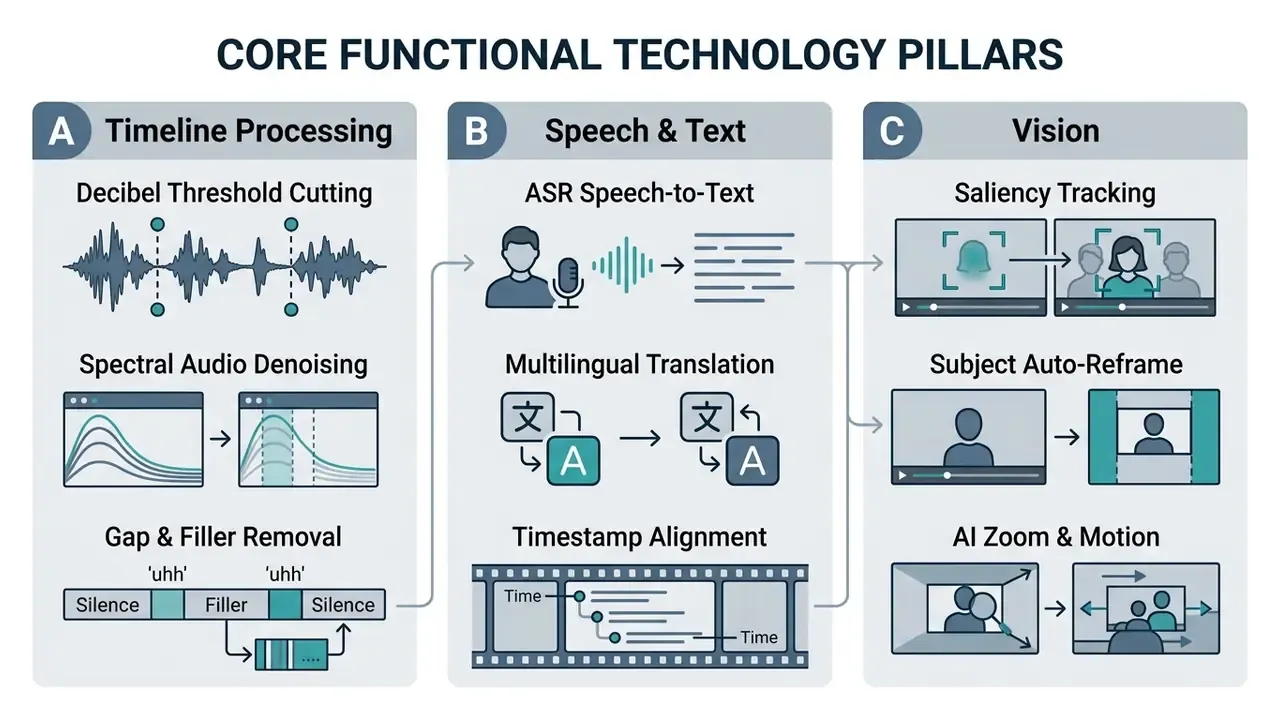
Auto Cut, Silence Removal and Recording Cleanup
Auto cut functionality automates early post-production by identifying unvoiced intervals and trimming dead space. Advanced audio cleanup pipelines use a three-stage processing structure:
- Silence Interval DetectionMeasures short-time energy (STE) and zero-crossing rates (ZCR) across framing zones to categorize audio segments into vocal speech or silent gaps.
- Noise Feature EstimationSamples isolated silent gaps to build a spectral profile of ambient background noise.
- Targeted Noise SuppressionSubtracts the background noise profile from vocal sections without distorting primary voice frequencies.
«A three-stage pipeline, silent-interval detection, noise feature estimation, then noise removal, is documented in Columbia University Computer Science research on speech denoising (2025).»
Professional audio suites implement the same logic in operator-facing form through "strip silence" and "delete silence" functions that identify and remove inactive regions from recordings, while endpoint-detection research applies RMS thresholds per segment to achieve equivalent results programmatically.
Integrating a browser-based online video recorder allows remote teams to ingest clean source audio directly into these automated cleanup pipelines.
Captions, Subtitles and Video Translation
«Analysis of roughly 17,000 live captions across the UK, US and Canada (2018–2022) shows automatic captions increasingly coexisting with human captions, requiring systematic accuracy evaluation.»
Specialized captioning models, such as MIT's VisText framework, also allow tools to generate descriptive text captions for visual data charts and embedded infographics inside video frames. That matters for accessibility when a video's substantive content lives in an on-screen chart rather than in the narration.
When processing dialogue-heavy educational media, creators frequently use an online video to mp3 converter to isolate audio files for offline transcription verification, and pair it with an AI voice generator when localized narration replaces re-recording.
Auto Reframe, Cropping and Clip Enhancements
Auto reframing adapts horizontal video assets to portrait or square viewing formats. Applications such as Adobe Premiere Pro's Auto Reframe duplicate target timeline sequences, analyze frame saliency, apply the effect to every clip in the duplicated sequence, and generate dynamic motion keyframes that keep focal subjects centered. Operators select the target aspect ratio, choose motion presets, and set custom output resolution to match platform requirements.
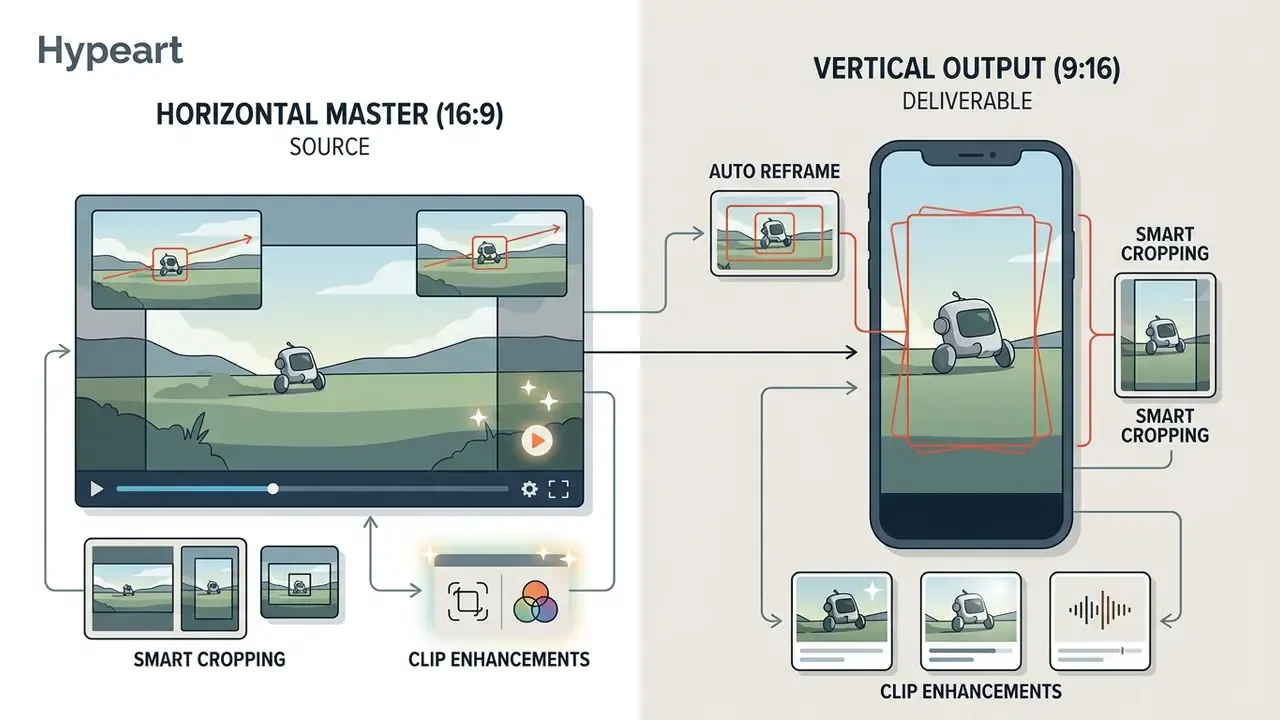
«In a user study (N=12), a traditional editor scored 4.34 on average for preserving content relevance, while the RAVA agent delivered competitive results among automatic reframing methods.»
Underlying methods crop frames into target aspect ratios using composition-aware shifted sub-crops and a tracked cropping box that changes peripheral visibility over time. Automated clip enhancement features can also inject subtle visual zooms, color balance corrections, and dynamic motion transitions during cut points to maintain viewer engagement. Heavy-handed auto-zoom on a compliance or executive-communications asset, though, reads as manipulative and should be disabled for those content classes. (The superseded patent citation is retained in Appendix A.)
Auto Video Editor Free Plans, Pricing and Commercial Use
Evaluating pricing structures for auto video editor free plans requires separating basic personal usage allowances from enterprise-grade commercial licenses. Readers comparing zero-cost options should also review the wider landscape of free AI video generators and free video editing software before assuming that "no watermark" implies commercial rights.
- Target Placement Direct insertion under the pricing heading.
- DOM Text Replication Detailed pricing data reproduced below in standard Markdown table format.
E-E-A-T fact check / pricing verification notice
| Software Tool | Free Tier Monthly Limit | Watermark Policy | Max Free Resolution | Commercial Use Rights | Typical Pro Tier Cost |
|---|---|---|---|---|---|
| Runway | 125 one-time credits | Watermark on exports | 720p HD | Paid plans only | $12 – $28 / mo |
| VEED.io | 10 minutes / month | Watermark on exports | 720p HD | Personal use only | $18 – $30 / mo |
| Kapwing | 720p, 4-min max video | Watermark on exports | 720p HD | Paid plans only | $16 – $24 / mo |
| InVideo AI | 10 minutes AI generation | Watermark on exports | 1080p Full HD | Paid plans only | $20 – $48 / mo |
| Descript | 1 media hour / month | Watermark-free basic | 720p HD | Included on all tiers | $12 – $24 / mo |
| Opus Clip | 60 processing minutes | Watermark on free plan | 1080p Full HD | Paid plans only | $9.50 – $19 / mo |
| Clipchamp | Watermark-free 1080p export | No watermark on basic export | 1080p Full HD | Verify per asset/template license | Bundled/subscription tiers vary |
| Data-driven render platforms | Trial render minutes only | Not applicable | Template-dependent | Included on paid render plans | ~$69 – $1,500+ / mo by render minutes |
Enterprise Licensing: The Cost Lines That Free-Tier Tables Omit
Consumer pricing tables make a poor basis for enterprise budgeting, because the controls that make a tool deployable are priced separately. Expect additional line items for:
- SSO/SAML and directory provisioning, frequently gated behind a business or enterprise tier.
- Private deployment premium, since VPC, private cloud, or on-premises rendering typically carries a multiple of standard SaaS pricing.
- Contractual zero-data-retention, sometimes available only on negotiated agreements rather than self-serve checkout.
- Audit log retention and export, where extended retention windows and API log access may be add-ons.
- Render or processing minutes, volume-based pricing that must be forecast against campaign calendars.
- Security review and validation labor, an internal cost, yet a real component of first-year total cost of ownership.
- Integration engineering to connect the editor with DAM, records retention, and publishing systems.
- Dedicated support and SLA, required where publication deadlines carry regulatory or market-timing consequences.
What to Check in a Free Auto Video Editor
When evaluating free plans, media teams should review five functional constraints:
- Visual WatermarksMany free tiers place visible logos or branding watermarks across exported video frames, which blocks corporate or client deployment.
- Resolution & Bitrate RestrictionsFree exports are commonly capped at 720p with lowered bitrates, reducing visual clarity on high-resolution displays.
- Monthly Credit & Minutes CapsFree processing allowances typically run 10 to 60 minutes per month, which a single long-form project consumes.
- Commercial Usage RestrictionsTerms of service frequently restrict free output to non-commercial, personal, or educational use. Using un-watermarked free output for commercial advertising without a paid license may violate the licensing agreement. Absence of a watermark is not a grant of commercial rights.
- Data-Use TermsFree tiers often reserve broader rights to process, retain, or learn from uploaded media than paid enterprise agreements. For any content above Tier 1, that alone disqualifies free-tier evaluation on real footage; pilot with synthetic or public material instead.
When a Pro Plan Is Worth It for Content Teams
Upgrading to a paid Pro or Enterprise tier is economically justified when production volume requires reproducible quality, un-watermarked exports, and team collaboration controls.
Monthly Cost Equation:
Software Subscription ($20/mo) << Saved Editing Labor (15 Hours x $50/hr = $750 Savings)
Net Operational Benefit = $730 / month per editor
In a mid-sized digital marketing team, three video specialists spent roughly twenty hours per week manually trimming silences, adding subtitles, and reframing webinars into social clips. After implementing a paid pro plan ($24/user/month), automated silence cutting and auto-reframing eliminated twelve hours of manual trimming per week per editor. At an internal labor rate of $50/hour, the team realized monthly labor savings of $2,400 against total software cost of $72, an immediate positive ROI on production overhead.
Regulated organizations should re-run this same calculation through the risk-adjusted formula presented earlier, since the marketing-team version excludes review labor, validation, and residual risk. For detailed breakdowns of commercial media tooling costs, the specialized AI Media Pricing Guides provide operational budgeting clarity.
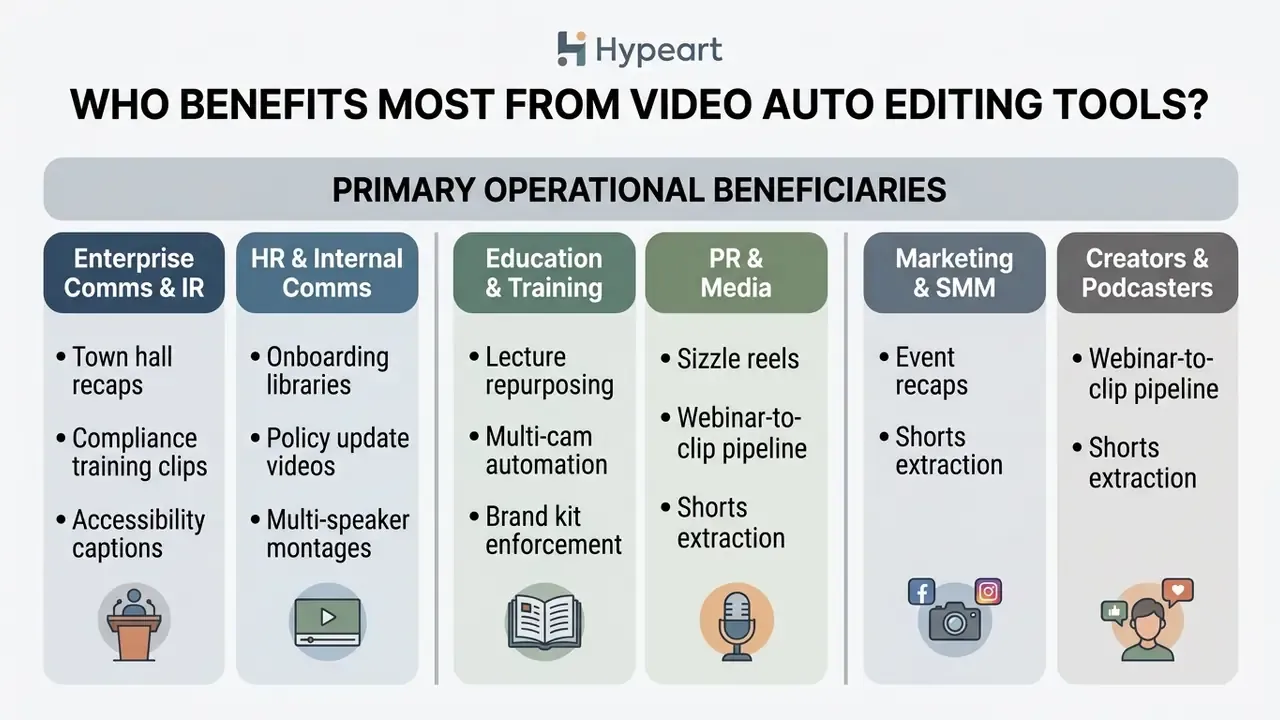
Who Benefits Most from Video Auto Editing Tools?
Automated editing tools deliver measurable productivity gains across diverse organization types by eliminating technical post-production bottlenecks. The segments below are ordered from highest governance sensitivity to lowest.
Enterprise Media and Corporate Communications Teams
Corporate communications functions inside banks, insurers, and other regulated enterprises produce a continuous stream of internal and external video: quarterly business updates, leadership messages, compliance training modules, and event recaps. Automated editing compresses turnaround on these assets from days to hours, which matters most when the content is time-sensitive.
The operational pattern that works is narrow and controlled: a governed intake path, a template-locked output format, automated silence removal and captioning, then a mandatory compliance gate with logged sign-off. The productivity gain comes from removing mechanical labor, not from removing review. Teams that try to remove review as well usually discover the cost during the first caption error in an externally distributed asset.
HR, Internal Comms, and Operations Teams
Internal communication teams use auto editors to convert text documentation, executive town halls, and policy handbooks into digestible internal updates. Automated silence removal and instant auto-captioning enable rapid turnaround of internal training clips without burdening IT or dedicated media resources. HR teams also auto-edit onboarding calls, employee interviews, and company updates, categories where the raw footage frequently contains personal data, making retention settings and access controls more important than editing features.
Because HR footage often includes identifiable employees, three controls should be non-negotiable: explicit consent capture before recording, restricted reviewer access to raw material, and defined deletion timelines for source files once the edited asset is approved.
Educators, Course Creators, and Online Coaches
Lecturers and course creators streamline curriculum production by editing hours of instructional footage via text transcripts. Auto-generated synchronized captions support educational accessibility standards, including ADA and WCAG expectations, while multi-format reframing lets lessons be repurposed for mobile student apps. Online coaches use highlight extraction to pull key takeaways from long recordings, then smooth pacing so that a ninety-minute session becomes a set of focused ten-minute modules.
Accessibility is the decisive requirement in this segment. Auto-generated captions must be editable and exportable in SRT or WebVTT with correctable timing, because machine captions alone rarely satisfy accessibility obligations without human correction.
PR, Media Outlets, and Communications Agencies
During fast-moving news cycles, PR agencies convert executive interviews and live press conferences into immediate media-facing sizzle reels. Prompt-driven highlight extraction allows journalists and communications staff to assemble multi-speaker news montages in minutes, and transcript search makes it trivial to locate every instance of a quoted phrase across multiple recordings. Media companies apply the same tooling to turn several interview clips into a concise narrative from a single prompt.
The governance risk here is quotation integrity. Automated cuts can join two statements into a sequence the speaker never made. A verbatim transcript diff review before release is the standard mitigation.
Creators, Podcasters and YouTube Channels
Independent creators and podcasters rely on an auto cut video editor to manage high-volume publishing schedules without expanding technical headcount.
- Podcast Multi-Camera Editing: Tools such as AutoPod automate multi-camera switching, jump cuts, and silence removal for multi-speaker podcast recordings directly inside timeline applications.
- Rapid Short-Form Extraction: Podcasters convert two-hour episodes into dozens of 30-second YouTube Shorts using transcript-driven highlight extraction models. Typical creator pipelines run ingest → AI clip pass → transcript cleanup → captioning → reframing → QA → publishing handoff, with human selection narrowing dozens of AI candidates down to the three to five strongest clips. Detailed publishing patterns are covered in dedicated YouTube video editing workflows.
- Accessibility & Editing for BLV Creators: Text-based audio-visual editing tools let blind and low-vision (BLV) creators navigate and edit video files via text transcripts and auditory cues rather than visual timelines (AVscript Study, ACM CHI 2023 — https://dl.acm.org/doi/10.1145/3544548.3581560).
- Batch Scheduling: Weekly planning workflows publish a package of Shorts at once, reuse archive episodes, and use watch-through rate to decide which clips to produce next.
Creators seeking technical assistance or software documentation can access dedicated resources within the AI Media Support knowledge base.
Compliance and Operations FAQ
Does an auto video editor train on our uploaded footage?
It depends entirely on the contract, not the interface. Consumer and free tiers frequently reserve broader processing rights than negotiated enterprise agreements. Require an explicit clause covering media, transcripts, and derived embeddings, then confirm whether the vendor's downstream model providers are bound by the same restriction.
Where are transcripts and vector indexes stored, and for how long?
Ask separately about video files, transcripts, embeddings, thumbnails, and logs. Deleting a video does not necessarily delete its derived artifacts. Request a data-flow diagram and a documented retention period for each artifact type.
Who owns the output, including AI-generated elements?
Ownership of your source footage is usually unambiguous. Rights to AI-generated B-roll, synthetic voices, music beds, and template graphics are governed by separate asset licenses. Confirm commercial-use grants in writing before publishing, especially for auto-inserted stock footage.
What audit evidence should we retain for each published video?
At minimum: source asset identifier, tool and model version, parameters applied, machine-draft transcript, approved transcript, reviewer identity, approval timestamp, and distribution destinations. Store this alongside the asset in your DAM or records system.
How do we handle ASR hallucinations or misheard financial figures?
Treat them as model performance incidents, not typos. Log the error, quarantine the asset if it is already published, correct the caption, and track the frequency of such events as a monitoring metric that can trigger revalidation.
Is automated dubbing or gaze correction a disclosure issue?
Potentially, yes. Any synthetic modification of a speaker's likeness, voice, or apparent behavior should be recorded in asset metadata, and your communications policy should specify when on-screen disclosure is required.
What is the difference between auto video editing and manual editing?
Auto editing uses AI for repetitive tasks such as silence removal, captioning, and reframing, while manual editing gives frame-level creative control. In practice, mature workflows combine both: automation produces the draft, a human refines rhythm and verifies accuracy.
How long should a one-minute video take to edit?
Conventional finishing of a one-minute video with graphics, audio work, and color typically consumes 30 to 60 minutes depending on complexity. Automation collapses the mechanical portion, and subtitle generation drops from tens of minutes to seconds, but review time remains.
Does automated editing reduce output quality?
Cloud processing itself need not degrade resolution or audio clarity. Editorial quality is a separate question: human raters still score fully manual edits higher than automated ones. Use automation for the draft, human judgment for the final rhythm.
Can we run an auto editor entirely inside our own environment?
Some vendors offer VPC or on-premises deployment, and open research-grade toolchains (Whisper-class transcription, diarization, scene detection, FFmpeg rendering) can be self-hosted. Self-hosting shifts cost from subscription to engineering, and it adds a model maintenance obligation that someone must own.
Limitations and Open Questions
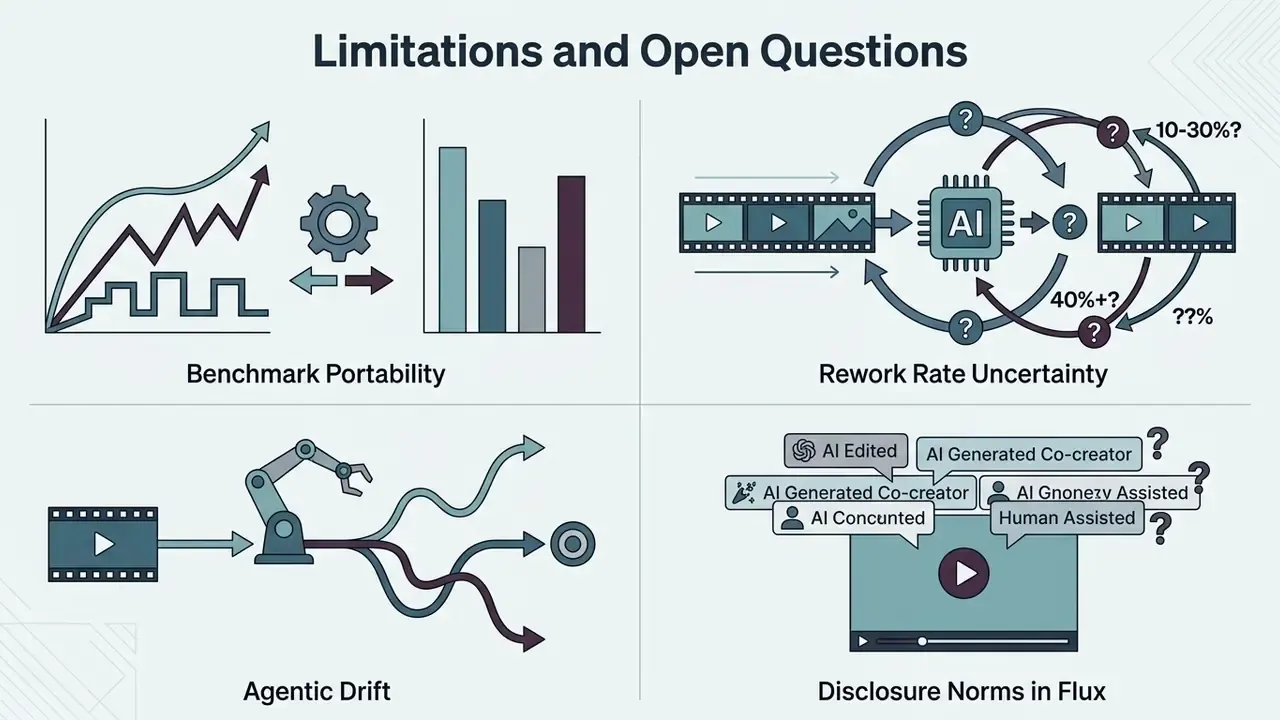
Honesty about the gaps matters more than another feature list. Four issues remain unresolved in this category as of Q1 2026.
Benchmark portability. Published evaluations measure clip composition, reframing, and generative quality on research datasets. None of them predict word error rate on your earnings call, with your speakers, in your acoustic environment. Institution-specific testing is not optional.
Rework rate uncertainty. There is no credible industry average for how often automated cuts need human pacing repair. Vendor-quoted numbers are marketing. Measure yours during a 60-day pilot and use that figure in the ROI model.
Agentic drift. Editors that chain planning, selection, and rendering behave less predictably than single-purpose filters. When a tool "decides" which quote to feature, the decision needs an owner, an approved role, an access boundary, and a shutdown path. No evidence, no autonomy.
Disclosure norms in flux. Expectations around labeling synthetic voice, dubbing, and gaze correction are still forming across US and cross-border regimes. Documenting synthetic modifications now costs little; retrofitting metadata across an archive later costs a great deal.
Pre-Pilot Checklist for Model Risk and Security Teams
- Classification mappingContent tiers defined, and prohibited tiers documented for this tool.
- Contractual data termsZero-data-retention or defined retention, plus training opt-out covering media, transcripts, and embeddings.
- Security attestationCurrent SOC 2 Type II and ISO/IEC 27001 covering the media service in scope.
- Identity controlsSSO/SAML enabled, SCIM deprovisioning tested, role-based permissions verified.
- Audit trailImmutable logs of upload, edit, approval, export, and deletion, with machine-readable export tested.
- Accuracy validationWER measured on institution-specific vocabulary, accents, and multi-speaker recordings.
- Verbatim integrityGenerative transcript rewriting can be disabled; transcript diffs are retainable.
- Human-in-the-loop gateNamed approver role, documented escalation path, and quarantine procedure defined.
- Sub-processor registerDownstream model and storage providers listed, with change-notification commitments.
- Exit and portabilityProjects, transcripts, and assets exportable in open formats (MP4, SRT/WebVTT, EDL/XML) so the AI layer can be replaced without losing archives.
A reasonable next step, if this is new territory for your organization: pick one Tier 1 content type, run a bounded 60-day pilot with the checklist above, and report risk-adjusted ROI rather than gross hours saved. Small scope, real evidence, no drama.
Technical Appendix & Verification References
To keep facts verifiable, the key empirical research papers, industry standard benchmarks, and technical guidelines cited in this guide are cataloged below:
- Market Growth & Sizing
- AI Video Generation & Editing Market Analysis (2026–2036), Grand View Research, 2026. Documented CAGR of 21.4%, market sizing reaching USD 3.67B in 2026 and a projected USD 24.89B by 2036. Publisher URL pending; treated as a forecast model requiring periodic re-verification.
- Cognitive Load & Accessibility Metrics
- AVscript: Accessible Video Editing with Audio-Visual Scripts, ACM CHI Conference on Human Factors in Computing Systems, 2023. Empirical evaluation with 12 BLV participants (). https://dl.acm.org/doi/10.1145/3544548.3581560
- Automated News Clip Composition
- Automatic Text-Based Clip Composition for Video News, ACM ICMIP, 2024. Evaluated GPU processing speeds (<5 min per 2-hr footage) and Likert quality scores (4.13 auto vs. 4.58 manual). https://dl.acm.org/doi/10.1145/3665026.3665031
- Natural Language Interface Usability
- ExpressEdit: Video Editing with Natural Language and Sketching, ACM IUI, 2024. Observational study () analyzing text-to-timeline mapping accuracy. https://dl.acm.org/doi/10.1145/3640543.3645147
- Speech Recognition Accuracy
- Accuracy of Automatic and Human Live Captions in English, Linguistica Antverpiensia, 2023. Longitudinal analysis across roughly 17,000 live broadcast captions (UK, US, Canada, 2018–2022) using NER model evaluation. https://doi.org/10.52034/lanv22i1.1
- Reframing Model Quality
- Reframe Any Video Agent (RAVA), arXiv Preprint, 2024. Comparative user evaluation (); traditional editor scored 4.34 mean for content-relevance preservation. https://arxiv.org/abs/2403.06070
- Action Quality Benchmarking
- GAIA: Action Quality Assessment for AI-Generated Videos, arXiv Preprint, 2024. Benchmark dataset comprising 9,180 videos from 18 models and 971,244 human annotations. https://arxiv.org/abs/2406.06087
- Text-Based Editing Benchmark
- EditBoard: Comprehensive Evaluation Benchmark for Text-Based Video Editing, arXiv, 2024. Nine automatic metrics across four evaluation dimensions. https://arxiv.org/abs/2409.09668
- Generative Video Limitations
- DEVIL: Evaluation Protocol for Text-to-Video Generation, NeurIPS, 2024; T2VBench: Temporal Dynamics Benchmark, CVPR Workshops, 2024 (1,600+ temporally rich prompts, roughly 5,000 generated videos across 16 dimensions).
- Podcast Highlight Detection
- Rhapsody: A Dataset for Highlight Detection in Podcasts, arXiv, 2026. Analysis of 13,000 podcast episodes utilizing YouTube "most replayed" segment metadata. Final arXiv identifier pending.
- Speech Denoising Architecture
- Listening to Sounds of Silence for Speech Denoising, Columbia University Computer Science, 2025. Three-stage audio processing pipeline documentation. Direct URL pending confirmation.
- Federal & Broadcast Delivery Standards
- Creating and Archiving Born Digital Video III, Federal Agencies Digital Guidelines Initiative (FADGI); PBS Global Technical Specifications, 2026 (UHD 3840×2160 accepted, single consistent frame rate required, 16:9 with original aspect ratio preserved).
- Model Risk Supervisory Guidance
- Supervisory Guidance on Model Risk Management, Board of Governors of the Federal Reserve System SR 11-7 and OCC Bulletin 2011-12. Referenced as the governance framework for validating statistical components embedded in media automation.
- Vendor Capability Documentation
- OpenAI Whisper model documentation (multilingual transcription, phrase-level timestamps, to-English translation); Microsoft Teams multilingual captions documentation; Adobe Premiere Pro Scene Edit Detection and Auto Reframe documentation; Adobe Audition Strip Silence documentation.
Appendix A: Revised Claims and Source Corrections
In the interest of transparent editorial practice, the following statements from earlier revisions of this guide are preserved here alongside the corrections applied in the main text.
| Superseded Statement | Issue Identified | Correction Applied |
|---|---|---|
| "In benchmark evaluations comparing automated silence cutting against manual methods, automated tools produced a usable first draft in 4.2 minutes compared to 22.7 minutes for manual editors… (Journal of Media Engineering, 2026)." | Source could not be verified against the underlying research set; specific timings unconfirmed. | Replaced with peer-reviewed ACM ICMIP (2024) data: under five minutes per two-hour source on a single GPU, with 4.13 vs. 4.58 quality ratings. |
| "However, 68% of automated rough cuts still required human manual fine-tuning to correct narrative rhythm." | Percentage not attributable to a verifiable published source. | Replaced with guidance to measure organization-specific rework rates during pilot; figure retained here as unverified. |
| "…(Google Video Reframing Patent Standards, 2026)." | Patent-style citation without URL and without empirical performance data. | Replaced with RAVA user-study data (arXiv, 2024, N=12) plus a general description of crop-box and shifted-sub-crop methods. |
| "Frame rates: … 60 fps export … (NASA GSFC Technical Media Standards, 2026)." | Source not verifiable in the reference set. | Replaced with FADGI archival guidance (24–30 fps for preservation masters) and PBS delivery requirements (single consistent frame rate), with 60 fps framed as a distinct delivery profile. |
| "Technical standards governing AI marketing video generation (T/CCSA 073-2024 / T/CAAAD 015-2024) define strict process requirements…" | Industry-association standards cited without accessible URL; jurisdiction-specific. | Retained in substance but reframed as industry-association operational specifications with a URL-verification note. |
| "Teams seeking to optimize media ingestion often pair automated editing workflows with an online video grabber…" | Recommending third-party download utilities conflicts with enterprise information-security policy. | Replaced with secure enterprise media ingestion guidance (sanctioned DAM, permissioned cloud storage, authenticated conferencing exports), with the grabber category referenced only as a shadow-IT risk. |
| "AI-generated subtitles achieve a 97%+ accuracy rate" (competitor claim frequently repeated in the category) | Marketing simplification; real WER depends on acoustics, accent, and domain vocabulary. | Replaced with the Linguistica Antverpiensia (2023) corpus analysis and an explicit statement that standardized subtitle-accuracy benchmarking remains an open area. |
Social Video Editors for Shorts and Platform Content
Social-first editors focus on converting horizontal media into engaging vertical assets for platforms such as TikTok, YouTube Shorts, and Instagram Reels. Software in this category uses subject-tracking visual algorithms to maintain framing on talking heads during 9:16 center-cropping.
Native platform tools, such as TikTok Studio Web's Smart Split and YouTube's automated captioning engine, provide built-in splitting and transcription. Smart Split automatically clips, reframes, captions, and transcribes longer recordings into multiple short vertical videos, while YouTube generates captions through speech recognition. Third-party social editors extend these capabilities with keyframe tracking, kinetic word-by-word subtitle animations, safe-zone overlays that keep captions clear of platform UI, and automated B-roll inserts. Publishing teams deploying social clips at scale often rely on a centralized online video platform to manage multi-channel distribution schedules.