That second part is what most teams skip.
«Evaluating an AI website generator requires looking past instant layout generation to inspect model risk, content accuracy, and security posture before going live.»
Key Governance and Build Takeaways
- What free actually means (2026) free tiers reliably cover prompt-to-draft generation, visual editing, and publishing on a provider subdomain. Custom domains, payment acceptance, and branding removal sit behind paywalls on Wix, Framer, Webflow, Canva, and Durable.
- Speed is real, oversight is mandatory AI-assisted implementation tasks completed up to 55.8% faster in controlled testing. Yet every one of 20 LLM-generated sites in a CHI 2025 study contained at least one manipulative design pattern.
- Vendor lock-in is a procurement question, not a design one verify static HTML/CSS/JS export rights, asset portability, and clean semantic markup before you commit brand assets to a platform.
- Prompt data is corporate data brand books, pricing logic, and unreleased positioning entered into a free generator may be retained or used for model training unless the vendor offers a documented opt-out or zero-data-retention terms.
- SEO works only in hybrid mode unedited AI content holds top rankings roughly 10% of the time versus about 80% for human-refined material, while 72% of SEO specialists now consider AI-assisted content competitive with human-written pages.
- Pre-launch is an audit event log the model version and prompt, assign a named human-in-the-loop sign-off, verify trademark safety of generated graphics, and confirm WCAG 2.2 compliance before publishing.
Who this guide is written for
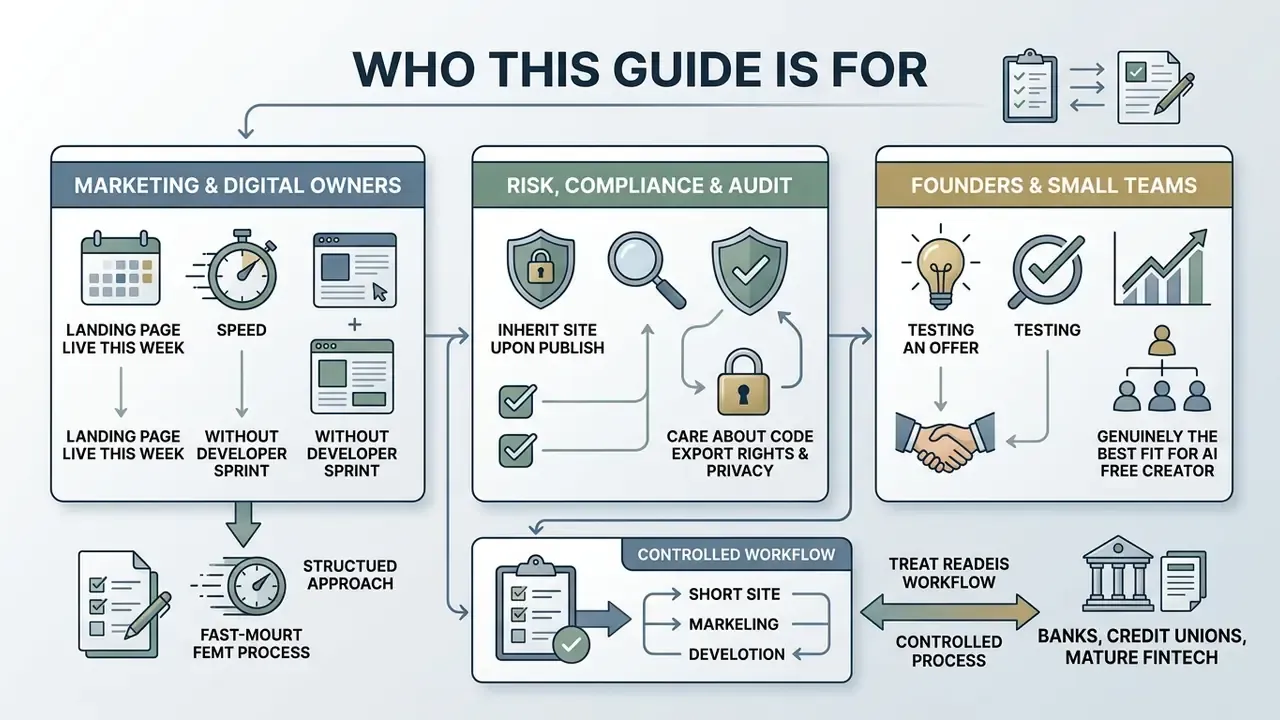
This guide assumes you are not simply looking for the fastest AI free website maker. You are deciding whether an AI-built page can carry a brand, a regulated claim, or a lead form that feeds a CRM.
Three reader profiles keep appearing in that decision:
- Marketing and digital owners who need a landing page live this week, without a developer sprint, and who will be asked later who approved the copy.
- Risk, compliance, and audit functions that inherit the site once it publishes, and who care about provenance, retention, and reproducibility of anything the model wrote.
- Founders and small commercial teams testing an offer, where an ai free website creator is genuinely the right tool, provided the free-tier limits are understood before design hours are spent.
If you sit in a bank, a credit union, or a mature fintech, treat the workflow below as a controlled process with an owner, an approval gate, and an audit trail, not as a design experiment. If you run a five-person consultancy, the same checklist still applies; it just takes an afternoon instead of a sprint.
What an AI website builder can create from a prompt
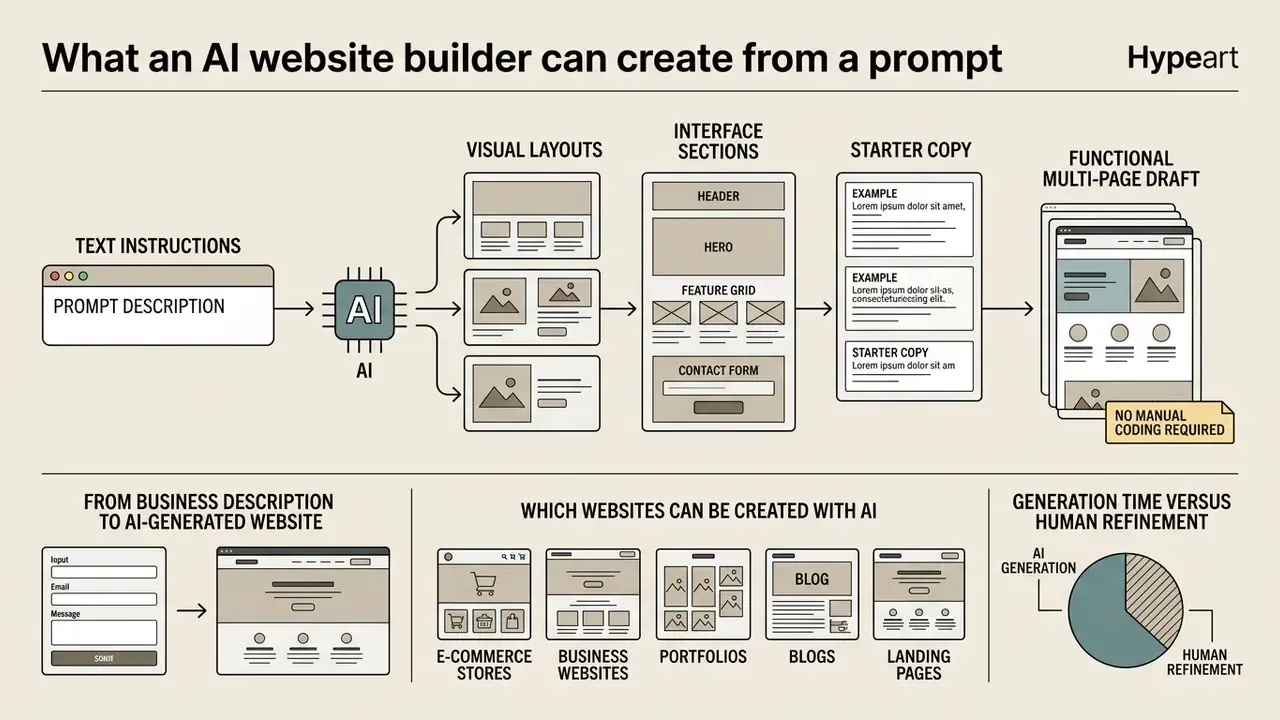
An AI website builder converts text instructions into a functional multi-page draft: visual layouts, interface sections, and starter copy, with no manual coding required. Modern generative systems read user intent and emit structured HTML and CSS frameworks alongside curated graphic assets.
From business description to AI-generated website
An AI website generator parses an operational brief (corporate objectives, audience, core offerings) and builds a sitemap plus a design layout from it. Research by Calò and De Russis (2023) at IS-EUD shows that large language models can convert structured text requirements into valid HTML/CSS documents using templated directives, which allows precise page creation and iterative updates.
«The system instructs the LLM to answer in the format "new, ,
", which allows the output to be parsed automatically into HTML and CSS without manual coding.»
The system maps business requirements onto standardized UI components: hero banners, value propositions, navigation menus. Because visual identity is generated in parallel with layout, teams frequently pair site generation with AI logo generators so that header marks, favicons, and section accents share one palette from the first draft.
One illustrative example, composite and hypothetical rather than a documented client engagement. A regional fintech team fed a 200-word operational description into a generator to draft a commercial landing page. The output came back as a five-section interface with structured value cards and a lead-capture block, in under two minutes. Two minutes. The deployment team then checked the draft against corporate branding standards, ran security checks, and logged the prompt text plus model version in the internal AI systems register for later audit review. That register entry took longer than the generation did, which is roughly the correct ratio.
Which websites can be created with AI
Generative platforms produce multi-page business websites, targeted marketing landing pages, creative portfolios, and campaign-specific promo pages. Research from OmniLayout (2025) demonstrates that advanced neural layout architectures can manage complex, long-sequence document structures, which makes them a reasonable fit for information-dense sites such as knowledge bases or corporate service directories.
«OmniLayout-LLM substantially outperforms specialized layout-generation models in complex domains such as newspapers, where coherent placement of long element sequences is required.»
Front-end layouts and draft content appear fast. Custom back-end business logic and transactional processing still require integration with enterprise infrastructure, and no prompt shortens that work. For deeper technical specifications on the underlying code synthesis tools, see the ai code generator technical overview. When a draft cites statistics or research, sourcing discipline matters as much as layout quality, and an ai citation generator helps keep references traceable instead of invented.
Use-case breakdown: generation time versus human refinement
| Site type | Typical AI generation time | Human refinement effort | Primary AI limitation |
|---|---|---|---|
| Single landing page | 1–3 minutes | 1–2 hours (claims, CTA copy, legal review) | Fabricated testimonials and urgency badges |
| Multi-page business site (4–7 pages) | 3–6 minutes | 4–8 hours (service accuracy, contact verification) | Inconsistent tone across subpages |
| Portfolio / creative showcase | 2–4 minutes | 2–4 hours (asset replacement, licensing checks) | Placeholder imagery lacking usage rights |
| Online store / catalog | 5–10 minutes plus catalog import | 8–20 hours (SKU data, gateway, tax, shipping) | No real inventory or payment logic generated |
| Knowledge base / service directory | 4–8 minutes | 6–15 hours (fact-checking, taxonomy) | Long-sequence layout drift, duplicate sections |
The pattern is consistent: generation is minutes, review is hours. Budget accordingly.
Is an AI website builder really free for business use?
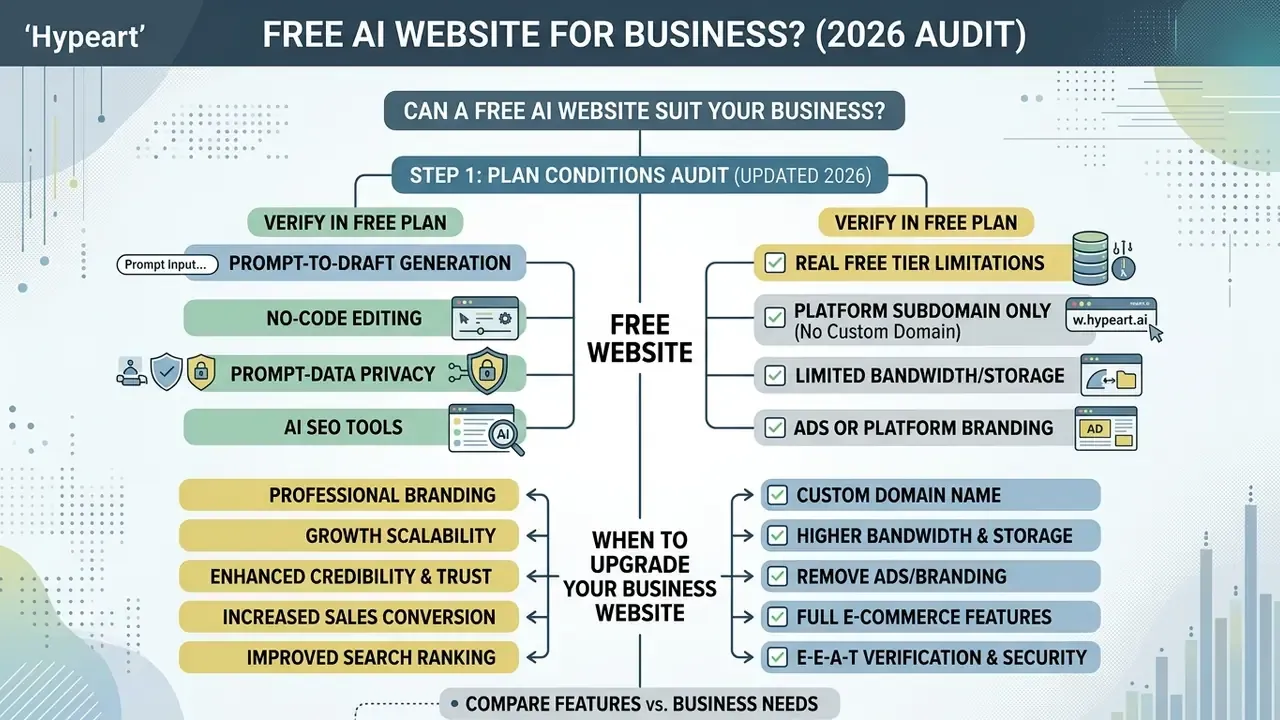
Many platforms let you create, generate, and test a site on a platform subdomain at no cost. Business-grade deployment generally requires a paid tier. Checking licence limits before the design phase prevents rework, and discovering mid-project that payment acceptance or a custom domain sits behind a paywall remains the single most common blocker for commercial launches.
| Feature Category | Free AI Tier Capabilities | Paid Upgrade Tier Capabilities |
|---|---|---|
| Domain Setup | Subdomain (e.g., brand.provider.com) | Custom domain connection (e.g., brand.com) |
| Platform Branding | Provider ads/watermarks visible | Complete removal of platform branding |
| Storage & Bandwidth | Strictly capped (e.g., 500 MB - 1 GB) | Expanded or unmetered capacity |
| AI Generation Quotas | Limited daily credits (e.g., ~500 credits) | High-capacity or unmetered AI usage |
| Commerce & Payments | Disabled or display-only | Fully integrated gateway processing |
| Page/Site Count | Hard caps (e.g., 2 static pages, 1–5 live sites) | Expanded page trees and multi-site management |
| Code Export | Often restricted or unavailable | Static build export or repository sync |
«Framer's free plan provides 500 AI credits per day; generating a single landing page costs roughly 300 credits, which equates to about two pages daily.»
What to verify in a free AI website plan
Before committing resources to any ai free website generator, check monthly bandwidth ceilings, media storage limits, search engine indexing rights, and content ownership terms. Read the terms of service to confirm that commercial usage is permitted on the free tier and that an export path exists if migration becomes necessary.
Rights questions extend to generated media, which is why teams cross-check the commercial use of AI image generators before shipping AI-produced hero visuals. Organizations assessing competing platforms can start from our compare framework hub.
Additional hidden constraints show up across free tiers of both site builders and hosting infrastructure: concurrency limits on builds, monthly request or bandwidth ceilings, file-count ceilings per site, user-seat caps that flip a project into read-only mode when exceeded, and automatic downgrade rules for dormant projects. Document each of these in the total cost of ownership model, together with the audit and review hours the site will consume after launch. Those review hours are the line item that most free-tier calculations quietly omit.
When a business website may need an upgrade
Data privacy, prompt security and AI inventory controls
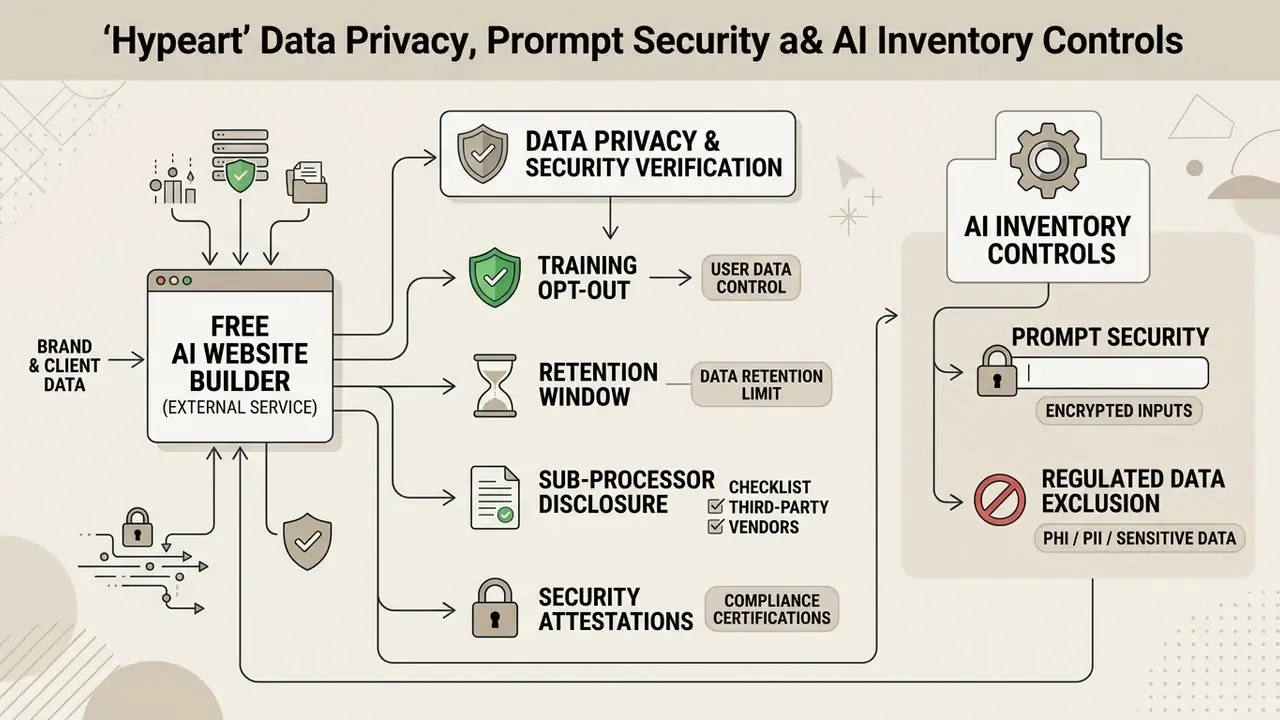
A free AI website builder is an external processing service, not a local design tool. Every business description, brand book excerpt, pricing table, and unreleased positioning statement typed into the prompt field leaves the corporate perimeter.
What to verify before entering brand or client data
- Training opt-out: does the vendor offer a documented "do not train on my data" control, or contractual zero data retention (ZDR) terms for prompts and uploads?
- Retention window: how long are prompts, uploaded reference files, and generated drafts stored, and can they be deleted on request?
- Sub-processor disclosure: which upstream model providers receive your prompt text, and in which jurisdictions is inference performed?
- Security attestations: is there a current SOC 2 Type II report or equivalent, plus enforced TLS in transit and encryption at rest?
- Regulated data exclusion: set a hard internal rule that customer records, financial account data, and any material subject to GLBA, HIPAA, or GDPR special-category rules never enter prompt context.
Register the tool before the first prompt
How to create a website with AI for free
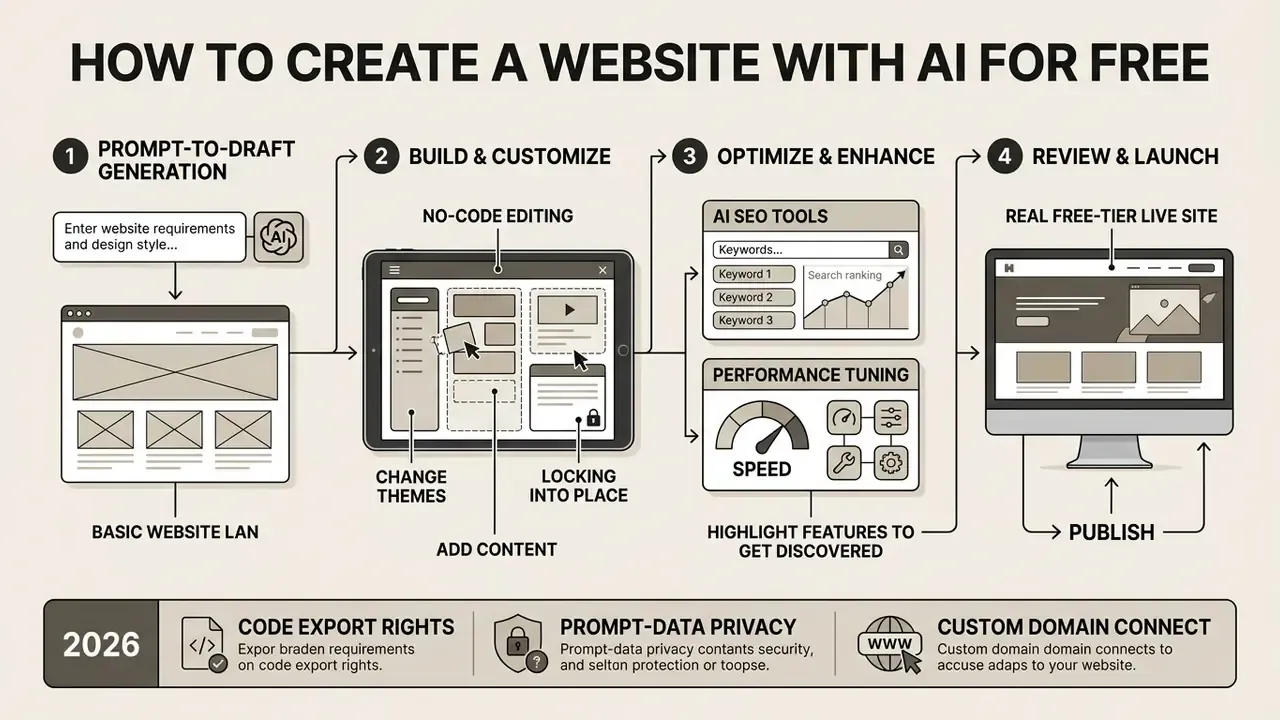
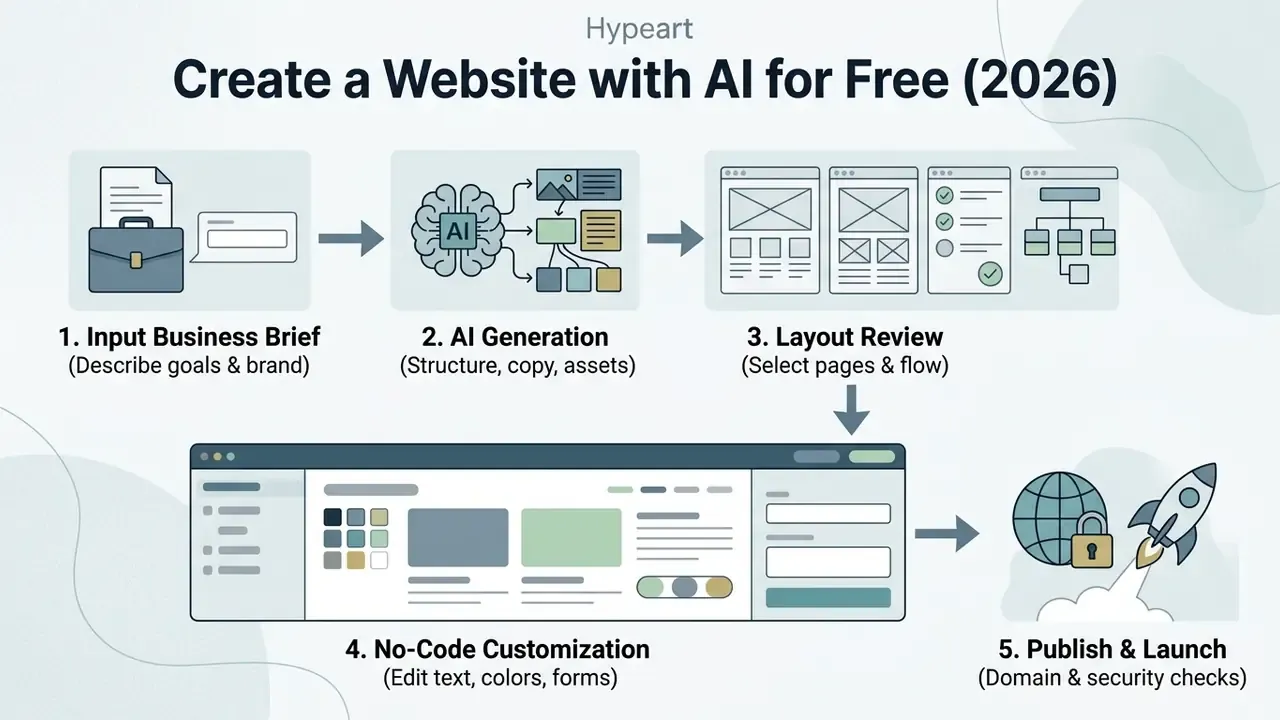
Building a site with a free AI generator comes down to four moves: specify parameters, generate layout components, refine the visuals, then deploy on platform-provided hosting.
Describe your website, business and design vision
To start generation, write a prompt that states your industry, conversion goal, brand personality, and required pages. Stanford University's GenAI Prompt Guide notes that prompts with explicit constraints, a defined audience, and contextual detail return higher-fidelity structural drafts. You can also upload reference style documentation or brand guidelines to align themes with existing corporate identity, subject to the prompt-security checks above. Four prompt blocks consistently improve first-draft quality:
1. Input Business Brief    --> 2. AI Generation          --> 3. Layout Review
   (Describe goals & brand)       (Structure, copy, assets)     (Select pages & flow)
                                                                       |
5. Publish & Launch       <-- 4. No-Code Customization   <-- ----------+
   (Domain & security checks)    (Edit text, colors, forms)
- Input Business Brief --> 2. AI Generation --> 3. Layout Review
- Publish & Launch <-- 4. No-Code Customization <-- ----------+
Vague prompts produce generic pages. That is not a model failure; it is an input failure.
- Business context
- industry, what you sell, the single conversion action, and the required page list.
- Audience
- one sentence on who the site serves, with behavioral context rather than demographics alone.
- Brand identity
- name, positioning, voice adjectives, and explicit differentiation from named competitors.
- Visual direction
- colour palette, typography preference, mood, imagery style, and one or two reference sites.
Generate the layout, pages and initial content
Once submitted, the AI tool to create website free architectures converts your brief into a multi-page draft with wireframes, typography pairings, colour palettes, and draft copy. In a 2023 controlled experiment by Peng et al. on developer productivity, AI-assisted workflows accelerated structural implementation tasks by up to 55.8%.
«Participants using GitHub Copilot completed an HTTP server implementation task 55.8% faster than the control group working without AI assistance.»
The generated draft gives you a complete structural baseline: section grids, media placeholders, primary call-to-action blocks. Platform documentation from Microsoft Power Pages, Webflow, and Figma Make describes a consistent sequence. The system proposes a site name and home-page layout, generates additional pages, then fills each page with markup, body copy, and matched imagery, leaving section order and page count editable afterwards.
Worth saying plainly: the draft is a starting point, not a deliverable.
Review the generated site before publishing
Before anything goes public, audit the generated text, visual assets, and functional elements. Findings from Krauß et al. (CHI 2025) show that LLM-generated sites routinely include deceptive design patterns, such as artificial urgency indicators or unverified testimonial blocks, by default when the prompt asks for high conversion.
«All 20 generated websites contained at least one manipulative pattern; the average number of patterns per site was 5, with a maximum of 9.»
Customize an AI-generated website without code
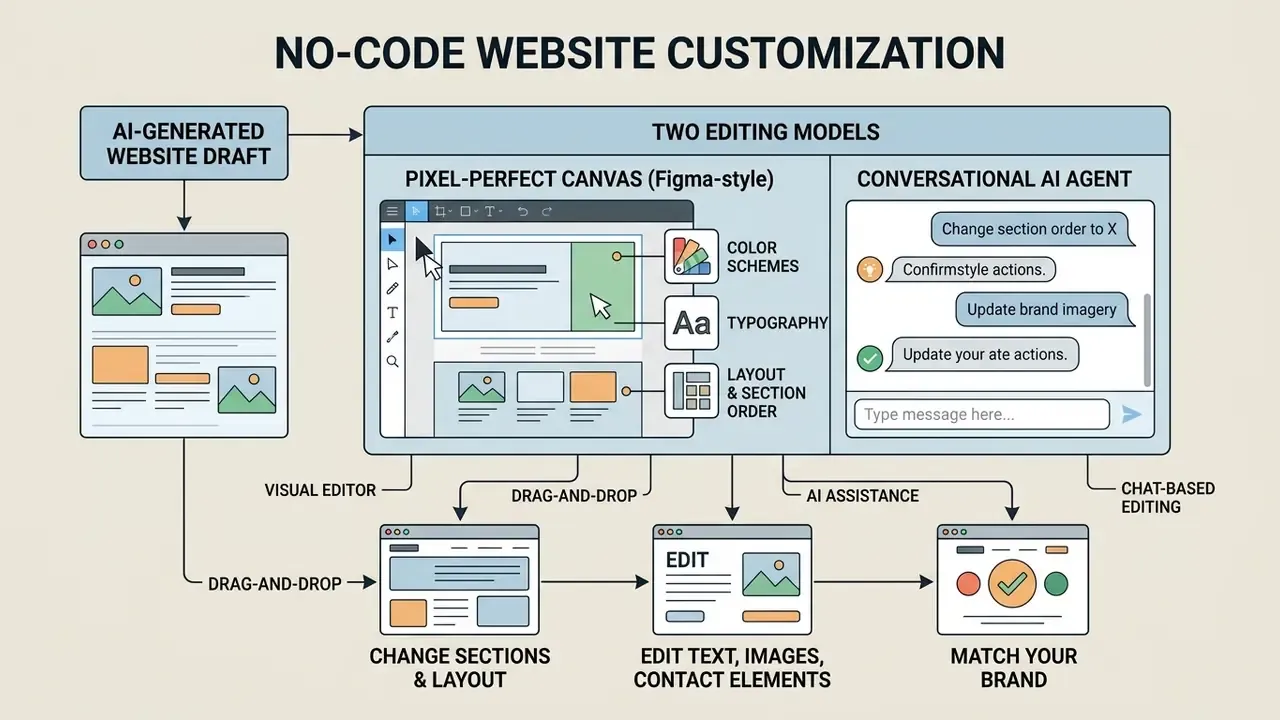
No-code visual editors let you modify AI-generated layouts, colour schemes, typography, and section order without writing a line of code.
Two editing models: pixel-perfect canvas and conversational agent
No-code AI editing runs through two interfaces:
- Freeform pixel-perfect canvas (Figma-style): absolute positioning, drag-and-drop resizing, and custom grid adjustments, without forcing content into rigid container blocks. Elements sit exactly where you place them, and the same freedom applies to AI-generated pages as to hand-built ones.
- Conversational AI editing agents: prompts such as "Change the primary button colour to navy blue and rewrite the main header to sound more professional" trigger instant global style updates through dialogue. Vendor documentation from Replit, Figma, and Readme describes agents that edit multiple pages at once and accept "click any element, then describe the change" interactions.
Most production teams alternate between the two. The agent handles bulk restyling and new section generation; the canvas handles final spacing, alignment, and brand-token precision.
Change sections, layout and pages to match your brand
Visual editors support drag-and-drop reconfiguration of sections, global palettes, and typographic hierarchies. Structural models such as PLay (Cheng et al., 2023) use conditioned latent diffusion to adjust spacing, alignment, and element emphasis while holding overall design balance.
«PLay outperforms prior approaches on FID and FD-VG metrics; a user study confirmed its practical value in professional design workflows.»
You can insert new functional blocks, reorder page hierarchies, and apply standardized design tokens to keep visual compliance across digital properties, often refining replaced imagery with AI photo editors before upload. In practice, brand alignment happens on three levels: page-level theme and palette, section-level background and spacing overrides, and block-level typography, border, margin, padding, radius, and shadow controls. Additional details on asset creation and media placement live in the ai clipart resource hub, and multi-image sections are easier to compose with an ai collage maker than by hand-cropping five separate uploads.
Edit text, images and contact elements with AI assistance
Contextual assistants inside the editor refine draft copy, propose alternative headlines, and swap visual elements in place, a workflow many teams extend with AI image generators for on-brand section visuals. A qualitative study by Takaffoli et al. (DIS 2024) found that enterprise UX practitioners lean on generative tools mainly for first drafts and iterative copy polishing, treating output as a foundation that still needs editorial review.
«UX practitioners report a lack of long-term memory in AI tools: they must restate brand context at the start of every new generation session.»
Contact forms and lead-capture inputs can be reconfigured to collect specific fields while staying inside your data privacy commitments. Retail and apparel teams building product sections sometimes prototype visuals with an ai clothing generator before commissioning a photo shoot, though licensing and likeness checks still apply. For supplementary editing options, see our photo editor platform guide.
Pages and business features to add to an AI website
Turning a basic draft into a commercial web property means adding standard informational pages, lead acquisition forms, and operational back-end tools.
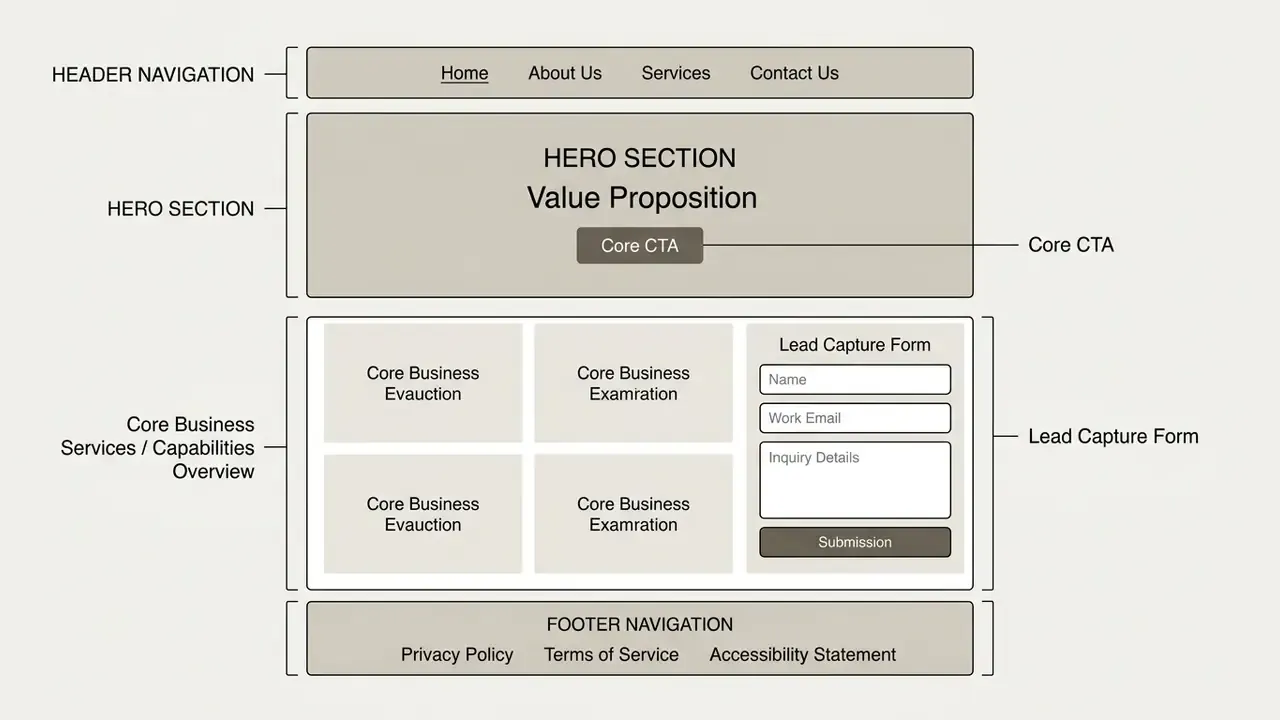
Essential pages and contact forms for a business website
A complete business website needs a primary landing page, an About Us overview, a Services or Products catalog, a Privacy Policy, and an accessible Contact page. Nielsen Norman Group's analysis of contact pages (NNGroup, 2019, https://www.nngroup.com/articles/contact-us-pages/) recommends full contact details visible from main navigation or footer, with a form of three to five fields offered alongside phone and email rather than instead of them.
Government web standards reinforce the same baseline. The U.S. Department of the Interior Web Standards Handbook requires a unique page title, a link back to the home page, consistent navigation, and site-wide disclaimers. Canada's Standard on Web Usability makes contact information, page titles, a home-page return mechanism, and search functionality mandatory. Keep forms streamlined, then, so conversion stays high without adding friction for prospective clients.
Integrating AI-generated brand assets (logos, vector graphics, and kits)
A website builder should not exist in isolation. Leading AI creation suites generate a unified visual identity alongside the site layout:
- AI logo synthesis vector-based logo creation built for scaling across web headers, favicon formats, and print collateral.
- Unified brand kits automatic palette and typography extraction applied across subpages, social cover templates, and digital business cards.
- Branded QR codes and email signatures dynamic QR codes pointing to landing pages or menus, formatted to match corporate design tokens, plus matching signature blocks for outbound mail.
- Link-in-bio and social sets single-page link hubs and per-network cover graphics generated from the same palette, keeping campaign traffic visually consistent with the site.
For regulated brands, every generated mark should pass a trademark similarity check and an IP-safety review before production. Vector output from a text prompt carries no automatic clearance, and nobody wants to discover that after the letterhead is printed.
Marketing, online store and payment capabilities
To support transactions, AI-built platforms need secure payment gateways, email marketing connectors, and CRM integrations. Guidance from the U.S. International Trade Administration (trade.gov, eCommerce payment guidance) states that accepting online payments requires both a merchant account and a payment gateway, defining the gateway as software within the website that authorizes and processes transactions. Adobe Commerce's integration documentation lists payment gateways and email marketing among standard third-party ecommerce integrations, while PayPal documents website payments and email invoice payments, and Adyen documents embedded online payments for ecommerce sites and apps.
Third-party marketing integrations route leads into enterprise databases and mailing lists automatically. Booking or scheduling modules add appointment capture for service businesses. Campaign pages increasingly lean on motion assets, so teams comparing production options can review our roundup of free video editing software, or start smaller with an ai clip generator for short hero loops and social cutdowns. For operational cost models and software pricing structures, consult the AI Media Pricing Guides.
Code ownership and source code export options
Source code portability is a decisive factor when choosing a free builder. Platforms such as Webflow or Wix keep your site inside their hosting ecosystem, while several AI generators allow clean HTML/CSS/JS export and market source ownership as a differentiator.
Before committing, verify:
Export capability doubles as a risk control. If a platform changes pricing, deprecates a feature, or suffers an outage, an exportable static build converts a vendor dependency into a portable asset. Ongoing disputes about training data and generated output are worth tracking too; our AI Litigation and Case Timelines portal follows how those cases move.
- Self-hosting rights
- can you download a static build (ZIP archive) to host on your own Nginx or Apache server, an object store, or GitHub Pages?
- Clean code output
- does the AI emit semantic markup, or platform-specific bloated dependencies that break outside the vendor runtime?
- Database and asset independence
- are media files served from external CDNs, or bundled inside the export package so the site renders after migration?
- Repository sync
- can the project push to a Git repository, giving you version history and a rollback path independent of the vendor dashboard?
- Contractual clarity
- do the terms assign ownership of generated code and copy to you, including on the free tier?
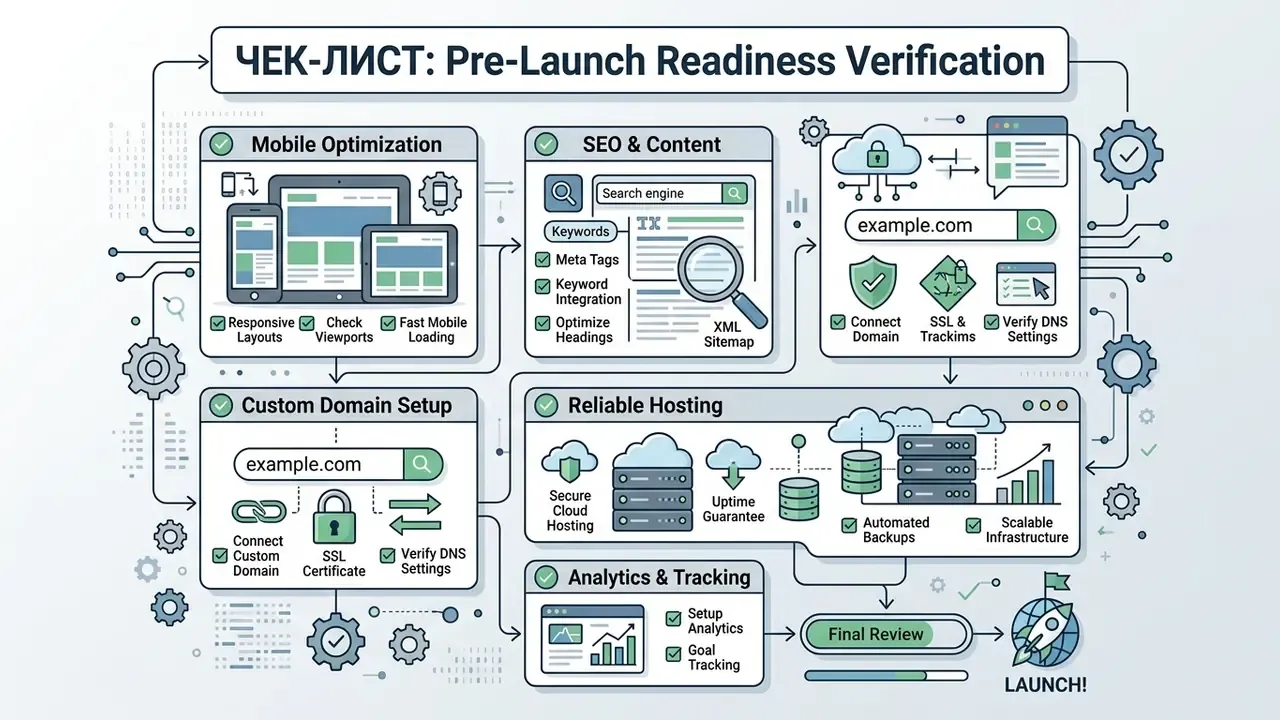
Prepare an AI website for launch: mobile, SEO, domain and hosting
Launch readiness means technical verification across mobile responsiveness, search engine optimization, custom domain configuration, and secure hosting.
Checklist0 / 10
Responsive design and SEO for AI-built websites
Google Search Central guidelines treat responsive web design, serving identical HTML across all viewports, as the standard for indexing and performance. Mobile-first indexing adds further requirements: identical robots meta tags on mobile and desktop, crawlable rendering resources, and matching structured data across versions.
A 2025 empirical study by Semrush covering 42,000 web pages indicates that unedited, fully AI-generated content rarely secures top rankings, holding top positions roughly 10% of the time versus about 80% for human-refined material. Hybrid AI-assisted content, by contrast, competes well.
«72% of SEO specialists believe AI-assisted content ranks as well as human-written content — up from 64% in the 2024 study.»
Optimizing title tags, heading hierarchy, meta descriptions, and image alt text helps crawlers index AI-generated pages correctly. Specialized tools for visual and video assets are covered in our video compressor technical documentation.
Built-in AI SEO tools and automated blogging
Beyond responsiveness, modern platforms embed AI SEO assistants that streamline indexing and content scaling:
- Automated meta tag generation systems analyse page copy to produce title tags under roughly 60 characters and meta descriptions under roughly 160 characters, matched to keyword intent, usually with several variants to refine by brand voice.
- Structured data injection automated Schema.org markup (Article, LocalBusiness, Product, FAQ) helps trigger rich snippets without hand-written JSON-LD.
- SEO assistants and site inspection checklist modules flag missing headings, thin pages, and indexation errors, with Search Console integration for sitemap submission and URL inspection from the dashboard.
- AI SEO writers for content scaling blogging modules take a seed keyword, propose topic clusters, draft long-form articles, set heading hierarchy, and publish into the site's blog collection.
- Redirect and canonical management 301 redirect tools prevent 404 losses when AI regenerates page slugs during a redesign.
Every one of these outputs still needs editorial review. The Semrush ranking gap between raw and refined AI content applies to auto-generated blog posts and meta descriptions just as much as to landing pages.
Connect a domain and publish with hosting and security
Publishing live means configuring DNS records so your custom domain resolves to the hosting provider's infrastructure. The sequence is consistent across platforms: add the hostname in domain settings, create the A or CNAME record the platform shows, let the host issue an automatic certificate (or upload a PEM/CRT chain with an unencrypted private key), then publish.
Modern cloud hosting platforms provision SSL/TLS certificates automatically to enforce HTTPS across incoming traffic. Once DNS propagation finishes, administrators trigger a one-click publish from the dashboard and the site becomes publicly accessible. Propagation can take minutes or most of a day, so avoid scheduling a launch announcement for the same hour.
«Over 36 days, roughly 71% of newly published AI-generated pages were indexed by Google, collecting more than 122,000 impressions and 244 clicks.»
If publishing breaks at the DNS or certificate step, our AI Media Support and Troubleshooting hub documents the usual failure modes. Teams wiring generated pages into existing systems can also review the AI Media API Guides, including the Google Veo API guide for programmatic video assets.
Limitations and open questions
Some honesty about what this workflow does not solve.
Generation speed says nothing about content accuracy. A model can produce a flawless five-section layout and a completely fabricated client quote in the same pass, and only a human reviewer catches the second one. Vendor free-tier terms also shift without much notice, so any pricing table, including the one above, should be re-verified before a purchase decision.
Two questions remain genuinely unsettled. First, how far generated code and generated imagery carry usable ownership rights on free tiers, given that terms vary by vendor and litigation continues. Second, whether AI-assisted content sustains rankings over multiple algorithm cycles; the Semrush data covers one snapshot, not a multi-year trend. Treat both as open.
FAQ about creating a website with AI for free
How fast can an AI website builder create a complete site?
Vendor documentation places first-draft generation between one and several minutes. WebWave advertises a complete site in roughly 3 minutes, while Kleap and Design.com describe generation "in minutes" or "in seconds" for single pages. No independent standard defines a universal generation time, and none of those figures include review. In practice, pre-launch content audits, brand alignment, trademark checks, and security review add several hours to a landing page and one to three working days to a multi-page commercial site.
Do I need coding or professional design skills to use an AI website maker?
No programming or advanced design skill is required. Visual editors let you change colours, typography, section order, and copy through point-and-click or drag-and-drop controls, and conversational agents accept plain-language change requests. Judgement is still required for claim accuracy, accessibility, and brand consistency. The skill simply shifts from production to review.
Can I export the HTML/CSS and host the site myself?
It depends entirely on the platform. Some generators market clean source export and repository sync as a core feature, letting you host a static build on your own server or GitHub Pages. Mainstream builders such as Wix and Webflow tie published sites to their hosting stack, with Webflow offering limited code export on higher tiers only. Confirm export rights, asset bundling, and code ownership clauses in the terms of service before investing design hours.
Is it safe to enter brand documents and business data into a free AI builder?
Treat prompts as outbound data transfers. Free tiers often reserve broad rights to process inputs, and some providers use submitted content to improve models unless an opt-out or zero-data-retention agreement is in place. Before uploading brand books, pricing tables, or client information, verify training opt-out controls, retention windows, sub-processor jurisdictions, and available security attestations. Prohibit regulated customer data in prompts by internal policy, not by good intentions.
Can I customize my website content after publishing it live?
Yes. Web managers can log into the dashboard at any time to edit copy, swap images, add pages, or reconfigure layout blocks. Changes can be saved as drafts or published immediately. For auditability, record substantive post-launch changes, particularly to claims, pricing, or legal pages, along with the reviewer who approved them.
Are free AI-generated websites secure and compliant?
Free tiers usually include standard cloud hosting and SSL encryption. Compliance is a separate matter: administrators must review generated content against data privacy law (GDPR, CCPA) and accessibility standards (WCAG 2.2). Because CHI 2025 research found manipulative patterns in every LLM-generated site tested, human sign-off on deceptive-design removal belongs in the launch gate, not on an optional checklist.
Can I use a custom domain name on a free AI website tier?
Most major platforms restrict custom domain connection to paid plans, hosting free sites on platform-branded subdomains such as brand.provider.com, framer.website, webflow.io, my.canva.site, or durable.site. Connecting your own domain almost always requires a subscription, though some vendors bundle a first-year domain registration with annual plans.
Which AI web creator free tier fits a first commercial test?
There is no single answer, and any ranking would be a guess. A reasonable filter: pick the ai website builder free create website flow whose free tier lets you publish the page count you actually need, then check export rights and prompt-data terms before you add brand assets. If payments or a custom domain are required on day one, budget for the paid tier from the start rather than rebuilding later.
A safe next step
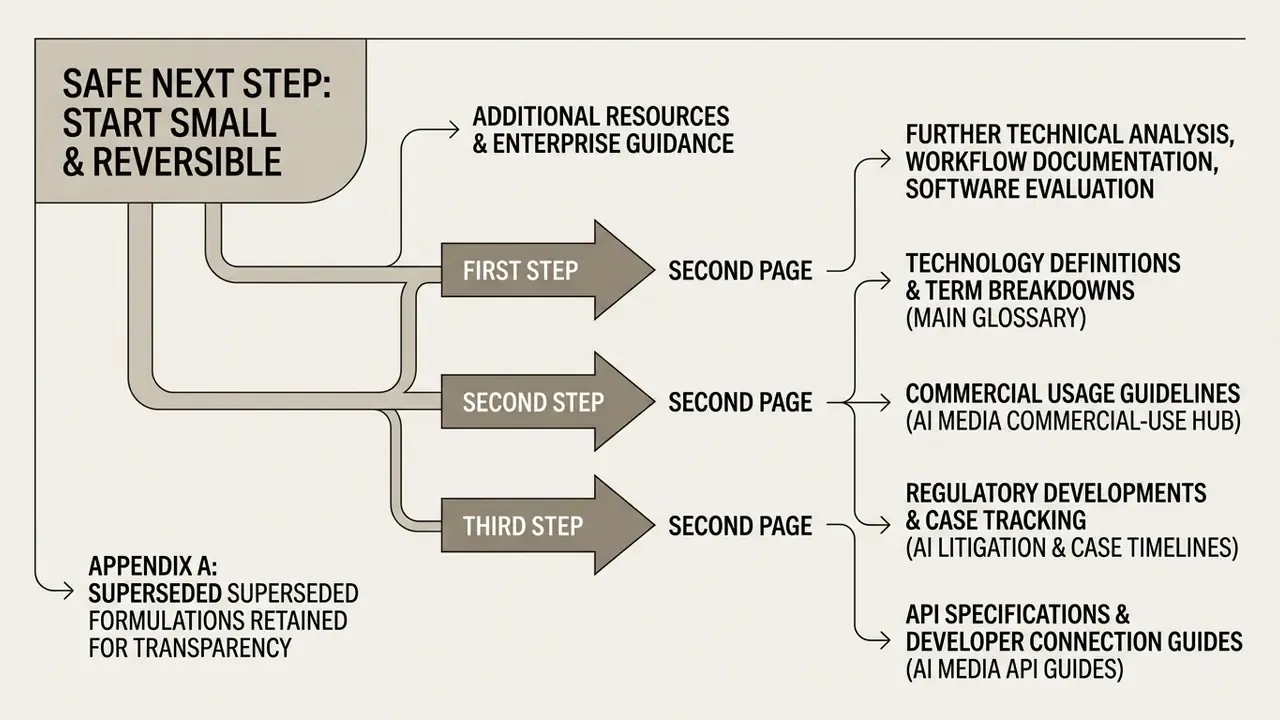
Start small and reversible. Generate one page, not a nine-page site, and treat it as a controlled pilot with a named owner.
Then do three things before the second page. Register the tool in your AI inventory. Log the model version and prompt text. Assign one reviewer who signs off that no fabricated claim, unlicensed image, or manipulative pattern survived into production. If those three steps feel heavy for a landing page, they will feel considerably lighter than the alternative during an audit.
Additional resources and enterprise guidance
For further technical analysis, workflow documentation, and software evaluation guides:
- Technology definitions and term breakdowns sit in our main glossary.
- Commercial usage guidelines are collected in the AI Media Commercial-Use Hub.
- Regulatory developments and case tracking live in AI Litigation and Case Timelines.
- API specifications and developer connection guides are in AI Media API Guides.
- Troubleshooting frameworks are maintained at AI Media Support and Troubleshooting.
- Cost modelling for AI-assisted production is available through our AI Media Calculators and pricing guides.
- Adjacent production tooling for site media is documented in the ai voice generator, free photo editor, and animation maker overviews.