Web-based generative media tools let you turn a single static photo into a moving clip without creating an account or handing over billing details. An image to video ai free no sign up tool opens in a browser tab and converts a still frame into an animated shot in seconds. Handy? Very. Risk-free? Not quite, and that distinction is the whole point of this guide.
Executive Summary
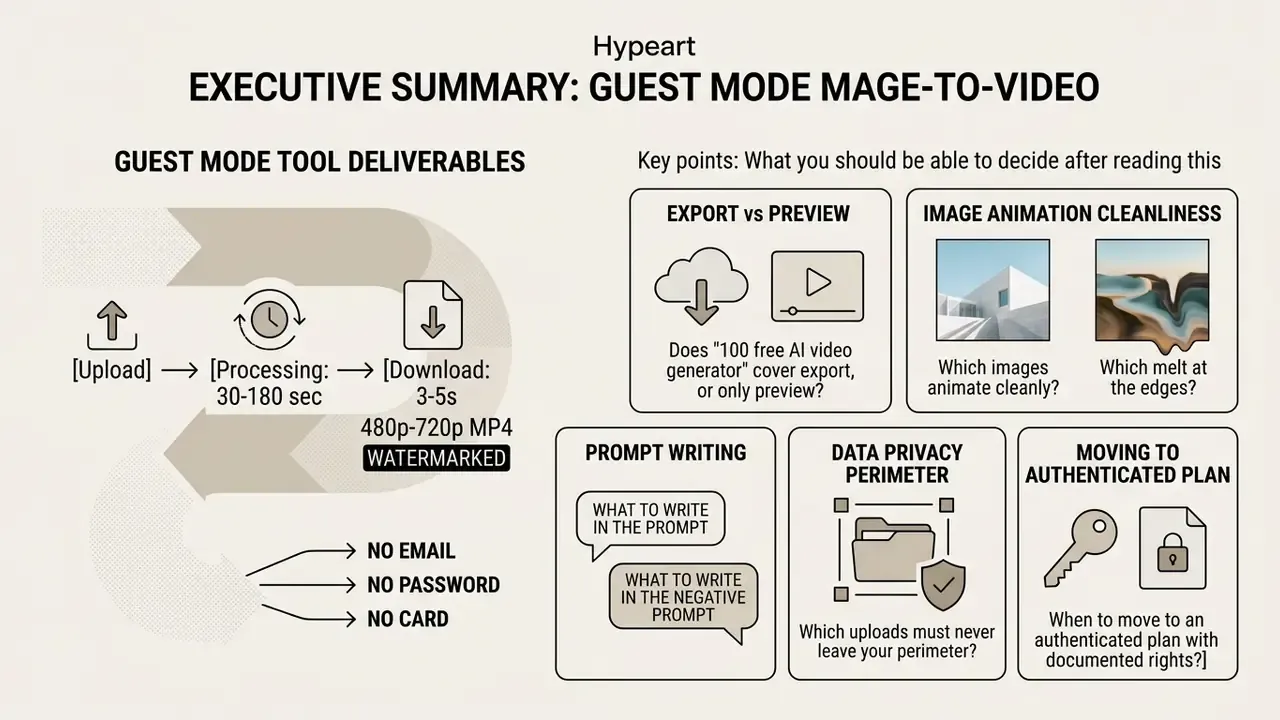
- For creators: guest-mode image-to-video tools deliver a 3 to 5 second, 480p to 720p MP4 in roughly 30 to 180 seconds, usually watermarked, with no email, no password, and no card. That is enough to test a hook, a storyboard beat, or a product motion concept. It is not enough for a finished 4K campaign asset.
- For operations and risk owners: "no sign up" removes friction and removes governance. Anonymous endpoints sit outside SSO, outside audit logs, and outside most DLP tooling, which makes them a textbook Shadow AI vector. The practical mitigation is not a ban but a narrow allowlist: no client media, no personal data, no unreleased product imagery, metadata stripped before upload.
- For legal and compliance: purely AI-generated output is not registrable for copyright in the United States, because human authorship is required, and the EU position aligns on the same human-intervention test. Realistic synthetic video resembling real persons or events carries transparency duties under the EU AI Act's deepfake disclosure rules. Free anonymous tiers almost never include legal indemnification.
- The one-line verdict: treat free no-sign-up image-to-video generators as a prototyping surface, and route anything client-facing, confidential, or commercially licensed through an authenticated, contractually covered pipeline.
What you should be able to decide after reading this
- Whether a "100 free ai image to video generator" claim actually covers export, or only preview.
- Which of your source images will animate cleanly, and which will melt at the edges.
- What to write in the prompt, and what to write in the negative prompt.
- Which uploads must never leave your perimeter, even for a five-second test.
- When to stop using guest mode and move to an authenticated plan with documented rights.
What "Image to Video AI Free No Sign Up" Means in Practice
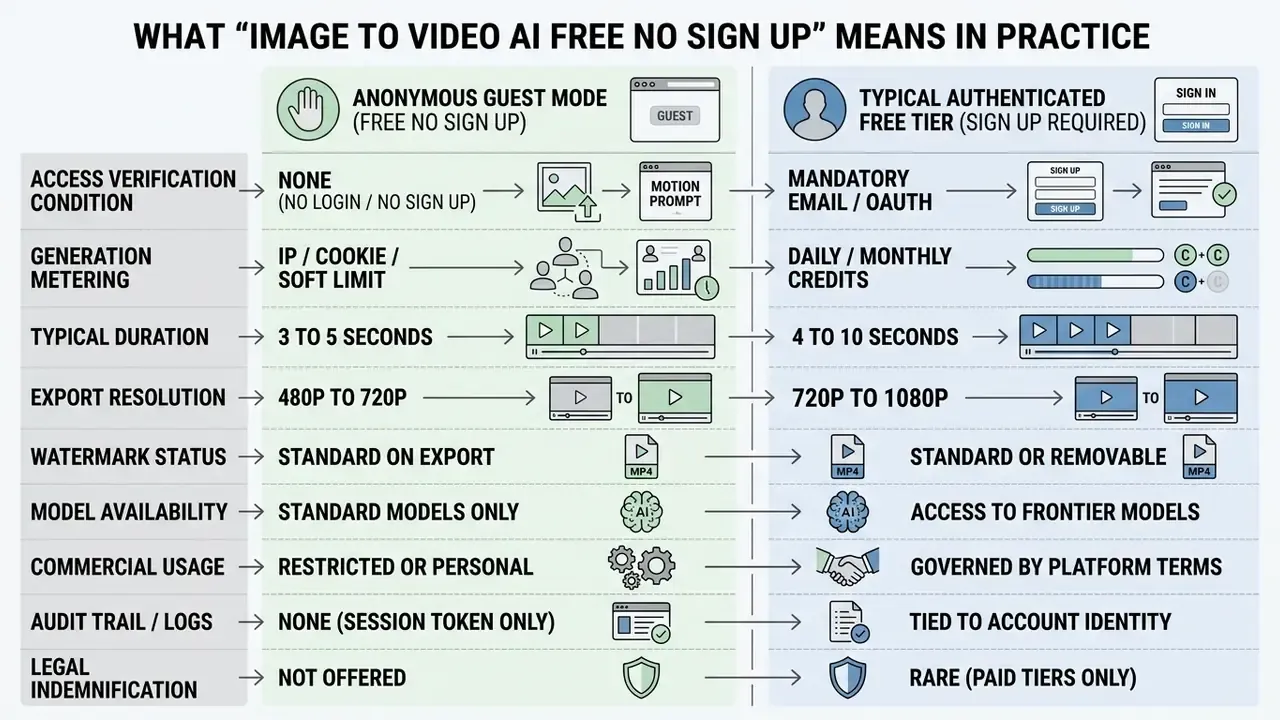
An image to video ai free no sign up workflow generates animated clips directly in a browser, with no account and no credentials. In practice, that means guest-mode access to an AI video generator that turns uploaded images into short dynamic clips using diffusion models. Entry costs nothing. Rendering speed, clip duration, and commercial usage rights, however, are shaped by compute economics and vendor monetization policy.
Free, No Sign Up, No Login and No Credits: What Actually Differs
The phrases "no sign up", "no login", "no credits", and "unlimited free" describe four different access models. Vendors blend them in marketing copy on purpose, which is why users get surprised at the download button.
- No Sign Up. You can open and operate the service without creating an account. The condition is the absence of registration, not the absence of tracking, rate limits, or watermarks. A tool advertised as ai image to video no sign up free starts generating media without identity checks.
- No Login. Access without entering credentials. This still coexists with an account system that unlocks saved projects, higher resolutions, or extra models. An ai image to video generator no login page and an ai image to video no sign in page are usually the same thing described twice.
- No Credits. The interface deducts nothing from a prepaid or monthly wallet for the covered function. A 100% free image to video ai workflow without credits can still impose queue delays or a daily generation ceiling.
- Unlimited Free. The provider advertises free use with no stated cap. In practice it applies to selected entry-level models, lower resolutions, or a daily quota, rarely to the full catalogue. Treat ai image to video generator unlimited free as "unlimited on the cheapest model".
Knowing these four apart helps you pick the right animation engine before the render finishes, not after. A structured overview of tier mechanics, export ceilings, and watermark policy sits in our reference on free AI video generators; adjacent tooling for still-image prep is covered in the free photo editor guide.
What Limits Remain in a Free Generator
Free anonymous platforms enforce strict limits on duration, resolution, rendering priority, and watermarking to keep GPU bills survivable. Most ai image to video no login free services cap clips at 3 to 5 seconds and hold output at 480p or 720p.
The reason is arithmetic, not stinginess. Diffusion-transformer video inference is one of the most expensive consumer AI workloads running in production today.
"Training Open-Sora required eight H100 GPUs and roughly 3,500 compute hours, which is exactly why free access is structurally capped."
"Generating about 5.1 seconds of video took roughly 93 seconds on a single A100 GPU, approximately 18 seconds of compute per second of output." StreamWise: Serving Multi-Modal Generation in Real-Time at Scale (2026)
So an ai image to video no credits pipeline throttles queues at peak hours, and paid tiers are sold mostly as queue priority rather than as a better model. Sometimes it is a better model too, but the priority is what you feel first.
| Free-tier limit | Typical value in guest mode | Underlying driver |
|---|---|---|
| Clip duration | 3 to 5 s (72-120 frames at 24 fps) | Frame count scales compute linearly |
| Resolution | 480p / 720p | Pixel count scales denoising cost |
| Daily generations | 1 to 3 per IP or session | GPU hour budget per anonymous user |
| Watermark | Applied on export | Monetization and provenance signal |
| Queue priority | Lowest tier | Paid jobs pre-empt free jobs |
| Model catalogue | Standard models only | Frontier models cost more per second |
If you want to sanity-check those numbers against your own volume, the AI Media Calculators turn seconds of output into estimated compute cost.
Governance and Risk Snapshot for Teams (Shadow AI and DLP)
Frictionless tools spread inside organisations precisely because they leave no trace. That is the risk, stated plainly. Before a marketing, design, or product team starts pushing files into an anonymous endpoint, walk this checklist once.
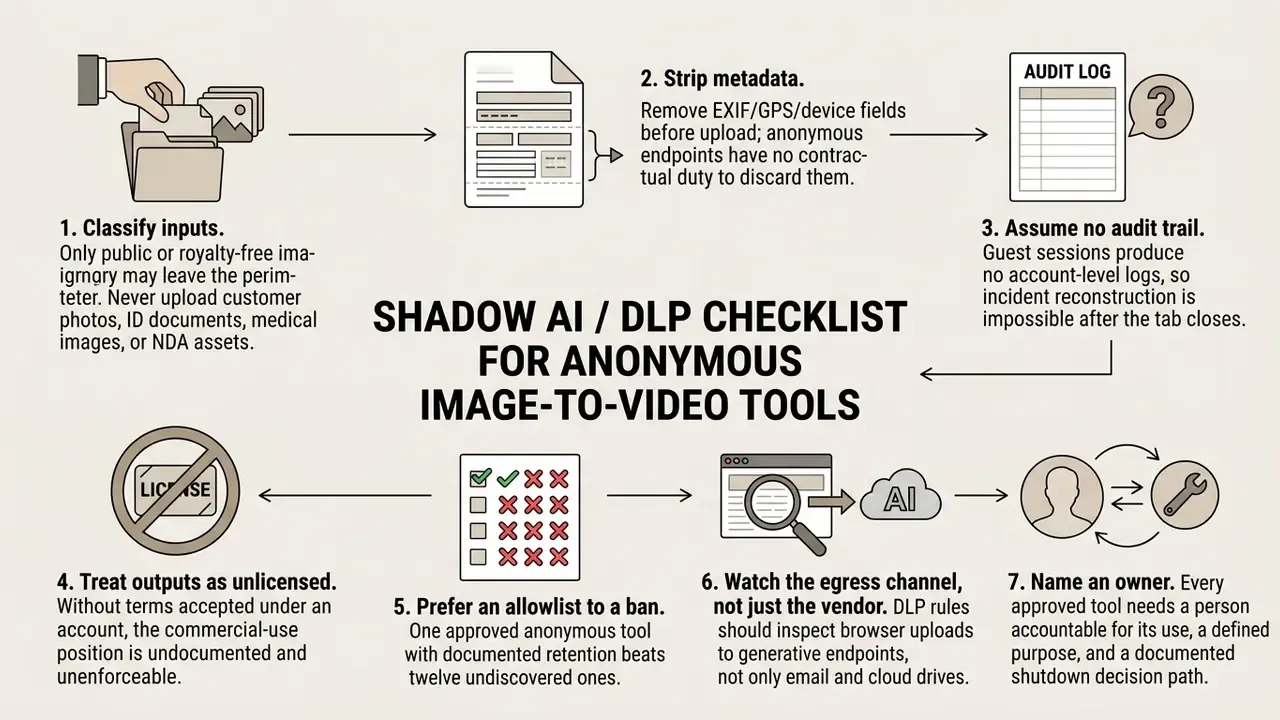
Risk matrix: what is actually exposed.
| Data category | Exposure in guest mode | Practical control |
|---|---|---|
| Uploaded image pixels | Transmitted to third-party GPU nodes | Use only cleared, non-confidential imagery |
| Image metadata (EXIF, GPS) | Often transmitted unchanged | Strip before upload |
| IP address and session token | Logged for rate limiting | Accept as unavoidable; do not tie corporate VPN identity to sensitive tests |
| Prompt text | Stored with the job record | Never paste internal codenames, roadmaps, or client names |
| Generated output | Cached until session expiry or scheduled purge | Download immediately, then verify the vendor purge policy |
One more governance note. A guest session is anonymous to the vendor, not to your browser. Cached files, download folders, and clipboard history still carry the evidence, which matters when someone asks three months later where a particular clip came from.
How to Create an AI Video from an Image Without Logging In
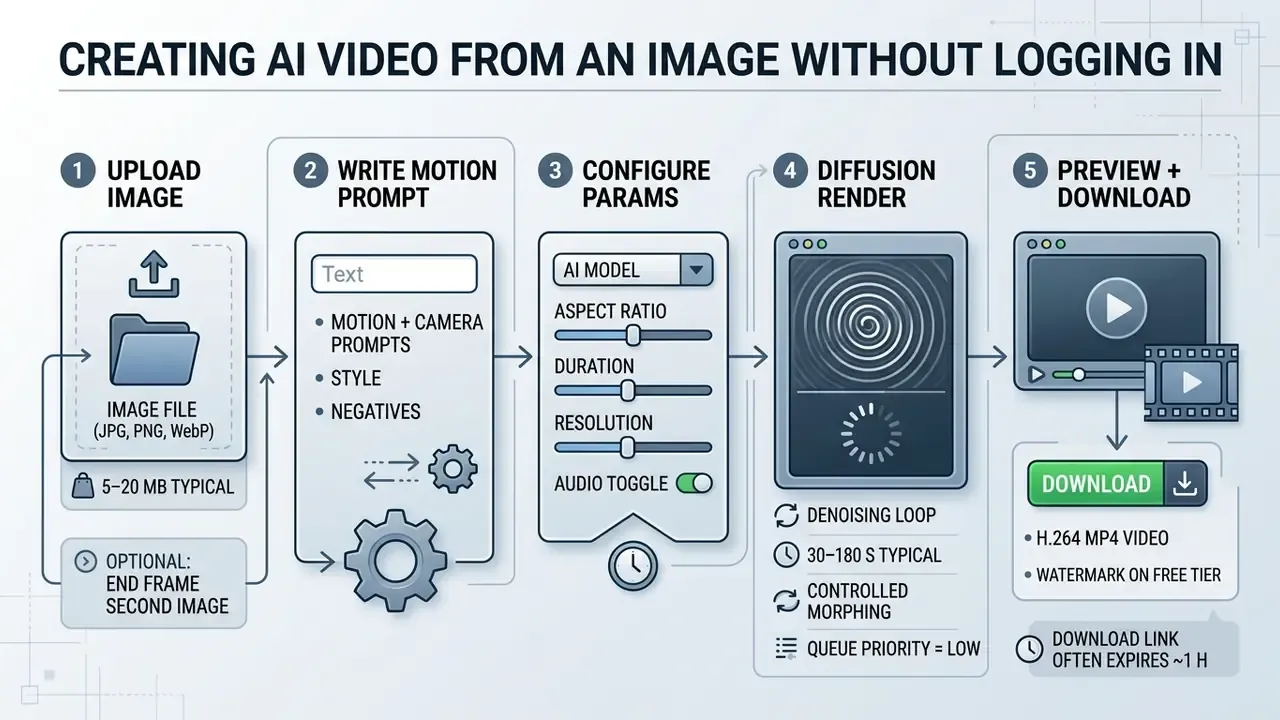
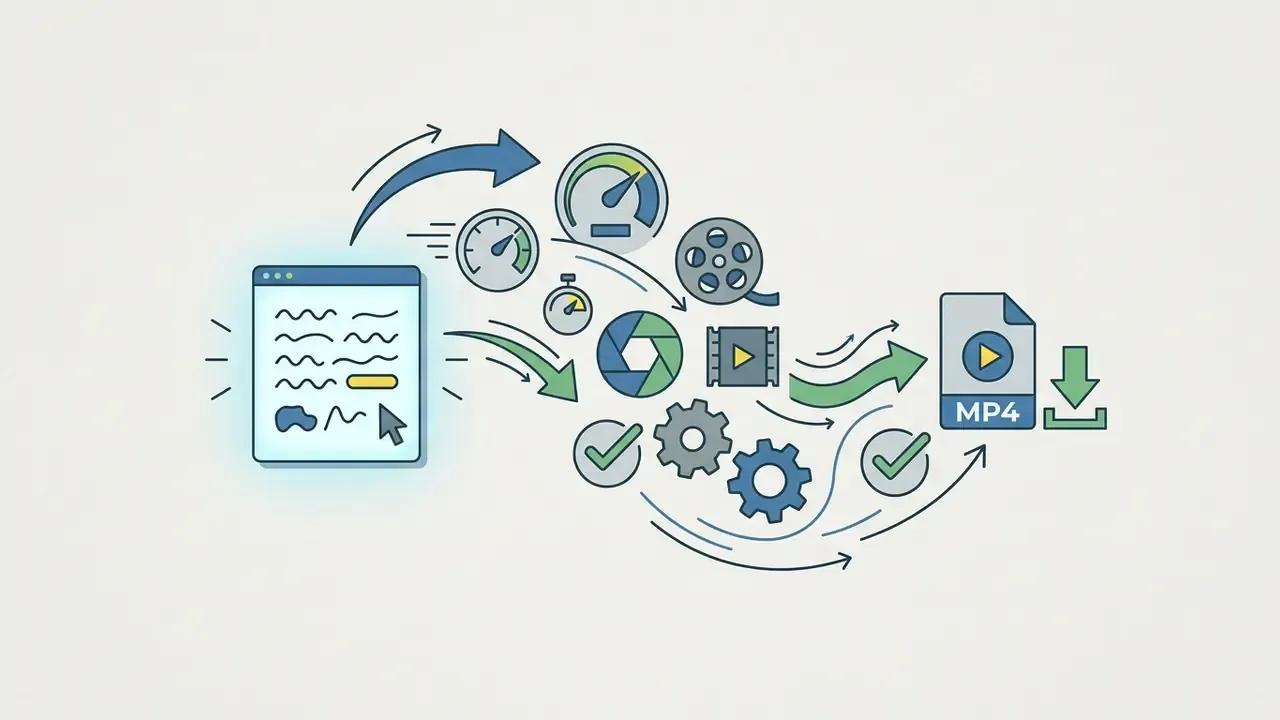
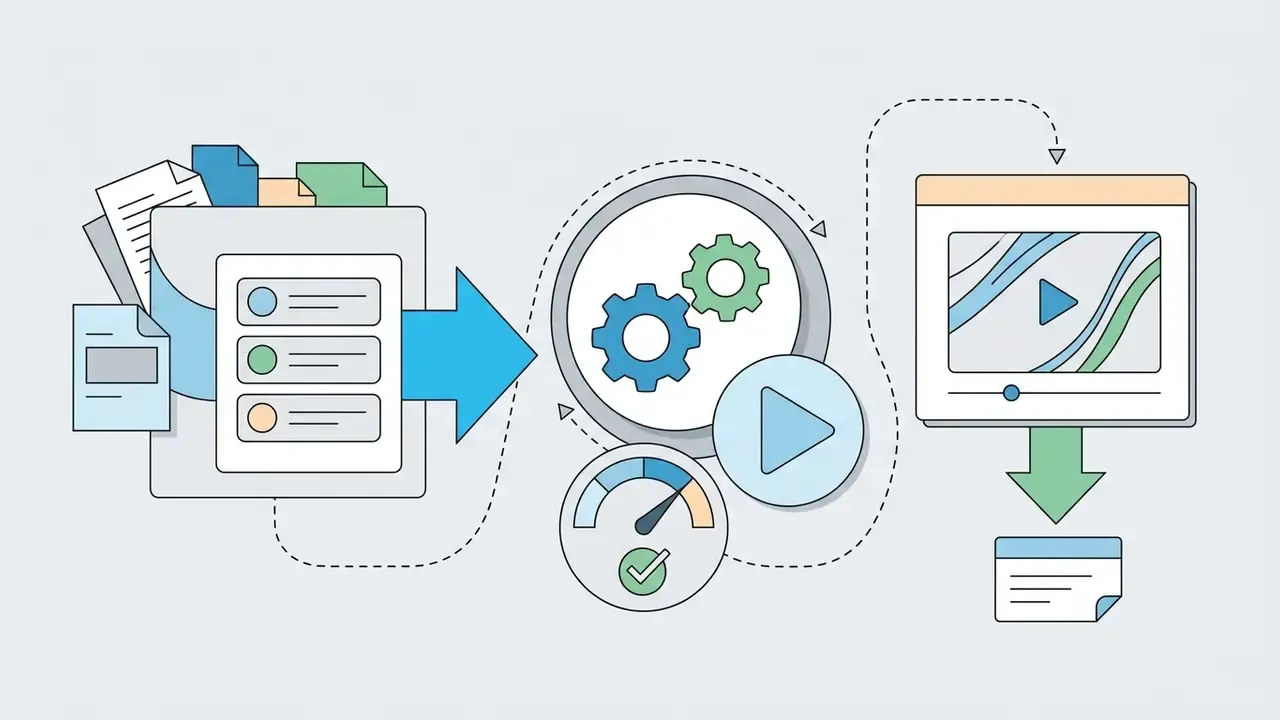
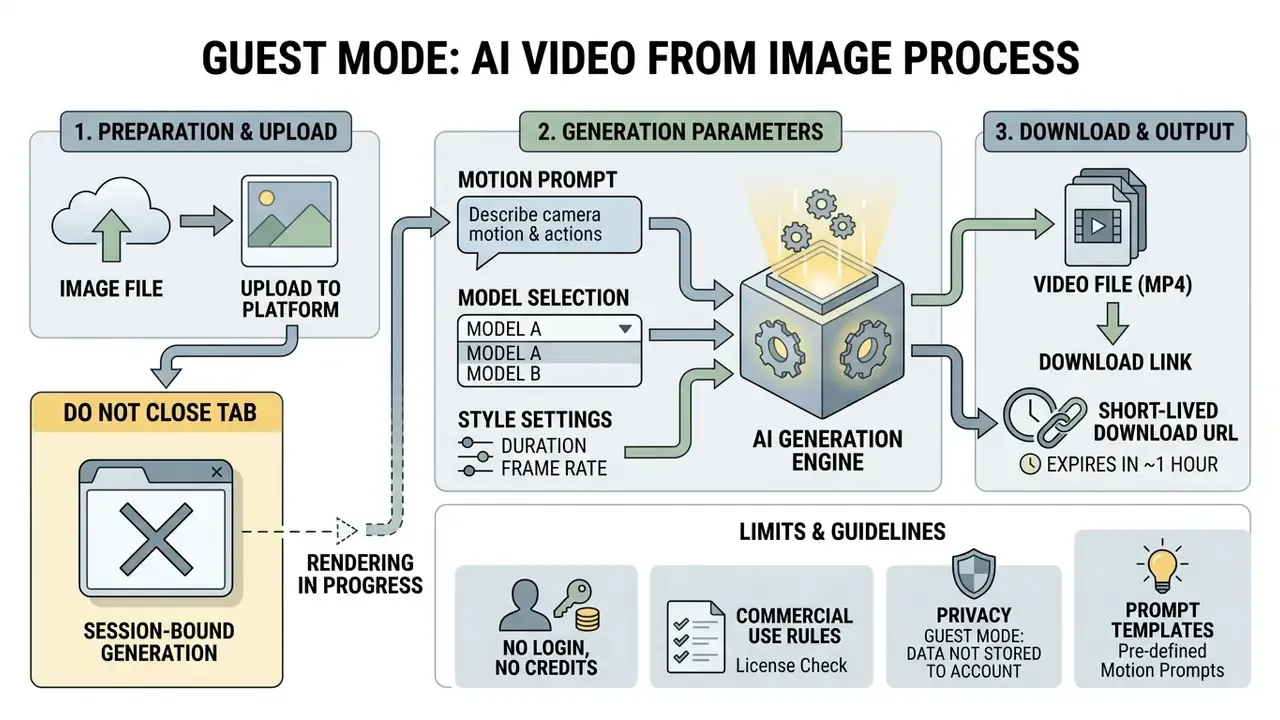
To create an AI video from an image without logging in, open a browser-based ai video from image no login generator, upload a static file, write a descriptive motion prompt, set rendering parameters, then download the finished MP4. Under the hood, a web API endpoint feeds your input frame and text guidance into an image-conditioned diffusion transformer.


Upload a Photo or Image for Video Creation
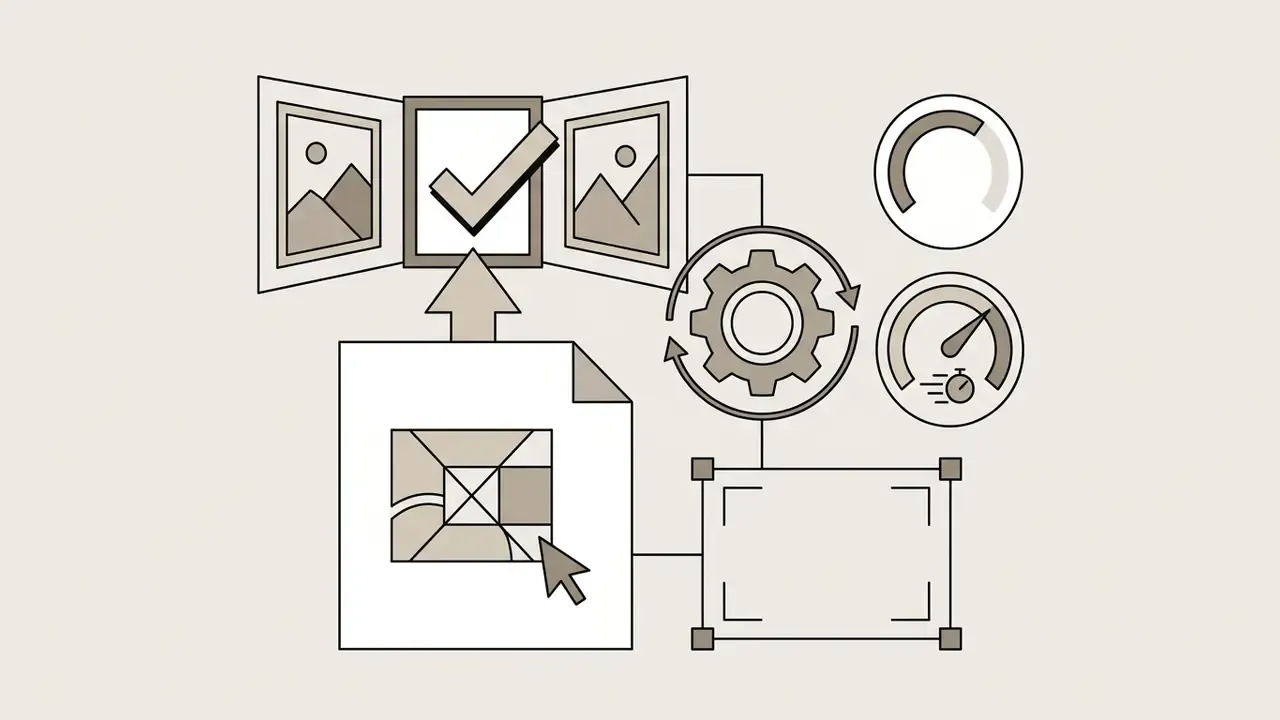
The image upload step is the visual anchor for everything that follows: it sets the first frame's spatial structure, palette, and lighting. A reliable ai image to video generator no sign up tool accepts JPEG, PNG, and WebP, and increasingly HEIC straight from an iPhone camera roll. Use high-contrast source files with a clear subject. Compressed or noisy input photos push visible artifacts through temporal conditioning, and no prompt will undo that.
During an evaluation of an automated visual asset pipeline, a media team uploaded uncompressed PNG portraits to a browser-based generator without any account authorization. By choosing source images with neutral backgrounds, the team eliminated first-frame distortion across 40 test runs. Same tool, same prompts; only the input discipline changed. This workflow enabled rapid content iteration while bypassing registration entirely. For broader media automation, teams often pair silent clips with a separate voice track, and the trade-offs of synthetic narration are documented in our AI voice generator guide.
Keyframe Control: Start Frame and End Frame
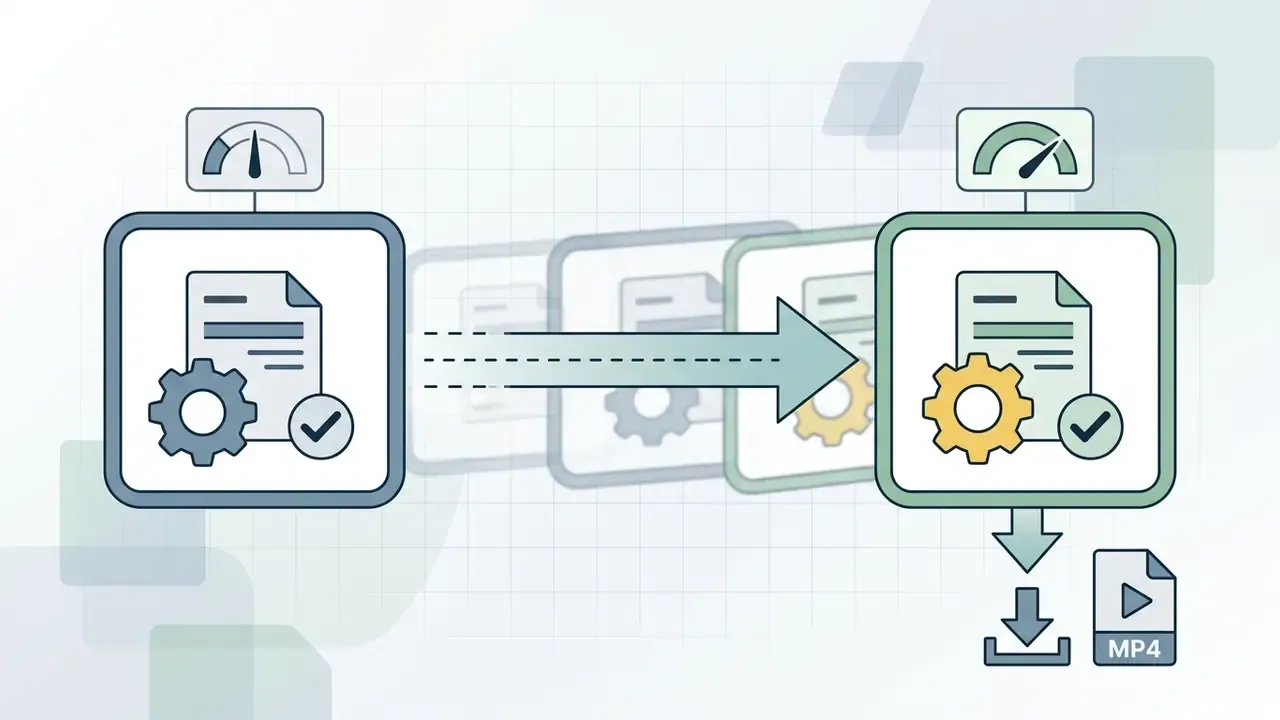
Single-image generation lets the model invent where the scene goes. Two-frame generation tells it. Several guest-mode tools now expose a second upload slot, which turns image-to-video from a guessing game into a controllable transition.
Practical rules for two-frame morphing:
- Keep both frames at the same aspect ratio and, ideally, the same resolution. Mismatched ratios force cropping and introduce drift.
- Preserve subject identity between frames. A different hairstyle or wardrobe in the end frame reads as a cut, not as motion.
- Use two-frame mode for transitions, reveals, before/after product states, and comic-panel animation. Use single-frame mode for ambient motion: wind, water, parallax.
- If the two frames are semantically too far apart, interpolation collapses into a cross-dissolve. Split the change into two shorter generations instead.
Describe Motion and Style in the Prompt
A text prompt gives the network the directional guidance it needs to calculate motion vectors between consecutive frames. Effective descriptions separate subject action from camera movement and name a trajectory: slow pan, zoom, tilt. Terms like cinematic, natural lighting, and smooth motion steer the video model toward photorealistic output and away from structural warping.
"UI2V-Bench shows that models follow prompts with explicit spatial relations and attributes far more accurately than vague instructions."
Vendor documentation converges on the same structure. Kling AI's camera-control guidance lists usable motion terms as push in, pull back, pan left/right, tilt up/down, track forward, orbit slowly, static camera, and recommends one camera movement per prompt with an explicit speed. Adobe Firefly asks for at least 8 words and no more than 1,800 characters. Prompt craft transfers between modalities, so the same phrasing discipline carries into text-to-video workflows and still-image generation.
Copy-Paste Prompt Templates
Portrait / face animation
Slow cinematic push-in, character subtle eye blink, gentle wind blowing through hair, soft studio lighting, shallow depth of field, 4k resolution
Landscape / nature
Dynamic parallax effect, ocean waves crashing gently on rocks, moving clouds during golden hour, static tripod camera, ultra-realistic
Product marketing
360-degree slow camera orbit around the product, cinematic soft spotlight, seamless studio background, elegant motion, no hands in frame
Cyberpunk / atmospheric effects
Flickering neon lights, subtle background rain falling, atmospheric fog swirling around subject, slow dolly forward, high contrast
Fashion / fabric physics
Model turns slowly toward camera, fabric flowing naturally, hair moving with the turn, medium shot, tracking camera, editorial lighting
Illustration / anime
Anime-style scene comes to life, character breathing subtly, falling cherry blossom petals, gentle horizontal pan left, cel-shaded look
Negative Prompts That Remove Common Artifacts
blurry, motion blur, extra fingers, extra limbs, warped face, identity change, melting background, flickering, duplicated objects, text overlay, watermark, distorted hands, sudden zoom, camera shake
Negative prompts matter most for human subjects. A diffusion-artifact taxonomy groups the dominant failure modes for people into anatomical implausibilities (missing or extra fingers, elongated necks) and stylistic artifacts (waxy, glossy, shiny surfaces). Those are exactly the words worth suppressing by name.
"Human-image failures cluster into anatomical implausibilities and stylistic artifacts such as waxy, glossy and shiny surfaces."
Launch Generation and Download the Finished Clip
Starting generation triggers a multi-step denoising sequence in which the model extrapolates future frames from your static input. Processing usually takes 30 to 90 seconds for a short guest-mode clip, and up to about three minutes on loaded infrastructure or at higher resolutions, depending on queue depth and hardware allocation. When rendering completes, the interface shows a preview plus a direct link to download the final MP4 for immediate use video work. Save the file straight away. Anonymous sessions typically discard the asset when the tab closes, and signed download URLs commonly expire within the hour.
Settings of an AI Image-to-Video Generator: Motion, Model, Quality and Format
Configuring an ai image to video generator free unlimited interface is a balancing act between motion intensity, camera control, output duration, and frame aspect ratio. These parameters decide whether the animation reads as fluid and cinematic, or as temporal jitter with identity drift.
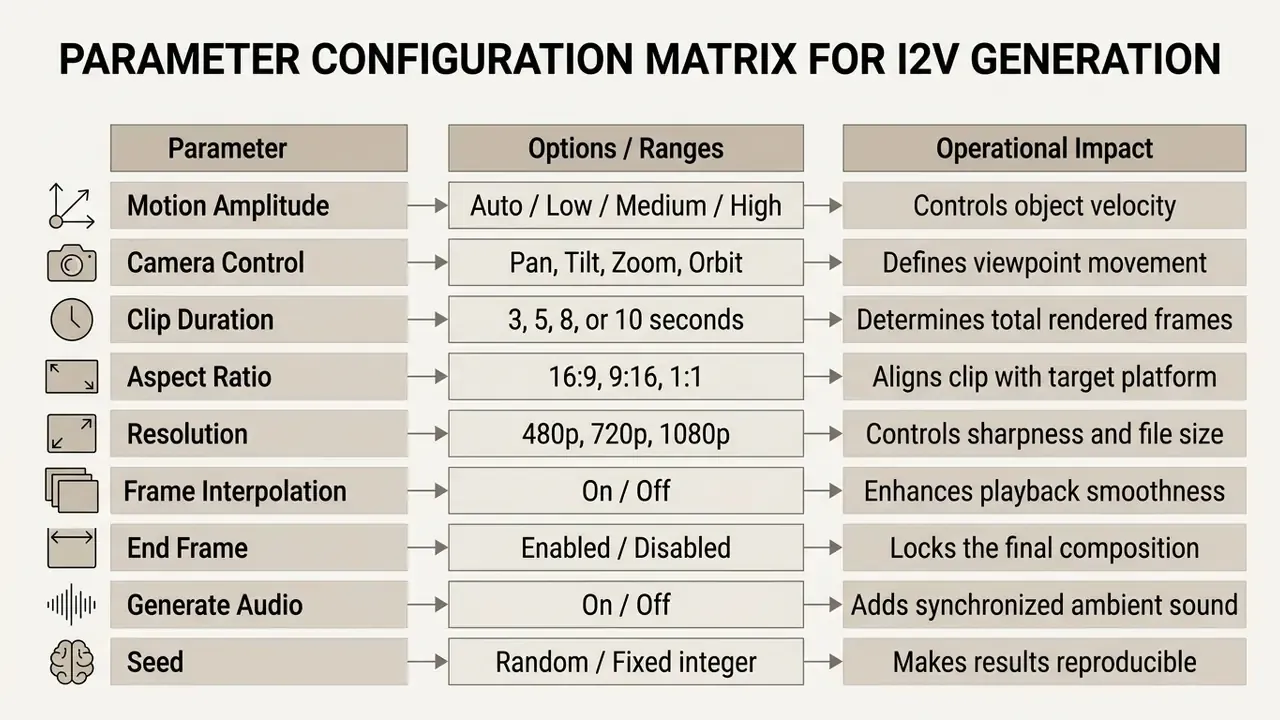
Public API documentation confirms these control groups directly. imgix exposes motion-model, motion-duration (default 5 seconds) and motion-seed for repeatable results. Veo 3.1 endpoints expose duration of 4/6/8 seconds, resolution up to 4K, aspect_ratio 16:9 or 9:16, and generate_audio defaulting to true. Vidu Q3 Pro exposes duration of 1 to 16 seconds plus movement_amplitude as auto/small/medium/large. WAN 2.7 image-to-video accepts an external audio_url (WAV or MP3, 2 to 30 seconds, under 15 MB).
The seed deserves more attention than it gets. Fix it, and you can change one prompt word at a time and actually see what that word did.
Video Model and Camera Movement Control
The video model you choose decides how faithfully camera trajectories and object physics get rendered. Frontier architectures such as Google veo and kling use dedicated camera conditioning layers to execute controlled pans, orbits, and zooms.
"CamViG encodes three-dimensional camera trajectories as a separate modality, enabling accurate pans and orbits when generating video from a single frame."
Research keeps decoupling the two axes. Recent work on decoupled control of time and camera pose conditions generation on continuous world-time sequences and camera trajectories separately, while related studies derive displacement fields from a camera trajectory and apply them through differentiable resampling during denoising. Practically, that is why naming one trajectory ("slow dolly forward") beats stacking three that contradict each other.
Model engine matrix (guest-mode availability as advertised by vendors):
| Model | Strength | Best-fit scenario | Availability without registration |
|---|---|---|---|
| Wan 2.5 / 2.7 | High texture detail, fabric physics | Product video marketing, fashion | Yes, at base quality |
| Hailuo (MiniMax) | Realistic human motion physics; inline [pan], [zoom], [static] tags | Dynamic scenes, sport, dance | Yes, with queue limits |
| Kling 1.5 / 3.0 Motion Control | Precise camera control (pan, zoom, orbit) | Cinematic fly-throughs | Limited number of attempts |
| Seedance 2.0 / 2.5 | Fast rendering, End Frame support, director-level camera control | Illustration and comic animation | Yes, no credits on playground tiers |
| Google Veo 2 / 3.1 | Photorealism, complex light and shadow, 1080p with native audio | Short-form artistic pieces | Queue-gated; API access for scale |
| Sora 2 | Long-form coherence, up to 60 s on paid tiers | Narrative sequences | Signed-in or paid access |
| Pixverse / Luma | Stylised motion presets, quick iterations | Social shorts, effects | Yes, daily quota |
| Runway (Gen-family) | Video-to-video restyling, strong first-frame fidelity | Restyling and B-roll | Account usually required |
Developers who need the same capability inside a pipeline rather than a browser tab can compare quotas and per-second pricing in the Google Veo API implementation guide; creative-quality trade-offs across engines are benchmarked in our AI art generator comparison.
Duration, Aspect Ratio and Video Formats
Clip duration in free web tools defaults to 3 to 5 seconds, which is 72 to 120 individual frames at 24 frames per second. The aspect ratio setting formats clips for landscape displays (16:9), vertical feeds (9:16), or square posts (1:1), with 4:3 and 3:4 as classic and vertical alternatives. Export formats centre on H.264 encoded MP4 because it plays everywhere; professional export references treat frame size, frame rate, field order, and aspect ratio as the four settings to confirm before rendering.
Pick an aspect ratio close to your source image's proportions. Forcing a 9:16 output from a wide landscape photo triggers aggressive cropping, after which the model has to invent the missing edges, and that is a classic source of background melting. Oversized exports can be compressed later without re-rendering; quality-versus-size trade-offs live in our video compressor guide.
Quality, Motion Smoothness and Audio
High-quality, smooth output depends on temporal consistency between rendered frames. Stronger models apply AI frame interpolation to suppress motion blur and hold crisp detail through dynamic camera sweeps. Newer models also integrate native audio synthesis that generates ambient sound alongside the visuals. Veo 3.1 documentation, for example, expects explicit prompt fields for dialogue, sound effects, and ambient noise, tying audio to the same generation pass.
Specialised models beat general-purpose ones on identity retention, and the gap is measurable:
"AniSora reaches 94.54 character consistency against 89.47 for MiniMax-I2V01, showing specialised models preserve identity better than generalists."
Vendor guidance adds two levers worth remembering: higher frames per second gives smoother motion, and a higher step count improves fidelity at a proportional cost in render time. On a free tier both levers usually sit at the cheapest setting, which is the single biggest quality gap between guest mode and a paid render.
Post-Processing: Upscaling, Audio and Lip Sync
A 480p watermarked clip is a draft, not a deliverable. Four chained operations turn it into something publishable, and all four exist as separate browser tools.
- Upscale to 1080p or 4K.Run the clip through an AI video upscaler to suppress diffusion artifacts, recover edge definition, and stabilise colour. Super-resolution plus frame interpolation is the standard enhancement pair documented by enhancement APIs: super-resolution raises pixel count, interpolation raises frame rate.
- Generate or attach audio.Enable the
Generate Audiotoggle where available to synthesise ambient sound matched to the visuals: wind, engine hum, water, room tone. Where the model expects an external track instead, supply a short WAV or MP3 (commonly 2 to 30 seconds, under 15 MB). When a clip needs a music bed rather than room tone, a cleared track from an ai music generator is usually faster than licensing a stock cue; mobile options are covered in the ai music generator app guide, unmetered tiers in ai music generator free unlimited, and engine-by-engine differences in our ai music generator overview. - Synchronise speech (lip sync).Upload a voice track so a subject in a static photo speaks with matched articulation. This is the step that turns a portrait animation into a talking-head asset for explainers and UGC-style ads.
- Assemble and publish.Cut the clips together, add captions, export per platform. Publishing-side decisions such as captions, thumbnails, and chapter structure are covered in our YouTube video editor workflow guide.
Chained pipeline at a glance:
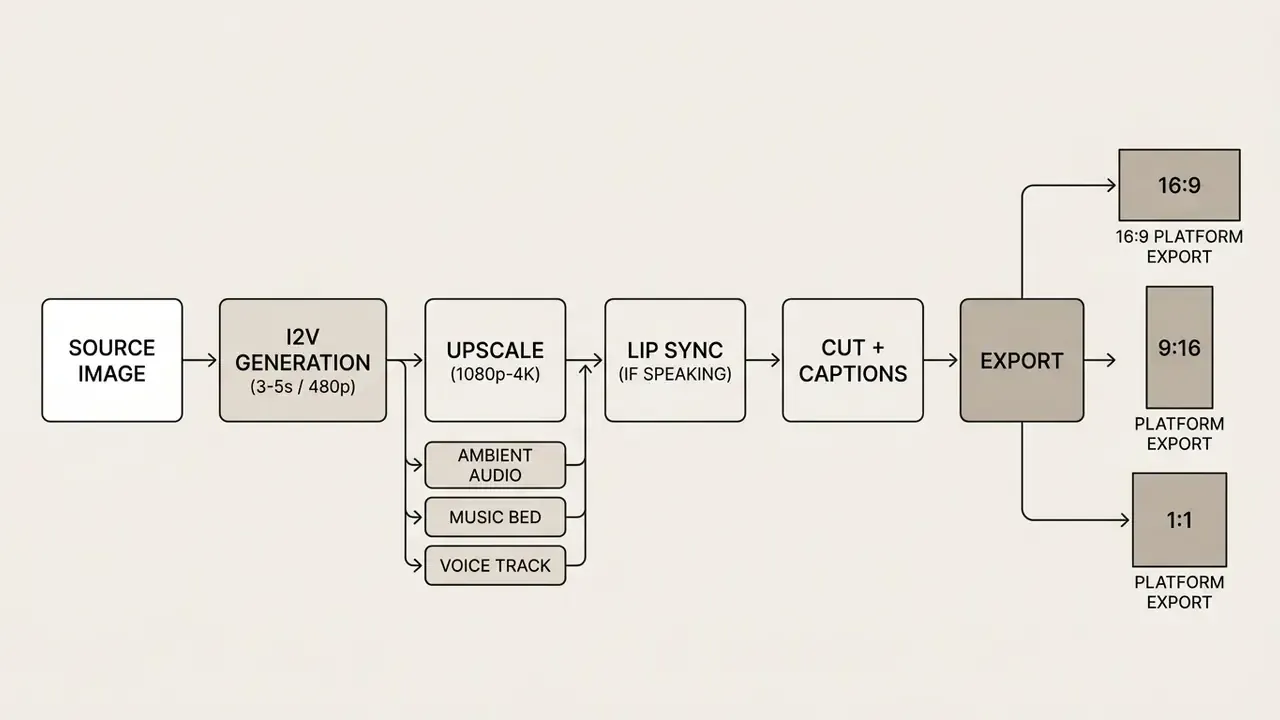
Note the guest-mode caveat. Each hop usually means a new anonymous session on a new tool, another upload, another retention policy to read. That is the hidden cost of avoiding an account: the pipeline works, but the compliance surface multiplies with every tab.
How to Compare Free Image-to-Video Tools Without Signup
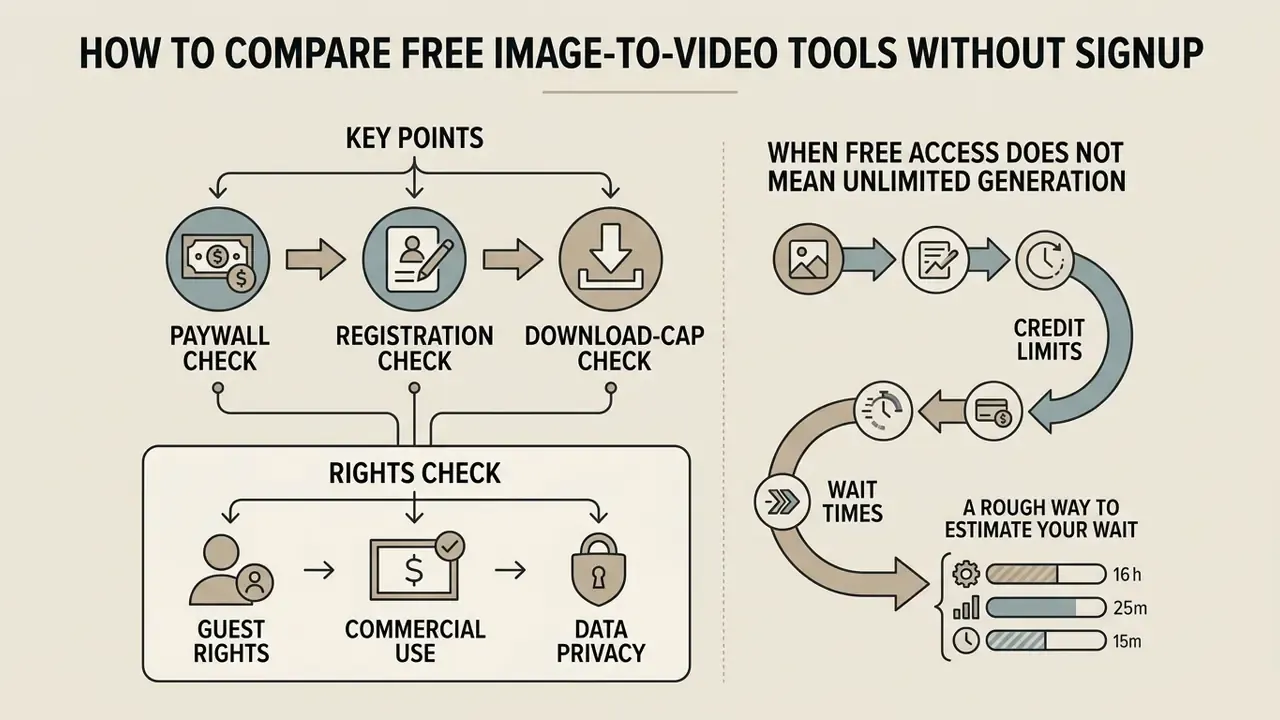
Evaluating an ai image to video generator free no signup platform means checking guest feature availability, export restrictions, and the monetization barriers nobody advertises. Compare on verifiable functional criteria and the paywall stops being a surprise.
| Feature Category | Free No Sign Up | Free No Login | No Credits Free | Unlimited Free (Select Models) |
|---|---|---|---|---|
| Account Creation | None required | None required | Email optional | None for basic models |
| Credit Metering | No wallet deduction | Daily IP allowance | Unmetered standard generation | Unmetered on low-res models |
| Max Duration | 3 to 5 seconds | 3 to 5 seconds | 4 to 6 seconds | 3 to 5 seconds |
| Render Resolution | 480p / 720p | 480p / 720p | 720p | 480p |
| Export Watermark | Included | Included | Optional | Included |
| Render Queue Priority | Standard / Low | Standard / Low | Queue-based | Standard |
| Commercial Rights | Personal use only | Personal use only | Governed by TOS | Non-commercial default |
| Two-Frame (End Frame) | Sometimes | Sometimes | Often | Rarely |
| Indemnification | None | None | None | None |
Note: Feature specifications reflect standard vendor operational policies observed across tested browser tools. Read the columns as patterns, not as guarantees for any single vendor.
Signs of a Genuinely Free AI Video Generator
A genuinely free ai video tool gives functional guest access without asking for payment details and without a trial timer. Legitimate platforms state upfront that no credit card is required and expose a plain download button for rendered clips. Transparent ones also disclose resolution limits and watermarks before you start the render, not on the export screen.
Use a numeric reference point rather than marketing adjectives when judging output:
"AIGCBench records DOVER 0.775 for Gen-2 and 0.995 CLIP consistency between adjacent frames, a usable quality benchmark for any free tool."
Four verification questions separate real free access from a dressed-up trial:
During a benchmarking study of web-based creative software, analysts evaluated multiple free rendering interfaces. Tools with explicit guest access allowed immediate testing without personal data entry, which shortened functional verification for creative teams mapping an automated toolchain. For structured vendor evaluations, our AI Media Comparison Matrices overview is the starting point, and a side-by-side comparison of free AI video generators narrows the shortlist by duration limits, credits, and watermark policy.
When Free Access Does Not Mean Unlimited Generation
Marketing words like "unlimited" tend to apply only to entry-level models or lower export resolutions. When an ai image to video generator free no credits service hits high load, non-paying requests drop into secondary queues and render times stretch. Frontier models stay behind logins or subscriptions because their per-second compute overhead is simply higher.
A rough way to estimate your wait. Using the published figure of roughly 18 seconds of A100 compute per second of generated video, a 5-second clip costs about 90 seconds of GPU time. So:
estimated wait  ≈  (queue position × 90 s)  ÷  free-tier GPU workers

                +  model load / warm-up (10-80 s on first cold start)
Ten free-tier workers and thirtieth place in the queue puts you roughly five minutes out before your job even starts, which is precisely the friction paid tiers are sold to remove. Vendor pages promising "a few seconds" are describing a warm cache and an empty queue, not a Friday-evening peak. Tier-by-tier costs across major tools are broken down in our AI Media Pricing Guides.
The pattern repeats across free software categories: free tiers ship the core function and gate the finishing touches. Watermarks, locked export formats, restricted premium effects. The same trade-off logic applies to still-image tooling documented in our online photo editor guide.
How to Get High-Quality Video from a Single Image
Photorealistic video from one static image depends on two things: input clarity and prompt precision. Neural networks lean on strong structural cues in the source to compute motion trajectories without inventing distortion.
Which Images and Photos Work Best for Animation
High-resolution photos with clean composition, a well-defined subject, and an uncluttered background stay the most stable during generation.
"Gen-2 reaches a first-frame SSIM of 0.803 and Pika 0.800, while VideoCrafter records only 0.300."
That spread shows how much of the final result is decided at the first frame, and the first frame is your upload. Frontal portraits, landscapes with depth, and structured 3D art hold identity far better than busy scenes with overlapping objects. If the source needs cleanup, background isolation, exposure correction, noise reduction, do it before upload rather than asking a diffusion model to fix it mid-motion; the relevant toolset is catalogued in our photo editor guide.
Research on portrait video reconstruction reports artifacts and identity distortion concentrated in oblique views, which is why near-frontal faces animate more reliably than three-quarter angles (PV3D: A 3D Generative Model for Portrait Video Generation, 2022, https://arxiv.org/abs/2212.06384). Complementary work on synthetic-image artifacts groups errors into object-aware distortion, omission and duplication, plus object-agnostic binding and lighting failures. Those categories show up far more often in composited scenes than in a clean single-subject frame (SynArtifact, 2024, https://arxiv.org/abs/2402.18068).
Input specification cheat sheet
| Attribute | Recommended | Why |
|---|---|---|
| Format | JPG, PNG, WebP (HEIC on some tools) | Universally accepted by guest endpoints |
| File size | Under the tool cap, commonly 5 to 20 MB | Larger files are re-compressed server-side |
| Resolution | Equal to or above the target export resolution | Upscaled inputs stay soft after rendering |
| Subject count | One clear primary subject | Multiple subjects multiply identity drift |
| Background | Clean, low clutter, separated from subject | Reduces background melting |
| Face angle | Frontal to near-frontal | Oblique views raise distortion risk |
| Compression | Minimal; avoid heavily re-saved JPEGs | Compression noise amplifies into flicker |
How to Write Prompts for Natural Motion
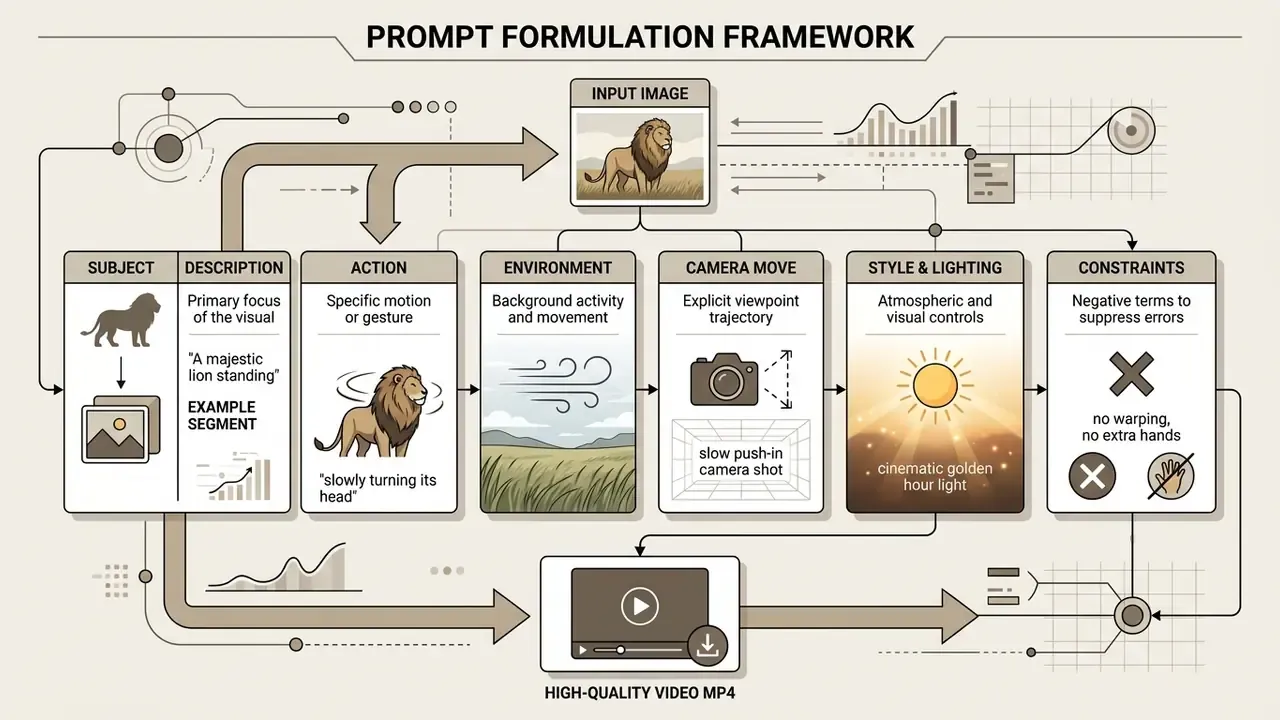
Effective prompts split object motion from camera movement into distinct phrases. Instead of a vague instruction, describe speed, direction, and spatial scope. "A slow tracking camera shot following a running horse across a field" tells the model about foreground dynamics and background parallax in one line.
Two prompt formulas from current camera-motion guidance are worth memorising:
[camera direction] + [scene pace] + [action/motion] + [atmospheric details][movement type + trajectory] + [speed and stability] + [subject action] + [environment motion] + [final composition] + [constraints]
Both enforce the same discipline: one camera movement per prompt, an explicit anchor for where the shot starts and ends, and a closing constraint clause that suppresses unwanted motion. Public prompting guidance from US government and university sources reinforces the general principle. Clear, specific, grounded instructions with delimiters between context and command produce more predictable generative output than open-ended description.
Style Taxonomy: Popular Animation Looks
Style is the cheapest lever in the prompt, because it costs no extra compute. Common families, and the phrasing that triggers them:
- Cinematic live-action.
anamorphic lens, shallow depth of field, golden hour light, film grain - Anime and cel-shaded.
anime style, cel shading, dynamic hair motion, sakura petals - 3D animation, Pixar-like.
stylised 3D render, soft global illumination, expressive character motion - Cyberpunk and neon glow.
neon reflections on wet asphalt, volumetric fog, teal and magenta grade - Oil painting and watercolour.
living painting, visible brush strokes, pigment bleeding at edges - Fantasy and mystical.
glowing magical orb, swirling mist, floating embers - Product and studio commercial.
seamless studio backdrop, soft key light, slow orbit, premium finish - Documentary realism.
handheld camera, natural light, no colour grade, observational framing - Retro and VHS.
VHS scanlines, chromatic aberration, 4:3 framing, tape wobble - Architectural and real estate.
slow interior dolly, wide-angle lens, natural window light, no people
Mixing more than two style families in a single prompt reliably degrades coherence. Pick one dominant look and one accent. That is it.
Commercial Use, Privacy and Content Restrictions
Using an ai image to video without login tool still requires you to think about data privacy, copyright ownership, and licensing terms. Generating media anonymously does not exempt anyone from intellectual property rules or platform policy.
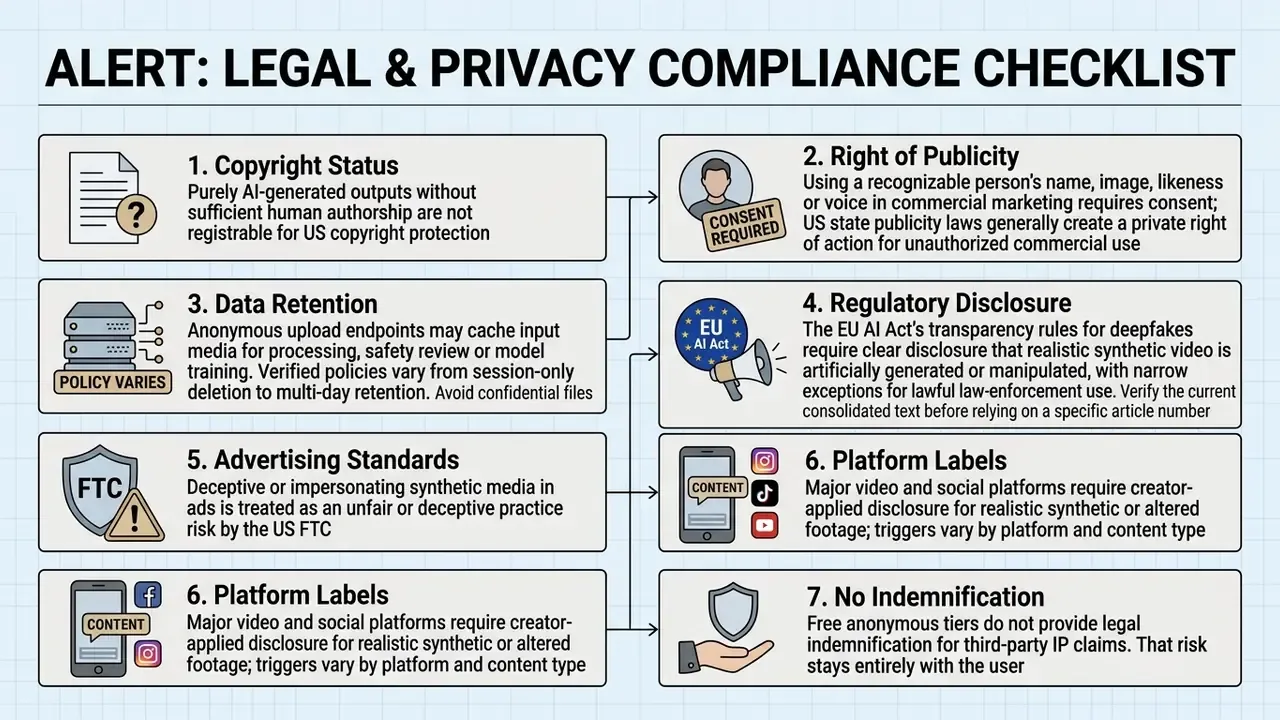
What to Check When Uploading an Image Without Login
Use Cases by Role
| Role | What guest-mode image-to-video is good for | Where it breaks |
|---|---|---|
| Social media creator | Testing hooks, animating stills into vertical shorts, rapid variant generation | Watermark and 480p export on the free tier |
| E-commerce marketer | Turning product stills into motion ads, orbit shots, try-on concepts | Brand consistency across many SKUs needs fixed seeds and accounts |
| Educator / course creator | Animating diagrams, historical photos, processes hard to film | Longer explainer clips exceed the 3 to 5 s limit |
| Indie filmmaker | Animatics, B-roll, teaser concepts instead of static storyboards | No project persistence without login |
| Real estate agent | Converting property photos into short immersive walk-throughs | Interior geometry warps on aggressive camera moves |
| Presenter / storyteller | Turning a key slide image into a moving opener | Audio and lip sync require extra tools |
| Ad creative tester | Producing many cheap variants for paid-social testing | No indemnification for likeness or IP claims |
| Musician / label | Animating cover art into loops and beat-matched visuals | Full song-length pieces need a dedicated ai music video generator |
Static-to-motion is a bridge discipline. Teams already running frame-based animation pipelines will recognise most controls, and the wider tooling landscape is compared in our animation maker guide.
FAQ: Free AI Image to Video Without Registration
Which image formats can I upload to an AI video generator?
Most browser-based generators accept JPG, PNG, WebP, and, on a growing subset of tools, HEIC from iPhone camera rolls. Support is not universal: several free tools list only JPG, PNG, and WebP. File size limits typically sit between 5 MB and 20 MB per upload. Matching your source image to the target aspect ratio before uploading prevents unexpected cropping or stretching during rendering.
How long does generation of a video from an image take?
Rendering a clip from a static photo generally takes 30 seconds to 3 minutes. Speed depends on infrastructure load, queue length, output duration, and resolution. Higher-tier models and 1080p exports cost more compute than a 480p preview. Serving research puts a hard floor under those numbers: about 93 seconds of single-A100 compute for roughly 5.1 seconds of video, plus 10 to 80 seconds of model load and warm-up on a cold start (StreamWise, 2026).
Do I need to download software for image-to-video generation?
No installation is required. Web-based generators run entirely inside modern desktop and mobile browsers such as Google Chrome, Apple Safari, and Microsoft Edge. Vendor documentation usually specifies recent versions, Adobe Firefly lists Chrome 108+ and Safari 15+, and some platforms restrict creation to desktop while allowing playback on mobile. You upload media, configure parameters, and download the finished file from the browser window. If a render fails repeatedly on one browser, our support resources cover the usual culprits: extensions, blocked third-party cookies, aggressive privacy modes.
Can I close the tab after submitting the job?
No. In guest mode the job is bound to the session, not to an account, so closing or refreshing the tab kills the render and loses both settings and queue position. Keep the tab in the foreground, avoid parallel generations in other tabs, and download as soon as the preview appears. Signed download links commonly expire within about an hour.
Can I generate a video from two images instead of one?
Yes, on tools that expose an End Frame slot. Upload the opening composition as the Start Frame and the target composition as the End Frame; the model interpolates the transition. This is the most reliable route to controlled morphing, reveals, and before/after product states rather than improvised motion.
Are the generated videos watermarked, and can the watermark be removed?
Free guest exports usually carry a watermark, and removal is normally a paid-tier or signed-in feature. A few vendors advertise watermark-free downloads on free tiers, but that is the exception. Verify the export policy before rendering, not after.
What aspect ratios and resolutions are supported?
Common ratios are 16:9 (YouTube, web), 9:16 (TikTok, Reels, Shorts), 1:1 (feed posts), plus 4:3 and 3:4. Free resolutions cluster at 480p and 720p; 1080p and 4K generally require an account or a paid plan. Choose the ratio closest to your source image to minimise cropping and distortion.
Can I add sound or make the subject speak?
Yes, two ways. Models with a generate_audio control synthesise ambient sound aligned to the visual stream. For speech, use a lip-sync tool and supply a voice track, recorded or synthesised. Trade-offs between synthetic voice engines are compared in our AI voice generator guide.
Is an ai photo to video no login tool the same as a no-sign-up one?
Functionally, almost always yes. An ai photo to video no login page, an ai photo to video free no sign up page, and an ai picture to video no sign up page usually describe the same guest mode with different marketing wording. The practical test is unchanged: can you export the file without entering an email, and do the terms say anything about commercial rights?
Is the output copyrighted, and can I sell it?
Purely AI-generated output is not registrable for copyright in the United States, and the EU applies a comparable human-intervention test. Commercial use is governed by the service terms you accepted, which, in anonymous mode, you may never have read. Free tiers rarely grant commercial rights and never grant indemnification, so route revenue-generating assets through an authenticated, contractually covered plan.
Appendix A: Editorial Corrections Log
Transparency about what changed matters as much as the correction itself. Superseded claims from earlier revisions of this guide are preserved here beside their updated versions.
| Superseded claim (earlier revision) | Updated position | Basis for change |
|---|---|---|
| "US Copyright Office Guidance, 2026" cited for the non-registrability of AI output | Attributed to Copyright and Artificial Intelligence, Part 2 (2025) and related Office guidance | Date attribution corrected to the actual publication window |
| "Anonymous guest endpoints cache input files indefinitely" | Retention varies by vendor; commonly session-only to 24 hours, with some providers keeping data longer for training or safety review | Vendor policies and the Copyright Office's own analysis show no uniform retention rule |
| Camera-control claim linked to a placeholder arXiv identifier | Re-cited to CamViG (2024), https://arxiv.org/abs/2405.13195 | Placeholder identifier removed; verified source substituted |
| Compute-cost claim linked to a placeholder arXiv identifier | Cited by title to Survey of Video Diffusion Models (2025) with the concrete 8xH100 / ~3,500 GPU-hour figure, plus StreamWise (2026) latency data | Unverifiable URL removed rather than presented as a live reference |
| "EU AI Act (2024/1689)" article and regulation numbering stated without qualification | Deepfake transparency obligation described with a note to verify the current consolidated text | Regulation and article numbering should be confirmed against the official text before compliance reliance |
| Artifact-reduction claim supported by an unverified citation | Reframed around the published diffusion-artifact taxonomy (2025) and SynArtifact (2024) | Claim retained, evidence upgraded |