What this guide covers in 30 seconds
- Two main tracks
- 2D (frame-by-frame, cut-out rigging, motion graphics) and 3D (modelling, rigging, keyframe acting, real-time engines). Both rest on the same 12 principles of animation.
- Four course models
- free and open-source self-study, paid self-paced libraries ($15 to $30 per course, or $10 to $50 per month), live mentored classes ($400 to $1,500 per module), and career bootcamps or diplomas ($1,500 to $15,000+).
- Named providers worth comparing
- Coursera (California Institute of the Arts, Duke University, Skillshare, EDUCBA), The Art of Aaron Blaise, CG Spectrum, Animation Mentor, Academy of Art University, Rocky Mountain College of Art + Design, plus free resources from Blender Studio and the Morevna Project.
- Hiring reality
- studios such as Disney, Pixar, DreamWorks, Sony Imageworks, Industrial Light & Magic, Weta, Ubisoft and Riot Games hire on the strength of a 60 to 90 second showreel, not on the certificate attached to it.
- Budget for hardware too
- a graphics tablet and 16 to 32 GB RAM for 2D; a dedicated GPU, 32 to 64 GB RAM and dual monitors for 3D and virtual production.
How to use this guide
Read it as a purchase decision, not a brochure. Start with the skills map to pick a lane, 2D or 3D. Then check the provider comparison, because the name on the certificate matters far less than the person reviewing your scene file. After that, match the format to your budget and to how much external accountability you personally need. Finally, look at the hardware table and the showreel structure before you pay anything, since those two items decide whether the course output is usable in a job application. If you are still testing whether animation suits you at all, the free resources listed below cost nothing but time.
Online animation courses provide structured pathways to master character design, movement physics, and digital storytelling through flexible remote platforms. Programs run from foundational self-paced video modules to intensive studio-led cohorts that mirror professional production pipelines.
To navigate digital creative tools, students frequently consult resources like the AI Media Glossary to understand evolving production terminology and technical standards.
What You Can Learn in Online Animation Courses
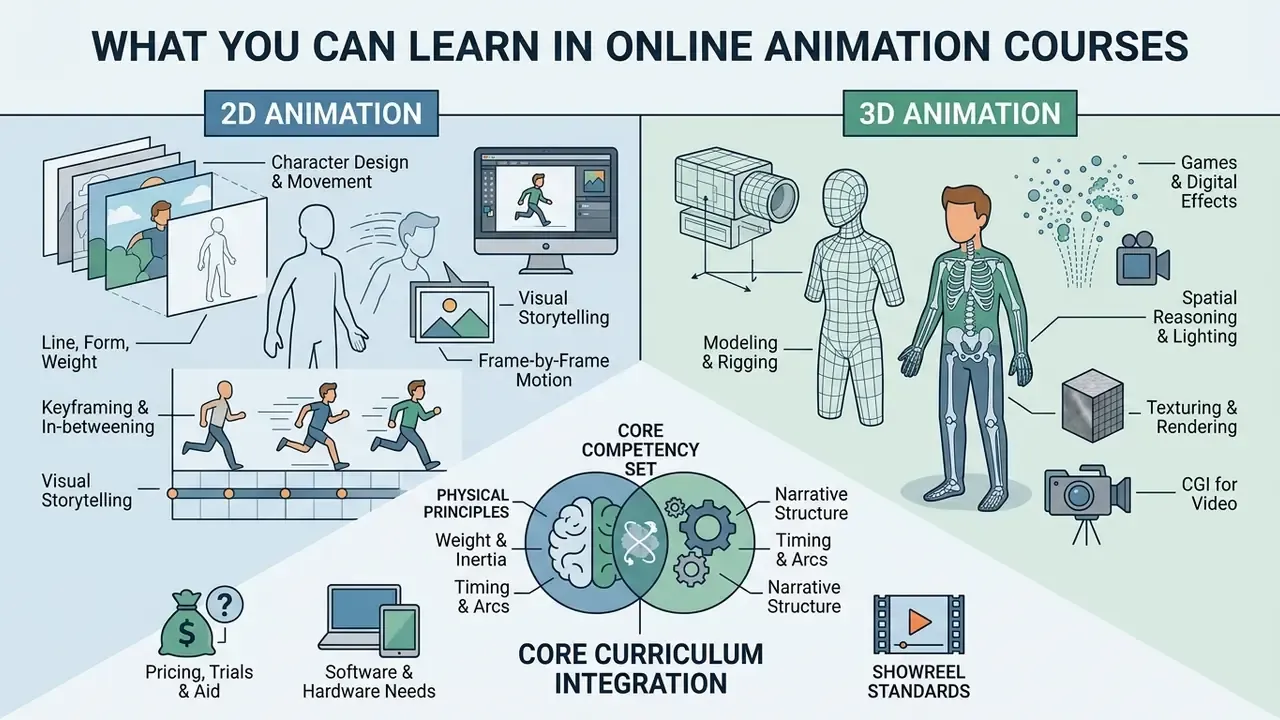
Online animation courses teach core mechanics, spatial reasoning, timing, and narrative structure across two-dimensional and three-dimensional digital environments. Students build software proficiency while applying classical motion principles to work made for film, gaming, and digital media.
«A study of 86 animation technology diploma students found a strong positive correlation (r = 0.892) between engagement and the perceived effectiveness of gamified, animated e-learning content.»
A complete curriculum integrates physical principles, such as weight, inertia, and arc trajectory, with narrative mechanics. Learners who want to test ideas quickly before committing to a full production pipeline often prototype with browser-based animation makers alongside their coursework. From there, the progression is predictable: basic motion exercises, then complex multi-character interactions, then the full pipeline from concept art to post-production rendering.
Current syllabi converge on the same competency set. Savannah College of Art and Design's 2026 animation catalog lists the 12 principles of 3D animation, humanoid body mechanics, character design, basic rigs, and a step-by-step storytelling process. The University of Utah's Advanced Game Animation syllabus adds animation pipelines, game-engine implementation, and motion-capture integration. University of Washington lecture material frames the principles of animation as a fusion of acting, directing, physics, and editing, with staging, timing, anticipation, overlap, and appeal doing most of the load-bearing work.
One practical note before you buy anything. The vocabulary is standardised across schools, so a course that never names the 12 principles is usually a software tour, not animation training.
2D Animation: Character, Motion and Visual Storytelling
Two-dimensional animation focuses on line, form, weight, keyframing, and frame-by-frame movement. Students learn animation techniques that produce expressive characters and dynamic motion graphics.
Curricula such as the University of Florida's 2D Digital Animation Techniques (DIG3313C) guide learners from gesture drawing and bouncing-ball exercises to complex hand-drawn walk cycles. Mastering storyboarding and timing through animatics lets animators structure cinematic flow before committing to full frame production. Advanced workflows then add vector-based rigging and digital compositing to streamline visual storytelling for broadcast and web.
Technique coverage varies by school but rarely strays far from a shared core. City University of Hong Kong's SM2714 syllabus covers frame-by-frame hand-drawn animation, cut-out animation, rotoscoping, pixilation and stop-motion. Vels University's MSc Animation module sequence moves from script and storyboard through character design and development, key poses, time stretch, facial expressions and walk cycles. Several respected 2D programs stay deliberately medium-agnostic: The Art of Aaron Blaise's Complete Animation Course states outright that no particular software is required, and that students can follow along with pencil and paper if they prefer traditional drawing.
3D Animation for Games, Video and Digital Effects
Three-dimensional animation trains artists to build, rig, and animate digital models inside spatial computer environments. Computer animation courses online cover the full 3D asset workflow: polygon modelling, UV mapping, texturing, rigging, lighting, and keyframe animation.
Courses such as Foothill College's Fundamentals of 3-D Animation (GID 44A) translate classical movement principles into spatial setups. Students build animated assets for video games, feature films, and visual effects. In game pipelines, animators craft seamless locomotion trees and combat cycles, while film and video workflows push toward sub-frame performance refinement and atmospheric digital effects.
Specialist modules split the discipline further. Nanyang Technological University's Rigging for Animation is a practice-based 39-hour studio course dedicated to rigging original characters and props. Ball State's 3D Animation, Rigging, and Simulation pairs intermediate character animation with cloth, hair and dynamics simulation. SIGGRAPH's rigging course notes describe rigging, deformations, dynamics and production practices as shared infrastructure across animation, visual effects and game development.
| Dimension | 2D Animation Courses | 3D Animation Courses |
|---|---|---|
| Primary Project Types | Short character scenes, motion graphics, title sequences, 15 to 30 second animated shorts, run and laughter cycles. | Modelled 3D objects, dioramas, character acting shots, lighting setups, game-ready locomotion assets, capstone short films. |
| Core Conceptual Skills | 12 principles of animation, timing and spacing, character posing, 2D visual storyboards, silhouette reading. | Spatial reasoning, bipedal rigging, 3D composition, surface texturing, camera movement, simulation setup. |
| Dominant Software | Toon Boom Harmony, Adobe Animate, TVPaint, Clip Studio Paint, After Effects, Photoshop. | Autodesk Maya, Blender, Cinema 4D, Unreal Engine, ZBrush, Houdini (intro level). |
| Free / Open-Source Options | Krita, OpenToonz, Synfig Studio, Blender Grease Pencil. | Blender, Godot (for engine practice), Blender's Cycles and EEVEE renderers. |
| Technical Workflow | Frame-by-frame drawing, vector cut-out rigging, 2D compositing, audio sync. | Polygon modelling, UV unwrapping, skeletal rigging, keyframing, rendering. |
| Industry Applications | TV series, explainer videos, web animation, motion design, 2D indie games. | AAA games, animated feature films, cinematic VFX, architectural visualisation, VR and AR. |
Reading the table sideways is the useful trick: 2D rewards drawing volume and rhythm, 3D rewards patience with technical setup. Neither is easier. They fail differently.
Where To Learn: Verified Platforms, Schools and Mentorship Programs
Course format matters less than who reviews your work. The table below maps the providers most often shortlisted by prospective animators, with the commercial conditions applicants actually need: trials, financial aid, source-file access, and how long the material stays available.
| Provider | Format | Indicative price | Access duration | Trial / financial aid | Working files, rigs & extras | Best for |
|---|---|---|---|---|---|---|
| Coursera hub (California Institute of the Arts, Duke University, Skillshare, EDUCBA) | Self-paced courses and 1 to 6 month specializations | Subscription-based; individual courses bundled | Course or subscription term; certificate on completion | Free trial on most listings; financial aid application available after preview | Downloadable briefs, project templates, peer-review assignments | Structured university-branded fundamentals at low risk |
| The Art of Aaron Blaise | Self-paced 2D masterclass library (20+ HD tutorials) | Complete Animation Course listed at $57 (from $129) | Lifetime downloadable access (~7 GB of files) | Frequent discounts, membership bundles | TVPaint source files, PDF print-outs, original drawings, subtitles in five languages | 2D fundamentals taught by a Disney-trained feature animator |
| CG Spectrum | Mentored career tracks, diplomas and short courses | Modular pricing; bundle discounts | Term-limited cohort access | Payment plans; institute-accredited pathways | Studio-grade rigs and scene files opened live by mentors | One-on-one mentorship from Disney, Ubisoft, ILM, Sony, EA and Weta veterans |
| Animation Mentor | 18-month online character animation and game animation programs; 12-week core courses | Program-level tuition, paid per term | Program duration plus alumni community | Term-based payment structures | Production rigs, weekly live Q&A, mentor screen-capture critiques | Portfolio-first training toward feature and AAA game roles |
| Academy of Art University (online) | Accredited online animation and VFX degree | University tuition | Degree-length enrolment | Federal and institutional financial aid, veteran benefits | Virtual Remote Lab (rLab) access to campus workstations, StudioX production credits, synchronous OS+ classes | Accredited degree with real film credits, studied remotely |
| Rocky Mountain College of Art + Design (RMCAD) | Online BFA in Animation | University tuition | Degree-length enrolment | Financial aid available | Competency-based rubrics across six learning domains | Degree route with explicitly documented learning outcomes |
| Free & open-source (Blender Studio, Morevna Project, Animation Apprentice) | Self-study video series and asset libraries | Free | Indefinite | Not applicable | Free rigs: Monty, Norman, Heavy, Morpheus; Blender Animation Fundamentals rigs | Testing commitment before paying tuition |
Two structural differences are worth internalising before you compare price tags.
First, mentorship is the scarce resource. Animation Mentor states that its instructors are screened through industry referrals, formal interviews, demo-reel review and training in the school's own teaching methodology, and that its faculty includes working professionals from Pixar, Disney, Blizzard, DreamWorks, Riot Games and Industrial Light & Magic. CG Spectrum makes a similar promise from the studio side, advertising mentors "who have worked at world-class studios such as Disney, Ubisoft, ILM, Sony, EA and Weta," with 2D tracks taught by veterans of Disney, DreamWorks, Warner Bros. and Nickelodeon.
Second, infrastructure can be part of the offer. Academy of Art University's Virtual Remote Lab turns a modest home computer into a gateway to high-powered campus systems. Renders advertised as taking twelve hours locally are said to finish in one or two, and synchronous OS+ classes let remote students join on-campus sessions live. If you cannot buy a workstation up front, remote-lab access is a legitimate line item in the comparison, not a bonus feature.
«Getting access to industry mentors is huge. It was the first time I had an experienced animator open my scene file. It was what I needed to get over some technical hurdles.»
Which Online Animation Course Is Right for Your Level
Choosing between animation programs online depends on current technical competency, previous artistic experience, and specific career targets. Educational structures separate instruction into skill tiers to keep the learning curve manageable.
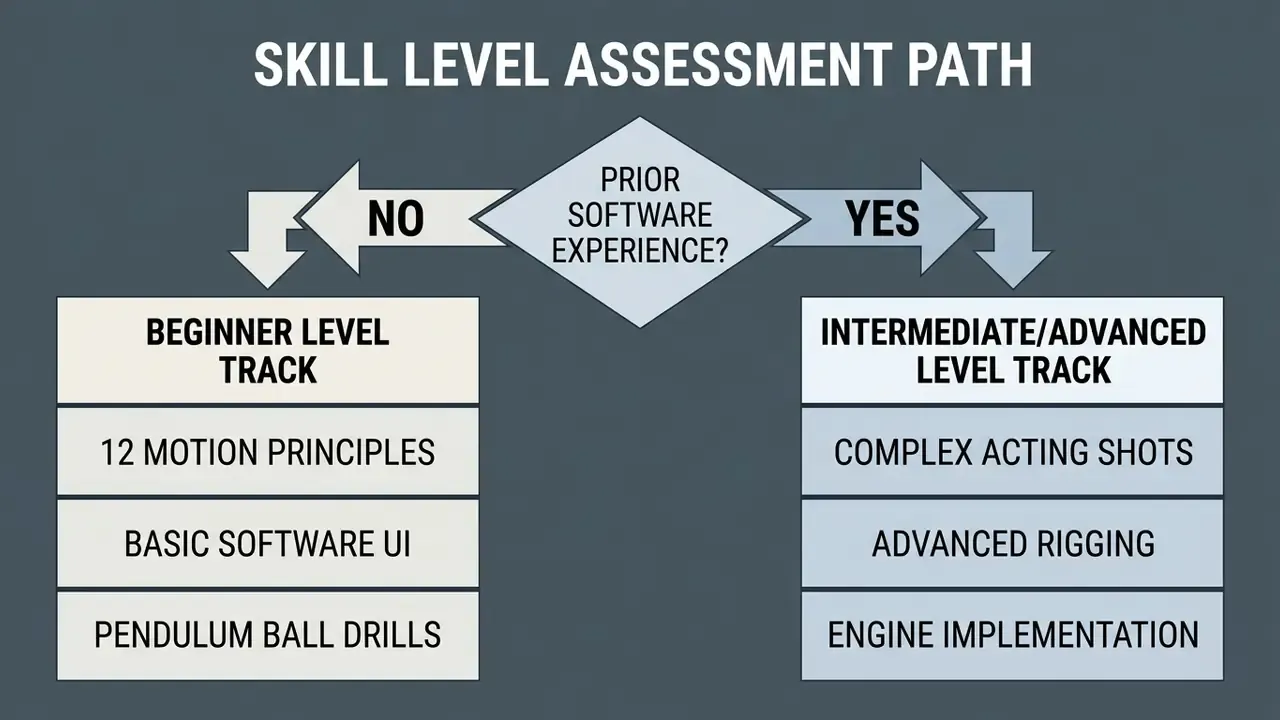
Beginners need clear instruction in movement physics and software navigation. Working animators want specialised training in acting, advanced rigging, or game-engine integration. Level naming is not standardised across vendors, so read the thresholds instead of the labels: Beginner assumes no prior software or motion training; Intermediate assumes you can finish a shot independently in familiar contexts; Advanced assumes fluency and shifts the emphasis to complex, stylistically demanding performance.
Animation Classes Online for Complete Beginners
Animation courses online for beginners focus on core physics, basic tool management, and incremental exercise routines. Absolute novices start without complex character models, mastering movement fundamentals through controlled drills.
Standard introductory assignments use bouncing balls and swinging pendulums to demonstrate squash, stretch, acceleration, and overlapping action. Structured guides specify 11 explicit key poses for a one-second pendulum swing to establish precise timing habits, with the bouncing-ball drill starting from a drawn floor line and shrinking arcs along the path. The best animation online courses for beginners then re-time the same exercise "on ones" and "on twos" so the student feels how frame rate changes read on screen. Confidence with the interface grows in parallel, which removes technical friction before anyone touches human anatomy or character acting.
«Students perceive animated character demonstrators as particularly engaging, increasing interactivity and helping clarify complex concepts.»
Beginners report the same three mistakes with almost boring consistency: starting with a full character rig instead of a ball, animating straight ahead without thumbnails, and polishing splines before the blocking reads. A well-designed beginner track blocks those errors by gating each assignment behind a pose test. Not glamorous. Effective.
Intermediate and Advanced Training for Working Animators
Advanced animation training targets practising artists who need complex emotional performance, refined body mechanics, and pipeline optimisation. These programs assume fluency in basic software mechanics and spend their time on storytelling nuance instead.
Upper-level university syllabi, such as University of Utah's Advanced Game Animation (GAMES 4200), emphasise character locomotion, facial mechanics, acting for animation, and motion-capture integration. Nanyang Technological University's DT3012 Acting for Animation pushes students to develop facial and full-body performance that communicates personality, motivation, intention and believable thought. Animators learn to convey internal motivation and subtext through weight distribution, micro-expressions, and physical timing you can feel rather than count. Masterclasses also cover technical asset optimisation for real-time engines like Unreal Engine and Unity.
How To Compare Animation Course Format, Mentoring and Pricing
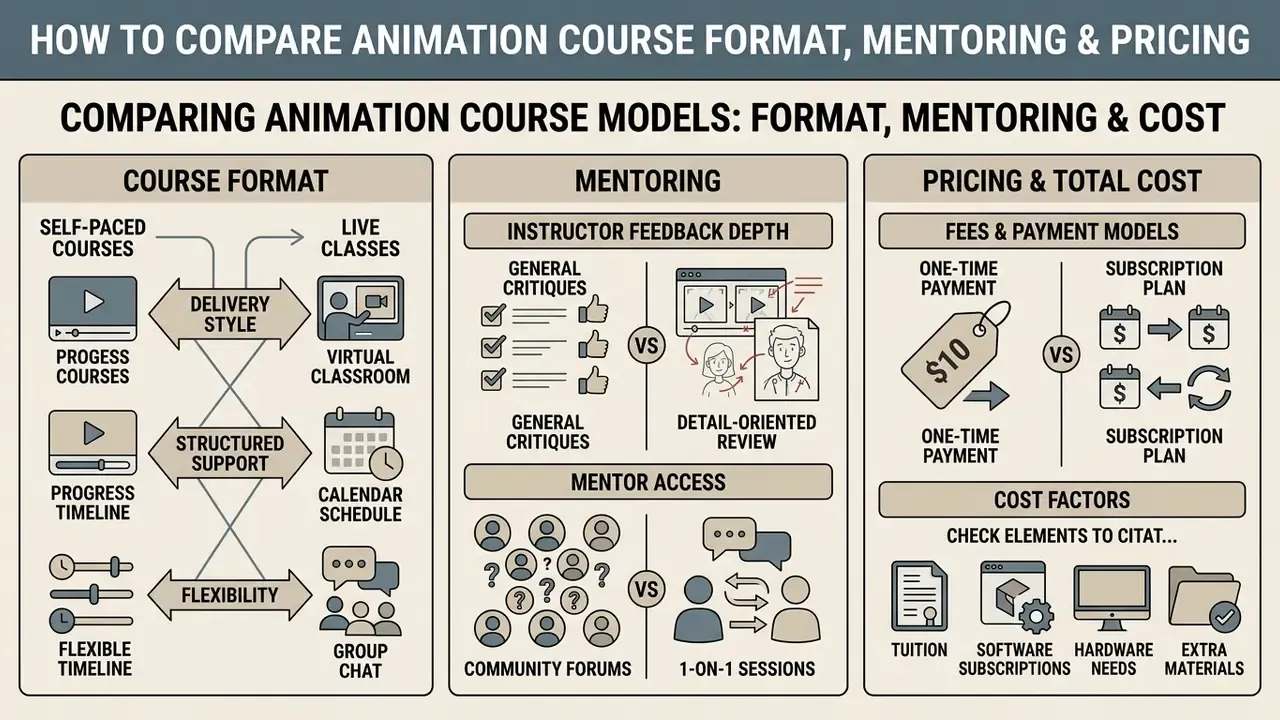
Animation course models differ substantially in structural support, delivery style, feedback depth, and total cost. Judging tuition against instructional value means looking at mentor access, portfolio output, and syllabus relevance together.
Pricing spans affordable asynchronous video libraries and high-tier mentorship bootcamps costing several thousand dollars. Which one fits depends on a slightly uncomfortable question: do you need external accountability, or will you genuinely animate on a Tuesday night without it?
«Gamification only works when learning objectives are defined in advance, otherwise game elements distract rather than support skill development.»
The same logic applies to buying an animation video course. Define the deliverable first (three portfolio shots? an engine-ready locomotion set?), then choose the format that produces it.
| Course Model | Estimated Cost Range | Access & Pacing | Access Duration | Trial / Financial Aid | Working Files & Rigs | Mentorship & Feedback | Primary Target Outcome |
|---|---|---|---|---|---|---|---|
| Free / Open-Source Self-Study | $0 | Fully self-directed | Indefinite | Not applicable | Free production rigs (Norman, Heavy, Morpheus, Monty), Blender Studio training assets | Community forums only | Testing aptitude before paying tuition |
| Self-Paced Video Course | $15 to $30 per course, or $10 to $50 monthly | Instant access; fully asynchronous | Lifetime downloads on some libraries; subscription-term on others | Free trial common (e.g. Coursera listings); money-back guarantees | Often includes source files, e.g. TVPaint scene files, PDFs, original drawings | Automated quizzes; community forums; no direct mentor critique | Initial skill exploration; tool introduction; personal interest |
| Interactive Live Class | $400 to $1,500 per module | Fixed weekly schedule; 6 to 12 week cohorts | Cohort term plus limited replay window | Instalment plans; occasional scholarships | Class scene files and instructor demo files | Direct instructor reviews; live Q&A; peer critiques | Targeted skill upgrades; mid-level portfolio enhancements |
| Career Bootcamp / Diploma | $1,500 to $15,000+ total (one documented 8-week, 48-hour bootcamp is priced at $1,500) | Structured 6 to 18 month tracks; rigorous pacing | Term-limited access; alumni community afterwards | Financial aid, instalments, and in some cases deferred "pay when hired" models | Studio-grade rigs, production scene files, remote lab access | One-on-one industry mentorship; career coaching; reel reviews | Professional studio hiring; junior animator career transition |
Prices and access conditions change often. Confirm both on the provider's own course page before you commit.
Self-Paced Courses, Live Classes and Online Workshops
Asynchronous video courses give maximum schedule flexibility at low cost, which suits self-motivated learners exploring introductory concepts. Complex physical principles, though, usually need expert eyes to catch subtle timing or posing errors.
Live animation online classes and intensive workshops combine structured weekly modules with direct professional feedback.
«Meta-analyses collected by Oregon State eCampus show that well-designed online and blended formats can match or exceed traditional instruction on learning outcomes.»
A 2024 systematic review of nursing students similarly measured a positive effect for online delivery on practical skills (SMD 0.43, 95% CI 0.33 to 0.54) and on learner confidence (SMD 0.56, 95% CI 0.29 to 0.83). That is evidence remote delivery is not inherently weaker for hands-on disciplines, provided the feedback loop is designed properly. Hybrid workshop models make the loop explicit: the University of Michigan's format front-loads an asynchronous course, then runs two days of live instruction with hands-on exercises and group presentations.
An animation workshop online also forces students to defend creative choices during live critique labs, which accelerates technical development faster than passive viewing. Because critique sessions are usually recorded, students should be comfortable with basic video editing software to re-cut notes, side-by-side comparisons and progress reels.
Scheduling guidance matters as much as format. UNESCO's distance-learning recommendations advise mixing synchronous and asynchronous delivery and keeping live sessions short, up to 20 minutes for primary and 40 minutes for secondary learners. The principle translates well to adult training: short live critique, long independent production time. Animation Mentor's structure reflects this, pairing 12-week courses and at least one weekly live Q&A with 15 to 20 hours of independent assignment work.
What To Check Before Paying for an Animation Program
Expert Verification Framework:
Commercial resources from our editorial team
Teams planning a production or training budget can review our AI Media Commercial-Use Hub for rights conditions across creative tools, and compare subscription tiers on the AI Media Pricing overview before allocating spend. Where rights questions are contested rather than settled, our AI Litigation and Case Timelines tracker records how disputes have progressed.
Animation Software and Tools Taught in Online Courses
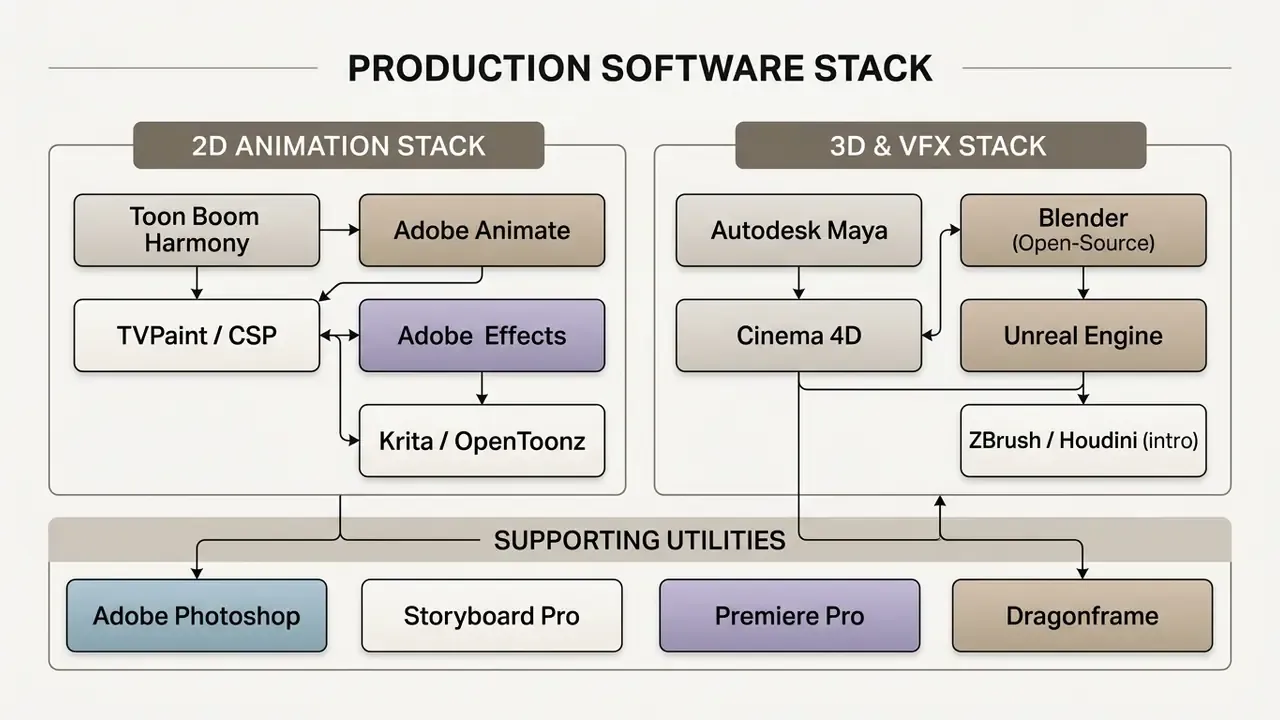
Modern animation programs online train students on the commercial suites used across major film, television, and game studios. Technical literacy in industry-standard packages remains a practical prerequisite for studio employment.
Course requirements usually specify hardware too: dedicated graphics processing units, digital drawing tablets, and dual-monitor arrangements. Increasingly, syllabi also expect familiarity with AI video generators used for previsualisation and reference gathering.
Software for 2D Animation and Character Design
Two-dimensional animation courses centre on vector and raster software capable of frame-by-frame illustration, skeletal rigging, and digital compositing.
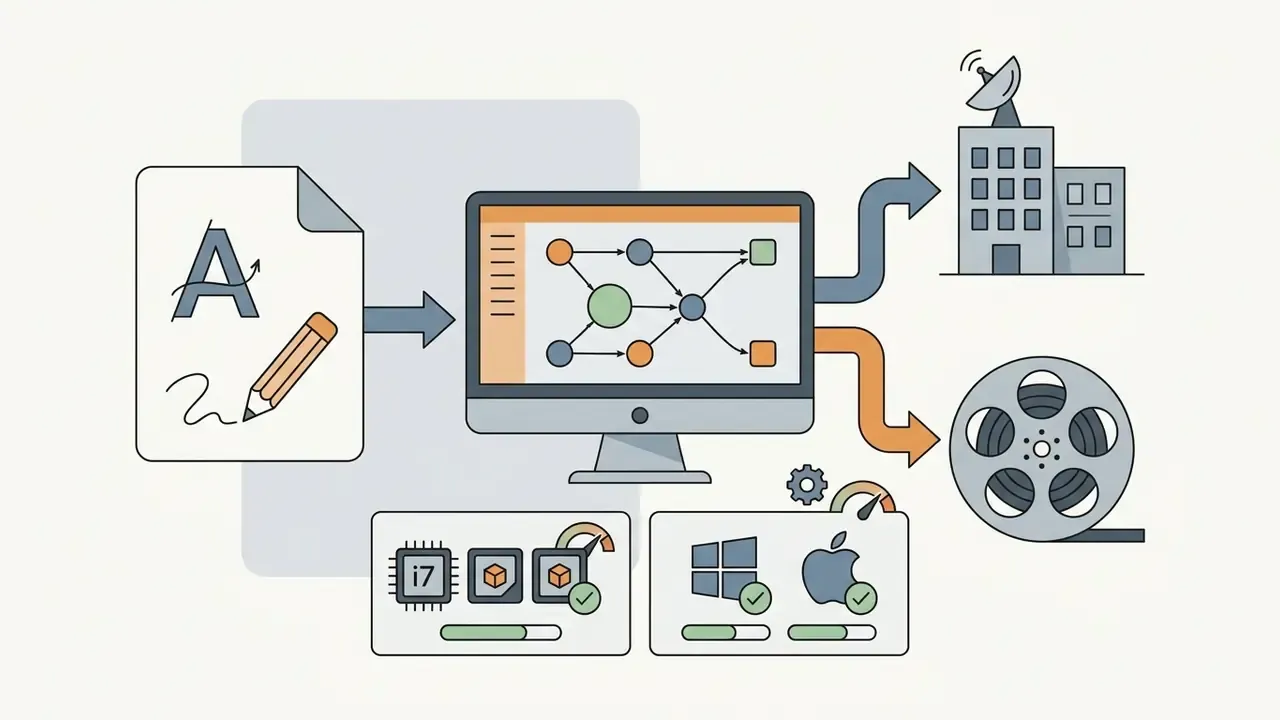

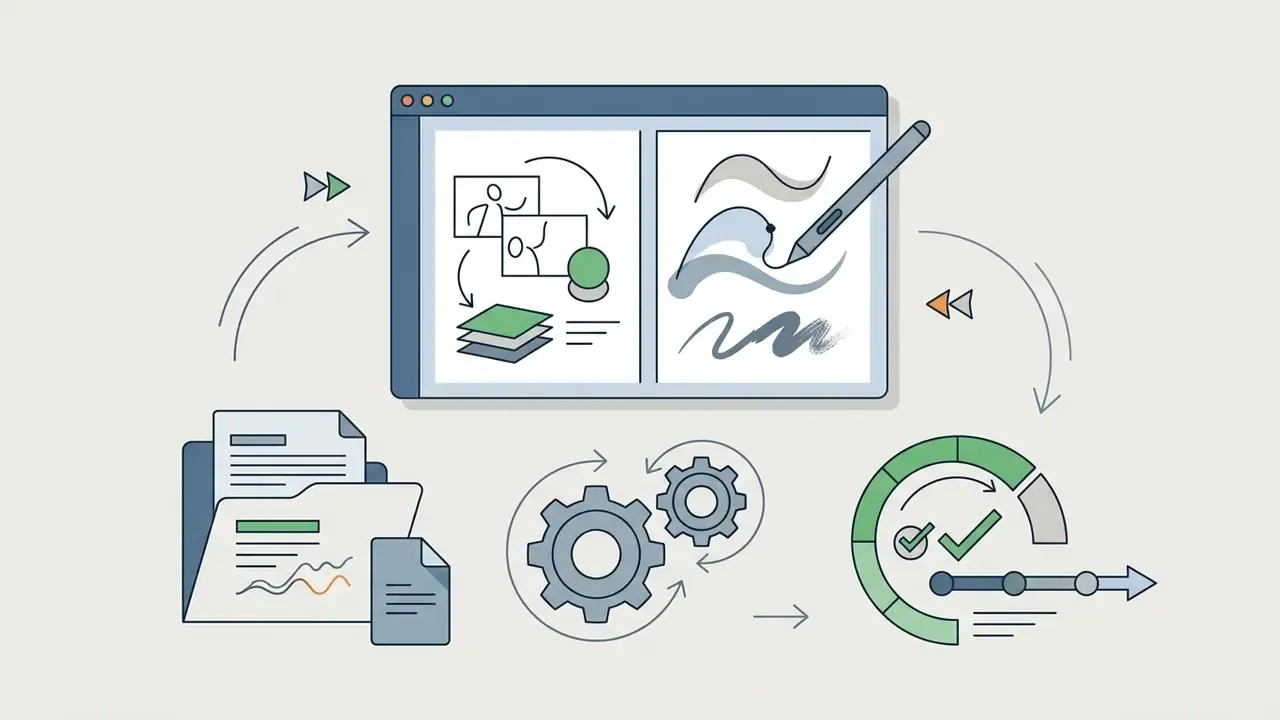
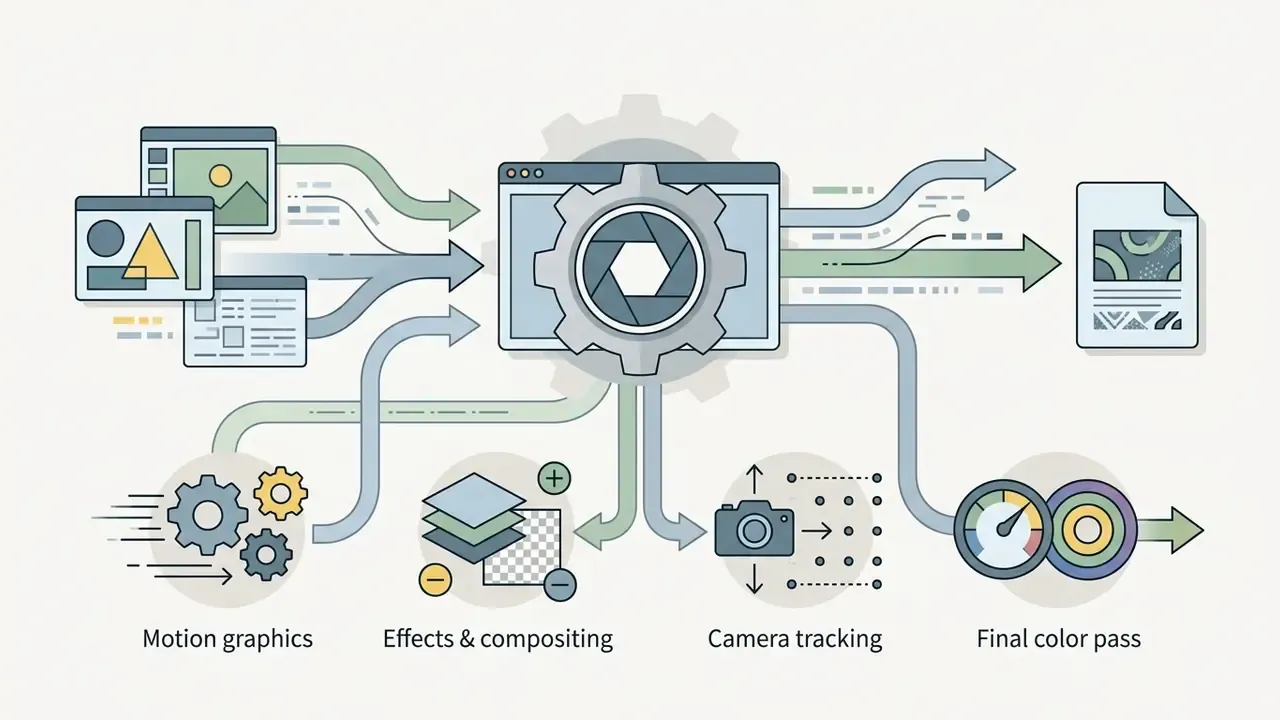
Character designers usually assemble mood boards and silhouette studies before animating. Many now use AI art generators as a reference-gathering step alongside life drawing and photo reference. Adjacent generators show up in student workflows for related reasons: an ai wallpaper generator for quick background colour scripts, an ai wireframe generator when a project needs interface mock-ups around the animation, and an ai website generator for a fast portfolio page. For style research, browsing conceptual work such as ai weiwei art or generated figure sets like ai women pictures can inform silhouette and costume choices, though nothing there substitutes for observational drawing. If you are unsure where uploads are permitted at all, our note on ai where i can upload images covers the practical limits.
Free and open-source alternatives for beginners. Financial barriers should not stop the first six months of practice. Krita provides a capable frame-by-frame timeline with onion skinning. OpenToonz is the open-source descendant of the toolset used on Studio Ghibli productions. Synfig Studio supports cut-out workflows and layered sequential animation. Blender Grease Pencil allows genuine 2D drawing inside a 3D scene, which makes it the cheapest route into hybrid 2D and 3D production. Instructional materials from Emily Carr University pair Adobe Animate with Cateater Stop-Motion Studio and a standard editor, a useful reminder of how modest the required stack can be.
Software for 3D Animation, Games and Effects
Computer animation classes online require high-performance software able to render complex spatial geometry, character rigs, and real-time lighting.
- Autodesk Maya: the studio standard for feature film and AAA game animation. Maya 2026 documents modelling, animation, character animation, motion graphics, simulation and effects, and exposes C++ and Python APIs for pipeline and tool development. Its MotionMaker workflow lets beginners generate character motion along a path before hand-keying.
- Blender: a powerful open-source 3D suite covering modelling, rigging, Grease Pencil 2D integration, motion tracking, masking, and animation. It works as an accessible entry point for beginners and independent studios, and the current 5.x LTS line is documented for the 2025 to 2027 support window.
- Cinema 4D: widely taught for motion design and broadcast graphics, where iteration speed outweighs rig complexity.
- Unreal Engine: built into advanced courses to teach real-time virtual production, camera manipulation, and game-engine asset deployment. Official documentation covers in-camera VFX, nDisplay, Live Link, Multi-User Editing and Web Remote Control, with setup guidance for single-machine and multi-machine stages.
- ZBrush: used for high-resolution sculpting and character look development feeding into the animation pipeline.
Because Blender is free and production-proven, many 2d and 3d animation courses online sequence it first and introduce Maya once students understand rigging concepts. You can see the same curricular pattern in South Carolina's 2026 advanced animation standard, which recommends "Autodesk Maya, Blender, or other 3D software" rather than mandating a single vendor. The pedagogical argument is that principles transfer between packages. The commercial argument is simpler: no student should be blocked by a licence fee during the fundamentals stage.
Hardware and Technical Setup Requirements
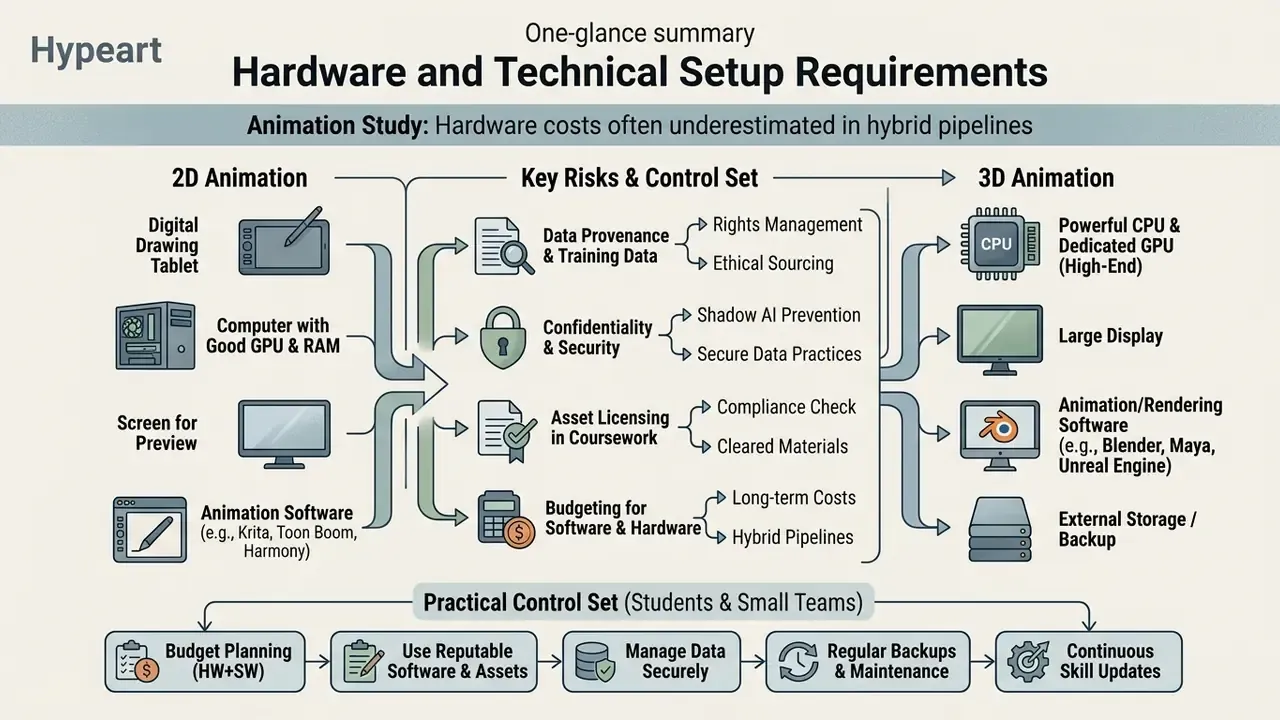
Hardware is the most frequently underestimated cost in online animation study. Course pages usually state requirements plainly. South Carolina's 2026 advanced animation standard requires one GPU-equipped computer per student with internet access. The University of Florida's 3D course specifies Autodesk Maya, Adobe Photoshop, After Effects, Media Encoder, QuickTime and a three-button mouse, and for online sections a two-monitor setup. The university's 2D course likewise requires Toon Boom Harmony, Adobe CC and dual monitors for remote students.
| Component | 2D Animation & Motion Graphics | 3D Animation, Games & VFX |
|---|---|---|
| CPU | High single-thread performance (modern Core i5 or i7, Ryzen 5 or 7); Harmony lists i5 minimum, i7 or Xeon recommended | 8 to 16 cores for simulation and rendering (Core i7 or i9, Ryzen 7 or 9) |
| RAM | 16 GB minimum, 32 GB recommended for compositing | 32 GB minimum, 64 GB for heavy scenes, simulation and Unreal Engine |
| GPU | Entry-level dedicated GPU sufficient; integrated graphics workable for vector work | Dedicated GPU required: RTX 3070 or 4070 class and above for viewport, GPU rendering and real-time engines |
| Storage | 512 GB NVMe SSD plus external backup | 1 TB+ NVMe SSD for cache, textures and renders, plus a project archive drive |
| Input device | Graphics tablet essential: Wacom Intuos or Cintiq, or XP-Pen equivalent; pen display preferred for frame-by-frame | Three-button mouse mandatory for Maya navigation; tablet useful for weight painting and texturing |
| Display | Colour-accurate monitor; dual monitors required by several online syllabi | Dual monitors: timeline and Graph Editor on one, viewport on the other |
| Audio | Headphones for lip-sync frame accuracy | Headphones plus reference speakers for cinematic timing |
| Fallback option | Cloud or remote lab access (e.g. Academy of Art University's rLab) where local hardware is insufficient | Remote workstation access or render-farm credits for final output |
Budget planning tip: allocate roughly the price of one mentored module to input hardware before enrolling. A reliable pen display and a three-button mouse remove more friction in the first month than any software upgrade does in six.
Generative AI in Animation Training: Hybrid Pipelines and IP Risk
From Online Animation Learning to a Career Portfolio
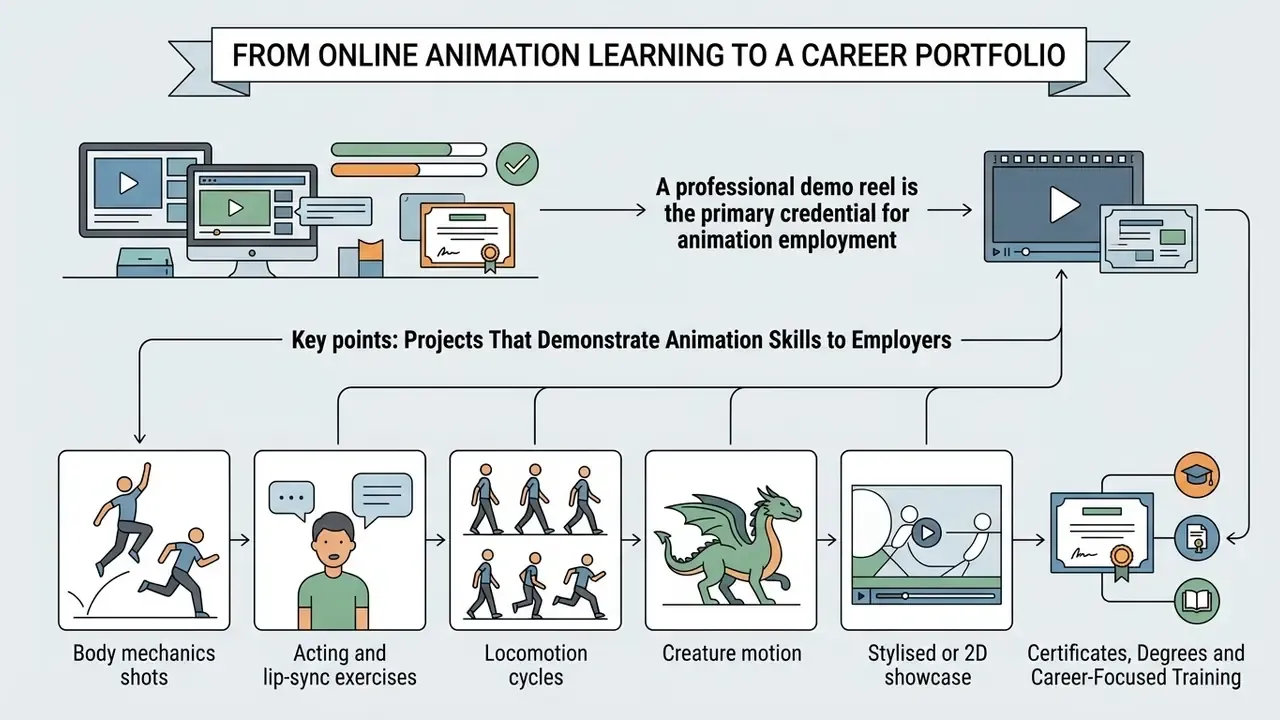
A professional demo reel is the primary credential for animation employment. Studios hire on demonstrated visual proof of skill rather than academic degrees or institutional prestige.
Good courses structure assignments so completed projects populate a candidate's portfolio directly. Students supplementing coursework with quick tests sometimes prototype motion ideas using free AI video generators before committing hand-keyed frames. A concise, high-quality reel outweighs long collections of unrefined work, and the length target is published by employers themselves.
«Animation showreels should be short, usually one to three minutes, and should show your best work first.»
«Motion-art reels should be around one minute and should showcase your best work.» — Riot Games, Portfolio and reel suggestions (2026). https://www.riotgames.com/en/portfolio-and-reel-suggestions
ScreenSkills adds three requirements candidates routinely miss: state your specific contribution on collaborative shots, make sure the reel plays across devices and browsers, and include contact details plus enough text that a viewer understands the work without you in the room. For VFX roles, ScreenSkills recommends 2 to 3 minute reels with shot breakdowns showing process, tools and software used. The SQA unit Creating a Showreel and Portfolio formalises the same output as material for presentation to a potential employer or client.
Leading programs design showreel assignments against the technical requirements of major feature and AAA game studios. Graduates apply into production pipelines at Disney, Pixar, DreamWorks, Sony Imageworks, Industrial Light & Magic, Weta, Blue Sky, Warner Bros., Nickelodeon, Ubisoft, EA, Blizzard and Riot Games, where recruiters look specifically for mechanics validated on production-ready rigs. CG Spectrum graduates describe exactly that route: one alumnus credits a school-built demo reel and professional connections with landing a first animator role at Sony Imageworks, while another reports being hired by DreamWorks after the program.
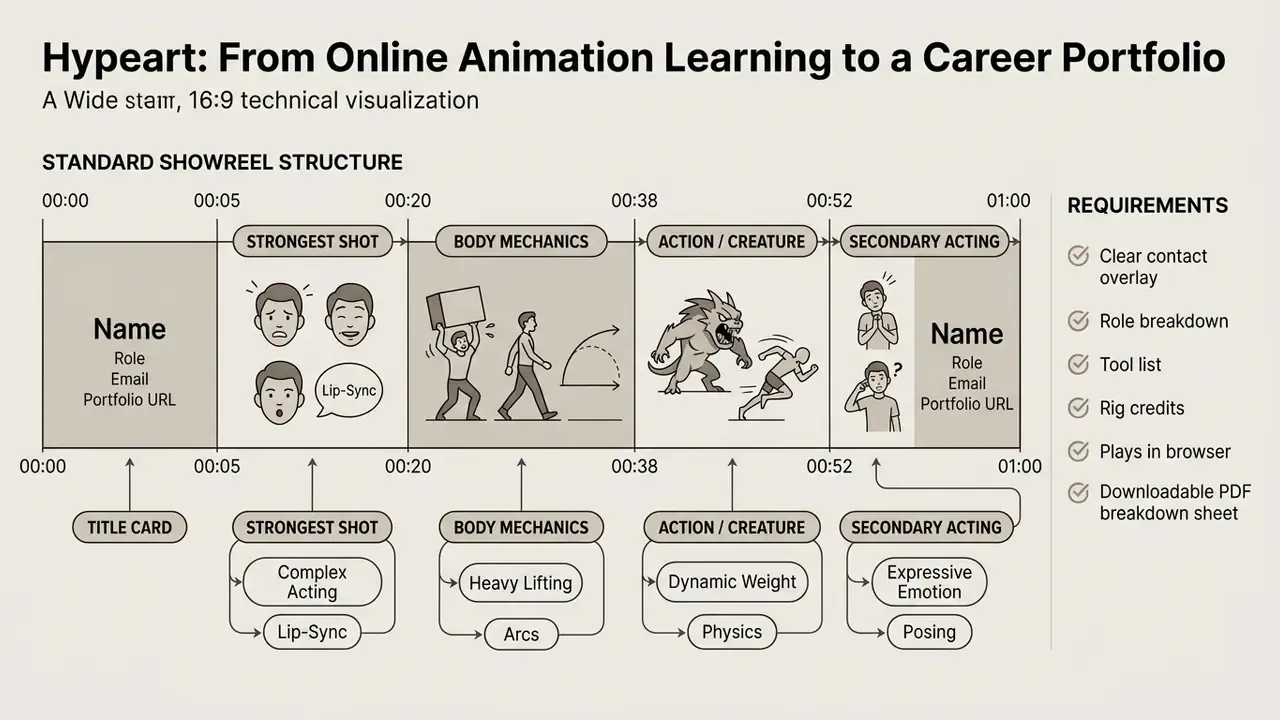
A title slide and an end card are non-negotiable. Recruiters watch dozens of reels in a sitting. If your name, role and email are not on screen in the first five seconds and again at the end, any follow-up depends on them re-opening your email. The accompanying breakdown sheet should list, per shot: rig used, software and version, your specific tasks, whether audio was supplied, and shot length.
Projects That Demonstrate Animation Skills to Employers
Recruiters and art directors review showreels to verify a candidate's grasp of physical mechanics, emotional subtlety, and technical discipline. Employer-published guidance from Animal Logic groups animation submissions into three categories, an acting piece, action work, and creature performance, and specifies that acting should be subtle with lip sync. Essential portfolio pieces include:
- Body mechanics shots jumps, obstacle courses, or heavy lifting that demonstrate weight, balance, momentum, and believable force transfer.
- Acting and lip-sync exercises dialogue scenes showcasing subtle facial performance, emotional subtext, eye tracking, and precise synchronisation. Where original dialogue is needed and no actor is available, students sometimes record scratch tracks or use an AI voice generator for practice audio, then credit the source in the breakdown.
- Locomotion cycles clean walk and run cycles viewed from multiple camera angles, highlighting weight shifts and fluid hip movement. Games-facing reels should add combat cycles and blend-ready locomotion sets.
- Creature motion quadruped or mythical creature sequences emphasising specialised mechanics, scale and physics believability.
- Stylised or 2D showcase for 2D and stylised roles, prioritise strong posing, exaggeration and rhythm over realism.
Emphasis differs by discipline. ScreenSkills separates character animation (acting, body mechanics) from games animation (cycles, combat, locomotion), VFX and creature work (realism, physics, scale), and stylised or 2D animation (posing, exaggeration, rhythm). Tailor the shot order to the job you are applying for rather than sending one generic edit everywhere. It takes an afternoon and changes response rates.
Finished reels are then cut, colour-matched and compressed for delivery. Artists publishing to a channel or portfolio site can follow our YouTube video editor workflow guide to keep upload quality consistent across platforms.
Certificates, Degrees and Career-Focused Training
Formal degrees and Professional Certificates validate completed coursework, yet studios still prioritise portfolio quality when hiring. Vocational certificates establish baseline technical discipline, while work placement access gives junior candidates a distinct advantage.
«RMCAD's online BFA in Animation frames learning outcomes across six domains: professionalism, collaboration, narrative, technical mastery, creative voice and critical thinking.»
FAQ: Frequently Asked Questions About Learning Animation Online
Can I Learn Animation Online for Free?
Yes, foundational concepts can be learned through open educational resources, free tutorials, and open-source software. The Morevna Project's school publishes free animation lessons online built entirely on free and open-source software used in its own productions. Blender Studio's Animation Fundamentals training provides downloadable character rigs and is explicitly based on an Animation Mentor-derived curriculum. Animation Apprentice distributes free theory videos and free training rigs including Monty, Norman, Heavy and Morpheus, and the widely used Stewart rig is another standard practice asset. Free software, Krita, OpenToonz, Synfig Studio and Blender, removes the licence barrier entirely. The limitation is feedback. Free self-study lacks structured expert critique, which is exactly what identifies subtle mechanical errors in timing, spacing and posing. Paid programs exist largely to supply that review loop: a mentor opening your scene file and pointing at the frame where the weight fails.
Do I Need Previous Drawing or Computer Animation Experience?
Previous drawing experience is not mandatory for 3D animation, since artists manipulate digital rigs much like physical puppets. Still, studying drawing fundamentals such as silhouette, line of action, and spatial balance improves posing. Steve Roberts' Character Animation: 2D Skills for Better 3D argues precisely this, centring 3D performance on solid drawing, silhouette clarity and posing. For 2D pathways, traditional drawing literacy remains a core requirement, and academic sources at University of the Arts London treat drawing as a key component of classical animation practice. Worth noting: several respected 2D courses can be followed with pencil and paper rather than a tablet. The Art of Aaron Blaise states that no particular software is required, and multiple verified reviewers report completing the course traditionally.
How Long Does It Take to Become an Animator?
Timelines vary by route and intensity, so treat these as documented reference points rather than guarantees. The UK's Junior Animator Level 4 apprenticeship standard specifies a typical duration of 18 months. Animation Mentor's online character animation program also runs 18 months, built from 12-week courses with 15 to 20 hours of weekly assignment work, and the school advises 20 to 40 hours per week for students pursuing animation full time. Portfolio-oriented roadmaps commonly sequence roughly three months of foundations, six months of advanced work, then continued specialisation. Full-time online university programs extend across three to four years, while intensive mentored bootcamps concentrate portfolio creation into 9 to 18 months. The variable that actually moves the date of a first offer is weekly practice volume combined with the quality of critique received.
Can I Pay in Instalments or Get Financial Aid?
Often yes, though the mechanism depends on the provider type. Subscription platforms such as Coursera list free trials on most courses and let learners apply for financial aid after previewing a course. Accredited institutions including Academy of Art University and RMCAD process conventional financial aid, and some offer veteran and military education benefits. Mentored bootcamps typically offer instalment plans, and at least one 3D animation bootcamp advertises "no fees upfront," with payment tied to employment outcomes. Self-paced libraries substitute discounting for financing: Aaron Blaise's Complete Animation Course, normally $129, is regularly listed at $57, and many platforms include a 30-day money-back guarantee. Always confirm refund windows and access duration in writing before paying.
Are Student Software Licences Cheaper?
Yes. Autodesk offers free educational access to Maya for verified students and educators, Adobe sells discounted Creative Cloud student plans, and Toon Boom operates educational pricing for Harmony. Blender, Krita, OpenToonz and Synfig are permanently free with no education-versus-commercial distinction. One caveat matters commercially: educational licences generally prohibit paid client work, so a student licence used on a freelance job is a licence breach. Plan a commercial licence into your budget before your first paid contract.
Can I Use Course Rigs and Assets in My Public Showreel?
Usually for portfolio purposes, but not always for commercial work. Free training rigs and school-supplied scene files typically permit demo-reel use with credit while prohibiting resale or commercial deployment. Credit the rig by name in your breakdown sheet. Recruiters recognise standard rigs instantly and read the credit as professionalism.
Do Online Courses Teach AI-Assisted Animation Yet?
Coverage is uneven. University syllabi still centre hand-keyed animation and traditional pipelines, while shorter commercial courses have started adding previsualisation and generative reference modules. If AI-assisted workflow matters for your target role, ask a prospective provider three questions: which tools are taught, whether licence and rights conditions are covered, and whether AI-assisted shots are permitted in graded portfolio work.
Licensing, Rights and Platform Resources
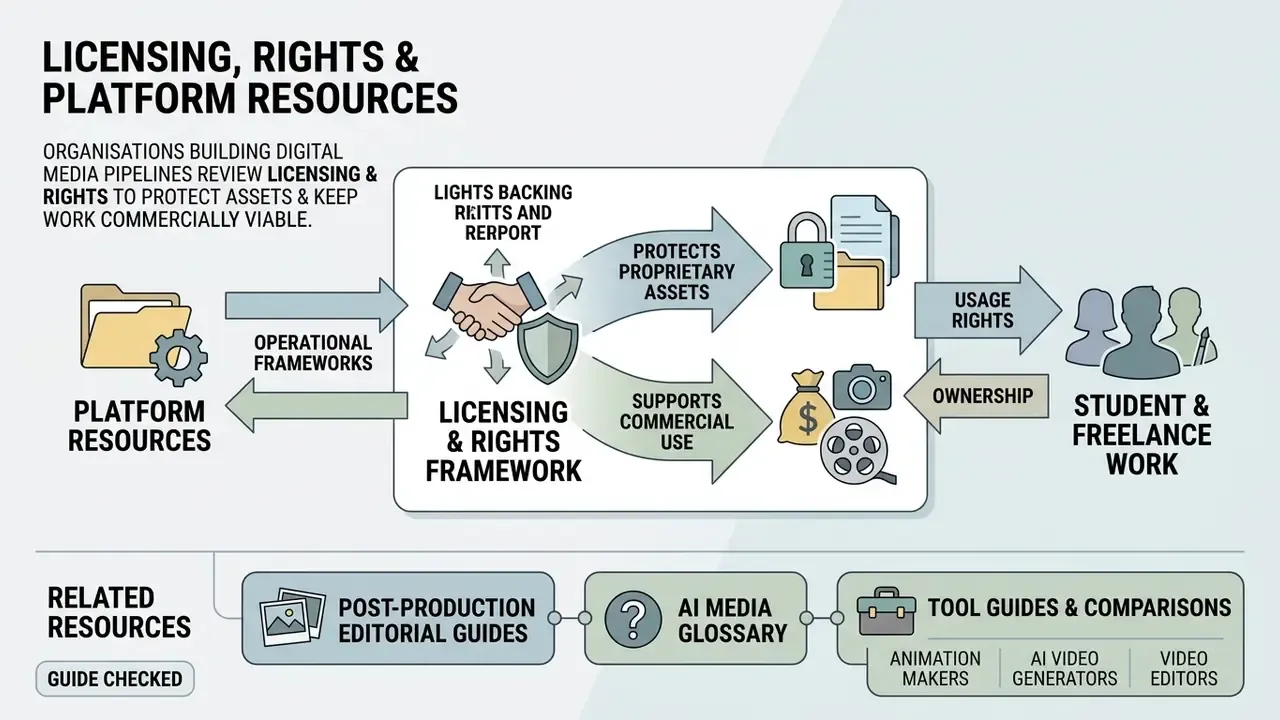
Organisations building digital media pipelines review licensing, rights and operational frameworks to protect proprietary assets and keep student or freelance work commercially usable. Teams verify output rights and permitted commercial scenarios through our commercial-use hub, plan tooling spend with the pricing overview, and confirm technical assistance protocols via customer support. Further operational and budget estimates can be produced using the AI Media Calculators, which translate render times, subscription tiers and per-seat licences into a realistic monthly figure before a course or a production begins.
For post-production, image preparation and delivery, related editorial guides cover photo editors for texture and concept clean-up, video compressors for reel delivery under platform size limits, and free video editing software for cutting your first showreel at zero cost.
How this guide was checked. Pricing, access terms and system requirements were read from provider and vendor pages rather than aggregator listings. Curriculum claims come from published university syllabi and course catalogues. Hiring benchmarks come from employer-published reel guidance and dated job postings. Where a provider claim could not be verified independently, it is presented as the provider's own statement.