Photo to cartoon AI turns a digital photograph into stylized illustrative artwork using deep learning models: Generative Adversarial Networks (GANs) and latent diffusion backbones. These systems read facial geometry, edge contours, and color distribution, then rebuild the frame as a cartoon image while holding on to semantic structure and the identity traits that make a face recognizable.
Why should a compliance or governance reader care about a consumer-looking tool? Because staff already upload badge photos and client portraits into free converters, often without a retention check.
Executive Summary: The Numbers That Matter Before You Upload
- Technology Modern converters combine GAN cartoonization (CartoonGAN, MS-CartoonGAN, ToonerGAN) with latent diffusion plus control adapters (ControlNet Canny, Depth, Reflect) to separate geometry from texture. Multi-adapter diffusion pipelines improve FID by up to 38% and CLIP-I semantic alignment by up to 42% against standard image-to-image translation.
- Input specs JPG, PNG, WEBP, HEIC up to 50 MB; optimal canvas 500×500 px to 4096×4096 px; typical inference latency 15–30 seconds on dedicated cloud GPUs.
- Styles Five core families (comic, anime/manga, 3D animation, pixel/flat vector, creative retro) plus trending micro-style presets: Studio Ghibli, Claymation, Makoto Shinkai, Simpsons, JoJo, One Piece, Ukiyo-e.
- Quality control Keep style strength (denoising weight) at 0.40–0.60 for a recognizable likeness. Below a 200×200 px face region, the model starts inventing features.
- Commercial risk Purely machine-generated output is not copyrightable in the US (US Copyright Office, 2023 and 2025), yet commercial use is usually permitted under vendor Terms of Service. The EU AI Act requires machine-readable marking of AI outputs; China mandates watermarking.
- Privacy benchmark Best practice is automatic purge of source files and feature vectors within 2 hours of task completion, with an explicit model-training opt-out and no persistent biometric templates.
- Cost benchmark Free tiers deliver 1–5 generations per day at 720p to 1024 px with watermarks. Paid tiers typically run $9 to $30 per month, or credit packs such as $10 for 20 images and $30 for 70 images, and unlock 4K exports, watermark removal, and explicit commercial licenses.
What Is Photo to Cartoon AI and How Does It Work?
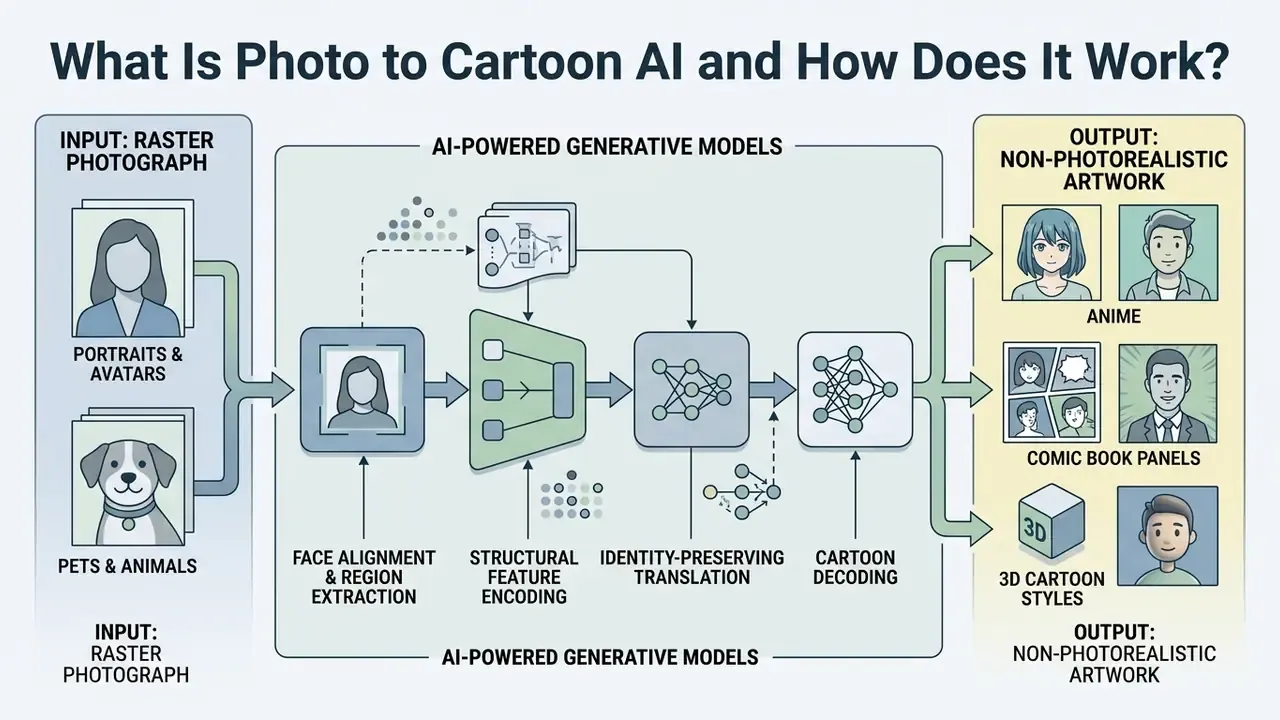
Photo to cartoon AI describes automated generative models that take raster photographs as input and synthesize non-photorealistic artwork: anime, comic book panels, or 3D character illustrations. Legacy filters relied on deterministic edge detection and color quantization. An ai cartoon generator works differently. It trains neural networks on paired or unpaired image datasets to learn mappings between photographic texture and artistic style. Readers evaluating the licensing side of these models can review our breakdown of AI image generators and commercial-use terms.
«Multi-adapter diffusion cartoonization improves FID by up to 38% and image-to-text alignment (CLIP-I) by up to 42% over standard image-to-image translation.»
Modern pipelines convert photos into cartoon outputs by splitting global image geometry from high-frequency texture. CartoonGAN and latent diffusion architectures with control adapters isolate structural content first, facial landmarks and background composition, and only then apply style-specific latent transformations. Research on multi-adapter cartoonization attributes the measured gains to three cooperating adapters: a cartoon-style adapter, a color-structure adapter, and a semantic adapter. Together they raise CLIP-I semantic alignment by up to 42% and cut FID by up to 38% versus standard image-to-image translation (SSRN Research Report on Text-to-Image Diffusion Cartoonization, 2024). For fundamental terminology across visual generation models, see our AI Media Glossary.
Academic work on the earlier GAN generation confirms the same architectural principle. MS-CartoonGAN and related multi-style papers combine an edge-promoting adversarial loss, a hierarchical content loss, and a style-classifier loss, so line clarity and style separation can be optimized independently of color fidelity. Different math, same conclusion: decouple structure from paint.
From Uploaded Photo to Cartoon Image
The pipeline starts when a user chooses to upload a photo into an ai image converter to cartoon engine. The system normalizes pixel values, detects facial landmarks, and maps key structural regions into a low-dimensional latent space.
Once encoded, the network evaluates face geometry and semantic regions. The generator then applies style-transfer losses, perceptual loss and feature-matching loss among them, to render cartoon linework and flat color shading while constraining the output to preserve the subject's anatomy. Advanced systems wrap this in a cartoon photo editor workflow or add specialized neural layers so eye shape, nose position, and jaw contours stay consistent between input and final asset.
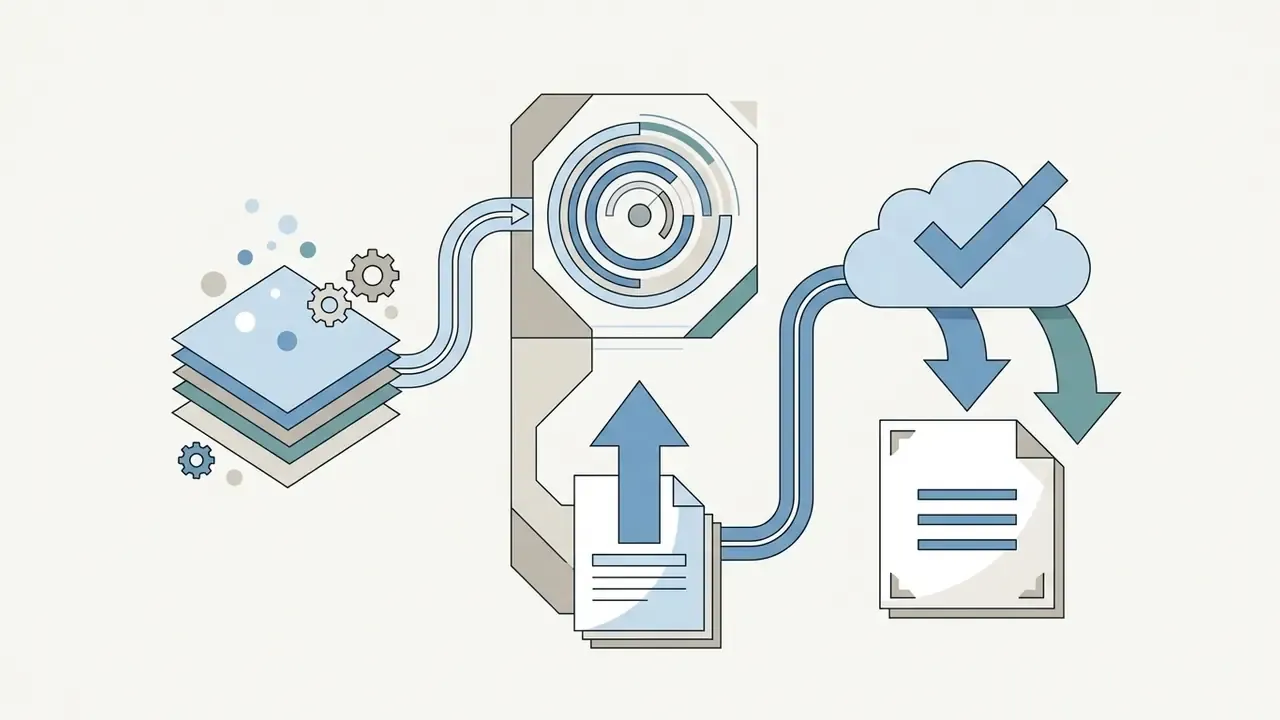
In practice, four stages do the work:
- Face alignment and region extraction.Landmark detection normalizes head roll, scale, and crop, so the encoder receives a canonical face patch.
- Structural feature encoding.A content network or StyleGAN-class encoder captures pose and identity in latent space; segmentation networks (for example SegNet trained on MS COCO) separate subject from background so each region can be styled independently.
- Identity-preserving translation.Perceptual, content, and deep-feature similarity losses constrain the transformation. Papers such as Cartoon-to-Photo Facial Translation with Generative Adversarial Networks (2018) use paired global and local discriminators to keep individual facial parts intact.
- Cartoon decoding.The decoder synthesizes stylized eyes, nose, mouth, and hairline while respecting preserved landmark geometry. Abstraction-Perception Preserving Cartoon Face Synthesis (2023) frames this as reducing texture detail while adding cartoon-specific features, enlarged eyes and line-drawn noses, without breaking perceptual recognition of the source face.
What AI Cartoonizers Can Transform
An ai image cartoon converter accepts a wide range of visual inputs: individual portraits, group photos, pets, landscapes, even architectural scenes.
- Portraits and avatars. Frontal headshots yield the highest fidelity when you generate stylized cartoon avatars and digital profile assets. Partial faces, extreme angles, and heavily filtered selfies degrade likeness fast.
- Pets and animals. Neural encoders segment fur patterns and animal facial structures to produce stylized pet illustrations. One clearly visible animal face gives the best result; multi-pet frames retain less per-subject detail.
- Landscapes and objects. Systems simplify complex natural texture, turning environmental photos into cel-shaded or painted concept art. Busy, low-contrast scenes reduce style clarity, because edge-detection thresholds cannot isolate dominant shapes.
- Group shots. Multi-identity frameworks process several subjects at once, though individual facial detail varies with resolution, and crowded frames tend to over-emphasize the dominant face.
If you need dedicated editing tools for adjusting the underlying photography before cartoonization, consult our guide on cartoon photo editor capabilities or the broader overview of online photo editors.
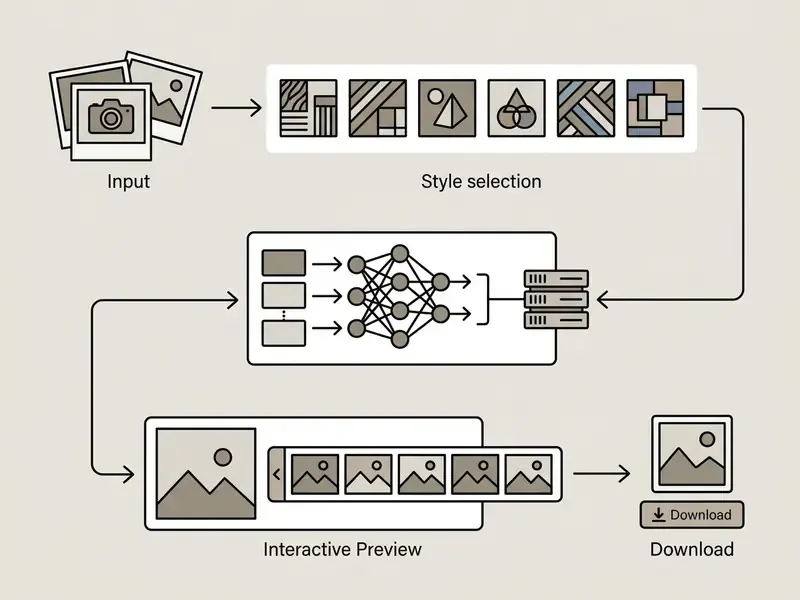
- Step labels for the graphic:

Cartoon Styles Available in an AI Cartoon Generator
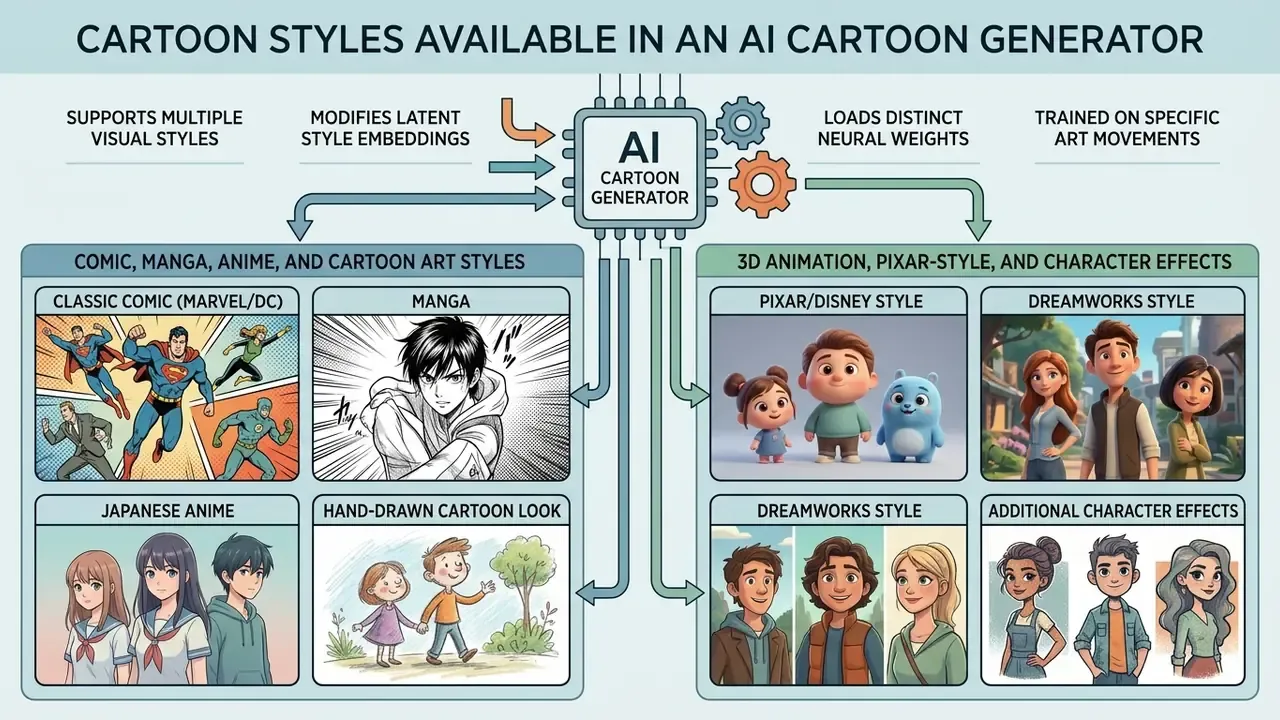
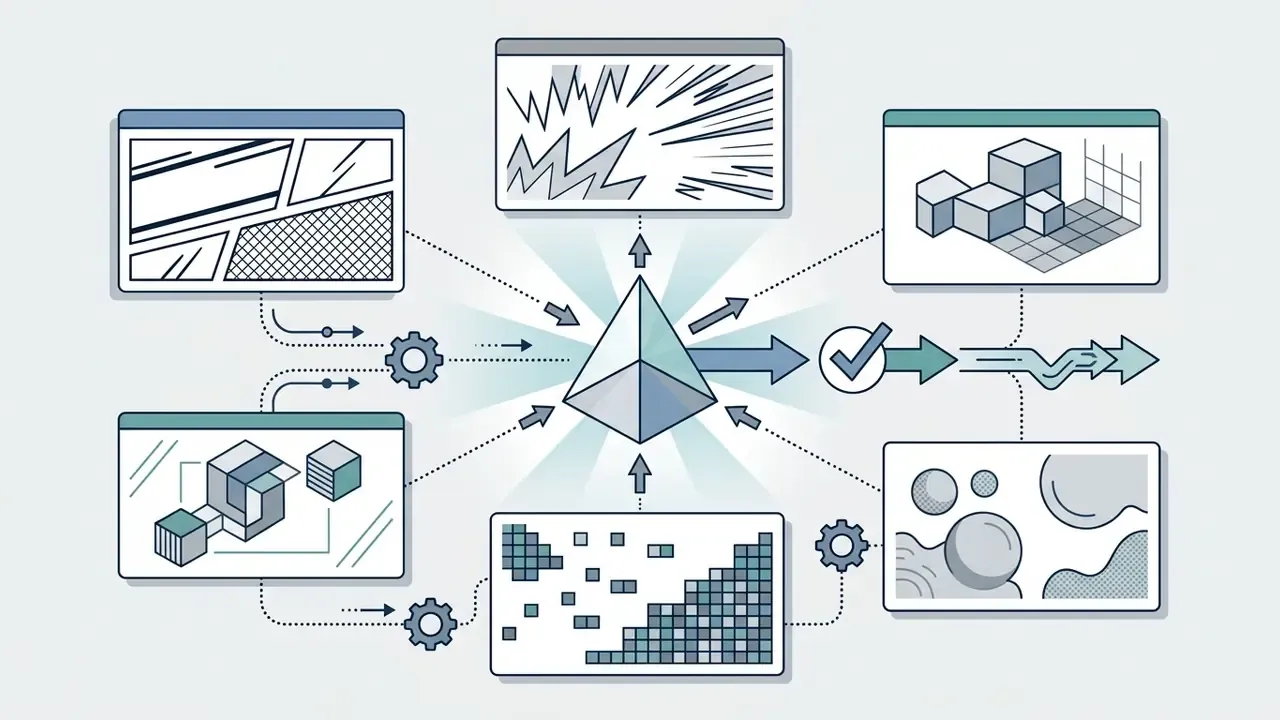
An ai cartoon generator supports multiple visual styles by modifying latent style embeddings or by loading distinct neural weights trained on specific art movements. Typical outputs cover classic Western comic art, Japanese anime, 3D studio animation, pixel art, and flat vector illustration.
Different objectives call for different styles. A brand team using photo to cartoon ai for corporate collateral usually lands on flat vector art, while individual creators reach for anime or comic renderings. Platforms built around a multi-style cartoon picture maker let users toggle presets without re-uploading the source asset, a capability enabled by multi-branch style encoders rather than per-style retraining.
«Multi-style GANs with multi-branch encoders model each style as a dataset-level distribution, sustaining realism without retraining for every new style.»
For a wider view of style libraries and licensing across artistic engines, see our comparison of AI art generators.
Comic, Manga, Anime, and Cartoon Art Styles
The 2D category covers traditional comic illustration, Japanese manga, and cel-shaded anime.
- Classic comic (Marvel/DC). Variable-weight inked outlines, cross-hatching, bold color blocking. This is page-based print art rather than a rendering algorithm, so the model has to synthesize ink weight variation explicitly. Anyone searching for ai photo to comic output is really asking for that ink discipline.
- Manga. Monochrome line art, screen-tone dot patterns, high-contrast shading. Manga is static monochrome print art, which is exactly why manga presets suppress color entirely.
- Japanese anime. Enlarged eye geometry, simplified nose and mouth lines, smooth cel-shaded gradients. Cel shading itself is a non-photorealistic technique using piecewise-constant tone steps and bold silhouette contours.
- Hand-drawn cartoon look. Simulates traditional animation cels with organic, slightly irregular contours and visible manual line variation.
«Feature-level SCAN modules combined with image-level Ada-CTSS adaptation outperform previous anime stylization methods on detail retention and visual quality.»
Non-photorealistic rendering research shows that models using feature-level style networks, such as SCAN modules, can decouple line simplification from color preservation (Lu et al., 2024). The same work reports that a CartoonGAN variant with a joint denoising module converges to a content loss of 0.0286 and a generator adversarial loss of 0.3982 by training epoch 50, which quantifies the stability advantage of decoupled line and color objectives. For thematic character filters, see our analysis of the character ai filter; for tool-level selection guidance, review the best AI image generators by style accuracy.
3D Animation, Pixar-Style, and Character Effects
3D conversion models map 2D photo features onto stylized three-dimensional character meshes, or apply volumetric shading to mimic studio animation.
- Pixar/Disney style. Rounded geometry, warm global illumination, soft subsurface scattering in skin, exaggerated facial readability, motion blur, shallow depth of field.
- DreamWorks style. Expressive facial performance dynamics, sharp rim lighting, exaggerated proportions, high contrast between stylized characters and detailed environments.
- Realistic 3D avatars. Keeps physically based rendering attributes (subsurface scattering, eye speculars, pore and hair-strand fidelity) while adjusting facial proportion for a digital-double effect.
When you evaluate automated avatar engines, developers can integrate dedicated endpoints documented in our AI Media API Guides, or review implementation economics in the Google Veo implementation guide.
Pixel Art, Flat Illustration, and Creative Styles
Creative and retro styles compress source imagery into formats tuned for indie gaming, editorial design, and children's publishing.
- Pixel art. Quantizes source pixels into visible 8-bit or 16-bit grids with constrained palettes. The defining criterion is deliberate placement of every visible pixel.
- Flat vector illustration. Opaque geometric shapes, solid fills, no drop shadows or complex gradients. IBM's Design Language flat-style rules recommend keeping objects and spacing at least 8 px wide and tall so shapes stay legible at small sizes.
- Pop art and doodle art. High-saturation primaries, halftone dots, sketchy overlay lines.
- Children's book illustration. Softened palettes, generous negative space, character-forward composition. Illustration programs typically expect complete 32-page picture-book dummies in a portfolio, which is why consistency presets matter more here than single-image polish.
Trending Pop-Culture and Micro-Style Presets
- Studio Ghibli aesthetic soft painterly backgrounds, lush green palettes, hand-drawn character warmth inspired by classic Japanese feature animation.
- Claymation and stop-motion tactile plasticine texture, subtle finger-press imperfections, volumetric studio lighting.
- Makoto Shinkai cinematic hyper-detailed cloudscapes, lens flare, vivid high-contrast twilight grading.
- Comic and manga variants (JoJo, One Piece, Simpsons) high-contrast hatching, dramatic muscular geometry, or that iconic yellow-skin flat vector abstraction.
- Japanese ukiyo-e woodblock linework, muted mineral pigments, flattened perspective, decorative pattern fills.
- Cel-shaded and scrapbook anime two or three tone bands with paper-grain overlays and journal-style annotation borders.
- Adventure Time / American cartoon simple geometric shapes, noodle limbs, bold outlines, saturated flat fills.
- Doodle and pop art halftone dot screens, sketchy overlay strokes, primary-color contrast blocking.
Style-accuracy note: studio-named presets describe an aesthetic direction. They imply no affiliation with, or endorsement by, any studio. For style-fidelity comparisons and usage rights on one of the most requested aesthetics, see our review of Ghibli-style AI image generators.
- Before and after descriptions: Comic, photographic gradients collapse into flat color blocks with heavy contours and halftone texture. Anime, eyes enlarge, linework cleans up, shading reduces to cel bands. Pixel art, the face resolves into visible squares on a constrained retro palette. 3D animation, forms gain volumetric depth with soft studio shading. Flat illustration, features simplify into vector shapes with solid fills and minimal depth.
Ways to Use AI Cartoon Images
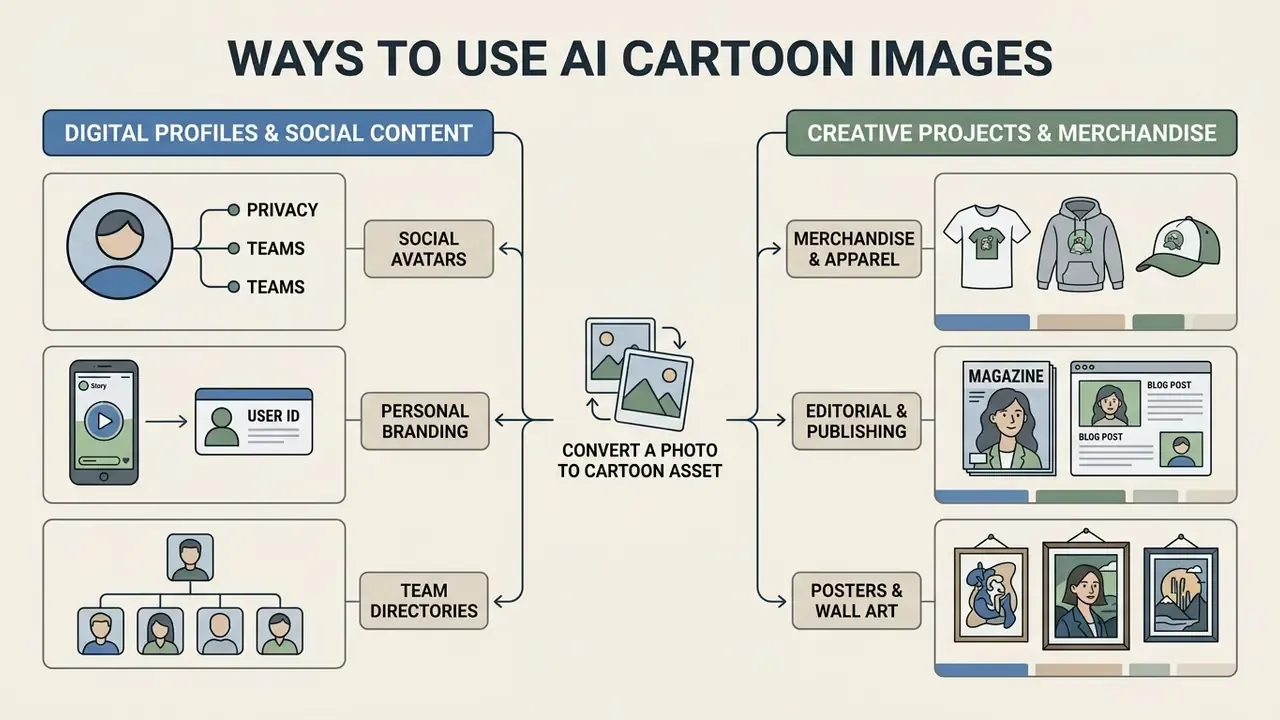
AI-generated cartoon assets show up across digital branding, personal social profiles, marketing campaigns, and physical merchandise.
A cartoon picture maker helps creators keep visual consistency across channels while trimming manual design cost. Institutional guidance is surprisingly direct here. The U.S. Department of Energy's Generative Artificial Intelligence Reference Guide (2024) lists text-to-image generation as appropriate for "a visual for a product, campaign, cover page, newsletter, logo, promotional material." Carnegie Mellon University's 2025 Brand Standards permit AI-generated conceptual illustration in marketing material, provided the asset carries the label "Image created using AI."
Cartoon Art for Prints, Posters, and Creative Projects
High-resolution cartoon images slot into physical products and digital publishing.
- Merchandise and apparel. Vector-style and comic illustrations print onto T-shirts, hoodies, and tote bags from transparent PNG exports.
- Editorial and publishing. Authors and game developers use cartoonized landscapes and character concepts for book illustration and indie title assets.
- Posters and wall art. Upscaled 4K outputs deliver high-contrast artwork for framing.
- Character and series development. Palette locking and style presets keep a cast visually consistent across panels, covers, or campaign variants.
Export Requirements for Merchandise and Physical Prints
- T-shirts and apparel PNG with transparent background, 300 DPI, minimum 3000×3000 px. Apparel presets commonly use 4500×5400 px for full-front prints.
- Large art posters (A2/A1) JPG or PNG, 300 DPI, upscaled to 4K or 4096×4096 px.
- Greeting cards and small prints PDF or PNG, 300 DPI, 3 mm bleed on each edge.
- Digital profile assets WEBP or PNG, 72 DPI, 1024×1024 px.
To evaluate additional artistic tools, check our analysis of the cartoonizer photo to cartoon category, extend backgrounds for wide-format prints with AI outpainting tools, or animate a finished avatar through an animation maker pipeline.
How to Convert a Photo to Cartoon Online
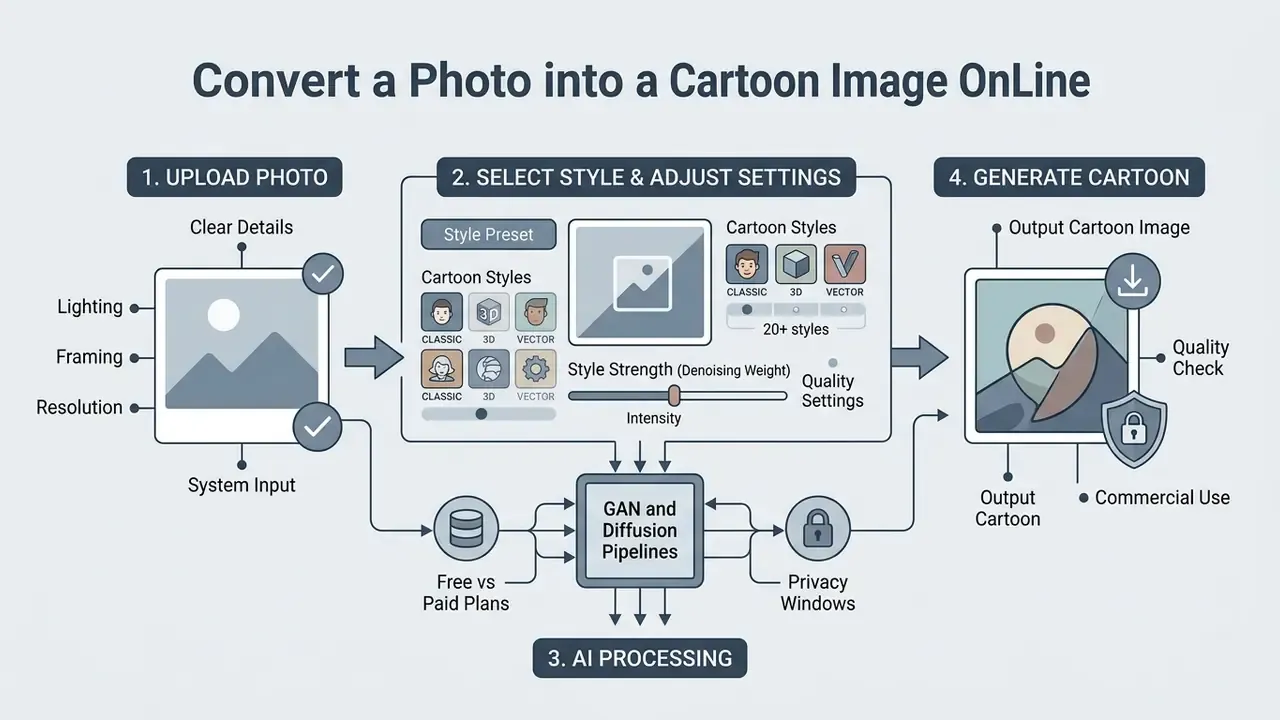
Converting a photograph into a cartoon image online follows a short sequence: upload a clean source photo, select the target style preset, adjust effect intensity, run generation.
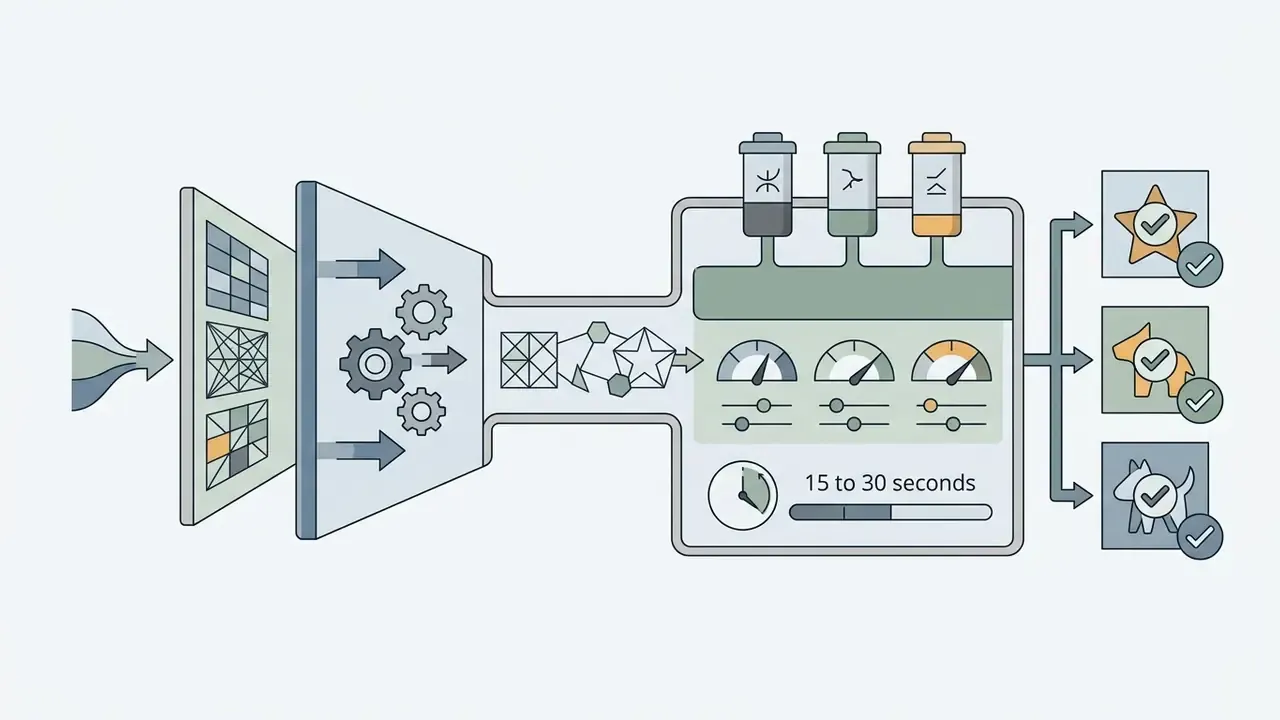
An ai tool to convert photo to cartoon removes most of the design labor for non-technical users. Modern web interfaces run on cloud GPU infrastructure and return stylized previews in roughly 15 to 30 seconds for standard transformations, up to 60 seconds for complex multi-adapter styles.
Upload a Photo with Clear Facial Details
Output quality depends directly on resolution, lighting, and composition of the input asset. No pipeline recovers what the camera never captured.
- Lighting. Use evenly lit photographs with minimal cast shadow across the face. Identity-document standards from the U.S. State Department and UK passport guidance both require uniform illumination with no shadows or reflections, which happens to be the exact condition that maximizes landmark detection accuracy.
- Framing. Single-person bust shots or close-up portraits give the encoder the cleanest landmark alignment. Square-on camera position, both eyes open and clearly visible, is the safest configuration.
- Resolution. Input files should carry a face region of at least 500×500 pixels to avoid interpolation blur. NIST face-image quality guidance requires crown-to-chin and ear-to-ear visibility with focus sufficient to maintain better than 2 mm resolution.
«Diffusion adapters preserve input shapes and color tones, but heavy compression or blur transfers artifacts directly into the final render.»
System Input and Processing Specifications
- Supported input formats: JPG, PNG, WEBP, HEIC, maximum 50 MB. Some consumer tools cap at 10 to 24 MB.
- Optimal canvas dimensions: 500×500 px up to 4096×4096 px, with 4K source retention.
- Average inference latency: 15 to 30 seconds on dedicated cloud GPU acceleration; complex styles up to 60 seconds.
- Aspect ratio preservation: automatic 1:1, 2:3, 3:2, 4:5, 9:16, 16:9, or native ratio options.
- Batch handling: multiple images can be queued in parallel; per-image latency rises with concurrent load on free tiers.
For workflows involving wardrobe or full-frame changes beyond facial stylization, creators can use a change clothes photo editor online free tool, or clean up the source frame first with a free photo editor.
Choose a Cartoon Style and Adjust Settings
After the upload, pick the aesthetic from the preset menu and configure generation parameters.
- Style preset.Comic, anime, 3D character, vector illustration, or a micro-style such as claymation or ukiyo-e.
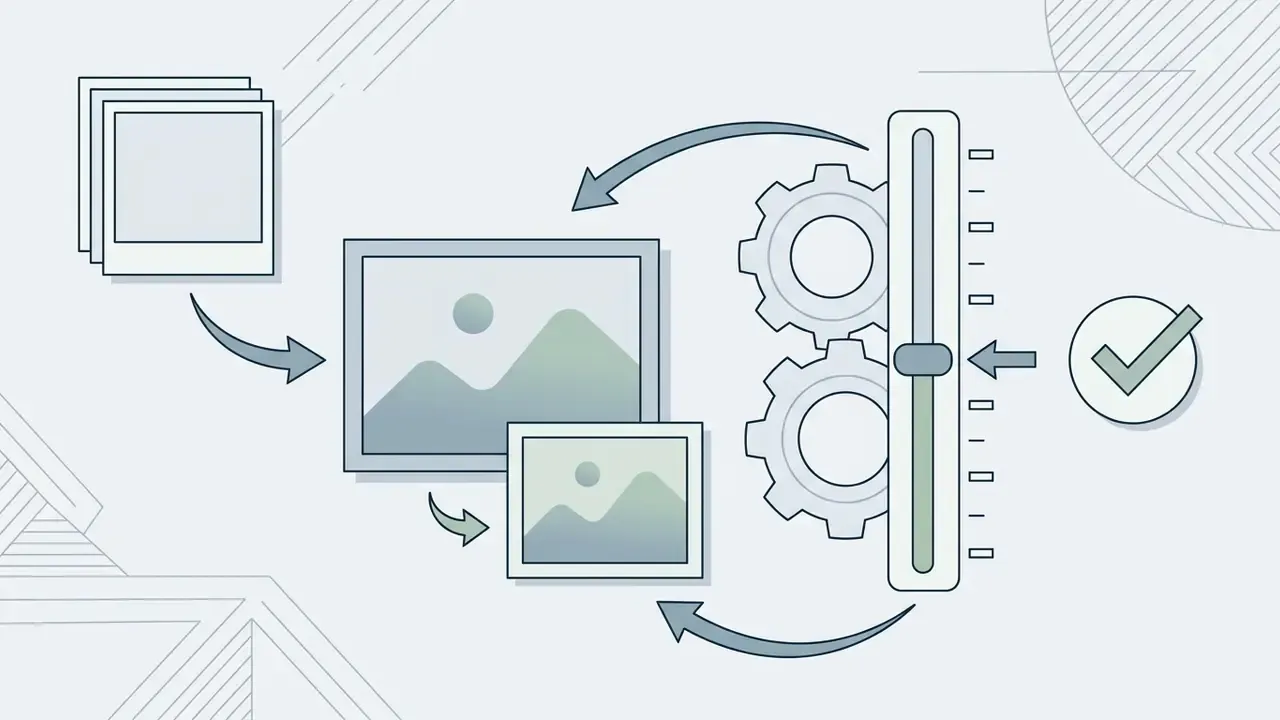
- Style strength (denoising weight).Controls how aggressively the model rewrites the photo. Lower settings, 0.3 to 0.5, hold photographic likeness; higher settings, 0.7 to 0.9, push artistic abstraction. Vendors label this slider variously as Strength, Visual Intensity, or Creativity.
- Prompt guidance (optional).Text modifiers such as "cel-shaded, pastel background, clean ink lines" steer the diffusion process. Effective edit prompts state both what must change and what must stay fixed. "Change only the rendering style, keep facial proportions unchanged" measurably reduces identity drift.
Copy-Paste Style Prompt Templates
Readers who want deeper control over reference-image conditioning can review our overview of image-to-image generators and style controls and the Canva AI Generator feature set.
How to Get High-Quality Photo to Cartoon Results
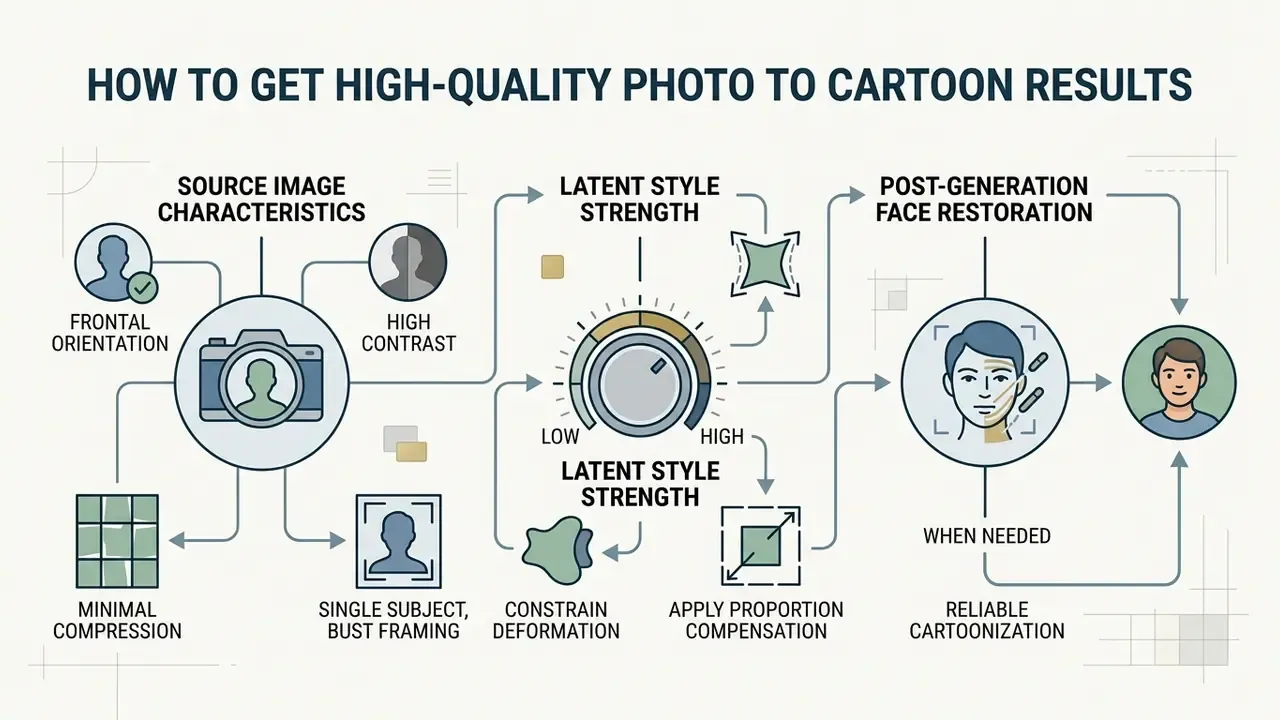
Reliable cartoonization comes from three levers: source image characteristics, latent style strength, and post-generation face restoration when needed.
When an ai photo to cartoon conversion pipeline returns something sub-optimal, the culprit is usually input compression, an extreme head pose, or excessive denoising. Knowing where the edge-detection threshold sits helps you pick better source files in the first place.
Which Photos Work Best for Cartoon Conversion
Neural networks perform best on images with clear visual boundaries and well-defined facial landmarks.
- Frontal orientation. Direct camera gaze lets facial parsing networks locate eyes, nose, and mouth contours accurately.
- High contrast. Strong separation between subject and background prevents structural merging artifacts. NIST guidance on facial individualization notes that feature visibility depends on feature size, shape, and contrast against the background.
- Minimal compression. Uncompressed PNGs or low-compression JPGs stop blocky artifacts from being amplified during style transfer.
- Single subject, bust framing. Portrait references from imaging standards recommend one subject, bust-level framing, and a neutral background, so skin tone and facial geometry are not distorted.
How to Preserve Likeness and Facial Details
Holding a likeness means balancing abstraction against anatomical landmark preservation.
- Constrain deformation. Use models with landmark-aware loss functions, such as facial parsing networks, that fix eye-to-nose distance ratios. WarpGAN and AutoToon both implement learned geometric warping that exaggerates features while preserving identity structure.
- Apply proportion compensation. Example-Based Caricature Synthesis documents an explicit rule set: if the eyes move apart, the nose should shorten, so stylization does not break perceived proportion.
- Adjust style weights. Keep style intensity in the 0.4 to 0.6 band whenever personal recognition matters.
- Use control networks. ControlNet modalities such as Canny edge or Depth maps lock input geometry during diffusion cycles.
«A StyleGAN encoder capturing pose and identity enables facial trait retention during cartoonization across varied viewing angles.»
For dedicated portrait creation workflows, review our standalone guide on cartoon maker tools.
Why Cartoon Images Can Look Blurry or Distorted
Blur and distortion appear when the network lacks spatial data, or when latent optimization diverges.
- Low source resolution. When input faces occupy fewer than 200×200 pixels, the model reconstructs missing features and invents structure.
- Over-stylization. High style weights push the network to prioritize abstract texture over real structural boundaries.
- Upscaling artifacts. Low-quality neural upscalers introduce grid patterns or color bleeding. Forensic analysis of low-resolution pipelines shows GAN-based upscaling can itself become the artifact source, while Lanczos resampling preserved high-frequency detail better in a documented two-stage 32 to 64 to 256 px workflow.
- Repeated regeneration. Each edit-and-regenerate cycle rebuilds fine facial detail from the previous output, so quality loss accumulates pass by pass.
«Color Canny ControlNet and Reflect ControlNet preserve boundaries and fine detail; without them diffusion models oversimplify high-frequency patterns.»
| Observed artifact | Root cause | Exact solution |
|---|---|---|
| Unrecognizable face | Denoising weight above 0.75 | Lower style strength to 0.40–0.50; activate face landmark locking. |
| Blurry or pixelated edges | Input face resolution below 200×200 px | Crop closer to the headshot or re-export the input as a clean PNG. |
| Melting or twisted geometry | Extreme side profile, or hands blocking the face | Use a direct frontal gaze with unobstructed facial contours. |
| Color bleeding or noise | Heavy JPEG compression in the source | Convert to uncompressed WEBP or PNG before execution. |
| Grid or droplet patterns | Autoencoder padding and loss-weight imbalance during upscaling | Export at native model resolution; avoid chaining a second GAN upscaler on top of diffusion output. |
| Faces merged in group shots | Subjects too small or overlapping | Crop so each face occupies at least 200×200 px; process subjects separately, then recomposite. |
| Detail loss after multiple edits | Cumulative degradation from repeated regeneration | Always restart from the sharpest original file, never from a generated output. |
Free AI Cartoon Tools, Paid Plans, and Commercial Use
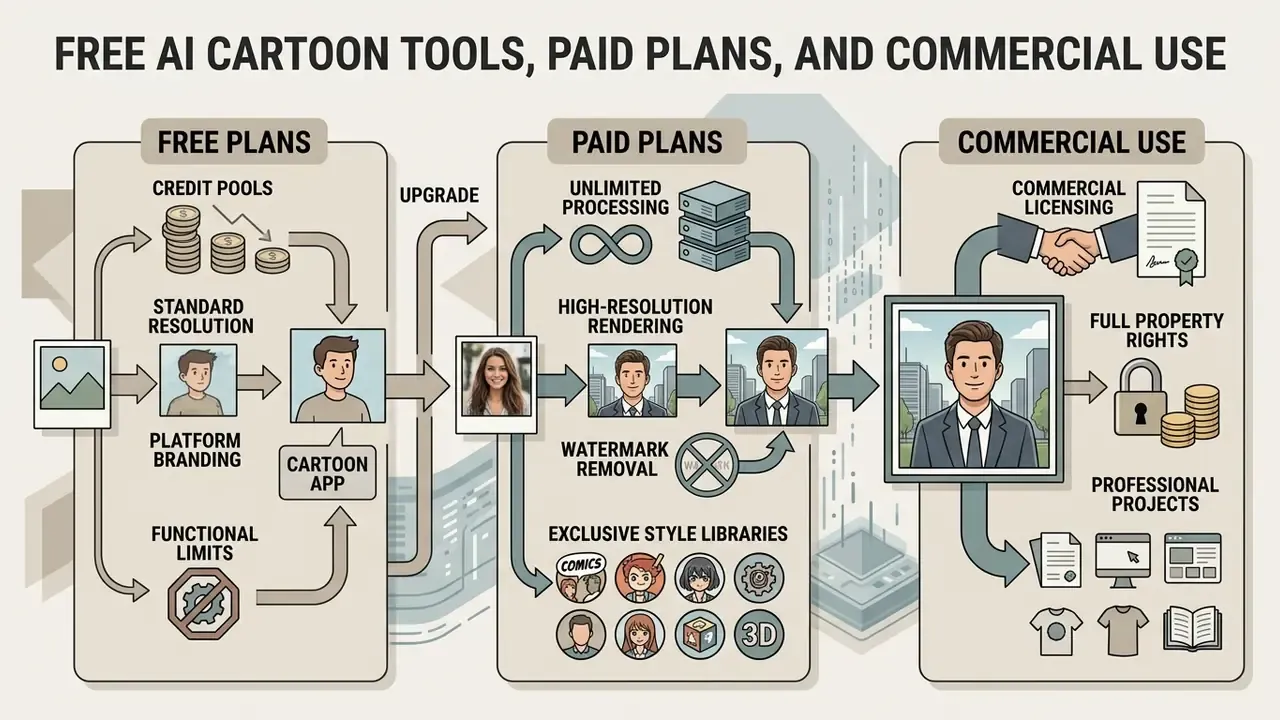
AI cartoon generators run on tiered distribution: free plans provide basic processing with functional limits, paid tiers unlock high-resolution export, advanced style modules, and explicit commercial licensing.
Evaluating any ai tools to convert photos into cartoon images means reading three documents, not one: storage policy, export resolution caps, and copyright terms. Cost structures vary with GPU compute demand.
| Feature / parameter | Free tier | Paid / subscription tiers |
|---|---|---|
| Typical price | $0, credit-limited or ad-supported | Roughly $9 to $30 per month, or credit packs (for example $10 for 20 images, $30 for 70 images) |
| Export resolution | Standard definition, 720p or 1024 px | High definition, 2K or 4K, up to 4096×4096 px |
| Watermark policy | Visible platform watermark on most tools | Watermark-free clean exports |
| Generation limits | Daily or weekly credit caps, 1 to 5 per day, or 1 to 2 per week anonymously | Unlimited or high-volume monthly credits |
| Processing speed | Standard queue wait times | Priority GPU allocation, 15 to 30 seconds |
| Commercial rights | Personal use only in most terms; some vendors permit commercial use | Explicit commercial license grant |
| Style access | Basic presets, 2D comic and standard anime | Full library, 80+ presets, plus custom LoRA style training |
| Batch and API access | Not available | Batch queues and REST endpoints on higher tiers |
What "Free AI Cartoon" Usually Includes
Free plans exist so you can test an ai cartoon from photo free converter before paying for anything.
- Credit pools. Platforms hand out recurring daily credits or a one-time registration bundle. Reported patterns run from one free generation per week for anonymous users to daily refills of three to five images.
- Standard resolution. Exports are generally capped at web dimensions, typically 1024×1024 pixels, with 720p output on some tools.
- Platform branding. Free downloads often carry a watermark in a lower corner. Practice is inconsistent though, and a minority of free tiers deliver watermark-free 1K output, which is worth checking before you assume the worst.
Users hunting no-cost graphics utilities can compare platforms in our roundup of cartoon maker app software and our comparison of free AI art generators by limits and watermarks. An ai picture to cartoon free tier is fine for testing likeness retention; it is rarely fine for a client deliverable.
Paid Features That Affect Cartoon Image Quality
A paid subscription buys compute tier and control, not magic.
- High-resolution rendering. Unlocks 4K output suitable for physical print.
- Watermark removal. Clean presentation for client-facing assets.
- Exclusive style libraries. Premium filters, seasonal presets, studio-grade 3D packs sit behind subscription gates.
- Priority generation. Dedicated GPU allocation stabilizes the 15 to 30 second latency target under peak load.
- Custom prompt fine-tuning. Advanced diffusion sliders, negative prompts, and custom LoRA style weights.
Post-processing gains often bundle with paid tiers, so compare them against standalone AI image enhancers. To model total cost per published asset, including credits burned on rejected candidates, run the numbers through our AI Media Calculators, and review current vendor pricing in our AI Media Pricing Guides.
Checking Commercial-Use Rights Before Downloading
Ownership and commercial deployment rights for AI-generated images depend on vendor terms and on the copyright jurisdiction that applies to you.
Under US Copyright Office guidance (Copyright Registration Guidance: Works Containing Material Generated by Artificial Intelligence, 2023; Copyright and Artificial Intelligence, Part 2: Copyrightability, 2025), purely machine-generated visual output lacking human creative authorship cannot be registered, and prompts alone do not create authorship. Commercial use, however, stays legally permissible when the generator's Terms of Service authorize it. Enterprise users still have to confirm that source photos do not infringe third-party publicity rights or trademarks.
«China requires watermarking of AI-generated images; the EU AI Act obliges providers to make AI content detectable and traceable in machine-readable form.»
«Liability for harmful AI-generated imagery may be distributed among the model developer, the hosting platform, and the user who published the content.» “An AI's Picture Paints a Thousand Lies,” SSRN Legal Scholarship
Additional compliance anchors worth checking before publication:
- Vendor terms asymmetry. Adobe explicitly permits commercial use of Firefly output from the commercially released model version, while other vendors condition commercial rights on plan level. Adobe's Generative AI Product Specific Terms (2025) also note that submitting output to the Firefly gallery grants Adobe a perpetual, irrevocable, worldwide, royalty-free, sublicensable marketing license to that output and its input.
- Separate AI terms. Canva's AI Product Terms (2026) govern AI tools independently of its general site terms, so publication rights must be verified in the AI-specific document.
- Rightsholder clearance. EU AI Act materials, Recital 105, state that use of copyright-protected content requires rightsholder authorization unless an exception applies; text-and-data-mining exceptions are narrow.
- Governance controls. NIST AI 600-1 recommends documented processes for responding to IP infringement claims, plus reasonable measures to flag outputs that reproduce licensed content.
- Likeness rights. The US Copyright Office's 2026 report on digital replicas treats image and likeness rights as licensable, while recommending limits and safeguards rather than outright assignment.
Commercial licensing advisory. Verify the Terms of Service of your chosen tool before you deploy cartoon assets in advertising, merchandise, or client deliverables. Free tier terms frequently restrict usage to non-commercial personal distribution. When a commercial license is required, our AI Media Commercial-Use Hub compares legal frameworks, and our review of vendor-specific commercial-use terms covers the platform-level detail.
Legal disclaimer: this information is general and does not substitute for legal advice. Before commercially deploying AI-generated images, review the terms of the specific service and the law in your jurisdiction.
Privacy, Enterprise Governance, and Common Questions About AI Cartoon Conversion
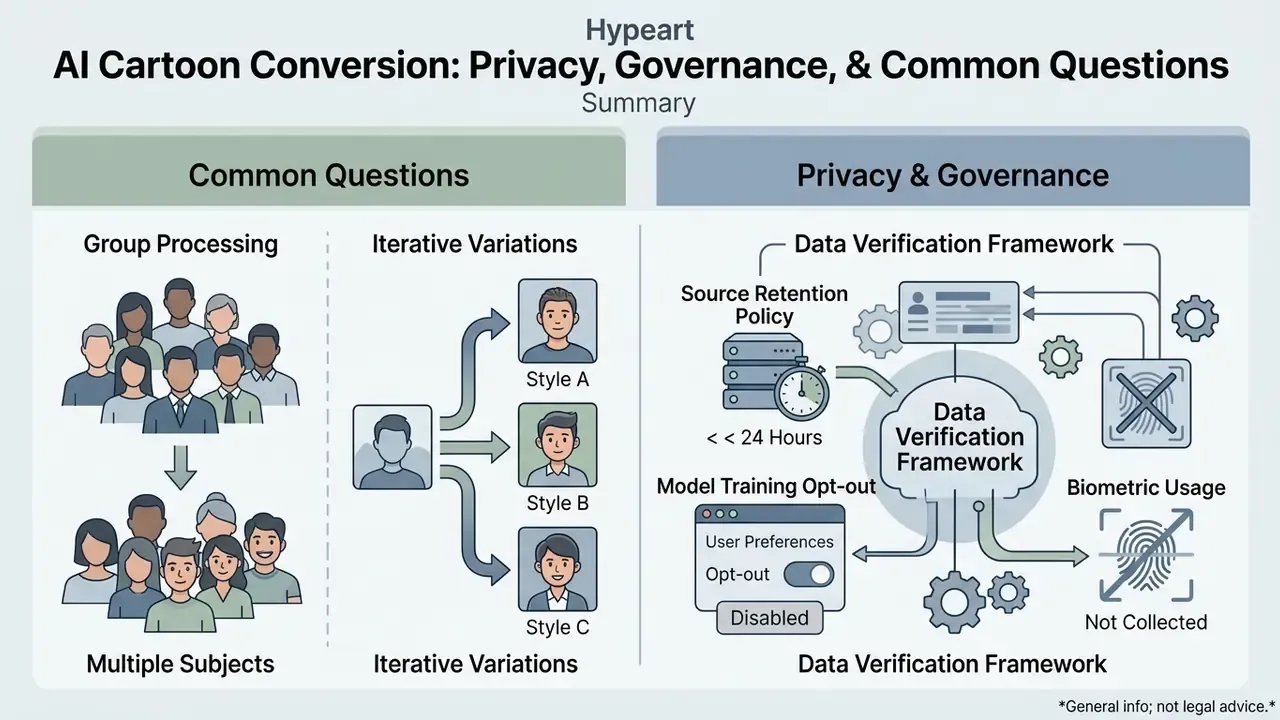
Data-protection disclaimer: this information is general and does not substitute for advice from a qualified data-protection specialist. Requirements for processing biometric data vary by jurisdiction.
Pushing personal portrait photography through an online cloud engine creates privacy and security exposure that deserves a decision, not a shrug.
Retention windows, biometric extraction policies, and multi-subject handling all shape whether a tool is usable inside a regulated organization. Regulatory expectations are already explicit. Australia's OAIC guidance on commercially available AI products (2024, updated 2026) treats both AI inputs and AI outputs containing personal information as covered collection, requiring the processing to be reasonably necessary and lawful. Canadian privacy guidance (2025) requires an appropriate purpose, proportionality review, consent analysis, transparency, safeguarding, and accuracy testing for any biometric initiative.
Can You Cartoonize Group Photos and Create Multiple Versions?
Data Privacy and Security Verification Framework
When you use a cloud-based ai cartoonify an image service, review the provider's privacy documentation against four criteria.
- Source image retention policy. Uploaded files and encoded feature vectors should be purged automatically from edge processing servers within 2 hours of task completion, with no permanent archiving of raw biometric photographs. Market practice still varies widely. Published policies range from automatic deletion within 24 hours, to 7-day deletion of both photos and trained personal models, to 30-day source storage and up to 6-month retention of training data tied to a user ID. Confirm the stated window in writing before uploading employee or client imagery.
- Model training opt-out. Verify that private uploads are not ingested to train general foundation models without explicit consent, and that opt-out requests delete associated training data by user identifier.
- Biometric data usage. Ensure the service does not build or sell persistent facial recognition templates derived from your input photographs.
- Claim plausibility. Treat "photos are never stored on our servers" as marketing simplification. Cloud GPU inference requires at least transient loading of the file into server memory or cache. The verifiable commitment is a short, documented purge window, not the absence of storage.
Regulatory bodies such as the European Data Protection Board enforce strict data minimization standards for facial image processing (EDPB Opinion on Facial Recognition Safeguards, 2025), assessing facial-image use against GDPR Articles 5(1)(e), 5(1)(f), 25, and 32: retention limitation, integrity and confidentiality, privacy by design, security. Non-compliance can trigger enforcement action and administrative fines.
Shadow AI and Enterprise Governance Controls
FAQ: Photo to Cartoon AI
Why doesn't my cartoon image look like me?
Two factors dominate: the source photo and the style intensity. Some presets retain more facial structure, while caricature and heavily abstract styles exaggerate features on purpose. Upload a sharp, front-facing photo where the whole face is visible, then reduce style strength to 0.40–0.50.
Why do faces sometimes look distorted?
Unusual angles break landmark detection. Side profiles, sunglasses, hands across the face, motion blur, and very dark frames are the usual suspects. A direct frontal shot with even lighting produces the most natural result.
Can I cartoonize group photos?
Yes. Couple, family, and small-group photos generally work, provided each face occupies at least roughly 200×200 pixels. When people appear small or overlap, per-person detail drops and features can merge.
Which photos work best for cartoon conversion?
Well-lit portraits and selfies with a clear view of the subject and a contrasting background. Blurry, heavily filtered, or strongly compressed images give the model less usable signal, and no ai to convert photo to cartoon pipeline invents detail that the sensor never recorded.
Why does the same photo look different across cartoon styles?
Each preset applies different latent style weights. Some are tuned to stay close to source geometry, others prioritize abstraction. It is normal for one image to look radically different across anime, comic, 3D, pixel, and caricature renders.
Can I use a cartoon image as a profile picture?
Yes, and it is the single most common use case: social platforms, gaming accounts, creator channels, community profiles. Stylized avatars also reduce exposure of raw biometric photographs.
Why does my cartoon image look blurry after downloading?
Usually the export resolution or the source resolution is too low. Start from a larger, sharper file and select the highest available export size, 4K or 4096×4096 px if the image is destined for print or a large screen.
How long does processing take?
Standard transformations complete in 15 to 30 seconds; complex multi-adapter styles can take up to 60 seconds. Free-tier queues add waiting time under load.
What are the file requirements?
Common limits are JPG, PNG, WEBP, and HEIC inputs up to 50 MB and 4096×4096 pixels, though some consumer tools cap uploads at 10 to 24 MB. Check the specific vendor before a batch run.
Do I get commercial rights?
Paid tiers usually grant explicit commercial rights; free tiers frequently restrict use to personal, non-commercial distribution. Copyright registration is a separate question. Purely machine-generated output is not registrable in the US without a human-authored expressive contribution.
Can I create multiple cartoon versions from the same photo?
Yes, and it is the recommended workflow. Generate several presets from one upload, compare likeness retention side by side, then export the strongest candidate. Multi-style encoders make preset switching possible without re-uploading the source, which is handy when you want an ai convert picture to cartoon result in three aesthetics at once.
Can I cartoonize a pet photo?
Yes. Pet portraits work well when one animal face is clearly visible and well-lit; fur texture gets segmented and re-rendered as stylized shading.
Editorial Standards, Review Log, and Indexing Notes
- Canonical path: /photo-to-cartoon-ai/
- Last substantive update: February 2026. Refreshed pricing bands, retention benchmarks, and 2026 vendor terms.
- Technical review: Marcus Hale, author.
- Evidence policy: performance figures (FID, CLIP-I, loss values) are quoted from the cited papers and have not been independently reproduced by our desk. Retention windows and prices reflect published vendor documentation at the time of review and change often.
- Correction policy: factual corrections are logged in this section with the date of the change, so readers can see what moved and when. Explore technical guides, terminology, and tooling in our AI Media Glossary, and monitor ongoing legal developments through our AI Litigation and Case Timelines.