What This Guide Covers
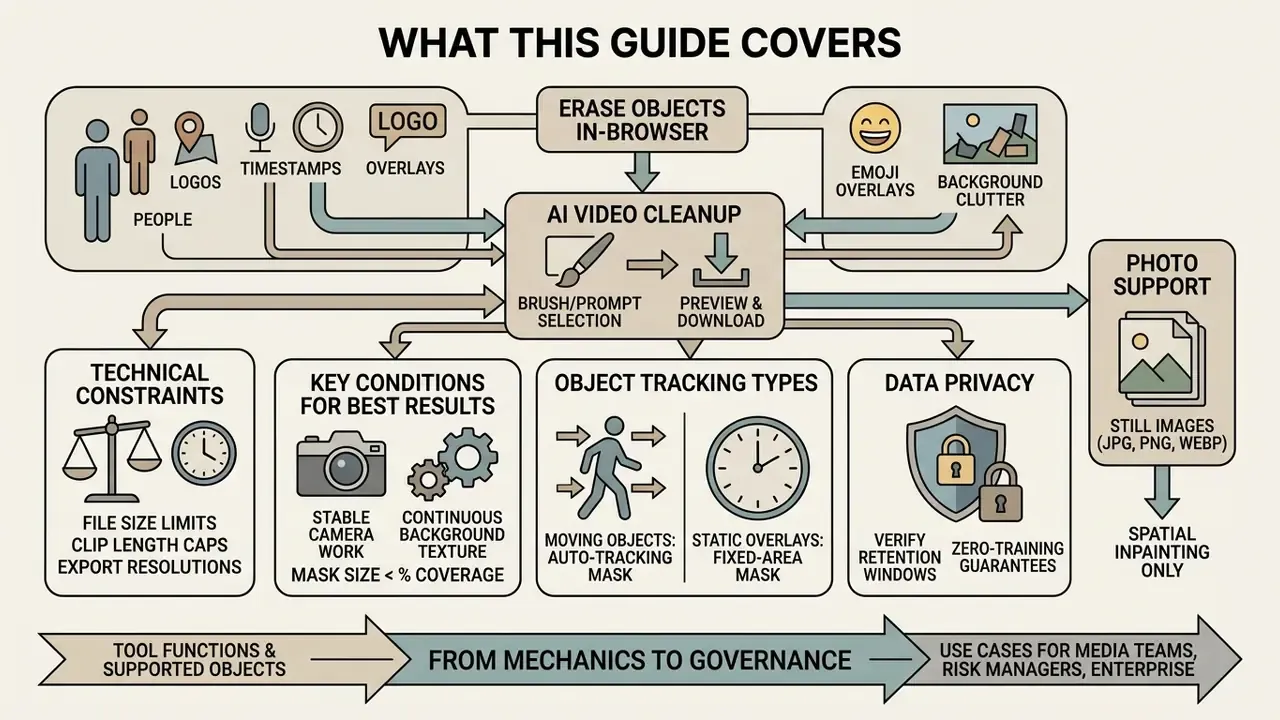
You can erase people, logos, timestamps, emoji overlays, and background clutter from a video clip directly in your browser. No desktop software. No rotoscoping. The workflow is always the same three moves: upload, mark the object (brush or text prompt), preview and download. AI inpainting rebuilds the background instead of blurring it, so the frame keeps its original size and resolution.
Fast answers:
- Free tiers typically cap uploads at 100 to 500 MB, clip length at 60 seconds to 3 minutes, and export at 720p to 1080p.
- Best results come from stable camera work, continuous background texture, and masks covering under roughly 30% of the frame.
- Moving objects need auto-tracking; static overlays only need a fixed-area mask.
- Privacy matters: before uploading proprietary footage, verify retention windows and zero-training guarantees (see the data security section below).
- Photos work too: JPG, JPEG, PNG, and WebP files skip temporal alignment and go straight to spatial inpainting.
The sections that follow move from mechanics to governance: what the tool actually does, which objects it can erase, the three-step workflow, motion tracking, a method comparison against blur and crop, quality assurance, troubleshooting a failed render, data retention risk, free-tier ceilings, and a closing FAQ.
For media teams, risk managers, and enterprise operations, unvetted visual distractions in video footage present both quality and compliance problems. An automated ai video object remover online free service lets organizations strip extraneous elements, such as unauthorized personnel, copyrighted logos, or background clutter, without heavy desktop editing infrastructure or manual frame-by-frame masking. There is a second-order point here that matters to anyone who signs off on tooling: the moment footage leaves your perimeter to be edited, you have created a data-processing event that somebody will eventually ask you to document.
For individual creators, the value proposition is simpler. A tourist walked into your landmark shot, a boom mic dipped into frame, or a stock clip carries somebody else's watermark. Instead of a reshoot, you upload the clip, paint over the problem, and download a clean plate minutes later.
What Is an AI Video Object Remover?
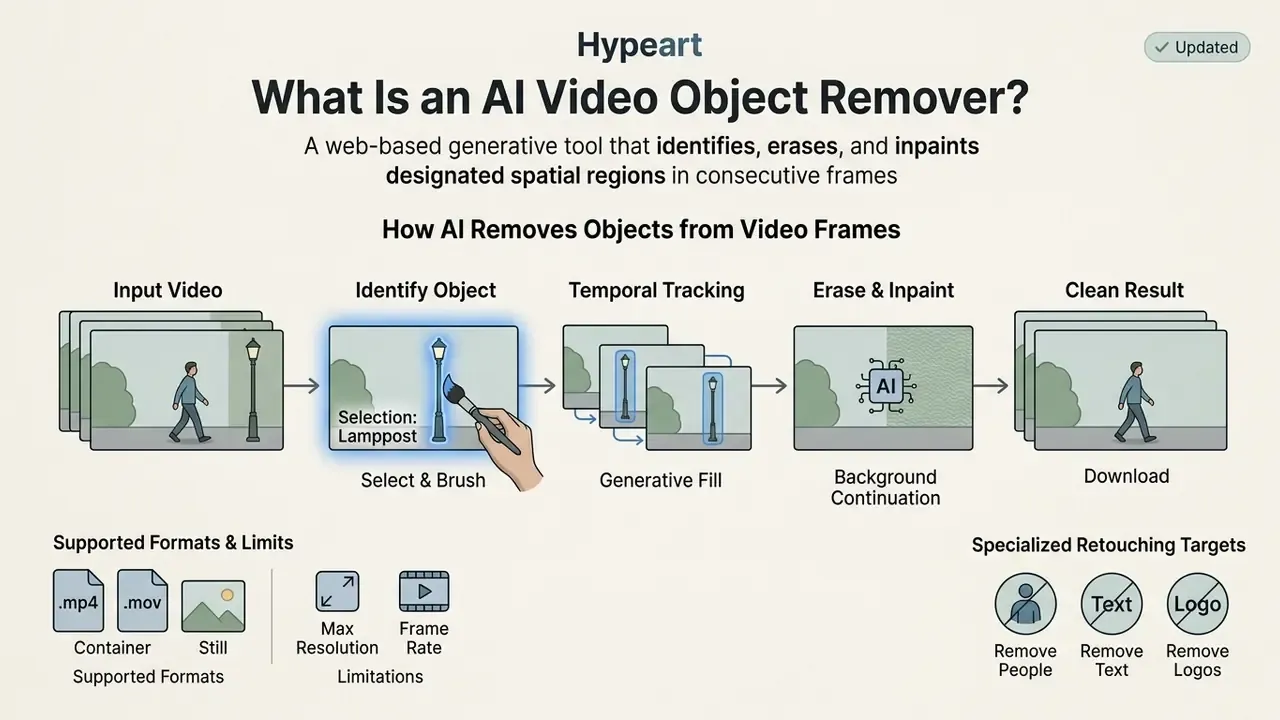
An AI video object remover is a web-based generative tool that identifies, erases, and inpaints designated spatial regions across consecutive video frames while maintaining temporal consistency. Unlike static image tools, an ai video object remover online free solution must reconstruct missing pixels while accounting for camera movement, shifting lighting, and dynamic foreground motion.
«Video inpainting fills masked regions with plausible content while preserving spatial and temporal coherence across all frames». DiffuEraser: A Diffusion Model for Video Inpainting, arXiv (2025). https://arxiv.org/abs/2501.10018
Computer vision frameworks categorize video object removal as a specialized form of spatio-temporal video inpainting (Video Inpainting, University of Edinburgh, 2008). When an operator selects an unwanted element, the underlying neural network analyzes adjacent frames to synthesize a clean background plate. Modern architectures, such as diffusion transformers, keep the filled area matched to surrounding textures and lighting without introducing temporal flickering (EraserDiT: Fast Video Inpainting with Diffusion Transformer Model, arXiv, 2025).
«EraserDiT reaches 30.78 PSNR and 0.9446 SSIM on the HQVI dataset, demonstrating high background reconstruction accuracy after object removal». EraserDiT: Fast Video Inpainting with Diffusion Transformer Model, arXiv (2025). https://arxiv.org/html/2506.12853v2
For enterprise operations and commercial marketing teams, a dedicated video object remover compresses production timelines. Instead of hours of manual rotoscoping in traditional software, operators upload raw clips, establish target masks, and let the model handle background synthesis. Teams mapping adjacent capabilities can review our reference material on video editing tools to see where object removal sits in a broader post-production stack.
Supported Input Formats and Technical Limits
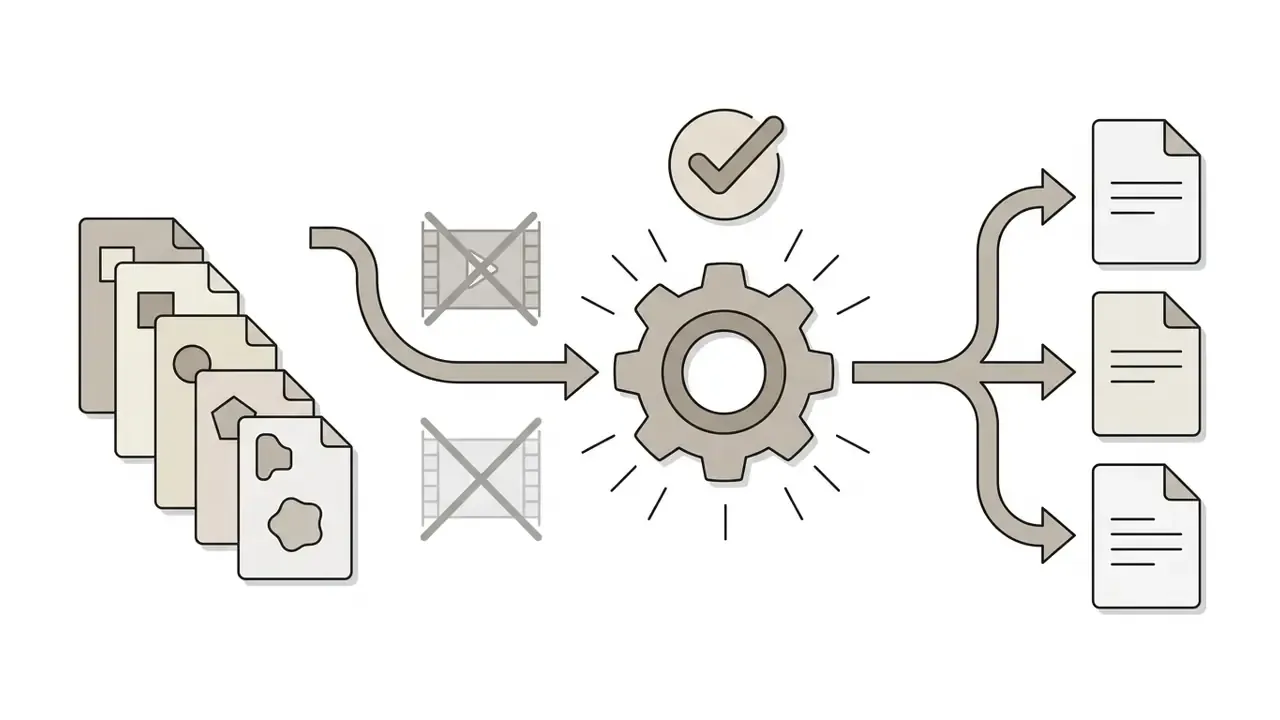
Browser-based removal engines accept both moving footage and still imagery, so a single workflow covers video cleanup and photo retouching:

How AI Removes Objects from Video Frames
Neural video object removal combines spatial inpainting on isolated keyframes with optical flow motion tracking across adjacent frames. When a user highlights unwanted objects, the algorithm generates a continuous binary mask that follows the target across time.
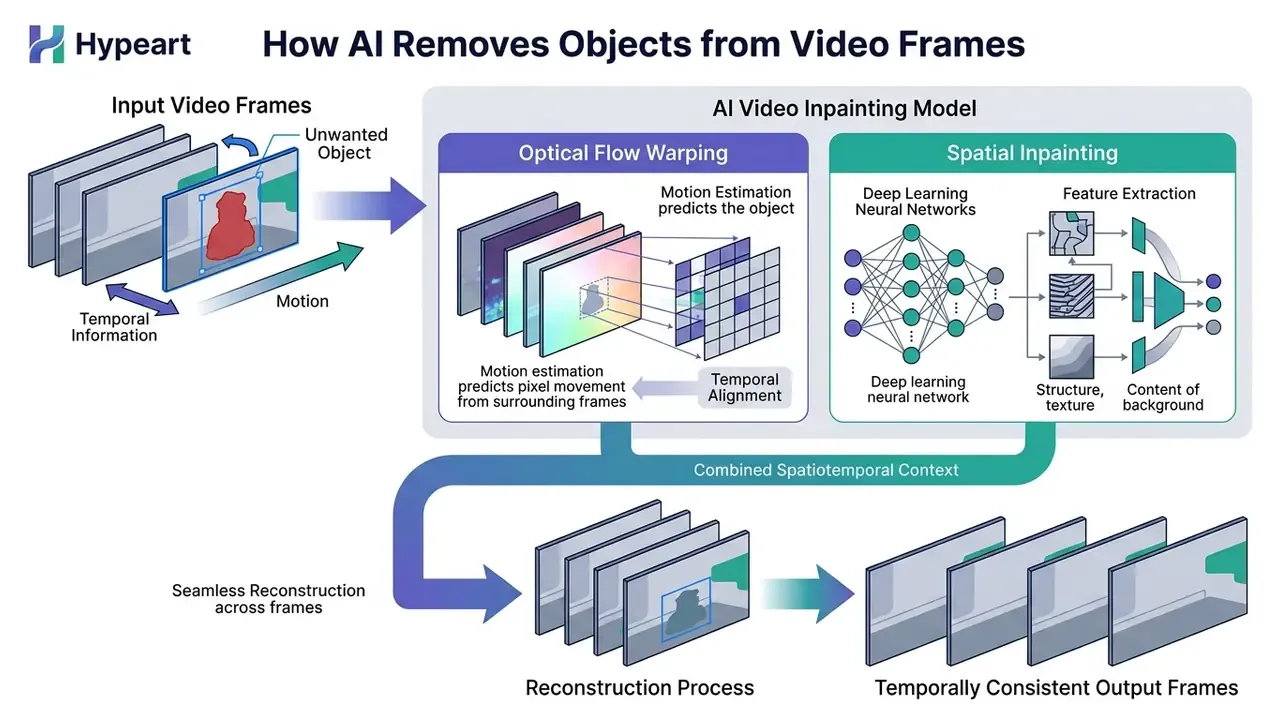
Early video editing architectures relied on patch matching and simple short-term frame alignment. Modern systems use flow-guided generative models, such as VORNet, which compute optical flow maps to warp valid background pixels into corrupted or masked areas (VORNet: Spatio-Temporally Consistent Video Inpainting for Object Removal, CVPR Workshops, 2019). The dual pass keeps immediate visual texture and long-term motion trajectories unified across the whole sequence.
«VORNet computes optical flow maps to warp valid background pixels into masked areas, unifying texture and motion trajectories». VORNet: Spatio-Temporally Consistent Video Inpainting for Object Removal, CVPR Workshops (2019). https://openaccess.thecvf.com/content_CVPRW_2019/papers/NTIRE/Chang_VORNet_Spatio-Temporally_Consistent_Video_Inpainting_for_Object_Removal_CVPRW_2019_paper.pdf
When Video Object Removal Works Best
AI-powered ai object removal yields the highest visual fidelity on footage with stable camera movement, continuous background textures, and clearly defined target boundaries. Clean architectural surfaces, open skies, static office interiors, and uniform walls give the model strong structural priors for background reconstruction.
When target masks are well proportioned and the surrounding environment is rich in context, exemplar-based and depth-guided inpainting algorithms synthesize missing areas seamlessly. Performance declines when you try to erase large foreground entities occupying more than 30% of the screen area, or when the target overlaps complex, rapidly moving background texture.
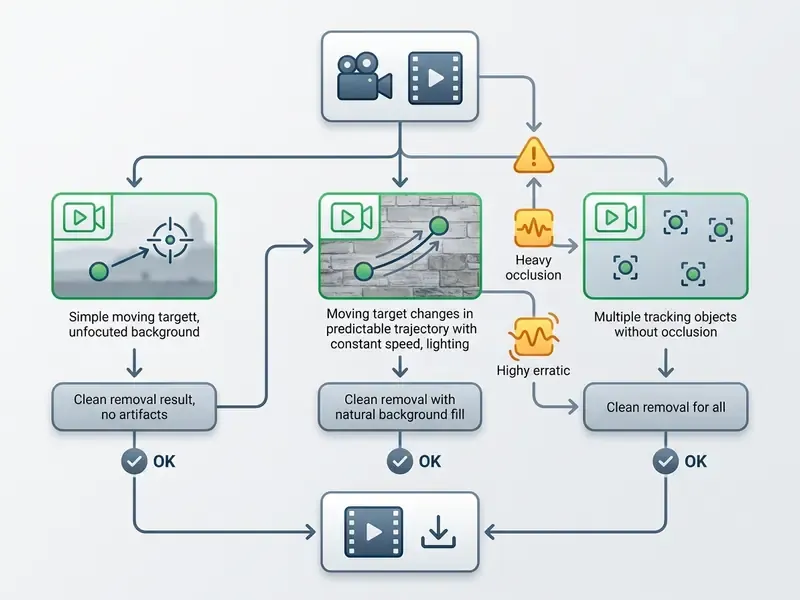
Text equivalent of the diagram, for readers and for screen readers:




What Unwanted Objects Can You Remove from Video?
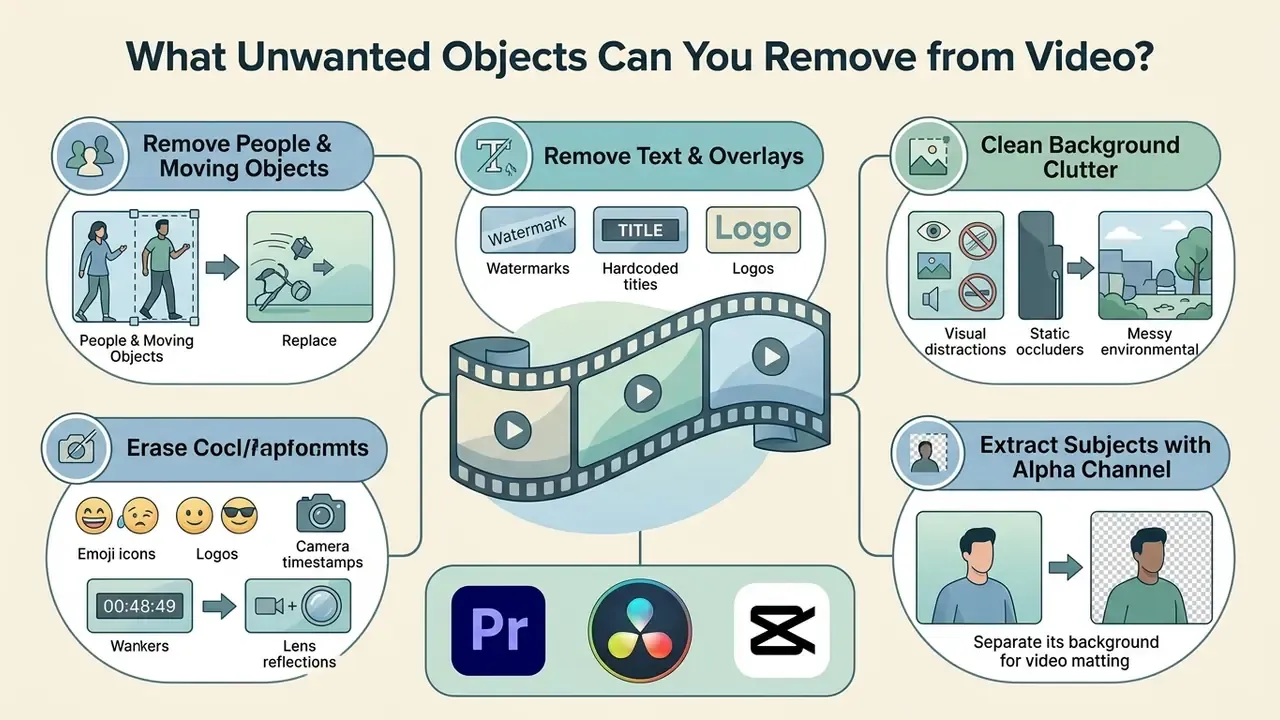
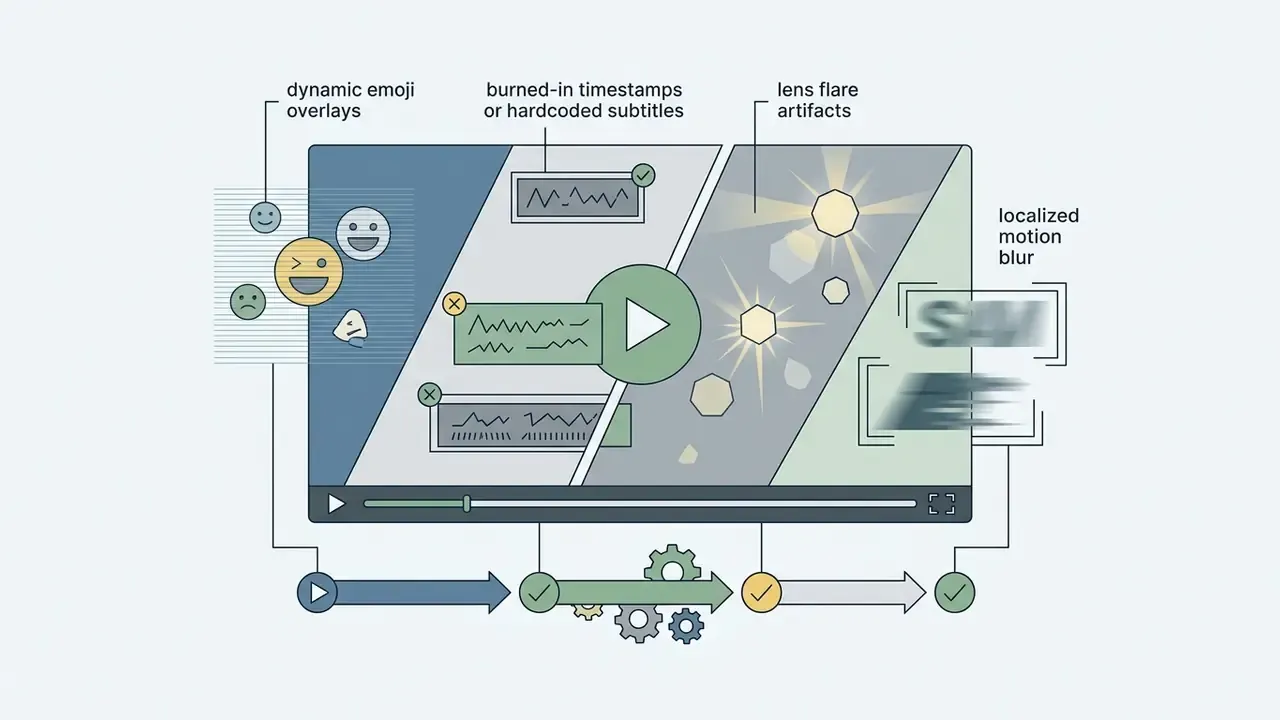
Modern AI video object removal algorithms erase static occluders, dynamic moving entities, hardcoded text, corporate logos, watermarks, emoji overlays, camera timestamps, lens flare artifacts, and general background clutter. Deploying an ai object removal pipeline lets organizations repurpose existing video assets for new distribution channels while lowering intellectual property and privacy exposure.
Remove People and Moving Objects to Clean Footage
Removing dynamic entities, such as pedestrians, vehicles, or unauthorized personnel, requires continuous neural tracking to prevent edge ghosting and background distortion. The video object removal engine tracks moving boundaries across changing perspectives and updates the underlying background plate as the shot evolves.
In institutional marketing environments, background bystanders create legal and privacy concerns more often than people expect. With mask-guided inpainting, media teams can remove people from corporate footage without touching the core presentation. Creators comparing adjacent capabilities can also review free AI video tools that pair generation and cleanup in one browser session.
Remove Text, Logos, Watermarks and Overlays
Static visual overlays, including burned-in timestamps, hardcoded subtitles, corporate logos, animated emoji stickers, and digital watermarks, sit at predictable spatial coordinates across a sequence. Isolating those coordinates lets spatial inpainting replace overlay pixels with surrounding surface texture.
When removing hardcoded text or brand assets for commercial use, operators must verify that the synthesized background preserves local lighting gradients. Edge-aware masking combined with generative fill is what prevents halo artifacts around the erased region. Licensing questions differ by asset class, so review the wider commercial use documentation before republishing edited third-party footage.
Clean Background Clutter and Visual Distractions
Background clutter, such as power lines, trash receptacles, construction equipment, or unexpected reflections, pulls attention away from your primary subject. AI models evaluate differential frame masks to infer original scene geometry and eliminate that visual noise ( (https://arxiv.org/abs/2508.18633)).
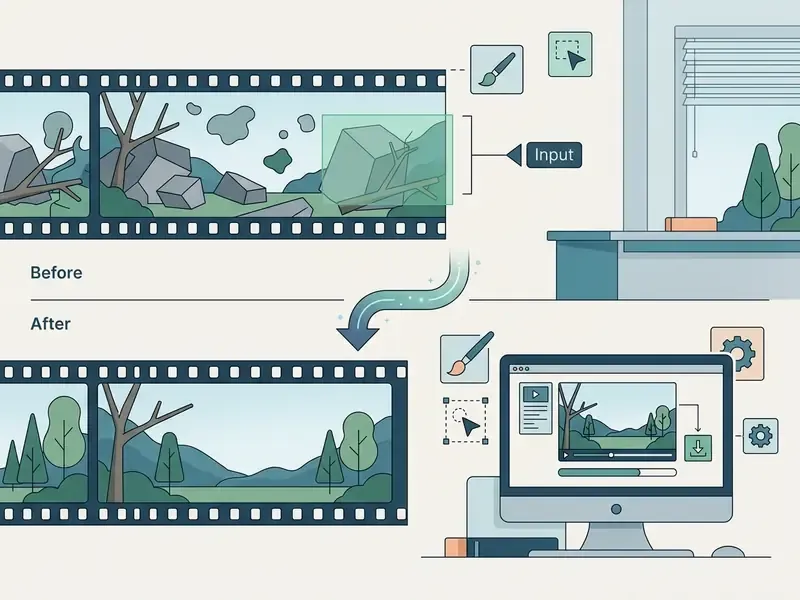
Recent research keeps returning to one point: the object is rarely the whole problem.
«ROSE systematizes five side-effect types, shadows, reflections, light, translucency, and mirrors, and trains the model to explicitly predict affected regions». ROSE: Remove Objects with Side Effects in Videos, arXiv (2025). https://arxiv.org/abs/2508.18633
Algorithms like ROSE predict and erase secondary artifacts, including cast shadows, glass reflections, and ambient light spill, so the restored surface reads as natural rather than patched.
Extract Video Subjects with Alpha Channel (Video Matting)
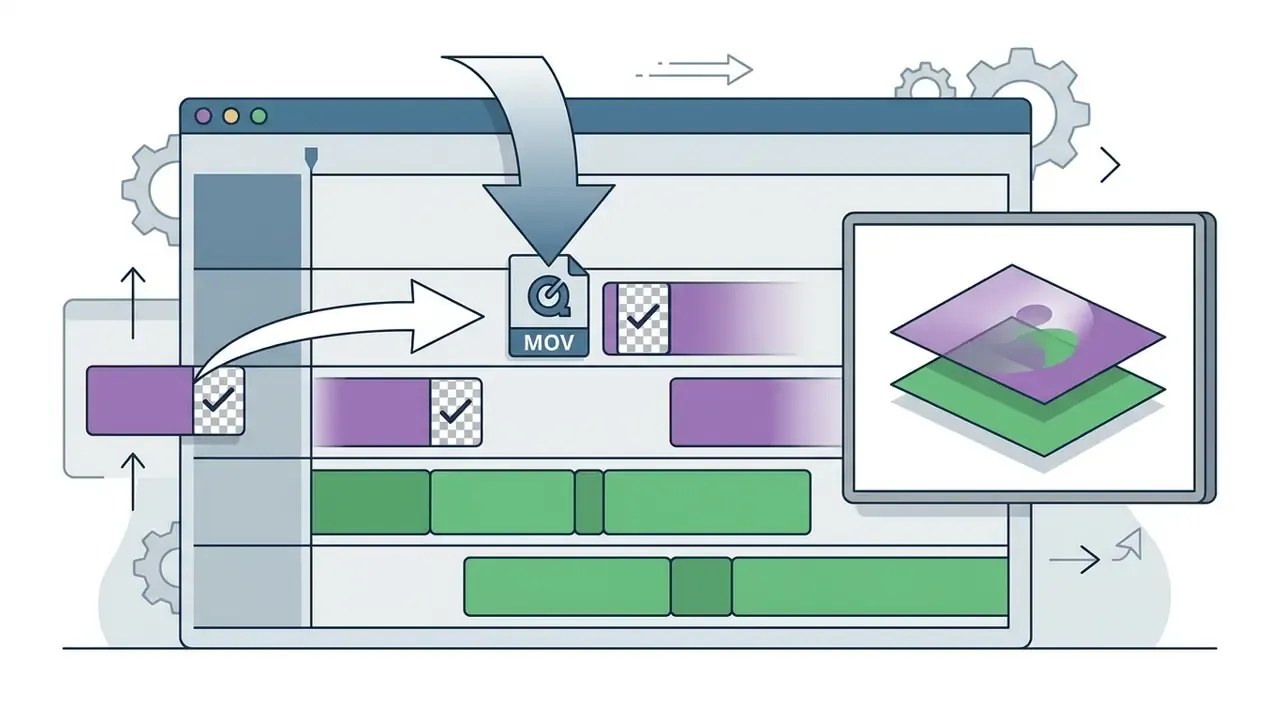
Beyond generative inpainting, modern engines support foreground extraction. Instead of filling erased pixels with synthesized background, the system isolates the target and exports clean ProRes 4444 or MOV assets carrying dynamic alpha transparency. Still images come back as transparent PNG files from the same segmentation pass.
That inversion of the removal workflow gives editors an immediate path into NLE timelines:
Because extraction and removal share the same mask, operators can produce both a clean plate and an isolated subject from a single selection. Useful when a brand needs the background for one campaign and the presenter for another.


Remove and Replace Backgrounds
Scene removal masks separate foreground subjects from their environment without a green screen, which enables full background replacement rather than simple erasure. Apple's Final Cut Pro documents this as automatic foreground detection with removal of the remaining frame, and browser tools apply the same principle: isolate the subject, then substitute a studio backdrop, a brand environment, or a solid colour for presentations and product demos.
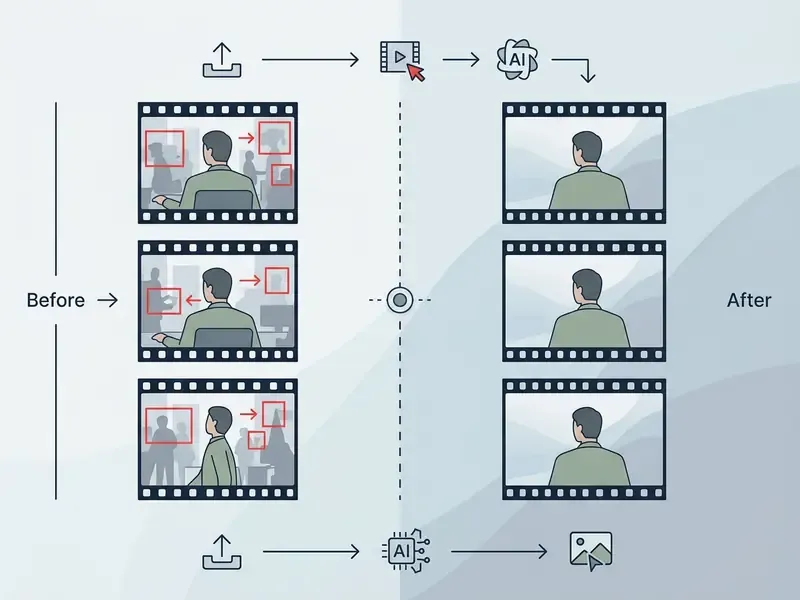
How to Remove an Object from Video Online in 3 Steps
An online video cleanup needs no local install and no specialized editing hardware. Using a free online remove object from video interface, operators finish the restoration in three moves. If you have been searching for how to remove object from video free without learning a node graph, this is the short path.
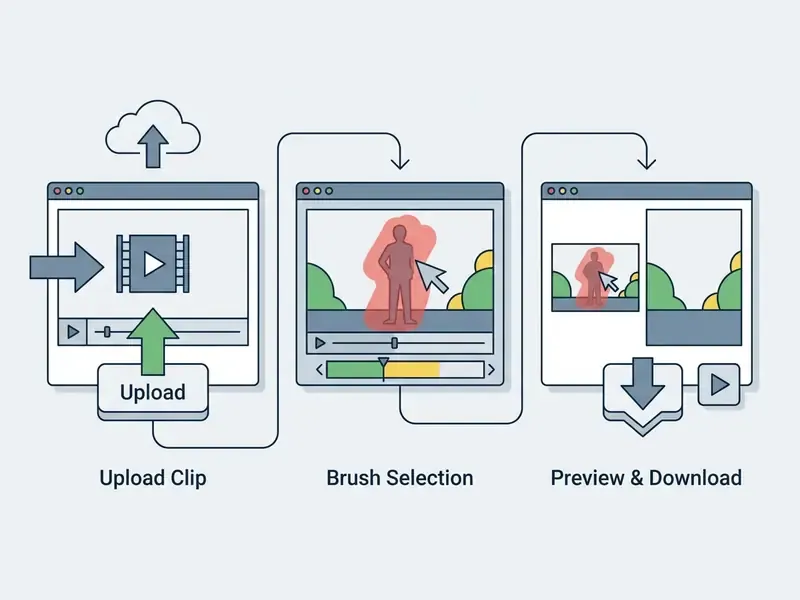
Step 1: Upload Your Video Clip
The workflow begins with upload straight to the cloud interface. Standard browser tools accept the major media formats, including MP4, MOV, WebM, and AVI, alongside still images in JPG, PNG, and WebP.
For efficient server-side inference, source files should follow platform resolution guidelines: typically 720p to 4K, up to 60 FPS, under 1 GB. Media teams running enterprise video pipelines can evaluate container compression strategies in our YouTube video editor workflows guide, and shrink oversized source files first using techniques from our video compressor reference.
Step 2: Select or Brush Over the Object to Remove
Once the clip loads into the timeline, the operator uses a brush tool or bounding box to highlight the target. Precise edge definition is critical. The mask should cover the whole object plus its immediate cast shadow or reflection.
Before painting, pick the tracking mode that matches your target. Static overlays such as watermarks and timestamps sit at fixed coordinates and only need a Fixed Area mask. Pedestrians, vehicles, and animals crossing the frame require Auto-Tracking, which propagates the mask across every frame.
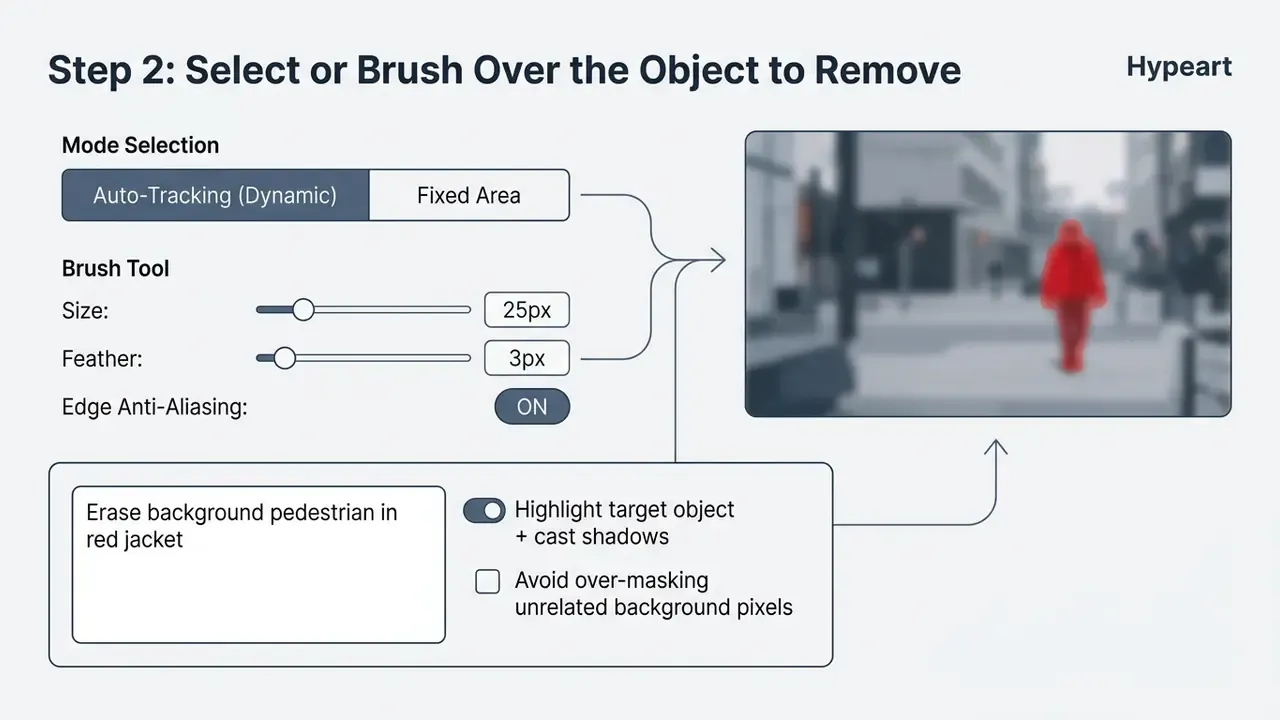
Advanced editors add refine-edge brushes and anti-aliasing toggles. Setting anti-aliasing before you create the selection prevents harsh boundary pixelation and lets the generative engine blend edge transitions smoothly. Brush technique matters as much as the model: use short strokes that follow the object perimeter at high magnification, work in add and subtract modes rather than one continuous drag, and finish complex silhouettes with a fill-mask operation instead of freehand painting.
Alternative Selection: Prompt-Driven AI Agent Selection
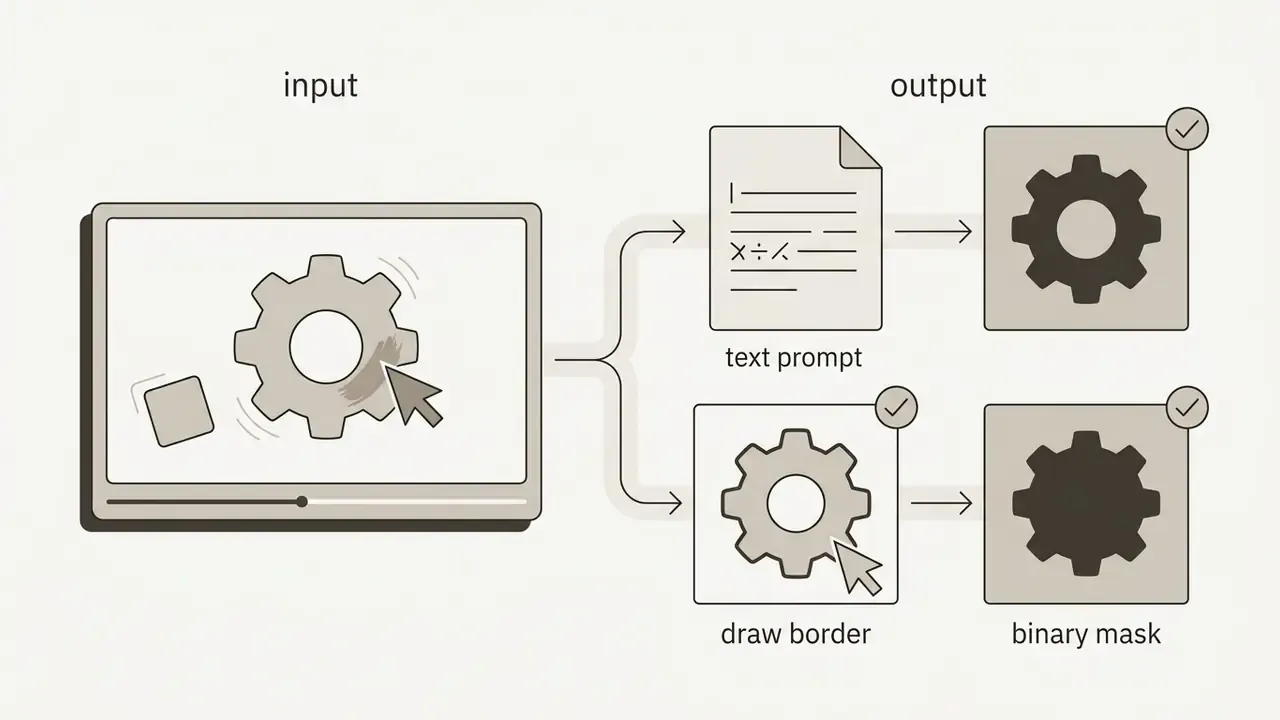
For complex or multi-element scenes, operators can use natural language prompts instead of manual brushing. The segmentation model (SAM3-class architectures, for example) parses the text and generates binary masks automatically:
- Single object prompting descriptive nouns and attributes, such as "erase the yellow fire hydrant" or "remove the silver sedan on the left".
- Category isolation plural semantics, such as "select all background pedestrians", to generate multi-entity boundary masks across every frame.
- Effect-inclusive prompting name the side effect explicitly, such as "remove the streetlamp and its cast shadow", so the engine targets shadows and reflections in the same pass.
«LoVoRA enables text-guided, mask-free removal via trainable object localization modules, reaching 0.9256 background and 0.9424 subject consistency». LoVoRA: Text-guided and Mask-free Video Object Removal and Addition, arXiv (2024). https://arxiv.org/abs/2512.02933
When to prefer each method. Brush masking gives pixel-level control and is the safer choice for thin structures, overlapping subjects, and legally sensitive removals where you must prove exactly what was edited. Prompt selection is faster for crowded scenes, category-wide cleanups, and clearly nameable objects, but it depends on the model reading your description the way you meant it.
Step 3: Generate, Preview and Download the Clean Video
After the mask is set, the operator starts the generation sequence. The cloud inference server processes frames in order, applying optical flow matching and generative fill across the clip duration.
«DiffuEraser decomposes inpainting into known-pixel propagation, unknown-region generation, and temporal consistency maintenance, outperforming peers on content completeness». DiffuEraser: A Diffusion Model for Video Inpainting, arXiv (2025). https://arxiv.org/abs/2501.10018
When processing ends, the interface opens an interactive preview. Scrub through keyframes and check visual continuity and edge stability before exporting. Credit-based platforms usually meter this stage by duration; roughly 20 credits per 30 seconds of processed footage is a common commercial benchmark, so budget compute before batching long sequences.
How AI Handles Moving Objects and Motion Tracking
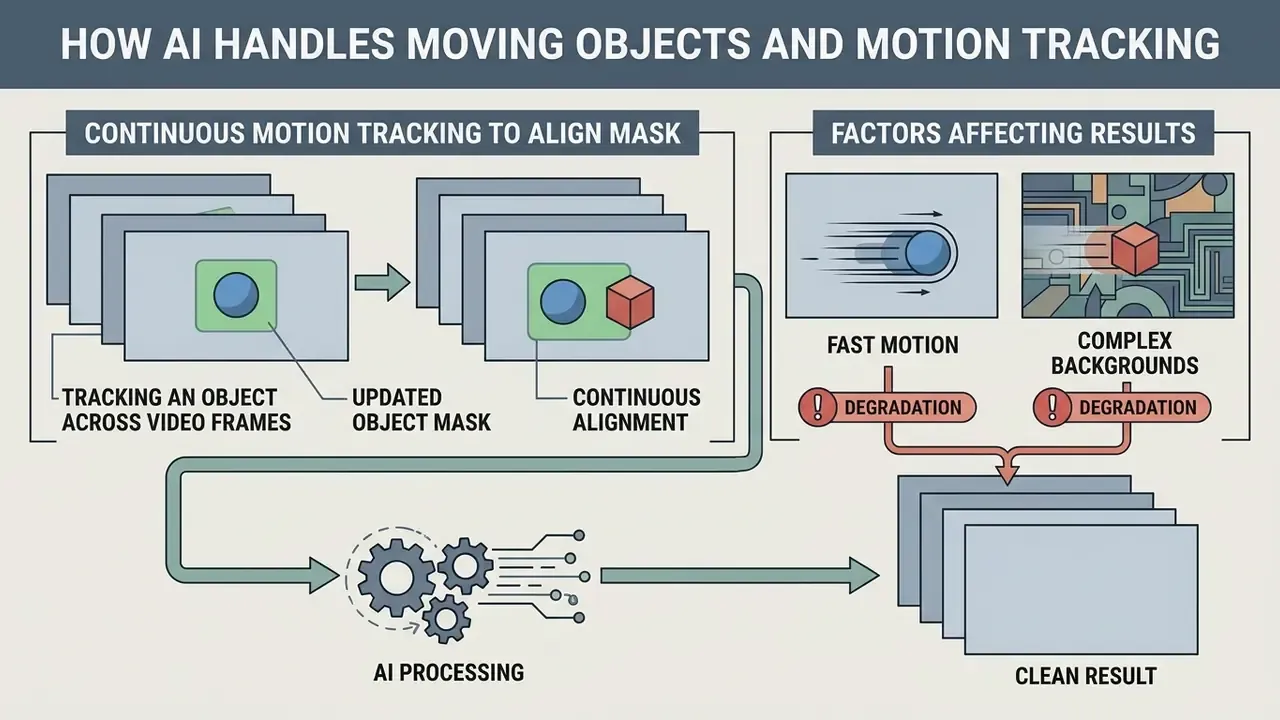
Erasing dynamic elements requires continuous motion tracking to keep the mask aligned as objects cross the screen. An ai to remove object from video workflow replaces tedious manual tracking with automated deep feature propagation. The same diffusion architectures behind AI video generators power these removal engines; generation and erasure are two applications of one generative backbone.
Tracking an Object Across Video Frames
Single-selection tracking lets an operator highlight a target in one keyframe. The tracker computes spatial feature embeddings and optical flow vectors, then propagates the mask forward and backward across the sequence.
Frame 01: [User Click] ---> Spatial Feature Extraction
Frame 15: Mask Propagated via Optical Flow Vectors
Frame 30: Boundary Updated for Perspective Shift
When a target is temporarily occluded, say a moving car passing behind a street sign, advanced trackers suspend mask updates until it re-emerges. Published long-term tracking research treats occlusion as a discrete state: when a substantial share of tracked points inside the bounding box register as background, the object model freezes instead of updating. That freeze is what stops the system from masking out stationary background elements by mistake.
Why Fast Motion and Complex Backgrounds Affect Results
Rapid subject movement introduces temporal motion blur and sampling mismatches that challenge inpainting engines.
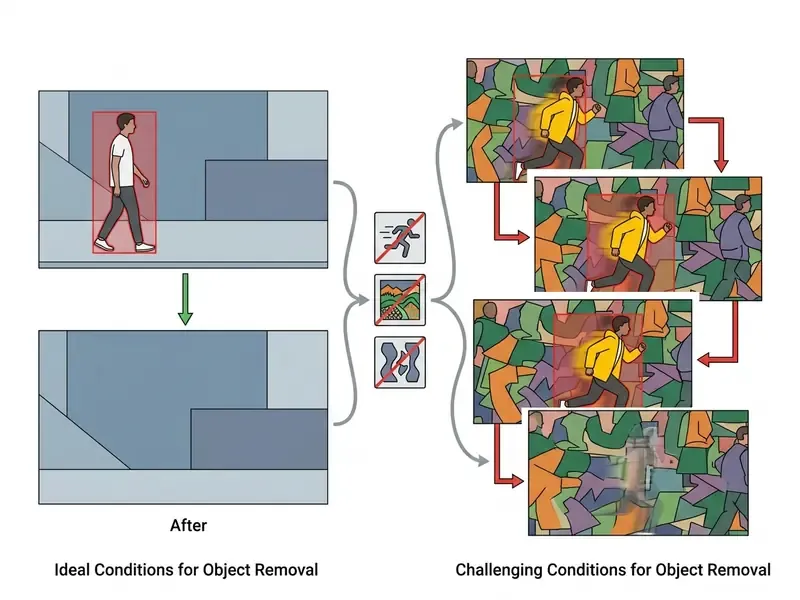
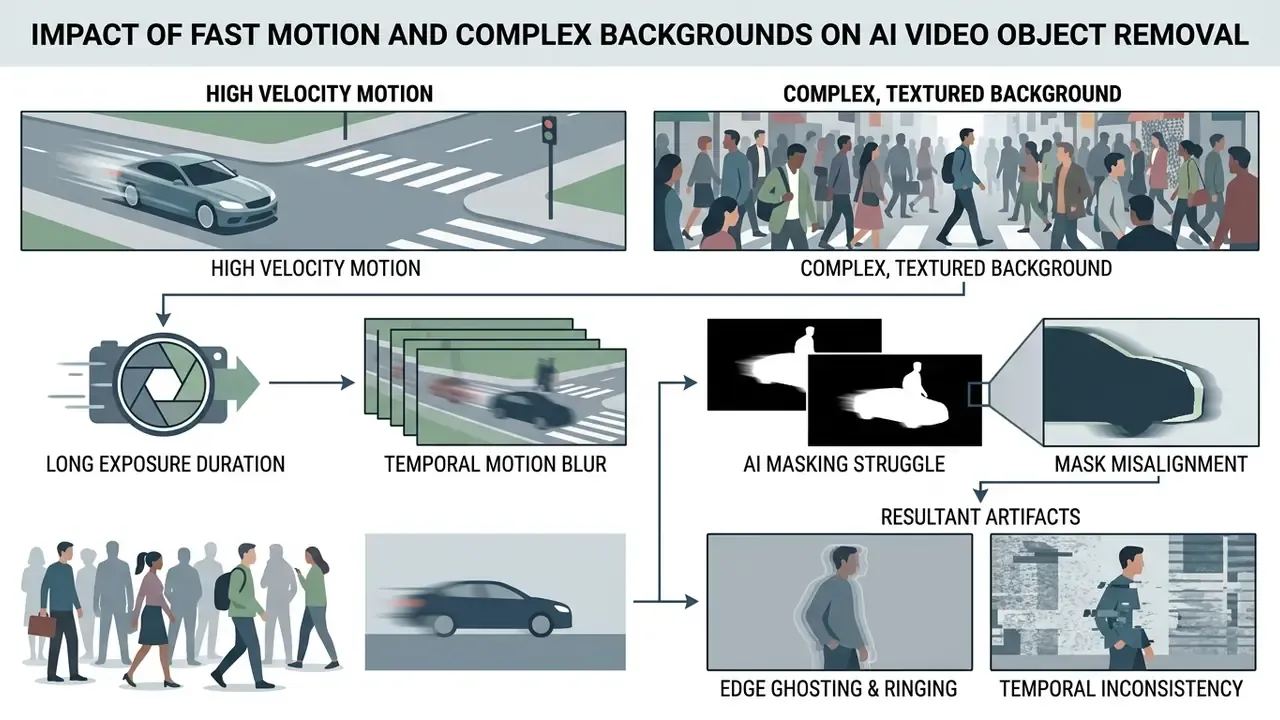
Complex, non-repetitive backgrounds, such as dense forest foliage, flashing crowd lights, or turbulent water, offer fewer predictable spatial patterns for generative models. In those scenes, expanding mask boundary padding or working at a higher frame rate helps hold background texture together. Mask dilation is a genuine trade-off, though: published object-removal experiments show recall rising while precision falls as dilation increases, so tune padding per scene instead of maximizing it.
AI Removal vs. Blur, Crop and Other Video Editing Methods
Picking a restoration method depends on project requirements, budget, and aesthetic standards. Comparing an ai video object removal pipeline against traditional blur and crop makes the trade-offs explicit.
| Method | Background Preservation | Handling Moving Objects | Impact on Visual Quality | Processing Speed | Compute Cost | Synthetic Artifact Risk | Retouch Noticeability |
|---|---|---|---|---|---|---|---|
| AI Object Removal | Reconstructs natural texture and geometry | Tracks and erases moving targets seamlessly | High PSNR/SSIM; keeps original frame area | Moderate (cloud GPU inference required) | Highest; GPU seconds billed per clip duration | Moderate; hallucinated texture or duplicated objects in crowded scenes | Low, often imperceptible under good conditions |
| Blur / Mosaic | Obscures underlying pixels with visual noise | Applies static or tracked blur blocks over target | Local loss of detail; creates its own distraction | Fast (local browser processing) | Negligible; runs on CPU or browser | None; no pixels are synthesized | High; clearly signals redacted content |
| Crop / Reframe | Discards frame area containing target | Works only if the target stays at the margins | Reduces spatial resolution; alters framing | Instantaneous | Negligible | None | Variable; changes original compositional intent |
| Manual Masking / Rotoscoping | Full operator control over reconstruction | Precise but labour-intensive per frame | Highest fidelity when executed well | Slowest; hours of human work | High labour cost, low compute cost | Low; human-verified every frame | Very low with a skilled operator |
Table analysis: AI object removal is the only automated technique that restores underlying background geometry without altering frame dimensions or leaving high-contrast blur artifacts. Manual rotoscoping matches or beats its fidelity, but it costs operator hours instead of GPU seconds. Blur remains the honest choice when you actually want viewers to see that something was redacted.
«BridgeRemoval builds a direct stochastic path from source video to cleaned output, using the original structure as a strong prior instead of random noise». Learning Stochastic Bridges for Video Object Removal via Video-to-Video Translation, arXiv (2025). https://arxiv.org/abs/2601.12066
Benchmark work also documents where AI loses. Diffusion-based removal can copy nearby objects into the filled region in crowded contexts, and models not trained specifically for removal may leave object traces or invent entirely new ones. Mask geometry drives much of that behaviour: earlier adversarial scene-editing research measured removal success rising from 54% to 73% purely by adding mask dilation.
Operators estimating production costs can model compute allocations with our media calculators, compare desktop alternatives in the overview of free video editing software, and review cross-platform performance metrics in the AI Media Comparison portal.
Will Removing an Object Affect Video Quality?
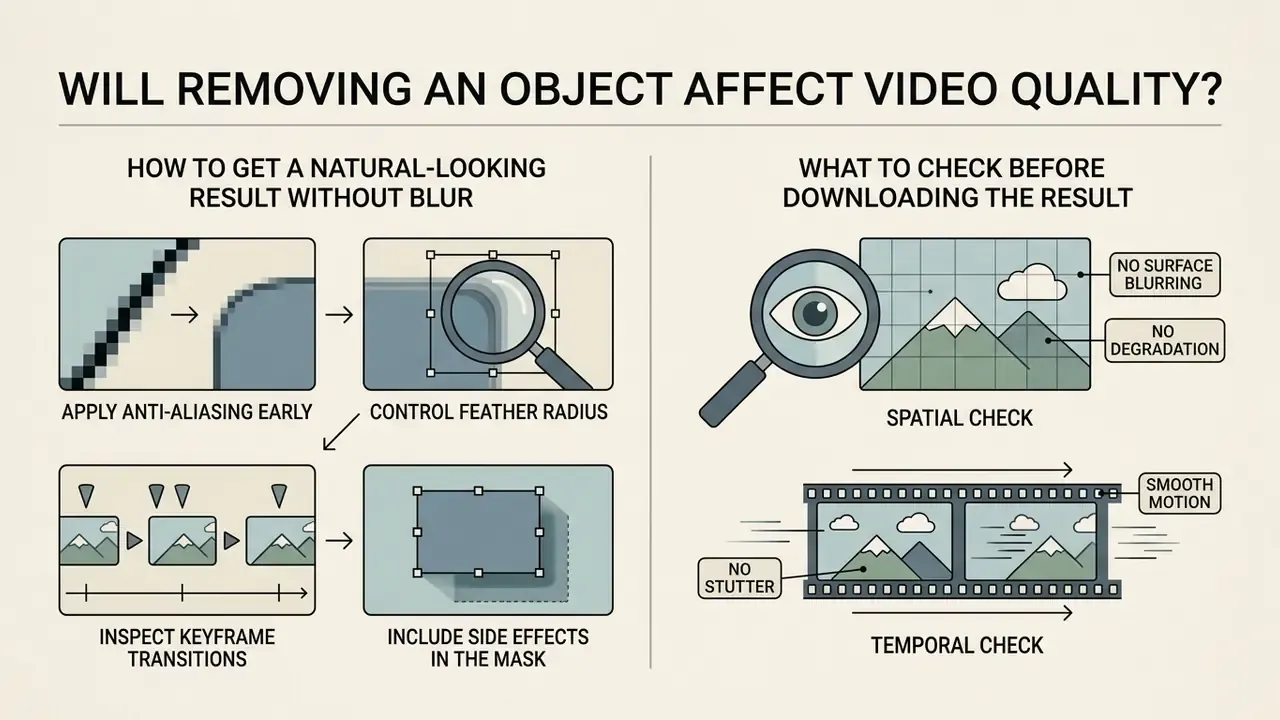
The recurring worry among editors is whether generative inpainting introduces degradation, surface blurring, or stutter. Empirical research points the same way each time: reconstruction fidelity tracks mask accuracy, scene complexity, and source resolution.
How to Get a Natural-Looking Result Without Blur
Seamless integration comes from disciplined masking. The same edge-handling principles apply in stills work, documented in our guide to AI photo editors. Over-masking removes valid background context, which forces the engine to hallucinate a larger area and raises the odds of a blurry patch.
- Apply anti-aliasing early.Enable boundary anti-aliasing before finalizing brush selections to smooth colour transitions between edge pixels. Adobe's documented rule is that anti-aliasing cannot be applied to an existing selection; it must be set before the selection is created.
- Control feather radius.Keep feathering low, around 2 to 5 pixels, to avoid soft out-of-focus halos around the erased perimeter.
- Inspect keyframe transitions.Verify mask coverage at key movement frames so motion blur tails are fully captured.
- Include side effects in the mask.Extend coverage to cast shadows, floor reflections, and light spill. Effect-blind masks leave residual darkening that reads as an obvious edit.
What to Check Before Downloading the Result
Before exporting, run a structured quality assurance pass to catch spatial and temporal anomalies (ITU-T Recommendation P.910). Observer-based assessment standards also require controlled viewing conditions; display-defect guidance calls for at least ten minutes of observer adaptation before judging image quality.
Checklist0 / 6
Fact Check: Technical Limitations of AI Video Removal
Generative video inpainting performance depends heavily on physical scene constraints. Knowing the parameters keeps expectations honest:
- Mask size sensitivity under-sized masks leave boundary fragments that badly degrade PSNR, dropping from 32.31 dB to 26.75 dB in measured trials, while oversized masks throw away essential context (Inpainting-Driven Mask Optimization for Object Removal, arXiv, 2024).
- Hardware and latency constraints high-resolution video needs real compute. Benchmarks show a 97-frame 2160×2100 clip taking roughly 65 seconds on a single NVIDIA H800 GPU without acceleration (EraserDiT, arXiv, 2025).
- Side-effect residuals removal algorithms that ignore secondary environmental effects often leave cast shadows or reflections behind, which undercuts realism (ROSE-Bench, arXiv, 2025).
- Segmentation dependency masks that miss part of the object cause inpainting to amplify the remaining fragment into a strong artifact. That is an intrinsic limit of semi-supervised removal, not a tuning problem.
Ethical Use, Disclosure and Content Provenance
Object removal alters the evidentiary content of a recording, which puts it inside the same governance perimeter as synthetic media. Regulated organizations should treat three items as mandatory:
- Purpose limitation removal fits privacy protection, brand safety, and production cleanup. It does not fit altering footage used as evidence, in compliance reporting, or in journalistic documentation without disclosure.
- Provenance metadata attach content credentials (C2PA-style manifests) or internal edit logs recording what was masked, by whom, and with which model version, so downstream reviewers can audit the change.
- Privacy law alignment European data-protection guidance on video devices confirms that individuals retain data-subject rights over footage containing their personal data, including the right to object. Masking can support compliance, but it does not by itself extinguish those obligations.
Troubleshooting: What to Do When the First Render Fails
A first pass with visible artifacts is normal, not a dead end. Work through these corrections in order:
- Expand the mask by 5 to 10 pixels.Boundary fragments left outside the mask are the single most common cause of smearing, and measured trials show mask sizing alone can shift PSNR by more than 5 dB.
- Add cast shadows and reflections to the selection.If a dark patch or glassy highlight persists where the object stood, your mask covered the object but not its side effects.
- Split the clip into shorter scenes.Cuts, lighting changes, and camera moves inside one submission confuse temporal propagation. Process each continuous shot separately, then reassemble.
- Reduce feathering to 2 or 3 pixels.Heavy feathering produces exactly the soft halo people mistake for AI blur.
- Add keyframes at motion extremes.Re-mark the object where it changes direction, scale, or becomes occluded, so tracking re-anchors instead of drifting.
- Switch selection method.If a prompt grabbed the wrong entity, fall back to brush masking. If brushwork missed thin structures, try a descriptive prompt.
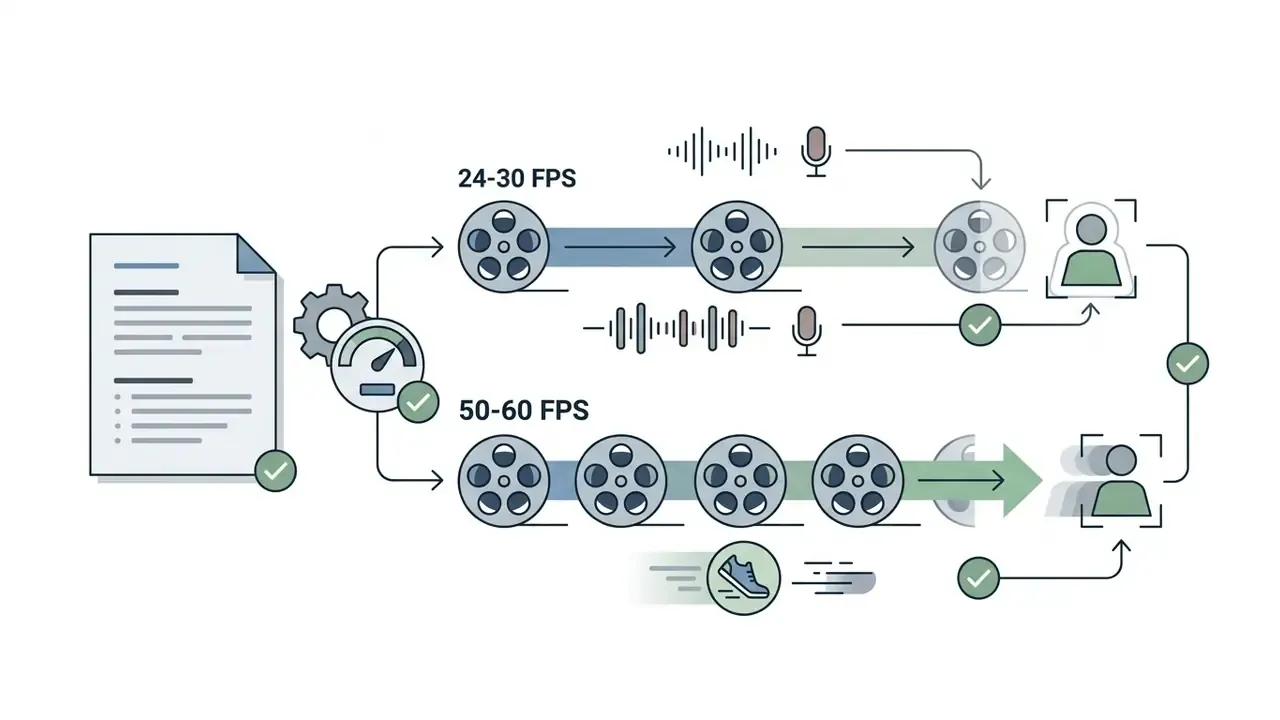
- Re-upload at higher source quality or frame rate.Compressed 30 FPS footage of fast motion gives the model fewer usable priors than a 60 FPS original.
- Accept a hybrid fix.For one stubborn frame, composite a clean plate from a neighbouring frame by hand rather than re-rendering the whole sequence.
Security, Privacy and Data Retention in Free Online Tools
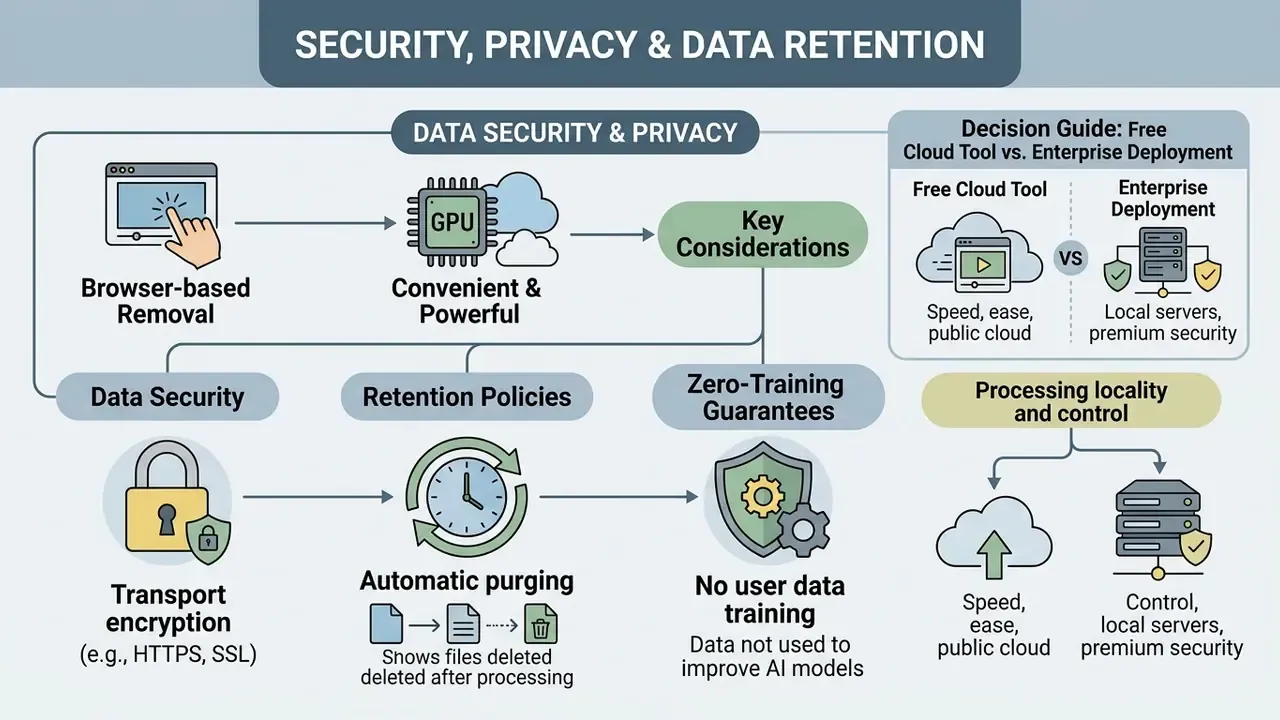
Browser-based removal is convenient precisely because the heavy lifting happens on someone else's GPU. That is also the risk. Uploading internal footage to an unvetted free service is a classic shadow AI pattern: the file leaves the corporate perimeter, retention terms go unread, and nobody can later prove where a copy of an executive interview or a customer's face ended up.
Data Security, Retention Policies, and Zero-Training Guarantees
When you process proprietary corporate assets or footage containing personally identifiable information, compliance depends on strict data isolation. Before uploading, verify four properties in the provider's published policy:
- Automatic purging temporary render files and preview outputs should be scrubbed from cloud nodes on a stated schedule. Industry practice ranges from 24 hours for free previews to about 7 days for paid assets, and some services retain uploads only around 90 minutes.
- Zero-training assurance source media, intermediate masks, and output renders must be isolated from model development. Client uploads should never train, fine-tune, or validate public AI models.
- Transport encryption end-to-end TLS/SSL must protect media during ingestion and distribution, covering authentication, content transfer, and response delivery.
- Processing locality and control confirm the region where inference runs, whether sub-processors are involved, and whether an offline or on-premise option exists. NIST public-cloud guidance flags loss of direct user control over stored data as a core risk class.
Decision Guide: Free Cloud Tool vs. Enterprise Deployment
| Footage type | Recommended path | Rationale |
|---|---|---|
| Public social clips, stock footage, personal travel video | Free browser tier | No confidentiality exposure; speed matters more than isolation |
| Marketing assets under NDA with an agency | Paid tier with a contractual DPA | Retention terms and liability need to be written down |
| Footage containing identifiable customers, patients, or minors | Enterprise or on-premise processing | PII triggers GDPR and CCPA obligations plus data-subject rights |
| Internal strategy, legal, or unreleased product recordings | On-premise or self-hosted inpainting | The upload itself is the risk, regardless of vendor policy |
One practical control set: publish an approved-tool list, block uploads of confidential-classified footage to consumer web services, and require that any AI edit to a retained record be logged with owner, timestamp, and model version. The governance overhead is small next to the cost of an unlogged leak.
Is a Free Online Video Object Remover Enough for Your Project?
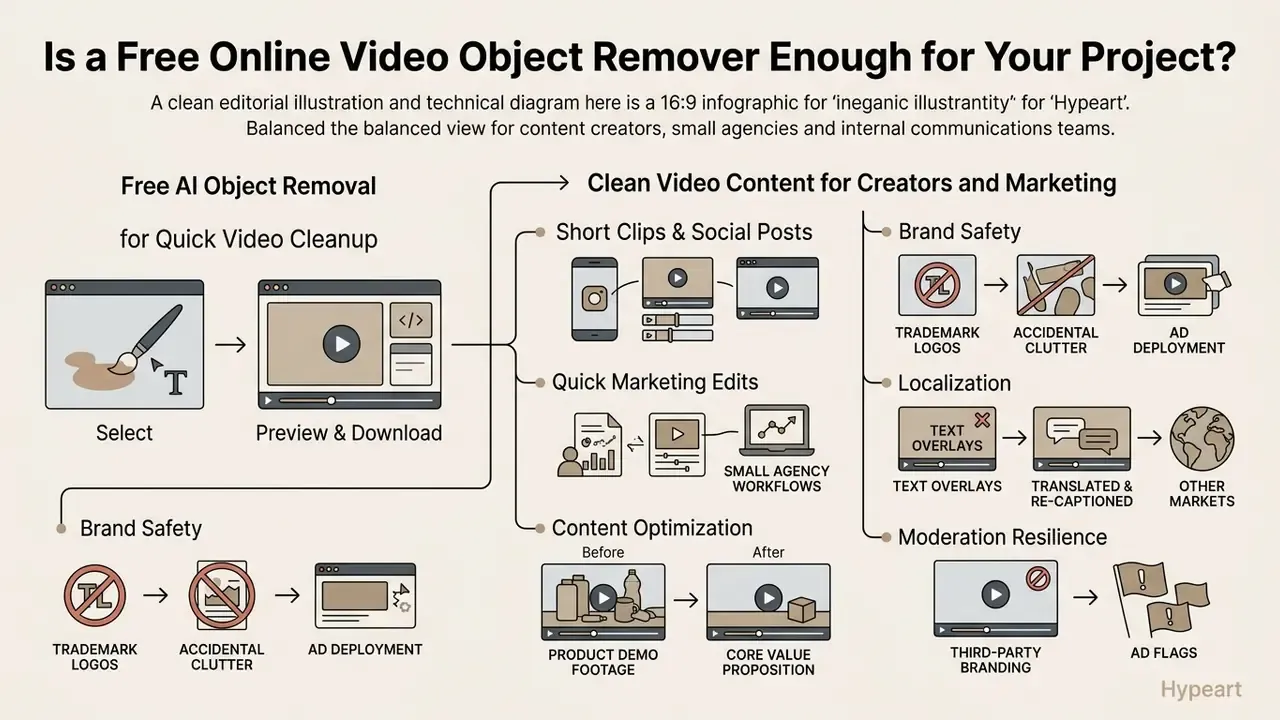
For content creators, small agencies, and internal communications teams, a free video object remover online balances visual quality against operational effort. Whether it is enough depends less on the model and more on what the footage is worth if it leaks.
Free AI Object Removal for Quick Video Cleanup
Free online tiers suit short clips, social posts, and quick marketing edits. No licence, no local workstation configuration, no queue with your IT department. Readers weighing tool selection can consult our comparison of the best AI video generators and free AI video generators for adjacent capability mapping, and check tier economics in the AI Media Pricing Guides.
«MiniMax-Remover achieves quality object removal in just 6 sampling steps without classifier-free guidance, substantially reducing inference latency». MiniMax-Remover: Taming Bad Noise Helps Video Object Removal, arXiv (2025). https://arxiv.org/abs/2505.24873
Free web tools also enforce technical constraints to manage server load. Typical published limits:
| Constraint | Common free-tier range | Notes |
|---|---|---|
| Upload file size | 100 MB to 1 GB | 100 MB is the most common ceiling; some services allow 500 MB |
| Clip duration | 60 seconds to 3 minutes | Longer clips require credit purchase |
| Export resolution | 720p to 1080p | 4K output is generally paid-only |
| Frame rate | Up to 60 FPS | Higher rates increase queue time proportionally |
| Watermark | Frequently applied | Free previews may be watermarked and expire in about a day |
| Queue priority | Deprioritized | Free jobs wait behind paid inference |
Processing time scales with pixel count and frame rate, roughly 4x the work for 4K versus 1080p at the same frame rate. Short 1080p clips render in under a minute; long 4K sequences can run for hours end to end.
Operators who need help with platform integration or export errors can consult our AI Media Support and Troubleshooting documentation.
Using Clean Video Content for Creators and Marketing
Multi-format studios rarely stop at video. The same production teams often work alongside an ai lyrics generator or ai melody generator for soundtrack drafts, an ai mashup maker for social remixes, an ai manga generator for storyboard panels, an ai map generator for explainer visuals, and even an ai math solver when a data-driven segment needs its numbers checked. Same governance question in every case: who owns the output, and what did the vendor keep?
FAQ: Removing Objects from Video Online
Does the Video Object Remover Work Online Without Downloading Software?
Yes. An object remover from video online tool runs entirely inside modern browsers (Chrome, Firefox, Safari, Edge) on Windows, macOS, and Linux. Files upload to cloud processing servers, where GPU-accelerated networks handle frame extraction, optical flow tracking, and generative inpainting. When processing completes, you preview and download the finished clip from the browser window with no local plugins or desktop apps. Technical teams building programmatic integrations can review our AI Media API Guides and track regulatory developments in the AI Litigation and Case Timelines database.
What Video Formats Can Be Uploaded and How Long Does Processing Take?
Most cloud removers accept standard containers, including MP4, MOV, WebM, AVI, and MKV. Duration depends on three variables: input resolution (1080p versus 4K), frame rate (30 versus 60 fps), and clip length. Short 1080p clips under 15 seconds usually render in 30 to 60 seconds. High-resolution 4K sequences, or clips with complex dynamic backgrounds, need several minutes of cloud GPU time, and a 4K 30 fps hour-long source can take four hours or more to process fully.
Can I Use the Same Tool for Photos and Still Images?
Yes. JPG, JPEG, PNG, and WebP files are supported. Images bypass temporal alignment, since there are no adjacent frames to warp, so the engine applies spatial inpainting straight to the masked region. The selection flow is identical: brush over or describe the object, then remove or extract it. Output format matches the source where possible, and extracted subjects arrive as transparent PNG.
Should I Use a Text Prompt or Brush Masking?
Both produce a binary mask; they differ in control and speed. Brush masking gives pixel-level precision and suits thin structures (cables, railings, hair), overlapping subjects, and any removal you may need to document for compliance. Prompt input is faster for crowded scenes and category-wide cleanups such as "remove all background pedestrians", and it needs no manual dexterity, but it depends on the segmentation model resolving your description correctly. A practical hybrid: prompt first, then refine the returned mask with the brush before rendering.
Can I Extract an Object Instead of Erasing It?
Yes. Extraction inverts the same mask. Rather than filling the region, the engine isolates the subject and exports it with an alpha channel: ProRes 4444 or MOV for video, transparent PNG for stills. Those assets drop straight into Adobe Premiere Pro, DaVinci Resolve, or CapCut for compositing over new backgrounds.
Is It Safe to Upload Confidential Corporate Video?
It depends entirely on the provider's published terms. Before uploading footage that is confidential or shows identifiable individuals, confirm four things: the retention window after which render files are purged, an explicit zero-training commitment stating your uploads never train or improve AI models, TLS/SSL encryption in transit, and disclosure of processing region and sub-processors. For footage covered by GDPR, CCPA, or sector regulation, including customer recordings, medical content, and unreleased product material, use an enterprise agreement with a data-processing addendum or an on-premise deployment instead of a consumer free tier.
Does Removal Reduce My Video's Resolution?
No. Unlike cropping, inpainting preserves original frame dimensions and pixel count; only the masked region is regenerated. Quality loss, when it happens, comes from re-encoding on export or from artifacts inside the filled region, not from resolution downscaling. Do check that your tier does not cap export resolution below your source, since many free tiers ceiling output at 1080p.
Can AI Remove Shadows and Reflections Too?
Effect-aware models can. Research systems sort side effects into shadows, reflections, light spill, translucency, and mirror images, then predict the affected regions alongside the object itself. Standard models that ignore secondary effects commonly leave residual darkening or highlights behind. If your tool does not handle effects automatically, include them in the mask manually or name them in the prompt.
Appendix A: Superseded Reference Notes
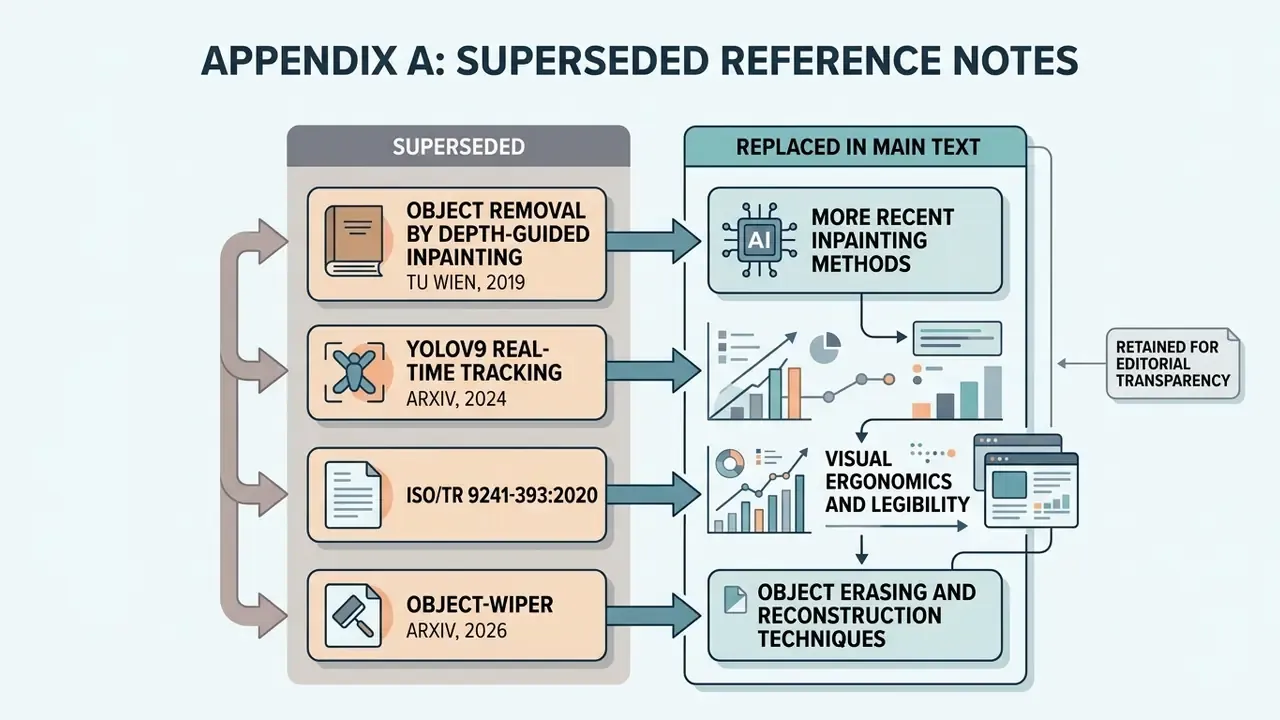
Retained for editorial transparency, replaced in the main text by more recent or better-matched sources:
- Object Removal by Depth-guided Inpainting, TU Wien, 2019. Originally cited for the 30% frame-area threshold. Superseded by SVOR (arXiv, 2025), which states the threshold with a verifiable URL and empirical basis.
- YOLOv9 Real-Time Tracking, 2024 (arXiv:2402.13616). Originally cited for mask propagation. YOLOv9 is an object detector, not a mask-propagation mechanism for video inpainting; replaced by Towards Online Real-Time Memory-based Video Inpainting Transformers (arXiv, 2024).
- ISO/TR 9241-393:2020. Retained as perceptual context for motion artifacts, with an explicit note that it is a display-ergonomics technical report rather than research on AI inpainting.
- Object-WIPER (arXiv:2601.06391). Preprint year cited as 2026; verify the release year against the publication date before final publication.