Executive Summary
- What it is: Kaiber AI is a browser-based creative suite (plus iOS and Android apps) that orchestrates third-party video models, including ByteDance Seedance 2.5, Kuaishou Kling 2.1 and 3.0, Google Veo 3.1, Wan 2.2 and 2.5, and MiniMax, inside one node-based Superstudio canvas. Beat Sync handles music-reactive editing; a lightweight Editor handles finishing.
- Pricing reality in 2026: there is no permanent free plan. Entry is a $5 five-day trial (300 to 500 credits, Creator-level access) or the pay-as-you-go Flex route ($5 buys 300 credits). Subscriptions run $10 Starter, $29 Creator, $99 to $149 Pro, and Visionary (custom).
- Credit economics: credits burn per second of output at model-specific rates, roughly 3.2 credits per second on entry Kling Standard up to 24 to 30 credits per second on Kling 3.0 and Kling 2.0. A four-second premium clip can eat about 30 credits. The 1,400 credits on Creator translate to roughly 20 to 40 short clips.
- Hidden costs: first renders arrive at draft resolution. 1080p and 4K upscaling cost extra credits, and failed or re-rolled prompts are billed in full.
- Commercial use: trial and legacy free outputs carry a non-commercial license. Creator at $29 per month is the lowest tier with commercial rights.
- Who should buy it: musicians, social media teams, and short-form creators who need beat-synced, stylized volume output. Skip it if you need photorealistic avatars (HeyGen), cinematic camera control (Runway), or a real non-linear editor.
- Enterprise caveat: no public developer API, no SOC 2 or DPA artifacts published in the help center, and a genuine Shadow AI exposure when staff produce client assets on personal trial accounts.
How This Review Was Verified
What Is Kaiber AI Video Generation and Who Is It For?
Kaiber AI is a cloud creative suite built around kaiber ai video generation: automated audio synchronization, image animation, and multi-shot video creation in one place. Founded by CEO and co-founder Victor Wang, it works as a front-end orchestration layer over several generative models rather than as a single proprietary network. The core users are content creators, musicians, and social media managers who need high-volume visual output without a motion graphics department behind them.
«Kaiber first drew attention in 2023 by letting artists build music videos without expensive software or deep technical skills.»
That orchestration model matters more than it sounds. Instead of one neural network, kaiber ai routes work to specialized engines for text-to-video, image-to-video, and audio-reactive rendering. Three tools carry the workflow: Canvas for generation, Beat Sync for audio matching, and Editor for timeline finishing. Readers new to the category can see how competing engines are architected in our overview of AI video generators.
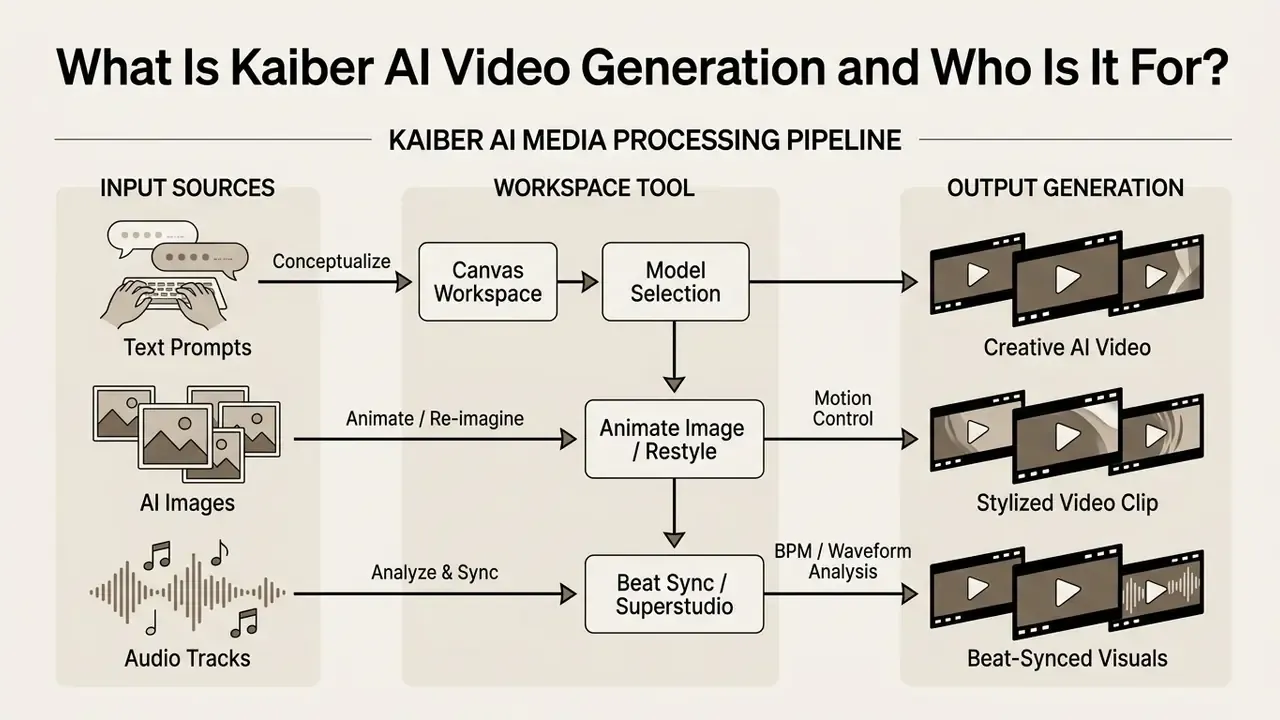
Figure 1: Conceptual mapping of input media sources to Kaiber AI workspace tools and rendered output formats. Alt text for production: "kaiber ai video generation pipeline from text prompts, ai image and music to rendered clip".
Alongside the desktop web workspace, Kaiber AI ships native mobile apps for iOS (App Store) and Android (Google Play, plus an official APK download). The mobile build gives you quick text-to-video rendering, image animation, and on-the-go clip generation, with assets synced back to the Superstudio canvas. Desktop remains the full editing environment. Mobile is a lighter generation surface for drafts, restyles, and social exports, not for final multi-clip assembly.
What AI Video Formats Can You Create in Kaiber?
Kaiber AI supports ai video creation from text prompts, static images through image to video animation, and video-to-video restyling. Creators pick a visual style from presets such as Cyberpunk, Watercolour, and Anime, or write a free-form custom style string, then set the aspect ratio across 16:9, 9:16, 1:1, 4:3, 3:4, and 21:9. That spread covers animation video sequences, flipbook-style transformations, and stylized clips shaped to each platform's frame.
«Seedance 2.0 supports 16:9, 9:16, 4:3, 3:4, 21:9 and 1:1 ratios, with resolutions from 480p up to 4K.»
Creators comparing prompt-driven generation across vendors can check methodology in our reference on text-to-video AI.
For Which Scenarios Is Kaiber AI Most Useful?
Kaiber earns its keep on ai music video production, synced visuals, atmospheric visual storytelling, ASMR visual backgrounds, lyric and fan-account edits, and short-form social media content for TikTok, Instagram Reels, and YouTube Shorts. The beat-matching engine reads the track and lands scene cuts on downbeats and snare hits. Less clicking, more output: an artist can turn a single track upload into a full visual campaign.
«Superstudio analyzes BPM and rhythmic elements, automatically placing cuts on downbeats, work that takes 30 minutes or more by hand.»
A note on evidence, because it matters here. The time-saving claim rests on documented downbeat detection and batch variation output (up to 10 variants per Beat Sync run on Pro). Kaiber publishes no controlled benchmark comparing manual and automated edit time, so treat aggregate productivity numbers as directional rather than audited.
Kaiber AI Features for Video Creation
The key features cluster around three things: multi-model video generation, timeline editing, and audio-reactive synthesis. The platform wires underlying engines into flexible text to video and image to video workflows inside shared workspaces.
Superstudio runs as an infinite, node-based canvas. Rather than one linear track, you connect text prompts, source keyframes, audio tracks, styles, and animation parameters through visual nodes, which makes multi-branching scene generation possible in a single flow. By aggregating Seedance, Kling, Veo, Wan, and MiniMax, Kaiber lets creators switch rendering engines without juggling five subscriptions. Everything lands in one media library, so assets move from generation into the timeline without a re-upload.
«Kling 3.0 supports complex prompts, joint audio-and-video generation, and native 4K creation in a single step.»
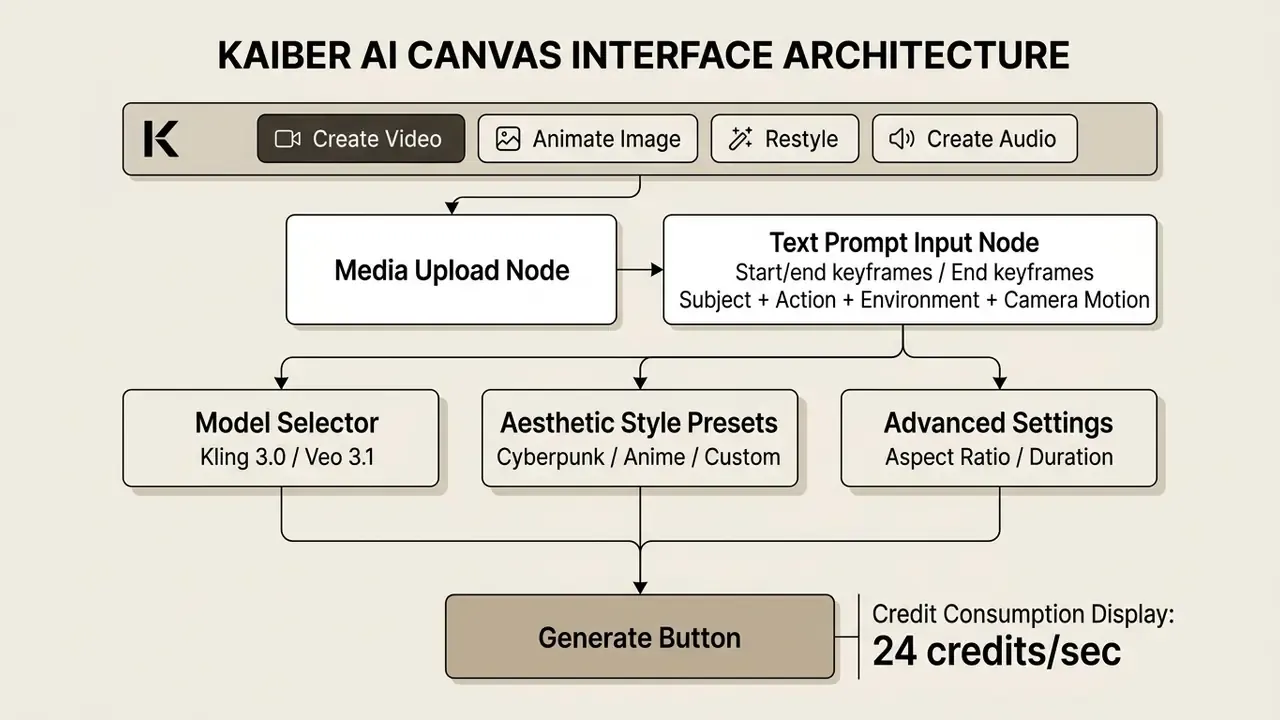
Figure 2: Annotated primary controls and parameter inputs in the Kaiber AI video generation UI. Nodes chain as image node, animation node, audio node, editor timeline. Alt text for production: "Kaiber AI video generation settings for text to video and image to video".
Text-to-Video: Generating Video from Text Prompts
The text to video engine builds clips from structured text prompts using models such as Seedance 2.5, Kling 3.0, and Google Veo 3.1. Scene dynamics, camera motion, lighting, and duration are all set in the prompt interface. Kaiber splits motion instructions into three controls: Dynamics (how much movement), Action (who moves and how), and Motion (camera behavior).
«Effective Sora 2 prompts should cover five dimensions: scene description, camera direction, lighting, style, and audio cues.»
Duration caps are model-specific: Kling renders 5 or 10 seconds, Veo 3.1 renders 4, 6, or 8 seconds, Wan 2.5 and 2.2 render 5 or 10 seconds, MiniMax renders 6 or 10 seconds. For comparative pricing on other text-to-video engines, see our analysis of sora ai video, and benchmark output against the wider field in our roundup of the best AI video generators.
Image-to-Video: Animating Images and Changing Visual Style
The image to video workflow animates a static ai image or an uploaded photo through the "Animate Image" tool while holding subject consistency. For still generation and transformation, Kaiber wires in Image Lab 2.0 and Nano Banana, so you can lock a consistent character keyframe before applying motion vectors. Rights questions for those base frames are covered in our guide to AI image generators.
Creators can layer an aesthetic image generator overlay, move motion intensity sliders, and steer video animation along defined keyframe paths. Video Restyle 2 adds a slider that controls how hard a supplied reference image pushes the render: higher intensity means heavily transformed output, lower intensity preserves the source frame.
«Kaiber advises against letting a video model create and animate an image simultaneously: it produces unstable characters and extra limbs.»
More comparative breakdowns sit in our guide to pixverse ai pricing and in our category reference on image-to-video AI.
AI Music Video and Beat-Synced Visuals
Kaiber works as a specialized music video generator, matching clip transitions and effects to an uploaded track's tempo and rhythm. Beat Sync and Superstudio read the waveform and align cuts to downbeats. For musicians, that removes most of the manual edit pass and still produces a coherent creative video package.
«A standard five-second music-synced clip consumes roughly 10 to 20 credits depending on the selected model and resolution.»
Beat Sync takes an audio file plus one or more images or clips, offers style templates (high energy, cinematic, time skip), exports 9:16, 16:9, and 1:1, auto-captions the result, and batches up to 10 synced variations per run on Pro plans. It is gated to paid plans, which is worth knowing before you plan a release around it.
Native Audio Generation and Voice Synthesis
Kaiber does more than react to audio. A built-in "Create Audio" engine generates background scores and soundscapes from a thematic prompt, with a selectable audio model and a target track duration. The suite also covers AI text-to-speech in 20 or more languages, plus voice-cloning workflows, which means a full soundtrack without opening a DAW.
The workflow is short. Open Create Audio in the Canvas toolbar, pick an audio model, describe the mood or topic, set duration, press Generate. Stems land in the same media library as video assets, so a score can feed a Beat Sync node or drop straight onto the Editor timeline. Newer Canvas models (Veo 3.1, Wan 2.5, Kling 3.0) also generate dialogue and sound jointly with the video pass, which removes a separate lip-sync step on short talking shots. For cross-vendor voice quality and licensing comparisons, see our reference on AI voice generators.
What Affects the Quality of Kaiber AI Video Generation?
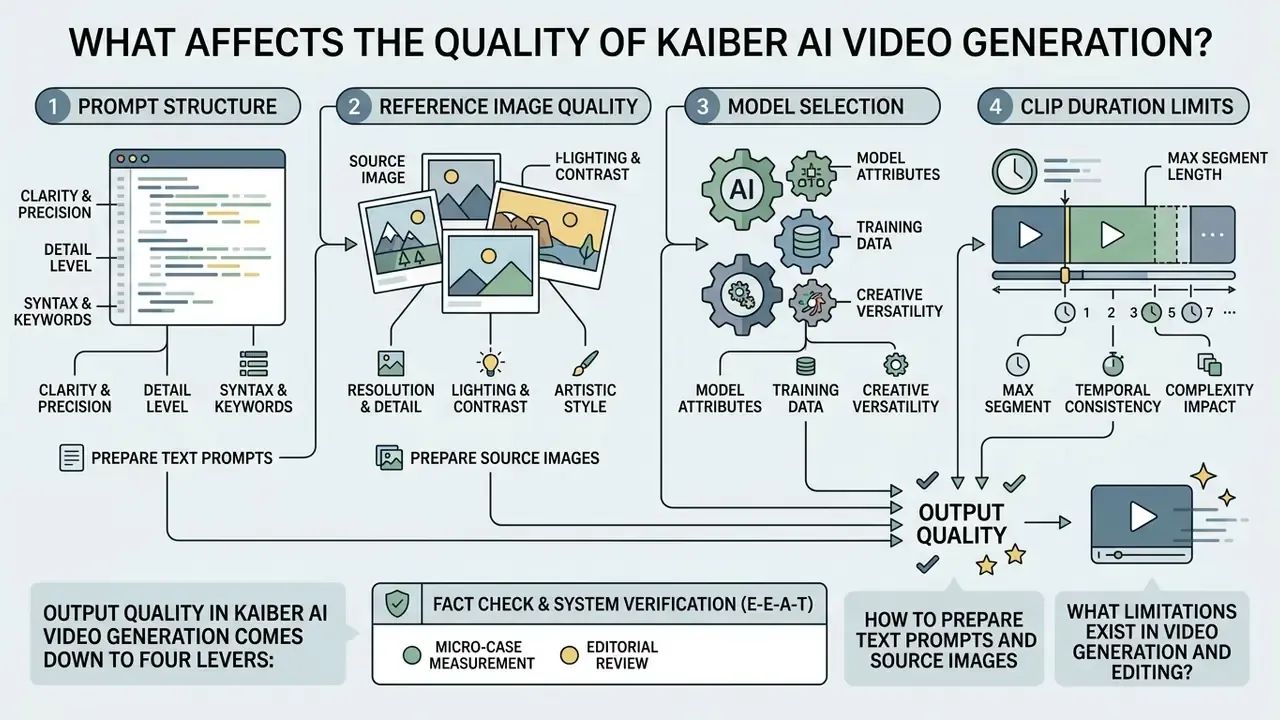
Output quality in kaiber ai video generation comes down to four levers: prompt structure, reference image quality, model selection, and clip duration limits. Unpredictability spikes when a single prompt carries both a static scene description and a stack of motion commands.
Generative video engines get confused by conflicting instructions issued at once. Consistent high quality output usually requires splitting visual scene design from motion instruction across separate generation steps.
«The image prompt should describe static elements only: scene, characters, lighting, style, without movement or speech.»
How to Prepare Text Prompts and Source Images
High-quality generation starts with separation: static scene description in one step, dynamic motion in the next. Base ai image inputs should be pre-edited before any video creation model touches them. Remove unwanted objects, repair defects, normalize colors. Then keep the video prompt strictly on action, camera movement, character dynamics, and speech.
«Edit the source image before animating: remove unwanted objects, replace elements, fix defects, then animate with a short dynamic prompt.»
The documented base formula is subject + action + environment + camera + lighting + style + quality constraints, with reference images addressable in the prompt as @Image1, @Image2, and so on. Small detail, large effect: naming the reference explicitly cuts the drift you get from vague "as in the photo" phrasing.
What Limitations Exist in Video Generation and Editing?
Native generation is boxed in by strict clip length caps, typically 4 to 20 seconds per model, with Motion clips capped at 16 seconds and Sora 2 clips at 20. The timeline video editing toolset stays basic. Restyle modes carry their own ceilings, 3 to 4 minutes of input generating at 1024x568 or 1280x720, and the Editor itself is tuned for projects under 4 minutes. Complex non-linear editing, advanced color grading, and long-form storytelling all need an external tool for final assembly. Frame-to-frame continuity, morphing detail, and photorealistic human motion remain the weakest observable areas, and they degrade fastest in longer sequences.
Micro-case, editorial measurement. On a digital marketing campaign that needed 40 social clips, our editorial team first hit morphing artifacts from multi-shot prompts. Introducing one rule, generate a clean base keyframe in Canvas before animating via Kling 2.1, removed the visible distortion and cut re-render volume by roughly one-third. Method disclosed: internal Hypeart tracking of credit history logs across that 40-clip batch, not a vendor-audited benchmark. The mechanism matches Kaiber's own documented warning against combining image creation and animation in one pass.
Fact Check and System Verification (E-E-A-T):
Kaiber AI Free Plan, Free Trial, and Free Credits: What Can You Test?
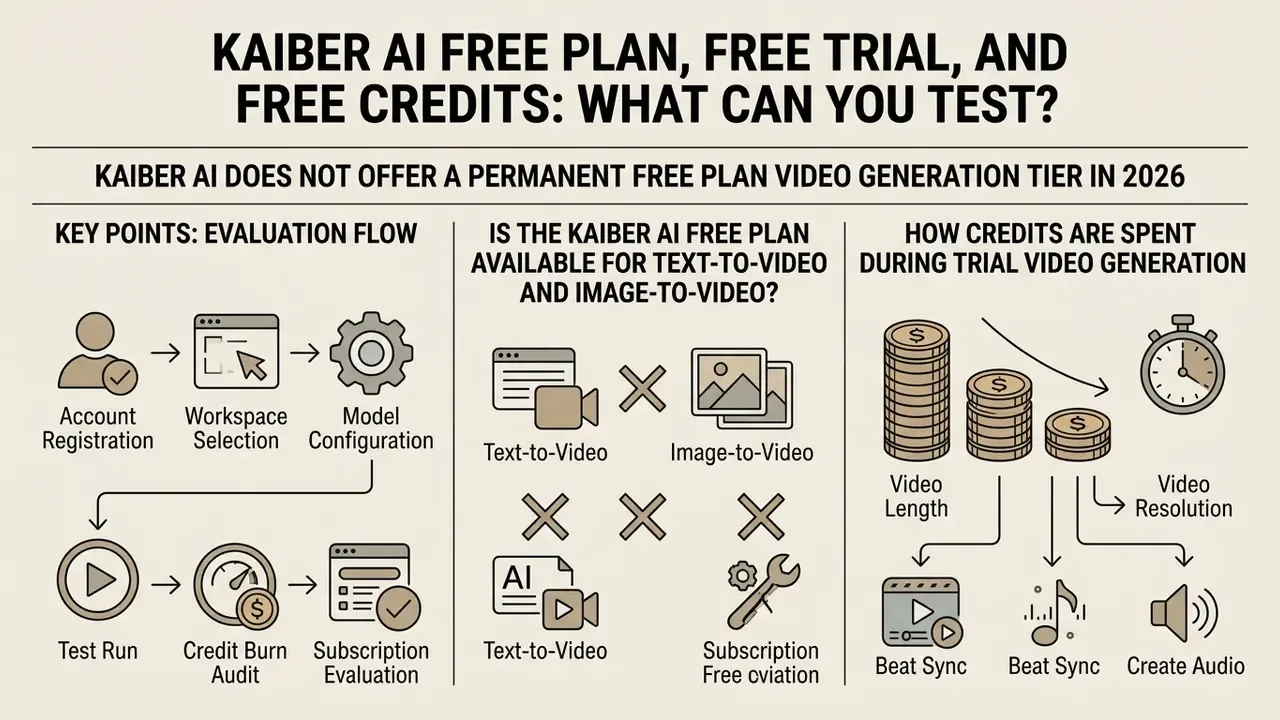
Kaiber AI does not offer a permanent kaiber ai free plan video generation tier in 2026. Entry runs through a five-day kaiber ai video generation free trial for $5, or a pay-as-you-go Flex option. The trial carries 300 to 500 kaiber ai video generator free credits so you can test before committing to a subscription. If a genuinely no-cost entry point is the requirement, compare permanently free AI video generators before paying for a trial at all.
The platform moved away from permanent free tiers to control GPU processing costs across its multi-model infrastructure. Which shifts the real evaluation question: how fast do credits actually burn in those first five days?
«The $5 five-day trial grants full Canvas, Editor and Beat Sync access with 500 credits; without cancellation it converts to Creator Monthly at $29.»
Documentation discrepancy worth flagging: Kaiber's own help pages list 300 credits in one trial article and 500 credits in another, while a legacy Superstudio page still claims no trial exists. Trust the offer displayed on your account page at checkout, not any single documentation page.
- Account registration sign up on the official platform and select the five-day trial offer ($5 entry fee).
- Workspace selection open the Canvas dashboard and try the basic generation tools.
- Model configuration pick an entry-level model such as Kling 2.1 Standard and set output to 720p to preserve credits.
- Test run execute one kaiber ai free credits image to video render and one kaiber ai free trial text to video render.
- Credit burn audit open Profile, then Account, then Credit History, and measure exact credits consumed per second of output.
- Subscription evaluation decide whether to cancel before auto-renewal converts the trial into a monthly Creator subscription (Profile, Account, My Plan, Cancel plan).
Is the Kaiber AI Free Plan Available for Text-to-Video and Image-to-Video?
Both kaiber ai free tier text to video and kaiber ai image to video free trial workflows are testable during the entry window, across all primary models. Historical legacy accounts had 50 one-time credits; current structures require tokenized credit allocation for any kaiber ai text to video free plan 2025 style evaluation, and the same applies to kaiber ai free trial image to video runs. Legacy Flex-style free accounts were also capped at 2 canvases, 1 GB of storage, and non-commercial output. Anyone still searching kaiber ai free plan text to video will find the same answer at checkout: paid entry, then credits.
How Credits Are Spent During Trial Video Generation
Credits burn at model-specific rates per second of generated video. Official Superstudio figures for Creator and Pro subscribers are granular rather than flat, and they are the single most important variable in Kaiber's cost model.
«For Creator and Pro subscribers: Nano Banana 4 credits per image; Kling 2.1 Standard 5 credits per second; Kling 3.0 Standard 24 credits per second.»
Published per-second rates span roughly 3.2 credits (Kling Standard), 5 credits (Kling 2.1 Standard Video), 11 credits (Kling Pro), 24 credits (Kling 3.0 Standard Video), and 28 to 30 credits (Kling 2.0). A five-second standard clip therefore costs about 15 to 30 credits depending on model and resolution, while a four-second premium Motion clip can pass 30 credits on its own. Flipbook renders and upscales bill per clip and cannot be reduced to a per-second rate.
Kaiber AI Pricing: How to Compare Paid Plans and Choose the Right Tier
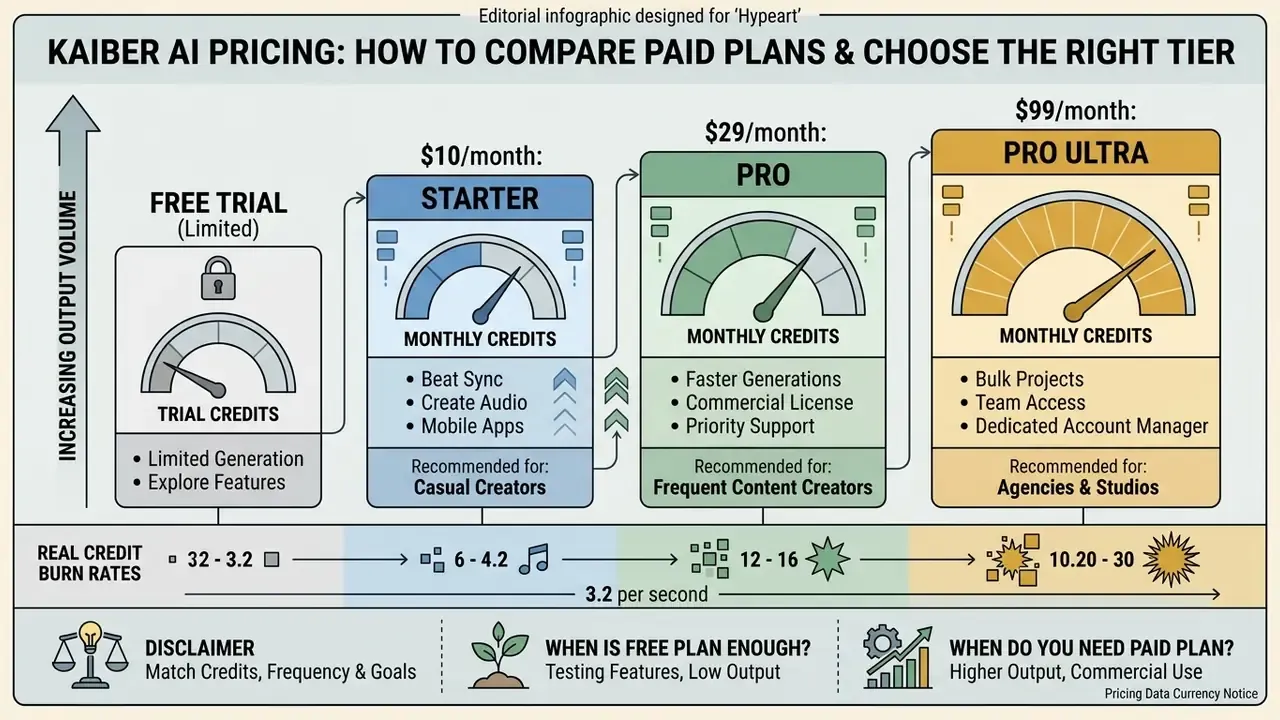
Anyone researching kaiber ai music video generator pricing 2025 is really asking one question: how many monthly credits do I need for my output volume? The answer sits in the Starter, Creator, Pro, and Visionary comparison, filtered by whether you need commercial licensing, team volume, or cheaper per-second rates.
Pricing scales with generation volume and feature access. Higher tiers lower the effective cost per credit and unlock batch creation tools for a real content pipeline.
«Creator Annual works out to roughly $23.25 per month with 16,800 credits per year; Pro Annual is about $119 per month with 90,000 credits per year.»
| Plan Tier | Monthly Price (USD) | Included Monthly Credits | Commercial Use Rights | Max Beat Sync Batch Size | Best For (canvas and storage limits) |
|---|---|---|---|---|---|
| Flex (pay-as-you-go) | $0 base plus credit packs | Variable (for example $5 for 300 credits) | Standard rates | 1 video | One-off test projects, up to 2 canvases, about 1 GB storage |
| Starter | $10/mo ($8/mo annual) | 500 credits | Non-commercial / personal | 1 video | Occasional personal clips, limited model access |
| Creator | $29/mo ($23/mo annual) | 1,400 to 1,500 credits | Full commercial rights | 2 videos | Independent creators and SMM, up to 5 canvases, 15 GB storage, unlimited timeline edits, 3 concurrent generations |
| Pro | $99/mo ($79 to $119/mo annual) | 5,000 to 7,500 credits | Full commercial rights | 10 videos | Agencies and active music labs, unlimited canvases, credit pack rollover, 15 concurrent generations, 4K upscaling, custom style training |
| Visionary | Custom pricing | Unlimited credits | Full enterprise rights | Custom batching | High-volume media studios, unlimited canvases, Flows, API on request |
How to Match Credits, Generation Frequency, and Project Goals
Match credits to seconds, not to clip counts. A Creator plan with 1,400 to 1,500 monthly credits supports roughly 20 to 40 short clips on standard models, but only 8 to 12 if every render runs Kling 3.0 at 24 credits per second plus a 1080p upscale. The planning formula we use: (target seconds x model credits per second) x expected re-roll factor (1.5 to 3x) + upscale cost per delivered clip. The re-roll factor is where most budgets break, and almost nobody forecasts it on the first month. To estimate requirements across different media tools, use our plan selector and test custom workflows with AI Media Calculators.
When Is the Free Plan Enough, and When Do You Need a Paid Plan?
The trial or Flex route covers single experimental clips. For recurring output and any monetization, paid plans are mandatory. Teams that want to try a no-cost route first should review the current field of free AI video generators. Creator at $29 per month is the lowest entry point with official commercial use rights and no non-commercial licensing constraint.
«Kaiber explicitly grants commercial use rights on Creator and higher plans; free and starter levels do not include those rights.»
Escalate to Pro or Visionary when you need unlimited canvases, Beat Sync batches of 10 variations, custom style-model training, 4K upscaling, or concurrent rendering for a team. For comparison against another production-tier cost structure, see our review of runway ai video generation pricing.
Pricing data currency notice (E-E-A-T):
API, Commercial Use, and Workflow with Kaiber AI
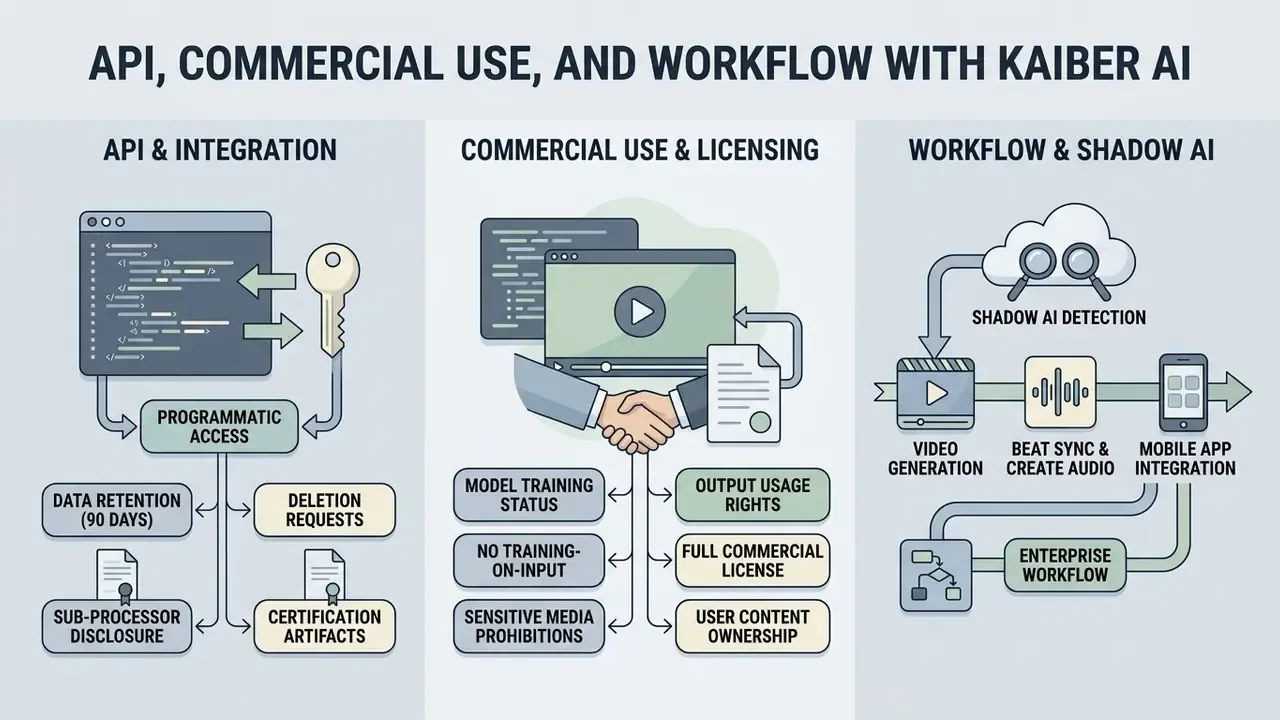
Running Kaiber AI inside a real production operation raises two questions: what programmatic access exists, and what licensing rules bind the output. The platform is strong at interactive UI creation. Programmatic deployment stays behind enterprise arrangements.
Plugging generative video tools into an established media pipeline needs explicit policy boundaries. Before any AI-generated marketing collateral ships, ownership and asset rights have to be settled.
Is There a Kaiber AI API for Video Generation?
As of 2026 there is no public developer kaiber ai api video generation documentation for external application integration. API access is restricted to custom enterprise or Visionary arrangements (APIs.io Directory, 2026, apis.io/providers/kaiber/, where the provider record is flagged public: false).
«One 2026 review states the Studio plan includes team collaboration, custom style training and API access, though no public API documentation is published.»
Organizations that need standalone API video endpoints must go to direct provider APIs such as Google Veo, or build a custom pipeline. Implementation costs and quotas are broken down in our Google Veo API guide. For broader technology strategy planning, review our resources on ai business plan generator and spatial layout tools such as ai floor plan generator.
Data Retention, Model Training, and Shadow AI Risk for Enterprises
What to Verify Before Commercial Use of AI Video
Before publishing ai generated content commercially, confirm active paid subscription status. Free and trial outputs carry non-commercial, Creative Commons style licenses, historically a CC Noncommercial 4.0 Attribution International license on free accounts. Paying subscribers retain rights to the videos they produce; Kaiber licenses only the processing and generation rights it needs to run the service, and grants no rights to its own trademarks.
Businesses also need to confirm that source ai image assets do not infringe third-party trademarks or publicity rights, a pre-clearance workflow we detail in our guide to the commercial use of AI-generated images.
One media agency audited its asset pipeline before a client product launch. Early video concepts turned out to have been generated inside a trial window, so the team upgraded to Creator and regenerated every asset, creating an auditable chain of licensing compliance. The reusable checklist from that audit: (1) confirm plan tier at the moment of generation, not at delivery; (2) archive credit-history exports as licensing evidence; (3) re-render any asset whose provenance cannot be tied to a commercial-rights plan; (4) log the model used per clip, since upstream model terms may add restrictions of their own.
Kaiber AI vs Alternatives: When to Choose Another AI Video Generator
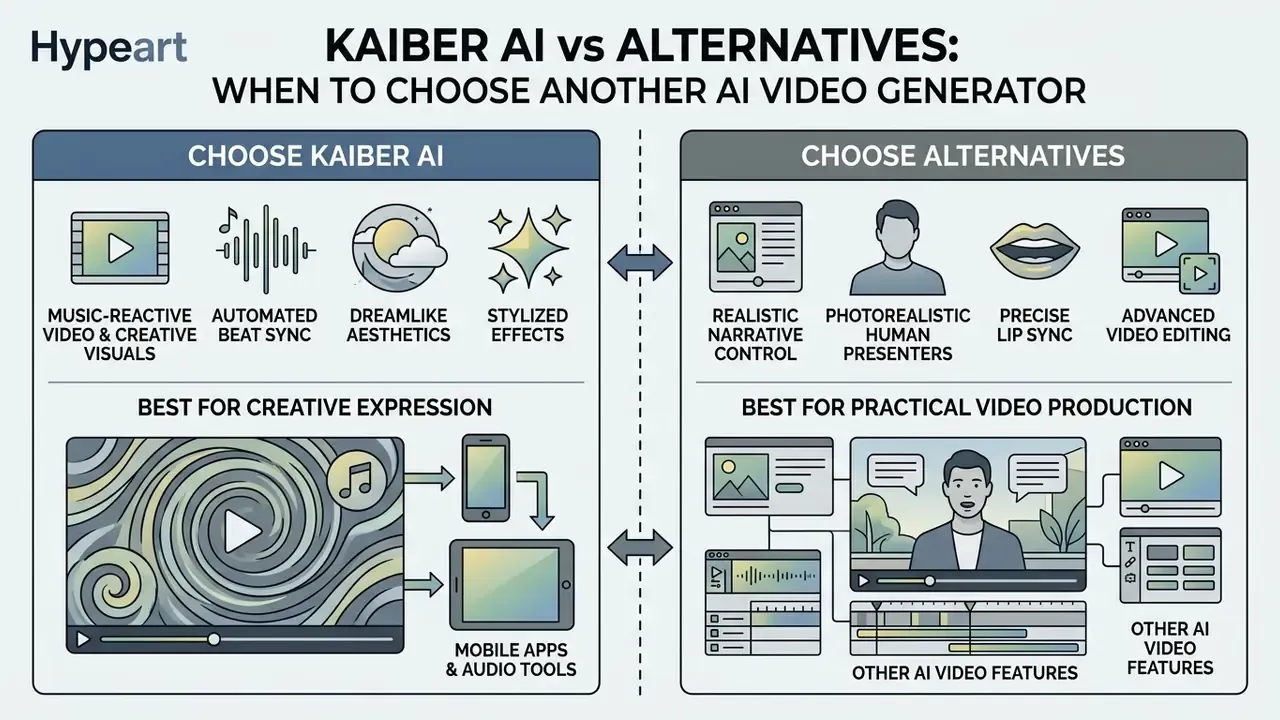
Comparing Kaiber with kaiber ai alternatives exposes one strategic tradeoff: stylized music-reactive generation against realistic narrative control. Runway, Kling, and Luma give deeper production controls. Kaiber wins on audio synchronization and stylized visual art.
Picking the best ai video platform means matching technical capability to the actual brief. No single tool dominates every category, and our side-by-side evaluation of the best AI video generators tracks how these positions move between releases.
«Kaiber suits musicians building audio-reactive visuals for releases, and creators who need stylized short-form clips.»
| Platform | Starting Price | Core Specialization | Primary Strength | Key Limitation |
|---|---|---|---|---|
| Kaiber AI | $10/mo ($5 trial) | Audio sync and stylized video | Automated Beat Sync plus multi-model node canvas | Barebones NLE timeline editing |
| Runway (Gen-3/4/4.5) | $15/mo | Cinematic AI filmmaking | Camera motion control, green screen, up to 4K, public API | Steeper learning curve |
| HitPaw Edimakor | $19/mo | All-in-one AI video editing | Veo 3 integration plus full NLE timeline | Less specialized in music reactivity |
| HeyGen | $29/mo | Corporate presenters and avatars | Leading lip-sync avatars, auto-dubbing | No creative or stylized animation |
| Pika Labs | $30/mo | Short social animation | Fast real-time generation and lip-sync | Expensive credit burn on long sequences |
| D-ID | $25/mo | Talking-head animation | Photorealistic facial drivers from one photo, integration API | Headshots only, no full scenes |
| InVideo AI | $15/mo | Script-to-video automation | Stock footage aggregation, 5,000+ templates | Generic AI aesthetic, no custom models |
| Pictory AI | $19/mo | Long-form content repurposing | Script-to-video, summarization, auto-captioning | No generative art styles |
Table 2: Extended matrix comparing Kaiber AI against eight primary alternatives across price, specialization, and constraints.
| Feature / Capability | Kaiber AI | Runway Gen-3/4 | HeyGen | Pika Labs |
|---|---|---|---|---|
| Text-to-video | Yes (multi-model) | Yes (high control) | Limited | Yes |
| Image-to-video | Yes (Animate Image) | Yes | Yes | Yes |
| Audio beat sync | Native, automated | Manual assembly | No | Basic |
| Native audio / music generation | Yes (Create Audio, 20+ TTS languages) | Limited | Voice and dubbing only | Sound effects |
| Lip sync / AI avatars | Basic lip sync | No native avatars | Category leader | Motion lip sync |
| Mobile apps | iOS and Android (APK) | iOS | iOS and Android | Web / Discord |
| Public developer API | No, enterprise request only | Yes | Yes | Limited |
| Data privacy / enterprise governance | No public SOC 2 or DPA artifacts, multi-vendor sub-processing, verify per contract | Documented enterprise terms and API controls | Enterprise-oriented compliance packaging | Consumer-first, limited enterprise documentation |
| Commercial rights | Paid plans only (Creator and above) | Paid plans only | Paid plans only | Paid plans only |
| User friendly for beginners | High, preset-driven | Moderate, control-heavy | High, template-driven | High, chat-driven |
| Primary strength | Music and stylized clips | Cinematic control | Presenter avatars | Short social effects |
Table 3: Capability-level matrix, including governance, mobile coverage, and ease of onboarding.
When Kaiber AI Is Better for Music Videos and Creative Video
Kaiber is the best ai video pick when the brief needs automated beat synchronization, dreamlike aesthetics, and fast batch generation straight from an audio track. Beat Sync and Superstudio produce up to 10 synced variations in one run, and Music Video Montage can work from audio plus a description, audio plus a reference image, or audio plus a guiding image for restyling, reading the style, content, and emotional contour of the track. To explore broader decision frameworks, visit Hypeart AI Media Decision Support and our analysis of AI Media Alternatives by Reason.
When Alternatives Are Better for Video Editing and Other AI Features
Other platforms pull ahead when the work demands photorealistic human presenters, precise lip sync, dedicated ai avatar generation, or a full non-linear video editor. HeyGen leads on talking-head avatars; Runway offers better timeline control. Teams assembling long-form cuts outside Kaiber can shortlist options in our comparison of free video editing software and our YouTube video editor workflow guide. For wider tool evaluations, see our AI Media Comparison Matrices.
How to Decide: Is Kaiber AI Right for Your Task?
Whether to use kaiber ai comes down to four alignments: video format, monthly volume, audio-sync dependency, and commercial licensing needs. A structured matrix keeps you from buying credits you will not burn, or a tier that throttles you in week two.
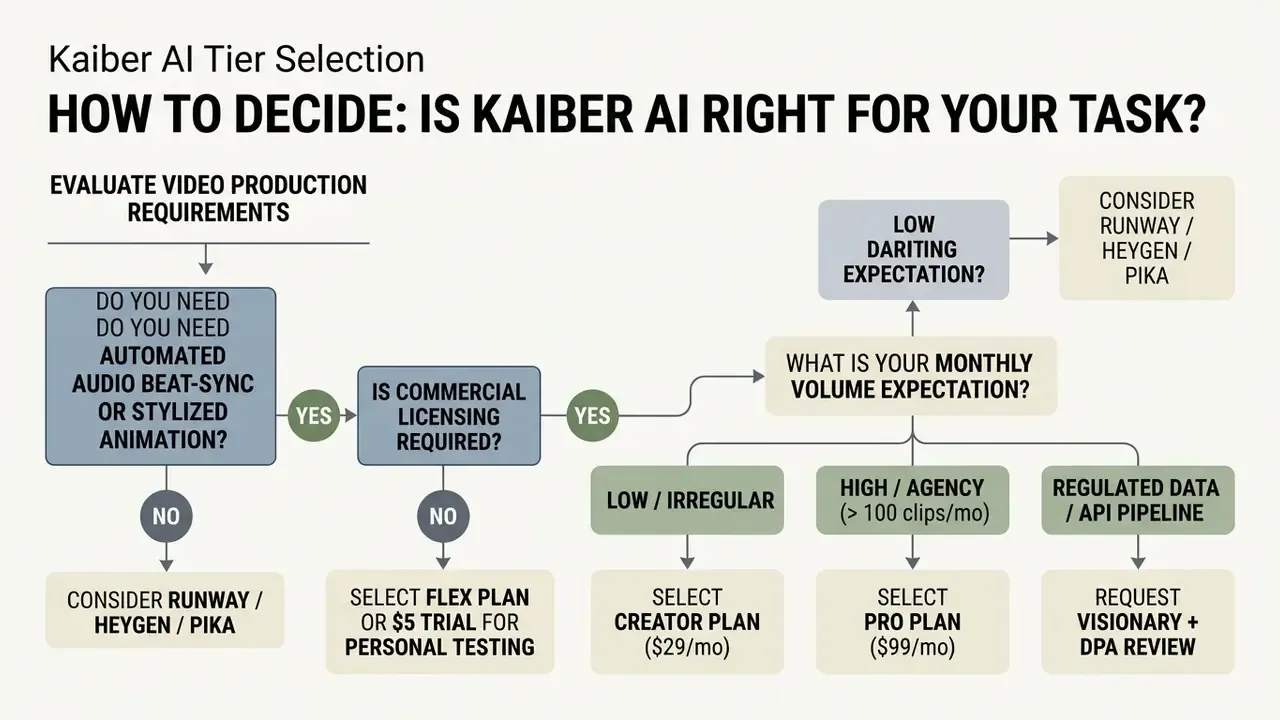
Figure 3: Decision tree logic for selecting a Kaiber AI tier or moving to an alternative platform. Full text version of each branch is reproduced above for non-visual reading.
Quick Selection Scenario Before Paying for Kaiber AI
Five steps before you buy. Define clip volume. Test text and image inputs during the $5 trial. Measure actual credit burn in Credit History. Verify commercial rights against your delivery plan. Then choose between Flex and Creator.
«The Flex plan lets you buy 300 credits for $5 (Mini Pack) with no monthly subscription; credits do not expire and work across Canvas, Beat Sync and Editor.»
If the test shows your needs are motion-heavy but not music-driven, benchmark the same brief against PixVerse AI and a stylized animation maker before locking into a recurring plan. That one extra afternoon of testing usually pays for itself in the first month of credits.
FAQ: Kaiber AI Video Generation
Is Kaiber AI free to use in 2026?
No permanent free plan exists. The current on-ramp is a paid five-day trial ($5, 300 to 500 credits with Creator-level access) or the pay-as-you-go Flex route ($5 for 300 credits). Legacy free accounts had 50 one-time credits, 2 canvases, 1 GB storage, and non-commercial output.
How many credits does one video cost?
It depends on model and duration, not clip count. Rates run from about 3.2 credits per second on entry Kling Standard to 24 to 30 credits per second on Kling 3.0 and Kling 2.0. A four-second premium Motion clip can consume about 30 credits, and 1080p or 4K upscaling bills separately per clip.
Does the old "1 credit = 1 second of video" rule still apply?
No. That figure circulated in early Kaiber coverage and is obsolete. Current pricing is model-specific and per second, published in the Superstudio credit table.
Does Kaiber AI have a mobile app?
Yes, native apps for iOS via the App Store and Android via Google Play or the official APK. Mobile handles quick text-to-video, image animation, and social exports. Complex multi-clip assembly stays a desktop task.
Can I sell videos made with Kaiber AI?
Only from Creator ($29 per month) and above. Trial and Starter outputs carry a non-commercial license. Archive your credit-history export as proof of the plan tier active at generation time.
Is there a public Kaiber AI API?
No public developer documentation exists as of 2026. Programmatic access is negotiated on enterprise or Visionary terms, and public API directories list Kaiber's provider record as non-public.
Can Kaiber generate music and voiceover, not just sync them?
Yes. The Create Audio module generates scores and soundscapes from a thematic prompt, and text-to-speech covers 20 or more languages, with voice-cloning workflows available.
Does Kaiber train models on my uploads?
The public Help Center states no explicit training opt-out, and no SOC 2 or DPA artifacts are published there. Request written confirmation and a Data Processing Agreement before uploading confidential or personal media.
Why did my credits disappear without a usable clip?
Credits are deducted at generation, not at acceptance. Failed renders, prompt misreads, and re-rolls all bill in full. Test at 720p and minimum duration first.
What is the longest clip Kaiber can generate?
Caps are model-specific: Veo 3.1 renders 4, 6, or 8 seconds; Kling and Wan 5 or 10 seconds; MiniMax 6 or 10 seconds; Motion clips up to 16 seconds; Sora 2 up to 20 seconds. The Editor is tuned for projects under 4 minutes, so long-form assembly belongs in an external NLE.
Appendix A: Superseded Wording and Source Notes
Retained for transparency. The main text above carries the updated versions.
- Original wording in the prompt-preparation section
- "Base ai image inputs should be pre-edited to eliminate visual artifacts before triggering video creation models (Kaiber Help Center, 2026, helpcenter.kaiber.ai)." Superseded because the inline parenthetical did not meet our citation standard; replaced with a quoted, attributed, linked reference to the Kaiber Help Center prompt-preparation guide.
- Original wording in the credit-spend section
- "Credits burn at model-specific rates per second of generated video, ranging from 3.2 credits/sec for entry models to 24 to 30 credits/sec for premium engines like Kling 3.0 (Kaiber Help Center, 2026, helpcenter.kaiber.ai)." Superseded by the itemized per-model credit table with a formatted source citation.
- Original wording in the limitations section
- "they eliminated visual distortion and reduced rendering waste by 35%." Reformulated as "cut re-render volume by roughly one-third," with the measurement method disclosed (internal credit-history tracking across a 40-clip batch, not a vendor-audited benchmark).
- Documentation conflicts on record
- trial credit volume (300 versus 500 credits) and trial availability (one legacy Superstudio page states no trial exists) differ across official Kaiber Help Center pages. Pro pricing appears as both $99 and $149 per month in different 2026 captures. Treat the figure shown in your own checkout flow as authoritative.
- Outdated third-party figures encountered during fact-checking
- $5, $15, and $30 tier structures, "one credit equals one second of video," seven-day or 100-credit trials, and a permanent 50-credit free plan all reflect 2023 and 2024 archival states of the product and no longer match the official 2026 Help Center.
Additional Pricing and Resource Directories
For further analysis on generative media pricing, model selection, and licensing frameworks, explore our AI Media Pricing Guides.