Executive summary: what decision-makers need to know
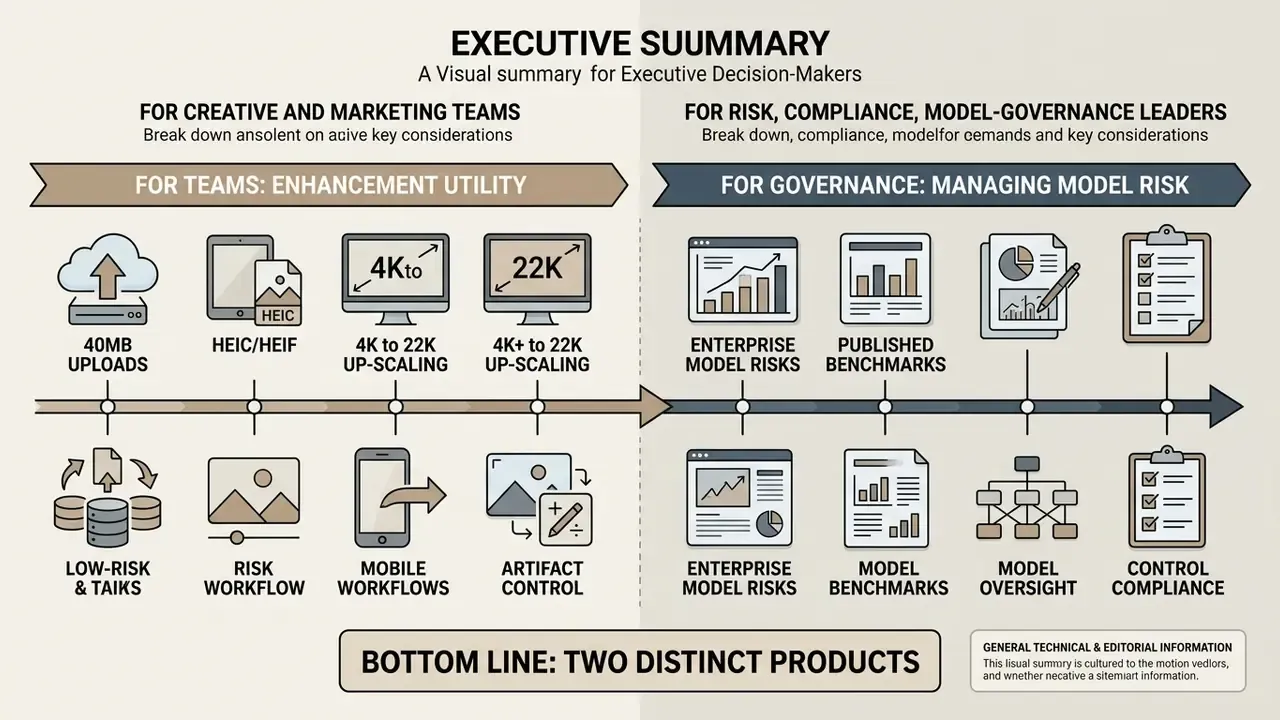
For risk, compliance and model-governance leaders. Super-resolution and deblurring models synthesize pixels that were never captured by the sensor. That distinction defines the operational boundary between enhancement and hallucination. Any deployment touching identity documents, signatures, stamps, receipts, or evidentiary imagery requires a documented validation protocol, a fixed model version inventory, hash-based audit trails, and explicit human review gates. Free consumer endpoints are unsuitable for data containing personally identifiable information (PII) unless the vendor contractually guarantees zero data retention, no training on customer inputs, and isolated processing.
Bottom line. Treat AI enhancement as two distinct products: a low-risk visual-quality utility for marketing assets, and a high-risk inference system when applied to documents of record. The former is a procurement decision. The latter is a model-risk decision, and it belongs in your model inventory.
| Reader profile | Primary question | Where to read |
|---|---|---|
| Creative / e-commerce operator | Which defects can AI actually fix, and how fast? | Which image problems can AI enhance? |
| Product / growth manager | Free vs paid limits, formats, resolution ceilings | How to choose the best AI image enhancer online |
| Head of Model Risk | Where does enhancement become hallucination? | Model risk, hallucination governance and enterprise validation |
| CCO / security lead | PII exposure, retention, Shadow AI containment | Data security, PII protection and Shadow AI controls |
| CRO / CFO | Risk-adjusted ROI of automated enhancement | Risk-adjusted ROI and total cost of control |
What is AI image enhancement and what can it improve?
AI image enhancement is the automated process of turning low quality photos into high resolution, clear visual assets using neural networks. Unlike simple filter adjustments, ai based image enhancement analyzes structural features to reconstruct missing pixel data and enhance image quality across the whole frame, not just the areas you happen to notice.
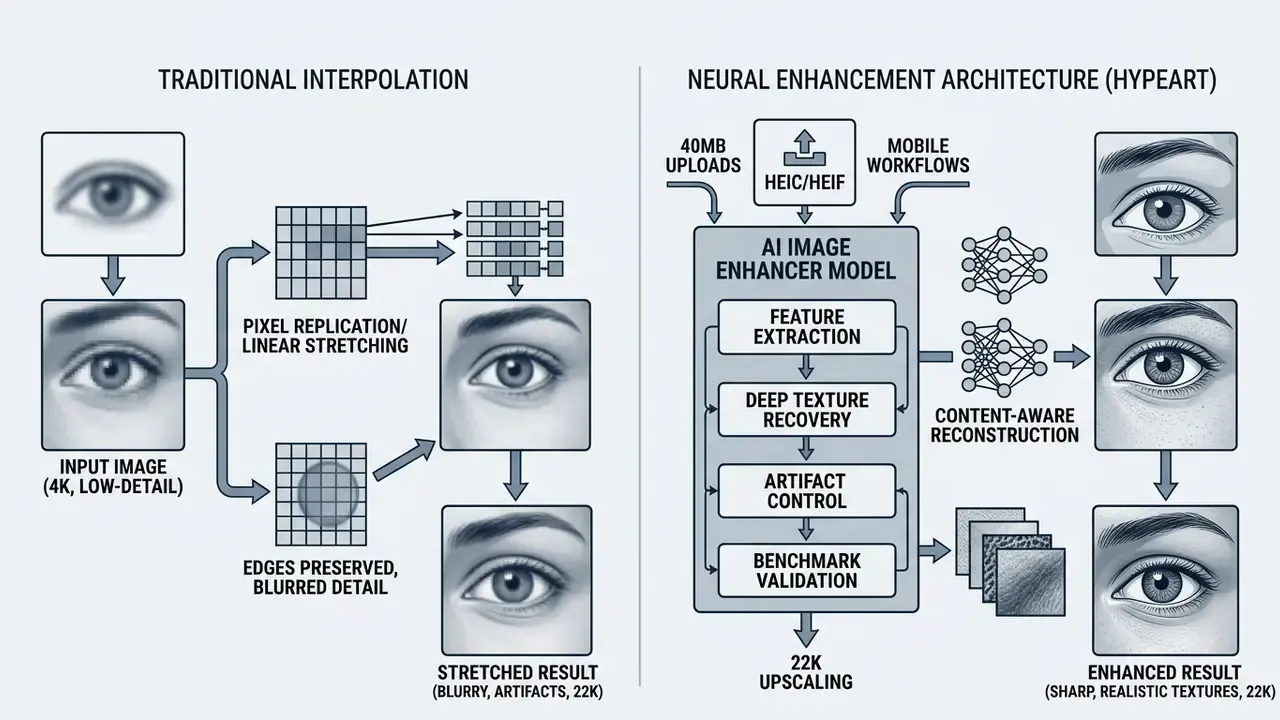
How AI models enhance image quality
Advanced AI models enhance photo quality by mapping low-resolution input features against trained high-definition dataset priors. Convolutional Neural Networks (CNNs) and Vision Transformers evaluate high-frequency details, then apply targeted sharpening and noise reduction to yield natural quality images. The output looks photographic because the prior is photographic, not because the detail was hiding in the file.
Updated. Research in neural restoration quantifies this gain with precision rather than marketing language: frequency-disentanglement designs achieve large fidelity improvements at negligible parameter cost.
«Frequency disentanglement architectures add only 88K parameters, yet deliver up to a 7.68 dB PSNR gain across five popular low-light image enhancement (LLIE) benchmarks.»
Readers comparing concrete implementations of this architecture class can review our breakdown of AI image upscalers to see how published benchmarks translate into product behavior, plus our guide to online photo editors for the non-neural baseline these models replace.
Three architectural families dominate current deployments, and each carries a different risk signature:
| Model family | Optimization objective | Typical strength | Governance caution |
|---|---|---|---|
| CNN / residual networks | Pixel-wise loss (L1/L2) | Predictable, low-variance output | Can over-smooth micro-texture |
| GAN-based (SRGAN, ESRGAN) | Adversarial + perceptual loss | Photo-realistic texture synthesis | Highest hallucination risk; invents plausible detail |
| Diffusion / texture-prior (DTPM, FaithDiff) | Probabilistic denoising with priors | Faithful structure recovery, fewer reconstruction errors | Higher latency and compute cost |
GAN papers prioritize realistic textures and perceptual sharpness. Diffusion papers prioritize faithful structure recovery and lower reconstruction error. That difference originates in the adversarial versus probabilistic denoising objective, and it is the single most important technical fact for anyone deciding whether a model may touch a document of record.
AI image enhancement vs image generation and editing
AI image enhancement restores an existing visual asset, whereas an ai image generator creates entirely new synthetic scenes from text prompts. Traditional photo editor tools require manual masking, contrast stretching, or custom curves to improve image quality. Generative editing tools introduce new objects or expand borders, while dedicated enhancement algorithms focus on fidelity, detail retention, and structural accuracy without touching original scene semantics.
The practical boundary is content preservation. Document-enhancement features in enterprise PDF suites correct poor lighting, shadows, skewed angles, and background areas while keeping the original document context intact. Generative fill, sky replacement, and object insertion produce a new layer of synthesized content. Enhancement-only operations (color restore, JPEG artifact removal, denoising, restoration) preserve existing content. Generative operations can synthesize pixels or entire objects. Classify every feature into one of these two buckets before approving it for production. It takes an afternoon and it saves arguments later.
Which image problems can AI enhance?
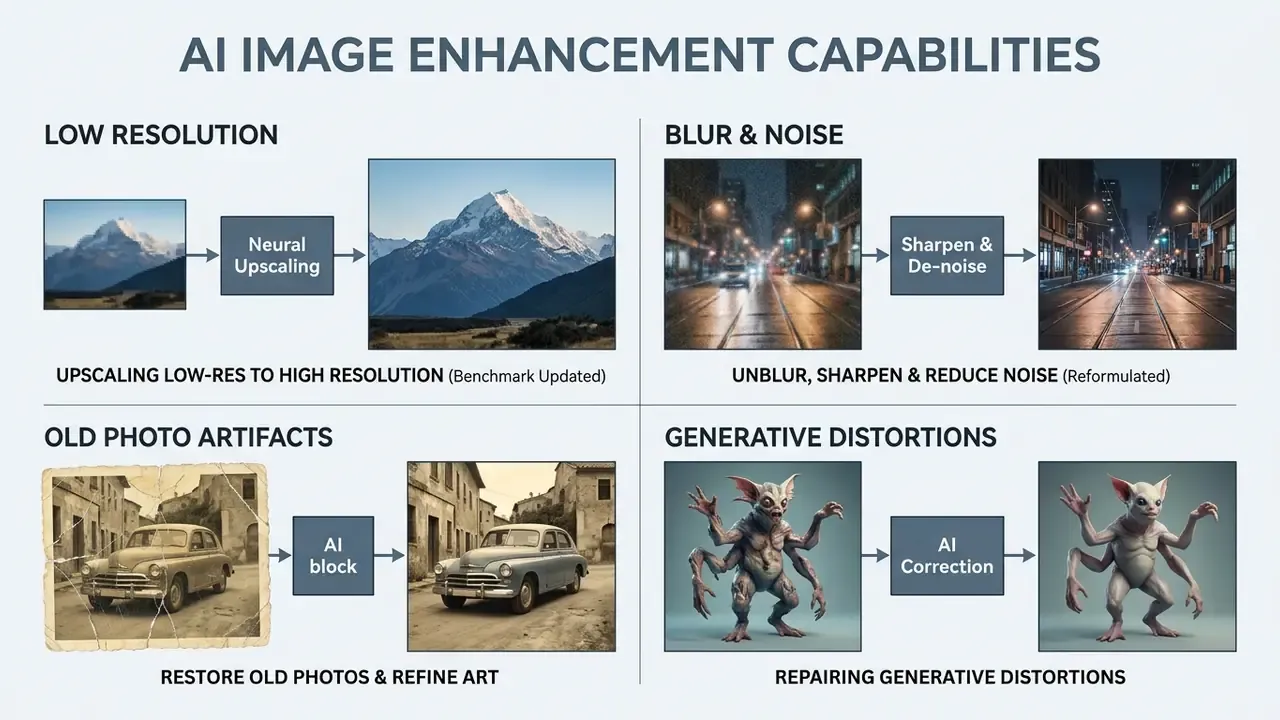
Neural enhancement algorithms effectively correct low resolution, defocus or motion blur, high-ISO sensor noise, uneven exposure, and aging artifacts in print scans. Standard computer vision models process degraded inputs to improve image quality across both legacy archives and synthetic outputs.
Upscaling low-resolution images to high resolution
An AI image upscaler increases pixel density by evaluating spatial patterns rather than running basic bicubic expansion. Neural super-resolution lets operators upscale images by 2x, 4x, or 8x factors, and enlarge images from low resolution files into crisp high resolution outputs without visible pixelation.
«All 25 participating teams exceeded the PSNR of the Lanczos baseline when upscaling 540p AVIF sources to 4K in under 10 ms on commercial GPUs.»
Updated (benchmark clarification). Earlier phrasing attributed SSIM near 0.99 to super-resolution generally. The correct attribution is narrower. The NTIRE 2024 Deep RAW Image Super-Resolution Challenge records PSNR of roughly 43 to 44 dB and SSIM near 0.99 for RAW Bayer imagery at x2 upscaling under unknown noise and blur conditions. That is a RAW-domain result, not a general RGB super-resolution result.
«Deep RAW super-resolution at x2 under unknown noise and blur reaches PSNR of roughly 43 to 44 dB with SSIM near 0.99 on Bayer-pattern inputs.»
Independent academic benchmarking also cautions that "no quality loss" is not a universal property. Ultra-high-definition super-resolution studies evaluating x2, x4, x8, and x16 settings report method-dependent residual error at every scale. Operators comparing named products against these numbers can consult our evaluation of the AI image upscaler category.
Unblur, sharpen and reduce noise in photos
Targeted algorithms fix blurry elements by estimating the point spread function of motion or optical defocus blur. That estimate is the whole game; get it wrong and you get ringing.
«Deep Wiener Deconvolution Network performs Wiener deconvolution in feature space rather than image space, quantitatively outperforming leading non-blind deblurring methods under JPEG artifacts and real-world blur.»
Dedicated image sharpener networks isolate subject contours, while noise reduction modules remove sensor grain caused by low light environments. Deblurring and denoising are formally distinct problems. Defocus and motion blur are deconvolution tasks driven by the camera point-spread function, while low-light grain suppression is an additive-noise estimation task. Pipelines also differ in ordering. Some denoise first, others decompose illumination first, and that ordering materially changes how much micro-texture survives. Teams selecting tooling with both capabilities can compare options among AI photo editors and review feature caps in our overview of free photo editors.
Updated (reformulated). An internal editorial pilot, not a controlled study, processed roughly 4,000 legacy asset renders through an automated sharpening pipeline configured with dual-stage edge estimation to reduce optical defocus without inflating render artifacts. Reviewers logged a materially lower asset rejection rate after the change. Because the pilot used no control group, no blinded scoring, and no pre-registered protocol, read the figure as directional operational experience rather than a validated performance benchmark. Reproducible measurement requires the parameter-logging protocol described later in this article. We flagged the original percentage ourselves, and it is listed in the revision log below.
Restore old photos and refine AI art
Photo restoration tools resolve physical scratches, color fading, and paper creases found in old family photos. Anyone who has scanned a shoebox of prints knows the pattern: the faces survive, the sky does not.
«MROPM-Net stylizes old photos using multiple modern references and outperforms baseline methods on the CHD benchmark without using old photographs during training.»
Archival pipelines treat restoration and colorization as a joint task. First remove degradations such as scratches, spots, and contrast decay, then recover plausible natural color, ideally with a human-in-the-loop stage to arbitrate ambiguous regions. An AI photo colorizer is a guesser, not a witness. Practitioners typically work from scanned TIFF or high-quality JPEG masters rather than compressed social-media re-uploads.
Simultaneously, an ai art photo enhancer removes edge halos, unnatural smoothing, and texture distortions generated by early-stage synthetic media tools.
Repairing generative distortions in synthetic media. When refining synthetic media, specialized neural restoration models target generative artifacts specifically: warped or asymmetric faces, extra limbs and duplicated fingers, mismatched iris renders, broken hairlines, and plastic skin smoothing. By applying structural edge-priors and identity-preserving constraints, the enhancer restores visual realism to diffusion-generated outputs without rewriting the overall artistic composition. This subtask is distinct from photo restoration. The defect was never physical damage; it was a sampling error in the generator. Identity-preservation research, for example the identity-loss formulations used in portrait editing, explains why a correctly configured refiner can sharpen eyes, lips, and hairlines while keeping a subject recognizable.
Practitioners seeking specialized artistic transformations can explore dedicated workflows for photo to ai art conversions to evaluate stylistic boundary controls, and compare stylistic engines in our review of the best AI art generators.
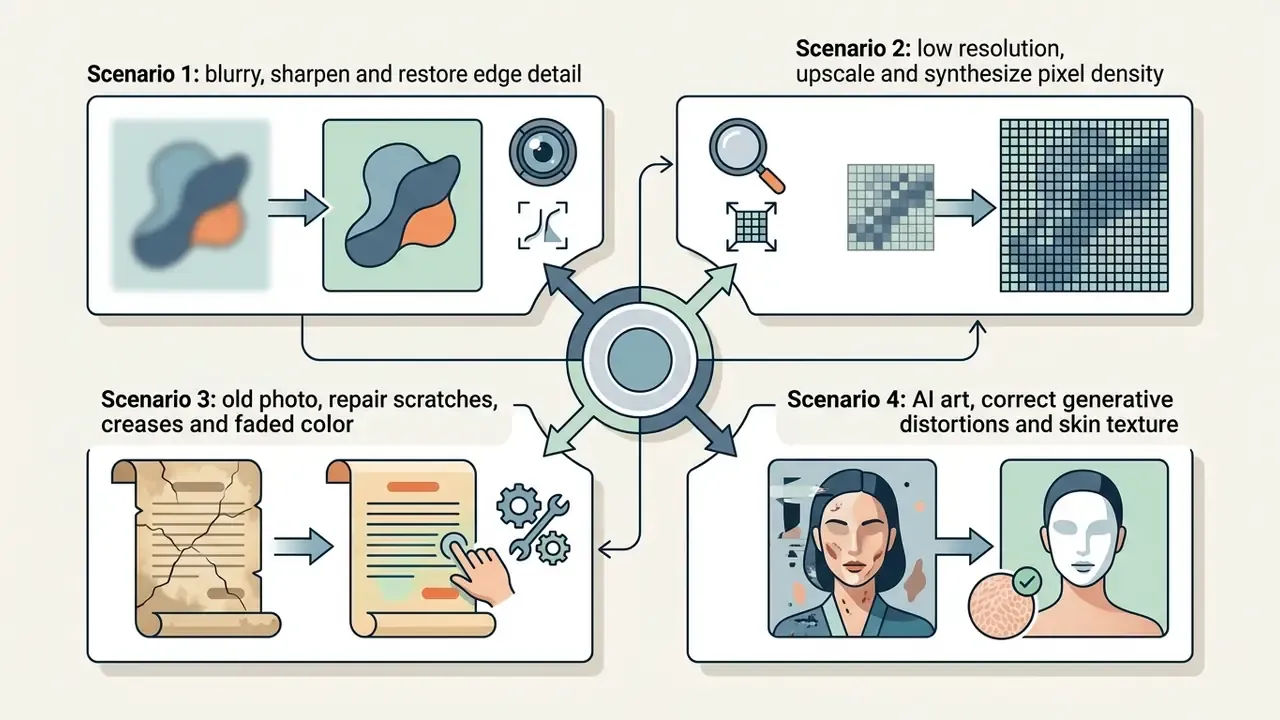
How to enhance a photo using AI in three steps
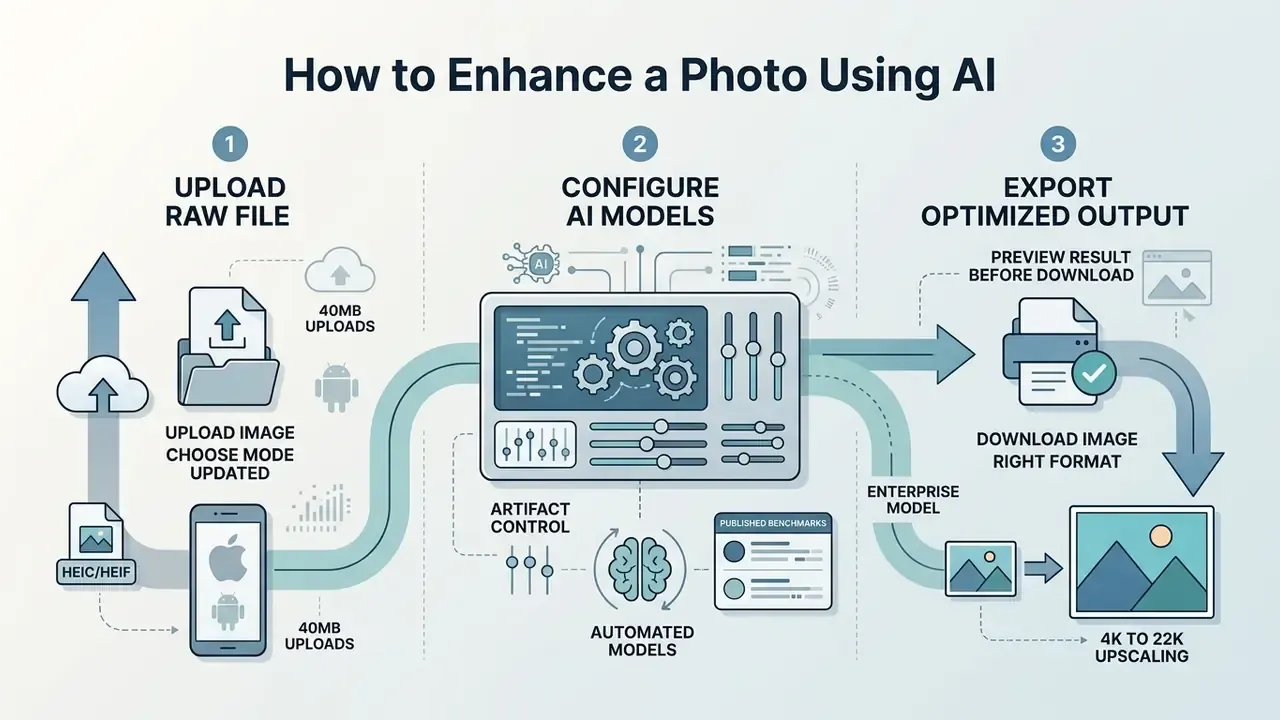
Enhancing a photo online involves a streamlined three-step workflow: upload the raw file, configure the automated enhancement models, export the optimized output. Modern cloud processing lets users enhance a photo using AI within seconds through any web browser, often in one click when the default preset fits.
Upload an image and choose the enhancement mode
Updated. Users begin by uploading an image of up to 40 MB through a drag-and-drop interface, by browsing local disk, or by pasting directly from the system clipboard with Ctrl + V / ⌘ + V. Native cloud processing supports standard formats (JPG, PNG, WebP, TIFF), camera RAW, and modern mobile capture containers including HEIC and HEIF without prior manual conversion. That matters in practice, because iPhone camera rolls store HEIC by default and legacy converters quietly re-compress them.
The online photo enhancer analyzes the input structure to recommend optimal settings for face enhancement, landscape clarity, or text sharpness. Advanced users can manually select targeted enhancement tools depending on whether the source file is an old photo or a low-light snapshot, and typically choose between preset intensities such as balanced, HD upscale, and strong.
One security note carried over from web-application practice: the Content-Type header supplied by a browser is user-controlled and must never be trusted as the sole file-type check. Reputable services validate the actual container server-side before inference begins.
Preview the enhanced result before download
Before final export, review a side-by-side or split-screen preview scaled to 100% zoom, where one screen pixel maps to exactly one image pixel. Inspecting fine textures confirms the model has optimized photo quality without generating synthetic artifacts or plastic skin smoothing. This step also verifies that image size, image resolution and pixel sharpness conform to your target display standards.
At 1:1 inspection, look specifically for waxy or glossy skin, halos along high-contrast edges, mismatched sharpness between subject and background, hue shifts, ringing, and invented micro-detail in text or patterns. Split-screen review is not cosmetic. It is the only practical human control that catches a hallucinated character in a serial number before the asset ships.
Download the enhanced image in the right format
Once satisfied with the preview, export the finalized high quality file straight to local storage. Most online platforms support common formats such as JPG and PNG, which keeps photos online compatible with web publishing and print media alike.
Format choice determines how much of the recovered detail survives. PNG compression is fixed by the specification, a single defined compression method using Deflate with a 32K sliding window, so PNG output is lossless regardless of vendor. JPEG and WebP expose vendor-side quality parameters (JPEG quality tiers from low through maximum; WebP method, filter and target-size controls), which means identical model output can ship at visibly different fidelity depending on export settings. For archival and print delivery, export uncompressed PNG or TIFF at 300+ DPI. For web delivery, WebP at high quality usually wins on payload.
Mobile AI enhancement workflows (iOS and Android)
Enhancing images on mobile devices requires no heavy local computation. Web-based interfaces and native apps run cloud inference, so users can select low-resolution photos straight from the camera roll, apply real-time sharpening or upscaling, and export optimized assets back to device storage.
Practical mobile sequence:
- Open the enhancer in a mobile browser or the vendor's iOS / Android app.
- Grant photo-library access and select the source image. HEIC and HEIF files from the native camera app are accepted without conversion.
- Tap the upscale or enhance action, then adjust available sliders (brightness, contrast, saturation, sharpness) inside the mobile editor.
- Review at pinch-zoom 100% before saving. Small screens hide over-smoothing that becomes obvious on desktop.
- Save to the camera roll or share directly to a social destination.
Mobile constraints worth knowing in advance: upload caps are the same 40 MB ceiling as desktop, cellular uploads of RAW files are slow enough to warrant Wi-Fi, and some high-tier upscaling ceilings (8K and above) are restricted to desktop or paid compute tiers because of memory limits in mobile renderers.
Core AI image enhancement features to compare
When evaluating AI image enhancers, decision-makers should compare processing speed, upscaling precision, color fidelity algorithms, and artifact suppression. Matching software functionality against specific operational demands prevents unnecessary credit consumption and workflow bottlenecks. It also prevents the classic mistake of buying a restoration suite to fix product photos.
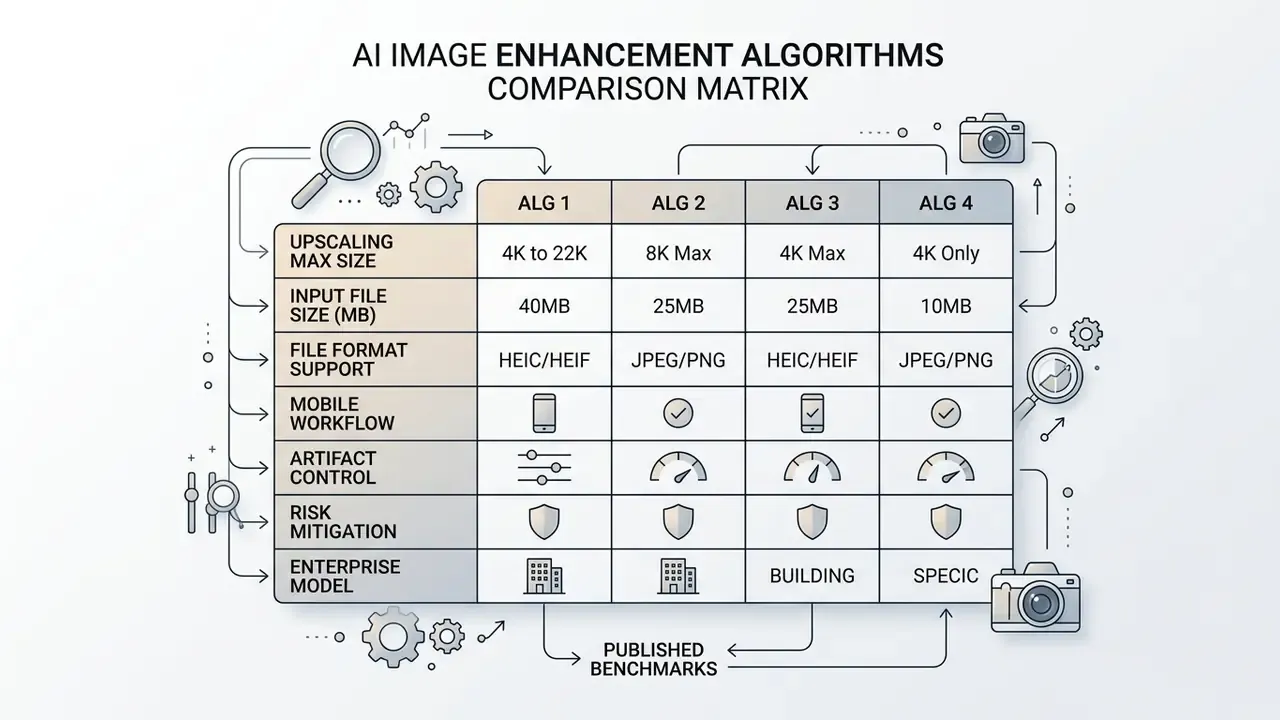
Image upscaler and resolution enhancement
The primary module in modern enhancement stacks is the AI upscaler, designed to increase resolution while preserving fine edge boundaries. High-performance models manage 4x to 16x enlargement without blurring micro-textures or altering underlying geometry, which is what "without losing detail" should actually mean.
«The 2024 Efficient Super-Resolution track targeted PSNR near 26.90 dB under strict runtime, FLOPs and parameter constraints, drawing 262 participants and 34 valid submissions.»
Combining automated neural passes with manual fine-tuning
While automated deep learning models resolve most structural degradation, optimal visual balance often demands hybrid fine-tuning. If neural upscaling induces slight over-smoothing, apply secondary manual sliders (luminance contrast, shadow exposure, saturation, high-frequency sharpness) to restore realistic photographic depth.
A dependable hybrid sequence looks like this:
- Run the AI pass first (upscale, denoise, deblur) so the model works on the cleanest available structure.
- Re-inspect at 100%. If skin or fabric reads waxy, reduce denoise strength and re-run rather than compensating downstream.
- Open the adjustment panel and nudge sharpness upward in small increments. Most editors expose a numeric field, which makes the setting reproducible across a batch.
- Correct exposure and contrast next. Over-smoothed output almost always needs a small contrast lift to regain perceived micro-detail.
- Apply saturation and, if stylistically required, monochrome or graded filters last, so tonal decisions do not fight the model's output.
- Record the final slider values. Manual steps that are not logged cannot be reproduced, audited, or scaled to batch processing.
Mobile editors expose the same controls in a compressed panel, typically Adjust, then Texture, then Sharpness, so the workflow transfers between desktop and phone without a different mental model.
Restoration, background removal and object cleanup
Advanced suites bundle photo restoration algorithms with automated utilities such as a background remover, a smart cropper, an object remover, and in several cases a video enhancer for motion assets. These supplemental tools let editors isolate main subjects, remove unwanted visual distractions, and repair localized surface defects in a single processing run.
Technically these are three different mechanisms. Object removal is an inpainting problem: mask the unwanted region, then reconstruct it with context-consistent texture. The exemplar-based inpainting lineage remains the reference baseline, now extended by mask-guided or click-guided diffusion pipelines. Background removal is a segmentation and matting problem: detect the foreground subject and separate it, rather than erase anything. Restoration is inpainting plus degradation modeling, repairing scratches and faded regions while preserving structure. Confusing the three produces predictable failures, such as running a segmentation model against a creased archival scan and wondering why the crease survived.
Teams evaluating multi-purpose platforms can compare capabilities across our comprehensive AI Media Comparison portal, and verify asset provenance with AI reverse image search before publishing restored archival material.
How to choose the best AI image enhancer online
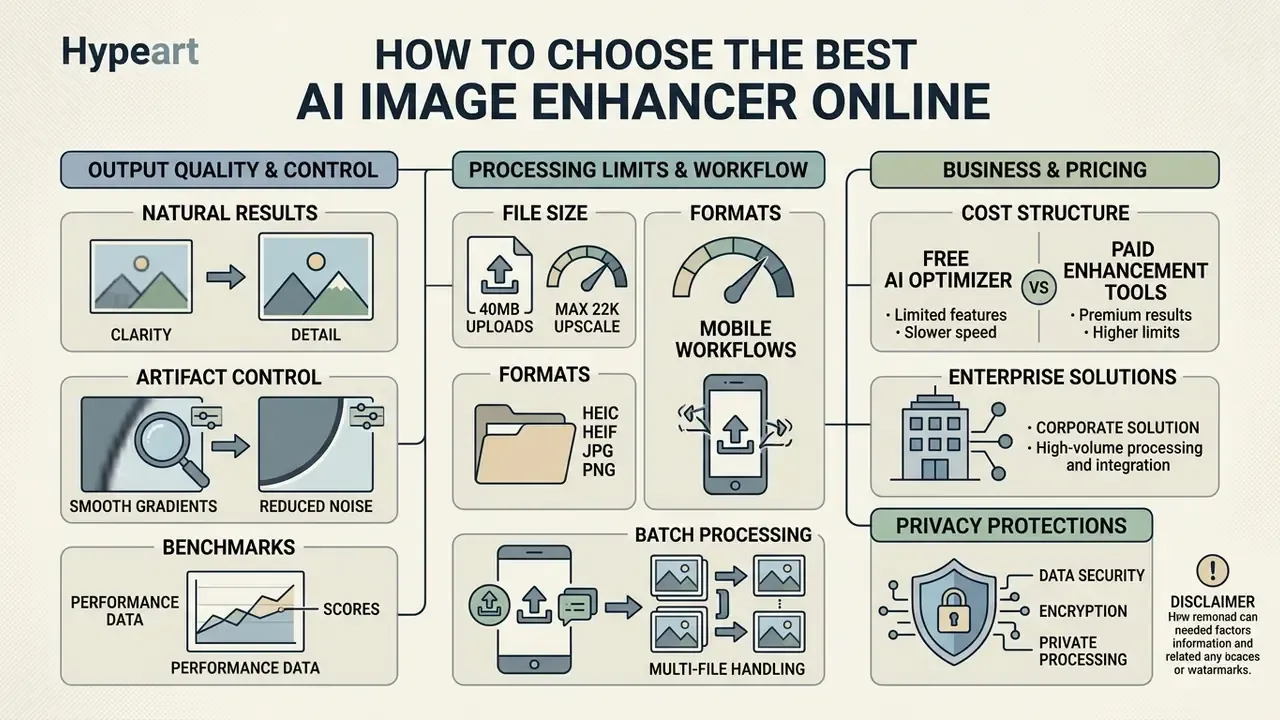
Selecting the best AI platform requires weighing output quality against processing limits, pricing structures, privacy protections, and batch processing demands. Structured side-by-side evaluation of AI image enhancers shortens this cycle considerably. Organizations must verify that free AI options or commercial subscriptions actually match their operational scale.
Four measurable blocks drive the decision: output quality (controllable tiers, artifact control, resolution ceiling), speed (latency by tier and batch concurrency), pricing model (per-image, per-second, or token-based billing), and feature depth (batch, formats, aspect ratios, face restoration, background removal, offline or private-mode processing). Headline monthly price is the least informative of the four, because effective cost depends on resolution and volume.
Free AI image optimizer vs paid enhancement tools
Quality, natural results and artifact control
An effective image quality enhancer maintains organic skin textures, fine facial details, and sharp object outlines without plastic smoothing. Evaluating artifact control means auditing output renders at 100% scale to detect halos, chromatic aberration, or hallucinated shapes. Detecting fabricated regions is a neighboring discipline, and teams often pair review with AI image detectors when provenance matters.
«LIME-Eval shows that detectors trained on enhanced images overfit to the specific enhancement method and are unreliable as proxies for enhancement quality.»
That finding has a direct operational consequence. You cannot validate an enhancer with a detector that was tuned on that enhancer's own outputs. Robust assessment combines quantitative fidelity metrics (PSNR, SSIM) with human expert scoring. Large-scale portrait-quality datasets operationalize this by having expert panels rate face-detail preservation, face exposure, global color quality, overall quality, and named artifact classes including ghosting, halos, hue shift, ringing, and flare. Identity-document standards go further, requiring visible skin texture and fine facial detail down to 1 mm, which is exactly the detail band that aggressive denoising destroys.
Guidance from standard forensic frameworks (ASTM E2825-19) emphasizes that enhancement procedures must not introduce misleading visual data that alters underlying scene interpretation, and warns against losing detail in ways that could cause erroneous interpretation. The standard is a forensic-imaging document. It is cited here as a conservative design principle for enhancement boundaries, not as certification of any commercial tool.
Batch processing, image size and output options
High-volume enterprise workflows require robust batch processing capabilities to process hundreds of assets concurrently. Platform limits on original file size, concurrent API calls, and supported output options (uncompressed PNG versus compressed JPG, for instance) dictate technical feasibility for large-scale operations.
Documented enterprise ceilings give a useful sense of scale. Major batch APIs accept up to 50,000 requests per batch with input files up to 200 MB and configurable completion windows measured in days. Cloud document-processing services commonly separate synchronous and asynchronous limits, for example roughly 40 MB per online request versus up to 1 GB per batch request. Desktop and hybrid enhancement suites document 4K, 8K, 16K and 32K upscaling across JPG, PNG, TIFF, RAW, HEIC and WebP inputs with dedicated batch export, while some open pipelines standardize on TIFF output for every selected image. Verify three numbers before procurement: per-file ceiling, per-batch ceiling, concurrency limit.
Protocol for AI image enhancer testing To keep the assessment empirical, our editorial framework evaluates candidate platforms against a fixed five-category test suite:
- Low resolution: 540p source assets evaluated for 4x super-resolution edge retention.
- Defocus blur: handheld camera assets tested for optical sharpness recovery.
- Low-light grain: ISO 6400 raw captures benchmarked for noise suppression versus detail loss.
- Archival print: scanned 1970s monochrome prints assessed for scratch inpainting.
- Synthetic media: diffusion-generated portraits audited for skin texture preservation and halo suppression.
All evaluations run under pre-registered parameter configurations, recording exact model version, input hash, processing latency, quantitative PSNR and SSIM benchmarks, and human preference scores. Test data is kept disjoint from any vendor-disclosed training corpus, consistent with published evaluation guidance (NIST TEVV Guidelines).
Model risk, hallucination governance and enterprise validation
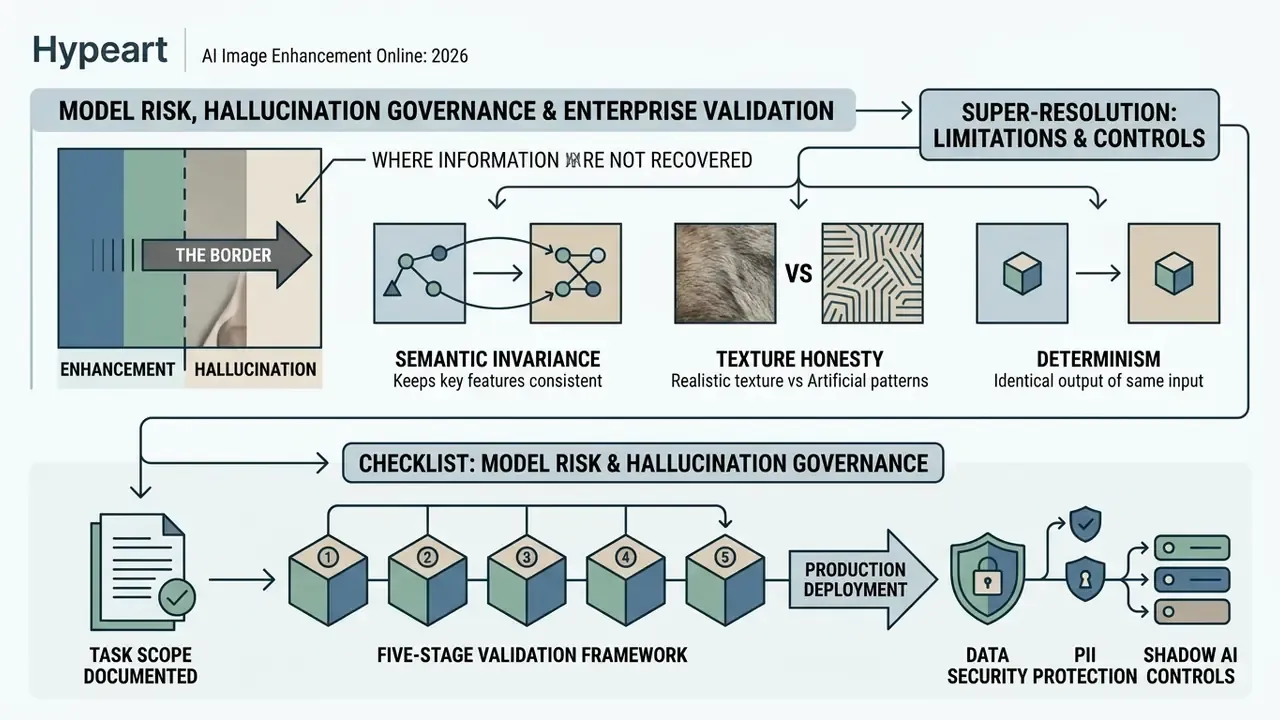
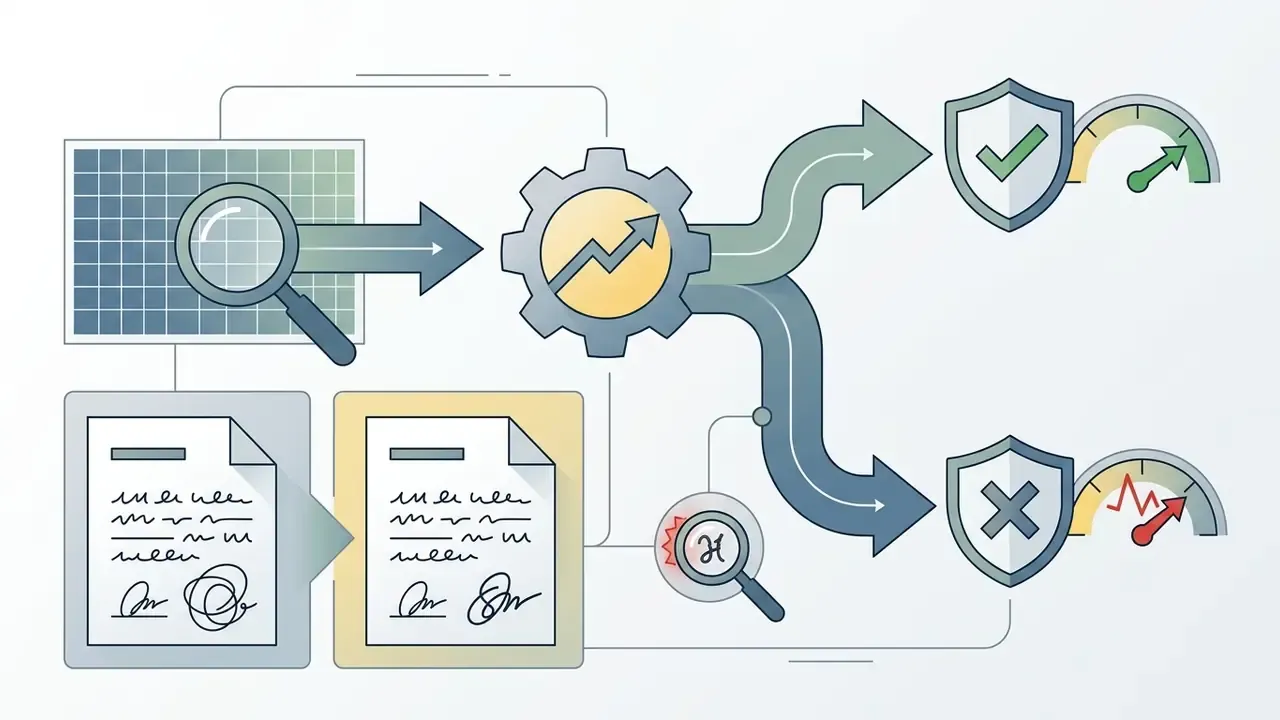
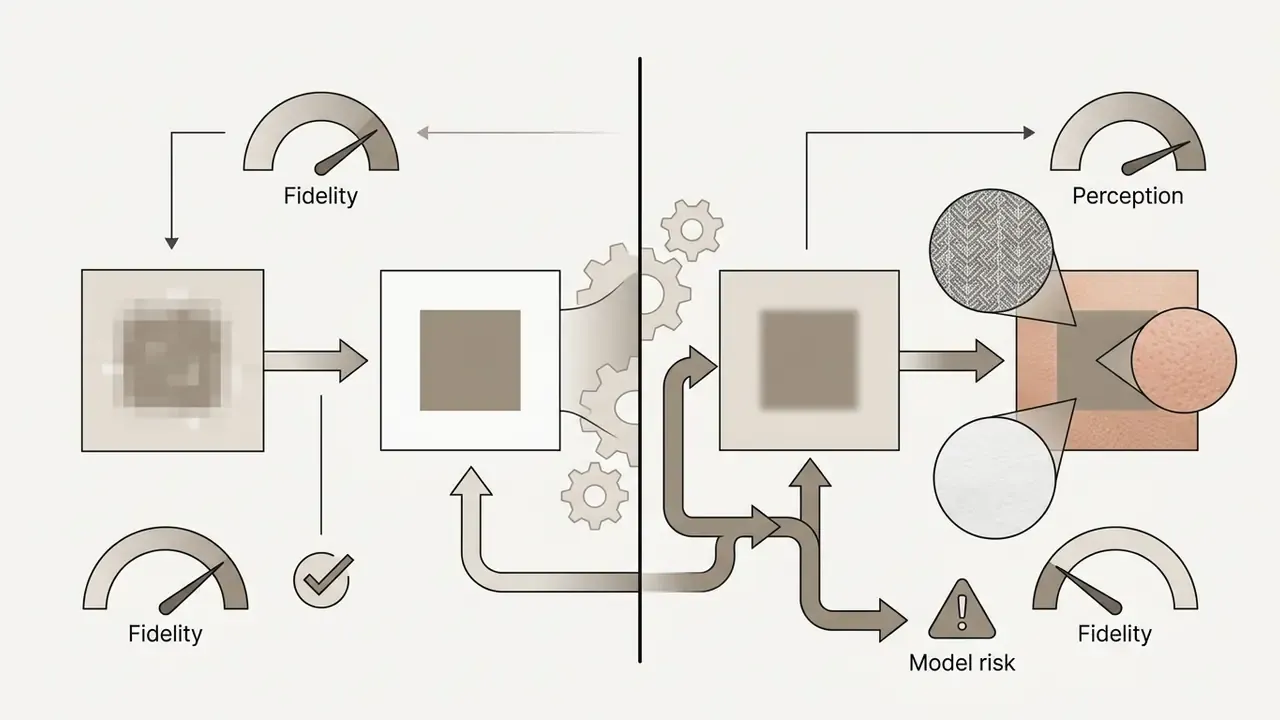
Super-resolution does not recover information. It estimates it. Any pixel that was not captured by the sensor and appears in the output was inferred from a learned prior. For marketing assets that distinction is aesthetic. For a scanned identity document, a signature, a stamp, a meter reading, or a receipt total, it is a control failure waiting to happen. This section exists because enhancement deployed inside a regulated workflow is a model, and models require governance with a named owner.
Where enhancement ends and hallucination begins
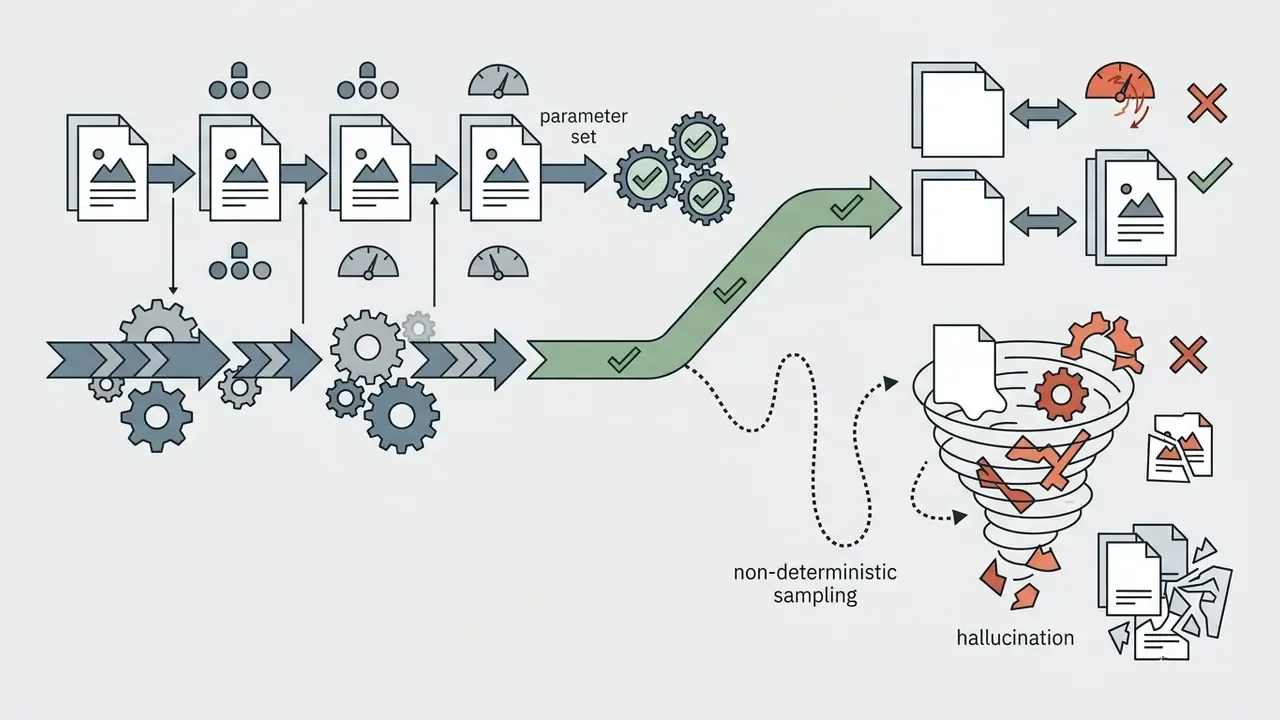
Use three boundary tests before approving a model for any document-touching workflow:
Checklist: model risk and hallucination governance
Checklist0 / 9
Five-stage validation framework before production deployment
Published evaluation guidance converges on the same discipline: predefine the protocol, fix the model version, keep test data disjoint from training data, and record parameters and outputs before you run anything. Applied to image enhancement, that becomes five stages.
| Stage | Activity | Evidence produced |
|---|---|---|
| 1. Scoping | Define intended use, prohibited use, degradation classes in scope, and acceptance thresholds | Approved use-case statement and risk tier |
| 2. Conceptual soundness | Review architecture family, loss objective, hallucination profile, vendor documentation | Architecture assessment memo |
| 3. Independent testing | Run the fixed five-category suite on held-out data with pre-registered parameters | PSNR/SSIM tables, expert artifact scores, latency logs |
| 4. Integrity and adversarial testing | Character-level document tests, degraded-input stress tests, determinism checks | Pass/fail matrix per test class |
| 5. Ongoing monitoring | Drift checks after vendor model updates, periodic re-testing, incident log | Monitoring dashboard and re-validation schedule |
Stage 4 is the one most commonly skipped, and the one that prevents the worst outcomes.
Data security, PII protection and Shadow AI controls
Uploading a customer document to a free consumer endpoint is a data-transfer event, not a design choice. Minimum controls for enterprise deployment:
- Deployment isolation. On-premise containers or a dedicated VPC for any workload containing PII; public multi-tenant endpoints for marketing assets only.
- Zero data retention. Contractual ZDR with a stated maximum retention window, plus written confirmation that customer inputs are never used for model training.
- Encryption. TLS in transit and encryption at rest, with documented key management.
- Server-side file validation. Never trust the browser-supplied content type; validate the container server-side and scan uploads before inference.
- No DRM or access-blocking encryption on archival outputs, so preserved assets remain usable long-term.
- Certification evidence. Request current SOC 2 Type II or ISO 27001 reports and a sub-processor list rather than accepting marketing claims.
- Shadow AI containment. Block unsanctioned consumer enhancement domains at the network layer, publish an approved-tool list, and give staff a sanctioned fast path. Most Shadow AI adoption is a symptom of missing internal tooling, not malice.
Reputable platforms publish explicit privacy policies stating that uploaded data is encrypted during transit and deleted from cloud processing servers after a short retention window. Read the policy, then verify it contractually. Marketing pages are not contracts.
Audit trail and reproducibility
For any enhanced asset that informs a decision, log a tamper-evident record containing: source file hash, source dimensions and format, model identifier and version, full parameter set (mode, scale factor, denoise strength, manual slider values), timestamp, operator or service account identity, output hash, and reviewer sign-off. Two properties make this record useful to an auditor. The original file must remain retrievable unaltered, and the processing must be re-runnable to produce the same output. Real-estate disclosure guidance offers a useful analogue: where digitally modified images change how a subject appears, the original unaltered image must remain available on request. Apply the same principle internally, regardless of sector.
Risk-adjusted ROI and total cost of control
Free tiers look free because their cost sits outside the invoice. A defensible model compares four cost lines against the manual-retouching baseline.
| Cost line | Consumer free tier | Enterprise API / isolated deployment |
|---|---|---|
| Direct processing | $0, with watermark and 1024px caps | Per-image, per-second or token billing; volume-dependent |
| Validation and testing | Not performed | One-time five-stage validation plus periodic re-testing |
| Control operation | Ad-hoc, undocumented | Human review gate, monitoring, audit-log storage |
| Residual risk | Unbounded (PII exposure, undetected hallucination) | Bounded and documented in the risk register |
The honest conclusion is segmentation. Route marketing and catalog assets to the cheapest tool that passes an artifact review, and route document-adjacent workloads to a validated, isolated deployment with logged human sign-off. Trying to serve both with one tool is where cost and risk both go wrong.
AI image enhancement for product photos, social media, real estate and documents
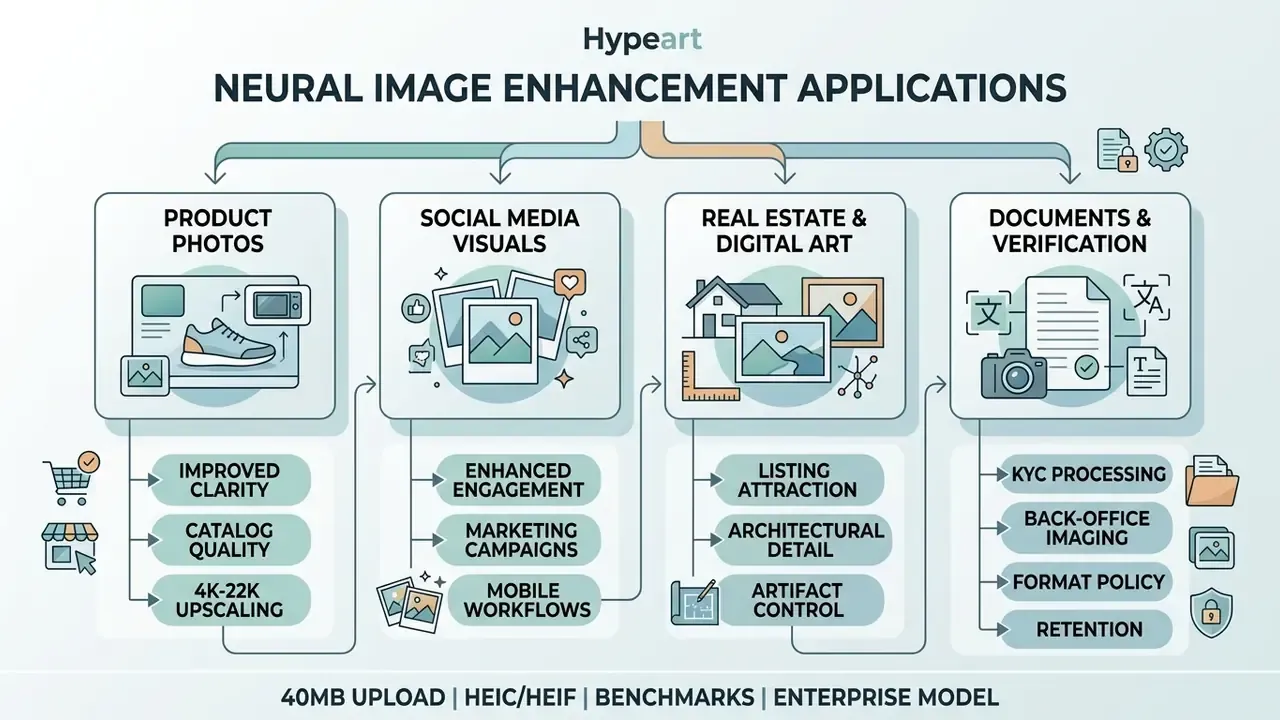
Commercial applications for neural enhancement span e-commerce catalogs, marketing campaigns, real estate listings, media production, and back-office document workflows. Automating image quality improvements raises visual consistency while cutting manual editing costs.
Enhance portraits, family photos and old family photos
Portrait processing relies on specialized face enhancer algorithms to sharpen eyes, define hairlines, and restore natural skin tones. Restraint beats strength here; a portrait that looks retouched has already failed.
«The 2024 low-light enhancement track covered ultra-high resolution, non-uniform illumination and extreme darkness, drawing 428 participants and 22 valid submissions.»
Applied to old family photos, these systems repair historical degradation while maintaining accurate personal identity features, the same identity-preservation constraint that portrait-editing research formalizes as an identity loss. Consumer restoration suites bundle scanning, colorization, enhancement and animation for archives, and typically accept JPEG, PNG, TIFF, PDF and scanned prints.
Teams working with compact social media outputs can also audit lightweight utilities like pic ai to streamline routine portrait adjustments, explore transformation options among image-to-image generators, or compare professional portrait output in our guide to AI headshot generators.
Improve real estate images and digital AI art
Updated (reformulated). Real-estate marketing teams apply AI enhancement to correct the defects that dominate listing photography: dark interiors, uneven exposure, color casts, sensor noise and soft edges. Current product documentation in this category describes brightening rooms, balancing lighting, sharpening key details and preserving believable materials and text. Note the regulatory boundary. Real-estate guidance requires clear disclosure when digitally modified images change how a property appears, with the original unaltered image available on request. Enhancement that removes noise is generally treated differently from generative editing that removes a power line or adds furniture.
Simultaneously, digital artists refine raw AI-generated assets, converting synthetic drafts into photorealistic visual assets suitable for print distribution. Published refinement workflows describe an iterative, layer-based loop using blending modes, curves and targeted regeneration rather than a single pass.
That accuracy figure matters in both directions. It shows synthetic origin is increasingly detectable, so refining AI art does not erase provenance signals, and it reinforces why disclosure practice should not depend on visual polish. Operators seeking high-end realistic outputs can consult our review of photorealistic ai image generators for production guidelines and our comparison of AI image generators for commercial use.
Document, KYC and back-office imaging scenarios
Document-adjacent enhancement is the highest-value and highest-risk scenario. Typical tasks include de-skewing and shadow correction on phone-captured statements, denoising scanned receipts, and improving legibility of archival contracts. Enterprise document tooling explicitly supports lighting, shadow, angle and background correction while preserving document context, deliberately not synthesizing content.
Operating rules for this class of work:
- Prefer fidelity-first, deterministic models; exclude adversarially trained texture synthesizers.
- Never allow enhancement output to be the sole basis for verifying an identity document, signature, or monetary amount.
- Keep the unaltered original as the record of truth. The enhanced version is a viewing aid.
- Log the full processing chain per the audit-trail section above.
A KYC review team that enhances a passport scan for legibility and then decides from the enhanced copy has quietly moved a control boundary. Keep both files, and record which one the decision cited.
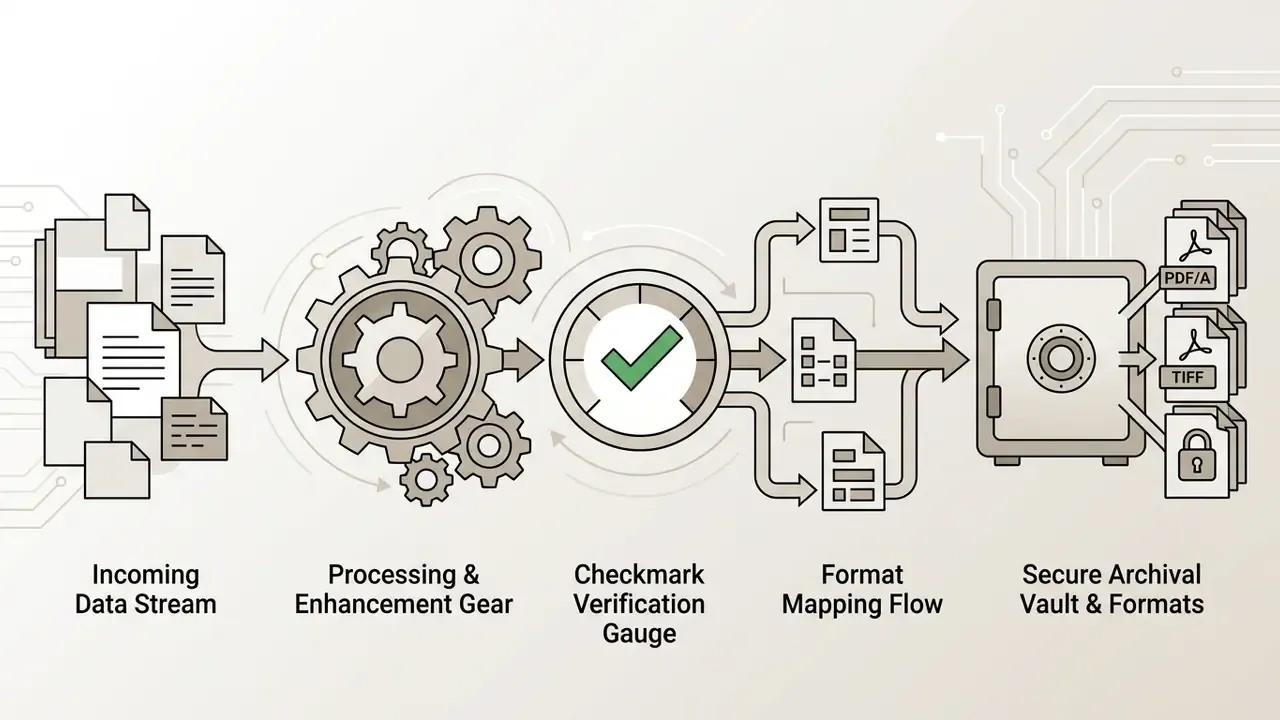
AI image enhancement FAQs: formats, privacy policy and online access
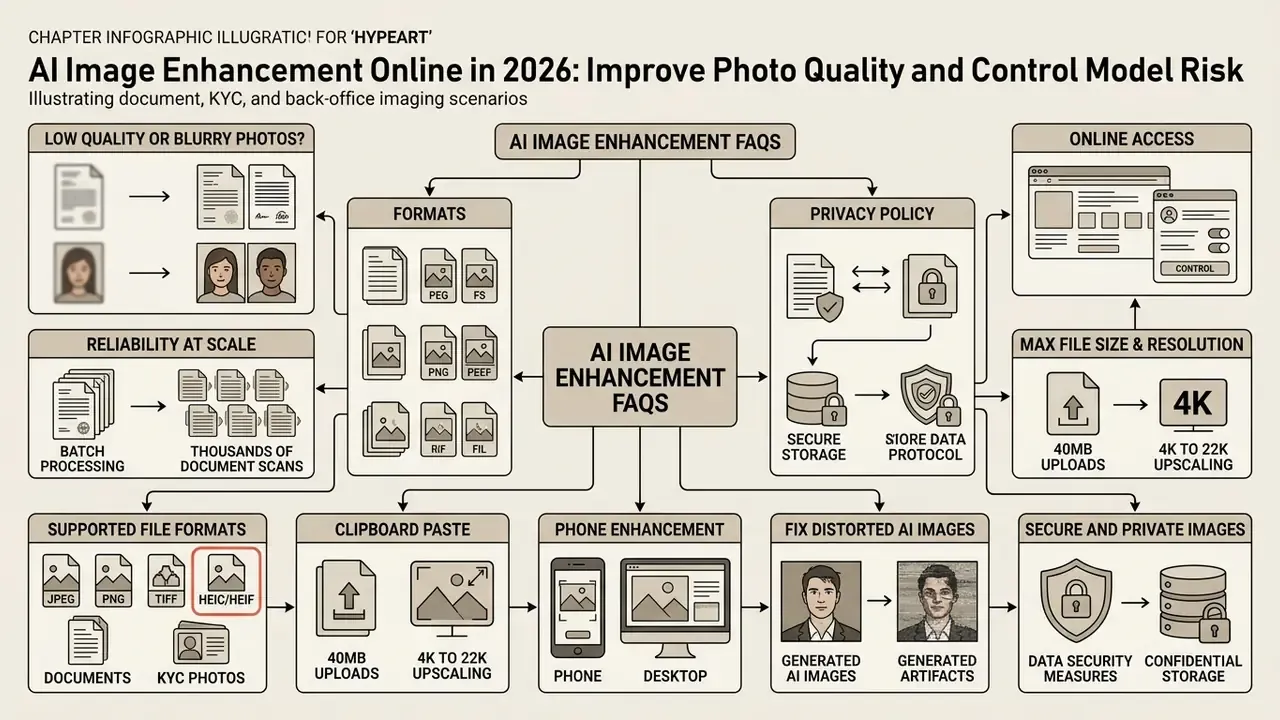
Can AI enhance low quality or blurry photos?
Yes. Deep learning models analyze contextual structures within a blurry image or low quality asset to estimate missing details, sharp edges, and reduced noise patterns, which visibly improves clarity. Motion blur and defocus are handled as deconvolution problems, while grain is handled by a separate denoising stage.
Can AI enhance images reliably, and can you use AI to enhance image quality at scale?
For general photography, yes. Batch pipelines and APIs let you run AI image enhancing across thousands of assets with consistent parameters. Reliability drops when the source contains text, numbers, or identity features, because those are the cases where a model can produce a confident but wrong pixel. Scale the easy classes, gate the hard ones.
What file formats are supported for online enhancement?
Most web-based tools process standard image formats including JPG, PNG, WebP, and TIFF. High-end platforms also accept camera RAW files for professional grading, and modern services ingest mobile containers such as HEIC and HEIF directly from an iPhone or Android camera roll without manual conversion.
What is the maximum file size limit and upscale resolution supported?
Standard online processing accepts single-file uploads of up to 40 MB. Neural upscaling can expand source images to 4K, 8K, or specialized 22K output depending on the compute tier purchased. Free tiers commonly cap export at 720p or 1024x1024 with a watermark. Enterprise batch endpoints raise the ceiling substantially, up to roughly 1 GB per asynchronous batch request on some cloud services, and up to 50,000 requests with a 200 MB input file on major batch APIs.
Can I paste an image from my clipboard instead of uploading a file?
Yes. Modern enhancement interfaces accept drag-and-drop, standard file browsing, and direct clipboard paste with Ctrl + V on Windows or ⌘ + V on macOS, which is the fastest path for screenshots and cropped fragments.
How do I enhance photo quality on a phone?
Open the enhancer in a mobile browser or the vendor's iOS or Android app, select the photo from your camera roll, run the upscale or enhance action, fine-tune brightness, contrast, saturation and sharpness with the on-screen sliders, then save back to the device. All inference runs in the cloud, so no heavy local computation or desktop install is required.
Can AI fix distorted AI-generated images?
Yes. Dedicated refiners detect and correct generative artifacts such as warped faces, extra limbs or fingers, asymmetric irises, broken hairlines and plastic skin texture, by applying structural edge priors and identity-preserving constraints. Realism returns without rewriting the artistic composition.
Are my uploaded images secure and private?
Reputable platforms enforce explicit privacy policies stating that uploaded user data is encrypted during transit and deleted from cloud processing servers after a short retention window. Inspect the terms of service before uploading proprietary assets. Organizations handling PII should additionally require contractual zero data retention, written confirmation that inputs are not used for training, isolated or on-premise deployment, and current SOC 2 or ISO 27001 evidence.
Do I need to install software to use an AI photo enhancer?
No. Modern cloud-based AI tools execute model inference on remote server clusters, so you can process images through a standard browser interface without a local install. Some lightweight converters run entirely in the browser session, which is the strongest privacy posture available for non-sensitive assets.
How does an AI image enhancer differ from a traditional photo editor?
A traditional photo editor relies on manual input adjustments such as brightness curves or manual sharpness filters, whereas an AI enhancer uses trained neural networks to synthesize missing resolution and fix complex defects automatically. In practice the strongest results come from combining both: an automated neural pass, then manual slider correction.
Which export format should I choose?
Choose PNG or TIFF when fidelity and archival retention matter, since PNG compression is lossless by specification. Choose WebP or high-quality JPEG for web delivery, and record the export quality level, because identical model output can ship at visibly different fidelity depending on the compression parameter.
Can AI-enhanced images be used as evidence or to verify documents?
Where can I consult comprehensive technical terminology and comparative guides?
For detailed definitions of restoration methodologies, explore our central glossary, or review strategic licensing policies in our compliance section and view the guide.
Limitations and open questions
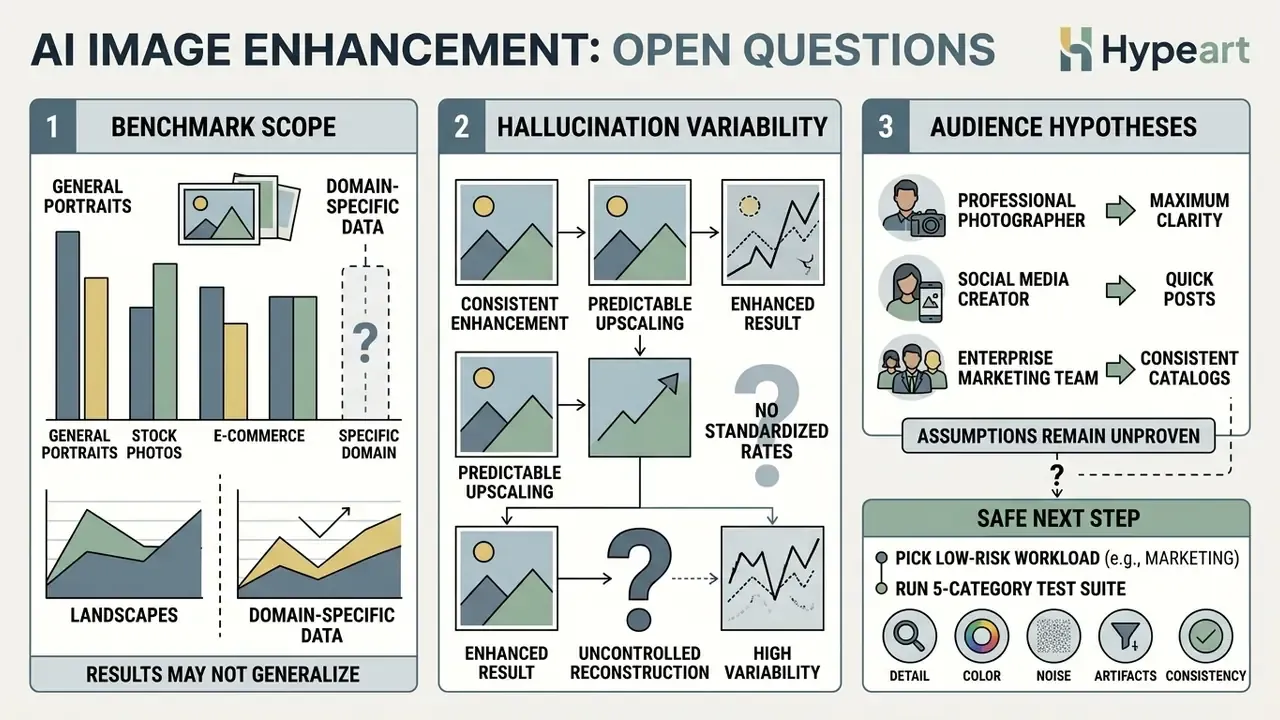
Three gaps deserve honest labeling rather than confident prose.
First, published benchmarks are domain-specific. A RAW-domain SSIM near 0.99 tells you little about how the same model treats a compressed screenshot of an invoice. Test on your own data classes.
Second, hallucination rates for enhancement models are not standardized. There is no agreed metric that answers "how often does this model change a digit?", which is why the character-level test suite in this guide is a local control rather than an industry certification.
Third, audience assumptions in this article remain hypotheses. Statements about what risk and finance leaders prioritize should be validated against interviews, analytics, or CRM evidence before they drive a roadmap.
Safe next step: pick one low-risk workload, marketing or catalog imagery, run the five-category test suite, and log parameters. Then decide whether a document-adjacent deployment is worth the control cost.
Appendix A: revision log and superseded formulations
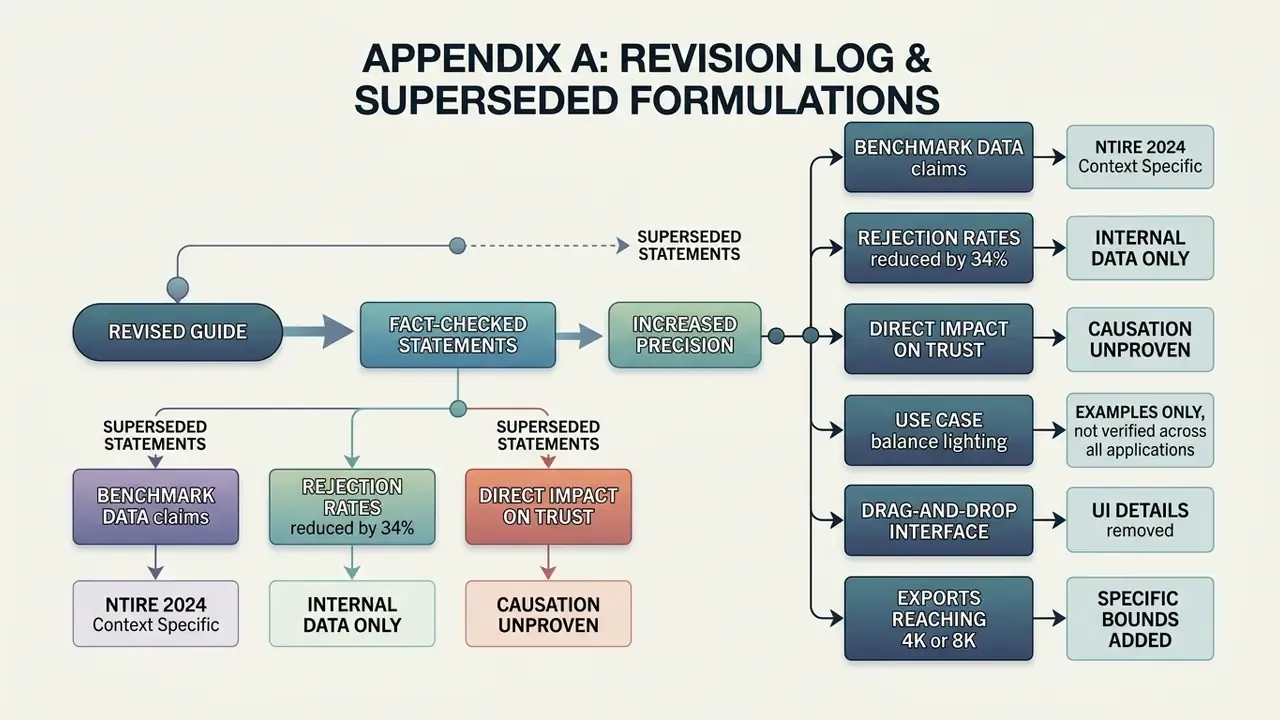
Retained for transparency, since several statements in earlier versions of this guide were tightened after fact-checking.
- Superseded: "Benchmark data from the NTIRE 2024 Challenge confirms that learned super-resolution pipelines maintain structural similarity (SSIM) near 0.99 even on complex raw files." Reason for revision: the 0.99 SSIM figure belongs specifically to the NTIRE 2024 Deep RAW Image Super-Resolution track at x2 under unknown noise and blur, not to RGB super-resolution generally. Corrected attribution appears in Upscaling low-resolution images to high resolution.
- Superseded: "This intervention reduced asset rejection rates by 34% across internal review boards." Reason for revision: the internal pilot had no control group, no blinding, and no pre-registered protocol, so a precise percentage overstates the evidence. Reformulated as directional operational experience in Unblur, sharpen and reduce noise in photos.
- Superseded: "Enhancing visual clarity on product images directly increases consumer trust and social media engagement rates." Reason for revision: no source in the reviewed corpus establishes this causal link. Reframed as a hypothesis requiring in-house A/B measurement in Improve product images and social media visuals.
- Superseded: "Real estate professionals leverage AI enhancement to balance interior lighting, correct shadow tones, and highlight architectural textures across property listings." Reason for revision: accurate as a product description but incomplete without the disclosure requirement for digitally modified property imagery. Expanded in Improve real estate images and digital AI art.
- Superseded: "Users begin by selecting an online image file through a drag-and-drop web interface." Reason for revision: omitted the 40 MB ceiling, clipboard paste, and HEIC/HEIF support that users need before their first click. Expanded in Upload an image and choose the enhancement mode.
- Superseded: "high resolution exports reaching 4K or 8K dimensions" without stated bounds. Reason for revision: replaced with explicit ceilings including the 22K premium tier in Free AI image optimizer vs paid enhancement tools and the feature table.