Why should a compliance or risk lead care about a photo tool? Because an upscaler is a generative model running on corporate data. That makes it both a media utility and a model-risk object.
Executive Summary (Key Takeaways)
- AI upscaling is inference, not recovery.An ai image upscaler 4k online free tool synthesizes statistically plausible pixels from learned priors. It never extracts lost sensor data, which makes every 4x output an estimate rather than evidence.
- Scale factor drives risk.1080p to 4K needs only 2x and stays visually safe. 540p to 4K needs 4x, measurably reduces fidelity, and raises the probability of hallucinated micro-detail, distorted small text and altered facial geometry.
- Architecture defines your data exposure.Browser-side WebGPU or WebAssembly execution keeps files on the local device. Cloud GPU queues transmit assets to third-party infrastructure and require documented zero-retention and deletion windows before any confidential file is uploaded.
- Upscaling creates no new rights.A clean, watermark-free 4K export does not cure underlying copyright issues, and purely machine-generated material lacks independent copyright protection under current US Copyright Office guidance.
- Operational workflowassess source suitability, choose the minimum viable scale factor, inspect the preview at 100%, escalate distorted faces, logos or documents to manual review, and only then publish or print.
- Ownership matters.Name an owner for the tool, log the approval, and record the retention window. Shadow AI usually starts with something as harmless as a photo upload.
What an AI Image Enhancer 4K Does and How It Differs From Ordinary Resizing
An ai image enhancer 4k reconstructs an image by applying learned statistical priors from large training datasets to estimate missing pixel values during upscaling. Standard resizing algorithms only calculate local mathematical averages. An ai image upscaler, by contrast, actively identifies object boundaries, reduces noise and synthesizes fine detail on the way to high resolution.
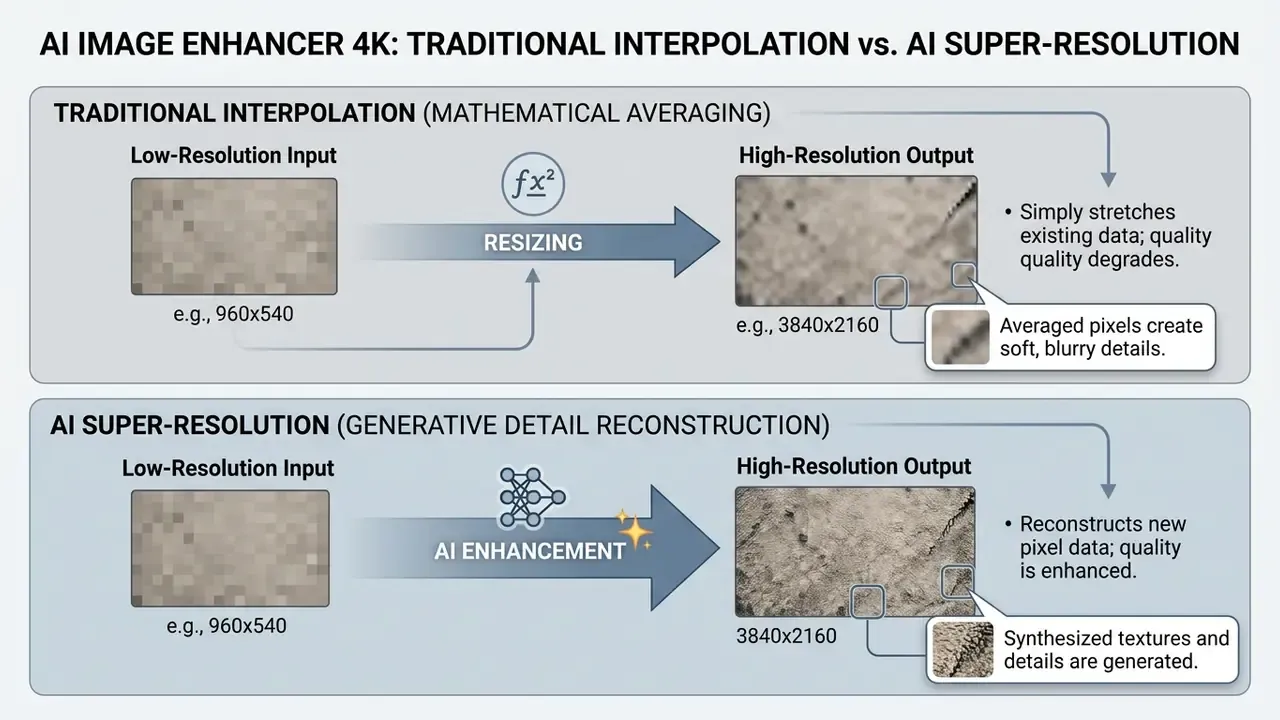
Traditional resampling techniques, such as bicubic or Lanczos interpolation, calculate output pixels strictly from surrounding input pixels. Lanczos resampling acts as a windowed sinc filter. It smoothes transitions, yet it frequently produces soft edges and ringing artifacts when expanding low resolution images.
Super resolution networks work differently. They evaluate contextual patterns across the entire frame. Convolutional neural networks, generative adversarial networks and latent diffusion models each invert the degradation process in their own way. GAN-based super-resolution predicts the high-resolution frame in a single forward pass from a bicubic-upscaled input. Diffusion models use that same low-resolution condition and iteratively denoise toward the final output, which is slower but often more texture-faithful.
«All 25 submitted models outperformed Lanczos in PSNR while upscaling compressed 540p AVIF images to 4K in under 10 ms on commercial GPUs».
To see how generative models behave across creative platforms, teams can compare options across popular image engines and read a dedicated AI image upscaler comparison before standardizing a corporate toolchain.
4K Resolution: How Many Pixels an Image Actually Needs
A standard 4K Ultra High Definition frame requires a spatial resolution of 3840×2160 pixels, roughly 8.29 megapixels in total.
«DCI 4K, used in digital cinema, measures 4096×2160 pixels (~8.85 MP), while consumer UHD is 3840×2160 (~8.29 MP)».
That distinction matters operationally. A file that satisfies consumer UHD delivery specs is still 256 pixels short of the DCI 4K container width used by cinema and broadcast partners. Converting a standard 1080p Full HD image (1920×1080) to 4K needs a 2x linear scaling factor. Converting a 540p image (960×540) needs 4x.
When you operate a 4k picture generator or an upscaler, the arithmetic between source image size and target frame is the whole ballgame:
| Source Format | Source Dimensions | Scale Multiplier | Output Dimensions | Total Megapixels |
|---|---|---|---|---|
| 480p (SD) | 640×480 | 6x (or 4x preset*) | 3840×2880 / 2560×1920 | 11.0 MP / 4.9 MP |
| 540p (qHD) | 960×540 | 4x | 3840×2160 | 8.29 MP (native 4K) |
| 720p (HD) | 1280×720 | 3x (or 4x preset) | 3840×2160 / 5120×2880 | 8.29 MP / 14.7 MP |
| 1080p (FHD) | 1920×1080 | 2x | 3840×2160 | 8.29 MP (native 4K) |
| DCI 4K target | 1024×540 | 4x | 4096×2160 | 8.85 MP (cinema 4K) |
Why AI Upscale Does Not Always Return Real Detail
An ai image upscaler 4k online free tool cannot recover authentic lost signal from severely degraded or blurry images. It generates probabilistic details drawn from its training distribution. With heavily compressed low resolution photos, networks routinely introduce artificial patterns or edge distortions.
Updated (2026). Generative restoration tools add artificial pixel information rather than extracting genuine sensor data. Where severe blur or pixelation is present, reconstructed facial features and fine details can come back twisted with synthetic artifacts. The effect is now quantified by dedicated hallucination metrics:
«The Hallucination Score (HS) shows that diffusion SR models can generate sharp yet semantically incorrect structures that are reflected neither in PSNR nor in NIQE».
The same trade-off appears in information-theoretic analysis of generative restoration: maximizing perceptual sharpness increases the risk of hallucinated details absent from the ground-truth original (see Looks Too Good To Be True: An Information-Theoretic Analysis of Hallucinations in Generative Restoration Models, NeurIPS, 2024). In practice, a "cleaner-looking" 4x output can be less accurate than a softer 2x output, because neither PSNR nor no-reference sharpness metrics penalize invented structure. Earlier editions of this guide cited a NIST OSAC reference document for the same conclusion. That citation is preserved in Appendix A and treated here as unverified pending a public URL.
How to Choose a Free AI Image Upscaler Online: No Sign Up, No Watermark, No Surprises
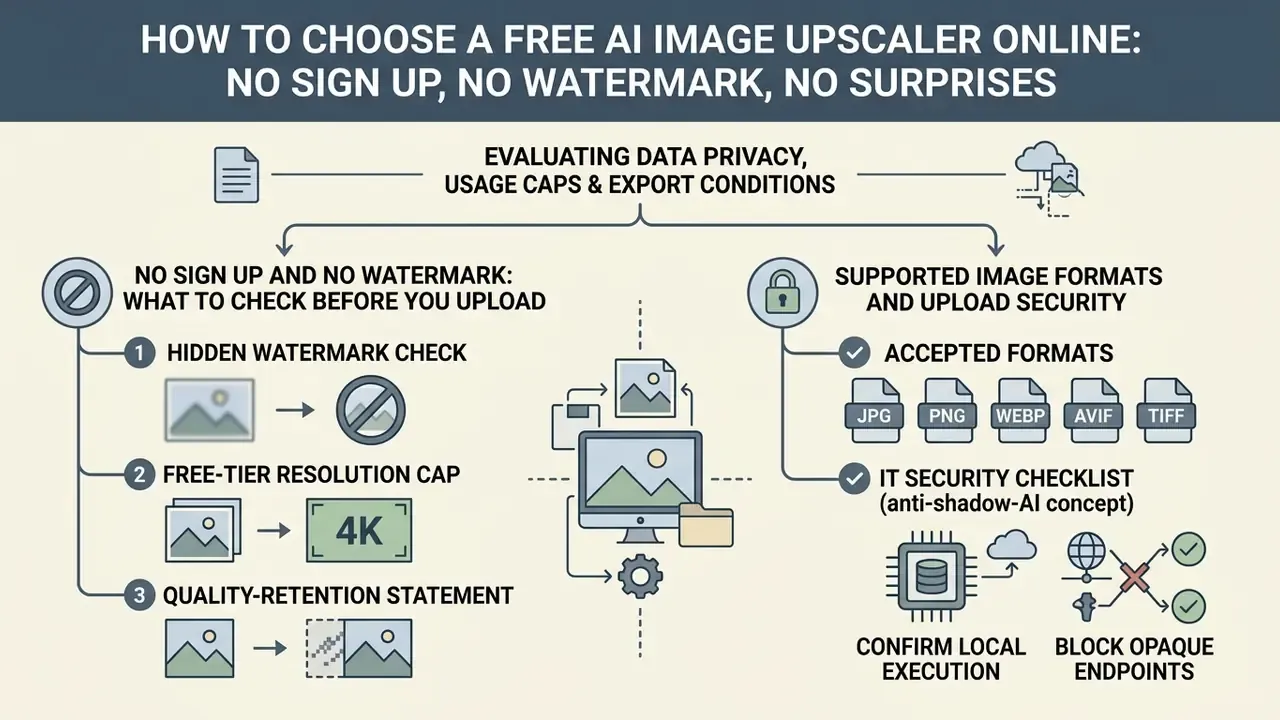
Selecting an ai image upscaler free no sign up platform means evaluating data privacy, usage caps and export conditions before any sensitive media leaves your desk. Verify first whether processing happens locally in the browser or on external cloud servers that retain uploads. Governance teams comparing adjacent categories can also review how general-purpose AI photo editors and free photo editors handle export restrictions and privacy defaults.
Criteria matrix for evaluating free online AI image upscaling platforms
| Evaluation Criterion | Standard Free Tier Limit | Security and Operational Risk | Verification Method |
|---|---|---|---|
| No sign up access | 3 to 5 images per day; 2x max scale | Unauthenticated rate limiting via IP tracking | Check whether the tool processes immediately, with no email prompt |
| No watermark output | Clean exports or branded corner tag | Unintended branding on commercial marketing assets | Run a test download and inspect the canvas margins at 100% |
| Processing architecture | Browser WebGPU / WebAssembly or cloud GPU queue | Data leakage if files land on opaque external servers | Read the privacy policy for an explicit zero-retention clause |
| Enterprise compliance flag | Rarely available on free tiers | No SOC 2 or ISO 27001 attestation means no auditable control environment | Prefer local browser execution (WebGPU) or request the vendor's current attestation report |
| File format support | JPG, PNG, WebP, HEIC, AVIF, TIFF, BMP, animated GIF (frame by frame) | Re-compression artifacts during format conversion | Verify input container limits and max file size (5-10 MB typical) before batch uploads |
| Retention window | Automatic deletion in 4 to 30 minutes (server-side tools) | Undisclosed retention enables secondary data collection or training reuse | Locate the explicit deletion interval in the privacy policy, not the marketing page |
| Processing latency | 15-45 seconds per 4K frame | VRAM and WebGPU hardware dependency; queue delays at peak load | Watch the progress bar during tile assembly and re-test at different hours |
An ai image upscaler free no watermark service removes the cost barrier for minor production tasks. Enterprise teams still have to confirm that the free ai image upscaler no sign up workflow satisfies basic corporate privacy standards. When reviewing platform features across enterprise design suites, teams often inspect how canva ai generator handles asset exports and privacy controls.
No Sign Up and No Watermark: What to Check Before You Upload an Image
Before you trigger an upload image action, verify that the tool explicitly guarantees no watermark overlays on the finalized export. Some free services show a clean preview screen, then stamp a semi-transparent logo across the high resolution image at download time. Annoying, and easy to miss.
Check, too, whether the free ai image upscaler no watermark policy covers maximum output dimensions or only lower-tier resolutions. 2x upscaling may be unrestricted while full 4K output or 4x magnification requires an account or paid credits. Readers comparing access policies across adjacent categories can review AI image generators that require no sign-up to see how the same monetization pattern repeats across generative tooling.
Three-point pre-upload verification checklist:
- Hidden watermark check.The page must state "no watermark" for free output. If the free plan mentions branding anywhere, treat every export as branded.
- Free-tier resolution cap.The product must publish its maximum (2x, 4x or native 4K). An unstated cap cannot be verified before upload.
- Quality-retention statement.Confirm that the tool returns a full-resolution file rather than a downscaled preview, and that it preserves the original aspect ratio without silent recompression.
Supported Image Formats and Upload Security
«Without cryptographic schemes or a trusted hardware environment, uploading images to third-party servers creates a risk of reconstructing confidential content through known-background attacks».
IT security checklist before whitelisting a web upscaler (anti-shadow-AI):
- Confirm local execution. Open browser DevTools, go to the Network tab, run one test upscale, and verify that no multipart POST containing the image payload leaves the device. Local WebGPU tools produce zero outbound image traffic.
- Block opaque endpoints. Allow-list only domains whose privacy policy states explicit zero-retention; block generic upscaler subdomains at the proxy or DNS layer.
- Audit telemetry. Look for analytics beacons that transmit filenames, EXIF or dimension metadata even when pixel data stays local.
- Classify before you upload. Confidential client imagery, internal documents and unreleased product renders belong on on-premise or contracted infrastructure. Never an unauthenticated free tier.
- Log the decision. Record tool name, processing architecture, retention window and approver, so model-risk and procurement functions keep an audit trail.
To review broader industry standards on asset licensing and safety, creators can explore the AI Media Commercial-Use Hub.
Tile-Based Processing: How AI Handles Large-Resolution Images
To upscale images that exceed GPU VRAM limits without crashing the browser execution context, enterprise-grade upscalers use tile-based processing. The network splits the canvas into overlapping grid tiles (typically 256×256 or 512×512 pixels), runs inference on each segment independently, then stitches segments back together with seamless blending kernels across the overlap regions. That keeps memory use bounded while holding consistent edge resolution across ultra-wide assets: panoramas, architectural elevations, 6000-pixel print layouts.
Two practical consequences follow. First, tiling explains why latency scales with total pixel count rather than file size, since a 4K assembly job runs dozens of sequential inference passes. Second, insufficient overlap or aggressive per-tile denoising can leave faint grid seams, visible as repeating soft rectangles across flat gradients such as sky or a studio backdrop. Inspect gradients at 100% before approving a tiled export.
Compute cost is the reason tiling exists at all:
«OP4KSR generates a 4096×4096 image in 5.75 seconds on a single NVIDIA H20, so even an optimized one-step diffusion SR pipeline demands substantial compute».
How to Tell Whether a Source Photo Is Suitable for 4K Upscaling
An ai picture enhancer 4k performs best when the input retains coherent structural lines and a clean signal-to-noise ratio. Inputs wrecked by severe motion blur, low-light noise or extreme pixelation cannot be restored, only re-imagined. Assessing suitability before you launch the workflow saves processing cycles and, more importantly, prevents the publication of hallucinated detail.
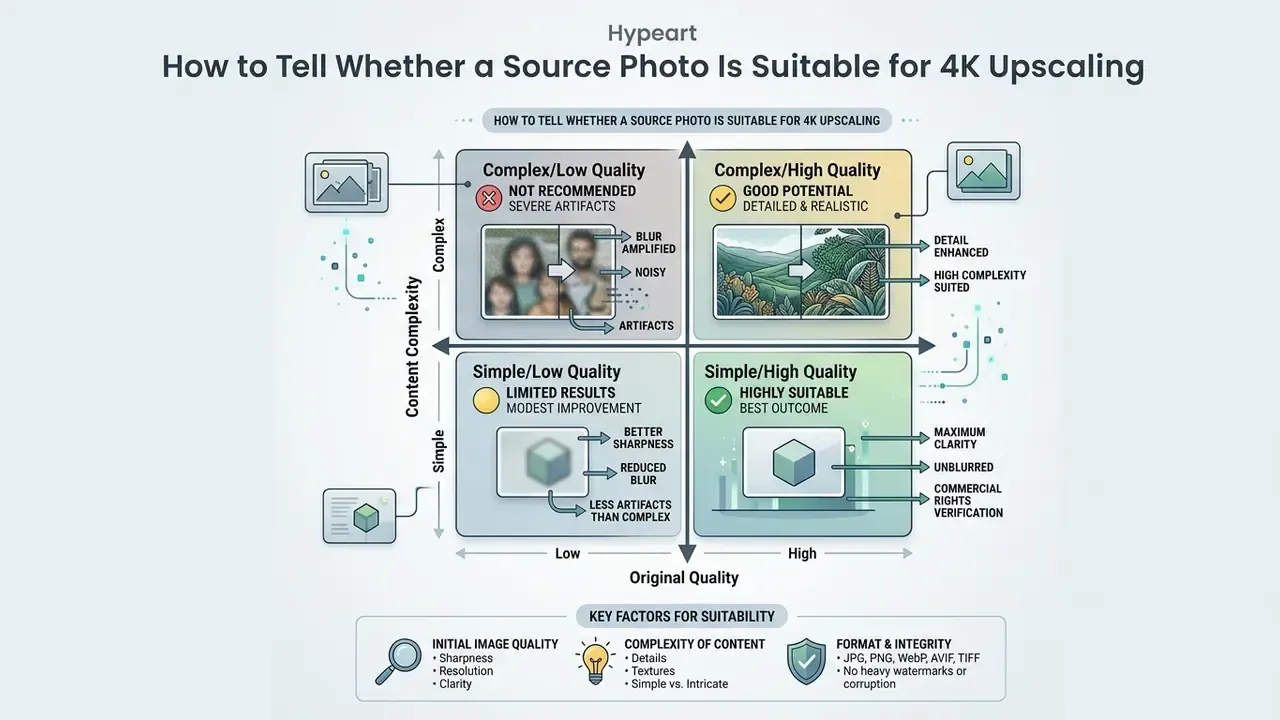
Decision gate: should this file go into a web upscaler at all?
- Is the asset confidential (client data, unreleased product, internal document)? Then no public tool. Use local WebGPU execution or contracted infrastructure.
- Is the source width 960 px or more? Then 4x to native 4K is geometrically viable. Below that, expect heavy synthesis.
- Does the image contain legal-critical text, signatures or identity-bearing faces? Upscale for legibility only, never for evidentiary or verification use.
- Is the original a lossy JPG below roughly 60% quality? Run a denoise pass first, or accept amplified block artifacts.
Which Images Give the Best Results After AI Upscaling
The strongest 4K results come from source images with clear subject boundaries and moderate base resolution. Categories that consistently reward the process:
- Focused portraits. Facial structures with readable eye and lip geometry let face recovery algorithms synthesize natural details.
- Catalog product photos. Product shots on clean, contrasting backgrounds allow the model to refine crisp edges and surface materials.
- Digital AI art. Renderings from Midjourney or Stable Diffusion upscale exceptionally well, because there is no sensor noise to amplify.
- High-DPI screenshots. Interface captures with distinct typographic lines expand cleanly.
- Structured technical imagery. Diagrams, charts, floor plans and scanned engineering drawings hold their geometry, since their edges are high-contrast and deterministic.
«In endoscopy, applying SwinIR and ESRGAN at ×4 to 2,566 HyperKvasir images produced PSNR 32.60 and SSIM 0.90, improving clinician-rated readability».
The endoscopy result illustrates a general rule: imagery with consistent illumination and repeatable structural priors upscales predictably, while chaotic low-light scenes do not. When testing alternative text-to-image generators before upscaling, creators frequently check whether can claude ai generate images or whether an external upscaling pipeline is still required.
When Increasing Resolution Without Quality Loss Is Impossible
«TextZoom shows that even specialized SR models with text priors fail to reconstruct characters that are unreadable in the source LR image due to heavy blur».
In such cases the network invents plausible replacement textures instead of restoring original scene information. Defocus and motion blur are the two hardest categories. Deblurring studies consistently report that classical and learned methods recover little genuine detail when the blur kernel is large. Perceived sharpness improves. True resolution does not.
How to Upscale an Image to 4K Online in Three Simple Steps
Platforms that convert image to 4k resolution online free ai all follow the same streamlined sequence. Load the asset, configure the target resolution, preview the synthesized output, download.
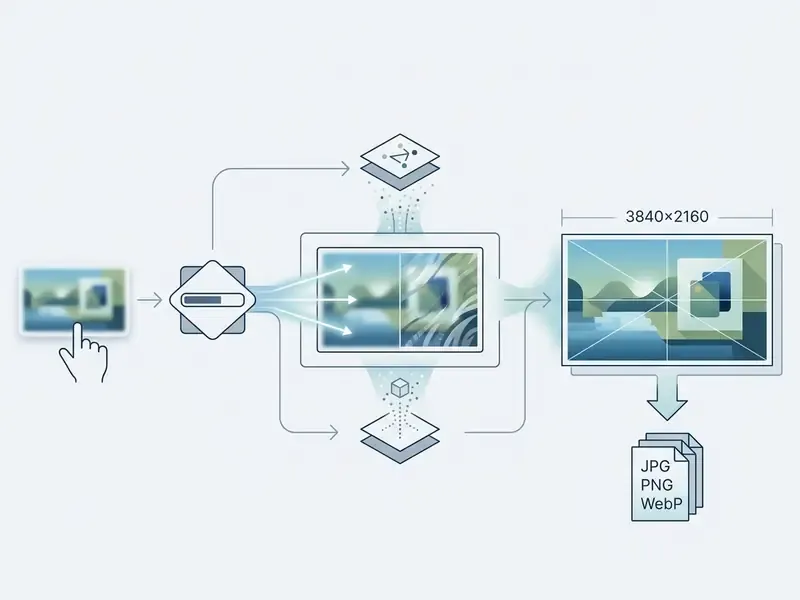
Knowing how to make an image 4k efficiently lets content managers restore legacy marketing assets quickly, without specialized desktop software and without a procurement cycle.
Step-by-step workflow
- Upload image.
- Drag and drop a source file (JPG, PNG, WebP, HEIC, AVIF, TIFF, BMP or GIF) into the browser interface.
- Select parameters.
- Choose the target scale factor (2x for 1080p inputs, 4x for 540p or lower), plus optional face enhancement or denoise strength.
- AI processing.
- The model runs denoising, feature extraction, tile-based inference and high-frequency synthesis.
- Preview inspection.
- Evaluate edge sharpness, skin textures, tile seams and artifacts at 100% scale.
- Download export.
- Save the finished high resolution image with no watermark applied.
Upload Image: Preparing JPG, PNG, WebP, AVIF and TIFF
Prepare source files properly and the network will not amplify existing compression flaws. Uncompressed PNG files yield the highest output fidelity, because they carry clean structural data free from discrete cosine transform block artifacts.
«SR benchmarks on DIV2K and RealSR confirm that heavy JPEG compression introduces blocking artifacts that models may mistake for texture, lowering final PSNR».
PNG remains the fidelity benchmark, yet modern AI image upscalers natively process a broad spectrum of containers: JPG, WebP, HEIC, AVIF, TIFF, BMP and animated GIF (upscaled frame by frame). Feeding the model uncompressed TIFF or high-bitrate AVIF stops it from reading compression noise as genuine texture. With lossy JPG or WebP inputs, heavy compression creates grid boundaries and color ringing, and an ai image upscaler processing such files may mistake that noise for natural surface detail.
One more thing. When the tool is used as an unblur image AI converter to fix pixelated screenshots or soft social-media exports, lossy inputs need an initial spatial denoise pass before high-frequency detail synthesis begins. Skipping that pass is the single most common cause of the "plastic" look in 4x outputs. Typical free-tier ceilings sit between 5 MB and 10 MB per file, with recommended input dimensions under roughly 2000 px per side for 4x presets.
Choosing 2x or 4x for Higher Resolution
The choice between 2x and 4x depends entirely on input dimensions and the structural fidelity you need. A 2x scale factor preserves underlying edge geometry with minimal distortion, which makes it the safe default for HD sources.
Updated (2026). Instead of leaning on an unsourced percentage, benchmark evidence frames the trade-off directly:
«NTIRE 2024 records that ×4 models consistently trail ×2 in PSNR/SSIM on Urban100 and Manga109, because aggressive scaling increases reliance on learned priors».
Vendor documentation on classical filters points the same direction: Lanczos and similar kernels generate ripple artifacts around sharp edges and block text, and larger scale factors amplify blockiness. For sources that already carry reasonable resolution, 2x gives more natural results without synthetic hallucinations. For very small sources, two sequential 2x passes frequently beat a single 4x pass, because each pass works on a cleaner intermediate signal. The earlier "14% to 17% PSNR drop" formulation is retained in Appendix A pending a citable source.
Preview and Download: How to Judge the Enhanced Image Before Saving
Before the final download, inspect the enhanced image in the preview window at 100% magnification. Look at sharp edges, fine line details, contrast boundaries and complex textures such as hair or fabric. Sharpness guidance used in face-image quality standards treats this as a visibility test: fine details and textures must be clearly discernible at full-view inspection, and blur must be traced to one of three origins, namely defocus, motion or post-processing (resizing, printing, scanning).
Then verify that the model has not introduced unwanted smoothing, plastic-looking skin, repeating tile seams across flat gradients, or halo rings along high-contrast borders.
Escalation rule (mandatory for regulated communications). If the enhanced output alters any of the following, stop the automated pipeline and route the asset to manual review or a re-shoot:
- facial geometry, eye shape or identity-bearing features of named individuals, including executive headshots and spokesperson imagery;
- any character in a document, contract, invoice, price label or compliance disclosure;
- brand marks, logotypes, trademark lettering or regulated risk warnings;
- product material, fabric weave or finish that could misrepresent a listed item.
Document the rejection reason, keep the original low-resolution asset as the source of truth, and never substitute a synthesized version into an archival or evidentiary record.
Once verified, download as PNG for print ready workflows or as high-quality JPG for web distribution. To assess how alternative generative systems handle image outputs, teams can review bing ai image tools and their licensing constraints, or benchmark the wider field through a roundup of the best AI image generators before choosing an upscaling partner.
What an AI Image Upscaler Improves Beyond Resolution
Modern ai image enhancer 4k platforms run several restoration tasks in the same pass. Vendor documentation across the market bundles upscaling with denoise, detail recovery, sharpening and face restoration as separate but co-executed controls. Some desktop pipelines even expose RGB denoise combined with 2x/4x upscaling in a single module. Readers can explore dedicated AI image enhancement tools to compare which restoration stages each vendor actually exposes. Alongside pixel expansion, advanced pipelines apply denoise filtering, contrast sharpening, edge refinement and specialized facial reconstruction.
Denoise, Sharp Edges and Detail Recovery
Digital noise reduction algorithms isolate random high-frequency luminance spikes from true visual structures. The denoise stage suppresses background grain before handing cleaned features to the edge enhancement block. Ordering matters here, because sharpening raw noisy pixels bakes grain into permanent texture.
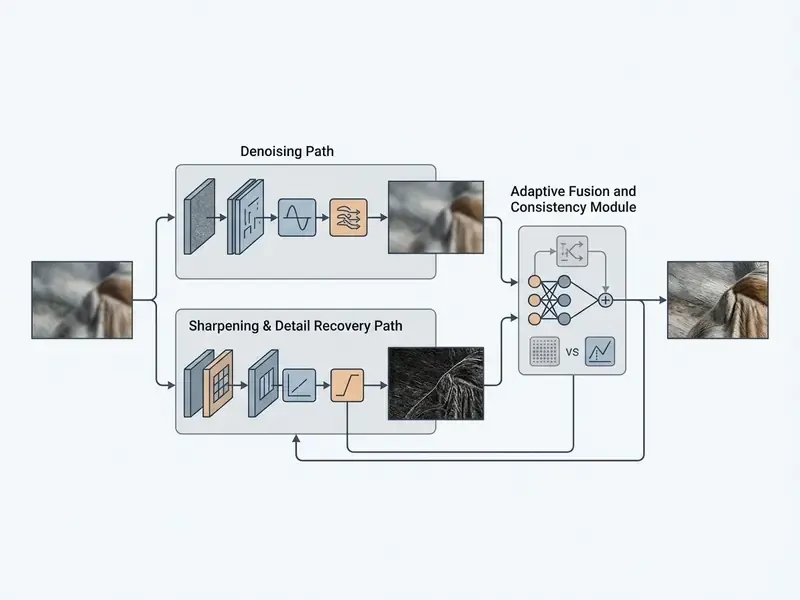
To avoid an overprocessed or artificial appearance, modern neural architectures use residual skip connections. These combine original low-frequency base layers with synthesized high-frequency feature maps, keeping photographic naturalness while refining fine line boundaries. Joint optimization with combined L1 and SSIM losses balances pixel accuracy against perceptual quality, and that is the documented mechanism for reducing the over-sharpened look.
«Real-ESRGAN uses a U-Net discriminator with spectral normalization and high-order degradation modeling, delivering realistic textures while suppressing noise and artifacts».
Portraits, Face Details and Product Photos: Where Careful Processing Matters
Restoring human portraits and product photography calls for tighter algorithmic constraints. Face restoration models such as GFP-GAN or CodeFormer use landmark priors to rebuild recognizable eyes, teeth and skin texture.
Aggressive face enhancement, however, risks altering an individual's actual identity or inventing skin textures that were never there. Peer-reviewed analysis of deep face restoration reports an explicit trade-off between reconstruction quality and reconstruction accuracy: a sharper face can diverge measurably from the real person. In e-commerce photography the parallel risk is commercial, since generative texture hallucination can change fabric patterns or material surfaces and leave a listing misleading.
«GraftSR demonstrates that diffusion SR models systematically hallucinate material textures; a reference-guided dual-mask approach restores authentic surfaces on TexRefSR-141K».
To examine broader automated design pipelines, operators can test canva ai art generator workflows for e-commerce graphics, or review AI headshot generator standards for portrait-specific privacy considerations.
Where Teams Use an AI Image Upscaler 4K
Enterprises, commercial creators and digital archivists deploy free ai image upscaler 4k online platforms across very different workflows. Scaling legacy visual assets to 4K keeps them compatible with high-density displays, print layouts and digital media channels. Teams extending assets sideways rather than upward can also review AI image-to-image transformation pipelines.
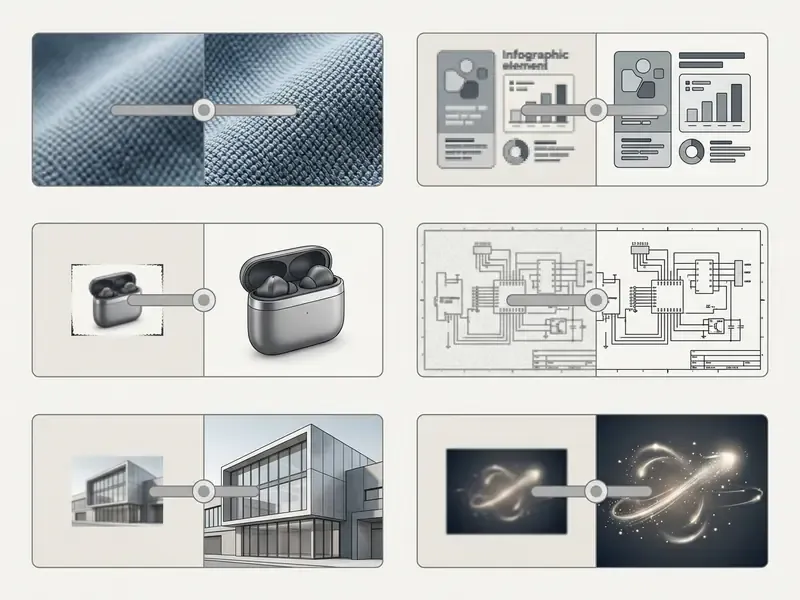
Detailed use case descriptions:
- Product photos (e-commerce). Low-res supplier images upscaled to meet marketplace zoom specifications, typically 1000px to 2400px at 300 DPI.
- Archival and old family photos. Faded analog prints and corporate photo archives restored through combined denoise, scratch removal and structural resolution enhancement.
- AI art and graphics. Low-resolution diffusion outputs upscaled to 4K for crisp digital presentation or print production.
- Photos screenshots. System UI captures expanded to improve typographic legibility in documentation, presentations and training manuals.
- Real estate and architectural visuals. Interior and exterior property captures scaled to 4K for listing portals and print brochures.
- Game development and texture upscaling. Legacy texture maps, sprite sheets and UI elements enlarged for high-DPI engine renders.
Corporate Archives, AI Art, Screenshots and Game Textures
Archival restoration uses AI upscaling to remove physical scan grain while sharpening soft contours. In enterprise media libraries the dominant workload is not family albums but corporate archive digitization: scanned annual reports, legacy brand photography, conference documentation, product catalogs, microfilmed records. When restoring historical documents or small-text screenshots, an ai increase image resolution free tool improves optical character recognition readability. 300 DPI remains the practical baseline for text-bearing scans, low-DPI sources benefit most from auto-scaling, and material already captured at 200-300 DPI may show no gain at all.
Personal restoration is a legitimate secondary scenario. Faded family photos, photo books and digitized slides all respond well to combined denoise and detail recovery. Corporate workflows should still keep the original scan as the archival master and treat the upscaled file as a derivative presentation asset.
When upscaling AI generated artwork from lower-tier generation setups, the process expands fine brushstrokes and intricate vector paths without introducing blur.
Game development and texture upscaling forms a separate technical niche. Studios enhance legacy 2D texture maps, sprite sheets, tileable diffuse maps and UI iconography for high-DPI renders in Unreal Engine or Unity. Two constraints dominate. Pixel-art boundaries must be preserved exactly, where nearest-neighbour or dedicated anime and pixel models beat photographic SR. And tileable textures must retain seam continuity, so tile-based inference overlap has to align with the texture's repeat boundary, otherwise the material shows visible grid lines at runtime.
Content managers evaluating emerging generative models can also investigate whether can deepseek generate images inside their current creation stacks, and compare wider tooling through the best AI art generator overview.
Can Upscaled Images Be Used for Commercial Purposes
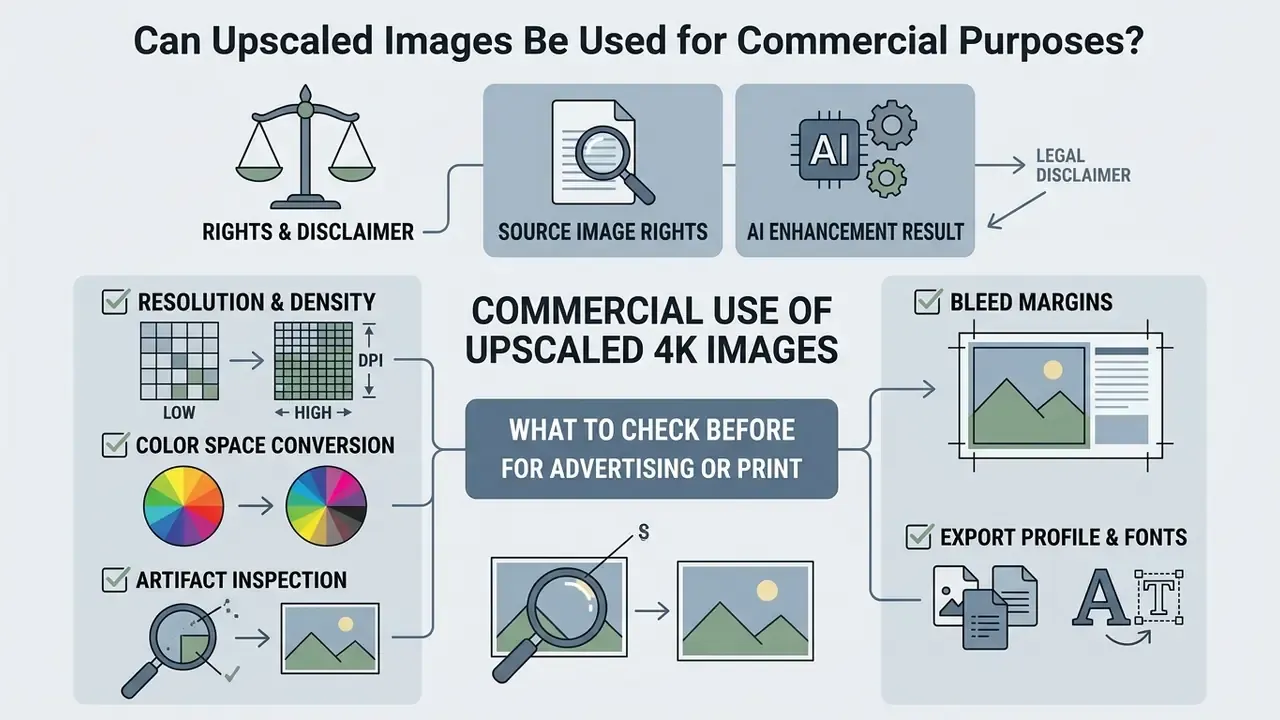
Using upscaled images for commercial purposes depends on two things: holding valid rights in the original source asset, and complying with the online tool's terms of service. An ai upscale image free no watermark output transfers no legal ownership if a third party holds copyright in the original.
«Under legal analysis, AI works lacking sufficient human authorship are not protected by copyright in the US or EU; upscaling alone creates no new rights».
Vendor terms act as a second, independent layer. Some services state that downloaded results may be used for personal or commercial purposes. Others require the uploader to warrant that they hold rights in the source image, and prohibit infringing uploads outright. Contract language can grant practical reuse even where copyright protection is unavailable. It can just as easily restrict reuse where you do own the underlying photograph.
Rights to the Source Image and to the AI Enhancement Result
Under US Copyright Office policy guidance, copyright protection applies strictly to human authorship. Running a third-party image through an ai image upscaler no watermark tool establishes no new copyright ownership in the upscaled file.
«The US Supreme Court decision in Warhol v. Goldsmith (2023) emphasizes that commercial use of a transformed image for the same purpose as the original is not fair use».
If the source asset is a proprietary photograph owned by your organization, the upscaled file inherits that original copyright protection. If the source is a purely AI generated image, the upscaled output may sit in the public domain or remain governed by platform license terms. European guidance reaches a similar place through a different test: outputs produced without substantial human intervention are not eligible for protection, which leaves them functionally unprotectable no matter how much compute the upscale consumed.
What to Check Before Using a 4K Image in Advertising or Print
Before you send a 4K upscaled image to commercial printing or to paid advertising networks, work through the checklist below. Teams formalizing internal policy can also review the broader rules on commercial use of AI images.
To review broader legal implications surrounding synthetic media and intellectual property, teams can explore the hub dedicated to AI litigation standards.
FAQ: Frequently Asked Questions About AI Image Enhancer 4K
What is the best free AI image upscaler online with no watermark?
The best free ai image upscaler online free options include open-source browser platforms built on WebGPU, plus cloud tools offering restricted daily free tiers without forced branding overlays. Documented free limits in the market run from 3 to 5 upscales per day up to "unlimited" browser-side processing, with higher magnification often gated behind sign-in. Test small batches to verify export clarity before you process large volumes.
Is a free AI image upscaler app safe for sensitive media?
A free ai image upscaler app that runs entirely client-side on the local device offers high data safety, since visual files never reach external cloud servers. Cloud-based applications must explicitly document immediate server-purging schedules. Published windows range from 4 minutes to 30 minutes, while some free tiers keep uploads for up to 7 days.
How does a blur to hd image converter ai handle low-resolution photos?
A blur to hd image converter ai uses deep learning models trained on blurred and clean image pairs to estimate sharp edge boundaries. Perceptual clarity improves noticeably. Severely out-of-focus images, though, come back with synthesized edge detail rather than a true restored optical signal.
Can I perform batch processing on free upscaling tools?
Updated (2026). Free web platforms often allow client-side batch queuing of roughly 3 to 10 files using dynamic browser worker threads, and several commercial editors expose "bulk image upscaling" directly in the web interface. Processing large batches of 4K assets in parallel sharply increases VRAM consumption, so queues usually run sequentially rather than concurrently. For commercial bulk upscaling of 100+ items, tools shift from in-browser queues to server-side asynchronous batch processing or REST APIs. Free API tiers commonly cap concurrency (for example, around 100 concurrent batch requests), input file size (about 2 GB) and storage. The earlier claim that batch operation requires desktop software or a developer API is preserved in Appendix A. For broader comparisons of free design tools, operators can compare options across visual software categories and review the best free AI image generators for adjacent limits.
Can AI fix a pixelated image or unblur a photo completely?
An AI upscaler can substantially reduce visible pixelation and restore perceived sharpness, which is why "fix pixelated image" and "make blurry images clear" dominate consumer search intent. It cannot recover characters, faces or textures that carry no residual signal in the source. Treat the result as a cosmetically improved derivative, not a recovered original.
Which file formats can an AI image upscaler accept?
Mainstream tools accept JPG/JPEG, PNG, WebP, HEIC/HEIF, AVIF, TIFF, BMP and GIF, with some services adding JFIF and PDF page extraction. Typical maximum file sizes run from 2 MB on lightweight free tiers to 10 MB on standard tools and 100 MB on enterprise platforms. Adobe's upscaler, by contrast, restricts input to JPEG, PNG and WebP only.
How long does 4K upscaling take?
Expect roughly 15-45 seconds per 4K frame on cloud GPUs, and 15-60 seconds on browser WebGPU depending on local hardware. Latency scales with total pixel count, because tile-based inference runs many sequential passes. Peak-hour queueing can add more delay on free tiers.
Is AI upscaling suitable for real estate listings and game textures?
Yes, with category-specific guardrails. Real estate captures benefit from 2x upscaling that clarifies material finishes without inventing architectural features. Game textures need models that preserve pixel-art boundaries and seam continuity, plus tile overlap aligned to the texture repeat so no grid appears at runtime.
Why a free AI image upscaler may have processing limits
Running high-throughput free ai image upscaler 4k online platforms demands substantial GPU compute and cloud bandwidth. High-resolution diffusion inference eats VRAM, which translates into real cost for the provider. A single optimized one-step 4K pass still consumes multiple seconds of high-end accelerator time, and accelerator capacity is billed by the hour. So free tiers impose operational limits: maximum file size caps (for example 2 MB to 10 MB), restricted daily generation counts, rate limits per IP such as 10 uploads per hour, queue wait times, or forced registration. These boundaries let providers manage compute load while nudging power users toward paid commercial tiers. To explore comprehensive workflow automation guides, creators can browse the hub for detailed implementation frameworks.
Risk-Adjusted Cost: What an Upscaling Workflow Actually Costs
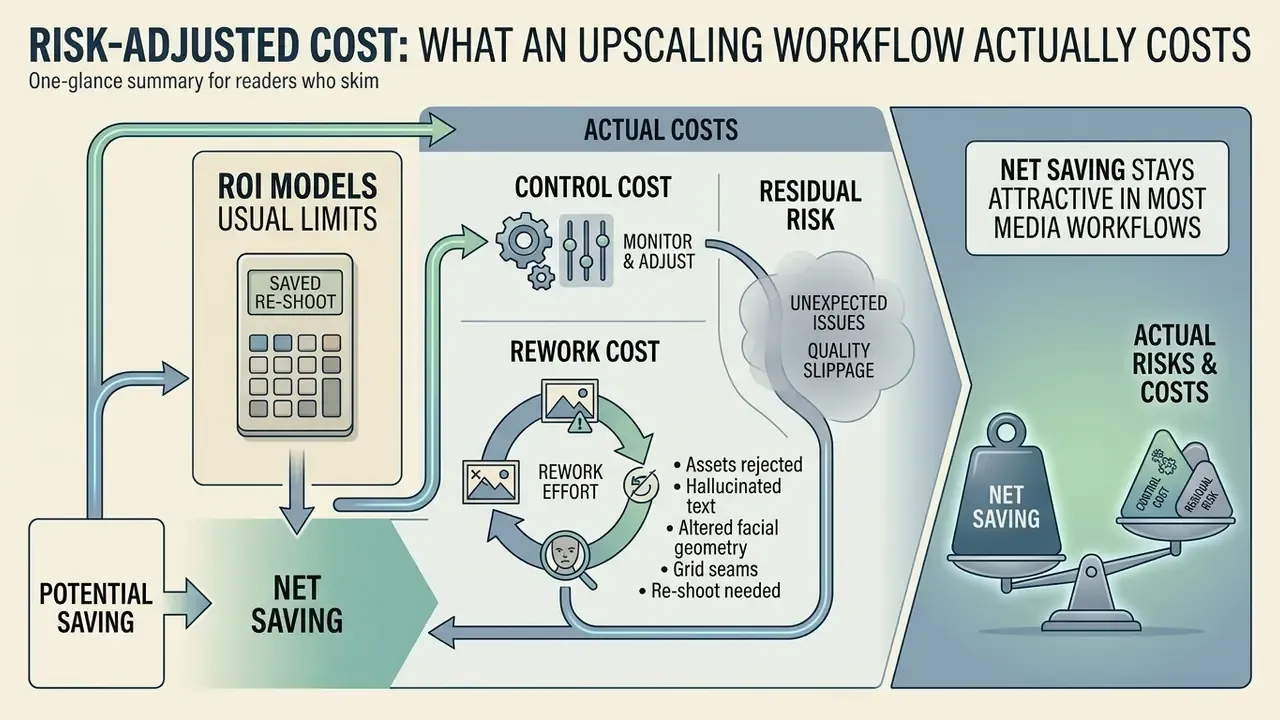
ROI models for image enhancement usually count the saved re-shoot and stop there. That is an incomplete number. A defensible calculation carries three cost lines beyond the subscription fee.
- Control cost. Human review time at the escalation gate. If 8% of a 1,200-asset batch needs a second pair of eyes at three minutes per frame, that is roughly five hours of reviewer time per campaign.
- Rework cost. Assets rejected for hallucinated text, altered facial geometry or grid seams, plus any re-shoot they trigger.
- Residual risk. The tail scenario: a synthesized detail reaching a regulated disclosure, a product listing or an executive headshot without disclosure. Low probability, uncomfortable consequence.
Net saving stays attractive in most media workflows. Just show the full arithmetic to whoever signs the approval, and keep the original file as the master. That is the whole governance point.
Appendix A: Superseded and Unverified Formulations (Editorial Transparency)
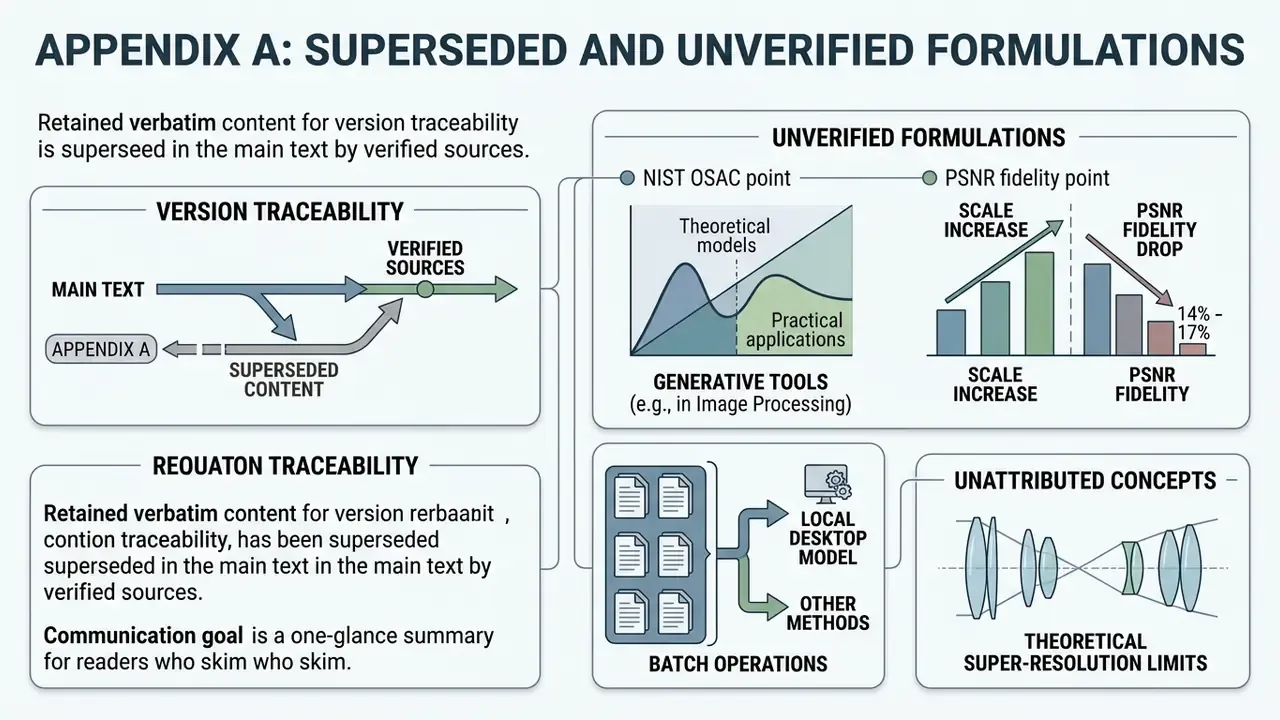
Retained verbatim for version traceability, superseded in the main text by verified sources.
- "As noted in the NIST OSAC Reference Document on Generative AI in Image Processing (2026), generative tools 'add artificial pixel information' rather than extracting genuine sensor data." Status: pending public URL verification. Replaced in the section on real detail by the Hallucination Score study and the NeurIPS 2024 perception versus ground-truth trade-off analysis.
- "Comprehensive computer vision benchmarks indicate a 14% to 17% drop in PSNR fidelity when increasing scale factors from 2x to 4x." Status: source not identified. Replaced by the NTIRE 2024 ×4 challenge findings in the 2x versus 4x section.
- "Enterprise workflows requiring multi-file batch operations typically utilize local desktop models or dedicated developer APIs." Status: contradicted by current market practice, since in-browser bulk upscaling now exists. Replaced in the FAQ.
- "Under theoretical super-resolution limits established in optical research..." (unattributed) Status: now supported by reported SNR-dependent SR ceilings (about 2.5x at 10 dB, 3x at 20 dB, 4x at 40 dB) and the TextZoom result.
Footer / Hub Navigation