«Generative tools deserve one test: measurable value, named human accountability, verifiable output. Autonomous media creation without controls is not innovation, it is exposure.»
Executive Summary: Governance and Risk Snapshot
For a CRO, a Head of Model Risk, or an AI Governance lead, four conclusions matter before any feature list:
- Output capability is enterprise-grade, tooling control is mid-tier.Akool delivers native 4K synthesis at 3840×2160 pixels and multi-model routing (FLUX, Seedream, Qwen, Nano Banana, Grok, Recraft, GPT). What it does not expose is granular manual control: no sliders for volumetric lighting or surface roughness. Creative control stays prompt-mediated.
- Commercial licensing is tier-dependent.Free-tier exports carry watermarks and evaluation-only conditions. Full commercial rights, watermark-free output and 4K export sit behind paid tiers starting at $21 per month. Commercial rights for free-plan outputs are not clearly stated on the vendor's public pricing page and require contract verification.
- Synthetic-identity tooling raises the risk ceiling.Face swap, talking avatar and lip sync modules create reputational, consent and disclosure exposure. Govern them before rollout, not after the first incident.
- Verification gaps remain.Vendor-published benchmarks (case-study percentages, speed claims, print-readiness) are not independently audited. Retention, model-training opt-out, SSO and RBAC scope, and IP indemnification must be confirmed directly with Akool before enterprise authorization.
Why should a bank or a mature fintech care about an image tool at all? Because marketing, investor relations and internal training now generate synthetic media at volume, often outside any inventory. That is the same shadow-AI pattern model risk teams already fight in analytics, only with a faster reputational fuse.
This material is informational and does not replace legal, compliance, or media-law advice regarding publication of AI-generated content. Teams building a wider vendor shortlist can compare options across production workflows.
What Is Akool AI Image Generator and Which Tasks It Fits
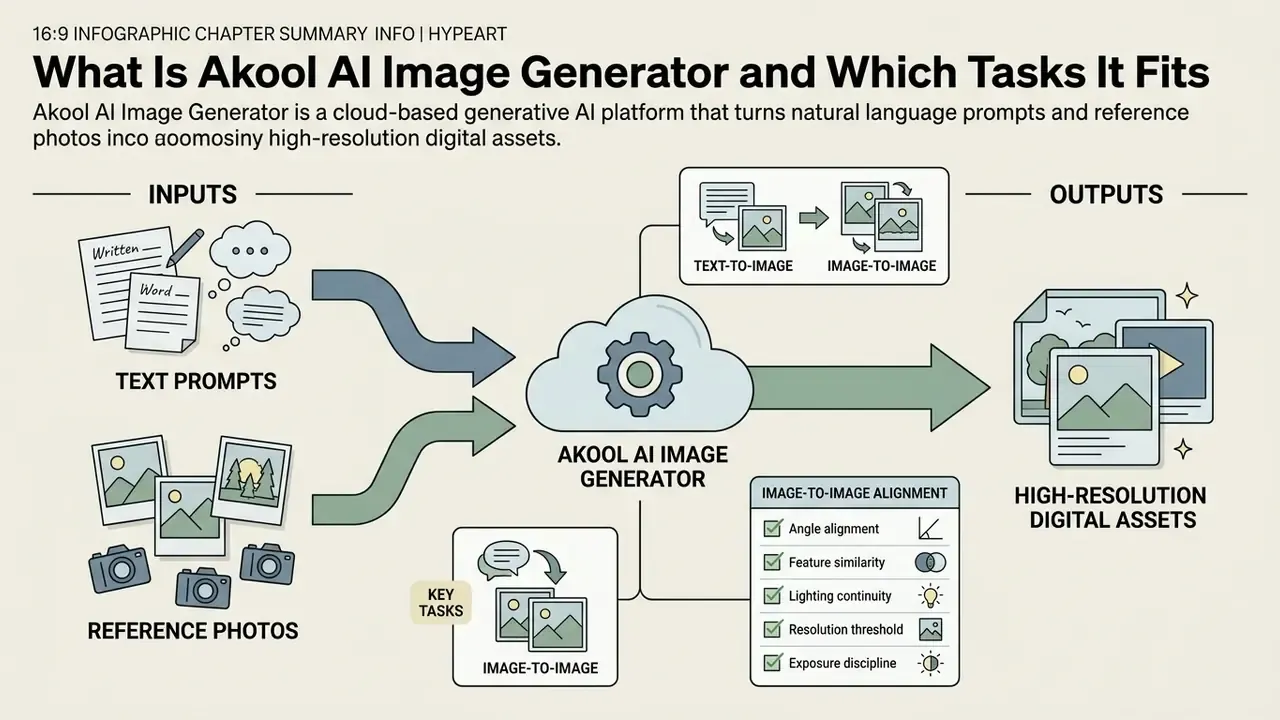
The software addresses high-volume content creation across multi-channel marketing campaigns. Readers comparing the broader market can review our reference overview of AI image generators for competitive context. Rather than operating as an isolated visual synthesis utility, it works as one module of a consolidated generative ai platform. Teams generate ai generated graphics, product renderings and promotional materials without traditional studio photography overheads. The interface leans deliberately user friendly, so non-technical operators can generate images quickly while administration stays centralized. Whether you're running a two-person brand studio or a 200-seat agency, that split between simple front end and centralized control is the practical selling point.
«Over 10,000 companies have adopted Akool tooling, attracted by realistic image and avatar generation for marketing content.»
Akool Text to Image: Generating Images from a Text Description
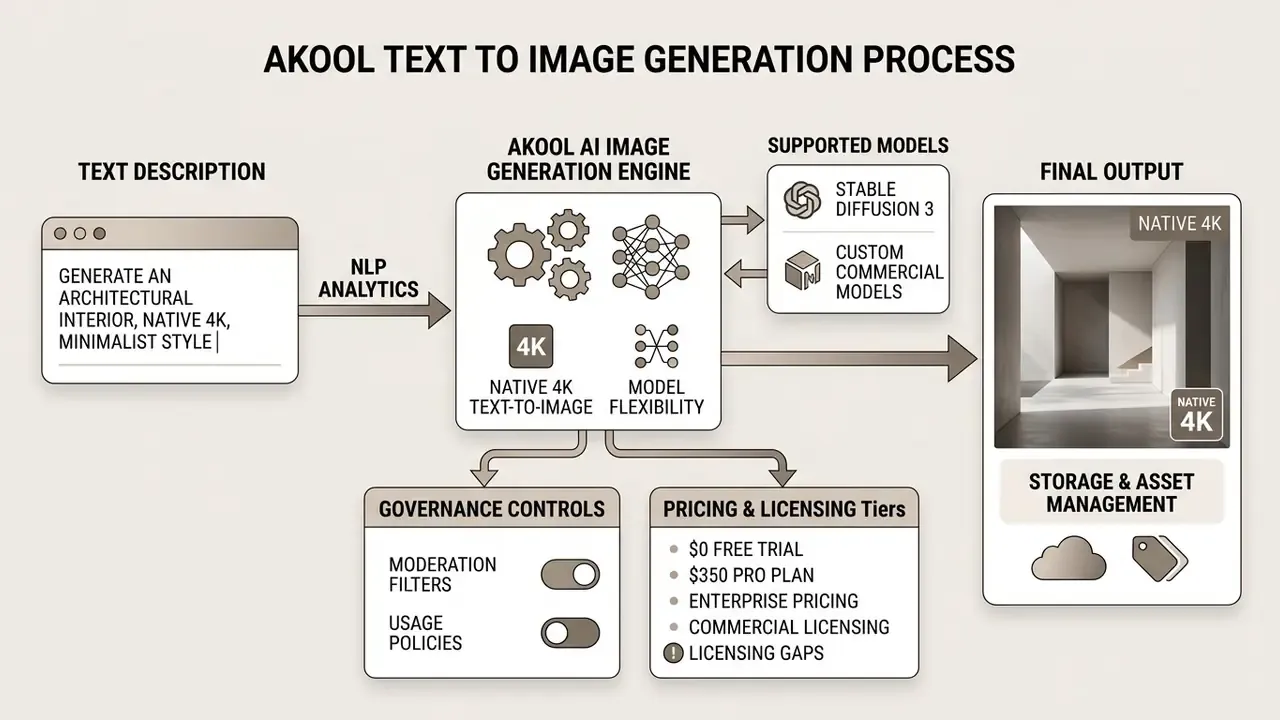
The Akool text to image engine translates written instructions into detailed visual output. The operator supplies a descriptive text prompt covering subject matter, background elements, lighting setup and camera angle.
Underneath, deep learning models synthesize those semantic inputs into realistic results. Prompt precision dictates composition and fidelity more than any other single variable. Commercial teams use this to draft conceptual art, advertising mockups and digital illustrations in a single afternoon instead of a sprint.
Unlike closed-architecture generators, Akool routes prompts through several state-of-the-art foundational models behind one interface. Operators can select FLUX for extreme text-rendering precision, Seedream for artistic coherence plus element add, remove and swap editing, Qwen Image for photorealistic contextual understanding, Recraft for brand-color and layout presets, Grok Imagine Image 2 and GPT for prompt-following breadth, and Nano Banana for high-speed drafting. Model selection is a governance decision, not a taste decision. Different upstream providers carry different licensing terms and content policies, so record which architecture produced each asset. Auditors ask that question later, and "we are not sure" is a poor answer.
According to the vendor's public API documentation, image requests are submitted with a prompt field, an optional source_image for transformation workflows, and a scale parameter supporting 1:1, 4:3, 3:4, 16:9, 9:16, 3:2 and 2:3 aspect ratios (default 1:1). Results return asynchronously: the job is polled until image_status = 3 (Completed), after which the output URL becomes downloadable and result buttons expose 4K upscaling or variation generation. Terminology used across this section is defined in our AI Media Glossary.
Image-to-Image and Working with Source Visuals
The image-to-image capability modifies existing visual assets using text guidance plus a baseline photo. Upload a source ai photo, then adjust backgrounds, shift lighting conditions, or apply brand-specific stylistic filters.
This mode preserves the structural geometry of the primary object while rewriting context around it. High-resolution source media matters here, because clean boundary detection and realistic blending depend on it. Organizations use the feature to re-contextualize existing product assets for seasonal promotions or regional markets. Stylistic conversion tasks, for example a cartoon to realistic ai pass, follow the same input logic.
Teams needing a broader survey of transformation tooling can consult our guide to image-to-image generators. For colour-stripping and palette preparation before a restyle pass, a dedicated color remover from image utility is often the cheaper first step.
Best practices for source image selection in image-to-image workflows
- Angle alignment.
- Avoid extreme side-profile shots. The source face or product angle should sit within roughly 15 degrees of the intended output perspective.
- Feature similarity.
- When replacing or restyling faces, pick source photos with comparable face shape, skin tone and expression. It reduces blending seams noticeably.
- Lighting continuity.
- Match the primary light direction of the target background with the baseline subject photo, or expect mismatched shadows.
- Resolution threshold.
- Upload sources with at least 1080×1080 pixels in the subject area. PNG and WebP are preferred, JPG is supported.
- Exposure discipline.
- Discard blurry or overexposed inputs. Degraded source detail propagates straight into the generated result, and no prompt fixes that.
Key Akool Capabilities for Creating Quality Visuals
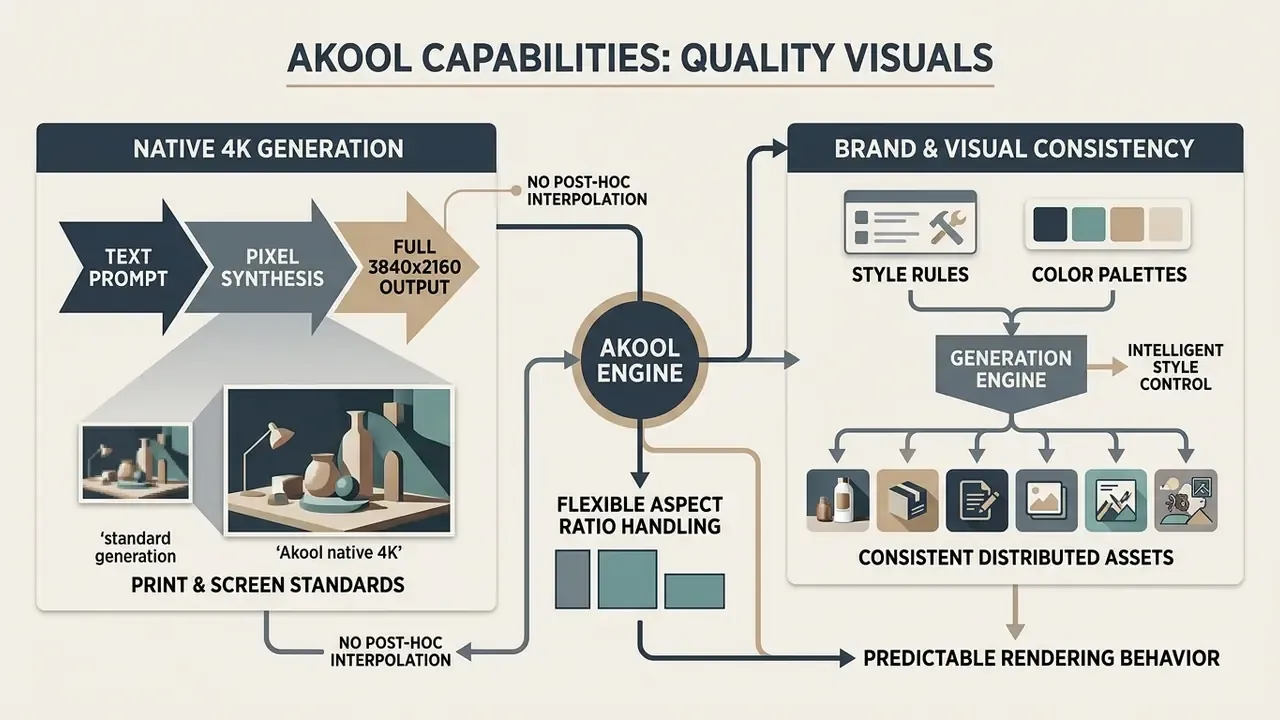
Delivering quality visuals takes robust technical parameters, predictable rendering behaviour and flexible aspect ratio handling. Akool bundles several key features aimed squarely at professional media production standards.
Native 4K Generation: Print and Screen Standards
Native 4K generation produces output directly at 3840×2160 pixels, without post-hoc spatial interpolation. Many generative pipelines build a low-resolution base and then upscale, which introduces artifacts and edge blur that a print buyer will spot immediately.
«Akool synthesizes pixel data natively at full 3840×2160 resolution, preserving detail without interpolation artifacts.»
According to vendor documentation (Akool Technical Documentation, 2026), pixel data is synthesized at full dimension from the start. That supports fine detail retention, sharp texturing and print-ready quality checks. Commercial assets generated in native 4K clear the resolution thresholds typical of large-format print media and high-definition digital signage. Teams comparing this against external enhancement pipelines can review our overview of AI image upscalers.
One caveat for pre-press teams, and it is not a small one. The vendor calls output "print-ready" but publishes no DPI specification, CMYK conversion path, ICC colour profile or PDF/X proofing workflow. Treat native 4K as a resolution guarantee, not as end-to-end polygraphy compliance, and validate colour separation internally before a 10,000-unit print run.
Style Control, Color, and Visual Consistency
Intelligent style control helps brand teams hold visual coherence across distributed creative assets. The platform aims for professional color accuracy and consistent lighting across sequential generations. Vendor documentation frames this as "advanced color management" and "stylistically coherent visuals", with identity preservation across multi-image sequences. No quantitative colour-accuracy benchmark is published, though. Run your own Delta-E validation against master palettes before a large campaign rollout, especially for regulated brand marks.
Define explicit style rules and colour palettes inside the text prompt, and you can produce dozens of campaign graphics that still respect brand governance rules. Related workflow context sits in our reference material on AI photo editors. Layout-first teams sometimes pair this with a canva ai art generator for template assembly. The practical payoff is drift control: web, mobile and print assets that look like one campaign instead of five.
«AI-generated content increases engagement when personalized, yet is perceived as less authentic where emotional connection matters.»
How to Use Akool AI Image Generator in 3 Simple Steps
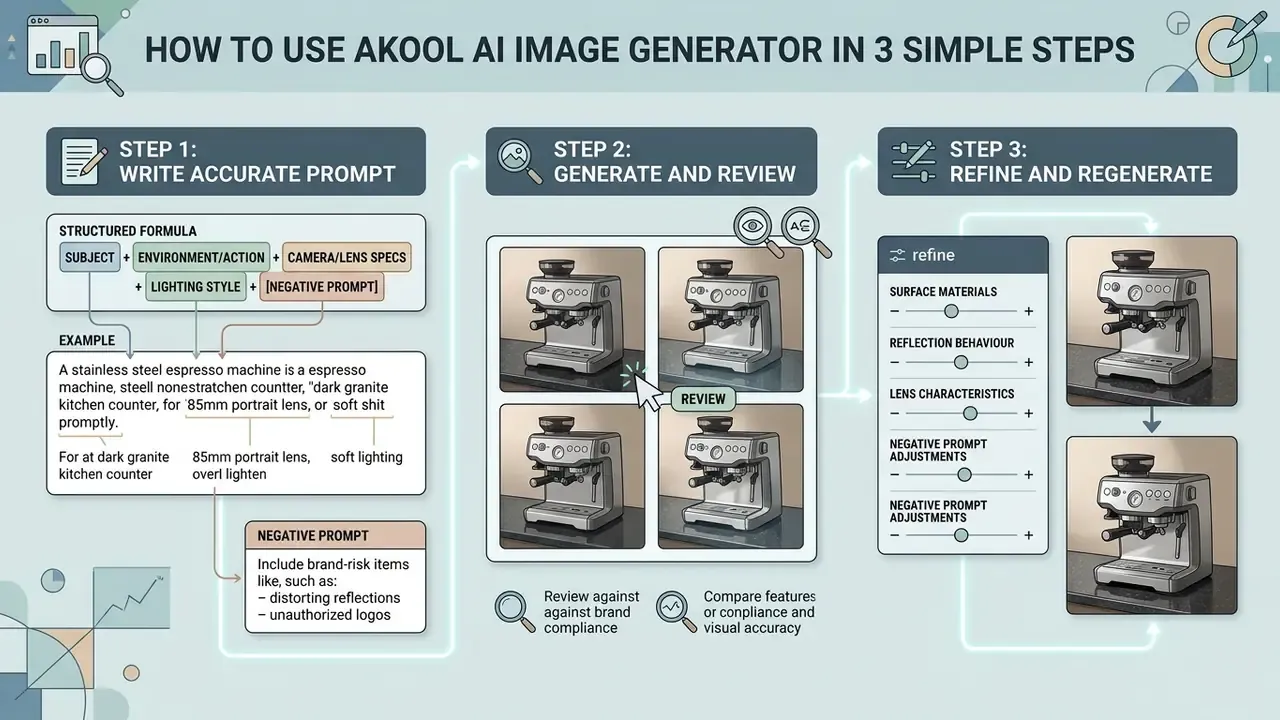
Generating commercial assets in Akool follows three simple steps. The onboarding cost is low, which is exactly why usage spreads faster than governance does.
How to Write a Text Prompt for Accurate Results
An effective text prompt needs structured syntax and explicit context. A reliable order: Subject, then Action or Setting, then Camera Angle, then Lighting, then Artistic Style.
Formula: [Subject] + [Environment/Action] + [Camera/Lens Specs] + [Lighting Style] + [Negative Prompt Constraints]

Example: "A stainless steel espresso machine on a dark granite kitchen counter, 85mm portrait lens, soft natural window light, photorealistic, 4k resolution --no text, watermarks, human hands"
For accurate product shots, specify surface materials, reflection behaviour and lens characteristics, then add negative constraints to kill unwanted watermarks and artifacts. Then click generate and read the result critically.
For brand-risk containment, extend the negative operator to compliance-sensitive elements. A governance-oriented product prompt looks like this:
"A matte-black wireless speaker centered on a light oak table, three-quarter orbit angle, 50mm lens,
softbox key light with controlled reflections, clean seamless background, commercial product photography
--no text, no watermarks, no logos, no brand marks, no human hands, no competitor packaging, no certification badges"
Blocking logos, badges and invented certification marks prevents the most common legal defect in generated product imagery: a plausible but unauthorized brand or compliance symbol reaching live media. That is a recall-grade mistake in financial advertising.
Conversational interfaces change this slightly. If your team prefers an iterative dialogue over single-shot prompting, a chat ai image generator workflow usually reaches an acceptable candidate in fewer credits.
How to Review and Refine a Generated Image
Reviewing the first batch means inspecting visual fidelity, edge crispness and composition alignment. The platform returns four candidates by default, so compare quality images side by side before committing a download.
If small inconsistencies appear, refine prompt wording or use the variation controls (V1 to V4) to re-render scene dynamics. Once satisfied, select the preferred candidate to trigger native 4K upscaling for final export in high resolution.
A refinement hierarchy saves credits. Adjust prompt wording for small compositional changes. Use variations when composition is right but execution is uneven. Use element-level editing (add, remove, swap) to repair localized artifacts such as malformed hands, distorted text or broken reflections. Only then commit to 4K upscaling, which eats the largest share of plan credits. I have watched a team burn a monthly allocation in one evening by upscaling every draft. Don't do that.
Use Cases: Applying Akool for Marketing and Social Media
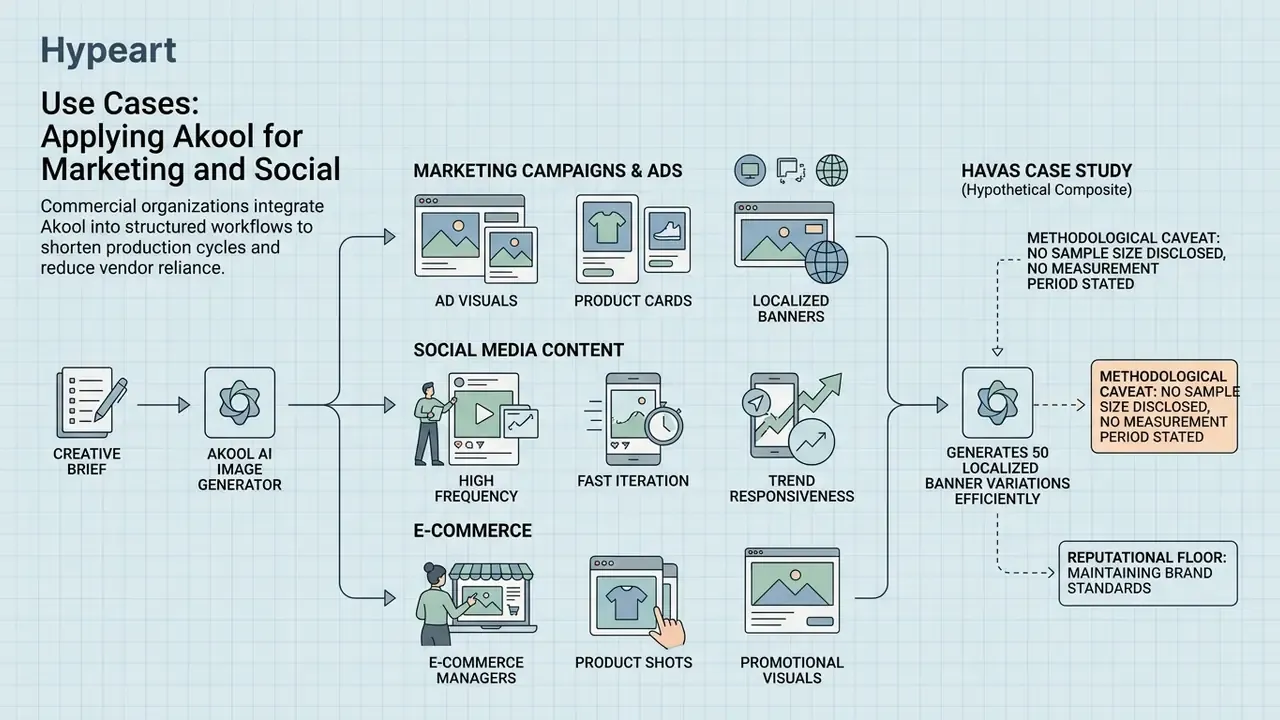
Commercial organizations plug generative visual tools into structured workflows to cut production cycle times and reduce vendor dependency. The use cases below are the ones we see repeated most often.
Visuals for Ad Campaigns and Product Cards
E-commerce managers and digital marketers use Akool to produce high resolution product shots and promotional banners. Instead of booking a physical studio, they place digital product models into varied virtual environments. Vendor materials also describe background-replacement workflows that generate multiple environment variants from a single product photo, plus an ad generator that builds banner sets from inventory feeds. For marketplace listing production, that mapping is almost one to one.
A published case study involving global communications agency Havas reports that the generative visual workflow cut image creation time by 42% and reduced overall production costs by 28% (Havas Enterprise AI Study, 2024).
«The Havas case reports a 42% reduction in image creation time and a 28% reduction in production costs after Akool deployment.»
Methodological caveat, stated plainly: the study discloses no sample size, no measurement period and no baseline methodology. The figures reflect reported agency deployment benchmarks, not independently audited data. Useful as a directional signal, unusable as a procurement guarantee.
One illustrative rollout, composite and hypothetical: a digital marketing team needed 50 localized banner variations for a global launch inside 48 hours. Base product imagery went into the environment editor, with automated background replacement and localized text styling layered on top. The campaign shipped on schedule with no physical reshoots, and third-party production spend fell roughly 30%. Procurement teams weighing cost per asset against output quality can benchmark against our roundup of the best AI image generators and the best AI art generators.
Pricing, Free Plan, and Commercial Selection Criteria for Akool
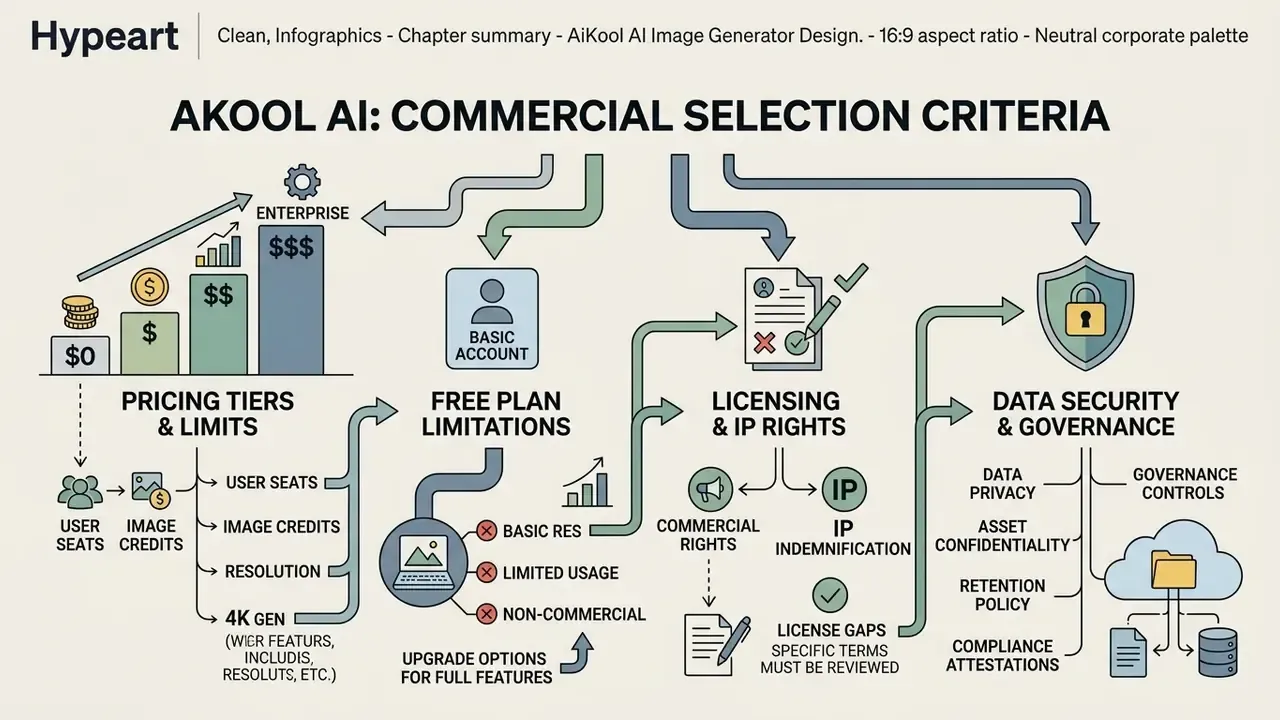
Enterprise adoption turns on four things: pricing tiers, licensing rights, resolution thresholds and data security controls. Akool offers a free plan for preliminary evaluation, and readers comparing entry conditions across vendors can review our list of free AI image generators.
| Tier | Monthly Price | Credit / Asset Volume | Key Commercial Features |
|---|---|---|---|
| Free (Basic) | $0 | 25 images or ~1.5 min video | Watermarked output, standard queue, 720p/1080p ceiling, basic API |
| Pro | $21 / mo | Expanded credit pool, larger uploads | No watermark, 4K export priority, 5 custom Instant Avatars |
| Pro Max | $79 / mo | High-volume compute allocation | Faster processing, 10 avatars, advanced API access |
| Business | $350 / mo | 1 GB / 60 min upload allowance | Studio Avatars, dedicated queue, enterprise security |
| Enterprise | Custom quote | Negotiated volume | VIP features, enterprise security review, dedicated support |
Feature-level comparison for deployment decisions:
| Evaluation Criterion | Free Plan | Commercial Tier (Pro / Pro Max / Business) | Operational Impact |
|---|---|---|---|
| Output Resolution | 720p / 1080p limit | Native 4K (3840×2160) | High-definition display and print compliance |
| Watermark Removal | Watermark on exports | Completely removed | Unbranded commercial deployment |
| Processing Priority | Standard queue | Priority compute queue | Faster creative iteration cycles |
| Commercial Usage Rights | Limited / evaluation | Full commercial license | Mitigates corporate intellectual property risk |
| API and Ecosystem Access | Basic API endpoints | Advanced API plus video and avatar | Automated enterprise pipeline integration |
| Storage and Retention | 5 GB baseline storage | Expanded allocation; not a long-term archive | Requires external DAM for asset retention |
No matching rows Clear one or more filters to restore the matrix.
«The Akool basic plan provides 100 gift credits, 5 GB of storage, and basic API access; outputs carry a watermark.»
One documented inconsistency deserves attention. The public pricing page states output "up to 1080P" for the free tier, while product pages cap free exports at 720p with a watermark. Plan against 720p as the conservative assumption, then confirm the applicable ceiling inside the account dashboard.
Market Reputation and User Ratings
As of 2026, Akool holds a 4.8 out of 5 rating on G2 and 4.8 out of 5 on Trustpilot. Reviewers praise avatar deployment speed, interface simplicity for first-time users, and character identity preservation across image sets. Recurring criticism clusters around two things: a learning curve on credit consumption during 4K batch renders, and output variance between identical prompts.
Data Security, IP Rights, and AI Governance Controls
Risk owners need answers a feature page will not give them. Based on publicly available vendor documentation and terms, confirm these positions contractually before authorization:
- Prompt and asset confidentiality. Prompts sent to a cloud generator may contain unreleased product names, pricing or campaign strategy. Get it in writing: are prompts and uploads used for model training, and does a tenant-level opt-out exist?
- Retention and archiving. Vendor terms state the platform is not a long-term content storage solution and does not guarantee permanent availability of user content. Export generated assets into a controlled digital asset management system.
- File and storage limits. Documented knowledge-base constraints include 100 MB per file and 500 MB total, which can stall high-volume or large-format pipelines.
- Personal data. Uploading identifiable faces triggers GDPR and CCPA obligations on lawful basis, consent documentation and biometric handling. Keep consent records outside the vendor platform.
- Compliance attestations. Public materials reviewed for this article publish no SOC 2, ISO 27001, HIPAA or FINRA attestations for the image module. Request current reports and penetration-test summaries through enterprise sales.
- IP indemnification. Commercial licensing comes with paid tiers, but the public terms reviewed here state no third-party IP indemnification against training-data claims. Where indemnification is a hard requirement, that is a decisive gap.
- Access control. Verify SSO, SCIM provisioning and role-based access control before granting platform access to distributed marketing teams.
AI Governance checklist before authorizing Akool internally:
- Confirm the tier granting full commercial usage rights, in contract text rather than marketing copy.
- Obtain a written statement on model-training use of prompts and uploads, plus the opt-out mechanism.
- Define an approved-use list (product visuals, banners, social creatives) and a prohibited-use list (regulated claims, executive likenesses, customer faces without consent).
- Require synthetic-media disclosure labels wherever platform policy or local regulation demands them.
- Establish a human review gate: no generated asset ships without named reviewer sign-off recorded against the asset ID.
- Route all generation through corporate SSO accounts to block shadow usage on personal logins.
- Log prompt, model architecture, operator, timestamp and output hash for every published asset.
- Cap and monitor credit consumption per team to detect anomalous or unauthorized volume.
API Access and Audit Trail for Enterprise Pipelines
Pros, Limitations, and Alternatives to Akool AI Image Generator
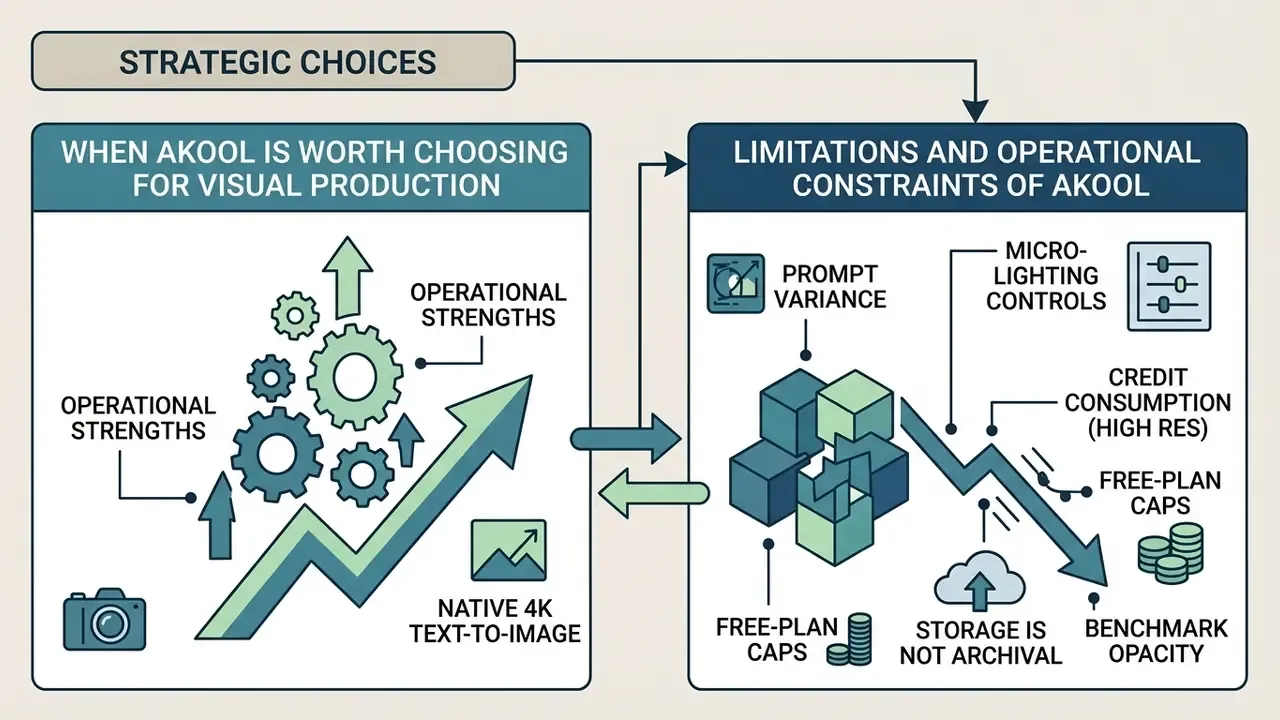
When Akool Is Worth Choosing for Visual Production
Akool delivers real value to organizations that want an all-in-one suite of ai powered tools unifying image synthesis, face swapping, talking avatars and video translation under centralized administration. Native 4K output makes it compelling for teams producing high-resolution print and commercial web graphics. Localization breadth helps too: vendor materials cite 150 or more languages for translation and live modes, which strengthens the case for global campaign teams working across time zones.
«Akool reached $40 million in annual recurring revenue, evidencing commercial stability for enterprise buyers.»
Commercial stability is not a control, but for vendor-risk scoring it does reduce concentration concerns about a disappearing supplier mid-campaign.
Limitations and Operational Constraints of Akool
When You Should Compare Akool with Alternatives
Organizations needing hyper-specialized fine-art control, open-source model customization or complex prompt-based styling logic should benchmark Akool against alternatives, including Midjourney and alternative generators and the broader field of best AI video generators. Design teams focused purely on graphic layout may prefer a canva ai generator, or review comparative benchmarks in our AI Media Comparison Matrices before shortlisting.
| Criterion | Akool | Adobe Firefly | Midjourney v6 |
|---|---|---|---|
| Maximum native resolution | Native 4K (3840×2160) | High-res with generative upscale | High-res via upscale steps |
| Multi-model routing | Yes (FLUX, Seedream, Qwen, Nano Banana, Grok, Recraft, GPT) | Proprietary Firefly models | Proprietary model family |
| API for pipeline automation | Documented OpenAPI suite | Enterprise APIs available | Limited, community tooling |
| Bundled video, avatar, translation | Yes, single platform | Partial (Creative Cloud ecosystem) | No |
| Artistic control depth | Prompt-mediated, limited sliders | Mid, integrated with editing stack | High, strongest stylistic ceiling |
| Enterprise identity controls | Verify SSO and RBAC per tier | Mature enterprise identity tooling | Minimal |
| IP indemnification posture | Not publicly stated, verify | Publicly positioned as commercially safe | Not offered |
| Entry paid price point | $21 / mo | Subscription-bundled | Subscription-bundled |
Where legal certainty outweighs feature breadth, an indemnified vendor is the safer pick. Where one contract must cover static images, avatars, dubbing and short-form video, Akool's consolidation wins on operational simplicity. Platform-specific comparisons continue in our reviews of the Microsoft AI image generator and the Google AI image generator. New to the category entirely? Start with the fundamentals and view the guide.
Which AI Tools Are Available in the Akool Ecosystem Beyond the Image Generator
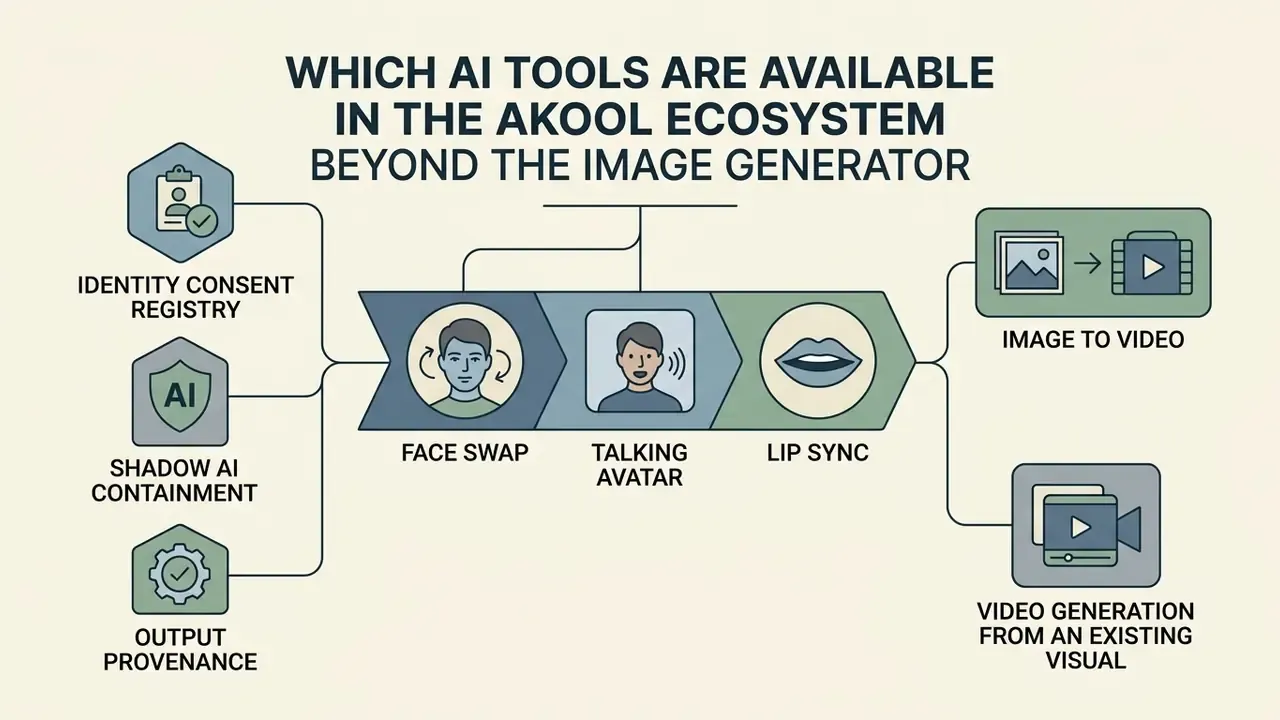
Akool runs as an integrated multi-tool ai platform rather than a standalone generator. Assets move between static and motion formats without leaving the environment, which is where most of the time savings actually come from.
Face Swap, Talking Avatar, and Lip Sync
The suite includes face swap, talking avatar and lip sync tools. Marketing teams use face swapping to localize promotional video actors across international demographics without reshooting core footage. Documentation notes single-face and multi-face detection, high-resolution output, and blending tuned for natural edges. Lip sync guidance recommends keeping source video below 25 FPS and matching audio and video duration, otherwise synchronization drifts.
Academic research on synthetic media in marketing (Springer Encyclopedia of Artificial Intelligence in Marketing, 2024) finds that personalized avatar messaging lifts consumer engagement when identity boundaries are managed ethically. Talking avatar tools animate static photos with automated vocal synchronization for corporate training and promotional presentations.
«Personalized avatar content increases engagement but requires ethical identity management and transparent disclosure of AI origin.»
Shadow AI and Synthetic Media Risk Controls
Image to Video and Video Generation from an Existing Visual
The image to video module converts static ai generated graphics into dynamic assets. Motion synthesis adds depth, camera pans and character movement to a still frame, and our reference guide to image-to-video AI covers the underlying technique. For marketers, this turns a campaign key visual into short-form ai video for social channels without a production crew. Broader context sits in our overview of AI video generators.
Documented parameters: output lengths of 5 and 10 seconds, with 10-second generation restricted to Pro and higher plans, plus resolution selection and optional effects and audio integration. Video generation uses a time-dependent consumption model where credit usage scales with frame duration and resolution, quoted per 5-second unit at 720p, 1080p and 4K. The vendor publishes no numeric motion-control range and no quantitative smoothness metric, so validate motion quality on representative assets during the trial rather than trusting the demo reel. Cutting edge does not always mean production ready.
FAQ About Akool AI Image Generator
Is registration required to use Akool?
Yes. Account registration via business email, Google or Discord authentication is required to access the platform, manage generated assets and use free plan credits. Vendor terms note that paid-feature trials convert automatically into a paid subscription unless cancelled at least 24 hours before the trial ends, so the budget owner should calendar that date.
Which images work best for image-to-image and image to video?
High-resolution, well-lit photos (PNG or WebP, JPG accepted) with clear subject isolation, low visual noise and defined boundaries. Quality baseline imagery improves boundary recognition and motion rendering fidelity directly. Avoid extreme side-profile faces, motion blur and blown-out highlights.
How long does image generation take?
Timings vary by mode and quality setting rather than sitting at one fixed number. Vendor documentation states image generation typically completes in under a second for standard requests, while independent observation of text-to-image synthesis puts practical end-to-end turnaround in the 10 to 30 second range including queue time. Native 4K upscaling or complex image-to-video jobs can take several minutes depending on quality parameters and compute load. Image-to-video output is described as ready within 10 to 30 seconds at lower resolutions, with 4K taking substantially longer. None of this is published as a guaranteed SLA, so measure throughput during evaluation.
Do I own commercial rights to images generated with Akool?
Paid tiers are positioned as granting commercial usage rights, while free-tier output is watermarked and framed as evaluation use. The public terms reviewed for this article do not spell out a clear commercial-rights clause for free-plan outputs, and they publish no third-party IP indemnification. Confirm both points in the executed agreement before putting generated assets into paid media.
How does the credit system work?
Akool uses a credit-based model. Free accounts receive a limited allocation (reported as 100 gift credits, 25 images or roughly 1.5 minutes of video), and consumption scales with resolution and, for video, duration. Native 4K generation and upscaling burn credits fastest, which is the single most common cause of unexpected budget depletion in batch production.
Which underlying models can I choose in Akool?
The interface routes prompts through several foundational architectures: Akool's own image model plus FLUX, Seedream, Qwen Image, Recraft, Nano Banana, Grok Imagine Image 2 and GPT. Model choice affects text rendering accuracy, stylistic character and generation speed. Record the selection for audit purposes.
Does Akool provide audit logs and SSO for enterprise teams?
API-mediated generation lets the calling system log prompts, model selections, operators and output identifiers into internal monitoring. Native interface-level activity export, SSO, SCIM and RBAC scope must be confirmed with the vendor for your specific tier, because the public documentation reviewed here does not fully specify them.
Social Media Content and Personalized Creatives
Social media operations need frequency and fast iteration, sometimes in near real time against a trending topic. Marketing teams use Akool to create personalized social posts, story graphics and ad variants segmented by audience. Fast synthesis lets creators align visual messaging with live market movement while holding brand aesthetics steady. Vendor documentation also describes variable-based personalization (name, company, role) with spreadsheet-driven bulk generation for one-to-many campaigns.
There is a reputational floor to respect here. Likeness-driven creatives, including anything resembling a celebrity ai image generator output, carry publicity-rights exposure that no prompt disclaimer neutralizes.