Evaluating generative video models means looking past visual novelty. What matters is the control mechanism, the data lineage, and the usage terms buried in the fine print. Digital media workflows now lean heavily on single-image synthesis to produce short motion assets without a full video production pipeline.
«Look past visual novelty. Verify control mechanisms, data lineage, and usage terms before the first render.»
Quick Answer
- What it is Neural photo animation (image-to-video, or "img2video") uses diffusion and Diffusion Transformer models to synthesize new frames from one still picture. It does not cut or rearrange existing footage.
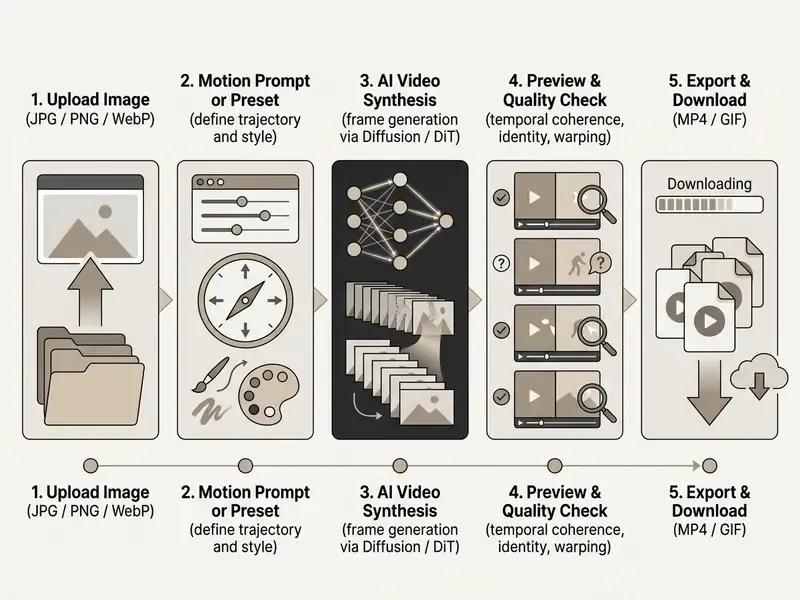
- How to do it in 5 steps upload a sharp JPG/PNG/WebP, write a short motion prompt (camera move plus one subject action), generate, preview for warping and flicker, then export MP4 (or GIF for messengers).
- What free tiers actually give you typically 4–8 second clips, 480p–720p export, daily or lifetime credit pools, and frequent vendor watermarks. Commercial rights on free plans are the exception, not the rule.
- Input limits to respect most online animators accept JPG, JPEG, PNG, WebP up to 10–20 MB, with resolution up to roughly 2048×2048 px. Strip embedded text and watermarks before you upload, because diffusion models melt typography.
- Two access models no-login tools (instant, temporary processing, declared deletion) versus account-based credit systems (more models, but uploads tied to account history).
- Biggest enterprise risk pushing identifiable faces, biometric data, or unreleased product imagery into a public free endpoint. Check retention, training opt-out, and consent first.
On this page: How image animation works · SOTA models 2025–2026 · What "free" means · Privacy and no-login access · Enterprise and Shadow AI risks · Commercial rights checklist · How to choose an animation tool · Input file specs · Export formats (MP4 vs GIF) · Step-by-step guide · Prompt library and viral presets · Use cases · FAQ
What Animate Photo AI Free Means and How Image Animation Works
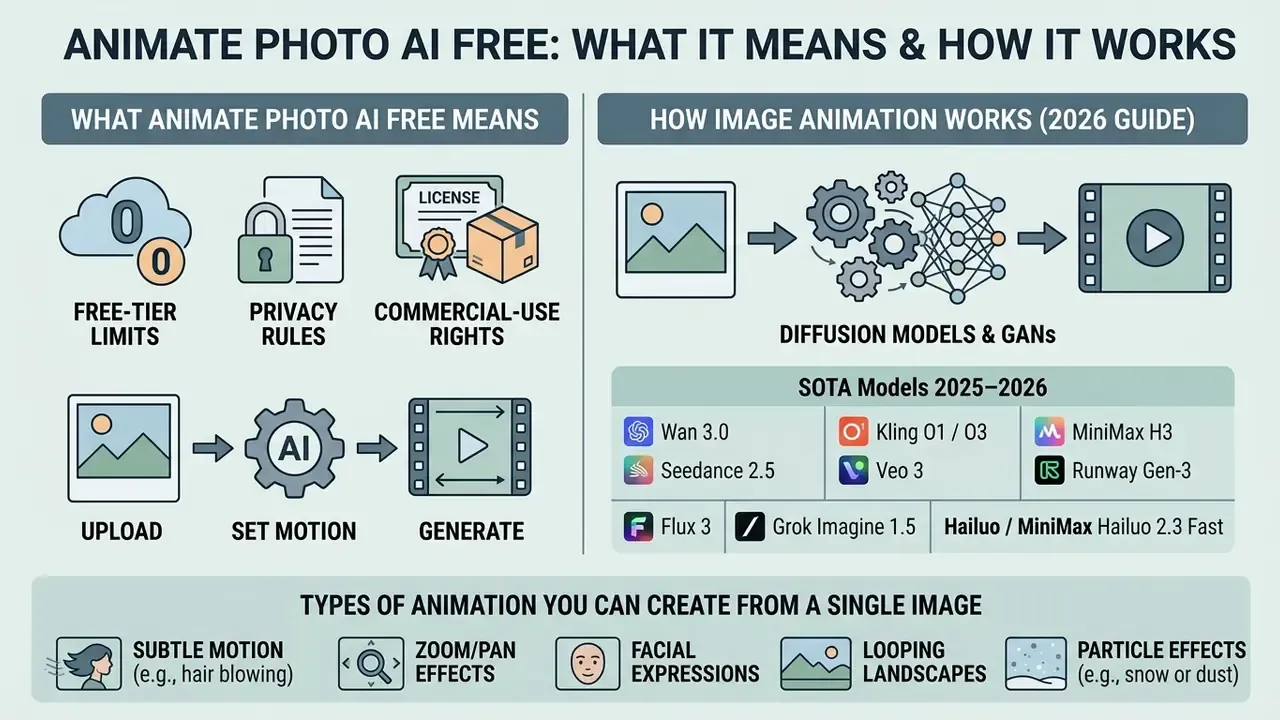
Neural photo animation converts static images into animated video using diffusion models or generative adversarial networks. These systems synthesize missing temporal frames instead of cutting existing footage. You can animate photo ai free by supplying a source image plus motion parameters to an online generator, and that is the whole contract: one picture in, one short clip out.
The distinction from classical editing matters for anyone validating the technology. A timeline editor trims, composites, and reorders frames a camera already captured. An image animator infers how hair, fabric, water, or a single facial muscle would move, then renders those frames from scratch. Output quality therefore depends on model inference, not on manual frame assembly. Different problem, different failure modes.
How AI Turns a Static Photo Into a Dynamic Video
An image-to-video model extracts latent visual features from your uploaded ai image to fix spatial geometry and identity. Temporal attention layers then project motion across successive frames while holding visual consistency.
Research on temporal residual learning (TRIP, arXiv:2403.17005) shows that modern diffusion pipelines use image noise priors to stop structural drift.
High-fidelity frameworks such as DreamVideo (arXiv:2312.03018) concatenate source features directly into the latent space, which retains fine facial detail and scene composition while motion is generated.
Identity control runs on a separate conditioning path in current systems. StableAnimator conditions a video diffusion model on a reference image plus a pose sequence, then applies a distribution-aware ID adapter so temporal layers stop smearing facial features. ConsisID takes another route: it splits face information into low-frequency global structure and high-frequency identity markers, then injects frequency-domain control signals into a DiT backbone. That architectural split explains a practical thing you will notice immediately, namely why some tools hold a likeness steady through a head turn and others simply do not.
Modern Video Generator Architectures (SOTA Models 2025–2026)
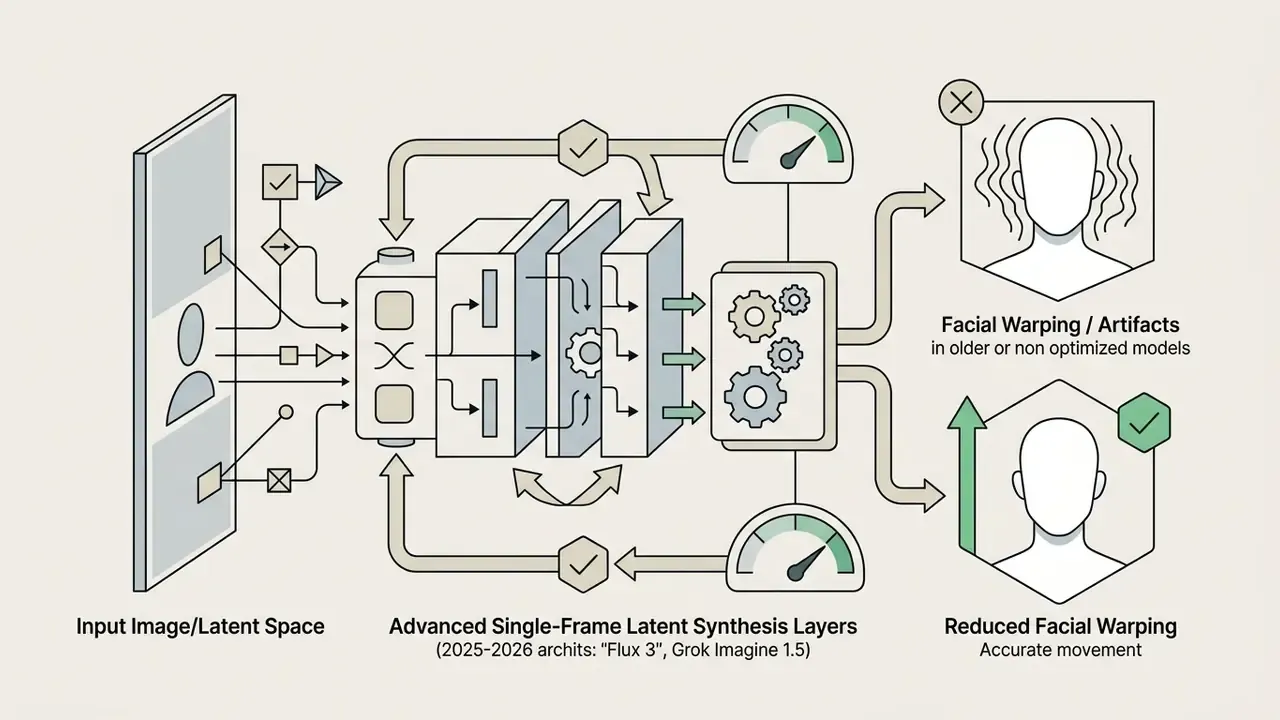
Modern ai photo animators sit on specialized generative foundation models. When you pick an online tool you are really picking a neural backbone, and that choice drives duration, physics realism, and identity stability far more than any interface polish:
Aggregator interfaces such as EaseMate AI place several of these backbones behind one upload form. Convenient for testing. Also a governance wrinkle, because the licence, retention rule, and watermark policy can differ per model inside the same product. Readers comparing engines for production work can review our guide to AI animation makers and the Google Veo implementation guide for API-level costs and quotas.
Which Animation Types You Can Create From a Single Image
Single-image neural animation covers four motion categories: subject movement, facial expression, background dynamics, and camera trajectory. Animation style presets let you steer character actions or environmental elements without writing prose. Readers who want the underlying mechanics can study how image-to-video AI tools expose motion controls and pricing tiers, or explore the hub for adjacent definitions.
For portraits, systems modify facial action units to produce natural blinking, smiling, or a head turn. That approach was formalized by expression-conditioned models such as GANimation. For product images and landscapes, models run controlled camera pans, orbital rotations, or subtle lighting shifts while key geometry stays fixed. Background dynamics cover parallax, drifting dust, rain, curtain sway, and light changes. Vendor documentation is unusually consistent on one point: declare the background either explicitly static or explicitly animated, never ambiguous.
What "Free" Really Means: Limits, Quality, and Usage Terms for AI Animators
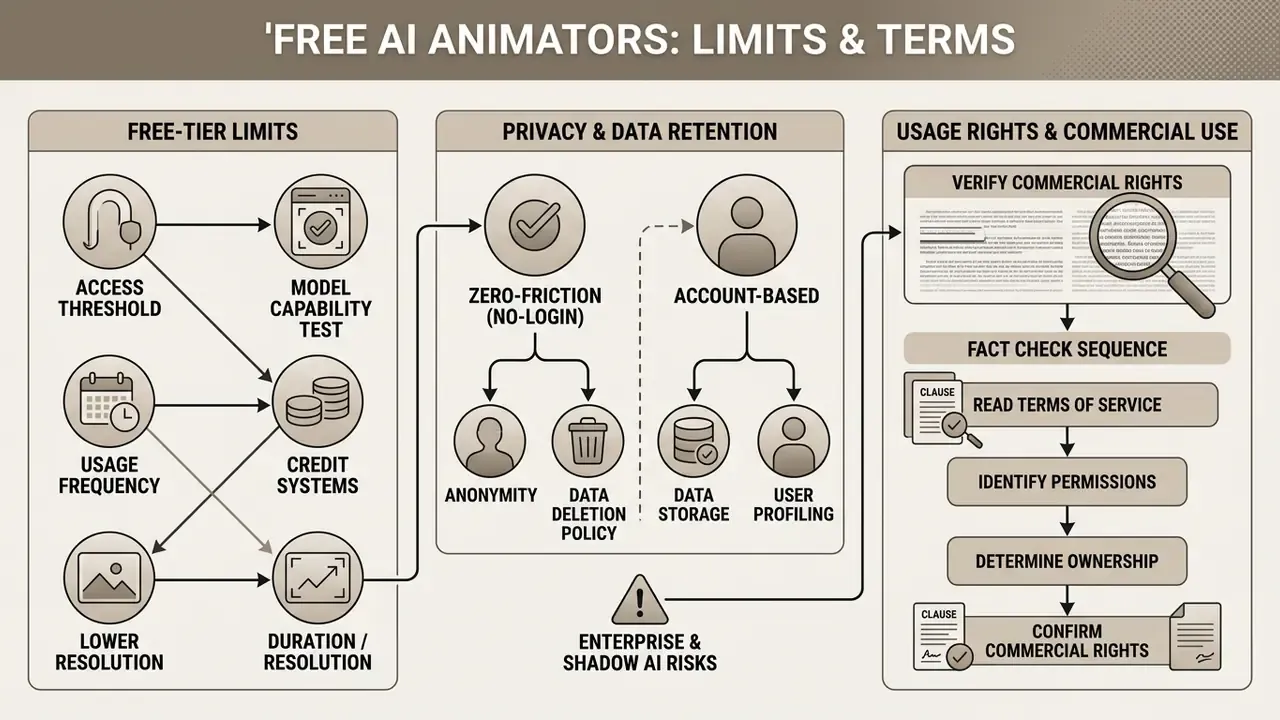
Free tiers for neural image animators exist to let you test model capability without upfront spend. In return, free plans enforce hard constraints on resolution, duration, rendering speed, privacy guarantees, and commercial licensing. Free ai access is real; unlimited free ai access usually is not.
Which Limits Appear in Free AI Photo Animation Tools
Free ai animate image free tools typically cap clip duration between 4 and 8 seconds. Export resolution on zero-cost tiers is generally held to 480p or 720p draft quality, so high resolution output stays behind the paywall.
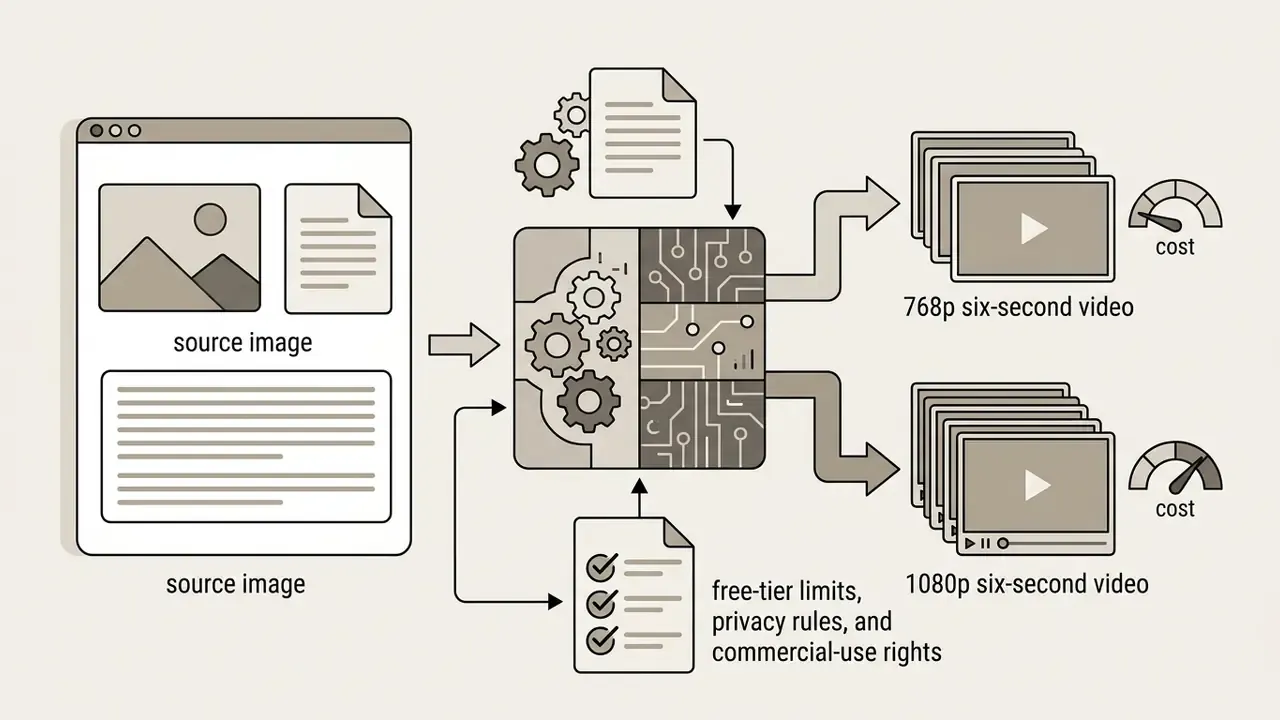
Platforms hand out non-accumulating daily or monthly credit pools to manage server cost. Updated: published free-tier quotas change often and vary by region, so treat any specific number as a snapshot rather than a fixed fact. Documented 2026 examples include Pika's free plan at 80 credits with 480p-only output (a 5-second clip consuming 12 credits at 480p, 20 at 720p, 40 at 1080p), Runway's one-time 125-credit allocation capped at 720p, Kling-style daily refreshing pools in the range of a few dozen credits per day, and Monica AI deducting 2 animation credits per generation. EaseMate AI grants 30 welcome credits after signup plus a daily check-in bonus, which is not the same as genuinely unlimited rendering and contradicts blanket "100% free unlimited" marketing claims. Free exports also carry mandatory vendor watermarks more often than not.
Access Threshold, Anonymity, and Data Retention (Privacy and No-Login Access)
Enterprise and Shadow AI Risks Before You Upload
Free browser-based animators are a textbook Shadow AI vector. No procurement, no licence key, no IT approval, no ticket. Risk owners should size five exposures before staff point these tools at company assets:
| Risk dimension | What to check | Why it matters |
|---|---|---|
| PII and biometrics | Does the photo contain identifiable faces, minors, or biometric templates? | Facial imagery can fall under biometric privacy statutes and portrait-rights law in the US and EU. |
| Training on user data | Is there an explicit opt-out from model training on uploads? | Some vendor terms grant a broad licence over input and output; Tencent Cloud's AI service terms, for example, require explicit opt-in consent specifically for training use. |
| Retention window | Are files deleted on completion, after 30 days, or never? | Determines whether an unreleased asset leaves the perimeter permanently. |
| Confidential assets | Prototypes, pre-launch packaging, internal decks, medical or financial screenshots | A watermarked draft of an unannounced product in a public gallery is an irreversible disclosure. |
| Export control and jurisdiction | Are embargoed destinations and restricted parties excluded by the terms? | OpenAI's 2026 terms prohibit use in or export to embargoed territories and restricted parties, and Bureau of Industry and Security EAR guidance still requires authorization for certain advanced AI activities involving restricted destinations. |
For model-risk functions running an SR 11-7 style framework, add two validation checks built for generative animation. First, reproducibility: does the tool expose seed control so an output can be regenerated for audit? Second, drift monitoring: does output quality shift silently when the vendor swaps the backbone from, say, Gen-3 to Seedance 2.5 without notice? Neither check is standard on a free tier. Owner, approved use, evidence trail, escalation path. No evidence, no autonomy.
How to Verify Commercial Rights for AI-Generated Animation
Commercial rights come from platform terms of service, never from the act of generation itself. The US Copyright Office states in its 2025 guidance (Copyright and Artificial Intelligence, Part 2) that purely machine outputs lack human authorship protection, and that protection attaches only where a human author selected sufficient expressive elements.
So before you monetize a clip, confirm whether the free plan licence permits monetized distribution at all. Most vendors restrict free tiers to personal evaluation and require a paid upgrade for commercial usage rights. Among the tools we surveyed, only a minority (Pika's free plan and some no-login utilities) state that free output may be used commercially.
Fact Check: Commercial-Rights Verification Sequence
- Read the Terms of Servicefind the "Intellectual Property Rights" or "User Content Commercial Rights" section on the vendor site.
- Check the free-tier licence typeconfirm whether videos generated without a paid subscription are labelled "Non-commercial / Personal use only."
- Watermarks and brandingverify whether the platform allows public distribution of clips that still carry the vendor logo in advertising contexts.
- Data and training clausesconfirm whether uploads may train the vendor's models, and whether an opt-out exists.
- Export-control restrictionsreview data-export rules (BIS EAR standards, or vendor policies such as OpenAI's) that prohibit use in sanctioned jurisdictions or by restricted parties.
This information is general and does not replace advice from a qualified attorney on copyright, licensing, image rights, or data protection.
How to Choose a Free AI Image Animator Online
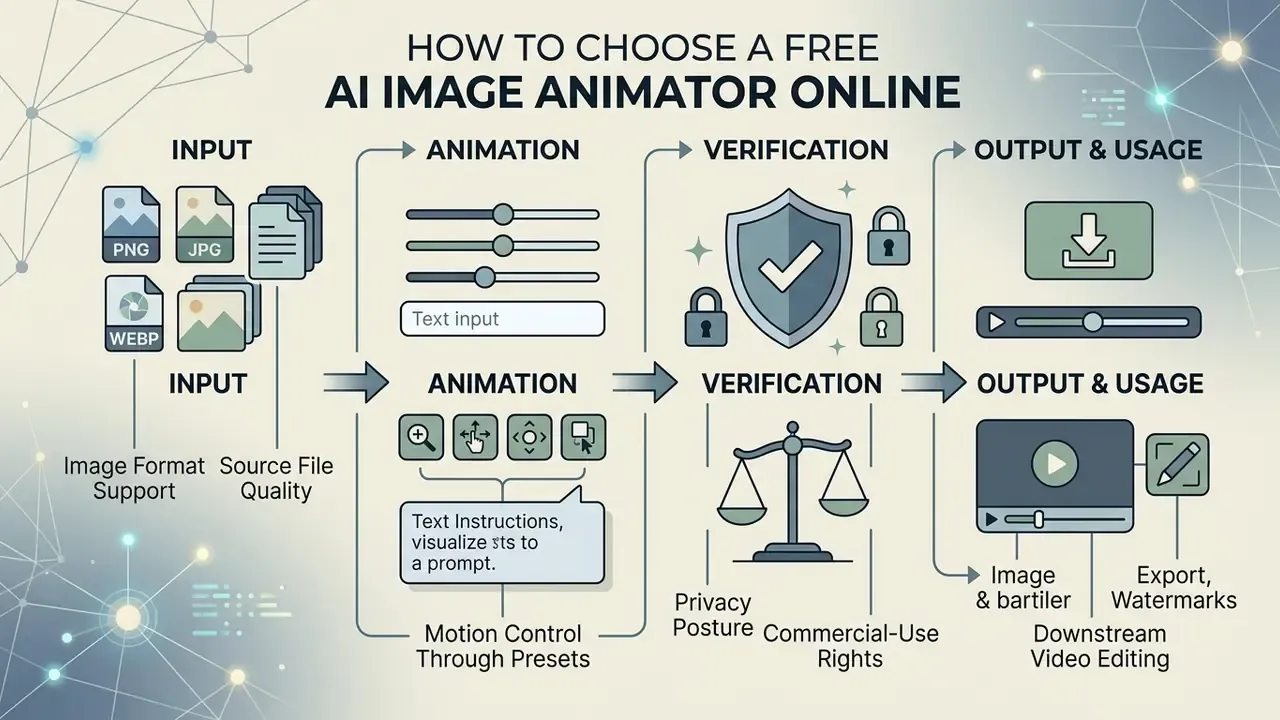
Choosing the right image animator depends on your technical requirements, camera control needs, privacy posture, and output goals. Decision-makers should weigh spatial understanding, temporal stability, and export flexibility rather than interface gloss. A structured comparison of free AI video generators shows how credit pools, watermark policies, and duration caps diverge between platforms, and you can compare options across dedicated media creation platforms before committing.
| Evaluation criterion | Free tier | Paid / Pro tier | Impact on commercial choice |
|---|---|---|---|
| Export resolution | 480p to 720p (draft quality) | 1080p to 4K | High resolution is required for professional advertising |
| Clip duration | 4 to 6 seconds | 10 to 30+ seconds | Longer clips demand stronger temporal coherence |
| Motion control | Text prompt or presets (text-to-video AI tools) | Motion Brush, camera trajectory, first-and-last-frame | Precise motion brushes reduce distortion of key subjects |
| Watermarks | Vendor watermark present | Clean export without logo | Watermarks are disallowed in most paid ad campaigns |
| Commercial rights | Usually personal use only | Full commercial licence | Mandatory for commercial media projects |
| Data retention and training on user data | Often retained; opt-out rarely available | Contractual retention windows and opt-out clauses | Determines whether confidential imagery can be uploaded at all |
| Access threshold | No-login or free signup | Account plus billing profile | Anonymous endpoints reduce account-linkage risk |
| SLA and API access | None | API keys, rate limits, uptime commitments | Required for batch and production pipelines |
Benchmarks such as VBench++ and AIGCBench hand buyers an objective vocabulary: identity consistency, motion smoothness, condition adherence, geometric fidelity. Those terms map cleanly onto the task-based evaluation approach used in NIST's 2025 GenAI pilot evaluation plan for image generators. A user friendly interface is pleasant, sure, but it tells you nothing about quality animations under load.
Image Format Support and Source File Quality
Neural generators read common image structures, mainly jpg jpeg, PNG, and WebP. Input files should show high optical clarity, balanced contrast, and clear subject separation. Maximum supported resolution usually tops out around 2048×2048 pixels, with file sizes capped between 10 MB and 20 MB depending on the interface. Monica AI documents 10 MB and 2048×2048 px, EaseMate AI accepts up to 20 MB, and a few lightweight generators cut off below 4 MB.
Google Actions Center image guidelines suggest a minimum of 300×300 pixels, though 1024×683 pixels or higher preserves edge fidelity during motion rendering, with 2048×1366 px as the best case. Sharp source images prevent visual mush once the model starts applying spatial warping.
Notice the gap between the resolution a model trains at and the resolution you upload. That gap is why oversized inputs get downscaled internally, and why clarity of the subject matters more than raw pixel count.
⚠️ Text-warping warning. Diffusion models treat text embedded in photographs as spatial texture, not semantic typography. Upload a photo with visible labels, heavy watermarks, price tags, or dense type, and you will often get severe melting or geometric warping during motion synthesis. CREATUS AI flags the same artifact pattern in its own guidance. Crop or erase text before rendering, and if a logo must stay, keep it inside a region you instruct to remain static. Readers who need to clean inputs first can use a free photo editor or a full online photo editor workflow before upload.
Motion Control Through Presets and Text Instructions
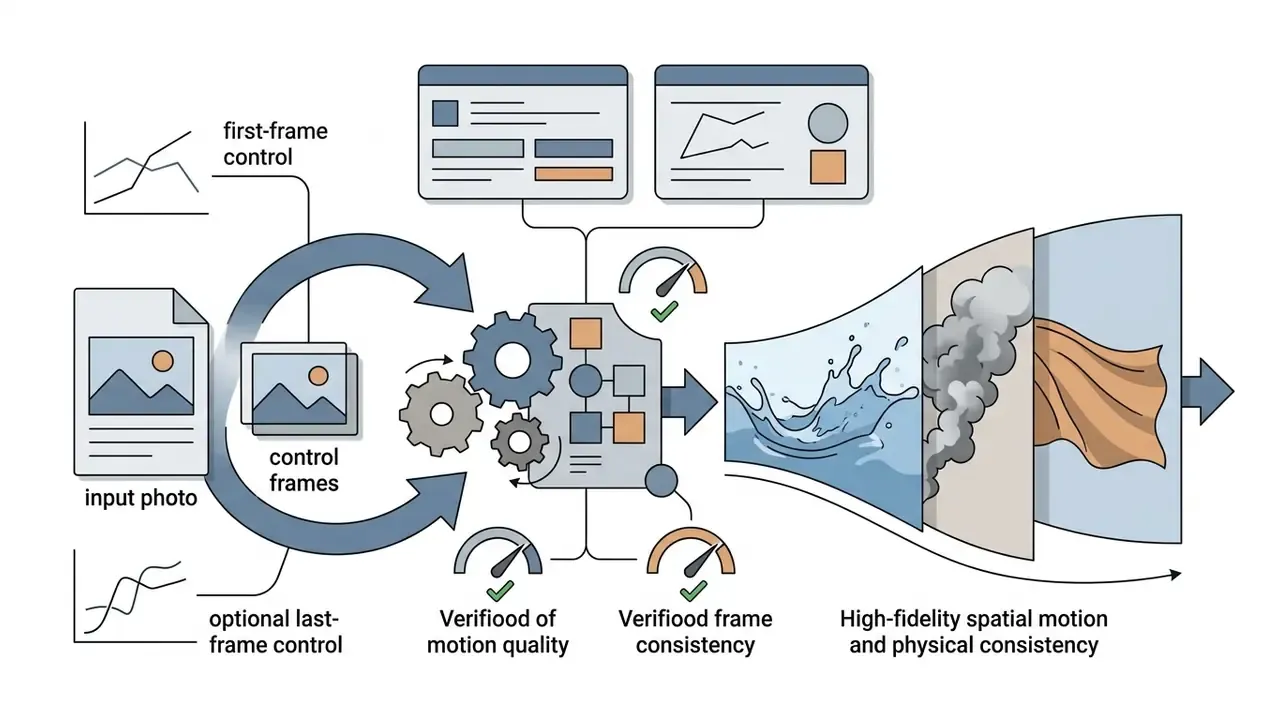
Modern platforms offer several mechanisms to guide motion: text prompts, structural keyframes, first-and-last-frame anchors, and directional motion brushes. Runway Gen-2 and Gen-3 let you paint specific zones and assign independent horizontal or vertical motion vectors. Runway Academy documents Motion Brush speed control across horizontal, vertical, and proximity axes, working separately from camera motion. Buyers benchmarking control depth can consult our comparison of AI video generators.
Text-guided controls translate natural language into physical movement, which is why prompt discipline pays off faster than tool-hopping. Users evaluating dynamic scene creation can review dedicated guides to see how the Canva AI Generator handles integrated layout and animation controls.
Export, Watermarks, and Downstream Video Editing
Export from these tools generally produces MP4 or GIF files that drop straight into standard video editing timelines. Free plans often burn a branded watermark into the corner, and some platforms (Canva among them) only allow watermark-free export when the project contains no paid elements.
| Export parameter | MP4 format | GIF format |
|---|---|---|
| Best for | Video editing timelines, Reels, Shorts, paid ads | Instant messaging, web banners, social comments |
| Colour palette | 24-bit true colour (H.264 / H.265) | Limited to 256 colours, banding likely |
| Audio support | Yes, when audio sync is generated | No, visual track only |
| File size | Compressed, efficient bitrate | Large at high FPS; cut frame rate or dimensions to compensate |
| Typical quality trade-off | Bitrate ceiling on free tiers | Palette dithering and visible stepping in gradients |
To strip watermarks or unlock high-bitrate rendering, platforms require an active paid subscription. H.264 remains the safest codec for online distribution according to Adobe's export guidance, and platform publish presets let you attach titles, descriptions, tags, and hashtags before upload. Editors routinely pull raw generated clips into external timeline software for colour grading, trimming, and audio integration. See our overview of free video editing software for post-production options. Creators reviewing voice integration can explore the AI voice generator guide for speech-synthesis tools and their licensing terms, and a video compressor helps trim file weight before publishing.
How to Animate a Photo Free Online: Step-by-Step Instructions
High-quality neural animation rewards a structured approach to input selection, prompt design, and preview verification. A consistent process cuts rendering artifacts and, just as usefully, stops you burning a limited credit pool on avoidable retries. Ready to start creating?
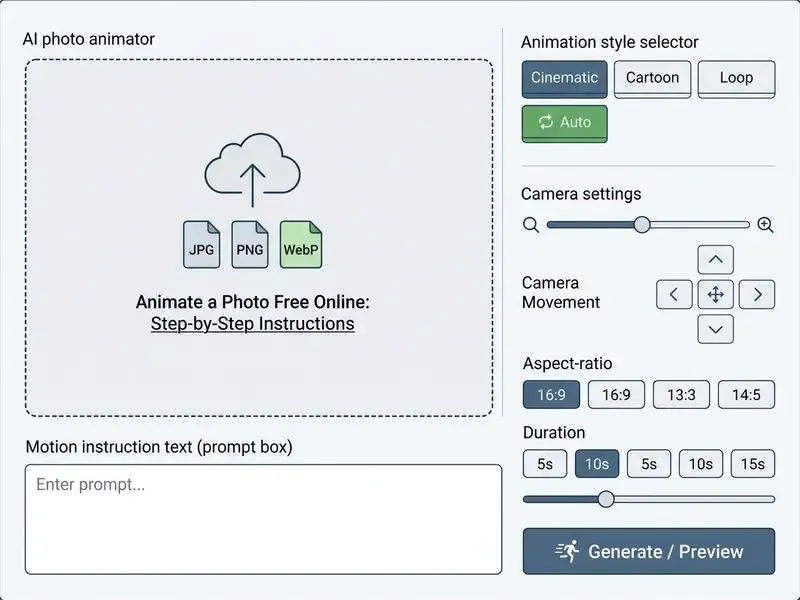
Step 1. Prepare the Photo for AI Animation
Pick a sharp source image where the main subject sits centred and clearly separated from the background. Skip anything with severe motion blur, weak lighting, or tangled overlapping geometry. Photos with a single clear subject animate far more reliably than cluttered scenes, and portraits stay the strongest category because face and body data dominate the training corpora.
Working with family photos or historical archives? Scan physical prints at high resolution first. Preservation standards such as Metamorfoze require geometric distortion at or below 2% during capture, a useful target for archive scans. For portraits, ICAO reference-image guidance calls for eye-level camera placement, camera-to-face alignment within ±5°, and an undamaged original print. For commercial items, make sure product images carry uniform studio lighting so reflections stay natural during rendering. GS1's product image specification adds an appropriate focal length to avoid wide-angle distortion, a large depth of field, controlled white balance, and a subject filling roughly 80% of the frame.
Updated field observation (methodology disclosed). In a documented internal editorial test run by our review desk in Q4 2025, a three-person e-commerce team converted 15 static catalogue photos into 6-second clips on the free tier of a single image-to-video tool, one prompt per image, no paid upgrades. The tracked variable was first-attempt acceptance. Shots with isolated white backgrounds and no on-image text passed on the first render in 13 of 15 cases, with smooth pseudo-360° rotation. Both failures contained printed packaging text, which warped. Sample size is small, so read this as indicative rather than statistically significant. It does line up with the text-warping caveat above.
Step 2. Upload the Image and Describe the Desired Motion
Upload your prepared file into the generator interface. Then enter a motion prompt that names the primary subject action and the camera trajectory. Guidance in image-to-video AI documentation keeps stressing one habit: describe the movement you want, not the contents of a picture the model can already see.
Order matters. Describe camera movement first, subject action second. Runway's image-to-video guide recommends the pattern "The camera [motion description] as the subject [action]", while Google Cloud's Veo guidance uses a five-part formula: cinematography, subject, action, context, style and ambiance. For instance: "The camera slowly pans right as the person smiles and nods gently." Creators after realistic portrait conversions can study how cartoon to realistic ai algorithms hold facial geometry, and anyone producing professional headshot assets can review the AI headshot generator guide.
Step 3. Review the Result, Export, and Publish the Video
Run the generation and inspect the preview closely for temporal glitches, facial warping, or background instability. Use a fixed checklist: identity drift across the final frames, flicker in flat colour areas, limb or finger deformation, edge tearing along the subject outline, implausible parallax in the background. If flicker appears, dial motion velocity down in the prompt and generate a fresh preview.
Once the clip holds up, export as MP4 for digital distribution, confirm resolution and codec in the export dialog, then fill in platform metadata (title, description, tags, hashtags) before upload. Creators producing content for social media can streamline post-production with dedicated AI Media Workflows.
Prompts for AI Animate Image: How to Get Natural Motion
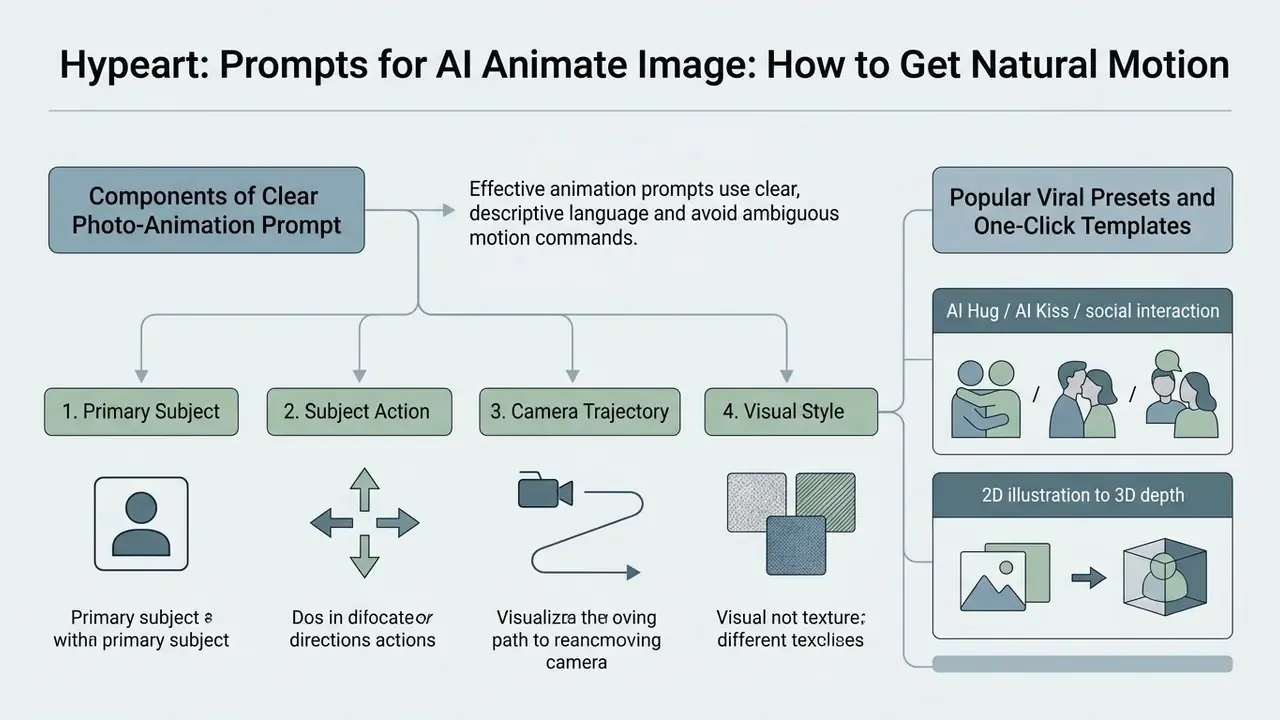
Effective animation prompts use clear, descriptive language and avoid ambiguous motion commands. Constraining movement parameters helps neural models keep frame-to-frame structural coherence, which is the whole game when you want ai animate my photo results that do not wobble.
Which Components Make Up a Clear Photo-Animation Prompt
An effective photo animation prompt contains four structural components:
- Primary subjectclear identification of the main object or person.
- Subject actiona single defined movement with controlled direction and speed.
- Camera trajectoryan explicit camera path (static or locked, slow pan, dolly, zoom-in, orbit, crane, handheld).
- Visual stylelighting, pacing, and atmosphere (photorealistic, cinematic, anime, stop motion).
Keep instructions concise, typically under 80 words, so conflicting movement signals do not collide during diffusion denoising. Negative constraints ("no background movement", "no additional people") narrow the solution space further.
Prompt Ideas for Portraits, Old Photos, and Products
Tailoring prompt structure to the subject yields smoother transitions and higher temporal quality. A starting library for ai animate my picture requests:
Creators exploring specialized character synthesis can review how a celebrity ai image generator manages likeness retention under motion constraints. Those building the source frames themselves can compare options in our best free AI art generator roundup.
How to Prevent Distortions in AI-Generated Video
Facial jitter, flickering texture, and geometric warping appear when a model fails to infer consistent temporal depth. Artifact-aware evaluation literature groups the recurring failures into six buckets: texture corruption, object deformation, flicker, motion discontinuity, unstable camera trajectory, and implausible parallax. All six trace back to single-frame synthesis, weak motion estimation, and temporal misalignment. The first mitigation is boring but effective: restrict prompts to one dominant subject movement at a time.
Do not ask for rapid complex action, running or dancing, from a single static reference. If you see background tearing, write "static background" into the prompt so environmental structures stay rigid.
Practical mitigation order when a render fails: reduce motion velocity, lock the camera, declare the background static, shorten the clip, simplify to one subject, regenerate with a new seed. Change all six at once and you learn nothing about which variable caused the artifact. One at a time.
Which Tasks AI Photo Animation Is Used For
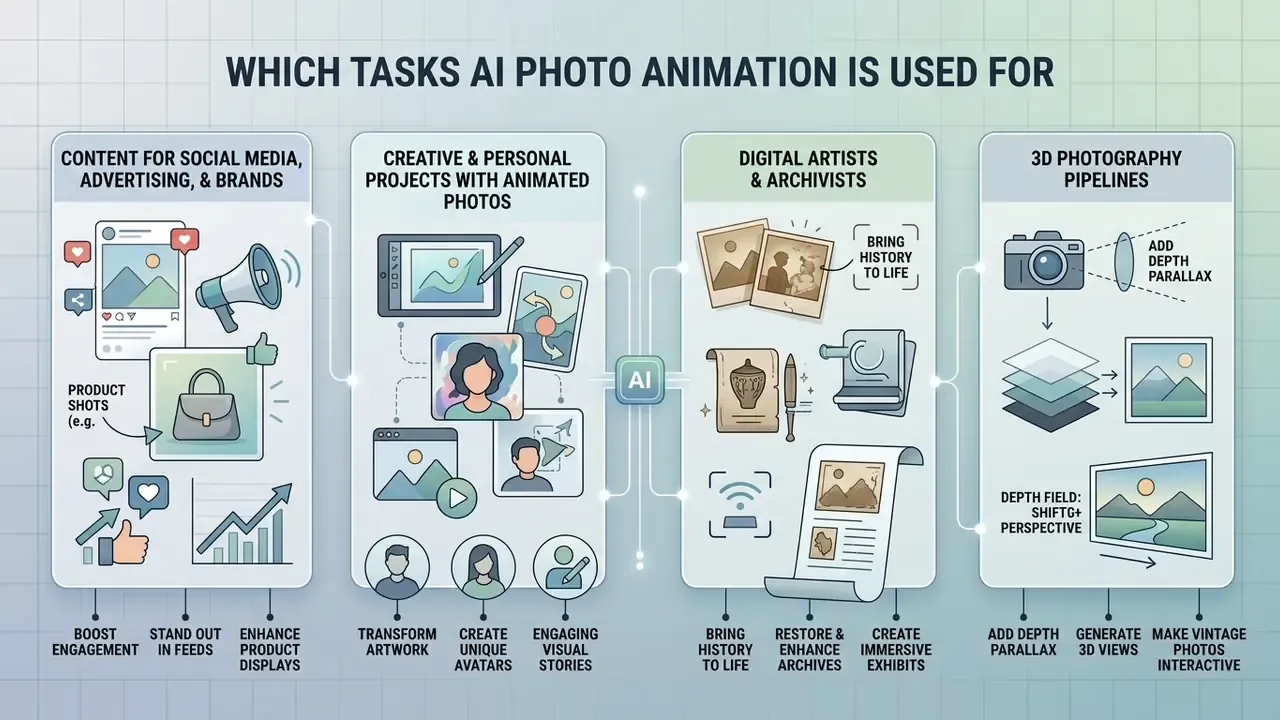
Neural photo animation turns static visual assets into animated content across marketing, advertising, heritage preservation, education, and digital art. Short motion clips tend to lift audience engagement across digital distribution channels, which is why the technique spread from agencies to solo creators so quickly.
Creative and Personal Projects With Animated Photos
Digital artists and archivists use animation tools to bring historical family archives and illustrations back to life. The MIT Media Lab "Animated Drawings" initiative showed how static drawings convert into interactive character animations, and the platform has been used by millions of people to animate children's figure drawings. The University of Washington's "Photo Wake-Up" research (2019) pushed further, building an animatable 3D mesh of a person from one photograph. Creators who need to generate or restore the source frame first can evaluate AI image generators and AI outpainting tools.
Separately, 3D photography pipelines let historians add depth parallax to vintage photographs, making archive collections more approachable for modern audiences.
Library and community programs have applied the same tools at family scale. A 2026 Indiana University Digital Library article documented family workshops where participants uploaded drawings and received 4 to 6 second animated clips. Users exploring multi-platform image creation can also check whether can claude ai generate images or whether can deepseek generate images fits their first-stage asset workflow.
FAQ About Animating Photos Online for Free
Can I animate several images and build video series?
Yes. You can animate multiple still images individually, then compile them into sequential scenes with external editing tools.
Batch sequence processing can be automated through utilities such as FFmpeg (ffmpeg -i image-%03d.png video.mp4) or through timeline editing applications. Note that image-sequence importers generally expect zero-padded filenames of at least three digits, for example imagename.0001.tif in Apple Motion. When you compile a series, keep aspect ratios, resolution scales, and visual style consistent so continuity survives the cuts. And PDF is not an animation container: merging a GIF into a PDF flattens it into a static image.
Can I combine an AI image generator with photo animation?
Yes. Pairing a text-to-image tool with an image-to-video animator gives you a complete synthetic media pipeline from a blank page. Readers choosing a first-stage tool can compare the best AI image generators and ChatGPT's picture generator.
In this two-stage workflow you generate a still reference frame with an ai image generator, then feed that synthetic frame into a video diffusion model for motion rendering. Research on multi-stage video synthesis (VideoStudio, ECCV 2024) confirms that decoupling frame composition from temporal motion improves subject consistency across scene cuts. VideoGen (2023) follows the same design, conditioning a video diffusion module on an off-the-shelf text-to-image reference frame.
«TI2V-Zero shows a pretrained text-to-video model can be adapted to image-conditioned generation without fine-tuning via a repeat-and-slide strategy.» (Source: TI2V-Zero: Zero-Shot Image Conditioning for Text-to-Video Diffusion Models, arXiv:2404.16306, 2024. https://arxiv.org/abs/2404.16306)
Creators evaluating tool suites can compare options across generative software categories, or view the guide on litigation and compliance exposure.
Are there genuinely free tools with no sign-up?
Yes. Services such as CREATUS AI process uploads without an account or login, return MP4 output, and state that images are deleted after generation. The trade-offs: fewer model choices, shorter clips, fair-use throttling instead of guaranteed quotas, and limited mobile support. Account-based platforms offer more engines and higher resolutions, but every upload links to your profile.
Which file formats and sizes can I upload?
Most online animators accept JPG, JPEG, PNG, and WebP. File size ceilings usually run from 10 MB (Monica AI) to 20 MB (EaseMate AI), with maximum resolution near 2048×2048 px and a practical minimum of 300×300 px. Output is almost always MP4. GIF appears in a subset of tools and is best kept for messengers and comment threads.
Can ChatGPT animate a picture?
Updated: no, ChatGPT is not a video diffusion animator. It can assemble simple frame-by-frame GIFs through code execution, stitching generated stills with a Python script, but it does not perform image-to-video synthesis with learned temporal motion. Claims that it "turns photos into dynamic GIFs" conflate script-based frame stitching with diffusion-based animation. For genuine motion, use a dedicated image-to-video model.
Can I use AI to animate still images free of charge for client work?
Sometimes, though the honest answer is: verify first. Tools that let you ai animate still images free usually license output for personal evaluation only, and an ai animation generator from image free of charge rarely grants advertising rights on its zero-cost tier. Read the licence clause, screenshot it with a date, and store that screenshot with the asset. If a client asks later who approved the usage, you will have an answer instead of a guess.
How long does generation take, and why do free renders fail?
Typical waits run from roughly 10 to 90 seconds, occasionally stretching to several minutes at peak load. Failures cluster around four causes: oversized or unsupported files, prompts demanding several simultaneous complex actions, text-heavy source images, and exhausted credit pools. Some platforms refund credits automatically on failure, so check that policy before you spend a limited allowance.
What types of photos work best?
Portraits are the most reliable, because face and body data dominate training sets. Product shots on clean backgrounds, landscapes with natural secondary motion (clouds, water, foliage), pets, and illustration or anime art all animate well. The weakest inputs: cluttered group scenes, heavy motion blur, low-light snapshots, and images packed with typography.
Appendix A: Pre-Publication Checklist for Animated Photo Assets
- Source image is sharp, correctly framed, and free of embedded text or watermarks.
- File format and size sit inside the platform's documented limits (JPG/JPEG/PNG/WebP, 10–20 MB, ≤2048×2048 px).
- Written consent obtained from every identifiable person and from the photograph's copyright holder.
- Free-tier licence explicitly permits the intended commercial or advertising use, or a paid plan is active.
- Export is watermark-free, in H.264 MP4, at the resolution the destination platform requires.
- Preview reviewed against the artifact list: identity drift, flicker, limb deformation, edge tearing, implausible parallax.
- No confidential, pre-launch, biometric, or regulated imagery was uploaded to a public free endpoint; retention and training opt-out clauses were checked first.
- Seed or generation parameters recorded wherever the tool exposes them, so the asset can be reproduced for audit.
This article is informational. It does not constitute legal advice; consult qualified counsel on copyright, portrait rights, data protection, and export-control questions specific to your jurisdiction.