An ai photo animation app converts a single static image into a dynamic video clip by predicting camera trajectories, subject dynamics and temporal motion frames. Modern image-to-video systems let creators, marketers and financial-services communications teams turn still assets into publishable visual content without specialist video editing skills. That convenience is also the governance problem: the input is usually a human face, and a face is regulated data in most of the jurisdictions our readers operate in.
Executive summary for decision makers
- What the category does image-to-video (I2V) diffusion and geometry-guided networks animate one still frame while locking subject identity. Text-to-video (T2V) synthesizes scenes from prompts and is weaker at exact photo fidelity.
- What to evaluate visual quality (FVD / SSIM), prompt adherence (CLIP image-video score), camera controllability (6-DOF trajectories), render latency, export resolution and commercial licensing.
- What is new in 2025 to 2026 the practical model stack has shifted to Sora 2, Google Veo 3.1, Seedance 2.5, Wan 3.0, MiniMax H3, Kling O1/O3, Runway Gen-4 and Grok Imagine 1.5. Earlier generations (Gen-3, Pika 1.x) are now baseline rather than frontier.
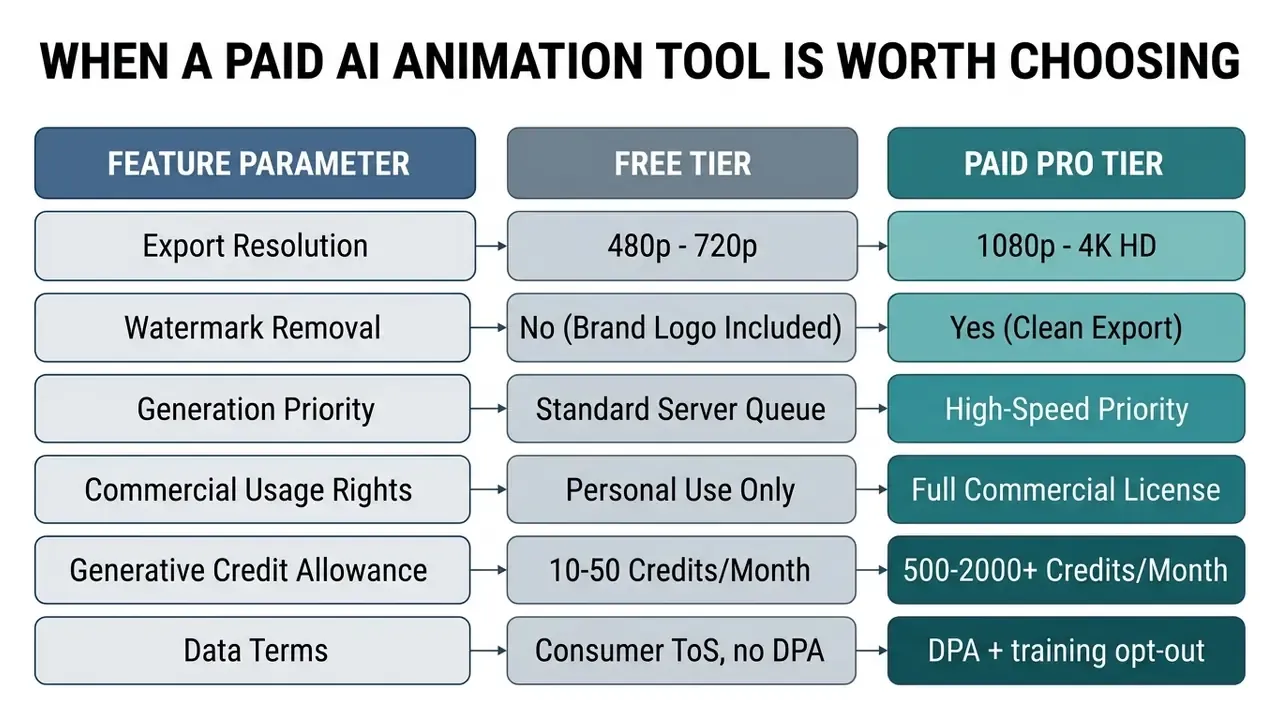
- What free tiers cost you watermarks, 480p to 720p ceilings, personal-use-only licences and daily credit caps usually in the single digits.
- Where paid plans matter watermark-free 1080p/4K exports, priority GPU queues, commercial licences, batch pipelines and, critically for regulated teams, DPAs plus no-training-on-customer-data commitments.
- Governance risk to manage first portraits are biometric data. Public free tools are the main vector for Shadow AI, deepfake exposure and PII leakage. Run the model-risk checklist below before any pilot goes to production.
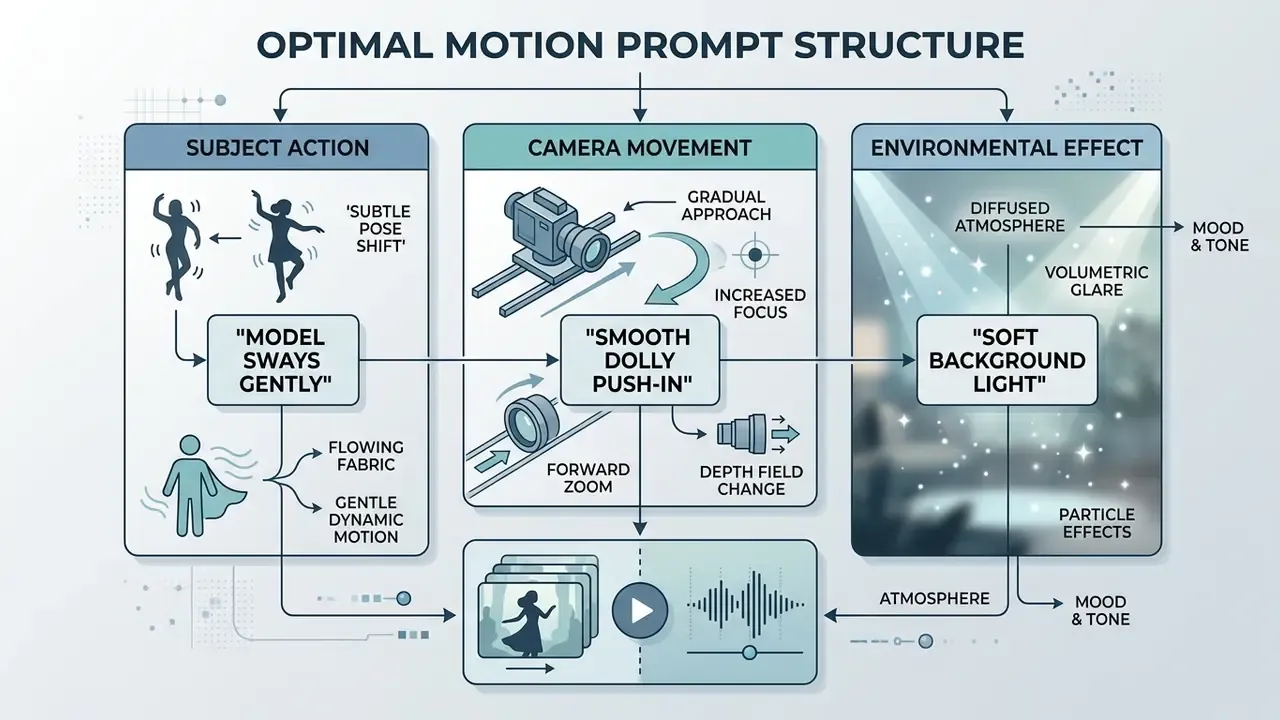
- Fastest path to output upload a clean 1024x1024 or larger source, write a three-part prompt (subject action, camera movement, environmental effect), preview, then export 1080p MP4 at 30 fps.
How to read this guide if you own risk rather than creative
Three audiences usually land here at once, and they need different pages of the same document. Creative leads want prompt recipes and motion presets. Marketing operations wants cost per second. Second-line risk wants to know whether an uploaded executive portrait can end up in someone's training corpus.
So the guide is layered. Sections on motion control, presets and prompt structure answer the production question. The governance, licensing and appendix sections answer the control question: who owns the decision, what evidence exists, and what gets logged. If you are preparing a pilot memo, the vendor security table and the promotion checklist are the two blocks your committee will actually read. Everything else is context.
One caveat before the detail. Vendor documentation in this category changes monthly, sometimes weekly. Treat every number here as a dated snapshot, not a specification.
What an AI photo animation app can create from a still image
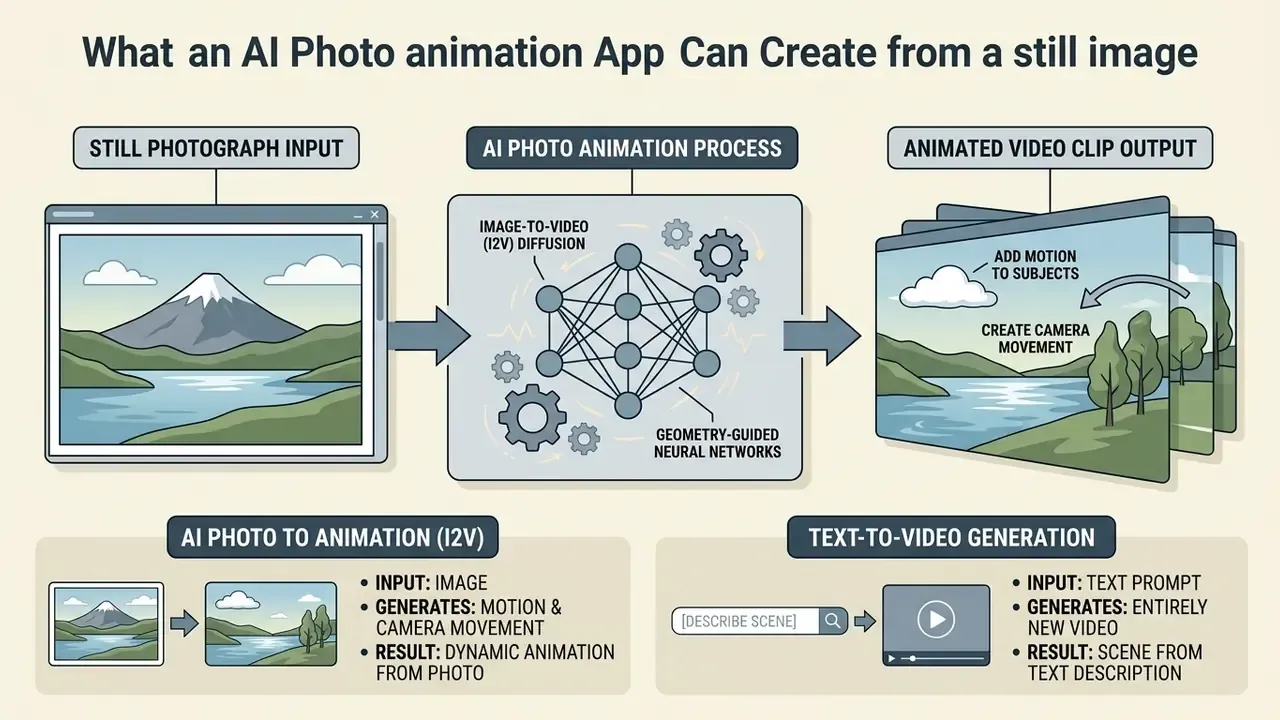
An ai photo animation app converts a still photograph into an animated video clip by applying image-to-video (I2V) diffusion architectures or geometry-guided neural networks. These applications generate continuous frame sequences that preserve the core subject while introducing realistic camera panning, subtle facial micro-expressions or background environmental motion.
AI photo to animation: motion, camera movement and animated video clips
Image animation tools transform static images into short video clips by injecting synthetic motion dynamics while locking key subject features. Systems powered by image-to-video diffusion models, such as Stable Video Diffusion and DynamiCrafter, condition frame generation on the initial input photo to maintain identity consistency across time.
For portrait photos, specialized deep learning frameworks such as DaGAN++ use self-supervised 3D depth maps to reconstruct head rotation, blinking and natural facial gestures without visible warping.
«I2V diffusion requires a strict balance between motion diversity and identity preservation, which is exactly what separates it from static image generation.»
Commercial teams use these ai photo animation apps to convert static product shots, marketing posters and lifestyle portraits into engaging visual content for high-converting channels. In practice, the motion families split into four repeatable buckets: facial micro-motion (blinking, breathing, a restrained smile), camera motion (pan, tilt, zoom, orbit, dolly), environmental motion (cloud drift, water ripples, fabric and hair sway) and depth-based parallax that separates foreground from background.
That is the whole vocabulary. Most disappointing outputs come from asking for several buckets at once.
To compare generative frameworks across model risk and creative workflows, see the overview. Readers who want a broader view of frame-by-frame and template-driven production can also review this guide to animation makers, which covers where a classic ai animation maker still beats a diffusion pipeline.
Image-to-video models versus text-based AI animation generators
«According to AIGCBench, Stable Video Diffusion achieves the best results among open models and performance comparable to closed tools across four key quality dimensions.»
Architecturally, the difference is the conditioning path. Text-to-video cascades such as Make-A-Video build on a text-to-image base with added spatiotemporal convolution and attention, then interpolate frames and upscale. That design optimizes prompt-driven synthesis rather than strict photo preservation. Image-first pipelines instead treat your uploaded frame as the visual anchor, which is why they win on layout and identity consistency.
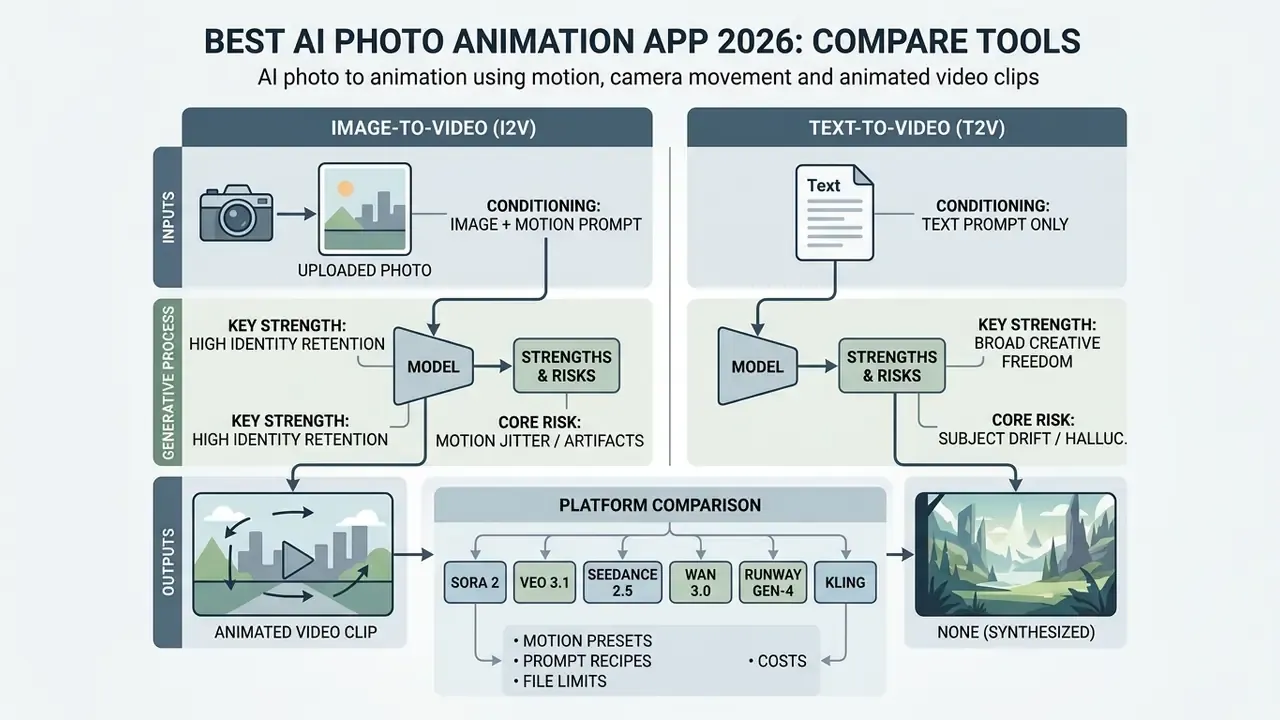
Teams shortlisting engines for both paths can compare AI video generators side by side before committing credits.
A standalone ai image generator builds still visuals from scratch, while an ai video generator with I2V capability preserves branding, composition and product fidelity. If the term is new to your stakeholders, this short explainer on image-to-video AI defines the conditioning model in plain language.
How to choose the best AI photo animation app
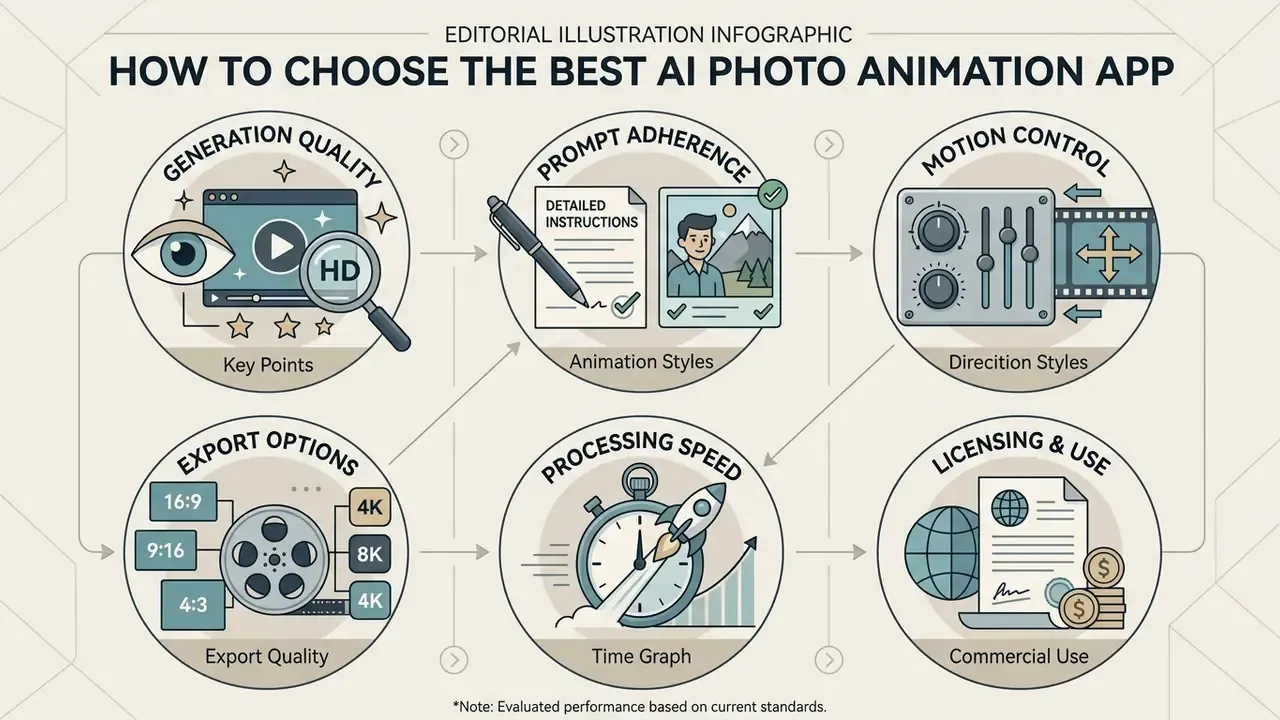
Selecting the best ai photo animation platform means evaluating generation quality, prompt adherence, processing speed, export resolutions and licensing terms. Operational leaders balance creative flexibility against model drift, watermark limits and enterprise data security requirements. Anyone searching for the best ai image animator on feature lists alone will pick the wrong tool for a regulated pipeline.
Motion control, animation styles and prompt support
Effective motion control combines precise text prompts, structural camera trajectories and interactive motion brushes. Leading platforms integrate trajectory parameters such as pan, tilt, zoom, dolly and orbit directly into the generation pipeline. Kling exposes both a Motion Brush for drawing an element's trajectory and a Static Brush that locks regions in place, while its API surfaces camera movement as structured values (horizontal, vertical, pan, tilt, roll, zoom).
Advanced frameworks such as MotionCtrl separate camera paths from subject dynamics, which allows independent manipulation of background motion and foreground subjects.
«CamI2V with epipolar attention improves camera-control accuracy by 25.5% on rotation and 7.77% on translation versus prior models on the RealEstate10K dataset.»
Export quality, aspect ratio and commercial use
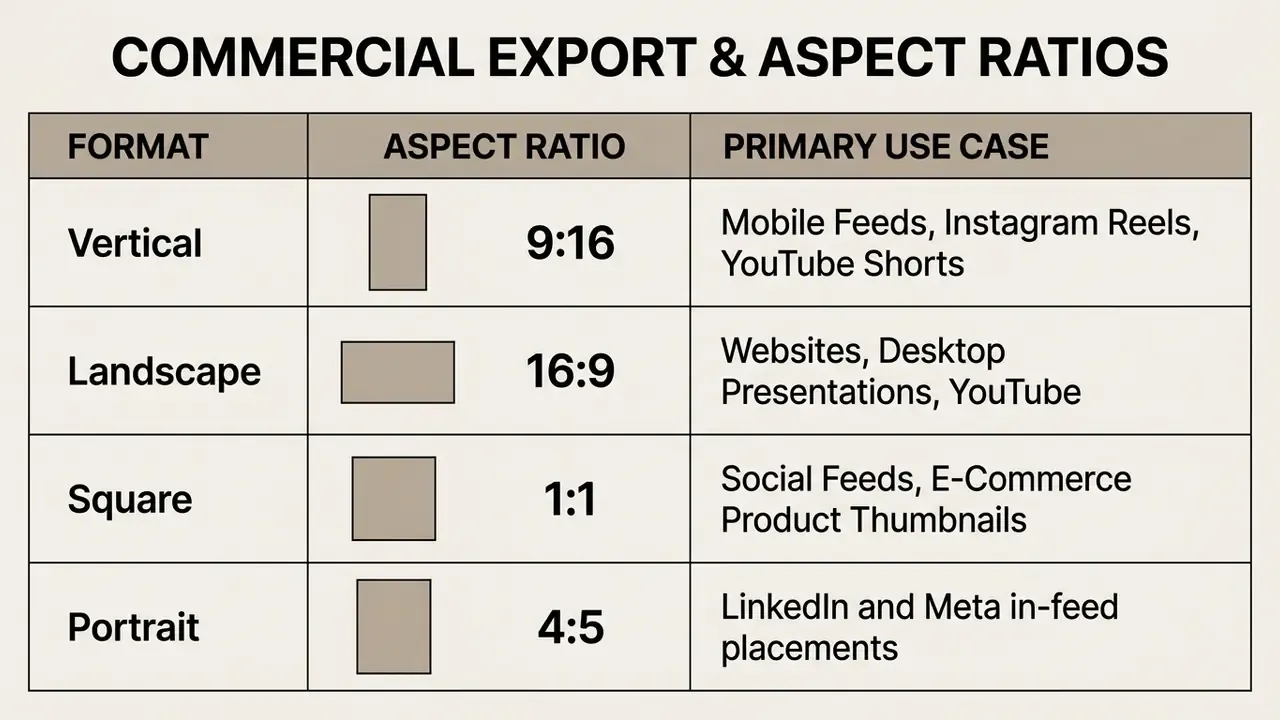
Commercial deployment requires high-definition export options, flexible aspect ratio formatting and clear intellectual property rights. Standard delivery uses 16:9 widescreen for desktop platforms, 9:16 vertical for short-form social feeds and 1:1 square for digital display ads. Broadcast specifications remain 16:9-anchored. PBS technical operating specifications state that all HD programming shall be 16:9, so 9:16 and 1:1 function as alternate delivery framings rather than primary HD standards.
Enterprise terms of service vary significantly on generated-content ownership. The U.S. Copyright Office notes that copyright protection requires human authorship, meaning purely AI-generated video frames are licensed rather than assigned under standard commercial terms. Registration guidance further requires applicants to disclose and disclaim AI-generated portions that exceed a de minimis contribution.
«Analysis of international, European and UK copyright law shows that every AI-video use case requires an individual assessment of liability and applicable defences.»
Ease of use, generation speed and technical skills
Modern ai tools for animating static images run user-friendly cloud workflows that remove the need for complex video editing skills. A marketing associate with no timeline experience can ship a usable clip on the first afternoon. Whether that clip should be published is a separate question, and it belongs to a named approver.
Updated (hedged performance claim). Vendor documentation does not publish a single standardized latency figure. Publicly stated ranges vary by product scope: some platforms advertise a first draft in "under a minute", while others state that most videos are ready "in under five minutes". Treat render time as a queue-dependent variable that your own pilot must measure, not a fixed specification. Actual latency depends on model complexity, resolution, clip duration and whether your plan includes priority GPU access.
Platforms using causal attention architectures reach faster generation times by processing sequential frame dependencies without full bidirectional compute overhead. Rapid preview features let teams iterate on motion prompts before spending daily generative credits. That single habit, preview cheap then render expensive, tends to cut credit burn on a pilot by a third or more in our own editorial testing.
| Evaluation Metric | Technical Standard | High-Performance Benchmark | Operational Consideration |
|---|---|---|---|
| Visual Quality | FVD / SSIM metrics | High spatial sharpness, minimal jitter | Eliminates blurry frame transitions |
| Prompt Adherence | CLIP image-video score | Precise execution of motion prompts | Prevents unexpected subject deformation |
| Camera Control | 6-DOF trajectory support | Smooth pan, zoom, dolly and tilt | Maintains natural background parallax |
| Rendering Speed | Time to first draft | Vendor-stated: under 60 s to under 5 min | Enables rapid creative iteration |
| Export Formats | MP4, GIF, WebM | 1080p / 4K without watermark | Required for professional publishing |
| Commercial Rights | Enterprise licence | Full commercial usage rights included | Protects against copyright liability |
| Data Handling | DPA plus no-training opt-out | SOC 2 Type II / ISO 27001 attestation | Required for PII and biometric inputs |
Corporate governance, data privacy and Shadow AI controls
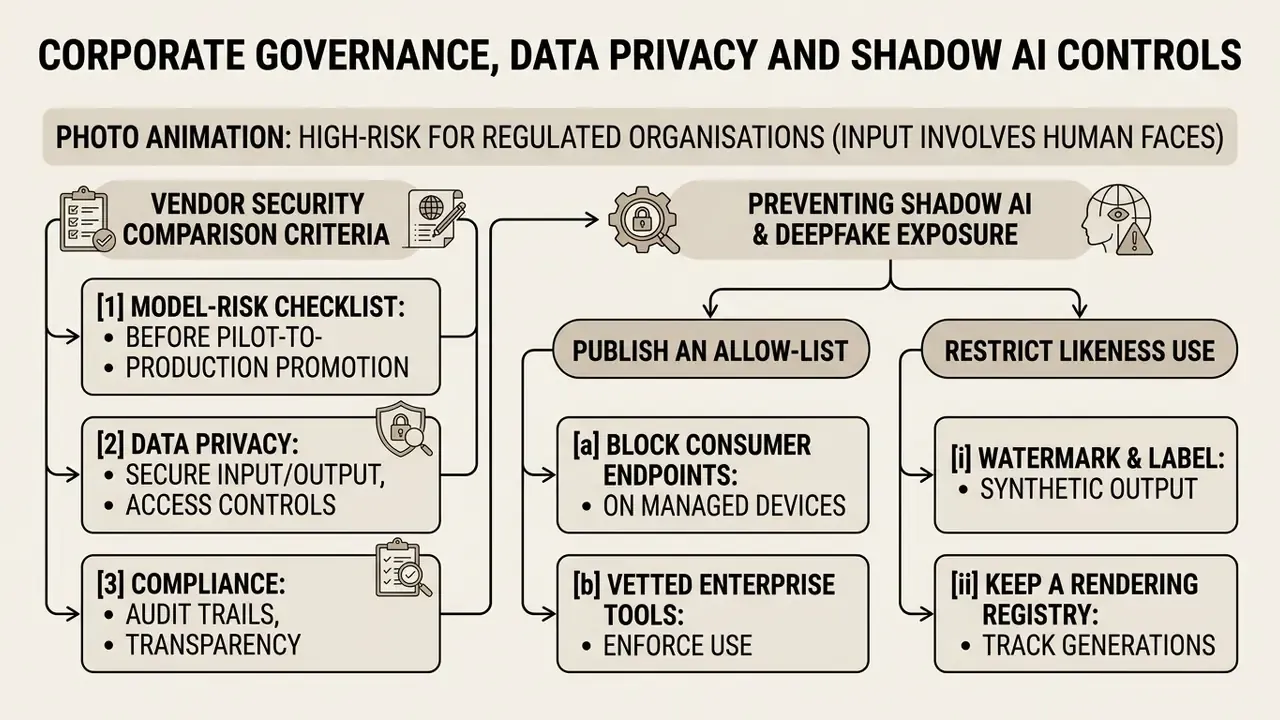
Photo animation is deceptively high-risk for regulated organisations because the input is usually a human face. Under GDPR and comparable frameworks, facial imagery processed for identification or reenactment can qualify as biometric or special-category data, and CCPA/CPRA treats it as sensitive personal information. Uploading a client, employee or executive portrait into a consumer free tier is therefore a data-processing decision, not a creative one.
Put differently: this is model inventory work, not marketing work.
Vendor security comparison criteria
| Governance Criterion | Why it matters for I2V tools | Minimum acceptable answer |
|---|---|---|
| SOC 2 Type II report | Confirms operating effectiveness of controls over time, not just design | Current report available under NDA |
| ISO/IEC 27001 certification | Demonstrates a managed information-security system | Valid certificate with scope covering the rendering platform |
| Data Processing Agreement (DPA) | Establishes processor obligations, sub-processors and transfer mechanism | Signed DPA with SCCs or equivalent |
| No training on customer inputs | Prevents faces and product IP from entering future model weights | Contractual opt-out, default-off for enterprise tiers |
| Retention and deletion window | Limits exposure of uploaded portraits and rendered clips | Configurable retention, documented deletion SLA |
| Region and residency controls | Needed where cross-border transfer of biometric data is restricted | Selectable processing region or private deployment |
| Deployment model | Self-hosted open weights remove third-party upload entirely | Local or VPC option for sensitive assets |
| Content provenance | EU AI Act transparency expectations require disclosure of synthetic media | C2PA support or visible labelling |
No matching rows Clear one or more filters to restore the matrix.
Preventing Shadow AI and deepfake exposure
- Publish an allow-list.Name the two or three approved animation platforms and the tier that carries a DPA. Everything else is out of policy by default.
- Block consumer endpoints on managed devicesfor uploads containing customer, employee or executive imagery, and log the attempts rather than relying on goodwill.
- Restrict likeness use.Require written consent for any animated portrait of an identifiable person, and prohibit animating senior-executive imagery outside a controlled workflow. Face-reenactment models are precisely the capability used to fabricate authorisation videos.
- Watermark and label synthetic output.European Commission transparency guidance and AI Act recital 134 expect clear disclosure when video content is artificially created or manipulated.
- Keep a rendering registry.Store prompt, source asset, model version, operator and licence for every published clip, so a takedown request or a dispute can be reconstructed later.
Model-risk checklist before pilot-to-production promotion
Checklist0 / 10
Disclaimer: the governance guidance above is general in nature and does not constitute legal, compliance or security advice for your jurisdiction or institution.
Best AI tools for animating images: comparison by use case
Choosing the best ai image animation tool depends on your production pipeline, whether you are building marketing creative, digital art or personal media archives. Different software architectures optimize for distinct operational goals, and the best ai image animation tools for a brand studio are rarely the ones a compliance team would approve for client-facing portraits.
AI image animation tools for artists, designers and creative teams
Digital artists and creative directors need advanced controls: motion reference videos, character identity locks and multi-model generation suites. Kling AI and Luma Dream Machine provide precise trajectory tools, which helps preserve character design consistency across complex camera moves. Kling 3.0 Motion Control goes further by exposing a character_orientation parameter (follow the image or follow the driving video) and extended durations of up to 30 seconds in video-reference mode.
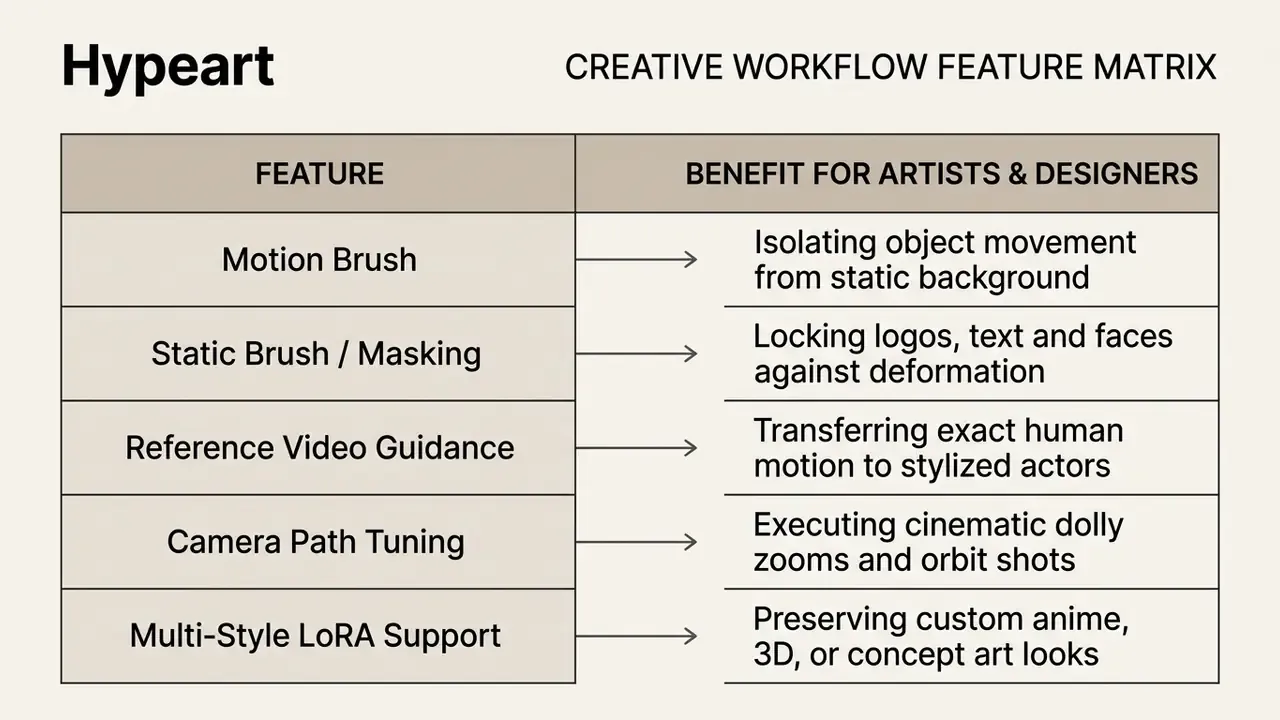
These tools support custom style conditioning, so teams can animate 2D illustrations, 3D concept renders and anime art without losing stylized detail. Style vocabularies now include flat illustration, cel-shaded ai cartoon looks, anime, storybook and 3D-cartoon presets, and image conditioning plus style adapters keep the look locked across frames. Creative teams evaluating specialized art generation capabilities can examine ai art and design tools for a deeper architectural comparison.
Tools for family memories, old photos and personal animated content
Specialized applications focus on animating historical photographs and personal family archives. Services such as MyHeritage Deep Nostalgia apply face-reenactment models to animate vintage portraits with realistic blinking, smiling and head turns. This is where a simple picture animator earns real emotional weight, and where the technology first went mainstream.
«DaGAN++ uses self-supervised 3D depth maps to reconstruct head rotation and facial expressions without visual distortion, reaching new realism levels on VoxCeleb1 and VoxCeleb2.»
These platforms combine automatic photo enhancement with face detection to repair scratches and low resolution before frame generation. MyHeritage explicitly recommends running its Photo Enhancer before animation for optimal results, then applies gestures from pre-recorded driver videos to the detected face. The resulting movement brings family memories to life while keeping facial structure and emotional authenticity intact.
Governance note for regulated teams. The same face-reenactment capability that animates a grandparent's portrait also animates a chief executive's press photo. Vendor claims of realism in this category are descriptive, not measured, since no numeric benchmark for facial naturalness or defect restoration is published. Any enterprise use of reenactment models should therefore sit behind consent records, a likeness policy and the synthetic-media labelling controls described above.
Free AI photo animation apps: what you get without paying
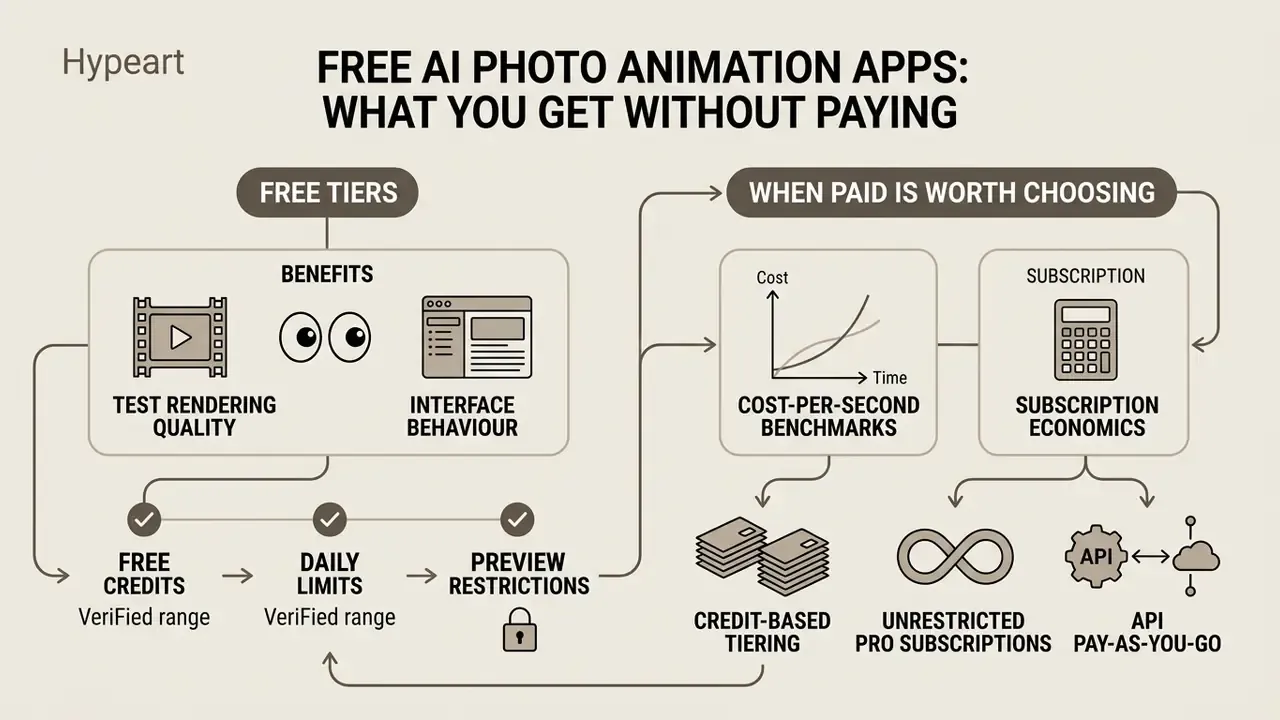
Using an ai photo animation app free tier lets creators test rendering quality and interface behaviour before subscribing. Free plans, though, enforce operational constraints designed to push upgrades. For regulated teams, a free tier is usually the least acceptable option on data terms, not merely the least generous on credits. An ai app that makes pictures move free of charge still processes your upload on someone else's GPU, under consumer terms.
Free credits, daily limits and preview restrictions
Free plans run on daily, monthly or one-time generative credit systems, and the accounting unit differs by vendor.
Updated (verified ranges). Documented examples rather than a single industry average: Runway grants a one-time pool of 125 credits; Pika publishes roughly 80 credits per month with 480p free output; Kling distributes a daily login allowance; Adobe Firefly issues a monthly generative-credit pool shared across image, video and audio. Editorial reviews of 2026 free tiers most often report one to five generations per day, 4 to 8-second clips and 480p to 720p ceilings. Those figures shift frequently and should be re-checked on vendor pricing pages before procurement.
Free tier outputs are generally capped at lower export resolutions (480p or 720p) and carry a visible brand watermark in a corner of the exported file. Free accounts also sit in longer server queues during peak hours. Readers auditing zero-cost options can review this breakdown of free AI video generators alongside our comparison of free AI video tools by quality and limits.
Creators hunting for no-cost art and motion tools can inspect what's the best free options available across current generative platforms. And yes, an ai photo animation free app can be perfectly adequate for an internal mock-up. It is rarely adequate for a client invoice.
When a paid AI animation tool is worth choosing
Upgrading becomes essential for commercial campaigns, client deliverables or high-volume content pipelines. Paid subscriptions remove watermarks, unlock 1080p and 4K exports and grant explicit commercial usage rights. For enterprise buyers the decisive differences are rarely credits: they are SLA, data-retention configuration, the contractual right to refuse model training on uploaded assets, indemnification and access to an API with isolated processing.
«Standards for authorship of AI-generated content diverge substantially across the United States, Korea and the EU, leaving creators in legal uncertainty about the status of co-created videos.»
Cost-per-second benchmarks and subscription economics
Evaluating generative AI platforms requires calculating the effective cost per rendered video second. Commercial SaaS pricing generally follows three structures:
- Credit-based tieringrenders consume internal tokens, typically 4 to 15 credits per 5-second clip. Average pricing spans $0.15 to $0.40 per generated clip on mid-tier plans (around $24.90 per month for 120 to 180 credits, 1080p output and standard queue priority).
- Unrestricted pro subscriptionshigh-volume tiers ($40.90 to $85.90 per month) offer priority GPU queue access, unlimited 1080p renders, commercial indemnification, frontier-model access (Sora 2, Veo 3.1, Seedance 2, Grok) and extended 10-second clip limits.
- API pay-as-you-goenterprise developer pipelines pay raw compute fees, averaging $0.02 to $0.08 per rendered second for standard HD diffusion pipelines. One-time credit packs (for example 32 credits for $12, 180 for $49.90, 360 for $99.90) suit burst campaigns where a monthly subscription would sit idle.
Commercial teams also benefit from priority cloud rendering, longer clip durations up to 10 seconds and batch processing. One line item most business cases forget: review time. If every published clip needs a named approver plus a registry entry, that labour belongs in the cost model next to the credits. For organizations calculating software licensing overhead across teams, check AI Media Pricing models to budget generative media tools properly.
How to animate a photo with AI in three steps
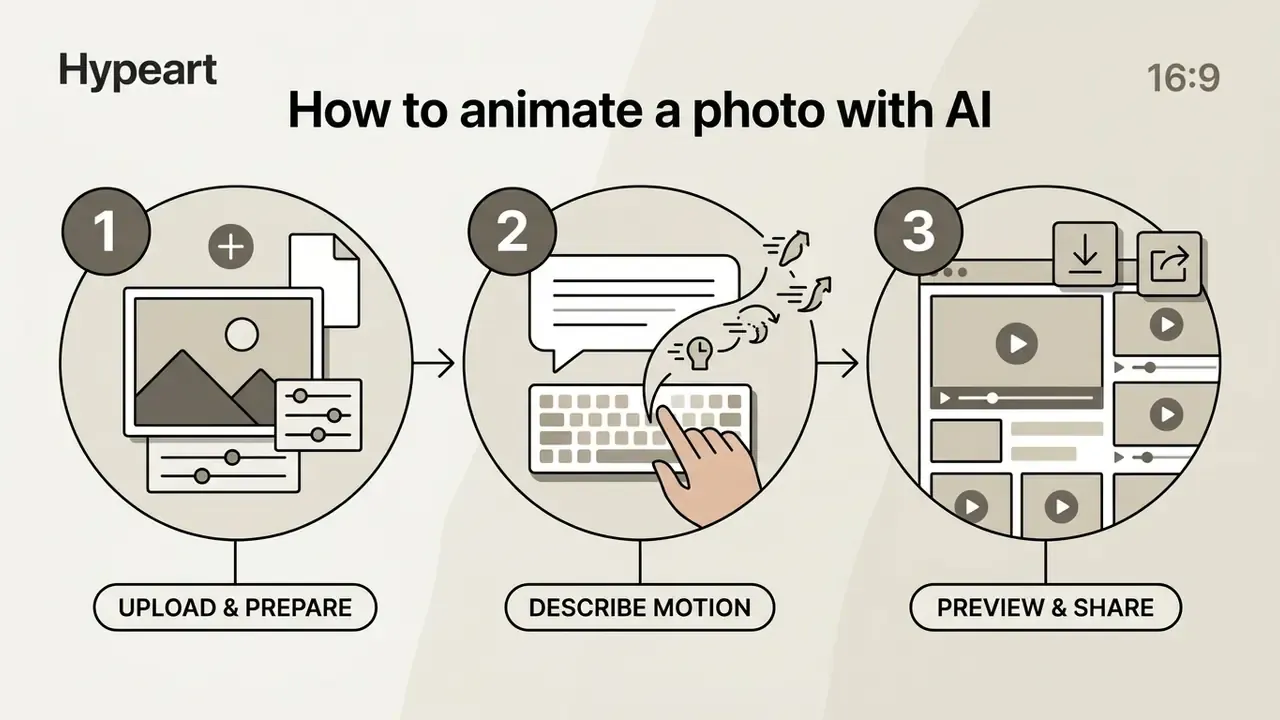
Animating a still photograph with an ai app for animating photos follows a short three-step workflow. Modern interfaces remove the technical barriers, so users move from raw photo to published video in minutes.
Upload an image and prepare it for animation
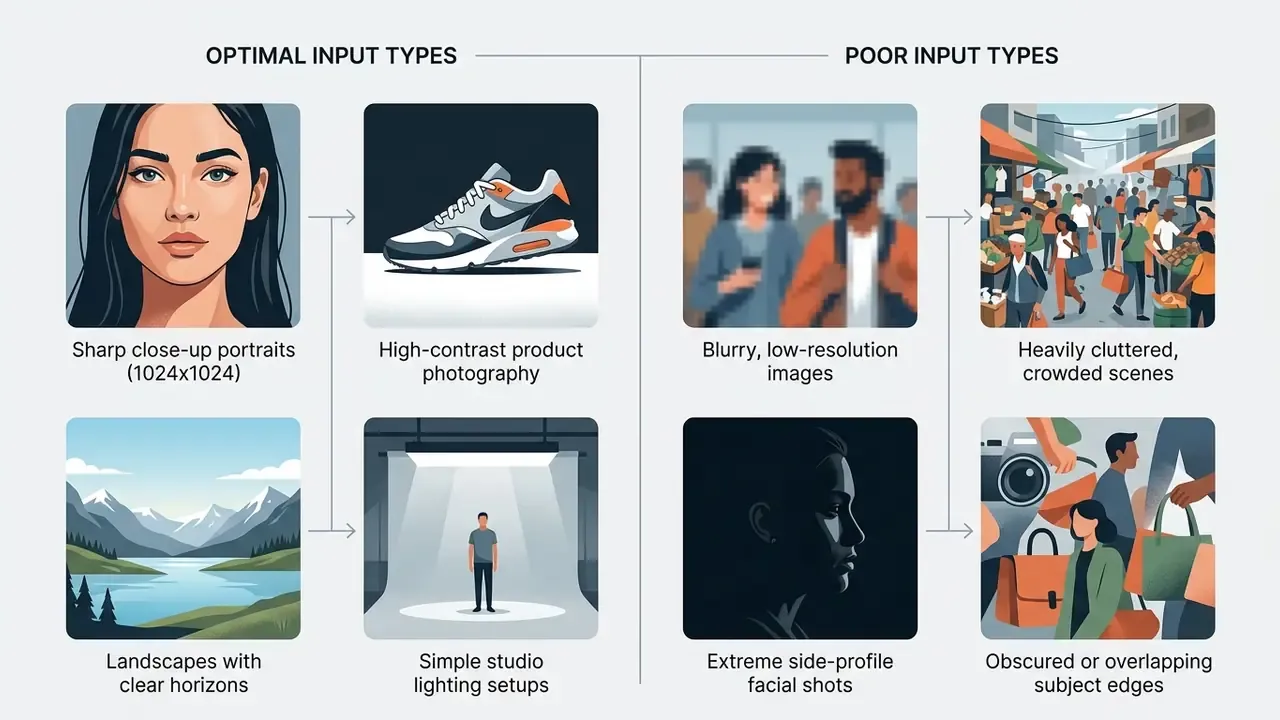
Begin by uploading a high-resolution image file (JPG or PNG) into the application workspace. Choose a source image with a clear subject, balanced lighting and distinct separation between foreground and background.
| File Parameter | Standard Free Limit | High-Performance Production Standard | Technical Impact |
|---|---|---|---|
| File formats | JPG, PNG | Uncompressed PNG, WebP | Prevents compression artifacts before diffusion encoding |
| Max file size | 6 MB to 10 MB | Up to 20 MB | Preserves structural detail for depth map generation |
| Input resolution | 1024x1024 px | 2048x2048 px (2K/4K source) | Higher input pixels reduce blurred frame interpolation |
| Aspect ratio locking | Pre-cropped 1:1, 9:16, 16:9 | Exact match to target export canvas | Eliminates edge stretching and generative padding |
| Minimum short edge | About 300 px (API floor) | 1080 px or more | Below the floor, API requests are rejected outright |
Pre-cropping the photo to your target aspect ratio, 9:16 for mobile or 16:9 for widescreen, prevents unwanted cropping artifacts during rendering. For readers new to the category mechanics, this primer on the AI video generator explains how conditioning, credits and queues interact.
Describe the motion with text prompts
Enter a concise prompt that describes the desired subject action and camera motion. Structure it logically: separate subject movement from environmental dynamics and camera direction.
For example: "A businesswoman looking forward and smiling subtly, camera slowly zooms in, background lights bokeh softly." Specify locked areas with static brushes if the tool supports spatial masking.
«In the DreamVideo user study, prompt-accuracy and video-quality ratings reached roughly 4.28 versus 3.88 for competing methods on a five-point scale.»
How to get high-quality AI photo animation results
Getting professional video quality from an ai image animation app comes down to two things: suitable source photographs and controlled motion prompts. Understanding model constraints prevents the usual generative artifacts, facial jitter and floating background elements among them.
Which static images work best for AI image animation
High-quality input photos produce noticeably better animation results. Diffusion models rely on clear visual boundaries to infer three-dimensional depth and motion vectors.
«UI2V-Bench shows that models can generate visually appealing motion while violating spatial relationships or incorrectly binding object attributes in complex scenes.»
Prompts and animation styles for more natural movement
Keep motion descriptions clear, specific and realistic. Avoid over-prompting with competing action keywords that confuse the temporal diffusion model.
Instead of "person runs, jumps, dances, and waves", ask for one subtle movement: "person nods gently and smiles." For camera work, use standard cinematic terminology such as slow pan right, subtle tilt up, tracking shot or dolly zoom. Runway's own Gen-4 guidance recommends positive phrasing and a clear separation between subject motion and camera motion, while Wan 3.0 and Seedance prompt guides dedicate a distinct segment to camera movement (slow push in, crane up, orbit, whip pan, rack focus).
«Causal video generators that restrict attention to past frames deliver lower latency and interactivity without significant quality loss compared with bidirectional models.»
Production-ready AI animation prompt recipes
Common artifacts and how to fix them
Artifact triage is the difference between a pilot and a production pipeline. Research on diffusion-generated imagery groups defects into anatomical implausibilities, stylistic artifacts, functional implausibilities, physics violations and sociocultural implausibilities, a taxonomy that maps directly onto what reviewers reject in animated portraits and product clips. Quantitative facial-animation evaluation adds measurable proxies: MSI for jitter, LSE for lip-sync error, LSR for lip similarity and Fréchet Distance, which correlates most closely with human ratings.
| Artifact | Visible symptom | Likely cause | Practical fix |
|---|---|---|---|
| Face morphing / identity drift | Features slide or change person mid-clip | Weak identity conditioning, long duration, extreme profile source | Shorten clip, use frontal source, enable identity lock or reference-image mode, mask the face as static |
| Temporal jitter | Frame-to-frame flicker on edges | Low-resolution input, aggressive motion prompt | Upload a 1024 px or larger source, reduce motion strength, prefer models with temporal-consistency layers |
| Floating or swimming background | Background drifts independently of subject | Depth-map failure on cluttered scenes | Use a simpler background, separate camera motion from subject motion, apply static brush to background |
| Limb or finger deformation | Extra fingers, bending joints | Anatomical implausibility under large motion | Restrict to micro-motion, crop out hands, avoid multi-action prompts |
| Logo and text warping | Brand marks smear or re-letter | Diffusion re-synthesis of fine detail | Mask logo regions, composite the clean logo back in post |
| Lip-sync mismatch | Mouth shapes lag the audio | Phoneme mapping error or audio drift | Re-render with a dedicated lipsync model, trim leading silence, verify frame rate |
| Over-saturated style shift | Colour and grade change across frames | Competing style keywords in the prompt | Keep one style descriptor, state "maintain original colour grade" |
Two habits reduce rework more than any prompt trick: preview at low resolution before spending credits on 1080p, and keep a rejection log so recurring artifact classes inform model selection rather than being rediscovered every campaign.
AI photo animation app FAQ
Can an AI image generator create a source image for animation?
Yes. Static images produced by Midjourney, DALL-E 3 or Stable Diffusion serve as excellent inputs for an ai photo to animation app. Because AI-generated images are clean, high-resolution and digitally crisp, image-to-video diffusion models handle them easily. Creators frequently use an AI image generator to design a character or scene, then import that generated frame into an animation tool to produce dynamic video clips, the pattern described in this explainer on image-to-video AI. For additional comparisons between conversational image models and dedicated art tools, explore AI Media Versus Comparisons. Teams building professional avatar libraries can also review this guide to AI headshot generators.
Can AI animation generators create 2D, 3D and cartoon-style videos?
Yes. A modern ai animation generator supports 2D flat illustration, 3D digital renders, anime and stylized cartoons. By pairing a stylized input image with style-specific text prompts or LoRA motion adapters, the model keeps the target aesthetic across the clip. Specialized tools use ControlNet and depth maps so stylized character designs hold correct geometry during movement, and vendor preset libraries now ship explicit "2D Anime" and "3D Cartoon" templates with cel shading and Pixar-style character cues.
What input image formats and resolutions are supported?
Most AI photo animation apps accept JPG, PNG and WebP. Several API endpoints additionally accept GIF, AVIF, HEIC and HEIF. For best rendering quality, source images should be at least 1024x1024 pixels or 1080p equivalent, with clear focus and high subject contrast. Common file-size ceilings sit between 6 MB and 20 MB, and API validators may reject images whose short edge is under roughly 300 pixels or whose aspect ratio falls outside 2:5 to 5:2.
Are AI-animated photo videos safe for commercial advertising?
Commercial safety depends on the platform licence and the rights to your source image. Using original or properly licensed photographs on a paid plan typically grants commercial usage rights. Always verify platform terms against your enterprise compliance standards, confirm that likeness consent exists for identifiable people, and check whether your jurisdiction requires visible disclosure of synthetic media.
How do generative credits work in free animation apps?
Generative credits act as internal platform currency. Creating a 4-second animated video clip usually costs between 5 and 15 credits, depending on resolution and model complexity. Free tiers grant a limited recurring allocation per day or month. Some vendors issue a one-time pool instead, and unused one-time packs may expire within 30 days.
Can I export AI photo animations directly as animated GIF files?
Most AI video generators output natively in high-definition MP4 to optimize compression. Editor-oriented platforms such as Adobe Firefly, Canva and Kapwing support direct GIF export with resolution and compression controls. For tools that only export MP4, convert the output to a high-frame-rate GIF or WebM with free container tools, preserving loop points and acceptable colour fidelity.
How does facial lipsync and voice animation work on static portraits?
Dedicated portrait animators use lip-sync neural networks such as SadTalker or LivePortrait. They take an audio file or text script and map phonemes onto the facial landmarks of a static image, producing synchronized jaw movement, mouth shapes and realistic head tilting without breaking identity consistency. Quality is measured with lip-sync error (LSE) and lip similarity (LSR) rather than by eye, and voice quality depends on the upstream AI voice generator you pair with the animation model.
Can a free plan output be used in a client deliverable?
Usually not. Most free tiers grant personal-use rights only and stamp a watermark on export, though a minority do allow commercial use on the free plan. Before invoicing a client, verify the licence tier, remove watermark dependence, and confirm the vendor does not reserve the right to train on your uploaded assets.
How large should the exported file be for social platforms?
Export an H.264 MP4 master, then create platform copies at the required aspect ratio. If upload times or playback stutter become an issue, reduce bitrate or run the master through a video compressor rather than re-rendering the clip from the model.
Who should own the decision to publish an animated portrait?
One named person, documented in advance. In practice that is a marketing owner for the creative decision and a second-line reviewer for likeness, licensing and labelling. Splitting the sign-off sounds bureaucratic until the first takedown request arrives, at which point the registry entry is the only thing that answers the question.
Technical appendix: verified vendor data and performance benchmark
To hold to model-risk standards, software features across commercial animation tools must be verified against current vendor documentation. The table below reflects the 2025 to 2026 model stack. Unverifiable vendors were removed rather than listed with placeholder data.
| Tool / Engine Name | Free Tier Allocation | Free Export Limit | Watermark Included | Commercial Rights | Native API Support |
|---|---|---|---|---|---|
| Sora 2 (OpenAI) | Enterprise priority only | 1080p MP4 | Paid plans only | Enterprise tier | Supported via OpenAI API |
| Google Veo 3.1 | Cloud Studio credits | 720p / 1080p | Yes (free tier) | Commercial licence | Vertex AI integration, see the Google Veo implementation guide |
| Seedance 2.5 | 30 signup credits | 720p MP4 | Optional watermark | Paid subscription | REST API supported |
| Runway Gen-4 | 125 one-time credits | 720p MP4 | Yes (free tier) | Paid plans only | Developer portal available |
| Wan 3.0 (open weights) | Local self-hosted, free | Unrestricted (4K) | No watermark | Apache 2.0 open licence | Local / ComfyUI pipeline |
| Kling AI (O1 / O3) | Daily login allowance | 720p MP4 | Yes (free tier) | Paid plans only | Developer API supported |
| MiniMax H3 | Trial credits | 720p MP4 | Yes (free tier) | Paid plans only | REST API documented |
| Adobe Firefly Video | Monthly generative credit pool | 720p MP4 / GIF | Yes (free tier) | Paid plans only | Available via Adobe Cloud |
| Pika 2.1 | About 80 monthly credits | 480p MP4 | Yes (free tier) | Allowed on free plan | Enterprise API available |
«VBench++ evaluates video generation across 16 dimensions, including subject identity consistency, motion smoothness and trustworthiness, validated against human preference annotations.»
Because vendor tiers change monthly, treat every row as a snapshot. Re-verify credits, watermark policy and licence scope on the vendor's own pricing page at procurement time, and record the verification date in your model inventory.
For developers planning custom video pipeline integrations, browse the hub for endpoint guides, developer costs and API rate limits. Teams evaluating alternative video software can also browse the hub to analyze competing tools across pricing, performance and enterprise compliance.
Appendix A: superseded wording and revision log
Retained for transparency and auditability. Each item records the original wording and why it was superseded in the main text above.