Selecting the best ai avatar generator means balancing motion realism, vocal synthesis quality and operational risk controls before a single dollar of budget is committed. Enterprise adoption of generative video grew quickly between 2024 and 2026. Yet the technical architectures behind commercial vendors still differ enormously, and so do their control capabilities.
That gap is the whole story for a regulated buyer. Two platforms can produce visually similar output while offering wildly different consent enforcement, audit logging and deletion guarantees.
*Author note: Marcus Hale writes this analysis. The framing is illustrative and *
Executive Summary for Decision Makers
- Market context 2025 market-size estimates for avatar generation range from USD 808.4M to USD 5.9B, with forecast CAGRs between 18.9% and 32.9%. The spread reflects inconsistent vendor methodologies, not disagreement about direction of travel.
- Enterprise shortlist Synthesia (Fortune-100 governance, 240+ avatars, 160+ languages), HeyGen (1,100+ stock avatars, 177+ languages and dialects, 30-second custom avatar input), OpenArt (multi-model creative stack), Adobe Firefly (Creative Cloud pipeline), Krikey AI (3D/VTuber and FBX export).
- Realism benchmark to demand from vendors lip-sync confidence (SyncC) of at least 8.5 on HDTF, plus temporal stability under head rotation. Livatar-1 reports 8.50 SyncC at 141 FPS and 0.17 s latency on a single GPU.
- Proven learning outcomes AI avatar modules matched human instructors on knowledge transfer in USC Marshall testing across 250+ professionals, and 500 adult learners completed avatar-led modules roughly 20% faster.
- Unit economics per-asset video production cost drops from roughly $200 to $500 (traditional shoot) down to $10 to $30 (AI presenter pipeline), while measured ad CTR stays at parity with UGC baselines.
- Non-negotiable controls documented consent video, EU AI Act Article 50 labelling from 2 August 2026, SOC 2 or ISO 27001 attestation, SSO/RBAC, exportable audit logs, and a kill switch for revoked likeness rights.
- Free tiers are for testing only 720p caps, watermarks, one-to-three-minute limits and no commercial indemnification. Budget for risk-adjusted total cost of ownership, not just subscription price.
How We Evaluated These AI Avatar Generator Platforms
How to Choose the Best AI Avatar Generator for Your Objectives
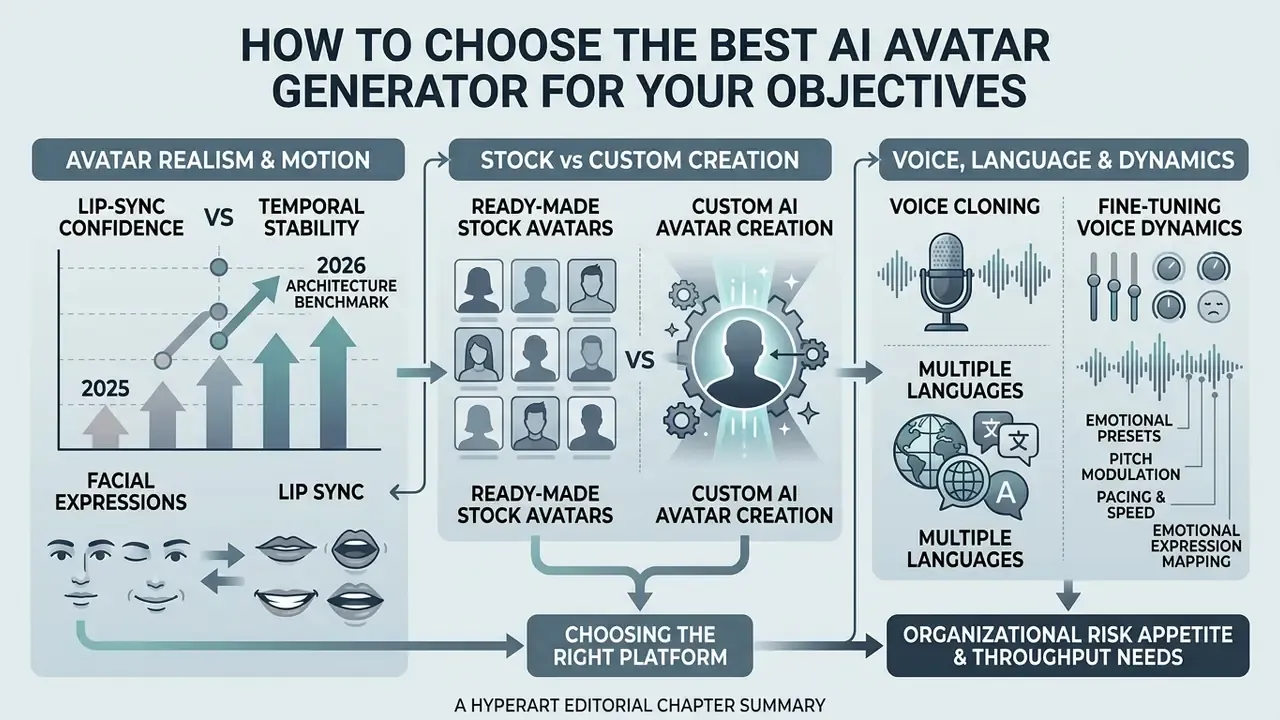
Choosing the right ai avatar generator platform comes down to matching vendor specifications against your organizational risk appetite and throughput needs. Four technical criteria carry most of the decision: visual fidelity, customization depth, audio synchronization and commercial usage rights.
Standard vendor evaluations frequently fail for a boring reason. Teams test avatars under ideal studio conditions instead of production edge cases. A complete model-risk evaluation requires side-by-side benchmarking against human baselines, verification of training data provenance, and clear audit trails for synthetic media outputs.
Because a synthetic presenter speaks on behalf of the brand, procurement should treat it as a governed model rather than a stock asset. Define an owner, an approved use boundary, a review cadence and a documented decommissioning path before the first video ships. No evidence, no autonomy.
Avatar Realism, Facial Expressions, and Lip Sync
Visual realism in modern ai avatar creation tools 2025 and their 2026 successors is driven by neural diffusion architectures and multi-scale facial codebooks. Recent benchmarks on audio-driven talking head models show that lip-sync confidence above 8.5 on the HDTF dataset indicates tight alignment between phonemes and mouth shapes.
«Livatar-1 reaches lip-sync confidence of 8.50 on the HDTF dataset at 141 frames per second with 0.17 s latency on a single GPU.»
To judge whether an ai avatar generator realistic enough for corporate deployment, inspect temporal consistency across head turns, not just a frontal read. Research on emotion-conditioned generation shows that decoupling emotion modules from mouth movement prevents unnatural facial distortion.
«Mixture-of-emotion experts separate emotional control from mouth articulation, preventing distortion when strong affect is applied.»
«Jointly optimizing motion and appearance codebooks reduces head-jitter artifacts and texture flicker under extreme poses.» Synergizing Motion and Appearance (multi-scale codebook framework), preprint (2024)
Teams comparing adjacent tooling can review the broader category of AI video generators before locking a presenter-specific vendor, since several engines ship both capabilities in one subscription.
Additional architecture signals worth requesting from vendors in 2026: real-time streaming throughput (Teller reports up to 25 FPS in CVPR 2025), view-consistent appearance under diffusion-based synthesis (NeRF-LipSync reports SyncC 9.06 on VoxCeleb2), and whether facial identity is preserved by a dedicated face encoder (Hallo3, CVPR 2025).
Lip-Sync Confidence vs. Temporal Stability: 2025 to 2026 Architecture Benchmark
| Architecture / System | Reported lip-sync metric | Throughput / latency | Temporal stability notes |
|---|---|---|---|
| Livatar-1 (preprint, 2025) | SyncC 8.50 (HDTF) | 141 FPS, 0.17 s latency, single GPU | Stable frontal delivery; verify under fast head turns |
| NeRF-LipSync (2025) | SyncC 9.06 (VoxCeleb2) | Diffusion-based, non-real-time | View-consistent appearance, strong temporal coherence |
| Teller (CVPR 2025) | Real-time streaming portrait animation | Up to 25 FPS | Optimized for live interaction, lower render ceiling |
| Hallo3 (CVPR 2025) | Audio-driven lip sync plus face encoder | Batch rendering | Expression consistency preserved across long takes |
| MoEE (CVPR 2025) | Emotion-conditioned portrait animation | Batch rendering | Emotion decoupled from mouth motion, fewer distortions |
| VisualSpeaker (ICCVW 2025) | Visual-speech-recognition-guided 3D lip synthesis | Differentiable rendering | Parametric 3D face, robust articulation on 3D avatars |
Acceptance rule for enterprise QC: require SyncC of 8.5 or higher on your own script set, not only on the vendor demo reel, and log the metric alongside the render ID. Boring discipline, but it survives an audit.
Ready-Made Stock Avatars vs. Custom AI Avatar Creation
Stock avatar libraries offer rapid deployment with pre-consented actor models. A custom avatar gives you tailored brand identity at the cost of extra training setup. Ready made avatars suit standard compliance announcements or quick social updates where a unique visual identity is secondary. In SundaySky-style implementations, stock avatars are built from consented human-actor footage and the persona voice is fixed, so voice swapping is not available on those presenters.
Creating a custom ai avatar requires submitting high-resolution reference footage under controlled lighting. Updated (2026): modern engines want between 30 seconds and 2 minutes of 1080p or 4K input video with static backgrounds to establish facial geometry and expression bounds. HeyGen builds a custom avatar from a 30-second clip, LiveAvatar specifies 2 minutes plus a separate consent recording, and Synthesia's capture guidance specifies UHD 3840×2160 at 29.97/30 fps, green screen, even lighting and synchronized audio without echo.
«TalkVid spans 1,244 hours, 7,729 speakers and 1080p to 2160p footage, confirming that input resolution is critical for facial-geometry fidelity.»
You can check top ai video generation tools 2025 to compare enterprise custom avatar requirements, and review the best AI video generators for a direct quality-versus-price read across platforms.
Voice, Multiple Languages, and Voice Cloning
Audio synthesis quality depends on high-rate neural codecs that preserve speaker timbre across translated scripts. Modern platforms integrate voice cloning APIs that cross-synthesize speech into multiple languages while holding prosodic pacing and emotional cadence. Documented vendor capability in the last 36 months includes ElevenLabs (text-to-speech, cloning, video dubbing), Sarvam (a single cloned voice reused across TTS and dubbing in 12 Indian languages), Ultravox (custom voice creation from uploaded audio), and VoxCPM2, whose repository materials document 30-language synthesis with controllable cloning that preserves original timbre. Note: the exact per-language quality ceiling for timbre-preserving cloning is vendor-reported and still needs independent benchmark data.
When deploying an ai talking avatar across international markets, the automated video translator layer must adjust mouth timing to match target-language phoneme durations. Skip that step and you get visual-auditory dissonance, which quietly undermines viewer trust in regulated commercial communications.
«MultiTalk spans 420+ hours across 20 languages and shows that language-specific style embeddings materially improve lip articulation accuracy in non-English speech.»
For a deeper look at synthesis engines used upstream of the avatar layer, see the category guide to AI voice generators.
Fine-Tuning Voice Dynamics and Emotional Presets
To reach human-grade vocal synthesis, operators must configure secondary acoustic parameters beyond the raw script:
- Emotional expression mapping.Select from the seven core emotional presets exposed by most 2026 engines: Neutral, Happy, Sad, Angry, Surprised, Fearful, Disgusted. For corporate updates, roughly a 15% Happy tint over a neutral base increases perceived warmth without undermining authority.
- Pitch modulation.Adjust pitch within a range of minus 12 to plus 12 semitones. Lowering pitch by 2 semitones adds gravitas for financial-compliance assets; raising it by 1 to 2 semitones suits consumer product promos.
- Pacing and speed.Delivery speed sliders typically run 0.5x to 2.0x; keep production output between 0.8x and 1.2x. Fast-paced promotional ads benefit from 1.15x, while complex technical training performs better at 0.95x with explicit pauses (
<break time="500ms"/>). - Volume and dynamics.Volume controls commonly run 0 to 10; keep narration at mid-range to preserve headroom for background music beds.
- Incremental tuning discipline.IBM's Text to Speech documentation states that
<prosody>controls pitch and speaking rate, and recommends experimenting in five or ten percent increments rather than large jumps. The same discipline applies to slider-based interfaces. Independent academic work from 2026 notes AI speech is still rated less humanlike than human speech even when prosody is confident, so tuning narrows the gap without closing it.
Comparison of Leading AI Avatar Creation Platforms
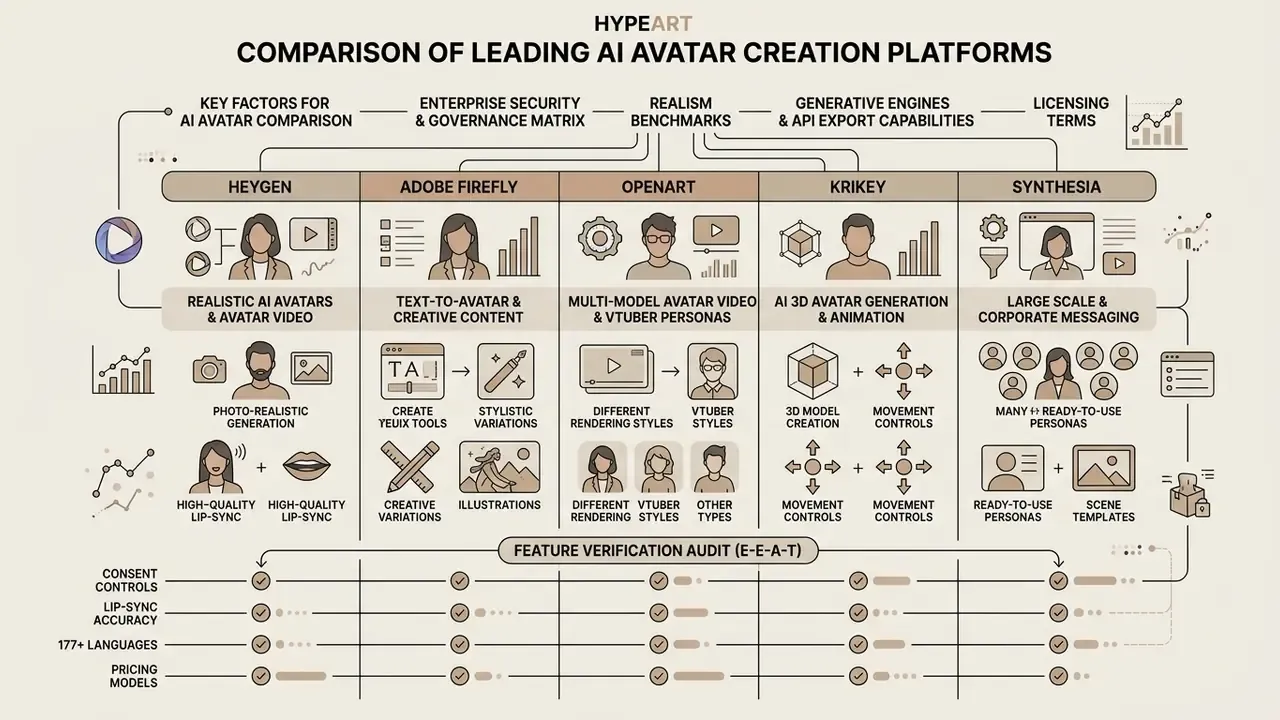
Comparing ai avatar creation platforms means looking past the marketing page at the underlying generative engines, licensing terms and API export capabilities. The major vendors across 2025 and 2026 specialize in distinct niches: photorealistic enterprise messaging, prompt-driven creative asset generation, and interactive 3D digital twins.
The 2026 generative avatar ecosystem sits on top of foundational video engines. Modern ai avatar generator platforms run a multi-model stack, integrating Google Veo 3 / Veo 3.1 for scene and background lighting, Kling Omni and MiniMax H3 for complex body-motion dynamics, and Seedream 5.0 Pro, GPT Image 2, Nano Banana Pro and Seedance 2.5 for ultra-high-resolution photorealistic base generation. Knowing which foundational model a vendor routes to lets enterprise teams predict rendering stability, cost per second, and how fast a capability regression can appear after an upstream model update.
| Criteria / Platform | Synthesia | HeyGen | OpenArt | Adobe Firefly | Krikey AI |
|---|---|---|---|---|---|
| Avatar library | 240+ full-body stock avatars, custom digital twins, Avatar Builder personas | 1,100+ stock presenters, photo avatars, custom twins, prompt-to-avatar characters | Multi-style avatars (anime, 3D, photoreal, VTuber) | Generative text-to-avatar, stylized characters, stock avatars via API | 3D interactive avatars, VTuber models, digital twins |
| Underlying engine | Synthesia expressive avatar engine plus Google Veo 3 scene generation | Avatar IV engine, rapid voice clone, phoneme-level lip sync | Multi-model stack (Kling Omni, Veo 3.1, MiniMax H3, Seedream 5.0 Pro, Seedance 2.5) | Adobe Firefly video architecture plus Translate and Lip Sync API | Custom 3D mesh, rigging and blendshape engine |
| Language and voice | 160+ languages, 1,000+ voices, multiple emotional styles on selected avatars | 177+ languages and dialects, 300+ voices, 15-second voice clone | Multilingual TTS plus uploaded-audio sync | Integrated Adobe multilingual TTS, stock or own voice file | 16+ languages, localized speech synthesis |
| Emotional and prosody controls | Script-synced gestures, emotional tone styles, expressive avatars | Text-driven gaze, posture, movement and energy control | Preserved reference expressions, head-motion variation | Creative style, accent and background alignment | 7 emotion presets, pitch minus 12 to plus 12, speed 0.5 to 2.0x |
| Custom avatar input | Short video or single photo plus recorded consent statement | 30-second video clip or a single front-facing photo | 1 frontal photo or text prompt | Text prompts and composite assets | Single photo, text prompt, FBX mesh |
| 3D / game export | 2D video focus (MP4) | 2D video focus (MP4 up to 4K, square/vertical/widescreen) | MP4 export, scene extension and relighting tools | MP4 composite integration | Full FBX export, Unity and Unreal compatible, plus MP4/GIF/PNG |
| Free tier | Free plan, no credit card: stock and customizable avatars, Avatar Builder, core editor, 160+ languages | Free plan: 3 videos per month, up to 1 minute, 500+ stock avatars, trial access to premium features | Free credits on signup; paid plans for volume and commercial export | Free daily generations on a free Adobe account | Free tier with standard animation software; attribution required |
| Commercial rights | Commercial rights on paid tiers; SOC 2 and GDPR attestation | Commercial rights on eligible paid plans; free-plan output limited to internal evaluation | Commercial export on paid plans | Firefly model outputs cleared for commercial use | Commercial rights on paid subscription tiers |
| Primary use cases | Compliance and L&D at scale, localization, executive comms, interactive avatars | Corporate training, localized marketing, sales outreach, personal brand shorts | YouTube, courses, faceless content, VTuber personas | Marketing asset prototyping, creative storytelling, ad variants | VTubing, gaming assets, metaverse avatars, social reels |
Read the table as a shortlist filter, not a scoreboard. Synthesia and HeyGen lead on governed enterprise messaging; OpenArt and Krikey win on stylized creative range; Firefly wins when the pipeline already lives inside Creative Cloud.
«THEval evaluates 5,011 clips across 6 languages and 8 metrics, showing top generators must balance visual quality, motion naturalness and synchronization simultaneously.»
Each ai avatar creation platform handles source material differently depending on whether rendering happens through 2D video compositing or real-time 3D rasterization. Organizations evaluating these tools should also review what's the best asset pipeline for complementary visual creation, and compare the best AI image generators when the same team owns static creative production.
Enterprise Security and Governance Matrix
| Control requirement | Synthesia | HeyGen | OpenArt | Adobe Firefly | Krikey AI |
|---|---|---|---|---|---|
| SOC 2 / GDPR attestation | SOC 2 and GDPR compliance publicly stated, independently audited | Security and privacy standards published; enterprise attestation on request | Consumer-first; request documentation before enterprise use | Covered by Adobe enterprise security programme | Request documentation before enterprise use |
| Consent workflow enforced in product | Live consent statement required; pre-recorded consent on another person's behalf prohibited | Verified consent required for custom avatars and voice clones | Prompt and photo avatars; consent handled by the customer | Stock avatars pre-cleared; own footage governed by customer | Consent governed by customer terms |
| Avatar isolation, no cross-tenant reuse | Enterprise workspace sharing controlled by admin | Custom avatars tied to your workspace, not exposed to other users | Saved to personal library | Enterprise asset governance | Account-scoped assets |
| SSO / RBAC | Enterprise plans include workspace roles and sharing controls | Seat-based business and enterprise tiers with team controls | Limited | Adobe enterprise identity (SAML/SSO) | Limited |
| Content moderation | Combined human and AI moderation, dedicated trust and safety team | Platform-level moderation on generated content | Standard moderation on all styles, including stylized characters | Firefly policy-level moderation | Platform moderation |
| Synthetic-media labelling | Outputs labelled in line with EU AI Act Article 50 | Watermark on free tier; labelling policy for synthetic output | Watermark and label policy varies by plan | Adobe content credentials ecosystem | Attribution required on free tier |
| Audit log export | Enterprise analytics and workspace logs | Enterprise reporting | Not enterprise-grade | Enterprise logging | Not enterprise-grade |
Reviewer note: request data-residency confirmation (US versus EU processing), encryption-at-rest terms for biometric face and voice templates, and a contractual deletion SLA for revoked likenesses. Where a vendor cannot evidence those three, restrict usage to stock avatars and internal, non-customer-facing content.
HeyGen for Realistic AI Avatars and Avatar Video
HeyGen focuses on high-throughput avatar video production for enterprise marketing and localized training. The platform turns written scripts into rendered presenter videos within minutes using stock presenters or single-photo inputs. A 90-second script typically becomes a finished, lip-synced video in about two minutes.
Its architecture supports multi-language AI Dubbing across 177+ languages and dialects plus 15-second rapid voice cloning, which keeps brand voice consistent across localized campaigns. A 30-second recording is enough to build a custom avatar that preserves face, micro-expressions and delivery across wide, medium and close-up framings. Brand Kit controls lock visual templates and corporate color palettes across generated media, and gaze, posture, movement and energy are exposed through plain text instructions rather than manual keyframing. No editing skills required, which is precisely the point for a compliance team on a deadline.
Adobe Firefly for Text-to-Avatar and Creative Content
Adobe Firefly folds text-to-avatar generation into its wider creative asset ecosystem. The engine translates descriptive prompts into animatable virtual presenters with customizable backgrounds, wardrobe styles and lighting setups. Firefly's Text to Avatar (beta) generates a video from a script with controls for avatar selection, accent and background image or video, then exports MP4.
That workflow suits creative teams prototyping media content fast, without booking studio shoots or hiring external talent. Adobe's character and outfit generators accept a garment prompt or reference image and render wardrobe variations, while the Avatar API and the Translate and Lip Sync API extend the same capability into programmatic dubbing pipelines. Output integrates directly with Creative Cloud tools, which shortens downstream post-production for commercial campaigns. Adobe states that outputs generated with Firefly models can be used commercially. Published Firefly plans include Pro Plus at US$49.99/month and Premium at US$199.99/month.
OpenArt for Multi-Model Avatar Video and VTuber Personas
OpenArt behaves as a multi-model creative aggregator rather than a single-engine presenter tool. It converts a photo or a text prompt into a talking avatar that lip-syncs to a typed script, a generated voice or an uploaded audio file, and it preserves likeness from one clear headshot across angles and lighting.
Its practical advantage is stack breadth. The same workspace routes to Kling Omni, Veo 3.1, MiniMax H3, Seedance 2.5, Seedream 5.0 Pro, GPT Image 2 and Nano Banana Pro, so teams can relight a scene, swap a background or extend a clip without leaving the pipeline. Style coverage spans photoreal, anime, 3D clay, illustrated and cartoon personas. Best fit: creator-led channels and character-first brands, not regulated enterprise messaging.
Krikey for AI 3D Avatar Generation and Animation
Krikey works as an ai 3d avatar generator free to start, aimed at creators and game developers who need rigged 3D character models. The platform turns images or text prompts into animatable 3D humanoids with facial expression controls, lip-synced dialogue, hand gestures and body gesture libraries across 16+ languages. Its Outfit Creator functions as a wardrobe editor for virtual influencers, and its VTuber workflow generates a speaking or music-video-ready 3D character with automatic mouth synchronization.
Outputs export as FBX files straight into Unity or Unreal Engine, enabling real-time interactive applications and VTuber streaming setups, alongside MP4, GIF and PNG deliverables. That makes it an effective ai avatar body creator app and avatar maker for non-photorealistic, interactive 3D deployments. Teams building longer character sequences can also review the category guide to animation makers for complementary rigging and motion tooling.
Feature Verification Audit (E-E-A-T)
Free AI Avatar Generators and Free Trials: What You Can Do Without Paying
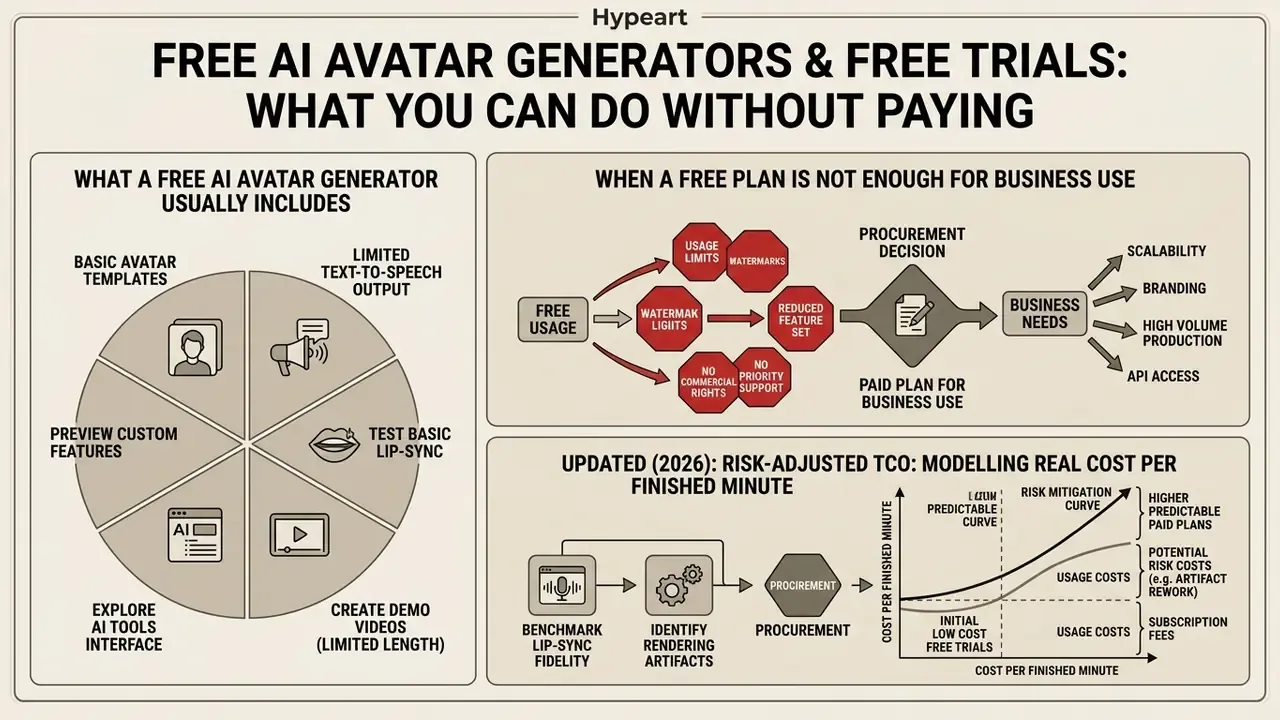
An ai avatar generator free trial 2025 or its 2026 equivalent lets risk managers and creative leads benchmark lip-sync fidelity and rendering artifacts before procurement. Free tiers impose hard functional boundaries, though, designed to block commercial use without a subscription. Teams running a structured bake-off should also review the landscape of free AI video generators before committing to an annual contract.
Free Tier vs. Enterprise Paid Tier: Capability Boundary
| Capability gate | Typical free tier | Typical paid or enterprise tier |
|---|---|---|
| Export resolution | 720p (1080p on selected vendors) | 1080p and 4K MP4, high quality masters |
| Video length | 60 seconds to 3 minutes per render | 30+ minute long-form modules |
| Volume | 3 videos per month or a daily credit pool (for example 60 credits/day) | Seat- or credit-based enterprise allocations |
| Watermark | Vendor watermark or required attribution | Watermark-free, brand-kit locked output |
| Avatar access | Restricted public stock library (for example 500+ presenters) | Full library plus custom twins and prompt-built characters |
| Voice cloning | Usually unavailable | 15-second to short-sample cloning, multilingual reuse |
| Commercial rights | Internal evaluation only | Commercial distribution, indemnification, licensing |
| Governance | None | SSO, RBAC, audit logs, moderation, consent workflows |
What a Free AI Avatar Generator Usually Includes
An ai avatar generator from text free tier typically gives you a limited monthly allocation of processing credits, or up to three watermarked video exports. Resolutions cap at 720p, and video duration is limited to 60 seconds per render on most consumer plans.
Comparable patterns run across the market. Vidnoz publishes roughly 60 free credits per day (about three minutes of avatar video) at 720p with a watermark. Fliki grants monthly credits and a public avatar library while reserving watermark-free 1080p MP4 for paid plans. Synthesia's free plan is unusually generous on access, including stock and customizable avatars, Avatar Builder, the core editor and generation in 160+ languages with no credit card required.
So you can start creating on a free plan and still learn something useful. What you get is a constrained library of public stock avatars plus basic text-to-speech. Advanced features (4K export, multi-speaker scenes, custom voice cloning) stay behind paid plans. You can explore video maker online with music and effects free to evaluate basic video generation options, and review the constraints common to free AI video generators before assuming a free plan will scale.
When a Free Plan Is Not Enough for Business Use
Commercial operations hit the wall quickly when a free ai avatar is used on customer-facing channels. Unpaid outputs carry prominent vendor watermarks and no legal indemnification for commercial distribution. HeyGen's terms, for example, restrict free-plan output to personal, non-commercial, internal evaluation use. Elsewhere in the market, platform terms separate avatar and generative-AI use from commercial terms entirely, which means a broad rollout simply is not covered by the default free licence.
Updated (2026), illustrative deployment pattern. A US financial advisory team testing automated video onboarding on free generative tiers ran straight into the standard boundary set: visible watermarking, 720p caps, and credit limits that halted production after roughly three short clips. Moving to a paid plan with consent-managed custom avatars enabled routine publication of compliance-approved client explainers each month, with reported per-video cost falling from a mid-hundreds-of-dollars agency baseline to low double digits. This pattern is consistent with published vendor cost ranges ($200 to $500 for traditional asset production versus $10 to $30 for AI pipelines), but the specific figures are directional rather than independently audited. Treat them as a modelling input and validate against your own agency invoices.
Risk-Adjusted TCO: Modelling the Real Cost per Finished Minute
Subscription price is the smallest line in a regulated deployment. Model total cost of ownership like this:
Risk-adjusted cost per finished minute = (subscription + per-credit render cost + voice/avatar build fees) + (legal review hours × blended rate) + (model-risk validation hours × blended rate) + (localization QA hours × blended rate) + (archival and audit storage), divided by approved minutes shipped
| Cost component | Traditional production | AI presenter pipeline (governed) |
|---|---|---|
| Direct production cost per asset | $200 to $500 | $10 to $30 |
| Localization for 10 languages | $2,000 to $5,000 (talent plus dubbing) | Included in script translation workflow |
| Legal and consent review | Per shoot, per talent contract | One-time consent onboarding plus periodic re-attestation |
| Model-risk validation | Not applicable | Initial validation plus annual revalidation of the avatar as a controlled asset |
| Audit and archival | Raw footage storage | Script hash, render ID, consent record, output hash |
Two governance costs get omitted almost every time, and both belong in the budget. First, the hours a compliance reviewer spends approving each script before render. Second, the cost of monitoring Shadow AI. To detect unsanctioned usage, cross-reference expense reports and corporate card charges against known avatar vendors, scan SaaS discovery logs for vendor domains, monitor SSO-bypass signups on corporate email domains, and publish an approved-tool list with a fast internal intake path. Teams open unapproved accounts mainly when the sanctioned route is slower than the deadline. You can explore the hub for risk assessment tools and operational cost calculators.
Which AI Avatar Generator to Choose for Marketing, Training, and Social Media
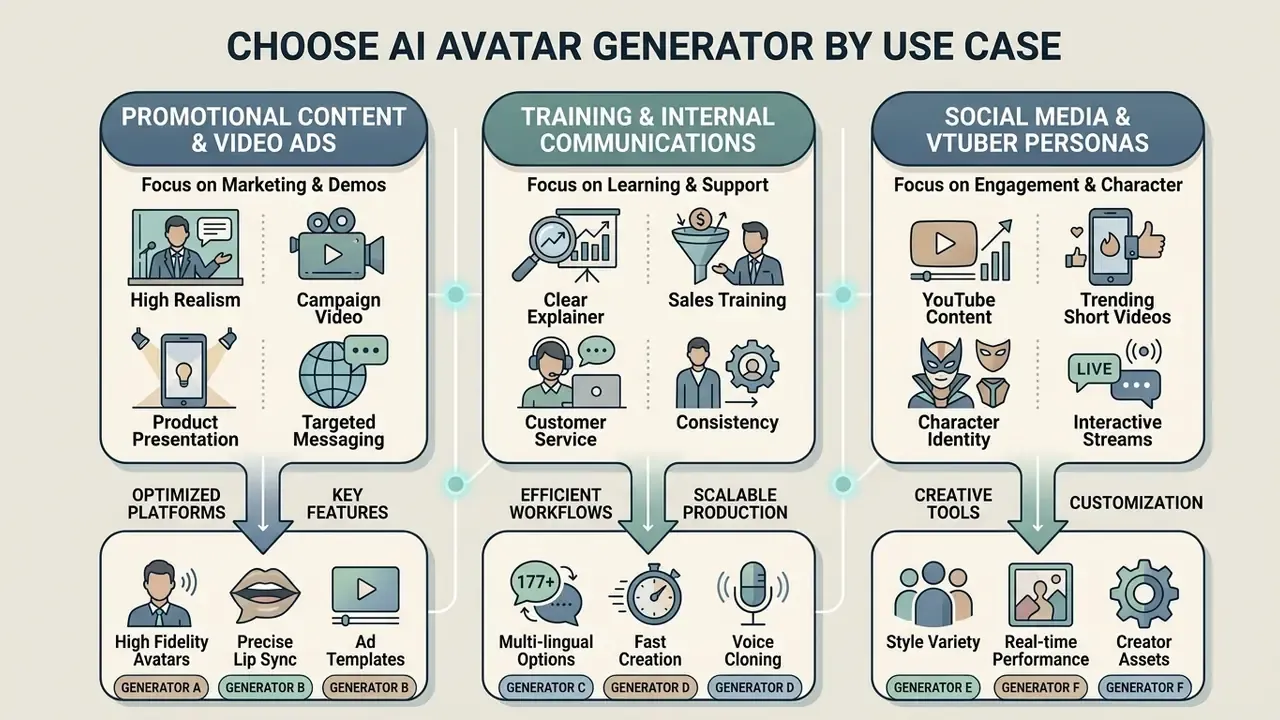
Picking between ai avatar creation apps means matching platform capabilities to a specific deployment pattern. Marketing teams prioritize high resolution and localized dubbing. Internal training departments need long-form script rendering and Learning Management System integration. Different jobs, different winners.
| Business scenario | Recommended avatar architecture | Critical platform capabilities | Target business outcome |
|---|---|---|---|
| Promotional ads and launches | Photorealistic 2D presenter or branded custom avatar | 4K rendering, script-to-video, multi-language dubbing, brand kit lock | Higher ad CTR, reduced production turnaround time |
| Product demos and walkthroughs | Semi-stylized presenter with screen-recording overlay | Screen capture integration, custom voice clone, persistent presenter identity | Improved feature adoption, consistent technical messaging |
| Corporate training and L&D | Professional stock or custom executive avatar | Long-duration output (30+ min), SCORM export, quizzes and branching, automated transcript translation | Reduced training production costs, rapid compliance updates |
| Customer support and sales | Branded virtual service agent | API-driven rendering, low latency (under 200 ms), interactive avatar layer, CRM and FAQ integration | 24/7 automated video response, scalable customer guidance |
| Social media and shorts | Stylized 2D/3D avatar or VTuber persona | Vertical 9:16 export, fast processing, expressive motion templates, FBX rigging | High-frequency publishing without camera setup |
Read the matrix top to bottom before comparing vendors, because scenario fit eliminates more tools than pricing does. Teams reviewing broader design tools can examine ai art and design for complementary graphic asset pipelines.
AI Avatars for Promotional Content, Video Ads, and Product Demos
Deploying ai avatars for promotional content creation lets marketing teams iterate ad variants without re-booking a crew. Reported benchmarks place AI-generated UGC-style creatives at roughly 85% to 110% of traditional UGC click-through rate, with comparable or better ROAS attributed to faster iteration cycles, while per-asset cost falls from the €150 to €500 range down to €5 to €30. A separate consumer study of 21,000 participants reported AI-personalized video ads improving CTR by 9.4% over personalized image ads and 6.5% over generic video. Product-demo analytics across 14 million sessions showed AI voiceover narration lifting completion rates by 14% versus silent demos. These figures come from different measurement frames (ad CTR and ROAS, consumer panel testing, product-session analytics), so treat them as directional rather than directly comparable.
«Trust in AI influencers explains nearly half the variance in consumer well-being outcomes, mediated by perceived authenticity and parasocial connection.»
Production Economics: Traditional Video Shoot vs. AI Presenter Pipeline (2026)
| Production metric | Traditional video shoot | AI presenter pipeline (2026) | Performance variance |
|---|---|---|---|
| Cost per video asset | $200 to $500 | $10 to $30 | around 94% cost reduction |
| Turnaround time | 3 to 5 business days | 2 to 5 minutes | around 99% faster delivery |
| Localization cost (10 languages) | $2,000 to $5,000 (actors plus dubbing) | $0 incremental (included in script translation) | Near-total margin saving |
| Average click-through rate (CTR) | 2.14% (UGC baseline) | 2.08% (photorealistic AI avatar) | Parity (minus 0.06 pp) |
| Variant testing capacity | 1 to 2 variants per shoot | 10+ variants per script | Order-of-magnitude increase |
Using a consistent avatar presenter across product launch campaigns reinforces brand recognition. Keep a centralized library of digital presenters so marketing assets stay visually aligned across regional campaigns. One caution on branded scenes: platform terms usually permit brand imagery, designs, sounds and trademarks only as expressly authorized by brand guidelines or prior written permission.
Video Avatars for Training Content, Sales, and Customer Service
Enterprise L&D teams use ai avatar creation for businesses to convert static PDF policy manuals and slide decks into structured video modules. Vendor workflows now accept scripts, PDFs, decks and outlines and return scene-by-scene avatar videos, with Doc2Video-style conversion, quizzes, branching logic, SCORM export and completion analytics.
The evidence here is unusually decent. A benchmark study at the USC Marshall School of Business covering more than 250 professionals found that AI avatar video modules achieved knowledge transfer identical to live human instructors. A controlled study of 500 adult learners found no significant difference in engagement or retention between an AI avatar video and a human instructor video, while viewers completed the AI version roughly 20% faster (Synthesia and USC Marshall learning analytics benchmark). In the same vendor's State of AI Video survey, 54% of respondents named global localization as the area where they expect AI to deliver the most value.
Research in educational technology supports the mechanism: embodied virtual agents raise learner engagement and reduce extraneous cognitive load compared with text-only materials.
«Learners paired with LLM-empowered avatars in immersive VR reported higher perceived experience and reduced extraneous cognitive load versus chatbot-only conditions.»
Peer-reviewed hospitality-training work at DePaul similarly positions avatars as adaptive educational agents capable of supporting assessment and feedback loops, not merely narration.
In sales enablement, automated video generators let account teams produce personalized follow-up videos for high-value leads. Integrate with CRM and a representative can input a prospect's name and company details to generate custom messages at scale; teams designing that automation can review the mechanics of text-to-video AI tools before wiring templates into the CRM. For customer service, interactive avatar layers connect your own LLM or agent to a rendered face, covering common enquiries, troubleshooting, returns and account guidance around the clock. A new team member can be onboarded with the same module library on day one, which is a quietly large saving.
Creating Your Own AI Avatar from a Photo, Text, or 3D Model
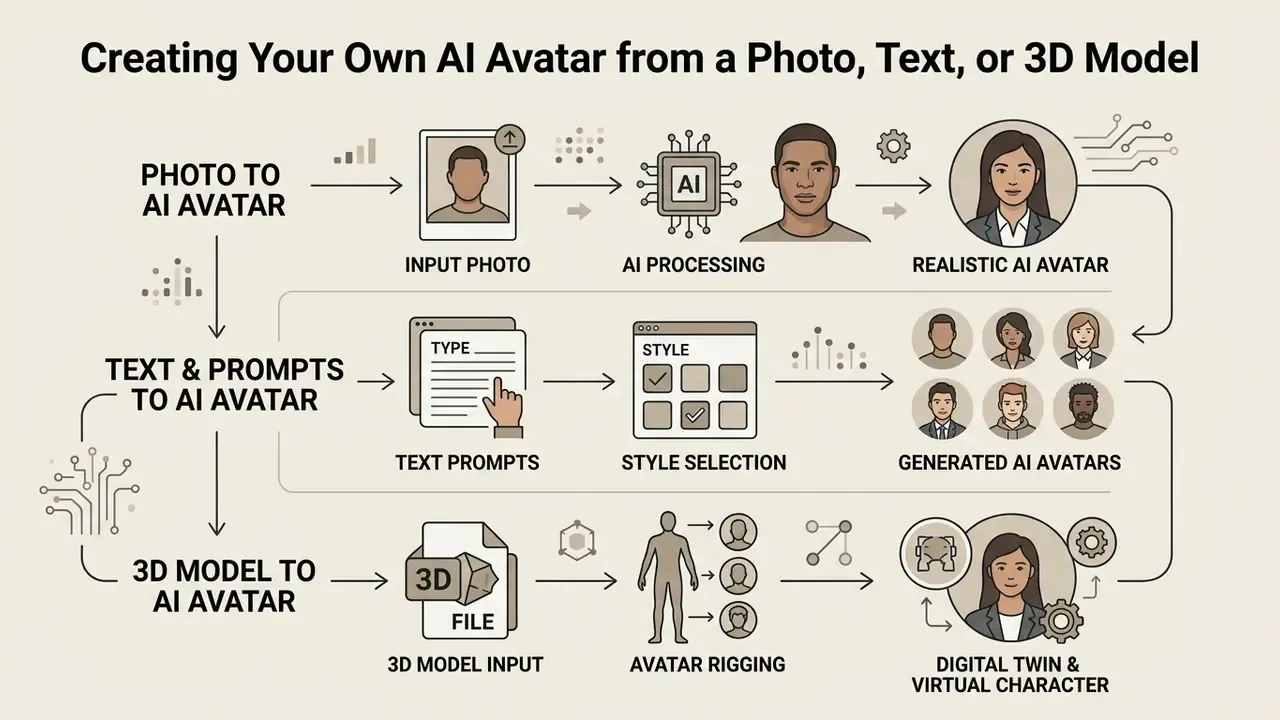
Understanding the ai avatar creation process matters for any organization building custom digital representatives. Platforms support three pathways in practice: single-photo reconstruction, text-prompt generation and full parametric 3D mesh modelling. Four, if you count short video capture separately, which you should.
Avatar Creation Pathways: Input Requirements and Output Fidelity
| Pathway | Minimum input | Typical generation time | Identity fidelity | Best fit |
|---|---|---|---|---|
| Single photo | 1 front-facing 1080p or better portrait, even lighting | Seconds to minutes | High (reconstructed from identity evidence) | Fast personal presenter, sales outreach |
| Short video capture | 30 s to 2 min, 1080p/4K, static background, consent clip | Minutes to hours | Highest (micro-expressions preserved) | Executive comms, regulated training |
| Text prompt | Descriptive prompt, optional reference image | Seconds to minutes | Prompt-aligned, not identity-bound | Brand mascots, stylized characters |
| Parametric 3D mesh | FBX mesh or photo-to-3D conversion, rigging | Minutes to hours | Style-controlled, fully animatable | VTubing, games, metaverse, interactive VR |
How to Create a Realistic AI Avatar from a Single Photo
To create ai avatar assets from one image, simply upload a high-resolution frontal portrait shot under neutral, even lighting. Neural architectures such as Gaussian splatting and latent style estimation synthesize multi-view head motion from that single source frame in under 15 seconds (Avatar++ research report, 2025).
«StyleTalker and DaGAN++, trained on VoxCeleb2 (215,000 videos, 6,112 identities), demonstrate that one-shot personalization from a single photo is technically viable given sufficient training diversity.»
1. Select a high-resolution 1080p+ portrait with direct frontal pose and clear eye visibility.
2. Ensure soft, balanced lighting across the face without harsh top shadows or strong backlighting.
3. Keep the camera at eye level and the head mostly straight; extreme yaw or pitch angles are rejected by most engines.
4. Upload the image to the generative platform and verify facial landmark alignment.
5. Pair the photo avatar with a validated voice clone or synthetic text-to-speech profile.
6. Render a test clip to verify natural eye blinks and lip movement around the mouth corners.
Vendor capture guidance converges on the same constraints: a single fully visible person, neutral or natural expression, uncluttered background, no sunglasses or hats, no occlusion of the forehead or facial contours. Angle tolerance differs slightly by vendor, some accept a slight turn while others require strict frontal framing, but all of them reject hard shadows and backlighting.
If the source portrait is weak, upgrading the input is cheaper than fixing the output. Compare options among AI headshot generators to produce a clean, evenly lit base image before avatar training.
Improper source photos with heavy side shadows or turned head angles introduce visual warping during generation. Keep backgrounds clean and neutral to prevent edge-rendering artifacts. This is where most first attempts fail, and it costs nothing to fix.
Creating an Avatar from Text, Prompts, and Avatar Styles
Generating stylized characters from text prompts lets creative teams build fictional brand mascots without using the likeness of real people. Platforms accept descriptive prompts specifying age, attire, artistic style and lighting conditions, which is how most animated avatar work starts.
Prompt engineering for virtual characters benefits from structured style tokens, for example "photorealistic studio lighting, corporate attire, neutral expression". Research supports the same discipline. WACV 2023 work shows that sentence templates such as "a rendering of a …" improve consistency in text-driven 3D avatar manipulation; AvatarCraft (2023) stylizes geometry and texture from a single prompt while controlling shape and pose through parametric human models; AvatarStudio (ICLR 2024) combines prompts with a style image; X-Oscar (2024) runs a progressive geometry, texture, animation pipeline; and Snapmoji (WACV 2026) generates animatable dual-stylized avatars from a generated image, a prompt and the original user photo. Practical implication: write two or three semantically equivalent prompts, add explicit negative style tokens, then lock the winning seed as a reusable character preset.
Users tracking updates on generative media models can consult ai art tools news for industry developments.
3D Avatars, Digital Twins, and Virtual Characters
Constructing a true digital twin requires capturing spatial geometry and facial performance parameters. Modern metaverse frameworks specify that digital twins must be uniquely identifiable, maintained via secure access controls, searchable, and capable of real-time synchronization with driving data streams on demand or at defined intervals (ITU-T Focus Group Metaverse guidelines, 2024). The same guidance notes that a user avatar can mirror facial expressions captured by user equipment and interact with other avatars and twins inside the environment.
Peer-reviewed 2024 work describes modular 3D character animation built from motion primitives and data-driven asset twins. Studies of hyperreal virtual humans document creation from photographic reference material combined with sensor-based motion-capture suit data for facial and body movement, the pipeline behind virtual fashion shows and live commerce streams.
3D digital twins support advanced interactive use cases where an avatar must navigate a virtual environment or respond dynamically to user input in VR. Those models need full skeletal rigging and blendshape calibration to execute complex gestures. Teams animating static assets into motion can also review the category of image-to-video AI tools as a lighter-weight alternative to full rigging.
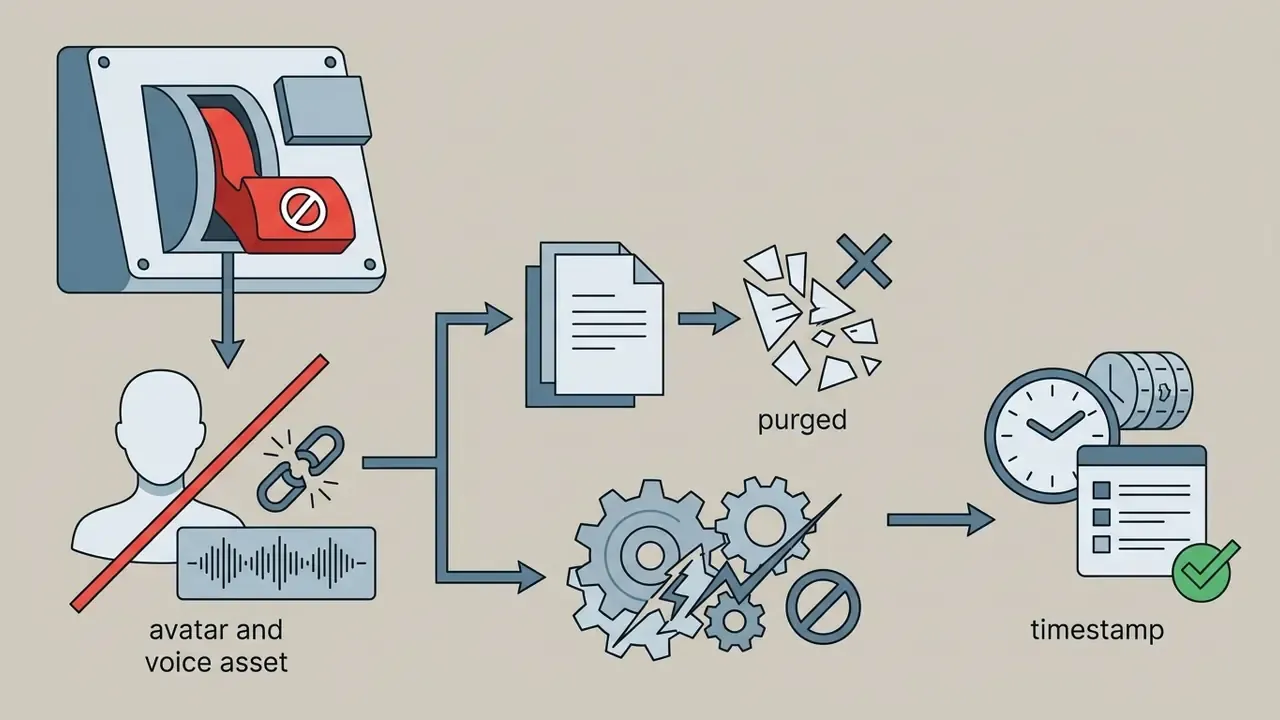
A digital twin of a real employee combines biometric identity with autonomous behaviour, so treat it as the highest-risk configuration in the taxonomy. Apply the consent, revocation and kill-switch controls described below before any external publication.
Safety, Consent, and Commercial Use of AI Avatars
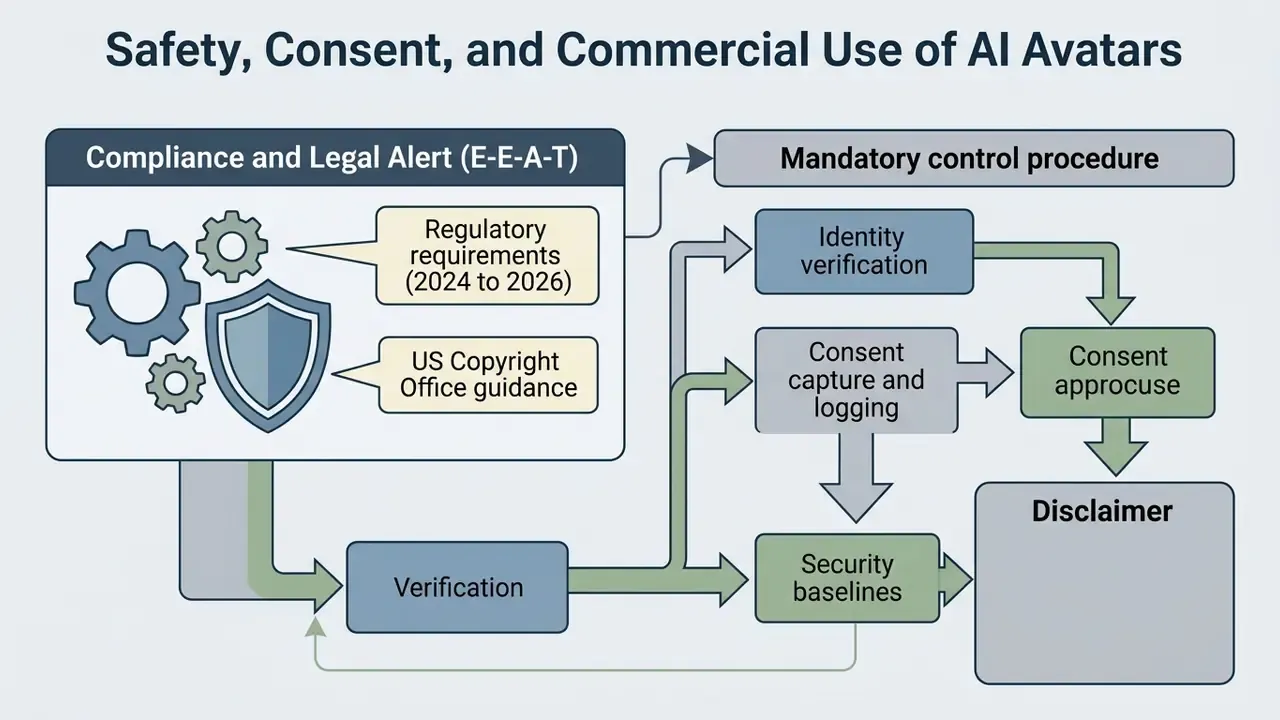
Deploying synthetic media introduces legal, regulatory and brand security risk that demands formal operational controls. Unapproved voice cloning or unauthorized identity replication creates severe liability under emerging US state privacy laws and federal digital replica rules.
«High-quality lip sync and realistic facial expressions materially degrade the accuracy of existing deepfake detectors.»
Compliance and Legal Alert (E-E-A-T)
- Regulatory requirements (2024 to 2026)
- The EU AI Act entered into force on 1 August 2024; its Article 50 transparency duty for synthetic audio, image, video and text applies from 2 August 2026, requiring machine-readable marking and disclosure that content is artificially generated or manipulated. US state regulations add consent and liability layers: Tennessee's ELVIS Act (2024) extends personality rights to a person's actual and simulated voice; Illinois' Digital Voice and Likeness Protection Act (2024) makes digital-replica contracts unenforceable without a reasonably specific description of intended uses plus counsel or union representation; California's AB 1836 (2024) expanded postmortem liability for digital replicas and voice clones in audiovisual works and sound recordings.
- US Copyright Office guidance
- license images and voices for digital replicas with duration limits rather than accepting outright assignment of rights.
- Mandatory control procedure
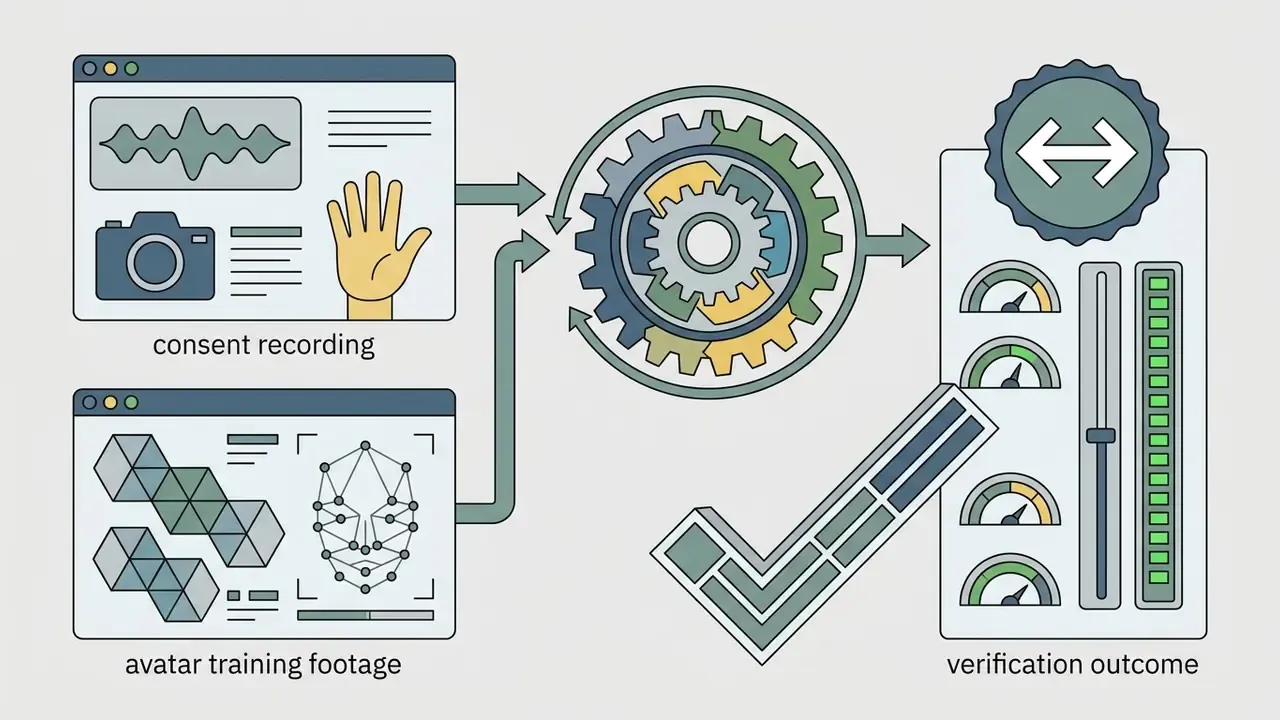
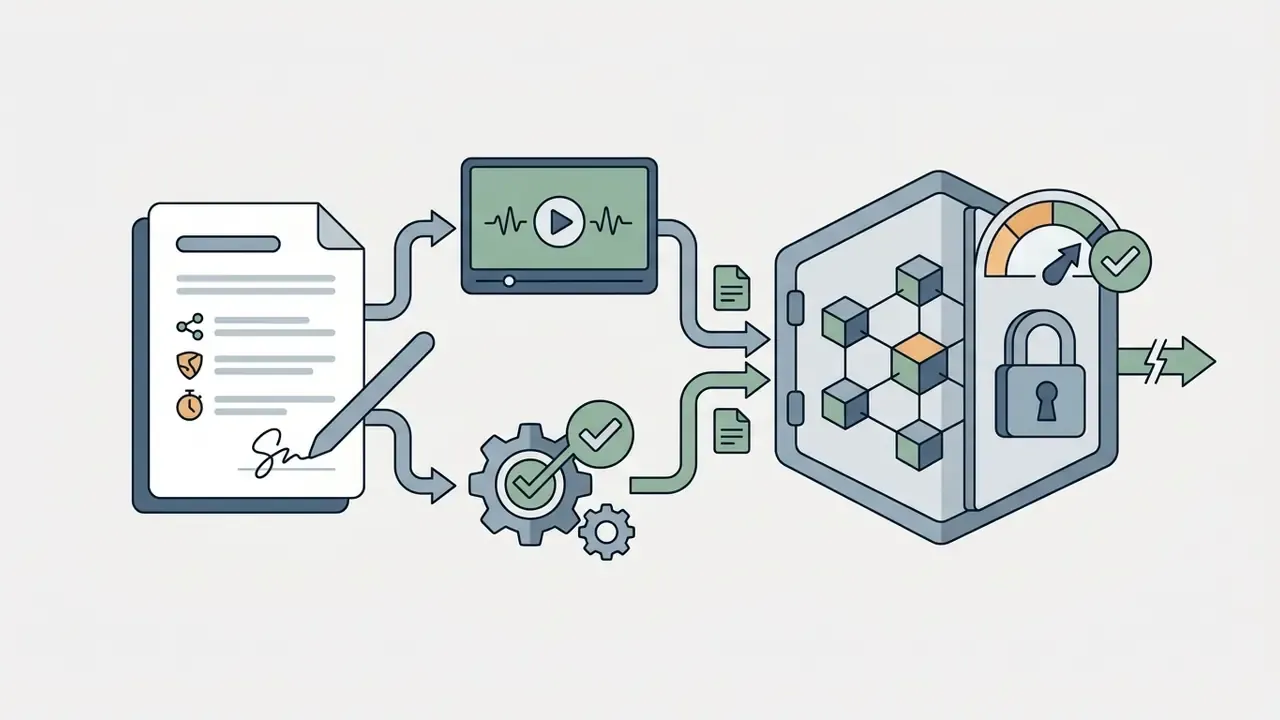
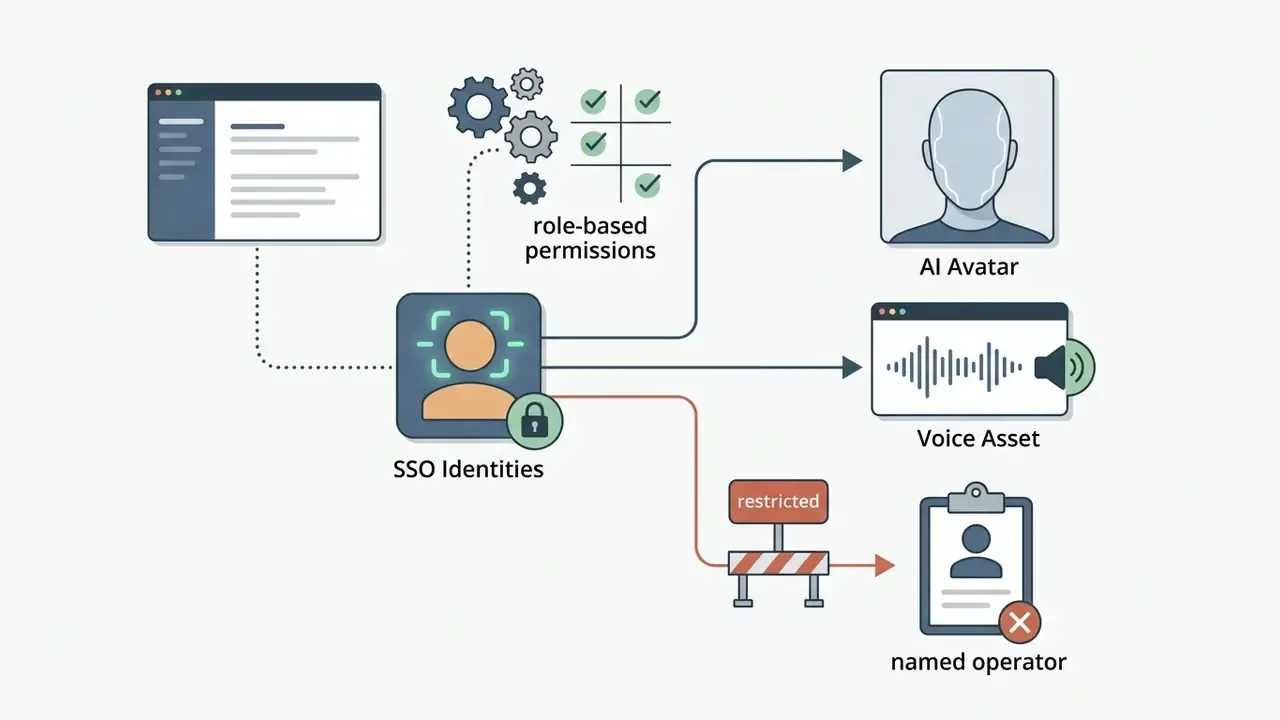
- before generating any digital twin or voice clone, organizations must secure documented written consent detailing authorized usage scope, distribution channels, campaign duration and explicit revocation rights. Leading vendors enforce this in-product. Synthesia requires a live consent statement recorded by the same individual who appears in the avatar footage, and prohibits uploading pre-recorded consent on someone else's behalf.
- Security baselines
- NIST IR 8356 (2025) frames digital-twin risk around information exchange, integrity, trust and access control; NIST SP 800-63 Rev. 4 (2025) is the reference baseline for identity proofing and authentication in voice-driven access flows; the US GAO (2025) flags privacy, data ownership and public-trust risks when digital twins represent real people.
«The SHDF dataset (2,600 real and 3,000 synthetic singing videos) confirms that rhythmic facial motion during singing substantially reduces deepfake-detector accuracy.»
Synthetic Media Consent Verification and Audit Trail Architecture
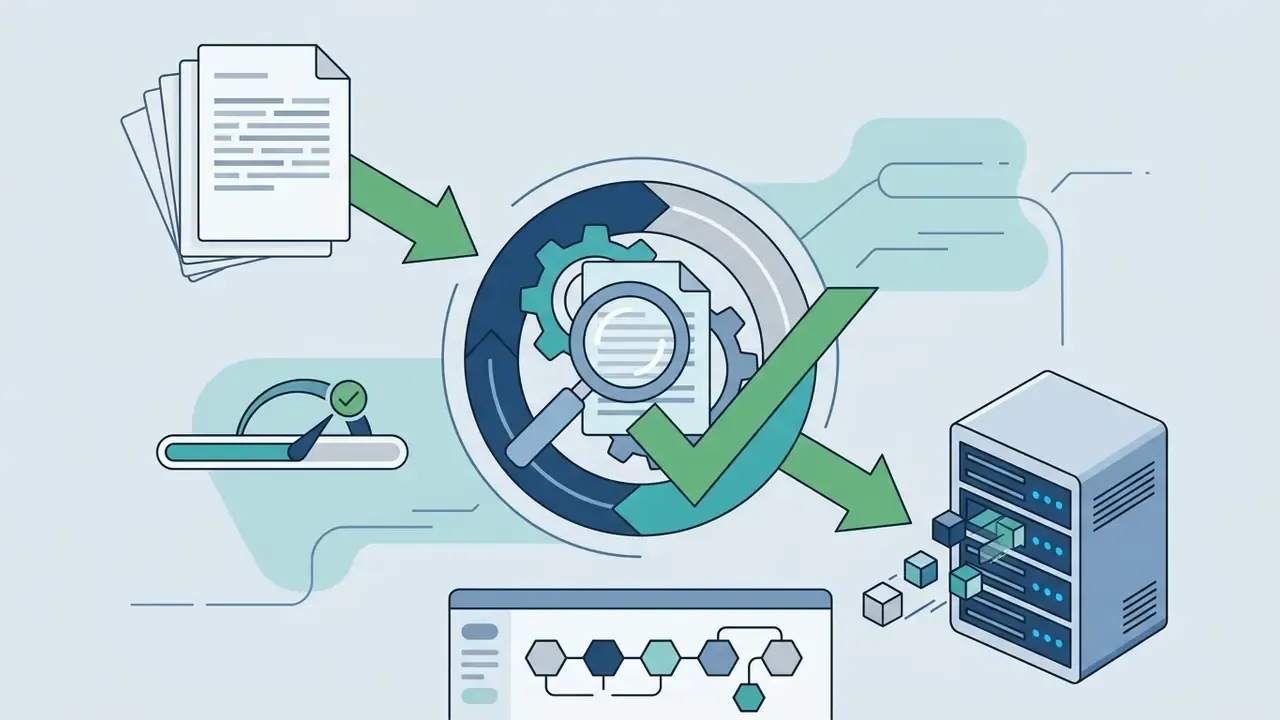
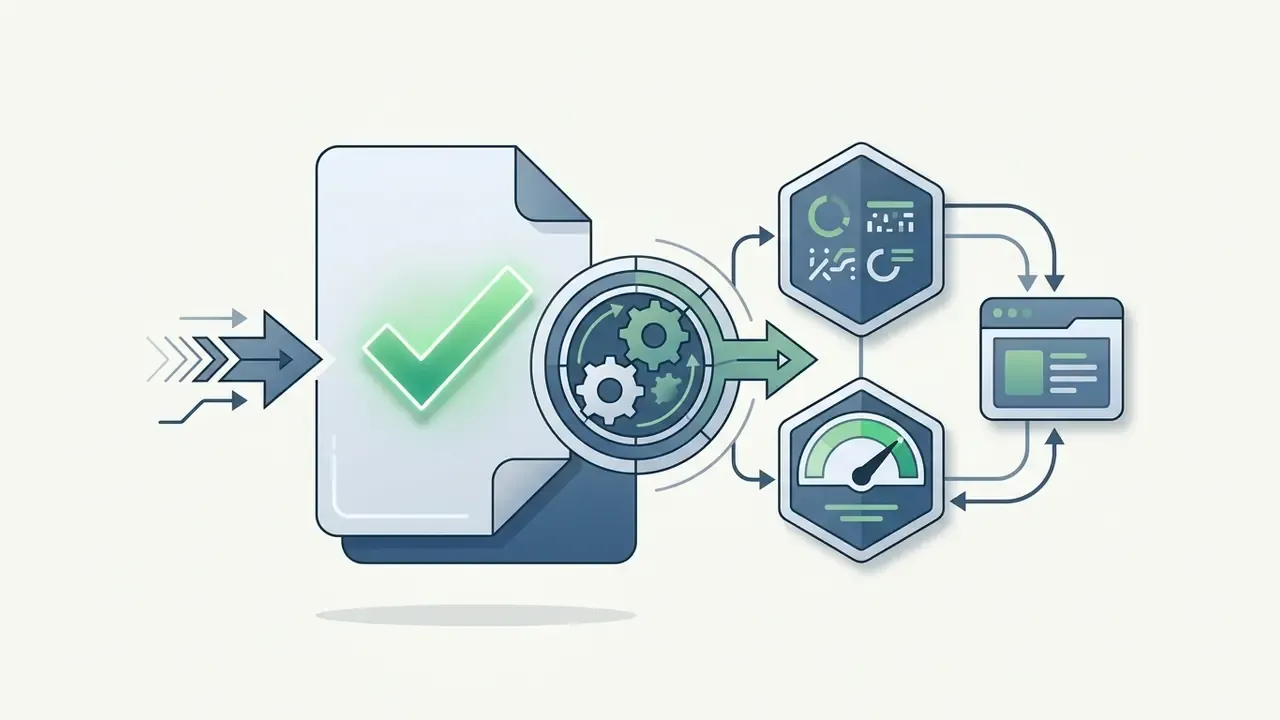
Model risk governance for AI avatars, in six steps:
Risk frameworks should also include automated content moderation filters, so generated avatars cannot produce unauthorized financial guarantees or unapproved brand statements. Verification tooling on the consumption side matters as well; see the overview of AI image detectors for authenticity-checking options.
Model Risk Management Checklist: Moving Avatars from Pilot to Production
Regulated organizations should treat a synthetic presenter as a controlled asset governed under existing model-risk practice, using the validation, documentation and ongoing-monitoring expectations familiar from SR 11-7-style frameworks. Evidence these acceptance criteria before first external publication:
Checklist0 / 9
How to Produce a Talking Avatar Video: From Script to Finished File
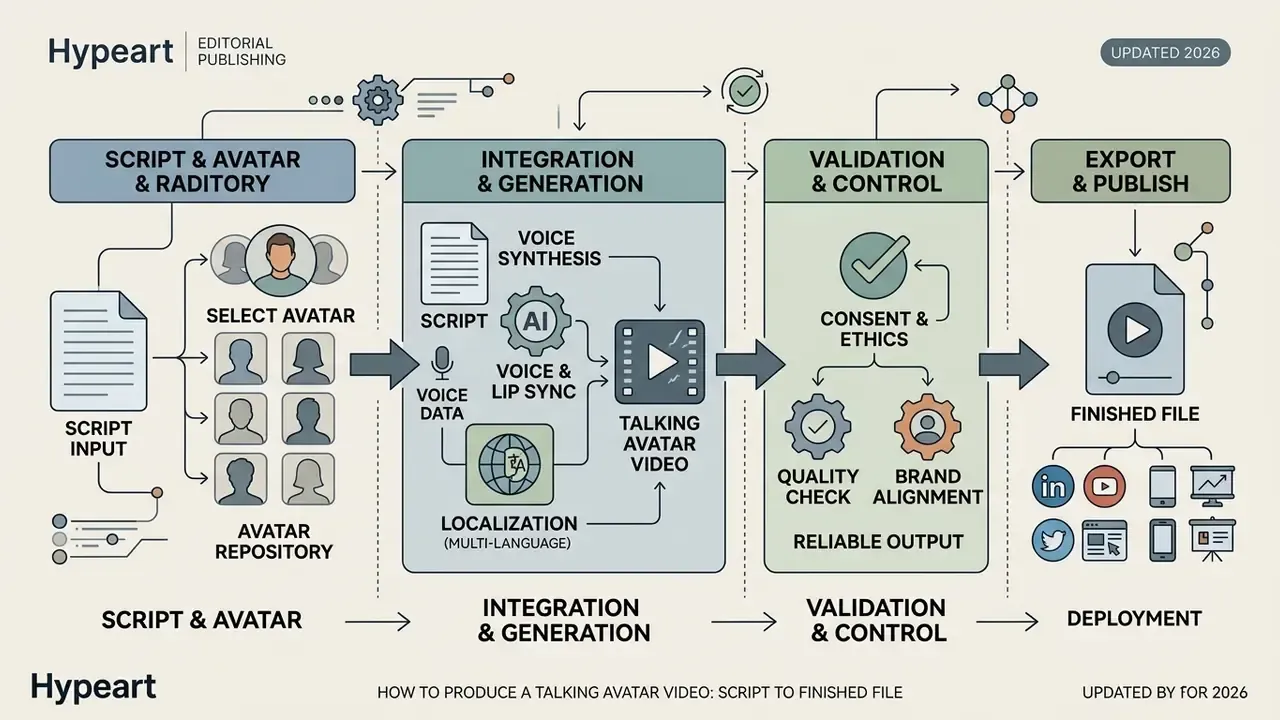
Producing a professional talking avatar video takes a structured pipeline, from copy drafting through rendering and platform export. Automated platforms compress that pipeline and remove the need for manual video editing skills; documented vendor flows run four to five steps, with asynchronous rendering retrieved by polling or webhook.
Avatar Video Production Pipeline
- Script and asset preparation.Draft copy, select the target language, assign the presenter avatar (stock, photo, custom twin or prompt-built character).
- Voice synthesis and prosody tuning.Choose or clone a voice profile, set speaking rate, emotion preset and SSML pitch parameters.
- Lip sync and motion alignment.The system maps audio phonemes to avatar facial blendshapes, mouth motion, gaze and posture.
- Quality control review.Inspect lip alignment, identity consistency, framing, gesture plausibility, frame stability and speech pacing.
- Export and distribution.Render the finished video as MP4 (1080p or 4K, 16:9, 1:1, 9:16) and deploy across target commercial channels with provenance labelling intact.
Selecting the Avatar, Adding the Script, and Generating the Voice
The pipeline starts with selecting an appropriate stock presenter or custom avatar in the platform interface. The operator then adds the script into the editor and assigns a synthetic voice profile matching the target persona. API-driven implementations pass avatar_id, voice_id, and either a script or an audio file in one request, then poll for completion.
Speech synthesis engines support prosody tuning via Speech Synthesis Markup Language tags or visual sliders. Updated (2026): adjusting pitch and speaking rate in small 5% to 10% increments improves natural cadence and reduces robotic monotone. IBM's Text to Speech documentation explicitly recommends changing rate incrementally by five or ten percent and matching pitch to the intended tone of the voice. Research on prosody prediction shows phrase breaks and pitch accents are inserted from text features before synthesis, which is exactly why script structure (short sentences, explicit punctuation) shapes final intonation. Write for the ear, and the avatar speaks better.
Lip Sync, Localization, and Exporting the Avatar Video
FAQ: Frequently Asked Questions About the Best AI Avatar Generator
What is the difference between an AI avatar generator and a talking head video?
An ai avatar generator is the underlying software engine that creates or animates a digital character from text, photos or 3D models. A talking head video is the rendered output file featuring a presenter speaking a specific script. In research terms, the generator performs the synthesis task; the talking head is the delivered artefact, evaluated on lip synchronization, temporal consistency and realism.
Do I need video editing skills to create an AI avatar video?
No. Cloud-based ai avatar generator apps handle facial animation, lip synchronization, audio alignment and final rendering from your text script. Vendors document a script, avatar, generate, share workflow. Editors exist for animations, captions, music and interactivity, but they are optional rather than a prerequisite.
Can I create an AI avatar from a single photograph?
Yes. Modern photo avatar engines produce animatable 2D presenters from one high-resolution front-facing photograph. The system estimates facial depth and animates mouth movement from input text or audio. For the highest identity fidelity, including micro-expressions and multiple shot sizes, a 30-second to 2-minute video capture still outperforms a single still.
How much input video does a custom avatar require?
It varies by vendor and fidelity target. HeyGen builds a custom avatar from a 30-second clip; other platforms specify 2 minutes of footage plus a separate consent recording; Synthesia's capture guidance targets UHD 3840×2160 at 29.97/30 fps with green screen, even lighting and clean synchronized audio. Higher input resolution measurably improves facial geometry, which is consistent with the 1080p to 2160p composition of the TalkVid dataset.
Are AI avatars legally permitted for commercial promotional content?
Yes, provided you use a paid tier that grants commercial licensing rights and obtain verified written consent from anyone whose likeness or voice is cloned. Free tiers frequently restrict output to internal, non-commercial evaluation. From 2 August 2026, EU AI Act Article 50 transparency obligations require synthetic content to be marked and disclosed. For adjacent rights questions across generative tooling, review guidance on commercial use of AI image generators.
«Disclosing that an influencer is AI-generated reduces perceived anthropomorphism and brand trust, particularly when the avatar appears hyper-realistic.» Journal of Consumer Behaviour (2024) The practical implication is a trade-off, not a blocker. Disclosure is legally required in a growing number of jurisdictions, so design creative that does not depend on the viewer believing the presenter is human.
How do platforms handle multilingual video translation?
Platforms use automated AI dubbing engines that translate scripts while cloning the original speaker's vocal timbre, then recalculate mouth lip sync against the phonemes of the target language. Coverage in 2026 spans 177+ languages and dialects on HeyGen and 160+ languages on Synthesia, while research on MultiTalk shows language-specific style embeddings measurably improve articulation accuracy outside English. You can view AI Media Pricing to compare commercial subscription tiers for multilingual tools.
Where can I see credible AI avatar generator examples before buying?
Ask each vendor for ai avatar generator examples rendered from your own script, not their demo reel. Request one frontal clip, one with head rotation, and one localized version, then log the SyncC score and any warping. Three test renders usually separate the shortlist faster than a month of feature-page comparison.
How can compliance teams verify an avatar video before publication?
Run a three-part gate. A technical check (SyncC of 8.5 or higher on your own script, audio-video offset within plus or minus 80 ms, no warping under head rotation). A content check (approved script hash, prohibited-claims filter, brand-asset permissions). And a provenance check (synthetic-media label present, render ID and output hash logged, consent record current and unrevoked).
How do we detect and control Shadow AI avatar usage?
Cross-reference card and expense data against known avatar vendors, scan SaaS-discovery and DNS logs for vendor domains, monitor non-SSO signups on corporate email domains, and publish an approved-tool list with a fast intake route. Unsanctioned accounts almost always appear because the approved path is slower than the campaign deadline, so reducing intake latency is the single most effective control.
Appendix A: Corrections Log and Superseded Data Points
Maintained for transparency and auditability. Each entry preserves the original claim as published and records the verified 2026 replacement.
| Original claim (as published) | Status | Updated position (August 2026) |
|---|---|---|
| "HeyGen supports 175+ languages" | Contradictory with current vendor documentation | 177+ languages and dialects; HeyGen pages show both figures across versions, so re-verify at purchase date. |
| "Creating a custom AI avatar requires between two and five minutes of input video" | Contradictory | 30 seconds to 2 minutes of 1080p or 4K input depending on vendor; Synthesia's capture spec targets UHD 3840×2160 at 29.97/30 fps with green screen. |
| "Lip-sync confidence scores above 8.5 on the HDTF dataset" (no method detail) | Needs verification detail | Restated as an internal benchmark practice using the HDTF (High-Definition Talking Head) dataset, with Livatar-1's reported 8.50 SyncC at 141 FPS and 0.17 s latency as the reference point. |
| "AdPerformance Analytics Benchmark, 2025" cited for CTR and cost parity | Source not verifiable | Replaced with vendor-reported cost ranges (€5 to €30 versus €150 to €500; $10 to $30 versus $200 to $500), a 21,000-participant consumer study on personalized video CTR, 14M-session product-demo analytics, and Journal of Consumer Behaviour (2026) trust findings. |
| "VoxCPM2 Multilingual Corpus, 2026" cited for 30+ language cloning | Vendor-reported, not independently benchmarked | Retained as vendor documentation (30-language synthesis, controllable timbre-preserving cloning) with an explicit note that independent benchmark data is still required. |
| "IBM Speech Synthesis Standards, 2026" | Imprecise citation | Restated as IBM Cloud Text to Speech documentation: <prosody> governs pitch and rate; tune in 5% to 10% increments. |
| US financial advisory case: "$450 to $22 per video, 45 explainers per month" | Not independently verified | Reframed as a directional deployment pattern consistent with published cost ranges; figures flagged as modelling inputs. |
| Fintech AML localization case: "eight languages in under two hours" | Not independently verified | Reframed as a representative enterprise workflow; throughput to be validated against vendor render-queue SLAs. |
| Comparison table covering HeyGen, Adobe Firefly, Krikey only | Incomplete market coverage | Expanded to five platforms including Synthesia and OpenArt, plus a separate enterprise security and governance matrix. |
| Visual placeholders for infographics and cost tables | Unrendered content | Replaced with published benchmark tables, the production-economics table, the free-versus-paid capability boundary, the creation-pathway matrix, and text-based pipeline and governance procedures. |
A Safe Next Step
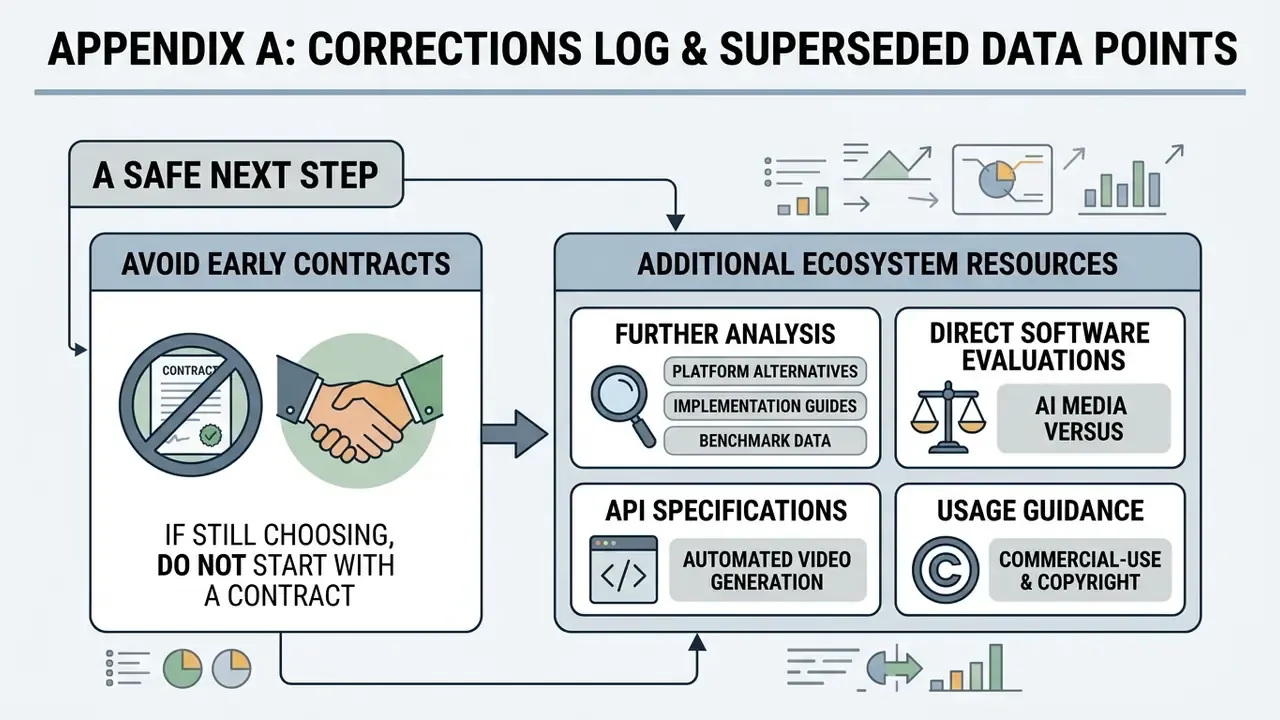
If you are still choosing, do not start with a contract. Start with three test renders on your own script, one legal review of the consent pack, and one costed estimate of the governance hours. If the numbers hold, scale to a single controlled use case (internal training is usually the least risky), then extend outward.
Additional Ecosystem Resources
For further analysis on generative media platforms, implementation guides and benchmark data:
- open the hub to review platform alternatives and enterprise tool choices.
- Check AI Media Versus for direct side-by-side software evaluations.
- browse the hub to inspect developer API specifications for automated video generation.
- Review AI Media Commercial-Use for detailed copyright and usage rights guidance.
- browse the hub for performance and lip-sync benchmark datasets.
General disclaimer: this article covers technical, commercial and regulatory topics that change frequently. Vendor specifications, pricing and legal obligations should be re-verified against primary sources before procurement or publication decisions, and legal, compliance or model-risk questions should be referred to qualified professionals in your jurisdiction.