Enterprise teams, financial institutions, and creative agencies are increasingly transitioning from initial pilots to scaled production. Doing so effectively requires matching specific organizational use cases against verified platform capabilities, licensing terms, and risk control measures. A marketing team that publishes an unlicensed clip on a regulated channel creates a legal problem, not a creative one.
In this guide: selection criteria, a 10-tool comparison table with exact monthly pricing, text-to-video and image-to-video leaders, avatar platforms and AI editors, script-to-video and screen-recording tools, a use-case decision tree, API and no-code automation, pricing and free-tier traps, copy-paste prompt templates, and a FAQ.
How to Choose the Best AI Video Generator App in 2025
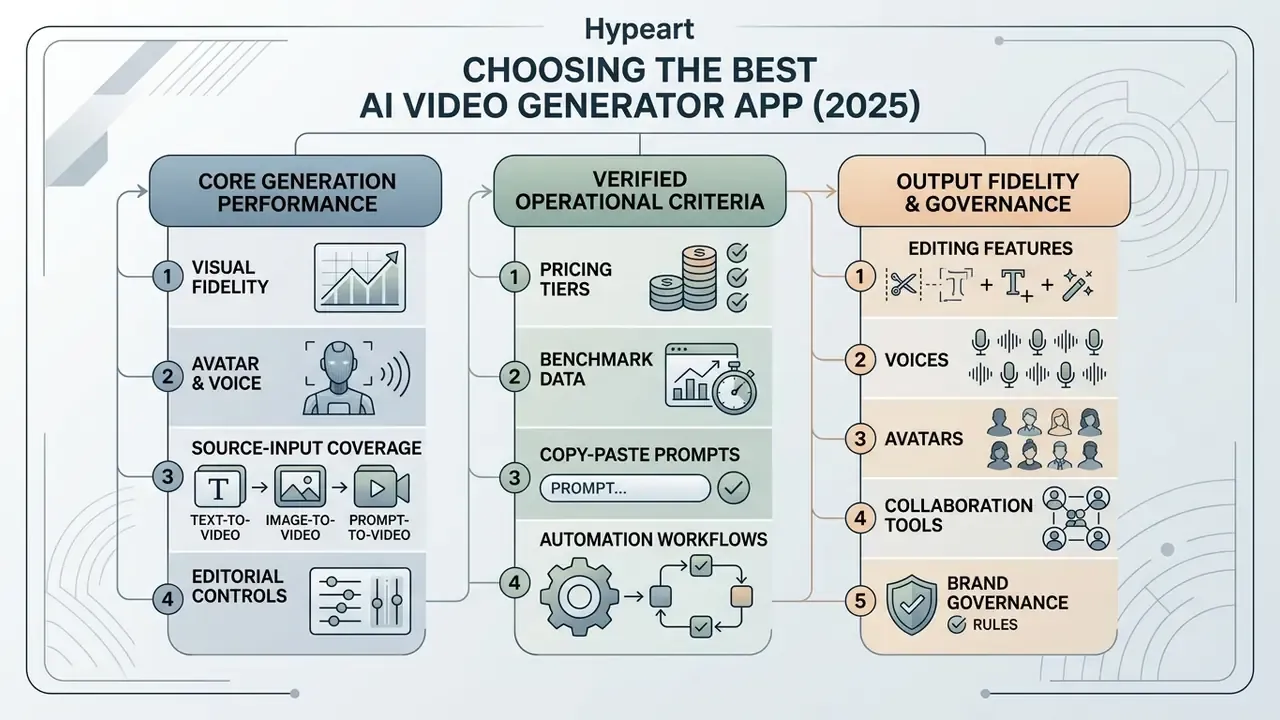
Selecting the best ai video generator app in 2025 requires evaluating specific operational criteria across rendering performance, prompt fidelity, and governance features. Organizations must assess underlying model capabilities alongside user interface accessibility to ensure sustainable workflow integration. A powerful ai video engine that nobody on the team can operate produces zero videos per month.
Video quality, prompt control, and available video models
«The leading model on MVBench, Video-CCAM-7B-v1.2, scored 69.23, about 14.6% higher than late-2023 performance.»
«Even the best commercial models receive extremely low scores for dynamic attribute binding, often generating static objects instead of transitions.»
For high-stakes deployments, generating high quality videos requires selecting architectures that maintain subject identity and camera stability without introducing spatial distortions or motion artifacts. Recent evaluation literature splits quality into four measurable axes that buyers can test independently: visual fidelity, temporal consistency, semantic (prompt) alignment, and physical consistency. That framing appears in the 2026 OpenReview paper The Evaluation Imperative for Video Generative Models, and it mirrors AIGCBench's control-video alignment, motion effects, temporal consistency, and video quality dimensions.
Editing features, voices, avatars, and collaboration
Beyond core text-to-video diffusion engines, full-featured AI video generation apps incorporate specialized post-processing tools. These include an integrated ai video editor, synthetic ai voices with voice cloning, precise lip sync engines, and realistic AI avatars designed for presenter-led content. Research on pose and expression controllable models (such as PECHead and DisCoHead) shows that disentangling facial expressions from head pose substantially reduces visual flickering and uncanny valley distortions in talking head videos.
«PECHead combines self-supervised landmarks with a 3D face model and motion-aware feature alignment, substantially reducing flicker and distortion.»
Vendor documentation confirms how these capabilities are packaged in practice. HeyGen's docs describe Lipsync as replacing audio on an existing video and re-animating the speaker's lip movements, while its voice generation includes presets plus custom cloning from a recorded or uploaded sample. Higgsfield AI separates functions into an Audio studio (text-to-speech, voice change, custom cloning) and a Lipsync Studio for talking clips from an image or video. Captioning tools diverge as well: Rask.ai frames lip sync as a localization feature, while Fliki exports subtitles either burned-in or as SRT files. If voice quality is your bottleneck rather than visuals, the best free ai voice generator options are worth testing separately from the video engine.
Platform adoption across enterprise teams also hinges on administrative controls. Features like auto caption generation, central asset media libraries, brand governance rules, and multi-user collaboration features dictate how efficiently marketing and training teams can scale video content without creating security vulnerabilities or unvetted shadow AI assets. One practical tell: ask whether generated assets land in a shared media library with version history, or in an individual's personal folder. The second answer is a governance gap waiting to surface in an audit.
- Core GenerationEvaluates text-to-video, image-to-video, and keyframe extend capabilities.
- Visual FidelityVerifies 1080p/4K rendering, 24+ FPS, and physical motion accuracy.
- Avatar & VoiceAssesses lip sync accuracy, natural facial dynamics, and custom voice cloning options.
- Editorial ControlsReviews timeline editing, auto captioning, background removal, and asset management.
- Source-Input CoverageConfirms whether the tool accepts scripts, PDFs, URLs, product photos, or existing footage.
- Brand GovernanceChecks brand kits, locked templates, approval flows, and shared workspaces.
- Learning CurveNotes whether the interface is user friendly for non-editors or requires a trained operator.
- Governance & PricingChecks SOC 2/GDPR compliance, commercial usage rights, per month costs, and free trial credit quotas.
Note: All checklist criteria must be verified against current platform documentation during tool evaluation.
AI Video Generation Platforms Comparison 2025: Top Tools at a Glance
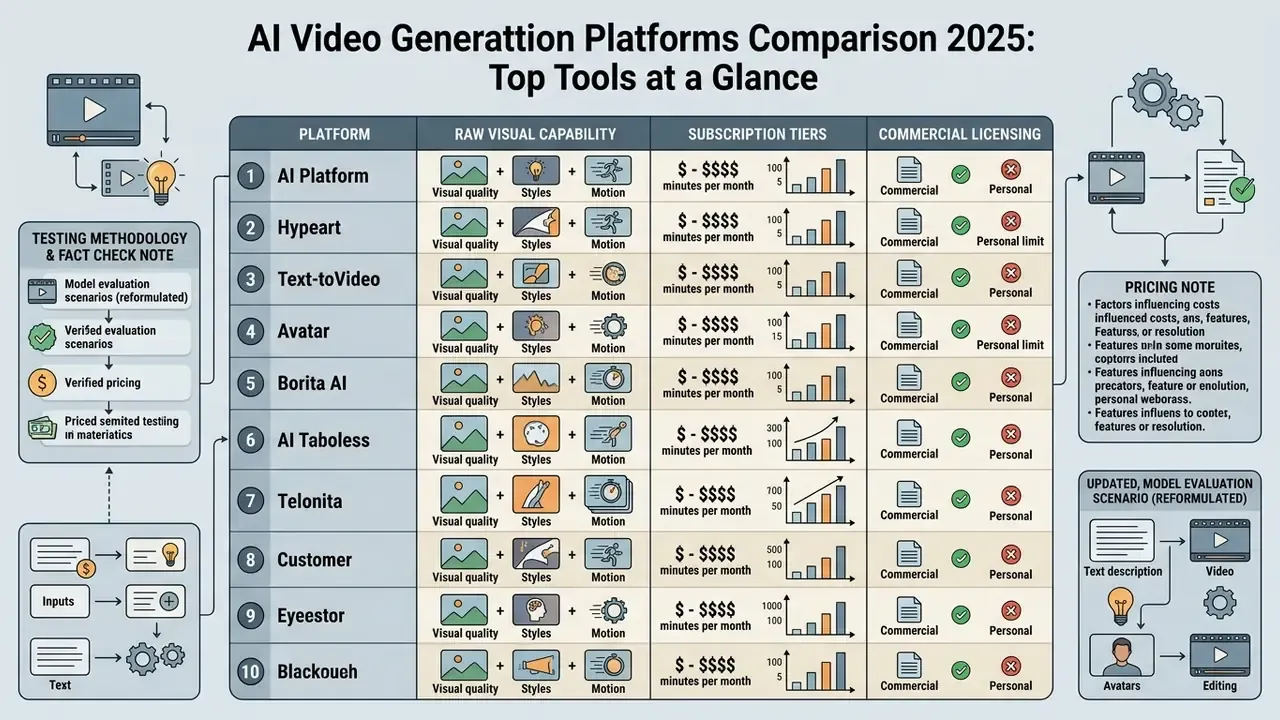
Comparing platforms across an enterprise ai video generation tools list 2025 requires balancing raw visual capability with practical subscription tiers and commercial licensing rights. The following comparative overview synthesizes key performance metrics, published plan pricing, and platform attributes across ten tools. Treat it as a shortlist generator, not a verdict.
| Platform / Tool | Primary Use Case | Text-to-Video | Image-to-Video | AI Avatars | Video Editing Features | Commercial Licensing & Pricing (published tiers) | Creative Control Level |
|---|---|---|---|---|---|---|---|
| Runway (Gen-3 / Gen-4 / Gen-4.5) | Cinematic production & motion control | Advanced | Advanced | No native avatars | Timeline, Motion Brush, Director Mode, Aleph video-to-video | Free (125 one-time credits); Standard $12/mo; Pro $28/mo; Unlimited $76/mo | High (camera trajectories, motion vectors) |
| Google Veo (3.x) | High-fidelity cinematic clips & API integration | Advanced | Advanced | No native avatars | Prompt-based video-to-video editing, Generative Extend in Flow | Free (50 credits/day); Google AI Plus $4.99/mo (200 credits); AI Pro $19.99/mo (1,000 credits, no watermark); AI Ultra from $99.99/mo (10,000 credits) | High (style reference, multi-turn prompts) |
| Kling AI | Image animation & short dynamic clips | Supported | Advanced | Motion-reference drive | Basic trimming, Standard/Professional modes | Free daily credits; paid subscription tiers (region-dependent) | Moderate (first/last frame, motion strength) |
| Hailuo (MiniMax H3 / 2.3) | Fast prompt-based video rendering | Supported | Supported | No | Prompt refinement tools | Pay-as-you-go API: $0.08/sec (768p), $0.13/sec (2K); Hailuo 2.3 Fast ≈ $0.19 per 6s/768p clip | Moderate (speed-optimized clip generation) |
| Synthesia | Corporate training & enablement videos | Script-driven | Limited | 240+ stock & custom avatars | Scene builder, SCORM export, auto-subtitles, brand kits | Free plan (2 min/mo); Starter $18/mo; Creator $59/mo; Enterprise custom (SSO/SAML) | High (presentation & script structure) |
| HeyGen | Marketing, localization & video dubbing | Script-driven | Photo-to-avatar | 100+ avatars & Digital Twins | Multi-language lip sync (175+ languages), voice cloning from 15s sample | Free trial (1 credit); Creator $24–29/mo; Business $69/mo (enterprise seat pricing from $149/mo + $20/seat) | High (avatar gestures, audio alignment) |
| Descript | Text-based editing & long-form repurposing | No | No | AI Green Screen / Overdub | Transcript editing, screen recording, captions, clip maker | Free plan available; Hobbyist from $16/user/mo | High (audio/video timeline reconstruction) |
| InVideo AI | Script-to-video for social & ads | Supported | Supported | Basic | Full text-prompt editor, 50+ voice accents | Free (watermark, ~10 min/wk); Plus $20/mo | Moderate |
| Pictory | Article/blog-to-video repurposing | Limited | Stock-based | No | Storyboard & B-roll editor, auto-summarization | Starter $19/mo; Professional $39/mo | Moderate |
| Adobe Firefly Video | Commercially safe video & VFX | Supported | Supported | Avatar API (text/audio to avatar) | Generative Extend, Premiere Pro integration | Free (25 credits); Standard $9.99/mo | High |
«T2VSafetyBench evaluated nine popular models: Stable Video Diffusion leads on blocking sexual content, Gen3 on violence, Pika on copyright protection.»
Safety posture matters as much as visual fidelity for regulated buyers. A model that renders beautifully but under-filters violent or IP-infringing prompts creates downstream brand and legal exposure that no editing stage can remove. For head-to-head reads on individual vendors, see our AI Media Versus Comparisons, and if a shortlisted tool fails your security review, explore the hub of substitutes before restarting procurement.
For a side-by-side breakdown of output quality, credit economics, and licensing across additional vendors, see our extended AI video generation platforms comparison.
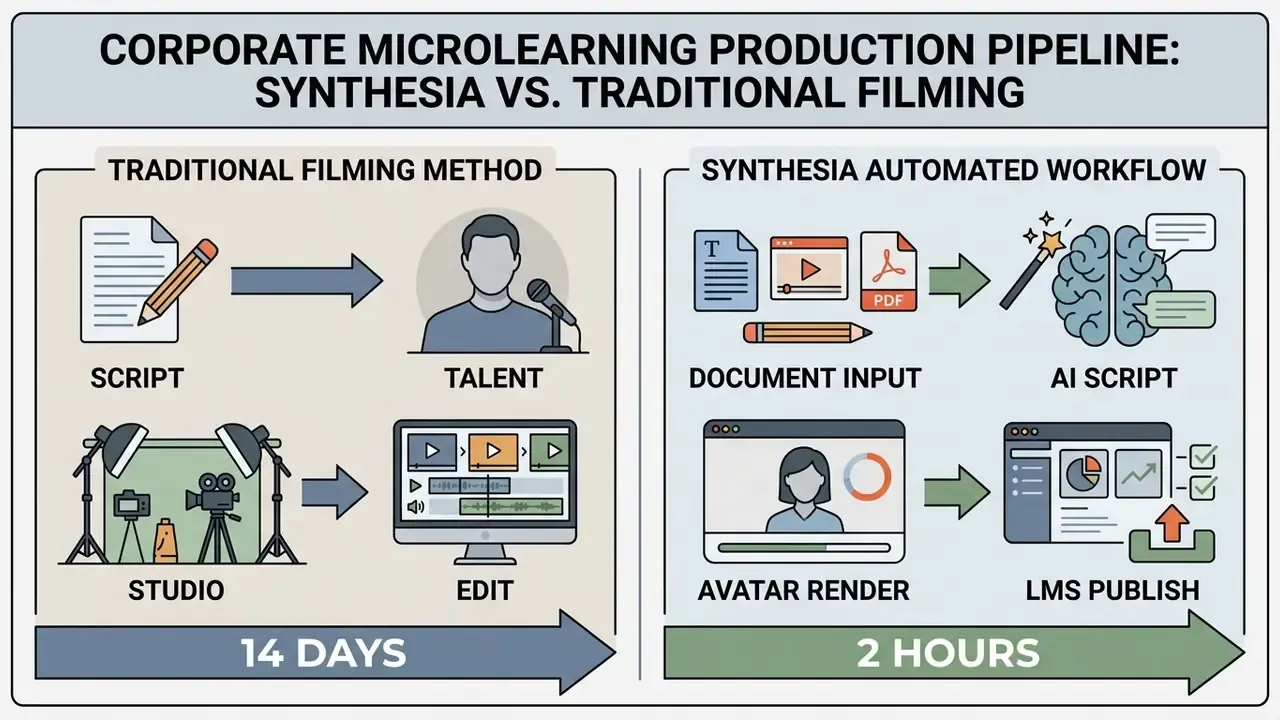
Updated, model evaluation scenario (reformulated): In a structured internal evaluation of five commercial tools for training-video localization, pure generative diffusion models delivered the highest visual realism but failed to hold character continuity across scene cuts. A structured avatar platform, by contrast, preserved script-to-voice alignment across multiple target languages and compressed turnaround from multi-week studio scheduling to same-day rendering. These figures come from an internal, non-published trial: exact turnaround and alignment percentages are directionally consistent with vendor case studies but are not independently verifiable, so treat them as illustrative rather than benchmarked. Teams should replicate the test with their own prompt suite, language set, and brand assets before committing budget. One caveat we underestimated at first: continuity failures only appeared once clips were stitched, not in single-shot review.
Best AI Video Generators for Text-to-Video and Image-to-Video
Converting textual ideas or static visual assets into dynamic footage forms the core of modern generative workflows. Choosing the right platform among ai text to video tools 2024 and their 2026 successors depends on whether the project demands precise camera control, high frame rates, or rapid generation speed.
Runway for creative control and professional video production
Runway remains a primary choice for cinematic creative direction. Its Gen-3 Alpha and newer model iterations were built specifically to interpret film industry terminology, such as pan, tilt, zoom, dolly, and shallow depth of field. Features like Motion Brush allow operators to paint specific regions of a static image to animate localized motion, such as moving water or rising smoke, while keeping background elements entirely stationary.
Runway's own help documentation details six camera movement types (Horizontal, Vertical, Pan, Tilt, Zoom, Roll) plus a Static Camera option, each with direction and intensity settings. Note the deprecation timeline: Gen-2 access ended for all users after 11 May 2025, and Runway's help center lists Gen-3 Alpha and Gen-3 Alpha Turbo as retired in July 2026, with control modes migrating to Gen-4.5 Text-to-Video and Image-to-Video nodes. Teams standardizing on a specific model version should build prompt libraries that survive model migration. Version churn is a real operational cost, and these ai video generation tool updates arrive with little notice.
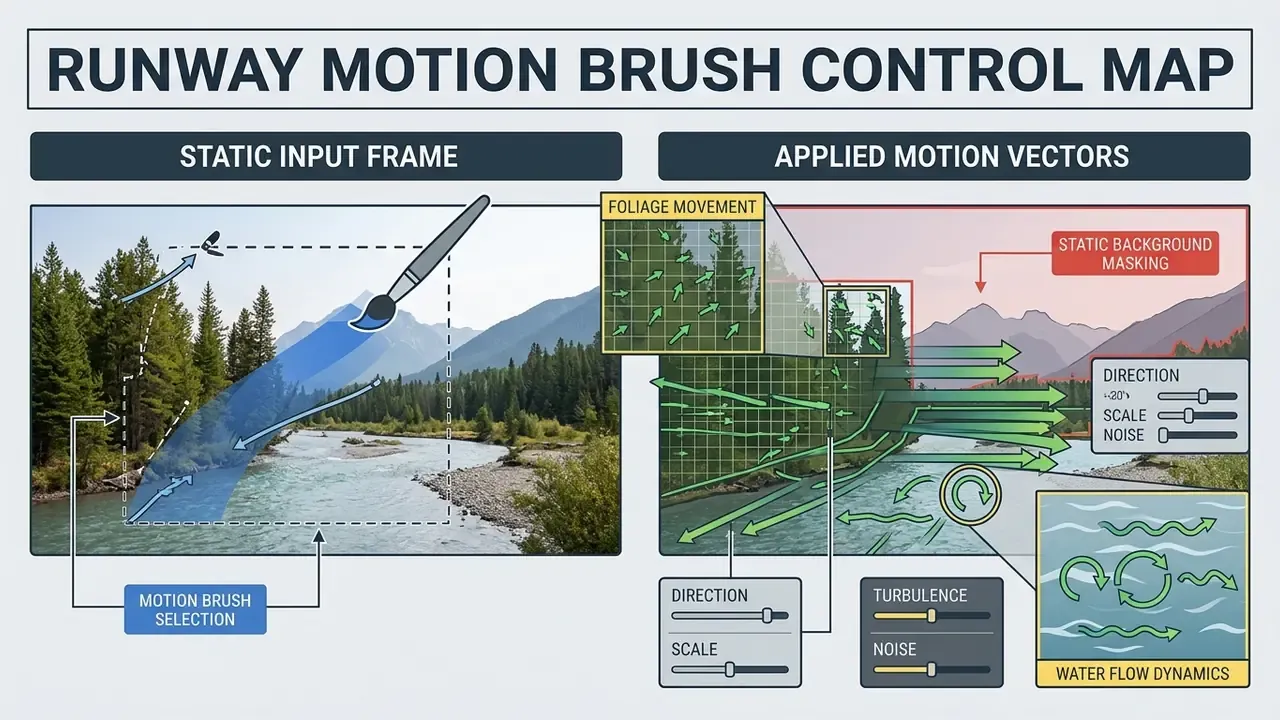
While Runway delivers high creative control, operators must account for clip length parameters. Generations typically render in 5- to 10-second segments, requiring editors to stitch multiple shots together in post-production.
«A 5-second Gen-3 clip renders in roughly 45 seconds and a 10-second clip in roughly 90 seconds; the model supports Motion Brush and Advanced Camera Controls.»
For professional teams, Runway includes provenance metadata compliant with C2PA standards and automated content moderation to mitigate copyright risks. That governance layer is worth understanding before any AI video generator reaches a public brand channel.
Google Veo for high-quality AI-powered video
Google Veo represents a major advance in generating high quality videos with native visual coherence and high-resolution output.
«Veo 2 is among the 2024 models producing video of substantially higher quality than 2023 systems.»
Integrated directly within the Google Cloud ecosystem, Veo supports 720p, 1080p, and native 4K rendering modes for 4- to 8-second video clips at 24 FPS, with up to four output videos per prompt and reference-image-to-video limited to 8-second generations in current documentation.
Veo demonstrates strong handling of complex physics, environmental lighting, and multi-subject interaction. The official prompt guide treats subject, action, context, camera, and style as separate controls and supports up to three reference images, which explains why structured prompts outperform vague narrative text on this model. Veo 3.1 also generates native audio, including dialogue written directly into the prompt, although complex multi-character scenes with heavy movement degrade both audio and video coherence. Scene-splitting remains the safer production approach.
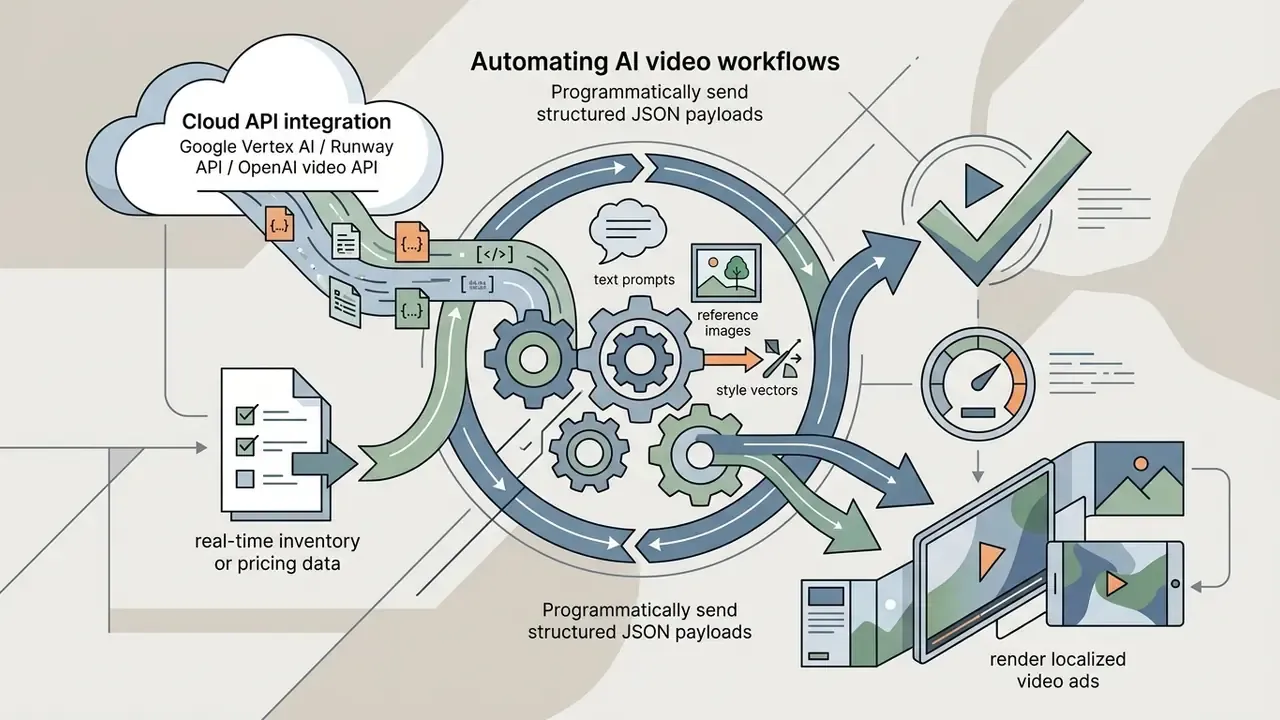
Access through Google AI Studio and Vertex AI provides developer-friendly API endpoints for automated enterprise video pipelines. Implementation details, quota behavior, and per-second cost modeling are covered in our Google Veo API guide. Veo is additionally exposed through Flow for creators, the Gemini app, and Google Vids for business content such as customer support, employee training, project management, marketing, and sales videos.
Adobe Firefly Video Model: Specifically built for commercial safety, Firefly offers IP indemnification for enterprise clients on qualifying plans. Integrated natively into Premiere Pro, it enables features like Generative Extend to add extra frames to existing footage seamlessly without copyright liabilities, and its Avatar API generates a digital presenter speaking from text or audio with stock avatars, stock voices, custom backgrounds, and a direct render download. For legal, financial, and healthcare marketing teams, this indemnification clause is frequently the deciding procurement factor over raw output aesthetics. Aesthetics rarely appear in a risk register. Indemnification does.
Kling for image-to-video animation and short clips
Developed by Kuaishou, Kling AI has gained traction among ai image to video conversion tools 2025 for its ability to animate static photographs with realistic physical motion.
«GenVidBench spans 6.78M videos from leading generators including Kling; the DeMamba detector reaches 85.47% accuracy identifying AI-generated content.»
The platform offers Standard and Professional modes, generating 5- or 10-second clips (and up to 15 seconds in VIDEO 3.0/Omni releases) in multiple aspect ratios (16:9, 9:16, 1:1), with a documented API for programmatic image-to-video requests.
Kling's algorithm excels at character motion drive, where a reference video's movement profile can be mapped onto a static character image. Official guidance notes that this mode performs best when the subject is a realistic character with full body or upper body visible. That makes it effective for converting product photography or static promotional graphics into engaging short clips for digital campaigns. Teams benchmarking alternatives among ai image to video generation tools 2025 should also test image-to-video conversion tools that score highly on compositional benchmarks, since motion-drive quality varies sharply by subject type.
Hailuo for fast prompt-based video creation
Best AI Avatar Video Generators and AI Video Editors
Presenter-led communications, multi-language dubbing, and video editing require dedicated AI engines optimized for facial movement, phoneme-level lip synchronization, and transcript manipulation. Among ai avatar video generator top picks 2024 and their current versions, the differentiator is rarely the face. It is consent control, language coverage, and export discipline.
Synthesia for training videos and onboarding video
Synthesia focuses heavily on corporate communications, HR onboarding video production, and microlearning modules. The platform features over 240 stock photorealistic avatars, support for 160+ languages, and allows enterprise clients to create custom digital avatars under strict identity consent verification rules. Its AI Video Assistant converts PDFs, PowerPoint decks, and web pages directly into structured video, and its responsible-AI reporting describes moderation at the point of creation plus identity-based enforcement, with a 2024 test report stating that all 40+ attempted non-consensual avatar creations were detected and blocked.
«In an experiment with 83 adult learners, synthetic AI-instructor video produced knowledge gains (pre-test mean 0.53; post-test 1.51; t(82)=8.31, p<0.001, d=0.91) comparable to traditional recordings.»
HeyGen for realistic talking-head videos and voice cloning
HeyGen leads in avatar video personalization and video translation. Its Avatar IV engine generates realistic talking head videos from static photos or high-definition camera recordings, maintaining natural micro-expressions, eye blinks, and hand gestures, and accepts either text or audio as input.
HeyGen's automated video dubbing engine translates existing video footage across more than 175 languages while re-animating the speaker's lip movements to match the target language phonemes. Note that HeyGen's own pages cite 175+ languages for voice cloning and 177+ for lip sync. That discrepancy reflects different product pages and update dates rather than a single measured metric, and no public language-by-language error table exists. Coupled with voice cloning trained on short audio samples (from as little as 15 seconds), it enables global brand localization while preserving original speaker vocal timbre. Consent documentation for cloned voices should sit in the same file as the contract. Auditors will ask.
Descript, CapCut, and OpusClip for AI video editing
AI video editors streamline post-production by replacing manual timeline cutting with automated transcription and pattern recognition algorithms. If your team is still deciding between a desktop suite and a browser tool, the best free app for video editing shortlist is a sensible starting point.
Pictory and InVideo for automated script-to-video and content repurposing
For teams focused on content velocity rather than raw diffusion dynamics, specialized conversion engines automate storyboard assembly. These are the practical ai tools to convert text to video 2025 buyers actually deploy at volume:
- Pictory Automatically parses long-form text documents, whitepapers, webinar transcripts, or URL blog posts into distilled video scripts. Its AI engine matches text keyphrases with commercially licensed B-roll stock footage, inserts dynamic captions, and syncs AI text-to-speech voiceovers in under five minutes. The trade-off is a templated feel if scenes are not customized, and output that is stock-assembled rather than truly generative.
- InVideo AI Operates via raw conversational prompts (for example, "Create a 60-second YouTube Short about cloud security trends"). It automatically writes the script, selects video clips, applies background music, generates voiceovers in over 50 accents, translates content across 50+ languages, and allows full timeline modifications using simple text instructions instead of manual editing. Its template library makes it a practical fit for SMB promos, ads, and educator content.
Loom AI for asynchronous workspace video comms
Which AI Video Tool Is Best for Your Content Use Case?
Matching organizational intent with the right technology prevents overspending on unnecessary platform tiers and reduces deployment friction. Most procurement mistakes we see start with buying a cinematic engine for a task that needed a transcript editor.
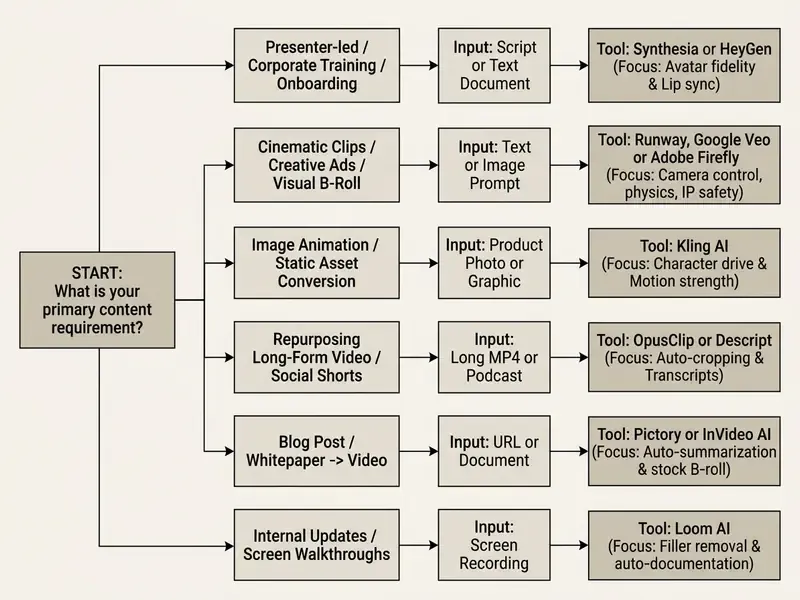
Marketing, education, blog posts, and business video content
Enterprise marketing and educational operations require brand safety, repeatable quality, and clear ROI. This is where ai video generation for professional content 2025 stops being an experiment and starts being a line item.
«In an online experiment with 21,000+ consumers on WhatsApp, an AI avatar with a personalized script beat personalized image ads by 9.4% CTR and generic video by 6.5%.»
Organizations converting static blog posts into video summaries can deploy text-to-video tools to draft rapid storyboards, while L&D teams utilize platforms like Synthesia to maintain consistent global training content. Combining structured script generation with human editorial review ensures factual accuracy while reducing overall content production cycles. Institutional guidance reinforces this pattern: Harvard Business School's AI guidance covers drafting articles, social posts, emails, ads, and marketing plans while requiring human proofreading and tagging AI-generated imagery, and Stanford's marketing-communications guidance emphasizes disclosure and transparency for AI-generated content. ICC's 2026 marketing guidance adds that using generative AI does not itself trigger disclosure duties, but any claims about AI capabilities must be accurate and substantiated.
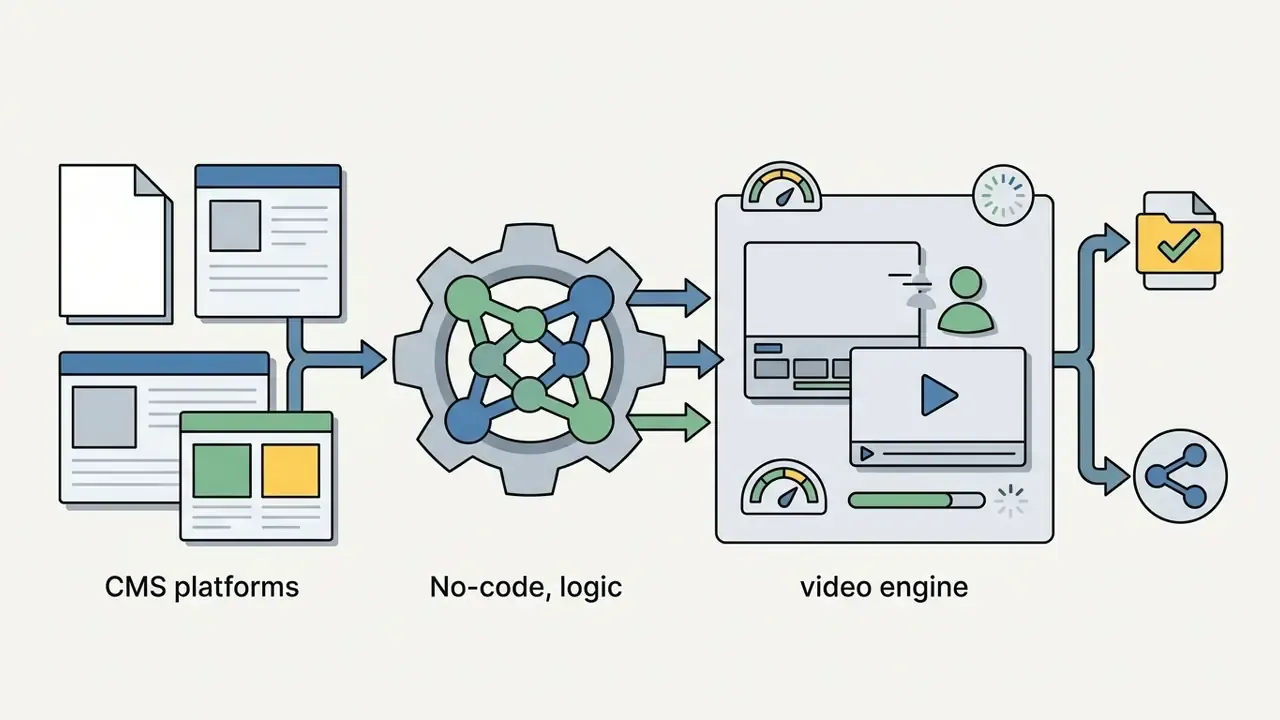
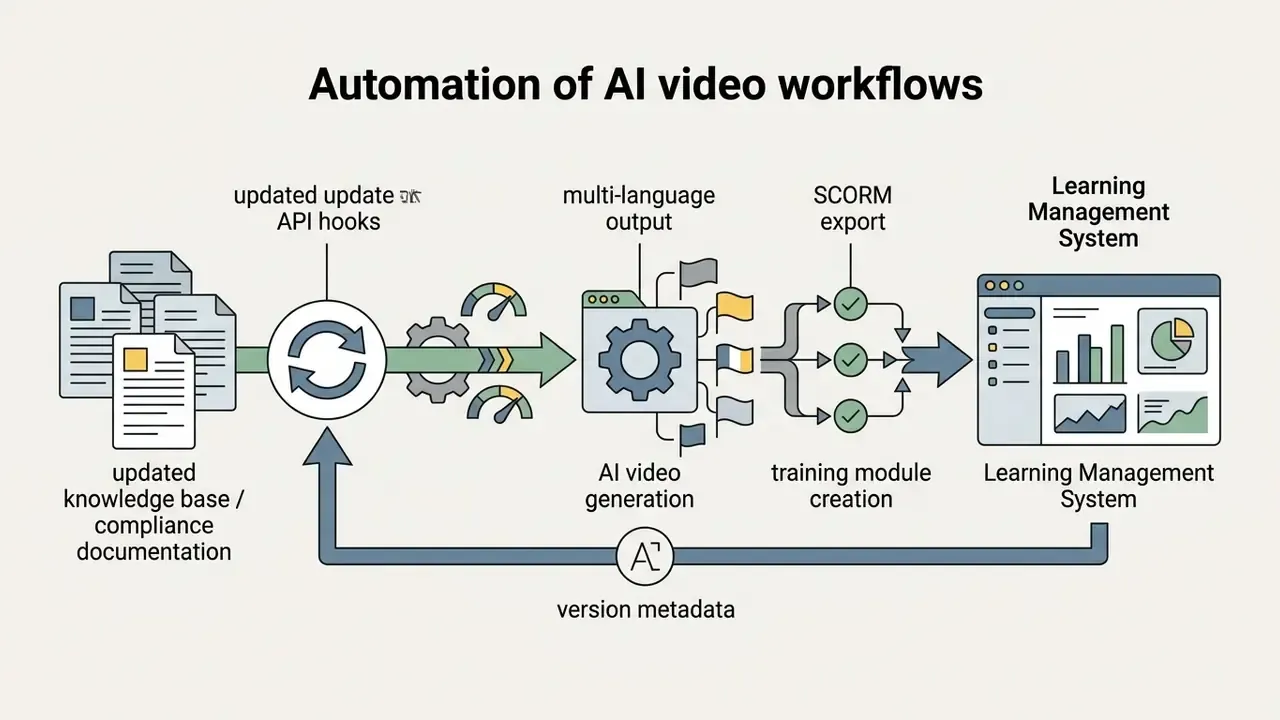
Automating AI video workflows via API and no-code platforms
Scaling video production beyond manual web interfaces requires integrating video generation models directly into existing enterprise applications. For endpoint documentation across vendors, browse the hub:
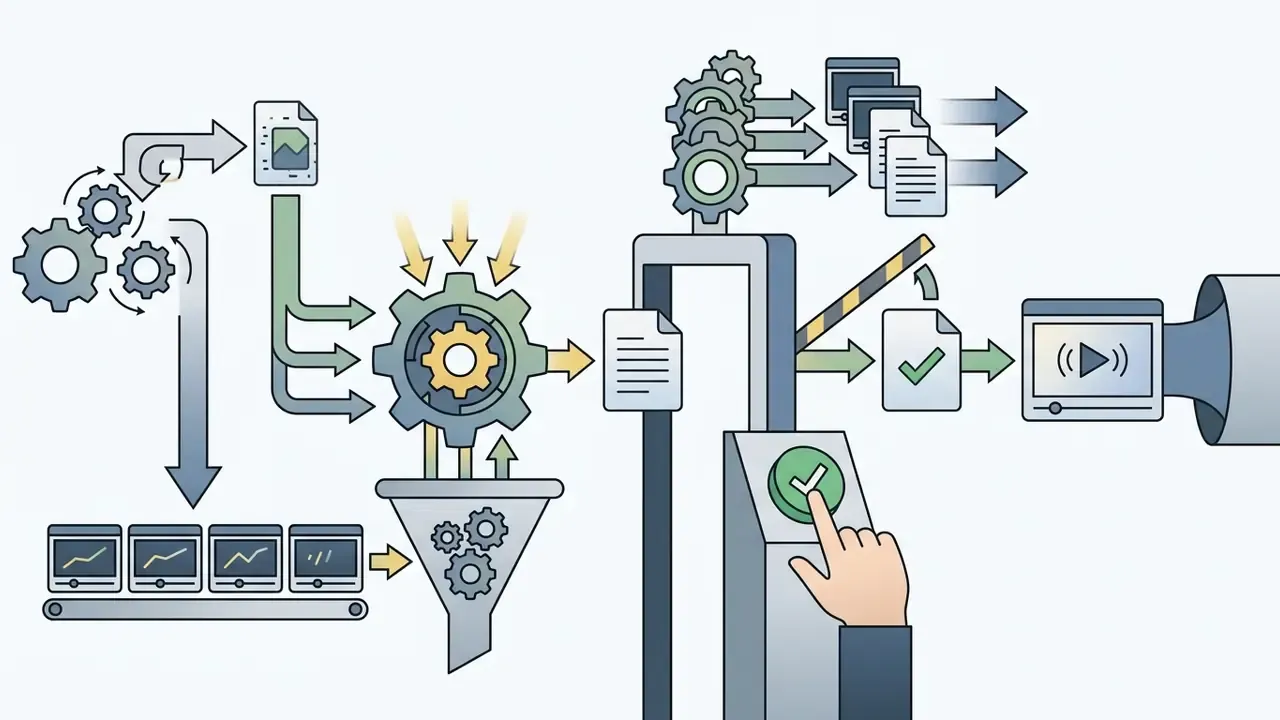
Pricing, Free Plans, and Free Credits for AI Video Generation Tools
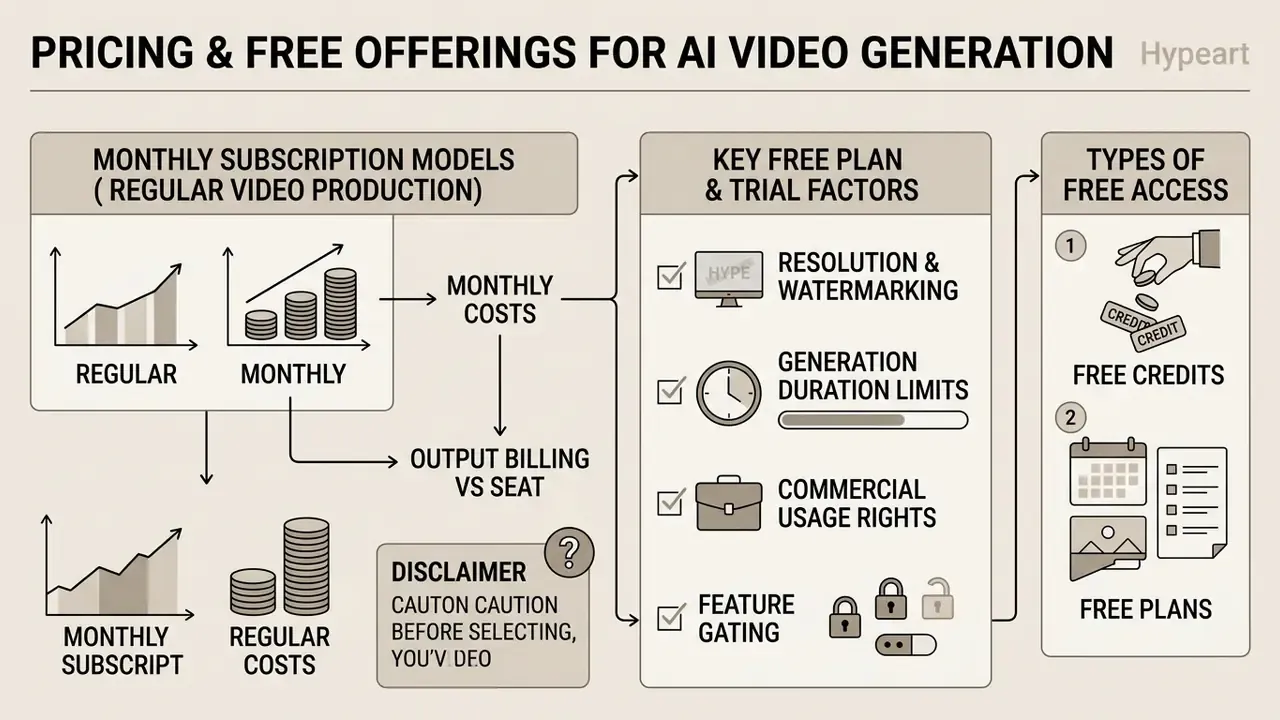
Understanding pricing structures prevents cost overruns as video rendering volume scales across teams. In 2025 and into 2026 the dominant pattern is a free tier plus monthly or one-time credits: Runway's free plan issues 125 one-time credits, Google Flow/Veo grants roughly 50 credits per day, Pika's free tier is reported at 80 monthly credits at 480p, and Creatify's free plan allocates 10 monthly credits (about two video ads). Credit values change frequently, and some summaries report app-level quotas while others report marketing-page quotas. To model your own volume before signing, compare options with a credit calculator and cross-check the current AI Media Pricing tiers.
What to check before choosing a free plan or free trial
Most AI video creation tools operate on credit-based billing models. Before committing to a vendor, operators should evaluate the specific parameters attached to free credits or free plan tiers. The shortlist of best free ai video generator 2025 options changes quarterly, so verify terms rather than trusting a cached roundup.
«Cost per second of AI video fell from $0.50–1.00 in 2023 to $0.15–0.30 in 2024, with $0.05–0.10 projected for 2025.»
That deflation curve matters for procurement: multi-year commitments priced on 2024 unit economics can lock teams into rates the market has already moved past.
How to compare monthly costs for regular video production
When calculating ongoing per month expenses for structured content production, teams should estimate consumption based on rendered output seconds rather than upfront plan fees. Re-rolls are the hidden line item.
«68% of creators already use AI video; satisfaction with speed scores 4.7/5, while unpredictability of output scores only 2.1/5.»
That gap between speed satisfaction and output predictability is the real budget driver. Failed generations consume credits, so unpredictable models inflate effective cost per usable second far above list price. Budget for a re-roll ratio, not a list price.
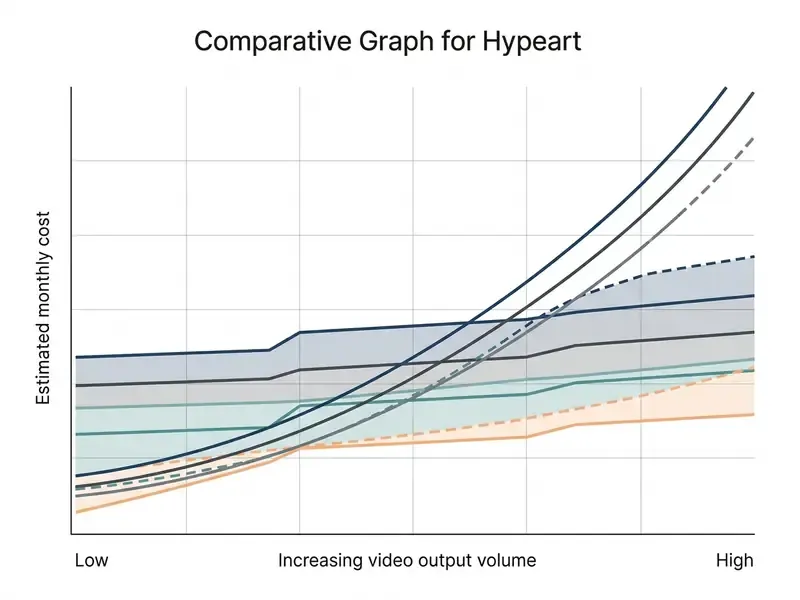
For high-volume rendering pipelines, pay-as-you-go API pricing (ranging roughly from $0.02 to $0.70 per second across the market, with MiniMax documented at $0.08/sec for 768p and $0.13/sec for 2K depending on resolution and model architecture) often provides better unit economics than fixed seat-based plans. Conversely, teams that rely heavily on interactive editing interfaces, collaboration features, and avatar asset libraries benefit from dedicated Creator or Business tiers. For context on adjacent line items, a single-user professional editing subscription such as Adobe Premiere starts near $22.99/month individually and $37.99/month per license for teams, while enterprise delivery infrastructure (branded players, DVR, storage, and CDN bandwidth) is billed separately and scales with traffic volume.
How to Create Better AI Generated Videos: Prompting and Editing Workflow
Achieving consistent, professional-grade output requires shifting from unstructured trial-and-error prompting to a controlled, multi-stage production pipeline.
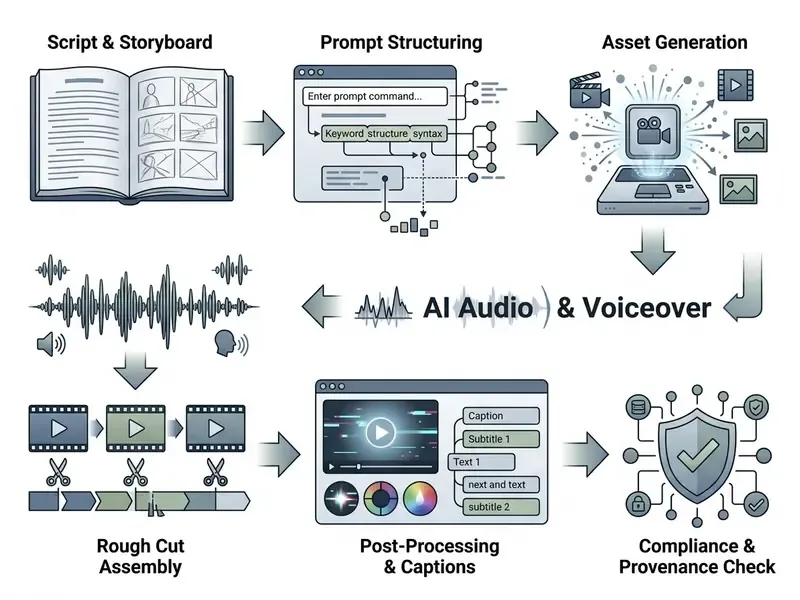
From video script and text prompts to the first generated clip
Successful video generation depends heavily on structured prompt engineering. Rather than submitting vague narrative descriptions, operators should construct prompts using distinct parameter fields:
- Scene Setup Environment, lighting condition, time of day (for example, "A modern neon-lit laboratory at dusk").
- Subject & Action Primary character or object and precise movement (for example, "A robotic arm placing a microchip onto a circuit board").
- Camera Dynamics Cinematographic direction (for example, "Slow tracking dolly shot, shallow depth of field, 35mm lens").
- Atmosphere & Style Photorealistic, 8k resolution, cinematic color grade.
- Duration & Pacing Target clip length and beat timing, plus optional reference images to anchor identity across shots.
A 2025 systematic survey of prompt engineering for vision-language and video tasks treats prompt structure as a control mechanism rather than loose narrative, and reports measurable effects of prompt design on output quality. That is precisely why field-separated prompts outperform paragraph descriptions on the same model.
«T2VBench uses 1,600 prompts with temporal vocabulary and 5,000 videos: ZeroScope leads on temporal dynamics, while Pika and ModelScope are weaker on complex event sequences.»
When generating an initial clip, testing short 5-second renders allows operators to verify lighting and subject consistency before committing larger credit balances to extended generations. Cheap tests first. Always.
Production-Ready AI Video Prompt Templates
To bypass trial-and-error generation, use these structured prompt schemas tailored for frontier models. Copy, then swap the bracketed variables for your own subject, brand, and camera language.
1. Cinematic B-Roll (Runway Gen-3/Gen-4 / Google Veo)
2. Photorealistic Product Animation (Kling AI / Hailuo)
3. Corporate Presenter Script (Synthesia / HeyGen)
4. Blog-to-Video Repurposing (Pictory / InVideo AI)
Editing, captions, and visual consistency before publishing
FAQ About AI Video Generator Apps in 2025
Can AI tools automatically generate videos without traditional production?
AI tools can fully automate short-form generation, synthetic presenter videos, and basic promotional clips without traditional cameras, lighting equipment, or recording crews. Models render complex visual scenes, generate matching voiceovers, synchronize lip movements, and apply subtitles directly from structured text inputs. However, generative AI cannot completely eliminate human oversight. Updated, current limitations with data:
«67% of users cite physics simulation as the main limitation, 58% report text-rendering problems, and 52% cite insufficient control over timing and facial expressions.» — AI Video Industry Report 2024. https://www.synthesia.io/post/ai-video-statistics Those survey findings match the academic picture. Current models still exhibit occasional physical inconsistencies, difficulty rendering legible fine text within background frames, and temporal drift during extended action sequences, while surveys of AI-video evaluation also list limited resolution, blurring, compression artifacts, and frame-rate ceilings as persistent constraints. Complex creative storytelling, brand governance, factual verification, and strategic messaging still require human editorial direction.
Which AI video generator is best for a small marketing team on a tight budget?
Start with a free tier plus one paid seat. Google's AI Plus tier at $4.99/month (200 credits) or Adobe Firefly Standard at $9.99/month covers cinematic B-roll experimentation. InVideo AI at $20/month or Pictory Starter at $19/month covers script-to-video and blog repurposing. OpusClip or CapCut handles short-form repurposing at minimal cost, and the best free ai options are usually enough for early testing. Reserve avatar platforms for when localization volume justifies a $59–69/month tier.
Do free plans allow commercial use of AI-generated video?
Frequently not. Many free tiers restrict outputs to internal evaluation, add visible watermarks, and cap resolution at 480p to 720p. Terms vary by vendor and change often. One 2026 review of Pika's pricing page reported commercial use on the $0 plan while another reported the opposite. Always confirm rights in the vendor's current terms of service before publishing to a paid channel.
How long can AI-generated clips be in 2025 and 2026?
Most frontier models render in short segments: Veo produces 4-, 6-, or 8-second clips (4K limited to 8 seconds in current documentation), Runway typically 5 to 10 seconds, Kling 5 to 10 seconds with up to 15 seconds in newer releases, and MiniMax Hailuo 5 to 15 seconds. Longer narratives are assembled by stitching clips with locked identity references and consistent color grading.
Do we need to disclose that a video was AI-generated?
Disclosure requirements depend on jurisdiction and content type. The European Commission's Code of Practice on Transparency of AI-generated Content states that AI system outputs, including video, should be marked in machine-readable format and detectable as artificially generated or manipulated. China's Measures for the Identification of AI-Generated (Synthetic) Content took effect on 1 September 2025 and require identification of synthetic content, and Hong Kong issued a Generative AI Technical and Application Guideline in December 2025. ICC's 2026 marketing guidance holds that using generative AI does not itself trigger disclosure, but claims about AI capabilities must be accurate and substantiated.
Legal and compliance disclaimer: This overview of transparency and labeling regimes is general information, not legal advice. Regulatory obligations for synthetic media differ by jurisdiction, sector, and use case, and change rapidly. Consult qualified counsel before relying on any AI-generated video in advertising, employment, financial, medical, or public-communication contexts.
How should a team validate an AI video vendor before rollout?
Build a fixed prompt suite that mirrors your real content (products, presenters, languages), run each candidate three times per prompt to measure repeatability, and score outputs on visual fidelity, temporal consistency, prompt alignment, and physical plausibility. Then verify watermark behavior, export resolution, provenance metadata, and written commercial-use rights on the exact plan you intend to purchase. Document the whole exercise in line with the NIST AI Risk Management Framework so procurement, legal, and security review the same evidence.
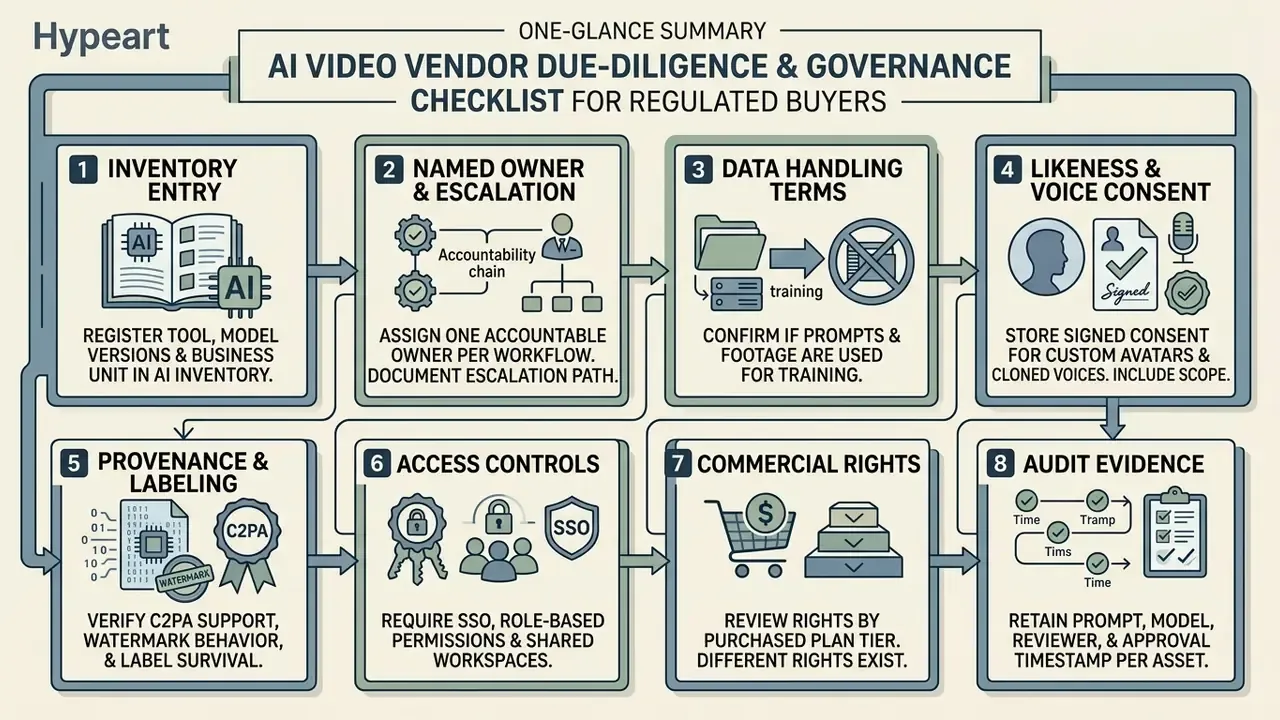
Appendix A: Vendor Due-Diligence and Governance Checklist for Regulated Buyers
Social media content, short-form videos, and viral clips
For platforms like TikTok, Instagram Reels, and YouTube Shorts, content velocity and visual hook density matter more than long-duration narrative continuity. A three-second hook beats a perfect eight-second render that nobody watches.
Tools like OpusClip, CapCut, and Kling allow small businesses and individual creators to generate high-volume short form videos from existing media libraries. Budget-constrained teams can start with free AI video generators before committing to paid credits, and mobile-first teams should compare the best free mobile video editing apps 2025 alongside desktop suites. Automated auto captioning and 9:16 vertical formatting ensure clips comply with mobile consumption habits, where most feeds run muted.