If you sign purchase orders inside a bank or a regulated fintech, the calculus changes. Quality stops being the binding constraint. Data handling, provenance, and licence evidence take over.
Quick Summary: What You Need to Know in 60 Seconds
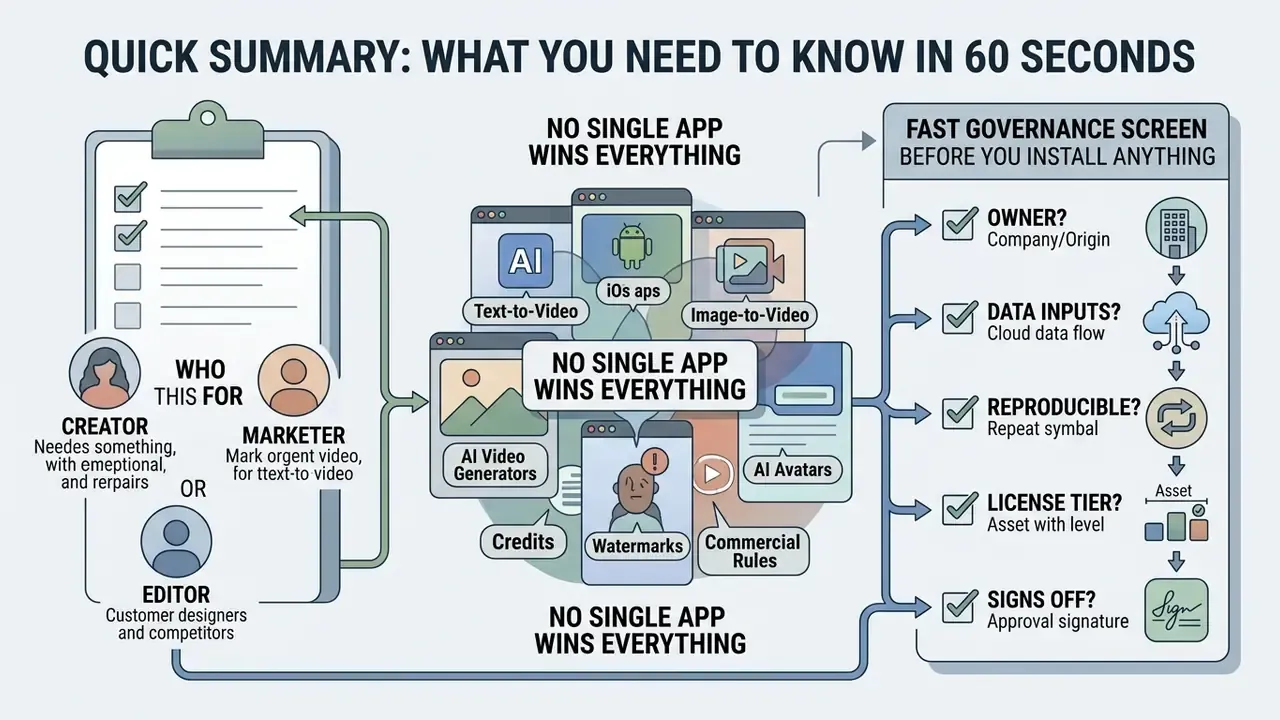
- No single app wins everything. Kling leads cinematic physics, Adobe Firefly leads multi-model choice and commercial safety, Runway leads shot-level creative control, HeyGen leads avatars and localization.
- "Free" almost always means credits. Typical 2026 free tiers deliver 3 to 20 clips per month (or 50 credits per day on Google surfaces), 4 to 8 second durations, 480p to 720p exports, and a visible watermark.
- Entry paid tiers are cheap but uneven. Google AI Plus starts at $4.99/month for 200 credits, Google AI Pro at $19.99/month for 1,000 credits plus watermark-free output, Runway Standard at $12/month, Adobe Firefly Standard at $9.99/month, HeyGen Creator at $29/month.
- Long-form is now possible. Single generations still cap at 4 to 15 seconds, but agentic platforms stitch scenes into videos up to 10 minutes with locked characters and a continuous voice track.
- Inputs go far beyond prompts. Script-to-video, PDF-to-video, and URL or blog-to-video pipelines are standard in 2026 suites.
- Marketing claims need verification. Advertised "unlimited free 4K with no watermark" offers are almost always capped by credits, resolution, or plan-level licensing.
- Commercial and compliance rules decide everything. Free tiers frequently prohibit monetization, rarely include IP indemnification, and almost never offer zero data retention, which matters enormously in regulated industries.
Who This Guide Is For
This guide splits into two tracks. Track 1 (creators, SMM teams, SMB marketers) covers speed, credits, vertical formats, and watermark-free publishing. Track 2 (regulated organizations: banks, fintech, insurance, healthcare) covers data retention, auditability, content provenance, and model-risk governance, addressed in the dedicated security and governance sections below. If you sit in the second group, read the free-tier comparison as a feasibility screen, not an approval list.
Fast Governance Screen Before You Install Anything
Before a single prompt is typed, five questions settle whether a free app is even eligible inside a controlled environment. Answer them in writing; it takes ten minutes and saves an incident report later.
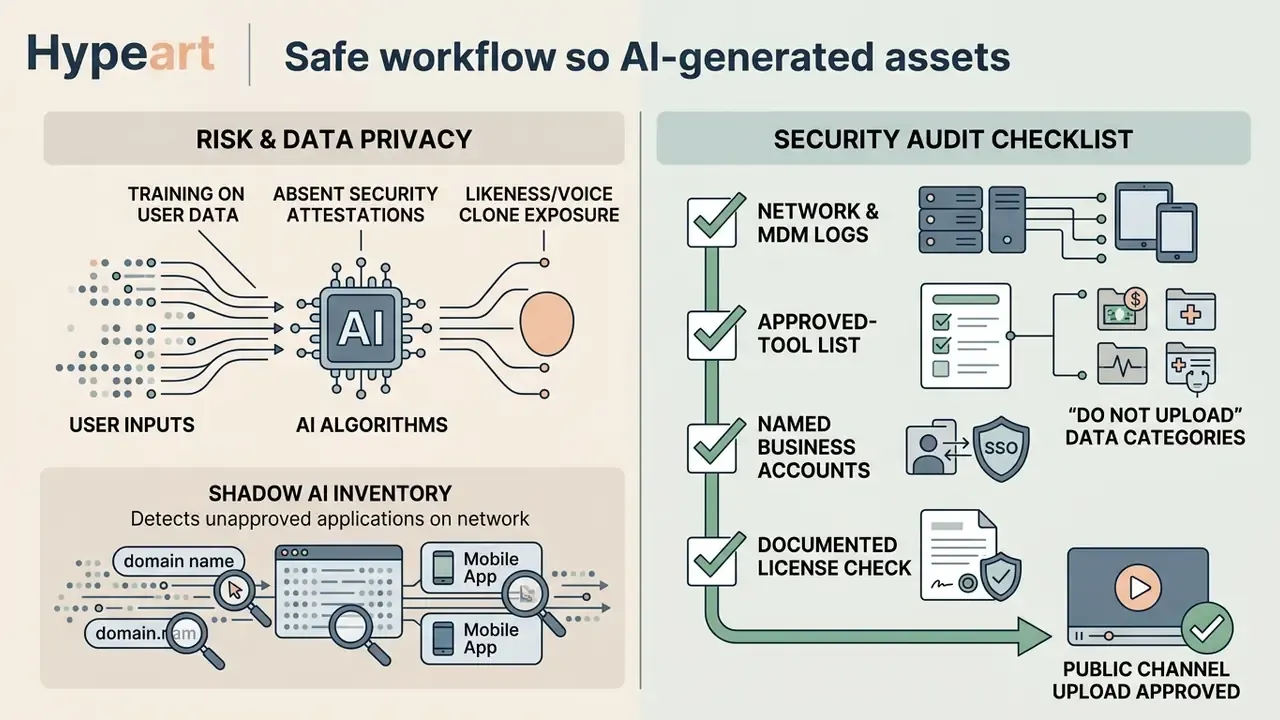
- Who owns this tool?A named business owner, not a team Slack channel. Unowned tools become shadow AI within weeks.
- What data may enter it?Define prohibited categories explicitly: customer records, unreleased product imagery, employee likeness, internal documents, anything personally identifiable.
- Is the output reproducible?Model version, prompt, seed, resolution. If the platform hides seeds, treat the render as non-reproducible and archive the file itself.
- What licence tier produced the asset?Free plans and paid plans grant different rights. The plan name belongs in the asset record.
- Who signs off before publication?One human, named, with authority to block. Agentic pipelines make this control more important, not less.
Fail any of the five and the tool stays in the sandbox. That is not bureaucracy; it is the minimum audit trail a supervisor will ask for.
What a Free AI Video Generator App Can Create
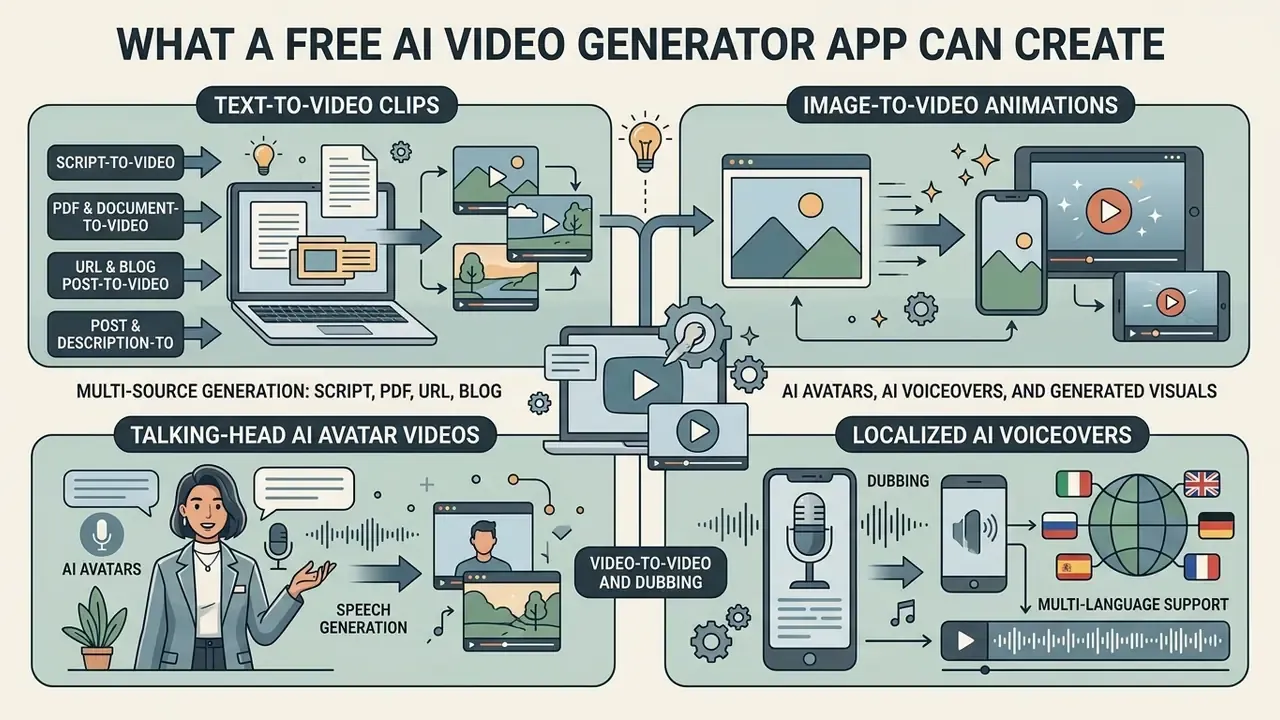
A free AI video generator app creates four primary formats: text-to-video clips, image-to-video animations, talking-head AI avatar videos, and localized AI voiceovers. Modern mobile and web applications lean on generative video models to turn natural language text prompt inputs or still photographs into dynamic generated visuals for social media, marketing, and training workflows.
In practice, 2026 platforms layer three extra capabilities on top of those four formats: multi-source ingestion (scripts, documents, URLs), built-in stock and audio libraries, and agentic orchestration that assembles entire multi-scene videos from a single objective.
Text-to-Video and Image-to-Video Generation
Text-to-video tools transform descriptive written prompts into synthetic video clips by predicting temporal motion and spatial consistency across frames. When users enter a detailed text prompt, the underlying video models construct multi-second scenes complete with subject movement, environmental lighting, and camera pans. Readers who want the mechanics behind frame prediction and temporal coherence can review our reference material on text-to-video AI.
Image-to-video tools take a static ai image or an uploaded photograph from an image generator and apply motion dynamics to animate specific elements. Benchmarks such as AIGCBench show that modern image-to-video systems hold higher visual fidelity and control-video alignment when they start from a high-resolution, artifact-free source photo than when they generate complex motion purely from text.
«AIGCBench evaluates image-to-video systems across eleven metrics, from control-video alignment to motion quality and temporal frame consistency.»
Users can select specific ai video models to balance creative style against physical realism when generating a video clip. A deeper breakdown of animation controls, source-image requirements, and motion-only prompting sits in our guide to image-to-video AI tools.
Two practical rules emerge from vendor documentation. First, image-to-video prompts should describe motion only, because re-describing static content that already exists in the frame wastes token budget and confuses the model. Second, source images must be clean: blur, distorted hands, and compression artifacts all get amplified once motion is applied. I learned that one the expensive way, burning nine credits on a product shot that was slightly soft to begin with.
Multi-Source Generation: Script, PDF, URL, and Blog to Video
High-efficiency creation workflows in 2026 extend far beyond a single text box. Leading suites accept structured content and convert it into scene sequences automatically:
- Script-to-Video
- Paste a finished narration script and the system segments it into shots, assigns visuals to each line, generates a voiceover, and burns in subtitles. Fastest route for creators who already write their own copy.
- PDF and document-to-video
- Training manuals, SOPs, compliance handbooks, and slide decks are parsed into narrated presentation videos fronted by AI avatars. Corporate learning teams use this to turn a 40-page onboarding document into modular lesson clips.
- URL or blog-post-to-video
- The platform crawls a web article or product page, extracts summary points, and matches stock footage or generated visuals to the extracted structure. E-commerce teams point the tool at a product detail page and receive a ready ad draft.
- Tweet, post, or product-description-to-video
- Micro-content is expanded into a 10 to 20 second vertical clip with a hook, a proof shot, and a call to action.
- Video-to-video and dubbing
- An existing master video is translated and re-dubbed with matched lip-sync into dozens of languages, no re-recording required.
AI Avatars, AI Voiceovers, and Generated Visuals
Specialized ai avatar generator platforms produce avatar video content featuring digital speakers that synthesize realistic speech from text scripts. An ai avatar tool matches facial expressions, eye contact, and mouth movements to an audio track using neural lip-sync technology.
«Talking head generation aims to synthesize video of a target identity speaking according to a driving signal, with high lip-sync and expression accuracy.»
The standard avatar pipeline runs through three stages: source input (portrait photo, short video clip, or voice sample), then avatar training or instant rigging, then video synthesis with lip-sync and expression transfer. Consumer tools compress this into a single upload. Enterprise platforms add consent verification and likeness storage controls, which is the part compliance teams actually care about.
These platforms combine synthetic visuals with an AI voiceover generated in dozens of languages, so creators can produce educational content, product demonstrations, and corporate announcements without physical cameras or studio environments. Background music tracks sit below the primary voice track to finish the production. Standard mixing practice keeps music around −20 dB while dialogue sits between −12 dB and −6 dB, so narration always dominates the mix.
Stock Media Libraries, Music, and Template Systems
A frequently overlooked differentiator is what sits around the generative model. Several suites pair generation with very large licensed asset catalogues. InVideo, for example, markets access to over 16 million stock photos and video clips plus AI-written scripts and voices in 50+ languages, which means a finished video can mix generated shots with real footage on one timeline.
Three asset categories matter when comparing free plans:

Autonomous AI Video Agents: Beyond Manual Prompting
Modern 2026 workflows are shifting from manual scene prompting to agentic video generation. Autonomous agents, including Claude-powered video orchestrators shipped by several suites, take one broad objective (a product launch URL, a raw script) and break down the production cycle themselves:
- Script decomposition and storyboarding.The agent parses the source text into individual logical shots, assigns a duration budget to each, and drafts shot descriptions with camera direction.
- Automated asset and model selection.It routes physically demanding action shots to realism-oriented models (for example Kling 3.0), stylized sequences to fast diffusion models, and presenter segments to avatar engines such as HeyGen or Hedra Avatar.
- Audio and subtitle assembly.It generates localized voiceovers, syncs ambient sound design, layers music beneath dialogue, and burns in platform-native captions without manual timeline editing.
- Revision loop.Because the agent retains the storyboard state, follow-up instructions in chat ("make scene three slower, swap the presenter, shorten the intro") trigger targeted re-renders instead of a full regeneration.
The practical benefit is throughput. One operator can supervise a dozen video variants in the time previously needed to prompt, download, and assemble two. The practical risk is oversight: agentic pipelines make it trivially easy to publish unreviewed synthetic content. That is precisely why the compliance checklist later in this guide exists.
Tool Categories: Generators, Editors, and Creation Suites
Comparing an avatar platform with a generative model is a category error. Independent testing rounds, including Zapier's 29-minute 2026 roundup of 16 AI video tools, split the market into three functional groups. Choosing the wrong group is the most common selection mistake we see.
Table 1. Functional categories of AI video tools and their typical free-tier ceiling
| Category | What it does best | Representative tools | Typical free-tier constraint |
|---|---|---|---|
| AI video generators | Create original footage from text prompts or images | Google Veo 3.1, Kling 3.0, Runway Gen-4.5, Adobe Firefly Video, Pika, Sora | Credit caps, 4 to 8 s clips, watermark |
| AI video editors | Edit, repurpose, caption, and polish existing footage | Descript, Veed, Opus Clip, Filmora, Captions | Watermarked exports, 720p ceiling, limited transcription minutes |
| AI video creation suites | End-to-end workflows: script, avatar, voice, publish | HeyGen, Synthesia, InVideo, Canva AI, Hedra | 1 to 3 videos per month, limited avatar library, language caps |
Generators solve "I have no footage." Editors solve "I have footage but no time." Suites solve "I have a document and need a finished narrated video."
How to Choose the Best Free AI Video Creation App
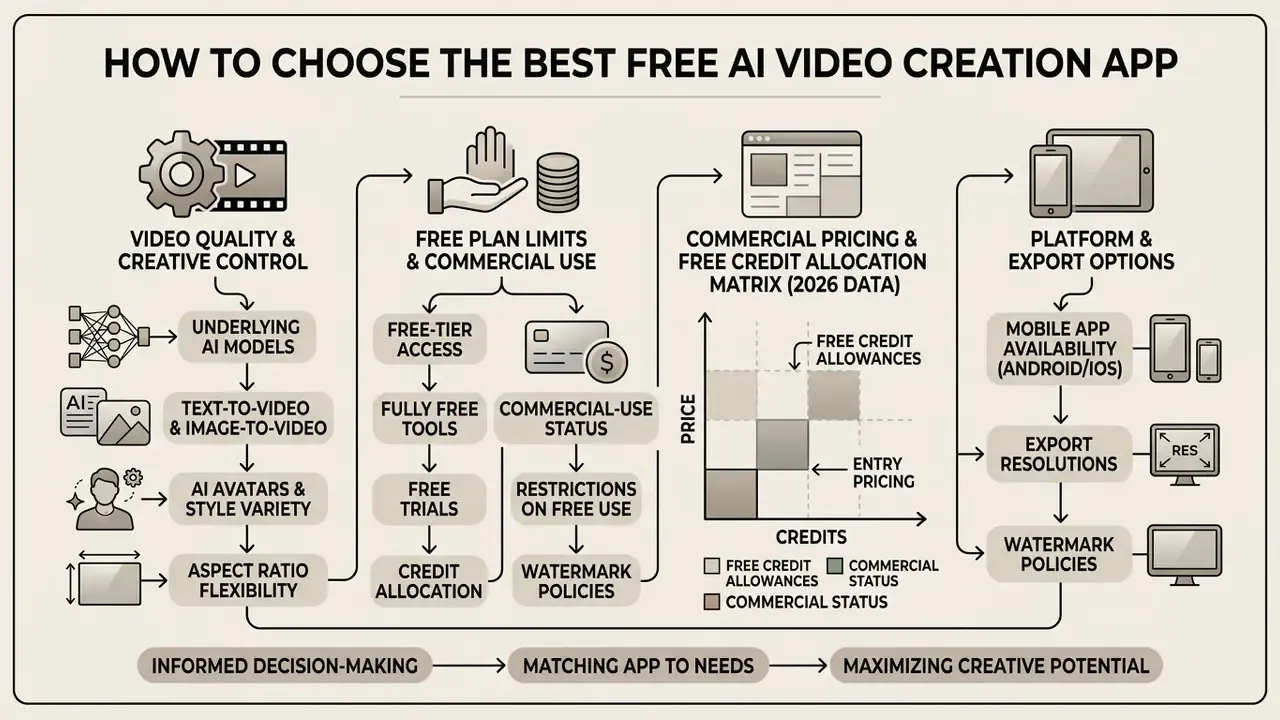
Choosing the best ai video creation app means working through the underlying AI models, free plan limits, export resolutions, aspect ratio flexibility, watermark policies, and commercial licensing terms. Get that order right and you avoid workflow bottlenecks later, plus the awkward discovery that your finished asset cannot legally ship.
Table 2. Selection matrix: key decision criteria for free AI video generator apps
| Selection criterion | Free tier baseline | Pro or upgraded baseline | Impact on business and commercial workflows |
|---|---|---|---|
| Generation types | Text-to-video, image-to-video, basic AI avatar | Multi-shot, multi-model, voice cloning, native audio | Determines whether the app can handle product demos, UGC ads, or explainers |
| Input sources | Text prompt, single image upload | Script, PDF, URL or blog, video-to-video, brand kit ingestion | Document and URL ingestion removes manual scripting from the workflow |
| Export quality and format | 480p to 720p MP4 | 1080p Full HD to 4K MP4 | Low-resolution free exports stay limited to social drafts or internal previews |
| Watermark policy | Visible vendor watermark applied | Watermark-free clean exports | Watermarked videos are generally unsuited to professional marketing campaigns |
| Aspect ratio support | Fixed 16:9 or 9:16 | Flexible 16:9, 9:16, 1:1, 4:5, 21:9 | Vertical 9:16 is mandatory for mobile workflows across TikTok, Reels, and Shorts |
| Maximum duration | 4 to 8 seconds per generation | 10 to 15 s per shot; up to 10 min via multi-scene stitching | Decides whether the tool can produce tutorials and explainers or only teasers |
| Commercial rights | Personal or non-commercial use only | Full commercial exploitation rights | Free tier outputs often prohibit monetization or paid ad campaigns |
| IP indemnification | Almost never included | Enterprise or qualifying paid plans only | Critical for regulated industries facing copyright exposure on public campaigns |
| Mobile availability | Web browser or basic mobile companion | Native iOS and Android app with cloud render | Enables direct generation, editing, and publishing from mobile devices |
No matching rows Clear one or more filters to restore the matrix.
Read the matrix from the right-hand column backwards. The business impact, not the feature list, is what determines whether a free plan is usable at all.
Video Quality, AI Models, and Creative Control
The rendering capability of any AI video tool depends directly on its underlying ai models. Advanced video generators let creators fine tune camera trajectories, motion intensity, and stylistic direction.
Empirical research in T2VPhysBench (2025) shows that state-of-the-art text-to-video models differ widely in physical compliance, with Kling and Sora scoring higher on physical realism than lighter consumer utilities.
«T2VPhysBench (2025) shows that every tested model systematically violates basic physical laws. The average compliance score does not exceed 0.60 in any category.»
So physical inconsistencies remain common across every current system, marketing claims notwithstanding. Creators evaluating high quality video tools should test how a given model handles complex motion, object interactions, and lighting before standardizing on it for professional production.
Peer-reviewed work on camera control confirms a second trade-off: control strength and visual fidelity are linked. Methods with explicit 3D or trajectory-aware guidance (GEN3C, FloVD, Latent-Reframe, AC3D, all CVPR/ICCV 2025) preserve frame consistency while improving pose alignment, whereas weaker control schemes buy motion accuracy at the cost of artifacts. Practically, aggressive camera instructions in a consumer free tier often degrade the shot rather than improve it.
Prompt engineering documentation from model providers converges on one structure: Subject + Motion + Scene + Shot Type + Camera Movement + Lighting + Style + Atmosphere. Amazon's Nova Reel guidance adds two hard constraints worth carrying across platforms. Prompts read best as image captions, and negation words such as "no" or "not" should be avoided entirely, since diffusion models do not reliably suppress a described concept.
Free Plan Limits, Watermarks, and Export Options
A standard free tier or free plan restricts generation volume, clip duration, and export settings. Most free platforms allocate daily or monthly credit balances that allow three to twenty short clips per billing cycle, usually capped at 4 to 8 seconds per clip.
Visible watermarks are the norm on free tier exports. Testing on Pika 2.5, for instance, shows free access limited to 480p with a visible brand mark, while paid upgrades unlock watermark free 1080p downloads and longer generations.
Platforms may also limit vertical aspect ratio options on free tiers, which pushes creators who need horizontal or square formats toward AI Media Alternatives or the paid plans documented in our AI Media Pricing Guides.
It is also essential to separate three commercial models that get conflated constantly:
- Fully free tools have no expiry and no payment trigger, comparable to Oracle's "Always Free" service class.
- Free tiers grant recurring free usage up to a monthly or daily cap. Google Cloud's Free Tier is the canonical example of quota-bound permanent access.
- Free trials are time-bounded. Google Cloud's trial runs 90 days, Oracle's runs 30 days or until credits run out, and most AI video "free plans" marketed as permanent are really one-time credit grants.
Commercial Pricing and Free Credit Allocation Matrix (2026 Data)
Table 3. Free credit allowances, entry pricing, and commercial-use status
| Tool / Model | Free credit allowance | Paid tier entry | Commercial use on free tier? | Max free resolution |
|---|---|---|---|---|
| Google Veo 3.1 (Flow) | 50 credits/day | $4.99/mo Google AI Plus (200 credits); $19.99/mo Pro (1,000 credits, no watermark) | No | 720p (watermarked) |
| Runway Gen-4.5 | 125 one-time credits | $12/mo Standard (more credits, no watermark, higher export quality) | No | 720p (watermarked) |
| Adobe Firefly Video | Daily resetting generative credits | $9.99/mo Firefly Standard | Limited; indemnification requires a qualifying plan | 1080p (Content Credentials attached) |
| Kling 3.0 / Video 3.0 Omni | Daily login bonus plus trial credits | From roughly $6.99 to $10/mo (metered per second) | No | 720p (watermarked) |
| HeyGen (avatars) | 1 to 3 videos/month, up to ~1 min, 720p, watermarked | $29/mo Creator (1080p, watermark-free) | No | 720p (watermarked) |
| Pika | 80 credits/month, 5 s clips | Paid tiers unlock 1080p, watermark-free | No | 480p (watermarked) |
| Descript (editor) | Limited transcription minutes | $16/user/mo Hobbyist (no watermark) | No | 720p |
| Google AI Ultra | n/a | $99.99/mo (10,000 credits); $199.99/mo (25,000 credits) | Yes, per plan terms | 4K (8-second generations) |
«HeyGen's free plan provides 1 to 3 videos per month of up to 1 minute at 720p with a watermark; the Creator plan at $29/month removes those limits and unlocks 1080p export.»
Credit economics deserve one extra minute of attention. Because most vendors meter per second of generated video rather than per render job, a "1,000 credit" plan can mean anywhere between 8 and 60 finished clips depending on resolution, model tier, and whether native audio is enabled. Before committing, divide monthly credits by the credit cost of your standard clip configuration. That single calculation predicts real capacity far better than the headline number.
Mobile App Availability for Android and Other Devices
A free ai video generator android app lets social media managers and creators generate, edit, and publish videos entirely from a phone. Mobile video tools push heavy model inference to the cloud and drop finished MP4 files straight into the camera roll.
A dedicated mobile video editor gives direct touch controls for prompt entry, image uploads, and quick clip trimming. This smartphone-centric workflow removes the file-shuffling step between desktop and phone when producing vertical content for social platforms.
Best Free AI Video Generator Apps at a Glance
Comparing top AI apps to make videos means looking at generation strengths, platform accessibility, free tier structures, and recommended use cases together. The table below summarizes the leading platforms available in 2026.
Table 4. Comparative overview of top free AI video generator platforms (2026 data)
| Platform / Tool | Primary generation type | Mobile / Android support | AI voice or audio integration | Free tier conditions | Watermark status | IP indemnity on free tier | Primary use case |
|---|---|---|---|---|---|---|---|
| Kling AI | Text-to-video, image-to-video (up to 7 input images, 3 to 15 s) | Web and Android app | Native audio and lip-sync | Daily free credits or trial allotment | Watermarked on free tier | No | Cinematic narrative clips and physical motion |
| Adobe Firefly | Multi-model text and image-to-video | Web, mobile web, Firefly mobile app | Sound effects from prompt, voice guide | Daily generative credits reset | Watermarked, Content Credentials attached | No, requires qualifying paid plan | Commercial design and multi-model generation |
| Runway | Text-to-video, image-to-video, video-to-video (Aleph) | Web and iOS app | Audio generation and lip-sync | 125 one-time initial credits | Watermarked on free plan | No | Creative film effects and multi-shot editing |
| HeyGen | AI avatar, talking head, PDF-to-video | Web and mobile web | Voice synthesis in 160+ languages | 1 to 3 free credit videos per month (720p) | Watermarked on free tier | No | Explainer videos, corporate training, localized ads |
Readers weighing free options against subscription products can review our side-by-side breakdown of leading AI video generators, which covers output quality, credit economics, and licensing depth.
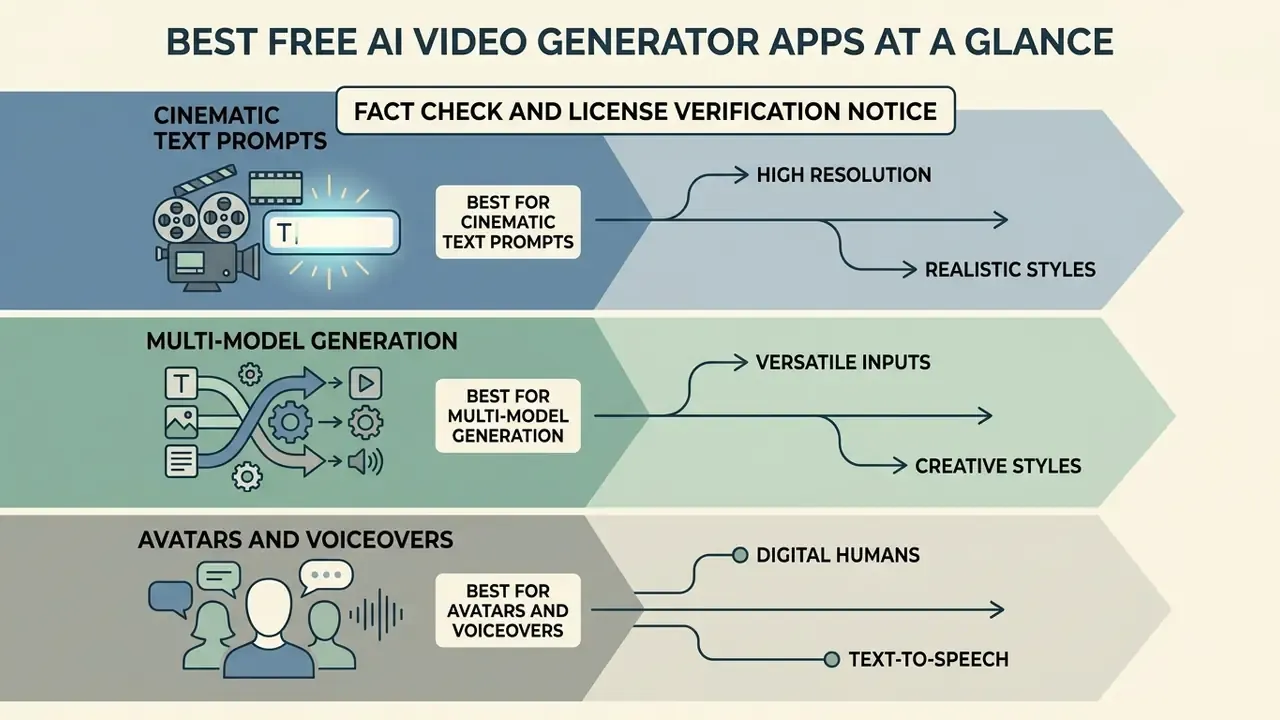
Best AI Video Generator for Cinematic Text Prompts
Kling AI stands out for cinematic visual quality straight from detailed text prompts. Built on advanced video diffusion architectures, Kling 3.0 supports multi-shot scene creation, character consistency across frames, and complex camera trajectories such as pans, tracking shots, and dolly zooms. Official documentation for the Video 3.0 Omni model specifies text-to-video and image-to-video support, up to seven reference images, source images of at least 300 px and under 10 MB, and clip durations between 3 and 15 seconds with output up to 4K.
In benchmark tests of fundamental physics (PhyWorldBench, 2025), Kling scored at the top for rigid body dynamics and realistic environmental interactions.
«PhyWorldBench (2025) records fundamental-physics scores of up to 0.510 for Kling-1.6, higher than most competitors, although Sora-Turbo and Gen-3 also rank among the most realistic models.»
There is a catch, and it is a sharp one. Researchers found Kling struggles badly with on-screen text legibility.
«T2VTextBench (2025) confirms that Kling is essentially unable to generate legible on-screen text. Its average score in the step-by-step text rendering category is just 0.01.»
Use Kling for visual storytelling and atmosphere, then add on-screen text, logos, and typography in post-production inside a conventional editor. Not elegant, but reliable.
Best Free AI Video Tool for Multi-Model Generation
Best AI Video Creator for Avatars and Voiceovers
Best Free AI Video Generator for Android and Mobile
Mobile-first video production needs lightweight interfaces, fast cloud rendering, native vertical framing, and direct integration with social publishing apps. A dedicated free AI video generator Android app or mobile platform lets creators produce short videos anywhere, no desktop editing software involved.
📱 Mobile AI video production pipeline (9:16 vertical optimization)
- Input.Upload a source photo from the Android camera roll, record a short clip, or enter a structured text prompt directly in the app.
- Cloud inference.Select a fast-render diffusion model. Turbo modes return a draft in seconds; standard quality tiers take roughly 1 to 3 minutes depending on complexity and server load.
- Mobile edit.Apply a vertical 9:16 crop at 1080×1920, auto-generate dynamic caption overlays, trim dead frames, attach royalty-free background audio.
- Social export.Export MP4 (H.264 video, AAC audio) and push straight to TikTok, Instagram Reels, or YouTube Shorts, or save to the camera roll for scheduling tools.
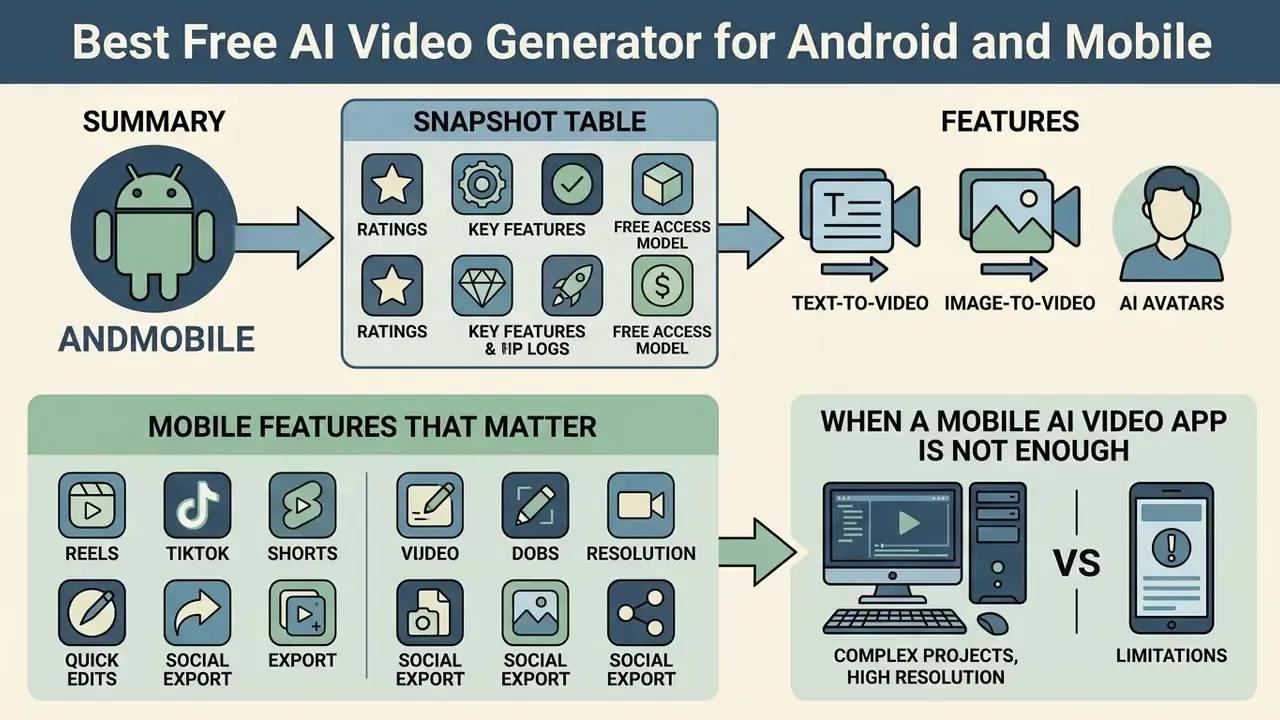
Android App Compatibility Snapshot
Table 5. Android and mobile AI video apps: ratings, features, and free access model
| Android app | Play Store rating (approx.) | Native mobile features | Cloud render speed | Free access model |
|---|---|---|---|---|
| Kling AI Mobile | 4.6 / 5.0 | Camera-roll upload, lip-sync, multi-image reference | Fast (1 to 2 min) | Daily free credits |
| Runway Mobile (iOS-first, Android via web) | 4.4 / 5.0 | Frame control, motion brush, Gen-4.5 access | Standard (2 to 4 min) | 125 one-time credits |
| InVideo AI Mobile | 4.7 / 5.0 | Text-prompt full edit, voiceover, 16M+ stock library | Instant cloud preview | Weekly AI minutes, watermarked |
| Vivideo | 4.7 / 5.0 | Multi-model switching, agentic long-form assembly | Fast to standard | Free daily plan, no card required |
| Digen | 4.3 / 5.0 | Free AI video plus image generation, avatar presets | Standard | Free tier with credits |
| MagicLight | 4.4 / 5.0 | Storyboard-first creation, character consistency | Standard | Free download and free plan |
| PixVerse | 4.5 / 5.0 | Effect templates, image-to-video motion presets | Fast | Credit-based free access |
| Canva (AI video clip) | 4.8 / 5.0 | Veo-powered clip generation inside full design editor | 1 to 3 min | Limited monthly clips on paid plans |
Ratings and free-tier terms move around constantly, so verify current Play Store listings and vendor pricing before you standardize a workflow on any single app. Canva's own documentation notes that its Create a Video Clip feature, powered by Google Veo, produces one 16:9 clip of up to eight seconds per prompt with synchronized audio. A useful reminder: even inside a mature design suite, generation limits are strict. Our overview of the Canva AI generator covers its licensing and export terms in detail.
Mobile Features That Matter for Reels, TikTok, and Shorts
Mobile video tools must support the 9:16 vertical aspect ratio that TikTok, Instagram Reels, and YouTube Shorts expect. University media guidelines specify 1080×1920 at 9:16 with MP4/H.264 export as the baseline for all three platforms. Native mobile apps speed up video creation through single-tap prompt templates, direct photo uploads from the camera roll, automated caption generation, and integrated background music selection.
Speed matters more on mobile than anywhere else. And here the evidence base is thin.
«No peer-reviewed benchmark published between 2023 and 2026 evaluates mobile AI video applications on latency, interface usability, or vertical-content suitability. Existing research focuses on server-side models.»
When a Mobile AI Video App Is Not Enough
Mobile apps excel at short clips and quick social posts. They fall apart on multi-layered editing and long-form video content. Phone screens simply lack the timeline precision, multi-track audio control, complex color grading, and keyboard shortcuts that high-end commercial production assumes.
Documented platform limits illustrate the ceiling. Microsoft states that Clipchamp projects have no formal length cap, yet recommends keeping videos under 10 minutes because longer timelines strain CPU, GPU, RAM, and disk during export. Mobile AI editors cut further still: Opus Clip's iOS app, for instance, does not allow custom clip length at upload and lacks cloud saving and auto-save toggles, constraints that make serial editing of long footage impractical.
Mobile devices also struggle with cloud file synchronization once several large uncompressed video assets are in play. Projects needing fine-tuned motion trajectories, detailed mask compositing, or long-form assembly belong on desktop workstations or specialized web dashboards. Our comparison of free video editing software covers desktop alternatives with batch editing, multi-track audio, and complex layering.
Which AI Video Generator Is Best for Your Use Case?
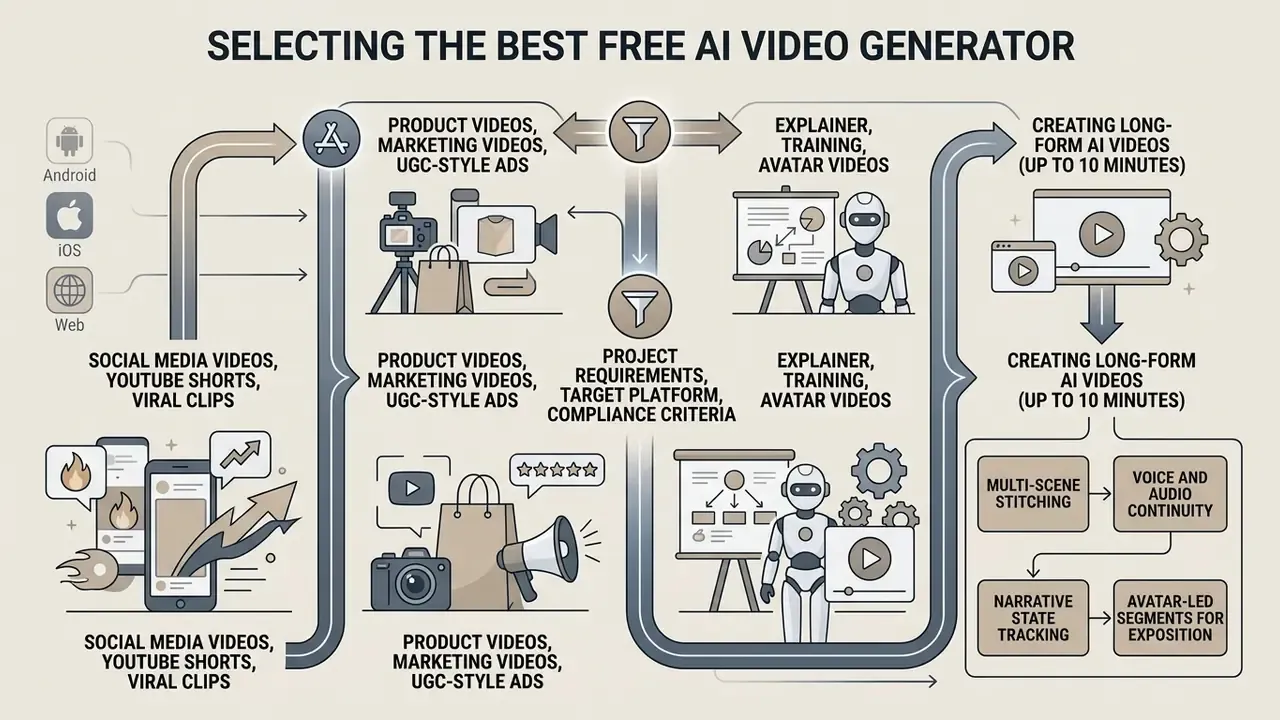
Selecting the right best free ai video generation app comes down to project requirements, target platform, and compliance criteria. Match the output goal to the tool class:
- Goal: short-form social growth (TikTok, Reels, Shorts). Prioritize speed, native vertical 9:16 output, template libraries, auto-captions. Choose a stylized generator or a social-focused suite. Physics accuracy is secondary to hook quality.
- Goal: product marketing and paid ads. Prioritize physical realism, product fidelity, brand-kit consistency, clean watermark-free export. Choose a realism-oriented generator (Kling, Sora, Veo) plus a paid plan with explicit commercial rights.
- Goal: corporate training and explainers. Prioritize avatars, PDF and script ingestion, multilingual voice, lip-synced dubbing. Choose an avatar suite (HeyGen, Synthesia, Hedra) and confirm data-handling terms before uploading internal documents.
- Goal: cinematic storytelling or film experiments. Prioritize shot-by-shot storyboarding, camera choreography, video-to-video transformation. Choose Runway or a multi-model workspace such as Adobe Firefly.
- Goal: regulated-industry communication. Prioritize provenance metadata (Content Credentials, C2PA), retention controls, audit logs, indemnification. Free tiers generally fail this screen. Go straight to the governance section below.
Product Videos, Marketing Videos, and UGC-Style Ads
Marketing teams building product videos and user-generated content (UGC) ads need strong product representation, clean lighting, and believable real-world physics. In benchmark evaluations, Kling 3.0 and Sora showed higher physical realism, which makes them the safer pick for showing tangible products in motion. Our reference page on AI video generators covers generation methods and commercial-use considerations in more depth.
Marketers often combine product photos with AI avatar creators to build UGC-style testimonial ads. Illustrative test structure (editorial, unverified): an e-commerce brand animates static product photos into 5-second clips, pairs each with an AI avatar speaker, and runs the resulting variants against a static-image control. The mechanism is well understood, since motion increases dwell time and variant volume improves hook discovery. Any specific click-through uplift figure, though, is campaign-dependent. Treat published uplift percentages as hypotheses to validate with your own A/B tests, logging creative version, model, seed, and audience segment for every variant.
Documented vendor workflows in this category follow one of three patterns: product link or product image to generated UGC avatar video; product description to script to narrated ad; or listing photos to cinematic virtual tour with voiceover.
Explainer, Training, and Avatar Videos
Educational institutions and corporate training departments lean on explainer videos and narrated training clips to move information quickly. AI avatar generators shine here, converting training manuals, slide decks, and SOP documentation directly into narrated presenter videos.
«EAI-Avatar (2025) demonstrates that emotion-aware avatars receive higher participant ratings for emotional accuracy and communicative effectiveness than baseline models.»
Platforms with automated video translation let organizations turn a single master training video into dozens of languages with matched lip-syncing. Some products advertise dubbing into 70+ languages plus an interactive two-way Q&A layer on top of the presenter. Teams expanding beyond video can also test a free ai photo editing app, browse specialized free animation apps for custom graphic workflows, or study creation methods in our animation maker guide.
Creating Long-Form AI Videos (Up to 10 Minutes)
Most free AI video models cap single-shot generations at 4 to 8 seconds, premium models at 10 to 15. Full-length content such as YouTube explainers, real-estate virtual tours, course modules, and corporate training needs multi-scene continuity instead. Agentic platforms now close that gap, producing coherent videos up to roughly 10 minutes.
Four mechanisms do the heavy lifting:
- Multi-scene stitching. A storyboarding agent connects dozens of generated clips while locking character appearance, wardrobe, colour grade, and lighting direction across cuts.
- Voice and audio continuity. One cloned or selected voice track is layered across all scene transitions, preventing audible shifts in tone, loudness, or accent between shots.
- Narrative state tracking. The agent retains a scene graph, so revising scene four does not desynchronize scenes five through twenty.
- Avatar-led segments for exposition. Long explanations come from a talking-head avatar (Hedra Avatar supports continuous output up to 10 minutes), while generated B-roll covers illustrative passages.
Two caveats apply. Credit consumption scales with duration, so a 10-minute video can drain an entire monthly free allowance in a single render. And error compounds: a physics or typography failure repeated across 60 shots is far more damaging than in one 8-second clip. Shot-level review stays mandatory.
How to Create AI Videos in a Free App
Creating synthetic video in a free app follows a structured workflow from concept to publication. Six stages, in order:
- Input stage: write prompt, upload photo, or import a document.Formulate a structured text prompt detailing subject, action, camera motion, and visual style; upload a clear reference photo; or import a script, PDF, or article URL for automatic scene decomposition.
- Configuration stage: select model and aspect ratio.Choose the target AI video model, visual style, clip duration, and aspect ratio (9:16 vertical for mobile, 16:9 for desktop). Record the model version and seed if the platform exposes them.
- Generation stage: click generate and render.Submit the job to cloud servers to render the raw video clip using diffusion or transformer models. Compare two or three outputs before committing.
- Post-production stage: edit and add audio.Apply video editing trims, overlay background music, generate an AI voiceover, add dynamic captions.
- Review and compliance stage: verify rights and provenance.Confirm commercial-use permissions for the plan, clear all third-party music and stock assets, check that no watermark remains, retain provenance metadata where available.
- Export stage: export and publish.Select final resolution (720p or 1080p MP4, H.264 plus AAC), export the file, and publish videos to target platforms.
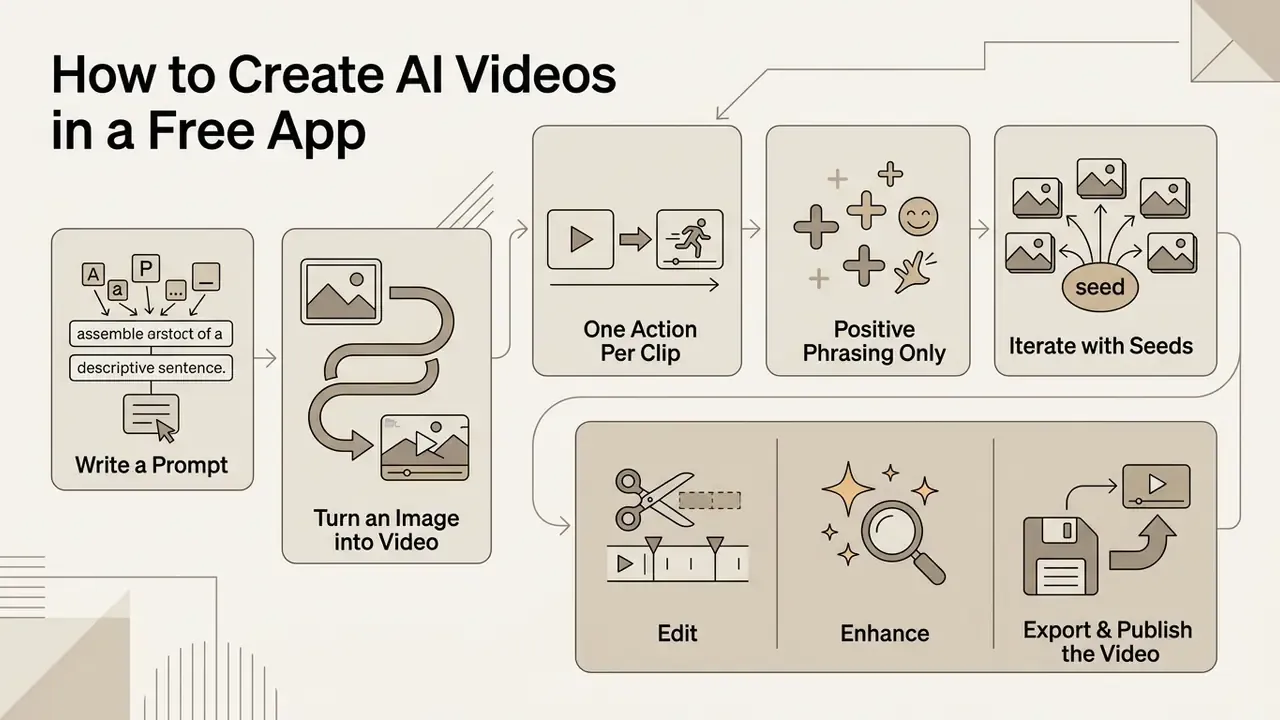
Write a Prompt or Turn an Image into Video
The quality of an AI-generated video clip hinges on prompt structure and source input clarity. Effective text prompts carry five components: subject, explicit motion or action, environment, camera movement, and aesthetic style.
Prompt Formula: [Subject] + [Action/Motion] + [Environment] + [Camera Angle/Movement] + [Style & Lighting]

Example: "A close-up shot of a vintage mechanical watch being carefully assembled on a wooden workbench, slow smooth camera pan, cinematic warm lighting, photorealistic 8k detail."
In image-to-video mode, describe the desired motion only. Do not re-describe static visual details already present in the uploaded photo. Runway's own guidance is explicit on this and adds a second warning: blur, facial distortion, and hand artifacts in the source still get intensified once animation is applied, so clean the input image before you prompt for motion.
Three further rules raise success rates on free tiers, where every failed render costs credits:
- One action per clip.Multi-action prompts fail disproportionately often. Keep each generation to a single beat of 5 to 10 seconds.
- Positive phrasing only.Describe what should appear, never what should be absent.
- Iterate with seeds.Where the platform exposes a seed value, fix it and change one variable at a time. That converts random retries into controlled experiments, which is also what makes the output auditable later.
Edit, Enhance, Export, and Publish the Video
After the initial render, post-production happens in a mobile or web video editor. Typical steps: trim unwanted frames, adjust brightness and colour balance, layer background music beneath dialogue, burn in captions for muted mobile viewing.
Export settings matter more than people expect. Social platforms generally want MP4 encoded in H.264 with AAC audio at 1080×1920, audio around 48 kHz. Caption handling differs by platform: some require burned-in captions, others accept SRT or VTT sidecar files, so confirm requirements before the final render rather than after. Creators who need clean exports without platform logos can evaluate dedicated options for free video editing before finalizing media files.
Free AI Video Generator Mistakes to Avoid
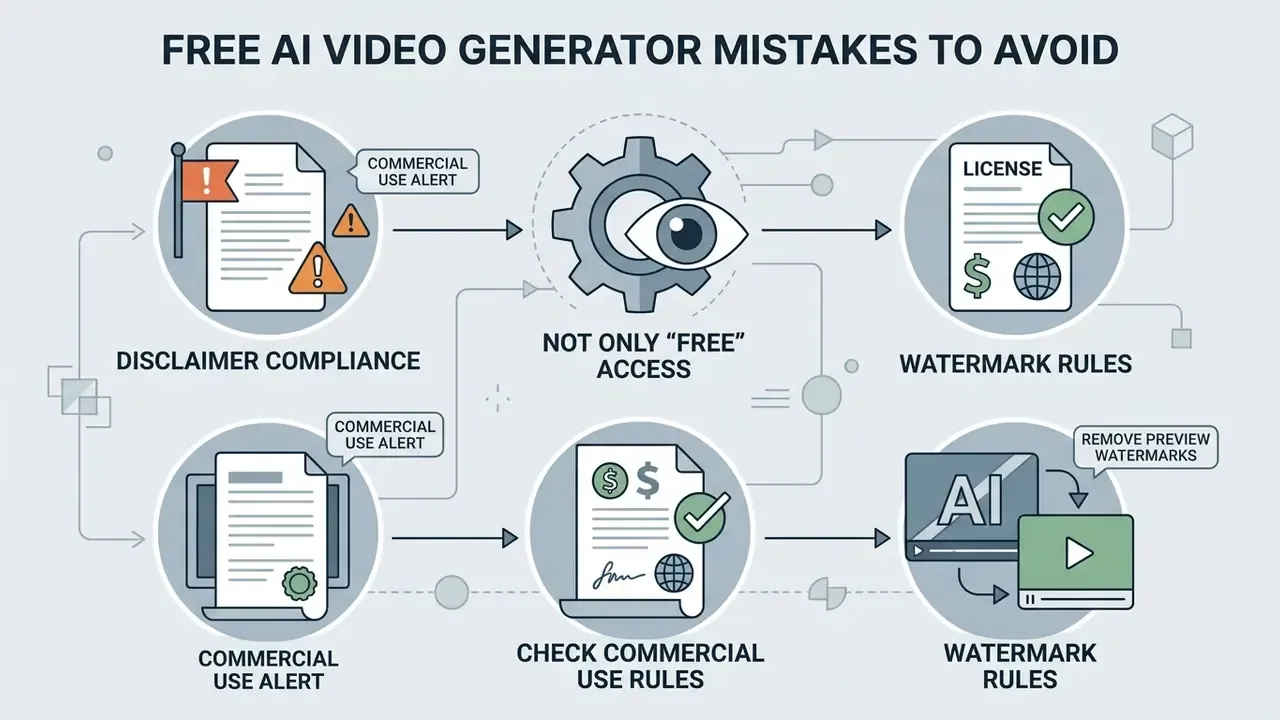
Free AI video tools carry technical, legal, and operational risks that can compromise content quality or trigger copyright disputes.
Do Not Judge an App Only by "Free" Access
A common mistake is judging an AI video generator by its "free" label without reading the operational constraints. Plenty of platforms advertised as free are restrictive trials that hand over a small one-time credit balance or limit output to low-resolution 480p clips with heavy watermarks.
Distinguish permanently free plans with recurring monthly quotas from temporary free trials and from open-source models that require local hardware hosting. Assessing true operational cost means analyzing credit consumption per second of generated video, and confirming whether "no watermark" applies to all exports or only to projects that avoid premium elements. CapCut illustrates this trap precisely: several product pages advertise watermark-free free export, while the help documentation states that Pro is required for watermark-free export once a project uses premium assets or exceeds free limits.
Check Commercial Use and Watermark Rules Before Publishing
Before publishing generated assets on monetized YouTube channels, client websites, or social ad accounts, verify watermark policies and intellectual property terms.
«GenVidBench (2025) assembles a dataset of videos from ten different generative models, showing that AI-content detection is advancing rapidly as platforms and regulators strengthen the distinction between synthetic and real video.»
Three mandatory pre-publication checks keep you on the right side of that line:
For specialized queries, open the hub to review commercial terms, compare quota-bound options across our roundup of free AI video generators, or browse the hub for utility calculators. Additional resource comparisons appear when you browse the hub to evaluate competing model capabilities side by side.
Security, Data Privacy, and Shadow AI Risks
Auditability, Reproducibility, and Model Risk Management
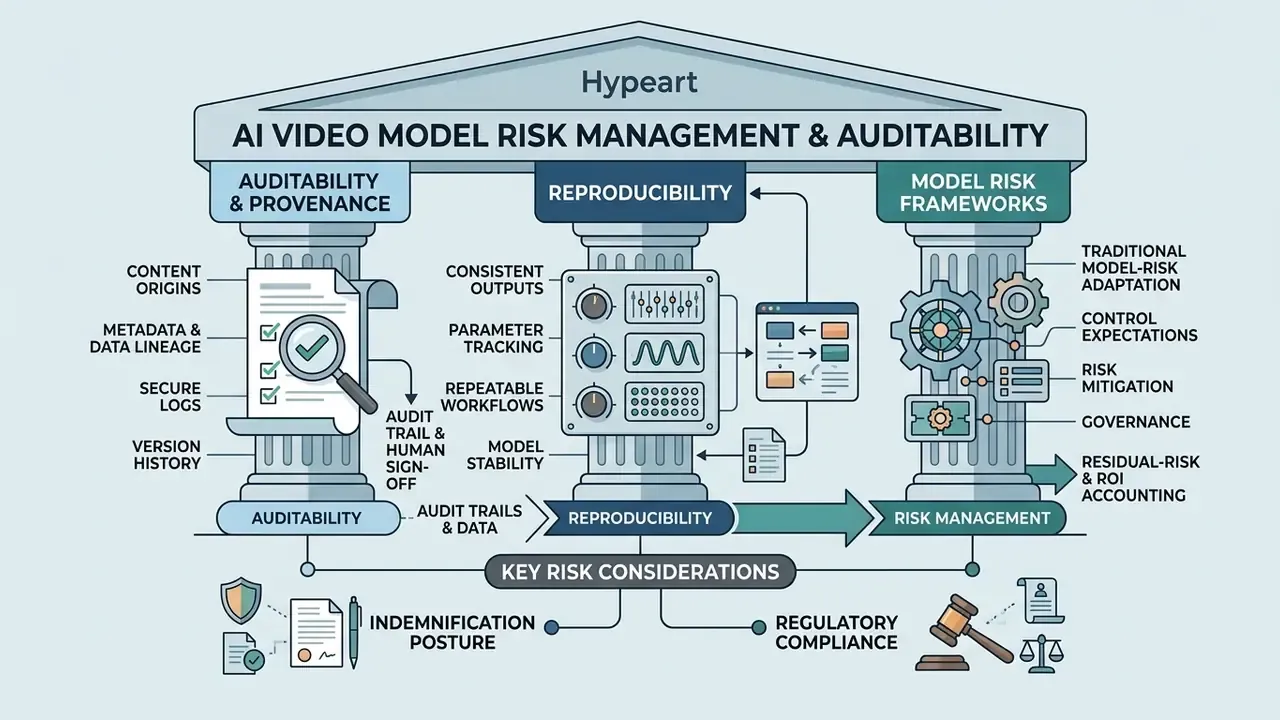
Generative video sits awkwardly inside traditional model-risk frameworks, yet the control expectations translate almost directly. Organizations operating under model-risk guidance such as the US SR 11-7 supervisory letter, or aligning to the NIST AI Risk Management Framework, need three things that consumer free tiers rarely provide.
Reproducibility. Document model name and version, prompt text, seed value where exposed, resolution, duration, and reference inputs for every published asset. Amazon's Nova Reel documentation explicitly recommends seed-based iteration, and platforms that expose seeds allow a render to be reproduced for review. Where seeds are hidden, treat the output as non-reproducible and retain the exported file itself as the record.
Provenance metadata. Adobe attaches Content Credentials to Firefly outputs, giving a machine-readable C2PA-style provenance record. Carrying that metadata through post-production is the cheapest control available, and it aligns with the detection trajectory documented by GenVidBench.
Audit trail and human sign-off. Log who generated the asset, who reviewed it, which licence tier produced it, and which approval gate cleared it for publication. Agentic pipelines raise the stakes here: when an autonomous agent assembles sixty shots, human review must happen at storyboard and final-cut checkpoints rather than shot by shot.
Indemnification posture. Confirm in writing whether the vendor offers intellectual-property indemnification and on which plans. In the 2026 market, indemnity is an enterprise or qualifying-paid-plan feature. Assume free tiers carry none at all.
Residual-risk and ROI accounting. One more line item gets skipped routinely. Control costs belong in the business case: review hours, licence upgrades needed for indemnity, metadata retention, incident response for impersonation. A free tool with three hours of weekly manual review is not free, and a risk-adjusted ROI model that ignores that review time will overstate the benefit. State the assumption explicitly, then let the committee argue with the number rather than with the framing.
Marketing Claims vs Verified Reality
Three claims circulate widely in this category and deserve direct correction.
Claim: "100% free forever, no watermark, 4K, unlimited." Verified reality: every provider surveyed for this guide caps free output through at least one of credits, resolution, duration, or plan-level licensing. Where 4K is offered, it is usually tied to short generations on premium tiers. Google's documentation ties 4K Veo output to 8-second generations. Treat unlimited-free advertising as a marketing position, not a specification.
Claim: "Free-tier output is safe for commercial campaigns." Verified reality: free plans frequently restrict use to personal, non-commercial purposes, and commercial rights are commonly reserved for paid tiers. Even where commercial use is permitted, as Canva states for designs generated with its AI tools, the vendor may explicitly disclaim exclusivity and place responsibility for clearing trademarks, artworks, and likenesses on the user.
Claim: "Modern models handle physics and text correctly." Verified reality: T2VPhysBench records average physical-compliance scores below 0.60 across all tested categories, and T2VTextBench records near-zero scores for legible sequential on-screen text. Plan to add typography in post-production and to review physically complex shots by hand.
Methodology and Testing Notes
FAQ
Is there a genuinely free AI video generator app with no watermark?
A small number of platforms advertise watermark-free free exports, but the exemption usually applies only to projects that avoid premium assets and stay inside credit and resolution limits. For predictable clean exports, an entry-level paid tier at $9.99 to $19.99 per month across major vendors is the reliable route.
How long can a free AI video be?
Single generations typically run 4 to 8 seconds on free tiers and 10 to 15 seconds on premium models. Long-form output up to roughly 10 minutes comes from stitching many generations together through an agent or a timeline, which consumes credits proportionally.
Can I make AI videos entirely on an Android phone?
Yes. Kling AI, Vivideo, Digen, MagicLight, PixVerse, InVideo, and Canva all offer Android or mobile-web creation with cloud rendering, 9:16 output, captions, and direct social export. Complex multi-track editing still belongs on desktop.
Which free tool is best for talking-head training videos?
Avatar suites: HeyGen, Synthesia, Hedra Avatar, and Canva's avatar feature, because they combine script or PDF ingestion, lip-sync, and multilingual voice. Expect 1 to 3 watermarked 720p videos per month on free plans.
Can I convert a blog post or PDF into a video?
Yes. URL-to-video, script-to-video, and PDF-to-video pipelines are standard in 2026 suites. The system extracts key points, builds a scene sequence, and generates narration plus captions automatically.
Is AI-generated video detectable?
Increasingly, yes. GenVidBench (2025) shows active progress in distinguishing synthetic from real footage, and provenance standards such as Content Credentials add machine-readable disclosure. Assume published synthetic content can be identified as such.
Can regulated organizations use free tiers?
Generally not for anything touching confidential data. Free plans rarely offer zero data retention, SSO, data-processing agreements, audit logs, or IP indemnification, and all of those are prerequisites in most financial-services control environments.
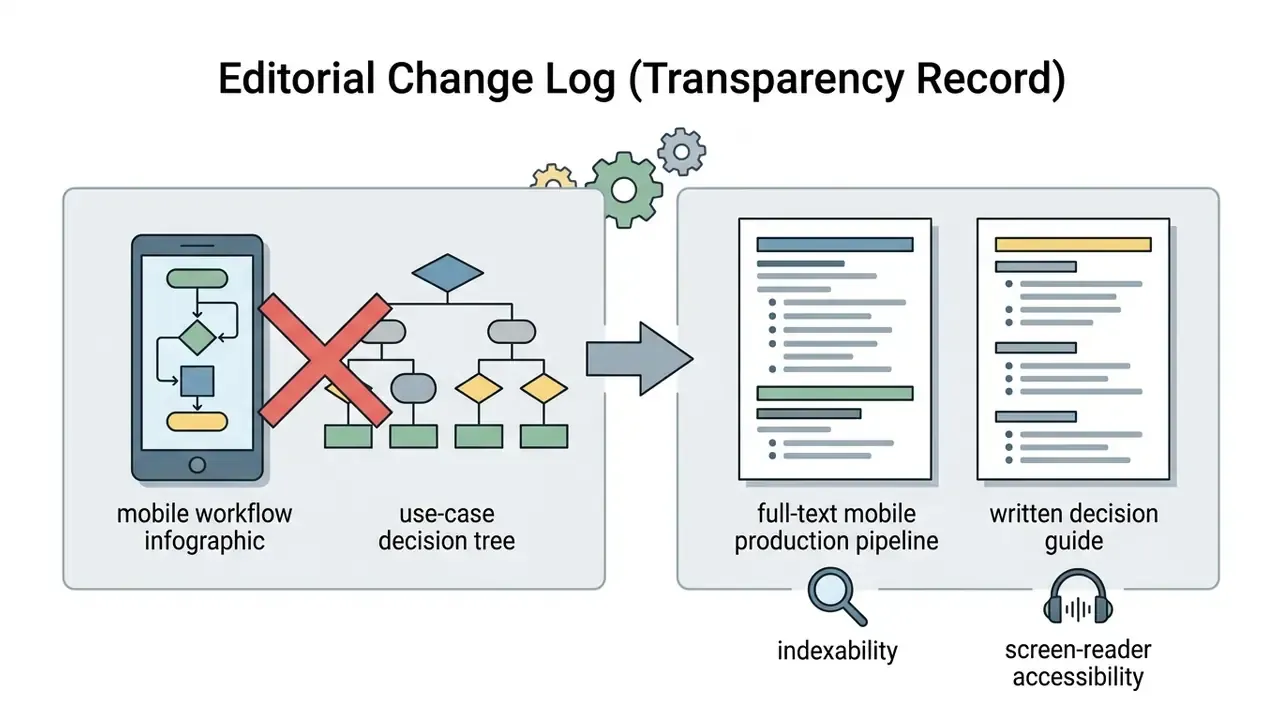
Appendix A: Editorial Change Log (Transparency Record)
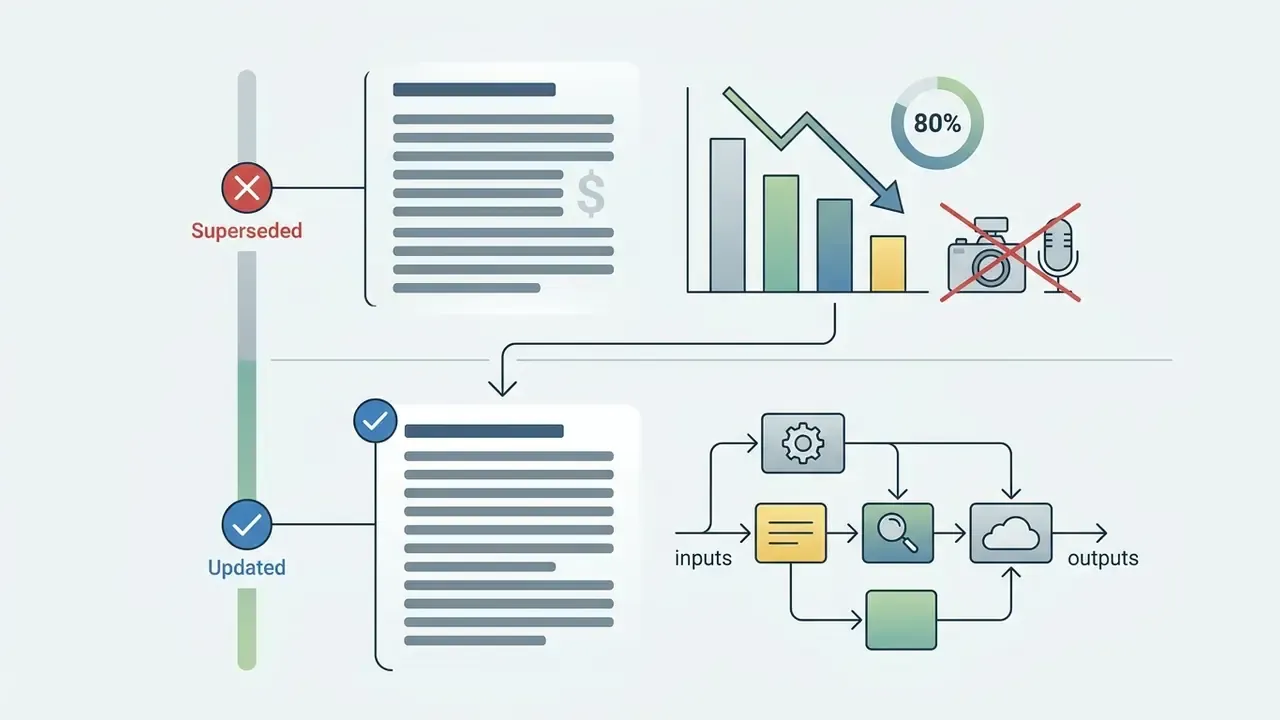
For readers auditing how this guide evolved, the following statements were revised during the 2026 update. Superseded phrasing is retained here for traceability.
Social Media Videos, YouTube Shorts, and Viral Clips
Short-form social content rewards visual impact, rapid pacing, and engaging motion far more than perfect physical realism. For viral social clips, tools like Pika and LTX Video deliver stylized lighting, vibrant colors, and fast clip generation.
The dominant 2026 short-form template runs hook, then context or problem, then proof or reveal, then payoff, then call to action, with the hook landing inside the first one to two seconds. Automation stacks extend this: one generated clip can be auto-published in parallel to TikTok, Instagram, and YouTube Shorts through workflow tools, turning a single render into three platform-native posts.
Creators producing high-volume social content usually pair AI video tools with automated clip generators and template libraries. For a broader toolset view, compare popular free ai tools optimized for social publishing.