That gap between "I made a logo" and "I own a logo" is where most buyers lose time.
Last reviewed and updated: January 2026 · Reviewed by the editorial benchmarking team
Executive Summary
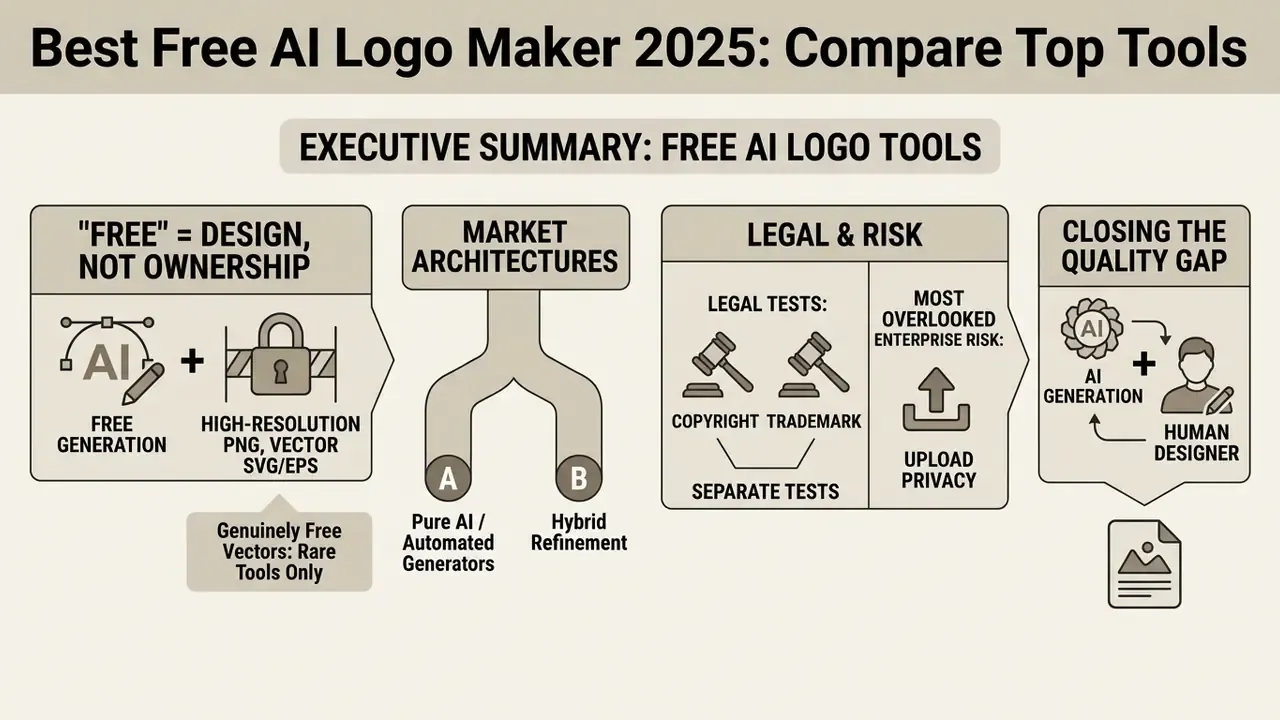
- "Free" almost always means "free to design," not "free to own." Most platforms let you generate and edit at zero cost, then gate high-resolution PNG, vector SVG/EPS, and commercial licensing behind paid tiers priced roughly between $3 and $15 per month.
- Only a small group of tools ship genuinely free vectors. Zarla and Namecheap release SVG files at no cost with commercial rights. Canva, Adobe Express, Design.com, and LOGO.com reserve vector export for premium plans.
- The market splits into two architectures. Template-hybrid logo makers (Design.com, Canva, Adobe Express, LOGO.com) prioritise brand kits and speed. Pure generative engines (Logo Diffusion, Sologo AI, Fotor, Ideogram) prioritise original shape synthesis and image-to-logo workflows.
- Copyright and trademark are separate legal tests. A purely machine-generated mark cannot be copyrighted in the US. It can still be registered as a trademark if it functions as a source identifier and clears conflict searches.
- Upload privacy is the most overlooked enterprise risk. Before uploading sketches, patent drawings, or unreleased product photos, audit retention and model re-training policies. The prompt text counts too.
- Hybrid "AI plus human designer" refinement closes the quality gap. When kerning, node cleanup, or print separation exceeds automated fixing, a designer-fix service delivers agency-grade output at a fraction of agency cost.
Who This Comparison Is For, and How to Read It
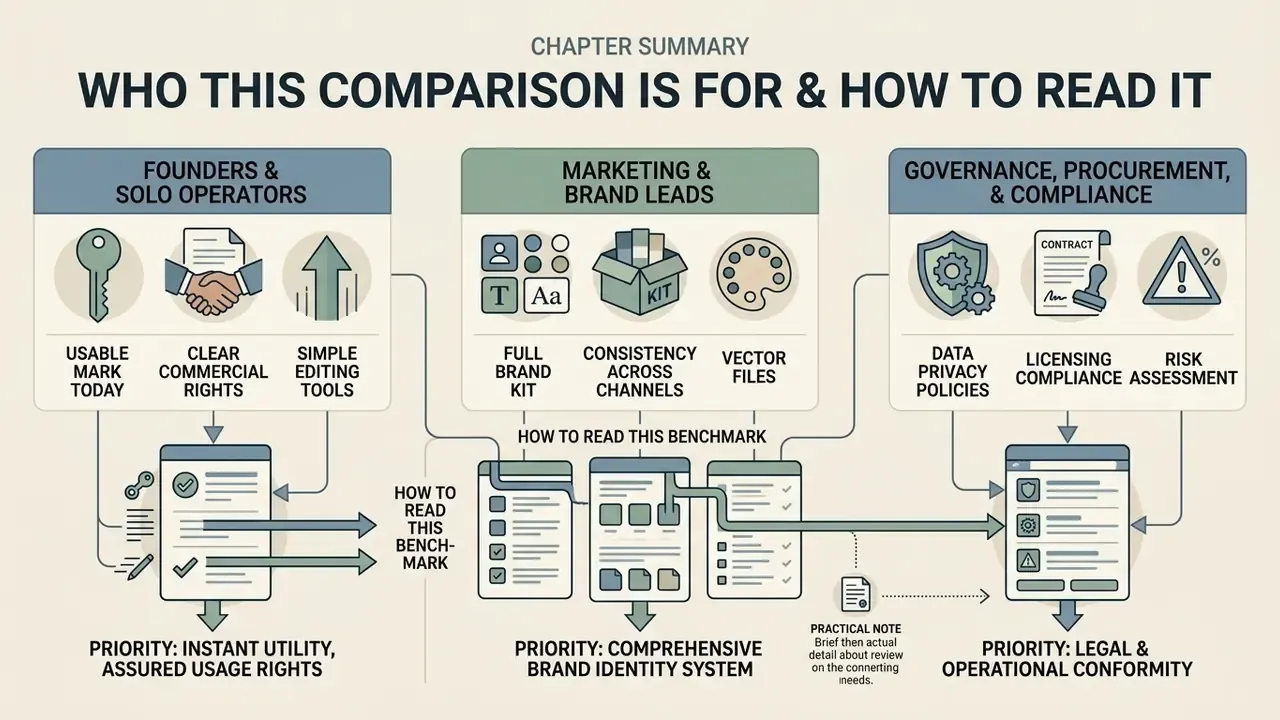
This benchmark is written for three buyer profiles, and each one reads it differently.
Founders and solo operators usually need one thing: a usable mark today, with clear commercial rights and no watermark. For them, the fastest path is a genuinely free vector tool, then a small paid tier only if the brand survives its first six months.
Marketing and brand leads care about the kit, not the icon. A single PNG is almost useless without horizontal lockups, favicon crops, business cards, and social banners that match. That is where template-hybrid platforms earn their subscription.
The third profile is the one most reviews ignore: governance, procurement, and compliance teams inside regulated organisations. Their question is not "which logo looks best" but "what did we upload, where did it go, who approved the licence, and can we prove it." If that describes your role, read the upload privacy, licensing, and legal checklist sections first, then come back to the tool table.
One practical note before the detail. Treat every price, credit count, and free-tier limit below as a snapshot taken during testing, not a contract. Free-credit loops in this category change monthly, sometimes weekly.
How We Chose the Best Free AI Logo Maker Tools in 2025
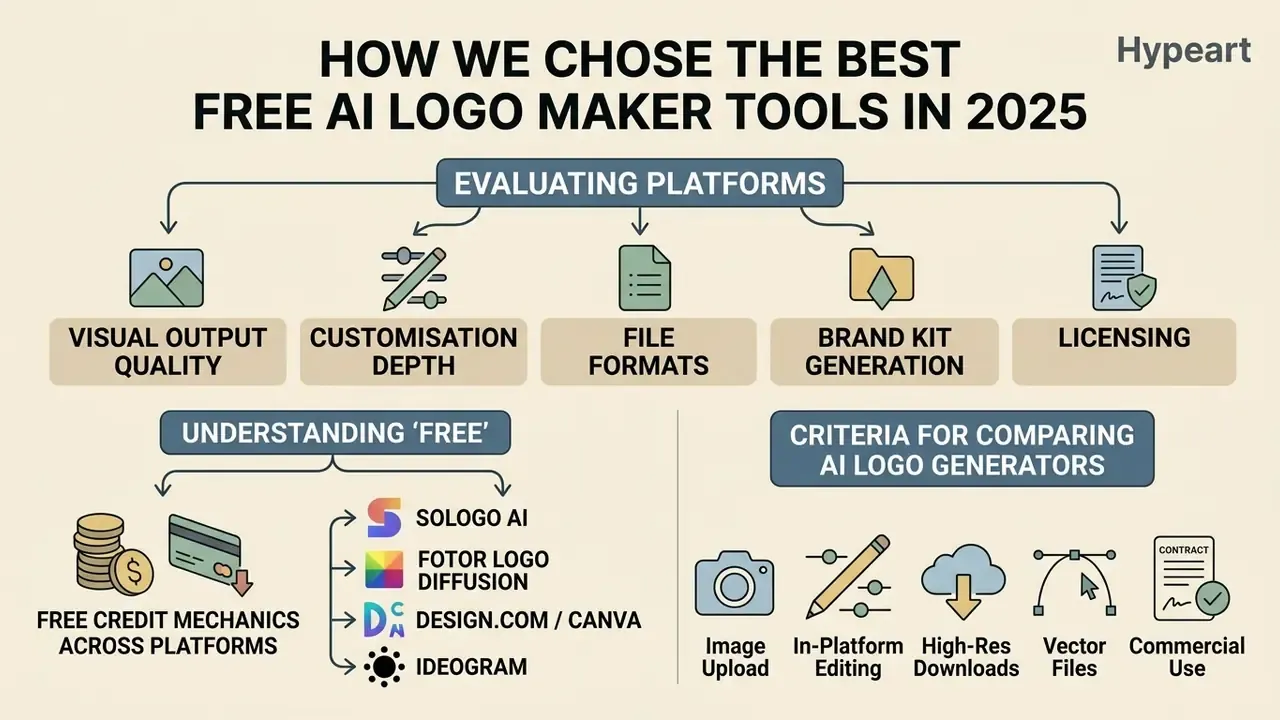
Evaluating the best ai logo maker tools 2025 involves testing platforms across visual output quality, customisation depth, file formats, brand kit generation, and licensing transparency. In our benchmarks, tools are assessed by how effectively they turn user input into a scalable, distinct ai generated logo that survives both a favicon and a trade-show banner.
To keep the framework objective, we analyse each best ai logo maker online 2025 platform using quantitative criteria adapted from industrial evaluations like Axis Intelligence's Logo Maker Quality Index (LMQI™), a proprietary third-party scoring methodology rather than an industry-wide standard. These standards measure how design algorithms handle typography, proportion, layout, and post-generation editing.
What "Free" Means in an AI Logo Generator
In the software ecosystem, "free" rarely means unrestricted access to production-ready brand assets. Most platforms operate as freemium funnels: AI logo generators let users generate and edit logos at no cost, but downloading high-resolution PNGs, vector logos (SVG/EPS), or securing commercial usage rights usually requires a paid upgrade.
«Most "free" logo generators are funnels: users spend 20 minutes customising, then get asked to pay $60 to download the file.»
According to a comparative industry benchmarking report published by Press.com, tools generally fall into two categories: "free to design" (previews are free, downloads are gated) and "actually free" (basic exports are provided at zero cost). The practical unlock thresholds we recorded during testing sit between $3/month (Design.com entry tier) and roughly $12 to $15/month (Canva Pro, Adobe Express Premium, Logo Diffusion paid credits). Platforms like Zarla or Namecheap offer free vector downloads with commercial rights, while most mainstream tools limit free tiers to low-resolution raster images or watermarked previews. To compare broader creative solutions, see the overview of available market options, or review how export gating works in adjacent categories such as free photo editors.
Free Credit Mechanics Across Platforms
Free-tier generosity differs structurally, not just in volume. Understanding the monetisation loop tells you exactly where the paywall will appear:
- Sologo AI Provides 10 free image-to-logo transformations alongside unlimited text-to-logo generations, charging only for vector source file downloads and advanced features. Subsequent edits remain free.
- Fotor Uses a daily credit loop where users earn generation tokens through daily logins, community sharing, and design challenges. Fotor Pro unlocks additional credits and high-quality rendering.
- Logo Diffusion Issues roughly 20 free credits per month. The free plan excludes vector export and commercial rights, both of which arrive with paid tiers.
- Design.com / Canva Offer free unlimited design and preview iterations, but gate the raw SVG/vector file download behind premium tiers.
- Ideogram Offers approximately 40 watermark-free generations per month on the free plan, which makes it unusually generous for typography-heavy marks.
Criteria for Comparing AI Logo Generators
To rank best free ai logo maker websites, each platform must be measured on output quality, customisation depth, vector support, brand kit features, and licensing clarity. These criteria separate basic icon generators from comprehensive branding tools capable of producing a professional logo rather than a pleasant thumbnail.
«Axis Intelligence tested nine platforms across 54 prompts, three business types, and seven weighted LMQI™ criteria, including output quality (28%) and customisation depth (20%).»
Academic evaluation frameworks converge on a comparable set of dimensions. Peer-reviewed work on AI logo design proposes assessing creativity, practicality, aesthetics, brand fit, and user satisfaction through expert review, questionnaires, and cross-media testing. Classic logo-design literature emphasises uniqueness, recognition, communication, aesthetic feeling, and adaptability. Different vocabulary, broadly the same checklist.
When evaluating ai tools for logo design, users with no design experience must consider whether a service provides direct editing tools for fonts colors, layout adjustments, and background removal. High-quality platforms also offer an integrated brand kit containing social media assets and business card layouts.
Assessment Framework for AI Logo Makers
| Criterion | What Is Evaluated | Operational Impact |
|---|---|---|
| Output Quality | Visual polish, legibility, and semantic alignment of the generated logo. | Determines whether the mark stays recognisable at favicon size and billboard scale. |
| Customisation Depth | Granularity of editing tools for text, icons, spacing, and custom colored palettes. | Allows teams to easily customize and fine tune outputs to match existing brand identity. |
| Vector Export | Availability of vector logos (SVG/EPS/PDF) versus flat raster images (PNG/JPG). | Essential for high-resolution printing without pixelation or quality loss. |
| Brand Kit Features | Provision of matched assets for business cards, social media, and brand guides. | Streamlines multi-channel deployment across web, print, and marketing materials. |
| Licensing Transparency | Clear terms for commercial purposes, trademark eligibility, and asset ownership. | Mitigates legal risk when deploying the logo in commercial operations. |
| Image Upload Capabilities | Support for ai logo generator upload image and sketch-to-vector transformation. | Enables teams to convert hand-drawn concepts or existing references into digital vector marks. |
| Upload Privacy and Retention | Whether uploaded rasters are retained, shared, or used for model re-training. | Protects trade secrets, unreleased designs, and NDA-covered sketches. |
No matching rows Clear one or more filters to restore the matrix.
The table above is also usable as a scoring sheet. Weight the rows that match your constraint: a print-heavy brand should weight vector export and licensing highest, while a digital-only startup can tolerate PNG for a quarter.
Testing Methodology
Summary of Top Recommended Tools for 2025
Before the individual platform reviews, this table condenses the benchmark into fast decision paths by use case.
| Category | Primary Recommendation | Key Advantage | Limitation / Consideration |
|---|---|---|---|
| Best Overall Brand Kit Generator | Design.com | Automated creation of matched business cards and web assets. | Vector SVG downloads require a paid plan (from about $3/month). |
| Best Free Template-Hybrid Builder | Canva | Real, unpaywalled PNG downloads plus extensive design control. | SVG export locked to Canva Pro. |
| Best for Commercial-Safe Templates | Adobe Express | Integrated with commercial-safe asset libraries and Adobe tools. | Advanced transparency and vector features require a subscription. |
| Best for Custom Vector Synthesis | Logo Diffusion | Native sketch-to-logo generation and layered SVG export. | Needs manual editing to fix occasional text distortions; free plan excludes commercial rights. |
| Best for Readable Typography in Logos | Ideogram | Renders legible lettering inside generated marks; about 40 free watermark-free runs monthly. | No native brand kit or vector export pipeline. |
| Best Image-to-Logo Conversion | Sologo AI | 10 free photo/sketch conversions plus unlimited text generations. | Vector source files are paid; brand kit coverage is limited. |
| Best Completely Free Vector Downloads | Zarla / Namecheap | Zero-cost SVG vector downloads with full commercial rights. | Fewer template variations than the major design suites. |
«Toolchase names Canva the "best free logo builder overall": real PNG downloads without payment and extensive design control.»
Best Free AI Logo Maker Websites to Try in 2025
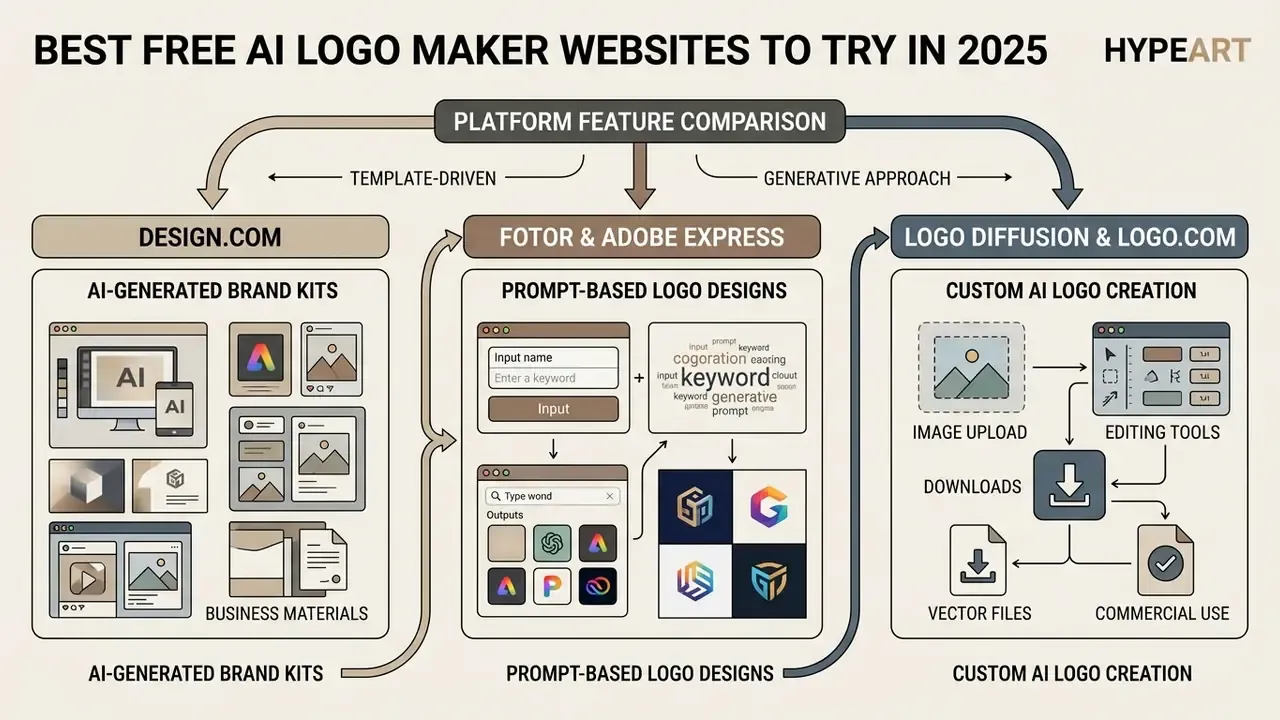
Choosing the right platform depends on whether you need a quick template-driven mark or an unconstrained generative graphic. By early 2026 the market is clearly divided between logo maker ai app platforms built on structured design templates and pure generative image models, comparable to the systems covered in our review of free AI image generators, which synthesise logos directly from text prompts.
«The market has split into two types: generators (pure AI, like DALL-E) and builders (AI plus templates), each with fundamentally different free-tier limits.»
If you want to test several creative workflows side by side, our broader catalog of ai picture app options clarifies how different models process visual assets.
Design.com for AI-Generated Brand Kits and Business Materials
Design.com combines AI logo generation with automated brand kit creation, producing coordinated assets for web and print. Its engine creates logo options based on business parameters, with structured control over layouts, typography, and colour schemes. The platform advertises access to more than 449,000 generated and refined marks, 500+ exclusive AI-paired fonts, and manual IP review of library icons.
According to the Axis Intelligence LMQI™ benchmark, Design.com scores 80.3 overall, with high marks for ease of use (9.2) and brand kit completeness (8.0).
«Design.com scored 8.0 for output quality, 7.5 for customisation depth and 8.0 for vector export, although SVG remains available only on paid tiers.»
Free design and preview features are genuinely free. Downloading vector SVG files or full brand kit packages requires a paid plan starting around $3 per month. Its documented export set spans PNG, JPG, SVG, EPS, and PDF, with more than a million matching templates for business cards, websites, social media, email signatures, flyers, and posters. Competing tiers are broken down in our pricing analysis hub.
Fotor and Adobe Express for Prompt-Based Logo Designs
Fotor and Adobe Express focus on prompt-based generation, letting users create logo designs from text descriptions or established template libraries. Both allow fast iteration, which helps turn a vague idea into a professional looking visual asset. Fotor reports an average generation speed of about three seconds and offers watermark-free downloads on generated marks.
Adobe Express integrates generative AI with Adobe's asset ecosystem, offering a free ai logo generator 2024 and 2025 workflow that outputs commercial-safe PNG files. Its guidance recommends prompts of five words or more, supports reference-image reruns, and exports transparent-background PNG. For a side-by-side of the closest template-hybrid alternative, see our breakdown of the Canva AI Generator and its licensing terms.
Fotor generates custom logo variants from text prompts quickly, though advanced vector downloads stay tied to premium tiers. For teams building broader digital assets, reviewing ai presentation generator tools or an ai slide deck generator helps align presentational material with your core logo mark.
Logo Diffusion and LOGO.com for Custom AI Logo Creation
Logo Diffusion uses deep generative models trained specifically on vector logo graphics, with native text-to-logo, sketch-to-logo, and image-to-logo workflows. Unlike template assembly tools, it synthesises original shapes, the same synthesis principle used by leading AI image generators, and includes a post-production vector editor to clean nodes and export scalable SVG files. Its vectoriser converts PNG/JPG/WEBP inputs into real Bézier paths and layered SVG, exportable as SVG or EPS for Illustrator, Figma, or Affinity.
«Academic work on "Designing Logo with Generative Models" demonstrates that a fine-tuned Stable Diffusion can produce logos rated by humans on recognisability, aesthetics and brand fit.»
«LMQI™ data gives Logo Diffusion 9.2 for vector export and 8.6 for output quality, but only 4.5 for brand kit completeness.» Axis Intelligence, «Best AI Logo Maker 2026» (2026). https://axisintelligence.com
LOGO.com provides a guided setup wizard that builds high-resolution PNG and vector packages from industry descriptors and colour preferences, and it can auto-generate a brand style guide from an existing logo, palette, and fonts. Its own documentation notes that free-plan logos are commercially usable only if a paid plan was at some point associated with that brand, and that exclusive licensing is sold separately from the standard licence. Read that clause twice before you file anything. LOGO.com delivers a comprehensive asset kit, while pure image generation models like Logo Diffusion allow greater creative freedom for custom symbol creation.
Platform Feature Comparison
| Service | Architecture | Text-to-Logo | Image/Sketch Upload | Vector Export (SVG) | Brand Kit Generation | Free Tier Scope |
|---|---|---|---|---|---|---|
| Design.com | Template + AI | Yes | Limited | Paid tier | Yes | Free design and preview; paid vector download |
| Canva | Template + AI | Yes | Placement only | Paid tier (Pro) | Yes | Free PNG download; paid vector export |
| Adobe Express | Template + AI | Yes | Reference support | Paid/integrated | Yes | Free PNG export; commercial-safe templates |
| Logo Diffusion | Generative AI | Yes | Yes (native) | Native SVG | Basic | About 20 free credits/month; commercial rights on paid plans |
| LOGO.com | Template + AI | Yes | Limited | Paid tier | Yes | Free concept generation; paid file packages |
| Sologo AI | Generative AI | Yes (unlimited) | Yes (native) | Paid source files | Limited | 10 free image-to-logo runs; free edits |
| Fotor | Generative AI + templates | Yes | Yes (reference) | Paid tier | Templates only | Daily earned credits; watermark-free output |
No matching rows Clear one or more filters to restore the matrix.
Read the table right to left if budget is the binding constraint. The "free tier scope" column, not the feature list, is what decides your actual deliverable this week.
«Zarla and Namecheap are the rare exception: they hand over SVG files free of charge with full commercial rights, while most competitors cap free tiers at raster PNG.»
AI Logo Generator With Image Upload: Which Tools Support It
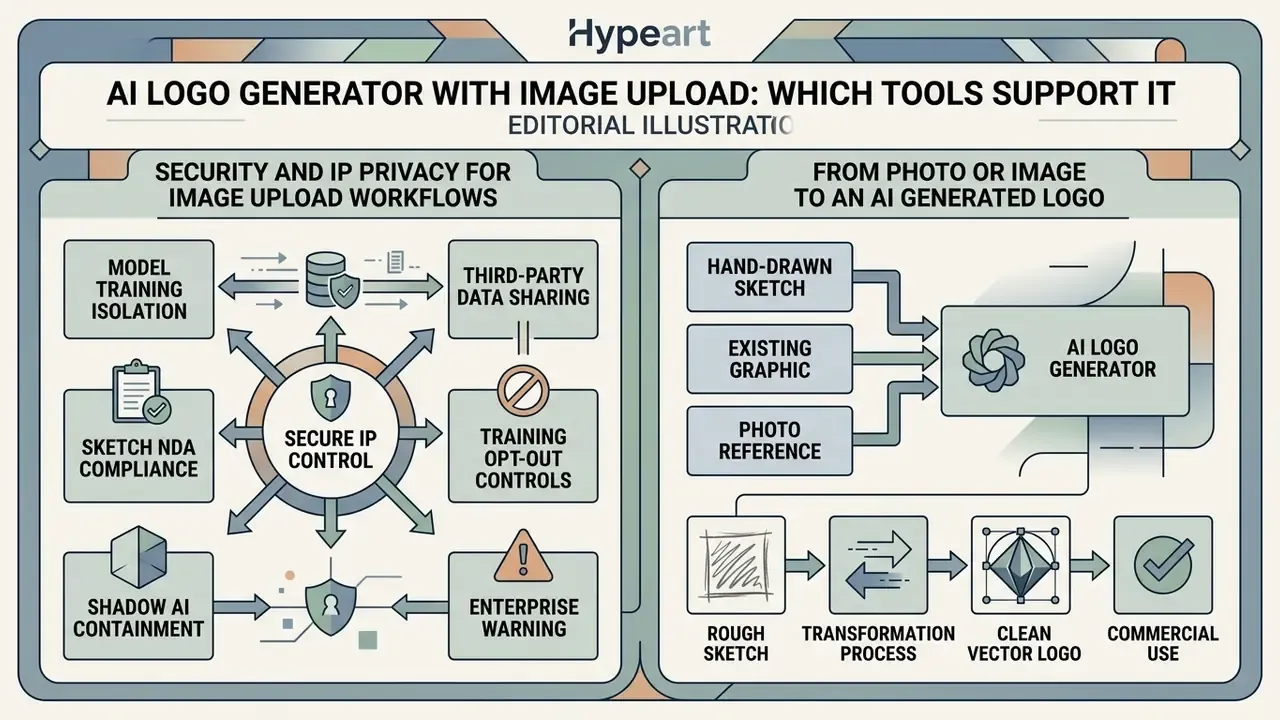
An ai logo generator with image upload lets teams transform hand-drawn sketches, existing graphics, or photo references into clean vector logos. This workflow gives precise control over composition, preserving visual structure while neural networks refine edges, typography, and line work.
An ai logo generator free upload image pipeline bridges manual brainstorming and automated vector creation. Several tools now advertise ai logo generator with image upload free access on entry tiers, though the free path usually stops at raster export. To see how AI models turn still graphics into other formats, read our guide on ai photo animation.
Diagram, image-to-vector pipeline (4 stages):
Raster input → Gaussian smoothing and binarization → Canny edge detection → Adaptive Douglas-Peucker contour simplification → SVG / EPS / DXF vector output
Security and IP Privacy for Image Upload Workflows
Uploading proprietary sketches, trade-secret product photos, or legacy brand assets into an online AI vision pipeline introduces real IP exposure. When using an ai logo maker with image upload, enterprise teams should audit the platform's data retention and model re-training policies:
- Model training isolationVerify that uploaded raster files are processed in zero-retention memory and are not ingested into public dataset pools for future model weights.
- Third-party data sharingPremium platforms explicitly contract that raw images are isolated solely for transient tensor transformation and deleted immediately after generation. Sologo AI, for example, states in its FAQ that «your uploaded photos are not shared with third parties or any other platforms. They are used solely for AI analysis».
- Sketch NDA complianceAvoid uploading non-disclosed patent drawings or unreleased product schematics to consumer-tier generators that lack explicit enterprise privacy guarantees.
- Training opt-out controlsPrefer vendors that expose an explicit opt-out toggle for model improvement, and record the setting in your AI governance log with the date and plan tier.
- Shadow AI containmentRestrict logo experimentation to approved tools. Uploading an unannounced product name or confidential mark to a public free tier is a disclosure event, not a design task.
From Photo or Image to an AI Generated Logo
Converting a photo or raster graphic into an ai logo image requires pre-processing pixel grids into clean vector paths, the same class of image-to-image AI transformation used in broader visual pipelines. Algorithms apply Gaussian smoothing, binarization, and edge detection (Canny boundary detection, typically) to isolate the core subject from background noise, then simplify boundary loops into line segments and Bézier curves before export to SVG, EPS, or DXF.
Tools supporting free ai logo generator upload image and free ai logo maker upload image workflows, Sologo AI and Logo Diffusion among them, consume uploaded raster files as conditioning inputs. The model simplifies complex detail into distinct shapes, producing a stylised unique logo suited to modern brand identity work. Recent research on layered image vectorization also reconstructs raster inputs as layer-wise vectors aligned to semantic macro-structures, which is why modern outputs separate icon, wordmark, and container shapes far more cleanly than legacy auto-tracers.
Turn a Drawing or Sketch Into a Logo
Sketch-to-logo technology uses neural networks (stroke-based models such as Sketch-RNN) to interpret hand-drawn line art. When a user feeds a rough sketch into an ai logo generator upload image free interface, the model analyses path topology and reconstructs it with geometric primitives and smooth Bézier curves. End-to-end frameworks combining a stroke encoder, stroke decoder, and stroke vectoriser now output vector line drawings directly, instead of inverting a raster trace.
«Designers use AI as a conversational partner, alternating text prompts and sketches to iteratively refine visual concepts.»
Schematic, neural sketch vectorization:
Human stroke input → Stroke encoding → Node reduction → Bézier path generation → Layered SVG
This route lets founders keep their exact layout preference while AI polishes geometry, balances proportion, and applies custom colored palettes. In our test run, a napkin sketch of a shield came back with cleaner symmetry than the original, though it needed one manual node pass on the lower point.
Prompt vs Image Upload: Which Starting Point to Choose
Choosing between a text prompt and an image upload depends on whether you prioritise conceptual exploration or structural control. Text prompts offer broad creative freedom, ideal when you start from scratch with only a business name or brand name. Image inputs preserve identity, geometry, layout, and existing brand elements, which is why documentation for the major models describes reference images as constraint-preserving refinement rather than free generation.
| Input Method | Primary Advantage | Trade-Off / Limitation | Best Use Case |
|---|---|---|---|
| Text prompt | High visual variety; fast ideation for logo ideas. | Less control over exact geometry and spatial alignment. | New brand identity projects with no prior visual assets. |
| Image / sketch upload | High structural fidelity; preserves the visual reference. | Constrains creative output to the reference shape. | Digitising sketches or modernising legacy brand symbols. |
| Hybrid (image plus text weighting) | Reference structure with steered style; adjustable image weight. | Requires parameter tuning to avoid literal copying. | Refreshing a legacy mark while shifting palette or era. |
«Toolchase and Vibedex both name Ideogram the best free AI for legible typography inside a logo, roughly 40 watermark-free generations per month.»
How to Create a Logo With AI for Free
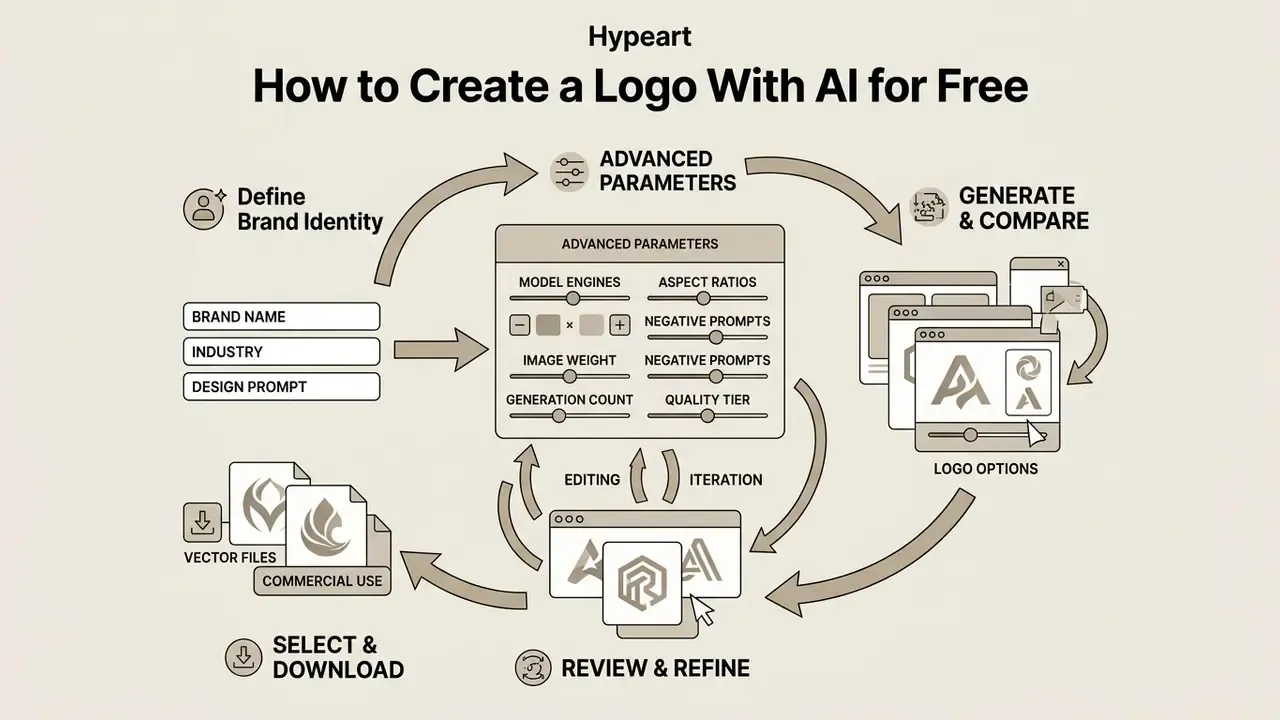
Creating a logo with AI without prior graphic design experience works best as a structured, iterative loop. A defined step-by-step workflow keeps generated concepts honest about legibility, scalability, and brand alignment before you export anything.
Enter Your Brand Name, Industry and Design Prompt
Start by entering your exact brand name and slogan in the generator interface. Specify your primary industry to anchor the model's visual vocabulary, so it picks relevant icon styles and font pairings. Prompt-engineering guidance is consistent on structure: put instructions first, separate instruction from context with clear delimiters, and state the desired output format explicitly.
When structuring a design prompt, lead with the core instruction and define exact visual descriptors:
- Weak prompt: "Make a cool finance logo."
- Strong prompt: "Minimalist geometric shield icon, deep navy blue and gold, modern sans-serif typography, clean vector style, transparent background."
Advanced Prompt Parameters: Model Engines, Aspect Ratios and Negative Prompts
When configuring text-to-logo prompts in advanced multi-model generators (Fotor or Logo Diffusion, for instance), specify technical canvas parameters alongside style descriptors:
- Model engine selection Pick vector-tuned diffusion engines (Logo Diffusion Native, Seedream) for clean geometric paths, or general image engines (Midjourney, Nano Banana) for illustrative, complex emblems.
- Aspect ratio control Enforce
--ar 1:1for standard square brand marks,--ar 16:9for wide website headers, or--ar 9:16for mobile social avatars. - Generation count and quality tier Request one to four candidates per run and select the high-quality rendering tier where available, since standard tiers often soften curve edges that later complicate vectorisation.
- Image weight When combining a reference upload with text, tune the image influence parameter (
--iw, for example) so the model respects structure without cloning the source. - Negative prompting Explicitly exclude raster artifacts by appending:
no realism, photorealistic, complex gradients, shadows, 3D render, fine lines.
Generate and Compare Multiple Logo Options
Never stop at the first output. Generate 20 to 30 variations to explore different compositions, layout balances, and font combinations.
«NeuraPulse recommends generating 20 to 30 variants before selecting: AI generators improve with iteration, and stylistic diversity surfaces stronger candidates.»
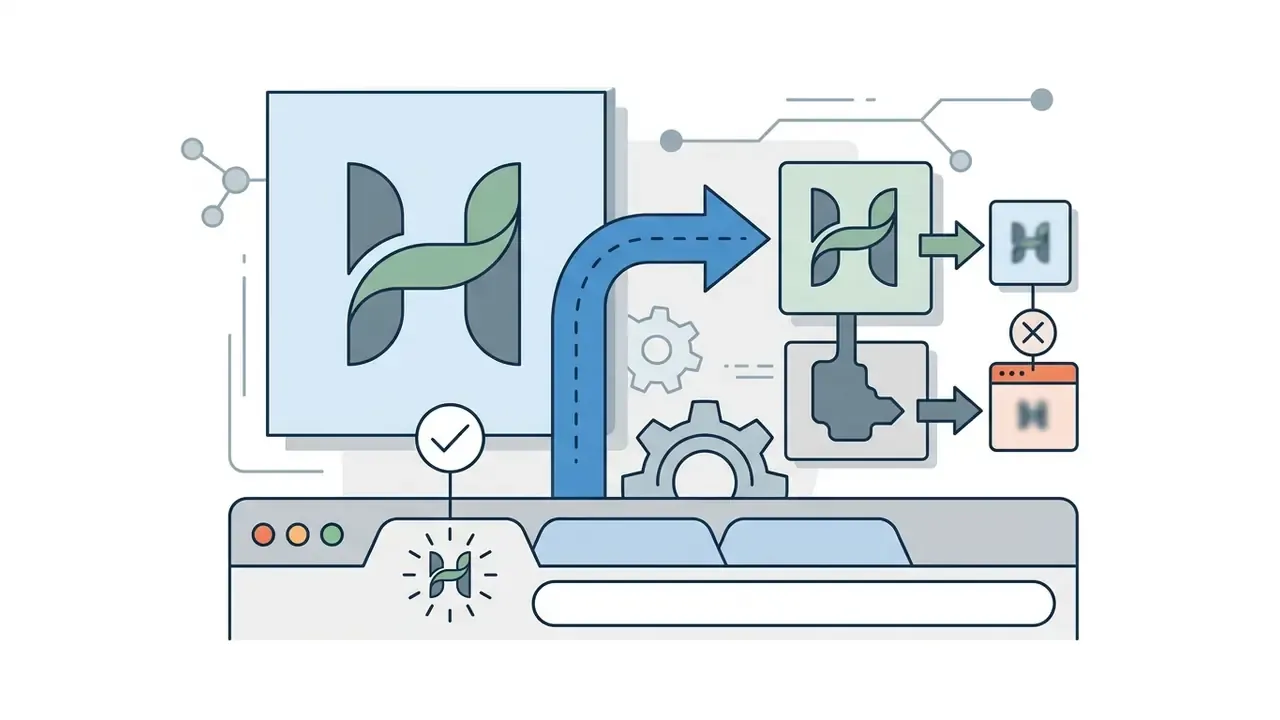
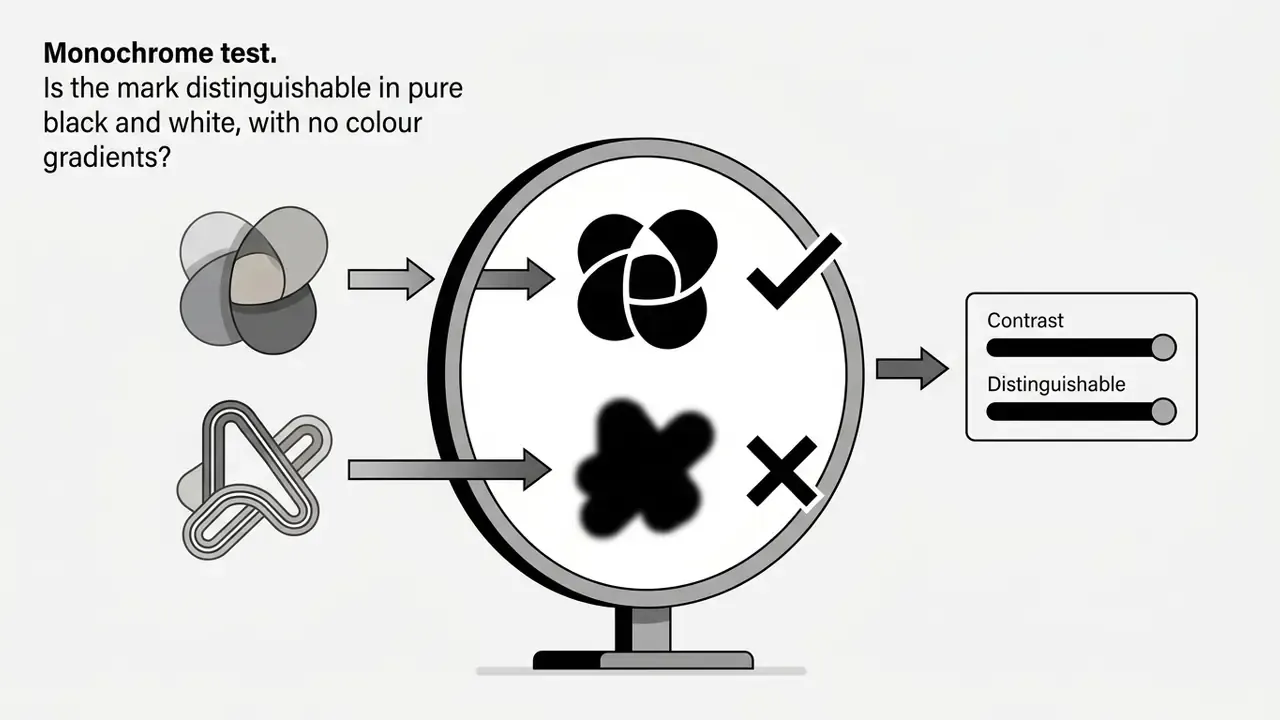
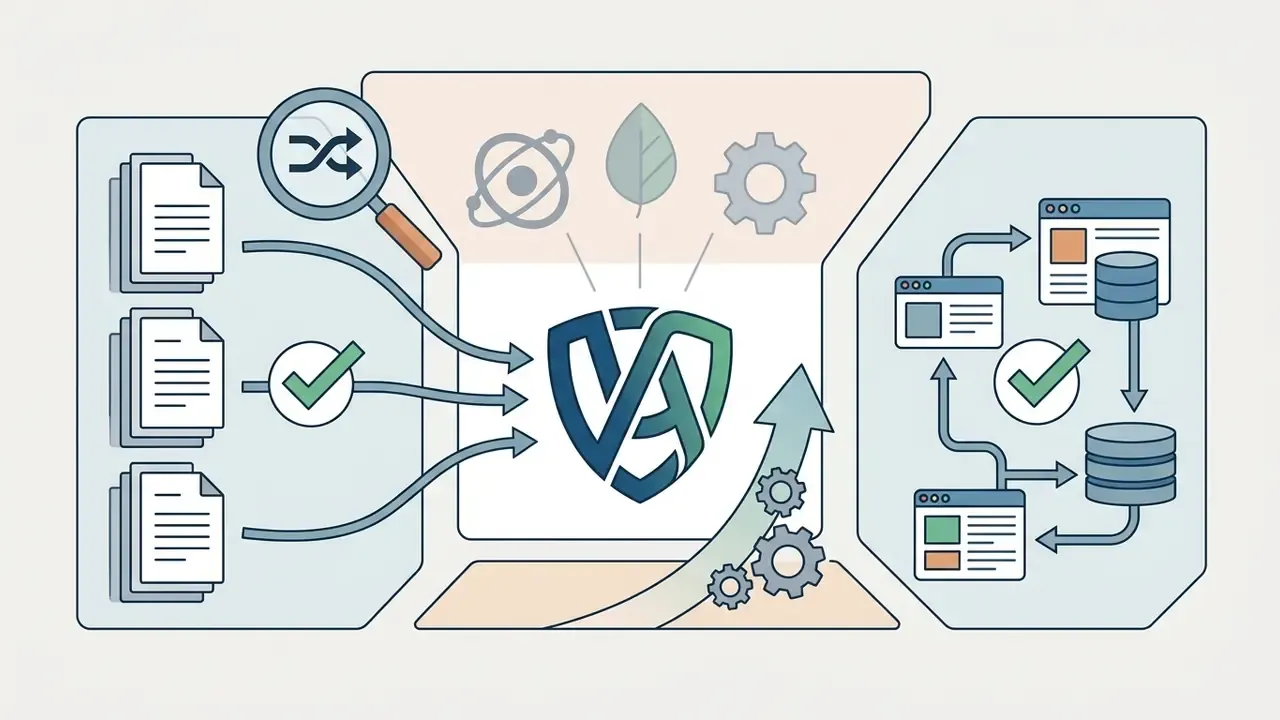
Then run three checks on the shortlist:
Customize Fonts, Colors and Layout Before Download
Once a candidate is selected, use the built-in design tools to fine tune composition. Make sure typography meets Web Content Accessibility Guidelines (WCAG 2.2), holding at least a 4.5:1 colour contrast ratio against the intended background.
«Text contrast of at least 4.5:1 is required for most text, and colour must not be the only visual means of conveying information.»
Adjust element spacing, verify icon proportions, and confirm sufficient clear space around text before export. Established brand manuals formalise this: clear space is often defined as a multiple of a height unit (2x the cap height, commonly), with minimum reproduction sizes around 5 mm in print or 20 px on screen, plus explicit prohibitions on distortion, gradients, or recolouring the mark.
Step-by-Step AI Logo Creation Workflow
- Step 1: Input brand parameters.Enter your business name, industry category, and a structured design prompt or reference image.
- Step 2: Generate concepts.Run 20 to 30 generative iterations in an ai logo generator free 2025 platform, fixing aspect ratio and negative prompts across runs.
- Step 3: Evaluate and select.Filter options by legibility, black-and-white contrast, and favicon scalability.
- Step 4: Refine in the editor.Adjust fonts, colour hex codes, and layout spacing, and execute background removal. Escalate to a designer-fix service if node geometry resists automated cleanup.
- Step 5: Export master assets.Download high-resolution PNG files for web use and vector SVG/EPS formats for print, then archive the prompt log for authorship documentation.
That last step sounds bureaucratic. It is also the cheapest legal insurance in the whole process.
Editing Features That Make an AI Logo Look Professional
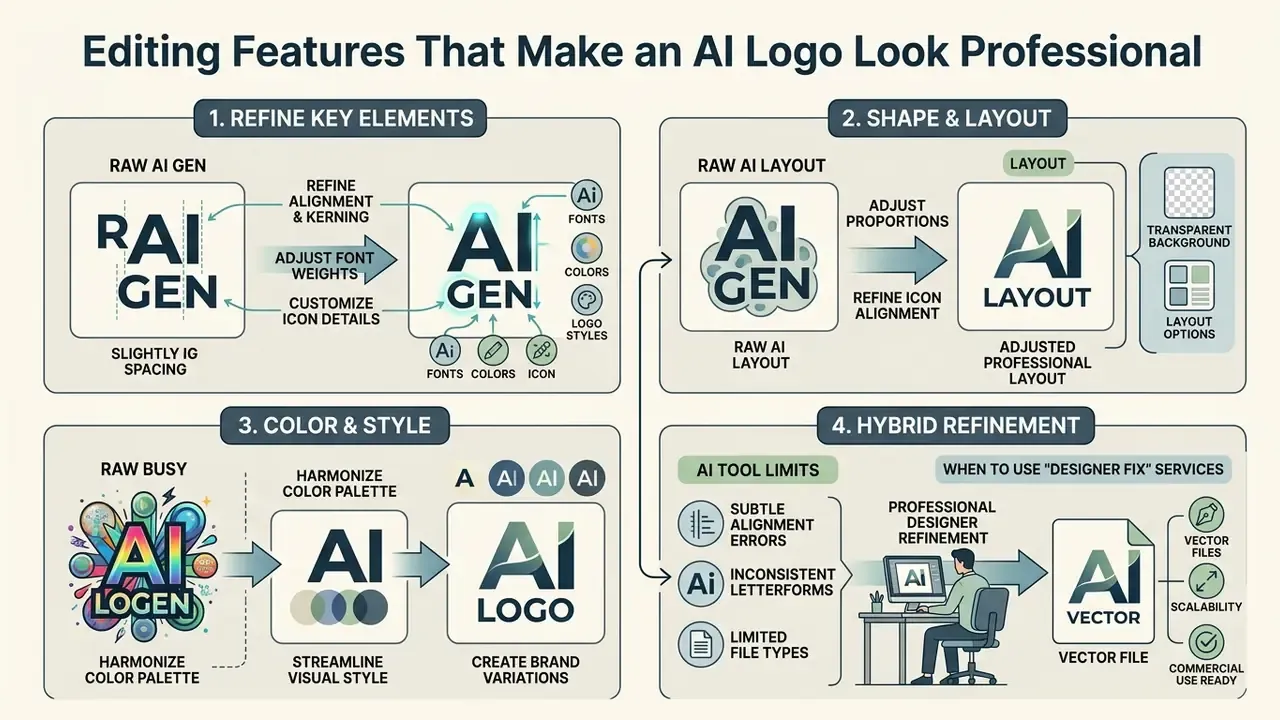
A raw AI generation often hides subtle alignment errors or inconsistent letterforms. Professional results depend on editing tools that allow granular adjustment of typography, spatial balance, and background parameters.
If you are producing social assets alongside your logo, explore tools for ai social media content creation to keep visual consistency across channels.
Fonts, Colors and Logo Styles for Brand Identity
Selecting approved typography locked to your brand identity is what signals visual authority. Modern sans-serif fonts read as technical efficiency; serif fonts carry heritage and security. Playful, decorative, and elegant logo styles each narrow your audience, so choose deliberately rather than by whichever candidate looked prettiest at 2 a.m.
Colour choices must follow exact RGB, CMYK, and Hex specifications. Avoid relying on colour alone to convey meaning, which keeps you compliant with accessibility standards across web and mobile interfaces. Icons that carry meaning should also clear a 3:1 contrast ratio against the adjacent background, per W3C guidance.
Transparent Background, Layout and Icon Refinement
Exporting a logo with a transparent background is mandatory for cross-channel deployment. A solid white bounding box blocks clean placement over dark website headers, video overlays, or printed collateral.
Professional editors provide manual node controls or layer isolation tools, overlapping heavily with the retouching capabilities found in modern AI photo editors. These let operators execute background removal, delete floating AI artifacts, adjust icon-to-text clear space, and keep rendering crisp across screen resolutions. One caveat: transparency changes contrast testing, so evaluate the rendered composite colour, not the source layer value.
Hybrid Refinement: When to Use "Designer Fix" Services
Browser-based node editors handle simple tweaks well. Complex typographic kerning, asymmetrical balance issues, or spatial overlap artifacts routinely exceed what automated fixing can do.
Leading platforms solve this through hybrid workflows, for example Logomakerr.AI's "Designer Fix", which invites users to «let our in-house designer help fine-tune your logo». Under this model, AI generates the core concept, and a human graphic designer executes final node cleanup, manual font kerning, and colour separation for print prepress. A hybrid service keeps the final vector path inside print-house tolerances while costing far less than a traditional agency retainer.
Hybrid escalation is usually justified when:
- letterforms show uneven sidebearings that survive automatic kerning;
- the icon contains stray nodes or overlapping fills that break at small sizes;
- print production requires spot-colour separation, trapping, or CMYK conversion;
- the mark needs derivative lockups (horizontal, stacked, icon-only) with consistent optical weight.
Documented human refinement carries a legal benefit too. It creates the record of human authorship that copyright filings require.
Download Formats, Vector Logos and Brand Kit Options
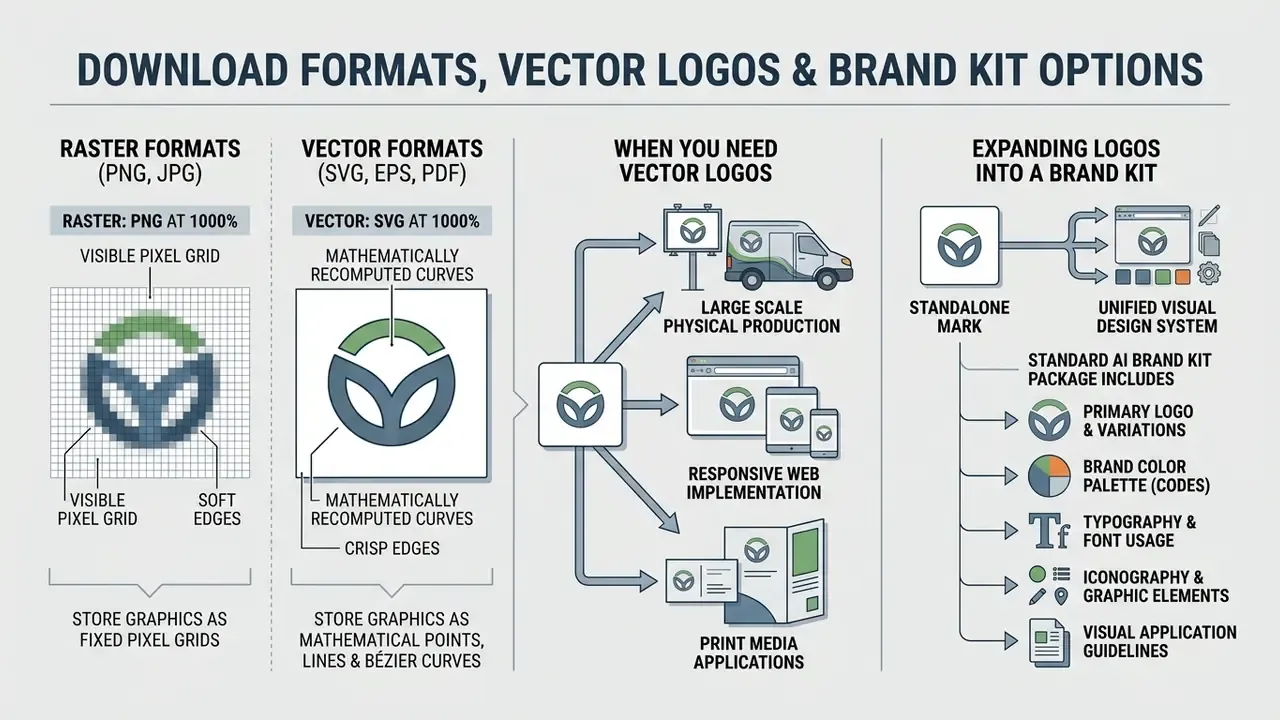
Understanding file formats prevents quality loss in physical production or responsive web implementation. Master logo packages should contain both raster derivatives and scalable vector formats.
Infographic, vector versus raster scaling:
PNG at 1000% → visible pixel grid, soft edges · SVG at 1000% → mathematically recomputed curves, identical sharpness
When You Need Vector Logos Instead of a Flat Image
Raster formats (PNG, JPG) store graphics as fixed pixel grids. Enlarge them for signage or apparel printing and the pixels stretch, producing visible blocking and blurred edges.
Vector formats (SVG, EPS, PDF) store graphics as mathematical points, lines, and Bézier curves.
«An SVG file is "made of math, not pixels": the logo can be stretched to billboard size without losing sharpness, while a PNG printed on a T-shirt shows pixels.»
SVG is the W3C-standardised, XML-based language for two-dimensional vector graphics, which is why its Bézier paths are recomputed at every display size with no theoretical resolution ceiling (W3C, «Scalable Vector Graphics (SVG) 2», https://www.w3.org/TR/SVG2/). That mathematical scalability is exactly what makes vector masters mandatory for print production and responsive web applications.
| Format | Category | Scalability | Transparency | Primary Application |
|---|---|---|---|---|
| PNG | Raster grid | Fixed (pixelated when enlarged) | Supported | Web display, social media profiles, email signatures. |
| JPG | Raster grid | Fixed (pixelated when enlarged) | Not supported | Basic digital previews, document drafts. |
| SVG | Vector path (W3C standard) | Infinite; Bézier curves recomputed mathematically at any size | Supported | Web graphics, responsive UI, master design files. |
| EPS / PDF | Vector container | Infinite; math-based paths, resolution-independent | Supported | High-resolution commercial printing, vector software editing. |
If your plan does not unlock SVG, high-quality raster enlargement is a partial fallback. Our comparison of AI image upscalers covers where interpolation holds up and where it collapses for line art.
Expanding a Logo Into a Brand Kit
A complete brand kit extends a standalone mark into a unified visual design system. Design.com, Canva, and Adobe Express automatically apply generated logos across standardised marketing templates. Adobe documents brand kits as collections of logos, colours, fonts, graphics, and templates; Design.com advertises 668,000+ brand-matched templates on its logo maker pages.
A standard AI brand kit package includes:
- Primary, horizontal, and icon-only logo variations.
- Vector master files (SVG/EPS) and transparent PNG exports.
- Brand guidelines detailing colour palettes (Hex/RGB/CMYK) and typographic rules.
- Print-ready templates for business cards, letterheads, and promotional flyers.
- Formatted profile graphics and banner templates for social media.
- A PDF or ZIP bundle documenting clear space, minimum sizes, permitted applications, and prohibited modifications.
For organisations planning custom content pipelines, developer specifications sit in our AI Media API Guides. You can also review alternative platform architectures and explore the hub of comparable vendors.
Commercial Use, Usage Rights and Trademark Considerations
Check Free Plan Terms Before Using a Logo for Business
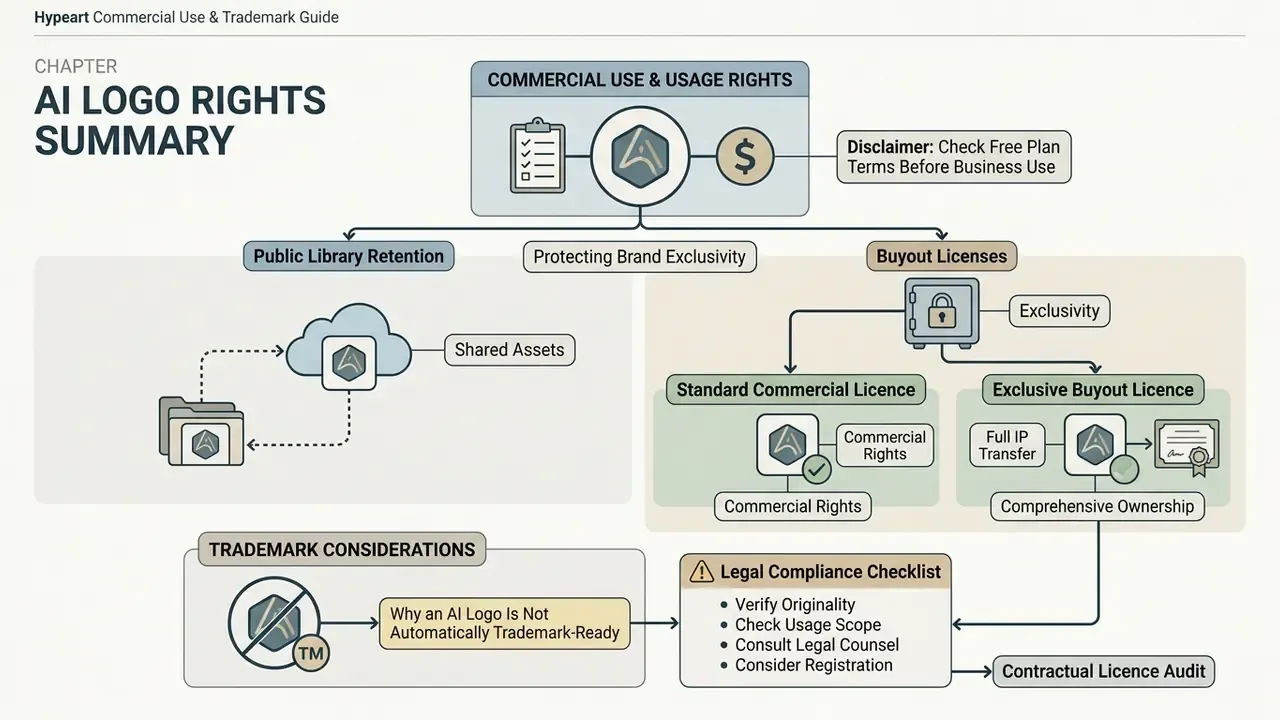
Not all free plans grant commercial exploitation rights, a pattern we document in detail for commercial usage rights for AI-generated images. Many platforms restrict free tier downloads to personal, non-commercial use and reserve commercial licences for paying subscribers. Examples observed across 2025 and 2026 include Logo Diffusion stating that its free plan carries «no commercial rights», LOGO.com conditioning free-plan commercial use on a prior paid association, and Sologo gating downloads and commercial deployment behind an active plan.
Under US Copyright Office guidance, reiterated in 2025 rulings, purely machine-generated outputs lacking meaningful human authorship cannot be copyrighted. The Office's January 2025 report on Copyright and Artificial Intelligence confirms that protection extends only to outputs in which a human determined sufficient expressive elements, and that prompts alone do not establish authorship.
«Questions of authorship, originality and infringement arising from AI training remain unresolved under existing law.»
So a service contract may permit commercial usage without granting exclusive ownership of the underlying image file. Document every manual modification, prompt revision, and editorial decision. That record is what supports a copyright claim covering your human contribution.
Protecting Brand Exclusivity: Public Library Retention vs Buyout Licenses
Because generative engines and template-hybrid platforms draw on finite vector component libraries, another business can generate a visually similar mark. To manage that risk, evaluate platforms by licensing tier:
- Standard commercial licence Grants non-exclusive rights to use the generated asset in commercial operations. The base icon or generative seed stays accessible in the platform's global index for other users.
- Exclusive buyout licence (full IP transfer) Offered by enterprise platforms such as Design.com, this option permanently purges the generated mark and its underlying vector primitives from the platform's public database, preventing identical re-generations by competitors. Design.com describes this as extended licensing that removes a logo icon from the library «helping ensure exclusivity, originality, and brand protection».
| Licence Tier | Exclusivity | Library Retention | Typical Buyer |
|---|---|---|---|
| Free / preview | None | Icon stays public; often non-commercial | Concept testing, internal mood boards |
| Standard commercial | Non-exclusive, worldwide | Icon stays in the public index | Small business, early-stage startup |
| Exclusive / buyout | Exclusive to purchaser | Mark and primitives removed from the public library | Funded brands, trademark filings, franchises |
LOGO.com similarly separates its standard licence from an exclusive licence, so confirm which tier your download actually carries before filing a trademark application.
Why an AI Logo Is Not Automatically Trademark-Ready
Trademark protection differs from copyright law. A trademark works as a source identifier in commerce, meaning an AI logo can be registered if it uniquely distinguishes your goods or services in the marketplace.
Registration stalls, though, when the logo conflicts with existing registered marks or lacks distinctiveness. And generative networks can occasionally reproduce memorised training data, which creates hidden infringement risk that no licence clause removes.
«We extract over a thousand training examples from state-of-the-art diffusion models, including photographs of individual people and trademarked company logos.»
«Providers of generative AI systems must mark synthetic content in a machine-readable format, and deployers must disclose deepfakes.»
Editorial Transparency and Vendor Claim Verification
Vendor marketing pages are primary sources for feature availability. They are not neutral sources. Our verification policy for this benchmark:
FAQ: Frequently Asked Questions About Free AI Logo Makers
Can AI help create professional logo designs?
Yes. AI tools accelerate initial ideation, layout generation, and colour pairing. Reaching a production-ready result still needs human refinement, vectorisation (SVG), contrast adjustment, and legal conflict clearance.
Can I download a vector SVG logo for free?
Genuinely free SVG exports are rare among mainstream logo tools. Zarla and Namecheap provide free vector downloads with commercial rights, while Canva, Adobe Express, and Design.com typically reserve SVG for paid tiers starting around $3 to $15 per month. Logo Diffusion offers native SVG output but places commercial rights on paid plans.
Can I trademark an AI-generated logo in the US?
Yes, provided the mark functions as a source identifier in commerce and does not create a likelihood of confusion with existing registered trademarks. Pure AI artwork without significant human authorship cannot be copyrighted under current US copyright guidance, which is a separate question from trademark eligibility.
Which AI logo generators support image and sketch uploads?
Logo Diffusion, Sologo AI, Fotor, Kapwing, and Adobe Express support reference image or sketch uploads. These systems convert raster lines into vector geometry, so hand-drawn concepts become structured logo marks. Free access varies by tier, and a free ai logo generator with image upload usually caps output at raster export.
Are my uploaded sketches used to train the AI model?
It depends entirely on the vendor. Consumer free tiers often reserve broad data rights, while some platforms, Sologo AI among them, state that uploads are used solely for generating your logo and are not shared with third parties. Before uploading confidential material, confirm the retention window and whether a training opt-out exists.
Can a competitor generate the same logo as mine?
On non-exclusive standard licences, yes. The underlying icon or generative seed usually stays in the platform's public library. An exclusive buyout licence removes that mark and its vector primitives from the shared index, which is the practical route to visual exclusivity.
What if the AI logo has flawed kerning or messy vector nodes?
Fix it in the platform's node editor first. When spacing, symmetry, or print separation problems persist, use a hybrid "designer fix" service where a human designer finishes the file. That also documents the human authorship copyright filings require.
Which free AI tool handles text inside a logo best?
Ideogram ranks highest for legible in-image typography on free tiers, with roughly 40 watermark-free generations per month. For wordmark-driven brands it is often the fastest route to readable lettering without manual retyping.
How many logo concepts should I generate before choosing?
Between 20 and 30 is the working range we and several independent reviewers landed on. Fewer than ten and you are usually picking the least bad option; beyond forty, returns flatten and decision fatigue sets in. Shortlist five, test them at favicon size, then commit. Navigation hub: For comprehensive tool comparisons, technical guides, and commercial usage frameworks, see the overview in our main evaluation index.