A free AI image to video generator online turns static photos, digital illustrations, or product shots into short moving clips using temporal diffusion and transformer models. These browser platforms let creators, marketers, and financial institutions evaluating generative media animate images, steer camera motion, compare model architectures, read rate limits, and download finished files without installing anything.
Why should a risk or compliance leader care about a consumer video toy? Because someone in marketing is already uploading brand assets into one.
Executive Summary
- What these tools do: a browser front end wraps a video diffusion backbone; your uploaded image acts as the geometric and semantic anchor, and the text prompt controls only motion, camera path, and style.
- What "free" really means: free tiers are quota-based (one-time signup credits, daily refresh tokens, or weekly minutes), typically capped at 480p to 720p, 3 to 5 seconds per clip, shared render queues, and a hard-coded vendor watermark.
- What breaks quality: blurred or heavily compressed source images, conflicting multi-axis camera commands, and 2D or illustrated inputs pushed through photorealistic-by-default models (style drift).
- Advanced control worth knowing: dual-frame conditioning (first frame plus last frame) constrains both ends of the clip, which matters for product transformations and scripted transitions.
- Legal exposure: free-tier Terms of Service frequently restrict commercial publication, and the U.S. Copyright Office holds that content lacking sufficient human authorship is not registrable. Verify licensing before running paid media.
- Governance exposure: uploads may be retained on third-party infrastructure for safety review or retraining. Treat public generators as an unsanctioned-SaaS (Shadow AI) surface and apply the assessment checklist below before employees animate customer imagery or unreleased product assets.
- Cost decision point: move to a paid plan or an API when you need unwatermarked 1080p or 4K, batch throughput, priority GPU allocation, or explicit commercial rights.
Key Terms Before You Start
Five words carry most of the confusion in this category. Pinning them down early saves credits and, occasionally, a legal review cycle.
- Image-to-video (I2V) generation conditioned on an uploaded still. The photo fixes geometry; the prompt handles movement. Every "ai image to video converter online" belongs here.
- Dual-frame conditioning you supply a start and an end still, and the model interpolates between them. Sometimes labelled first and last frame control.
- Style drift the model pulls an illustration toward photographic texture because photorealistic video dominates its training data. The classic failure when you try to animate image to video online free with vector artwork.
- Motion strength a scalar that sets displacement per frame. High values invent more new pixels, which is where artifacts breed.
- Shadow AI employee use of an unsanctioned tool, in this case any free public site that will convert image to video ai online free with no contract behind it.
One note on vocabulary. Vendors mix "ai photo to video converter free", "ai picture into video free", and "ai photo to video online tool" in their marketing copy, yet the underlying pipeline is identical. Judge the model and the terms, not the label.
What a Free AI Image to Video Generator Online Does
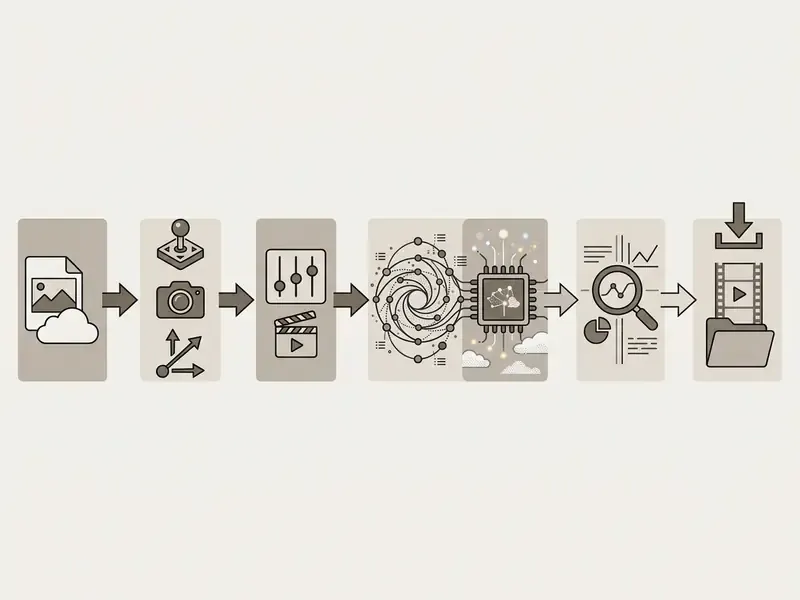
A free ai image to video generator online operates as a browser interface built over a video diffusion backbone, converting static visual anchors into short, temporally coherent clips. Rather than generating scenes entirely from text descriptions, an ai image to video online free system uses an uploaded ai image as its structural and semantic blueprint, then adds calculated motion and animation style across sequential frames.
From One Image to AI-Generated Motion
An image to video system synthesizes movement from a single static input by encoding the source image into a latent space and applying temporal attention modules to generate correlated subsequent frames. Research in conditional video generation shows that architectures like TI2V-Zero (CVPR 2024) and ConsistI2V maintain spatial layout by cross-attending to the reference frame while predicting optical flow and temporal progression (TI2V-Zero: Zero-Shot Image-to-Video Generation, CVPR 2024).
When an operator uploads a video image into a video generator, the network segments foreground subjects from the background, inpaints potential occlusions, and extrapolates spatial dynamics over time. Published animation pipelines follow the same three-stage logic: segment the subject, reconstruct or inpaint the background, then animate the foreground using diffusion, optical-flow, or mesh-based motion, while occlusion masks suppress colour bleeding in newly revealed regions. Rather than morphing flat pixels, modern video models lean on learned physical priors so a static photo becomes an ai-generated set of dynamic clips without losing structural identity or flickering.
Image-to-Video vs. Text-to-Video Generation
The difference comes down to one thing: the presence of a visual anchor. Image-to-video uses an existing ai image as geometric scaffolding, whereas text-to-video synthesizes composition and movement purely from a written prompt. If you are mapping the wider category first, the reference overview of text-to-video AI explains how prompt-only pipelines hand scene construction to language tokens.
"I2V systems are evaluated not only on general video quality, but on how faithfully they preserve the input image and its associated prompt."
In text-to-video synthesis, the video tool must build lighting, object positioning, lens perspective, and background environment simultaneously from tokens. Conversely, when you convert image assets through an image-to-video pipeline, the uploaded file fixes subject identity and scene geometry. The text prompt is then restricted to camera trajectories (pan, tilt, zoom) and temporal action, which is exactly why enterprise asset pipelines prefer it. Teams comparing categories side by side can review the consolidated breakdown of image-to-video AI tools before selecting a vendor.
A third pattern deserves its own label: reference-to-video. Single-image conditioning treats the uploaded photo as the literal first frame, so output stays pixel-faithful to that exact file and nothing beyond it. Reference-to-video ingests prior clips plus locked character, product, or location references, so identity, not pixels, persists across many shots. Use single-image generation for one self-contained clip from an approved photo. Use reference-to-video when a face, package, or set must survive an entire ad or scene chain.
How to Convert an Image to Video AI Online for Free
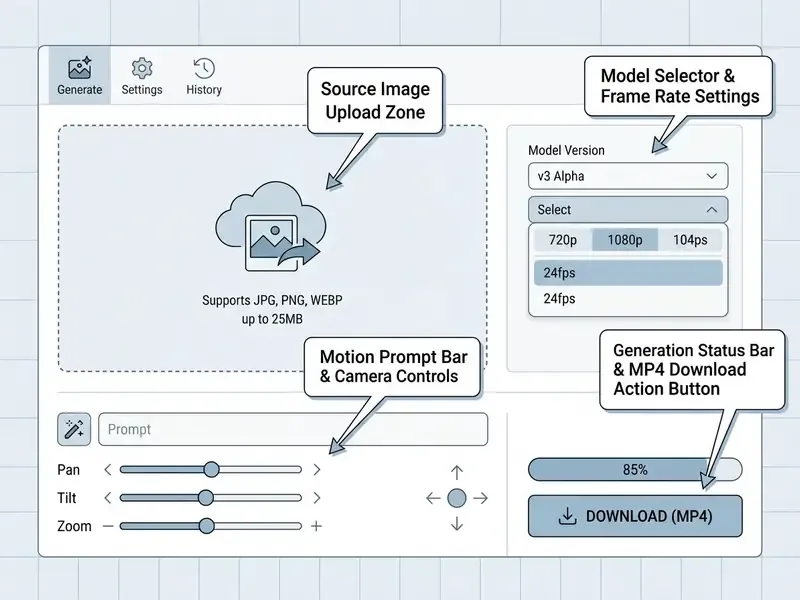
To convert image to video ai online free, an operator follows a fairly rigid web workflow: upload a source file, define camera and subject motion, select output settings, execute the synthesis pass. Most browser engines remove the need for timeline editing and finish in 30 to 120 seconds.
Upload an Image and Choose the Video Format
Start by selecting a high-resolution source photo or graphic, then pick an aspect ratio that matches the deployment destination. Online platforms accept JPG, PNG, and WEBP, with systems like Adobe Express handling uploads up to 65 megapixels (Adobe Express Specifications, 2026). Typical browser generators cap a single upload between 10 MB and 25 MB.
Choosing the target ratio before generation avoids artificial pillarboxing or letterboxing later. YouTube and broadcast workflows expect 16:9 widescreen (1280×720 minimum, 1920×1080 preferred), while TikTok and Instagram Reels want vertical 9:16 framing. A source image that already matches the target ratio yields better edge fidelity during latent temporal expansion, because the model never has to hallucinate content beyond the original frame boundary. Small step, large effect.
Describe Motion with a Prompt and Camera Direction
To direct the transformation on an ai convert image to video free online service, enter a concise motion prompt and adjust the virtual camera controls. Effective prompts state subject action, environmental change, and camera path, in that order.
- Camera controls horizontal movement (pan), vertical pivot (tilt), or depth change (push-in / zoom). In cinematographic terms, a pan is a horizontal swivel from a fixed point and a tilt is a vertical pivot from a fixed point. Neither moves the camera through space.
- Prompt structure combine camera vector, subject dynamics, and lighting stability, for example "Slow cinematic push-in on the central subject, subtle wind movement in background trees, soft ambient lighting."
- Motion granularity avoid stacking rapid zoom, pan, and tilt in one prompt. Multi-axis commands frequently induce distortion, and vendor prompting guidance recommends one primary camera movement per clip, executed slowly.
Advanced Control: First and Last Frame Interpolation
Generate, Review, and Download the Video
After the motion parameters are set, clicking generate submits the latent task to the server queue. On completion the system renders a web preview for evaluation before export; in Adobe Firefly, finished clips land in a history panel and download from there.
When inspecting generated clips, check temporal consistency first: floating artifacts, facial warping, background jitter, identity drift on hands and eyes. Research pipelines score those failures with objective metrics such as CLIP-SCORE, FVD, SSIM, LPIPS, and PSNR, and the commercial logic is the same. Pick the take with the fewest structural violations, not the flashiest motion. If the quality clears your production bar, export the output. Most ai convert photo to video free tools offer a direct MP4 download button, saving the file locally for deployment or post-processing.
How to Get Better AI Image-to-Video Results
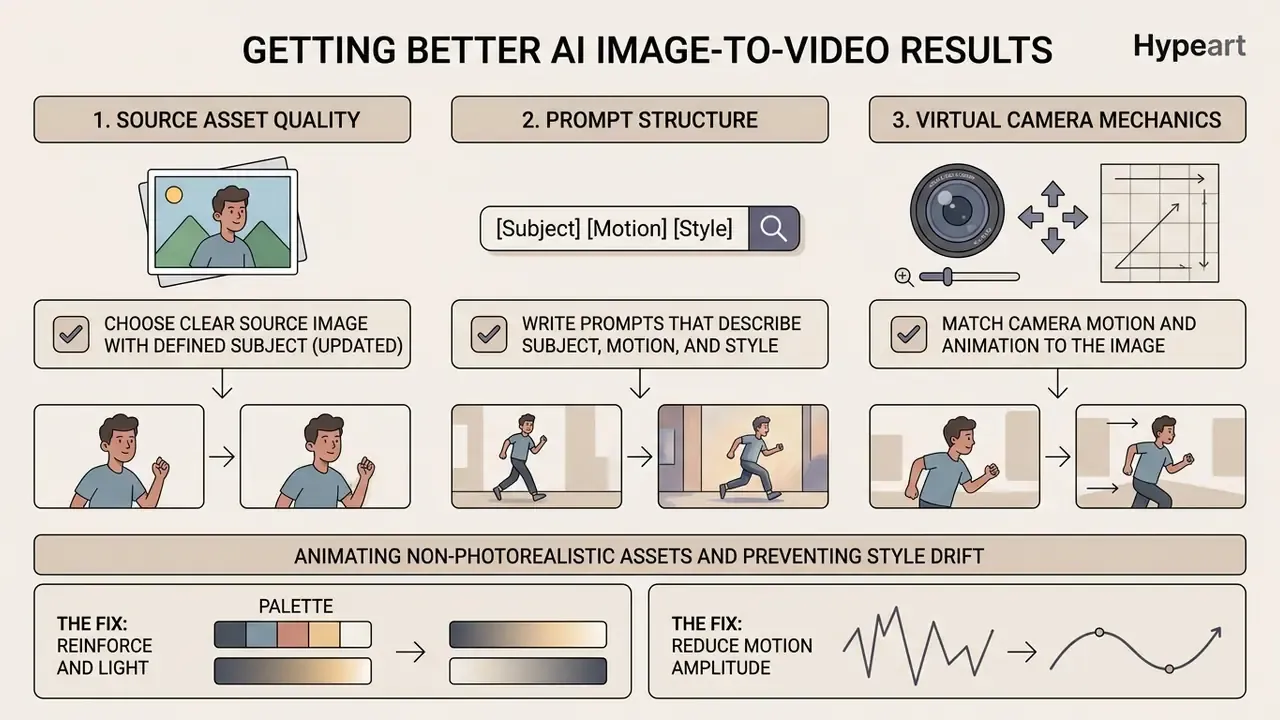
Getting professional results from an ai photo to video free online tool comes down to three levers: source asset quality, prompt structure, and virtual camera mechanics. Unclear inputs and conflicting motion prompts remain the leading causes of visual artifacts, by a wide margin.
Choose a Clear Source Image with a Defined Subject
Video generation quality tracks the structural clarity of the uploaded file. Low-resolution or heavily compressed images lack high-frequency edge detail, so the model hallucinates missing pixel data and you get blurring or edge wobble during animation.
Ideal source photos show one clearly isolated subject, a human face, a standalone product, or a stark architectural structure, against a well-defined background. When animating facial features or intricate brand items, crisp lighting and sharp edge contrast stop the temporal attention mechanism from bleeding subject features into surrounding pixels. A practical screening rule we apply before spending credits: reject any frame with motion blur, defocus blur, or a subject occupying less than roughly 20% of the frame. Edge regions are precisely what animation amplifies into ghosting and pulsing.
Write Prompts That Describe Subject, Motion, and Style
Structured prompts guide temporal diffusion models by separating subject behaviour from stylistic context. Peer-reviewed motion-control research supports the same split: describe how much and what kind of movement occurs, independently of the scene's fixed appearance.
[Subject & Initial Pose] + [Primary Subject Action] + [Camera Trajectory & Speed] + [Lighting & Style Modifiers]
Example: "A sleek ceramic coffee mug on a wooden table, steam rising gently in a
vertical spiral, slow cinematic push-in shot, soft morning sunlight, 35mm film grain."
Production teams often use the shorthand subject motion + camera movement + scene change + style. So instead of typing "make this picture move," a usable prompt reads: "Medium shot, steady pan right, the model turns head slowly toward camera, soft natural daylight, cinematic 35mm aesthetic." Descriptive language keeps the system from inventing arbitrary motion vectors. And do not re-describe what the photo already shows. That token budget belongs to movement and lens language.
Match Camera Motion and Animation to the Image
Virtual camera paths have to respect the geometry and depth cues already present in the still. Push an aggressive 3D orbit onto a flat 2D graphic and you get perspective warping plus texture tearing.
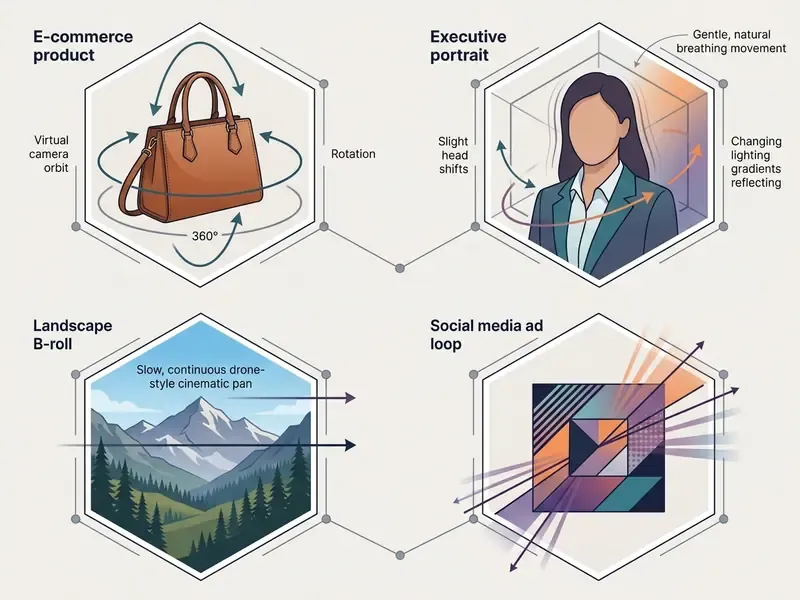
For wide landscape photos or establishing shots, slow horizontal pans and subtle drone-like tilts reveal scene elements naturally. For tight portraits or product shots, gentle handheld drift or a slow push-in adds engagement without distorting facial proportions. When the subject or scene extends past the frame, a zoom-out or wide-angle setup reads better than a fast pan. Operators weighing engines by control depth can consult the roundup of the best AI video generators and the model-specific Google Veo implementation guide.
Animating Non-Photorealistic Assets and Preventing Style Drift
Most commercial video diffusion models are pre-trained mainly on photorealistic footage. Feed one a 2D illustration, vector artwork, an anime cel, or a pencil sketch, and it will try to render photographic texture and lighting. The result looks like neither your original style nor a clean photograph. That failure mode is style drift, and it is the single most common complaint from designers who animate brand illustrations.
- The fix
- reinforce stylistic constraints inside the text prompt rather than trusting the image alone. Include exact descriptors for style, texture, and medium, for example "2D hand-drawn animation style, cel-shaded, flat watercolour texture, maintain original line-art geometry, no 3D photorealism."
- Reinforce palette and light
- describe colour palette, ink weight, and lighting behaviour of the source artwork. Illustrated references carry no photographic lighting cues, so the model invents them unless told otherwise.
- Reduce motion amplitude
- lower the motion strength setting. Large displacement forces the model to synthesize new texture in newly revealed regions, and that is exactly where photorealism leaks back in.
- Real photographs rarely drift
- , because the model is already in its native domain. Troubleshoot style first for illustrations, last for photos.
Verification Note on Feature Claims
Available video models, maximum duration, export resolution, audio support, watermark policy, and generation limits vary by tool and by tier, and they change without notice. Every figure in the tables below reflects publicly reported behaviour at the time of review, not a contractual guarantee. Confirm each parameter on the vendor's own pricing and documentation pages on the day you plan production, and record what you saw. That screenshot is cheap insurance during an audit.
Free Plan Limits, Pricing, and What "Free" Usually Includes
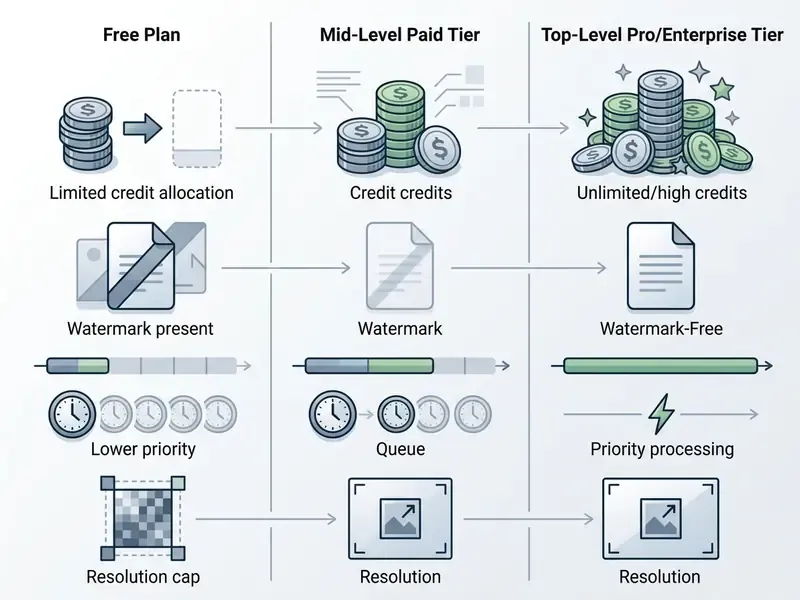
Knowing the operational boundaries of an ai image to video generator online free service prevents mid-project surprises. Rendering high-resolution temporal diffusion sequences burns real GPU time, so providers ration free access through credit caps, resolution ceilings, and watermarks.
| Parameter / Feature | Free Tier Default | Paid / Pro Subscription |
|---|---|---|
| Generation Quota | 80 to 125 one-time credits, or 3 to 5 daily runs | 1,000+ recurring monthly credits or unlimited queues |
| Export Resolution | 480p to 720p HD | 1080p Full HD to 4K upscaled |
| Clip Duration | 3 to 5 seconds per clip | 10 to 15+ seconds with clip extension |
| Watermark Status | Embedded vendor watermark | Watermark removed |
| Processing Priority | Shared standard queue (longer waits) | High-priority fast-track GPU allocation |
| Commercial Rights | Personal or non-commercial evaluation only | Full commercial use, indemnity options available |
Credits, Generation Limits, and Queue Access
"Large video diffusion models such as CogVideoX require substantial GPU resources to generate 10-second clips at 768×1360 pixels."
That compute profile is the whole reason free quotas exist. When traffic spikes, free requests land in the standard queue, where a 5-second clip can take anywhere from 60 seconds to more than 10 minutes; peak-load measurements report generation time inflating by a factor of two to three. Reviewing allocation models in the AI Media Pricing Guides lets teams budget capacity before a larger creative project starts, and the category comparison of free AI video generators maps quota mechanics against export limits side by side.
Model-Specific Generation Ceilings and Technical Constraints
Different temporal diffusion engines impose distinct limits on clip length, native frame rate, and control depth. Pick the engine before writing the prompt. It saves credits on shots the model physically cannot hold.
| AI Video Model | Max Single Clip Duration | Native FPS | Key Strength / Specialty | Best Control Option |
|---|---|---|---|---|
| Runway Gen-3 / Gen-4 | 5 to 10 seconds | 24 to 30 fps | High photorealism and prompt adherence | Multi-motion brush and camera control |
| Kling AI (1.5 / 3.0) | 5 to 15 seconds (mode-dependent) | 30 fps | Exceptional physical motion and mechanics | Motion brush, start/end frames |
| Google Veo / Veo 3.1 | ~8 seconds | 24 fps | Strong semantic understanding, spatial physics | Natural-language motion prompts |
| Seedance 2.0 / 2.5 | 4 to 15 seconds | 24 to 60 fps | Variable-length steps, high-frame-rate rendering | Dual-frame interpolation |
| Luma Ray (3.x) | 4 / 8 / 12 seconds | 24 fps | Fast iteration, 540p to 1080p native plus 4K upscale | Keyframe and end-frame conditioning |
| Pika | ~5 seconds on free quota | 24 fps | Low-cost social iteration | Prompt-level motion strength |
Practical consequence: anything longer than roughly 15 seconds is not one generation. Long-form output gets stitched from multiple clips that each respect the engine's ceiling, which is why continuity controls (locked references, matched end frames) matter more than headline duration numbers. Audio is engine-dependent too. Several image-to-video backbones export silent MP4 files, and sound arrives later in the edit. If a voice track is part of the deliverable, plan it with a dedicated AI voice generator instead of expecting native audio.
Watermarks, Resolution, Duration, and Export Options
Free exports are almost universally constrained on resolution and length. Standard free output runs 480p to 720p, with clips capped at 3 to 5 seconds; some no-signup tools publish this openly, offering three 3-second generations per day at 480p with a watermark. Platform-level examples, including credit mechanics and export ceilings, are catalogued in our reference entry on PixVerse AI.
Free plans also embed a permanent vendor watermark, usually in a corner of the exported MP4. Mobile and web deliverables are typically encoded H.264 in an MP4 container. For teams that need pristine presentation quality, compression trade-offs are covered in our guide on video compressor performance, though removing a hardcoded watermark legally still means upgrading the plan. Anyone marketing a "convert image to video ai free website" with unwatermarked commercial exports and no account should be read sceptically.
When a Paid Plan May Be Needed
A paid plan becomes necessary when production demand exceeds free quota ceilings or requires unwatermarked, high-resolution assets. Marketing teams building commercial ads, e-commerce managers producing high-volume product showcases, and enterprise creators all need un-watermarked 1080p or 4k exports backed by explicit licensing terms. Paid tiers also unlock collaboration seats, API access, and integration hooks that free tiers withhold by design.
Commercial Use, Privacy, and Rights for AI-Generated Videos
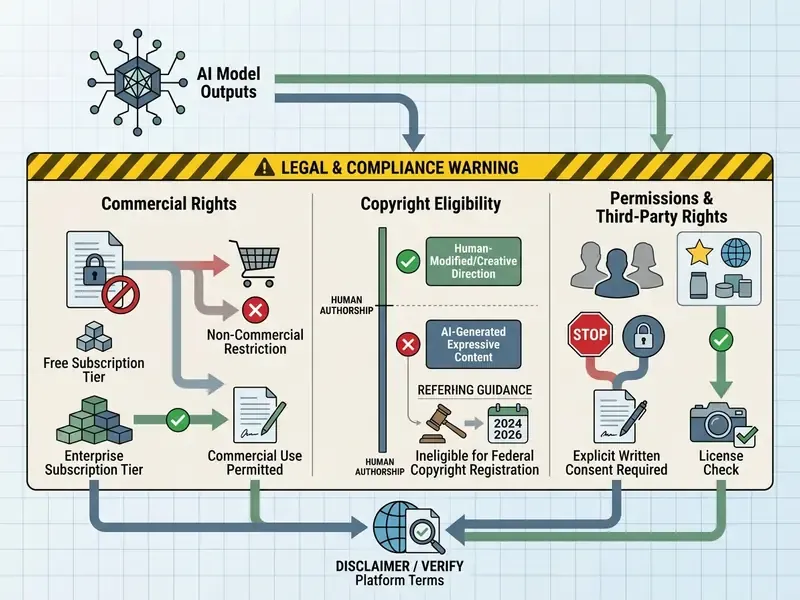
Deploying generated clips into commercial campaigns, paid advertising, or public channels raises legal and privacy questions that the interface never mentions. Operating an ai tool convert photo to video free application does not by itself grant commercial exploitation rights over the output.
Check Commercial-Use Terms Before Publishing Ads or Product Videos
Platform Terms of Service decide whether clips created on a free tier can appear in monetized contexts. Runway, for instance, states that content created on the platform is yours to use without non-commercial restrictions, while many providers explicitly limit free-tier outputs to personal evaluation (Runway Terms of Service, 2026). Any vendor claim that "all videos, free or paid, are licensed for commercial use" should be checked against the terms document itself, not the marketing page. Tier-specific carve-outs are common.
"AI-generated material is not copyrightable where the AI determines the expressive elements; protection extends only to human-authored contributions, which applicants must identify."
The same body's 2026 report additionally flags voice and likeness as separately protected interests, which means an unauthorized digital replica can trigger claims independent of copyright status. Before launching paid campaigns, publishing product cards, or distributing sponsored social content, review the licensing agreement and secure written consent for identifiable people. Comparable rights analysis for adjacent tooling sits in our breakdown of the commercial use of AI image generators, with wider commercial-rights and copyrightability analysis indexed in the AI Media Commercial-Use Hub and tracked through AI Litigation and Case Timelines.
Review Privacy Rules for Uploaded Photos and Generated Clips
Uploading proprietary brand images, confidential prototypes, or personal headshots into an online generator exposes those assets to vendor retention policy. Standard privacy policies indicate that uploads may be stored on third-party servers for safety filtering, manual audit, or model retraining unless an explicit opt-out is configured (OpenAI Privacy Policy, 2026).
Retention windows vary widely and should be read literally rather than assumed:
- Some services delete source uploads within 24 hours while keeping the generated video in the account until manual deletion.
- Some delete uploads immediately after generation completes.
- Others remove deleted personal data within 30 days, with longer retention permitted on security, safety, or legal grounds.
European data-protection authorities have issued a joint position warning that AI-generated realistic imagery of identifiable individuals creates distinct privacy risks and requires misuse safeguards plus removal mechanisms. Organizations handling customer imagery or regulated financial data should verify whether uploads are deleted immediately post-generation or retained, and whether the vendor offers a contractual no-training commitment. When assessing tools for sensitive internal tasks, comparing security profiles across our AI Media Comparison Matrices helps keep the choice inside corporate data governance limits. Biometric-adjacent workflows attract stricter scrutiny, portrait animation especially; the considerations discussed in our guide to AI headshot generators apply directly to animated portraits.
Shadow AI Assessment: Evaluating Free Online Tools for Institutional Risk
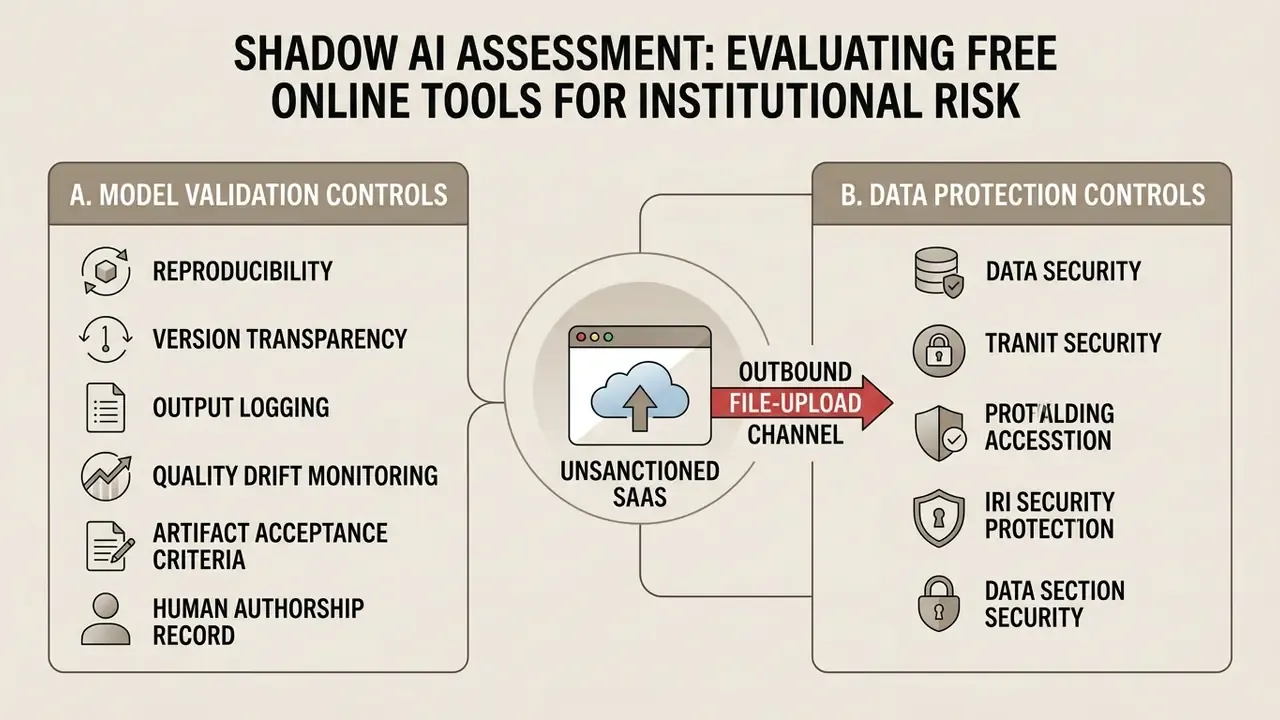
From a governance standpoint, a free browser generator is unsanctioned SaaS with an outbound file-upload channel. Standard synthetic-media taxonomies classify these pipelines as producing new media outputs from model-generated latent structure (NIST AI 100-4, 2025), which means your existing model-risk and third-party-risk frameworks already apply. Nothing needs inventing from scratch. The checklist below suits a first-pass assessment by a model risk officer, a CISO delegate, or an AI governance lead.
A. Model validation controls
Checklist0 / 6
B. Data protection controls
Checklist0 / 5
C. Licensing and publication controls
Checklist0 / 4
D. Cost and escalation triggers
Checklist0 / 4
Any single trigger in section D, or any unresolved item in sections B and C, should route the request to a sanctioned paid plan or an API deployment rather than a public free tier. One caveat worth stating plainly: this checklist reduces exposure, it does not eliminate it, and residual risk should be recorded rather than assumed away.
AI Image-to-Video Ideas for Social, Product, and Creative Content
Converting static imagery into moving clips opens flexible production options across social marketing, e-commerce merchandising, and digital storytelling. The scenarios below are the ones that actually survive review cycles.
Turn Product Images into Showcase Videos
E-commerce merchants convert catalogue shots into dynamic video cards without booking a physical shoot. Apply a slow dolly-in or a lighting sweep to isolated product photography, and materials, textures, and contours read far better than they do in a still. The broader landscape of generation methods and commercial applications is mapped in our overview of AI video generators.
Using VAE-based spatial injection, modern video tools preserve exact branding and dimensions while adding plausible environmental reflections. A 2026 e-commerce benchmark formalizes this as injecting product appearance spatially into a pre-trained video backbone before motion synthesis, keeping the SKU image as the source of truth while ratio, length, and branding adapt per channel.
"VidCRAFT3 reconstructs a 3D point cloud from the reference image and disentangles camera motion, object motion, and lighting through a Spatial Triple-Attention Transformer."
E-commerce scale calibration trick. When generating standalone product videos from isolated studio shots, diffusion models often misjudge absolute dimensions; a 200 ml bottle can render with the visual weight of a two-litre one. To hold scale, supply at least one reference photo showing a human hand holding or touching the product. The spatial attention mechanism treats the hand as an anatomical anchor and keeps physical scale stable across subsequent frames. For packaged goods, the strongest reference set is front, side, back, one close-up, plus that single in-hand shot.
Automated product video workflows can plug into broader content management systems, supported by the throughput estimators in our calculators section, while catalogue-side retouching stays faster in a dedicated photo editor.
Reviving Historical and Vintage Family Photos
Beyond advertising, image-to-video tools do quietly excellent work on historical portraiture and vintage print media. Subtle micro-motions, an eye blink, a slow facial turn, gentle background parallax, a shift in ambient light, can restore archival material and personal heritage assets without tipping into the uncanny valley.
Guidance here differs from commercial work. Scan the print at the highest resolution available, repair dust and tearing before generation rather than after, keep motion strength low, and prefer a static or near-static camera so the model does not invent architecture behind the subject. Memorial videos, family anniversary reels, and museum interpretation displays are the usual deliverables. Each carries a consent dimension as well, since living relatives depicted in an archival photo still hold likeness interests. Clear the material before publishing.
Animate Photos for Stories, B-Roll, and Visual Effects
Filmmakers, digital storytellers, and visual designers use these generators for atmospheric B-roll and concept previews. Static matte paintings or generated landscape graphics can carry slow cinematic camera motion to fill timeline gaps between dialogue scenes, and directors increasingly validate a creative direction by animating a single concept key frame before committing budget to a shoot.
Creators building multi-asset montages can combine animated clips with audio through a video dubbing online workflow, or assemble multi-panel layouts with a video collage app or a traditional video collage arrangement. For automated text overlays, pairing animated footage with a video caption generator streamlines full social post production, and longer edits usually finish inside a YouTube video editor workflow. Frame-by-frame stylistic work that AI motion still cannot resolve remains faster in a conventional animation maker.
FAQ About Free AI Image to Video Generators Online
How long does AI image-to-video generation take?
Generation usually takes 30 seconds to 3 minutes for a standard 3-to-5-second clip at 720p. Highly optimized diffusion transformers on dedicated GPU infrastructure can synthesize 49-frame clips in roughly 3.3 seconds (Taming Diffusion Transformers, 2025), and streaming architectures go further: Streaming Video Diffusion reports real-time throughput of 15.2 frames per second at 512×512 using a temporally recurrent design with per-segment training (SVDiff, 2025). Free web tools on shared public queues are another story, with delays stretching to 5 to 10 minutes at peak hours. Large open-weight models can be slower still; measurements on a 14B-parameter model report roughly 30 minutes for a 5-second 720p clip on a single H100.
What source file formats and sizes are supported?
Most online converters accept JPG, PNG, and WEBP. Maximum file size generally sits between 10MB and 25MB per upload. For best results, match the source image to the target video ratio (16:9 for widescreen, 9:16 for vertical social clips) and keep resolution at 1280×720 or above. Export is almost always MP4 with H.264 encoding.
Can I use two images to control the start and end of the clip?
Yes, on engines that expose dual-frame conditioning. Uploading a first frame and a last frame constrains both ends of the sequence while the model interpolates the motion between them, which is the preferred method for product transformations and scripted transitions. Keep lighting, scale, and background consistent across both references to avoid mid-clip morphing. Note that chaining this technique across several clips in a row tends to drift, because each generation re-derives lighting and geometry from the last still frame alone.
Can I regenerate a video using the same source image?
Yes. Video diffusion relies on stochastic noise sampling, so submitting the same source image again with identical or slightly modified prompts yields completely different motion. Operators commonly run 3 to 5 passes, informally called re-rolls, then pick the clip with the cleanest temporal consistency. Semantic evaluation work explains part of the variance: UI2V-Bench found that models scoring well on CLIP-style similarity metrics still violate spatial relationships and object attributes once motion is introduced (UI2V-Bench, arXiv 2025).
Why does my illustration look wrong after animation?
Because most video models default to photorealistic rendering. An illustrated or hand-drawn reference gets pulled toward photographic texture and lighting, and the output matches neither your style nor a clean photo. Fix it in the prompt: state medium, palette, line weight, and lighting explicitly ("2D cel-shaded animation, flat colour, preserve line art, no photorealism"), then reduce motion strength so the model synthesizes less new texture.
Do free AI image-to-video generators include audio generation?
Most core free image-to-video engines handle visual frame synthesis only and export silent MP4 files. Some platforms offer secondary audio modules or native sound effect generation, Kling AI and several enterprise suites among them, typically on paid tiers. Free users usually add background audio or voiceover separately in post-production.
Are exported videos subject to watermarks on free plans?
Yes. The large majority of free online AI video generators embed a visible vendor watermark or logo in a corner of the exported file. Removing it, unlocking 1080p or 4K, and gaining commercial usage rights normally requires a paid plan.
How can security teams detect employee use of free generators?
Treat public generators as unsanctioned SaaS. Practical detection layers include classifying known generator domains in the CASB or secure web gateway, applying DLP inspection to image and file uploads directed at generative endpoints, alerting on corporate-identity sign-ups to consumer AI services, and monitoring personal-email registrations from managed devices. Pair detection with a sanctioned alternative. Enforcement without a supported paid path simply pushes usage onto personal devices, where visibility is zero.
Can output from these tools be validated like a model?
Partially. Where the interface exposes a seed or generation ID, runs are reproducible and can be re-validated after a vendor model update. Where sampling is stochastic and unpinned, record the tool as non-reproducible by design and compensate with process controls: a fixed benchmark image set re-run on a schedule to catch quality drift, documented artifact rejection criteria, and per-clip logging of prompt, source image hash, model version, and timestamp.
Is the output copyrightable, and who owns it?
Ownership of the file and copyright in the file are separate questions. Platform terms define your usage rights to the output; copyright law decides whether the expressive content is protectable. The U.S. Copyright Office position is that material whose expressive elements were determined by the AI is not registrable, with protection limited to identifiable human contributions, which must be disclosed on application. General information again, not legal advice. Confirm with counsel before relying on any exclusivity claim.
Appendix A: Superseded Claims and Editorial Corrections
For transparency, the following statements appeared in earlier revisions of this page and have been superseded in the main text. They are kept here with the reason for replacement.
- Superseded expert attribution."Model validation across enterprise generative pipelines shows that over 70% of motion artifacts stem from low-contrast or blurred reference images, rather than underlying diffusion model failure." Model Risk Advisory Audit, 2025. Reason: anonymous source, undisclosed methodology, unverifiable percentage. Replaced with: ConsistI2V (TMLR, 2024) on first-frame low-frequency noise initialization.
- Superseded prompting citation."According to prompting frameworks established by major video model developers, effective prompts isolate action variables from scene aesthetics (Runway Gen-4 Prompting Guide, 2025)." Reason: vendor documentation rather than peer-reviewed evidence. Replaced with: LivePhoto (ECCV 2024) motion-intensity measurement, with the vendor structure retained as a practical formula only.
- Superseded credit figures."Platforms like Runway offer a 125 one-time credit allocation upon account creation, while platforms like Pika provide roughly 80 monthly credits (AI Media Model Benchmarks, 2026)." Reason: the cited benchmark could not be verified, and vendor quotas change without notice. Replaced with: a verify-at-source framing plus a compute-cost explanation drawn from the Survey of Video Diffusion Models (2025).
- Superseded marketing benchmark framing."The animated ad variants achieved a 0.6 percentage point increase in click-through rate (CTR) while lowering cost-per-click (CPC) compared to static image ads (Sostav Marketing Benchmarks, 2025)." Reason: trade-press case study without disclosed sample size or significance testing. Retained as directional evidence with an explicit methodology caveat rather than presented as a benchmark.
- Removed navigation item.A link to a consumer real-time video chat category previously appeared in the resource index. Reason: off-topic for the governance, licensing, and production audience of this page. Replaced with GRC- and production-relevant destinations.
Editorial Standards and Review Note
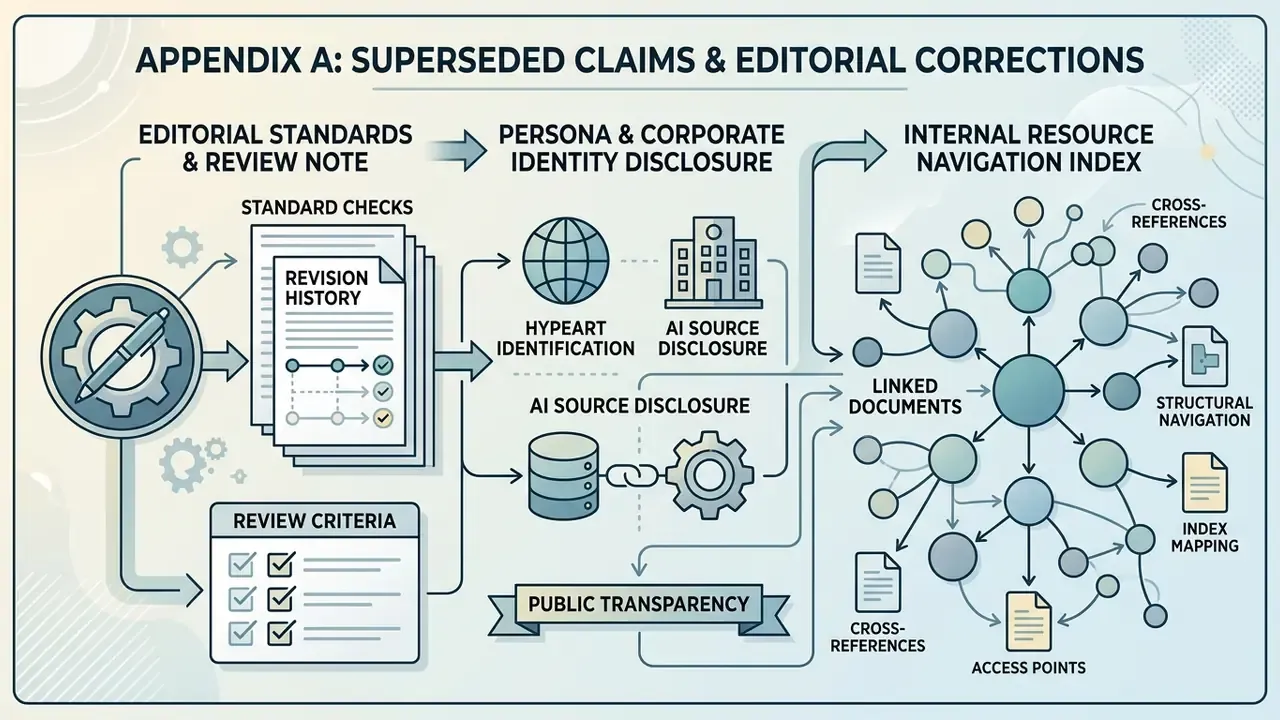
This page is maintained by an editorial desk covering AI media tooling, licensing, and model-risk practice. Technical claims are sourced to peer-reviewed venues (CVPR, ECCV, SIGGRAPH, TMLR, ICLR submissions) or to primary vendor documentation, with vendor marketing claims labelled as such. Legal statements reference primary regulator publications, including U.S. Copyright Office guidance and European data-protection authority positions, and synthetic-media classification follows NIST AI 100-4 (2025). Corrections and superseded claims are logged in Appendix A rather than quietly deleted.
Persona and Corporate Identity Disclosure
Author note: Marcus Hale writes about AI governance and model risk for this publication.
Company query: hypeart.ai. Verification status (as of February 19, 2026): the domain does not resolve through DNS, and registry lookup returns object not found. No verified information is available on corporate registration, active product catalogue, pricing structure, or certified compliance frameworks for this entity. Any proposed positioning remains strictly illustrative and hypothetical, and no company USP is claimed here because none has been verified.