Executive summary
- What the technology is an image-to-video model conditions a space-time diffusion network on one source frame plus an optional motion prompt, then synthesizes temporally coherent frames without keyframing or manual masking.
- What "free" actually means in 2026 daily or monthly credit allocations, 480p to 720p export ceilings, 3-to-10-second clips, visible watermarks, and, critically, personal, non-commercial licenses on most free tiers.
- Biggest commercial risk three independent gates must all clear before publication. IP rights in the input photo, the platform's commercial license for the output, and regional synthetic-media disclosure rules.
- Biggest technical risk style drift on illustrated or 3D source art, plus identity drift across multi-clip sequences. Both are mitigated by explicit style prompting and by switching from image-to-video to reference-to-video frameworks.
- Biggest governance risk Shadow AI adoption of free tiers, where the residual risk (watermarked or unlicensed assets in paid media) exceeds the nominal $0 cost by orders of magnitude.
- Who should read what governance leads go to the commercial-use and risk-matrix sections; creators go to prompt recipes and troubleshooting; engineers go to API parameters and cost-per-second.
What a free AI image to video animation tool does
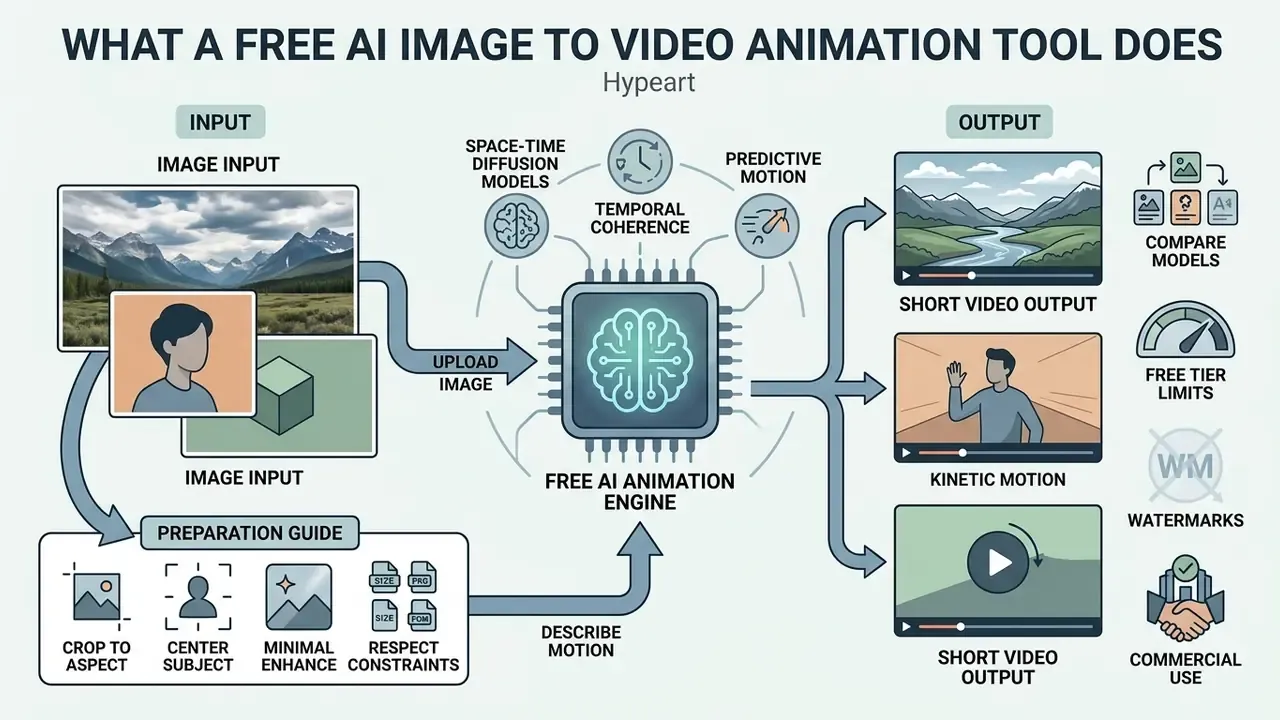
Standard video editing software depends on keyframing, timeline interpolation, or manual masking. An ai image to video animation tool instead uses neural networks to infer the missing spatial and temporal data. It reads structural features inside a static image to synthesize plausible movement: a shifting expression, flowing water, a slow dramatic pan. The output is a fully generated video from one visual source, which is why the category is often described as an ai image to video animator rather than an editor.
One practical framing for procurement: you are not buying an effect, you are buying a model plus a licence plus a retention policy.
How AI creates motion from a single image
AI models generate motion from a single picture by encoding the source image into a lower-dimensional latent space and running reverse space-time diffusion to predict frame-by-frame visual progression. The process maps textual motion guidance onto spatial features, which lets the algorithm synthesize camera trajectories, background environmental shifts, and realistic facial reenactments. Readers who want the mechanics unpacked in more depth can continue with our reference on image-to-video AI tools.
According to research on space-time diffusion models, architectures like Google's Lumiere use a Space-Time U-Net (STUNet) to process the entire temporal duration of a clip in a single pass, generating an 80-frame sequence at 16 frames per second without cascaded temporal super-resolution.
«STUNet processes the whole temporal duration of the clip at once, generating an 80-frame sequence at 16 fps without cascaded super-resolution.»
Similarly, dual-stream models like DynamiCrafter combine high-level CLIP visual embeddings with frame-level pixel concatenation to retain identity while applying dynamic motion. The dual-stream design exists precisely because semantic alignment alone is not enough for pixel-level fidelity:
«Some visual details are still hard to preserve»
Newer diffusion-transformer systems push this further. Motion-transfer methods extract cross-frame attention from a pretrained DiT and convert it into an attention motion flow signal, which is why 2025 and 2026 models handle non-frontal views, moving background elements, and camera motion far more reliably than early motion-module architectures. That reliability gain is also what moved these systems from novelty into brand-facing production, and therefore into scope for model risk.
Which images and photos are suitable for animation
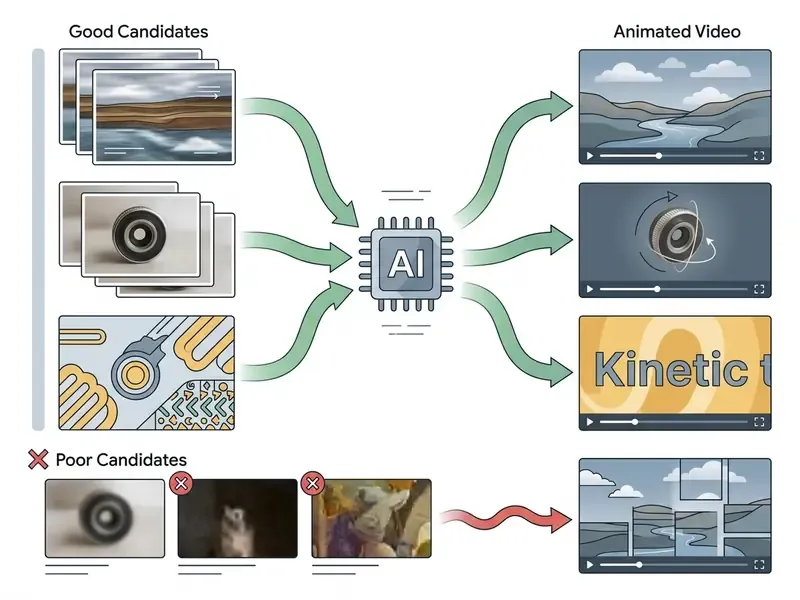
The visual assets best suited for AI video generation are high-resolution, sharply focused photos with distinct subject-background separation and clear structural edges. Source images with high contrast and defined subjects minimize artifacting and visual drift during latent denoising.
Baseline imaging guidelines established by NIST emphasize that edge sharpness and contrast directly determine downstream visual performance in video analytics and processing pipelines.
When you feed an ai photo into an animation pipeline, cluttered backgrounds or extreme low-light noise frequently trigger model hallucinations. High-clarity portraits, architectural stills, and isolated product shots yield the most stable motion vectors. If the source needs cleanup, sharpening, or background separation first, work through our overview of AI photo editors before generation.
Preparation rules that keep showing up in official vendor documentation:
- Crop to the target aspect ratio before upload, preserving the subject's focal point rather than letting the platform auto-crop it out of frame.
- Keep the subject centered or explicitly marked. Focal-point cropping behaves as the anchor around which any downstream scaling occurs.
- Enhance minimally. Increase sharpness, contrast, and visibility, but avoid aggressive denoising that flattens the edge structure the model relies on.
- Respect file constraints. Most consumer generators accept JPG, JPEG, PNG, WEBP, and sometimes HEIC, at up to roughly 20 MB.
- Upload image
- select and upload a clean, high-resolution source photo into the generator panel.
- Describe motion
- enter text prompts specifying camera trajectories, subject actions, and lighting dynamics.
- Choose model and settings
- configure aspect ratio, resolution ceilings, clip length, and the target diffusion model.
- Generate
- execute space-time denoising to synthesize intermediate motion frames.
- Review and download video
- inspect the rendered clip for artifacts, motion drift, and export watermarks before downloading.
- Audit and log retention
- archive the prompt text, the source asset hash, the model and version identifier, and any provenance metadata (C2PA or SynthID) into the GRC register, so the deliverable stays reproducible and auditable.
How to prevent prompt drift and object distortion
When you animate hand-drawn art, 2D illustrations, or 3D renders, base diffusion models default to photorealistic texturing, which degrades the source style. That failure mode is usually called prompt drift. Real photographs rarely show it, because the model is already operating inside its native distribution. If a specific platform keeps producing the same defect, our AI Media Support and Troubleshooting notes collect the vendor-side workarounds.
Step-by-step stabilization procedure:
- Describe the style explicitly, not just the motion.Specify colour space, lighting, and texture of the source, for example:
cel-shaded 2D animation, flat colour palette, line art style, dynamic wind motion. Relying on the image alone lets the model re-derive the aesthetic. - Lock brand context and physical scale.For packaged products, include a reference frame of the item held in a hand. That gives the model an unambiguous read on real-world scale instead of a guess.
- Separate image-to-video from reference-to-video.Image-to-video treats your photo as the literal first frame and suits single, self-contained clips. When character or product identity must survive across a sequence, switch to reference-to-video frameworks that carry object embeddings between generations.
- Do not chain start and end frames across many clips.Frame chaining only sees the last still, so lighting, geometry, and camera position are re-derived from scratch on every hop, and drift compounds. Reference-conditioned generation reads the whole prior clip plus locked references instead of resetting.
- Limit action density per clip.One to two subject actions and one to two camera moves per short generation raise determinism sharply. Overloaded prompts produce warping and morphing artifacts.
- Load multi-angle references for products.Front, side, back, and a close-up produce the most stable identity retention across a campaign's worth of clips.
What "free" means: limits, watermarks, and generation access
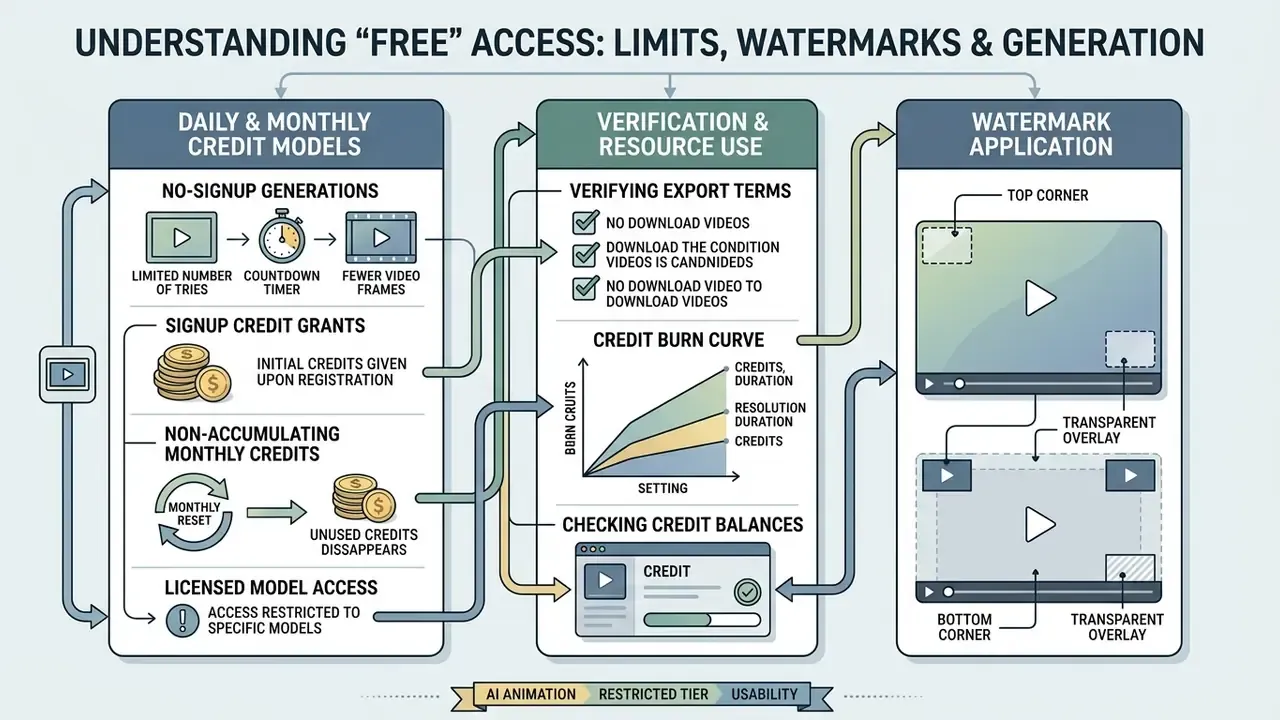
Free access in AI video generation platforms usually designates a restricted tier governed by daily or monthly credit allocations, visible branding watermarks, capped output durations, and lower export resolutions. Basic testing costs nothing. Production-grade output generally requires upgraded licensing, and the tier-by-tier mechanics are broken down further in our reference on free AI video generators.
Most freemium services enforce strict resource boundaries to prevent compute strain. Users can explore foundational features and evaluate model performance, but scaling content creation means evaluating credit consumption rates, resolution caps, and platform export rules. For precise calculations on computational cost versus project volume, consult our comprehensive AI Media Calculators.
Which features are usually available in free image-to-video mode
Unpaid tiers typically grant access to baseline diffusion models, standard 720p exports, 4-to-5-second generation lengths, and basic motion prompting. Advanced parameters such as custom camera trajectories, native audio synthesis, or multi-resolution upscaling are frequently reserved for premium plans.
In practice, "free" resolves into one of four documented shapes:
- No-signup daily generations typically 3 generations per day at roughly 3 seconds each, exported at 480p with a watermark, running on a fast baseline model with built-in audio and lip-sync.
- Signup credit grants one-time bonus packs, for example 20 to 125 credits, plus daily check-in bonuses, spendable across models at different burn rates.
- Monthly non-accumulating credits the unused balance resets rather than rolls over. Avatar and talking-photo platforms commonly define one credit as up to roughly 15 seconds of output.
- Free daily generations on a licensed model login required, capped daily volume, commercially-cleared training data.
For example, platforms like Pika assign credit balances where a 5-second 720p clip consumes fewer resources (6 credits) than a 10-second 1080p render (45 credits), which shows how cost scales with quality.
«A 5-second 720p clip costs 6 credits, while a 10-second 1080p render costs 45 credits under model 2.2.»
Free tiers let creators experiment with simple image-to-video prompts, but they restrict high-performance fine-tuning. Expect duration ceilings of 3 to 10 seconds, resolution ceilings of 480p to 720p, and daily generation counts in the 3 to 10 range. Adequate for evaluation. Entirely inadequate for a paid media flight.
How to verify watermark, credit, and export terms
Verifying watermark placement, credit burn rates, and export limits means inspecting a platform's public Terms of Service and pricing documentation before workflow integration. Platforms frequently apply visible digital overlays or embedded metadata to outputs generated by non-paying users.
Some vendor marketing pages advertise watermark-free generation. Official policy pages often clarify that watermark removal is restricted to paid tiers, or that sharing directly from the native app retains branding (Kapwing Terms of Service, 2026).
«Upgrading to Pro or Fancy removes the watermark on downloads, but sharing directly from the app retains the watermark on all plans.»
To compare recurring subscription tiers across leading generative platforms, refer to our AI Media Pricing Guides, and for a side-by-side view of zero-cost options, see the comparison of free AI video generators.
A four-line verification routine before any asset enters a workflow:
Costing Shadow AI: control costs and residual risk
A $0 tool is never a $0 decision. Governance functions can approximate the true exposure of uncontrolled free-tier usage with a simple, auditable expression:
Total exposure = (Control costs) + (Residual risk)
- Control costs = discovery and inventory of free-tier accounts, plus policy authoring, plus reviewer time per asset, plus the eventual paid-tier migration cost. Migration cost is a function of volume:
seats × plan price + (clips per month × seconds per clip × price per second). At a documented API floor of roughly $0.023 per second and a ceiling near $0.70 per second, a 200-clip monthly cadence at 5 seconds each spans roughly $23 to $700 in generation cost alone, before seats, storage, or review labour. - Residual risk = probability of a licensing breach × remediation cost. Remediation is not the generation fee. It is campaign takedown, creative re-shoot, media re-buy, client credit, and, where disclosure law applies, regulatory exposure.
The asymmetry is the whole point. The free tier saves tens of dollars and can put a five- or six-figure media flight at risk. Practical controls stay cheap by comparison: an allow-list of approved models, mandatory logging of prompt, source and model triples, and a hard rule that no watermarked or non-commercially-licensed export reaches a client deliverable.
Treat that as a hypothesis to validate with your own analytics rather than a settled number, since breach probability differs sharply between an internal training clip and a national ad flight.
Can AI clips be used in commercial projects?
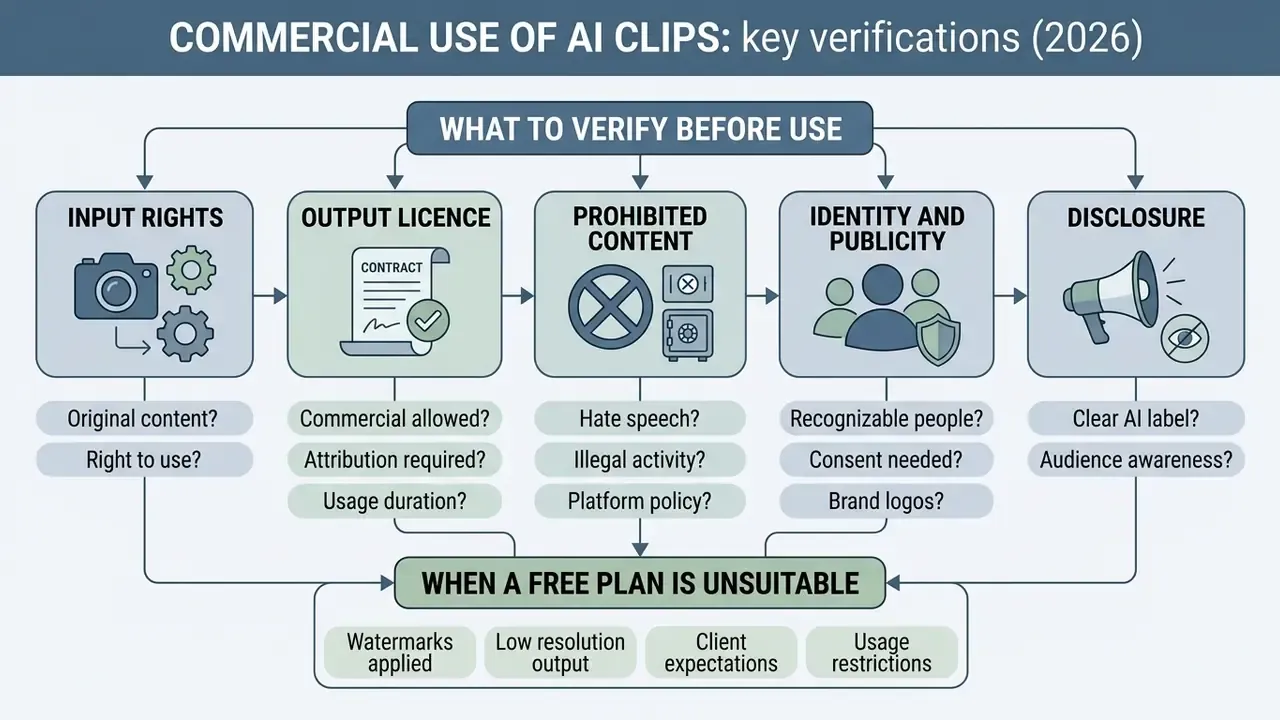
Commercial use of AI-generated video depends on three things: the platform's licensing agreement, the intellectual property clearance of the uploaded source photo, and regional synthetic media disclosure regulations. Using synthetic clips in advertising, social media campaigns, or client deliverables without checking all three creates real legal exposure.
Organizations deploying generated videos into client projects must separate personal experimentation rights from commercial exploitation licenses. The adjacent framework for commercial-use rights over AI content covers the same IP logic applied to still imagery. For an exhaustive analysis of legal precedent, copyright guidance, and corporate risk frameworks, explore the AI Media Commercial-Use Hub.
What to verify before commercial use of a video
Before launching a commercial campaign, operators need to confirm full intellectual property ownership of the input photo, verify that the platform license grants commercial rights, and ensure compliance with synthetic media disclosure mandates.
The U.S. Copyright Office emphasizes that AI outputs lacking human authorship cannot register standalone copyright, while third-party IP present in input photos retains full protection.
«AI output without human authorship cannot be registered as a standalone copyrighted work, while third-party IP inside input photos retains full protection.»
Regulatory frameworks such as California's SB 1050 additionally mandate explicit disclosure markers on synthetic media deployed in commercial advertising.
«Covered providers must offer a manifest disclosure option for AI-generated image, video, or audio content created by their own generative systems.»
A minimum pre-publication gate list:
- Input rights
- documented ownership or licence for the source photograph, including model releases and any depicted trademarks.
- Output licence
- written confirmation that the plan tier in use permits commercial exploitation. Free tiers frequently do not.
- Prohibited content
- the asset clears the vendor's generative-AI usage policy, meaning no third-party copyright or trademark in inputs, and no violation of privacy or publicity rights.
- Identity and publicity
- likeness of real individuals cleared separately from copyright, since digital replicas implicate personality rights independently.
- Disclosure
- synthetic-media labelling applied where the jurisdiction or platform requires it, with provenance metadata retained.
When a free plan is unsuitable for client work
Free tiers stop being viable for agency and enterprise projects when exports carry mandatory branding watermarks, non-commercial beta restrictions, or low-resolution caps that fail client delivery standards.
The recurring blocker, though, is not output quality. It is licence scope. Vendors routinely classify preview and beta generative features as personal, non-commercial use, and reserve commercial rights plus IP indemnification for paid or enterprise tiers. Adobe's published generative-AI guidelines, for instance, restrict inputs and prompts that touch third-party copyright, trademark, privacy, or publicity rights, and tie "commercially safe" status to specific licensed models rather than to the platform as a whole (Adobe Generative AI User Guidelines, 2026). Independently, providers such as Magic Hour state that free users may use generated videos only for personal, non-commercial purposes, with full commercial rights attaching to paid Creator, Pro, or Business plans.
For a regulated environment, a bank, an insurer, or a fintech marketing team, the operational consequence is concrete. A paid-social campaign built on a free-tier export can require complete regeneration under an enterprise contract with indemnification before launch, because the beta licence never granted commercial rights in the first place. Where the brand is a financial institution, the disclosure dimension compounds the licence dimension: synthetic depictions of advisors, customers, or product outcomes attract both AI-labelling requirements and advertising-conduct scrutiny.
Licence first. Creative second.
Why model terms can differ
Licensing terms diverge across AI models because the underlying training datasets differ in IP clearance, enterprise indemnification policies, and platform monetization frameworks. Models trained on public web scrapes carry a different risk profile than models trained exclusively on licensed stock libraries.
Adobe Firefly models, for example, are explicitly labeled "Commercially Safe" because they are trained on cleared Adobe Stock assets and come with corporate IP indemnification.
«"Commercially safe" content is produced by Firefly models trained on assets Adobe holds rights to, with IP indemnification provided.»
OpenAI Sora access and pricing, by contrast, operate under dedicated service terms billing $0.10 to $0.70 per second, reflecting a distinct commercial model (OpenAI Service Terms, 2026). Those service terms additionally specify that publicly shared content grants OpenAI rights to reproduce, distribute, modify, display, and perform that content for operating and promoting the services, a clause that matters a great deal for confidential client work. Kling AI maintains a user policy and a separate paid-service policy, both effective 2026/04/21, which is exactly why plan tier must be verified rather than assumed. For updates on ongoing regulatory challenges, review the AI Litigation and Case Timelines.
| Parameter | What to check (based on documented sources) | Potential risk for business |
|---|---|---|
| Commercial permission | Verify whether the feature is labeled "Commercially Safe" or non-commercial beta. | Contract breach, forced takedowns, legal liability. |
| Training data IP | Confirm whether training data is rights-cleared with vendor indemnification. | Copyright infringement claims from asset owners. |
| Visible watermark | Check for visible logos on downloaded free exports. | Unprofessional visual delivery, client rejection. |
| Provenance metadata | Audit for embedded SynthID or C2PA provenance tracking. | Failure to comply with regional AI disclosure laws. |
| Resolution and codec | Confirm the maximum free export resolution (720p versus 1080p). | Sub-par presentation on large displays. |
| Input content policy | Confirm prompts and reference images carry no third-party IP, likeness, or privacy exposure. | Policy violation, account suspension, publicity-rights claims. |
| Data handling | Confirm whether uploads and outputs are used for model training or retained. | Confidentiality breach on client or pre-launch assets. |
| Public sharing clause | Check whether public sharing grants the vendor broad reuse rights. | Loss of exclusivity on campaign creative. |
Read the table as a gate sequence rather than a scorecard. One red cell in commercial permission or input rights blocks publication, no matter how strong the other rows look.
How to choose an AI image to video tool and a suitable model
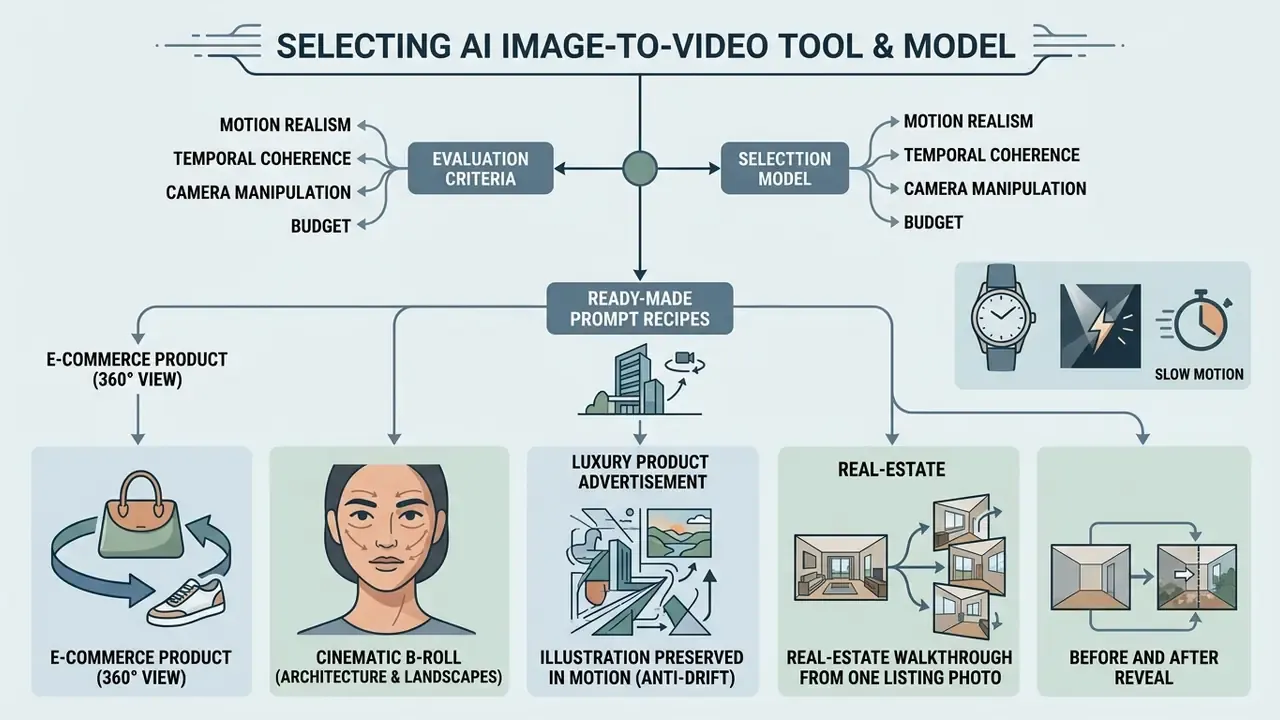
Selecting an AI image to video tool means balancing motion realism, temporal coherence, camera manipulation, and budget against project goals. Some models specialize in photorealistic human physics. Others excel at stylized animation or complex choreography.
Evaluating ai tools for image to video animation comes down to matching model architecture to your target distribution channel. Our comparison of AI video generators puts the leading engines side by side on that basis, and direct technical breakdowns sit in our AI Media Comparison Matrices.
Ready-made prompt recipes for common tasks
Effective video prompts separate three blocks, subject action, environment dynamics, and camera behaviour, rather than re-describing the still image. Camera behaviour is best specified as shot size plus angle plus movement plus speed plus final framing. The templates below are copy-ready starting points.
E-commerce product (360° view):
Studio product shot, 360-degree smooth camera rotation around the item, cinematic studio lighting, soft shadows, 4k resolution, hyper-realistic detail.Portrait and micro-expressions:
Close-up portrait, subject subtly smiles, natural eye blink, gentle hair movement caused by breeze, soft focus background, photorealistic 8k.Cinematic B-roll (architecture and landscapes):
Slow forward drone camera movement moving through the corridor, atmospheric haze, volumetric sunset lighting, 24fps cinema look.Luxury product advertisement:
Perfume bottle on wet black marble, slow dolly-in from wide to macro, rim light catching the glass edge, condensation droplets sliding down, shallow depth of field, 24fps commercial look.Illustration preserved in motion (anti-drift):
Cel-shaded 2D illustration, flat colour palette preserved, visible line art, hair and fabric drifting in light wind, static camera, no photorealistic texturing.Real-estate walkthrough from one listing photo:
Interior listing photo, steady forward truck through the living room toward the window, natural daylight falloff, no lens distortion, 16:9 framing.Before and after reveal:
Static frame, slow horizontal wipe reveal from left to right, consistent lighting across both states, no subject deformation, 9:16 vertical.Social loop (seamless):
Subtle continuous parallax on background layers, subject motion returning to the starting pose by the final frame, ambient particle drift, 9:16, loop-friendly.
One constraint improves determinism across every recipe here: keep each short clip to one or two subject actions and one or two camera moves. Overloaded prompts remain the primary cause of warping in 5-second generations.
Models for realistic, cinematic, and creative video
Leading diffusion architectures show specialized strengths across photorealism, physical interaction, cinematic camera control, and artistic stylization. Picking the right one prevents motion distortion and subject warping before you spend a single credit.
«CameraCtrl reaches a translation error of 12.98 versus 14.02 for MotionCtrl by injecting camera-trajectory features into the temporal attention layers.»
«Sora shows promise as a physical world simulator, yet it does not accurately model several basic interactions, for example breaking glass.»
Practical mapping by task: Kling for choreography, combat, and full-body sync; Seedance for motion complexity and reference-driven multimodal control; Veo for cinema-grade camera language and character consistency; Sora for physically plausible human motion and environmental shots; PixVerse and stylization-first engines for illustrated, creative output. For animated, non-photoreal deliverables, cross-reference our guide to animation makers.
Which video parameters to compare before generating
The structural parameters worth checking before you render: aspect ratio support, frame rate, clip duration, maximum resolution, and native audio synthesis.
Google Cloud Vertex AI Veo 3 preview documentation specifies support for 9:16 and 16:9 at 24 FPS, with output lengths of 4, 6, or 8 seconds in 720p or 1080p.
«Veo 3 supports 9:16 and 16:9 at 24 FPS, with 4-, 6-, or 8-second outputs at 720p or 1080p.»
Veo 3.1 Fast preview keeps those aspect ratios, frame rate, and 720p/1080p output while adding 4K as a preview input and output resolution. Runway Gen-4 documentation lists 16:9, 9:16, 1:1, 4:3, 3:4, and 21:9 at 24 FPS. Duration ceilings vary sharply by engine: roughly 4 to 15 seconds for Seedance-class models, around 8 seconds for Veo, around 10 seconds for Kling and Runway. Anything longer requires multi-clip stitching. Implementation details and cost mechanics for Google's engine sit in our Google Veo implementation guide.
When templates, editing, and motion control are necessary
Templates and advanced motion controls matter most when you build multi-clip campaigns, match a specific brand aesthetic, or drop generated B-roll into an existing timeline.
Platforms that embed generative AI directly into non-linear editors, such as Adobe Firefly inside Premiere Pro, let editors generate contextual B-roll straight into sequence gaps.
«The Firefly Video Model lets editors generate contextual B-roll directly inside the Premiere Pro timeline, filling gaps in the cut.»
Three control layers are documented across 2025 and 2026 tooling: template systems with published sliders, dials, and preset camera moves; camera paths defined by keyframes or 3D trajectories; and trajectory or keyframe conditioning, where drawn paths, static anchor points, or global moves such as pan and zoom constrain generation. Start-and-end-frame control belongs to the same family. The first frame sets the initial state, the last frame sets the destination, and the model infers the path between them. Export practice mirrors conventional post-production: preview, iterate, then choose a delivery format, with H.264 still the default recommendation for online distribution.
Model comparison: motion focus, audio, free limits, and rights
| Model / platform | Primary motion focus | Native audio | Free tier limits (duration / resolution) | Commercial use on free tier | Watermark on free export | Provenance and data notes |
|---|---|---|---|---|---|---|
| LTX Video 2.3 | Real-time iteration, lip-sync, expressive faces | Yes | ~3 sec / 480p, ~3 generations per day (no signup) | No, personal use only | Yes | No training on uploads (vendor-stated); no indemnification |
| Wan 2.5 | Balanced image-to-video, photorealism | Yes (dialogue + FX) | 5 sec / 720p via daily bonus points; paid tiers to 1080p / 10 sec | No | Yes | Verify regional data residency before client use |
| PixVerse V5 | Stylized and creative motion | No | 8 sec ceiling; ~90 signup points plus ~60 daily points, reduced resolution | No | Yes | Consumer terms, no enterprise indemnification. See PixVerse AI |
| Kling AI 2.5 / 3.0 | Complex joint physics, action, camera control | Yes | Limited trial credits; 1080p on paid plans, ~10 sec ceiling | No | Yes | User policy and paid-service policy effective 2026/04/21; verify tier |
| Google Veo 3.1 | Cinematic lens control, camera language, character consistency | Yes | ~50 credits/day in consumer Flow tier, Veo 3.1 Lite/Fast/Quality only; Cloud trial via API | No | Yes (SynthID metadata embedded) | Enterprise access via Vertex AI with organizational data controls; billed per second of output |
| OpenAI Sora 2 / Sora 2 Pro | Complex physical simulation, world coherence | Yes | No consumer free tier; API billed $0.10/sec (720p) to $0.30 and $0.70/sec (Pro) | N/A | N/A | Service terms grant broad vendor rights over publicly shared content |
| Seedance (2.0-class) | Choreography, action, multimodal reference control | Yes | Reported ~100 credits/day, up to 1080p / 10 sec (third-party reporting) | Verify, reporting inconsistent | Reported none | Primary licence text not verified; treat as unconfirmed for client work |
| Adobe Firefly Video | Editorial B-roll, brand-safe generation | Limited | Limited daily generations on free account (login required) | Restricted on free tier | Yes | "Commercially safe" training data plus IP indemnification on qualifying paid plans |
| Grok Imagine 1.5 | Dynamic environments, ambience | Yes (ambience) | Platform credit access; up to 15 sec, 480p/720p/1080p tiers | No | Yes | Consumer terms; verify retention policy |
Reporting note: figures marked as third-party or reported were not confirmed in primary vendor documentation at time of review and should be re-verified before procurement. Free-tier terms change often. Treat every row as a snapshot, not a contract.
How to animate a photo to video: the step-by-step process
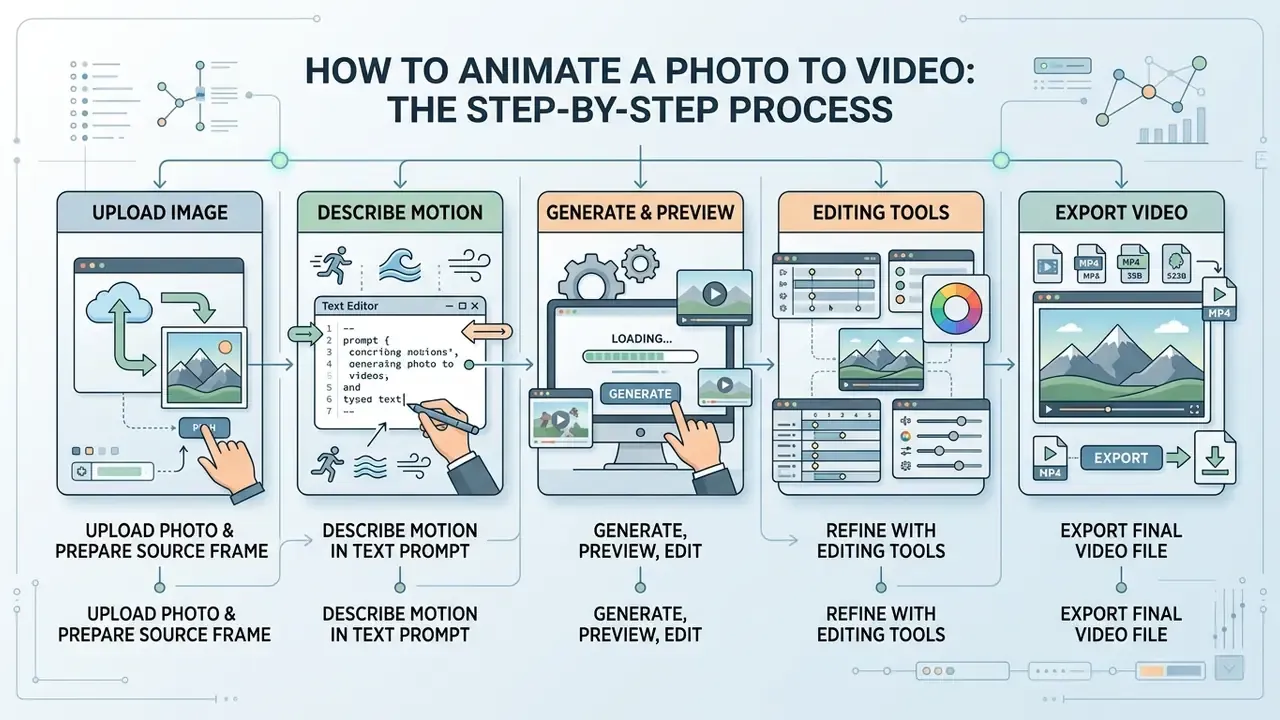
Most ai animation tools to turn photos into videos follow the same five-stage path, whatever the brand on the login screen. Knowing the stages makes the control points obvious, because each one leaves an artifact you can log.
Upload image and prepare the source frame
How to describe motion in a text prompt
A prompt for an ai tool animate image to video should say what moves, how the environment behaves, and what the camera does. Nothing else. Describing the subject again ("a woman in a red coat") wastes tokens the model already has from the reference. Instead, write the delta: subject turns head slightly left, coat hem lifts in wind, slow push-in, 24fps.
Three practical constraints. Keep the action count low. Name the style if the source is not photographic. Set the camera speed explicitly, since "fast" and "slow" change the perceived realism more than resolution does.
Generate, preview, editing, and export
Generate, then watch the clip twice: once for motion plausibility, once for identity. Hands, logos, and text are still the usual failure points in 2026, so check them frame by frame at the end of the clip, where drift concentrates. Then handle editing (trim, colour match, audio), pick the delivery format, and download.
Before publishing, run the licence and watermark check from the earlier gate list. A clean render on a personal-use licence is still an unusable render.
Prompts and camera control for better AI animation
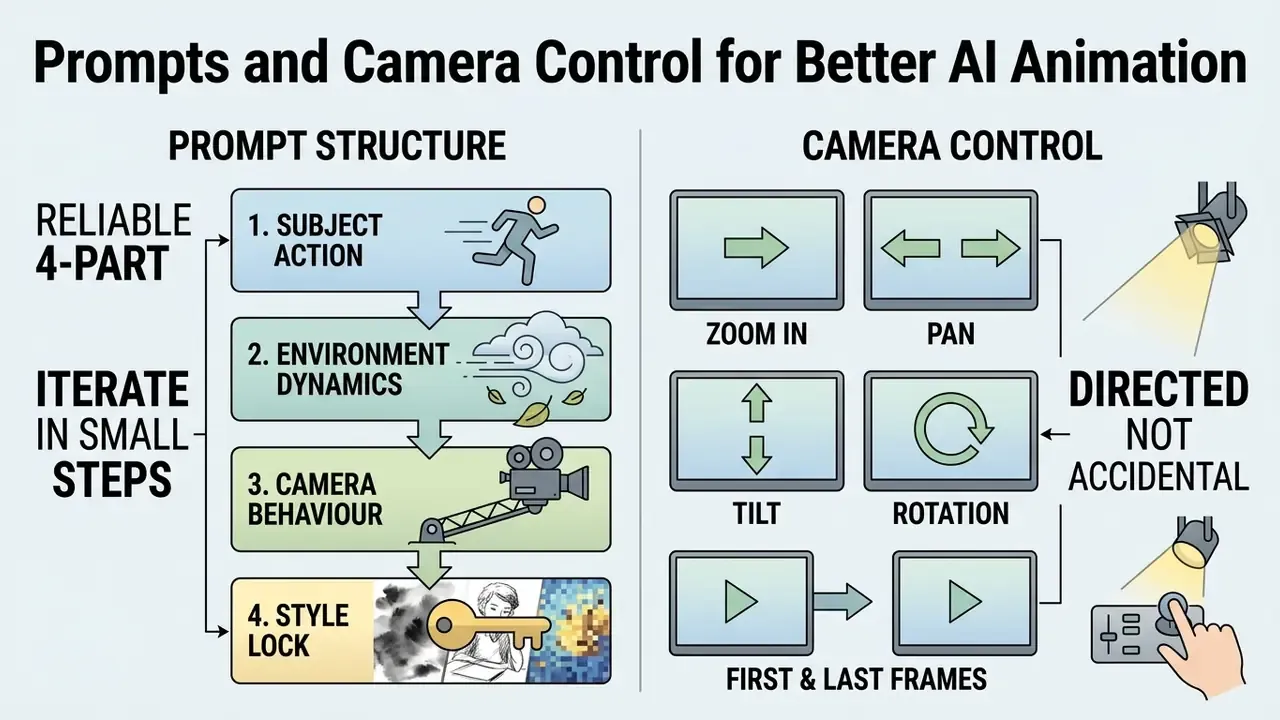
Quality in this category correlates less with model choice than most buyers expect, and more with prompt discipline. Two teams using the same engine can produce wildly different generated videos from the same photo.
Prompt structure for animate image to video
A reliable structure has four parts: subject action, environment dynamics, camera behaviour, style lock. Write them in that order, keep each part short, and avoid contradictory instructions such as "static camera, sweeping orbit". Specificity beats length. Steam rising from cup, condensation on window, static camera, warm practical light, photorealistic outperforms a paragraph of adjectives almost every time.
Iterate in small steps. Change one variable per generation, log the seed, and you build a repeatable recipe instead of a lucky render. That is also what makes the videos I create defensible in review: the parameters are written down.
Controlling camera motion and first and last frames
Camera control is where video with ai starts to feel directed rather than accidental. Specify shot size, angle, movement, speed, and final framing. For a scripted beat, use first-frame and last-frame conditioning: the model interpolates a path between the two states, which gives you a deterministic destination instead of a hopeful one.
The caveat repeats itself, so treat it as a rule. Chaining last frames across many clips resets lighting and geometry each hop. For sequences, use reference-conditioned generation and keep a locked reference set.
AI animation image to video for social media, product, and creative projects
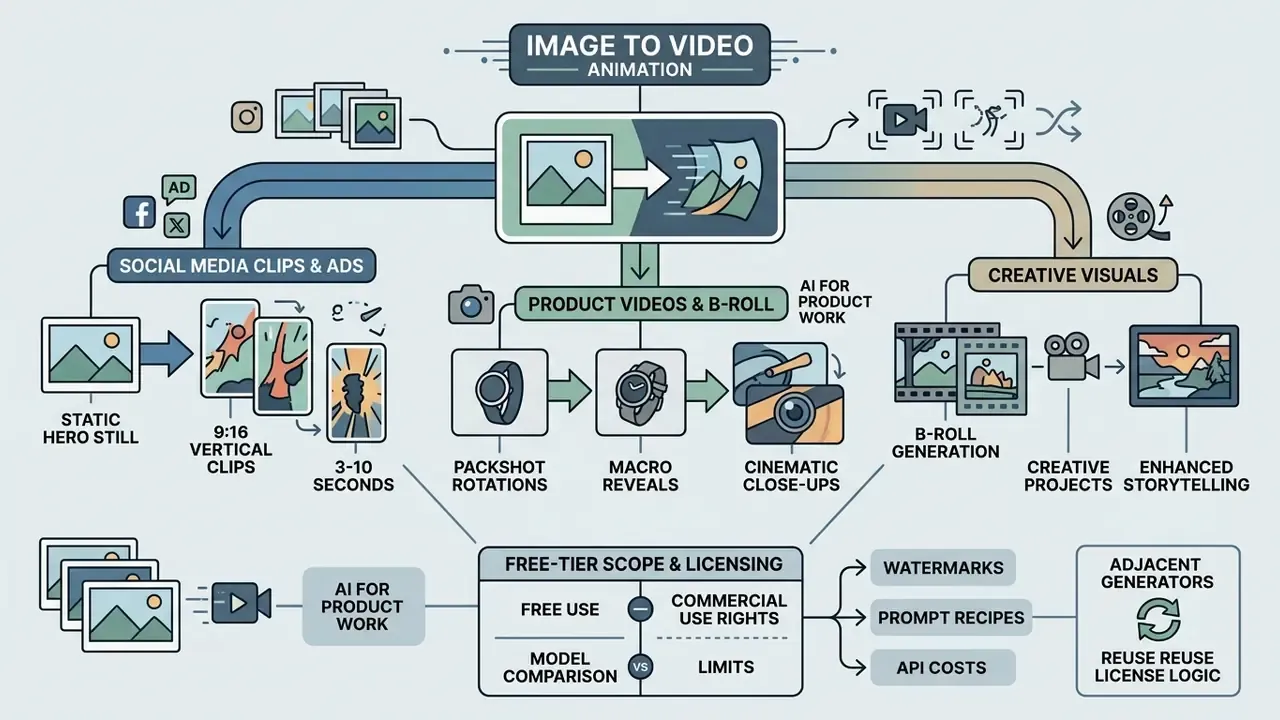
Where does this technology actually pay? Mostly in short-form, high-volume formats where the alternative is a shoot that cannot be justified.
Product videos, B-roll, and creative visuals
For product work, an ai image to video animation tool produces packshot rotations, macro reveals, and background-only motion for card or device imagery. As cinematic B-roll, it fills timeline gaps that would otherwise need stock. As creative output, it powers lyric visuals, archival memories, and stylized loops where the video image relationship is intentionally non-literal.
Adjacent zero-cost generators follow the same licence logic worth reusing here: check the free-tier scope on an ai qr code generator, an ai question generator, an ai quiz generator, an ai quote generator, an ai rap generator, or an ai rap lyrics generator before any of that output reaches a campaign.
Integrating AI image-to-video via API: parameters and cost
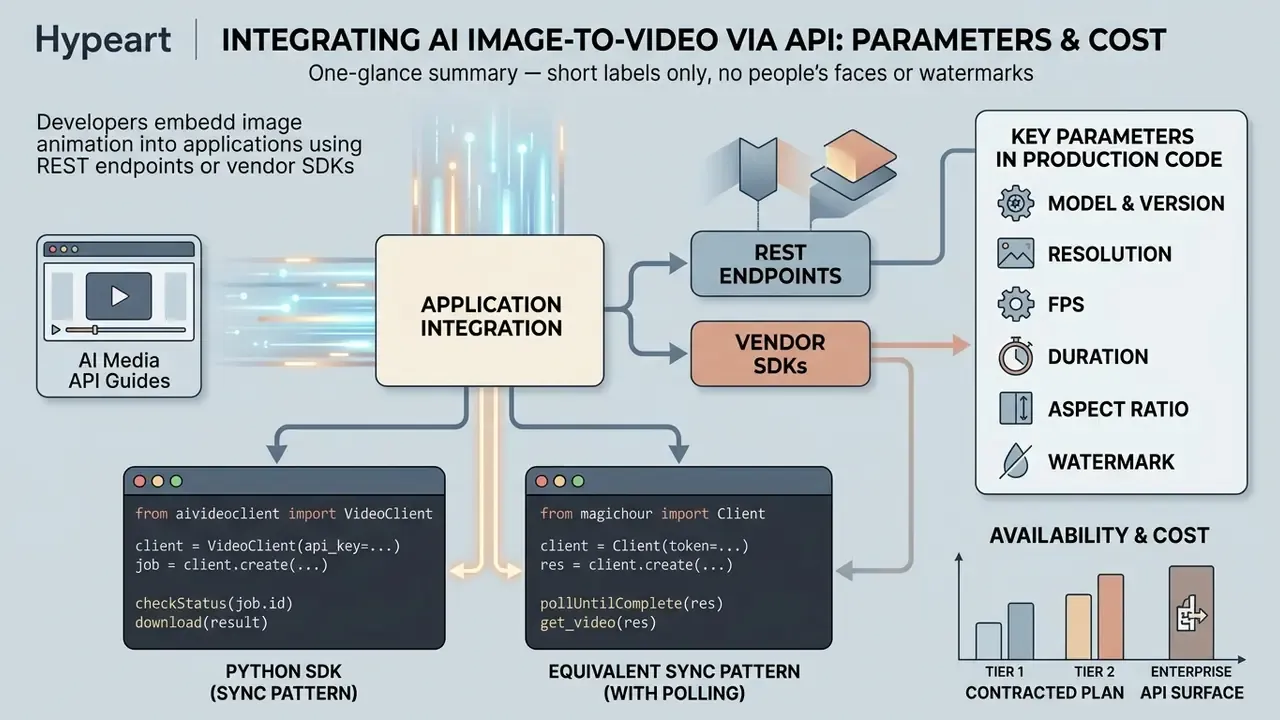
Developers can embed image animation into their own applications through REST endpoints or vendor SDKs; broader patterns live in our AI Media API Guides. Billing is typically per second of generated video: roughly $0.023/sec at the low end for baseline models, rising to $0.10/sec for 720p premium output and $0.30 to $0.70/sec for the highest-tier resolutions. Credit-based platforms express the same economics differently, at approximately 1 credit per frame at base rate, so a 5-second 720p clip on a premium model burns on the order of 150 credits.
Example call (Python SDK):
from ai_video_client import VideoClient
import os
client = VideoClient(api_key=os.getenv("AI_API_KEY"))
response = client.image_to_video.create(
    image_path="./input_assets/product.png",
    prompt="Slow zoom in, soft ambient light drift",
    model="kling-v2-5",
    duration_seconds=5.0,
    resolution="1080p",
    fps=24,
    watermark=False
)
print(f"Generation queued. Output URL: {response.video_url}")
Equivalent synchronous pattern with download and polling:
from magic_hour import Client
from os import getenv
client = Client(token=getenv("API_TOKEN"))
res = client.v1.image_to_video.generate(
    assets={"image_file_path": "/path/to/source.png"},
    end_seconds=5.0,
    name="Product loop",
    resolution="720p",
    wait_for_completion=True,
    download_outputs=True,
    download_directory="./renders"
)
Parameters worth pinning explicitly in production code:
modeland model version. Never rely on a floating "latest" alias, or outputs drift between releases and reproducibility breaks.resolution,fps,duration_seconds,aspect_ratio. These are the primary cost drivers and the parameters most often silently capped by plan tier.watermark. Availability depends on the contracted plan, not on the API surface.seed, where exposed. Required for repeatable renders during QA.- Provenance flags. Confirm whether SynthID or C2PA manifests are attached, since disclosure obligations follow the asset, not the endpoint.
Engineering controls to pair with the integration: rate-limit and budget-cap per project key; persist the prompt, source-asset hash, model version, and response ID for audit; run an automated pre-publication check that rejects assets flagged as watermarked or personal-use-licensed; and route generation for confidential client material only to endpoints with documented no-training and short-retention terms.
FAQ
Is a free AI image to video animation tool genuinely free?
Yes for evaluation, conditionally for production. Free access typically means 3 to 10 short generations per day at 480p to 720p, clips of 3 to 10 seconds, and a visible watermark. Vendor pages advertising "no watermark" often mean no watermark on paid download, while in-app sharing still carries branding. Read the plan page and the Terms of Service together.
Can I use free-tier output in a client campaign or a paid ad?
Frequently not. Multiple platforms restrict free-tier output to personal, non-commercial use and reserve commercial rights, plus IP indemnification, for paid Creator, Pro, Business, or enterprise plans. Rights in the input photo are a separate gate the platform licence never covers.
Why does my illustration animate into something photorealistic?
Because most video models default to a photoreal rendering distribution. Describe the colour palette, texture, line work, and lighting explicitly in the prompt instead of relying on the reference image alone. Real photographs rarely show this drift, since the model is already in its native style.
How do I keep a product or character consistent across several clips?
Use reference-to-video rather than chained image-to-video. Frame chaining only reads the final still, so lighting, geometry, and identity are re-derived each hop. Load front, side, back, and close-up references, and include one shot of a packaged product held in a hand so the model reads true scale.
Do I have to disclose that a video is AI-generated?
It depends on jurisdiction and channel, and the trend runs toward mandatory labelling for synthetic media in advertising. Retain provenance metadata (SynthID, C2PA) and apply platform-level AI labels where offered. Treat disclosure as a compliance requirement, not a creative choice.
What should I log for auditability?
The source asset (hash and rights record), the exact prompt, the model and version identifier, the plan tier under which it was generated, the export specification, and any provenance metadata. Store all of it in the GRC register alongside the campaign record.
Which free-tier metric matters most for a governance review?
Licence scope, then watermark policy, then retention. Resolution is the easiest limit to see and the least consequential one, since a beautiful 1080p clip on a personal-use licence still cannot ship.
Next steps for risk and governance leaders
- Inventory free-tier usage. Scan SSO and expense data for consumer generative-video domains. Unmanaged accounts are the Shadow AI surface.
- Publish an allow-list. Approve specific models and plan tiers with documented commercial rights, indemnification, and no-training terms. Explicitly disallow everything else for client-facing work.
- Codify a pre-publication gate. No asset ships without input-rights evidence, output-licence confirmation, prohibited-content clearance, and disclosure or provenance handling.
- Instrument logging. Capture prompt, source hash, model version, plan tier, and provenance metadata for every generated asset.
- Re-verify quarterly. Free limits, watermark policies, and licence language change on vendor timelines, not yours. Schedule a standing review and re-date the register.
Start with one channel rather than the whole estate. A single controlled workflow, fully logged, teaches more about your actual risk appetite than a policy memo does.
Related reading: comparison of free AI video generators · Google Veo implementation and API costs · guide to animation makers · guide to AI voice generators for adding synthetic narration or sound to finished clips · guide to video compressors for delivery-size optimisation · YouTube video editor workflows for publishing the finished sequence · full AI Media Glossary.
Appendix A: superseded formulations retained for transparency
The following earlier formulation was replaced in the section "When a free plan is unsuitable for client work" because it referenced an anonymous engagement without a verifiable source, methodology, or published documentation. It is kept here for editorial transparency only and should not be cited as evidence:
The replacement text in the main body expresses the same operational principle, that beta and free generative features are commonly licensed as personal, non-commercial use, but anchors it to published vendor policy rather than to an unattributed engagement.
Likewise, the earlier generic phrasing of free-tier capabilities ("standard 720p export resolutions, 4-to-5-second generation lengths") has been superseded in the main text by the itemised 480p/720p, 3-to-10-second, and 3-to-10-generations-per-day breakdown, which reflects the documented shapes of current free plans. Both formulations are preserved so readers can see how the specification was tightened.
Social media clips and ads from a single photograph
An ai animate picture to video pass turns one hero still into vertical 9:16 clips, three to ten seconds long, loop-friendly, ready for paid social. For a financial-services marketing team, the appeal is speed on evergreen assets: an app screenshot with subtle parallax, a branch photo with gentle camera drift. Note the compliance side though. Any depiction of customers, advisors, or product outcomes needs both AI labelling and normal advertising review, and synthetic likeness is a separate clearance from copyright.