Last updated: 2026. Reviewed for technical accuracy against peer-reviewed pose-guided video generation literature (CVPR/ECCV/arXiv, 2023 to 2026) and public vendor documentation.
TL;DR Quick Summary for Creators and Teams
- What it does: you upload one photo plus either a preset choreography template or a reference dance video. The model transfers skeletal motion onto your subject and renders a new MP4. Nothing is filmed. Every frame is synthesized.
- Fastest route for social content: template-driven web tools (Viggle-class libraries of thousands of trending routines) return a vertical 9:16 clip in roughly under a minute on priority infrastructure.
- Highest motion fidelity: reference-video workflows built on commercial motion-control engines (Kling 3.0 Motion Control, Viggle JST-1) hold identity through spins, limb crossovers and group formations.
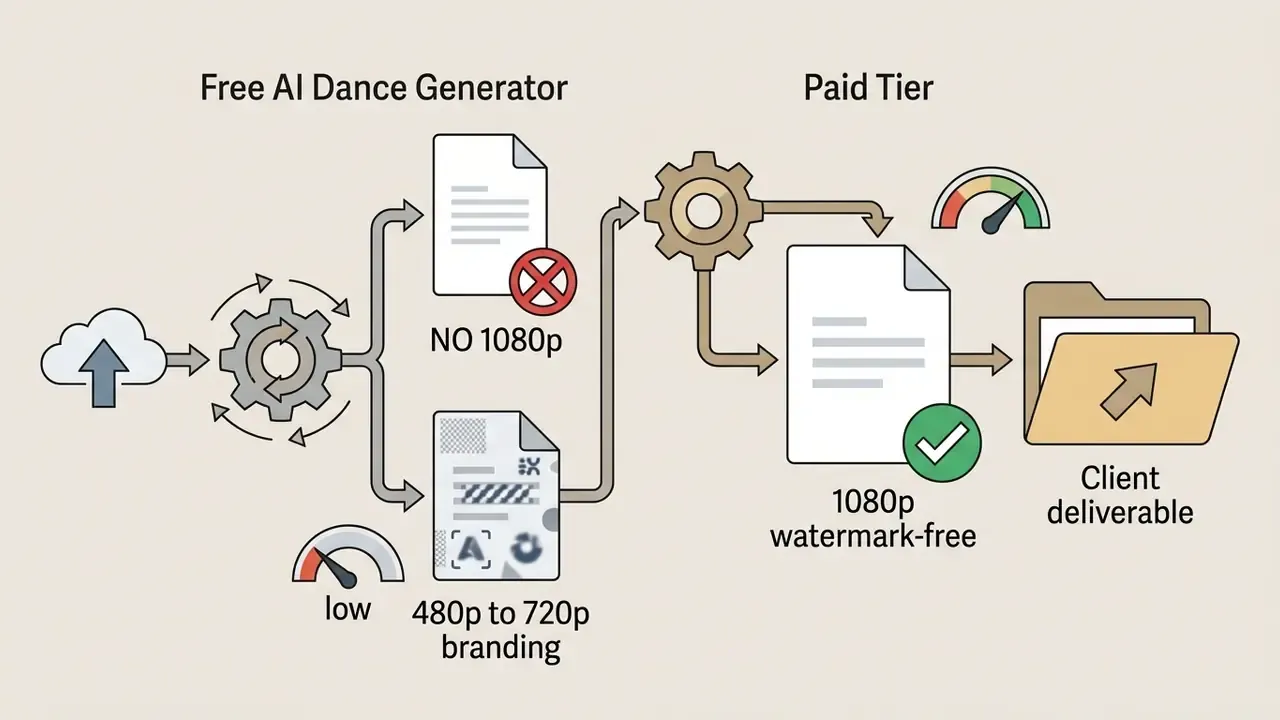
- Free access reality check: typical free tiers grant 1 instant generation without registration, or 3 to 5 free video credits per day after account creation, capped at 480p to 720p with a platform watermark.
- Input specs worth memorising: JPG / JPEG / PNG / WEBP up to 20 MB for the still; MP4 / WEBM / MOV up to 30 seconds for the reference motion clip.
- Before publishing commercially: clear the likeness, clear the music synchronization rights, and confirm your subscription tier actually grants commercial distribution plus watermark removal.
What is an AI Dance Generator and How It Creates Dance Videos
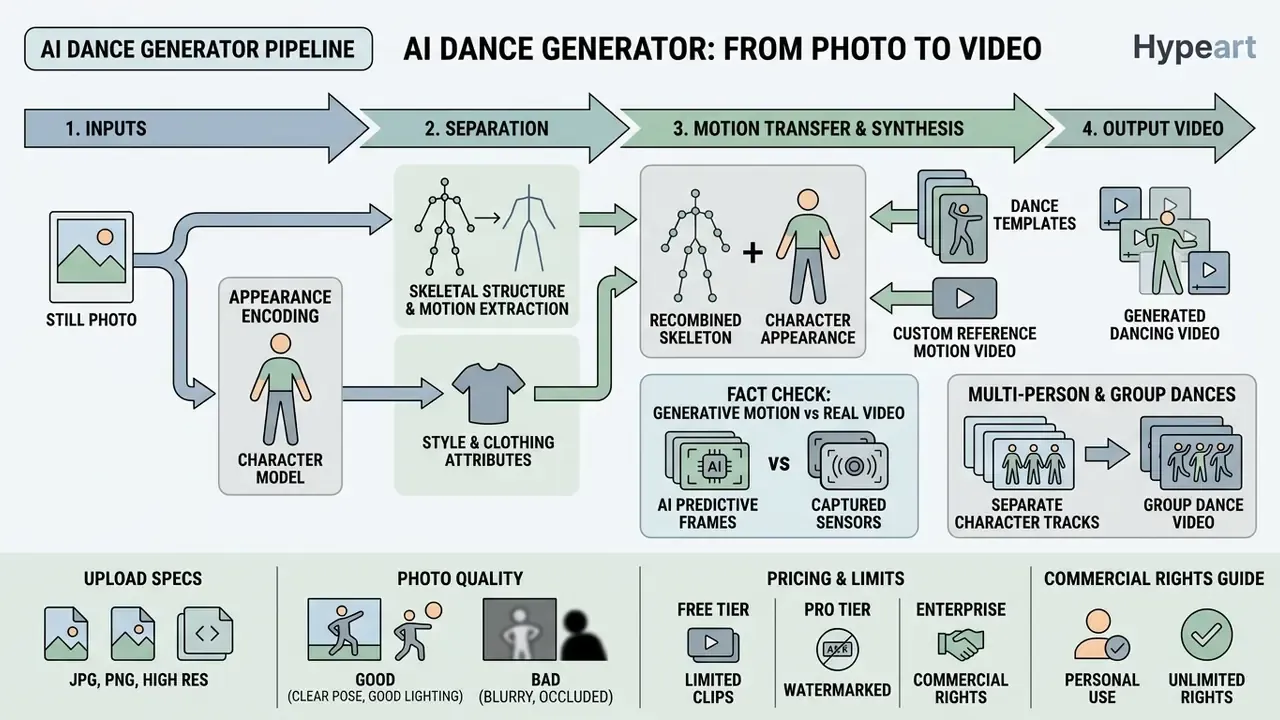
An AI dance generator is an automated video synthesis pipeline that separates appearance (face, clothing, proportions) from skeletal movement, then recombines the two. Instead of recording live footage, these systems use a dance video generator framework to map a target pose sequence onto a source photo or image, synthesizing fresh ai video frames with deep learning backbones. Readers mapping the broader category can also review adjacent image-to-video AI tools and general-purpose animation makers, which automate keyframing rather than motion transfer.
How appearance and motion are separated (conceptual pipeline):
| Stage | Input | What the model does | Output |
|---|---|---|---|
| 1. Identity encoding | Reference photo | Extracts facial geometry, garments, body proportions into an appearance embedding | Static identity representation |
| 2. Pose extraction | Template or reference video | Detects 2D/3D keypoints, DensePose or SMPL body maps per frame | Skeleton sequence |
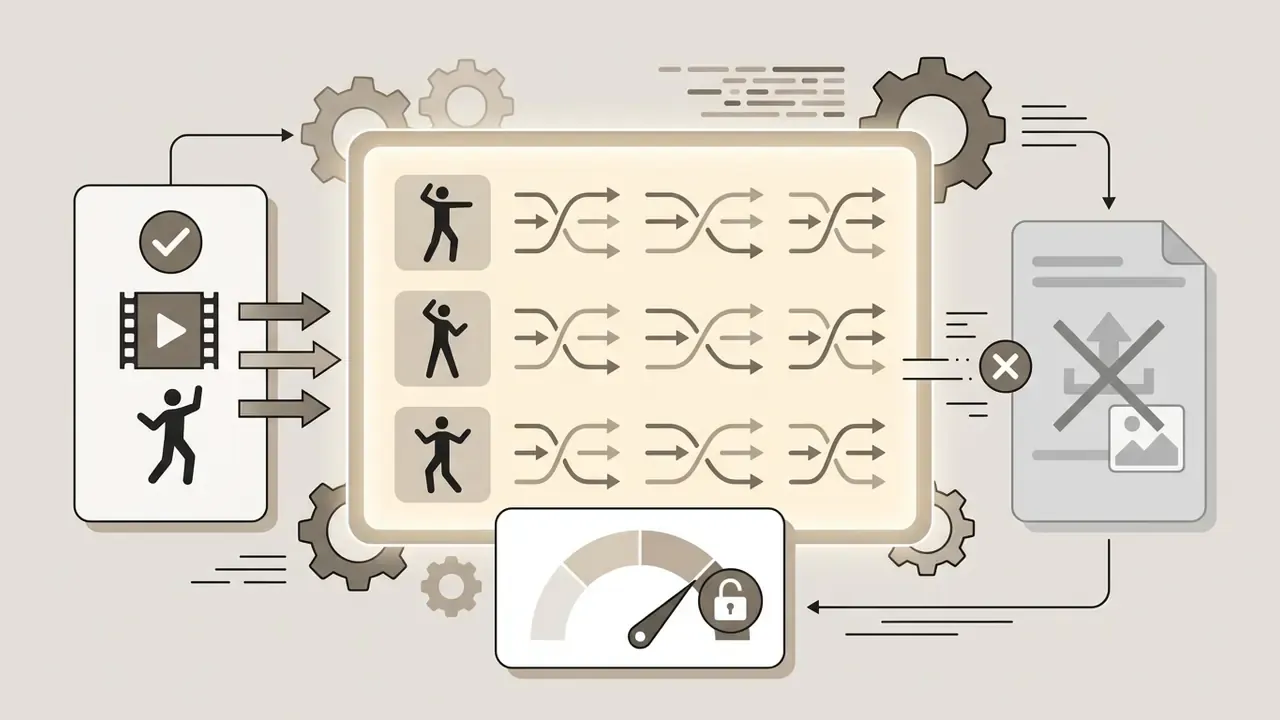
| 3. Conditioned diffusion | Identity + pose sequence | Denoises latents frame by frame under pose guidance with temporal attention | Coherent frame stack |
| 4. Decoding and muxing | Frame stack + audio | Upscales, interpolates, aligns beat and lip-sync | Exportable MP4 |
From Photo to Dancing Video: Character Animation and Motion Transfer
Generative animation turns one static character into a continuous dancing clip using pose-guided latent diffusion. Models such as Animate Anyone (CVPR 2024) and MimicMotion pair a reference appearance encoder with a pose guider, so facial traits and garments hold while the body executes frame-by-frame motion. By decoding sequential skeleton maps or DensePose alignments, the system produces temporal dance videos from a single reference image. No multi-camera rig. No studio time.
To test character stability across complex movement, a technical team ran an image to dance video ai free pipeline on high-resolution portrait assets. They extracted 2D keypoints with AlphaPose, routed them through a pose-conditioned diffusion sampler, and produced 8-second clips in which facial geometry stayed visually stable across the sequence during internal side-by-side review. That is an in-house observation, not a peer-reviewed benchmark. Worth stating plainly, because the verified mechanism behind such stability is confidence weighting on the pose signal:
«Each pose keypoint carries a confidence score, reducing distortion in hands and fine detail when pose estimates are noisy.»
In commercial production, engines such as Kling 3.0 Motion Control and Viggle JST-1 run alongside these academic models. They interpret 3D spatial body mechanics to handle rapid rotations, limb crossovers and fluid choreography while holding temporal identity across frames. In practice that is the difference between a mapped backflip and a hallucinated third arm.
Multi-Person Animation: Generating Group AI Dance Videos
Advanced diffusion pipelines now support multi-tracking architectures (Viggle's JST-1 and Multi-Track frameworks, for example). These systems run separate spatial keypoint estimation for up to 7 distinct characters in a single frame. Creators assign a separate face or body photo to each detected skeletal track, which unlocks group K-pop routines, family dance edits and multi-character memes without cross-identity contamination during overlaps.
Practical constraints for group generation:
- Each tracked subject has to stay distinguishable in the reference video. Heavy occlusion breaks track assignment.
- Identity swaps are per track, so a 5-person routine needs 5 separate photos meeting the same quality bar as a solo clip.
- Render cost scales roughly with the number of tracked skeletons, so group clips burn more credits and sit longer in the queue.
Dance Templates vs. Custom Reference Motion Video
You control choreography in one of two ways: pick a built-in template, or upload your own reference motion video. Built-in choreography libraries ship pre-rendered movement sequences, from trending social routines to ballet, pole, afrobeat and shuffle patterns, mapped to standard skeletal rigs. Upload a reference clip instead and the system extracts live movement from a human dancer, transferring those exact moves onto the target image. That second path suits tailored creation workflows, brand choreography and anything a template library will never carry.
Fact Check: How Generative Motion Differs from Real Video Capture
How to Choose the Best AI Dance Generator
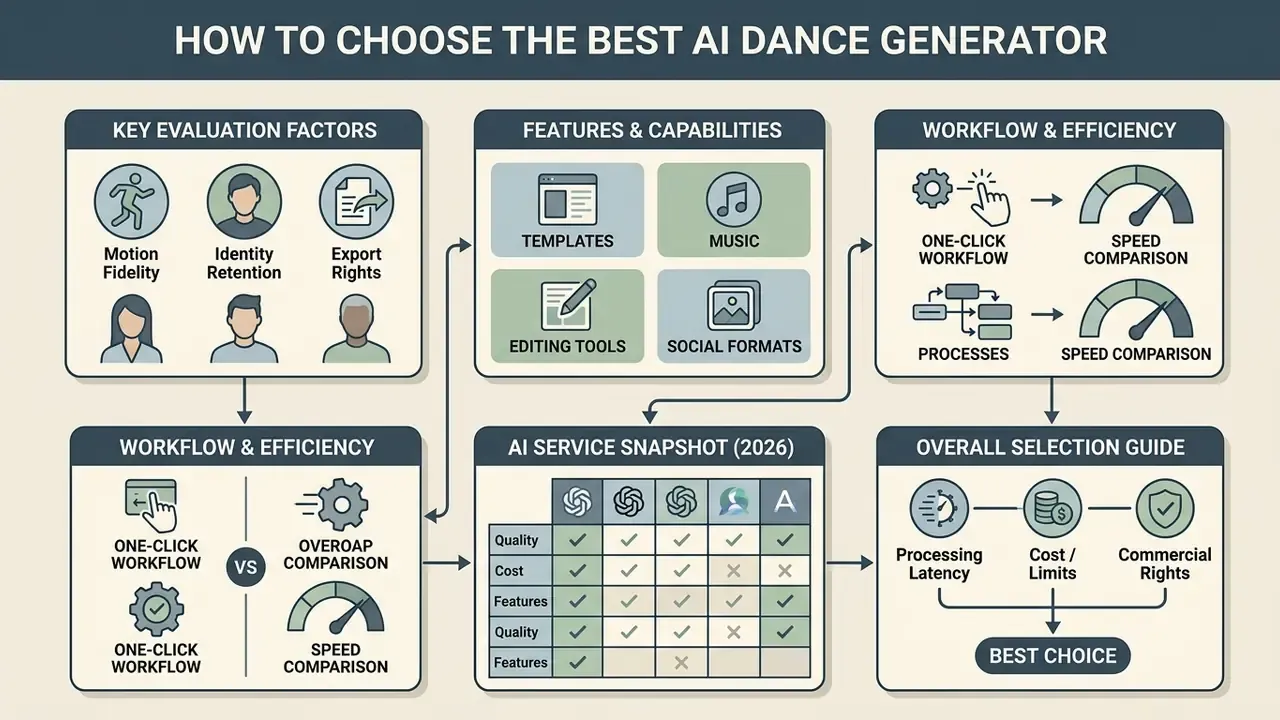
Selecting the best ai dance generator means weighing motion fidelity, processing latency, identity retention and export rights. The strongest tools balance realistic frame rendering with browser-based controls, so you move from raw image to finished asset without a local render farm. A best ai dance video generator shortlist usually comes down to three or four services, not thirty.
Motion Quality, Appearance Preservation, and Realistic Animation
A high-quality generative pipeline keeps natural body mechanics while preventing identity distortion across frames. Architectures like HumanDiT post lower Fréchet Video Distance (FVD) scores after training on large human motion corpora, which is why clothing and facial proportions stay fixed while the subject performs fluid dancing actions.
Three axes matter for evaluation, and the literature measures them separately: motion quality (FID, FVD, NPSS), music synchronization (Beat Align, as used in Bailando, CVPR 2022), and identity preservation (per-frame appearance similarity, reported in motion-transfer papers rather than dance-generation benchmarks). No single published metric covers all three at once. Which is exactly why side-by-side visual QA stays mandatory before anything goes live.
One-Click Workflow and Generation Speed
A best one click ai dance video maker hides the neural configuration behind an ordinary web form. Cloud platforms such as Viggle AI and SeaArt AI run generation on hosted GPU clusters and publish "under a minute" targets for short clips on priority queues. Those are vendor-stated figures, not guarantees, and they move with queue depth, resolution and clip length. The durable benefit is architectural rather than temporal: no local install, no specialised hardware, no driver roulette.
| Selection Metric | Free / Entry Tier | Professional / Paid Tier | Enterprise / API Access |
|---|---|---|---|
| Input Modality | Single photo / standard image | High-res photo and custom video | Bulk image and motion video streams |
| Motion Quality | 480p to 720p / standard frame rate | 1080p HD / smooth interpolation | 4K / custom temporal filtering |
| Choreography Control | Basic preset templates | Custom motion transfer upload | Programmatic API / batch presets |
| Multi-Character Tracks | Single subject only | Up to 7 tracked skeletons | Configurable batch tracking |
| Watermark and License | Platform watermark / personal | Watermark-free / commercial rights | Fully licensed / custom SLAs |
| Processing Time | Standard queue (1 to 5 min) | Priority queue (often under 60 s) | Dedicated GPU infrastructure |
Teams weighing this category against general-purpose generation stacks can also review the wider market of best AI video generators, run the numbers and compare options on credit spend, or study the developer-side economics of hosted video models in this Google Veo implementation guide.
Comparison of Real AI Dance Services (2026 Snapshot)
| Service | Input model | Template library | Free access (vendor-stated) | Standout capability | Watch-outs |
|---|---|---|---|---|---|
| Viggle AI | Photo + template or uploaded motion video | 8,000+ routines (TikTok, K-pop, ballet, pole, afrobeat, shuffle) | 1 video without sign-in; 5 free dance videos per day for registered free users | JST-1 3D body mechanics; Multi-Track swaps up to 7 characters | Heavy demand lengthens the free queue |
| EaseMate AI | Photo + reference dance video (required) | 10 trending style templates | Credit-based; daily check-ins and referrals add credits | Kling 3.0 Motion Control; keeps original audio with lip-sync; watermark-free export | Needs a reference clip; 20 MB / 30 s input caps |
| Vidnoz Photo Dance | Photo + preset motion or custom sequence | 115+ trending dance motions with BGM | Free web access, no watermark on the stated free flow | Explicit good vs bad photo guidance; music preview per track | Rejects lying-down poses and profile shots |
| Media.io Dance AI | Single photo, effect-based | Named viral effects (Baby Dance, Tyla Dance, Dog Dance, Not Cute Anymore, Drunken Dance) | Free credits on login | Fastest 3-step flow, TikTok-optimised pacing | Fewer motion-control parameters |
| SeaArt AI | Photo + preset dance | Preset dance effects | Credit-based free tier | One-click generation in seconds to roughly a minute | Output resolution tied to plan |
Vendor-stated figures reflect public product pages and change often. Verify current limits before you commit a production workflow to any of them.
How to Create an AI Dance Video from a Photo Online
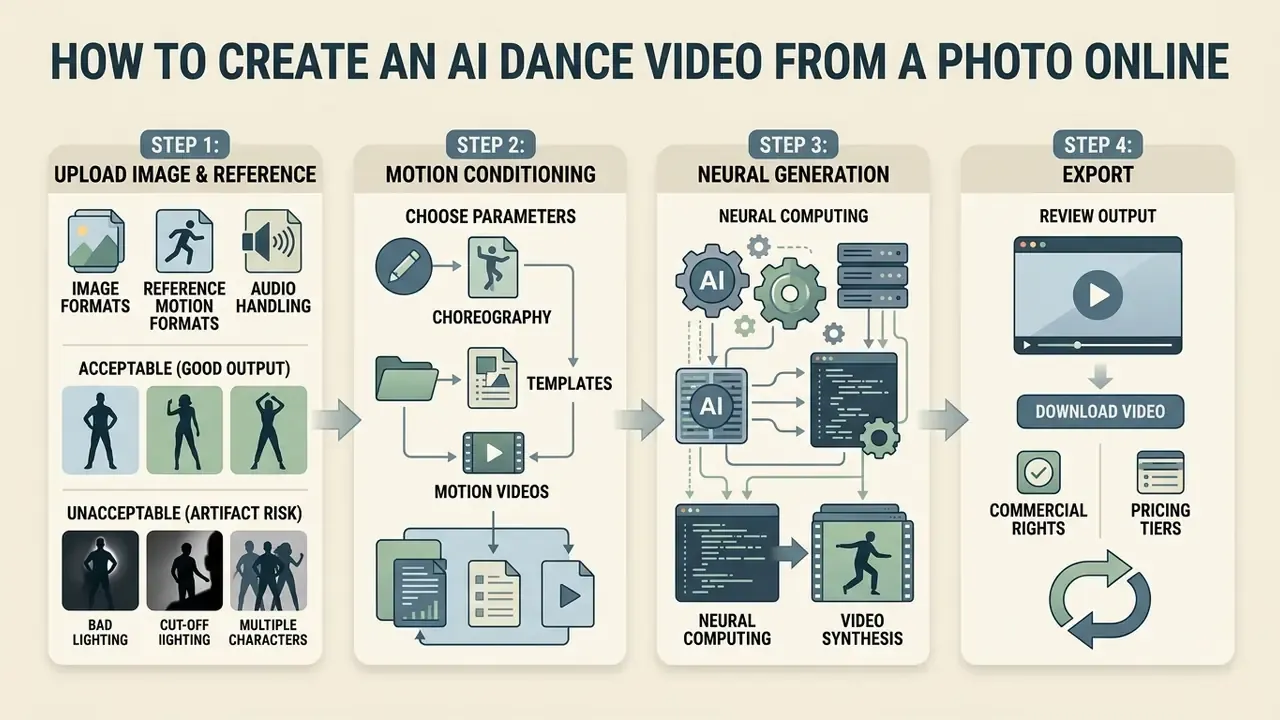
Making a synthetic dance clip online is a four-step loop: image selection, motion conditioning, neural generation, export. An ai dance video generator online free flow follows the same sequence as a paid one, only with tighter caps.
Workflow at a glance: Upload photo → Choose template or upload reference motion → Generate → QA for artifacts → Download and share
Step 1: Upload a Photo or Image with Your Character
Start with a clear, well-lit photo showing a full-body view of the character. Centre the subject against a clean background with limbs fully visible, which gives the pose estimator an accurate initial body map. Most failed generations trace back to this step, not to the model.
Supported input specifications:
- Image formats JPG, JPEG, PNG, WEBP (max 20 MB). Minimum recommended resolution 1080x1080 px.
- Reference motion video formats MP4, WEBM, MOV (max 30 seconds; 30 to 60 fps; some motion-control flows cap uploads at 100 MB).
- Audio handling the native track from a reference video is preserved automatically and aligned through frame-level lip-sync and beat matching, so no manual music import is required.
Source stills that need cleanup, such as background removal, exposure correction or straightening, can be prepared in advance with a standard online photo editor or a free photo editor so the estimator receives clean contours. Teams collecting consent at scale often pair the upload step with an ai form generator to capture and store likeness permissions alongside each asset.
Photo validation criteria for optimal pose tracking
- Acceptable (good output)
- full-body or waist-up front-facing shot; subject upright without body tilt; isolated or plain light background; exposed limbs and hands; even lighting; sharp facial and garment detail.
- Unacceptable (artifact risk)
- profile or side views; occlusion by objects (bags, cups, phones, instruments); dim or uneven lighting; lying-down poses; cropped feet, hands or forehead; multiple overlapping subjects in a single-track workflow.
Step 2: Select Choreography, Template, or Motion Video
Pick your movement sequence from the platform's choreography library, or upload a custom 10 to 30 second reference dance video. A preset template applies pre-calculated skeletal keypoints instantly. A custom clip needs a short preprocessing pass to extract motion markers. For reference uploads, keep the dancer's full body visible for the entire clip with minimal occlusion and steady lighting, because the tracker inherits every flaw in the source performance. Shaky phone footage in, shaky animation out.
Step 3: Generate, Review Output, and Download Video
Hit generate and let the model render the ai-generated clip. Then review it properly: temporal stability, facial fidelity, motion fluidity, background behaviour. Once satisfied, download the MP4 or share it straight to your target channels. Creators building a fuller campaign can test an ai flyer generator or an ai font generator for supporting assets, while large exports headed to several platforms can be prepared with a video compressor.
Export checklist for social platforms: 9:16 vertical framing, a visual hook inside the first 1.5 seconds, minimum 1000 px width for static thumbnails, MP4 for video and JPG for photo-based covers, plus an AI-generated content label wherever platform policy requires disclosure.
Step 4: Troubleshooting Common Generation Artifacts
| Symptom | Probable cause | Corrective action |
|---|---|---|
| Blurred or fused hands | Noisy keypoints on fast limb motion; hands occluded in the source photo | Re-upload with hands fully visible and separated from the torso; choose a slower-tempo template |
| Face drifting or "melting" across frames | Weak identity conditioning at low input resolution | Raise source resolution (1080 px or more on the short side), use a straight-on portrait, avoid heavy facial shadow |
| Missing or extra limbs | Cropped body parts in the still, or overlapping subjects on one track | Use an uncropped full-body shot; switch to multi-track for more than one person |
| Background flicker or shimmer | Frame-sequential rendering with a busy or textured background | Use a plain background, or isolate the subject before upload |
| Stiff, robotic movement | Template mismatched to body proportions | Select a template closer to the subject's build, or supply a custom reference video |
| Audio drifting out of sync | Reference clip trimmed after motion extraction | Keep the reference clip intact and re-run generation with native audio preserved |
Free AI Dance Generator: What Is Available for Free
Working out what a free ai dance video generator really offers means reading three things: daily quotas, resolution caps and privacy terms. Trial access is common; the operational limits behind it vary wildly. That pattern shows up across the wider market of free AI video generators, and the best free ai dance video generator for you depends on which limit hurts least.
Free Generations, Trial Access, and Free Tool Limitations
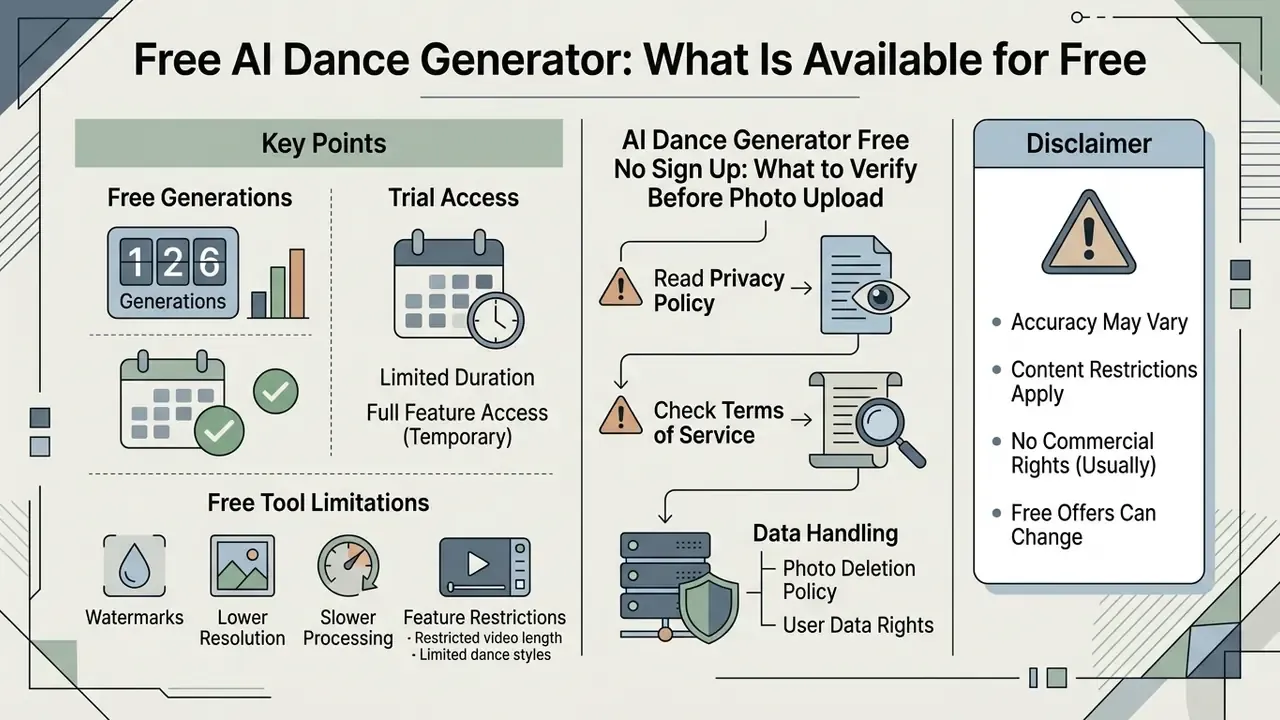
Most free dance ai generator platforms run on credit-based daily check-ins or promotional generations granted at sign-up. An ai choreography generator free tier typically grants 1 instant generation without registration, or a daily allocation of 3 to 5 free video credits after account creation. Some systems instead issue a token pool that resets every 24 hours. Free processing usually caps exports at 480p to 720p, appends a platform watermark, limits clip length (5 seconds is common on entry models), drops requests into a shared queue, and may purge stored outputs after a short retention window such as 15 days.
Put differently: an ai photo dance free workflow is fine for testing an idea, and thin for anything a client pays for.
AI Dance Generator Free No Sign Up: What to Verify Before Photo Upload
With an ai dance generator free no sign up tool, review data retention before you submit sensitive personal media. Services running without authentication often apply temporary retention windows, for example 24-hour auto-deletion. Unverified public endpoints, on the other hand, may keep uploaded photos for model training or system logging indefinitely.
Shadow AI checklist, five verifications before uploading a corporate or client photo:
Organisations mapping broader video pipelines can inspect an AI avatar generator, review an AI headshot generator for portrait-grade source assets, or test an AI video upscaler when export fidelity matters more than speed.
Pricing Plans, Download Options, and Commercial Rights
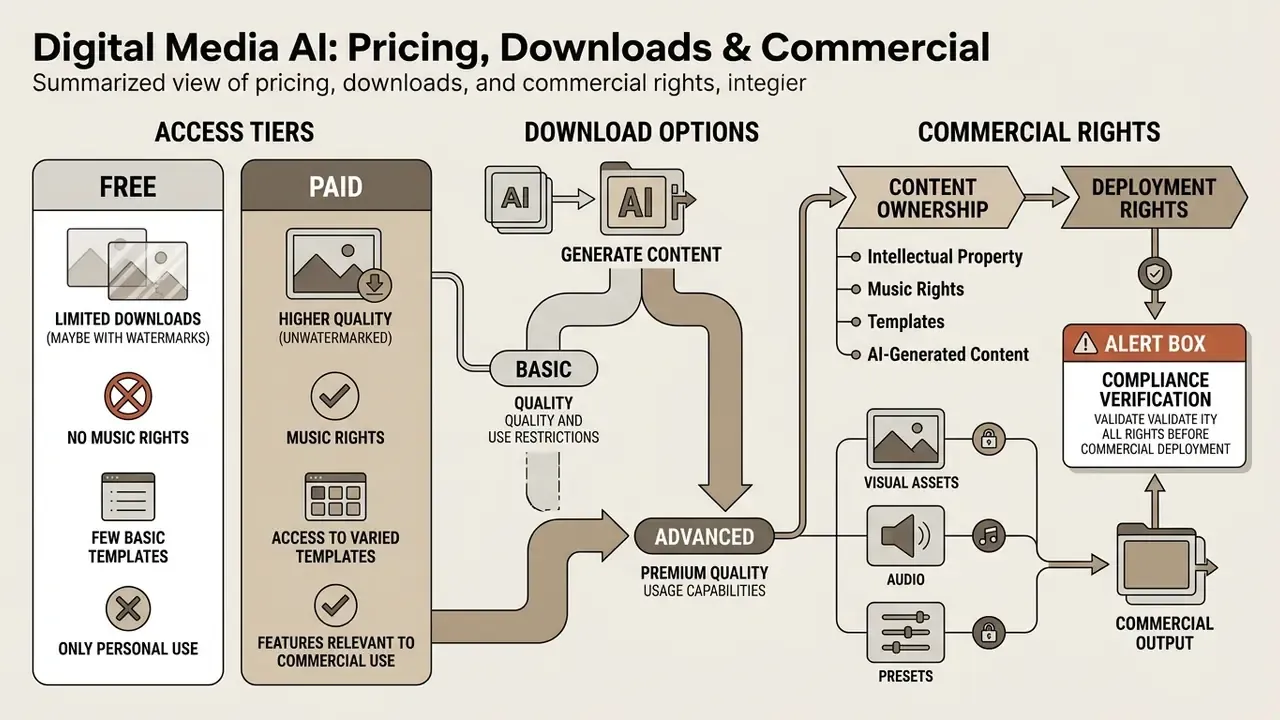
Moving from casual use to commercial distribution changes the questions: subscription tiers, compute costs, intellectual property. An ai dance video generator free online flow rarely carries the rights you need for paid media.
Free vs. Paid Access Comparison
Across published vendor pricing pages, paid production tiers usually remove the watermark, unlock 1080p (4K reserved for higher tiers), add priority or dedicated rendering queues, and grant a commercial usage licence. These are vendor commitments, not industry standards. At least one pricing page grants commercial use on its free plan, while others restrict it to the top tier only. Before committing, evaluate monthly credit conversion rates against your expected output volume and inspect the detailed pricing structure line by line.
So treat every figure below as a starting point and re-verify it against the live page before procurement. Enterprise buyers who need signed documentation can browse the hub for compliance materials.
Intellectual Property, Music Rights, Templates, and AI-Generated Content
Under U.S. Copyright Office guidance, purely machine-generated video output lacking substantial human creative direction falls into the public domain. Registration covers only the human-authored expressive elements, and prompts alone do not establish authorship. European Parliament research lands in a similar place: output produced without substantial human intervention is not eligible for copyright protection in the EU.
Using a commercial audio track inside a synthetic dance clip needs its own synchronization licence. Choreography is protected only where it is fixed in a tangible medium and reflects human authorship, so AI-generated choreography alone is not copyrightable. Unauthorised likeness use sits in a different legal box entirely, handled through digital-replica and publicity-rights frameworks rather than copyright registration. Vendor terms reviewed for this guide consistently push the rights-clearing burden onto the user, covering "music, footage, trademarks and consents for publicity rights", and at least one explicitly prohibits removing or obscuring platform watermarks.
For adjacent rights questions, review guidance on commercial use of AI image generators, the style-licensing considerations documented for Ghibli-style AI image generators, or open the hub for broader business licensing notes.
Alert Box: Compliance Verification Before Commercial Deployment
| Pricing Tier | Typical Cost | Resolution | Watermark Status | Commercial Usage License |
|---|---|---|---|---|
| Free / No Sign-Up | $0 (1 generation, or 3 to 5 credits per day) | 480p to 720p | Included | Non-commercial / personal only |
| Starter / Basic | $9.90 to $14.99 per month | 1080p HD | Removed | Limited commercial licence |
| Pro / Studio | $29.90 to $89.99 per month | 1080p to 4K | Removed | Full commercial licence |
| Team / Enterprise | $79.90 to $149.99 per month, or custom | 4K + API batch | Removed | Full commercial licence + SLA |
Enterprise Governance, Security, and Model Risk for Generative Dance Video
Consumer virality and enterprise deployment share a pipeline, not a risk profile. Teams extending model validation frameworks to generative video should name the failure classes explicitly, then attach a control to each one.
| Risk class | Manifestation in dance generation | Suggested control |
|---|---|---|
| Anatomical hallucination | Extra or fused limbs, warped hands during overlap or rotation | Automated per-frame keypoint count check against the expected skeleton |
| Biometric identity drift | Facial geometry shifting across the sequence | Frame-sampled face-embedding similarity threshold before release |
| Temporal instability | Flicker, ghosting, background shimmer | FVD / SSIM regression testing against a fixed internal benchmark set |
| Likeness misuse | Animation of a person without consent | Mandatory consent artifact stored alongside every generated asset |
| Music infringement | Uncleared sync of a commercial track | Audio rights register linked to each published clip |
| Shadow AI data egress | Staff uploading client photos to anonymous endpoints | Approved-tool list plus DLP rules for image upload domains |
| Audit gap | No record of source photo, template, model version | Immutable generation log: input hash, model, template ID, timestamp, operator |
Ideas for AI Dance Videos: Viral Content, Characters, and Photos
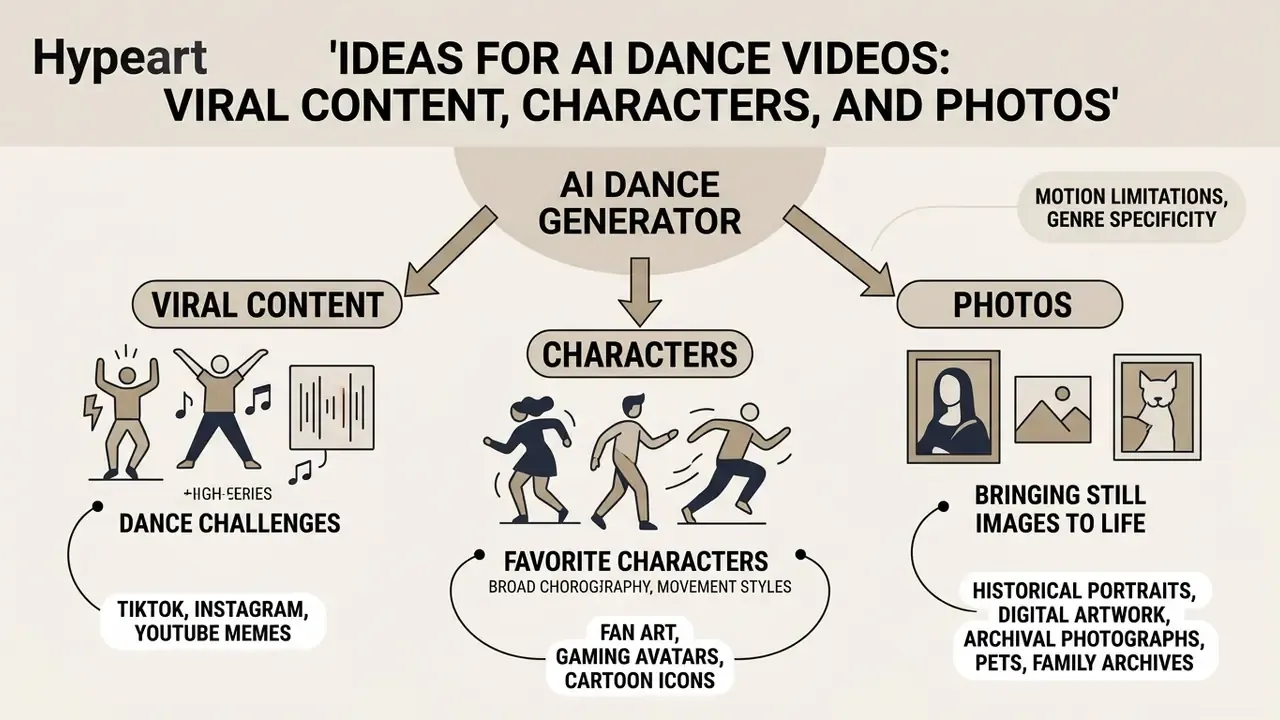
Synthetic dance videos work as flexible content assets for marketing, engagement and light storytelling. Cheap to iterate, fast to test.
Dance Videos for TikTok, Instagram, and YouTube
Short-form platforms run on rhythmic, high-energy visuals. Pair a trending audio clip with an ai photo to dance video generator free workflow and static brand assets become vertical posts tuned for TikTok, Instagram Reels and YouTube Shorts. An ai photo dance generator online free tier is usually enough to test three concepts before you spend on a plan.
Motion models now ship with broad choreography libraries, so creators can apply viral challenges without filming a frame: K-pop idol routines (KATSEYE-style choreography, Jennie-inspired "Like Jennie" sequences), Tyla water dance, afrobeat shuffles, Baby Dance, Ghost Step, Dog Dance, Not Cute Anymore, Tauba Tauba, "Can I join?" trio trends, Rat Dance, Cough Dance, Soda Pop, and meme-driven animations such as Drunken Dance. Preset templates remove the need for reference performances, while hashtag clusters around #AIDance, #DanceTrend, #dance, #shorts and #viral carry discovery.
That breadth of training data explains how one architectural backbone covers ballet spins, pole work, club edits and regional street styles. Creators publishing to long-form channels can align the vertical cut with their main feed using this YouTube video editor workflow guide.
Memes, Favorite Characters, Pets, and Family Archives
Generative motion opens odder doors: historical portraits, digital artwork, archival photographs, pets, fictional brand mascots. Applying structured motion to unconventional subjects produces highly shareable, frequently ridiculous content, and it stress-tests pose estimation networks in ways benchmarks do not. Public archives have published animated GIF collections of newsreels, celebrities and "dancing sailors", which shows institutional appetite for motion-based reuse of still holdings. An ai picture dance free experiment on a great-grandparent's photo tends to land better with family than any brand campaign. Creators exploring the wider toolset can review general-purpose AI video generators, browse the hub to weigh alternative platforms, or view the guide for API integration options.
A caution rides alongside the fun. Guidance on manipulated media recommends verifying source, visuals and metadata before republishing altered depictions of real people, and applying platform AI labels whenever the subject is identifiable.
FAQ on AI Dance Generators
What photos work best for AI photo dance?
The best input is a sharp, evenly lit, full-body portrait shot straight on, ideally against a plain light background. Body contours should be clear, with no overlapping objects and no dark shadow swallowing the limbs, so the pose estimator can extract keypoints cleanly. Avoid profile views, tilted posture, lying-down poses, cropped feet or hands, and anything held in front of the torso. An ai photo dance online free tier will not rescue a bad source image.
«A single photo is sufficient to build a photorealistic, animatable whole-body avatar, which raises consent questions when uploading other people's images.» One Shot, One Talk: Whole-body Talking Avatar from a Single Image (2025 to 2026). arXiv preprint, https://arxiv.org/abs/2412.01106
How long does it take to generate a dance video?
Vendor-published ranges put a 5 to 10 second clip at 30 to 180 seconds, depending on queue volume, output resolution and model complexity. Reported examples cluster near 30 to 60 seconds for a 5-second clip and 90 to 180 seconds for 15 seconds of output. Mobile apps relying on server-side queueing during peak hours run far longer; one documents 20 to 30 minutes as typical.
«Diffusion-based video generation remains computationally expensive; MACE-Dance reports 224 FPS for motion generation, while rendering RGB frames requires substantially more resources.» MACE-Dance: BiMamba and Transformer hybrid for 3D dance motion generation (2024 to 2025). arXiv preprint Trimming, captioning and colour polish can happen afterwards in free video editing software.
Can I make a group dance video with several people?
Yes, on platforms with multi-track architectures. They track each detected person separately, up to seven characters in one frame, and accept a distinct face or body photo per track. Success hinges on each subject staying visually separable in the reference video. Heavy overlap causes track confusion and identity bleed.
Do I need to add music manually?
Usually not. When the reference clip carries audio, a dancing ai generator free flow preserves the original track and aligns it with the animation, lip-sync included where the subject is singing. Manual import matters mainly for template-driven flows without embedded audio. Either way, commercial tracks still need independent synchronization clearance.
Why do the hands look blurry or the face unstable?
These are architectural artifacts of frame-sequential diffusion, not user error. Hand blur and identity drift concentrate in frames with fast limb motion, occlusion or low-resolution source detail. Confidence-weighted pose guidance and 3D parametric conditioning (SMPL-based depth and normal maps) measurably reduce both effects, which is why engine choice outweighs prompt wording here.
Can you create picture talk or only full-body dance animation?
AI dance generators specialise in full-body skeletal animation and whole-body spatial movement. "Picture talk" or talking-head generators do something different: speech-driven facial expression and lip synchronization, with motion limited to lips, eyes, head pose and sometimes the upper body. Both rest on generative diffusion principles, yet they use distinct conditioning pipelines, and only a subset of speech-driven research models handles face, body and hands jointly.
Who owns the copyright to the generated clip?
In the United States, only human-authored expressive contributions are registrable; purely machine-generated output is not protected. EU analysis treats fully autonomous AI output as public domain. Vendor terms typically say you keep ownership of your uploaded photos and your generated videos while the platform keeps its own technology and template assets. Your practical rights therefore come from contract plus whatever human creative direction you can actually document. Risk teams mapping exposure around synthetic media can explore the hub for compliance frameworks.
Appendix A: Superseded Claims and Corrections
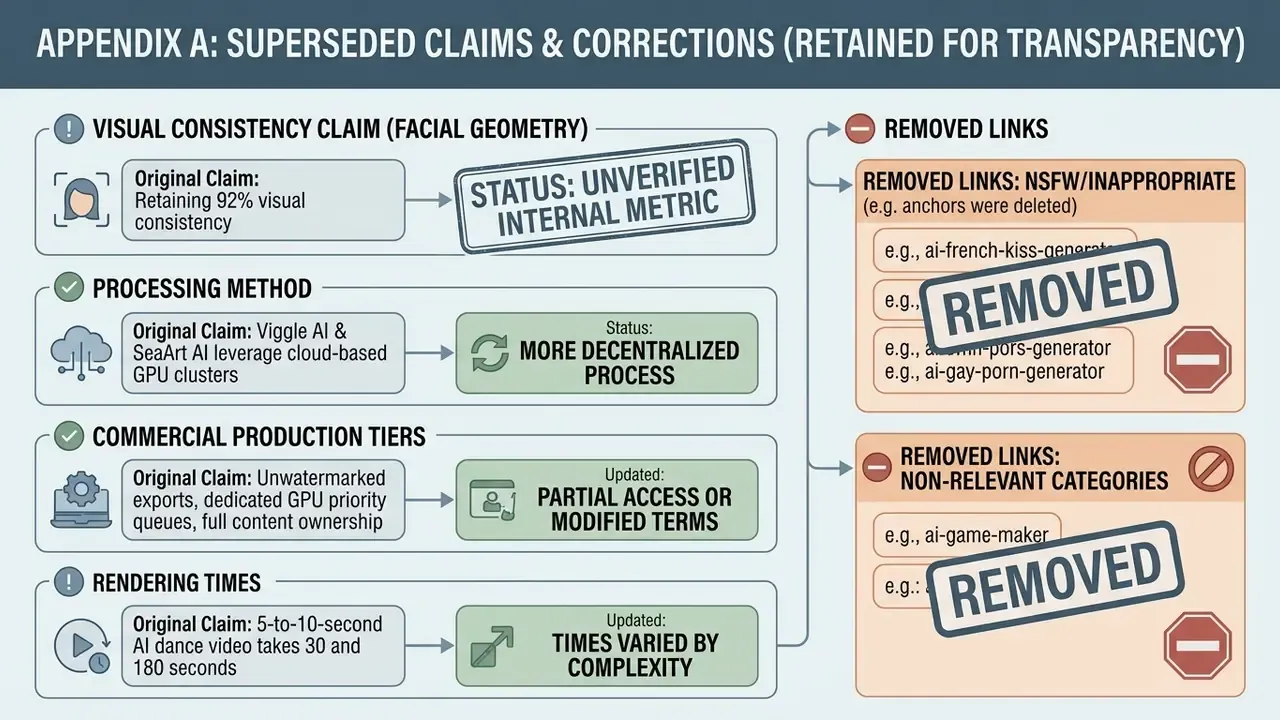
How to Re-Verify This Guide Before You Buy
Vendor pages shift faster than editorial reviews, so treat this article as a checklist rather than a fixed record. Four steps keep it current: Terminology, adjacent tools and definitions used throughout this guide are collected in the glossary, where you can browse the hub for related entries.
- Re-read the free tier terms on the live product page and note the date you checked.
- Run one test generation with a non-sensitive photo and log resolution, watermark, clip length and queue time.
- Screenshot the commercial-use clause of the plan you intend to buy, and store it with the procurement record.
- Re-run your internal QA metrics (keypoint count, face-embedding similarity, FVD against your benchmark set) after any vendor model update.