"Evaluating digital media tools requires balancing speed, privacy controls, and human authenticity. In video creation, automated models accelerate production, but verified human governance ensures lasting emotional resonance and regulatory compliance."
Executive Summary
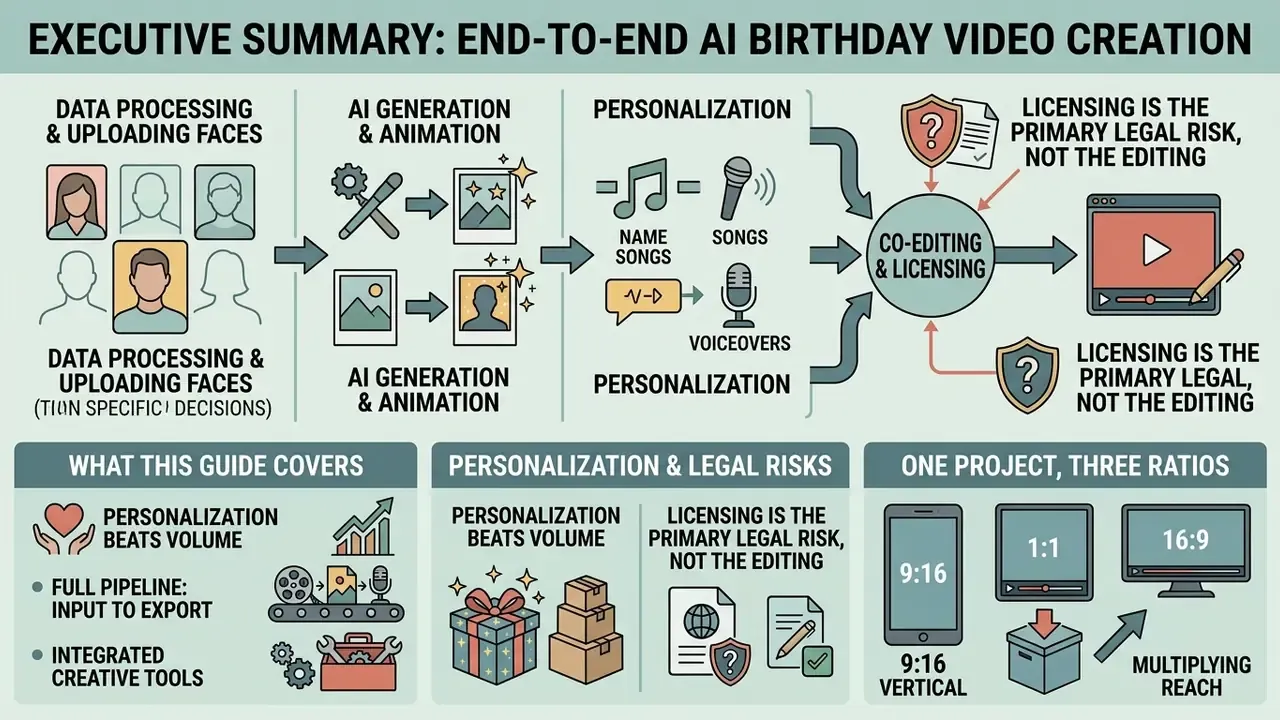
- AI generation now covers the full pipeline. Prompt-to-video, photo animation, script writing, name-singing music tracks, and multilingual voiceovers (50+ languages) are produced inside a single browser session. No camera, no editing experience required.
- Personalization beats volume. AI-personalized video advertising outperformed both personalized images and standard video on click-through rate. Yet AI-written greetings are rated as less sincere unless real photos, real names, and social closeness are visible in the frame.
- Licensing is the primary legal risk, not the editing. Any commercial or brand-facing birthday video needs two separate music permissions, synchronization rights (composition) and master-use rights (recording), plus verified commercial licenses for templates, fonts, and AI-generated audio.
- Uploading faces is a data-processing decision. Children's photos fall under GDPR Article 8 and US COPPA. Free consumer web tools used by employees for corporate greetings create a Shadow AI exposure that belongs in the AI asset inventory and the vendor risk review.
- One project should ship three ratios. Export 1080×1920 (9:16 reels and stories), 1080×1080 (1:1 feed), and 1920×1080 or 4K (16:9 projector or TV) from the same timeline instead of re-editing per platform.
What This Guide Covers
- What a birthday video maker is and what videos it creates
- How to choose the best birthday video maker online
- Free plans, pricing, and commercial usage terms
- How to create a birthday video with photos and music online
- How to personalize a happy birthday video
- How to make a group birthday video from friends and family
- FAQ about birthday video makers
- Appendices: export specs, vendor checklist, consent wording
What Is a Birthday Video Maker and What Videos Can You Create
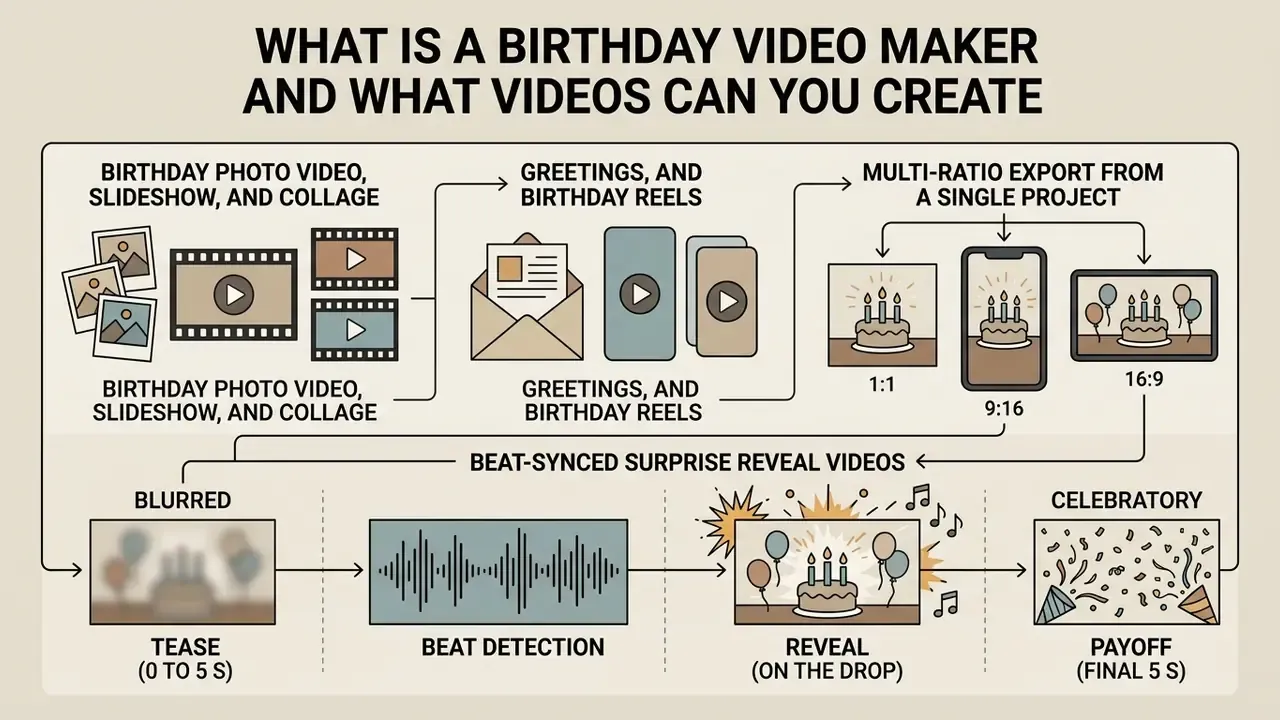
A birthday video maker is a specialized media assembly application that turns static assets and short clips into structured celebratory motion graphics. In short: these tools cover everything from a 15-second animated card to a 12-minute group tribute, and the real difference between formats is length, orientation, and the number of contributors.
The output range is wide: personalized happy birthday video messages, animated birthday photo video montages, slideshows, vertical social media reels, dynamic video cards, birthday invitations and eCards, looping GIFs, memes, cartoons, and collaborative group tributes. Web editors and generative tools let creators customize transitions, text overlays, and audio tracks, so a single celebration video can be tailored for a toddler, a colleague, or a 70th anniversary party.
Five popular birthday video formats.
- Birthday photo video an animated slideshow built from a photo archive with synchronized music and transition effects.
- Birthday collage several photos and clips composed on one screen to recap the highlights of a year.
- Birthday video card a vertical interactive greeting card carrying the recipient's name, age, and a written wish.
- Group birthday video a merged compilation of short messages recorded by family members and colleagues in different locations.
- Birthday reel a dynamic 9:16 short clip with trending effects and beat-matched music for social platforms.
Purpose of the gallery: to help a user choose the format before the project starts. Alt-text targets: "birthday photo video example", "birthday video card maker template".
Birthday Photo Video, Slideshow, and Birthday Collage
A birthday photo video converts static digital photographs into a moving slideshow through panning effects, transition filters, and synchronized background music. Creators who want to move past simple panning can review dedicated image-to-video AI tools, which animate a single frame instead of merely sliding it across the screen. Single archival images or multi-photo layouts can also be combined into a birthday collage video that recaps key life events or one calendar year.
To build a compelling birthday video compilation, editors organize media chronologically or by theme. Tools marketed as a birthday video collage maker online free, or as a dedicated birthday video compilation maker, add automated timing matching so uploaded images land on the chosen audio beats. Memorial and legacy montage practice is stricter: group images by decade or event, keep the order chronological, allow at least 15 photos per narrative unit, and plan 10 to 20 minutes of runtime when the audience is large and seated.
Video Cards, Greetings, and Birthday Reels
Video greeting cards and birthday reels are short-form celebratory videos engineered for instant messaging and social distribution. A birthday card video maker, a birthday video card maker, or a birthday greetings video maker produces compact, high-impact visuals with customized typography and animated elements.
With a birthday message video maker or a birthday reel maker, output is usually vertical (9:16) and built for Instagram, TikTok, or WhatsApp. These short clips live on three things: clear greeting text, visible movement, and concise audio. Commercial marketplace listings converge on almost the same recipe: a vertical animated card of roughly 30 seconds, delivered through WhatsApp, Instagram, Facebook, or Messenger.
Multi-Ratio Export From a Single Project (1:1, 9:16, 16:9)
Rebuilding the same greeting three times is the most common waste of effort I see in briefs. Modern editors keep one master timeline and re-frame it, so plan the composition for reframing from the very first scene.
| Aspect ratio | Resolution | Where it plays | Composition rule |
|---|---|---|---|
| 9:16 vertical | 1080×1920 px | TikTok, Reels, Shorts, Stories, WhatsApp status | Keep faces and key text in the central third; caption size 48 pt or larger; leave safe margins for platform UI |
| 1:1 square | 1080×1080 px | Feed posts, messenger previews, photo collages | Best for multi-photo grids; titles centered, no bottom-edge text |
| 16:9 horizontal | 1920×1080 px (or 3840×2160 for 4K) | Party projector, TV playback, YouTube | Widest layout for group films; use background blur or generated fill where vertical sources appear |
AI-assisted reframing detects the subject and pads the missing area with a blurred or generated background, so a portrait phone clip can still play on a banquet projector without black bars. Export the master at native project resolution first, then derive platform versions from it. If delivery size becomes a problem, compress the derivatives rather than the master; the guide to a video compressor covers the quality-loss trade-offs.
Beat-Synced Surprise Reveal Videos
A surprise reveal is a timing structure, not an effect. It works because the audience is denied the payoff for a few seconds.
- Tease (0 to 5 s).Open on an archival or childhood photo with a soft blur and a quiet intro. No cake, no name, no confetti yet.
- Beat detection.Use auto-beat detection to mark the audio peak, then snap the cut point of the next scene to that marker.
- Reveal (on the drop).At the bass drop, cut to the climax frame: the cake being carried in, the candle blowing, the recipient's current photo, with a flash transition and a confetti burst.
- Payoff (final 5 s).Hold a static end card with the name, age, and the group's signature, so the clip can be screenshotted and re-shared.
The same structure powers office screen takeovers, hidden-camera party drops, and video calls. The anticipation gap is what makes a 20-second clip feel like a gift rather than a template.
Videos for Kids, Friends, Family, and Milestone Birthdays
Tone and narrative structure follow the recipient and the weight of the occasion. Kid birthday videos lean on vibrant color, playful animation, and energetic music. Family and milestone tribute reels prioritize emotional depth, historical photo archives, and personal voiceovers.
Script length follows the relationship. Practitioner guidance recommends 30 to 60 seconds for a friend or relative, 1 to 2 minutes for a close relationship, and 90 seconds to 3 minutes for a milestone birthday, which "earns the extra time" through explicit acknowledgment of the date plus one specific memory. For children, lines stay short and age-anchored: ages 1 to 5 focus on growth, 6 to 12 on abilities and achievements, 13 to 17 on the transition into adulthood. The reliable three-part frame is a brief opening, a body carrying one anecdote, and a short closing wish.
For 18th, 30th, or 50th celebrations, creators build longer compilation projects meant to be watched together during a party. Shared memories inside a surprise video presentation reinforce the personal connection and leave an enduring keepsake for the celebrant.
Niche Formats Worth Planning Separately
- First birthday cake-smash video. Shoot in slow motion (60 or 120 fps) to hold the child's reaction, apply pastel-toned color filters, and correct white balance manually. Indoor party lighting almost always pushes footage toward orange and amplifies sensor noise. A single cake-smash still can also be animated into a 20-second cinematic reel for grandparents.
- Birthday memes and GIF cards. Build 3-second looping clips (GIF or short MP4) with oversized caption text and one exaggerated reaction. These are optimized for chat delivery, not feeds, so legibility at thumbnail size beats visual polish.
- Invitation videos and eCards. Swap in the name, age, venue, and time over a fixed animated layout. This replaces printed invitations when the party is less than a week away.
- Kids' class or team greeting. Twenty short clips of five seconds each read better than five long ones. The value here is breadth of participation, not production quality.
How to Choose the Best Birthday Video Maker Online
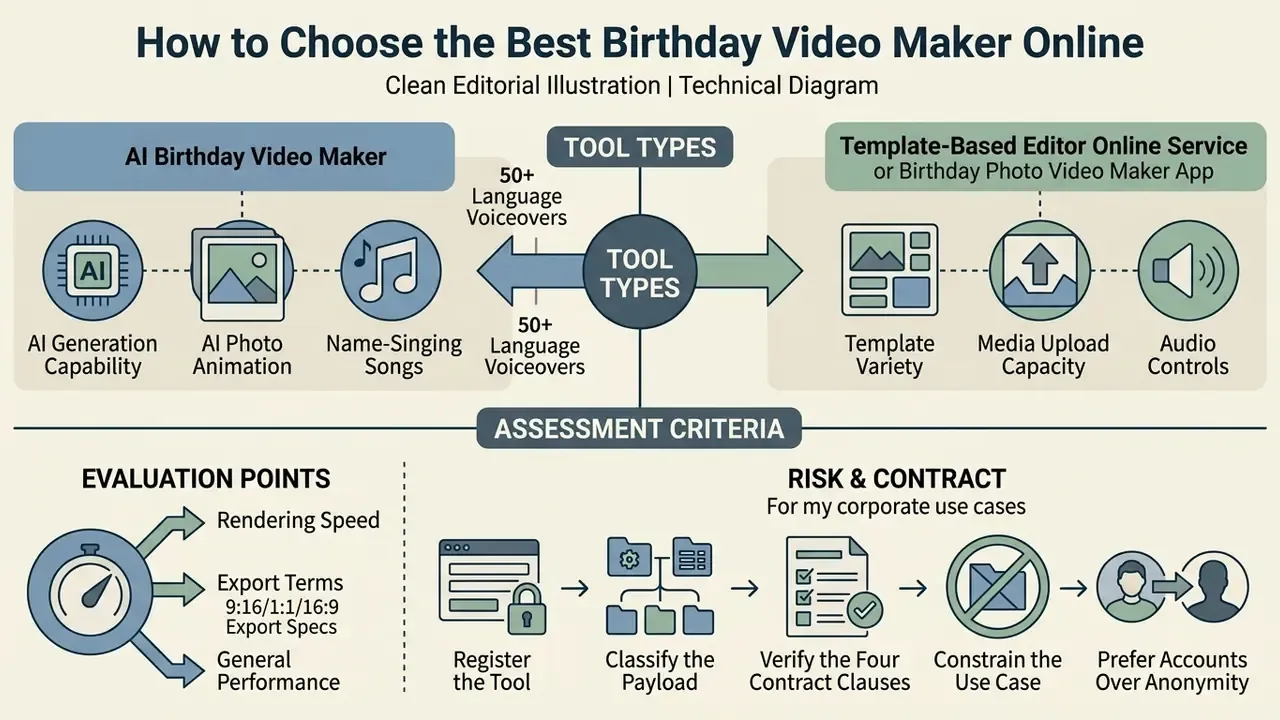
Choosing the best birthday video maker online means assessing template variety, AI generation capability, media upload capacity, audio controls, rendering speed, and export terms. In short: consumer criteria decide how the video looks, while enterprise criteria (encryption, model-training opt-out, retention, indemnification) decide whether you are allowed to upload the footage at all.
Comparing manual timeline editors with automated AI video generators keeps output quality aligned with privacy and usage expectations. Independent selection frameworks add three criteria that vendors rarely advertise: accessibility support (W3C recommends planning descriptions, captions, and an accessible player from the start), caption handling as required by WCAG 3.0 media-alternative provisions, and personal-data handling in line with European Data Protection Board video guidance.
Then there is the workflow question: browser-based cloud application or mobile app? For side-by-side scoring, review the best AI video generators and the wider set of AI Media Comparison Matrices.
AI Birthday Video Maker or Template-Based Editor
An AI birthday video generator uses machine learning and natural language processing to convert text prompts, uploaded images, and audio clips into a finished edit within minutes. Readers who want the mechanics behind prompt-driven generation can review text-to-video AI tools. A template-based editor works the other way: pre-designed frames where you drag in photos, adjust text boxes, and pick a music track. The difference is workflow rather than outcome. AI generation is prompt-driven and synthesizes content; template editing is layout-driven and fills content.
"AI-personalized video advertisements achieved click-through rates 9.4 percentage points higher than personalized images and 6.5 percentage points higher than standard video."
The same body of work reports production cost reductions of roughly 90% versus traditional shoots, which is why brands now generate per-recipient greetings at scale. The counterweight is perceived sincerity, measured in two controlled experiments:
"AI-generated birthday wishes were perceived as less sincere and as requiring less effort; personalization and social closeness neutralized that effect."
Practical conclusion, and it is a modest one: use AI for layout, pacing, reframing, and music, then keep the human layer visible. Real photographs, the recipient's actual name, a recorded voice, and a memory only the sender could know. AI layout generation plus human-curated photos and personalized text is the balance that holds efficiency and authentic emotional impact together.
Online Service or Birthday Photo Video Maker App
Browser-based services offer full multi-track timeline editing, precise keyframe control, color correction, and flexible exports with no installation. They are also WYSIWYG and re-editable: a project saved in the cloud can be previewed, revised, and re-exported as MP4 or GIF from any browser. Mobile applications trade that control for speed: one-tap editing, direct gallery access, instant filters, HD saving in seconds, and streamlined sharing to WhatsApp, Instagram, Facebook, and YouTube.
For multi-person group projects and layered photo slideshows, desktop browser editors win on layout control. Mobile apps win on location capture and publishing a short birthday reel straight from a phone. Teams that publish to a channel afterwards can route the master through a YouTube editing workflow for chapters and end screens.
| Comparison criterion | AI Birthday Video Maker | Template-based online editor | Birthday Photo Video Maker App |
|---|---|---|---|
| Primary media source | Text prompts, generative media, auto-selected photos | User-uploaded photos and videos, stock libraries | Smartphone gallery, device camera |
| Music handling | AI-composed tracks by mood, name-singing songs, speech synthesis | Licensed catalog, MP3 upload | Built-in tracks, system sounds, voice recording |
| Text greetings | Automatic script and wish generation | Manual entry, alignment, font selection | Sticker presets, basic text overlays |
| Animation and effects | Auto-editing, beat synchronization, photo animation | Configurable transitions, filters, layers | One-tap animation templates |
| Voiceover | Synthetic voices, 50+ languages, tone-aware delivery | Manual recording or audio upload | In-app microphone recording |
| Export formats | MP4, WebM, up to 4K; multi-ratio re-render | MP4, GIF, PDF (for printing frames) | MP4 optimized for social platforms |
| Free-tier limits | Token or credit caps, generation quotas | Watermark on free exports, 720p cap | Ads, in-app purchases |
| Encryption (in transit and at rest) | Verify TLS in transit and encryption at rest in the DPA | Usually documented for cloud projects | Frequently undocumented in store listings |
| Content used for model training (opt-out) | Must be checked per plan; enterprise tiers usually offer opt-out | Often opt-out by default for uploads | Rarely disclosed |
| Retention and deletion policy | Look for a published retention window and hard-delete option | Project storage tied to account lifetime | Device-local plus opaque cloud caches |
| Enterprise SSO and audit logs | Available on team and enterprise plans | Available on business plans | Almost never |
| Commercial indemnification | Enterprise plans only, in writing | Depends on stock and template license | Not offered |
Where technical limits matter, check the vendor documentation rather than the marketing page. Published constraints vary a lot: some generative platforms grant a fixed number of free daily generations across image, video, and audio with PNG, JPG, and MP4 export; some video APIs accept JPG, JPEG, PNG, WEBP, HEIC, and HEIF inputs with a total request body of no more than 64 MB, a single file cap of 30 MB, and up to nine reference images.
Shadow AI Risk and Vendor Assessment for Corporate Use
When an employee uploads staff photographs, client footage, or a colleague's family pictures into a free consumer video maker, the organization has quietly onboarded a data processor. That is Shadow AI. Treat it as an inventory item, not a cultural quirk.
- Register the tool. Add every generative media service used for corporate greetings to the AI asset inventory with owner, purpose, data categories, and retention window.
- Classify the payload. Faces are personal data, and they become biometric data when processed by specific technical means for unique identification or authentication. Face-animation and face-swap features therefore change the risk class of the very same photograph.
- Verify the four contract clauses. Encryption in transit and at rest; exclusion of customer content from model training; documented deletion on request; named sub-processors for rendering and storage.
- Constrain the use case. Corporate greetings should use consented headshots or brand assets. Never customer records, internal dashboards, or unreleased product footage as background.
- Prefer accounts over anonymity. A free tier with no account, no DPA, and no support channel gives you no route for a deletion request or an incident notification.
"The provenance of image, video, and audio material should be verified, and it must be established whether the media was edited, compressed, or stored."
Identity-adjacent workflows raise the bar further: NIST SP 800-63A-4 (2025) requires applicant consent before a session is recorded, and requires the provider to publish retention and deletion processes for video records.
Free Birthday Video Maker, Pricing Plans, and Commercial Usage
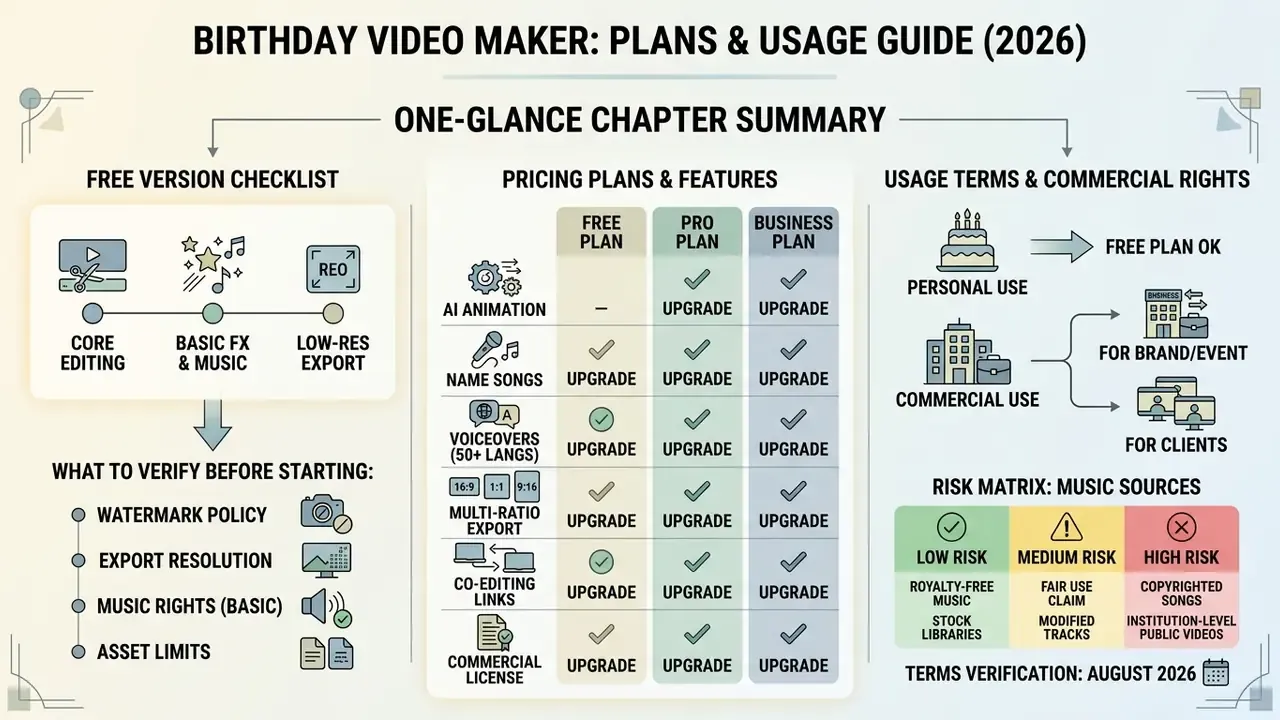
Free online birthday video makers run on freemium economics: core editing free, advanced exports, high-resolution rendering, and stock media libraries behind a paid tier. In short: free tiers cost you watermarks and resolution; paid tiers buy you rights, and rights are what a brand actually needs.
"The digital greeting card market was valued at about $450 million in 2023, with projected growth of roughly 10% per year through 2030."
That growth explains the freemium pressure. Vendors monetize the exact moment a personal greeting becomes a branded one. So read the service terms for licensing scope, watermark policy, and commercial restrictions before anything ships. For pricing breakdowns across creative software platforms, consult the AI Media Pricing Guides, and review rights management protocols in the AI Media Commercial-Use Hub.
What to Check in the Free Version Before You Start
Before starting a project in a free editor, check export limitations. Common constraints: automatic watermark placement on rendered videos, export resolution capped at 720p, duration limits (often 1 to 4 minutes), monthly subtitle quotas, and restricted access to premium music catalogs. Trial versions of desktop converters and screen recorders frequently stamp every saved file and may cap recordings at two minutes.
Verifying export rules prevents an unpleasant paywall at the download step. If watermark-free 1080p output is required, budget for the paid plan or pick a tool that states watermark-free export explicitly. A small number of products ship a free license that includes all features and unlimited commercial use, which is a fundamentally different model from watermark-based freemium. Comparative limits are catalogued in our overview of free AI video generators and the review of the best free AI video generators.
Terms of Use for Brand, Event, and Client Videos
Risk Matrix: Music Sources in Institution-Level Public Videos
| Music source | Sync rights | Master-use rights | Typical risk in brand or agency use | Required action |
|---|---|---|---|---|
| Commercial released track | Not included | Not included | High: takedown, demonetization, claim | Negotiate both licenses in writing before publication |
| Platform in-app audio library | Platform-limited | Platform-limited | High if reused off-platform or in paid media | Restrict to organic posts on the same platform |
| Stock library (paid, commercial tier) | Included per license | Included per license | Low, if territory, term, and channels match the campaign | Archive license PDF and invoice with the project |
| AI-generated instrumental (enterprise plan) | Provider-granted | Provider-granted | Medium: depends on training-data indemnity | Confirm indemnification and output ownership clause |
| AI name-singing song (consumer plan) | Often personal use only | Often personal use only | High for brand campaigns | Upgrade to a commercial plan before any client use |
How to Create a Birthday Video With Photos and Music Online
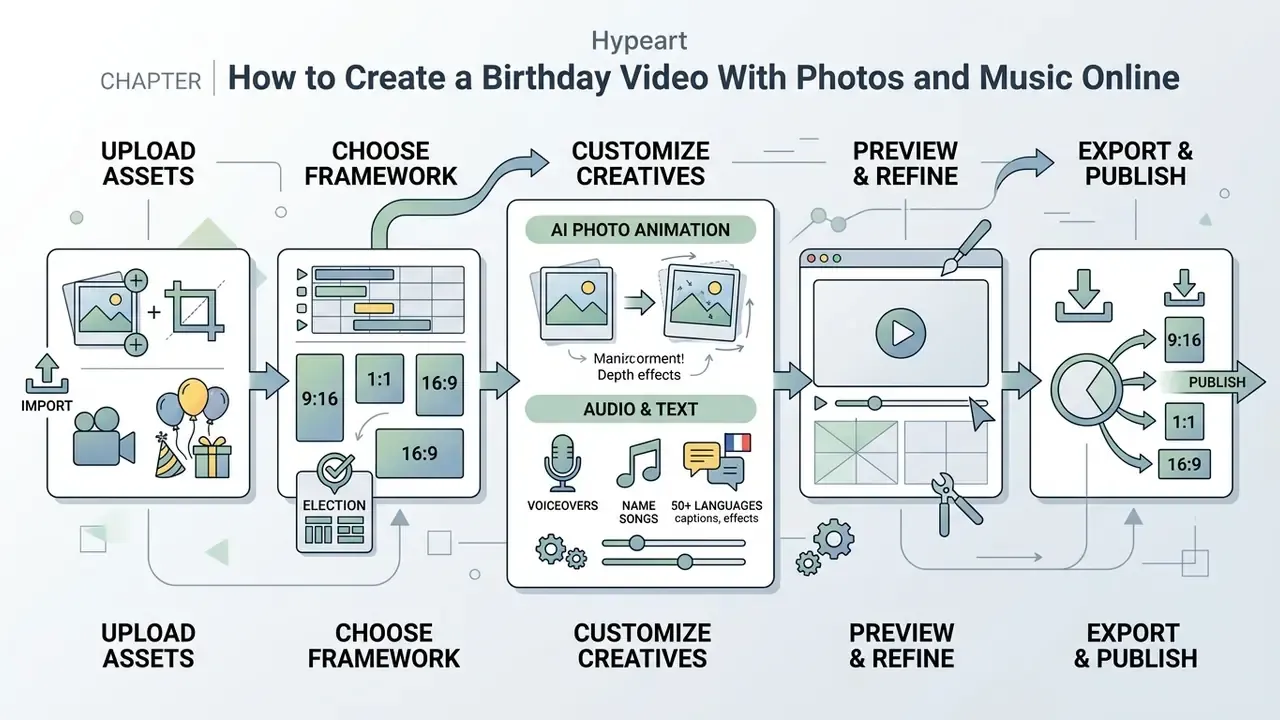
Creating a custom birthday video online follows a systematic workflow: upload raw assets, pick an editing framework, customize visuals and audio, preview the composition, export the file. Structured browser tools let creators produce professional-quality greetings quickly, without prior editing experience.
The business case for the same workflow is measurable. In a randomized controlled trial run with an insurer's customer base:
"Personalized video reduced customer churn by 10.9%, and NPS rose from 13 to 36 among recipients who recalled the video."
Creators who want to automate script writing or audio generation during editing can consult specialized resources such as an ai movie script generator or an ai music creator.
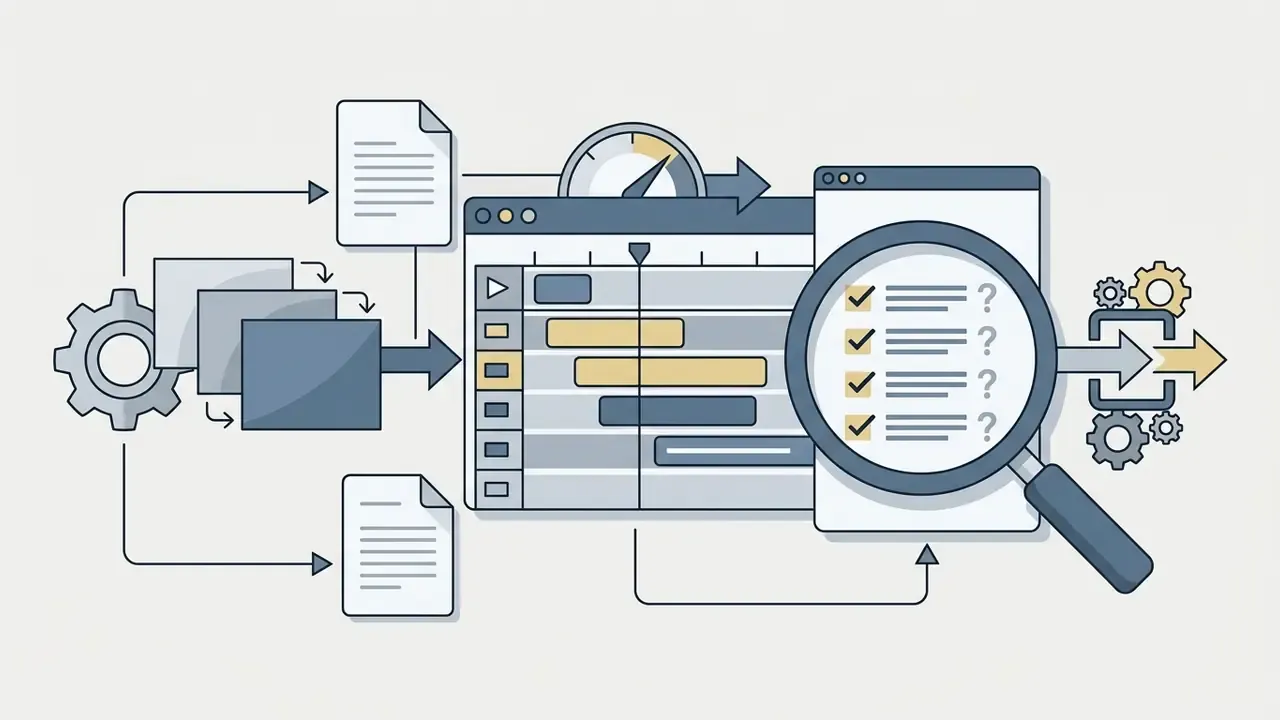
Step-by-step workflow for creating a birthday video online. Stage 1: prepare and upload photos, video, and media. Stage 2: choose the concept (template selection or AI prompt). Stage 3: configure audio and visuals (music, text, animation). Stage 4: preview and quality check. Stage 5: export and deliver (MP4 download or direct share link).
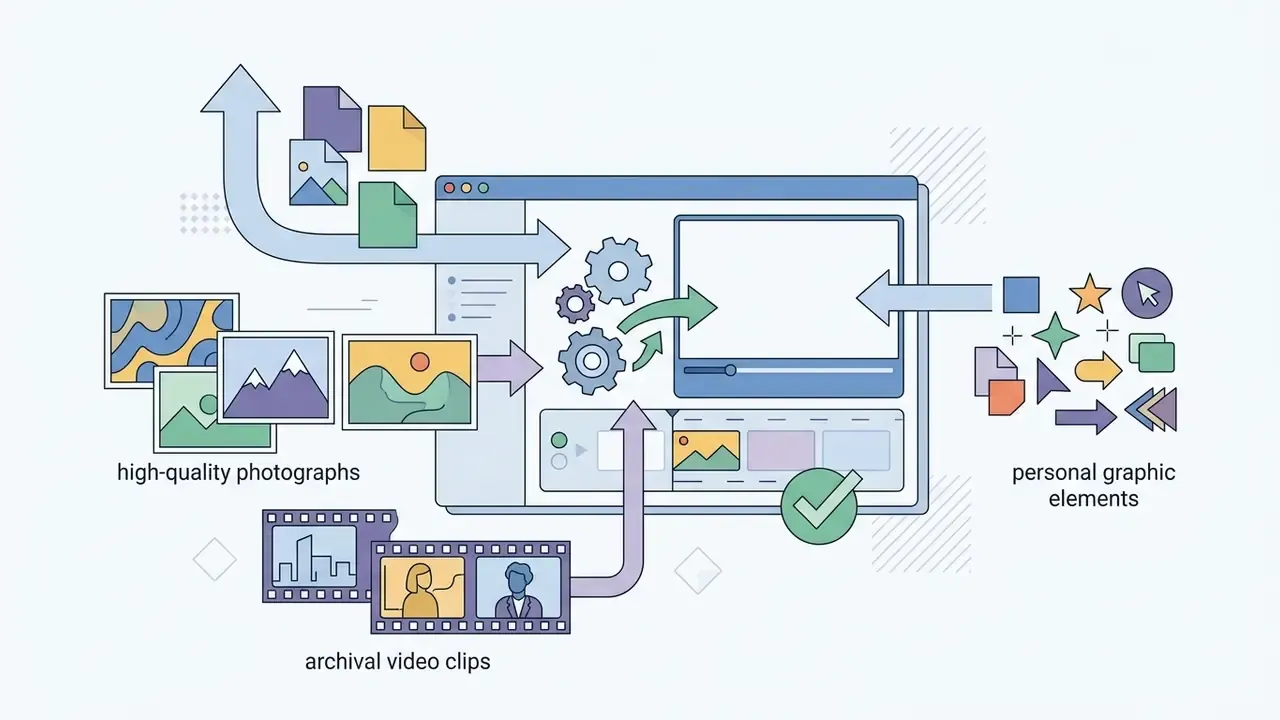
Upload Photos, Video, and Celebration Assets
For visual clarity, upload original digital images and uncompressed footage. Updated source requirements: federal submission standards require video in MP4 and images as JPG, PNG, or PDF, with scanned or PDF image material at a minimum of 300 dpi (OFAC Production Submission Standards, U.S. Department of the Treasury, 2024). Master deliverable guidance recommends rendering at the native project resolution: 1280×720, 1920×1080, 2K, or 4K (AHRQ audiovisual deliverables guidance, 2025). Records-management guidance adds that born-digital video should be kept uncompressed or at the highest available quality (Washington State Records Management Advice, 2024), and legacy NASA audio and video standards recommend preserving the original source aspect ratio wherever possible.
Sorting the photos chronologically before upload saves real time on the timeline. A pass through an online photo editor to fix exposure, crop borders, and reduce noise keeps the visual standard consistent across the whole slideshow. On accepted formats, most editors ingest MOV, MP4, MPEG, MKV, WEBM, and GIF for video, plus JPG, PNG, HEIC, or WebP for images.
Choose a Template, Music, and Animation
Templates set the visual framework: transitions, color palette, graphic overlays. An animated birthday video maker environment applies motion effects to still pictures automatically, which is often enough for a card-length greeting.
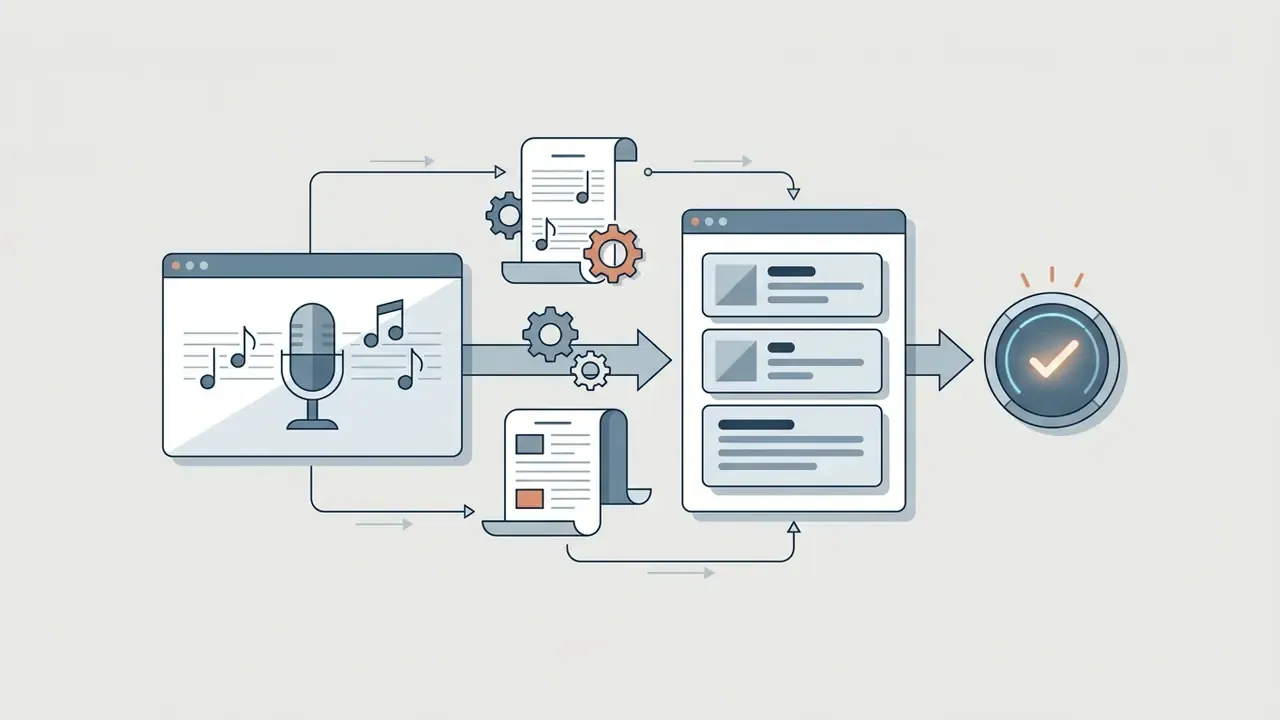
Background music should match tempo to emotional tone. Upbeat acoustic arrangements suit energetic party clips; soft orchestral tracks suit retrospective family tributes. Users exploring advanced music tools can use an ai music generator app to synthesize a custom instrumental track cut precisely to video length.
How AI Photo Animation Works (Photo-to-Video Micro-Motion)
Frame-aware animation models read the depth map of a still photograph, segment the subject from the background, then generate physically plausible micro-motion instead of a flat zoom.
- Candle flicker. The model identifies the light source on the cake and animates a warm, irregular flicker with matching highlight shifts on faces and frosting.
- Balloon and confetti drift. Background segmentation lets the engine add gentle buoyancy to balloons and slow parallax drift to falling confetti, so the depth of the room reads correctly.
- Camera parallax. Instead of a Ken Burns pan, the generator produces a slight dolly move with foreground and background travelling at different speeds. That is the effect that makes a single frame look cinematic.
- Face reanimation. Portrait-animation models (the LivePortrait and SadTalker family) add blinking, a subtle smile onset, and head micro-rotation to archival photographs, which is why a single first-birthday portrait can carry a 20-second reel.
- Restoration pass. Motion blur is softened, cake colors are re-saturated, and indoor noise is reduced before animation. Otherwise motion amplifies the artifacts.
Practical guardrails: animate one hero photo per video rather than every frame, keep face reanimation subtle on photographs of deceased relatives, and confirm the provider's policy on biometric processing before uploading children's portraits.
Creating a Personal Name-Singing Song (AI Name Song Generator)
Instead of a generic backing track, generative music tools can sing the celebrant's name.
- Enter the name and genre.Pop, jazz, rock, acoustic, or a lullaby style for a first birthday.
- Add personal details.Hobbies, age, inside jokes, and memorable phrases feed the lyric generator, so the verse is specific rather than interchangeable.
- Optionally supply a reference.Some tools accept a reference melody or a "Happy Birthday" variant to match tempo and mood.
- Generate the vocal track.The model returns a full vocal arrangement with the name embedded natively in the chorus and verse, exportable as MP3 or WAV for the timeline.
- Balance the mix.Duck the music by 6 to 10 dB under spoken sections, so the name stays audible against voice messages.
Licensing note: consumer-tier name songs are frequently restricted to personal use. If the greeting supports a brand, a client, or a monetized channel, upgrade to a plan that grants commercial rights and output ownership before publication.
Add the Greeting, Save, and Send the Video
Personalized text overlays turn a generic sequence into a direct greeting. Editors let you position the birthday message title, choose legible typography, adjust font contrast, and time the caption appearance. On short-form platforms, text is added on the edit screen and can be repositioned on the preview screen before the final save; unfinished work can sit as a draft and go out later.
Once the timeline is complete, run a full preview to check transition timing and audio balance. Render as MP4 for universal playback across devices, or generate a direct share link for instant delivery through social platforms and messengers. App-to-messenger delivery is supported natively: mobile apps using platform SDKs push links and media files straight into Messenger and WhatsApp, while web sharing relies on Open Graph metadata to build the link preview a recipient sees before they tap.
How to Personalize a Happy Birthday Video
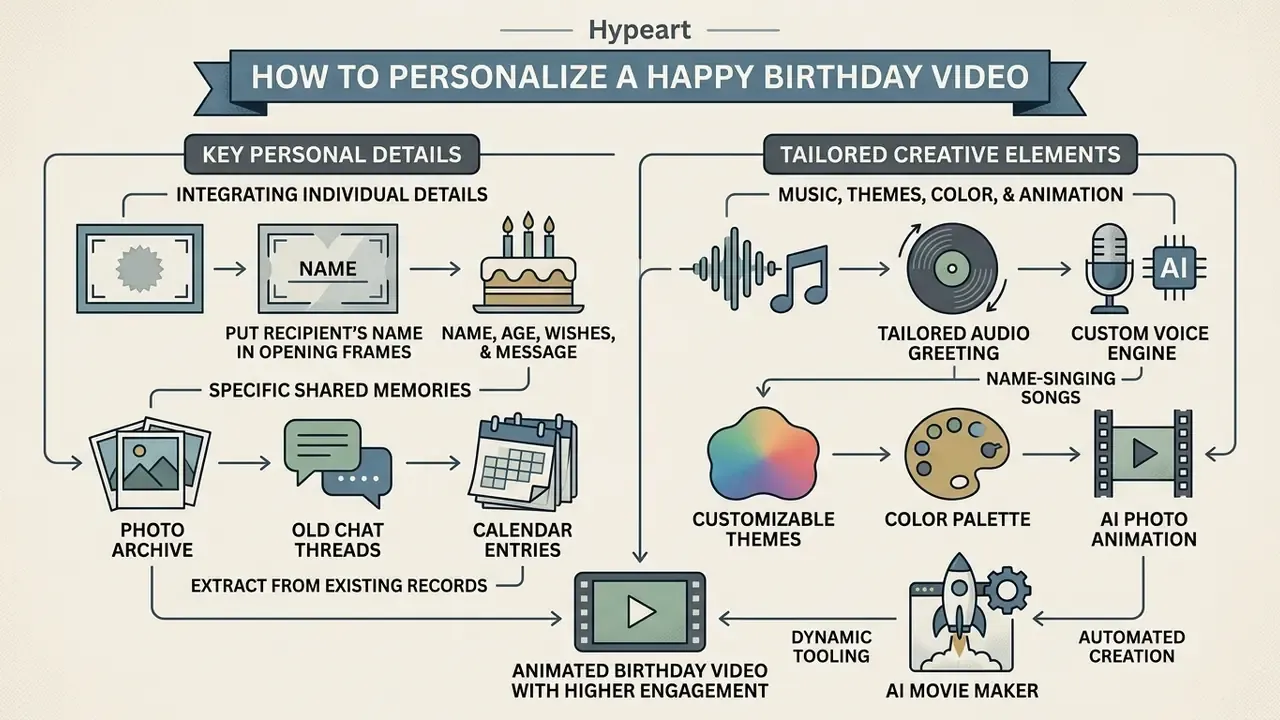
Personalizing a happy birthday video means integrating individual details: name, age, specific shared memories, a tailored color palette, and a custom audio greeting.
A mixed-methods study reached the same conclusion for non-advertising messages, reporting significant differences in engagement and elaboration between personalized and non-personalized videos (Rollins College Faculty Publications, 2026, https://scholarship.rollins.edu/as_facpub/420/).
Creators can bring in dynamic tooling, including an ai movie maker or custom voice engines, to automate visual personalization while keeping the human message intact.
Name, Age, Wishes, and a Personal Birthday Message
Put the recipient's name in the opening frames. Naming an age milestone or a specific personal achievement is what makes the video feel bespoke rather than mass-produced. In AI-assisted writing, personalization is literally a set of input variables: name, age, relationship, profession, hobbies, interests, occasion, and the exact themes you want mentioned, whether health, career, or a shared trip, which the model then weaves into one or several candidate texts.
Where the memories themselves are hard to recall, external material is the fix:
"Using external resources is an adaptive strategy: it helps participants reach new insights beyond the limits of internal memory."
In practice that means opening the photo archive, old chat threads, and calendar entries before writing the script. The specific detail you retrieve is what separates a personal greeting from a template. When drafting the birthday wish itself, stay concise and authentic; generative tools can draft unique greeting messages from prompt parameters such as hobbies, relationship type, and desired emotional tone.
Music, Themes, Color, and Animated Birthday Video
Visual styling should follow the recipient's personality, but legibility comes first. Updated design guidance: limit a layout to two or three colors and aim for high contrast to improve legibility (CISA House Style Guidelines, 2021); keep a text contrast ratio of at least 4.5:1 against neutral, consistent backgrounds (State of Minnesota Tableau Design Guide for Accessibility, 2025); and use accent colors, tints, and movement lines sparingly for emphasis rather than as the base palette (SBA Visual Identity guidance, 2024). Systematic public-sector palettes such as the U.S. Web Design System (2026) prove the same point: a small, consistent color set beats a decorative one.
Subtle animation, floating confetti, dynamic light flares, smooth photo pans, creates visual rhythm without stealing attention from the photo memories. Creators who want deeper motion control can compare dedicated animation makers before committing to one editor. Choose songs that carry personal significance for the celebrant, and keep music under spoken lines so the message is never masked.
How to Make a Group Birthday Video From Friends and Family
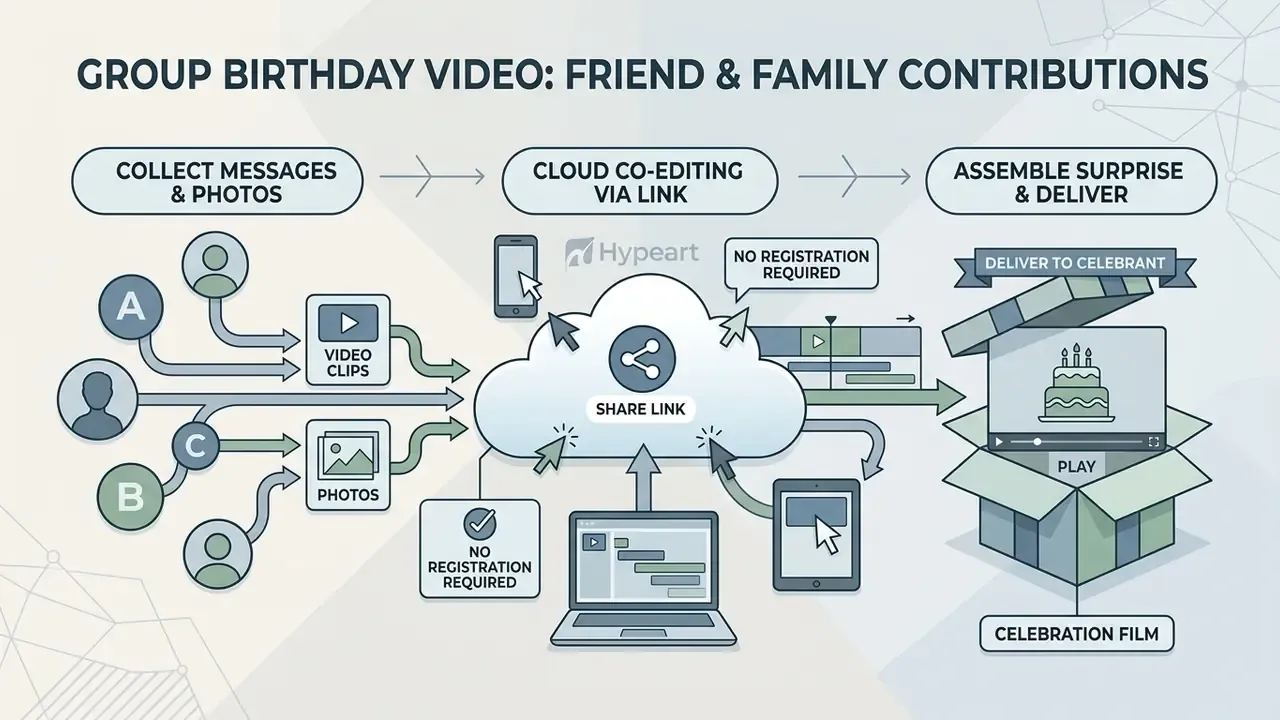
A group birthday video compiles individual video messages, photos, and greetings from several friends, family members, or colleagues into one celebration film. Collaboration needs organization: clear submission guidelines and centralized media assembly. Production guidance from academic media units is consistent on the prerequisites: agree on a shared creative vision and role assignment before filming, work from a script or storyboard with a shooting schedule, and collect a release form from everyone who appears on camera.
When coordinating multi-person creative projects, organizers and team leads can use AI Media Calculators to estimate rendering times, storage requirements, and production bandwidth.
Collecting Video Messages and Photos From Participants
Set up one simple submission channel: a shared cloud folder, an email upload link, or a group collection platform. Clear instructions matter more than tooling. Ask contributors to record in landscape mode, keep clips under 30 seconds, and speak in a well-lit room, and the footage arrives usable.
Cloud Co-Editing Without Registration (Co-Editing Links)
Manual file collection is now the slow path. Editors that support co-editing links compress the whole gathering stage into one URL.
- The organizer builds a template project and generates a public link with "append a segment" permissions.
- Contributors open the link on any device, with no account creation, and record their greeting straight into the browser timeline, or drop in a clip and a photo.
- Each contribution lands as its own scene, so nothing overwrites anyone else's work and the organizer keeps final cut control.
- AI post-processing normalizes loudness across all recordings to a single target (approximately −14 LUFS), trims dead air at the head and tail, and auto-generates captions for accents and noisy rooms.
- The organizer reorders scenes, adds the opening title and the closing group frame, then exports once in three ratios.
The group format also protects the emotional payload of the video:
"Social closeness of the sender neutralizes negative reactions to AI-assisted birthday wishes: recipients rate them as more sincere when familiar faces are visible."
To comply with data privacy standards, collection workflows must obtain participant consent before processing video footage, especially when gathering media across international borders (ISO/IEC 29184:2020, privacy notice and consent controls). Consent records themselves should be machine-readable and interoperable, following the consent-receipt structure defined in ISO/IEC TS 27560:2023, and collection should stay limited to relevant data obtained by lawful and fair means, as reflected in NIST SP 800-53-derived privacy guidance. Institutional practice is stricter still: video recordings typically require signed consent, while audio-only contributions may accept verbal consent.
Children's footage deserves a separate decision:
"82% of social-media-using parents had posted photos or videos of their children; disclosed names, faces and birth dates can be exploited by bad actors."
This information is general in nature and does not replace advice from a qualified data protection specialist.
Assembling the Surprise and Delivering It to the Celebrant
Assembly starts with a rough cut: recorded greetings and archival photos placed into a logical narrative sequence. Updated production guidance: storytelling and montage toolkits recommend building the rough cut first, importing audio, images, music, and video into a single project, ordering material chronologically or by story flow, and only then trimming, adding cross dissolves or fades, inserting titles and graphics, and setting a consistent transition duration (about 1.0 second). Background music should never overpower speech, and the story flow should be charted before the polishing pass. Editors comparing tools for this stage can start from our review of free video editing software.
Keep music volume lower under spoken messages so every voice stays clear. A practical assembly order: cold-open title (5 s), short greetings grouped by relationship, photo montage with a music swell, the longest and most personal message, then a group closing frame with everyone on screen. Once it is finalized, export the compilation as MP4, share a private link, or schedule a live screen-share during the party. And remember: a 16:9 master will play far better on a venue projector than a stack of vertical phone clips.
FAQ About Birthday Video Makers
This section answers the recurring questions about birthday video length, custom voice integration, multi-format export, name-singing songs, and data privacy when uploading media to online platforms.
For troubleshooting export errors or platform compatibility issues, visit AI Media Support and Troubleshooting.
How long should a birthday video be?
Optimal length depends on the distribution format and the viewing setting. Vertical reels and video cards perform best between 15 and 45 seconds to maximize completion rate, and reach-oriented guidance narrows the sweet spot further to 7 to 30 seconds; explanatory or story-driven clips stretch to 60 to 90 seconds. Platform slideshow formats can be capped by the network itself, and documented social media specifications list a 15-second maximum for a slideshow. Personal photo slideshows and multi-person group compilation films usually run 2 to 5 minutes, which holds engagement without fatigue, while memorial or milestone tributes shown to a seated audience can justify 10 to 20 minutes.
Can I record a birthday message in my own voice?
Yes. Modern editors support direct voiceover recording via built-in microphone controls, or manual MP3 and WAV upload. Voice tracks layer over background music with independent volume sliders and noise reduction filters. Four routes are commonly documented: record a voiceover in the editor, upload an existing audio file, generate a text-to-speech voiceover, or record webcam video and detach the audio into its own track. Advanced AI media platforms can also synthesize custom voice profiles and deliver tone-aware narration in 50+ languages, which is what makes a single greeting usable for an international family or a global team. Technical details on voice synthesis are covered in our guide to AI voice generators.
Can AI really sing the birthday person's name?
Yes. Name-singing generators take the recipient's name, a genre, and optional personal details, then compose a full vocal track with the name embedded in the chorus. Two caveats. Check pronunciation on unusual spellings before rendering, since phonetic hints usually fix it. And verify that your plan grants the rights you need, because consumer tiers typically license personal use only.
Can I export one project for TikTok, feed posts, and a projector?
Yes, if the editor supports aspect-ratio switching on an existing timeline. Keep faces and text inside the central third, then export 1080×1920 for 9:16, 1080×1080 for 1:1, and 1920×1080 or 4K for 16:9. AI reframing fills the missing edges with a blurred or generated background, so manual re-editing per platform is not required.
How are uploaded birthday photos and videos protected?
Reputable platforms protect uploaded media with SSL/TLS encryption in transit and encrypted cloud storage at rest. For personal data, especially photos of children, verify that the provider maintains explicit retention and deletion policies aligned with GDPR (Article 8) and US COPPA. Under GDPR, national law may lower the child-consent threshold from 16 to 13, and reasonable efforts must be made to verify parental authorization. Under COPPA, services directed to children under 13 need verifiable parental consent before collection, and data must be limited to what is reasonably necessary. Photographs are not automatically special-category data, but they become biometric data once processed by specific technical means for unique identification, which is exactly what face-animation features do.
"User popularity mediates the relationship between in-app behavior and privacy sensitivity: the more views, the sharper the awareness of risk." — Li et al., Understanding information disclosures and privacy sensitivity on short-form video platforms, Journal of Retailing and Consumer Services (2023, n = 35,456 TikTok users). https://www.sciencedirect.com/journal/journal-of-retailing-and-consumer-services
Avoid public publishing when the material is sensitive family media; use private, password-protected sharing links instead. For corporate use, add the vendor to the AI asset inventory, confirm the model-training opt-out in writing, and prefer accounts covered by a data processing agreement over anonymous free tiers.
This information is general in nature and does not replace advice from a qualified data protection specialist.
Limitations and Open Questions
A short note on what this guide cannot settle. The advertising effect sizes quoted above come from controlled experiments in commercial contexts, not from personal greetings sent between family members, so transfer is plausible but unproven. Vendor limits (free generations, file caps, retention windows) change quietly and often, sometimes within a single quarter. Sincerity research is young: two experiments are a signal, not a settled finding. And licensing terms for AI-generated music remain in motion while litigation over training data continues, which is why the safest position for a brand-facing greeting is still a paid stock license with an archived PDF.
Treat every audience assumption here as a hypothesis until your own analytics, interviews, or customer research confirm it.
Appendices
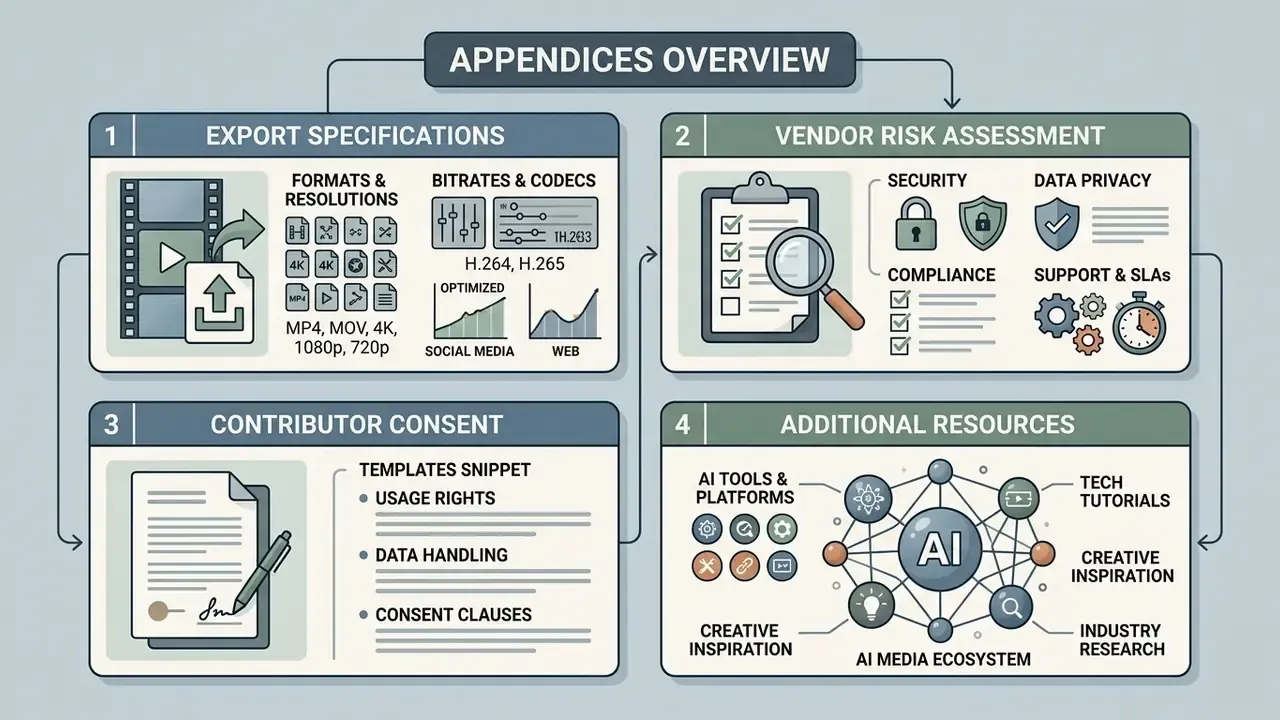
Appendix A. Export Specification Sheet (Copy-Ready)
| Parameter | Recommended value | Rationale |
|---|---|---|
| Source photo resolution | 300 dpi or higher for scans; original camera file otherwise | OFAC Production Submission Standards (2024) |
| Master render | Native project resolution: 1280×720, 1920×1080, 2K, or 4K | AHRQ audiovisual deliverables guidance (2025) |
| Master compression | Uncompressed or highest available quality | Washington State Records Management Advice (2024) |
| Container | MP4 (H.264/AAC) for delivery | Universal playback across devices and messengers |
| Vertical delivery | 1080×1920, captions 48 pt or larger | Reels, Shorts, TikTok, WhatsApp status |
| Square delivery | 1080×1080 | Feed posts and messenger previews |
| Horizontal delivery | 1920×1080 or 3840×2160 | Projector, TV, YouTube |
| Loudness target | Approximately −14 LUFS integrated, speech 6 to 10 dB above music | Consistency across multi-contributor recordings |
| Aspect ratio policy | Preserve original source ratio where possible | NASA audio and video standards for internet resources |
| Captions | Burned-in or platform captions on every version | WCAG 3.0 media-alternative requirements; W3C accessibility guidance |
Appendix B. Vendor Risk Assessment Checklist for Birthday Video Tools
- Is the service listed in the AI asset inventory with a named internal owner?
- Are encryption in transit and at rest documented in the DPA or on the security page?
- Is customer content excluded from model training by default, or is opt-out available on the current plan?
- Is there a published retention window and a hard-delete mechanism on request?
- Are sub-processors for rendering, storage, and CDN named?
- Does the plan include enterprise SSO, role permissions, and audit logs?
- Does the license grant commercial and agency or client use for the intended channels, territory, and term?
- Does the provider offer indemnification for AI-generated output?
- Are children's images processed at all, and if so, under which consent basis (GDPR Art. 8 or COPPA)?
- Does any feature perform biometric processing (face animation, face swap, identity matching)?
- Is there an incident-notification channel and a support SLA?
- Have the Terms of Service and the license been archived as PDF with the project date?
Appendix C. Consent Wording for Contributors (Template Snippet)
For contributions involving children, add: "I confirm that I am the parent or legal guardian of the child shown and consent to their image being included." Keep the consent record in a machine-readable, interoperable format aligned with ISO/IEC TS 27560:2023, and present the notice in line with ISO/IEC 29184:2020 before any upload begins.
Appendix D. Additional Resources and the AI Media Ecosystem
Creators and technical teams evaluating broader generative media capabilities, automation APIs, or litigation standards can explore these reference hubs:
- Review developer deployment frameworks in the AI Media API documentation.
- Track regulatory standards and legal precedents on the AI Litigation and Case Timelines page.
- Explore specialized asset creation tools such as an ai movie poster generator for stylized title cards and party invitations.
- Compare compression and delivery trade-offs in the guide to a video compressor before sending large group films through messengers.
AI Media Glossary: the central reference for terminology and technology in digital media production.