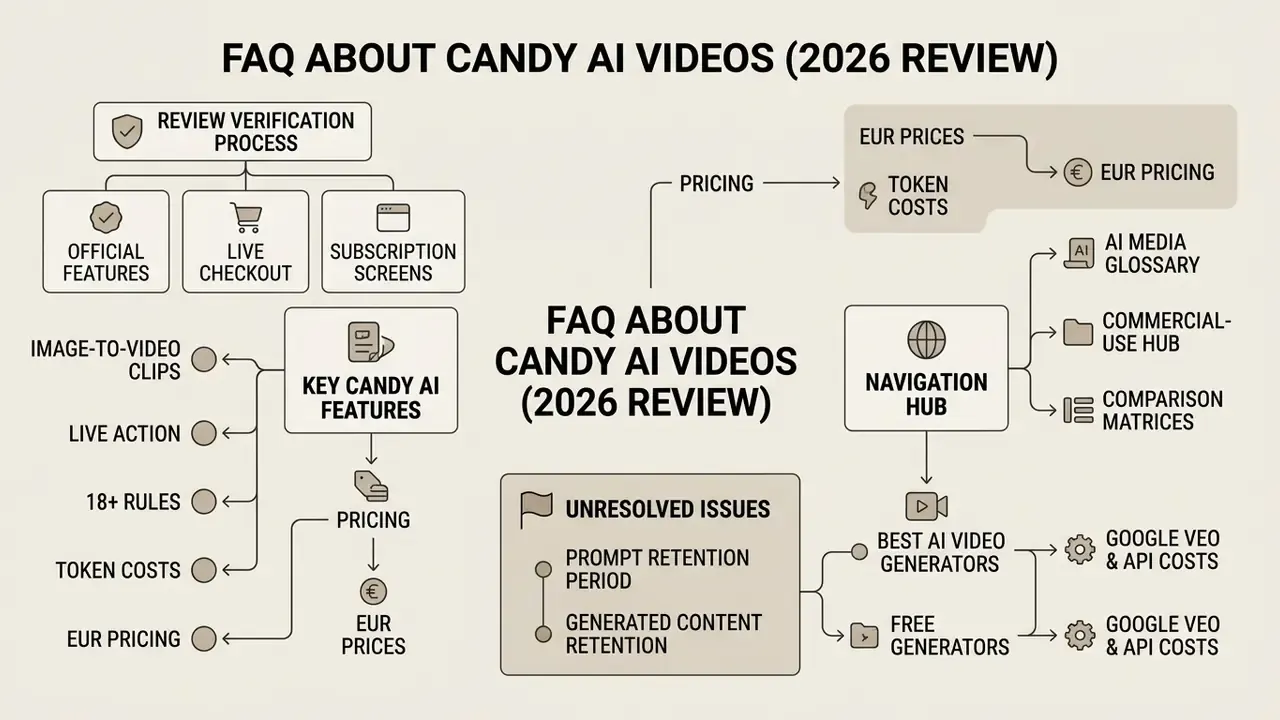
Why would a risk or compliance lead read a companion-app review at all? Because these apps show up in expense reports and on managed devices long before anyone files a request. That is the quiet part.
⚠️ Intent disambiguation, read this first
Executive summary: what to know before you subscribe
- Video generation is real but character-locked. Candy AI produces 3 to 15 second animated clips and Live Action sequences up to 120 seconds, always anchored to an existing companion avatar. It does not render arbitrary landscapes, products, or corporate B-roll.
- Video is a paid feature, twice over. A Premium subscription unlocks access; tokens pay for each render. Nominal subscription pricing spans €3.99 to €13.99 per month, with weekly (€5.60) and bi-weekly (€9.79) micro-plans at checkout.
- Real spend runs far above list price. Heavy image and video users report $20 to $60 per month once token top-ups are counted. That gap is the single most common budgeting mistake we see reported.
- 18+ / NSFW generation is a headline Premium benefit, not an edge case, and it is fully blocked on the free tier.
- Commercial use is contractually prohibited. All output is licensed for personal, non-commercial use under EverAI Limited terms. Charges appear on bank statements as EverAI.
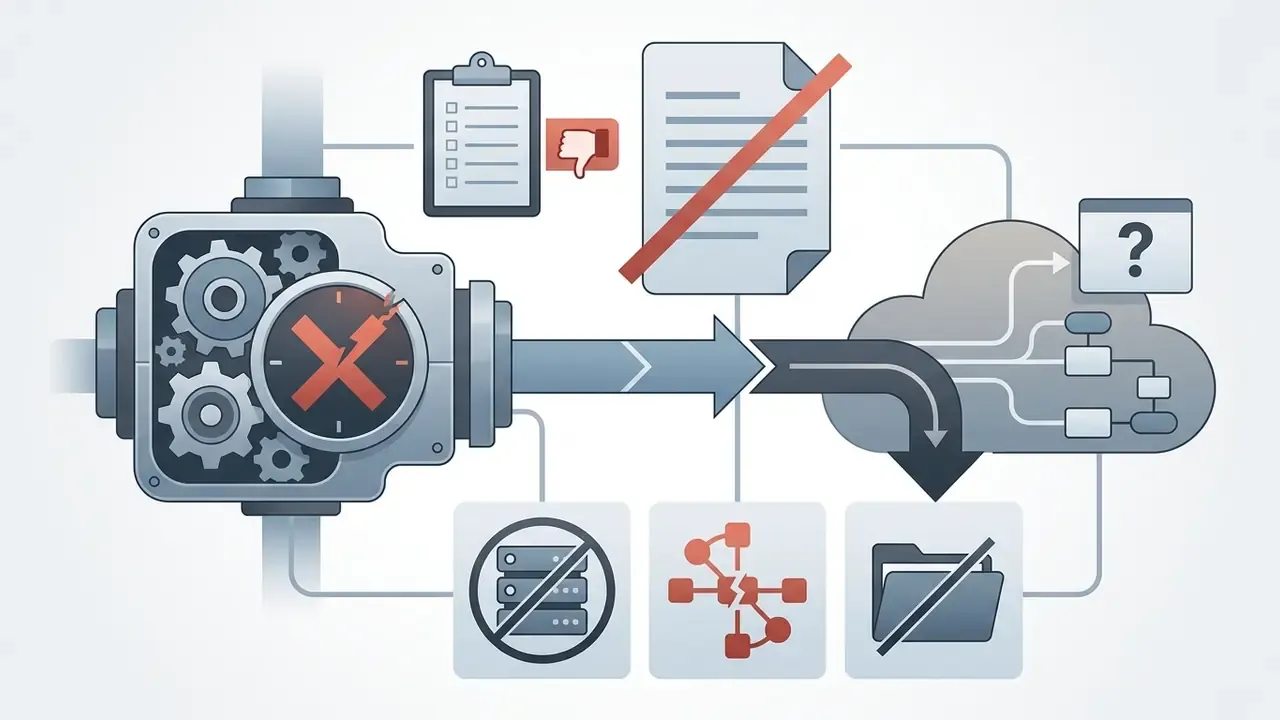
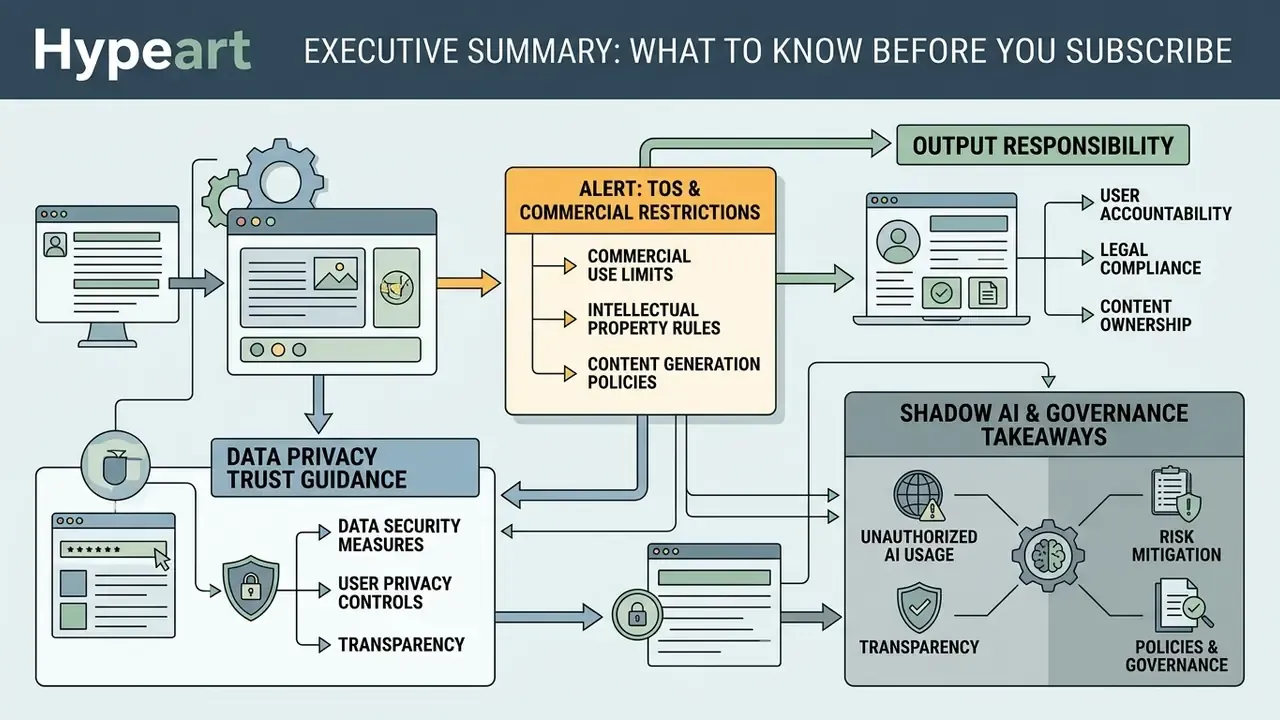
Terms of service, commercial restrictions, and Shadow AI exposure
Shadow AI and governance takeaways
| Risk vector | Observed status on Candy AI | Practical implication |
|---|---|---|
| Commercial licensing | No commercial-use license; personal use only | Any brand, ad, or monetized deployment breaches the TOS |
| Data controllership | EverAI Limited (Malta) as controller under GDPR / UK GDPR | Corporate data entered into prompts leaves the organizational perimeter |
| Deployment model | Closed proprietary B2C SaaS; no on-premises option | No model-weight audit, no tenancy isolation, no DPA-grade enterprise tier |
| Payment traceability | Statements show the descriptor EverAI | Expense reviews may miss the charge unless the descriptor is mapped |
| Content category | 18+ / NSFW generation is an advertised Premium benefit | Elevated HR, conduct, and reputational risk on managed devices |
Governance checklist: verify the current TOS and privacy notice, confirm the retention policy for prompts and generated media, confirm that no commercial-use grant exists, and block or monitor the domain if adult companion services fall outside acceptable-use policy. One more line worth adding to the control set: map the EverAI descriptor in expense analytics, because a card statement that never says "Candy AI" is exactly how this category stays invisible.
What Candy AI Videos are and whether the platform can generate video
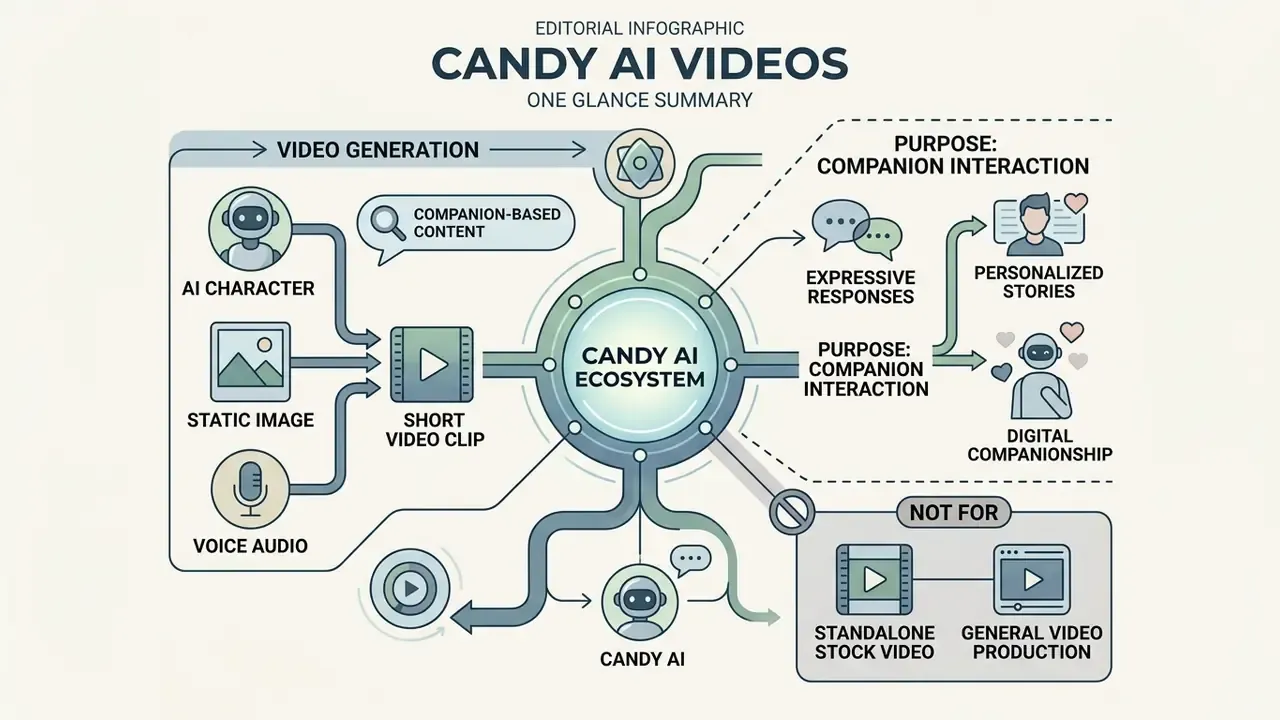
Candy AI does generate videos, but strictly inside a companion-based ecosystem rather than as a standalone stock video generator. The platform produces short animated clips (3 to 10 seconds) and longer Live Action sequences (up to 120 seconds), each conditioned on selected AI characters and user prompts.
According to platform documentation and 2026 review benchmarks, Candy AI does not generate arbitrary landscape or product footage. Every video clip is anchored to an existing companion avatar, using the underlying image rendering engines and contextual prompt parameters to animate facial expressions, physical gestures, and synchronized audio. So the honest answer to "does Candy AI make videos" is yes, with an asterisk: only videos of its own characters.
Videos with AI characters, images, and voice
What short AI video clips are used for
Short AI video clips in Candy AI mostly exist to enhance conversational roleplay and supply personalized visual engagement. These 3 to 10 second animations work as dynamic visual responses embedded directly in chat streams, usually carrying micro-motion: a head turn, a blink, a waving gesture, a slow smile forming.
People use these clips for personal entertainment and social-media content creation across short-form vertical formats. Vertical, square, and horizontal exports map onto TikTok, Reels, Shorts, and stories. A separate "Shorts" feed presents full-screen vertical clips tied to specific characters, and a tap opens a conversation with that persona. For broader research into visual models, creators often consult the AI Media Glossary to benchmark avatar behaviors.
«Short clips are simultaneously the platform's most resource-intensive feature and its primary engagement driver.»
How to create a Candy AI video: from character or idea to finished clip
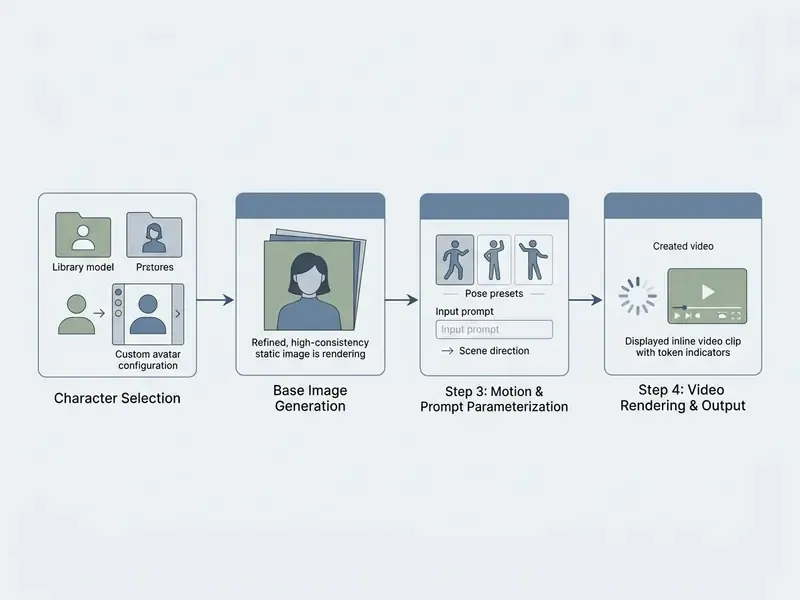
Creating a video on Candy AI follows a four-step sequence: choose an AI character, generate a base image, apply action or prompt parameters, then render the clip. The system leans on image-to-video conversion or text-conditioned scene requests, not unguided video synthesis.
Choosing an AI character and preparing images
Video creation starts with an active AI character profile. Users pick from over 140 pre-configured companions or build a custom persona by defining physical appearance, personality traits, relationship type, occupation, interests, and voice.
Because the system depends on existing visual anchors, preparing high-quality static images is not optional. Testing indicates that images generated with Candy AI's V2 engine yield clearer facial structures and better stability once converted into moving clips. Blurry source, wobbly output. It really is that direct.
«V2-engine images cost 4 tokens, render in roughly 10 seconds, and hold a stable facial structure through video conversion.»
Users searching for general creation frameworks often review how an ai visual generator handles frame consistency before committing rendering credits.
Text prompt and launching video generation
Once an image or character profile is ready, users configure text prompts or pose presets to dictate motion. These are the same conceptual mechanics that govern text-to-video AI engines, applied to a fixed character identity. Selecting "Create AI Video" opens parameter controls including poses such as Smiling, Posing, Caress, Random, or Turning.
For Scenario Mode in Live Action, users type descriptive prompts specifying scene environment, outfit, and motion dynamics. A repeatable prompt pattern reported across 2026 walkthroughs looks like this: [action/pose] + [place/location] + [clothing] + [expression/mood] + [camera angle]. The engine interprets those prompts against the character model to calculate motion vectors. Users evaluating platform functionality frequently check the api section to understand model integration limits and server response times.
Motion prompt cheat-sheet
To reduce generation artifacts (hand distortion, facial smearing, identity drift), pair a built-in preset with a tightly scoped text command:
| Desired motion | Built-in preset | Optimal text prompt (Scenario Mode) |
|---|---|---|
| Smile and eye contact | Smiling | medium close-up, slow warm smile, looking directly into camera, natural eye blink, soft studio lighting |
| Head turn | Turning | slow smooth head turn from left to right, maintaining eye contact, cinematic bokeh background |
| Gesture / posture | Posing | slight shoulder turn, gentle hand wave, upper body shot, stable torso motion |
| Subtle micro-motion | Random | slow blink, slight head tilt, calm expression, tiny eyebrow movement |
| Dynamic scene | Scenario Mode | walking towards camera in a modern cafe, subtle hair movement, realistic facial dynamics, 4k resolution |
Receiving and using the finished video
After the request launches, Candy AI processes output within 30 to 90 seconds depending on clip duration and queue load. The finished short video or Live Action segment appears inside the chat interface or the media gallery.
«The Lumina-Realism V4 engine renders an approximately 15-second 4K clip in about 30 seconds of processing time.»
Clips replay inside the web dashboard. Native bulk export is limited, so most people either keep the clips for personal companion interactions or post them to short-form feeds; anyone who wants to trim, caption, or restack the output typically moves it into standard video editing tools. When judging realistic avatar motion, reviewers often compare these outputs against specialized models documented in guides to ai videos that demonstrate human-like dynamics.
Candy AI image to video: how still images become clips
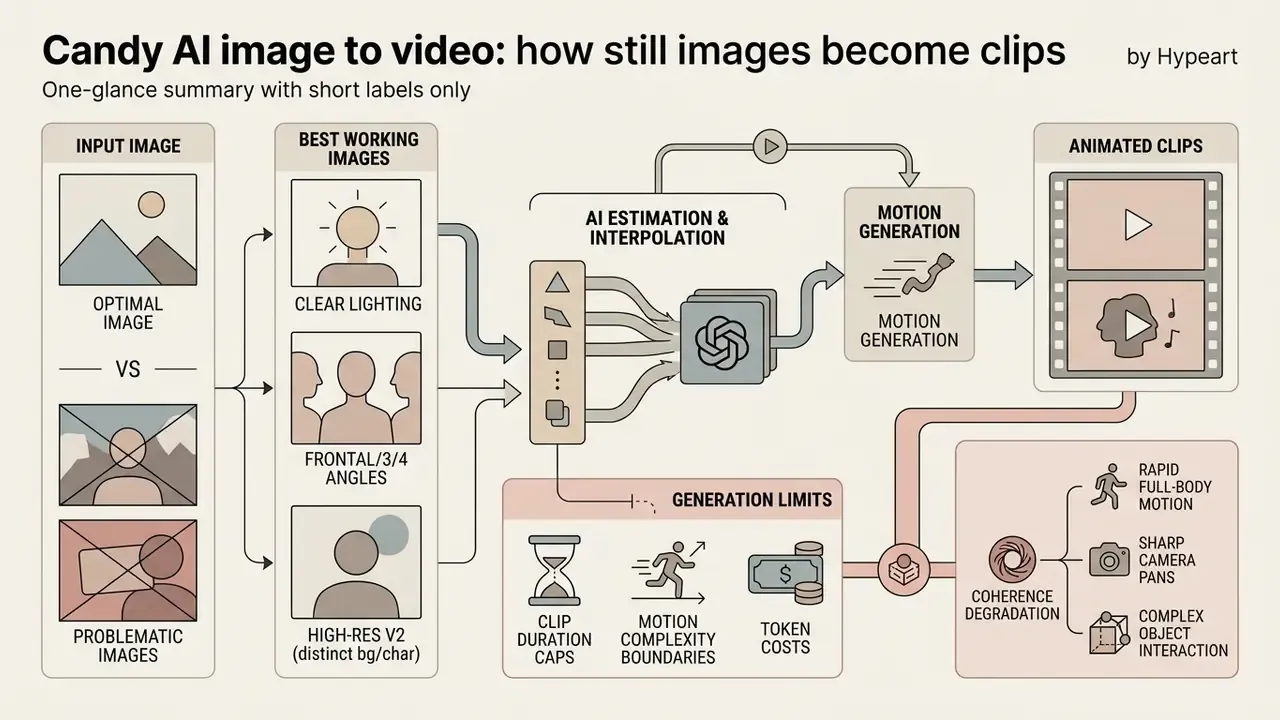
Candy AI image to video technology converts static character photos into animated sequences using motion estimation and diffusion-based frame interpolation. Understanding how image-to-video AI tools treat keyframes clarifies the behavior: the original image acts as a structural keyframe, which limits character identity drift across frames.
Which images work best for generation
The cleanest image-to-video outputs come from clear facial lighting, frontal or three-quarter angles, and medium close-up framing. Full-body shots with cluttered backgrounds tend to distort around limbs. Eye-level camera positioning with soft front light stays the most reliable configuration.
High-resolution V2 images with a distinct boundary between character and background give the animation engine the easiest job.
«Poses that already imply movement, a turn, a gesture, a dynamic stance, convert into video more convincingly than static frontal portraits.»
Motion, duration, and visual consistency limits
Candy AI video generation stays constrained by clip duration caps, motion complexity boundaries, and token consumption rates. Standard image-to-video conversions produce clips between 3 and 15 seconds, while specialized Live Action sequences reach up to 120 seconds. Independent reviewers report measured samples close to 10 seconds for standard portrait clips.
Visual coherence degrades when prompts demand rapid full-body motion, sharp camera pans, or complex object interactions. Minor motion jitter around hands and occasional temporal distortion are inherent to the light-weight diffusion architecture, and reviewers describe stiffness or appearance drift across longer sequences. Not fatal for chat-native content. Very visible if you try to pass it off as film.
«Live Action sequences up to 120 seconds consume roughly 15 to 20 tokens per minute, about $1.50 to $3.00 per clip at base pack pricing.»
Capabilities and practical limits of the Candy AI video generator
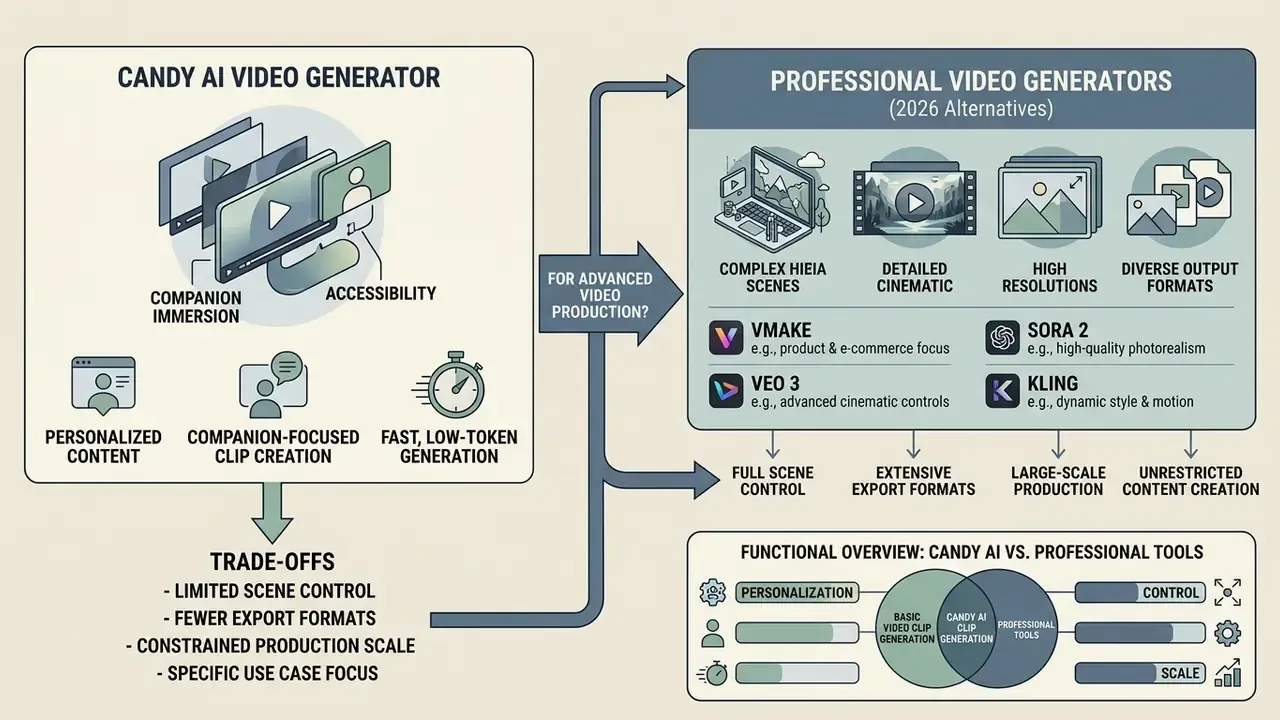
The Candy AI video generator trades scene control, export formats, and production scale for accessibility and companion immersion. That positioning gets clearer when you measure it against general-purpose AI video generators. It is built for companion interaction, not broad commercial video production.
| Feature Area | Platform Capabilities | Key Limitations & Constraints |
|---|---|---|
| AI Characters | Over 140 pre-built personas; detailed custom companion creation (appearance, personality, voice). | Customization restricted to Premium; free tier offers only basic pre-set companions. |
| Image Generation | High-consistency photorealistic and anime rendering; 1 to 16 images per request; strong facial identity lock via V2 engine. | Token gated (2 to 4 tokens per image); limited manual lighting or camera lens controls. |
| Text Chat | Unlimited messaging on Premium; roleplay context dynamically drives media output suggestions. | Free plan capped at roughly 5 to 20 messages per day; strict content filters on unpaid accounts. |
| Voice Features | Voice messages and interactive voice calls matching companion sound profiles. | Token-based consumption (3 to 10 tokens per minute); quality varies across character models. |
| Short Video Clips | 3 to 10 second conversational clips; integrated directly into chat; vertical, square, horizontal output. | Image or character input required; token costs (5 to 20 tokens per clip); limited camera movement. |
| Live Action Video | Up to 120-second dynamic sequences with synchronized movement and contextual audio. | High token burn (15 to 20 tokens per minute); beta feature with variable processing latency. |
| 18+ / NSFW Output | Explicit image and video generation advertised as a core Premium benefit; private gallery storage. | Entirely blocked on free tier; elevated token cost; no commercial redistribution rights. |
Read the table one column at a time and the pattern is obvious: every capability is real, and every capability is metered.
Strengths for personalized content
The platform is good at one thing and knows it: highly personalized, multimodal character interaction inside a streamlined interface. By unifying chat history, voice synthesis, and dynamic video clips, Candy AI creates a continuous sense of presence for personal roleplay. Companions are described as adaptive, retaining conversational context and evolving preferences across sessions, which is what keeps generated media visually and tonally consistent over weeks of use. Users hunting for cost-free audio tooling frequently examine an ai voice generator free no sign up resource to compare voice realism against Candy AI's native synthetic voice engine.
When you need a more specialized AI video generator
Candy AI is inadequate for business marketing, multi-shot cinematic productions, complex physics simulations, or commercial advertising. When a project needs frame-by-frame control, camera movement paths, or non-character B-roll, creators have to move to dedicated video creation suites, a landscape mapped in our comparison of the best AI video generators.
Production teams routinely review AI Media Comparison Matrices to weigh enterprise model capabilities against consumer companion apps, while budget-constrained creators often start with free AI video generators before paying for a premium engine. For teams managing rendering budgets, forecasting token usage through AI Media Calculators beats discovering the real cost mid-campaign.
Candy AI versus professional video generators (Vmake, Sora 2, Veo 3, Kling)
| Criterion | Candy AI Video Generator | Professional suites (Vmake / Sora 2 Pro / Veo 3.1 / Kling 3.0) |
|---|---|---|
| Primary focus | Virtual AI companions, roleplay chat, character shorts | Commercial advertising, product showcases, e-commerce, B-roll |
| Input modes | Character + image + prompt (image-to-video required) | Text-to-video and image-to-video from any subject |
| Clip length | 3 to 15 sec clips; up to 120 sec Live Action | 5 to 30+ sec with multi-shot timelines and scene transitions |
| Camera control | Basic: fixed pose presets, no timeline | Full: pans, push-ins, angle selection, start and end frames |
| Subject range | Human and anime avatar templates only | Products, landscapes, drone footage, avatars, talking heads |
| Commercial rights | Prohibited, personal and non-commercial use only | Permitted, commercial licensing available |
| Export | In-chat player and media gallery | 4K export, watermark-free files, CMS and workflow integrations |
| Enhancement tools | None | Upscaling, denoising, watermark removal, aspect-ratio variants |
NSFW and 18+ video generation in Candy AI: rules and capabilities
General-purpose public generators (Runway, Sora, Veo) block explicit content and face-bearing reference images. Candy AI does the opposite: it removes baseline content filters for paying subscribers. Official checkout pages list "Generate 18+ Videos" and "Generate 18+ Images" next to the "Full Live Action Experience" as headline Premium benefits, and third-party reviews describe the platform as substantially less filtered than most companion competitors. Readers comparing this category against dedicated ai video porn tooling will find the same trade-off repeated: fewer filters, weaker rights.
Mechanics and constraints of the NSFW mode:
- Availability 18+ image and video generation is fully blocked on the free tier and unlocks only with an active Premium subscription. Free accounts also face stricter conversational content filters.
- Generation flow explicit clips are triggered through contextual chat prompts ("describe the outfit or scenario you want to see") or by selecting action presets from the avatar menu, then converting the resulting image into video.
- Token consumption NSFW Live Action scenes sit at the upper end of the token curve, up to roughly 20 tokens for a 60-second clip, on top of the 2 to 4 tokens spent generating the source image.
- Content privacy generated 18+ material is stored in a private user gallery. Under EverAI Limited's policy, this content is not publicly indexed, though users stay solely responsible for the outputs they create.
- Hard limits likenesses of real, identifiable people are prohibited, and no output, explicit or otherwise, carries a commercial license.
For anyone writing acceptable-use policy, this section is the operative one. An advertised adult feature on a managed device is a conduct question first and a technology question second.
Candy AI Videos pricing: free access, subscriptions, and add-ons
Candy AI runs a freemium model plus a secondary token economy. Basic text interaction is available free, but accessing candy ai generate video capabilities requires a paid Premium plan and token expenditure on every render.
| Plan | Cost (USD / EUR) | Billing cycle | Included tokens | 18+ / video access |
|---|---|---|---|---|
| Free Tier | $0 / €0 | Perpetual | 0 tokens (roughly 5 to 20 messages per day) | ❌ Blocked |
| Weekly Premium | ~$5.60 / €5.60 | Every week | Tokens purchased separately | ✅ Full access |
| Bi-Weekly Premium | ~$9.79 / €9.79 | Every 2 weeks | Tokens purchased separately | ✅ Full access |
| Monthly Premium | $13.99 / €13.99 | Monthly | 100 tokens per month | ✅ Full access |
| Quarterly Premium | $8.99 / €8.99 per month | €26.97 billed quarterly (−35%) | 100 tokens per month | ✅ Full access |
| Annual Premium | $3.99 / €3.99 per month | €47.88 billed annually (−70%) | 100 tokens per month | ✅ Full access |
| Token top-up packs | From $9.99 / €9.99 | One-off | +100 tokens | Required for heavy rendering |
Pricing data verified via official checkout pages as of August 2026. Token usage for video ranges from 5 to 20 tokens per clip; images cost 2 to 4 tokens; voice calls run roughly 3 to 10 tokens per minute. Additional local taxes may apply. Always re-check the live checkout page, since promotional discounts rotate.
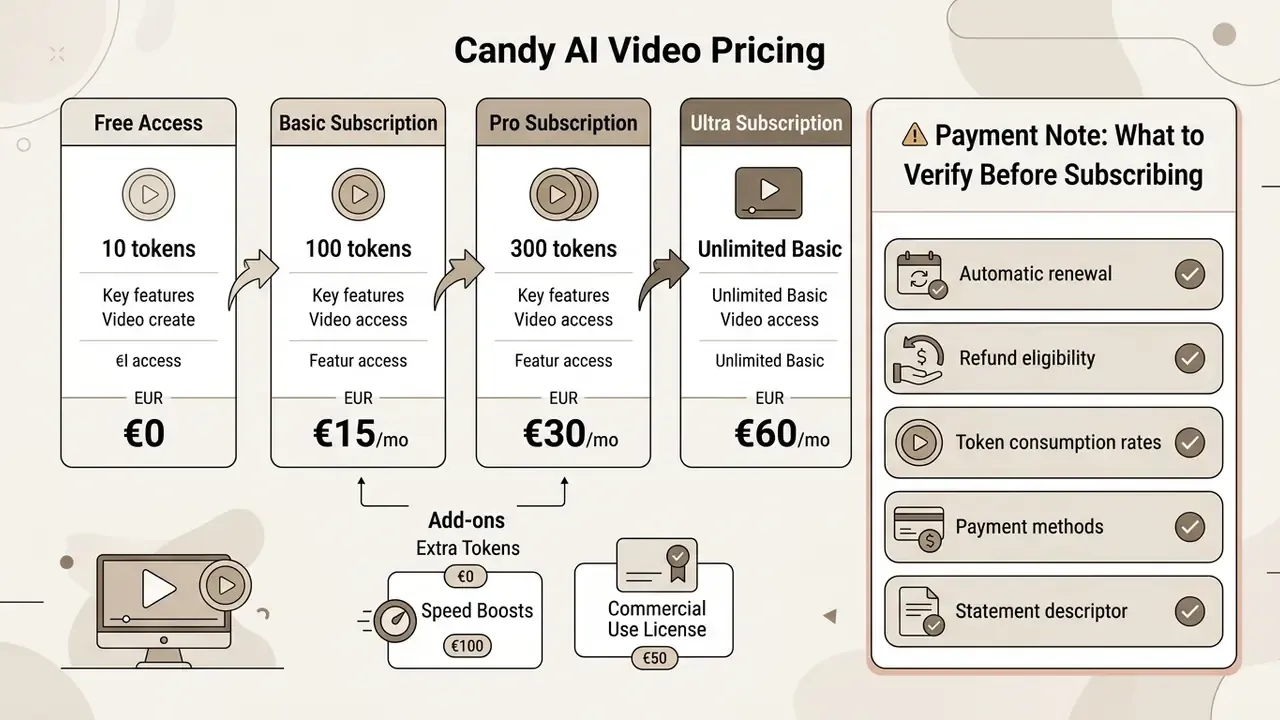
«Active users who generate video and images regularly spend $20 to $60 per month once token top-ups are included, two to five times the nominal subscription price.»
What to verify before subscribing
Four operational terms deserve a look before you enter card details:
- Automatic renewal.Subscriptions renew at the end of each billing cycle unless cancelled in user settings before the renewal date. The charge posts on the first day of the new period, and short weekly or bi-weekly cycles come back around fastest.
- Refund eligibility.Refunds are limited to credit card purchases requested within 24 hours of payment, provided fewer than 20 tokens have been consumed. Purchases made through alternative payment routes may fall outside the refund window entirely.
- Token consumption rates.The 100 included monthly tokens cover only a slice of heavy media usage. A handful of Live Action videos or high-resolution image batches will push you into standalone top-up packs ($9.99 for 100 tokens). Users comparing broader subscription costs can review general software pricing structures across creative AI platforms.
- Payment methods and statement descriptor.Card payments, Pay by Bank, and region-specific alternatives are accepted; the saved method becomes the default for future renewals, and the descriptor shown is EverAI, not "Candy AI."
Privacy, security, and commercial use of Candy AI generated videos
«EverAI Limited's privacy notice documents processing of prompts, generated images, and videos under GDPR and UK GDPR; no source confirms an explicit commercial-use licence for generated clips.»
Practically, that means three things for creators and reviewers. First, ownership language in the public terms restricts commercial exploitation instead of granting a transferable licence, so monetized publication carries contractual risk. Second, users bear sole responsibility for prompts and outputs, including any depiction that could be read as a real person. Third, because the platform is a closed proprietary service with no on-premises deployment and no model-weight audit path, organizations cannot subject it to the assurance process they apply to enterprise video vendors.
One caveat worth stating plainly: public policy pages are a weak substitute for a signed data processing agreement. Where evidence is thin, treat the residual risk as unmeasured rather than low.
FAQ about Candy AI Videos
Do I need video editing skills to create AI videos?
No. Generating videos in Candy AI needs no prior video editing or neural-network expertise. The platform uses a guided, prompt-driven interface where users pick pose presets or type basic text descriptions, and the clip completes automatically. The documented flow is simply prompt, preview, publish. Users looking for standalone creative assets often explore tools listed in the guide to free photo editors or reference a standalone animation maker to see how manual editing workflows compare with automated AI generation.
Does Candy AI support short videos and text prompts?
Yes. Candy AI is built around short video generation triggered by text prompts and chat context. Standard clips run 3 to 15 seconds, while Live Action scenario prompts support sequences up to 120 seconds. A separate Shorts feed also hosts pre-produced episodic clips tied to specific characters, roughly a minute per episode. For offline audio experimentation, some users hunt for an ai voice generator free download to test local synthesis, although Candy AI handles all text-to-speech and video rendering in the cloud. Additional support details and technical requirements sit in AI Media Support and Troubleshooting.
Can I use Candy AI videos in commercial ads on YouTube or TikTok?
No. The EverAI Limited terms of service prohibit using any platform-generated content for commercial purposes of any kind, including advertising, monetization, and public redistribution. Posting a clip to a monetized channel, a brand account, or a paid ad placement falls outside the personal-use licence. Commercial campaigns need a generator that grants explicit commercial rights.
Can Candy AI generate candy, food, or product videos?
No. The engine is locked to human and anime character templates, so product showcases, ASMR confectionery footage, chocolate-waterfall shots, and drone or landscape B-roll are out of scope. Those outputs come from general text-to-video engines such as Sora 2 Pro, Veo 3.1, Kling, or Luma, usually accessed through multi-model platforms.
Which free-tier limits apply to video?
The free tier grants perpetual $0 access with roughly 5 to 20 chat messages per day, basic character selection, and no media generation. Custom avatars, image rendering, voice calls, Live Action, and all 18+ output require a paid plan. A seven-day full-access trial is advertised separately on the service page and should not be confused with the permanent free tier.
How long does a Candy AI video take to render?
Typical processing runs 30 to 90 seconds depending on clip length and queue load; a 15-second 4K render on the Lumina-Realism V4 pipeline is documented at roughly 30 seconds. Live Action sequences take longer and show more variable latency, since review coverage still labels the feature as beta.
How this review was verified